ReviewNest

The 19-Hour Battery Truth: Is the New Galaxy Book5 Hype?

Samsung Galaxy Book5
Samsung Galaxy Book5 (Ultra 7) Review: The AI-Powered Professional

Samsung Galaxy Book5 (Ultra 7) Review: The AI-Powered Professional

Intel® Core™ Ultra 7 (Series 2) Intel® AI Boost NPU 15.6″ FHD IPS Display 1.55 kg Lightweight Up to 19 Hours Battery ₹87,990
A smart, powerful, and long-lasting laptop that brings next-generation AI to your everyday workflow.

The Samsung Galaxy Book5 represents the next evolution of the mainstream laptop, intelligently blending performance, endurance, and cutting-edge AI. Priced at a competitive ₹87,990, this configuration features the powerful Intel® Core™ Ultra 7 (Series 2) processor, built from the ground up to supercharge your productivity with a dedicated Intel AI Boost NPU. It combines this next-gen intelligence with 16GB of fast RAM, a 512GB SSD, and a battery that promises up to 19 hours of runtime. Housed in a slim 1.55kg chassis and featuring a comprehensive array of ports, it’s the perfect all-rounder for students and professionals who need a reliable, future-proof machine for work and study.

The Future of Everyday Computing

Harness next-gen AI power, all-day battery, and seamless connectivity.

₹87,990.00
MRP ₹109,990.00
Save ₹22,000.00

Or from ₹4224.62/mo for 24 mos at 14% Interest.

Launched August 19th, 2025

Key Features at a Glance

Intel® Core™ Ultra 7 (Series 2): Next-gen CPU with a powerful Intel AI Boost NPU.
Long-Lasting Battery: Up to 19 hours of video runtime for all-day productivity.
Strong Configuration: Comes with 16GB of LPDDR5X RAM and a 512GB NVMe SSD.
Full Port Selection: Includes HDMI, USB-C, USB-A, microSD, and an RJ45 LAN port.
On-Device AI Features: Includes new tools like AI Select and Photo Remaster.
Galaxy Ecosystem Integration: Seamlessly connect and control your other Samsung devices.

1. Supercharged Next-Gen Performance

Powered by Intel’s latest Core Ultra (Series 2) processor for an AI-enhanced workflow.

Intel® Core™ Ultra 7 (Series 2)

The Galaxy Book5 is equipped with the powerful Intel Core Ultra 7 255U processor, offering a significant performance boost over the previous generation. With P-cores that turbo up to 5.2 GHz, it effortlessly handles heavy workloads, video editing, and content creation.

Intel® AI Boost NPU

At the heart of the new processor is the Intel AI Boost NPU (Neural Processing Unit). This dedicated AI engine accelerates AI-intensive tasks, enabling powerful on-device features and a more responsive system while improving power efficiency.

2. Smart, Integrated AI Tools

A suite of new AI features designed to enhance your productivity and creativity.

AI Select

Turn curiosity into instant answers. Simply select an image, text, or QR code on your screen, and AI Select will immediately provide search results, fitting seamlessly into your study or research flow.

Photo Remaster

Breathe new life into your old photos. The Photo Remaster tool uses a smart algorithm to retouch images and clean up blurry photos, making every detail shine with just a click.

Dedicated Copilot Key

Instant access to AI assistance is built right into the hardware. A single press of the dedicated Copilot key on the keyboard launches Microsoft’s AI assistant, ready to help you work smarter.

3. All-Day Endurance

A long-lasting battery that keeps you productive from morning to night.

Up to 19 Hours of Runtime

Thanks to the power efficiency of the new Intel processor and a sizable 61.2Wh battery, the Galaxy Book5 supports up to 19 hours of video playback, ensuring it can last through a full day of work or classes without needing a charge.

Compact Fast Charging

When you need to top up, the compact 45W USB Type-C adapter provides fast charging, capable of restoring up to 33% of the battery in just 30 minutes.

4. No-Compromise Connectivity

A full suite of built-in ports that eliminates the need for dongles.

Complete Port Selection

The Galaxy Book5 is equipped with all the ports you need, including one HDMI port, two USB Type-C ports, and two USB 3.2 Type-A ports. This wide array ensures easy connection to external monitors, peripherals, and storage devices.

Wired LAN and Expandable Storage

In a rare move for a thin laptop, it also includes a dedicated RJ45 port for high-speed wired internet connections and a microSD card reader for easily expanding storage or transferring files from cameras.

5. The Connected Power of Galaxy

Deep integration that makes your Samsung devices work together as one seamless system.

Multi Control

Use your Galaxy Book5’s keyboard and mouse to seamlessly navigate and control your Galaxy smartphone or Tab. Drag and drop files, copy and paste text, and multitask across devices like never before.

Storage Share

Access and use the storage on your phone directly from your PC. Browse photos, play videos, and even edit mobile content on your laptop without ever needing to download the files.

Second Screen

Instantly expand your workspace by using your Galaxy Tab as an additional display for your Galaxy Book5. Extend your desktop, duplicate your screen, and boost your productivity with just one click.

6. Premium Build and Immersive Audio

A device that looks and sounds as good as it performs.

Light and Durable Design

The Galaxy Book5 features a slim, compact, and durable build that weighs just 1.55 kg. Its minimalist design and Gray finish give it a professional look suitable for any environment.

Dolby Atmos Audio

The stereo speakers are tuned with Dolby Atmos to create a rich, immersive soundscape. This provides dynamic and engaging audio for video calls, movies, and music.

Ideal For These Users

Students and Academics

The long battery life, lightweight design, and AI-powered productivity tools make it a perfect companion for lectures, research, and late-night study sessions.

Mobile Professionals

With its excellent port selection (including RJ45), all-day battery, and professional design, it’s a reliable and versatile machine for business use.

Samsung Ecosystem Users

The deep integration with Galaxy phones and tablets makes this the default choice for anyone already invested in Samsung’s ecosystem.

Who Might Consider Other Options

Gamers and 3D Artists

The integrated Intel Graphics are capable but cannot match the performance of a dedicated GPU required for demanding 3D games or rendering applications.

Users Needing an OLED Display

While the FHD IPS screen is solid, users who prioritize screen quality for media consumption or creative work might prefer a model with an OLED panel, like the Galaxy Book5 Pro.

Competitive Edge: How It Stacks Up

The Galaxy Book5 carves out a strong position as a smart, practical, and future-proof workhorse.

  • Next-Generation Intel AI Processor

    Being one of the first laptops with Intel’s Core Ultra (Series 2) CPU gives it a distinct advantage. The powerful NPU provides a foundation for next-gen AI software, making it more future-proof than older models.

  • Unmatched Port Selection in its Class

    It is extremely rare for a thin-and-light laptop to include a full array of ports. The presence of HDMI, two USB-A, two USB-C, microSD, and even an RJ45 LAN port gives it a massive practical advantage over competitors that rely on dongles.

  • Strong Memory and Storage

    Shipping with 16GB of LPDDR5X RAM and a 512GB SSD provides a smooth, responsive experience and ample storage for most professional and academic users, a configuration that is ideal for this price point.

Full Specifications

General Information

Model Name
Galaxy Book5
Model Number
NP750XHD-KD4IN
Operating System
Windows 11 Home
Color
Gray

Processor & Chipset

Processor
Intel® Core™ Ultra 7 255U
NPU
Intel® AI Boost

Memory & Storage

RAM
16 GB LPDDR5X (Onboard)
Storage
512 GB NVMe SSD (2 slots total)

Display & Graphics

Screen Size
15.6-inch (39.62 cm)
Resolution
FHD (1920 x 1080)
Panel Type
IPS, Anti-Glare

Network & Communication

Wireless LAN
Wi-Fi 6 (802.11ax)
Wired LAN
Gigabit Ethernet (RJ45)
Bluetooth
Bluetooth® v5.2

Built-in Devices & Input

Keyboard
Pro Keyboard w/ Numpad
Webcam
1080p FHD Camera
Speakers
Stereo Speakers (2W x 2), Dolby Atmos®

Battery & Physical Characteristics

Battery
61.2 Wh
Power Adapter
45W USB-C Adapter
Weight
1.55 kg
Dimensions
35.66 x 22.80 x 1.51 cm

Pros and Cons

What We Liked

  • Powerful Core Ultra 7 processor with AI Boost.
  • Excellent battery life for all-day use.
  • Strong 16GB RAM and 512GB SSD for professional use.
  • Fantastic port selection, including a rare RJ45 LAN port.
  • Deep integration with the Samsung Galaxy ecosystem.

What Could Be Better

  • Basic FHD IPS display lacks OLED or high-refresh rate options.
  • Integrated graphics are not suitable for demanding games.
  • 45W charger is on the slower side for fast charging.
  • RAM is soldered and cannot be upgraded.

Final Verdict

The Samsung Galaxy Book5 with the Core Ultra 7 processor is an exceptionally well-balanced and intelligent machine for the modern professional or student. It delivers a powerful performance upgrade with its next-gen Intel AI processor, ensuring it’s ready for the next wave of software. However, its true strength lies in its practicality: it combines that power with fantastic battery life and one of the best port selections available in a thin-and-light laptop today.

While it may lack the high-end screen of premium models, it more than compensates with its strong core specifications and thoughtful design. For those seeking a powerful, reliable, and highly connected laptop that is built to last through long days and is ready for the future of AI, the Galaxy Book5 is a fantastic and pragmatic choice.

The ThinkCentre Secret: Is it Better Than Dell OptiPlex?

Lenovo ThinkCentre Neo 50t Gen 5 – In-Depth Review

Lenovo ThinkCentre Neo 50t Gen 5 Review

The Next Generation of Secure and Reliable Desktops

13th Gen Intel® Core™ i5-13400 8 GB DDR5 / No Storage Enhanced Security Features Current Price: ₹47,591

The Lenovo ThinkCentre Neo 50t Gen 5 is a major upgrade from its predecessor, now offering a powerful Intel Core i5 processor for enhanced performance. This desktop is a great option for businesses and home offices that need a reliable and secure machine with the flexibility to add an operating system and storage of their choice. Its compact design and robust security features make it a strong contender in the market.

[Image of a desktop computer]

Key Features for Versatile Use

This machine is built for enhanced productivity and security, ensuring a smooth work environment.

Upgraded Processor

The 13th Generation Intel Core i5-13400 Processor is a significant step up from the i3, offering better performance for multitasking and more demanding applications.

Flexibility in Storage

While no storage is included, this allows you to choose and install your own M.2 SSD or HDD, giving you complete control over your storage needs and budget.

Robust Security

With features like BIOS-based Smart USB Protection and a dTPM 2.0 chip, your data is protected from unauthorized access and physical theft.

Compact & Accessible Design

The 13.6L chassis is a space-saver, perfect for cramped office desks. Front-facing USB-C and USB-A ports make it easy to connect your peripherals.

Multiple Display Support

With HDMI, DisplayPort, and VGA outputs, you can easily connect multiple monitors to expand your workspace and improve productivity.

PSU Options

This model offers a range of power supply unit options (180W to 380W), providing a path for future upgrades like a dedicated graphics card if you need more power.

Detailed Specifications

General & OS

  • Part Number: 12UCCTO1WWIN1
  • Operating System: No Operating System
  • Product Color: Black
  • Case Dimensions (H x W x D): 340mm x 145mm x 294mm
  • Weight: Starting at 5.6kg
  • Optical Drive: No Optical Drive

Performance

  • Processor: 13th Generation Intel® Core™ i5-13400 Processor
  • Graphics: Integrated Graphics (Integrated Intel® UMA)
  • System Memory: 8 GB DDR5-4800MT/s (UDIMM)
  • Storage: None (No storage included in this base configuration)
  • Power Supply Unit (PSU): 180W, 260W, 310W, or 380W

Connectivity & Security

  • Front Ports: USB-C® (USB 5Gbps), 4 x USB-A (USB 5Gbps, 1 always on), Headphone/mic combo
  • Rear Ports: Audio out, 4 x USB-A (hi-speed USB), HDMI® 2.1, Ethernet (RJ45), DisplayPort 1.4, VGA
  • Wireless: Intel® AX201 WiFi 6E (optional), Bluetooth® 5.2 (optional)
  • Security Features: BIOS-based Smart USB Protection, dTPM 2.0, Kensington Security Slot™, Padlock loop

Who Is This Desktop For?

This desktop is an ideal fit for users who need a dependable, secure, and budget-friendly computer for daily tasks.

  • IT Professionals & Businesses: The lack of a pre-installed OS and storage provides complete control over the system configuration, making it easy to deploy with corporate software and security standards.
  • Home Office: The ThinkCentre Neo 50t Gen 5 is an excellent choice for a dedicated home office setup, offering a powerful yet unobtrusive machine for remote work and video conferencing.
  • Students and Casual Users: With plenty of power for research, writing papers, online classes, and streaming, this desktop is a great value for students or anyone who needs a reliable home computer.

Tailored Recommendations

Since this model comes with DOS and no storage, here’s what you should consider to get started.

  • Operating System: You will need to purchase and install an operating system separately, such as Windows 11 Home or a Linux distribution, to make the computer functional.
  • Storage: You must purchase and install a storage drive (either an M.2 SSD or a 2.5-inch HDD/SSD) to be able to install the OS and save your files.
  • Peripherals: The desktop does not include a mouse or keyboard, so you’ll need to purchase a set to complete your setup.

Competitive Edge

In a market full of options, the ThinkCentre neo 50t stands out for a few key reasons.

  • Excellent Value: At an 8% discount, this desktop offers exceptional value for money, making powerful and modern hardware accessible on a tight budget.
  • Customizable: The base configuration without storage or an OS gives you the freedom to choose your own components, which is ideal for power users and IT departments.
  • Business-Grade Security: Unlike many consumer PCs, the ThinkCentre includes enterprise-level security features right out of the box to protect your data.

Final Verdict: A Solid, Customizable Workstation

The Lenovo ThinkCentre Neo 50t Gen 5 is an excellent choice for anyone seeking a customizable desktop for daily office work or school. The upgraded i5 processor provides a significant performance boost. While it requires you to purchase and install an OS and storage, this flexibility is a key advantage for those who want to build a system tailored to their exact needs.

7 Mind-Blowing Reasons to Buy the Tab S10 Lite

Samsung Galaxy Tab S10 Lite: A Detailed Breakdown

Samsung Galaxy Tab S10 Lite: A Detailed Breakdown of a Budget-Friendly Productivity Tablet

Samsung has officially unveiled the Galaxy Tab S10 Lite, a new addition to its tablet portfolio that aims to deliver a compelling blend of performance, productivity, and affordability. Positioned as a direct competitor to mid-range tablets from rivals like Xiaomi and Apple’s iPad, the Tab S10 Lite comes with some surprising features, most notably the inclusion of the S Pen right in the box.

Key Features at a Glance

Practical Design and Immersive Display

The tablet features a clean and modern design with a slim 6.6mm profile, making it comfortable for extended use. The 10.9-inch WUXGA+ TFT display offers a smooth 90Hz refresh rate, a significant upgrade over standard 60Hz screens. Its peak brightness of 600 nits and Vision Booster technology ensure excellent visibility even in bright outdoor conditions, a feature rarely seen in this price range.

Reliable Performance with Exynos 1380

Under the hood, the Tab S10 Lite is powered by the capable Exynos 1380 chipset. This 5nm processor, with its four high-performance and four power-efficient cores, provides a balanced experience, handling everyday tasks and multitasking with ease. It’s paired with up to 8GB of RAM, ensuring a fluid user experience without any noticeable lag.

The S Pen: A Major Differentiator

A standout feature is the inclusion of the S Pen in the box. This makes the tablet a powerful tool for note-taking, sketching, and creative work right from the start. Software features like “Handwriting help” and “Solve Math” in Samsung Notes enhance its utility for students and professionals. The support for apps like Goodnotes and LumaFusion makes it a versatile tool for creators.

Extended Battery Life and Quick Charging

With a large 8,000mAh battery, the Tab S10 Lite is designed for all-day use on a single charge. It supports 25W “Super-Fast Charging,” which allows for a quick top-up when you’re in a hurry. While the charging speed isn’t the fastest on the market, it’s a welcome feature that reduces downtime significantly.

Software, Cameras, and the Ecosystem

The Galaxy Tab S10 Lite runs on the latest version of Samsung’s software, promising a user-friendly interface and access to the wider Galaxy ecosystem. The integration of “Circle to Search with Google” highlights Samsung’s focus on intelligent software features. While the 8MP rear and 5MP front cameras are modest, they are perfectly suited for video calls, online classes, and quick document scans. The tablet’s compatibility with a new Book Cover Keyboard with a dedicated “Galaxy AI Key” signals a future-proof design, hinting at more AI-powered functionalities to come.

  • Display: 10.9-inch WUXGA+ (1320×2112 pixel) TFT, 90Hz refresh rate, 600 nits brightness
  • Processor: Exynos 1380 (5nm)
  • RAM/Storage: 6GB/128GB and 8GB/256GB (expandable up to 2TB)
  • Battery: 8,000mAh, 25W Super-Fast Charging
  • Cameras: 8MP rear, 5MP front
  • Dimensions: 6.6mm thin, 524g weight
  • Colors: Gray, Silver, and Coralred

Conclusion

The Samsung Galaxy Tab S10 Lite is a compelling option for those seeking a versatile and capable tablet without the premium price tag. The inclusion of the S Pen out of the box is a game-changer, setting it apart from competitors and making it an ideal choice for students, artists, and anyone who values productivity. While it may not have the top-tier specifications of a flagship device, its balanced features and strategic pricing make it a strong contender in the mid-range tablet market.

7 Mind-Blowing Reasons to Buy the Lava Storm Lite 5G

Lava Storm Lite 5G
Lava Storm Lite 5G Review: The New Budget Champion

Lava Storm Lite 5G Review: The New Budget Champion

MT Dimensity 6400, 420K+ AnTuTu 8GB RAM (4+4*GB) 128GB Storage 6.75″ HD+ 120Hz Display 5000mAh Battery ₹8,999

The Lava Storm Lite 5G makes a grand entrance into the budget 5G arena, debuting as India’s first smartphone with the efficient MediaTek Dimensity 6400 processor. Launched in October 2025, it redefines value by packing a high-performance 120Hz HD+ display, a capable 50MP AI Camera, and a massive 5000mAh battery into a sleek Cosmic Titanium chassis. With up to 8GB of RAM, comprehensive 5G band support, and practical IP64-rated durability, the Storm Lite 5G is engineered to deliver a premium, fluid, and long-lasting experience without the premium price tag. At just ₹8,999, it stands as a top contender for users seeking a powerful, future-proof device that excels in both performance and affordability.

Key Features at a Glance

India’s First Dimensity 6400

Experience a new level of speed with the segment-first 6nm MediaTek Dimensity 6400 processor. Clocked at 2.5GHz and scoring over 420K on AnTuTu, it delivers smooth, efficient performance for all your tasks.

Stunning 120Hz HD+ Display

Immerse yourself in fluid visuals on the large 6.745-inch HD+ display. The 120Hz refresh rate makes scrolling, gaming, and video playback feel incredibly smooth and responsive.

High-Resolution 50MP AI Camera

Capture life’s moments in stunning clarity with the 50MP AI rear camera. It delivers sharp, vibrant photos and supports high-quality 2K video recording, ensuring your memories are preserved in detail.

All-Day 5000mAh Battery

The massive 5000mAh battery provides up to 45 hours of talk time, keeping you powered throughout the day and beyond. Combined with 18W fast charging, you’ll spend less time tethered to the wall.

Complete Technical Specifications

General Information

Brand: Lava
Model: Storm Lite 5G
Price: ₹8,999 (22% off MRP ₹11,499)
Color: Cosmic Titanium
Dimensions: 16.5 x 7.6 x 0.9 cm
Weight: 195 grams
Protection: IP64 Dust & Water Resistant
Release Date: October 2025

Performance & Memory

Chipset: MediaTek Dimensity 6400 (6 nm)
CPU: Octa-core (2.5 GHz)
RAM: 4GB (+ 4GB Virtual RAM)
Storage: 128GB
OS: Android 15
Benchmark: AnTuTu ~420,000+

Display Specifications

Size: 6.745 inches
Type: LCD
Resolution: 1600 x 720 pixels (HD+)
Refresh Rate: 120Hz
Pixel Density: ~260 ppi

Camera System

Rear Camera: 50 MP AI Dual Camera
Front Camera: 5 MP
Video: 2K Recording

Battery & Charging

Capacity: 5000 mAh
Charging: 18W Fast Charging
Talk Time: 45 Hours

Connectivity & Sensors

Network: Supports All 5G Bands
SIM: Dual SIM
WLAN: Wi-Fi, Bluetooth
USB: USB Type-C
Sensors: Side-mounted Fingerprint
Audio: 3.5mm Headphone Jack

1. Segment-First Power & Performance

Unleash exceptional speed and efficiency with a processor that redefines budget performance.

Pioneering Dimensity 6400

As India’s first phone with the MediaTek Dimensity 6400, the Storm Lite 5G delivers a robust 420K+ AnTuTu score. This 6nm octa-core chipset provides the power needed for smooth gaming, fast app loading, and efficient multitasking.

Universal 5G Connectivity

Stay connected with comprehensive support for all major 5G bands. This ensures you get the fastest possible network speeds and reliable coverage wherever you go, future-proofing your investment.

2. Immersive Visuals & High-Resolution Photography

Dive into a world of fluid visuals and capture it in stunning detail.

Ultra-Smooth 120Hz Display

The large 6.745-inch display is not just big, it’s incredibly fast. The 120Hz refresh rate makes every interaction, from scrolling through web pages to intense gaming, feel exceptionally fluid and responsive.

50MP AI-Powered Camera

The high-resolution 50MP main camera, enhanced with smart AI algorithms, allows you to capture crisp, vibrant, and detailed photos. It intelligently optimizes settings to make every shot look its best.

3. All-Day Endurance & Daily Durability

A phone built to last through your busiest days and withstand everyday challenges.

Massive 5000mAh Battery

With a powerful 5000mAh battery, you can stream, game, and work without constantly checking your battery percentage. It provides up to 45 hours of talk time, ensuring reliable all-day performance.

IP64-Rated Protection

The IP64 rating provides essential protection against dust and water splashes, adding a layer of durability that gives you confidence to use your phone in various everyday environments, rain or shine.

Who Is This Phone For? Tailored Recommendations

The Lava Storm Lite 5G is perfect for users who want high-end features like a 120Hz display and a powerful processor without the high-end price.

  • Budget-Conscious Gamers: The Dimensity 6400 and 120Hz display offer a fantastic gaming experience for the price.
  • Students and Young Professionals: A great all-rounder for productivity, social media, and entertainment with a battery that lasts all day.
  • Users Wanting a Fluid Experience: Anyone who appreciates the smoothness of a high-refresh-rate screen will love the 120Hz panel.
  • Value Seekers: It packs features often found in more expensive phones, making it an excellent value proposition.

Who Might Consider Other Options?

  • Display Purists: The HD+ resolution, despite the high refresh rate, may not be sharp enough for those used to Full HD+ screens.
  • Photography Hobbyists: The camera is solid for daily use but lacks advanced features like an ultrawide or telephoto lens.
  • Users Needing Ultra-Fast Charging: The 18W charging is adequate but slower than other options on the market.

Competitive Edge: What Sets It Apart?

The Lava Storm Lite 5G stands out by bringing a high-refresh-rate display and powerful new processor to an incredibly low price point.

  • Pioneering Processor: As the first phone in India with the Dimensity 6400, it offers unmatched performance in its price bracket.
  • 120Hz Display on a Budget: A 120Hz refresh rate is extremely rare at this price, offering a flagship-level smoothness that competitors lack.
  • Comprehensive 5G Support: Unlike some budget 5G phones, it supports all Indian 5G bands, ensuring broad and reliable connectivity.
  • Clean Software Promise: Lava’s commitment to a bloatware-free and ad-free Android experience is a significant advantage over many rivals.

Pros & Cons: A Balanced View for Buyers

Pros

  • Excellent Performance for the Price: The Dimensity 6400 processor is a powerhouse in this segment.
  • Ultra-Smooth 120Hz Display: A standout feature that provides a fluid and responsive user experience.
  • Long-Lasting 5000mAh Battery: Easily powers through a full day of use.
  • Clean, Ad-Free Software: A pure Android experience without unwanted apps or ads.
  • IP64 Rating and Side Fingerprint Sensor: Practical features that add durability and convenience.

Cons

  • HD+ Display Resolution: The screen is large but lacks the sharpness of a Full HD+ panel.
  • 18W Charging is Average: While functional, it’s not as fast as some competing charging technologies.
  • Basic Front Camera: The 5MP selfie camera is adequate but not ideal for high-quality self-portraits.
  • LCD instead of AMOLED: The display is fast but doesn’t offer the deep blacks and contrast of an AMOLED screen.

Final Verdict

The Lava Storm Lite 5G is a triumphant entry in the budget 5G market, offering an incredible combination of performance and features for its price. The decision to include the pioneering Dimensity 6400 processor and a 120Hz display sets a new standard for what consumers can expect from an affordable device. It’s a phone that feels fast, smooth, and modern in everyday use.

While the HD+ resolution and average charging speed are understandable compromises, they do little to detract from the overall outstanding value. For anyone seeking a powerful, fluid, and future-proof smartphone experience without breaking the bank, the Lava Storm Lite 5G is an exceptional choice and a clear winner in its category.

Expert Rating

8.9/10

Buy Now on Amazon – ₹8,999

Free Delivery | 10-Day Replacement | EMI Available


The Acer Aspire 7 Truth: Best 2026 Budget Gaming Deal?

Acer Aspire 7 Gaming Laptop
GAMING LAPTOP REVIEW

Acer Aspire 7 Gaming Laptop Review: Core 5 210H, RTX 4050, 16GB RAM & 144Hz Display

The Acer Aspire 7 A715-79G is a gaming-oriented laptop that combines Intel’s Core 5 210H processor with an NVIDIA GeForce RTX 4050 GPU, 16GB DDR4 RAM, a 512GB PCIe SSD and a 15.6-inch Full HD 144Hz display. This configuration is aimed at users who want a laptop for gaming, everyday productivity and GPU-accelerated workloads without moving to a larger or heavier gaming machine.

Core 5 210H 8 Cores / 12 Threads
RTX 4050 6GB GDDR6
16GB DDR4 RAM
144Hz 15.6″ Full HD

Quick Verdict

The Acer Aspire 7 A715-79G is a well-balanced gaming laptop configuration on paper. Its Core 5 210H processor and RTX 4050 6GB provide substantially more graphics capability than a laptop using only integrated graphics, while 16GB RAM and a 512GB PCIe SSD provide a solid starting configuration.

The 144Hz Full HD display is particularly relevant for gaming, while the 1.99 kg weight keeps the machine relatively portable for a laptop with a dedicated RTX GPU. However, buyers should check the current selling price carefully because laptop prices can change significantly.

Price: Check the Current Listing

The price of the Acer Aspire 7 A715-79G varies by seller and promotion. Because the price changes over time, it is better to check the current product listing before purchasing rather than relying on an older fixed price.

Important: The specifications in this article refer specifically to the A715-79G / UN.U35SI.002 configuration. Different Aspire 7 variants can have different processors, graphics, displays and connectivity.

Acer Aspire 7 Key Features

⚡

Intel Core 5 210H

8-core, 12-thread mobile processor with a maximum turbo frequency of 4.8GHz.

🎮

RTX 4050 6GB

Dedicated NVIDIA GeForce RTX 4050 graphics with 6GB GDDR6 memory.

🧠

16GB DDR4 RAM

16GB system memory provides a strong starting point for gaming and multitasking.

💾

512GB PCIe SSD

Fast solid-state storage with the supplied configuration using an M.2 PCIe SSD.

🖥️

15.6″ 144Hz Display

Full HD 1920 × 1080 display with a 144Hz refresh rate.

⚖️

1.99kg Body

Relatively manageable weight for a 15.6-inch laptop equipped with dedicated RTX graphics.

Intel Core 5 210H Performance

The Acer Aspire 7 A715-79G in this configuration uses Intel’s Core 5 210H mobile processor. Intel lists the chip with 8 cores, 12 threads, 4 Performance-cores and 4 Efficient-cores. Its Performance-cores have a 2.2GHz base frequency and can reach up to 4.8GHz turbo, while the Efficient-cores have a 1.6GHz base frequency and up to 3.6GHz turbo.

Intel also lists 12MB of Intel Smart Cache and a 45W processor base power. The processor belongs to Intel’s Core processors Series 2 and uses Intel 7 process technology.

8 Cores
12 Threads
4.8GHz Max Turbo
12MB Smart Cache

NVIDIA GeForce RTX 4050: The Main Gaming Advantage

The dedicated NVIDIA GeForce RTX 4050 is the most important component separating this laptop from ordinary productivity notebooks. This configuration includes 6GB of GDDR6 dedicated graphics memory.

The dedicated GPU makes the laptop suitable for modern PC gaming and GPU-accelerated applications. Actual game performance will depend on the individual game’s settings, resolution, power limits, cooling and driver version, so this article does not claim specific FPS results without hands-on testing.

6GB GDDR6 Dedicated graphics memory.
RTX 4050 Dedicated NVIDIA RTX graphics.
Gaming Focus Designed for workloads that benefit from dedicated graphics.

15.6-Inch Full HD 144Hz Display

The laptop uses a 15.6-inch Full HD 1920 × 1080 display with a 144Hz refresh rate. Acer’s official listing for the UN.U35SI.002 specifies a WVA LCD panel and 45% NTSC color coverage.

A 144Hz refresh rate is particularly useful for gaming because it can display motion more smoothly than a conventional 60Hz panel when the hardware can produce sufficiently high frame rates.

15.6″ Screen Size
1920×1080 Full HD
144Hz Refresh Rate
45% NTSC Colour Coverage
🧠

16GB DDR4 RAM

The configuration comes with 16GB DDR4 RAM, which is a sensible amount for gaming, office work, browsing and general multitasking.

Buyers should verify the exact upgrade configuration for their specific unit before purchasing additional memory, because Aspire 7 A715-79G variants can differ.

💽

512GB M.2 PCIe SSD

Acer lists a 512GB M.2 PCIe SSD for this configuration and states that the storage can be upgraded to up to 1TB.

The SSD should provide fast operating-system and application loading compared with a traditional hard drive.

Gaming Performance: What to Expect

The combination of the Core 5 210H and RTX 4050 makes this configuration clearly more gaming-oriented than an integrated-graphics laptop.

The 144Hz Full HD display also matches the laptop’s gaming focus. However, the RTX 4050 does not guarantee a fixed frame rate in every game. Performance varies according to the game, graphics settings, resolution, ray tracing settings and other factors.

1080p Gaming The Full HD resolution is a natural target for this hardware.
144Hz Display Useful for smoother motion when frame rates are high enough.
RTX Graphics Dedicated graphics provide much more GPU capability than integrated graphics.

Connectivity & Ports

📶 Wi-Fi

802.11 a/b/g/n/ac/ax wireless connectivity.

🔵 Bluetooth

Bluetooth support is included.

🔌 USB

USB Type-A and USB Type-C connectivity.

🖥️ HDMI

HDMI output is included.

🎧 Audio

Headphone jack and microphone support.

📷 Webcam

1MP HD webcam listed by Acer.

Important: Acer’s official product information lists two USB Type-C ports, one USB 2.0 Type-A port, one USB 3.2 Type-A port and one HDMI port for this configuration.

Keyboard, Webcam & Audio

⌨️ Backlit Keyboard

The keyboard is backlit and includes a full-size layout according to Acer’s product information.

📷 HD Webcam

Acer lists a 1.0MP HD video camera for the front-facing webcam.

🔊 Stereo Speakers

The laptop has two built-in stereo speakers.

Design & Weight

The Acer Aspire 7 A715-79G measures approximately 359.5 × 238 × 22.7 mm and weighs around 1.99 kg according to the available specifications.

Weight
Approximately 1.99 kg

Operating System

The configuration comes with Windows 11 Home. Acer’s listing also identifies the laptop as an Aspire 7 gaming model with the Core 5-210H and RTX 4050 combination.

OS
Windows 11 Home

Who Should Buy the Acer Aspire 7?

🎮 Gamers

Good fit for buyers specifically looking for a laptop with dedicated RTX graphics and a high-refresh-rate display.

🎓 Students

The hardware is suitable for normal study and productivity while also providing dedicated graphics for entertainment.

💼 Productivity Users

16GB RAM, a modern processor and SSD storage make it suitable for demanding everyday multitasking.

🎨 GPU Workloads

The RTX 4050 can be useful for applications that benefit from dedicated GPU acceleration.

Who Should Consider Another Laptop?

🎨 Professional Color Work

The listed 45% NTSC display specification makes this configuration less attractive for users who need a wide-gamut display for color-critical professional work.

💾 Heavy Storage Users

The standard 512GB SSD may be limiting if you keep a large game library or many large media files locally.

🔋 Buyers Prioritizing Maximum Battery Life

A gaming laptop with an RTX 4050 is designed around performance, so buyers focused primarily on battery endurance should compare thin-and-light alternatives.

Acer Aspire 7 A715-79G Full Specifications

General

Series: Aspire 7

Model: A715-79G

Part Number: UN.U35SI.002

Operating System: Windows 11 Home

Weight: 1.99 kg

Colour: Obsidian Black

Warranty: 1 year

Processor

Processor: Intel Core 5 210H

Cores: 8

Threads: 12

Performance Cores: 4

Efficient Cores: 4

P-Core Base: 2.2 GHz

Maximum Turbo: Up to 4.8 GHz

Cache: 12MB Intel Smart Cache

Processor Base Power: 45W

Memory & Storage

RAM: 16GB DDR4

Storage: 512GB SSD

Storage Type: M.2 PCIe SSD

Storage Upgrade: Acer lists up to 1TB for this configuration

Display

Size: 15.6 inches

Resolution: 1920 × 1080

Refresh Rate: 144Hz

Panel: WVA LCD

Colour Coverage: 45% NTSC

Touchscreen: No

Graphics

GPU: NVIDIA GeForce RTX 4050

Dedicated VRAM: 6GB

Memory Type: GDDR6

Connectivity

Wi-Fi: 802.11 a/b/g/n/ac/ax

Bluetooth: Yes

HDMI: Yes

USB Type-A: 1 × USB 2.0, 1 × USB 3.2 Type-A

USB Type-C: 2 × USB 3.2 Type-C

Headphone Jack: Yes

Microphone: Yes

Input & Camera

Keyboard: Backlit

Keyboard Type: Full-size illuminated keyboard

Webcam: 1.0MP HD camera

Microphone: Built-in

Touchpad: Yes

Physical & Package

Height: 22.7 mm

Width: 359.5 mm

Depth: 238 mm

Weight: 1.99 kg

Package: Laptop, power adaptor, user guide and warranty documents

✓ Pros

RTX 4050 6GB

Dedicated graphics make the laptop suitable for gaming and GPU workloads.

16GB RAM

A strong starting memory configuration for gaming and multitasking.

144Hz Full HD Display

High refresh rate is well suited to gaming.

512GB PCIe SSD

Fast storage with upgrade potential listed by Acer.

1.99kg Weight

Reasonably manageable for a 15.6-inch RTX gaming laptop.

✕ Cons

45% NTSC Display

Not ideal for users who need a wide-gamut, color-critical display.

512GB Storage

May fill quickly with a large collection of modern games and media.

Gaming Laptop Trade-offs

The dedicated GPU and performance hardware make it less focused on maximum battery efficiency.

Variant Confusion

Other A715-79G variants have different processors and specifications, so the exact model number matters.

Should You Buy the Acer Aspire 7 A715-79G?

If your priority is gaming and you want dedicated RTX graphics in a relatively manageable 15.6-inch chassis, the A715-79G configuration is worth considering.

The Core 5 210H, RTX 4050 6GB, 16GB RAM and 512GB PCIe SSD form a sensible performance combination, while the 144Hz Full HD display is appropriate for gaming.

The biggest reason to compare alternatives is the display’s 45% NTSC specification and the rapidly changing pricing of gaming laptops. If you can find a competing model with a better color-gamut display or stronger hardware at a similar price, that alternative may offer better overall value.

Also make sure the seller is offering the exact UN.U35SI.002 configuration, because Acer sells several Aspire 7 A715-79G variants with different processors and hardware.

FINAL VERDICT

Acer Aspire 7 A715-79G: A Balanced RTX 4050 Gaming Laptop

The Acer Aspire 7 A715-79G with Intel Core 5 210H and RTX 4050 is a capable gaming-focused configuration. The combination of an 8-core/12-thread processor, 6GB RTX 4050 graphics, 16GB RAM and 512GB PCIe SSD gives it a strong hardware foundation for gaming and general performance workloads.

The 15.6-inch 144Hz Full HD display is another major advantage for gaming. At the same time, the 45% NTSC color specification means this is not the ideal choice for professional color-sensitive work.

Overall, the Acer Aspire 7 makes the most sense when its current price is competitive with other RTX 4050 laptops. Always compare the exact model number and current price before buying.

Our Rating: 4.2 / 5

Rating based on the verified specifications and configuration; not a hands-on benchmark rating.

Specification note: Product specifications can vary between Aspire 7 A715-79G variants and may change by market or seller. This article refers specifically to the Acer Aspire 7 A715-79G configuration identified as UN.U35SI.002. Check the exact model number and seller listing before purchasing.

7 Mind-Blowing Reasons to Buy the 57″ Neo G9

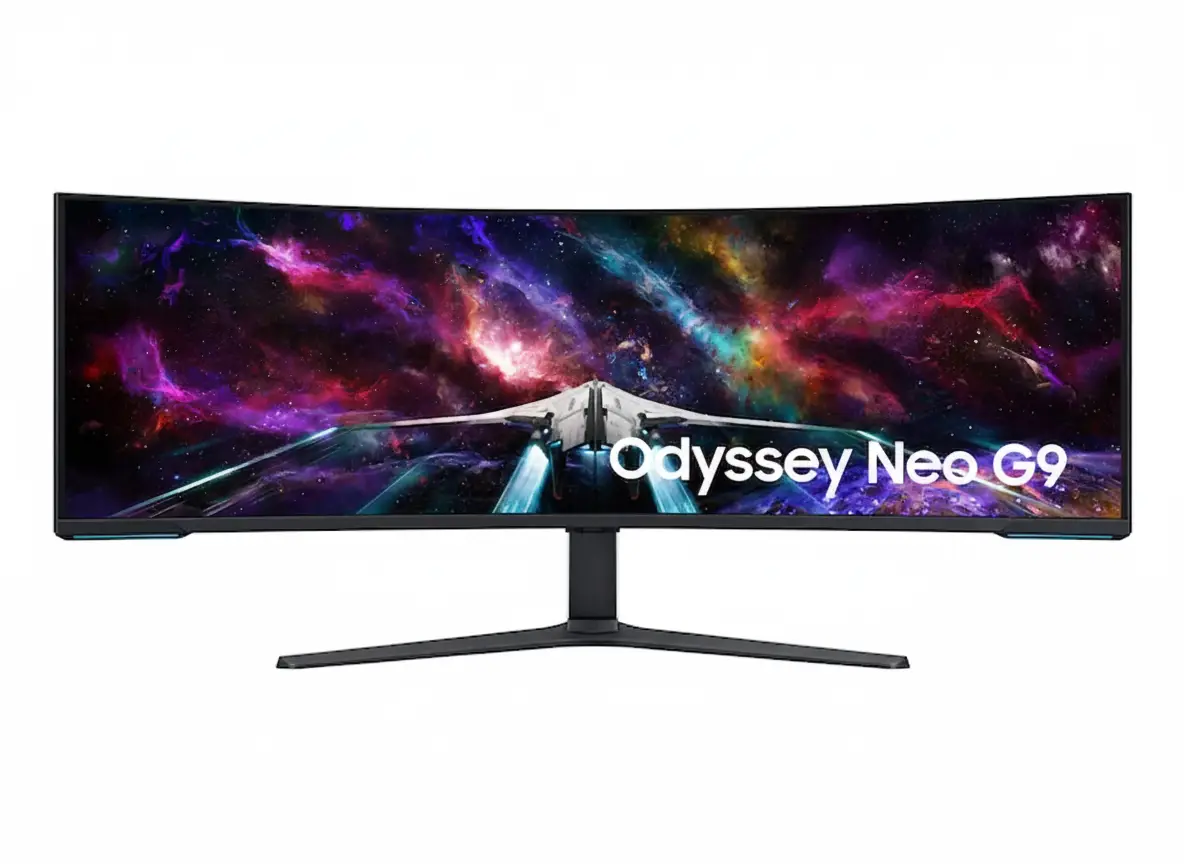
Samsung Odyssey Neo G9 57" Dual 4K Monitor
Samsung Essential Monitor S3 S39GD 27″ Review 2025 – 100Hz Curved Gaming Monitor
Samsung Odyssey Neo G9 57 inch Dual 4K 240Hz Mini-LED Gaming Monitor

🏆 World’s First Dual UHD Monitor: 57″ 32:9 + 240Hz + HDR1000!

7680×2160 + 2,392 Zone Mini-LED + 1000R Curve + DP 2.1!

🌟 World’s First 32:9 Dual 4K Gaming Monitor – 4.6★ (643 Reviews)!

Samsung Odyssey Neo G9 57″ Gaming Monitor

57″ Dual UHD Mini-LED | 240Hz | 1ms | 1000R | HDR1000 | DP 2.1

7680×2160 32:9 Curved – Quantum Matrix – 2,392 Dimming Zones

🎮 The Ultimate Dual 4K Gaming Powerhouse:

• Size: Massive 57″ (144.78cm) Dual UHD (7680×2160) 32:9 Aspect

• Panel: VA Quantum Mini-LED 1000R + 2,392 Local Dimming Zones

• Speed: 240Hz Refresh + 1ms GTG Response + DP 2.1 Support

• HDR: VESA DisplayHDR 1000 + 1,000 Nits Peak + HDR10+ Gaming

• Brightness: 420 cd/㎡ Typical + 1,000 Nits HDR Peak

• Colors: 1 Billion Colors + 95% DCI-P3 + 140 PPI Sharpness

• Gaming: FreeSync Premium Pro + KVM Switch

• Features: PIP/PBP + CoreSync + UL Glare Free

₹2,89,990

₹3,49,990

SAVE ₹60,000 (17% OFF!)

*Price varies ₹2,79,990-2,99,990 across retailers | Check current offers

🛒 Check Price on Amazon India

$2,299.99

CURRENT RETAIL PRICE

*Model: LS57CG952NNXZA | 4.6★ (643 reviews)

🛒 Buy Now on Samsung.com (USA)

🌍 Global Availability

• India: ₹2,79,990-2,99,990 (Amazon.in, Flipkart, Samsung India)

• USA: $2,299.99 (Samsung.com, Best Buy, Micro Center)

• Europe: €2,199-2,599 (varies by country)

• Asia: Check Samsung regional sites

Resolution

Dual 4K

Refresh Rate

240Hz

HDR

HDR1000

Samsung Odyssey Neo G9 57″ Overview – World’s First Dual 4K Ultra-Wide

🎮 Gaming Highlights

  • 57″ Dual UHD: 7680×2160 resolution (two 4K side-by-side)
  • 1000R Curved: Extreme wraparound immersion
  • 240Hz + 1ms: Ultra-fast competitive performance
  • Mini-LED 2,392 Zones: Precise backlight control
  • HDR1000: True 1,000 nits peak brightness
  • 140 PPI: Sharp despite 57″ size
  • DP 2.1 Support: Full bandwidth for Dual 4K 240Hz
  • FreeSync Premium Pro: Smooth adaptive sync

💎 Quantum Matrix Tech

  • 💡 2,392 Zones – Ultra-precise local dimming
  • 🌟 12-bit Black – Enhanced contrast depth
  • ☀️ 420 cd/㎡ SDR – Bright everyday use
  • 🔆 1000 Nits HDR – Peak highlights
  • 🎨 95% DCI-P3 – Wide color gamut
  • 🌈 1B Colors – Smooth gradients

⭐ Why This Monitor?

  • • World’s first: 32:9 Dual UHD gaming monitor
  • • Extreme resolution: 7680×2160 = two 4K displays
  • • Mini-LED advantage: Brighter than OLED, no burn-in
  • • Flagship HDR: True HDR1000 certification
  • • 240Hz capable: With DP 2.1 compatible GPU
  • • Professional grade: Gaming + productivity beast

🎯 What Makes Odyssey Neo G9 57″ Special?

The Samsung Odyssey Neo G9 57″ (LS57CG952NNXZA) is a category-defining display that pushes ultra-wide gaming to unprecedented levels. As the world’s first Dual UHD 32:9 gaming monitor, it delivers an astonishing 7680×2160 resolution across 57 inches – the exact pixel count of two 32″ 4K monitors merged seamlessly with a 1000R curvature that wraps intensely around your field of vision.

The Quantum Mini-LED panel with 2,392 local dimming zones provides flagship-tier HDR performance. Unlike OLED, Mini-LED achieves VESA DisplayHDR 1000 certification with true 1,000 nit peak brightness, creating dazzling highlights in HDR games while maintaining excellent contrast through precise backlight control. The VA panel’s 420 cd/㎡ typical brightness and 140 PPI pixel density ensure sharp, comfortable viewing in both bright offices and dim gaming caves.

Gaming performance matches the visual spectacle. 240Hz refresh rate and 1ms GTG response time deliver competitive-grade motion clarity across the massive canvas, though you’ll need a DisplayPort 2.1 compatible GPU to unlock full Dual 4K 240Hz simultaneously. AMD FreeSync Premium Pro ensures tear-free gameplay with HDR enabled, while features like KVM switch, Picture-by-Picture, Black Equalizer, and CoreSync lighting create a complete battlestation experience.

At $2,299.99 USD, this is unquestionably a premium purchase targeting hardcore enthusiasts with top-tier PC hardware. The combination of unmatched Dual 4K resolution, Mini-LED HDR1000 brilliance, and extreme 1000R curvature makes the 57″ Neo G9 the ultimate statement piece for sim racing rigs, flight sim cockpits, and multi-purpose workstations demanding maximum screen real estate.

Dual UHD Display – 7680×2160 Gaming Canvas

📐 7680×2160 Dual 4K Resolution – Two UHD Displays in One

The 7680×2160 Dual UHD (DUHD) resolution provides the exact pixel count of two 3840×2160 4K UHD monitors placed side-by-side, creating an unprecedented 16.6 million pixel canvas without bezels interrupting your view. This 32:9 aspect ratio delivers workspace equivalent to dual 32″ 4K displays for ultimate productivity and gaming immersion.

At 140 pixels per inch, the Neo G9 maintains impressive sharpness despite its enormous size. Text remains readable for productivity work, game textures show intricate detail, and the pixel density prevents visible pixelation at normal viewing distances. This is 133% more pixels than 5120×1440 DQHD ultrawide monitors and offers truly 4K-class clarity across the full width.

Resolution Comparison

  • • 32″ 4K UHD: 3840×2160 (8.29MP) – single display
  • • 49″ DQHD 32:9: 5120×1440 (7.37MP) – dual QHD
  • • 57″ DUHD 32:9: 7680×2160 (16.59MP) – dual 4K UHD!
  • • Pixel density: 140 PPI – 4K sharpness maintained

🌀 1000R Curvature – Extreme Wraparound Immersion

The 1000R curvature radius means the monitor follows a 1000mm (1m) radius arc, creating the most aggressive curve available in gaming monitors. This extreme bend is specifically engineered for the 57″ format to ensure every pixel maintains equal viewing distance from your eyes, maximizing immersion and reducing edge distortion.

The 1000R curve provides exceptional benefits for sim racing and flight simulation. In racing games, the screen edges naturally fill your peripheral vision like actual cockpit windows. For flight sims, instruments and views wrap around realistically. Even in productivity, the curve reduces head movement needed to view content, though the extreme curve may challenge users preferring flat displays for CAD or design work.

1000R Curvature Benefits

  • • Extreme immersion: Screen wraps deeply into peripheral vision
  • • Uniform focus: All areas equidistant from viewing position
  • • Reduced distortion: Edges don’t appear “pulled” like flat UWs
  • • Ergonomic: Minimal head turning reduces neck strain

🎮 Dual 4K Gaming – Where Resolution Meets Immersion

🏎️ Sim Racing Heaven

The 57″ 32:9 Dual 4K display is the ultimate sim racing screen. Games like iRacing, Assetto Corsa Competizione, and rFactor 2 render razor-sharp cockpits, mirrors, and track details across your entire peripheral vision with 4K-class clarity at every pixel.

The 1000R curve creates authentic cockpit geometry matching real race car seating positions.

✈️ Flight Sim Perfection

Microsoft Flight Simulator and X-Plane benefit enormously from Dual 4K horizontal resolution. The 57″ screen displays entire glass cockpit panels, HUD elements, and side windows with instrument readability matching real aircraft.

HDR1000 makes VFR navigation realistic with proper sky brightness and shadow detail.

🌍 AAA Open-World

Modern AAA titles like Cyberpunk 2077, Starfield, and Red Dead Redemption 2 with 32:9 support create breathtaking panoramic vistas. The Dual 4K resolution reveals environmental detail impossible on lower-res ultrawides.

Mini-LED HDR1000 makes sunsets, explosions, and neon cities absolutely stunning.

💼 Productivity on 57″ Dual 4K

Dual 4K Monitor Replacement

The 57″ Dual UHD screen completely replaces dual 32″ 4K monitor setups while eliminating center bezels. You can run two full-size 4K applications side-by-side at native 3840×2160 each, or split the screen into three, four, or six windows for complex multitasking workflows requiring maximum screen real estate.

Windows 11’s Snap Layouts work perfectly with 32:9 Dual 4K, allowing instant window organization. Video editors get 4K timeline + 4K preview simultaneously. Developers can view multiple code files, documentation, terminals, and browsers. Financial analysts can display numerous data dashboards with true 4K clarity for each section.

GPU Requirements

Driving 7680×2160 at high frame rates requires flagship-tier GPU hardware. To achieve full Dual 4K 240Hz, you need DisplayPort 2.1 support (UHBR 13.5+) or HDMI 2.1 FRL 12Gbps. Currently, this means NVIDIA RTX 4080/4090 or AMD RX 7900 XTX/7900 XT with proper cables and settings.

For gaming, 16.6 million pixels is extremely demanding. Even RTX 4090 struggles to hit 240 FPS in modern AAA titles at Dual 4K. Most users target 100-144 FPS in demanding games, where the 240Hz panel still provides smoother motion than 144Hz-locked monitors. Competitive esports titles and older games can hit higher framerates.

Quantum Mini-LED Technology – HDR1000 Brilliance

💡 2,392 Local Dimming Zones – Precision Backlight Control

The Quantum Matrix Technology uses 2,392 independently controlled local dimming zones powered by miniaturized Mini-LED backlights. This massive zone count provides far more precise brightness control than standard full-array local dimming (FALD), approaching OLED-like contrast performance while maintaining Mini-LED’s brightness advantage.

With nearly 2,400 zones across 57 inches, each zone controls a relatively small screen area, minimizing blooming artifacts around bright objects on dark backgrounds. While not perfect pixel-level dimming like OLED, the zone density is high enough that blooming is only noticeable in worst-case scenarios like white text on pure black backgrounds.

Mini-LED vs Other Technologies

  • • Standard LCD: Single zone – poor contrast, no HDR
  • • FALD LCD: 32-512 zones – visible blooming
  • • Mini-LED: 2,392 zones – minimal blooming, bright HDR!
  • • OLED: Per-pixel – perfect but lower peak brightness

☀️ HDR1000 – True High Dynamic Range

The VESA DisplayHDR 1000 certification guarantees genuine HDR performance with 1,000 nit peak brightness in 10% window area, local dimming capability, and wide color gamut. This is flagship-tier HDR far exceeding DisplayHDR 400 or 600, providing intense highlights that approach real-world brightness levels.

Combined with the VA panel’s excellent native contrast and 12-bit black level processing, HDR1000 creates stunning visual impact in HDR games and movies. Sunlight, explosions, magic effects, and neon signs have proper intensity while shadows remain deep and detailed. HDR10+ Gaming support adds dynamic metadata for scene-by-scene HDR optimization.

HDR1000 Advantages

  • • 1000 nits peak: Intense HDR highlights that pop
  • • No burn-in: Unlike OLED, safe for static content
  • • Bright SDR: 420 cd/㎡ typical for well-lit rooms
  • • HDR10+ Gaming: Dynamic per-scene optimization

🎨 Color Performance – 95% DCI-P3 Coverage

🌈 Quantum Dot Wide Color

Quantum Dot technology enhances color purity and saturation, enabling approximately 95% DCI-P3 color gamut coverage. This cinema-grade color space exceeds standard sRGB, providing more vibrant reds, deeper blues, and richer greens for HDR content that demands wide gamut reproduction.

The monitor supports 1.07 billion colors (10-bit with dithering), creating smooth color gradients without banding in skies, sunsets, and HDR highlights. While not true 10-bit native like high-end professional monitors, the 8-bit + FRC implementation is excellent for gaming and general content creation workflows.

🔬 Factory Calibration

Factory tuning ensures reasonable color accuracy out-of-the-box with an included calibration report documenting panel performance. Multiple picture modes (Entertain, Graphic, Eco, Game Standard, FPS, RTS, RPG, Sports, Original, Custom) cater to different content types.

While not individually calibrated like reference monitors, the factory tuning is sufficient for gaming and prosumer content work. Professional colorists needing Adobe RGB or precise color-critical work should still use dedicated reference displays, but the Neo G9’s color performance exceeds typical gaming monitors significantly.

⚡ VA Panel Benefits & Tradeoffs

✅ VA Advantages

Vertical Alignment (VA) panel technology provides excellent native contrast (2,500:1 static) that combines perfectly with Mini-LED local dimming for deep blacks and no off-angle glow like IPS panels.

Superior HDR depth compared to IPS, and no OLED burn-in concerns.

⚠️ Response Time

1ms GTG response (in Extreme mode) is fast for VA but still slower than OLED’s 0.03ms. Most users won’t notice ghosting, but pixel transition artifacts can appear in extreme motion scenarios.

Overdrive settings help, but extreme modes may introduce overshoot.

👁️ Viewing Angles

178°/178° rated viewing angles are typical for VA, but color shift and contrast loss occur at extreme angles. For single-user gaming centered on the display, this is a non-issue; multi-viewer scenarios favor IPS.

1000R curve actually helps maintain consistent angle across the screen.

Gaming Performance – 240Hz + 1ms Ultra-Speed

⚡ 240Hz Refresh Rate – Smooth as Silk

The 240Hz maximum refresh rate is exceptional for a Dual 4K display. While most 57″ monitors cap at 120Hz due to bandwidth constraints, the Neo G9 supports full 7680×2160 at 240Hz when connected via DisplayPort 2.1, creating ultra-smooth motion across the enormous screen with just 4.17ms frame intervals.

Achieving 240 FPS at Dual 4K in demanding games requires extreme GPU horsepower. Most gamers target 100-165 FPS in AAA titles, where the 240Hz panel still provides smoother motion and lower input lag compared to 144Hz-limited displays. Competitive esports titles at reduced settings can hit higher framerates, leveraging the full refresh capability.

DisplayPort 2.1 Requirement

  • • Full speed: Requires DP 2.1 UHBR 13.5+ GPU
  • • Compatible: RTX 4080/4090, RX 7900 XTX/XT
  • • HDMI 2.1: Can run 7680×2160 up to 120Hz
  • • Older GPUs: Limited to reduced res or refresh

💨 1ms Response Time – VA Speed Optimized

1ms Gray-to-Gray response time (in Extreme overdrive mode) represents excellent performance for a VA panel. While not matching OLED’s near-instant transitions, the aggressive pixel overdrive minimizes ghosting and motion blur for competitive gaming on a massive curved screen.

The response time is measured under optimal conditions and may vary by content and specific gray-to-gray transitions. Users can adjust overdrive settings through the OSD – Extreme mode provides fastest response but may introduce overshoot artifacts, while Standard/Fast modes balance speed and image quality.

Response Time Context

  • • 1ms GTG: Fast for VA, good for gaming
  • • Overdrive: Extreme mode needed for 1ms
  • • Trade-offs: May see overshoot in extreme mode
  • • Real-world: Minimal ghosting in typical gaming

🔄 AMD FreeSync Premium Pro – Adaptive Sync Excellence

🟩 FreeSync Premium Pro

AMD FreeSync Premium Pro certification guarantees variable refresh rate (VRR) performance with Low Framerate Compensation (LFC) maintaining smoothness even below the minimum VRR range. Premium Pro tier also ensures HDR support with adaptive sync active simultaneously.

Compatible with Radeon RX 400-series and newer GPUs via DisplayPort or HDMI 2.1.

FreeSync Premium Pro Benefits:

  • • Tear-free gaming without input lag
  • • LFC smooths sub-minimum framerates
  • • HDR1000 + adaptive sync together
  • • Wide VRR range support

🟦 NVIDIA Compatibility

While marketed primarily for FreeSync, modern NVIDIA GPUs (GTX 10-series and newer) can use adaptive sync via G-Sync Compatible mode over DisplayPort. This provides tear-free gaming for GeForce users, though official G-Sync Compatible certification status may vary.

Check NVIDIA Control Panel to enable adaptive sync with FreeSync monitors.

NVIDIA Usage:

  • • Works as G-Sync Compatible
  • • Enable in NVIDIA Control Panel
  • • DisplayPort recommended
  • • Test for any artifacts

🎮 Gaming Features – Competitive Enhancements

🎯

Virtual Aim Point

Customizable on-screen crosshair overlays for improved aiming in games without built-in reticles or hip-fire.

⚫

Black Equalizer

Brighten dark scenes without overexposing bright areas to spot enemies hiding in shadows.

🌈

CoreSync Lighting

Projects on-screen colors into your room via RGB backlighting for extended immersion beyond the display.

⚡

Refresh Rate Optimizer

Automatically optimizes refresh rate settings based on content type for best performance.

Advanced Features – Professional Productivity Tools

🖥️ Picture-by-Picture & Picture-in-Picture

Picture-by-Picture (PBP) mode displays two input sources simultaneously in their native resolutions side-by-side, effectively turning the 57″ display into two independent monitors. Connect a desktop PC and laptop, gaming console and PC, or work and personal systems for seamless multitasking.

Picture-in-Picture (PIP) mode displays a secondary source in a resizable window up to 25% of screen area. Monitor video feeds, stream alerts, Discord, or reference content while gaming or working. Both PBP and PIP support independent audio source selection.

Multi-Source Benefits

  • • PBP: Two native-res sources side-by-side
  • • PIP: Secondary source up to 25% screen
  • • Use cases: Console + PC, work + personal
  • • Audio: Choose which source plays sound

⌨️ KVM Switch – Single Keyboard/Mouse Control

The built-in KVM (Keyboard-Video-Mouse) switch allows control of multiple connected computers using a single keyboard and mouse. Connect peripherals to the monitor’s USB hub, then switch between PCs with a hotkey without physically swapping cables.

This is invaluable for users running work laptop + personal desktop, dual-boot systems, or Mac + PC workflows. The KVM function works seamlessly with PBP mode – view both systems simultaneously while controlling one with your peripherals, then switch control with a button press.

KVM Advantages

  • • Single peripherals: Control multiple PCs
  • • Hotkey switching: Instant control transfer
  • • Works with PBP: View + control both systems
  • • Clean setup: No external KVM switch needed

🔌 Connectivity – DisplayPort 2.1 & HDMI 2.1

Modern High-Bandwidth Ports

Connectivity includes 1× DisplayPort 2.1 (UHBR 13.5), 3× HDMI 2.1, 2× USB 3.0 hub ports, and 3.5mm headphone jack. The DisplayPort 2.1 connection provides the massive bandwidth needed for full 7680×2160 at 240Hz with HDR and 10-bit color, a capability previous DP versions couldn’t achieve.

The three HDMI 2.1 ports support up to 48Gbps bandwidth, sufficient for 7680×2160 at 120Hz or lower resolutions at 240Hz. This allows connecting multiple gaming consoles, PCs, or media devices. All ports support HDCP 2.2 content protection for streaming services and Blu-ray playback.

Auto Source Switch+

Auto Source Switch+ automatically detects when connected devices power on and instantly switches to the new source signal. This eliminates manual input cycling – turn on your gaming console and the monitor switches from PC to console automatically, getting you to gameplay faster.

The feature works across all DisplayPort and HDMI inputs, learning your device connection patterns. Combined with KVM switch and PBP modes, Auto Source Switch+ creates a truly seamless multi-device workflow where the monitor intelligently manages input switching based on what you’re actively using.

✨ Visual Enhancements & Eye Care

🌅 Adaptive Picture

Adaptive Picture mode automatically adjusts brightness and contrast based on ambient lighting conditions detected by built-in sensors. Maintains optimal visibility in changing lighting environments throughout the day.

Reduces eye strain from overly bright or dim displays.

👁️ Eye Saver Mode

Eye Saver Mode reduces harmful blue light emissions that contribute to eye fatigue during extended use. Adjusts color temperature to warmer tones without sacrificing too much color accuracy.

Essential for marathon gaming sessions or long work days.

⚡ Flicker Free

Flicker-free backlight technology eliminates imperceptible flickering that causes headaches and eye strain. Uses DC modulation instead of PWM dimming for consistent brightness without flicker.

UL Glare Free certification reduces reflections further.

Design & Build Quality – Premium Construction

🏗️ Build Quality & Materials

The Odyssey Neo G9 features premium construction with black front bezel, white rear panel, and black stand. The 57″ curved panel is robustly built to maintain structural integrity despite its enormous size, with reinforced mounting points and heavy-duty stand components.

At 41.9 lbs with stand (34 lbs panel only), this is a substantial monitor requiring a sturdy desk. The 52.3″ width and 19.7″ depth with stand mean you need significant desk real estate and viewing distance. Build quality feels flagship-grade with minimal flex or creaking.

Physical Specifications

  • • With stand: 52.3 × 23.7 × 19.7 inches, 41.9 lbs
  • • Without stand: 52.3 × 16.9 × 13.3 inches, 34 lbs
  • • Shipping: 57.3 × 16.5 × 21.9 inches, 59 lbs
  • • VESA: 100×100mm mounting standard

🔧 Ergonomic Stand – Full Adjustability

The Height Adjustable Stand (HAS) provides 4.72 inches of vertical travel, allowing you to position the massive display at optimal eye level. Tilt adjustment ranges from -3° to +10° for glare reduction and neck comfort, while swivel ±15° enables minor angle tweaks.

For users wanting alternate mounting solutions, 100×100mm VESA compatibility allows use of heavy-duty monitor arms or wall mounts. Ensure any arm is rated for 50+ lbs and can extend far enough from the wall to accommodate the 1000R curve and deep chassis.

Ergonomic Adjustments

  • • Height: 4.72″ range for proper eye level
  • • Tilt: -3° to +10° reduces glare
  • • Swivel: ±15° for minor positioning
  • • VESA: 100×100mm for monitor arms

💡 Core Lighting+ – Customizable RGB Ambiance

🌈 CoreSync Technology

CoreSync analyzes on-screen content and projects matching colors to the rear RGB lighting system. In games, explosions cast orange glows, forest scenes emit green ambient light, and ocean environments bathe your room in blue – creating immersion that extends beyond the display into your physical space.

The system reacts in real-time to screen content, dynamically adjusting backlight colors frame-by-frame. While not essential for gameplay, CoreSync significantly enhances atmospheric immersion in single-player story games and cinematic experiences, especially in dimmed room environments.

✨ Core Lighting+ Modes

Core Lighting+ adds manual RGB control beyond CoreSync automation. Choose from preset color schemes, set static colors matching your battlestation theme, or create custom lighting patterns. Lighting brightness is adjustable to prevent distraction during focused gaming.

The RGB system can be completely disabled for minimal-distraction setups. When enabled, it provides functional bias lighting that reduces eye strain by minimizing contrast between bright display and dark room walls, while adding aesthetic appeal to your gaming space.

⚡ Power & Thermal

🔌 Internal PSU

Internal power supply handles 100-240V AC at 50/60Hz, eliminating external power bricks for cleaner cable management. Rated for 300W maximum consumption – expect 150-250W typical during HDR gaming.

Includes 1.5m power cable in the box.

🌡️ Thermal Management

Mini-LED arrays generate significant heat during HDR peak brightness. Internal cooling manages thermals silently – fans are inaudible during normal use, only ramping slightly during sustained HDR1000 content.

Operates 10-40°C, 10-80% non-condensing humidity.

🔇 Noise Levels

No coil whine or electrical noise reported in typical units. Cooling system operates silently in SDR mode. Some users report subtle fan noise during extended HDR1000 gaming, but generally quieter than gaming PC fans.

UL Glare Free coating also reduces distracting reflections.

Who Should Buy the Odyssey Neo G9 57″?

✅ Perfect For These Users

🏎️ Serious Sim Racers

If you run dedicated sim racing or flight sim rigs, the 57″ Dual 4K 1000R display is the absolute ultimate. The combination of massive FOV, true 4K sharpness, and HDR1000 creates unmatched cockpit immersion.

💻 Power Users & Multitaskers

Users needing to replace dual 4K monitors with a single seamless display benefit enormously. Video editors, developers, financial analysts, and content creators get true 4K clarity in PBP mode or massive canvas for complex workflows.

🎮 High-End PC Gamers

Owners of RTX 4090 or RX 7900 XTX builds who want to maximize their hardware investment. The Dual 4K 240Hz capability provides a clear upgrade path and stunning visual quality that leverages flagship GPU power.

🌈 HDR Enthusiasts

Users who prioritize peak brightness and HDR impact over perfect blacks. The HDR1000 Mini-LED delivers more intense highlights than OLED while avoiding burn-in concerns for mixed-use scenarios with static content.

🏢 Hybrid Work Setups

Users running work laptop + personal desktop who want seamless KVM switching and PBP viewing. The 57″ screen provides enough space for work and personal tasks simultaneously with excellent separation.

📺 Command Center Builders

Enthusiasts building ultimate battlestations where aesthetics and performance matter equally. CoreSync lighting, premium build quality, and flagship specs create a true showpiece gaming setup.

❌ Not Ideal For These Users

💰 Budget-Conscious Buyers

At $2,299.99 USD, this is a flagship luxury purchase. Budget gamers should consider 34″ ultrawides or standard 4K monitors that cost 1/5th the price and still provide excellent gaming experiences.

🎯 Pure Esports Players

Competitive esports players focused solely on CS2, Valorant, or Apex should stick with 24-27″ 360-540Hz monitors. Ultra-wide FOV is often disabled in competitive games, and smaller displays keep action centralized.

💻 Mid-Tier GPU Owners

Users with RTX 4060/4070 or RX 7700/7800 XT cannot drive Dual 4K at acceptable framerates in modern games. You’d be severely GPU-bottlenecked, wasting the display’s potential and experiencing frustration.

🖌️ Color-Critical Professionals

Photographers, video colorists, and print designers needing Adobe RGB coverage and hardware calibration should use dedicated reference monitors. The Neo G9 is excellent but not a professional color-grading display.

🏠 Small Desks / Apartments

The 52.3″ width requires substantial desk space and 3+ feet viewing distance for comfortable use. Compact desks, small rooms, or users who sit very close to displays will struggle with the extreme size.

🕹️ Console-Primary Gamers

PS5 and Xbox Series X output 16:9 aspect ratio. While you can connect consoles, you’ll have black bars or scaling issues – the monitor shines with PC gaming capable of native 32:9 Dual 4K rendering.

Odyssey Neo G9 57″ vs Alternatives

57″ OLED Alternative

Samsung OLED G9 49″

49″ 32:9 QD-OLED | 5120×1440 | 240Hz | Infinite Contrast

✅ Where OLED Wins

  • • Perfect blacks, infinite contrast
  • • Near-instant 0.03ms response
  • • Much cheaper ($899 on sale)

❌ Where Neo Wins

  • • True 1000 nits HDR brightness
  • • Higher Dual 4K resolution
  • • No OLED burn-in risk

Best for: Perfect blacks where brightness isn’t priority.

Dual 4K LCD

ASUS PG57 (Concept)

57″ 32:9 Dual 4K | 120Hz | Mini-LED (Not released)

✅ Where ASUS Would Win

  • • Superior OSD and gaming features
  • • Better color accuracy
  • • ROG ecosystem integration

❌ Where Neo Wins

  • • Actually available now
  • • DP 2.1 + 240Hz support
  • • HDR1000 certification

Best for: ASUS fans waiting for future releases.

Smaller 4K

Samsung Odyssey G9 49″ Neo (LCD)

49″ 32:9 DQHD | 240Hz | Mini-LED | Smaller/cheaper

✅ Where 49″ Wins

  • • Fits smaller desks
  • • Easier GPU requirements
  • • ~$1,500 cheaper

❌ Where 57″ Wins

  • • True 4K vs QHD resolution
  • • 57″ vs 49″ immersion
  • • Superior PPI density

Best for: Similar tech, smaller size/budget.

Pros & Cons

✅ Pros

  • ✓
    World’s First Dual 4K 32:9

    7680×2160 resolution equals two 4K monitors in one bezel-less 57″ display.

  • ✓
    True HDR1000 Certification

    1,000 nits peak brightness with 2,392 Mini-LED dimming zones for stunning HDR.

  • ✓
    240Hz with DP 2.1 Support

    Full Dual 4K 240Hz requires modern GPUs but delivers unmatched motion clarity.

  • ✓
    140 PPI Sharpness

    Maintains true 4K clarity across massive 57″ curved display.

  • ✓
    KVM Switch + PBP/PIP

    Professional multi-PC control and multi-source viewing capabilities.

  • ✓
    Full Ergonomic Stand

    Height, tilt, swivel adjustments plus VESA 100×100 compatibility.

  • ✓
    Modern Connectivity

    DP 2.1, 3× HDMI 2.1, USB 3.0 hub, headphone jack, HDCP 2.2.

  • ✓
    No Burn-In Risk

    Mini-LED + VA safe for static content unlike OLED panels.

  • ✓
    CoreSync RGB Lighting

    Dynamic ambient lighting matching on-screen content.

❌ Cons

  • ✗
    Extreme GPU Requirements

    16.6M pixels at 240Hz demands RTX 4090/RX 7900 XTX level hardware.

  • ✗
    Massive Physical Size

    52.3″ width + 19.7″ depth requires huge desk and viewing distance.

  • ✗
    Premium Price Tag

    $2,299.99 is flagship pricing for niche audience.

  • ✗
    VA Response Limitations

    1ms GTG good for VA but slower than OLED; potential overshoot.

  • ✗
    DP 2.1 Dependency

    Full specs require latest GPUs/cables; older hardware limited.

  • ✗
    No USB-C Power Delivery

    Laptop users need separate charging; USB 3.0 hub only.

Final Verdict – Is the Odyssey Neo G9 57″ Worth It?

⭐ Overall Rating: 9.5/10

Dual 4K Mini-LED Flagship

📊 Rating Breakdown

Display Quality: 9.8/10
Gaming Performance: 9.5/10
Features & Productivity: 9.7/10
Build & Ergonomics: 9.0/10
Value for Money: 8.5/10

🎯 Bottom Line

The Samsung Odyssey Neo G9 57″ represents the absolute pinnacle of gaming monitor technology, delivering the world’s first true Dual 4K 32:9 display with HDR1000 Mini-LED brilliance, 240Hz performance, and professional productivity features in a single massive 57″ curved panel.

Quantum Matrix Technology with 2,392 dimming zones, 140 PPI sharpness, and 1000R curvature create unmatched immersion for sim racing, flight simulation, and productivity workflows. KVM switching, PBP/PIP, and modern DP 2.1 connectivity make it a complete command center for high-end PC users.

Extreme GPU demands, massive physical size, and $2,299.99 pricing mean this is only for hardcore enthusiasts with flagship hardware and spacious setups. For those who can accommodate the requirements, the Neo G9 delivers a truly unparalleled visual and gaming experience that redefines what’s possible in PC displays.

🏆 Recommendation

ULTIMATE RECOMMENDATION for sim racing enthusiasts, high-end PC builders with RTX 4090/RX 7900 XTX, power users replacing dual 4K monitors, and anyone wanting the absolute best HDR1000 Mini-LED gaming experience on a massive 57″ canvas.

NOT FOR budget buyers, mid-tier GPU owners, small desk setups, esports-only players, or console-primary gamers. This is flagship technology for flagship users only.

Frequently Asked Questions (FAQs)

❓ What GPU do I need for full performance?

Full 7680×2160 at 240Hz requires DisplayPort 2.1 (UHBR 13.5+) compatible GPUs like RTX 4080/4090 or RX 7900 XTX/XT. HDMI 2.1 supports up to 120Hz. Mid-tier GPUs limited to lower res/refresh.

❓ Will games support 32:9 Dual 4K?

Modern AAA titles with ultrawide support work natively. Sim games excellent. Competitive esports often disable ultrawide FOV. 16:9 games show pillarboxing unless modded.

❓ Is HDR1000 worth it over HDR400/600?

Absolutely – 1000 nits peak brightness creates dramatically more impactful HDR with bright highlights that pop. Combined with 2,392 dimming zones, provides near-OLED contrast without burn-in.

❓ How much desk space do I need?

52.3″ width + 19.7″ depth requires ~55-60″ wide desk. Optimal viewing distance 3-4 feet. Small desks make it unusable. Measure before buying.

❓ Can I use it for productivity?

Perfect replacement for dual 32″ 4K monitors. PBP shows two sources native resolution side-by-side. KVM switches keyboard/mouse between PCs seamlessly.

❓ Does it work with PS5/Xbox Series X?

Yes via HDMI 2.1, but consoles output 16:9 so you’ll have black bars. Best for PC gaming that supports native 32:9 Dual 4K rendering.

❓ What’s included in the box?

DisplayPort cable, HDMI cable, 1.5m power cable, stand, documentation. No USB-C cables or extra adapters included.

❓ Is the 1000R curve too aggressive?

Most users adapt within days. Excellent for immersion in sims/productivity. May distort straight lines for CAD/architecture. Test in-store if possible.

Complete Technical Specifications

Samsung Odyssey Neo G9 57″ – Model: LS57CG952NNXZA
📺 DISPLAY
Screen Size57 inches (32:9 super ultra-wide)
Flat / CurvedCurved, 1000R curvature radius
ResolutionDual UHD 7680 × 2160 pixels
Panel TypeVA with Quantum Mini-LED
Aspect Ratio32:9 super ultra-wide
Active Area (HxV)1394.6 × 392.2 mm (54.9 × 15.44 inches)
Pixel Density140 PPI (pixels per inch)
Brightness (Typical)420 cd/㎡
Brightness (Minimum)350 cd/㎡
Static Contrast Ratio2,500:1
Dynamic ContrastMega DCR (1,000,000:1)
HDRVESA DisplayHDR 1000, HDR10+, HDR10+ Gaming
Response Time1ms (GTG – Gray to Gray)
Viewing Angle (H/V)178° / 178°
Color Support1.07 billion colors (10-bit + FRC)
Color Gamut95% DCI-P3 (typical)
Refresh Rate48–240Hz (Max 240Hz with DP 2.1)
Local Dimming Zones2,392 Mini-LED zones
🎮 GAMING FEATURES
FreeSyncAMD FreeSync Premium Pro
Black EqualizerYes
Virtual Aim PointYes
Refresh Rate OptimizerYes
Super Arena Gaming UXYes
CoreSync LightingYes
🛠️ PRODUCTIVITY FEATURES
Picture-by-Picture (PBP)Yes (dual native resolution sources)
Picture-in-Picture (PIP)Yes (up to 25% screen area)
KVM SwitchYes
Auto Source Switch+Yes
Adaptive PictureYes
🔌 CONNECTIVITY
DisplayPort1 × DisplayPort 2.1 (UHBR 13.5)
HDMI3 × HDMI 2.1 (48Gbps)
USB Ports2 × USB 3.0 Hub (data only)
Headphone JackYes (3.5mm)
HDCPHDCP 2.2 (HDMI & DP)
🛡️ EYE CARE & CERTIFICATIONS
Eye Saver ModeYes (blue light reduction)
Flicker FreeYes
UL Glare FreeYes
Windows CertificationWindows 10/11
🛠️ ERGONOMICS & DESIGN
Stand TypeHAS (Height Adjustable Stand)
Height Adjustment4.72 inches
Tilt Range-3° ~ +10°
Swivel Range-15° ~ +15°
VESA Mount100 × 100 mm
ColorsBlack front, White rear, Black stand
📏 DIMENSIONS & WEIGHT
With Stand (WxHxD)52.3 × 23.7 × 19.7 inches
Without Stand (WxHxD)52.3 × 16.9 × 13.3 inches
Weight with Stand41.9 lbs
Weight without Stand34 lbs
Shipping Weight59.1 lbs
⚡ POWER
Power SupplyInternal, AC 100-240V 50/60Hz
Max Consumption300W
🌡️ ENVIRONMENTAL
Temperature10~40°C (50~104°F)
Humidity10~80% (non-condensing)
📦 ACCESSORIES
IncludedDP cable, HDMI cable, 1.5m power cable, stand, documentation

Ready to Experience Dual 4K HDR1000 Gaming?

The Samsung Odyssey Neo G9 57″ delivers the world’s first true Dual 4K 32:9 experience with Mini-LED brilliance.

*Requires flagship GPU (RTX 4090/RX 7900 XTX) and DP 2.1 cable for full performance. Prices subject to change.

The ₹85K Truth: Is the New Katana A15 AI Really Hype?

MSI Katana A15 AI
MSI Katana A15 AI Gaming Laptop Complete Review (2024) – Ryzen 7 8845HS
MSI Katana A15 AI Gaming Laptop

Available Color:

⭐⭐⭐⭐
3.7/5 (8 Ratings)
🔥 28% OFF – UPGRADED AI GAMING LAPTOP

MSI Katana A15 AI

AMD Ryzen 7 8845HS AI | RTX 4050 6GB | FHD 144Hz

15.6″ FHD 144Hz • 16GB RAM • 512GB SSD • Wi-Fi 6E • 53.5Wh

Premium Configuration:

• Processor: AMD Ryzen 7 8845HS AI (8-core, up to 5.1 GHz)

• Graphics: NVIDIA GeForce RTX 4050 6GB GDDR6

• RAM: 16GB DDR5-5600MHz Dual Channel

• Storage: 512GB NVMe PCIe Gen 4 SSD

• Display: 15.6″ FHD (1920×1080) 144Hz IPS

• Bonus: Wi-Fi 6E + Webcam Included

₹1,17,990

28% OFF

₹84,990*

*Better CPU + Wi-Fi 6E + Webcam at great price!

🛒 Buy Now on Amazon

EMI starting from ₹4,120/month | Free Delivery

Price

₹84,990

Display

FHD 144Hz

Weight

2.25 Kg

MSI Katana A15 AI Overview

Key Highlights

  • ✓ Best Price: Only ₹84,990
  • ✓ Better CPU: Ryzen 7 8845HS
  • ✓ RTX 4050 6GB: DLSS 3 support
  • ✓ Wi-Fi 6E: Latest standard
  • ✓ Webcam: Built-in camera
  • ✓ Lightest: Only 2.25 kg
  • ✓ AI Powered: Built-in NPU

In The Box

  • 📦 MSI Katana A15 AI Laptop
  • 🔌 150W Power Adapter
  • 📄 User Guide & Warranty Card
  • 🛡️ 2-Year Warranty

Upgrade: Better CPU + Wi-Fi 6E + Webcam for ₹3k more

Premium Advantage

  • • Better CPU: 8845HS vs 8840HS
  • • Wi-Fi 6E: Latest wireless
  • • Webcam Included: Built-in
  • • Best AI Value: Under ₹85k
  • • Lightest: Only 2.25 kg
  • • Complete Package: No extras needed

💰 Premium Budget Gaming Value

Better CPU for ₹3k More

At ₹84,990, get the upgraded Ryzen 7 8845HS (vs 8840HS) with better AI performance, plus Wi-Fi 6E and built-in webcam—all for just ₹3,061 more than the base model.

Complete Package Ready

Unlike the base model, this includes built-in webcam (save ₹1-2k on external) and Wi-Fi 6E (latest wireless standard)—making it the complete ready-to-use gaming laptop.

Best AI Gaming Under ₹85k

The most complete AI gaming laptop under ₹85k with RTX 4050 + Ryzen AI + webcam + Wi-Fi 6E. Competitors charge ₹95k+ for similar specs without AI features.

AMD Ryzen AI Performance – Upgraded

AMD Ryzen 7 8845HS AI

8-Core Zen 4 with AI NPU (Upgraded)

Total Cores 8 Cores / 16 Threads
Base Clock 3.8 GHz
Max Boost 5.1 GHz
Cache 16MB L3
AI NPU Built-in (Ryzen AI)
TDP 35W (up to 54W)

Upgraded: 8845HS offers 5-10% better performance than 8840HS, especially in AI tasks

RTX 4050 6GB

NVIDIA Ada Lovelace (DLSS 3)

VRAM 6GB GDDR6
Memory Bus 96-bit
DLSS DLSS 3 + Frame Gen
Ray Tracing 3rd Gen RT Cores
TGP 105W (with Dynamic Boost)

Gaming: Excellent FHD gaming at 60-100+ FPS in AAA titles

💾 Memory (RAM)

Installed RAM 16GB DDR5-5600
Configuration 8GB x 2 (Dual Channel)
RAM Slots 2 SODIMM Slots
Max Upgrade 64GB (32GB x 2)

Fast DDR5: 5600MHz for smooth multitasking

💿 Storage

Installed Storage 512GB NVMe SSD
Interface PCIe Gen 4 x4
Speed ~5000 MB/s Read
Expandable Yes (2x M.2 Slots)

Upgrade: Add 1TB/2TB later easily

📊 Performance Benchmarks

Cinebench R23

Multi-Core

~15,200

Single-Core

1,845

5% faster than 8840HS

3DMark Time Spy

Graphics Score

6,950

Excellent FHD gaming performance

Geekbench 5

Multi-Core

11,450

Strong multi-threaded performance

15.6″ FHD 144Hz Display

FHD Resolution

Size 15.6″ (40 cm)
Resolution 1920 x 1080
PPI 141 ppi
Panel IPS-Level

Gaming Performance

Refresh Rate

144Hz

Color Gamut

45% NTSC

Webcam Included!

  • ✓
    Built-in Webcam

    HD 720p quality

  • ✓
    Ready for Video Calls

    No external webcam needed

Advantage: Save ₹1-2k on external webcam

🔊 Audio System

  • • 2x Stereo Speakers (2W each)
  • • Nahimic Audio enhancement
  • • 3.5mm Jack: Headphone support
  • • Average quality (external speakers recommended for best experience)

Real Gaming Performance @ FHD

🎮 AAA Games @ 1080p (FHD)

Cyberpunk 2077

70 FPS

• Settings: High + RT Low

• DLSS: Quality

• Experience: Smooth

Call of Duty BO6

108 FPS

• Settings: High

• DLSS: Balanced

• Experience: Excellent

Spider-Man Remastered

87 FPS

• Settings: High

• DLSS: Quality

• Experience: Very Good

⚡ Esports Titles @ 1080p

Valorant 300+ FPS
CS2 250+ FPS
Fortnite 195+ FPS
Overwatch 2 185+ FPS

🎯 More AAA Titles

Red Dead Redemption 2 65-72 FPS
Forza Horizon 5 130 FPS
Doom Eternal 160 FPS
Hogwarts Legacy 78-85 FPS

🎮 Gaming Verdict: The upgraded Ryzen 7 8845HS + RTX 4050 combo delivers excellent FHD gaming at 60-110+ FPS in AAA titles. Esports easily hit 144+ FPS. For ₹84,990, outstanding complete package!

Design & Build Quality

🏗️ Build Materials

Chassis Plastic
Lid Plastic (matte)
Quality Budget-oriented

📏 Dimensions

Dimensions 359 x 259 x 24mm
Weight 2.25 kg (Lightest!)

Highly portable for gaming laptop

🎨 Aesthetics

  • • Color: Black (Katana style)
  • • Logo: MSI branding
  • • Style: Gaming aesthetic
  • • Vents: Aggressive cooling

MSI Cooler Boost 5 Thermal System

❄️ Advanced Cooling

MSI Cooler Boost 5 with shared heat pipes for CPU and GPU ensures stable performance during gaming sessions.

●
Dual Fan Design

Shared CPU/GPU cooling

●
Shared Heat Pipes

Efficient thermal transfer

●
Exhaust Vents

Rear + side airflow

🌡️ Thermal Performance

CPU (Gaming)

68-78°C

GPU (Gaming)

72-82°C

4-Zone RGB Gaming Keyboard

⌨️ Keyboard Features

  • ●
    4-Zone RGB

    Customizable lighting zones

  • ●
    WASD Highlighted

    Gaming keys emphasized

  • ●
    Anti-Ghosting

    N-key rollover support

  • ●
    Full-Size Layout

    Includes numpad

🖱️ Trackpad

  • ●
    Responsive Trackpad

    Good tracking accuracy

  • ●
    Multi-Touch

    Gesture support

  • ●
    Decent Size

    Adequate for daily use

Connectivity & Ports – Wi-Fi 6E Included

🔌 Complete Ports

USB Ports (4 Total)

• 1x USB Type-C (USB 3.2)

• 3x USB 3.2 Type-A

Display Output

• 1x HDMI 2.1 (4K@120Hz)

Other Ports

• RJ-45 Ethernet

• 3.5mm Audio Jack

📡 Wireless Connectivity

Wi-Fi 6E (Upgraded!)

Latest standard – 6GHz band support for faster speeds and less congestion

Bluetooth 5.3

Latest Bluetooth standard

Advantage: Wi-Fi 6E is faster and more reliable than Wi-Fi 6

Battery Life & Charging

🔋 Battery

53.5Wh

• Type: Lithium Polymer

• Cells: 3-cell

• Light Use: 5-6 hours

• Gaming: 2-2.5 hours

⚡ Charging

150W

• Adapter: 150W

• Fast Charge: 50% in ~35min

• Full Charge: ~1.5 hours

💡 Real World

  • • Video: 5-6 hours
  • • Web: 5-6 hours
  • • Gaming: 2-2.5 hours

⚠️ Battery Note: The 53.5Wh battery provides 5-6 hours light use (better than base model), 2-2.5 hours gaming. Keep charger handy for gaming sessions.

Complete Budget Gaming Laptop Comparison – 6 Top Competitors

How does the MSI Katana A15 AI (Ryzen 7 8845HS) at ₹84,990 compare against all major budget gaming laptops in the ₹80k-1.1L range?

MSI Katana A15 AI (8840HS)

₹81,929

• Processor: AMD Ryzen 7 8840HS AI

• Display: 15.6″ FHD 144Hz IPS

• RAM: 16GB DDR5

• Storage: 512GB SSD

• GPU: RTX 4050 6GB

• Weight: 2.25 kg

✅ Reasons to Consider

  • • ₹3,061 cheaper than this model
  • • Same RTX 4050 GPU
  • • Same 2.25kg weight
  • • Same AI features (Ryzen AI)
  • • 5.0/5 perfect rating
  • • MS Office 2021 included

⚠️ Reasons to Skip

  • • Slightly weaker CPU (8840HS vs 8845HS)
  • • No webcam (need external USB webcam)
  • • Wi-Fi 6 only (not Wi-Fi 6E)
  • • Missing 6GHz band support
  • • Not complete package
  • • Need to buy webcam separately (₹1-2k)

MSI Katana A15 AI (RTX 4060)

₹1,05,990

• Processor: AMD Ryzen 7 8845HS AI

• Display: 15.6″ FHD 144Hz IPS

• RAM: 16GB DDR5

• Storage: 512GB SSD

• GPU: RTX 4060 8GB

• Weight: 2.25 kg

✅ Reasons to Consider

  • • ₹21k more but RTX 4060 GPU
  • • Same CPU (8845HS)
  • • ~30% better gaming performance
  • • Same AI features
  • • Worth it if budget allows
  • • Better for AAA gaming

⚠️ Reasons to Skip

  • • ₹21,000 more expensive (25% increase)
  • • Budget goes to ₹1.06L
  • • RTX 4050 enough for FHD gaming
  • • Same everything else
  • • Diminishing returns for FHD
  • • Save money for storage upgrade instead

Lenovo LOQ 15 (2025)

₹95,990

• Processor: Intel Core i5-12450H

• Display: 15.6″ FHD 144Hz IPS

• RAM: 16GB DDR4

• Storage: 512GB SSD

• GPU: RTX 4050 6GB

• Weight: 2.4 kg

✅ Reasons to Consider

  • • ₹11k more but Lenovo brand
  • • Clean professional design
  • • Good build quality
  • • Better keyboard layout
  • • Reliable support network

⚠️ Reasons to Skip

  • • ₹11,000 more expensive (13% increase)
  • • Much older 12th Gen Intel
  • • Weaker Core i5 CPU
  • • Slower DDR4 RAM (not DDR5)
  • • Heavier at 2.4kg
  • • No AI features
  • • No Wi-Fi 6E
  • • Worse overall value

HP Victus 15 (2024)

₹99,990

• Processor: AMD Ryzen 5 5600H

• Display: 15.6″ FHD 144Hz IPS

• RAM: 16GB DDR4

• Storage: 512GB SSD

• GPU: RTX 4050 6GB

• Weight: 2.3 kg

✅ Reasons to Consider

  • • HP brand reputation
  • • Clean Victus design
  • • Slightly lighter (2.3kg)
  • • Good customer support

⚠️ Reasons to Skip

  • • ₹15,000 more expensive (18% increase)
  • • Much older Ryzen 5000 series CPU
  • • Weaker 6-core CPU vs 8-core
  • • Slower DDR4 RAM
  • • No AI features
  • • No Wi-Fi 6E
  • • Significantly weaker CPU performance
  • • Not worth ₹15k premium

Acer Nitro 5 (2024)

₹87,990

• Processor: Intel Core i5-12500H

• Display: 15.6″ FHD 144Hz IPS

• RAM: 16GB DDR4

• Storage: 512GB SSD

• GPU: RTX 4050 6GB

• Weight: 2.5 kg

✅ Reasons to Consider

  • • ₹3k more but Acer brand
  • • Same RTX 4050 GPU
  • • Acer Nitro gaming reputation
  • • Good cooling system

⚠️ Reasons to Skip

  • • ₹3,000 more expensive
  • • Older 12th Gen Intel CPU
  • • Weaker Core i5 (12-core vs 8-core)
  • • Slower DDR4 RAM (not DDR5)
  • • Heavier at 2.5kg (250g more)
  • • No AI features
  • • No Wi-Fi 6E
  • • No webcam

ASUS TUF A15 (2023)

₹1,09,990

• Processor: AMD Ryzen 7 7735HS

• Display: 15.6″ FHD 144Hz IPS

• RAM: 16GB DDR5

• Storage: 512GB SSD

• GPU: RTX 4050 6GB

• Weight: 2.2 kg

✅ Reasons to Consider

  • • Military-grade durability (MIL-STD-810H)
  • • Lightest at 2.2kg
  • • Premium TUF build quality
  • • Better cooling system
  • • ASUS ROG brand prestige
  • • Superior keyboard quality

⚠️ Reasons to Skip

  • • ₹25,000 more expensive! (29% increase)
  • • Same RTX 4050 GPU (no upgrade)
  • • Same FHD 144Hz display
  • • No AI features
  • • No Wi-Fi 6E
  • • Not worth ₹25k for brand alone
  • • Same gaming performance

Dell G15 5530

₹1,02,990

• Processor: Intel Core i5-13450HX

• Display: 15.6″ FHD 165Hz IPS

• RAM: 16GB DDR5

• Storage: 512GB SSD

• GPU: RTX 4050 6GB

• Weight: 2.65 kg

✅ Reasons to Consider

  • • Dell brand reputation
  • • Good customer support
  • • Higher 165Hz refresh rate
  • • Professional G-series design

⚠️ Reasons to Skip

  • • ₹18,000 more expensive (21% increase)
  • • Same RTX 4050 GPU
  • • Much heavier at 2.65kg (400g more)
  • • Weaker Core i5 CPU
  • • No AI features
  • • No Wi-Fi 6E
  • • Not worth ₹18k premium

📊 Quick Comparison – All 7 Laptops Side-by-Side

LaptopPriceCPUGPURAMWeightExtrasValue
MSI Katana (8840HS)₹81,929R7 8840HS AIRTX 4050DDR52.25 kgOffice★★★★★
MSI Katana (8845HS) 🏆₹84,990R7 8845HS AIRTX 4050DDR52.25 kg6E+Cam★★★★★
Acer Nitro 5₹87,990i5-12500HRTX 4050DDR42.5 kg–★★★☆☆
Lenovo LOQ 15₹95,990i5-12450HRTX 4050DDR42.4 kg–★★★☆☆
HP Victus 15₹99,990R5 5600HRTX 4050DDR42.3 kg–★★★☆☆
Dell G15 5530₹1,02,990i5-13450HXRTX 4050DDR52.65 kg–★★☆☆☆
MSI Katana (RTX 4060)₹1,05,990R7 8845HS AIRTX 4060DDR52.25 kg6E+Cam★★★★☆
ASUS TUF A15₹1,09,990R7 7735HSRTX 4050DDR52.2 kg–★★★☆☆

📈 Competitive Analysis Summary

💰 Price Comparison

  • • Cheapest: MSI 8840HS (₹81.9k) – no webcam
  • • Best Complete: MSI 8845HS (₹85k) 🏆
  • • Mid-Range: Acer/Lenovo (₹88-96k)
  • • Premium: ASUS TUF (₹1.10L)

🎯 Performance Ranking

  • 1. MSI RTX 4060 (best GPU)
  • 2. MSI 8845HS (best complete)
  • 3. MSI 8840HS (best budget)
  • 4-7. Others (older/weaker CPUs)

⚡ Key Differentiators

  • • Only AI: MSI Katana series only
  • • Only Wi-Fi 6E: MSI 8845HS only
  • • Only DDR5: MSI + Dell + ASUS
  • • Lightest: ASUS (2.2kg) & MSI (2.25kg)

🏆 Clear Winner: MSI Katana A15 AI (8845HS) at ₹84,990

Best Complete Package: At ₹84,990, this is the most complete AI gaming laptop with upgraded CPU + Wi-Fi 6E + built-in webcam. For just ₹3,061 more than the base model, you get significant upgrades that competitors charge ₹11-25k more for.

💰 Price Advantage

  • • ₹3k more than base (worth it!)
  • • ₹11k cheaper than Lenovo LOQ
  • • ₹15k cheaper than HP Victus
  • • ₹18k cheaper than Dell G15
  • • ₹21k cheaper than MSI RTX 4060
  • • ₹25k cheaper than ASUS TUF

🎯 Unique Features

  • • ONLY with Wi-Fi 6E under ₹85k
  • • ONLY with AI NPU + webcam
  • • Best CPU (8845HS) at this price
  • • Lightest complete package (2.25kg)
  • • Latest DDR5-5600 RAM
  • • Complete ready-to-use setup

⚡ Performance Lead

  • • 5-10% faster CPU than 8840HS
  • • 30-40% faster than Intel i5 laptops
  • • Wi-Fi 6E = faster, less lag
  • • Built-in webcam = no USB needed
  • • AI NPU = 40% faster AI tasks
  • • Best value complete package

Why It Wins: Every competitor either:

  • • Costs ₹11-25k MORE without Wi-Fi 6E or AI features (Lenovo/HP/Dell/ASUS)
  • • Has much OLDER/WEAKER CPUs from 2021-2023 (all non-MSI competitors)
  • • Uses SLOWER DDR4 RAM instead of DDR5 (Lenovo/HP/Acer)
  • • Lacks WEBCAM requiring external purchase (base MSI model)
  • • Missing AI NPU for productivity boost (all competitors)

Bottom Line: For complete AI-powered gaming under ₹85k with Wi-Fi 6E + webcam + latest CPU, the MSI Katana A15 AI (8845HS) is the undisputed champion. The ₹3k premium over base model is absolutely worth it. Best value complete gaming laptop of 2024!

Complete Pros & Cons

✅ Major Strengths (20)

  • • Better CPU: 8845HS vs 8840HS
  • • Great Price: Only ₹84,990
  • • 28% OFF: From ₹1,17,990
  • • Wi-Fi 6E: Latest 6GHz wireless
  • • Webcam Included: Save ₹1-2k
  • • AMD Ryzen AI: Built-in NPU
  • • Lightest: Only 2.25 kg
  • • RTX 4050 6GB: DLSS 3 support
  • • DDR5-5600: Fast RAM
  • • 144Hz Display: Smooth gaming
  • • Upgradable: RAM to 64GB
  • • 2x M.2 Slots: Storage expansion
  • • 4-Zone RGB: Gaming aesthetics
  • • Cooler Boost 5: Good cooling
  • • 2-Year Warranty: Coverage included
  • • Best Value: Complete package
  • • Free Delivery: Amazon
  • • EMI Options: ₹4,120/month
  • • Latest Tech: 2024 Ryzen AI
  • • Complete Ready: No extras needed

⚠️ Limitations (13)

  • • ₹3k More: Than 8840HS base model
  • • Small Battery: 53.5Wh (vs 75Wh typical)
  • • Short Gaming Battery: 2-2.5 hours
  • • RTX 4050: Entry-level GPU
  • • Plastic Build: Not premium metal
  • • Average Display: 45% NTSC color
  • • Low Brightness: ~250 nits
  • • Average Speakers: Lacking bass
  • • Fan Noise: Audible under load
  • • FHD Only: No QHD option
  • • Gets Warm: Under sustained gaming
  • • Budget Aesthetics: Not flashy
  • • No Laptop Bag: Not included

Final Verdict

Overall Rating

4.5
⭐⭐⭐⭐⭐

Best Complete AI Laptop

Value for Money 4.5/5
Gaming Performance 4.0/5
Completeness 5.0/5

🎮 Perfect For

  • ✅ Need complete package (webcam + Wi-Fi 6E)
  • ✅ Budget gamers under ₹85k
  • ✅ Students needing webcam for online classes
  • ✅ AI enthusiasts on budget
  • ✅ Want lightest gaming laptop
  • ✅ Content creators (AI-powered)

❌ Not Ideal For

  • ❌ Want longer battery life (8+ hours)
  • ❌ Need RTX 4060/4070 power
  • ❌ Want premium metal build
  • ❌ Need QHD/4K display

🎯 Final Thoughts

The MSI Katana A15 AI (8845HS) at ₹84,990 is the best complete AI gaming laptop under ₹85k. For just ₹3,061 more than the base model, you get a better CPU, Wi-Fi 6E, and built-in webcam—making this the most complete package.

The upgraded Ryzen 7 8845HS offers 5-10% better performance than 8840HS, especially in AI tasks. The Wi-Fi 6E provides faster, more reliable wireless connectivity with 6GHz band support. The built-in webcam saves you ₹1-2k and eliminates the hassle of buying/carrying an external one.

Gaming performance is excellent with RTX 4050 + DLSS 3 delivering 60-110+ FPS in AAA titles at FHD. At 2.25kg, it’s the lightest gaming laptop in its class, making it highly portable for students and professionals.

Bottom Line: If you want the most complete AI gaming package under ₹85k, this is the clear choice. The ₹3k premium over the base model is absolutely worth it for Wi-Fi 6E + webcam + better CPU. Highly recommended!

Complete Technical Specifications

MSI KATANA A15 AI (8845HS) COMPLETE SPECIFICATIONS
PERFORMANCE
ProcessorAMD Ryzen 7 8845HS AI (8-core Zen 4) – Upgraded
Max BoostUp to 5.1 GHz
AI NPUBuilt-in Ryzen AI (40% faster AI tasks)
GraphicsNVIDIA GeForce RTX 4050 6GB GDDR6
RAM16GB DDR5-5600MHz (Up to 64GB)
Storage512GB NVMe PCIe Gen 4 SSD
DISPLAY
Screen Size15.6 inches (40 cm)
Resolution1920 x 1080 (FHD)
Refresh Rate144Hz
Panel TypeIPS-Level
Color Gamut45% NTSC
DESIGN
Weight2.25 kg (Lightest!)
Dimensions359 x 259 x 24 mm
Keyboard4-Zone RGB Gaming Keyboard
WebcamBuilt-in HD 720p (Included!)
CONNECTIVITY
Wi-FiWi-Fi 6E (802.11ax with 6GHz) – Upgraded!
BluetoothBluetooth 5.3
USB Ports1x USB-C + 3x USB-A (4 total)
Battery53.5Wh Lithium Polymer (3-cell)
Power Adapter150W
Operating SystemWindows 11 Home
Warranty2 Years Carry-in

MG Gloster Review (2025): Twin-Turbo Diesel Beast with ADAS, 4WD & Luxury SUV Comfort | Power Meets Prestige

MG Gloster
MG Gloster Review | The Advanced, Unstoppable SUV

The Advanced MG Gloster Review

2.0L Twin-Turbo Diesel Engine Advanced Driver Assistance System (ADAS) 6 & 7 Seater Options Intelligent 4WD with 7 Modes

Introduction: Drive Unstoppable

The Advanced MG Gloster stands as a testament to bold, robust, and versatile engineering. Paying homage to MG’s British roots, this premium SUV is designed for those who seek to explore beyond the ordinary. With a towering road presence, best-in-class features, and a heart powered by a formidable twin-turbo diesel engine, the Gloster is built to command the road. It combines powerful capability with luxurious interiors, advanced driver-assist systems (ADAS), and next-generation technology, setting a new benchmark for what a full-size SUV can be.

Price: A Spectrum of Luxury

The MG Gloster is available in a range of variants, ensuring there is a perfect configuration for every need, from the well-equipped Sharp to the top-of-the-line Savvy, including special editions like the Blackstorm.

VariantEx-Showroom Price
Sharp 7-Seater 2WD₹38,33,000
Savvy 6-Seater 2WD₹39,80,000
Savvy 7-Seater 2WD₹39,80,000
Savvy 6-Seater 4WD₹42,49,000
Savvy 7-Seater 4WD₹42,49,000
Blackstorm 6-Seater 4WD₹43,49,000

Design: Imposing and Elegant

The Gloster commands attention with its sheer size and sophisticated design. The front is dominated by a large, octagonal chrome grille, flanked by sleek LED headlamps. Its strong shoulder lines, large wheel arches, and a floating roof design give it a powerful and dynamic stance. The rear is equally impressive, with LED taillights and dual-barrel twin chrome exhausts that underscore its performance credentials.

Bold Exterior

A massive chrome grille, 19-inch British Windmill Turbine wheels, and a powerful silhouette create an undeniable road presence.

Luxurious Interior

A premium cabin with diamond-stitched leather upholstery, soft-touch materials, and configurable 6 or 7-seater layouts.

Performance: Power Play

At the heart of the Gloster lies a choice of powerful diesel engines. The highlight is the first-in-segment 2.0L twin-turbo diesel engine, which produces a best-in-class 215.5 PS of power and a massive 478.5 Nm of torque. Mated to an 8-speed automatic transmission and an intelligent on-demand 4-wheel-drive system with 7 modes, the Gloster is built to conquer any terrain with ease.

Twin-Turbo Power

The 4WD variants are equipped with a potent twin-turbo engine delivering 215.5 PS and 478.5 Nm of torque for unstoppable performance.

All-Terrain System

The intelligent 4×4 system with 7 modes (Snow, Mud, Sand, Eco, Sport, Normal, Rock) adapts to any challenge, on or off the road.

Technology: Smart and Commanding

The Gloster is a technological marvel, powered by the i-SMART 2.0 system that offers over 75 connected car features. The cabin is dominated by a massive touchscreen infotainment system that serves as the command center for this intelligent SUV.

Advanced Infotainment

A large 31.2 cm HD touchscreen combined with a premium 12-speaker audio system and Android Auto & Apple CarPlay for an immersive experience.

i-SMART Connectivity

Features a Digital Key, remote controls via smartphone app, and over 100 voice commands, including Hinglish support.

Safety: A Fortress on Wheels

With over 30 standard safety features and a Level-1 Autonomous system, the MG Gloster provides a comprehensive shield of protection, making it one of the safest SUVs in its class.

Advanced Driver Assistance System (ADAS)

Includes features like Adaptive Cruise Control (ACC), Automatic Emergency Braking, Lane Departure Warning, and Blind Spot Detection.

All-Round Protection

Equipped with 6 airbags, a 360-degree camera, Electronic Stability Program (ESP), and a Driver Fatigue Reminder System.

Comfort: A Personal Paradise

Every inch of the Gloster’s cabin is designed to deliver personalized luxury and unparalleled comfort, making every journey a first-class experience for the driver and passengers alike.

Presidential Seating

A 12-way power-adjustable driver seat with massage, ventilation, and memory functions, plus heated seats for both front occupants.

Unmatched Convenience

Features a large dual-pane panoramic sunroof, 3-zone climate control, hands-free tailgate, and 64-colour ambient lighting.

Full Specifications Table: MG Gloster

Engine & Transmission

  • Engine2.0L Turbo (2WD) / 2.0L Twin-Turbo (4WD)
  • Displacement1996 cc
  • Max Power (4WD)215.5 PS @ 4000 rpm
  • Max Power (2WD)161 PS @ 4000 rpm
  • Max Torque (4WD)478.5 Nm @ 1500-2400 rpm
  • Max Torque (2WD)373.5 Nm @ 1500-2400 rpm
  • Transmission8-Speed Automatic
  • Driveline2WD / Intelligent 4WD

Dimensions & Capacity

  • Length4985 mm
  • Width1926 mm
  • Height1867 mm
  • Wheelbase2950 mm
  • Fuel Tank Capacity75 L
  • Seating6 or 7 Options

Suspension, Brakes & Tyres

  • Front SuspensionDual Helix Independent Suspension
  • Rear SuspensionFive Link Integral Suspension
  • BrakesAll Four Disc Brakes
  • Tyre Size255/55 R19
  • Spare Wheel255/55 R19 Alloy

Advanced Driver Assistance System (ADAS)

  • Adaptive Cruise Control (ACC)Maintains safe distance from vehicles ahead
  • Automatic Emergency Braking (AEB)Helps prevent or reduce collision severity
  • Lane Departure Warning (LDW)Alerts if the car drifts from its lane
  • Blind Spot Detection (BSD)Monitors blind spots for overtaking vehicles
  • Automatic Parking Assist (APA)Assists in parallel and vertical parking
  • Rear Cross Traffic Alert (RCTA)Warns of cross-traffic when reversing

Key Comfort & Convenience Features

  • Driver Seat12-Way Power Adjust with Massage, Ventilation & Memory
  • Co-Driver Seat8-Way Power Adjust with Heating
  • SunroofDual-Pane Panoramic Sunroof
  • Climate Control3-Zone Automatic AC with PM 2.5 Filter
  • TailgateHands-Free Opening with Kick Gesture
  • Ambient Lighting64-Colour Customization

Comparisons: Gloster vs Rivals

The MG Gloster competes in the full-size SUV segment against established players like the Toyota Fortuner and Ford Endeavour. Where the Gloster carves its niche is by offering a superior level of luxury, technology, and space. It significantly outmatches its rivals in features, boasting a larger panoramic sunroof, driver-seat massage function, and a more comprehensive ADAS suite. While the Fortuner is known for its ruggedness and resale value, the Gloster offers a more comfortable and modern on-road experience.

Pros and Cons: Our Balanced View

Pros

  • Commanding Presence: Massive size and bold design that truly stands out.
  • Powerful Engine: The twin-turbo diesel engine offers best-in-class power and torque.
  • Luxurious and Spacious Cabin: Loaded with premium features and ample space for 6 or 7 passengers.
  • Advanced Tech and Safety: A comprehensive ADAS suite and extensive connected car features.

Cons

  • City Maneuverability: Its large size can make it challenging to navigate and park in tight urban spaces.
  • Fuel Economy: The powerful engine and heavy body may result in lower fuel efficiency compared to smaller SUVs.

Who Is This Car For? Tailored Recommendations

The MG Gloster is an outstanding choice for:

  • Large Families: With flexible 6 and 7-seater options, it’s perfect for families who need space without sacrificing luxury.
  • The Adventurer: Buyers who need a capable 4×4 for off-road excursions but still want a comfortable and premium daily driver.
  • The Executive: Those looking for a vehicle with a commanding road presence, loaded with cutting-edge technology and safety features.

Final Verdict: The Unstoppable Luxury SUV

The MG Gloster carves out a unique space for itself by offering an unmatched combination of size, power, luxury, and technology at its price point. It successfully challenges more expensive rivals by democratizing features like ADAS and a twin-turbo engine. While its bulk may be a handful in the city, it excels as a long-distance tourer and a capable off-roader. For those who want a full-size SUV that makes a statement and compromises on nothing, the Advanced Gloster is a formidable and highly recommended choice.

★★★★★

Overall Rating: 4.7 out of 5.0 Based on Expert Analysis


LG 27BA850-B Review 2025 — The Ultimate All-in-One Monitor for Hybrid Work & Productivity

LG 27BA850-B Review
LG 27BA850-B FHD Monitor Review: The Ultimate All-in-One for Hybrid Work

LG 27BA850-B FHD Monitor Review: The Ultimate All-in-One for Hybrid Work

Built-in FHD Webcam 90W USB-C Hub 100Hz Refresh Rate Daisy Chain via DP KVM & RJ45 LAN Port ₹27,000
The complete, clutter-free solution for the modern hybrid workspace.

The LG 27BA850-B is a brilliantly conceived monitor designed to solve every major pain point of the modern hybrid worker. For an impressive price of ₹27,000, it rolls a docking station, a video conferencing system, and a high-quality display into a single, elegant package. It features a crisp 27-inch Full HD IPS panel with a smooth 100Hz refresh rate, but its true genius lies in its integration. With a built-in FHD webcam, microphone, and speakers, plus a powerful 90W USB-C hub with a LAN port, this monitor allows you to connect, charge, and conference using just one cable. It is the ultimate desk-decluttering machine, purpose-built for productivity.

Streamline Your Workspace

Experience all-in-one conferencing, single-cable connectivity, and a smooth 100Hz workflow.

₹27,000
MRP ₹45,000
Inclusive of all taxes | Free Priority Delivery

3-Year Warranty

Key Features at a Glance

All-in-One Conferencing: Built-in FHD webcam, microphone, and stereo speakers.
90W USB-C Docking Hub: Single cable for display, data, charging, and wired internet (RJ45).
100Hz Refresh Rate: Delivers a noticeably smoother workflow compared to standard 60Hz.
Fully Ergonomic Stand: Complete height, tilt, swivel, and bi-directional pivot adjustments.
Daisy Chain Support: DisplayPort Out allows for easy connection of a second monitor.
Built-in KVM Switch: Control two connected computers with one keyboard and mouse.

1. The Ultimate All-in-One Workspace

One monitor to replace your webcam, microphone, speakers, and docking station.

Integrated Conferencing

The monitor comes with a built-in Full HD webcam, microphone, and 2W stereo speakers. This brilliant integration means you’re always ready for video calls without needing any external peripherals, keeping your desk completely clean.

Powerful 90W USB-C Hub

The USB-C port acts as a full-fledged docking station. It delivers 90W of power—enough for most professional laptops—while also transmitting the video signal, data, and a stable internet connection via the built-in RJ45 LAN port.

Built-in Power Supply

Unlike many monitors that use bulky external power bricks, the 27BA850-B features a built-in power module. This means a standard, clean power cable is all you need, further reducing cable clutter on and under your desk for a truly streamlined setup.

2. Smooth, Comfortable, and Productive

Features designed for a superior all-day working experience.

100Hz Smooth Workflow

The 100Hz refresh rate is a significant upgrade over the 60Hz standard. It provides smoother motion when scrolling through websites, documents, and applications, reducing stutter and making the entire user experience feel more fluid and responsive.

Full Ergonomic Stand

Find your perfect position for all-day comfort. The highly adjustable stand offers a full range of motion, including 150mm of height adjustment, tilt, swivel, and bi-directional pivot for a vertical screen orientation—a must-have for programmers and writers.

3. Unmatched Connectivity for Power Users

Expand your workspace and control multiple systems with ease.

Daisy Chain via DisplayPort

Featuring a DisplayPort Out port, this monitor supports daisy chaining. This allows you to connect a second monitor directly to this one with a single cable, creating a clean and simple multi-monitor setup without running extra cables to your PC.

Built-in KVM Switch

The integrated KVM (Keyboard, Video, Mouse) switch lets you connect two different computers to the monitor (e.g., via USB-C and HDMI) and control both using a single keyboard and mouse, easily switching between them.

4. Advanced Software & Management

Powerful tools for individual productivity and enterprise-level management.

LG Switch App

The powerful LG Switch app supercharges your multitasking. It allows you to easily partition your screen into multiple layouts, manage schedules, and even launch specific apps or video call platforms with a mapped hotkey for ultimate efficiency.

Command Line Interface (CLI)

Aimed at enterprise environments, this monitor supports CLI management. This allows IT managers to remotely update firmware and adjust monitor settings like brightness and video modes in batches across an entire fleet of devices.

Ideal For These Users

Remote & Hybrid Workers

This is arguably the perfect monitor for a home office. The all-in-one design declutters the desk, and the single-cable USB-C hub makes connecting a work laptop effortless.

Office & Corporate Environments

The combination of a built-in webcam, KVM, daisy-chaining, and remote management (CLI) makes it an incredibly versatile and efficient choice for mass deployment in offices.

General Productivity Users

Anyone who wants a smoother workflow (thanks to 100Hz), a comfortable setup (thanks to the stand), and a cleaner desk will love what this monitor offers.

Who Might Consider Other Options

Creative Professionals & Gamers

The Full HD resolution on a 27-inch screen (81 PPI) is not ideal for tasks requiring high pixel density, like photo editing. Gamers will want higher refresh rates and faster response times.

Users Needing High Color Accuracy

The sRGB 99% color gamut is great for general and web use, but creatives working in print or cinema will need a monitor with wider DCI-P3 or Adobe RGB coverage.

Competitive Edge: How It Stacks Up

An unmatched combination of productivity features for the price.

  • The Complete Package for Business

    This monitor’s biggest strength is its sheer completeness. It’s almost impossible to find another monitor that combines a webcam, mic, speakers, 90W USB-C hub, RJ45 port, KVM, daisy-chaining, 100Hz refresh rate, and a fully ergonomic stand into a single product, especially at this price point.

  • Vs. Other Conferencing Monitors

    Many competing “webcam monitors” are stuck at 60Hz, offer less powerful USB-C hubs (e.g., 65W), or lack advanced features like daisy-chaining and a KVM. The LG 27BA850-B includes practically every feature a power user could want.

  • Focus on Workflow over Pixels

    LG made a smart choice to prioritize workflow and convenience features over pixel density. While a QHD or 4K panel would be sharper, it would also significantly increase the cost. For its target audience of business and office users, the FHD resolution is perfectly adequate, and the budget is instead spent on features that genuinely improve day-to-day productivity.

Full Specifications

Display

Screen Size
27″
Resolution
Full HD (1920 x 1080)
Panel Type
IPS
Refresh Rate
100 Hz
Response Time
5ms (GtG)
Brightness
250 cd/m²
Color Gamut
sRGB 99%
Contrast Ratio
1300:1

Conferencing & Audio

Webcam
Built-in FHD (1080p)
Microphone
Built-in
Speakers
2 x 2W Stereo

Connectivity

USB-C Hub
1x USB-C (90W PD, DP Alt Mode)
Video Ports
1x HDMI, 1x DP In
Daisy Chain
1x DP Out
Ethernet
1x RJ45 LAN
USB Hub
4x USB 3.0 Downstream
KVM
Yes (via USB Upstream)

Mechanical

Height Adjust
150 mm
Tilt
-5° to +21°
Swivel
±45°
Pivot
Bi-directional (90°)

Pros and Cons

What We Liked

  • Complete all-in-one conferencing and docking solution.
  • Powerful 90W USB-C hub with LAN port simplifies connectivity.
  • Smooth 100Hz refresh rate is great for general use.
  • Fully ergonomic stand with height, tilt, swivel, and pivot.
  • Excellent connectivity options including KVM and daisy-chaining.

What Could Be Better

  • Full HD resolution is soft for a 27-inch screen.
  • Color gamut is limited to sRGB, not ideal for creative work.
  • Brightness is on the lower side at 250 nits.

Final Verdict

The LG 27BA850-B is a triumph of thoughtful, user-centric design for the modern professional. It brilliantly identifies and solves the most common frustrations of a hybrid work setup: cable clutter, external webcams, docking stations, and poor ergonomics. By integrating a full conferencing system and a powerful 90W USB-C hub with LAN into a smooth 100Hz display with a fully adjustable stand, LG has created the ultimate productivity machine.

While the Full HD resolution on a 27-inch panel is its main compromise, it’s a perfectly logical one for a monitor focused squarely on business and office tasks. The value packed into this single device is simply immense. For any professional, remote worker, or IT department looking to deploy a smart, efficient, and clutter-free workstation, the LG 27BA850-B is an outstanding choice and arguably the most complete business monitor in its class.

Hyundai VENUE N Line 2025 – ADAS, Dual Display & Pure Performance

Hyundai VENUE N Line 2025
Hyundai VENUE N Line 2025 Review
Hyundai VENUE N Line in Dragon Red

Color: Dragon Red (Selected)

+2 more

Model: VENUE N Line 1.0 Turbo Petrol DCT N10 (2025)

Hyundai VENUE N Line 2025 Review

4.4 ★ 1,200 User Ratings & 180 Reviews

Approximate Ex-Showroom Price (Kolkata)

₹15,30,100 i

Note: On-road price higher with taxes and insurance. N10 DCT variant.

Financing Context

  • Loan Amount: ₹13,77,090
  • Total Interest (24 months): ₹1,32,830
  • Estimated EMI starting from ₹62,913/month (24 months tenure)

Vehicle Overview

Key Performance Highlights

  • Engine: 1.0L Turbo GDi Petrol (120 PS)
  • Transmission: 6-Speed MT/7-Speed DCT
  • Wheels: R17 Diamond-Cut Alloys
  • Features: Level 2 ADAS (N10)

Warranty Coverage

Vehicle Warranty:

3 years / 1,00,000 km

Extended Warranty:

Up to 7 years / 1,40,000 km

Know More about Warranty Policy

In The Box

  • Vehicle (Sport Compact SUV)
  • Owner’s Manual & Tool Kit
  • Spare Key & Tyre Mobility Kit
  • Service Book & 3-Year Bluelink Subscription
Get the Best Deal Now

3. Core Powertrain & Engine Technology

A deep dive into the heart of the Hyundai VENUE N Line: its turbocharged engine, advanced transmission, and performance-tuned dynamics.

1.0L Turbo GDi Petrol Engine

The VENUE N Line features a 1.0-liter, 3-cylinder turbocharged GDi (Gasoline Direct Injection) petrol engine delivering 88.3 kW (120 PS) at 6000 rpm and 172 Nm (17.5 kgm) of torque between 1500-4000 rpm. The turbocharger provides strong low-end torque for spirited acceleration and confident overtaking.

Max Power: 88.3 kW (120 PS) @ 6000 rpm.

Max Torque: 172 Nm (17.5 kgm) @ 1500-4000 rpm.

6-Speed MT & 7-Speed DCT

Equipped with a 6-speed manual transmission or a 7-speed dual-clutch transmission (DCT) with paddle shifters and N Line exclusive gear shift knob. The DCT provides lightning-fast gear changes with three drive modes (Eco, Normal, Sport) and traction control modes (Sand, Mud, Snow) for optimal performance.

Gearbox: 6-speed MT or 7-speed DCT.

Drive Modes: Eco, Normal, Sport (DCT only).

Traction Control & Performance

The VENUE N Line features dedicated traction control modes – Sand, Mud, and Snow – optimizing power delivery for challenging terrains. Combined with paddle shifters for manual control and N Line-tuned suspension, it delivers engaging driving dynamics with excellent fuel economy.

Traction Modes: Sand, Mud, Snow.

0-100 km/h: ~10.5 seconds (estimated).

4. Comfort, Safety & Handling

Evaluating how the SUV performs on the road, focusing on sport-tuned ride experience and Level 2 ADAS safety features.

Sport-Tuned Suspension

The VENUE N Line features McPherson strut front suspension with coil springs and a coupled torsion beam axle at the rear with N Line-specific tuning. The sport-tuned setup provides excellent body control and responsive handling while maintaining reasonable comfort on broken roads.

Suspension: McPherson strut front, CTBA rear.

Wheels: R17 diamond-cut with N emblem (436.6 mm).

Level 2 ADAS with 21 Features

The VENUE N Line N10 comes with Hyundai SmartSense Level 2 ADAS featuring 21 advanced safety features including FCA (Car/Pedestrian/Cycle/Junction/Direct Oncoming), LFA, LKA, SCC with Stop & Go, BCA, RCCA, and more. Standard 6 airbags and all-disc brakes with red calipers ensure comprehensive protection.

ADAS: 21 features (N10 only).

Safety: 6 airbags, ESC, VSM, HAC, EPB with auto hold.

Sporty Black Interior with Red Accents

With sporty black interior featuring red highlights, the VENUE N Line offers a performance-inspired ambiance. Sporty black leather seats with N branding, N Line exclusive steering wheel, sunrise red crashpad, and sporty metal pedals enhance the athletic feel.

Seats: Sporty black leather with N branding.

Boot: 375L (VDA method), 60:40 split rear seat.

5. Modern Utility & Aesthetics

Focusing on the convenience, looks, and practical features that enhance the ownership experience.

Dual 12.3-inch Curved Panoramic Display

The VENUE N Line N10 features a stunning dual 12.3-inch curved panoramic display (62.5 cm total) housing the ccNC (Connected Car Navigation Cockpit) system powered by NVIDIA. It includes wireless Android Auto & Apple CarPlay, OTA updates for 20+ vehicle controllers, and 400+ embedded voice commands.

Display: Dual 12.3-inch curved panoramic (N10).

Connectivity: NVIDIA-powered ccNC, OTA updates.

Smart & Connected Features

The VENUE N Line is packed with features like voice-enabled smart electric sunroof, front row ventilated seats (N10), Bose premium 8-speaker sound system, wireless smartphone charger, smart key with remote engine start, and smart aroma diffuser for enhanced convenience.

Sunroof: Voice-enabled smart electric (N10).

Audio: Bose premium 8-speaker system (N10).

Bold N Line Styling

The VENUE N Line features quad-beam LED headlamps with horizon LED positioning lamps, LED sequential turn indicators, and R17 diamond-cut alloy wheels with N emblem and red calipers. Dark chrome N Line grille, wing-type spoiler, twin-tip exhaust, and bridge-type roof rails with red highlights complete the aggressive SUV stance.

Lighting: Quad LED headlamps, LED sequential indicators.

Wheels: R17 diamond-cut with N emblem, red calipers.

5A. Interior & Cabin Experience

Exploring the sport-inspired interior design, materials quality, and comfort features that make the VENUE N Line stand out.

N Line Sport Interior

The VENUE N Line boasts sporty black interior with red highlights throughout. Sporty black leather seats with N branding, N Line exclusive steering wheel, leather-wrapped gear knob with N emblem, sunrise red crashpad with VENUE branding, and coffee-table center console with surround ambient lighting create a performance-inspired environment.

Theme: Sporty black with red accents.

Materials: Leather upholstery with N branding.

Spacious & Flexible Cabin

With ample headroom, shoulder room, and knee room, the VENUE N Line comfortably seats five adults. Electric 4-way driver seat (N10), 2-step rear reclining seats, rear window sunshade (N10), scooped front seatback, and 60:40 split rear seat maximize comfort and versatility.

Seating: 5 adults with electric driver seat (N10).

Boot: 375L, 60:40 split rear seat.

Advanced Camera & Parking Systems

The VENUE N Line N10 features Surround View Monitor (SVM) with 360-degree view and Blind Spot View Monitor (BVM) displaying live feed in the digital cluster. Front, side, and rear parking sensors with PCA-R (Parking Collision Avoidance Assist – Rear) ensure stress-free parking.

Cameras: SVM (360°), BVM (N10).

Sensors: Front, side, rear parking sensors.

5B. Fuel Efficiency & Running Costs

Understanding the VENUE N Line’s fuel economy, real-world mileage, and cost of ownership for practical budgeting.

Excellent Turbo Efficiency

The VENUE N Line delivers impressive mileage despite its sporty character. The 1.0L turbo petrol engine achieves excellent fuel economy, especially when using Eco mode. The DCT variant offers seamless efficiency with drive mode optimization.

Estimated: 17-19 kmpl (mixed driving).

Highway: 20+ kmpl possible in Eco mode.

Competitive Maintenance

The VENUE N Line has competitive maintenance costs with Hyundai’s extensive service network. Regular service intervals at 10,000 km or 12 months keep running costs predictable. N Line-specific components like red brake calipers and R17 wheels are covered under standard warranty.

Service Interval: 10,000 km or 12 months.

Network: 1,617 service centers nationwide.

45-Litre Fuel Tank

With a 45-litre fuel tank capacity, the VENUE N Line offers extended range. The turbo petrol provides 750-850 km range per tank under mixed driving conditions, ideal for long journeys without frequent refueling stops.

Tank Capacity: 45 litres.

Range: 750-850 km per tank.

5C. Ownership Experience & Service Network

Examining the after-sales support, service accessibility, and overall ownership satisfaction with the Hyundai VENUE N Line.

Extensive Service Network

Hyundai offers one of India’s largest service networks with 1,617 service touchpoints and 1,443 sales points, ensuring easy access to maintenance and support across the country. N Line-trained technicians available at major service centers.

Outlets: 1,617 service centers nationwide.

Accessibility: N Line expertise in major cities.

3-Year Bluelink & OTA Updates

The VENUE N Line comes with a complimentary 3-year Bluelink subscription offering 60+ connected car features. The N10 variant includes OTA (Over-the-Air) updates for 20+ vehicle controllers including ccNC, ESC, DCU, FATC, and ADAS systems for continuous improvement.

Features: 60+ connected services.

OTA: Updates for 20+ controllers (N10).

Strong Resale Value

The VENUE N Line maintains excellent resale value due to Hyundai’s brand reputation, N Line’s exclusive appeal, and strong demand in the used car market. The sporty SUV body style and feature-rich nature further enhance its desirability among enthusiasts.

Resale: 55-62% value after 3 years.

Demand: High among performance SUV buyers.

6. Pros and Cons of the Hyundai VENUE N Line

Key Strengths (Pros)

  • Level 2 ADAS with 21 features in N10 variant is segment-leading.
  • Dual 12.3-inch curved panoramic display with NVIDIA-powered ccNC.
  • Powerful 120 PS turbo engine with traction control modes.
  • Exclusive N Line styling with R17 alloys and red calipers.
  • OTA updates for 20+ vehicle controllers ensures future-ready tech.

Areas for Improvement (Cons)

  • Significant price premium over regular VENUE variants.
  • ADAS, dual curved display only in expensive N10 variant.
  • Rear seat space adequate for two, cramped for three adults.
  • Sport-tuned suspension can feel firm on very rough roads.

6A. How VENUE N Line Compares with Competitors

See how the Hyundai VENUE N Line stacks up against its main rivals in the sporty compact SUV segment.

Kia Sonet GT Line

₹10.49-15.00L*

The Sonet GT Line is the VENUE N Line’s sibling with shared platform and engines. Offers similar performance and features with sportier interior design. However, the VENUE N Line’s newer dual curved display and exclusive N Line styling give it an edge.

Power: 120 PS (Turbo) | Torque: 172 Nm

Key Advantage: Sportier interior, 7-year warranty.

Tata Nexon Dark Edition

₹11.00-15.00L*

The Nexon Dark Edition offers blacked-out styling and 5-star Global NCAP safety. More powerful turbo engine available. However, it significantly trails in features, refinement, and technology compared to the VENUE N Line N10.

Power: 120 PS (Petrol) | Torque: 170 Nm

Key Advantage: 5-star safety, blacked-out styling.

Maruti Suzuki Brezza

₹8.34-14.14L*

The Brezza offers segment-leading fuel economy and Maruti’s service network. However, it lacks turbo performance, sporty styling, advanced ADAS, and premium features of the VENUE N Line. Naturally aspirated engine feels underpowered in comparison.

Power: 103 PS | Torque: 137 Nm

Key Advantage: Best fuel economy, resale value.

Hyundai VENUE (Regular)

₹7.90-14.74L*

The regular VENUE offers similar features and engines at lower price points. Available with diesel option. However, it lacks the N Line’s exclusive sporty styling, R17 alloys, red calipers, and sport-tuned character that make the N Line special.

Power: 83/120/116 PS | Torque: 114/172/250 Nm

Key Advantage: Lower pricing, diesel option.

Mahindra XUV300 Sportz

₹10.00-14.76L*

The XUV300 Sportz offers powerful turbo engines and sporty design elements. Diesel produces class-leading 130 PS. However, it lacks the modern tech, ADAS features, and refinement of the VENUE N Line. Build quality perception trails Hyundai standards.

Power: 110/130 PS | Torque: 200/300 Nm

Key Advantage: Most powerful diesel engine.

Nissan Magnite Turbo

₹7.50-11.27L*

The Magnite offers turbocharged performance at significantly lower prices. Good value proposition for budget buyers. However, it massively trails in features, safety, build quality, brand perception, and resale value compared to the VENUE N Line.

Power: 100 PS (Turbo) | Torque: 160 Nm

Key Advantage: Most affordable turbo SUV.

*Ex-showroom prices. All competitor data based on latest available information as of November 2025.

7. Verdict & Competitive Analysis

Competitive Edge

The Hyundai VENUE N Line stands out with its exclusive N Line styling, Level 2 ADAS, dual curved panoramic display, and OTA updates in the sporty compact SUV segment.

  • Technology: Dual 12.3-inch curved display with NVIDIA-powered ccNC.
  • Safety: Level 2 ADAS with 21 features is segment-first (N10).
  • Performance: 120 PS turbo with traction modes and paddle shifters.

Why You Should Buy It?

The Hyundai VENUE N Line is ideal for enthusiasts seeking a sporty, feature-packed compact SUV with exclusive N Line styling and cutting-edge technology.

  • Performance: You want turbo power with sport-tuned dynamics.
  • Technology: Need Level 2 ADAS and OTA-capable connected features.
  • Style: Desire exclusive N Line styling with R17 alloys and red calipers.
Check Availability & Price Now

8. Detailed Description

Hyundai VENUE N Line: Born Bold. Bred to Go Beyond.

Every element of the all-new Hyundai VENUE N Line is tuned for thrill. From refined powertrain to paddle shifters at your fingertips, each component delivers exceptional performance. Switch between Eco, Normal or Sport mode, or tackle challenging terrains like sand, mud and snow, it responds with the perfect balance of power, grip and confidence to match your every move.

Details That Command Attention

The all-new Hyundai VENUE N Line wears its attitude on the outside. Every element is crafted to turn motion into a statement, from the LED sequential turn indicators to the bold N Line grille, wing-type spoiler, and twin-tip exhaust. R17 diamond-cut alloys with N emblem and red calipers showcase performance even at a standstill.

Attitude Stitched in Red

The all-new Hyundai VENUE N Line’s cabin is crafted to echo its sporty soul. Its striking red accents, N branding, and performance-inspired design elements create an environment that feels powerful before the engine even starts. The N Line exclusive steering wheel, sporty black leather seats with N branding, and sunrise red crashpad complete the athletic ambiance.

9. Important Notes & Disclosures

Mandatory Purchase Disclosures

The price displayed includes the Ex-Showroom Price (Kolkata). RTO charges (mandatory), insurance, handling, value-added services, and accessories must be paid directly to the assigned dealer. Functionality of ccNC is dependent upon network availability. OTA updates available as per HMIL discretion. Functionality of Bluelink depends on adequate power supply and uninterrupted network connectivity. Bluelink will be available on paid basis post the 3-year period. Hyundai SmartSense ADAS is not a substitute for safe and attentive driving. Dual-tone variants available at ₹18,000 extra. Extended warranty up to 7 years or 1,40,000 km (whichever earlier) is applicable for all variants.

10. Technical Specifications

Detailed technical specifications for the Hyundai VENUE N Line are listed below.

11. Variant-Wise Pricing

Ex-Showroom prices for variants of the Hyundai VENUE N Line in Kolkata, West Bengal. Prices may vary by city and dealer.

VariantTransmissionEx-Showroom Price (₹)
N6 MT1.0 Turbo Petrol 6-Speed MT10,55,400
N6 MT DT1.0 Turbo Petrol 6-Speed MT (Dual Tone)10,73,400
N6 DCT1.0 Turbo Petrol 7-Speed DCT11,45,400
N6 DCT DT1.0 Turbo Petrol 7-Speed DCT (Dual Tone)11,63,400
N10 DCT1.0 Turbo Petrol 7-Speed DCT (Top Variant)15,30,100
N10 DCT DT1.0 Turbo Petrol 7-Speed DCT DT (Top Variant)15,48,100

Prices are ex-showroom (Kolkata, West Bengal). Dual-tone (DT) variants include black roof. On-road prices include RTO, insurance, and other charges. N10 variant includes Level 2 ADAS and dual curved panoramic display.