ReviewNest

Acer Nitro V 15 Gaming Laptop (ANV15-41): Ryzen 7 7735HS, RTX 4050, 16GB DDR5 & 144Hz Display

Acer Nitro V 15 (ANV15-41-R4Q4) Gaming Laptop Review – Full Details

Acer Nitro V 15 (ANV15-41-R4Q4)

Ryzen 7 7735HS NVIDIA RTX 4050 (6GB) 16GB DDR5 RAM 512GB SSD 15.6″ FHD 144Hz 75W TGP

The Acer Nitro V 15 (ANV15-41) emerges as a formidable contender in the budget gaming laptop arena, engineered for gamers who crave reliable performance without emptying their wallets. This specific model, the ANV15-41-R4Q4, pairs the potent AMD Ryzen 7 7735HS processor with an NVIDIA GeForce RTX 4050 GPU, a combination designed to deliver a smooth 1080p gaming experience across a wide range of modern titles. It aims to strike the perfect balance between processing power, graphical prowess, and affordability.

Built on a foundation of speed and efficiency, the Nitro V 15 features 16GB of DDR5 RAM and a responsive 512GB PCIe NVMe SSD, ensuring quick load times and seamless multitasking. The visual centerpiece is its 15.6-inch Full HD IPS display with a 144Hz refresh rate, promising fluid motion and clear visuals in fast-paced games. While it doesn’t boast the premium frills of its high-end counterparts, its solid build, surprisingly good upgradability, and comprehensive feature set, including a dedicated Copilot key, make it a practical and powerful choice for aspiring esports enthusiasts and students alike.

Key Features at a Glance

Potent CPU/GPU Combo: AMD Ryzen 7 7735HS and NVIDIA RTX 4050 for solid 1080p gaming.
High-Refresh-Rate Display: 15.6-inch FHD IPS panel with a smooth 144Hz refresh rate.
Fast DDR5 Memory: 16GB of the latest generation DDR5 RAM for snappy multitasking.
Excellent Upgradability: Features two SODIMM slots for RAM and two M.2 slots for SSD expansion.
NitroSense Control: Software utility for monitoring system thermals and customizing fan performance.
Modern Connectivity: Includes a versatile USB4 port, Wi-Fi 6, and Gigabit Ethernet.

Gaming Performance & Hardware

The Nitro V 15 ANV15-41-R4Q4 is configured to deliver a competent and enjoyable gaming experience by balancing its core components effectively.

Processor Power: AMD Ryzen 7 7735HS

The heart of this machine is the AMD Ryzen 7 7735HS. This octa-core, 16-thread processor, based on the reliable Zen 3+ architecture, provides ample power for modern gaming and multitasking. It ensures that the CPU won’t be a bottleneck in most gaming scenarios, allowing the GPU to perform to its full potential.

Graphics: NVIDIA GeForce RTX 4050

The main draw for gamers is the GeForce RTX 4050 with 6GB of GDDR6 VRAM. It leverages NVIDIA’s latest architecture to provide access to transformative features like DLSS 3.5 (Super Resolution and Frame Generation), which uses AI to boost frame rates significantly. This makes playing graphically intensive AAA titles at 1080p with high settings a smooth reality.

Power Delivery: 75W TGP

This model features a Maximum Graphics Power (TGP) of up to 75W for the RTX 4050. While not the highest wattage available for this GPU, it represents a strategic balance between performance, heat, and power consumption, making it well-suited for the laptop’s thermal design and delivering consistent performance without excessive throttling.

Display for Gaming: 144Hz FHD Panel

The 15.6-inch 144Hz Full HD display is a key asset for gaming. The high refresh rate translates to incredibly smooth motion, providing a competitive edge in fast-paced titles like esports shooters. The IPS technology ensures good viewing angles, though the 45% NTSC color gamut means colors are functional for gaming but not ideal for professional creative work.

Thermal Management

Acer has implemented a dual-fan, dual-intake cooling system. This design pulls cool air from both the top (through the keyboard) and the bottom of the chassis, expelling heat through rear and side vents. This approach helps maintain stable performance during long gaming sessions, with the NitroSense key providing instant access to fan controls for when you need to maximize cooling.

Upgradability and Longevity

A major strength is its user-friendly upgradability. The laptop contains two SODIMM slots for DDR5 RAM and two M.2 PCIe slots for storage. This allows users to easily increase RAM or add a second SSD down the line—a critical feature for extending the laptop’s usable lifespan as games and applications become more demanding.

Full Specifications Table

General Information

  • Model: Nitro V 15 ANV15-41-R4Q4
  • Operating System: Windows 11 Home Single Language

Processor & Graphics

  • Processor: AMD Ryzen™ 7 7735HS (8 Cores, 16 Threads, up to 4.75 GHz)
  • Graphics: NVIDIA® GeForce RTX™ 4050, 6 GB GDDR6 (Up to 75W TGP)

Memory & Storage

  • Memory: 16 GB DDR5 SDRAM (Upgradable)
  • Storage: 512 GB PCIe NVMe SSD (M.2)

Display Details

  • Display: 15.6″ Full HD (1920 x 1080) IPS, 144 Hz, ComfyView (Matte)

Connectivity

  • Ports: 1x USB4, 3x USB 3.2 Gen 1 Type-A, 1x HDMI, 1x RJ-45, 3.5mm Combo Jack
  • Wireless: Wi-Fi 6 (IEEE 802.11ax), Gigabit Ethernet, Bluetooth 5.1

Power & Dimensions

  • Battery: 59 Wh Lithium Polymer
  • Dimensions: 36.23 x 23.99 x 2.35 cm
  • Weight: Approx. 2.10 kg

Input Devices

  • Keyboard: White Backlit Keyboard with Copilot Key

Pros and Cons: A Balanced View

Pros:

  • Strong 1080p Gaming Performance: The RTX 4050 and Ryzen 7 combo provides a solid experience for modern games at Full HD resolution.
  • Excellent Upgradability: Dual SODIMM and dual M.2 slots offer excellent future-proofing and expansion options, a rarity in budget laptops.
  • Decent Battery Life: For a gaming laptop, it delivers respectable battery life for general productivity and video playback, lasting up to 7.5 hours.
  • Smooth High-Refresh-Rate Screen: The 144Hz IPS display ensures fluid visuals, which is crucial for competitive gaming.
  • Modern Port Selection: The inclusion of a USB4 port is a high-end feature that provides versatile, high-speed connectivity.

Cons:

  • All-Plastic Build: The chassis is entirely plastic, which feels less premium and has some flex compared to metal-bodied competitors.
  • Average Display Color: The screen’s 45% NTSC color gamut is subpar, resulting in less vibrant colors, which may affect creative work.
  • Can Get Loud: The cooling fans can become quite noisy under heavy CPU and GPU load, a common trait in budget gaming laptops.
  • Limited SSD Capacity: The 512GB SSD can fill up quickly with modern game install sizes, making an upgrade almost necessary for serious gamers.

Who Is This Laptop For? Tailored Recommendations

The Acer Nitro V 15 is an excellent fit for users who prioritize performance and value:

  • Budget-Conscious Gamers: Its primary audience is those who want to play current games at 1080p without investing in a high-end rig. It offers one of the best price-to-performance ratios in its class.
  • Students: A great dual-purpose machine that can handle demanding engineering or creative software for school and serve as a capable gaming device for downtime.
  • Entry-Level Content Creators: The strong Ryzen 7 processor and dedicated NVIDIA graphics make it suitable for video editing and other creative workloads, though a color-accurate external monitor is recommended.

Who Might Consider Other Options?

While the Nitro V 15 is a strong contender, certain users might look elsewhere:

  • Creative Professionals: Users who require professional-grade color accuracy for photo or video editing will find the display’s limited color gamut to be a significant drawback.
  • Users Seeking a Premium Build: Those who value a sturdy, premium-feeling device might be put off by the all-plastic chassis and prefer to invest in a laptop with a metal body.
  • Quiet Environment Users: The fan noise under load can be distracting. Gamers who play with a headset won’t mind, but it could be an issue in a quiet office or library.

Competitive Edge: Acer Nitro V 15 vs. The Rivals

In the competitive budget gaming market, the Nitro V 15 carves out a strong position:

  • Superior Upgradability: Compared to many budget competitors like the Dell G15 or some HP Victus models that may limit access or have fewer slots, the Nitro V 15’s dual M.2 and dual SODIMM slots are a significant advantage for long-term value.
  • Future-Proof Port Selection: The inclusion of a USB4 port is a standout feature at this price point, offering connectivity speeds and versatility typically reserved for more expensive machines.
  • Balanced Performance: While some rivals may offer a slightly better CPU or GPU in isolation, the Nitro V 15 provides a well-balanced combination that avoids significant bottlenecks, ensuring a consistent gaming experience.

Final Verdict: A Budget Gaming Champion

The Acer Nitro V 15 (ANV15-41-R4Q4) stands out as an intelligent and compelling choice in the crowded budget gaming market. It makes smart sacrifices—primarily in its all-plastic construction and basic screen color accuracy—to deliver what matters most to gamers: raw performance. The synergy between the AMD Ryzen 7 7735HS and the 75W RTX 4050 GPU provides a genuinely smooth and enjoyable 1080p gaming experience that punches well above its price tag.

What truly elevates the Nitro V 15 is its focus on practical, user-friendly features. The excellent upgradability, modern port selection including USB4, and effective cooling management via NitroSense give it a longevity and versatility that many budget-focused rivals lack. While it’s not the prettiest or most premium-feeling laptop, it is a thoughtfully engineered tool for gaming. For anyone looking for maximum gaming power per dollar, the Acer Nitro V 15 is not just a good option—it’s one of the best you can get.

★★★★☆

Overall Rating: 4.5 out of 5.0 (Based on Expert Analysis)
Acer Nitro Lite 16 Review — Core i7 & RTX 4050 Power in a Lightweight Gaming Beast

Acer Nitro Lite 16
Acer Nitro Lite 16 Review: Lightweight Design Meets Heavyweight Gaming Power

Acer Nitro Lite 16 Review: Lightweight Design, Heavyweight Gaming

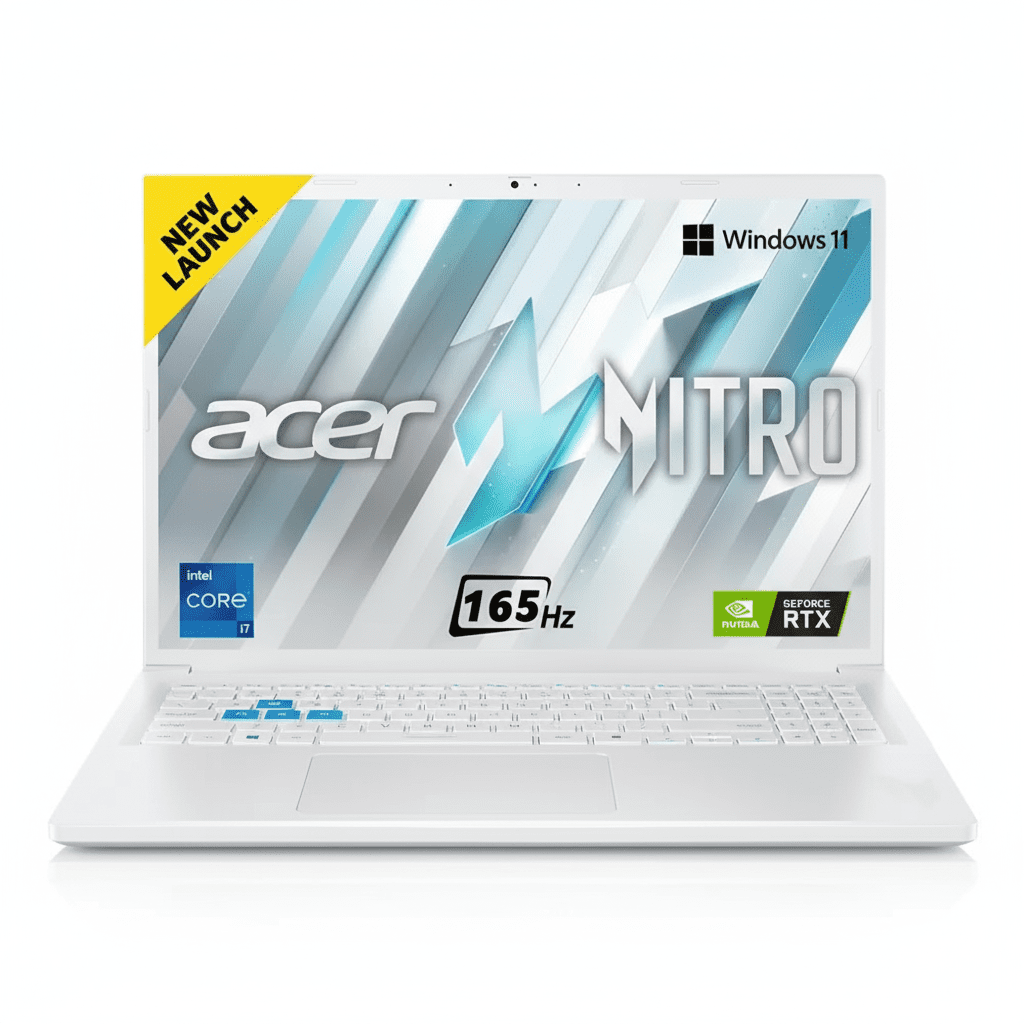
Intel® Core™ i7-13620H NVIDIA® RTX™ 4050 (6GB) 16″ WUXGA 165Hz Display 1.95 kg Lightweight DLSS 3 Frame Generation ₹89,999
A rare blend of high-performance gaming components in an impressively portable sub-2kg chassis.

The Acer Nitro Lite 16 (NL16-71G) carves out a unique niche in the gaming laptop market by delivering serious power in a surprisingly portable package. Breaking the stereotype of heavy gaming rigs, this machine packs a potent Intel® Core™ i7-13620H processor and an NVIDIA® GeForce RTX 4050 GPU into a chassis that weighs just 1.95 kg. Priced at ₹89,999, it pairs this performance with a large, fast 16-inch 165Hz display and 16GB of DDR5 RAM. It’s a machine built for the gamer, student, or professional who needs to take their power on the go, offering a compelling blend of performance, portability, and price.

Game On The Go, Without Compromise

Experience the power of a Core i7 and RTX 4050 in a laptop that weighs under 2kg.

₹89,999
MRP ₹113,899
21% OFF | Limited Time Offer

One-Year International Travelers Warranty

Key Features at a Glance

Core™ i7-13620H CPU: A high-performance 10-core processor for elite gaming and multitasking.
RTX 4050 with DLSS 3: Next-gen GPU with AI Frame Generation for huge FPS boosts.
16-inch 165Hz Display: A large, immersive, and incredibly smooth screen for competitive play.
Ultra-Lightweight Design: Weighs just 1.95kg, making it exceptionally portable for a 16-inch gamer.
16GB DDR5 RAM: Fast, dual-channel memory ensures smooth system performance.
Modern 16:10 Aspect Ratio: Taller screen provides more vertical space for productivity and gaming.

1. Potent H-Series Gaming Power

A high-end CPU and a next-gen GPU that punch well above their weight class.

Intel® Core™ i7-13620H

The Core™ i7-13620H is a true high-performance processor with 10 cores and 16 threads, capable of reaching speeds up to 4.9 GHz. This ensures the CPU won’t bottleneck the GPU, providing smooth, high-framerate gaming and excellent performance in demanding productivity apps.

NVIDIA® GeForce RTX 4050

The modern RTX 4050 brings the magic of DLSS 3 Frame Generation, an AI-powered feature that can dramatically increase frame rates in supported games. With 6GB of GDDR6 VRAM, it’s well-equipped for high-quality 1080p and 1200p gaming.

2. Large, Fast, and Immersive Display

A 16-inch screen with a high refresh rate and a modern aspect ratio.

165Hz Refresh Rate

The display refreshes 165 times per second, offering exceptionally smooth motion that is a huge advantage in fast-paced games. Action appears clearer and your inputs feel more responsive.

16:10 WUXGA Panel

The 16-inch, 1920×1200 resolution screen uses a taller 16:10 aspect ratio. This gives you more vertical screen space, which is great for seeing more of the game world and for productivity tasks like web browsing.

Acer ComfyView™

The display features an anti-glare ComfyView™ finish, which reduces reflections and eye strain during long gaming sessions or work marathons, though it has a basic 45% NTSC color gamut.

3. Gaming Power That Travels

The “Lite” in Nitro Lite means you can take serious performance anywhere.

Sub-2kg Weight

At just 1.95 kg, the Nitro Lite is remarkably lightweight for a 16-inch gaming laptop. This makes it a genuinely portable option for students who game in their dorm or professionals who travel.

Clean, Minimalist Design

The laptop comes in a clean, stylish white finish that avoids aggressive “gamer” aesthetics. It’s a powerful machine you can confidently use in any setting, from a LAN party to a lecture hall.

4. Fast Memory and Storage

A modern memory and storage configuration for a fluid and responsive experience.

16GB of DDR5 RAM

The laptop is equipped with 16GB of fast, dual-channel DDR5 RAM (2x8GB modules). This ensures smooth multitasking and provides plenty of memory for modern games and applications.

Speedy Gen4 SSD

A 512GB PCIe Gen4 NVMe SSD delivers rapid boot times and lightning-fast game loading, ensuring you spend less time waiting and more time playing.

5. Comprehensive Cooling

An effective thermal system to sustain performance during intense gaming sessions.

Dual Fan System

The Nitro Lite features a dual-fan cooling setup that pulls cool air in and exhausts hot air out through multiple vents, keeping the powerful i7 CPU and RTX 4050 GPU from thermal throttling.

NitroSense Control

Acer’s NitroSense utility software gives you one-touch control over fan speeds, allowing you to switch between quiet modes for work and max performance modes for gaming.

6. All the Essentials for Gaming & Work

Thoughtful features that enhance the daily user experience.

FHD Webcam

The included 2MP Full HD camera provides a sharp, clear picture for video calls, a significant step up from the 720p webcams found on many competitors.

Backlit Keyboard

A backlit keyboard allows for comfortable and accurate typing or gaming in any lighting condition, from a dark room to a dimly lit lecture hall.

Fast Wireless Networking

With support for Wi-Fi 6, the Nitro Lite ensures a fast, stable, and low-latency wireless connection, which is crucial for competitive online gaming.

Ideal For These Users

Students Who Game

Its lightweight design makes it easy to carry to class, while the powerful hardware lets it handle any game after studies are done.

Portable Power Users

Professionals or creators who need a powerful CPU and a decent GPU in a travel-friendly format will find this machine highly capable.

Mid-Range Gaming Enthusiasts

Gamers looking for a great 1200p gaming experience with high refresh rates and access to modern features like DLSS 3.

Who Might Consider Other Options

Creative Professionals

The display’s 45% NTSC color gamut is not accurate enough for professional photo or video color grading work.

Users Needing Long Battery Life

The combination of a powerful H-series CPU and a relatively small 53Wh battery means battery life will be limited, especially when gaming.

Competitive Edge: How It Stacks Up

The Nitro Lite’s unique balance of power and portability gives it a clear identity.

  • Unmatched Portability in its Class

    Its biggest advantage is its 1.95kg weight. Finding a 16-inch gaming laptop with a Core i7 H-series processor and an RTX 40-series GPU under 2kg is extremely rare, making it a market leader for portable performance.

  • Powerful CPU and GPU Pairing

    The combination of a 10-core Core i7-13620H and an RTX 4050 offers excellent, well-balanced performance for high-refresh-rate 1200p gaming, with the added benefit of DLSS 3 support.

  • Large, High-Refresh 16:10 Display

    While its color is average, the screen excels in the areas that matter most to gamers: a large 16-inch size, a fluid 165Hz refresh rate, and a tall 16:10 aspect ratio that provides a more immersive view.

Full Specifications

General Information

Model Name
Acer Nitro Lite 16 (NL16-71G)
Model Number
NH.D5ASI.002
Operating System
Windows 11 Home
Color
White

Processor & Chipset

Processor
Intel® Core™ i7-13620H
Base Speed
2.4 GHz
Max Turbo Speed
4.9 GHz

Memory & Storage

RAM
16 GB DDR5 (2x8GB Dual-Channel)
Storage
512 GB PCIe Gen4 NVMe SSD

Display & Graphics

Screen Size
16.0-inch (40.64 cm)
Resolution
WUXGA (1920 x 1200)
Refresh Rate
165Hz
GPU
NVIDIA® GeForce RTX™ 4050 (6GB GDDR6)

Network & Communication

Wireless LAN
Wi-Fi 6 (802.11ax)
Bluetooth
Bluetooth® 5.1

Built-in Devices & Input

Keyboard
Backlit Keyboard
Webcam
2MP FHD Camera
Speakers
Two built-in stereo speakers

Battery & Physical Characteristics

Battery
53Wh Li-Ion
Power Adapter
100W PD Adapter
Weight
1.95 kg
Height
22.9 mm

Pros and Cons

What We Liked

  • Extremely lightweight (1.95kg) for a 16-inch gaming laptop.
  • Powerful Core i7 H-series processor.
  • Modern RTX 4050 GPU with DLSS 3 support.
  • Large 16-inch, 165Hz display with a 16:10 aspect ratio.
  • Fast DDR5 RAM included as standard.

What Could Be Better

  • Display has poor color gamut (45% NTSC).
  • Relatively small 53Wh battery for a gaming laptop.
  • Limited RAM upgradability (max 16GB).
  • Port selection is somewhat limited for a gaming machine.

Final Verdict

The Acer Nitro Lite 16 is a fascinating and highly appealing proposition. It successfully merges two worlds that are often mutually exclusive: high-performance gaming and genuine portability. By packing a potent Core i7 H-series CPU and an RTX 4050 into a sub-2kg chassis, Acer has created a machine that stands out in a crowded market.

It makes intelligent sacrifices—most notably in screen color accuracy and battery size—to achieve its lightweight goal. However, for its target audience, these are worthy trade-offs. If you are a student, a creative, or a professional who needs a powerful laptop that you can comfortably carry every day, and you also want to enjoy high-refresh-rate gaming, the Nitro Lite 16 is one of the most compelling and unique options available.

Acer Aspire 3 Spin 14 (A3SP14-31PT) – Core i3, 8GB RAM, 512GB SSD, 2-in-1 Laptop

Acer Aspire 3 Spin 14 Review: Versatility for Everyday Use

Acer Aspire 3 Spin 14

The Flexible 2-in-1 for Everyday Productivity

Intel® Core™ i3-N305 Processor 8 GB LPDDR5 / 512 GB SSD 14″ WUXGA Touchscreen IPS Display

The Acer Aspire 3 Spin 14 (A3SP14-31PT) is a versatile 2-in-1 laptop designed for everyday productivity and entertainment. This model is perfect for students, home users, and professionals who need the flexibility of a tablet and the power of a laptop in a single device. Its touchscreen and convertible design allow you to seamlessly switch between modes, making it ideal for note-taking, drawing, and presentations.

This review focuses on how this particular configuration provides a near-perfect balance of versatility and performance for casual and light-duty computing tasks.

Key Features for Versatile Use

The Aspire 3 Spin 14 is built to handle your daily tasks with its flexible design and solid core components.

Flexible 2-in-1 Design

The signature 2-in-1 design with a 360° hinge allows you to use the device as a traditional laptop, a stand, a tent, or a tablet. This adaptability makes it suitable for a wide range of scenarios, from typing documents to giving presentations.

Responsive Touchscreen Display

The 14-inch WUXGA (1920 x 1200) touchscreen display provides a crisp and immersive visual experience. The IPS technology ensures wide viewing angles, while the ComfyView finish helps reduce glare.

Fast Storage & RAM

A snappy 512GB PCIe NVMe SSD ensures quick boot times and rapid application loading, while the 8GB of LPDDR5 RAM provides a solid foundation for smooth multitasking and efficient performance for everyday computing.

Robust Connectivity

The laptop comes equipped with the latest Wi-Fi 6E standard for fast and stable wireless connections, as well as a variety of ports including USB 3.2 Gen 2 Type-C, providing modern connectivity for all your peripherals.

All-Day Battery Life

With a battery life of up to 10 hours, the Aspire 3 Spin 14 is designed to keep you productive throughout the day without needing to stay tethered to a power outlet.

Detailed Specifications

General & OS

  • Model Number: A3SP14-31PT | NX.KENSI.004
  • Operating System: Windows 11 Home Single Language
  • Product Color: Silver
  • Weight (Approximate): 1.54 kg (3.4 lbs)

Performance

  • Processor: Intel® Core™ i3-N305 (Octa-core)
  • Processor Speed: 1.80 GHz
  • Graphics: Integrated Intel® UHD Graphics (Shared)
  • System Memory: 8 GB LPDDR5
  • Storage: 512 GB PCIe NVMe SSD

Display, Camera & Audio

  • Screen Size: 14 inches (35.56cm)
  • Screen Resolution: 1920 x 1200 (WUXGA)
  • Panel Type: IPS, Touchscreen, Anti-Glare
  • Aspect Ratio: 16:10
  • Refresh Rate: 60 Hz
  • Audio: 2 x Built-in Speakers, Microphone

Connectivity & Battery

  • Wireless: Wi-Fi 6E, Bluetooth 5.1 or above
  • Ports: 1 x HDMI, 2 x USB 3.2 Gen 1 Type-A, 1 x USB 3.2 Gen 2 Type-C
  • Total USB Ports: 3
  • Battery Life: Up to 10 hours
  • Battery Energy: 50 Wh

Pros and Cons: A Balanced View for Buyers

Pros

  • Exceptional Versatility: The 2-in-1 design is the main strength, offering the ability to switch between laptop and tablet modes effortlessly.
  • Smooth Daily Performance: The combination of the Core i3-N305 processor, 8GB LPDDR5 RAM, and a fast SSD ensures a responsive experience for web browsing, streaming, and office work.
  • Great Display: The WUXGA (1920×1200) touchscreen with IPS technology is a fantastic feature for both work and media consumption.

Cons

  • No Fingerprint Reader: Lacks a modern biometric security feature for quick and easy login.
  • No Keyboard Backlight: This can be a significant drawback for those who frequently work in low-light conditions.
  • Limited Graphics Performance: The integrated UHD Graphics and Core i3 processor are not built for demanding gaming or professional-level creative work.

Sustainability & Certifications

Acer’s commitment to sustainability is evident in the Aspire 3 Spin 14. The device is part of Acer’s Earthion initiative, which focuses on creating a more sustainable ecosystem.

Eco-Friendly Materials

The chassis and keyboard caps are made from post-consumer recycled (PCR) plastics, reducing waste and the use of new materials.

Certifications

This model is **EPEAT-registered**, a globally recognized benchmark for environmentally responsible products, and is **ENERGY STAR certified** for its power efficiency.

Who Is This Laptop For? Tailored Recommendations

The Acer Aspire 3 Spin 14 is a fantastic choice for several types of users who prioritize versatility and value.

Students

The convertible design is perfect for **note-taking and sketching in tablet mode**, while the solid-state drive and battery life ensure it can handle classes and study sessions all day.

Home Users

For casual web browsing, email, streaming movies, and video calls, the Aspire 3 Spin 14 provides an **excellent, affordable platform** with the added bonus of a tablet mode for relaxing on the couch.

Light Professionals

The laptop’s fast storage and convertible display make it great for **presenting in meetings** or for professionals who need a secondary, portable device for on-the-go productivity.

Competitive Edge

In the highly competitive market of budget-friendly 2-in-1s, the Acer Aspire 3 Spin 14 stands out for several reasons.

Value and Versatility

While other laptops in this price range often compromise on features, the Aspire 3 Spin 14 provides a high-resolution WUXGA touchscreen and a convertible design that are often found in more expensive models. This makes it an exceptional value proposition.

Performance for the Price

The combination of the Intel Core i3-N305 and 8GB of LPDDR5 RAM offers a better-than-expected performance for everyday tasks, surpassing many competitors that might still be using older, less efficient processors and RAM standards at a similar price point.

Final Verdict: A Great Value for General Use

The Acer Aspire 3 Spin 14 is a solid choice for anyone looking for a versatile and reliable laptop for daily tasks. The 2-in-1 design with a touch-enabled screen is a standout feature that adds immense value, making it perfect for students, casual users, and anyone who wants the flexibility to use their device in multiple ways.

★★★★☆

Overall Rating: 4.0 out of 5.0

(A highly recommended laptop for students and personal use, with excellent versatility for the price)

The Ultimate AI Laptop: Acer Aspire AI. Unmatched Battery Life, Next-Gen Processors & Stunning OLED for Students & Pros.

Acer Aspire 14 & 16 AI Laptop Review – Full Details

Acer Aspire 14 & 16 AI (Copilot+ PC)

Up to Intel® Core™ Ultra (Series 2) Intel® Arc™ Graphics Up to 32GB LPDDR5X Up to 2TB SSD 14” or 16” WUXGA OLED Option Copilot+ PC

The Acer Aspire 14 AI and Aspire 16 AI represent a new era of intelligent computing, bringing the advanced capabilities of Copilot+ PCs to the mainstream. These laptops are engineered to be the perfect partners for students and professionals, delivering powerful, AI-accelerated performance, remarkable power efficiency, and versatile design. They stand out by offering a choice of next-generation processors from Intel, AMD, and Snapdragon, democratizing access to cutting-edge AI experiences[220].

At their heart, these machines are powered by processors like the Intel® Core™ Ultra (Series 2), featuring a potent NPU for on-device AI tasks and impressive integrated Intel® Arc™ graphics[216]. This is complemented by up to 32GB of fast LPDDR5X memory and expansive SSD storage. The visual experience is anchored by a choice of brilliant displays, including a stunning OLED option with DisplayHDR™ True Black 500. By blending next-gen performance with exceptional battery life and a suite of smart Acer AI tools, the Aspire AI series is poised to redefine everyday productivity and creativity[219].

Key Features at a Glance

Copilot+ PC Experience: The fastest, most intelligent Windows PCs with advanced AI features.
Next-Gen AI Processors: Choice of Intel® Core™ Ultra (Series 2), AMD Ryzen™ AI, or Snapdragon® X Series[220].
Exceptional Battery Life: Multi-day battery life thanks to new, power-efficient chips[221].
Brilliant OLED Display Option: Available WUXGA OLED screen with 100% DCI-P3 and HDR True Black 500[219].
Acer AI Zone: A suite of smart, on-device AI tools like AcerSense and Acer Assist.
Modern Connectivity: Features dual Thunderbolt™ 4 ports (on Intel models) and up to Wi-Fi 7.

Intelligent Performance for the AI Era

The Aspire AI series is built from the ground up to leverage the power of on-device artificial intelligence, enhancing everything you do.

Next-Generation AI Hardware

Equipped with processors like the Intel® Core™ Ultra (Series 2), these laptops feature a dedicated Neural Processing Unit (NPU) delivering up to 47 TOPS. This hardware acceleration unlocks advanced AI experiences like Windows Studio Effects, real-time translation with Live Captions, and generative AI with Cocreator, all while running efficiently on the device to preserve battery life[216].

Accelerated Creativity

The integrated Intel® Arc™ graphics contribute up to 67 TOPS of total platform AI performance. This muscle is used to accelerate creative tasks like AI-powered photo and video editing, AI game upscaling for smoother frame rates, and running a vast ecosystem of over 300 AI-optimized applications, all with impressive speed and precision.

Effortless Multitasking

With support for up to 32GB of high-speed LPDDR5X RAM and up to a 2TB PCIe 4.0 SSD, the Aspire AI series ensures that your workflow remains fluid. Lightning-fast load times and the ability to handle numerous applications simultaneously mean you can create, browse, and communicate without interruption or slowdowns[216].

Immersive Visuals & Modern Design

The Aspire AI series combines a brilliant viewing experience with a sleek, versatile, and durable chassis.

Indulge Your Eyes with OLED

The standout display option is the WUXGA OLED panel. It offers a cinematic viewing experience with DisplayHDR™ True Black 500 certification for incredible contrast and deep blacks. The 100% DCI-P3 color gamut ensures vibrant, true-to-life colors, making it ideal for both content creation and consumption. While base IPS models are more functional, the OLED option elevates the device to a premium tier[218][219].

Style and Substance

The laptops feature a thin and lightweight aluminum top cover, giving them a modern and professional aesthetic. The design is practical, with a 180° lie-flat hinge for versatile use in any environment. However, some reviews note that the keyboard deck is plastic, which, while rigid, detracts slightly from an all-premium feel[216][221].

Competitive Edge: Acer Aspire AI vs. The Rivals

The Aspire AI series carves out a unique space in the burgeoning Copilot+ PC market by focusing on choice, efficiency, and value.

  • Freedom of Choice (CPU): Unlike many competitors who launch with a single chip option, Acer offers the Aspire AI series with processors from Intel, AMD, and Snapdragon. This gives consumers unprecedented choice to pick the architecture that best suits their needs, whether it’s Intel’s robust ecosystem, AMD’s multi-core strength, or Snapdragon’s ARM-based efficiency[220].
  • A Focus on Extreme Battery Life: The key message across all configurations is multi-day battery life. By leveraging the power efficiency of next-gen NPUs and processors, the Aspire AI series is positioned as a leader in endurance, a critical factor for students and mobile professionals that many rivals struggle with[221].
  • Democratizing Premium Features: The Aspire series brings features like an optional OLED display, dual Thunderbolt 4 / USB4 ports, and Wi-Fi 7 to a more accessible price point. Competitors often reserve this level of connectivity and display quality for their more expensive premium lines.

Full Specifications Table

General Information

  • Brand:Acer
  • Model Series:Aspire 14 AI & Aspire 16 AI
  • Operating System:Windows 11 Home
  • AI Features:Copilot+ PC

Processor & Graphics Options

  • Intel Processor:Up to Intel® Core™ Ultra 7 258V (Series 2)[216]
  • Intel Graphics:Up to Intel® Arc™ Graphics 140V[220]
  • AMD Processor:Up to AMD Ryzen™ AI 7 350[220]
  • AMD Graphics:Up to AMD Radeon™ 860M[220]
  • Snapdragon Processor:Snapdragon® X Series[226]

Memory & Storage

  • Memory:Up to 32 GB LPDDR5X
  • Storage:Up to 2 TB M.2 PCIe Gen4 SSD

Display Options

  • Sizes:14-inch and 16-inch
  • Aspect Ratio:16:10
  • Panel Technology:Options for IPS LCD or OLED with up to WUXGA+ (2048×1280) resolution and 120Hz refresh rate[219].

Connectivity

  • WIFI:Up to Wi-Fi 7
  • Bluetooth:Bluetooth 5.4 or above
  • Ports:2x Thunderbolt™ 4 (USB4 on AMD/Snapdragon), 2x USB-A 3.2 Gen 1, HDMI 2.1, MicroSD Card Slot, 3.5mm audio jack[218][220].

Pros and Cons: A Balanced View

Pros:

  • Excellent Performance for the Price: Delivers strong productivity and AI performance that punches above its weight class[216].
  • Outstanding Battery Life: The new, efficient processors provide multi-day battery life for many use cases[221].
  • Superb OLED Display Option: The available OLED panel is bright, color-accurate, and offers stunning contrast[218].
  • Future-Proof AI Features: As a Copilot+ PC, it’s ready for the next wave of AI-integrated software and features.
  • Versatile Connectivity: A generous port selection including dual Thunderbolt 4 / USB4 and HDMI 2.1 is rare at this price point.

Cons:

  • Mixed Build Quality: While the lid is aluminum, the plastic keyboard deck feels less premium than competitors[216][221].
  • Underwhelming Base Display: The standard IPS screen options are functional but lack the brightness and color of the OLED panel[216].
  • Average Keyboard and Speakers: Reviews note that the keyboard and audio system are serviceable but not standout features[214][218].
  • Not for Serious Gaming: While the integrated graphics are capable and AI-accelerated, they are not a substitute for a dedicated GPU for high-end gaming.

Who Is This Laptop For?

  • Students and Academics: The exceptional battery life, lightweight design, and powerful AI tools for research and productivity make it an ideal campus companion.
  • Mobile Professionals and Hybrid Workers: Those who need a reliable, long-lasting machine for remote work, presentations, and communication will appreciate the endurance and connectivity.
  • Casual Creators: Users who dabble in photo and video editing will benefit from the AI-accelerated performance and the optional color-accurate OLED display.
  • Early Adopters on a Budget: Anyone wanting to experience the benefits of a Copilot+ PC without paying a premium price will find the Aspire AI series highly attractive[229].

Who Might Consider Other Options?

  • Gamers and Power Users: The integrated graphics, while capable, are not designed for high-end gaming or intensive 3D rendering. These users should look for laptops with discrete GPUs.
  • Users Demanding a Premium Feel: Those who prioritize an all-metal unibody construction and premium tactile feedback may be better served by more expensive alternatives like a Dell XPS or MacBook Air.
  • Video Professionals: While the OLED screen is great, heavy video editors may find the overall performance ceiling lower than dedicated content creation laptops with more powerful cooling and discrete graphics.

Final Verdict: Intelligent, Enduring, and Attainable

The Acer Aspire 14 and 16 AI are a powerful statement in the new Copilot+ PC landscape, delivering next-generation intelligence and phenomenal battery life at a refreshingly accessible price point[221]. The series’ greatest strength is its flexibility, offering a choice of cutting-edge processors from Intel, AMD, and Snapdragon, ensuring there’s a configuration for nearly any productivity-focused user[220]. The combination of a potent NPU, strong CPU performance, and remarkable power efficiency makes this a truly modern machine.

While compromises are made in the chassis material and the quality of the base-level screens, these are easily forgiven when considering the exceptional value on offer[216]. For users who can opt for the stunning OLED display, the Aspire AI transforms into a formidable creative and media consumption device. For students, professionals, and everyday users who want a laptop that is smart, long-lasting, and ready for the future of AI without breaking the bank, the Acer Aspire AI series is an outstanding choice and a resounding recommendation.

★★★★☆

Overall Rating: 4.5 out of 5.0 (Based on Expert Analysis)

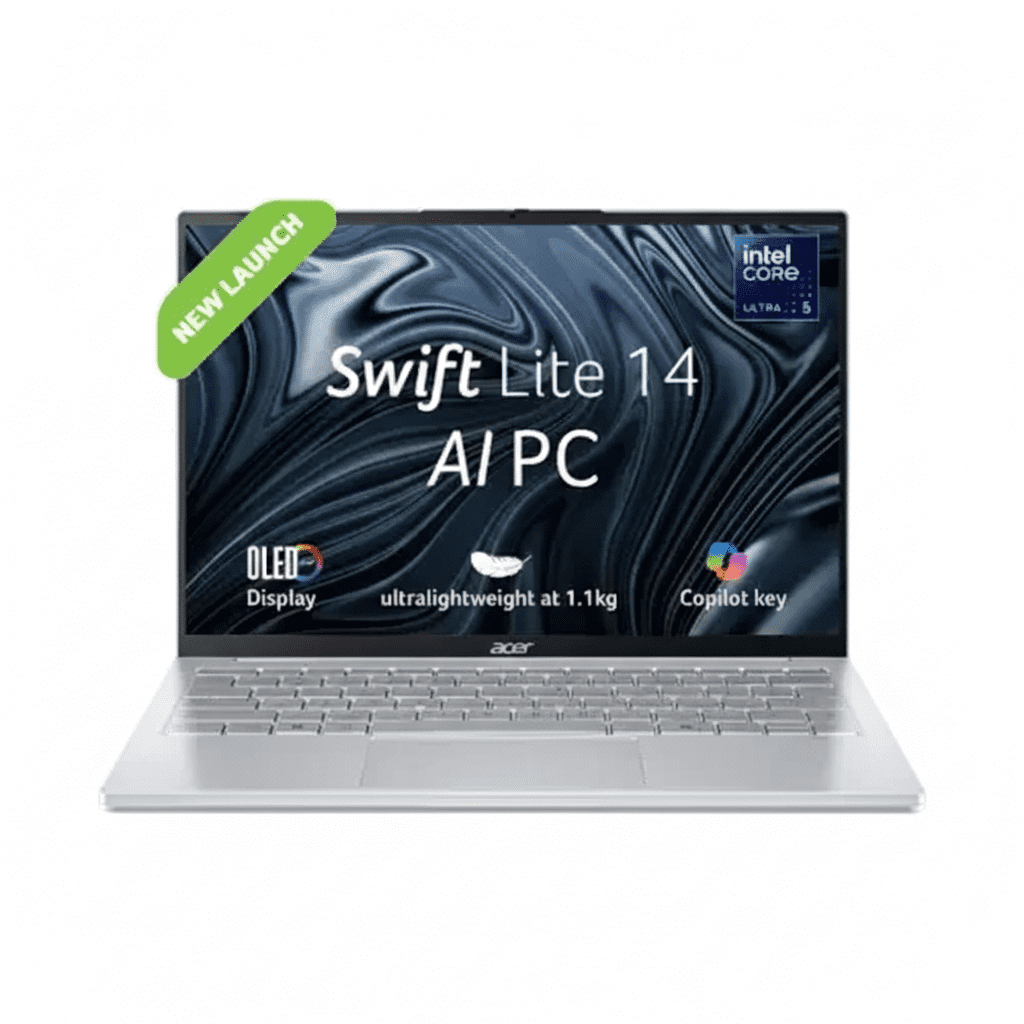
Acer Swift Lite 14 Review — Featherlight 1.1kg OLED Laptop with Intel Core Ultra 5

Acer Swift Lite 14
Acer Swift Lite 14 Review: Featherlight Portability Meets OLED Brilliance

Acer Swift Lite 14 Review: Featherlight Portability Meets OLED Brilliance

Just 1.1 kg 14″ WUXGA OLED Display Intel® Core™ Ultra 5 115U 100% DCI-P3 Color 16 GB LPDDR5 RAM ₹62,999
The ultimate ultrabook for those who demand extreme portability without sacrificing screen quality.

The Acer Swift Lite 14 (SFL14-54M) is a masterclass in engineering, pushing the boundaries of what a thin-and-light laptop can be. Its headline feature is a staggering 1.1 kg weight, making it one of the most portable 14-inch laptops on the market. But this portability doesn’t come at the cost of quality. For an aggressive price of ₹62,999, Acer has packed in a breathtaking WUXGA OLED display with 100% DCI-P3 color and an efficient yet capable Intel® Core™ Ultra 5 processor. This machine is the ultimate “take-anywhere” device for mobile professionals, frequent travelers, and students who value a premium experience and a featherlight bag.

Experience Featherlight Freedom

Get the pinnacle of portability with a stunning OLED display at an exceptional price.

₹62,999
MRP ₹94,999
34% OFF | Limited Time Offer

One-Year International Travelers Warranty

Key Features at a Glance

Featherlight 1.1kg: One of the lightest 14-inch laptops available.
WUXGA OLED Display: Stunning colors and perfect blacks with 100% DCI-P3 gamut.
Core™ Ultra 5 CPU: Modern, AI-enhanced processor for efficient performance.
16GB LPDDR5 RAM: Fast, power-efficient memory for smooth multitasking.
USB-C Charging: Convenient charging via a standard 65W PD adapter.
FHD Webcam: A sharp, high-quality camera for clear video calls.

1. The Pinnacle of Portability

Engineered to be so light, you’ll forget it’s in your bag.

Extraordinary 1.1 kg Weight

The defining feature of the Swift Lite is its incredible 1.1 kg weight. This puts it in an elite class of ultrabooks, making it the perfect choice for anyone who carries their laptop daily and values minimal bulk and maximum mobility.

Ultra-Slim 15.9mm Profile

Complementing its low weight is a razor-thin 15.9mm chassis. This allows the Swift Lite 14 to slip effortlessly into any sleeve, backpack, or tote bag, making it an ideal companion for travel and daily commutes.

2. A Breathtaking OLED Display

A screen that makes everything from spreadsheets to movies look incredible.

Perfect Blacks & Vibrant Colors

The OLED panel provides an infinite contrast ratio with true, perfect blacks. This makes for a stunningly rich and immersive viewing experience that traditional LCD screens cannot match.

Professional-Grade Color

With 100% DCI-P3 color gamut coverage, this display reproduces colors with cinematic accuracy. It’s a fantastic feature for photo editing, graphic design, and anyone who appreciates true-to-life visuals.

Bright & Sharp

The WUXGA (1920×1200) resolution and 400 nits of brightness ensure a sharp, detailed image that is easily viewable even in bright environments.

3. Efficient & Modern Core Ultra Power

Powered by Intel’s latest AI-enhanced processor for a snappy, long-lasting experience.

Intel® Core™ Ultra 5 115U

This new Core™ Ultra 5 processor is designed for maximum efficiency. It provides excellent performance for everyday productivity tasks while sipping power to extend battery life.

Integrated AI Boost

Featuring an onboard NPU (Neural Processing Unit), the processor can efficiently handle AI-driven tasks like background blur in video calls, freeing up the main CPU cores and improving overall system responsiveness.

4. Fast, Responsive Multitasking

A powerful memory and storage combination that keeps up with your workflow.

16GB of High-Speed LPDDR5 RAM

A generous 16GB of onboard LPDDR5 memory provides ample bandwidth for fluidly switching between multiple applications, browser tabs, and documents without any lag.

512GB Gen4 NVMe SSD

The 512GB PCIe Gen4 SSD ensures the entire system feels incredibly responsive, with near-instant boot times, fast application launches, and rapid file transfers.

5. All-Day Battery and Convenient Charging

Designed to keep up with your busy day.

Up to 9 Hours of Use

Thanks to the efficient Core Ultra processor and a well-sized 50Wh battery, the Swift Lite is rated for up to 9 hours of runtime, allowing you to work or study through the day without reaching for a charger.

USB-C Power Delivery

The laptop charges via a compact 65W USB-C PD adapter. This universal standard means you can often use the same charger for your laptop, phone, and other devices, simplifying your travel kit.

6. Premium Usability Features

Thoughtful additions that elevate the day-to-day experience.

Crisp FHD Webcam

The built-in Full HD webcam delivers a sharp and clear video feed, ensuring you look your best during video conferences and online classes.

Backlit Keyboard with Copilot

The comfortable backlit keyboard allows for easy typing in any lighting, and includes a dedicated Copilot key for instant access to Microsoft’s AI assistant.

Modern Connectivity

Equipped with Wi-Fi 6 for fast wireless speeds and a mix of USB-C and USB-A ports, you have the essential connections for your peripherals.

Ideal For These Users

Frequent Travelers

At 1.1 kg, this is a dream machine for anyone who is constantly on the move and needs a capable yet barely-there laptop.

Mobile Professionals & Students

Its blend of performance, portability, and long battery life makes it perfect for taking to meetings, lectures, and coffee shops.

Media Lovers

The stunning OLED screen provides a spectacular experience for watching movies and TV shows on the go.

Who Might Consider Other Options

Gamers

The integrated Intel Graphics are not designed for modern gaming. Gamers will need a laptop with a dedicated NVIDIA or AMD GPU.

Heavy Multitaskers & Power Users

The efficient U-series processor is excellent for general use, but users who do heavy video editing or 3D rendering may want a more powerful H-series CPU.

Competitive Edge: How It Stacks Up

The Swift Lite 14’s unique feature combination sets it apart from the crowd.

  • Unbeatable Weight-to-Screen-Quality Ratio

    Its key advantage is offering a premium, color-accurate 100% DCI-P3 OLED display in a chassis that weighs just 1.1 kg. This combination is extremely rare, especially at this price point, offering the best of both worlds for portability and visual fidelity.

  • Premium Experience for the Price

    For ₹62,999, the inclusion of a latest-generation Core Ultra processor, a stunning OLED screen, 16GB of LPDDR5 RAM, and an FHD webcam provides a distinctly premium user experience that punches well above its price tag.

  • Focus on Mobility

    Everything about this laptop, from its weight and thinness to its power-efficient CPU and USB-C charging, is laser-focused on creating the ultimate mobile productivity device.

Full Specifications

General Information

Model Name
Acer Swift Lite 14 (SFL14-54M)
Model Number
NX.D2GSI.001
Operating System
Windows 11 Home + MS Office
Color
Light Silver

Processor & Chipset

Processor
Intel® Core™ Ultra 5 115U
Base Speed
1.5 GHz
Max Turbo Speed
4.2 GHz

Memory & Storage

RAM
16 GB LPDDR5 (onboard)
Storage
512 GB PCIe Gen4 NVMe SSD

Display & Graphics

Screen Size
14.0-inch (35.56 cm)
Resolution
WUXGA (1920 x 1200)
Panel Type
OLED, 400 nits, 100% DCI-P3
Graphics
Intel® Graphics

Network & Communication

Wireless LAN
Wi-Fi 6 (802.11ax)
Bluetooth
Bluetooth® 5.1

Built-in Devices & Input

Keyboard
Backlit Keyboard w/ Copilot Key
Webcam
FHD Camera
Speakers
Two built-in stereo speakers

Battery & Physical Characteristics

Battery
50Wh Li-Ion
Power Adapter
65W USB-C PD Adapter
Weight
1.1 kg
Height
15.9 mm

Pros and Cons

What We Liked

  • Incredibly lightweight at just 1.1 kg.
  • Absolutely gorgeous WUXGA OLED display.
  • Professional-grade 100% DCI-P3 color accuracy.
  • Efficient Core Ultra 5 processor with AI Boost.
  • Convenient charging with a 65W USB-C adapter.

What Could Be Better

  • Not suitable for gaming due to integrated graphics.
  • RAM is soldered and cannot be upgraded.
  • Display is 60Hz, not high refresh rate.
  • Limited port selection compared to larger laptops.

Final Verdict

The Acer Swift Lite 14 is a spectacular achievement in mobile computing, representing one of the best choices for users who prioritize portability above all else. Packing a brilliant, color-accurate OLED display into a chassis that weighs a mere 1.1 kg is a rare and winning combination. The efficient Core Ultra 5 processor and generous LPDDR5 RAM provide a smooth and responsive experience for all productivity and entertainment needs.

It is not a gaming machine, nor is it a workstation for the heaviest of loads. Instead, it is a master of its own domain. For the frequent traveler, the busy student, or the mobile professional who wants a beautiful screen in the lightest possible package, the Acer Swift Lite 14 is an almost perfect laptop and an outstanding value proposition.

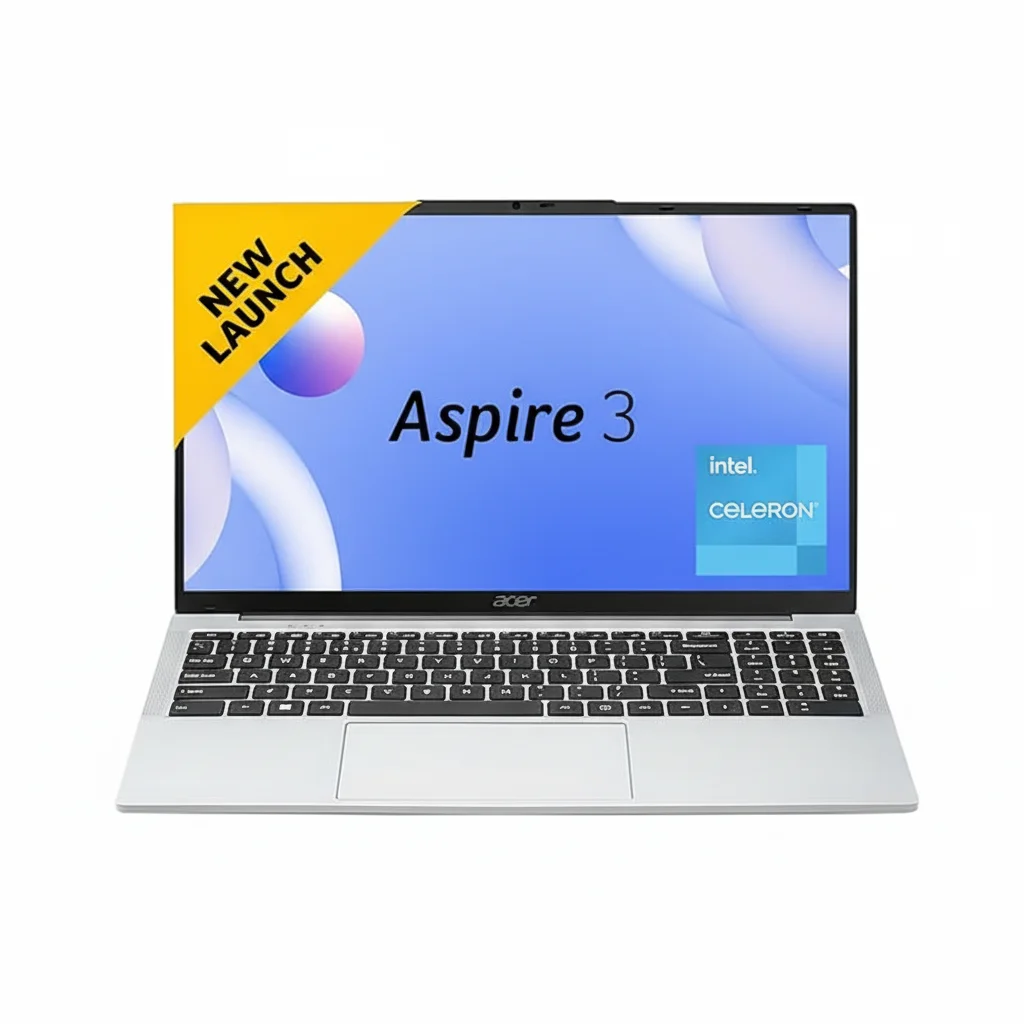
Acer Aspire 3 (A325-45) Review: The Best 8GB RAM Laptop Under ₹20,000?

Acer Aspire 3
Acer Aspire 3 (A325-45) Laptop Review – Full Details

Acer Aspire 3 Laptop (A325-45)

Intel Celeron N4500 8GB LPDDR4X RAM 256GB SSD 15.6″ HD Display Windows 11 Home 1.5kg Lightweight

The Acer Aspire 3 (A325-45) positions itself as a dependable, no-frills workhorse for students and home users on a strict budget. Priced at ₹19,990, this laptop focuses on delivering a balanced and reliable Windows 11 experience by combining a solid 8GB of RAM and a snappy 256GB SSD with a large 15.6-inch screen.

While it makes a key compromise with its basic HD resolution display, it compensates with the trusted performance of an Intel Celeron N4500 processor and the backing of Acer’s established brand reputation. It’s designed for users who prioritize smooth multitasking for everyday tasks and a familiar Windows environment over a high-resolution screen, making it a safe and practical choice from a well-known manufacturer.

Balanced Performance for Daily Use

A smart combination of RAM and storage for a smooth everyday Windows experience.

8GB RAM for Smooth Multitasking

With 8GB of LPDDR4X RAM, the Aspire 3 can handle everyday multitasking—like browsing with multiple tabs, streaming music, and using Microsoft Office—with a level of smoothness that 4GB laptops struggle to provide in Windows 11.

Snappy 256GB SSD

The 256GB SSD ensures that the laptop boots up quickly, applications load without long waits, and the overall system feels responsive. It provides a good amount of space for essential programs and personal files.

Designed for Productivity and Portability

A large screen for work and a lightweight chassis for when you’re on the move.

Large 15.6-inch Workspace

The 15.6-inch screen offers a large canvas for productivity, making it comfortable to work on spreadsheets or view documents. While it’s only an HD (1366×768) panel, it includes Acer’s BlueLightShield technology to reduce eye strain during long sessions.

Thin and Light Design

Despite its large screen, the Aspire 3 is impressively lightweight at just 1.5 kg. Its slim profile makes it easy to slip into a backpack, offering a good balance between screen size and portability for students.

Full Specifications

Core Components & OS

  • Processor:Intel Celeron N4500 (Dual Core, up to 2.80 GHz)
  • Operating System:Windows 11 Home
  • RAM:8 GB LPDDR4X SDRAM
  • Storage:256 GB SSD

Display & Graphics

  • Screen Size:15.6 Inches
  • Resolution:1366 x 768 pixels (HD)
  • Panel Type:LED with Acer BlueLightShield
  • Graphics:Integrated Intel UHD Graphics

Connectivity & Ports

  • Wireless:Dual-Band Wi-Fi 5 (802.11ac)
  • Ports:Multiple USB 3.0, HDMI, Ethernet Port

Physical Design & Battery

  • Weight:1.5 kg
  • Color:Pure Silver
  • Battery:38 WHr Lithium Ion
  • Webcam:HD Webcam

Pros and Cons: A Balanced View

Pros:

  • Good Multitasking Performance: 8GB RAM provides a smooth experience for everyday tasks.
  • Trusted Brand: Acer is an established brand with a reliable service network.
  • Lightweight for its Size: Very portable for a 15.6-inch laptop at just 1.5 kg.
  • Full Windows 11 Experience: Runs the familiar Windows operating system with full software compatibility.
  • Fast Storage: The 256GB SSD ensures quick boot and load times.

Cons:

  • Low-Resolution Display: The 1366×768 HD screen is a major drawback and is not sharp for a 15.6-inch panel.
  • Weak Processor: The Celeron N4500 is suitable for basic tasks but will struggle with anything demanding.
  • No Backlit Keyboard: Lacks a feature that is becoming common even in budget laptops.
  • Basic Design: The laptop has a simple, no-frills plastic construction.

Who Is This Laptop For?

  • The Brand-Conscious Student: A student who needs a reliable laptop for assignments and research from a well-known brand with good service support.
  • The Home User: Perfect for family use, including web browsing, paying bills, homework, and email.
  • The Basic Office Worker: A suitable, low-cost option for remote work that revolves around Microsoft Office, email, and web-based applications.

Who Might Consider Other Options?

  • Media Consumers: Users who primarily watch videos or movies will be disappointed by the low-resolution HD screen.
  • Users Needing Performance: Competitors like the Primebook 2 Max offer significantly more processing power for the same price.
  • Anyone Doing Creative Work: The weak processor and low-resolution screen make it unsuitable for photo editing, video work, or graphic design.

Competitive Edge: The Safe and Reliable Choice

The Acer Aspire 3’s main advantage is its positioning as the dependable, well-supported option in a sea of lesser-known brands.

  • Brand Trust and Service: Its key competitive edge is the Acer brand name. Buyers get the peace of mind that comes with a large, established company, including a reliable warranty and a widespread service network, which smaller brands can’t match.
  • Balanced, Usable Specs: The combination of 8GB RAM and a 256GB SSD is the “just right” configuration for a smooth Windows 11 experience for basic use, a balance that many other budget laptops fail to achieve.
  • Focus on the Essentials: It doesn’t try to dazzle with high-end features. Instead, it focuses on providing a stable and reliable platform for the most common tasks, making it a straightforward and practical choice for its target audience.

Final Verdict: A Safe Bet with One Major Flaw

The Acer Aspire 3 (A325-45) is the “safe bet” in the under-₹20,000 laptop category. It comes from a trusted brand, offers a solid 8GB/256GB configuration that ensures a smooth experience for everyday Windows tasks, and is commendably lightweight. For users who are wary of newer brands and prioritize reliability and service, it is a very sensible option.

However, its one major, undeniable flaw is the low-resolution HD display. In a market where competitors are offering crisp, vibrant FHD screens for the same price, the Aspire 3’s screen feels dated and is a significant compromise. If you can look past the display and value brand reliability above all else, the Aspire 3 is a solid performer for basic needs. Otherwise, better screens and more powerful processors are available for the same money.

★★★☆☆

Overall Rating: 3.5 out of 5.0 (Held back by the HD Display)

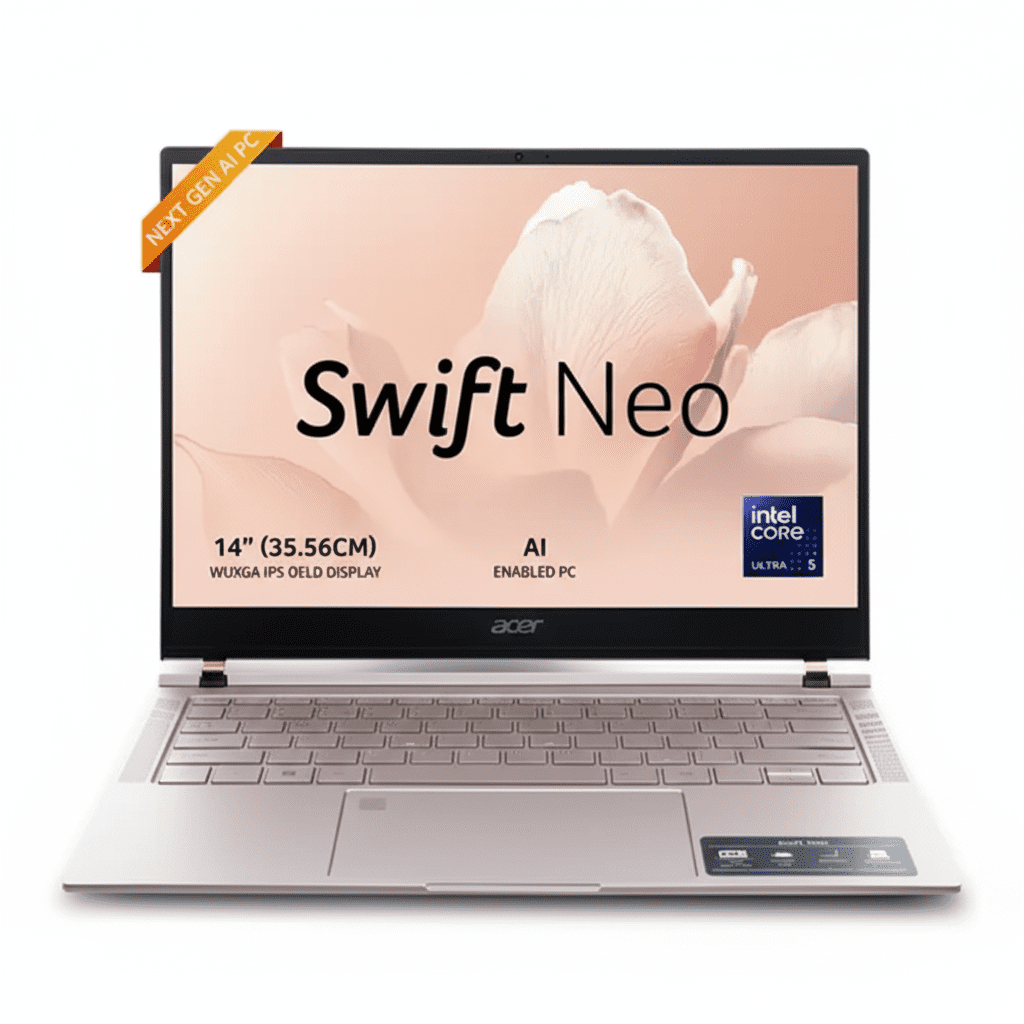
The Secret OLED Power of the New Acer Swift Neo

Acer Swift Neo
Acer Swift Neo Review: OLED Brilliance Meets AI Smarts

Acer Swift Neo Review: OLED Brilliance Meets AI Smarts

Intel® Core™ Ultra 5 115U 14″ WUXGA OLED Display AI Laptop 1.3 kg Lightweight 16 GB LPDDR5 RAM ₹61,999
An ultra-light AI laptop that packs a stunning OLED display and premium features at an unbeatable price.

The Acer Swift Neo (SFN14-54H) is a game-changer in the world of ultra-portable laptops, delivering a suite of premium features at an astonishingly competitive price of ₹61,999. Its main attraction is a breathtaking 14-inch WUXGA OLED display, a feature typically reserved for much more expensive machines. Powered by the new AI-ready Intel® Core™ Ultra 5 processor and packaged in a stylish, 1.3 kg lightweight chassis, the Swift Neo is purpose-built for students and mobile professionals. It masterfully blends performance, portability, and a premium viewing experience into one incredible value package.

Experience OLED at an Unbelievable Price

Get the future-ready AI PC with a stunning display for work, study, and play.

₹61,999
MRP ₹99,999
38% OFF | Limited Time Offer

One-Year International Travelers Warranty

Key Features at a Glance

14″ WUXGA OLED Display: Absolutely stunning visuals with perfect blacks and 100% sRGB color.
Intel® Core™ Ultra 5 CPU: AI-powered processor with an NPU for next-gen features and efficiency.
Ultra-Light & Thin: Weighs just 1.3 kg with a sleek aluminum chassis in Rose Gold.
Fast Memory & Storage: 16 GB of LPDDR5 RAM and a 512 GB PCIe Gen4 SSD.
All-Day Battery: Up to 8 hours of battery life with 65W USB-C PD charging.
Premium Add-ons: Includes a fingerprint reader, backlit keyboard, and a 1080p FHD webcam.

1. A Truly Breathtaking OLED Display

Experience a level of visual fidelity that’s almost unheard of at this price point.

Perfect Blacks, Vibrant Colors

The 14-inch OLED panel is the star of the show. Unlike traditional IPS screens, OLED technology allows each pixel to turn off completely, delivering true, infinite blacks and an incredible contrast ratio. This makes movies and photos look exceptionally punchy and immersive.

Sharp & Color-Accurate

With a sharp WUXGA (1920×1200) resolution, a modern 16:10 aspect ratio, 400 nits of brightness, and 100% sRGB color gamut, this display is not just for media consumption. It’s also a great tool for budding content creators who need accurate colors for photo and video editing.

2. Next-Generation AI Performance

Powered by Intel’s latest Core Ultra processor, built for the new era of AI computing.

Intel® Core™ Ultra 5 with NPU

The Intel Core Ultra 5 115U processor introduces a three-tiered architecture with Performance-cores, Efficiency-cores, and new Low-power E-cores. Crucially, it includes a dedicated NPU (Neural Processing Unit) called Intel AI Boost, designed to handle AI tasks with maximum efficiency.

AI-Enhanced Experiences

This AI-ready hardware enables smoother, faster processing for AI-powered features. Experience crystal-clear video calls with AI-powered background blur and voice enhancement that run locally for better privacy. A dedicated Copilot key gives you instant access to Windows’ built-in AI assistant.

3. Designed for Life on the Move

A premium, ultra-light build that’s as stylish as it is portable.

Ultra-Light at 1.3 kg

Weighing in at just 1.3 kg, the Swift Neo is incredibly easy to carry around all day, whether you’re moving between classes or commuting to a coffee shop.

Sleek Aluminum Chassis

The laptop impresses with a sleek aluminum build and a stylish Rose Gold finish, giving it a premium look and feel that defies its budget-friendly price tag.

Premium Touchpoints

Thoughtful details like a backlit keyboard for typing in dim light and a premium-looking diamond-cut touchpad with an integrated fingerprint reader elevate the day-to-day user experience.

4. Snappy, Responsive Performance

A modern hardware configuration ensures your daily tasks are handled with ease.

16 GB LPDDR5 RAM

A generous 16 GB of fast LPDDR5 memory allows for smooth multitasking. You can run multiple browser tabs, edit documents, and stream media simultaneously without the system slowing down.

512 GB Gen4 SSD

The laptop is equipped with a fast 512 GB PCIe Gen4 NVMe SSD. This ensures that Windows 11 boots in seconds and applications load almost instantly, making the entire system feel swift and responsive.

5. All-Day Battery and Full Connectivity

Stay productive and connected all day, wherever you are.

Long Battery Life

With its power-efficient Core Ultra processor, the Swift Neo is rated for up to 8 hours of battery life. Real-world testing shows it can last around 7 hours with typical use, enough to get you through a full day of classes or work.

Versatile USB-C Ports

The inclusion of two full-function USB Type-C ports adds excellent versatility for charging, connecting external displays, and transferring data at high speeds.

Modern Wireless

Stay reliably connected with the latest wireless standards, including fast Wi-Fi 6 and Bluetooth 5.2 for pairing all your accessories.

6. Built for Secure & Clear Communication

Essential features for modern hybrid work and online learning.

1080p FHD Webcam

The built-in 1920 x 1080 resolution webcam provides a sharp, clear picture for your video calls, a significant step up from the 720p cameras found on many other laptops.

Fingerprint Security

Log in quickly and securely with the integrated fingerprint reader. It works with Windows Hello for password-free access, adding both convenience and security.

Ideal For These Users

Students

The lightweight design, long battery life, excellent OLED screen, and affordable price make it a near-perfect laptop for university and school.

Mobile & Hybrid Professionals

Its stylish look, portability, and AI-enhanced features for video calls are ideal for professionals who are constantly on the move.

Content Consumers

Anyone who loves watching movies and shows will be blown away by the quality of the OLED display, which offers a cinematic viewing experience.

Who Might Consider Other Options

Gamers

The integrated Intel® Arc™ Graphics can handle light games like *Minecraft* or *Valorant*, but it is not powerful enough for demanding AAA titles.

Heavy Creative Professionals

While excellent for light photo editing, the efficiency-focused Core Ultra 5 processor isn’t designed for intensive 4K video editing or complex 3D rendering workflows.

Users Needing a Touchscreen

Despite its premium features, this model of the Swift Neo does not include a touchscreen, which may be a dealbreaker for users who prefer that input method.

Competitive Edge: How It Stacks Up

A feature set that punches far above its price tag.

  • The OLED Display

    Its primary advantage is offering a WUXGA OLED panel at a price point where standard FHD IPS screens are the norm. The visual quality—perfect blacks, vibrant colors, high brightness—is simply unmatched by any competitor in its class.

  • AI-Ready Core Ultra Platform

    By using a new Intel Core Ultra processor with an integrated NPU, the Swift Neo is future-proofed for the next wave of AI applications. This gives it a technological edge over older laptops that lack dedicated AI hardware.

  • Premium Design and Portability

    Combining a 1.3 kg aluminum chassis with features like a backlit keyboard and fingerprint reader gives the Swift Neo a premium fit and finish that is rare to find under ₹70,000, making it feel like a much more expensive device.

Full Specifications

General Information

Model Name
Acer Swift Neo (SFN14-54H)
Model Number
UN.35GSI.002
Operating System
Windows 11 Home (64-bit)
Included Software
Microsoft Office Home & Student

Processor & Chipset

Processor
Intel® Core™ Ultra 5 115U
Base Speed
1.5 GHz
Max Turbo Speed
Up to 4.2 GHz

Memory & Storage

RAM
16 GB LPDDR5 (onboard)
SSD Capacity
512 GB

Display & Graphics

Screen Size
14.0-inch (35.56 cm)
Panel Type
OLED IPS
Resolution
WUXGA (1920 x 1200)
Graphics
Intel® Graphics

Network & Communication

Wireless LAN
Wi-Fi 6
Bluetooth
Bluetooth® 5.2 or above
Ports
2x USB-C, 1x USB-A, 1x HDMI

Built-in Devices

Keyboard
FineTip, Backlit
Webcam
1080p FHD (1920 x 1080)
Microphone
Yes
Fingerprint Reader
Yes

Battery & Physical Characteristics

Battery
55Wh Li-Ion
Power Adapter
65W PD AC adapter
Weight
1.3 kg
Height
14.9 mm

Pros and Cons

What We Liked

  • Absolutely stunning OLED display for the price.
  • Premium, lightweight, and stylish aluminum design.
  • Future-proof AI-ready Core Ultra processor.
  • Generous 16 GB of fast LPDDR5 RAM.
  • Excellent value for the features offered.

What Could Be Better

  • Integrated graphics are not suitable for serious gaming.
  • Screen hinge has some noticeable wobble.
  • Audio performance is average, lacking in bass.
  • Lacks touchscreen functionality.

Final Verdict

The Acer Swift Neo is a triumphant exercise in delivering premium features at a mainstream price. It’s a stylish, lightweight laptop that adapts perfectly to the needs of students and hybrid workers. The star of the show is undoubtedly the 14-inch WUXGA OLED display, which offers a visual experience that is simply unheard of in this price bracket.

While it doesn’t aim to be a gaming powerhouse, its performance for daily productivity, creative tasks, and media consumption is smooth and responsive thanks to the new Core Ultra 5 processor and 16 GB of RAM. If you are looking for an ultra-portable Windows laptop that feels premium, looks fantastic, and has a best-in-class display without breaking the bank, the Acer Swift Neo should be at the very top of your list.