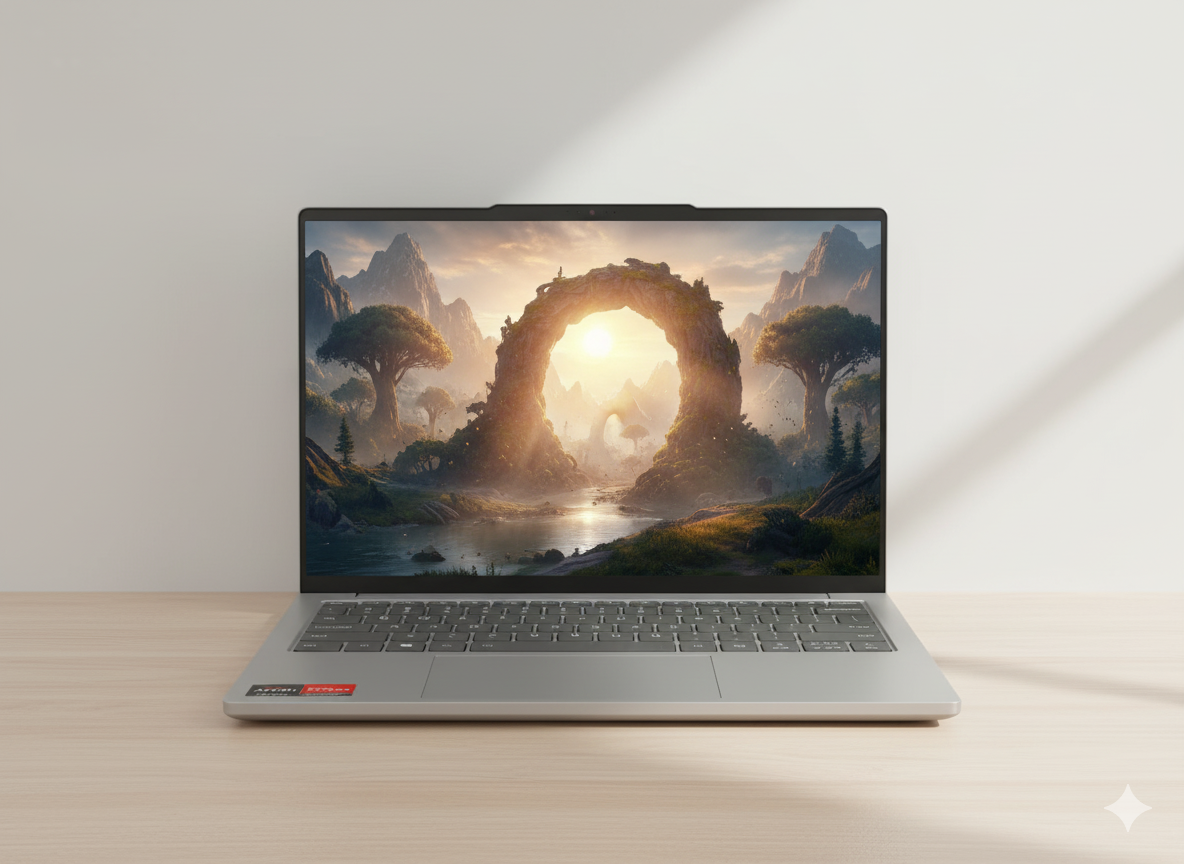
ReviewNest

Neopticon BrowseBook Review: Is It Good for Students? Ultimate Guide

Neopticon BrowseBook 15.6" Laptop
Neopticon BrowseBook 15.6″ (8GB/256GB) Review – Full Details

Neopticon BrowseBook 15.6″ Laptop (8GB/256GB)

15.6″ FHD IPS Display Numeric Keypad 8GB RAM 256GB SSD Windows 11 Home 1.5kg Lightweight

The Neopticon BrowseBook 15.6″ is the productivity-focused hero of the ultra-budget laptop world. For just ₹16,990, it combines the most powerful configuration in the series—8GB RAM and a 256GB SSD—with a large, immersive 15.6-inch Full HD IPS display and a dedicated numeric keypad.

This unique combination makes it the ideal choice for students and home office users who need more screen real estate for their work and appreciate the efficiency of a numpad for data entry. While still based on the modest Intel Celeron N4020 platform, this “Made in India” laptop prioritizes a comfortable and efficient desktop-like experience at a price that remains accessible to everyone.

Productivity on a Bigger Canvas

A larger screen and a numeric keypad to supercharge your workflow.

Expansive 15.6″ FHD IPS Display

The large 15.6-inch Full HD screen provides a comfortable, expansive workspace, making it easier to view documents side-by-side or enjoy movies. The IPS panel ensures colors are vibrant and viewing angles are excellent.

Dedicated Numeric Keypad

A key feature for productivity, the integrated numeric keypad makes data entry, calculations, and working with spreadsheets significantly faster and more efficient than on a standard keyboard layout.

The Most Capable Configuration

With 8GB of RAM, this model delivers the smoothest experience in the BrowseBook lineup.

8GB RAM for Light Multitasking

The upgrade to 8GB of RAM is crucial for a smooth Windows 11 experience. It allows you to comfortably browse with several tabs open, listen to music, and work on documents without the frustrating lag common to 4GB systems.

Practical 256GB SSD Storage

The 256GB SSD provides a solid foundation for your operating system, essential applications, and personal files, ensuring fast boot-up and snappy program loading while offering enough space for everyday use.

Full Specifications Table

General Information

  • Brand:Neopticon
  • Model Name:BrowseBook
  • Model Number:BBN40825615
  • Color:Grey

Processor & Graphics

  • Processor:Intel Celeron N4020 (Dual Core, up to 2.8 GHz)
  • Graphic Card:Integrated Intel UHD Graphics

Memory & Storage

  • Memory:8 GB LPDDR4 RAM
  • Storage:256 GB SSD

Display & Input

  • Display Size:15.6 inch
  • Display Resolution:1920 x 1080 (Full HD)
  • Display Technology:IPS Panel
  • Keyboard:Full-size keyboard with Numeric Keypad

Connectivity & Battery

  • Wireless:Wi-Fi, Bluetooth
  • Ports:USB 3.0, USB Type-C, Mini HDMI, Micro SD Card Slot, 3.5mm Audio Jack
  • Battery:38Wh (5000mAh)

OS & Warranty

  • Operating System:Windows 11 Home
  • Warranty:1 Year Warranty

Pros and Cons: A Balanced View

Pros:

  • Large 15.6-inch FHD IPS Screen: Excellent for productivity and media.
  • Includes Numeric Keypad: A huge plus for data entry and spreadsheet work.
  • 8GB of RAM: Provides a much smoother multitasking experience than 4GB models.
  • Excellent Value for Money: An unbeatable combination of screen size and specs for the price.
  • Still Lightweight: Very portable for a 15.6-inch laptop at only 1.5 kg.

Cons:

  • Weak Processor: The Celeron N4020 is the primary performance bottleneck.
  • Not for Heavy Workloads: Unsuitable for gaming, video editing, or intensive software.
  • Basic Build and Webcam Quality: The focus is on internal specs, not external polish.
  • Unproven Brand Longevity: As a new market entrant, long-term reliability is unknown.

Who Is This Laptop For?

  • Home Office and Small Business Users: Perfect for accounting, data entry, and document management on a tight budget.
  • Students (Especially Business/Finance): The large screen and numpad are ideal for working with spreadsheets and datasets.
  • Media Consumption Enthusiasts: An excellent, affordable “Netflix machine” with a large, high-quality screen.

Who Might Consider Other Options?

  • Users Who Prioritize Portability: The 14.1-inch model is lighter and more compact for those constantly on the move.
  • Anyone Needing More CPU Power: If your workflow involves more than basic apps, a laptop with a Core i3 or Ryzen 3 processor is a necessary step up.
  • Gamers or Content Creators: This machine lacks the dedicated graphics and processing power for these tasks.

Competitive Edge: The Budget Productivity King

This BrowseBook model stands out by offering a desktop-like productivity setup at an entry-level price.

  • The Screen and Numpad Combo: Its biggest advantage is the combination of a large 15.6″ FHD IPS screen and a full numeric keypad. This pairing is virtually unheard of in the sub-₹17,000 price category and is a massive boon for productivity.
  • The 8GB RAM Standard: By including 8GB of RAM, it provides a genuinely usable Windows 11 experience for light multitasking, setting it apart from the 4GB competition that often feels sluggish.
  • Maximum Features for Minimal Cost: It successfully bundles the most desirable features for a home office or student user—big screen, numpad, adequate RAM and storage—into the most affordable package possible.

Final Verdict: The Best Budget Laptop for a Desktop-Like Experience

The Neopticon BrowseBook 15.6″ with 8GB of RAM is the definitive choice for any budget-conscious user who values screen real estate and productivity. It takes the winning formula of the 14-inch model and enhances it with a larger display and a numeric keypad, creating an excellent, low-cost workstation for data entry, spreadsheet work, and media consumption.

While the Celeron processor means you must keep your performance expectations in check, the 8GB of RAM ensures the experience is as smooth as it can be. If you primarily work from a desk and want the most comfortable and efficient setup for basic tasks without spending a fortune, this specific model offers an unbeatable and highly intelligent combination of features for the price.

★★★★☆

Overall Rating: 4.6 out of 5.0 (For Budget Productivity)
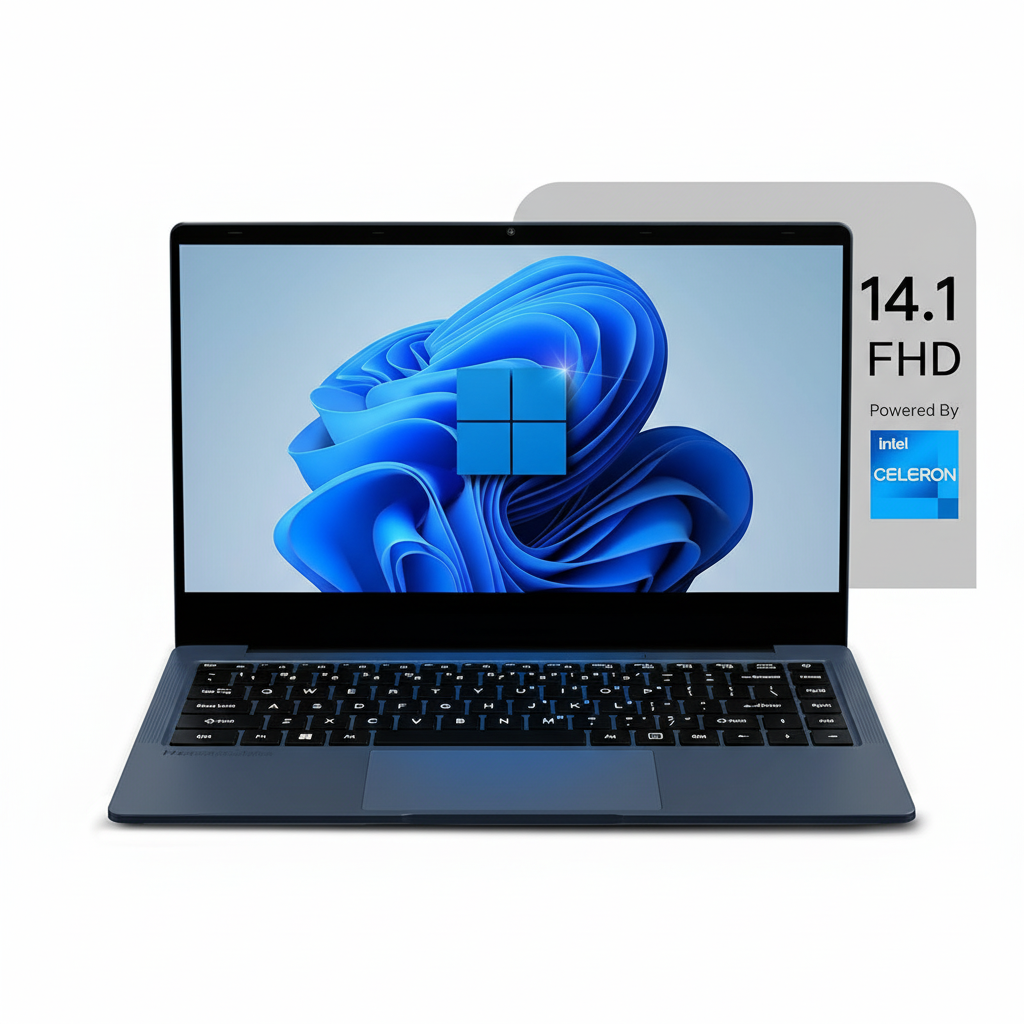
Neopticon BrowseBook: The Ultimate Budget Laptop with a 256GB SSD & FHD Screen

Neopticon BrowseBook
Neopticon BrowseBook 14.1″ (256GB) Laptop Review – Full Details

Neopticon BrowseBook 14.1″ Laptop (256GB)

14.1″ FHD IPS Display Intel Celeron N4020 256GB SSD 4GB RAM Windows 11 Home 1.3kg Lightweight

The Neopticon BrowseBook 14.1″ (256GB model) represents the smart-buy sweet spot in the ultra-budget laptop category. For a modest price of ₹13,990, it takes the best feature of the base model—its excellent FHD IPS display—and pairs it with a more practical 256GB SSD, addressing the primary concern of limited storage.

This configuration maintains the same efficient Intel Celeron N4020 processor and 4GB RAM, focusing squarely on essential tasks like web browsing, document editing, and video streaming. By doubling the storage, this “Made in India” laptop becomes a much more viable and long-lasting option for students and basic home users who need to install a few essential applications alongside Windows 11.

The Sweet Spot: More Storage, Better Value

The key upgrade that makes this model the intelligent choice for budget buyers.

Spacious 256GB SSD

The jump to a 256GB SSD is the most significant upgrade. This provides ample space for the Windows 11 OS, essential applications like Office or Zoom, and a comfortable amount of personal files, greatly improving the laptop’s long-term usability.

Excellent Full HD IPS Display

This model retains the excellent 14.1-inch Full HD (1920×1080) IPS screen. It delivers sharp text, vibrant colors, and wide viewing angles that are far superior to the displays on most other laptops in this rock-bottom price tier.

Performance for the Essentials

A lightweight system optimized for web browsing, streaming, and document work.

Efficient, Basic Processing

The Intel Celeron N4020 processor and 4GB of RAM are configured for basic single-tasking. Expect smooth performance for writing emails, watching YouTube, or working in a single application, but not for heavy multitasking.

Lightweight and Portable

At just 1.3 kg, the BrowseBook is effortless to carry. Combined with its 38Wh battery, it provides enough power and portability for students to take to campus or for use as a convenient travel companion for basic tasks.

Full Specifications Table

General Information

  • Brand:Neopticon
  • Model Name:BrowseBook
  • Model Number:BBN40425614
  • Color:Grey

Processor & Graphics

  • Processor:Intel Celeron N4020 (Dual Core, up to 2.8 GHz)
  • Graphic Card:Integrated Intel UHD Graphics

Memory & Storage

  • Memory:4 GB LPDDR4 RAM
  • Storage:256 GB SSD

Display Details

  • Display Size:14.1 inch
  • Display Resolution:1920 x 1080 (Full HD)
  • Display Technology:IPS Panel

Connectivity & Battery

  • Wireless:Wi-Fi, Bluetooth
  • Ports:USB 3.0, USB Type-C, Mini HDMI, Micro SD Card Slot, 3.5mm Audio Jack
  • Battery:38Wh (5000mAh)

OS & Warranty

  • Operating System:Windows 11 Home
  • Warranty:1 Year Warranty

Pros and Cons: A Balanced View

Pros:

  • Excellent Value: An exceptional price for a laptop with a 256GB SSD and FHD display.
  • Superior FHD IPS Display: The screen quality is the best feature and is unmatched at this price.
  • More Usable Storage: 256GB is much more practical for installing apps and storing files than the 128GB base model.
  • Lightweight and Portable: Very easy to carry at just 1.3 kg.
  • Good Port Selection: Offers a useful range of modern and legacy ports.

Cons:

  • Very Basic Performance: The Celeron CPU and 4GB RAM are a significant bottleneck for multitasking.
  • Not for Demanding Tasks: Cannot handle gaming, video editing, or heavy software.
  • Basic Build Quality: Made of plastic to keep costs down.
  • Unproven Brand Reliability: Long-term durability and customer support are not well-established.

Who Is This Laptop For?

  • The Savvy Student: Someone who needs a cheap laptop for online classes and assignments but wants enough storage for a few key apps.
  • The Basic Home User: Ideal for household use like paying bills online, browsing recipes, social media, and streaming videos.
  • The Value-Conscious Buyer: Anyone looking for the absolute most for their money in the sub-₹15,000 category.

Who Might Consider Other Options?

  • Heavy Multitaskers: The 4GB of RAM will cause frustration for anyone who keeps many browser tabs or multiple programs open.
  • Anyone with Performance Needs: If your work or hobby involves anything more demanding than a web browser and a text editor, this is not the laptop for you.
  • Users Who Need More Storage: While 256GB is a good start, it can still be filled quickly. Heavy file hoarders will need to rely on external drives.

Competitive Edge: The Value Sweet Spot

This BrowseBook model finds its edge by balancing its best feature with more practical storage.

  • FHD IPS Display + 256GB SSD Combo: This model’s key advantage is offering both a great screen and a usable amount of storage at a price where competitors often force you to choose one or the other (or neither).
  • Full Windows vs. Competitors: It provides the full, familiar Windows 11 Home operating system, which is more versatile for installing specific desktop applications than ChromeOS-based rivals in the same price bracket.
  • Aggressive Price-to-Feature Ratio: The combination of screen quality, storage size, and ultra-low price makes its overall value proposition extremely difficult for established brands to match.

Final Verdict: The Smartest Ultra-Budget Choice

The Neopticon BrowseBook 14.1″ with 256GB SSD is the standout model in the lineup and a truly compelling offer for the ultra-budget market. It smartly retains the excellent Full HD IPS display from the base model while doubling the storage, which makes it a far more practical and future-proof device for a very small increase in price.

While its performance is strictly limited to basic, single-task operations, it excels at those tasks thanks to its snappy SSD and great screen. For students, home users, or anyone needing a simple, portable Windows machine without breaking the bank, this specific configuration offers the best balance of features and value available. It’s a prime example of getting the most for your money where it truly enhances the daily experience.

★★★★☆

Overall Rating: 4.2 out of 5.0 (For Ultra-Budget Laptops)

Neopticon BrowseBook: The Best Budget Laptop for Multitasking – 8GB RAM, FHD Display

Neopticon BrowseBook
Neopticon BrowseBook 14.1″ (8GB/256GB) Review – Full Details

Neopticon BrowseBook 14.1″ Laptop (8GB/256GB)

8GB RAM 256GB SSD 14.1″ FHD IPS Display Intel Celeron N4020 Windows 11 Home 1.3kg Lightweight

The Neopticon BrowseBook 14.1″ (8GB/256GB) is the top-of-the-line configuration in this ultra-budget series, and it represents the most capable and well-rounded version of the device. For a price of ₹15,990, this model addresses the key performance bottleneck of the cheaper variants by doubling the RAM to 8GB.

This crucial upgrade, combined with the practical 256GB SSD and the excellent Full HD IPS display, makes this the most usable BrowseBook for light multitasking. While still powered by the entry-level Intel Celeron N4020 processor, the additional RAM significantly improves the experience in Windows 11, making this the definitive choice for students and home users seeking the absolute best performance possible at this price point.

The Best of a Budget Breed

This model unlocks the true potential of the BrowseBook platform with essential upgrades.

8GB RAM for Smoother Multitasking

The jump to 8GB of RAM is the single most important upgrade in this model. It allows for a much smoother experience when multitasking, such as running a web browser with multiple tabs, a music streaming app, and a word processor simultaneously without significant slowdowns.

Ample Storage and Great Display

This configuration combines the best features of the series: a practical 256GB SSD for your OS and applications, and the crisp, vibrant 14.1-inch Full HD IPS display that makes all content look great, from spreadsheets to movies.

Core Performance and Portability

Maintains the lightweight design and essential connectivity of the series.

Efficient Celeron Processor

The Intel Celeron N4020 remains the heart of the machine, providing efficient, low-power processing for everyday tasks. It’s best suited for web browsing, office applications, and media consumption.

Ultra-Light and Connected

The laptop’s featherlight 1.3 kg weight and comprehensive port selection—including USB-C and Mini HDMI—are retained, making it an excellent portable companion for school or home use.

Full Specifications Table

General Information

  • Brand:Neopticon
  • Model Name:BrowseBook
  • Model Number:BBN40825614
  • Color:Grey

Processor & Graphics

  • Processor:Intel Celeron N4020 (Dual Core, up to 2.8 GHz)
  • Graphic Card:Integrated Intel UHD Graphics

Memory & Storage

  • Memory:8 GB LPDDR4 RAM
  • Storage:256 GB SSD

Display Details

  • Display Size:14.1 inch
  • Display Resolution:1920 x 1080 (Full HD)
  • Display Technology:IPS Panel

Connectivity & Battery

  • Wireless:Wi-Fi, Bluetooth
  • Ports:USB 3.0, USB Type-C, Mini HDMI, Micro SD Card Slot, 3.5mm Audio Jack
  • Battery:38Wh (5000mAh)

OS & Warranty

  • Operating System:Windows 11 Home
  • Warranty:1 Year Warranty

Pros and Cons: A Balanced View

Pros:

  • Most Capable Performer: 8GB RAM makes a noticeable difference for light multitasking.
  • Excellent Value Proposition: The best combination of RAM, storage, and display for the price.
  • Great FHD IPS Display: A feature that elevates the entire user experience.
  • Lightweight and Portable: Easy to carry at just 1.3 kg.
  • Good Port Selection: All the essential ports are included.

Cons:

  • CPU is a Bottleneck: The Celeron processor holds back the potential of the 8GB RAM.
  • Not for Heavy Use: Strictly for basic productivity and media consumption.
  • Basic Build and Webcam: Costs are cut on the chassis and camera quality.
  • Unproven Brand: Long-term reliability is still a question mark.

Who Is This Laptop For?

  • The Power-Conscious Student: A student who wants to run a few apps at once (e.g., browser, music, Word) without major slowdowns.
  • The Impatient Home User: Someone who values a smoother experience and is willing to pay a little extra to avoid the lag of a 4GB system.
  • The Ultimate Budget-Seeker: A user who wants the absolute most performance and features possible without crossing the ₹16,000 mark.

Who Might Consider Other Options?

  • Anyone with a Slightly Higher Budget: Spending a few thousand more can get you a laptop with a much more powerful Core i3 or Ryzen 3 processor.
  • Users Needing Longevity: The Celeron processor will feel dated much faster than a more capable CPU.
  • Gamers or Creatives: This machine lacks the processing and graphics power for any form of gaming or content creation.

Competitive Edge: The Multitasking King of Budget Laptops

This BrowseBook configuration stands alone by offering a usable multitasking experience at a price where it’s virtually nonexistent.

  • The 8GB RAM Advantage: Its primary edge is the inclusion of 8GB of RAM. At this price, almost every competitor is stuck with 4GB, which struggles with modern Windows 11. The extra RAM makes this the most usable and least frustrating laptop in its class for everyday multitasking.
  • The Complete Budget Package: It combines the three most important features for a good user experience—a great display, usable RAM, and adequate SSD storage—at a price point that is simply unmatched by other brands.
  • Maximum Value Extraction: This model represents the absolute peak of the BrowseBook’s value proposition, squeezing every last drop of performance and usability out of the ultra-budget platform.

Final Verdict: The Best Sub-₹16,000 Laptop, Period.

The Neopticon BrowseBook 14.1″ with 8GB RAM and a 256GB SSD is, without a doubt, the smartest purchase in the entire ultra-budget laptop market. By addressing the critical performance limitation of its cheaper siblings—the 4GB of RAM—this model transforms from a single-task device into a genuinely usable light multitasker.

The experience of using Windows 11 with 8GB of RAM is significantly smoother, and when paired with the excellent FHD IPS display and a decent-sized SSD, the result is a laptop that feels far more expensive than it is. While the Celeron processor remains a limiting factor for heavy workloads, it is perfectly adequate for the target audience. If your budget is firmly under ₹16,000, this is the most capable, well-balanced, and intelligent choice you can make.

★★★★☆

Overall Rating: 4.5 out of 5.0 (The Best Value Configuration)

Neopticon BrowseBook 14.1″ Laptop – FHD IPS, 128GB SSD, Windows 11 – ₹11,990

Neopticon BrowseBook
Neopticon BrowseBook 14.1″ Laptop Review – Full Details

Neopticon BrowseBook 14.1″ Laptop

14.1″ FHD IPS Display Intel Celeron N4020 128GB SSD 4GB RAM Windows 11 Home 1.3kg Lightweight

The Neopticon BrowseBook 14.1″ is an ultra-budget laptop that aims to deliver essential computing features at an astonishingly low price point of ₹11,990. Designed and manufactured in India, this device targets students, first-time laptop owners, and users with very basic needs, offering a surprisingly good display and a lightweight design for its cost.

It makes smart compromises, pairing a basic Intel Celeron N4020 processor and 4GB of RAM with a standout Full HD IPS screen—a feature rarely seen in this segment. While it’s not built for heavy lifting, the BrowseBook provides a full Windows 11 Home experience for web browsing, document editing, and video streaming, making it a compelling option for those on the tightest of budgets.

A Display That Punches Above Its Weight

Experience sharp, vibrant visuals usually reserved for more expensive laptops.

Full HD IPS Screen

The standout feature of the BrowseBook is its 14.1-inch Full HD (1920×1080) IPS display. Unlike the washed-out, low-resolution TN panels common in this price range, this screen delivers sharper text, more vibrant colors, and much better viewing angles, making it great for watching videos, browsing the web, and attending online classes.

Performance for Everyday Essentials

Optimized for basic tasks like web browsing, email, and document editing.

Efficient Intel Celeron Processor

The Intel Celeron N4020 dual-core processor is designed for light, everyday tasks. It capably handles web browsing with a few tabs, running Microsoft Office applications, and streaming media, but will struggle with heavy multitasking or demanding software.

SSD for Snappy Response

The inclusion of a 128GB SSD (Solid State Drive) instead of a slower eMMC or traditional hard drive is a smart choice. It allows for much faster boot times and quicker application loading, making the laptop feel more responsive in day-to-day use.

Lightweight and Connected

An ultra-portable design with all the essential ports you need.

Ultra-Portable at 1.3kg

Weighing just 1.3 kg, the BrowseBook is incredibly easy to carry around. Its lightweight and compact form factor make it an ideal companion for students to take to class or for use as a secondary “couch computer” at home.

Versatile Port Selection

For a budget device, the BrowseBook offers an excellent selection of ports. It includes USB 3.0, a Type-C port, a Mini HDMI for connecting to external displays, a Micro SD card slot for expanding storage, and a headphone jack, minimizing the need for dongles.

Full Specifications Table

General Information

  • Brand:Neopticon
  • Model Name:BrowseBook
  • Model Number:BBN40412814
  • Color:Grey

Processor & Graphics

  • Processor:Intel Celeron N4020 (Dual Core, up to 2.8 GHz)
  • Graphic Card:Integrated Intel UHD Graphics

Memory & Storage

  • Memory:4 GB LPDDR4 RAM
  • Storage:128 GB SSD

Display Details

  • Display Size:14.1 inch
  • Display Resolution:1920 x 1080 (Full HD)
  • Display Technology:IPS Panel

Connectivity & Battery

  • Wireless:Wi-Fi, Bluetooth
  • Ports:USB 3.0, USB Type-C, Mini HDMI, Micro SD Card Slot, 3.5mm Audio Jack
  • Battery:38Wh (5000mAh)

OS & Warranty

  • Operating System:Windows 11 Home
  • Warranty:1 Year Warranty

Pros and Cons: A Balanced View

Pros:

  • Extremely Affordable Price: Unbeatable value for a full Windows 11 laptop.
  • Excellent FHD IPS Display: A sharp, vibrant screen that is rare in this budget segment.
  • Very Lightweight and Portable: At only 1.3kg, it’s easy to carry everywhere.
  • Good Selection of Ports: Includes USB-C and Mini HDMI, reducing the need for dongles.
  • Fast Boot Times: The SSD ensures the OS and apps load quickly.

Cons:

  • Very Limited Performance: The Celeron N4020 and 4GB RAM are only suitable for basic single-tasking.
  • Small Storage Capacity: 128GB will fill up quickly; reliance on cloud or external storage is necessary.
  • Basic Build Quality: The all-plastic construction is functional but not premium.
  • Unknown Brand Reliability: As a new brand, long-term durability and customer service are unproven.

Who Is This Laptop For?

  • Students on a Tight Budget: Perfect for attending online classes, browsing for research, and writing assignments in Google Docs or Microsoft Office Online.
  • First-Time Laptop Users: A low-risk entry into the world of computing for basic email, social media, and web browsing.
  • As a Secondary “Beater” Device: An excellent, inexpensive secondary laptop for the kitchen or travel, used primarily for media consumption and browsing.

Who Might Consider Other Options?

  • Anyone Who Multitasks: The 4GB of RAM is a major bottleneck and is not suitable for running multiple applications or having many browser tabs open.
  • Users of Demanding Software: This laptop cannot run photo/video editing software, modern games, or programming IDEs effectively.
  • Those Needing Large Offline Storage: If you need to store large files, applications, or games locally, the 128GB SSD is insufficient.

Competitive Edge: The Display is King

The BrowseBook’s main advantage is its screen, which elevates the entire user experience above its budget-class rivals.

  • Full HD IPS at an Entry-Level Price: Its single greatest advantage is the 1080p IPS display. Competitors at this price almost universally use dim, low-resolution 768p TN panels. The BrowseBook’s superior screen makes video content and text significantly better to look at.
  • Full Windows 11 Experience: Unlike Chromebooks in this price range, it runs a full version of Windows 11 Home, offering broader (though slower) software compatibility and a familiar interface for most users.
  • Aggressive, Unbeatable Pricing: At its sale price, the BrowseBook undercuts nearly every other laptop that offers a comparable display and SSD storage, making it a purely value-driven choice.

Final Verdict: A Smart Compromise for the Ultra-Budget Buyer

The Neopticon BrowseBook 14.1″ is a laptop built on a foundation of intelligent compromises. It forgoes processing power to deliver a user experience that feels surprisingly premium where it counts most for basic users: the display. Its Full HD IPS screen is a game-changer in this ultra-budget segment, making everyday tasks like watching YouTube and browsing the web far more enjoyable than on its rivals.

You must be clear about its limitations: this is not a device for multitasking, gaming, or any demanding software. It is a simple tool for simple tasks. However, for a student needing a portable note-taker, a family needing a basic web browser, or as a secondary media device, its value is undeniable. If your budget is absolute rock-bottom and your needs are modest, the Neopticon BrowseBook is one of the smartest purchases you can make.

★★★★☆

Overall Rating: 4.0 out of 5.0 (For Basic Use Only)

Need Power on a Budget? The Lenovo IdeaPad Slim 3i Packs a Performance Punch for Students & Office.

Lenovo IdeaPad Slim 3i 12th Gen (Intel i5) Laptop Review – Full Details

IdeaPad Slim 3i 12th Gen, 39.62cms – Intel i5

Intel® Core™ i5-12450H 16GB LPDDR5 RAM 512GB SSD Intel® UHD Graphics 15.6” FHD TN Windows 11 Home

The Lenovo IdeaPad Slim 3i 12th Gen is a mainstream workhorse laptop that prioritizes raw processing power over visual flair, aiming to deliver exceptional value for students and office users. Priced competitively at ₹54,990, it packs a high-performance H-series processor and a generous 16GB of RAM—a combination rarely seen in this segment.

At its core, this laptop is built around the powerful Intel® Core™ i5-12450H Processor, designed for demanding productivity tasks. It pairs this with 16GB of fast LPDDR5 RAM and a 512GB PCIe Gen4 SSD for a responsive experience. However, to meet its aggressive price point, it makes a significant compromise with a basic 15.6-inch FHD TN display. Encased in a durable Arctic Grey chassis and bundled with MS Office Home 2024 and a comprehensive warranty, the IdeaPad Slim 3i presents a compelling, if unbalanced, package for performance-focused buyers.

Key Features at a Glance

High-Performance H-Series CPU: A powerful 12th Gen Intel Core i5 processor for demanding tasks.
Generous 16GB RAM: Fast LPDDR5 memory ensures smooth multitasking.
Full-Size Backlit Keyboard: Includes a dedicated number pad for enhanced productivity.
Durable Build Quality: Engineered with military-grade (MIL-STD-810H) quality for on-the-go use.
Excellent Value Bundle: Comes preloaded with a lifetime license for MS Office Home 2024.
Comprehensive Warranty: Includes 1 Year On-site support and 1 Year Accidental Damage Protection.

H-Series Power for Productivity Workflows

The H-Series Advantage

The star of the show is the Intel® Core™ i5-12450H Processor. Unlike the low-power U-series chips common in this price range, this 45W H-series processor offers significantly higher multi-core performance, making it well-suited for heavy multitasking, coding, running virtual machines, and demanding office applications without throttling.

Basic Integrated Graphics

The integrated Intel® UHD Graphics are sufficient for driving the display and handling video playback. However, they are not intended for gaming or graphically intensive creative work like video editing, which would require a laptop with a discrete GPU.

Fast but Fixed 16GB Memory

With 16GB of LPDDR5-4800MT/s RAM, the system capably handles numerous browser tabs, large documents, and multiple apps simultaneously. As is common in thin laptops, this memory is soldered to the motherboard and cannot be upgraded later.

Responsive Gen4 Storage

The 512GB M.2 PCIe Gen4 SSD ensures quick boot times and rapid application loading. While the QLC (Quad-Level Cell) nature means it has lower theoretical endurance than more expensive TLC drives, this is unnoticeable for typical office and student workloads.

Functional Design & Display Compromises

The Display: A Major Trade-Off

To afford the powerful CPU, Lenovo made its biggest compromise on the display. The 15.6-inch FHD panel is a TN (Twisted Nematic) type, which results in poor viewing angles. Its low brightness of 250 nits and limited color coverage (45% NTSC) make for a washed-out image that is difficult to use in bright rooms and wholly unsuitable for color-sensitive work.

Practical and Durable Chassis

The laptop features a sleek Arctic Grey finish and boasts a military-grade (MIL-STD-810H) rated chassis, ensuring it can withstand the bumps and scrapes of daily commutes. At 10% slimmer than the previous generation, it remains quite portable for a 15.6-inch device.

Productivity-Focused Inputs

The backlit keyboard is a highlight, offering a comfortable typing experience with the significant advantage of a dedicated number pad. This forces the main keyboard and trackpad to be off-center, which can feel awkward but is a boon for anyone working with spreadsheets or data entry. The webcam includes a physical privacy shutter for peace of mind.

Comprehensive Connectivity & Value-Added Support

Modern Port Selection

The laptop is well-equipped for peripherals and displays:

  • 1x USB-C® 3.2 Gen 1: A full-function port supporting data, power delivery, and DisplayPort 1.2.
  • 2x USB-A 3.2 Gen 1: For connecting legacy devices like mice and keyboards.
  • HDMI® 1.4: For connecting to external monitors or projectors.
  • SD card reader & Headphone/mic jack.

Wireless & Software

Equipped with Wi-Fi 6 and Bluetooth® 5.1, the laptop offers fast and reliable wireless performance. The inclusion of a lifetime license for Microsoft Office Home & Student 2024 adds tremendous value right out of the box, saving users a significant expense.

Enhanced Warranty & Protection

Lenovo includes a strong support package as standard: 1 Year of On-site Warranty for convenient hardware service and 1 Year of Accidental Damage Protection (ADP), which covers spills, drops, and other unforeseen mishaps.

Full Specifications Table

General Information

  • Brand: Ideapad (Lenovo)
  • Model: IdeaPad Slim 3i 12th Gen (83ER00MCIN)
  • OS: Windows 11 Home Single Language 64
  • Color: Arctic Grey

Processor & Graphics

  • Processor: 12th Gen Intel® Core™ i5-12450H (E-cores up to 3.30 GHz, P-cores up to 4.40 GHz)
  • Graphics: Integrated Intel® UHD Graphics for 12th Gen Intel® Processors

Memory & Storage

  • Memory: 16 GB LPDDR5-4800MT/s (Soldered)
  • Storage: 512 GB SSD M.2 2242 PCIe Gen4 QLC

Display

  • Size: 39.62cms (15.6 inch)
  • Resolution: FHD (1920 x 1080)
  • Technology: TN, Anti-Glare, Non-Touch, 45% NTSC, 250 nits, 60 Hz

Input & Connectivity

  • Keyboard: Backlit, Storm Grey – English (US) with Numpad
  • Pointing Device: ClickPad
  • Wireless: Wi-Fi 6 2×2 AX & Bluetooth® 5.1 or above
  • Ports: 1x USB-C 3.2 Gen 1 (full function), 2x USB-A 3.2 Gen 1, HDMI 1.4, SD Card Reader, Headphone / mic combo

Software & Services

  • Software Preload: MS Office Home 2024
  • Warranty & Services: 1 Year On-site Warranty + 1 Year Accidental Damage Protection

Pros and Cons: A Balanced View

Pros:

  • Excellent CPU Performance: The Core i5-H series processor is a powerhouse for this price point, ideal for demanding work.
  • Generous Memory: 16GB of fast LPDDR5 RAM ensures smooth multitasking across many applications.
  • Great Value Bundle: Comes with a lifetime license for MS Office 2024 and a comprehensive 1-year ADP warranty.
  • Productive Keyboard: A full-size, backlit keyboard with a dedicated number pad is great for office work and data entry.
  • Durable & Sturdy: Military-grade build quality provides peace of mind for daily commutes and travel.

Cons:

  • Very Poor Display Quality: The TN panel has terrible viewing angles, low brightness (250 nits), and poor color reproduction (45% NTSC).
  • Soldered RAM: No option to upgrade memory in the future, limiting long-term viability for power users.
  • Awkward Ergonomics: The off-center keyboard and trackpad layout, forced by the numpad, can be uncomfortable for touch typists.
  • Basic Graphics: Integrated Intel UHD graphics are only suitable for the lightest of tasks, not gaming or creative work.
  • Likely Short Battery Life: The power-hungry H-series CPU will likely result in mediocre battery performance compared to U-series laptops.

Who Is This Laptop For? Tailored Recommendations

  • Students & Office Users on a Budget: This is a perfect fit for users who need maximum processing power for coding, heavy spreadsheets, and multitasking, and care more about performance than screen quality.
  • “Desktop Replacement” Users: Ideal for those who plan to use the laptop primarily with an external monitor, keyboard, and mouse. In this scenario, the poor display and awkward ergonomics become irrelevant, and you get a powerful mini-PC for a great price.
  • Number Crunchers: Accountants, analysts, and anyone who lives in Excel will greatly appreciate the dedicated number pad.

Who Might Consider Other Options?

  • Anyone Doing Visual Work: The display’s extremely poor color accuracy and viewing angles make it an instant deal-breaker for photographers, designers, and video editors.
  • Media Lovers: If you want to watch movies and TV shows, the washed-out and dim TN panel will provide a disappointing experience.
  • Gamers: The integrated graphics are not capable of running modern games.
  • Users Prioritizing Portability & Battery Life: The H-series chip, while powerful, consumes more battery than a U-series chip, making it less ideal for long stretches away from a power outlet.

Competitive Edge: Power vs. Polish

In the sub-₹60,000 price bracket, the IdeaPad Slim 3i’s competitive edge is crystal clear: it sacrifices everything for raw CPU power.

  • Unmatched CPU Performance: Its key advantage is the Intel Core i5-12450H. Most competitors in this range, like the Acer Aspire Lite or HP 15s, use lower-power Core i3/i5 U-series chips. The Slim 3i will significantly outperform them in multi-threaded tasks, compiling code, or handling large datasets.
  • Generous High-Speed RAM: Offering 16GB of LPDDR5 RAM as standard is another strong point. Many rivals still offer only 8GB or slower DDR4 memory, giving the Slim 3i an edge in heavy multitasking.
  • The Display Deficit: This is where competitors win. For a similar price, other laptops will almost always offer a superior IPS display with better colors and viewing angles, making them far better for general use and media consumption. The Slim 3i is betting that its target user will prioritize performance over the screen.

Final Verdict: A Performance Powerhouse with a Major Flaw

The Lenovo IdeaPad Slim 3i 12th Gen is a laptop of extreme, calculated trade-offs. It delivers unbeatable processing power and memory speed in its price class, thanks to the Core i5-H CPU and 16GB of LPDDR5 RAM. For users whose primary concern is raw performance for tasks like coding, heavy browsing, or complex spreadsheets, this machine is a phenomenal value. The inclusion of Office 2024 and a strong ADP warranty further sweetens the deal.

However, this performance comes at the direct and severe expense of the screen. The low-quality TN display is a significant drawback that cripples the laptop’s versatility, making it unsuitable for any task that requires color accuracy or for simply enjoying media. Therefore, this laptop can only be recommended to a very specific user: someone on a strict budget who needs maximum CPU power for their work and either plans to use an external monitor or truly does not care about display quality. It’s a specialized tool, not an all-rounder.

★★★☆☆

Overall Rating: 3.5 out of 5.0 (For its Niche Audience)

Lenovo IdeaPad Slim 5: Unbeatable Power & Big-Screen Productivity for Less.

Lenovo IdeaPad Slim 5 Gen 10 (13.3″ AMD R7) Laptop Review – Full Details

IdeaPad Slim 5 Gen 10, 33.78cms – AMD R7

Ryzen™ 7 7735HS 16GB LPDDR5X RAM 512GB TLC SSD Radeon™ 680M 13.3” WUXGA IPS Windows 11 Home

The Lenovo IdeaPad Slim 5 Gen 10 (13.3-inch) is a masterclass in ultra-portable performance, offering a potent combination of power and mobility for those on the move. Priced at an attractive ₹63,491, this compact laptop is engineered for students, frequent travelers, and professionals who refuse to compromise on performance.

This model is powered by the formidable AMD Ryzen™ 7 7735HS Processor with integrated AMD Radeon™ 680M Graphics, ensuring a smooth and responsive experience. Its brilliant 13.3-inch WUXGA (1920 x 1200) IPS display boasts an impressive 400 nits brightness and an anti-glare finish, making it perfect for use in any environment. The system includes 16GB of high-speed LPDDR5X RAM and a high-quality 512GB PCIe Gen4 TLC SSD for enhanced durability and performance. Encased in a durable, lightweight Cloud Grey chassis and bundled with Office Home 2024 and a 1-year PremiumCare warranty with ADP, this laptop delivers outstanding value and portability.

This review will delve into the IdeaPad Slim 5’s exceptional blend of performance and portability, its bright display, and its overall value proposition, positioning it as a top choice for mobile productivity.

Key Features at a Glance

Ultra-Portable Design: Incredibly thin and light, weighing just over 1.1kg.
Powerful Ryzen™ 7 HS-Series CPU: High-performance processing for demanding tasks.
Bright 400-Nit IPS Display: Excellent visibility with anti-glare and 100% sRGB.
High-Quality TLC SSD: 512GB PCIe Gen4 TLC storage for better performance and endurance.
Advanced Wi-Fi 6E: Cutting-edge wireless for faster, more stable connections.
Comprehensive Warranty & ADP: 1 Year PremiumCare + Accidental Damage Protection.

Performance in a Portable Package

This compact IdeaPad Slim 5 packs a surprising amount of power for its size.

High-Performance Ryzen™ 7 CPU:

The AMD Ryzen™ 7 7735HS Processor is a standout feature, delivering desktop-class performance in an ultra-portable form factor. It excels at multitasking, productivity apps, and even light content creation, making no compromises on speed despite its small size.

Solid Integrated Graphics:

The integrated AMD Radeon™ 680M Graphics are well-suited for high-resolution video playback, everyday photo editing, and casual gaming. This makes the laptop a versatile companion for both work and entertainment.

Fast but Fixed 16GB LPDDR5X RAM:

The 16GB of LPDDR5X-6400MT/s RAM is plenty for ensuring a fluid multitasking experience. However, potential buyers should be aware that this memory is soldered and cannot be upgraded, a common trade-off for achieving such a thin profile.

High-Quality 512GB TLC SSD:

A key advantage is the inclusion of a 512GB PCIe Gen4 TLC SSD. TLC (Triple-Level Cell) drives offer better sustained performance and endurance compared to the more common QLC drives in this price range, ensuring long-term system responsiveness.

Bright Display & Ultra-Portable Design

The laptop’s design prioritizes mobility and visual clarity.

Brilliant 400-Nit IPS Display:

The 13.3-inch WUXGA (1920 x 1200) IPS display is a major highlight. With 400 nits of brightness, it’s significantly brighter than many competitors, making it easily viewable outdoors or in bright rooms. The anti-glare finish and 100% sRGB color accuracy create a viewing experience that is both comfortable and vibrant.

Extreme Portability:

Weighing in at just 2.57lbs (approx. 1.17 kg) and measuring only 14.2mm thin, this is a true ultra-portable. Its compact footprint and light weight make it an ideal companion for anyone who works or studies on the go, fitting easily into any backpack. The metal chassis is also MIL-STD-810H certified for durability.

Smart Security & Input:

The laptop includes a high-quality FHD IR camera with a privacy shutter, enabling secure and convenient password-free logins via Windows Hello. The comfortable backlit keyboard and precise ClickPad round out an excellent user input experience.

Comprehensive Connectivity & Value-Added Support

Despite its size, the IdeaPad Slim 5 Gen 10 doesn’t skimp on connectivity or support.

Versatile Port Selection:

The laptop offers a robust array of ports, rare for an ultra-portable:

  • 2x USB-C® (10Gbps) with PD 3.0 & DP 1.4: For charging, data, and displays.
  • 2x USB-A (5Gbps), one always-on: For connecting all your existing peripherals.
  • HDMI® 2.1: For easy connection to TVs and monitors.
  • Micro SD card reader: A convenient extra for creators.
  • Headphone / mic combo jack.

Future-Proof Wireless with Wi-Fi 6E:

Features the latest Wi-Fi 6E (2×2 AX), offering access to the 6GHz band for lower latency and faster speeds in supported environments, along with Bluetooth® 5.3.

Ready-to-Go Software:

Ships with a perpetual license for Microsoft Office Home 2024, providing essential productivity tools from day one.

Complete Peace of Mind:

Includes a comprehensive 1 Year PremiumCare warranty and 1 Year Accidental Damage Protection, offering top-tier support and coverage against drops and spills.

Full Specifications

General Information

  • Brand: Ideapad (Lenovo)
  • Model Name: IdeaPad Slim 5 Gen 10 (13, AMD)
  • Operating System: Windows 11 Home Single Language 64
  • Color: Cloud Grey

Processor & Graphics

  • Processor: AMD Ryzen™ 7 7735HS Processor (3.20 GHz up to 4.75 GHz)
  • Graphic Card: Integrated AMD Radeon™ 680M

Memory & Storage

  • Memory: 16 GB LPDDR5X-6400MT/s (Soldered)
  • Storage: 512 GB SSD M.2 2242 PCIe Gen4 TLC

Display Details

  • Display Size: 33.78cms (13.3 inch)
  • Display Resolution: WUXGA (1920 x 1200)
  • Display Technology: IPS, Anti-Glare, Non-Touch, 100%sRGB, 400 nits, 60 Hz

Input & Audio

  • Keyboard: Backlit, Luna Grey – English (US)
  • Pointing Device: ClickPad
  • Webcam: FHD IR camera with privacy shutter

Connectivity

  • WIFI: Wi-Fi 6E 2×2 AX
  • Bluetooth: Bluetooth® 5.3
  • Ports: 2x USB-C® (USB 10Gbps) with Power Delivery 3.0 & DisplayPort 1.4, 1x USB-A (USB 5Gbps, always on), 1x USB-A (USB 5Gbps), HDMI® 2.1, Micro SD card reader, Headphone / mic combo jack

Power & Dimensions

  • AC Adapter / Power Supply: 65W
  • Dimensions (W x D x H): ~304 x 215 x 14.2 mm
  • Weight: Starting at 1.17 kg (2.57 lbs)

Software & Services

  • Software Preload: Office Home 2024
  • Warranty: 1 Year Onsite Warranty + 1 Year PremiumCare
  • Services: 1 Year Accidental Damage Protection

Pros and Cons: A Balanced View for Buyers

Pros:

  • Exceptional Portability: Extremely thin and lightweight design makes it perfect for users on the go.
  • Powerful HS-Series Processor: The Ryzen 7 7735HS offers outstanding performance for such a compact machine.
  • Bright Anti-Glare Display: The 400-nit IPS screen is bright, color-accurate, and comfortable to use in any lighting condition.
  • High-Quality TLC SSD: Offers better long-term performance and durability than the QLC drives found in many competitors.
  • Future-Proof Wi-Fi 6E: Provides the latest in wireless connectivity for faster, more reliable internet.
  • Complete Value Package: Bundled with Office 2024, PremiumCare, and Accidental Damage Protection.

Cons:

  • Soldered RAM: The 16GB of memory is not upgradeable, limiting future-proofing for very heavy workloads.
  • Limited Storage Capacity: 512GB may not be sufficient for users with large game libraries or extensive media files.
  • Standard 60Hz Refresh Rate: While fine for productivity, it lacks the fluidity of higher refresh rate screens.
  • No Discrete GPU Option: The integrated graphics are strong but not suitable for demanding 3D rendering or high-end gaming.

Who Is This Laptop For? Tailored Recommendations

The 13.3-inch IdeaPad Slim 5 is the ultimate choice for users who prioritize mobility above all else:

  • Frequent Travelers & Commuters: Its incredibly light and compact form factor makes it the perfect travel companion without sacrificing CPU performance.
  • University Students: Ideal for carrying between classes, the library, and home. It’s powerful enough for any academic task and has a bright screen for working anywhere.
  • Mobile Professionals: For those who work from coffee shops, client sites, or co-working spaces, this laptop offers serious power in a package that won’t weigh them down.
  • Users Who Value a Bright, Matte Screen: Anyone frustrated with glossy, dim screens will appreciate the 400-nit anti-glare display, which provides excellent clarity indoors and out.

Who Might Consider Other Options?

This ultra-portable may not be the best choice for everyone:

  • Users Needing a Larger Screen: Those who primarily work at a desk and need more screen real estate for multitasking should consider the 15.3-inch model or an external monitor.
  • Power Users Requiring >16GB RAM: Since the RAM is soldered, users running virtual machines, large datasets, or extremely demanding software should look for models with upgradeable memory.
  • Digital Hoarders: Users who need to store a vast amount of data locally will find the 512GB SSD limiting and should consider models with 1TB or more, or plan to use cloud/external storage.
  • Visual Professionals Needing OLED: While the IPS screen is excellent, graphic designers or video editors who depend on the perfect contrast of OLED may prefer the 14-inch OLED variant.

Competitive Edge: Power Meets Portability

The 13.3-inch IdeaPad Slim 5’s competitive edge lies in its unique fusion of high-end features within an ultra-portable chassis.

  • HS-Series Power in an Ultrabook Body: Its biggest advantage is packing a powerful Ryzen 7 HS-series CPU into a sub-1.2kg body. Most competitors in this weight class use lower-wattage U-series processors, giving the IdeaPad a significant performance lead.
  • Superior Display Brightness & Quality: At 400 nits, its anti-glare screen is brighter and more versatile than the typical 300-nit panels found on many competing ultra-portables, making it far more usable in varied lighting.
  • Higher Quality Components: The inclusion of a faster, more durable TLC SSD and the latest Wi-Fi 6E standard are premium touches often omitted by competitors to cut costs in this segment.
  • Unmatched Bundled Value: Just like its larger sibling, the inclusion of Office 2024, PremiumCare, and Accidental Damage Protection provides a level of value and peace of mind that is almost unheard of at this price point.

While other ultra-portables may be light, they often sacrifice performance, display quality, or ports. The IdeaPad Slim 5 Gen 10 forces fewer compromises, delivering a remarkably complete and powerful package for its size and price.

Final Verdict: The Ultimate Portable Powerhouse

The Lenovo IdeaPad Slim 5 Gen 10 (13.3-inch, AMD R7) is an outstanding achievement in mobile computing. It delivers an almost perfect balance of high-end performance and extreme portability, making it a top-tier choice for anyone who needs to work, study, or create on the move. The decision to include a powerful Ryzen 7 HS-series processor and a high-quality TLC SSD in such a lightweight frame is a game-changer for its category.

Its bright, 400-nit anti-glare screen is a joy to use in any setting, and the generous port selection defies its slim profile. While the soldered RAM is a necessary compromise for its form factor, the 16GB provided is more than sufficient for its target audience. For its combination of power, portability, display quality, and unbeatable bundled value with software and warranties, the 13.3-inch IdeaPad Slim 5 Gen 10 is an unqualified success and a resounding recommendation. It is the new benchmark for affordable ultra-portable performance.

★★★★☆

Overall Rating: 4.8 out of 5.0 (Based on Expert Analysis)

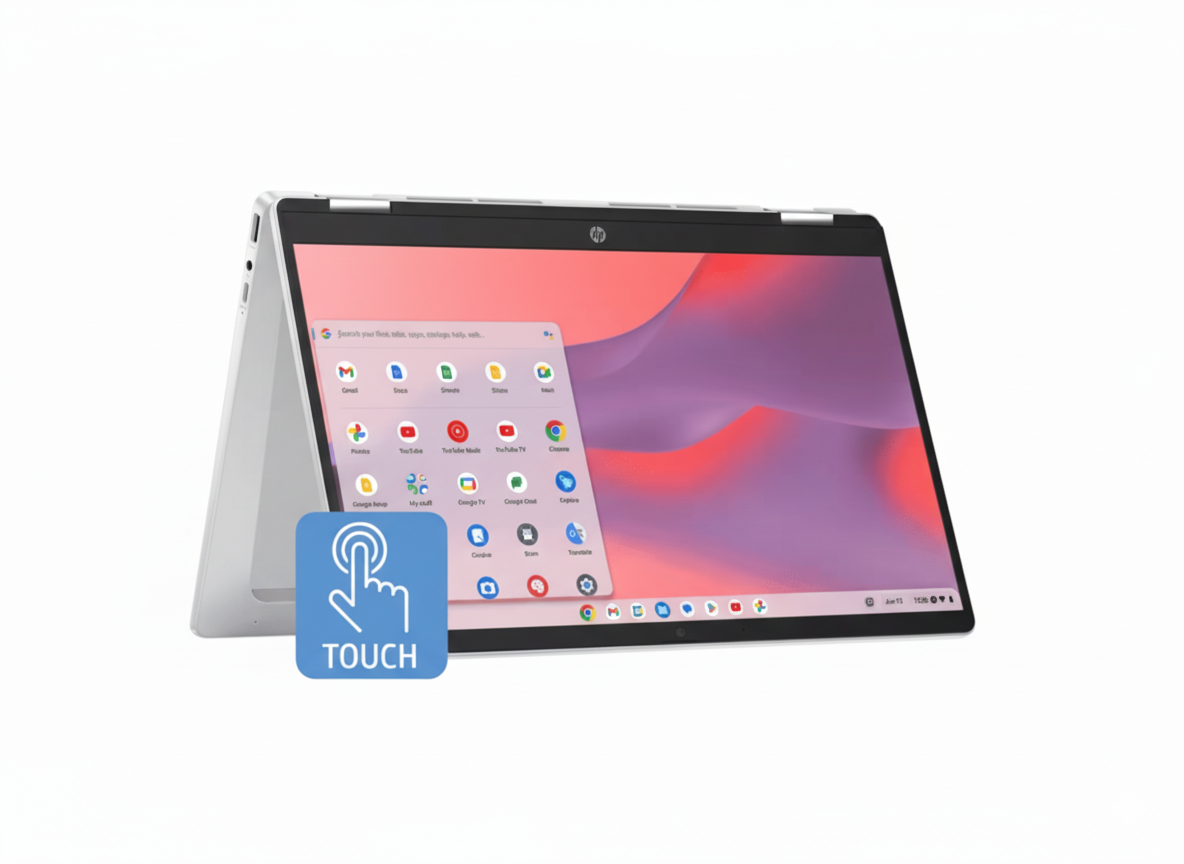
HP Chromebook x360 14b (N100) – HD Touchscreen, 2-in-1, 128GB Storage – ₹36,039

HP Chromebook x360
HP Chromebook x360 (14b-cd0011TU) Review – Full Details

HP Chromebook x360 14b-cd0011TU

ChromeOS 360° Convertible HD Touchscreen Intel® Processor N100 Up to 12 Hours Battery HP Fast Charge

The HP Chromebook x360 14b is the ultimate everyday companion, engineered for simplicity, speed, and versatility. At an affordable price of ₹36,039, this 2-in-1 convertible is the perfect choice for students, families, and anyone who lives in the browser, offering a seamless and secure experience powered by Google’s ChromeOS.

It combines the flexibility of a 360-degree hinge and an HD touchscreen with the efficiency of an Intel® N100 processor and all-day battery life. With access to millions of Android apps on the Google Play Store, this device is ready for everything from homework and browsing to streaming and light gaming, all within a simple, secure, and always-up-to-date environment.

The Simplicity and Speed of ChromeOS

Enjoy a fast, secure, and hassle-free computing experience designed for the modern web.

Fast, Simple, and Secure

ChromeOS boots up in seconds and stays fast over time. With built-in virus protection and automatic updates, it’s one of the most secure operating systems available, letting you browse and work with peace of mind.

A World of Apps

Get access to over a million apps on the Google Play Store. Whether you need productivity tools like Microsoft 365, creative apps from Adobe, or your favorite streaming services and games, you can find it on your Chromebook.

360° of Versatility

A flexible device that adapts to every part of your day.

Four Flexible Modes

The durable 360-degree hinge allows you to effortlessly switch between laptop mode for typing, stand mode for watching videos, tent mode for presentations, and tablet mode for browsing and interacting with apps.

Intuitive HD Touchscreen

The 14-inch HD (1366 x 768) touchscreen makes interacting with ChromeOS and Android apps a totally intuitive experience. Pinch, zoom, tap, and swipe your way through tasks with ease, just like on a smartphone or tablet.

Built for Life On-the-Go

A lightweight design and long battery life to keep up with your busy day.

All-Day Battery Life

With up to 12 hours of battery life, you can get through a full day of classes, work, and entertainment without needing to hunt for a power outlet. When you do need to recharge, HP Fast Charge gets you from 0 to 50% in about 45 minutes.

Efficient Performance

The Intel® Processor N100, paired with 4GB of LPDDR5 RAM and 128 GB of UFS storage, is optimized for ChromeOS. It provides smooth performance for web browsing, streaming 4K content, and running multiple apps efficiently.

Smart and Practical Design

Thoughtful features designed for modern use and peace of mind.

Privacy You Can See

Ensure your privacy with a visible, physical camera shutter. There’s no need for unsightly tape; simply slide the shutter to cover the camera when it’s not in use for complete peace of mind.

Modern Connectivity

Stay connected with fast Wi-Fi 6 and versatile ports. The Chromebook includes two USB-C® ports for charging, data, and displays, plus a convenient USB-A port for your existing peripherals.

Full Specifications Table

General Information

  • Brand:HP
  • Model Name:Chromebook x360 14b-cd0011TU
  • SKU:A95C2PA
  • Form Factor:Convertible (2-in-1)

Processor & Graphics

  • Processor:Intel® Processor N100 (up to 3.4 GHz, 4 cores)
  • Graphic Card:Integrated Intel® UHD Graphics

Memory & Storage

  • Memory:4 GB LPDDR5-4800 MHz RAM (onboard)
  • Storage:128 GB UFS

Display Details

  • Display:14″ diagonal, HD (1366 x 768), multitouch-enabled, micro-edge, 250 nits

Input & Security

  • Keyboard:Full-size keyboard
  • Webcam:HP True Vision 720p HD camera
  • Security:Camera privacy shutter, H1 Secure Microcontroller

Connectivity

  • WIFI:MediaTek Wi-Fi 6 MT7921 (2×2)
  • Bluetooth:Bluetooth® 5.3
  • Ports:2x USB-C® 5Gbps (PD, DP 1.4), 1x USB-A 5Gbps

OS & Warranty

  • Operating System:ChromeOS
  • Warranty:1 Year On-site Warranty

Pros and Cons: A Balanced View

Pros:

  • Simple and Secure OS: ChromeOS is fast, easy to use, and automatically updated.
  • Versatile 2-in-1 Design: The 360-degree hinge and touchscreen add great flexibility.
  • Excellent Battery Life: Up to 12 hours means you can leave the charger at home.
  • Great Value: An affordable price for a convertible with a touchscreen.
  • Access to Android Apps: The Google Play Store offers a massive library of apps and games.

Cons:

  • Limited Offline Capability: Best suited for users who are almost always connected to the internet.
  • Low-Resolution Display: The HD (1366×768) screen is not very sharp for a 14-inch device.
  • Modest Performance: The N100 processor and 4GB of RAM are for basic tasks, not heavy multitasking or demanding software.
  • Limited Internal Storage: 128GB of UFS storage can fill up quickly if you store many files offline.

Who Is This Laptop For?

  • Students: Perfect for online learning, research, writing assignments with Google Docs, and streaming.
  • Casual Home Users: An excellent secondary device for web browsing, email, social media, and watching YouTube or Netflix.
  • Cloud-Based Workers: Professionals whose work is primarily done through web apps and cloud services.

Who Might Consider Other Options?

  • Power Users: Anyone who needs to run traditional, demanding desktop software (like Adobe Photoshop, video editors, or complex IDEs) should choose a Windows or macOS laptop.
  • Gamers: This device is not designed for playing graphically intensive PC games.
  • Users Needing Lots of Offline Storage: If you need to store hundreds of gigabytes of photos, videos, or files locally, the 128GB of storage will be limiting.

Competitive Edge: Versatility Meets Simplicity

The Chromebook x360 excels by offering a flexible, frustration-free experience at a highly competitive price.

  • The Power of ChromeOS: Its key advantage is its operating system. ChromeOS offers unparalleled speed, security, and simplicity for web-centric tasks, something traditional Windows laptops in this price range often struggle with.
  • 360° Touchscreen Flexibility: Unlike most budget laptops, this Chromebook is a full convertible with a touchscreen. This provides a level of versatility for media consumption and app interaction that fixed-clamshell designs can’t match.
  • All-Day, Worry-Free Battery: The combination of the efficient Intel N100 chip and the lightweight ChromeOS results in a genuine all-day battery life, a feature that often requires a much larger investment in the Windows world.

Final Verdict: The Perfect Everyday Convertible

The HP Chromebook x360 14b is a fantastic device for its target audience. It delivers on the core promise of ChromeOS: a fast, simple, and secure computing experience that’s perfect for browsing, streaming, and online productivity. The addition of a 360-degree hinge and a responsive touchscreen adds a layer of fun and versatility that makes it stand out in the crowded budget laptop market.

While power users and those reliant on specific desktop software should look elsewhere, this Chromebook is an ideal choice for students, families, or as a secondary “couch computer.” It’s reliable, easy to use, and offers incredible battery life and flexibility for the price. If your digital life revolves around the web, this is one of the smartest and most enjoyable ways to experience it.

★★★★☆

Overall Rating: 4.5 out of 5.0 (For Web-Based Use)