ReviewNest

Dell Pro 27 Plus (P2725DE) Review: The Ultimate 27″ QHD USB-C Hub Powerhouse

Dell Pro 27 Plus (P2725DE)
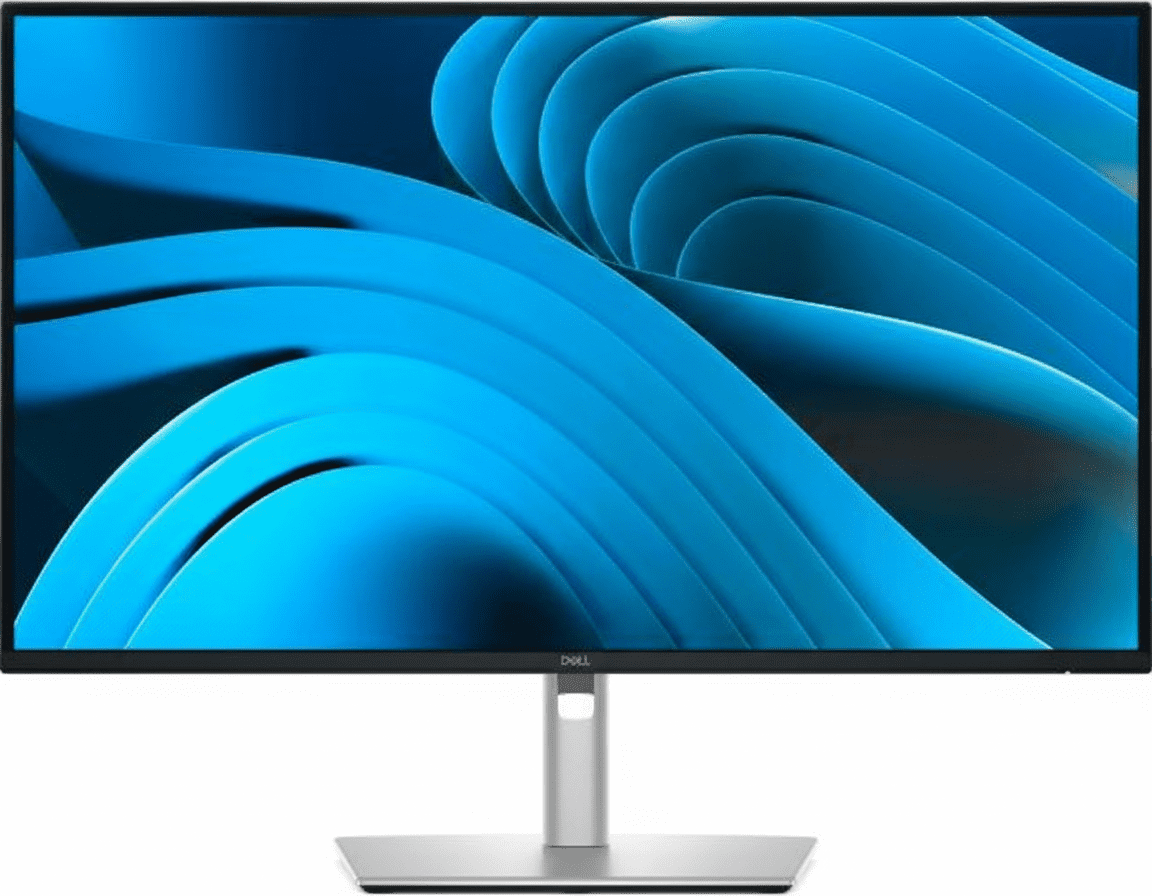
Dell Pro 27 Plus QHD USB-C Hub Monitor (P2725DE) Review: The QHD Powerhouse, Supersized

Dell Pro 27 Plus QHD USB-C Hub Monitor (P2725DE) Review: The QHD Powerhouse, Supersized

27″ QHD 100Hz Display 90W USB-C Hub with RJ45 4-Star Eye Comfort Daisy Chain via DisplayPort Pop-Out USB Ports ₹25,899
The ultimate 27-inch single-cable docking station for expansive, high-clarity productivity.

The Dell Pro 27 Plus (P2725DE) takes the winning formula of its 24-inch sibling and scales it up, creating the definitive productivity hub for users who crave more screen real estate. Priced at ₹25,899, it delivers the perfect trifecta of size, sharpness, and speed with its expansive 27-inch QHD (2560×1440) panel and a fluid 100Hz refresh rate. Its true power lies in its comprehensive single-cable docking solution, featuring 90W USB-C power delivery, an integrated Gigabit Ethernet port, and a full suite of USB ports. For professionals who want an all-in-one, high-clarity workstation centerpiece, the P2725DE is the ultimate upgrade.

Expansive Clarity, Ultimate Connectivity

Experience a large 27″ QHD screen, single-cable hub convenience, and world-class eye comfort.

₹25,899
₹26,599 (Save ₹700)
Inclusive of all taxes | Free Priority Delivery

Valid till Oct 17th | 3-Year Premium Panel Exchange

Key Features at a Glance

27″ QHD Display: Large, sharp 2560×1440 panel for expansive multitasking.
90W USB-C Hub: Power your laptop and connect video, data, and Ethernet with one cable.
100Hz Refresh Rate: Delivers noticeably smoother scrolling and motion than standard 60Hz.
Pop-Out USB Ports: Cleverly hidden front-access USB-A and USB-C ports for convenience.
4-Star Eye Comfort: TÜV-certified with ComfortView Plus to reduce eye strain without color distortion.
Full Ergonomics: Complete height, tilt, swivel, and pivot adjustability for perfect positioning.

1. The Ultimate Productivity Hub

One cable is all you need to power your entire workspace.

Single-Cable 90W USB-C

The powerful USB-C port is the heart of this monitor, delivering up to 90W of power. Connect your laptop to handle video, transfer data, and charge its battery—all through a single cable, completely eliminating clutter.

Full Docking Connectivity

This monitor replaces your separate dock with a built-in RJ45 Gigabit Ethernet port for stable network access and a hub of USB-A and USB-C downstream ports for peripherals, keeping your desk clean and efficient.

2. Expansive Clarity and Fluidity

See more of your work in stunning detail and enjoy a smoother workflow.

Sharp 27-inch QHD Screen

The large 27-inch screen combined with a 2560×1440 (QHD) resolution is the sweet spot for modern productivity. It offers significantly more screen real estate and sharper detail than a Full HD monitor, allowing for comfortable, expansive multitasking.

Smooth 100Hz Refresh Rate

Experience a noticeable upgrade in fluidity with the 100Hz refresh rate. It delivers less flicker and more seamless scrolling through documents and websites, making every interaction feel more responsive.

3. World-Class Eye Comfort

Work longer with less strain, thanks to Dell’s industry-leading comfort features.

TÜV 4-Star Eye Comfort Certification

This monitor achieves a top-tier TÜV 4-star eye comfort certification. This is achieved through its advanced ComfortView Plus hardware, which reduces harmful blue light emissions to less than 35% without the yellow tint of software filters, ensuring all-day comfort with uncompromised color accuracy.

4. Designed for Your Workflow

A fully adjustable stand and clever features to enhance convenience.

Full Ergonomic Adjustability

Find your perfect viewing position with a stand that offers a complete range of motion. You can adjust the height (150mm), tilt, swivel, and pivot into a vertical orientation, ensuring all-day comfort.

Convenient Pop-Out Ports

The monitor features a brilliantly designed pop-out hub on the bottom bezel. With a simple press, you get quick access to a USB-A and USB-C port for connecting peripherals or charging your phone, which can then be hidden away for a clean look.

Ideal For These Users

Hybrid & Office Professionals

The single-cable USB-C hub functionality with 90W power and RJ45 Ethernet makes it the perfect centerpiece for a modern laptop-driven workflow.

Users Needing More Screen Space

The 27-inch QHD screen is the perfect upgrade for multitaskers who find a 24-inch screen too restrictive, allowing multiple windows to be viewed comfortably side-by-side.

Entry-Level Creatives & Data Analysts

The high resolution provides the detail needed for working with large images, complex spreadsheets, and detailed reports, all while maintaining excellent clarity.

MacBook and Windows Laptop Users

Dell has specifically tested and validated this monitor for macOS compatibility, ensuring a seamless plug-and-play experience for both Windows and Mac users via USB-C.

Who Might Consider Other Options

Gamers

Despite the 100Hz refresh rate, this is a productivity-focused monitor. It lacks the fast response times and adaptive sync technology (G-Sync/FreeSync) needed for a great gaming experience.

High-End Creative Professionals

The 99% sRGB color space is excellent for web content, but professionals working in print or cinema who need full Adobe RGB or DCI-P3 coverage should look at the UltraSharp series.

Users Seeking 4K Resolution

For those who need the absolute sharpest text and image quality for tasks like 4K video editing, a 27-inch 4K monitor would be a step up in pixel density.

Competitive Edge: How It Stacks Up

The new sweet spot for professional productivity.

  • Vs. The P2425DE (24″ Version)

    The P2725DE offers the exact same feature set as its excellent 24-inch sibling but provides a significantly larger 27-inch screen. This makes it the better choice for users who prioritize multitasking and want more physical space for their windows.

  • Vs. Other 27″ QHD Hub Monitors

    Many competing QHD hubs are stuck at 60Hz or 75Hz. The P2725DE stands out by offering a 100Hz refresh rate for a much smoother experience, combined with Dell’s industry-leading 4-star eye comfort and the clever pop-out front ports.

  • The Complete Productivity Package

    Its edge is the completeness of the package. It doesn’t just offer a large QHD screen; it pairs it with a smooth refresh rate, a full docking station, best-in-class ergonomics, and advanced eye comfort. It’s a monitor with no major compromises for the modern professional.

Full Specifications

Display

Screen Size
27″
Resolution
QHD (2560 x 1440)
Panel Type
IPS
Refresh Rate
100 Hz
Brightness
350 cd/m²
Contrast Ratio
1500:1
Color Gamut
99% sRGB
PPI
109

Connectivity

USB-C Hub
1x USB-C (90W PD, DP Alt Mode)
Video Ports
1x DP 1.4, 1x HDMI
Video Out
1x DP 1.4 (MST)
Ethernet
1x RJ45 Gigabit Ethernet
USB Downstream
3x USB-A, 1x USB-C (15W)

Mechanical

Height Adjust
150 mm
Tilt
-5° to 21°
Swivel
-45° to 45°
Pivot
±90°

Pros and Cons

What We Liked

  • Large and sharp 27-inch QHD screen.
  • Complete docking hub with 90W USB-C and RJ45.
  • Smooth 100Hz refresh rate enhances daily use.
  • Top-tier 4-star eye comfort certification.
  • Clever pop-out front-facing USB ports.

What Could Be Better

  • Not suitable for gaming due to slower response times.
  • Color gamut is limited to sRGB.
  • Higher price than non-hub QHD monitors.

Final Verdict

The Dell P2725DE is a spectacular productivity monitor that hits the sweet spot for modern professionals. It combines the most sought-after features into one cohesive and powerful package: a large 27-inch QHD screen for expansive multitasking, a fluid 100Hz refresh rate for a smoother workflow, and a comprehensive 90W USB-C docking station that declutters your desk and simplifies your life.

It smartly includes best-in-class ergonomics and eye comfort, ensuring it’s as pleasant to use as it is powerful. While not for gamers or high-end color professionals, the P2725DE is a near-perfect solution for its intended audience. For anyone seeking a premium, all-in-one hub monitor that boosts both productivity and comfort, the P2725DE is an exceptional choice and a new benchmark for what a mainstream professional monitor should be.
Dell Pro 34 Plus (P3425WE) Review: The Ultimate 34″ Ultrawide QHD USB-C Hub Powerhouse

Dell Pro 34 Plus (P3425WE)
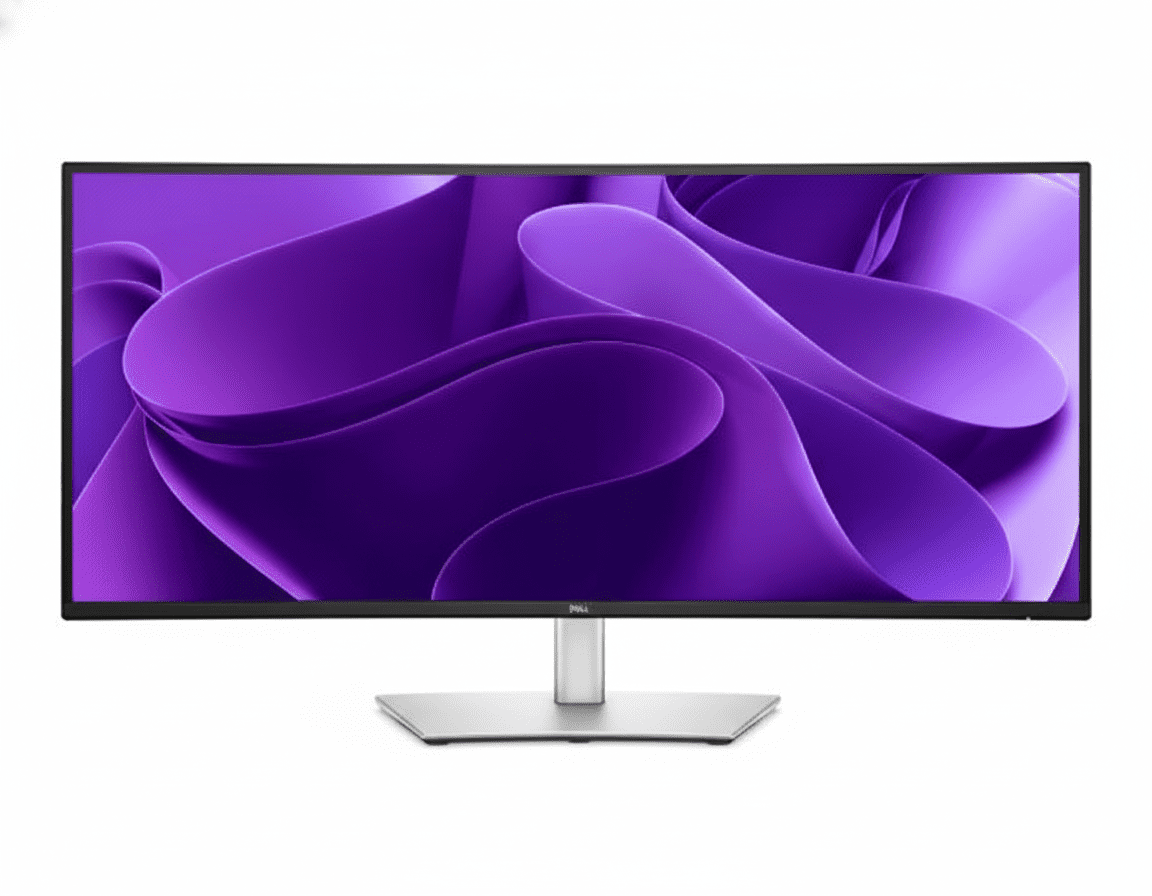
Dell Pro 34 Plus USB-C Hub Monitor (P3425WE) Review: The Ultimate Ultrawide Hub

Dell Pro 34 Plus USB-C Hub Monitor (P3425WE) Review: The Ultimate Ultrawide Hub

34″ Curved WQHD 100Hz 90W USB-C Hub with KVM 4-Star Eye Comfort PiP & PbP Modes Pop-Out USB Ports ₹52,159
The definitive all-in-one hub for immersive, ultrawide productivity.

The Dell Pro 34 Plus (P3425WE) represents the pinnacle of productivity-focused ultrawide monitors, combining an immense, immersive screen with the most comprehensive connectivity hub in its class. For ₹52,159, this 34-inch curved display delivers a sharp WQHD (3440×1440) resolution, a fluid 100Hz refresh rate, and top-tier 4-star eye comfort. Its true power, however, is its ability to serve as the ultimate workstation centerpiece, featuring a 90W USB-C port, integrated KVM switch, Gigabit Ethernet, and clever pop-out front ports. The P3425WE is designed for the power user who demands maximum screen real estate and minimum clutter.

Immerse Yourself in Productivity

Experience an expansive 34″ curved WQHD screen, a powerful KVM hub, and world-class eye comfort.

₹52,159
Inclusive of all taxes | Free Priority Delivery

3-Year Premium Panel Exchange

Key Features at a Glance

34″ Curved WQHD Display: Immersive, sharp 3440×1440 ultrawide screen.
90W USB-C Hub with KVM: Power your laptop and control two PCs with one keyboard and mouse.
100Hz Refresh Rate: Delivers noticeably smoother scrolling and motion than standard 60Hz.
PiP and PbP Modes: View and manage content from two different PC sources simultaneously.
4-Star Eye Comfort: TÜV-certified with ComfortView Plus to reduce eye strain without color distortion.
Pop-Out USB Ports: Cleverly hidden front-access USB-A and USB-C ports for convenience.

1. The Ultimate Immersive Hub

A single command center for all your devices, wrapped in an expansive ultrawide view.

Single-Cable Hub with KVM

This monitor is a true docking station. The powerful 90W USB-C port powers your laptop, while the integrated KVM switch lets you control two connected PCs with a single keyboard and mouse, seamlessly switching between them.

Full Docking Connectivity

It replaces your separate dock with a built-in RJ45 Gigabit Ethernet port, and a hub of USB-A and USB-C downstream ports—including clever pop-out front ports—keeping your desk efficient and free of clutter.

2. Expansive, Fluid Visuals

Immerse yourself in a panoramic view with stunning detail and smooth motion.

Curved Ultrawide WQHD Screen

The immense 34-inch, 21:9 screen with a gentle 3800R curve and sharp 3440×1440 resolution provides a panoramic, immersive view that’s perfect for expansive spreadsheets, long timelines, and side-by-side document comparison.

Smooth 100Hz Refresh Rate

Experience a noticeable upgrade in fluidity with the 100Hz refresh rate. It delivers less flicker and more seamless scrolling through data and websites, making every interaction feel more responsive.

3. Next-Level Multitasking

View and manage multiple sources on one expansive screen.

Picture-by-Picture & Picture-in-Picture

The ultrawide screen is perfect for PbP and PiP modes, allowing you to display and work on content from two different PC sources at the same time, as if you had two monitors in one.

Integrated KVM Switch

The built-in KVM (Keyboard, Video, Mouse) switch lets you connect two computers to the monitor and control both using a single keyboard and mouse, seamlessly toggling between them with the push of a button.

4. World-Class Eye Comfort

Work longer with less strain, thanks to Dell’s industry-leading comfort features.

TÜV 4-Star Eye Comfort Certification

This monitor achieves a top-tier TÜV 4-star eye comfort certification. This is achieved through its advanced ComfortView Plus hardware, which reduces harmful blue light emissions to less than 35% without the yellow tint of software filters, ensuring all-day comfort with uncompromised color accuracy.

Ideal For These Users

Power Multitaskers & Financial Analysts

The vast 21:9 screen is perfect for viewing multiple large spreadsheets, data feeds, and applications simultaneously without needing a second monitor.

Users with Multiple Computers

The built-in KVM switch is a game-changer for anyone who regularly works with two PCs (like a work laptop and a personal desktop), allowing them to control both with one set of peripherals.

Content Creators & Video Editors

The ultrawide aspect ratio is ideal for viewing long video editing timelines, with plenty of space for bins and tool palettes on the side.

Anyone Seeking an Immersive Single-Monitor Setup

For those who want to replace a dual-monitor setup with a single, seamless, and immersive display, the P3425WE is the perfect solution.

Who Might Consider Other Options

Gamers

While the 100Hz refresh rate is good, this is a productivity monitor. It lacks the fast response times and adaptive sync technology that are crucial for a competitive gaming experience.

High-End Creative Professionals

The 99% sRGB color gamut is excellent, but professionals needing wider gamuts like Adobe RGB or DCI-P3 for color-critical work should look at Dell’s UltraSharp or Alienware lines.

Users on a Tight Budget

This is a premium productivity monitor. Users can get excellent QHD performance in a standard 16:9 aspect ratio from the P2725DE for a significantly lower price.

Competitive Edge: How It Stacks Up

The ultimate integration of ultrawide immersion and docking station power.

  • Vs. Other Ultrawide Monitors

    Many competing ultrawides focus on gaming and often lack comprehensive connectivity. The P3425WE stands out by pairing its excellent 100Hz WQHD panel with a full 90W USB-C hub, KVM switch, and RJ45 port, making it a far more versatile productivity tool.

  • Vs. Dell UltraSharp Ultrawides

    The P3425WE brings many premium features, like the KVM and 100Hz refresh rate, from the more expensive UltraSharp line down to the more accessible P-series, offering better value. UltraSharp models typically offer wider color gamuts (DCI-P3) and sometimes higher resolutions or faster refresh rates for a higher price.

  • The Complete Power-User Package

    Its key advantage is being a true all-in-one solution. It replaces a dual-monitor setup, a docking station, and a KVM switch with a single, elegant, and powerful device, offering an unmatched level of integration and convenience.

Full Specifications

Display

Screen Size
34.1″ Curved (3800R)
Resolution
WQHD (3440 x 1440)
Aspect Ratio
21:9
Panel Type
IPS
Refresh Rate
100 Hz
Brightness
350 cd/m²
Contrast Ratio
1500:1
Color Gamut
99% sRGB

Connectivity

USB-C Hub
1x USB-C (90W PD, DP Alt Mode)
Video Ports
1x DP 1.4, 1x HDMI 2.1
KVM Switch
Yes (1x USB-B Upstream)
Ethernet
1x RJ45 Gigabit Ethernet
USB Downstream
3x USB-A, 1x USB-C (15W)

Mechanical

Height Adjust
150 mm
Tilt
-5° to 21°
Swivel
-30° to 30°
Slant
±4°

Pros and Cons

What We Liked

  • Immersive 34-inch curved ultrawide screen.
  • Complete docking station with KVM, 90W USB-C, and RJ45.
  • Smooth 100Hz refresh rate enhances daily use.
  • Excellent ergonomics and build quality.
  • Useful PiP, PbP, and pop-out USB features.

What Could Be Better

  • No DisplayPort-out for daisy chaining.
  • Color gamut is limited to sRGB, not ideal for high-end creatives.
  • Premium price point.

Final Verdict

The Dell P3425WE is a phenomenal productivity powerhouse that successfully combines the immersive experience of an ultrawide with the unparalleled convenience of a full-featured KVM docking station. The expansive 34-inch curved WQHD screen, enhanced by a fluid 100Hz refresh rate, offers a breathtaking canvas for multitasking. When paired with its ability to control two PCs and act as a single-cable hub for power, networking, and peripherals, it becomes a truly transformative tool for any power user’s desk.

While its sRGB color space may not suit high-end colorists, it’s more than enough for most professional and creative work. For anyone looking to declutter their desk, streamline a multi-PC workflow, and gain an immersive productivity boost, the P3425WE is an outstanding all-in-one solution and a top contender in the premium ultrawide market.