ReviewNest

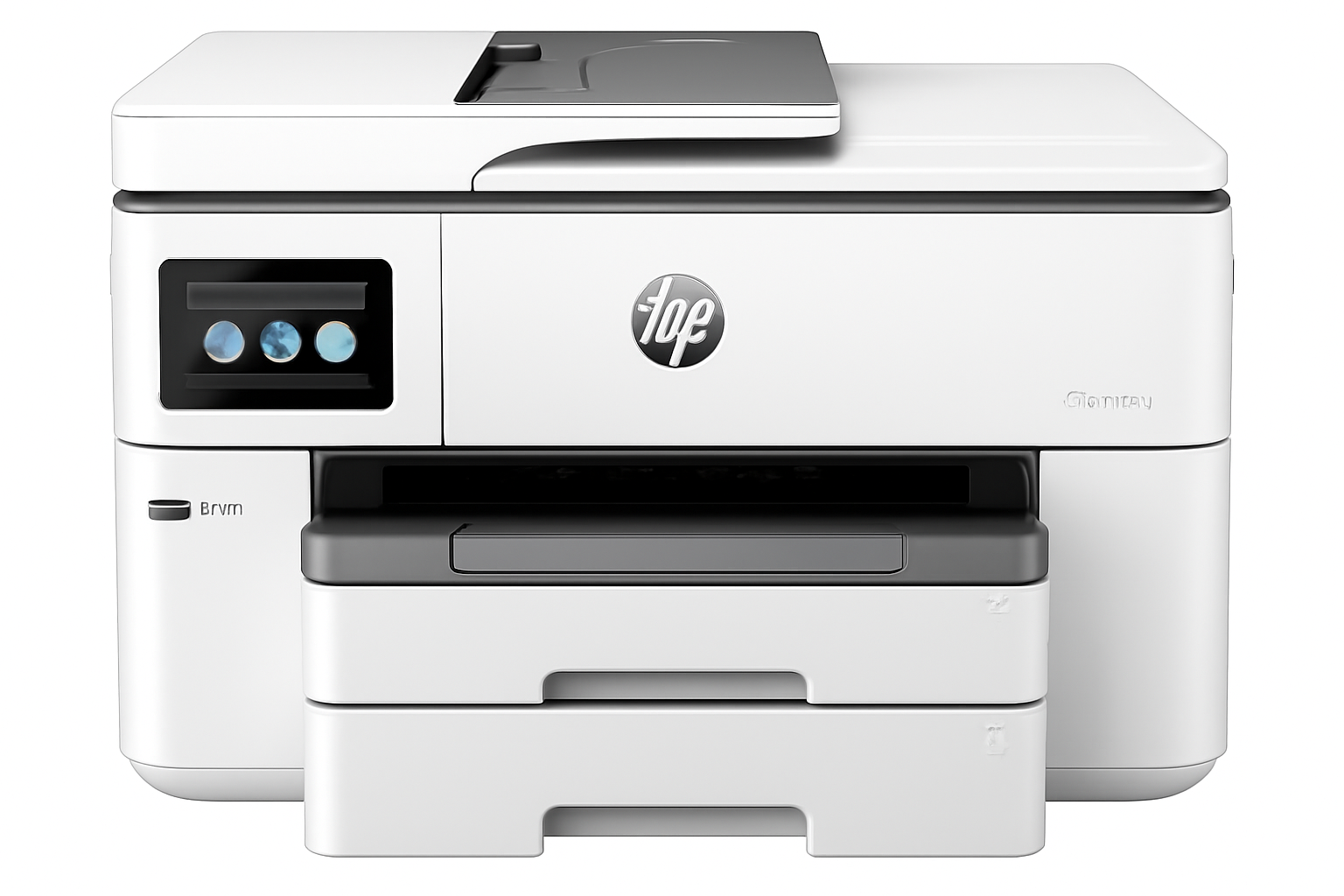
HP OfficeJet Pro 9730 Review – Best A3 Wide Format Printer for Business & Design (2024)

HP OfficeJet Pro 9730 Wide Format All-in-One Printer Review

HP OfficeJet Pro 9730 Wide Format All-in-One Printer Review: The A3 Powerhouse for Indian Businesses?

Print, Copy, Scan Wide Format (A3) Dual-band Wi-Fi, Ethernet Auto Duplex Print & Scan All Pigment-based Inks 30,000 pages/month duty cycle

In the dynamic landscape of Indian small businesses and hybrid offices, a printer that can handle diverse needs—from standard reports to large-format marketing materials—is invaluable. The HP OfficeJet Pro 9730 Wide Format All-in-One Printer emerges as a formidable contender, specifically designed to be a versatile and high-performance inkjet multifunction device. Priced at ₹34,499, this printer isn’t just an A4 workhorse; it excels at printing and scanning in wide formats up to A3, a critical capability for architects, designers, marketing agencies, and anyone needing larger-than-standard output. Beyond its wide-format prowess, the 9730 offers robust print, copy, and scan functions with impressive speeds of up to 22 ppm (black) and 18 ppm (color). Key professional features include automatic two-sided printing and scanning, an Automatic Document Feeder (ADF), a user-friendly 4.3″ touchscreen, and comprehensive connectivity via USB, Ethernet, and self-healing dual-band Wi-Fi. Utilizing pigment-based inks for all colors, it promises durable, professional-quality documents and vibrant graphics, making it an ideal investment for businesses with diverse and demanding printing needs in India.

Key Advantages: Why the HP OfficeJet Pro 9730 Dominates Diverse Office Workflows

The HP OfficeJet Pro 9730 is engineered to be a true all-rounder, tackling both everyday office tasks and specialized wide-format projects with ease.

Game-Changing Wide Format Capability (A3 Print & Scan):

This is the undisputed star feature. The ability to print and scan documents up to A3 size is a significant differentiator, making it an indispensable tool for businesses that handle blueprints, large spreadsheets, marketing posters, design mock-ups, or large presentations.

Comprehensive All-in-One Multifunctionality:

The 9730 integrates print, copy, and scan capabilities seamlessly into a single, high-performing device. This comprehensive functionality maximizes office efficiency, allowing employees to handle a variety of document tasks without switching between machines.

Boosted Productivity: Automatic Duplex Printing and Scanning:

Time is money in a business environment. The 9730 enhances productivity significantly with automatic two-sided (duplex) printing and scanning. This feature not only saves paper but also dramatically speeds up the handling of multi-page documents.

Effortless Multi-Page Handling with Automatic Document Feeder (ADF):

The integrated Automatic Document Feeder (ADF) is a must-have for busy offices. It allows you to load multiple pages and scan or copy them in one go without manual feeding. This is invaluable for digitizing archives, sending multi-page contracts, or batch-copying handouts.

Blazing Fast Print Speeds for Busy Offices:

The 9730 keeps pace with demanding office environments, delivering impressive ISO print speeds of up to 22 ppm for black and 18 ppm for color. For high-volume bursts, draft speeds reach up to 34 ppm for both black and color.

Robust & Reliable Connectivity: Dual-Band Wi-Fi with Self-Heal & Ethernet:

The printer offers comprehensive and stable connectivity options: Dual-Band Wi-Fi (2.4/5 GHz) with Self-Heal and Ethernet. This ensures consistent and reliable network access, critical for shared office environments.

Comprehensive Mobile Printing:

Supports HP Smart app, Apple AirPrint™, Mopria™ Certified, Chrome OS, and Wi-Fi Direct Printing, making it incredibly easy to print from virtually any mobile device or cloud platform.

Intuitive 4.3″ Color Touchscreen Control Panel:

Navigation and control are a breeze with the user-friendly 4.3″ color graphic touchscreen. This intuitive interface simplifies tasks, provides quick access to settings, and offers visual feedback, enhancing the overall user experience.

High Paper Capacity with Dual Trays:

Minimize interruptions with the generous paper handling capabilities. Equipped with two 250-sheet input trays, the 9730 provides a total input capacity of 500 sheets. This means fewer paper reloads during large print jobs, boosting efficiency.

Professional, Durable Prints with Pigment-Based Inks:

The 9730 uses pigment-based inks for all four colors (Black, Cyan, Magenta, Yellow). This is a significant advantage as pigment inks are known for their durability, water resistance, fade resistance, and ability to produce sharp text and vibrant graphics.

High Duty Cycle for Sustained Performance:

Designed as a true workhorse, the 9730 has a high monthly duty cycle of up to 30,000 pages, with a recommended volume of 250-1,500 pages. This robust design ensures it can handle the consistent demands of small work teams and growing businesses.

Full Specifications: HP OfficeJet Pro 9730 Wide Format All-in-One Printer

Product & Price

  • Model Name: HP OfficeJet Pro 9730 Wide Format All-in-One Printer
  • SKU: 537P5C
  • Price: ₹34,499
  • Product Type: Inkjet Multifunction Printer
  • Series: OfficeJet Pro
  • Perfect for: Small Work Teams/ Hybrid offices

Core Functions & Print Technology

  • Functions: Print, Scan, Copy
  • Top Key Features: Wireless; Print from phone/tablet; ADF; Two-sided printing; Two-sided scanning; Scan to email; Scan to pdf; Touchscreen; Quiet mode
  • Print Technology: HP Thermal Inkjet
  • Multitasking Supported: Yes
  • Print Colours: Yes (4 colors: Black, Cyan, Magenta, Yellow)

Print Performance

  • Print Speed Black (ISO): Up to 22 ppm
  • Print Speed Color (ISO): Up to 18 ppm
  • Print Speed Black (Draft, A4): Up to 34 ppm
  • Print Speed Colour (Draft, A4): Up to 34 ppm
  • Duty Cycle (monthly, A4): Up to 30,000 pages
  • Recommended Monthly Page Volume: 250 to 1500 pages
  • Print Quality Black (best): Up to 1200 x 1200 rendered dpi
  • Print Quality Color (best): Up to 4800 x 1200 optimized dpi on HP Advance Photo Paper, 1200 x 1200 dpi input

Paper Handling

  • Media Sizes Supported: A4; A5; A6; B5 (JIS); Envelope (DL, C5, C6, Chou #3, Chou #4); Card (Hagaki); A3; Custom: Tray 1: 76 x 127 to 297 x 420 mm; Tray 2: 210 x 297 to 297 x 420 mm; Key: 10 x 15 cm; A4; A3; Envelopes
  • Maximum Input Capacity (sheets): Up to 500 sheets (Tray 1: 250, Tray 2: 250)
  • Maximum Output Capacity (sheets): Up to 75 A-size sheets, Up to 50 B-size sheets
  • Paper Handling Input, Standard: 250-sheet input tray, 250-sheet plain paper tray
  • Paper Handling Output, Standard: 75-sheet output tray
  • Automatic Document Feeder (ADF): Yes
  • Duplex Printing: Automatic
  • Media Types: Plain; HP EcoFFICIENT; HP Premium Presentation Matte 120g; HP Tri-fold Brochure Glossy 180g; HP Brochure Matte 180g; HP Brochure Glossy 180g; HP Advanced Photo Papers; Light 60-74g
  • Media Weight, Supported: 34 to 250 g/m²
  • Media Weight, Recommended: 60 to 105 g/m²

Ink System

  • Number of Print Cartridges: 4 (1 each black, cyan, magenta, yellow)
  • Ink Types: Pigment-based (black and color)
  • Replacement Cartridges: HP 936 series; HP 936e EvoMore series (planned April 2024)
  • Print Head Nozzles: Total 6272 (1568/color * 4)

Connectivity & Communications

  • Wireless Capability: Yes, with built-in dual-band Wi-Fi 802.11 a/b/g/n/ac and a self-heal solution
  • Network Capabilities: Yes, via built-in Ethernet; Wireless 802.11a/b/g/n/ac
  • Connectivity, Standard: 1 Ethernet; 1 Hi-Speed USB 2.0 (device); 1 Hi-Speed USB 2.0 (host); 1 Wi-Fi 802.11 a/b/g/n/ac (dual band)
  • Mobile Printing Capability: Chrome OS; HP Smart app; Apple AirPrint™; Mobile Apps; Wi-Fi® Direct Printing; Mopria™ Certified

Scanner & Copier Specifications

  • Scan Technology: Contact Image Sensor (CIS)
  • Scan Size, Maximum: 297 x 432 mm (A3)
  • Scan Resolution, Optical: Up to 1200 dpi
  • Scan File Format: Bitmap (.bmp), JPEG (.jpg), PDF (.pdf), PNG (.png), Rich Text (.rtf), Searchable PDF (.pdf), Text (.txt), TIFF (.tif)
  • Copies, Maximum: Up to 99 copies
  • Copy Reduce / Enlarge: 25 to 400%
  • Copy Speed Black (ISO): Up to 18 cpm

System Specifications

  • Memory: 512 MB
  • Control Panel: 4.3″ (10.92 cm) touchscreen control panel with color graphic display; LED indicator light (WiFi indicator)
  • Supported OS: Windows 11; Windows 10; macOS 11 Big Sur; macOS 12 Monterey; macOS 13 Ventura; macOS 14 Sonoma; Linux; Chrome OS
  • Minimum System Requirements: Microsoft® Windows® 11, 10: 32-bit or 64-bit; 2 GB HD space; Internet connection; Microsoft® Internet Explorer or Edge. Apple® macOS v11 BigSur, macOS v12 Monterey, macOS v13 Ventura; 2 GB HD; Internet required.

Dimensions & Power

  • Dimensions (W x D x H): 581 x 467 x 386 mm (Output Tray + Cleanout Door not extended); Max: 581 x 842 x 386 mm (Output Tray + Cleanout Door fully extended)
  • Power Consumption: 0.11W (Manual-Off), 5.40W (Standby), 1.39W (Sleep)
  • Power Supply Type: Internal (Built-in) Universal Power Supply

Box Contents & Warranty

  • What’s in the box: HP OfficeJet Pro 9730 WF AiO Printer; HP 938 Setup Black, Cyan, Magenta, Yellow Ink Cartridges; Regulatory Flyer; Ink Caution Flyer; Power Cord; Setup Poster; Reference Guide; SW CD (AP Indo only)
  • Cable Included: USB Cable
  • Warranty: One-year limited hardware warranty

Making the Right Choice: Pros and Cons for Your Business Needs

Pros: Where the OfficeJet Pro 9730 Excels for Business

  • Exceptional Wide Format (A3) Support: This is the primary reason to consider the 9730. Its ability to print and scan documents up to A3 size is a crucial advantage for architectural firms, design studios, marketing teams, real estate agencies, and anyone needing larger-than-standard output.
  • Complete Multifunctionality with Advanced Duplex: Offers print, copy, and scan functions. Critically, it includes automatic duplex printing AND scanning, along with an ADF (Automatic Document Feeder). This combination makes handling multi-page, double-sided documents incredibly efficient.
  • Fast Print Speeds for Business Demands: With ISO speeds of 22 ppm for black and 18 ppm for color, and even faster draft modes (34 ppm), this printer is designed to keep up with the demands of a small to medium-sized office, minimizing wait times for important documents.
  • Comprehensive and Reliable Connectivity: The 9730 offers ultimate flexibility with USB 2.0, Ethernet (for stable wired networking), and robust dual-band Wi-Fi (2.4/5 GHz) with self-heal technology. This ensures consistent and reliable network access, critical for shared office environments.
  • Extensive Mobile and Cloud Printing Support: Seamlessly integrate with your mobile devices and cloud workflows via HP Smart app, Apple AirPrint™, Mopria™ Certified, Chrome OS, and Wi-Fi Direct Printing. This enhances productivity and allows for printing from virtually anywhere.
  • Intuitive 4.3″ Color Touchscreen: The large, responsive touchscreen simplifies navigation through settings, managing print jobs, and accessing various functions, making it user-friendly for everyone in the office.
  • High Paper Input Capacity (500 sheets): Dual 250-sheet input trays provide a total of 500 sheets, significantly reducing the frequency of paper reloads during large print runs and ensuring continuous workflow.
  • Professional-Grade Pigment-Based Inks: Using pigment-based inks for all four colors ensures that your prints are not only vibrant and sharp but also highly durable, water-resistant, and fade-resistant.
  • High Duty Cycle for Workload Management: With a monthly duty cycle of up to 30,000 pages and a recommended volume of 250-1,500 pages, the 9730 is built to handle the consistent and varied demands of a busy small work team or hybrid office.
  • Multitasking Capability: Unlike some entry-level AIOs, this printer supports multitasking, meaning it can process multiple functions simultaneously (e.g., receive a print job while scanning).

Cons: What to Consider Before Investing

  • Inkjet Running Costs (Compared to Laser): While HP OfficeJet Pro series offers competitive inkjet running costs, for businesses printing extremely high volumes of primarily black-and-white documents, a monochrome LaserJet Tank printer might offer a lower per-page cost in the very long run. Insight: However, for mixed-use (color and A3 printing), the 9730’s capabilities often outweigh the slightly higher per-page cost compared to a dedicated laser printer, especially when considering the initial investment for color laser A3.
  • No Fax Functionality: The printer lacks a built-in fax modem. Consideration: Many modern businesses have transitioned away from traditional fax machines. For those who still require it, an internet-based fax service or a separate fax machine would be necessary.
  • Physical Size and Footprint: As a wide-format AIO, it naturally has a larger footprint than standard A4 printers. Planning: Ensure you have adequate desk or counter space to accommodate its dimensions (581 x 467 x 386 mm, extending to 842mm depth with trays fully out).
  • USB 2.0 Host Port Only: While sufficient for basic connections, faster USB 3.0 or higher host ports would offer quicker data transfers for scan-to-USB operations, especially for large files. Impact: For most network-based scanning or scanning to PC, this is a minor point.

Who Is This Printer For? Tailored Recommendations

The HP OfficeJet Pro 9730 Wide Format All-in-One Printer is an outstanding choice for:

  • Small to Medium Businesses (SMBs): Especially those with diverse printing needs, including both standard A4 and larger A3 documents.
  • Hybrid Offices: Where employees need a versatile printer for both in-office and remote work, with robust connectivity and mobile printing options.
  • Architects, Designers, and Marketing Agencies: Professionals who regularly work with blueprints, large-format graphics, posters, or design mock-ups up to A3 size.
  • Businesses Requiring Durable, Professional-Quality Color Prints: The all-pigment ink system ensures high-quality, water-resistant, and fade-resistant output for important documents and marketing materials.
  • Work Teams Needing High Productivity: With fast speeds, automatic duplex printing and scanning, and a high-capacity ADF, it streamlines workflows and minimizes manual intervention.

Who Might Consider Other Options?

You might consider other options if:

  • You Print Extremely High Volumes of Monochrome Documents: For businesses solely focused on very high-volume black-and-white printing, a monochrome laser printer or a monochrome LaserJet Tank might offer lower long-term running costs.
  • Fax Functionality is Absolutely Essential: As this model does not include a built-in fax modem, you would need an alternative solution.
  • You Have Very Limited Office Space: Its wide-format capabilities mean a larger physical footprint, which might not be suitable for extremely cramped environments.
  • You Need Faster USB Data Transfer: While its network connectivity is robust, if you frequently transfer extremely large scan files directly via USB, a printer with USB 3.0 or higher might be faster.

Competitive Edge: What Sets It Apart

The HP OfficeJet Pro 9730 Wide Format All-in-One Printer distinguishes itself in the market with several key advantages:

  • Affordable A3 Print & Scan Solution: It offers comprehensive wide-format (A3) printing and scanning capabilities at a price point that is highly competitive, especially when compared to dedicated A3 printers or A3-capable color laser MFPs.
  • All-Pigment Ink System: The use of pigment-based inks for all four colors is a significant advantage, providing superior durability, water resistance, and professional-grade output for all types of documents, including marketing materials.
  • Advanced Productivity Features: The combination of automatic duplex printing AND scanning, along with a reliable ADF, makes it exceptionally efficient for handling multi-page documents, a critical feature for busy offices.
  • Robust Network Connectivity with Self-Heal Wi-Fi: The inclusion of both Ethernet and self-healing dual-band Wi-Fi ensures consistent, reliable, and flexible connectivity, minimizing network-related downtime in office environments.
  • High Paper Capacity and Touchscreen Interface: The dual 250-sheet trays and the intuitive 4.3″ color touchscreen enhance user experience and reduce interruptions, making it a more user-friendly and efficient device for shared use.

Final Verdict: Is the HP OfficeJet Pro 9730 the Right A3 Multifunction Printer for Your Indian Business?

The HP OfficeJet Pro 9730 Wide Format All-in-One Printer is an outstanding choice for small work teams, hybrid offices, and businesses in India that require versatile printing, copying, and scanning capabilities up to A3 size. Its robust feature set, including fast print and scan speeds, automatic duplex functionality for both, a reliable ADF, and comprehensive connectivity options (including stable dual-band Wi-Fi and Ethernet), makes it a highly productive and efficient workhorse. The use of pigment-based inks for all colors ensures your output is consistently professional, durable, and resistant to water and fading – a crucial aspect for business documents and marketing materials. Priced at ₹34,499, it offers significant value for its specialized wide-format capabilities and advanced feature set. For businesses with diverse document needs, whether it’s standard reports, A3 marketing materials, or large-format scans, the HP OfficeJet Pro 9730 is a strong contender and a smart investment that can truly elevate your office’s productivity and professional output.

★★★★★

Overall Rating: 4.5 out of 5.0 (Based on Expert Analysis)
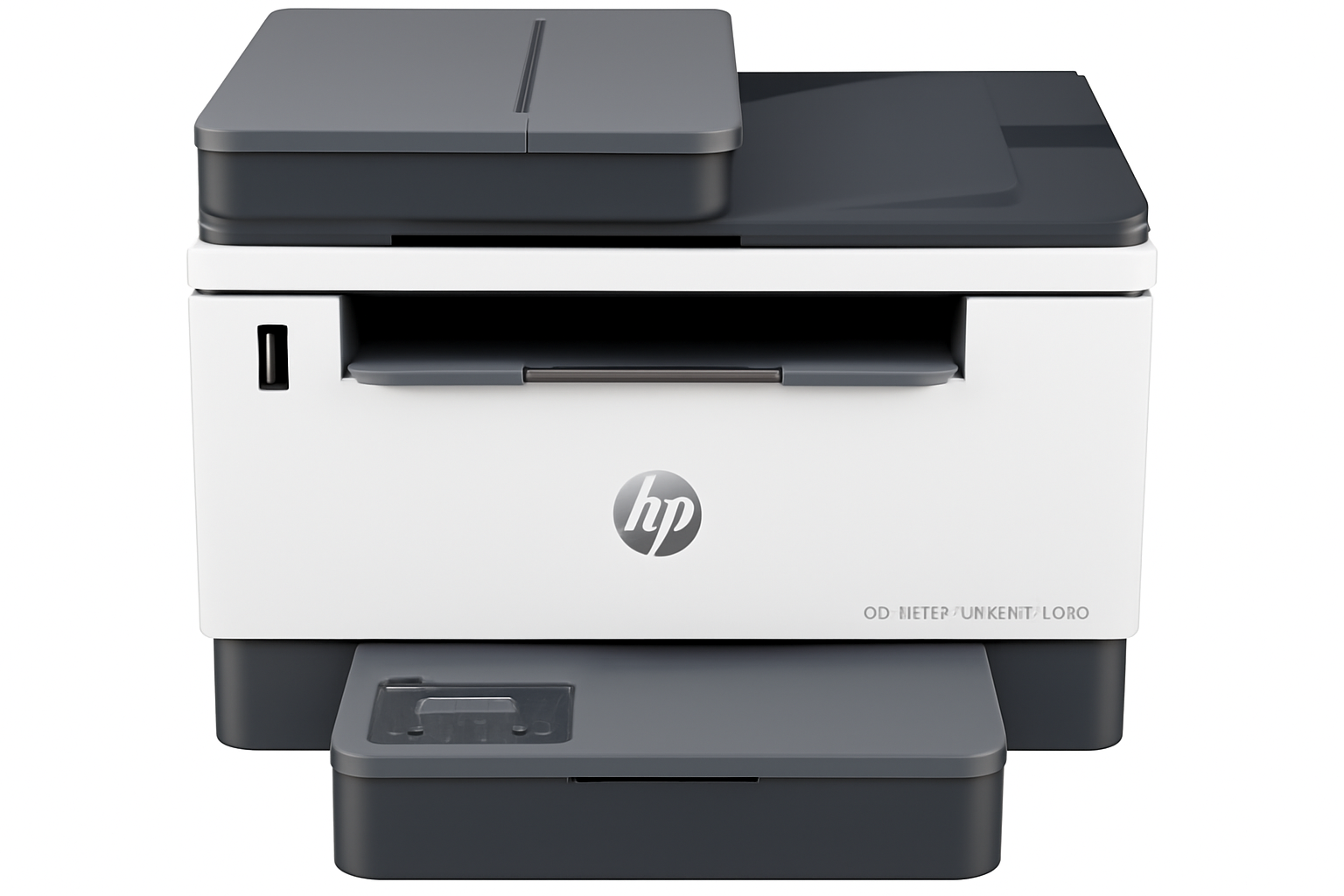

HP LaserJet Tank MFP 2606sdw Review – Best Monochrome Business Printer with Duplex & Wi-Fi in India (2024)

HP LaserJet Tank MFP 2606sdw Printer Review

HP LaserJet Tank MFP 2606sdw Printer Review: The Ultimate Cost-Saver for Indian Small Businesses?

Print, Scan, Copy, Duplex, ADF Dual-Band Wi-Fi, Ethernet, USB Laser (Black & White) 5,000 pages toner included 25,000 pages/month duty cycle

For small businesses and distributed workforces across India, controlling operational costs while maintaining efficiency is paramount. The HP LaserJet Tank MFP 2606sdw Printer emerges as a compelling solution, promising robust performance and, critically, an exceptionally low cost per page. Currently available at an attractive price of ₹21,999 (a significant saving from its original ₹32,164), this A4 Black and White Laser Multifunction Printer is engineered for efficiency. It offers a comprehensive suite of functionalities: print, copy, scan, automatic duplex (two-sided) printing, and an Automatic Document Feeder (ADF). With a swift print speed of up to 22 ppm, its true differentiator is the innovative “toner tank” system, coming pre-filled with enough toner for an impressive 5,000 pages. Coupled with versatile connectivity options (USB, Ethernet, dual-band Wi-Fi) and mobile printing capabilities, the 2606sdw is designed to be a productivity powerhouse for your work environment.

Key Advantages: Why the LaserJet Tank MFP 2606sdw is a Business Game-Changer

The HP LaserJet Tank MFP 2606sdw is meticulously designed to meet the rigorous demands of small businesses, offering unparalleled cost efficiency and reliable performance.

Revolutionary Ultra-Low Cost Per Page:

This is the defining advantage. The “LaserJet Tank” system redefines toner management. The 2606sdw comes with an HP Black Original LaserJet Tank Imaging Drum pre-filled with approximately 5,000 pages of toner yield. This dramatically reduces your ongoing printing expenses, offering significant long-term operational savings.

4-in-1 Multifunctionality for Comprehensive Office Tasks:

This single device consolidates your office needs by offering print, copy, scan, and automatic duplex printing capabilities. Whether it’s producing crisp reports, duplicating invoices, digitizing important documents, or printing double-sided flyers, the 2606sdw handles diverse business requirements efficiently.

Boosted Productivity with Automatic Document Feeder (ADF):

The integrated ADF is a must-have for any busy office. It allows you to load multi-page documents (up to 40 sheets) for sequential scanning or copying without manual feeding. This saves considerable time and effort when dealing with large contracts, forms, or records.

Swift Black and White Print Speed (22 ppm):

Time is a precious commodity in business. With a print speed of up to 22 pages per minute (ppm) for black and white documents, the 2606sdw ensures that your reports, invoices, and other essential papers are ready quickly, keeping your workflow uninterrupted and your team productive.

Versatile and Robust Connectivity Options:

The printer seamlessly integrates into various office setups with its flexible connectivity: Hi-Speed USB 2.0, Ethernet (10/100Base-TX), and Dual-Band Wi-Fi (2.4/5 GHz). This ensures stable, secure, and fast network access, ideal for shared office environments.

Mobile Printing Ready:

Compatible with HP Smart App, Apple AirPrint™, Mopria™ Certified, and Wi-Fi Direct Printing, allowing for convenient printing from smartphones, tablets, and other mobile devices, enhancing flexibility for modern workstyles.

Built for Durability: High Duty Cycle:

Designed for consistent business use, the 2606sdw boasts a robust monthly duty cycle of up to 25,000 pages, with a recommended volume of 250-2,500 pages. This signifies its durability and ability to handle the demands of small businesses and teams of up to 5 users.

Automatic Two-Sided (Duplex) Printing:

This essential feature automatically prints on both sides of the page, significantly saving paper costs and reducing environmental impact. It’s particularly useful for creating professional-looking reports and internal documents.

Exceptional Value at its Price Point:

At ₹21,999, the 2606sdw offers phenomenal value. When factoring in the initial high-yield toner (5,000 pages), the long-term running costs become incredibly competitive, especially compared to traditional laser printers or even high-volume inkjets for monochrome printing.

Full Specifications: HP LaserJet Tank MFP 2606sdw Printer

Product & Price

  • Model Name: HP LaserJet Tank MFP 2606sdw Printer
  • SKU: 381U2A
  • Current Price: ₹21,999 (incl. of all taxes)
  • Original Price: ₹32,164
  • Savings: ₹10,165 (31%)
  • Product Type: Laser Multifunction Printer
  • Series: LaserJet Tank MFP
  • Perfect for: Business / Enterprise Departments/ Distributed Workforce

Core Functions & Print Technology

  • Functions: Print, Scan, Copy
  • Features: Two-sided printing (Automatic Duplex), Scan to email, Scan to PDF
  • Print Technology: Laser (Black and White)

Print Performance

  • Print Speed (black, A4): Up to 22 ppm
  • Duty Cycle (monthly, A4): Up to 25,000 pages
  • Recommended Monthly Page Volume: 250-2,500 pages
  • Target User & Print Volume: For teams up to 5 users; Prints up to 2,500 pages/month
  • Print Quality (black, best): Up to 600 x 600 dpi

Paper Handling

  • Input Capacity: Up to 250 sheets
  • Output Capacity: Up to 100 sheets
  • Automatic Document Feeder (ADF): Yes
  • Duplex Printing: Automatic
  • Media Sizes Supported: A6; A5; A4; No.10 Env; C5 Env; DL Env; B5 Env; B5(JIS); B6 (JIS); 216mm x340mm; Custom: 102 x 152 to 215.9 x 355.6 mm; Key: 10 x 15 cm; A4; Envelopes
  • Media Types: Plain paper, Heavy paper, Bond paper, Label, Light paper, Envelope
  • Media Weight, Supported: 60 to 163 g/m²

Cartridges & Supplies

  • Number of Print Cartridges: 1 (black)
  • Replacement Cartridges: HP 154A/154X Black LaserJet Tank Toner Reload Kit; HP 158A/158X Black LaserJet Tank Toner Reload Kit (China/India)
  • Supplies Feature: HP LaserJet Tank Technology
  • Initial Toner Yield: ~5000 pages (Imaging Drum)

Connectivity & Communications

  • Wireless Capability: Yes, built-in WiFi 802.11a/b/g/n (2.4/5GHz)
  • Network Capabilities: Ethernet 10/100Base-TX; built-in WiFi 802.11b/g/n (2.4/5GHz)
  • Connectivity, Standard: Hi-Speed USB (compatible with USB 2.0 specifications); Ethernet 10/100 Base-TX; 802.11a/b/g/n (2.4/5 GHz) Wi-Fi radio
  • Mobile Printing Capability: HP Smart App; Apple AirPrint™; Mopria™ Certified; Wi-Fi® Direct Printing

System Specifications

  • Memory: 64 MB
  • Control Panel: Icon LCD; 2 lights (Media, Lid open); 10 buttons (WiFi, Down, Menu, Up, Copy, ID copy, Info, Resume, Cancel, Power)
  • Supported OS: Windows 11; Windows 10; macOS 10.15 Catalina; macOS 11 Big Sur; macOS 12 Monterey; Linux; Windows Server 2008 R2 (64-bit), 2008 R2 (SP1), 2012 (64-bit), 2012 R2 (64-bit), 2016 (64-bit)
  • Minimum System Requirements: Microsoft® Windows® 11, 10, 2 GB HD space, Internet connection, Microsoft® Internet Explorer or Edge. Apple® macOS v10.15 Catalina, macOSv11 Big Sur, macOS v12 Monterey; 2 GB HD; Internet required.

Dimensions & Power

  • Dimensions (W x D x H): 418 x 345 x 311.4 mm; Max: 418 x 398.5 x 311.4 mm
  • Power Consumption: Active printing: 390w, Ready: 2.7w, Sleep: 0.51w, Manual Off: 0.05w, Auto Off/Manual On: 0.05w, Auto-Off/Wake on LAN: 0.5w
  • Power Supply Type: Internal (Built-in) power supply

Box Contents & Warranty

  • What’s in the box: 381U2A HP LaserJet Tank MFP 2606sdw Printer; HP Black Original LaserJet Tank Imaging Drum (~5000 page black toner yield), Power Cord, Setup Guide, Reference Guide, Regulatory/Support Flyers, CD (for APJ only)
  • Cable Included: Yes, 1 USB Cable (China and India)
  • Warranty: One-year limited hardware warranty

Making the Smart Investment: Pros and Cons for Your Business

Pros: The Business Benefits You’ll Love

  • Revolutionary Ultra-Low Cost Per Page: This is the undisputed champion feature. The toner tank system, pre-filled with an impressive 5,000 pages of toner, translates to significantly reduced ongoing printing expenses. For businesses with consistent monochrome printing needs, this offers a tangible and substantial saving on your operational budget over time.
  • Comprehensive 4-in-1 Multifunctionality: This printer is a true workhorse, combining printing, copying, scanning, and automatic duplexing, all in one compact device. It streamlines your office workflow, allowing your team to handle diverse document tasks efficiently without needing multiple machines.
  • Enhanced Productivity with Automatic Document Feeder (ADF): The integrated ADF is a major time-saver for businesses. It allows you to load up to 40 sheets for automated multi-page scanning or copying without manual feeding. This is invaluable for digitizing archives, processing invoices, or creating bulk copies.
  • Swift Black and White Print Speed (22 ppm): Time is a precious commodity in business. With a print speed of up to 22 pages per minute (ppm) for black and white documents, the 2606sdw ensures that your reports, invoices, and other essential papers are ready quickly, keeping your workflow uninterrupted and your team productive.
  • Versatile and Robust Connectivity: The 2606sdw offers excellent integration into any office environment with USB, Ethernet (for stable wired networks), and dual-band Wi-Fi (2.4/5 GHz). The dual-band Wi-Fi provides more stable and reliable wireless connections, while Ethernet ensures maximum security and consistent performance for shared access.
  • Seamless Mobile Printing Capabilities: In today’s mobile-first world, printing from smartphones and tablets is crucial. The printer fully supports HP Smart App, Apple AirPrint™, Mopria™ Certified, and Wi-Fi Direct Printing, making it incredibly convenient for your team to print from their preferred devices.
  • Designed for Durability and High Volume: With a robust monthly duty cycle of up to 25,000 pages and a recommended volume of 250-2,500 pages, this printer is built to withstand consistent business use. It’s a reliable choice for teams of up to 5 users.
  • Automatic Two-Sided (Duplex) Printing: This essential feature not only saves paper (and thus costs) but also contributes to a more professional look for your documents, making it ideal for reports, proposals, and internal communications.
  • Competitive Pricing for Value: At ₹21,999, the initial investment is highly competitive for a laser MFP with such a comprehensive feature set and, most importantly, the included 5,000-page toner yield.

Cons: Points to Consider

  • Monochrome Only: This printer is designed exclusively for black and white printing. If your business has any need for color documents, marketing materials, or presentations, you will need a separate color printer or a more expensive color laser solution. Insight: For businesses where the vast majority of printing is monochrome (invoices, reports, basic documents), this is a non-issue and allows for extreme cost efficiency in that specific domain.
  • Limited Memory (64 MB): While sufficient for most day-to-day tasks, 64 MB of memory might be a bottleneck for very complex graphics-heavy documents or extremely large print queues in busier environments, potentially leading to slower processing times. Consideration: For typical office document printing (text, simple charts), this memory is generally adequate.
  • No Fax Functionality: The 2606sdw does not include a built-in fax modem. Impact: For many modern businesses, traditional faxing has been replaced by email and digital document sharing. If fax is still a critical component of your workflow, you’ll need an alternative solution (e.g., online fax service or a dedicated fax machine).
  • Basic Control Panel: An icon LCD panel is functional and clear but is less intuitive and visually rich than a full color touchscreen. Workaround: The comprehensive HP Smart App provides a much more advanced and user-friendly interface for managing all printer functions from your smartphone or computer, mitigating the simplicity of the on-device control panel.

Who Is This Printer For? Tailored Recommendations

The HP LaserJet Tank MFP 2606sdw Printer stands out as an outstanding choice for:

  • Small Businesses & Home Offices with High Monochrome Printing Needs: If your primary printing consists of black and white documents (invoices, reports, forms) and you want to drastically reduce toner costs.
  • Distributed Workforces & Hybrid Setups: Where employees need a reliable, efficient, and cost-effective monochrome MFP for their individual or small team use.
  • Users Seeking Ultra-Low Running Costs: The innovative toner tank system and included 5,000-page yield are ideal for those prioritizing long-term savings on consumables.
  • Businesses Valuing Productivity Features: Automatic duplex printing and an ADF for multi-page scanning/copying are crucial for streamlining office workflows.
  • Those Requiring Robust Connectivity: With USB, Ethernet, and dual-band Wi-Fi, it offers flexible and reliable integration into various network environments.

Who Might Consider Other Options?

You might consider other options if:

  • You Need Color Printing: This printer is monochrome-only. If your business requires any color documents, marketing materials, or presentations, you will need a separate color printer or a color MFP.
  • Fax Functionality is Absolutely Essential: As this model does not include a built-in fax modem, you would need an alternative solution (e.g., online fax service).
  • You Process Extremely Complex Graphics or Very Large Print Queues: While generally sufficient, the 64 MB memory might be a minor bottleneck in highly demanding scenarios.
  • You Prefer a Full Color Touchscreen Interface: The icon LCD panel is functional but less visually rich than a modern touchscreen.

Competitive Edge: What Sets It Apart

The HP LaserJet Tank MFP 2606sdw Printer distinguishes itself in the market with several key advantages:

  • Pioneering Toner Tank System: Its innovative refillable toner tank, combined with the included 5,000-page yield, offers a significantly lower cost per page than traditional laser cartridges, making it a true cost-saving leader in the monochrome laser MFP segment.
  • Comprehensive Multifunctionality with Duplex & ADF: The combination of print, scan, copy, automatic two-sided printing, and an Automatic Document Feeder (ADF) provides a complete and efficient solution for diverse office document needs.
  • Robust Dual-Band Wi-Fi and Ethernet: Offering both stable wired and flexible wireless connectivity (including 2.4/5GHz Wi-Fi) ensures seamless integration into any modern office network, providing reliability and convenience.
  • High Duty Cycle for Sustained Business Use: Designed to handle up to 25,000 pages per month, it’s built for durability and consistent performance, making it a reliable workhorse for small businesses.
  • Exceptional Value Proposition: Its competitive purchase price, coupled with the included high-yield toner and ultra-low running costs, positions it as an extremely attractive and strategic investment for businesses looking to optimize their printing budget.

Final Verdict: The HP LaserJet Tank MFP 2606sdw – A Smart Investment for Indian Businesses?

The HP LaserJet Tank MFP 2606sdw Printer stands out as an outstanding choice for small businesses, home offices, and distributed teams in India that primarily require efficient, cost-effective, and feature-rich monochrome laser multifunction printing. Its defining advantage is the innovative toner tank system and the incredibly low cost per page it delivers, making it a powerful tool for controlling operational expenses. The combination of swift print speeds, automatic duplex printing, an ADF for easy multi-page handling, and versatile connectivity options (including robust dual-band Wi-Fi and Ethernet) ensures high productivity. While it is a monochrome-only device and lacks traditional fax functionality, its strengths in terms of ultra-low running costs, speed, and comprehensive multifunctionality for black and white documents make it a highly competitive and strategic investment at its attractive price point of ₹21,999. If your business demands consistent, economical, and reliable monochrome output, the 2606sdw is definitely a top contender.

★★★★★

Overall Rating: 4.5 out of 5.0 (Based on Expert Analysis)
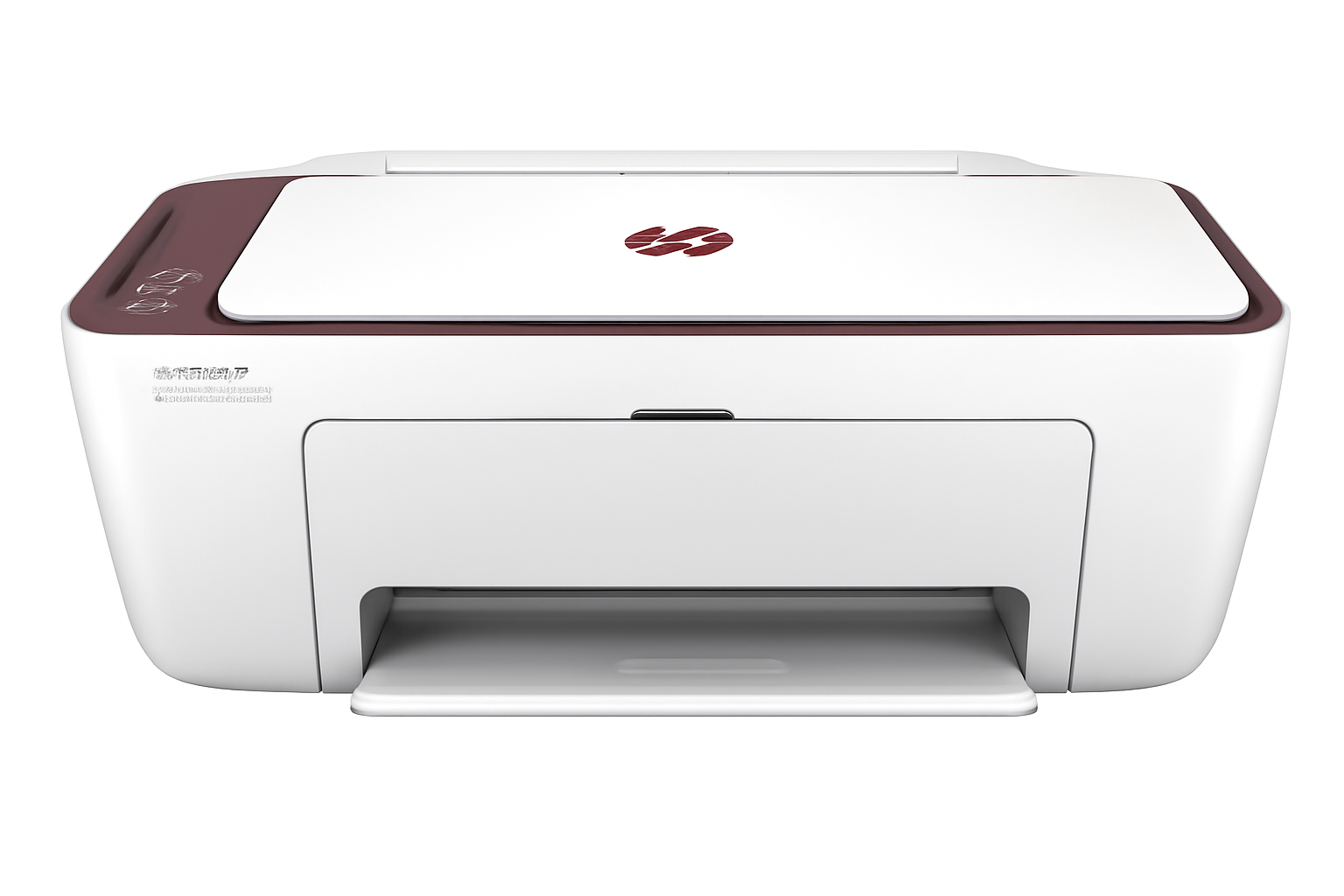

HP Ink Advantage Ultra 4929: Wireless AIO Printer, Low Cost Ink, Smart App Setup, Print Copy Scan

HP Ink Advantage Ultra 4929 All-in-One Printer Review

HP Ink Advantage Ultra 4929 All-in-One Printer Review: Unbeatable Value for Home Printing in India?

Print, Scan, Copy, Wireless Single-band Wi-Fi, AirPrint 2 Black + 2 Tri-Color Ink Sets Included 1,000 pages/month duty cycle Ideal for Home Use

In the quest for an affordable yet efficient printer for your home in India, the HP Ink Advantage Ultra 4929 All-in-One Printer emerges as a compelling option. Launched with a focus on simple, stress-free printing, this compact A4 color inkjet multifunction device offers print, copy, and scan capabilities with convenient wireless connectivity. What truly sets the HP Ink Advantage Ultra 4929 apart, especially at its current price of ₹8,699 (after a 20% saving), is its exceptional bundled ink supply. It arrives with two sets of black and two sets of tri-color original HP Ink Advantage cartridges, promising significantly extended printing right out of the box. Designed for up to 3 users and basic color printing, could this be the ultimate value proposition for your household printing needs in India? Let’s explore its features, performance, and whether its unique ink offering makes it the smart choice for you.

Key Advantages: Why the HP Ink Advantage Ultra 4929 Shines

The HP Ink Advantage Ultra 4929 is engineered to deliver a seamless and economical printing experience for the modern home. Here’s what makes it a truly valuable addition to your digital setup:

Unmatched Value: Ultra-Low Cost Per Page from Day One!

This is the undisputed champion feature of the 4929. Unlike most printers that come with “starter” cartridges, the HP Ink Advantage Ultra 4929 is bundled with a generous supply: two sets of black and two sets of tri-color HP 47 Original Ink Advantage cartridges. This means you get significant printing capacity right out of the box, drastically lowering your initial running costs.

All-in-One Functionality: Your Home Productivity Hub:

Why juggle multiple devices when one can do it all? The 4929 seamlessly combines print, copy, and scan capabilities. From generating school reports to digitizing old family photos or quickly duplicating documents, this single device streamlines your tasks, saving space and effort in your home office or study area.

Hassle-Free Wireless Connectivity & Self-Reset Wi-Fi:

Embrace wireless freedom! The 4929 features built-in 2.4 GHz single-band Wi-Fi along with Wi-Fi Direct. A standout feature is “Self Reset WiFi,” which automatically detects and resolves connectivity issues, ensuring a reliable and stable wireless connection, minimizing interruptions to your workflow.

Intuitive Mobile Printing Support:

Print directly from your smartphone or tablet with ultimate ease. The HP Ink Advantage Ultra 4929 is compatible with popular mobile printing solutions like Apple AirPrint, Mopria, and Chrome OS, alongside the highly capable HP Smart App.

Compact and Space-Saving Design:

Designed with modern living in mind, its smaller dimensions mean the 4929 fits comfortably on most desks, shelves, or small tables without taking up valuable real estate. Its sleek and unobtrusive design blends seamlessly into any home environment.

Reliable Print Quality for Everyday Needs:

Don’t let the affordable price fool you on quality. The 4929 delivers up to 1200×1200 dpi for black prints and 4800×1200 dpi for color prints (on selected HP photo papers). This ensures sharp, crisp text for documents and vibrant, clear colors for everyday photos and graphics.

Crisp, Smudge-Resistant Black Text:

For important documents and professional correspondence, clarity is paramount. The printer utilizes pigment-based black ink, which provides superior water resistance and ensures your text is sharp, deep, and resists smudging, giving your documents a polished and durable finish.

Full Specifications: HP Ink Advantage Ultra 4929

Product & Price

  • Model Name: HP Ink Advantage Ultra 4929 Print, Copy, Scan, Self Reset WiFi, Smart App Setup
  • SKU: 60K34B
  • Current Price: ₹8,699
  • Original Price: ₹10,938
  • Savings: ₹2,239 (20%)
  • Product Type: Inkjet Multifunction Printer
  • Series: DeskJet
  • Perfect for: Home / Basic Color Printing

Core Functions & Print Technology

  • Functions: Print, Scan, Copy, Wireless
  • Top Key Features: Scan to PDF
  • Print Technology: HP Thermal Inkjet
  • Print Colours: Yes (Black, Cyan, Magenta, Yellow)

Print Performance

  • Print Speed Black (ISO): Up to 7.5 ppm
  • Print Speed Color (ISO): Up to 5.5 ppm
  • Print Speed Black (Draft, A4): Up to 20 ppm
  • Print Speed Colour (Draft, A4): Up to 16 ppm
  • Duty Cycle (monthly, A4): Up to 1000 pages
  • Recommended Monthly Page Volume: 50 to 100 pages
  • Target User & Print Volume: For teams up to 3 users; Prints up to 100 pages/month
  • Print Quality Black (best): Up to 1200 x 1200 rendered dpi
  • Print Quality Color (best): Up to 4800 x 1200 optimized dpi color (on selected HP photo papers with 1200 input dpi)

Paper Handling

  • Input Capacity: Up to 60 sheets
  • Output Capacity: Up to 25 sheets
  • Duplex Printing: Manual (driver support provided)
  • Media Sizes Supported: A4; B5; A6; DL envelope; Custom: 76 x 127 to 215 x 355 mm
  • Media Types: Plain paper, photo paper, brochure paper, envelopes and other specialty inkjet papers

Ink System

  • Number of Print Cartridges: 2 (1 each black, tri-color)
  • Ink Types: Dye-based (color); Pigment-based (black)
  • Replacement Cartridges: HP 47 Original Black Ultra Ink Advantage Cartridge (6ZD21A); HP 47 Original Tri-Color Ultra Ink Advantage Cartridge (6ZD61A)

Scanner & Copier Specifications

  • Scan Technology: Contact Image Sensor (CIS)
  • Scan Resolution, Optical: Up to 1200 dpi
  • Scan File Format: JPEG, TIFF, PDF, BMP, PNG
  • Copies, Maximum: Up to 9 copies
  • Copy Speed Black (ISO): Up to 6 cpm

System & Connectivity

  • Memory: 64 MB DDR1
  • Control Panel: Fixed icons display; 7 buttons; 5 LED indicator lights
  • Supported OS: Windows 10/11, macOS (10.14–14 Sonoma), Chrome OS
  • Connectivity: Single-band Wi-Fi (2.4 GHz), AirPrint, Mopria, HP App, USB 2.0

Dimensions & Power

  • Dimensions (W x D x H): 425 x 304 x 154 mm (Standard); 425 x 546 x 250 mm (Output Extension full out)
  • Power Consumption: 2.8 W (ready)

Box Contents & Warranty

  • Included In Box: HP DeskJet Ultra Ink Advantage 4929 Printer; HP 47 Setup Black Cartridge; HP 47 Setup Tri-color Cartridge; Regulatory flyer; Setup guide; Reference guide; USB cable, Power cord; PLUS 2 sets of Black Original Ink Advantage Cartridge; 2 sets of Tri-color Original Ink Advantage Cartridge
  • Warranty: One-year limited warranty

Making an Informed Choice: Pros and Cons

Pros: What You’ll Appreciate

  • Exceptional Value with Included Ink: This is the most significant selling point. Getting two extra sets of both black and tri-color cartridges translates to substantial printing capacity right out of the box, drastically reducing your immediate ink costs and offering a very low cost per page from day one.
  • Highly Affordable Purchase Price: At ₹8,699, it’s a very budget-friendly option for a wireless all-in-one printer, making it accessible to a wide range of home users.
  • Reliable Wireless Connectivity (Wi-Fi & Wi-Fi Direct): Enjoy the freedom of printing from multiple devices without cables. The “Self Reset WiFi” feature is a genuine convenience, helping maintain a stable connection automatically.
  • Broad Mobile Printing Support: With compatibility for Apple AirPrint, Mopria, and the versatile HP Smart App, printing directly from your smartphone or tablet is seamless and intuitive.
  • Compact & Space-Saving Design: Ideal for homes with limited desk space, its small footprint ensures it integrates well into any corner of your living or study area.
  • Good Print Quality for Everyday Needs: It delivers sharp black text and decent color prints, perfectly suitable for school assignments, documents, and casual photo printing.
  • Crisp, Smudge-Resistant Black Text: For important documents and professional correspondence, clarity is paramount. The printer utilizes pigment-based black ink, which provides superior water resistance and ensures your text is sharp, deep, and resists smudging, giving your documents a polished and durable finish.
  • Effortless Setup: The HP Smart App-guided setup process is remarkably straightforward, getting you printing in minutes even if you’re not tech-savvy.

Cons: What to Consider (and practical insights)

  • No Automatic Duplex Printing: For two-sided prints, you’ll need to manually flip pages. This can be cumbersome for large documents. Insight: For occasional duplex printing, the manual driver support works fine. If you print many double-sided documents daily, a printer with an automatic duplexer would be more efficient (though typically more expensive).
  • Modest ISO Print Speeds (7.5 ppm black / 5.5 ppm color): These speeds are on the slower side for inkjet printers. It’s not built for high-volume or urgent print jobs. Insight: This printer is optimized for home users who print intermittently. If you need to churn out hundreds of pages quickly, you’ll need to manage your expectations or look at business-oriented models.
  • Low Paper Capacity (60-sheet input / 25-sheet output): You’ll need to refill the input tray more frequently if you print continuous documents. Insight: This is a common characteristic of compact, budget-friendly printers. Keep a small stack of paper readily available to minimize interruptions.
  • No Automatic Document Feeder (ADF): For multi-page scanning or copying, each page must be placed manually on the scanner glass. Impact: If you regularly scan multi-page contracts or reports, this will be a manual process. Consider your scanning habits before purchasing.
  • Basic Control Panel: The fixed icon display with buttons and LEDs is less intuitive than a modern touchscreen. Workaround: The HP Smart App provides a much richer and more intuitive interface for managing print, scan, and copy functions, making the physical control panel less critical for most operations.
  • Single-Band Wi-Fi (2.4 GHz only): Limited to the 2.4 GHz band, which can be more susceptible to interference in crowded wireless environments compared to dual-band Wi-Fi. Tip: Ensure your wireless router is placed optimally, and if you experience slow speeds, consider if other 2.4GHz devices (like microwaves, Bluetooth devices) are causing interference.
  • No Ethernet Port: Lacks a wired network connection, relying solely on wireless or USB. Relevance: For most home users, Wi-Fi is sufficient. This is only a concern if you require a stable wired network connection due to specific IT setups or very unstable wireless conditions.
  • Limited Direct Copy Functionality: Maximum copies are 9, and advanced settings like reduce/enlarge are managed via the HP Smart App, not directly on the printer. Insight: This is standard for entry-level models. For complex copy jobs, utilizing the HP Smart App is necessary.

Who Is This Printer For? Tailored Recommendations

The HP Ink Advantage Ultra 4929 All-in-One Printer is an ideal choice for:

  • Home Users Seeking Exceptional Ink Value: If you want to minimize your long-term ink costs and appreciate a generous supply of cartridges included upfront.
  • Students and Small Families: Perfect for intermittent printing of assignments, recipes, occasional photos, and general documents.
  • Users Who Prioritize Wireless Convenience: With Wi-Fi, Wi-Fi Direct, and self-resetting Wi-Fi, it offers reliable and easy wireless printing from various devices.
  • Those with Limited Desk Space: Its compact design makes it suitable for smaller home offices or study areas.
  • Mobile-First Users: Seamless integration with the HP Smart App, AirPrint, and Mopria makes printing from smartphones and tablets effortless.

Who Might Consider Other Options?

You might consider other options if:

  • You Have High-Volume, Frequent Printing Needs: While the included ink is great, for very high daily volumes, a dedicated Ink Tank (tank-based) printer or a laser printer would be more efficient in the long run.
  • Automatic Duplex Printing is a Must: If you regularly print two-sided documents and need the convenience of automatic duplexing.
  • You Need to Scan/Copy Multi-Page Documents Regularly: The absence of an Automatic Document Feeder (ADF) means manual placement for each page, which can be time-consuming for large jobs.
  • You Require Faster Print Speeds: For business environments or situations where large print jobs need to be completed very quickly.
  • You Need an Ethernet (Wired Network) Connection: If your network setup or wireless stability demands a wired connection.

Competitive Edge: What Sets It Apart

The HP Ink Advantage Ultra 4929 All-in-One Printer distinguishes itself in the market with several key advantages:

  • Unmatched Ink Value Included: The primary differentiator is the inclusion of two full sets of HP 47 Original Ink Advantage cartridges, offering an incredibly low cost per page right from purchase and saving users significant money on initial ink refills.
  • Self Reset WiFi Feature: This intelligent feature automatically resolves connectivity issues, providing a more reliable and frustration-free wireless printing experience than many competitors.
  • HP Smart App Ecosystem: The seamless integration with the HP Smart App for effortless setup, comprehensive mobile printing (AirPrint, Mopria), and intuitive management sets it apart from many budget competitors.
  • Pigment-Based Black Ink: This is a premium feature for an entry-level printer, ensuring sharp, durable, and water-resistant black text documents, crucial for professional-looking prints.
  • Compact and Space-Saving Design: Its small footprint is a significant advantage for homes where space is limited, making it easy to integrate into any environment.

Final Verdict: Is the HP Ink Advantage Ultra 4929 Your Home’s Best Bet?

The HP Ink Advantage Ultra 4929 All-in-One Printer is an exceptional choice for individuals, students, or families with basic, low-to-moderate volume printing needs who prioritize affordability, ease of use, and incredible upfront ink value. Its standout feature – the inclusion of two full sets of both black and tri-color original HP Ink Advantage cartridges – offers an incredibly low cost per page right from the start, making it a very economical choice for long-term use. While it intelligently foregoes advanced features like automatic duplexing (beyond manual support), an ADF, and rapid print speeds, its robust wireless capabilities, compact size, and incredibly user-friendly mobile app setup make it a practical, efficient, and highly economical solution for everyday home printing, copying, and scanning in India. If you’re looking for value and simplicity, the Ultra 4929 is a strong contender.

★★★★☆

Overall Rating: 4.5 out of 5.0 (Based on Expert Analysis)