HP OfficeJet Pro 9730 Wide Format All-in-One Printer Review: The A3 Powerhouse for Indian Businesses?
In the dynamic landscape of Indian small businesses and hybrid offices, a printer that can handle diverse needs—from standard reports to large-format marketing materials—is invaluable. The HP OfficeJet Pro 9730 Wide Format All-in-One Printer emerges as a formidable contender, specifically designed to be a versatile and high-performance inkjet multifunction device. Priced at ₹34,499, this printer isn’t just an A4 workhorse; it excels at printing and scanning in wide formats up to A3, a critical capability for architects, designers, marketing agencies, and anyone needing larger-than-standard output. Beyond its wide-format prowess, the 9730 offers robust print, copy, and scan functions with impressive speeds of up to 22 ppm (black) and 18 ppm (color). Key professional features include automatic two-sided printing and scanning, an Automatic Document Feeder (ADF), a user-friendly 4.3″ touchscreen, and comprehensive connectivity via USB, Ethernet, and self-healing dual-band Wi-Fi. Utilizing pigment-based inks for all colors, it promises durable, professional-quality documents and vibrant graphics, making it an ideal investment for businesses with diverse and demanding printing needs in India.
Key Advantages: Why the HP OfficeJet Pro 9730 Dominates Diverse Office Workflows
The HP OfficeJet Pro 9730 is engineered to be a true all-rounder, tackling both everyday office tasks and specialized wide-format projects with ease.
Game-Changing Wide Format Capability (A3 Print & Scan):
This is the undisputed star feature. The ability to print and scan documents up to A3 size is a significant differentiator, making it an indispensable tool for businesses that handle blueprints, large spreadsheets, marketing posters, design mock-ups, or large presentations.
Comprehensive All-in-One Multifunctionality:
The 9730 integrates print, copy, and scan capabilities seamlessly into a single, high-performing device. This comprehensive functionality maximizes office efficiency, allowing employees to handle a variety of document tasks without switching between machines.
Boosted Productivity: Automatic Duplex Printing and Scanning:
Time is money in a business environment. The 9730 enhances productivity significantly with automatic two-sided (duplex) printing and scanning. This feature not only saves paper but also dramatically speeds up the handling of multi-page documents.
Effortless Multi-Page Handling with Automatic Document Feeder (ADF):
The integrated Automatic Document Feeder (ADF) is a must-have for busy offices. It allows you to load multiple pages and scan or copy them in one go without manual feeding. This is invaluable for digitizing archives, sending multi-page contracts, or batch-copying handouts.
Blazing Fast Print Speeds for Busy Offices:
The 9730 keeps pace with demanding office environments, delivering impressive ISO print speeds of up to 22 ppm for black and 18 ppm for color. For high-volume bursts, draft speeds reach up to 34 ppm for both black and color.
Robust & Reliable Connectivity: Dual-Band Wi-Fi with Self-Heal & Ethernet:
The printer offers comprehensive and stable connectivity options: Dual-Band Wi-Fi (2.4/5 GHz) with Self-Heal and Ethernet. This ensures consistent and reliable network access, critical for shared office environments.
Comprehensive Mobile Printing:
Supports HP Smart app, Apple AirPrint™, Mopria™ Certified, Chrome OS, and Wi-Fi Direct Printing, making it incredibly easy to print from virtually any mobile device or cloud platform.
Intuitive 4.3″ Color Touchscreen Control Panel:
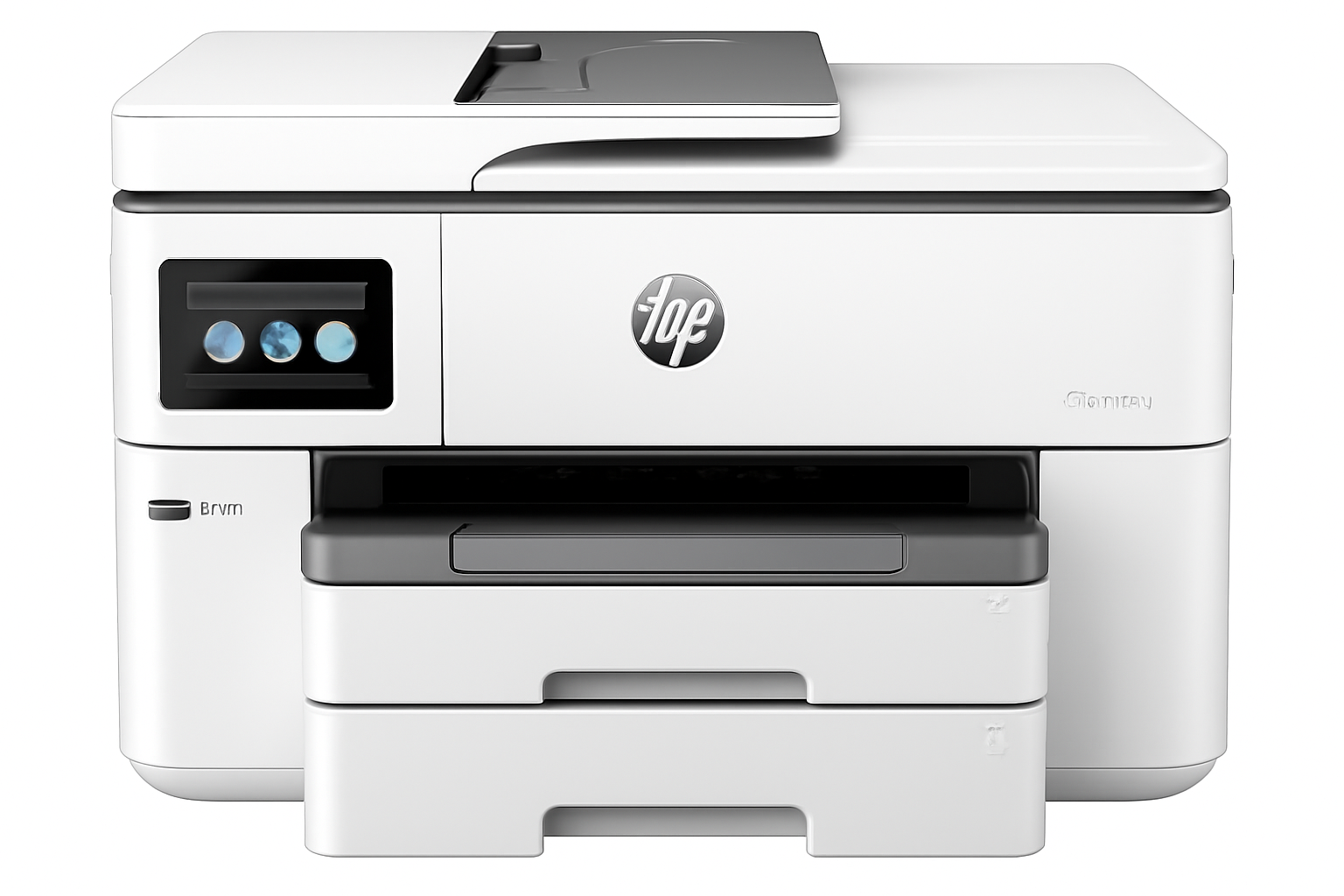
Navigation and control are a breeze with the user-friendly 4.3″ color graphic touchscreen. This intuitive interface simplifies tasks, provides quick access to settings, and offers visual feedback, enhancing the overall user experience.
High Paper Capacity with Dual Trays:
Minimize interruptions with the generous paper handling capabilities. Equipped with two 250-sheet input trays, the 9730 provides a total input capacity of 500 sheets. This means fewer paper reloads during large print jobs, boosting efficiency.
Professional, Durable Prints with Pigment-Based Inks:
The 9730 uses pigment-based inks for all four colors (Black, Cyan, Magenta, Yellow). This is a significant advantage as pigment inks are known for their durability, water resistance, fade resistance, and ability to produce sharp text and vibrant graphics.
High Duty Cycle for Sustained Performance:
Designed as a true workhorse, the 9730 has a high monthly duty cycle of up to 30,000 pages, with a recommended volume of 250-1,500 pages. This robust design ensures it can handle the consistent demands of small work teams and growing businesses.
Full Specifications: HP OfficeJet Pro 9730 Wide Format All-in-One Printer
Product & Price
- Model Name: HP OfficeJet Pro 9730 Wide Format All-in-One Printer
- SKU: 537P5C
- Price: ₹34,499
- Product Type: Inkjet Multifunction Printer
- Series: OfficeJet Pro
- Perfect for: Small Work Teams/ Hybrid offices
Core Functions & Print Technology
- Functions: Print, Scan, Copy
- Top Key Features: Wireless; Print from phone/tablet; ADF; Two-sided printing; Two-sided scanning; Scan to email; Scan to pdf; Touchscreen; Quiet mode
- Print Technology: HP Thermal Inkjet
- Multitasking Supported: Yes
- Print Colours: Yes (4 colors: Black, Cyan, Magenta, Yellow)
Print Performance
- Print Speed Black (ISO): Up to 22 ppm
- Print Speed Color (ISO): Up to 18 ppm
- Print Speed Black (Draft, A4): Up to 34 ppm
- Print Speed Colour (Draft, A4): Up to 34 ppm
- Duty Cycle (monthly, A4): Up to 30,000 pages
- Recommended Monthly Page Volume: 250 to 1500 pages
- Print Quality Black (best): Up to 1200 x 1200 rendered dpi
- Print Quality Color (best): Up to 4800 x 1200 optimized dpi on HP Advance Photo Paper, 1200 x 1200 dpi input
Paper Handling
- Media Sizes Supported: A4; A5; A6; B5 (JIS); Envelope (DL, C5, C6, Chou #3, Chou #4); Card (Hagaki); A3; Custom: Tray 1: 76 x 127 to 297 x 420 mm; Tray 2: 210 x 297 to 297 x 420 mm; Key: 10 x 15 cm; A4; A3; Envelopes
- Maximum Input Capacity (sheets): Up to 500 sheets (Tray 1: 250, Tray 2: 250)
- Maximum Output Capacity (sheets): Up to 75 A-size sheets, Up to 50 B-size sheets
- Paper Handling Input, Standard: 250-sheet input tray, 250-sheet plain paper tray
- Paper Handling Output, Standard: 75-sheet output tray
- Automatic Document Feeder (ADF): Yes
- Duplex Printing: Automatic
- Media Types: Plain; HP EcoFFICIENT; HP Premium Presentation Matte 120g; HP Tri-fold Brochure Glossy 180g; HP Brochure Matte 180g; HP Brochure Glossy 180g; HP Advanced Photo Papers; Light 60-74g
- Media Weight, Supported: 34 to 250 g/m²
- Media Weight, Recommended: 60 to 105 g/m²
Ink System
- Number of Print Cartridges: 4 (1 each black, cyan, magenta, yellow)
- Ink Types: Pigment-based (black and color)
- Replacement Cartridges: HP 936 series; HP 936e EvoMore series (planned April 2024)
- Print Head Nozzles: Total 6272 (1568/color * 4)
Connectivity & Communications
- Wireless Capability: Yes, with built-in dual-band Wi-Fi 802.11 a/b/g/n/ac and a self-heal solution
- Network Capabilities: Yes, via built-in Ethernet; Wireless 802.11a/b/g/n/ac
- Connectivity, Standard: 1 Ethernet; 1 Hi-Speed USB 2.0 (device); 1 Hi-Speed USB 2.0 (host); 1 Wi-Fi 802.11 a/b/g/n/ac (dual band)
- Mobile Printing Capability: Chrome OS; HP Smart app; Apple AirPrint™; Mobile Apps; Wi-Fi® Direct Printing; Mopria™ Certified
Scanner & Copier Specifications
- Scan Technology: Contact Image Sensor (CIS)
- Scan Size, Maximum: 297 x 432 mm (A3)
- Scan Resolution, Optical: Up to 1200 dpi
- Scan File Format: Bitmap (.bmp), JPEG (.jpg), PDF (.pdf), PNG (.png), Rich Text (.rtf), Searchable PDF (.pdf), Text (.txt), TIFF (.tif)
- Copies, Maximum: Up to 99 copies
- Copy Reduce / Enlarge: 25 to 400%
- Copy Speed Black (ISO): Up to 18 cpm
System Specifications
- Memory: 512 MB
- Control Panel: 4.3″ (10.92 cm) touchscreen control panel with color graphic display; LED indicator light (WiFi indicator)
- Supported OS: Windows 11; Windows 10; macOS 11 Big Sur; macOS 12 Monterey; macOS 13 Ventura; macOS 14 Sonoma; Linux; Chrome OS
- Minimum System Requirements: Microsoft® Windows® 11, 10: 32-bit or 64-bit; 2 GB HD space; Internet connection; Microsoft® Internet Explorer or Edge. Apple® macOS v11 BigSur, macOS v12 Monterey, macOS v13 Ventura; 2 GB HD; Internet required.
Dimensions & Power
- Dimensions (W x D x H): 581 x 467 x 386 mm (Output Tray + Cleanout Door not extended); Max: 581 x 842 x 386 mm (Output Tray + Cleanout Door fully extended)
- Power Consumption: 0.11W (Manual-Off), 5.40W (Standby), 1.39W (Sleep)
- Power Supply Type: Internal (Built-in) Universal Power Supply
Box Contents & Warranty
- What’s in the box: HP OfficeJet Pro 9730 WF AiO Printer; HP 938 Setup Black, Cyan, Magenta, Yellow Ink Cartridges; Regulatory Flyer; Ink Caution Flyer; Power Cord; Setup Poster; Reference Guide; SW CD (AP Indo only)
- Cable Included: USB Cable
- Warranty: One-year limited hardware warranty
Making the Right Choice: Pros and Cons for Your Business Needs
Pros: Where the OfficeJet Pro 9730 Excels for Business
- Exceptional Wide Format (A3) Support: This is the primary reason to consider the 9730. Its ability to print and scan documents up to A3 size is a crucial advantage for architectural firms, design studios, marketing teams, real estate agencies, and anyone needing larger-than-standard output.
- Complete Multifunctionality with Advanced Duplex: Offers print, copy, and scan functions. Critically, it includes automatic duplex printing AND scanning, along with an ADF (Automatic Document Feeder). This combination makes handling multi-page, double-sided documents incredibly efficient.
- Fast Print Speeds for Business Demands: With ISO speeds of 22 ppm for black and 18 ppm for color, and even faster draft modes (34 ppm), this printer is designed to keep up with the demands of a small to medium-sized office, minimizing wait times for important documents.
- Comprehensive and Reliable Connectivity: The 9730 offers ultimate flexibility with USB 2.0, Ethernet (for stable wired networking), and robust dual-band Wi-Fi (2.4/5 GHz) with self-heal technology. This ensures consistent and reliable network access, critical for shared office environments.
- Extensive Mobile and Cloud Printing Support: Seamlessly integrate with your mobile devices and cloud workflows via HP Smart app, Apple AirPrint™, Mopria™ Certified, Chrome OS, and Wi-Fi Direct Printing. This enhances productivity and allows for printing from virtually anywhere.
- Intuitive 4.3″ Color Touchscreen: The large, responsive touchscreen simplifies navigation through settings, managing print jobs, and accessing various functions, making it user-friendly for everyone in the office.
- High Paper Input Capacity (500 sheets): Dual 250-sheet input trays provide a total of 500 sheets, significantly reducing the frequency of paper reloads during large print runs and ensuring continuous workflow.
- Professional-Grade Pigment-Based Inks: Using pigment-based inks for all four colors ensures that your prints are not only vibrant and sharp but also highly durable, water-resistant, and fade-resistant.
- High Duty Cycle for Workload Management: With a monthly duty cycle of up to 30,000 pages and a recommended volume of 250-1,500 pages, the 9730 is built to handle the consistent and varied demands of a busy small work team or hybrid office.
- Multitasking Capability: Unlike some entry-level AIOs, this printer supports multitasking, meaning it can process multiple functions simultaneously (e.g., receive a print job while scanning).
Cons: What to Consider Before Investing
- Inkjet Running Costs (Compared to Laser): While HP OfficeJet Pro series offers competitive inkjet running costs, for businesses printing extremely high volumes of primarily black-and-white documents, a monochrome LaserJet Tank printer might offer a lower per-page cost in the very long run. Insight: However, for mixed-use (color and A3 printing), the 9730’s capabilities often outweigh the slightly higher per-page cost compared to a dedicated laser printer, especially when considering the initial investment for color laser A3.
- No Fax Functionality: The printer lacks a built-in fax modem. Consideration: Many modern businesses have transitioned away from traditional fax machines. For those who still require it, an internet-based fax service or a separate fax machine would be necessary.
- Physical Size and Footprint: As a wide-format AIO, it naturally has a larger footprint than standard A4 printers. Planning: Ensure you have adequate desk or counter space to accommodate its dimensions (581 x 467 x 386 mm, extending to 842mm depth with trays fully out).
- USB 2.0 Host Port Only: While sufficient for basic connections, faster USB 3.0 or higher host ports would offer quicker data transfers for scan-to-USB operations, especially for large files. Impact: For most network-based scanning or scanning to PC, this is a minor point.
Who Is This Printer For? Tailored Recommendations
The HP OfficeJet Pro 9730 Wide Format All-in-One Printer is an outstanding choice for:
- Small to Medium Businesses (SMBs): Especially those with diverse printing needs, including both standard A4 and larger A3 documents.
- Hybrid Offices: Where employees need a versatile printer for both in-office and remote work, with robust connectivity and mobile printing options.
- Architects, Designers, and Marketing Agencies: Professionals who regularly work with blueprints, large-format graphics, posters, or design mock-ups up to A3 size.
- Businesses Requiring Durable, Professional-Quality Color Prints: The all-pigment ink system ensures high-quality, water-resistant, and fade-resistant output for important documents and marketing materials.
- Work Teams Needing High Productivity: With fast speeds, automatic duplex printing and scanning, and a high-capacity ADF, it streamlines workflows and minimizes manual intervention.
Who Might Consider Other Options?
You might consider other options if:
- You Print Extremely High Volumes of Monochrome Documents: For businesses solely focused on very high-volume black-and-white printing, a monochrome laser printer or a monochrome LaserJet Tank might offer lower long-term running costs.
- Fax Functionality is Absolutely Essential: As this model does not include a built-in fax modem, you would need an alternative solution.
- You Have Very Limited Office Space: Its wide-format capabilities mean a larger physical footprint, which might not be suitable for extremely cramped environments.
- You Need Faster USB Data Transfer: While its network connectivity is robust, if you frequently transfer extremely large scan files directly via USB, a printer with USB 3.0 or higher might be faster.
Competitive Edge: What Sets It Apart
The HP OfficeJet Pro 9730 Wide Format All-in-One Printer distinguishes itself in the market with several key advantages:
- Affordable A3 Print & Scan Solution: It offers comprehensive wide-format (A3) printing and scanning capabilities at a price point that is highly competitive, especially when compared to dedicated A3 printers or A3-capable color laser MFPs.
- All-Pigment Ink System: The use of pigment-based inks for all four colors is a significant advantage, providing superior durability, water resistance, and professional-grade output for all types of documents, including marketing materials.
- Advanced Productivity Features: The combination of automatic duplex printing AND scanning, along with a reliable ADF, makes it exceptionally efficient for handling multi-page documents, a critical feature for busy offices.
- Robust Network Connectivity with Self-Heal Wi-Fi: The inclusion of both Ethernet and self-healing dual-band Wi-Fi ensures consistent, reliable, and flexible connectivity, minimizing network-related downtime in office environments.
- High Paper Capacity and Touchscreen Interface: The dual 250-sheet trays and the intuitive 4.3″ color touchscreen enhance user experience and reduce interruptions, making it a more user-friendly and efficient device for shared use.
Final Verdict: Is the HP OfficeJet Pro 9730 the Right A3 Multifunction Printer for Your Indian Business?
The HP OfficeJet Pro 9730 Wide Format All-in-One Printer is an outstanding choice for small work teams, hybrid offices, and businesses in India that require versatile printing, copying, and scanning capabilities up to A3 size. Its robust feature set, including fast print and scan speeds, automatic duplex functionality for both, a reliable ADF, and comprehensive connectivity options (including stable dual-band Wi-Fi and Ethernet), makes it a highly productive and efficient workhorse. The use of pigment-based inks for all colors ensures your output is consistently professional, durable, and resistant to water and fading – a crucial aspect for business documents and marketing materials. Priced at ₹34,499, it offers significant value for its specialized wide-format capabilities and advanced feature set. For businesses with diverse document needs, whether it’s standard reports, A3 marketing materials, or large-format scans, the HP OfficeJet Pro 9730 is a strong contender and a smart investment that can truly elevate your office’s productivity and professional output.
Overall Rating: 4.5 out of 5.0 (Based on Expert Analysis)