ReviewNest

Is ASUS ProArt P16 Worth It? Ultimate Creator Laptop Review

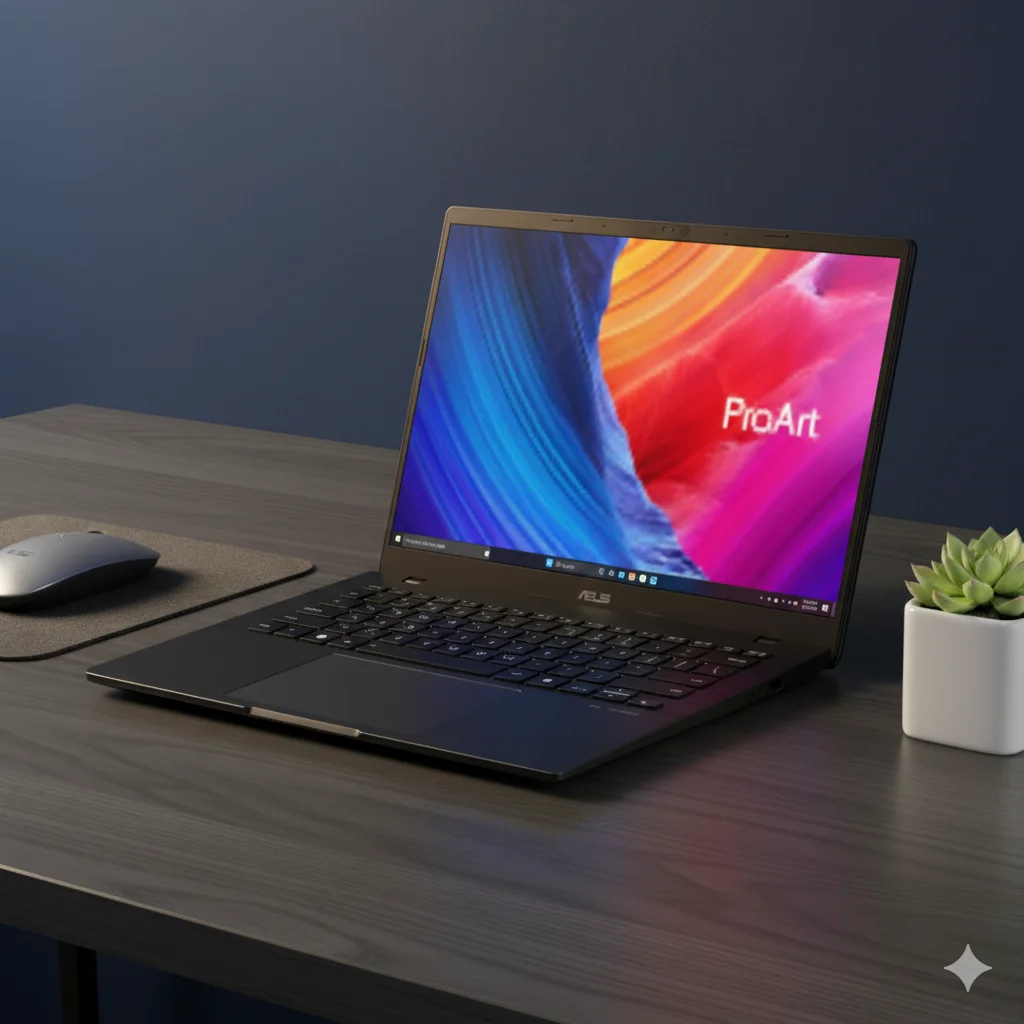
ASUS ProArt P16 (H7606WU) Review: Versatility for AI & Creators

ASUS ProArt P16 (H7606WU)

AMD Ryzen™ AI 9 365 / HX 370 50 TOPS NPU GeForce RTX™ 4050 24GB/32GB LPDDR5X / 1TB SSD 16.0″ 4K OLED Touch

The ASUS ProArt P16 H7606WU is a versatile and powerful creator laptop designed to be a true mobile companion for professionals. This model brings the same premium ProArt experience in a more accessible configuration, supporting the upcoming Copilot+ PC experiences with its AMD Ryzen™ AI 9 series processor. It expertly balances high performance, a breathtaking 4K OLED display, and a suite of creator-focused features to handle a wide range of professional tasks. This review for September 2025 explores how the H7606WU holds its own as a compelling choice for creators who need power without sacrificing a thoughtful, well-rounded design.

Key Features at a Glance

Next-Gen AI Performance: AMD Ryzen AI 9 365 / HX 370 with a 50 TOPS NPU.
Capable Graphics: NVIDIA® GeForce RTX™ 4050 Laptop GPU.
Immersive 4K Display: 16-inch 4K OLED touch screen.
Solid Memory & Storage: Up to 32GB of LPDDR5X RAM and a 1TB PCIe 4.0 SSD.
Pro-Grade Connectivity: Includes USB 4.0, HDMI 2.1, and an SD Express 7.0 reader.
Creator-Ready Tools: Features a Copilot key, virtual DialPad, and a stylus.

ProArt P16 H7606WU: In-Depth Features

Core Performance: Processor & AI

The H7606WU is powered by the AMD Ryzen™ AI 9 series processors. These CPUs are engineered for the next wave of AI-accelerated computing, making the laptop a true Copilot+ PC. This platform delivers up to 50 TOPS of AI processing power, allowing for a new generation of on-device AI features, including real-time image generation and intelligent search, all without needing an internet connection.

The specific processor in this model is either the AMD Ryzen™ AI 9 **365** or the more powerful AMD Ryzen™ AI 9 **HX 370**. Both feature high core counts and boost speeds that ensure smooth performance for complex multitasking and content creation applications.

Creative Powerhouse: Graphics

This laptop comes equipped with the NVIDIA® GeForce RTX™ 4050 Laptop GPU, which features 6GB of GDDR6 VRAM. While not a top-of-the-line gaming card, the RTX 4050 is a highly capable GPU for creators. It provides dedicated hardware for ray tracing and AI, which are optimized by NVIDIA Studio drivers for maximum performance and stability in applications like Adobe Premiere Pro, Blender, and DaVinci Resolve. It is a perfect choice for tasks like video editing, graphic design, and 3D modeling.

Professional-Grade Display

  • 4K OLED Technology: The 16.0-inch 4K OLED display delivers perfect blacks and an infinite contrast ratio, making every image and video pop with stunning clarity and color.
  • VESA Certified DisplayHDR True Black 500: This certification ensures the screen can produce deep blacks and bright highlights, offering a truly immersive viewing experience for HDR content.
  • PANTONE Validated: The display is factory calibrated and meets a Delta E < 1, ensuring professional-grade color accuracy that is vital for designers and photographers.
  • Touch & Stylus Support: The intuitive touch screen and included stylus add an extra layer of creative control for sketching, designing, and annotating.

Memory & Storage

  • RAM: The H7606WU is offered with either 24GB or 32GB of LPDDR5X onboard memory. This ample amount of high-speed RAM is more than sufficient for multitasking and handling large project files in creative applications.
  • Storage: The 1TB M.2 NVMe™ PCIe® 4.0 SSD provides fast read and write speeds, significantly reducing application load times and file transfer durations.

Connectivity & Ports

  • USB-C Ports: A combination of a USB 4.0 Gen 3 Type-C and a USB 3.2 Gen 2 Type-C port provides high-speed data transfer, video output, and Power Delivery for charging.
  • SD Express 7.0 Card Reader: This professional-grade card reader supports the latest, fastest SD cards, making it an essential tool for photographers and videographers.
  • HDMI 2.1 FRL: The HDMI 2.1 port allows you to connect to high-resolution external displays with high refresh rates for a multi-monitor setup.

Durability & User Interface

Built to the US MIL-STD 810H military-grade standard, the ProArt P16 is highly durable and designed to withstand the rigors of travel. The seamless touchpad features a virtual DialPad, a unique and intuitive tool for creators that allows for quick adjustments in creative software like Adobe Photoshop. The backlit keyboard includes a dedicated Copilot key for easy access to AI features.

Competitive Edge

The ASUS ProArt P16 H7606WU distinguishes itself by offering a robust feature set and a balance of performance that is rare in its class.

Focused AI and Graphics

While some competitors focus on raw gaming power, the H7606WU prioritizes a balanced, creator-centric performance. The combination of a high-TOPS NPU and the capable RTX 4050 ensures smooth operation for a wide range of creative tasks, from AI-accelerated effects to video encoding, without the higher cost and power consumption of a more powerful GPU.

Display Quality that Matters

The 4K OLED display is a standout feature that sets the ProArt P16 apart from many laptops in its price range. The PANTONE validation and VESA HDR True Black certification provide a level of color accuracy and visual depth that is essential for professionals and is often reserved for much more expensive machines.

Integrated Productivity Tools

Features like the virtual DialPad and included stylus are not just additions but integrated tools that streamline the creative workflow. This attention to a holistic user experience, including a comprehensive port selection and military-grade durability, makes the H7606WU a more complete and reliable solution for mobile professionals.

Full Specification Details

General Information

  • Model:ProArt P16 (H7606WU)
  • Color:Nano Black
  • Operating System:Windows 11 Home / Pro

Processor & Graphics

  • Processor:AMD Ryzen™ AI 9 365 or HX 370
  • Discrete Graphics:NVIDIA® GeForce RTX™ 4050 Laptop GPU (6GB GDDR6)
  • Integrated Graphics:AMD Radeon™ 880M Graphics
  • Neural Processor:AMD XDNA™ NPU (up to 50 TOPS)

Display

  • Panel:16.0-inch, 4K (3840 x 2400) OLED, 16:10, Touch screen
  • Refresh Rate:60Hz
  • Brightness & HDR:500 nits HDR peak brightness, VESA Certified Display HDR True Black 500
  • Color Validation:PANTONE Validated, 100% DCI-P3

Memory & Storage

  • Memory:24GB / 32GB LPDDR5X on board
  • Storage:1TB M.2 NVMe™ PCIe® 4.0 SSD

Connectivity

  • I/O Ports:1x USB 4.0 Gen 3 Type-C, 1x USB 3.2 Gen 2 Type-C, 2x USB 3.2 Gen 2 Type-A, 1x HDMI 2.1, 1x 3.5mm Combo Audio Jack, 1x DC-in, 1x SD Express 7.0 card reader
  • Wireless:Wi-Fi 7, Bluetooth 5.4

Power & Dimensions

  • Power Supply:200W AC Adapter, 90WHrs Battery
  • Weight:1.85 kg (4.08 lbs)
  • Dimensions:35.49 x 24.69 x 1.73 cm

Included Accessories

  • In the box:Backpack, USB-A to RJ45 gigabit ethernet adapter, Stylus, Power adapter

Pros & Cons: A Balanced View

Pros:

  • Excellent AI Performance: The 50 TOPS NPU offers leading performance for Copilot+ and AI-accelerated tasks.
  • Stunning 4K OLED Display: Color-accurate, high-resolution, and HDR-certified display for flawless visuals.
  • Good Balance of Power: The combination of the Ryzen AI processor and RTX 4050 GPU provides a strong foundation for a wide range of creative tasks.
  • Professional Features: Thoughtful additions like the virtual DialPad, SD Express reader, and stylus support.
  • Robust and Durable: US MIL-STD 810H military-grade build for peace of mind.

Cons:

  • Graphics Limitations: The RTX 4050 may not be powerful enough for the most demanding 3D rendering or high-end game development.
  • Soldered Memory: The memory is soldered to the board, so future upgrades are not possible.
  • Configuration Confusion: The existence of different RAM and OS configurations could be confusing for buyers.

Who Is This Laptop For?

  • Video Editors & Photographers: The 4K OLED display and fast SSD are perfect for editing high-resolution footage and images.
  • Graphic Designers: The color-accurate screen, stylus support, and virtual DialPad provide a top-tier design experience.
  • AI Enthusiasts: With its high-TOPS NPU, this is an ideal laptop for those who want to develop or use on-device AI applications.
  • Mobile Professionals: The combination of a powerful CPU, solid graphics, and a durable chassis makes it perfect for creators who need a reliable workstation on the go.

Who Might Consider Other Options?

  • Hardcore 3D Artists: Those working on the most complex 3D rendering projects may benefit from a more powerful RTX 4070 or 4080 GPU found in higher-end models.
  • Gamers: While capable, this laptop is optimized for creative workflows, and a dedicated gaming laptop may offer a higher refresh rate display and more powerful GPU for a better gaming experience.

Final Verdict: A Well-Rounded Powerhouse for the Modern Creator

The ASUS ProArt P16 H7606WU is a testament to purposeful design. It balances a powerful AI-centric processor with a capable RTX 4050 GPU, all while delivering a stunning 4K OLED display and a host of creator-friendly features. This is a laptop that understands the modern creative workflow and is built to excel at it.

While some may wish for a more powerful GPU, the overall package is a fantastic value for those who need a durable, reliable, and highly capable machine for video editing, graphic design, and AI-accelerated tasks. The ProArt P16 H7606WU is a strong recommendation for any professional seeking a premium experience without needing the absolute highest-end performance.

★★★★☆

Highly Recommended

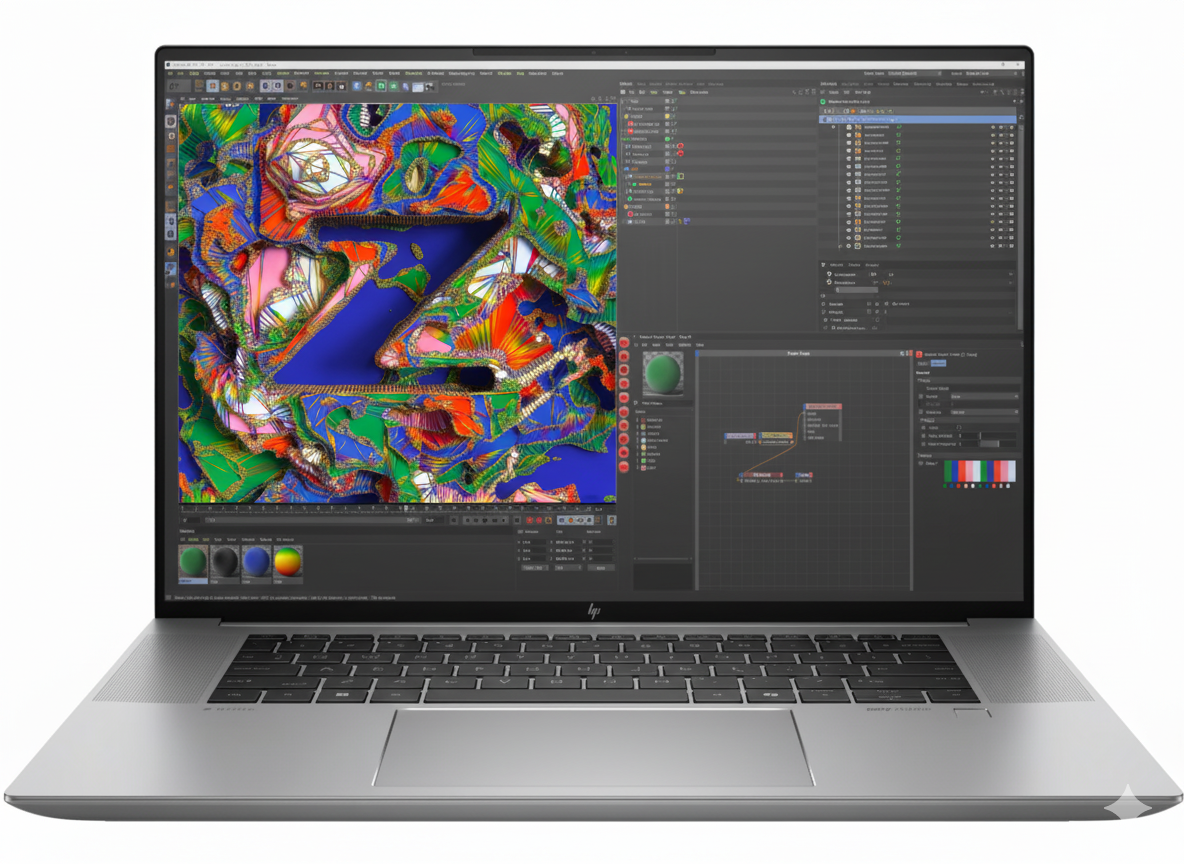
HP ZBook Studio 16 G11 Mobile Workstation – Intel Core Ultra 9, NVIDIA RTX 4070, 64GB RAM

HP ZBook Studio 16 G11 Mobile Workstation
HP ZBook Studio 16 G11 Mobile Workstation Review – Full Details

HP ZBook Studio 16 G11 Mobile Workstation

Up to Intel® Core™ Ultra 9 Up to NVIDIA® RTX™ 4070 Up to 64GB DDR5 RAM 16-inch 16:10 Display ISV Certified HP Wolf Security

The HP ZBook Studio G11 is a masterstroke of mobile workstation design, packing astonishing power into a sleek, impossibly thin chassis. It’s engineered for the most demanding creative professionals—3D artists, video editors, data scientists, and developers—who require desktop-class performance without being tethered to a desk.

This portable powerhouse can be configured with up to an Intel® Core™ Ultra 9 processor, a professional-grade NVIDIA® GeForce RTX™ 4070 Laptop GPU, and a massive 64GB of DDR5 RAM. It’s a no-compromise solution for rendering complex scenes, training AI models, and visualizing massive datasets, all from a device that easily slips into a backpack.

Uncompromising Creative Power

Accelerate your workflow with top-tier processing and professional-grade graphics.

Next-Gen Intel® Core™ Ultra 9

The available Intel® Core™ Ultra 9 processor features a revolutionary architecture with dedicated CPU, GPU, and NPU engines. This allows it to intelligently allocate resources, delivering extreme performance for complex 3D modeling and data analysis while efficiently handling AI-enhanced software features.

Professional NVIDIA® RTX™ Graphics

Configure your ZBook with up to an NVIDIA® GeForce RTX™ 4070 Laptop GPU or a professional NVIDIA RTX™ Ada Generation GPU. This hardware accelerates rendering, ray tracing, and AI computations, making it an essential tool for animators, architects, and data scientists.

Sleek Design, Serious Performance

A device that defies expectations by packing immense power into a remarkably thin and light chassis.

Thin, Light, and Durable

Starting at just 1.73 kg and measuring as thin as 1.8 cm, the ZBook Studio is exceptionally portable for a 16-inch workstation. The premium aluminum chassis is both elegant and durable, built to withstand the rigors of professional use on the go.

Immersive 16:10 Display

The 16-inch, 16:10 aspect ratio display gives you more vertical screen real estate, perfect for viewing timelines in video editing software or seeing more lines of code. Higher-end configurations offer stunning DreamColor displays with exceptional color accuracy for creative work.

Built for Professional Collaboration

Stay connected and communicate clearly, no matter where your work takes you.

Crystal-Clear Audio by Poly Studio

Experience best-in-class audio with dual stereo speakers and dual-array microphones tuned by Poly Studio. AI-enhanced noise suppression filters out background distractions, ensuring your voice is heard with perfect clarity during client calls and team meetings.

Future-Proof Connectivity

The ZBook Studio is equipped with a full suite of modern ports, including two versatile Thunderbolt™ 4 ports for high-speed data, display output, and charging. It also features the latest Wi-Fi 7 standard, providing ultra-fast and reliable wireless connectivity.

Enterprise-Grade Security and Reliability

A workstation designed to protect your data and withstand the demands of professional workflows.

Advanced Security and Durability

The ZBook Studio comes standard with advanced security features, including HP Sure Start, the industry’s first self-healing BIOS, to protect your device at the firmware level. The spill-resistant keyboard with a built-in drain hole and the integrated fingerprint reader underscore its durable, professional-grade design, ensuring it’s ready for real-world work environments.

Full Specifications Table

Processor & Graphics

  • Processor Options:Up to Intel® Core™ Ultra 9
  • Graphics Options:Up to NVIDIA® GeForce RTX™ 4070 Laptop GPU

Memory & Storage

  • Memory:Up to 64 GB DDR5 5600 MT/s (2x SODIMM slots)
  • Storage:Up to 2 TB PCIe Gen4 NVMe™ SSD

Display

  • Size:16.0-inch diagonal
  • Aspect Ratio:16:10
  • Panel Options:WUXGA (1920×1200) IPS, DreamColor OLED options available

Connectivity & Ports

  • Wireless:Wi-Fi 7 + Bluetooth® 5.4
  • Ports:2x Thunderbolt™ 4 with USB-C, 1x USB 3.2 Gen 1 Type-A, 1x Headphone/mic combo jack

Physical & OS

  • Dimensions:Approx. 35.6 x 24.2 x 1.9 cm
  • Weight:Starting at 1.73 kg
  • Battery:86 Whr Polymer with Fast Charge
  • Operating System:Windows 11 Pro

Pros and Cons: A Balanced View

Pros:

  • Extreme Performance: Configurable with Core Ultra 9 and RTX 4070 for true desktop-class power.
  • Sleek and Portable Design: Incredibly thin and light for a 16-inch workstation.
  • User-Upgradable RAM/SSD: Dual SODIMM and M.2 slots allow for future expansion.
  • Excellent Pro-Grade Keyboard: Comfortable and durable for long work sessions.
  • Robust Security Features: Enterprise-level security with a self-healing BIOS.

Cons:

  • Very High Price: Top-tier configurations are a major financial investment.
  • Underwhelming Webcam: Some models come with a basic 720p webcam, which is disappointing for a premium device.
  • Limited Port Selection: Lacks a dedicated SD card reader and has only one USB-A port.
  • Battery Life Under Load: The powerful components can drain the battery quickly during intensive tasks.

Who Is This Laptop For?

  • 3D Artists and Animators: Professionals who need powerful CPU and GPU performance for modeling, sculpting, and real-time rendering.
  • Video Editors and Colorists: Creators working with high-resolution footage who need fast rendering times and color-accurate displays (on premium screen models).
  • Data Scientists and Developers: Users who compile large codebases, run complex simulations, or train machine learning models.

Who Might Consider Other Options?

  • Users on a Budget: The ZBook Studio commands a significant premium; other workstations offer more power for the price if you can accept a bulkier design.
  • Those Needing Maximum I/O: Professionals who rely on multiple USB-A devices, an SD card reader, or an Ethernet port may find the port selection limiting.
  • Professionals Needing Extreme Battery Life: While the battery is large, the high-performance components mean it won’t last as long as an ultra-portable with integrated graphics.

Competitive Edge: The Creator’s Dream Machine

The ZBook Studio G11 carves out a unique space by refusing to compromise on either performance or portability.

  • Performance Density: Its primary advantage is packing an incredible amount of power—a Core Ultra 9 and an RTX 4070—into a chassis that is significantly thinner and lighter than traditional mobile workstations. It offers the power of a tank in the body of a sports car.
  • Sleek, Professional Aesthetics: Unlike many clunky, gaming-inspired performance laptops, the ZBook Studio maintains a clean, professional, and minimalist design that looks at home in any client meeting or creative studio.
  • Upgradability and ISV Certification: Despite its slim design, it offers user-upgradable RAM and storage, a key feature for long-term use. Its ISV certifications also guarantee stable and optimized performance in professional creative applications from Adobe, Autodesk, and more.

Final Verdict: The Pinnacle of Portable Power

The HP ZBook Studio G11 is a stunning achievement in workstation engineering. It successfully delivers on the promise of true desktop-level performance in a design that is remarkably sleek, light, and portable. For the creative professional who has been forced to choose between a powerful but heavy workstation and a portable but underpowered ultrabook, the ZBook Studio is the answer.

While it commands a very high price and makes some minor compromises on webcam quality and port selection, these are small trade-offs for the sheer performance density it offers. This is a specialized tool for top-tier professionals who need to render, compile, and create without limits, wherever inspiration strikes. For those users, the ZBook Studio G11 is not just an excellent choice—it is arguably the best in its class.

★★★★★

Overall Rating: 4.9 out of 5.0 (For Creative Professionals)