ReviewNest

Lenovo IdeaPad Slim 3i: How to Get Smooth Performance & Better Display

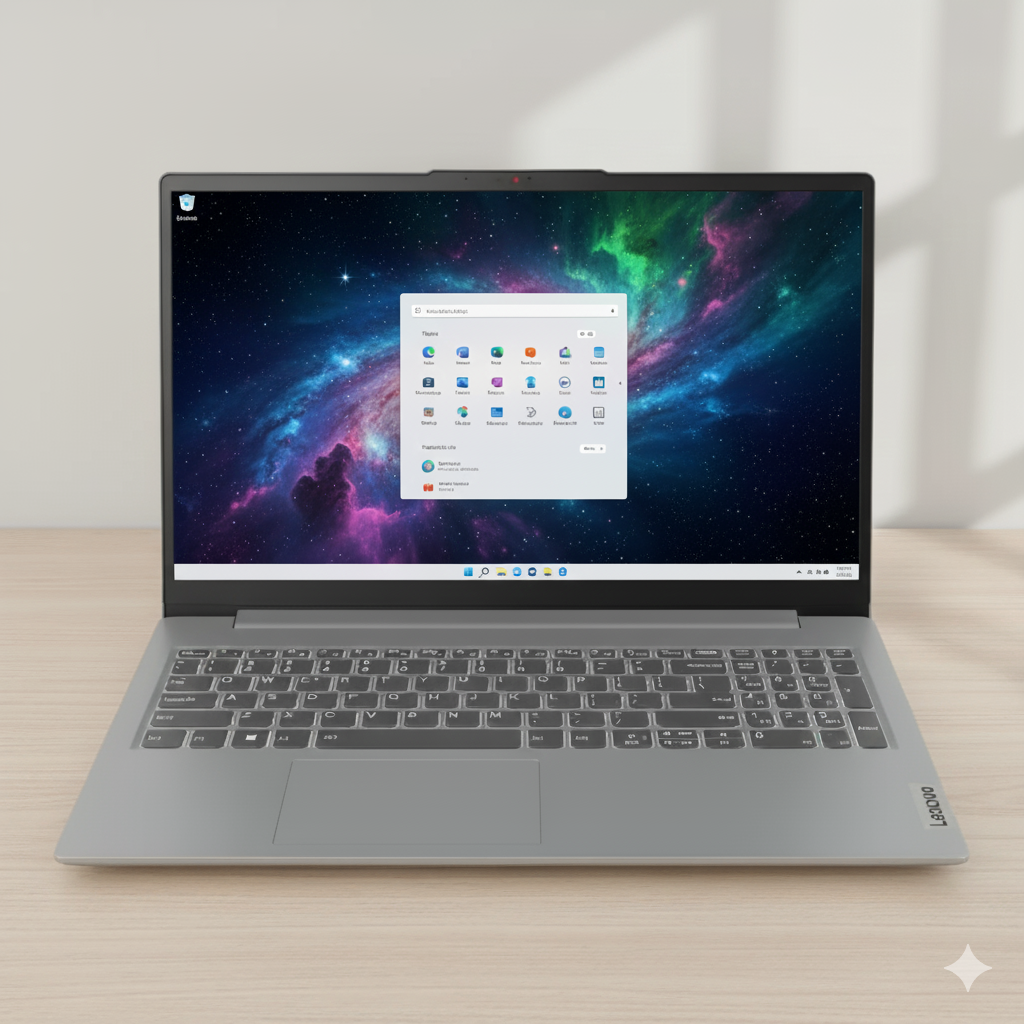
Lenovo IdeaPad Slim 3i 13th Gen (Intel i5) Laptop Review – Full Details

IdeaPad Slim 3i 13th Gen, 38.86cms – Intel i5

Intel® Core™ i5-13420H 16GB DDR5 RAM 512GB SSD Intel® UHD Graphics 15.3” WUXGA IPS Windows 11 Home

The Lenovo IdeaPad Slim 3i 13th Gen strikes an impressive and highly sought-after balance between high-performance computing and everyday usability. Priced at an attractive ₹61,491, this laptop addresses the critical flaw of its predecessors by pairing a powerful H-series processor with a significantly improved display, making it a powerful contender in the mid-range market.

At its heart is the potent 13th Gen Intel® Core™ i5-13420H Processor, delivering robust performance for demanding applications. This is complemented by 16GB of DDR5 RAM (partially upgradable) and a 512GB PCIe Gen4 SSD. Crucially, the display is a 15.3-inch WUXGA (1920×1200) IPS panel, offering superior viewing angles and a taller 16:10 aspect ratio for enhanced productivity. Wrapped in a sleek Luna Grey chassis and including MS Office 2024 and Accidental Damage Protection, this model represents a well-rounded and high-value package.

Key Features at a Glance

Powerful 13th Gen H-CPU: The Intel Core i5-13420H is built for serious productivity and multitasking.
Upgraded WUXGA IPS Display: A 16:10 aspect ratio IPS screen with much better viewing angles than TN panels.
Partially Upgradable RAM: 16GB DDR5 total, with an 8GB SODIMM slot for future expansion.
300 Nits Brightness: A brighter screen that is more usable in well-lit rooms.
Productivity-Ready Bundle: Comes preloaded with a lifetime license for MS Office Home 2024.
Full Warranty Coverage: Includes 1 Year On-site support plus 1 Year Accidental Damage Protection.

Balanced Performance for Modern Workflows

13th Gen H-Series Power

The Intel® Core™ i5-13420H Processor is the heart of this machine, offering excellent multi-core performance that breezes through demanding tasks like software development, heavy data analysis, and running multiple applications at once. Its high clock speeds ensure a snappy, responsive feel in day-to-day use.

Upgradable Dual-Channel Memory

This model features a smart 16GB DDR5 memory configuration: 8GB is soldered to the board, and another 8GB is in an accessible SODIMM slot. This provides great dual-channel performance out of the box and gives users the flexibility to upgrade the 8GB stick to a 16GB or 32GB module in the future for even more memory.

Standard Integrated Graphics

The integrated Intel® UHD Graphics are perfectly adequate for standard productivity, web browsing, and video streaming. However, they are not designed for modern gaming or professional creative applications, which would necessitate a dedicated GPU.

Fast Gen4 Storage

The 512GB PCIe Gen4 SSD delivers fast system boot times, quick application loading, and speedy file transfers, contributing to the laptop’s overall responsiveness. The 512GB capacity is a good starting point for most users.

An Upgraded Display & Practical Design

A Much-Needed IPS Panel

The standout upgrade is the 15.3-inch WUXGA (1920×1200) IPS display. The IPS technology provides vastly superior viewing angles and color consistency compared to cheaper TN panels. The 300 nits brightness makes it comfortable to use in most indoor environments, while the anti-glare finish minimizes reflections.

Productive 16:10 Aspect Ratio

The 16:10 aspect ratio provides more vertical screen real estate than traditional 16:9 displays. This is a significant advantage for productivity, as it allows you to see more of a document, spreadsheet, or webpage without scrolling. However, the 45% NTSC color gamut is still basic and not suitable for color-critical creative work.

Sleek and Functional Design

Finished in an elegant Luna Grey, the laptop maintains a professional aesthetic. It includes a privacy shutter for the webcam and a comfortable ClickPad. Unlike some 15-inch models, this version appears to omit the number pad, resulting in a centered keyboard and trackpad for better typing ergonomics.

Comprehensive Connectivity & Value-Added Support

Versatile Port Selection

The laptop offers a solid array of ports for modern workflows:

  • 1x USB-C®: A versatile port for data transfer (5Gbps), Power Delivery, and DisplayPort output.
  • 2x USB-A: High-speed ports for connecting standard peripherals.
  • HDMI® 1.4: Supports external displays up to 4K at 30Hz.
  • SD card reader & Headphone/mic jack.

Reliable Wireless & Software Bonus

With Wi-Fi 6 and Bluetooth® 5.2, the device ensures fast and stable connections to networks and accessories. The pre-installed Microsoft Office Home & Student 2024 is a huge value-add, making the laptop productive right out of the box.

Complete Peace of Mind

Lenovo’s excellent warranty package provides significant value, including 1 Year of On-site Premium Care for hassle-free hardware support and 1 Year of Accidental Damage Protection (ADP) to cover unexpected drops or spills.

Full Specifications Table

General Information

  • Brand: Ideapad (Lenovo)
  • Model: IdeaPad Slim 3i 13th Gen (83K100C6IN)
  • OS: Windows 11 Home Single Language 64
  • Color: Luna Grey

Processor & Graphics

  • Processor: 13th Gen Intel® Core™ i5-13420H (E-cores up to 3.40 GHz, P-cores up to 4.60 GHz)
  • Graphics: Integrated Intel® UHD Graphics

Memory & Storage

  • Memory: 16 GB DDR5-4800MT/s (8 GB Soldered + 8 GB SODIMM)
  • Storage: 512 GB SSD M.2 2242 PCIe Gen4 QLC

Display

  • Size: 38.86cms (15.3 inch)
  • Resolution: WUXGA (1920 x 1200)
  • Technology: IPS, Anti-Glare, Non-Touch, 45% NTSC, 300 nits, 60 Hz

Input & Connectivity

  • Keyboard: Backlit, Centered – English (US)
  • Pointing Device: ClickPad
  • Wireless: Wi-Fi 6 2×2 AX & Bluetooth® 5.2
  • Ports: 1x USB-C® (USB 5Gbps/PD/DP), 2x USB-A, HDMI® 1.4, SD card reader, Headphone / mic combo, Power in

Software & Services

  • Software Preload: MS Office Home 2024
  • Warranty: 1 Year On-site + 1YR Accidental Damage Protection

Pros and Cons: A Balanced View

Pros:

  • Excellent CPU Performance: The 13th Gen Core i5-H processor is a powerhouse for demanding productivity at this price.
  • Upgraded IPS Display: The WUXGA IPS screen is a massive improvement over TN panels, with good brightness and great viewing angles.
  • Partially Upgradable RAM: The 8GB SODIMM slot provides a valuable path for future memory upgrades, enhancing longevity.
  • Productive Aspect Ratio: The 16:10 display offers more vertical space for documents and web browsing.
  • Great Value Bundle: Comes standard with MS Office 2024 and a 1-Year Accidental Damage Protection warranty.

Cons:

  • Average Color Gamut: The 45% NTSC color coverage is adequate for office work but not for creative professionals.
  • Basic Integrated Graphics: Not suitable for gaming or heavy GPU-accelerated tasks.
  • Modest Port Selection: While functional, it lacks a second USB-C port or faster USB standards.
  • Potential Battery Life: The powerful H-series CPU may lead to shorter battery life compared to more efficient U-series models.

Who Is This Laptop For? Tailored Recommendations

  • Students & Academics: An ideal machine for research, coding, and heavy multitasking, with a display that’s comfortable for long study sessions. The included Office is a major bonus.
  • Office Professionals & Programmers: The powerful CPU, upgradable RAM, and taller 16:10 screen create a highly productive environment for coding, data analysis, and document management.
  • General Home Users: A fantastic choice for users who want a fast, reliable laptop for browsing, streaming, and everyday tasks, with a display that is a clear step-up from budget offerings.

Who Might Consider Other Options?

  • Creative Professionals: Photographers, designers, and video editors will need a display with much higher color accuracy (e.g., 100% sRGB or DCI-P3).
  • Serious Gamers: The integrated Intel UHD graphics cannot handle demanding modern games; a laptop with a dedicated NVIDIA or AMD GPU is required.
  • Users Needing Maximum Battery Life: While fine for typical use, those who need all-day power away from an outlet might prefer a model with a more power-efficient U-series processor.

Competitive Edge: The Sweet Spot of Power and Polish

In the crowded ~₹60,000 market, the IdeaPad Slim 3i 13th Gen carves out a compelling niche by refusing to make the usual compromises.

  • Power AND a Good Display: This is its biggest advantage. While competitors often force buyers to choose between a strong CPU (with a poor TN screen) or a good IPS screen (with a weak U-series CPU), this model delivers both. It pairs an H-series chip with a respectable WUXGA IPS panel.
  • Upgradability: The hybrid RAM configuration (8GB soldered + 8GB SODIMM) is a rare and valuable feature in this class, offering a clear upgrade path that many sealed, all-soldered competitor laptops lack.
  • Complete Value Package: Bundling MS Office 2024 and Accidental Damage Protection as standard makes the total cost of ownership lower than many rivals where these are expensive add-ons.

Final Verdict: An Outstanding Mid-Range All-Rounder

The Lenovo IdeaPad Slim 3i 13th Gen (i5-13420H) is a resounding success and a standout recommendation in the mid-range laptop market. It intelligently corrects the critical flaws of previous budget-performance models by providing a bright, clear WUXGA IPS display that is a pleasure to use for everyday tasks. When combined with the formidable power of the H-series processor and the flexibility of partially upgradable RAM, the result is a remarkably balanced machine.

While the color accuracy won’t satisfy creative professionals and the integrated graphics aren’t for gamers, this laptop isn’t trying to be for them. It is laser-focused on the student and professional user who demands strong, responsive performance for productivity without being penalized with a subpar screen. For that audience, the IdeaPad Slim 3i hits a home run, delivering excellent performance, a quality display, and outstanding value with its software and warranty bundle.

★★★★☆

Overall Rating: 4.5 out of 5.0 (Based on Expert Analysis)
ASUS Vivobook 14: Unleash Next-Gen AI with AMD Ryzen AI & Unbeatable Security.

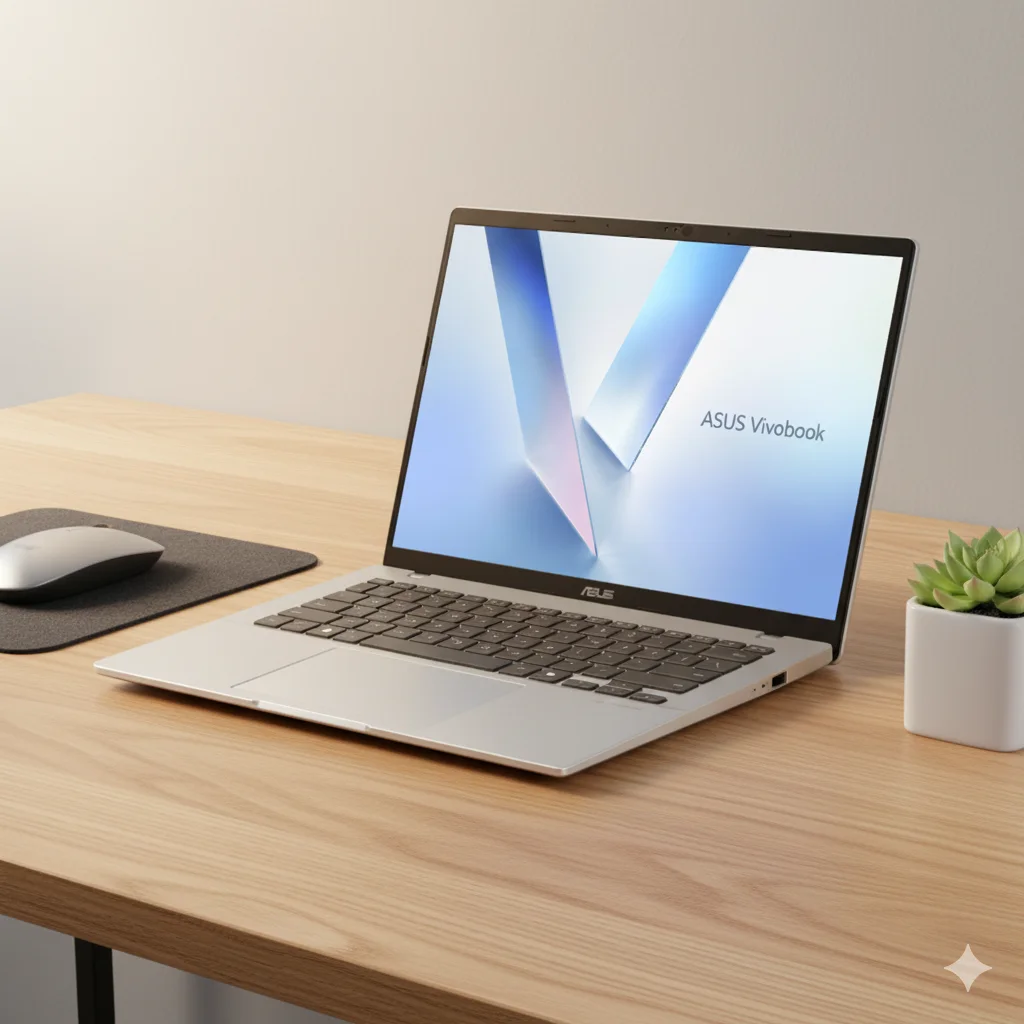
ASUS Vivobook 14 (M1407) Review: The Smart, Secure, and Affordable Copilot+ PC

ASUS Vivobook 14 (M1407)

AMD Ryzen™ AI 7/5 Up to 50 TOPS NPU 16GB DDR5 / 512GB PCIe 4.0 14″ WUXGA IPS 42WHrs Battery Microsoft Pluton Security

Welcome to the next wave of personal computing with the ASUS Vivobook 14 (M1407), a pioneering Copilot+ PC that brings high-end AI and security features to the mainstream. Powered by the latest AMD Ryzen™ AI 300 Series processors and their formidable 50 TOPS NPU, this laptop is engineered for students, mobile professionals, and everyday users who demand intelligence and efficiency. Packaged in a slim, lightweight, and military-grade durable chassis, it delivers a potent combination of on-device AI, robust security via the Microsoft Pluton processor, and practical, user-friendly features. This in-depth review for September 2025 explores how the Vivobook 14 balances affordability with next-generation technology to create a truly compelling and future-proof machine.

Key Features at a Glance

Next-Gen AI Performance: AMD Ryzen™ AI 300 Series with a powerful 50 TOPS NPU.
Advanced Copilot+ PC Experience: Native support for Recall, Cocreator, and other on-device AI tools.
Robust Hardware Security: Fortified with the Microsoft Pluton security processor for chip-level protection.
Clear & Comfortable Display: 14-inch FHD+ 16:10 IPS display with TÜV Rheinland certification.
Military-Grade Durability: US MIL-STD 810H tested for reliability in a thin and light (1.46kg) package.
Excellent Connectivity: Includes four USB ports (2x Type-C, 2x Type-A), HDMI, and fast Wi-Fi 6.

AI-Powered Performance: More Intelligence, More Productivity

The Vivobook 14 is at the forefront of the AI PC revolution, leveraging AMD’s latest technology to deliver a smarter user experience.

AMD Ryzen™ AI 300 Series Processors:

Choose between the powerful AMD Ryzen™ AI 7 350 (8 cores) or the efficient Ryzen™ AI 5 330 (4 cores). These processors are designed for sustained performance and enhanced efficiency, backed by an improved cooling system with a TDP of up to 35W.

AMD XDNA™ NPU:

The integrated Neural Processing Unit (NPU) is the star of the show, delivering a massive 50 TOPS (Trillion Operations Per Second). This enables lightning-fast, on-device AI processing for Copilot+ features like real-time translation, content generation, and system-wide optimizations without relying on the cloud.

ASUS AI Applications:

Beyond the Windows AI features, ASUS includes its own suite of intelligent tools. StoryCube helps organize your photos and videos, while the new Virtual Assistant “OMNI” can summarize documents and answer questions about your files, all processed locally for maximum privacy.

Advanced Security: More Secure, More Peace of Mind

The Vivobook 14 integrates cutting-edge hardware and intelligent software to provide a secure user experience from the chip up.

Microsoft Pluton Security Processor:

This chip-to-cloud security technology is built directly into the CPU, creating a hardware root of trust that protects sensitive data like credentials and encryption keys from physical and software-based attacks, a feature usually reserved for premium business laptops.

Secure Login & Privacy Shutter:

The FHD IR camera enables fast and secure facial recognition login via Windows Hello. For guaranteed privacy, a physical privacy shutter instantly covers the webcam, ensuring you are only on camera when you want to be.

Immersive & Comfortable Display

The Vivobook 14’s display is engineered for an excellent visual experience, perfect for both productivity and entertainment.

14-inch WUXGA IPS Display:

The 16:10 aspect ratio panel offers more vertical screen space with a WUXGA (1920 x 1200) resolution. It features an impressive 87% screen-to-body ratio, 300 nits of brightness, and an anti-glare finish for comfortable viewing in various lighting conditions.

Eye-Care Certified:

To protect your eyes during long work or study sessions, the display is TÜV Rheinland-certified for low blue light emissions, reducing eye strain without compromising color quality.

Productivity-Focused Design & Durability

ASUS has engineered the Vivobook 14 to be a perfect daily companion, blending portability, comfort, and proven toughness.

Slim, Light & Stylish:

Measuring just 1.79cm thin and weighing only 1.46kg, the Vivobook 14 is effortless to carry around campus or between meetings. It’s available in several elegant colors, including Cool Silver and Quiet Blue.

US MIL-STD 810H Military-Grade Standard:

This laptop isn’t just about looks. It has passed rigorous MIL-STD 810H testing for shock, vibration, and extreme temperatures, ensuring it can withstand the bumps and knocks of daily life.

ErgoSense Keyboard & Smart Gesture Touchpad:

The keyboard offers a comfortable typing experience with 1.7mm key travel and includes a dedicated Copilot key for instant AI access. The large touchpad incorporates Smart Gestures, allowing you to control volume and brightness with a simple swipe.

Full Specification Details

Processor & Graphics

  • Processor Options: AMD Ryzen™ AI 7 350 (8 cores, up to 5.0GHz) or AMD Ryzen™ AI 5 330 (4 cores, up to 4.5GHz)
  • Neural Processor: AMD XDNA™ NPU (up to 50 TOPS)
  • Graphics: Integrated AMD Radeon™ Graphics

Display

  • Panel: 14.0-inch, WUXGA (1920 x 1200) IPS, 16:10 Aspect Ratio
  • Details: 60Hz Refresh Rate, 300 nits, Anti-glare finish, 87% Screen-to-body ratio

Memory & Storage

  • Memory: 16GB DDR5 on board
  • Storage: 512GB M.2 NVMe™ PCIe® 4.0 SSD
  • Expansion Slots: 1x DDR5 SO-DIMM slot (up to 32GB total), 1x M.2 2280 PCIe 4.0×4 (up to 1TB total)

Connectivity

  • I/O Ports: 2x USB 3.2 Gen 1 Type-C (Display/Power Delivery), 2x USB 3.2 Gen 1 Type-A, 1x HDMI 1.4, 1x 3.5mm Combo Audio Jack
  • Network: Wi-Fi 6 (802.11ax) 2*2 + Bluetooth® 5.3

Power & Dimensions

  • Battery: 42WHrs, 3-cell Li-ion
  • Power Supply: 65W AC Adapter (Type-C)
  • Weight: 1.46 kg
  • Dimensions: 31.52 x 22.34 x 1.79 ~ 1.99 cm

Security & Durability

  • Security: Microsoft Pluton Security Processor, IR Webcam with Windows Hello, Firmware TPM, Privacy Shutter
  • Durability: US MIL-STD 810H military-grade standard

Pros & Cons: A Balanced View for Buyers

Pros:

  • Powerful On-Device AI: The 50 TOPS NPU provides class-leading AI performance for fast, private, and efficient AI workloads.
  • Excellent Value Proposition: Brings next-generation Copilot+ PC features and hardware security to an affordable starting price of ₹58,990.
  • Robust Hardware Security: Integrated Microsoft Pluton processor and an IR camera with privacy shutter offer excellent security.
  • Durable and Portable: It’s lightweight at 1.46kg but tough enough to meet MIL-STD 810H standards.
  • Good I/O Selection: A practical set of ports, including two USB-C and two USB-A, reduces the need for dongles.
  • Upgradable RAM & Storage: Features a SO-DIMM slot and M.2 slot for future upgrades, a rarity in modern thin laptops.

Cons:

  • Modest Battery Size: The 42WHrs battery is smaller than many competitors, which may limit all-day unplugged use under heavy loads.
  • Standard Display: The 60Hz WUXGA IPS screen is practical but lacks the vibrancy and deep blacks of an OLED panel.
  • No High-Speed Wi-Fi: Equipped with Wi-Fi 6, which is fast, but lacks the future-proofing of Wi-Fi 6E or Wi-Fi 7.
  • Integrated Graphics Only: Not suitable for serious gaming or demanding 3D creative work.

Who Is This Laptop For? Tailored Recommendations

  • Students and Academics: The lightweight, durable design, comfortable keyboard, and powerful AI features for research and writing make it an ideal educational companion.
  • Mobile Professionals and Office Users: A great choice for those who need a reliable, secure, and portable machine for everyday productivity tasks, presentations, and video conferencing.
  • Budget-Conscious Tech Enthusiasts: Users who want to experience the new era of Copilot+ PCs without paying a premium price will find this to be a perfect entry point.
  • Home Users: An excellent all-around laptop for family use, balancing performance for tasks, AI for organization, and a great screen for media consumption.

Who Might Consider Other Options?

  • Hardcore Gamers & 3D Artists: The integrated AMD Radeon graphics are not designed for intensive gaming or professional 3D rendering. A dedicated GPU is a must for these users.
  • Creative Professionals Needing Color Accuracy: While the IPS display is good, designers and photographers who require the perfect colors and contrast of an OLED display should look at higher-end models.
  • Road Warriors Needing Maximum Battery: While fast-charging is a plus, the 42WHrs battery may not be enough for users who are frequently away from power outlets for extended periods.
  • Users Requiring Top-Tier Performance: While the Ryzen AI 7 is powerful, professionals with extreme computing needs (e.g., video editing, complex simulations) might still prefer a workstation-class device.

Competitive Edge: Vivobook 14 vs. The Rivals

In the emerging market of Copilot+ PCs, the ASUS Vivobook 14 (M1407) carves out a compelling niche by democratizing next-generation technology.

  • AI Power for the Mainstream: Its key advantage is offering a massive 50 TOPS of NPU performance at a price point where competitors often offer far less AI capability or none at all. It makes true on-device AI accessible.
  • Enterprise-Grade Security by Default: The inclusion of the Microsoft Pluton processor is a significant differentiator in this price segment, providing a level of hardware security typically found in much more expensive business laptops.
  • Superior Upgradability: Unlike many thin-and-light laptops that have fully soldered components, the Vivobook 14 offers an open SO-DIMM slot for RAM and an accessible M.2 slot for storage, providing a clear path for future upgrades and extending the device’s lifespan.
  • Practical & Durable Design: By combining a lightweight build with MIL-STD 810H durability, it offers a level of resilience that many stylish but fragile consumer laptops lack.

Final Verdict: The Smart, Accessible Choice for the AI Era

The ASUS Vivobook 14 (M1407) is a landmark device, successfully bringing the power and potential of the Copilot+ PC experience to a highly accessible price point. It smartly prioritizes the features that matter most for a modern workflow: powerful on-device AI processing, robust hardware security, and a durable, portable design. The inclusion of the AMD Ryzen™ AI 300 series processor with its 50 TOPS NPU is a game-changer for this segment, delivering intelligence and speed where it counts.

While it makes sensible compromises with a standard IPS display and a smaller battery to meet its aggressive price, these do not detract from its core mission. For students, professionals, and anyone looking for a future-proof laptop without breaking the bank, the Vivobook 14 offers an almost unbeatable blend of innovation and value. Starting at ₹58,990, it stands as a brilliant and highly recommended entry point into the new age of AI-powered computing.

★★★★☆

Overall Rating: 4.5 out of 5.0 (Based on Expert Analysis)