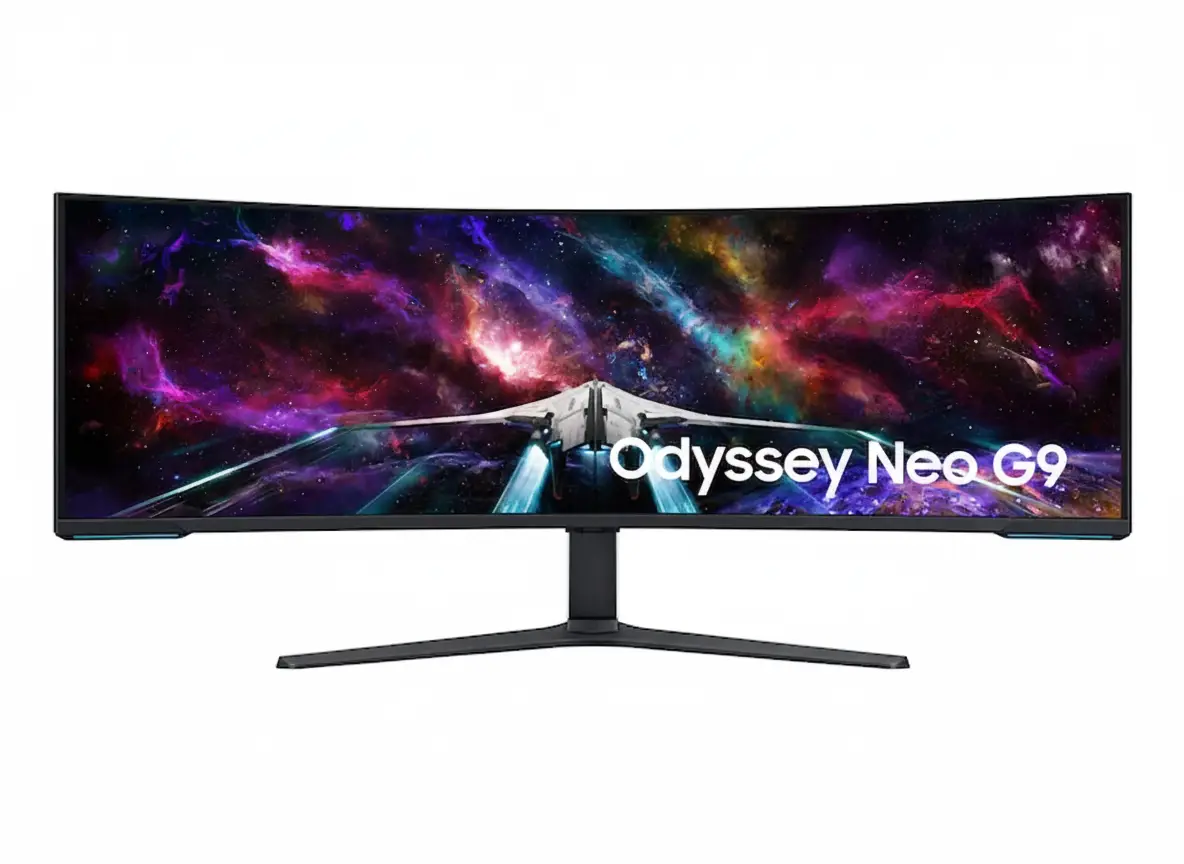
🏆 World’s First Dual UHD Monitor: 57″ 32:9 + 240Hz + HDR1000!
7680×2160 + 2,392 Zone Mini-LED + 1000R Curve + DP 2.1!
Samsung Odyssey Neo G9 57″ Gaming Monitor
57″ Dual UHD Mini-LED | 240Hz | 1ms | 1000R | HDR1000 | DP 2.1
7680×2160 32:9 Curved – Quantum Matrix – 2,392 Dimming Zones
🎮 The Ultimate Dual 4K Gaming Powerhouse:
• Size: Massive 57″ (144.78cm) Dual UHD (7680×2160) 32:9 Aspect
• Panel: VA Quantum Mini-LED 1000R + 2,392 Local Dimming Zones
• Speed: 240Hz Refresh + 1ms GTG Response + DP 2.1 Support
• HDR: VESA DisplayHDR 1000 + 1,000 Nits Peak + HDR10+ Gaming
• Brightness: 420 cd/㎡ Typical + 1,000 Nits HDR Peak
• Colors: 1 Billion Colors + 95% DCI-P3 + 140 PPI Sharpness
• Gaming: FreeSync Premium Pro + KVM Switch
• Features: PIP/PBP + CoreSync + UL Glare Free
₹2,89,990
₹3,49,990
SAVE ₹60,000 (17% OFF!)
*Price varies ₹2,79,990-2,99,990 across retailers | Check current offers
🛒 Check Price on Amazon India$2,299.99
CURRENT RETAIL PRICE
*Model: LS57CG952NNXZA | 4.6★ (643 reviews)
🛒 Buy Now on Samsung.com (USA)🌍 Global Availability
• India: ₹2,79,990-2,99,990 (Amazon.in, Flipkart, Samsung India)
• USA: $2,299.99 (Samsung.com, Best Buy, Micro Center)
• Europe: €2,199-2,599 (varies by country)
• Asia: Check Samsung regional sites
Resolution
Dual 4K
Refresh Rate
240Hz
HDR
HDR1000
Samsung Odyssey Neo G9 57″ Overview – World’s First Dual 4K Ultra-Wide
🎮 Gaming Highlights
- 57″ Dual UHD: 7680×2160 resolution (two 4K side-by-side)
- 1000R Curved: Extreme wraparound immersion
- 240Hz + 1ms: Ultra-fast competitive performance
- Mini-LED 2,392 Zones: Precise backlight control
- HDR1000: True 1,000 nits peak brightness
- 140 PPI: Sharp despite 57″ size
- DP 2.1 Support: Full bandwidth for Dual 4K 240Hz
- FreeSync Premium Pro: Smooth adaptive sync
💎 Quantum Matrix Tech
- 💡 2,392 Zones – Ultra-precise local dimming
- 🌟 12-bit Black – Enhanced contrast depth
- ☀️ 420 cd/㎡ SDR – Bright everyday use
- 🔆 1000 Nits HDR – Peak highlights
- 🎨 95% DCI-P3 – Wide color gamut
- 🌈 1B Colors – Smooth gradients
⭐ Why This Monitor?
- • World’s first: 32:9 Dual UHD gaming monitor
- • Extreme resolution: 7680×2160 = two 4K displays
- • Mini-LED advantage: Brighter than OLED, no burn-in
- • Flagship HDR: True HDR1000 certification
- • 240Hz capable: With DP 2.1 compatible GPU
- • Professional grade: Gaming + productivity beast
🎯 What Makes Odyssey Neo G9 57″ Special?
The Samsung Odyssey Neo G9 57″ (LS57CG952NNXZA) is a category-defining display that pushes ultra-wide gaming to unprecedented levels. As the world’s first Dual UHD 32:9 gaming monitor, it delivers an astonishing 7680×2160 resolution across 57 inches – the exact pixel count of two 32″ 4K monitors merged seamlessly with a 1000R curvature that wraps intensely around your field of vision.
The Quantum Mini-LED panel with 2,392 local dimming zones provides flagship-tier HDR performance. Unlike OLED, Mini-LED achieves VESA DisplayHDR 1000 certification with true 1,000 nit peak brightness, creating dazzling highlights in HDR games while maintaining excellent contrast through precise backlight control. The VA panel’s 420 cd/㎡ typical brightness and 140 PPI pixel density ensure sharp, comfortable viewing in both bright offices and dim gaming caves.
Gaming performance matches the visual spectacle. 240Hz refresh rate and 1ms GTG response time deliver competitive-grade motion clarity across the massive canvas, though you’ll need a DisplayPort 2.1 compatible GPU to unlock full Dual 4K 240Hz simultaneously. AMD FreeSync Premium Pro ensures tear-free gameplay with HDR enabled, while features like KVM switch, Picture-by-Picture, Black Equalizer, and CoreSync lighting create a complete battlestation experience.
At $2,299.99 USD, this is unquestionably a premium purchase targeting hardcore enthusiasts with top-tier PC hardware. The combination of unmatched Dual 4K resolution, Mini-LED HDR1000 brilliance, and extreme 1000R curvature makes the 57″ Neo G9 the ultimate statement piece for sim racing rigs, flight sim cockpits, and multi-purpose workstations demanding maximum screen real estate.
Dual UHD Display – 7680×2160 Gaming Canvas
📐 7680×2160 Dual 4K Resolution – Two UHD Displays in One
The 7680×2160 Dual UHD (DUHD) resolution provides the exact pixel count of two 3840×2160 4K UHD monitors placed side-by-side, creating an unprecedented 16.6 million pixel canvas without bezels interrupting your view. This 32:9 aspect ratio delivers workspace equivalent to dual 32″ 4K displays for ultimate productivity and gaming immersion.
At 140 pixels per inch, the Neo G9 maintains impressive sharpness despite its enormous size. Text remains readable for productivity work, game textures show intricate detail, and the pixel density prevents visible pixelation at normal viewing distances. This is 133% more pixels than 5120×1440 DQHD ultrawide monitors and offers truly 4K-class clarity across the full width.
Resolution Comparison
- • 32″ 4K UHD: 3840×2160 (8.29MP) – single display
- • 49″ DQHD 32:9: 5120×1440 (7.37MP) – dual QHD
- • 57″ DUHD 32:9: 7680×2160 (16.59MP) – dual 4K UHD!
- • Pixel density: 140 PPI – 4K sharpness maintained
🌀 1000R Curvature – Extreme Wraparound Immersion
The 1000R curvature radius means the monitor follows a 1000mm (1m) radius arc, creating the most aggressive curve available in gaming monitors. This extreme bend is specifically engineered for the 57″ format to ensure every pixel maintains equal viewing distance from your eyes, maximizing immersion and reducing edge distortion.
The 1000R curve provides exceptional benefits for sim racing and flight simulation. In racing games, the screen edges naturally fill your peripheral vision like actual cockpit windows. For flight sims, instruments and views wrap around realistically. Even in productivity, the curve reduces head movement needed to view content, though the extreme curve may challenge users preferring flat displays for CAD or design work.
1000R Curvature Benefits
- • Extreme immersion: Screen wraps deeply into peripheral vision
- • Uniform focus: All areas equidistant from viewing position
- • Reduced distortion: Edges don’t appear “pulled” like flat UWs
- • Ergonomic: Minimal head turning reduces neck strain
🎮 Dual 4K Gaming – Where Resolution Meets Immersion
🏎️ Sim Racing Heaven
The 57″ 32:9 Dual 4K display is the ultimate sim racing screen. Games like iRacing, Assetto Corsa Competizione, and rFactor 2 render razor-sharp cockpits, mirrors, and track details across your entire peripheral vision with 4K-class clarity at every pixel.
The 1000R curve creates authentic cockpit geometry matching real race car seating positions.
✈️ Flight Sim Perfection
Microsoft Flight Simulator and X-Plane benefit enormously from Dual 4K horizontal resolution. The 57″ screen displays entire glass cockpit panels, HUD elements, and side windows with instrument readability matching real aircraft.
HDR1000 makes VFR navigation realistic with proper sky brightness and shadow detail.
🌍 AAA Open-World
Modern AAA titles like Cyberpunk 2077, Starfield, and Red Dead Redemption 2 with 32:9 support create breathtaking panoramic vistas. The Dual 4K resolution reveals environmental detail impossible on lower-res ultrawides.
Mini-LED HDR1000 makes sunsets, explosions, and neon cities absolutely stunning.
💼 Productivity on 57″ Dual 4K
Dual 4K Monitor Replacement
The 57″ Dual UHD screen completely replaces dual 32″ 4K monitor setups while eliminating center bezels. You can run two full-size 4K applications side-by-side at native 3840×2160 each, or split the screen into three, four, or six windows for complex multitasking workflows requiring maximum screen real estate.
Windows 11’s Snap Layouts work perfectly with 32:9 Dual 4K, allowing instant window organization. Video editors get 4K timeline + 4K preview simultaneously. Developers can view multiple code files, documentation, terminals, and browsers. Financial analysts can display numerous data dashboards with true 4K clarity for each section.
GPU Requirements
Driving 7680×2160 at high frame rates requires flagship-tier GPU hardware. To achieve full Dual 4K 240Hz, you need DisplayPort 2.1 support (UHBR 13.5+) or HDMI 2.1 FRL 12Gbps. Currently, this means NVIDIA RTX 4080/4090 or AMD RX 7900 XTX/7900 XT with proper cables and settings.
For gaming, 16.6 million pixels is extremely demanding. Even RTX 4090 struggles to hit 240 FPS in modern AAA titles at Dual 4K. Most users target 100-144 FPS in demanding games, where the 240Hz panel still provides smoother motion than 144Hz-locked monitors. Competitive esports titles and older games can hit higher framerates.
Quantum Mini-LED Technology – HDR1000 Brilliance
💡 2,392 Local Dimming Zones – Precision Backlight Control
The Quantum Matrix Technology uses 2,392 independently controlled local dimming zones powered by miniaturized Mini-LED backlights. This massive zone count provides far more precise brightness control than standard full-array local dimming (FALD), approaching OLED-like contrast performance while maintaining Mini-LED’s brightness advantage.
With nearly 2,400 zones across 57 inches, each zone controls a relatively small screen area, minimizing blooming artifacts around bright objects on dark backgrounds. While not perfect pixel-level dimming like OLED, the zone density is high enough that blooming is only noticeable in worst-case scenarios like white text on pure black backgrounds.
Mini-LED vs Other Technologies
- • Standard LCD: Single zone – poor contrast, no HDR
- • FALD LCD: 32-512 zones – visible blooming
- • Mini-LED: 2,392 zones – minimal blooming, bright HDR!
- • OLED: Per-pixel – perfect but lower peak brightness
☀️ HDR1000 – True High Dynamic Range
The VESA DisplayHDR 1000 certification guarantees genuine HDR performance with 1,000 nit peak brightness in 10% window area, local dimming capability, and wide color gamut. This is flagship-tier HDR far exceeding DisplayHDR 400 or 600, providing intense highlights that approach real-world brightness levels.
Combined with the VA panel’s excellent native contrast and 12-bit black level processing, HDR1000 creates stunning visual impact in HDR games and movies. Sunlight, explosions, magic effects, and neon signs have proper intensity while shadows remain deep and detailed. HDR10+ Gaming support adds dynamic metadata for scene-by-scene HDR optimization.
HDR1000 Advantages
- • 1000 nits peak: Intense HDR highlights that pop
- • No burn-in: Unlike OLED, safe for static content
- • Bright SDR: 420 cd/㎡ typical for well-lit rooms
- • HDR10+ Gaming: Dynamic per-scene optimization
🎨 Color Performance – 95% DCI-P3 Coverage
🌈 Quantum Dot Wide Color
Quantum Dot technology enhances color purity and saturation, enabling approximately 95% DCI-P3 color gamut coverage. This cinema-grade color space exceeds standard sRGB, providing more vibrant reds, deeper blues, and richer greens for HDR content that demands wide gamut reproduction.
The monitor supports 1.07 billion colors (10-bit with dithering), creating smooth color gradients without banding in skies, sunsets, and HDR highlights. While not true 10-bit native like high-end professional monitors, the 8-bit + FRC implementation is excellent for gaming and general content creation workflows.
🔬 Factory Calibration
Factory tuning ensures reasonable color accuracy out-of-the-box with an included calibration report documenting panel performance. Multiple picture modes (Entertain, Graphic, Eco, Game Standard, FPS, RTS, RPG, Sports, Original, Custom) cater to different content types.
While not individually calibrated like reference monitors, the factory tuning is sufficient for gaming and prosumer content work. Professional colorists needing Adobe RGB or precise color-critical work should still use dedicated reference displays, but the Neo G9’s color performance exceeds typical gaming monitors significantly.
⚡ VA Panel Benefits & Tradeoffs
✅ VA Advantages
Vertical Alignment (VA) panel technology provides excellent native contrast (2,500:1 static) that combines perfectly with Mini-LED local dimming for deep blacks and no off-angle glow like IPS panels.
Superior HDR depth compared to IPS, and no OLED burn-in concerns.
⚠️ Response Time
1ms GTG response (in Extreme mode) is fast for VA but still slower than OLED’s 0.03ms. Most users won’t notice ghosting, but pixel transition artifacts can appear in extreme motion scenarios.
Overdrive settings help, but extreme modes may introduce overshoot.
👁️ Viewing Angles
178°/178° rated viewing angles are typical for VA, but color shift and contrast loss occur at extreme angles. For single-user gaming centered on the display, this is a non-issue; multi-viewer scenarios favor IPS.
1000R curve actually helps maintain consistent angle across the screen.
Gaming Performance – 240Hz + 1ms Ultra-Speed
⚡ 240Hz Refresh Rate – Smooth as Silk
The 240Hz maximum refresh rate is exceptional for a Dual 4K display. While most 57″ monitors cap at 120Hz due to bandwidth constraints, the Neo G9 supports full 7680×2160 at 240Hz when connected via DisplayPort 2.1, creating ultra-smooth motion across the enormous screen with just 4.17ms frame intervals.
Achieving 240 FPS at Dual 4K in demanding games requires extreme GPU horsepower. Most gamers target 100-165 FPS in AAA titles, where the 240Hz panel still provides smoother motion and lower input lag compared to 144Hz-limited displays. Competitive esports titles at reduced settings can hit higher framerates, leveraging the full refresh capability.
DisplayPort 2.1 Requirement
- • Full speed: Requires DP 2.1 UHBR 13.5+ GPU
- • Compatible: RTX 4080/4090, RX 7900 XTX/XT
- • HDMI 2.1: Can run 7680×2160 up to 120Hz
- • Older GPUs: Limited to reduced res or refresh
💨 1ms Response Time – VA Speed Optimized
1ms Gray-to-Gray response time (in Extreme overdrive mode) represents excellent performance for a VA panel. While not matching OLED’s near-instant transitions, the aggressive pixel overdrive minimizes ghosting and motion blur for competitive gaming on a massive curved screen.
The response time is measured under optimal conditions and may vary by content and specific gray-to-gray transitions. Users can adjust overdrive settings through the OSD – Extreme mode provides fastest response but may introduce overshoot artifacts, while Standard/Fast modes balance speed and image quality.
Response Time Context
- • 1ms GTG: Fast for VA, good for gaming
- • Overdrive: Extreme mode needed for 1ms
- • Trade-offs: May see overshoot in extreme mode
- • Real-world: Minimal ghosting in typical gaming
🔄 AMD FreeSync Premium Pro – Adaptive Sync Excellence
🟩 FreeSync Premium Pro
AMD FreeSync Premium Pro certification guarantees variable refresh rate (VRR) performance with Low Framerate Compensation (LFC) maintaining smoothness even below the minimum VRR range. Premium Pro tier also ensures HDR support with adaptive sync active simultaneously.
Compatible with Radeon RX 400-series and newer GPUs via DisplayPort or HDMI 2.1.
FreeSync Premium Pro Benefits:
- • Tear-free gaming without input lag
- • LFC smooths sub-minimum framerates
- • HDR1000 + adaptive sync together
- • Wide VRR range support
🟦 NVIDIA Compatibility
While marketed primarily for FreeSync, modern NVIDIA GPUs (GTX 10-series and newer) can use adaptive sync via G-Sync Compatible mode over DisplayPort. This provides tear-free gaming for GeForce users, though official G-Sync Compatible certification status may vary.
Check NVIDIA Control Panel to enable adaptive sync with FreeSync monitors.
NVIDIA Usage:
- • Works as G-Sync Compatible
- • Enable in NVIDIA Control Panel
- • DisplayPort recommended
- • Test for any artifacts
🎮 Gaming Features – Competitive Enhancements
Virtual Aim Point
Customizable on-screen crosshair overlays for improved aiming in games without built-in reticles or hip-fire.
Black Equalizer
Brighten dark scenes without overexposing bright areas to spot enemies hiding in shadows.
CoreSync Lighting
Projects on-screen colors into your room via RGB backlighting for extended immersion beyond the display.
Refresh Rate Optimizer
Automatically optimizes refresh rate settings based on content type for best performance.
Advanced Features – Professional Productivity Tools
🖥️ Picture-by-Picture & Picture-in-Picture
Picture-by-Picture (PBP) mode displays two input sources simultaneously in their native resolutions side-by-side, effectively turning the 57″ display into two independent monitors. Connect a desktop PC and laptop, gaming console and PC, or work and personal systems for seamless multitasking.
Picture-in-Picture (PIP) mode displays a secondary source in a resizable window up to 25% of screen area. Monitor video feeds, stream alerts, Discord, or reference content while gaming or working. Both PBP and PIP support independent audio source selection.
Multi-Source Benefits
- • PBP: Two native-res sources side-by-side
- • PIP: Secondary source up to 25% screen
- • Use cases: Console + PC, work + personal
- • Audio: Choose which source plays sound
⌨️ KVM Switch – Single Keyboard/Mouse Control
The built-in KVM (Keyboard-Video-Mouse) switch allows control of multiple connected computers using a single keyboard and mouse. Connect peripherals to the monitor’s USB hub, then switch between PCs with a hotkey without physically swapping cables.
This is invaluable for users running work laptop + personal desktop, dual-boot systems, or Mac + PC workflows. The KVM function works seamlessly with PBP mode – view both systems simultaneously while controlling one with your peripherals, then switch control with a button press.
KVM Advantages
- • Single peripherals: Control multiple PCs
- • Hotkey switching: Instant control transfer
- • Works with PBP: View + control both systems
- • Clean setup: No external KVM switch needed
🔌 Connectivity – DisplayPort 2.1 & HDMI 2.1
Modern High-Bandwidth Ports
Connectivity includes 1× DisplayPort 2.1 (UHBR 13.5), 3× HDMI 2.1, 2× USB 3.0 hub ports, and 3.5mm headphone jack. The DisplayPort 2.1 connection provides the massive bandwidth needed for full 7680×2160 at 240Hz with HDR and 10-bit color, a capability previous DP versions couldn’t achieve.
The three HDMI 2.1 ports support up to 48Gbps bandwidth, sufficient for 7680×2160 at 120Hz or lower resolutions at 240Hz. This allows connecting multiple gaming consoles, PCs, or media devices. All ports support HDCP 2.2 content protection for streaming services and Blu-ray playback.
Auto Source Switch+
Auto Source Switch+ automatically detects when connected devices power on and instantly switches to the new source signal. This eliminates manual input cycling – turn on your gaming console and the monitor switches from PC to console automatically, getting you to gameplay faster.
The feature works across all DisplayPort and HDMI inputs, learning your device connection patterns. Combined with KVM switch and PBP modes, Auto Source Switch+ creates a truly seamless multi-device workflow where the monitor intelligently manages input switching based on what you’re actively using.
✨ Visual Enhancements & Eye Care
🌅 Adaptive Picture
Adaptive Picture mode automatically adjusts brightness and contrast based on ambient lighting conditions detected by built-in sensors. Maintains optimal visibility in changing lighting environments throughout the day.
Reduces eye strain from overly bright or dim displays.
👁️ Eye Saver Mode
Eye Saver Mode reduces harmful blue light emissions that contribute to eye fatigue during extended use. Adjusts color temperature to warmer tones without sacrificing too much color accuracy.
Essential for marathon gaming sessions or long work days.
⚡ Flicker Free
Flicker-free backlight technology eliminates imperceptible flickering that causes headaches and eye strain. Uses DC modulation instead of PWM dimming for consistent brightness without flicker.
UL Glare Free certification reduces reflections further.
Design & Build Quality – Premium Construction
🏗️ Build Quality & Materials
The Odyssey Neo G9 features premium construction with black front bezel, white rear panel, and black stand. The 57″ curved panel is robustly built to maintain structural integrity despite its enormous size, with reinforced mounting points and heavy-duty stand components.
At 41.9 lbs with stand (34 lbs panel only), this is a substantial monitor requiring a sturdy desk. The 52.3″ width and 19.7″ depth with stand mean you need significant desk real estate and viewing distance. Build quality feels flagship-grade with minimal flex or creaking.
Physical Specifications
- • With stand: 52.3 × 23.7 × 19.7 inches, 41.9 lbs
- • Without stand: 52.3 × 16.9 × 13.3 inches, 34 lbs
- • Shipping: 57.3 × 16.5 × 21.9 inches, 59 lbs
- • VESA: 100×100mm mounting standard
🔧 Ergonomic Stand – Full Adjustability
The Height Adjustable Stand (HAS) provides 4.72 inches of vertical travel, allowing you to position the massive display at optimal eye level. Tilt adjustment ranges from -3° to +10° for glare reduction and neck comfort, while swivel ±15° enables minor angle tweaks.
For users wanting alternate mounting solutions, 100×100mm VESA compatibility allows use of heavy-duty monitor arms or wall mounts. Ensure any arm is rated for 50+ lbs and can extend far enough from the wall to accommodate the 1000R curve and deep chassis.
Ergonomic Adjustments
- • Height: 4.72″ range for proper eye level
- • Tilt: -3° to +10° reduces glare
- • Swivel: ±15° for minor positioning
- • VESA: 100×100mm for monitor arms
💡 Core Lighting+ – Customizable RGB Ambiance
🌈 CoreSync Technology
CoreSync analyzes on-screen content and projects matching colors to the rear RGB lighting system. In games, explosions cast orange glows, forest scenes emit green ambient light, and ocean environments bathe your room in blue – creating immersion that extends beyond the display into your physical space.
The system reacts in real-time to screen content, dynamically adjusting backlight colors frame-by-frame. While not essential for gameplay, CoreSync significantly enhances atmospheric immersion in single-player story games and cinematic experiences, especially in dimmed room environments.
✨ Core Lighting+ Modes
Core Lighting+ adds manual RGB control beyond CoreSync automation. Choose from preset color schemes, set static colors matching your battlestation theme, or create custom lighting patterns. Lighting brightness is adjustable to prevent distraction during focused gaming.
The RGB system can be completely disabled for minimal-distraction setups. When enabled, it provides functional bias lighting that reduces eye strain by minimizing contrast between bright display and dark room walls, while adding aesthetic appeal to your gaming space.
⚡ Power & Thermal
🔌 Internal PSU
Internal power supply handles 100-240V AC at 50/60Hz, eliminating external power bricks for cleaner cable management. Rated for 300W maximum consumption – expect 150-250W typical during HDR gaming.
Includes 1.5m power cable in the box.
🌡️ Thermal Management
Mini-LED arrays generate significant heat during HDR peak brightness. Internal cooling manages thermals silently – fans are inaudible during normal use, only ramping slightly during sustained HDR1000 content.
Operates 10-40°C, 10-80% non-condensing humidity.
🔇 Noise Levels
No coil whine or electrical noise reported in typical units. Cooling system operates silently in SDR mode. Some users report subtle fan noise during extended HDR1000 gaming, but generally quieter than gaming PC fans.
UL Glare Free coating also reduces distracting reflections.
Who Should Buy the Odyssey Neo G9 57″?
✅ Perfect For These Users
🏎️ Serious Sim Racers
If you run dedicated sim racing or flight sim rigs, the 57″ Dual 4K 1000R display is the absolute ultimate. The combination of massive FOV, true 4K sharpness, and HDR1000 creates unmatched cockpit immersion.
💻 Power Users & Multitaskers
Users needing to replace dual 4K monitors with a single seamless display benefit enormously. Video editors, developers, financial analysts, and content creators get true 4K clarity in PBP mode or massive canvas for complex workflows.
🎮 High-End PC Gamers
Owners of RTX 4090 or RX 7900 XTX builds who want to maximize their hardware investment. The Dual 4K 240Hz capability provides a clear upgrade path and stunning visual quality that leverages flagship GPU power.
🌈 HDR Enthusiasts
Users who prioritize peak brightness and HDR impact over perfect blacks. The HDR1000 Mini-LED delivers more intense highlights than OLED while avoiding burn-in concerns for mixed-use scenarios with static content.
🏢 Hybrid Work Setups
Users running work laptop + personal desktop who want seamless KVM switching and PBP viewing. The 57″ screen provides enough space for work and personal tasks simultaneously with excellent separation.
📺 Command Center Builders
Enthusiasts building ultimate battlestations where aesthetics and performance matter equally. CoreSync lighting, premium build quality, and flagship specs create a true showpiece gaming setup.
❌ Not Ideal For These Users
💰 Budget-Conscious Buyers
At $2,299.99 USD, this is a flagship luxury purchase. Budget gamers should consider 34″ ultrawides or standard 4K monitors that cost 1/5th the price and still provide excellent gaming experiences.
🎯 Pure Esports Players
Competitive esports players focused solely on CS2, Valorant, or Apex should stick with 24-27″ 360-540Hz monitors. Ultra-wide FOV is often disabled in competitive games, and smaller displays keep action centralized.
💻 Mid-Tier GPU Owners
Users with RTX 4060/4070 or RX 7700/7800 XT cannot drive Dual 4K at acceptable framerates in modern games. You’d be severely GPU-bottlenecked, wasting the display’s potential and experiencing frustration.
🖌️ Color-Critical Professionals
Photographers, video colorists, and print designers needing Adobe RGB coverage and hardware calibration should use dedicated reference monitors. The Neo G9 is excellent but not a professional color-grading display.
🏠 Small Desks / Apartments
The 52.3″ width requires substantial desk space and 3+ feet viewing distance for comfortable use. Compact desks, small rooms, or users who sit very close to displays will struggle with the extreme size.
🕹️ Console-Primary Gamers
PS5 and Xbox Series X output 16:9 aspect ratio. While you can connect consoles, you’ll have black bars or scaling issues – the monitor shines with PC gaming capable of native 32:9 Dual 4K rendering.
Odyssey Neo G9 57″ vs Alternatives
Samsung OLED G9 49″
49″ 32:9 QD-OLED | 5120×1440 | 240Hz | Infinite Contrast
✅ Where OLED Wins
- • Perfect blacks, infinite contrast
- • Near-instant 0.03ms response
- • Much cheaper ($899 on sale)
❌ Where Neo Wins
- • True 1000 nits HDR brightness
- • Higher Dual 4K resolution
- • No OLED burn-in risk
Best for: Perfect blacks where brightness isn’t priority.
ASUS PG57 (Concept)
57″ 32:9 Dual 4K | 120Hz | Mini-LED (Not released)
✅ Where ASUS Would Win
- • Superior OSD and gaming features
- • Better color accuracy
- • ROG ecosystem integration
❌ Where Neo Wins
- • Actually available now
- • DP 2.1 + 240Hz support
- • HDR1000 certification
Best for: ASUS fans waiting for future releases.
Samsung Odyssey G9 49″ Neo (LCD)
49″ 32:9 DQHD | 240Hz | Mini-LED | Smaller/cheaper
✅ Where 49″ Wins
- • Fits smaller desks
- • Easier GPU requirements
- • ~$1,500 cheaper
❌ Where 57″ Wins
- • True 4K vs QHD resolution
- • 57″ vs 49″ immersion
- • Superior PPI density
Best for: Similar tech, smaller size/budget.
Pros & Cons
✅ Pros
-
✓World’s First Dual 4K 32:9
7680×2160 resolution equals two 4K monitors in one bezel-less 57″ display.
-
✓True HDR1000 Certification
1,000 nits peak brightness with 2,392 Mini-LED dimming zones for stunning HDR.
-
✓240Hz with DP 2.1 Support
Full Dual 4K 240Hz requires modern GPUs but delivers unmatched motion clarity.
-
✓140 PPI Sharpness
Maintains true 4K clarity across massive 57″ curved display.
-
✓KVM Switch + PBP/PIP
Professional multi-PC control and multi-source viewing capabilities.
-
✓Full Ergonomic Stand
Height, tilt, swivel adjustments plus VESA 100×100 compatibility.
-
✓Modern Connectivity
DP 2.1, 3× HDMI 2.1, USB 3.0 hub, headphone jack, HDCP 2.2.
-
✓No Burn-In Risk
Mini-LED + VA safe for static content unlike OLED panels.
-
✓CoreSync RGB Lighting
Dynamic ambient lighting matching on-screen content.
❌ Cons
-
✗Extreme GPU Requirements
16.6M pixels at 240Hz demands RTX 4090/RX 7900 XTX level hardware.
-
✗Massive Physical Size
52.3″ width + 19.7″ depth requires huge desk and viewing distance.
-
✗Premium Price Tag
$2,299.99 is flagship pricing for niche audience.
-
✗VA Response Limitations
1ms GTG good for VA but slower than OLED; potential overshoot.
-
✗DP 2.1 Dependency
Full specs require latest GPUs/cables; older hardware limited.
-
✗No USB-C Power Delivery
Laptop users need separate charging; USB 3.0 hub only.
Final Verdict – Is the Odyssey Neo G9 57″ Worth It?
⭐ Overall Rating: 9.5/10
Dual 4K Mini-LED Flagship
📊 Rating Breakdown
🎯 Bottom Line
The Samsung Odyssey Neo G9 57″ represents the absolute pinnacle of gaming monitor technology, delivering the world’s first true Dual 4K 32:9 display with HDR1000 Mini-LED brilliance, 240Hz performance, and professional productivity features in a single massive 57″ curved panel.
Quantum Matrix Technology with 2,392 dimming zones, 140 PPI sharpness, and 1000R curvature create unmatched immersion for sim racing, flight simulation, and productivity workflows. KVM switching, PBP/PIP, and modern DP 2.1 connectivity make it a complete command center for high-end PC users.
Extreme GPU demands, massive physical size, and $2,299.99 pricing mean this is only for hardcore enthusiasts with flagship hardware and spacious setups. For those who can accommodate the requirements, the Neo G9 delivers a truly unparalleled visual and gaming experience that redefines what’s possible in PC displays.
🏆 Recommendation
ULTIMATE RECOMMENDATION for sim racing enthusiasts, high-end PC builders with RTX 4090/RX 7900 XTX, power users replacing dual 4K monitors, and anyone wanting the absolute best HDR1000 Mini-LED gaming experience on a massive 57″ canvas.
NOT FOR budget buyers, mid-tier GPU owners, small desk setups, esports-only players, or console-primary gamers. This is flagship technology for flagship users only.
Frequently Asked Questions (FAQs)
❓ What GPU do I need for full performance?
Full 7680×2160 at 240Hz requires DisplayPort 2.1 (UHBR 13.5+) compatible GPUs like RTX 4080/4090 or RX 7900 XTX/XT. HDMI 2.1 supports up to 120Hz. Mid-tier GPUs limited to lower res/refresh.
❓ Will games support 32:9 Dual 4K?
Modern AAA titles with ultrawide support work natively. Sim games excellent. Competitive esports often disable ultrawide FOV. 16:9 games show pillarboxing unless modded.
❓ Is HDR1000 worth it over HDR400/600?
Absolutely – 1000 nits peak brightness creates dramatically more impactful HDR with bright highlights that pop. Combined with 2,392 dimming zones, provides near-OLED contrast without burn-in.
❓ How much desk space do I need?
52.3″ width + 19.7″ depth requires ~55-60″ wide desk. Optimal viewing distance 3-4 feet. Small desks make it unusable. Measure before buying.
❓ Can I use it for productivity?
Perfect replacement for dual 32″ 4K monitors. PBP shows two sources native resolution side-by-side. KVM switches keyboard/mouse between PCs seamlessly.
❓ Does it work with PS5/Xbox Series X?
Yes via HDMI 2.1, but consoles output 16:9 so you’ll have black bars. Best for PC gaming that supports native 32:9 Dual 4K rendering.
❓ What’s included in the box?
DisplayPort cable, HDMI cable, 1.5m power cable, stand, documentation. No USB-C cables or extra adapters included.
❓ Is the 1000R curve too aggressive?
Most users adapt within days. Excellent for immersion in sims/productivity. May distort straight lines for CAD/architecture. Test in-store if possible.
Complete Technical Specifications
| Samsung Odyssey Neo G9 57″ – Model: LS57CG952NNXZA | |
|---|---|
| 📺 DISPLAY | |
| Screen Size | 57 inches (32:9 super ultra-wide) |
| Flat / Curved | Curved, 1000R curvature radius |
| Resolution | Dual UHD 7680 × 2160 pixels |
| Panel Type | VA with Quantum Mini-LED |
| Aspect Ratio | 32:9 super ultra-wide |
| Active Area (HxV) | 1394.6 × 392.2 mm (54.9 × 15.44 inches) |
| Pixel Density | 140 PPI (pixels per inch) |
| Brightness (Typical) | 420 cd/㎡ |
| Brightness (Minimum) | 350 cd/㎡ |
| Static Contrast Ratio | 2,500:1 |
| Dynamic Contrast | Mega DCR (1,000,000:1) |
| HDR | VESA DisplayHDR 1000, HDR10+, HDR10+ Gaming |
| Response Time | 1ms (GTG – Gray to Gray) |
| Viewing Angle (H/V) | 178° / 178° |
| Color Support | 1.07 billion colors (10-bit + FRC) |
| Color Gamut | 95% DCI-P3 (typical) |
| Refresh Rate | 48–240Hz (Max 240Hz with DP 2.1) |
| Local Dimming Zones | 2,392 Mini-LED zones |
| 🎮 GAMING FEATURES | |
| FreeSync | AMD FreeSync Premium Pro |
| Black Equalizer | Yes |
| Virtual Aim Point | Yes |
| Refresh Rate Optimizer | Yes |
| Super Arena Gaming UX | Yes |
| CoreSync Lighting | Yes |
| 🛠️ PRODUCTIVITY FEATURES | |
| Picture-by-Picture (PBP) | Yes (dual native resolution sources) |
| Picture-in-Picture (PIP) | Yes (up to 25% screen area) |
| KVM Switch | Yes |
| Auto Source Switch+ | Yes |
| Adaptive Picture | Yes |
| 🔌 CONNECTIVITY | |
| DisplayPort | 1 × DisplayPort 2.1 (UHBR 13.5) |
| HDMI | 3 × HDMI 2.1 (48Gbps) |
| USB Ports | 2 × USB 3.0 Hub (data only) |
| Headphone Jack | Yes (3.5mm) |
| HDCP | HDCP 2.2 (HDMI & DP) |
| 🛡️ EYE CARE & CERTIFICATIONS | |
| Eye Saver Mode | Yes (blue light reduction) |
| Flicker Free | Yes |
| UL Glare Free | Yes |
| Windows Certification | Windows 10/11 |
| 🛠️ ERGONOMICS & DESIGN | |
| Stand Type | HAS (Height Adjustable Stand) |
| Height Adjustment | 4.72 inches |
| Tilt Range | -3° ~ +10° |
| Swivel Range | -15° ~ +15° |
| VESA Mount | 100 × 100 mm |
| Colors | Black front, White rear, Black stand |
| 📏 DIMENSIONS & WEIGHT | |
| With Stand (WxHxD) | 52.3 × 23.7 × 19.7 inches |
| Without Stand (WxHxD) | 52.3 × 16.9 × 13.3 inches |
| Weight with Stand | 41.9 lbs |
| Weight without Stand | 34 lbs |
| Shipping Weight | 59.1 lbs |
| ⚡ POWER | |
| Power Supply | Internal, AC 100-240V 50/60Hz |
| Max Consumption | 300W |
| 🌡️ ENVIRONMENTAL | |
| Temperature | 10~40°C (50~104°F) |
| Humidity | 10~80% (non-condensing) |
| 📦 ACCESSORIES | |
| Included | DP cable, HDMI cable, 1.5m power cable, stand, documentation |
Ready to Experience Dual 4K HDR1000 Gaming?
The Samsung Odyssey Neo G9 57″ delivers the world’s first true Dual 4K 32:9 experience with Mini-LED brilliance.
*Requires flagship GPU (RTX 4090/RX 7900 XTX) and DP 2.1 cable for full performance. Prices subject to change.