ReviewNest

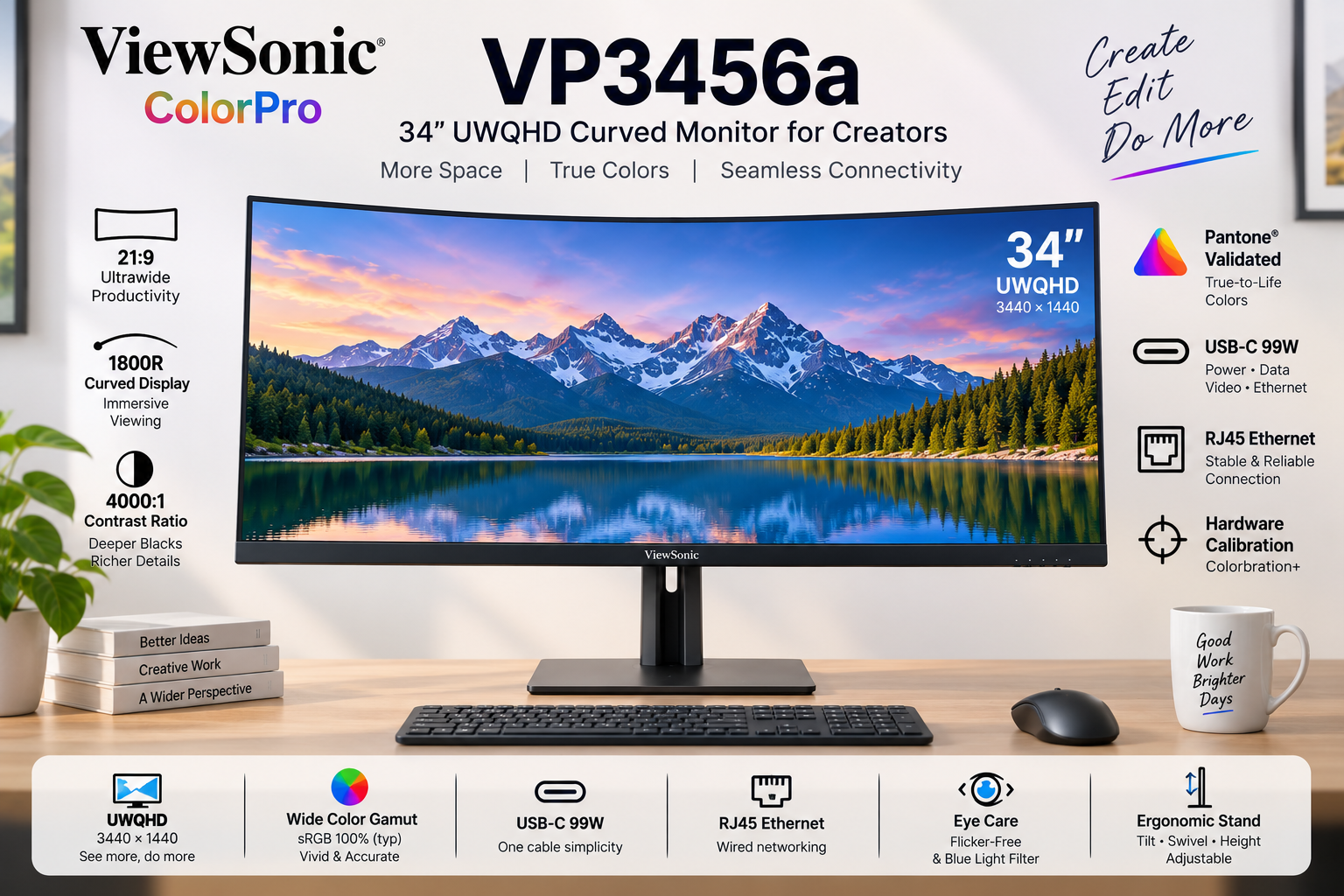
ViewSonic ColorPro VP3456a Review 2026: 34″ UWQHD Curved Monitor

Read our full review of the ViewSonic ColorPro VP3456a. This 34-inch UWQHD curved creative monitor features a massive 4,000:1 contrast ratio, Pantone Validated colors, and a built-in docking station with 99W USB-C and RJ45 Ethernet.

ViewSonic ColorPro VP3456a 34 inch Curved Monitor

🎬 Cinematic Canvas: 34″ UWQHD 1800R Curve!

Wrap-around immersion meets Pantone-validated colors and a 99W USB-C Ethernet Dock.

🏆 Premium Ultrawide Creative Monitor

ViewSonic ColorPro VP3456a

34″ UWQHD (3440×1440) | 21:9 Curved | VA Panel | 99W USB-C

4000:1 Contrast – Pantone® Validated – RJ45 Ethernet – Hardware Calibrated

⚡ Master Multitasking & Workflow:

• Wrap-Around Immersion: 1800R curve with 21:9 cinematic aspect ratio

• Deep VA Contrast: 4,000:1 static contrast ratio for incredibly deep blacks

• Ultimate Docking: 99W USB-C Power Delivery + dedicated RJ45 Ethernet port

• Color Accuracy: Pantone Validated with factory-calibrated Delta E < 2

• Hardware Calibration: Supported by Colorbration+ for long-term consistency

• Multitasking Beast: vDisplay Manager with 12 split-screen layouts

• Fluid Output: 75Hz refresh rate with Adaptive FreeSync technology

₹44,999

₹58,999

23% OFF

Model: VP3456a | 3-Year Warranty | Free Delivery

🛒 Buy Now on Amazon India

$499.99

Model: VP3456a | Premium Warranty | Free Shipping

🛒 Buy Now – USA

£429

Model: VP3456a | Premium Warranty | Check availability

🛒 Check UK Retailers

🌍 Global Availability

• India: ₹44,999 (Amazon / ViewSonic Authorized Dealers)

• USA: $499.99 (B&H Photo, Amazon, ViewSonic Store)

• UK: £429 (Amazon UK, Scan Computers)

• Europe: €459-499 varies by country

Resolution

UWQHD

Curve

1800R

Contrast

4,000:1

USB-C PD

99W

ColorPro VP3456a Overview – Brilliant First Impressions

🖥️ Immersive UWQHD Canvas

  • 34″ Ultrawide: 21:9 Aspect Ratio
  • UWQHD Resolution: 3440 x 1440 pixels
  • 1800R Curve: Wrap-around viewing
  • VA Technology: Deep 4,000:1 Contrast
  • 400 Nits Brightness: Excellent SDR punch
  • HDR10: Extended dynamic range

🎨 Validated Color

  • Pantone® Validated: Authentic reproduction
  • Delta E < 2: Indistinguishable accuracy
  • 100% sRGB: Industry standard web color
  • 16.7M Colors: 8-bit (6-bit + FRC) panel
  • Hardware Calibration: Colorbration+ support
  • Pre-Calibrated: Report included in box

🔌 The Ultimate Dock

  • • 99W USB-C PD: Massive laptop charging power
  • • RJ45 Ethernet: Hardwired internet for your laptop
  • • Split Screen: vDisplay Manager software
  • • Smooth Output: 75Hz with FreeSync
  • • Extensive I/O: 2x HDMI 2.1, 1x DP, USB Hub
  • • Comfort: Flicker-Free & Low Blue Light

🎯 What Makes the ColorPro VP3456a Special?

The ViewSonic ColorPro VP3456a represents a massive productivity upgrade for video editors, timeline-based creatives, and multitasking professionals. By stepping away from the standard 16:9 monitor format and embracing a 34-inch 21:9 UltraWide QHD (3440 x 1440) canvas, it completely eliminates the need for a dual-monitor setup. The 1800R curve gently wraps the edges of the screen into your peripheral vision, ensuring comfortable viewing distances across the entire massive display.

What truly sets this monitor apart in the creative space is its Vertical Alignment (VA) panel boasting a staggering 4,000:1 static contrast ratio. Traditional IPS creative monitors hover around 1,000:1. The VP3456a delivers blacks that are four times deeper, making it an absolute dream for video editors working on cinematic footage, or designers who require intense shadow detail without the “IPS glow” effect in dark rooms.

Despite being a VA panel, ViewSonic has ensured rigorous color accuracy. It is Pantone® Validated with 100% sRGB coverage and arrives factory-calibrated to a Delta E < 2. Furthermore, it supports Hardware Calibration via Colorbration+ software, allowing you to write color LUTs directly to the monitor to maintain long-term color fidelity.

Beyond visuals, the VP3456a functions as a complete, high-end docking station. It features a USB-C port delivering an incredibly robust 99W of Power Delivery—enough to keep heavy-duty 16-inch laptops fully charged under maximum rendering load. But ViewSonic went a step further by including an RJ45 Ethernet port directly on the monitor.

This means a single USB-C cable running to your MacBook or Windows laptop provides: 1) 3440x1440p video, 2) 99W of power, 3) Connection to your USB mouse and keyboard, and 4) A gigabit hardwired internet connection. It is the definition of a “Clutter-Free, One-Cable Solution.”

Finally, the workflow is accelerated by a 75Hz refresh rate with FreeSync (making timeline scrubbing smoother than standard 60Hz) and ViewSonic’s vDisplay Manager. This software allows you to instantly snap applications into 12 customizable split-screen grids, mastering the massive ultrawide real estate without the hassle of manually resizing windows.

Ultrawide Display – Wrap-Around Immersion

🖥️ UWQHD & The 1800R Curve

The UWQHD (3440 x 1440) resolution provides over twice the pixels of a standard Full HD monitor. In practical terms, this 21:9 aspect ratio gives you the horizontal space of roughly one-and-a-half 27-inch monitors, completely uninterrupted by a plastic bezel in the middle. For video editors, this means viewing your preview window in full 1080p or 4K scaled, while still having an incredibly long, un-cramped timeline spanning the bottom of the screen.

Because a flat 34-inch screen would cause color and brightness shifts at the far edges due to extreme viewing angles, ViewSonic utilizes an 1800R curvature. This gentle curve brings the edges of the display equidistant to your eyes, wrapping the digital workspace around you. It dramatically reduces neck turning and eye strain, creating a highly immersive, focused environment.

🌑 4,000:1 VA Contrast Ratio

While IPS panels are famous for viewing angles, VA (Vertical Alignment) panels are the kings of contrast. The VP3456a boasts a massive 4,000:1 static contrast ratio. Blacks on this monitor look truly black, rather than the glowing dark grey typical of IPS displays. When working on moody photography, dark UI themes, or editing cinematic video, the depth and punchiness of the image are immediately noticeable.

Combined with a bright 400 cd/m² (nits) typical brightness and HDR10 support, the dynamic range of this display is excellent for SDR content creation. Note that VA panels can exhibit slight gamma shifts when viewed from extreme off-center angles, but the 1800R curve almost entirely mitigates this issue for the primary user sitting in the center sweet spot.

Color Accuracy – Pantone Validated Precision

🎨 Delta E < 2 Out of the Box

Professional work requires professional guarantees. Every VP3456a undergoes rigorous pre-factory calibration and includes a personalized color calibration report in the box. With a Delta E < 2, the difference between the color your computer requests and the color the monitor outputs is mathematically imperceptible to the human eye. What you see is exactly what your clients will get.

The monitor is proudly Pantone® Validated, ensuring it accurately reproduces the full range of the Pantone Matching System (PMS). With 100% sRGB and 114% REC709 coverage, it serves as an impeccable reference monitor for digital web design, UI/UX creation, and standard broadcast video editing.

⚙️ Colorbration+ Hardware Calibration

Monitors drift in color accuracy over time as the backlight ages. To combat this, the VP3456a supports true Hardware Calibration via ViewSonic’s Colorbration+ software. Using supported colorimeters (like X-Rite i1Display Pro or Datacolor Spyder X), you can recalibrate the display at the hardware level.

Unlike software calibration (which just tweaks your Windows/Mac graphics card output and can cause color banding), Hardware Calibration writes the color correction data directly to the monitor’s internal scaler. This ensures brilliant, long-term color consistency regardless of what laptop or PC you plug into it.

Docking & Workflow – The 99W Command Center

🔌 99W USB-C + RJ45 Ethernet

This is where the VP3456a outshines the competition. The USB-C port provides a massive 99W of Power Delivery. While 65W monitors struggle to keep high-end 15/16-inch laptops charged during video rendering, 99W ensures your mobile workstation stays at 100% battery under maximum load.

Furthermore, the inclusion of an RJ45 Ethernet LAN port turns this monitor into a premium dock. Wi-Fi can be unreliable when transferring massive 4K video files to a NAS or server. By plugging an Ethernet cable into the monitor, your laptop receives hardwired, gigabit internet through the same single USB-C cable that provides power and video.

🪟 vDisplay Manager & 75Hz

Managing a 34-inch ultrawide canvas manually can be tedious. ViewSonic’s free vDisplay Manager software features Screen Split, offering 6 predefined layouts and 12 customizable grids. You can drag and drop applications to instantly tile them perfectly across the screen. The Windows-only Auto Launch feature will even reopen your saved layouts upon boot.

Workflow is further smoothed by the 75Hz refresh rate and FreeSync support. While not a 144Hz gaming monitor, 75Hz provides a 25% smoother experience than standard 60Hz displays. Scrolling through dense code, moving windows, and timeline scrubbing feels noticeably snappier and reduces eye strain.

Design & Ergonomics

📐 Complete Adjustability

Ultrawide monitors are notoriously heavy and often ship with rigid stands. ViewSonic breaks this trend by including a highly versatile ergonomic stand. It offers 130mm of height adjustment, allowing you to set the perfect eye-level posture to prevent neck strain during long editing sessions.

It also features a massive 120º swivel (60º left/right) and a -6º to 21º tilt. Due to the 21:9 ultra-wide format and 1800R curve, there is no portrait pivot mode (which is standard for curved ultrawides). The stand features mindful design with an integrated cable management cutout to keep your desk clutter-free.

🖥️ 3-Sided Borderless Aesthetics

The VP3456a embraces a sleek, modern industrial design with 3-side borderless bezels. The thin frame ensures that your attention remains entirely on your artwork and timeline, not on thick plastic borders. If you somehow have the desk space to run two of these side-by-side, the thin bezels create a nearly seamless panoramic view.

ViewSonic also includes comprehensive Eye Care technology. The monitor is Flicker-Free and features a software-based Low Blue Light filter, allowing you to warm up the screen temperature when reading documents late at night to protect your circadian rhythm.

Who Should Buy the ViewSonic VP3456a?

✅ Perfect For These Users

🎬 Video Editors & Motion Designers

The 21:9 aspect ratio is tailor-made for Premiere Pro, DaVinci Resolve, and After Effects. You can view massive timelines without scrolling, while the 4,000:1 VA contrast ratio ensures deep, cinematic blacks for accurate grading.

💻 High-End Laptop Owners

If you use a powerful workstation laptop (like a MacBook Pro 16 or Dell Precision), the 99W USB-C PD and RJ45 Ethernet make this the ultimate one-cable docking station. Power, display, gigabit internet, and USB peripherals all run through one cord.

📊 Financial Analysts & Multitaskers

Say goodbye to the bezel gap of a dual-monitor setup. The massive UWQHD canvas combined with vDisplay Manager’s split-screen grids allows you to comfortably view three full-size documents or spreadsheets side-by-side.

⚠️ Consider Alternatives If You Need

🎮 Hardcore Competitive Gamers

While 75Hz and FreeSync are great for casual gaming and UI smoothness, competitive gamers need 144Hz+. If your primary use is fast-paced shooters, look into dedicated ultrawide gaming monitors.

📸 Adobe RGB Print Photographers

The monitor covers 100% sRGB for web content, but only 80% of Adobe RGB. If you are a fine-art photographer soft-proofing for physical CMYK print, you need a monitor with 99%+ Adobe RGB coverage.

🔍 Retina-Level Sharpness

At 34 inches, UWQHD (3440×1440) yields roughly 109 PPI. This is standard and looks great at arm’s length, but it is not the 163+ PPI of a 4K 27-inch display. If you are extremely sensitive to text sharpness, stick to standard 4K displays.

Top Competitors & Alternatives

Dell P3424WE Hub Monitor

34″ Curved UWQHD IPS USB-C Dock

₹48,999

34″ 3440x1440p | 60Hz | IPS | 90W USB-C

Display: 34″ UWQHD (3440×1440), IPS, 60Hz, 3800R curve

Features: 90W PD, RJ45 Ethernet, KVM Switch

Advantage: Built-in KVM switch and IPS viewing angles

Why Choose Dell P3424WE Instead?

If you prefer IPS panels over VA panels for wider viewing angles, and you desperately need a built-in KVM switch to seamlessly control two different computers with one keyboard and mouse. It also acts as an excellent USB-C/RJ45 dock.

Why Choose ViewSonic VP3456a Instead?

The ViewSonic offers a much deeper 1800R curve (vs Dell’s flatter 3800R), providing better immersion. It also has a faster 75Hz refresh rate, Hardware Calibration support, and the VA panel provides 4x deeper contrast (4000:1 vs Dell’s 1000:1) for video editors.

LG 34WP65C-B

34″ Curved UWQHD VA Monitor

₹32,999

34″ 3440x1440p | 160Hz | VA | No USB-C

Display: 34″ UWQHD (3440×1440), VA, 160Hz, 1800R curve

Features: 3000:1 contrast, HDR10, built-in 7W speakers

Advantage: Much cheaper and 160Hz for gaming

Why Choose LG 34WP65C Instead?

If you are on a strict budget and want a hybrid monitor for office work by day and high-refresh PC gaming (160Hz) by night. It uses a similar 1800R VA panel but costs significantly less.

Why Choose ViewSonic VP3456a Instead?

The LG completely lacks USB-C and acts just as a dumb screen. The ViewSonic justifies its premium by being a full docking station (99W PD + Ethernet) and offering professional-grade Pantone Validated, factory-calibrated colors with Hardware LUT support.

Pros and Cons – ViewSonic VP3456a

✅ What We Loved

🔌 Ultimate 99W USB-C Dock

Delivering 99W of Power Delivery alongside an RJ45 Ethernet port transforms this monitor into a premium hub. One cable charges massive 16-inch laptops, provides gigabit hardwired internet, and connects peripherals.

🌑 4,000:1 Deep Contrast

The VA panel provides blacks that are four times deeper than standard IPS displays. Editing cinematic footage or working in dark UI modes looks incredibly rich and punchy without annoying “IPS glow.”

🎨 True Hardware Calibration

Factory-calibrated to Delta E < 2 and Pantone Validated out of the box. More importantly, it supports Colorbration+ hardware LUT calibration to maintain that accuracy for years to come.

🔄 75Hz Smooth Multitasking

The 75Hz refresh rate provides a 25% bump in smoothness over standard 60Hz office monitors. Combined with vDisplay Manager’s Screen Split, navigating massive timelines is fluid and highly efficient.

📐 Superb Ergonomics

Unlike many rigid ultrawide monitors, the VP3456a includes a highly adjustable stand featuring 130mm of height adjustment, 120º swivel, and generous tilt, ensuring neck comfort during long sessions.

⚠️ What Could Be Better

👁️ VA Panel Viewing Angles

While the 1800R curve helps mitigate this, VA panels natively suffer from slight color and gamma shifts when viewed from extreme off-center angles compared to IPS panels. You must sit in the sweet spot.

🖨️ Not for Print Photography

With only 80% coverage of the Adobe RGB color space, fine-art photographers and print designers cannot use this display for accurate CMYK soft-proofing. It is strictly for web and digital video (sRGB/REC709).

🏃‍♂️ 75Hz Limits Gaming

While 75Hz is great for productivity, gamers looking to fully utilize their high-end GPUs will be disappointed. It lacks the 144Hz+ speeds required for fast-paced competitive gaming.

🖥️ No Built-in KVM

For a monitor designed to be a premium productivity hub with so many inputs, the lack of a built-in KVM switch (to control two PCs with one mouse/keyboard) is a missed opportunity often found on rival Dell displays.

Final Verdict – A Creator’s Command Center

🏆 Best Ultrawide Docking Monitor for Video Editors
9.0 /10

Massive Workspace Meets Unmatched USB-C Power

🎯 The Bottom Line

The ViewSonic ColorPro VP3456a is an absolute powerhouse for productivity and digital content creation. By pairing a massive 34-inch UWQHD canvas with a VA panel boasting a 4,000:1 contrast ratio, it delivers an immersive, cinematic editing experience that makes traditional IPS monitors look washed out in comparison.

However, its greatest strength lies in its connectivity. The inclusion of a 99W USB-C Power Delivery port alongside hardwired RJ45 Ethernet elevates this display from a mere monitor to a premium laptop docking station. It completely eliminates cable clutter, keeping high-performance workstation laptops charged and connected to gigabit internet through a single cord.

While the VA panel means it isn’t suited for color-critical print photography (lacking Adobe RGB coverage), its Pantone Validation, factory calibration, and Hardware LUT support make it an impeccably accurate tool for web designers and SDR video editors working in sRGB and REC709.

💡 Who Should Buy This?

Video editors, motion graphic artists, and heavy multitaskers will find the VP3456a transformative. The 21:9 aspect ratio is perfect for long Premiere Pro timelines, and the vDisplay Manager makes organizing multiple windows effortless.

It is highly recommended for MacBook Pro 16 and high-end Windows mobile workstation users. The 99W PD ensures your battery won’t slowly drain while exporting heavy projects, a common issue with cheaper 65W USB-C monitors.

Final Recommendation: At ₹44,999, the ViewSonic VP3456a commands a premium, but it justifies every penny by replacing the need for a dual-monitor setup and an expensive external thunderbolt dock. It is a brilliant, streamlined command center for digital creatives.

📊 Rating Breakdown

Productivity & Workspace (UWQHD) 9.8/10
Connectivity (99W PD + Ethernet) 9.9/10
Contrast & Black Levels (VA Panel) 9.5/10
Digital Color Accuracy (sRGB/Delta E) 9.2/10
Ergonomics & Stand Quality 9.0/10
Print Photography (Adobe RGB) 7.5/10
Gaming Performance (75Hz) 7.0/10

Complete Technical Specifications

Display Specifications
Screen Size34 inches (Viewable: 34 inches)
Panel TypeVA (Vertical Alignment) Technology
Resolution3440 x 1440
Resolution TypeUWQHD (UltraWide QHD)
Aspect Ratio21:9
Curvature1800R
Refresh Rate75Hz
Variable Refresh RateYes (FreeSync)
Response Time (GTG Typical)5ms
Response Time (GTG w/OD)5ms
Brightness400 cd/m² (typ)
Static Contrast Ratio4,000:1 (typ)
Dynamic Contrast Ratio20M:1
Viewing Angles178º horizontal, 178º vertical
Display Colors16.7 Million Colors
Color Space Support8 bit (6 bit + FRC)
Light Source & LifeLED / 30,000 Hrs (Min)
Pixel Pitch0.232 mm (H) x 0.232 mm (V)
Surface TreatmentAnti-Glare, Hard Coating (3H)
Color Gamut & Eye Care
sRGB Coverage114% size / 100% coverage (Typ)
REC709 Coverage114% size / 100% coverage (Typ)
DCI-P3 Coverage84% size / 84% coverage (Typ)
Adobe RGB Coverage84% size / 80% coverage (Typ)
EBU & SMPTE-C100% coverage (Typ)
Flicker-FreeYes
Low Blue LightYes (Software Solution)
CalibrationHardware Calibration Supported (Colorbration+)
Connectivity & Audio
USB Type-C (Upstream)1x (DisplayPort Alt mode, 99W Power Delivery)
Ethernet LAN (RJ45)1x Gigabit Ethernet
USB 3.2 Type A (Downstream)2x Ports
USB 3.2 Type B (Upstream)1x Port
HDMI Ports2x HDMI 2.1
DisplayPort1x DisplayPort (v1.2)
Internal Speakers3Watts x2
Ergonomics & Stand
Height Adjustment130 mm
Swivel120º (60º left / 60º right)
Tilt (Forward/Back)-6º / 21º
VESA Compatible100 x 100 mm
Cable OrganizationYes
Power & Dimensions
Power Consumption47.6W (Typical) / 52.6W (Max) / 32.8W (Eco Conserve)
Stand-by Power0.5W
Power SupplyInternal Power Supply
VoltageAC 100-240V
Physical (With Stand)809 x 480.46~539.23 x 243 mm (W x H x D)
Physical (Without Stand)809 x 366 x 105 mm (W x H x D)
Weight (Net with Stand)11.2 kg (24.7 lbs)
Weight (Without Stand)7.4 kg (16.3 lbs)

Ready to Master Your Workflow?

Get the ViewSonic ColorPro VP3456a – 34″ UWQHD 99W USB-C Monitor Today!

🛒 Buy Now on Amazon – Check Price

✓ Pantone Validated | ✓ 99W USB-C + Ethernet | ✓ 4,000:1 Deep Contrast
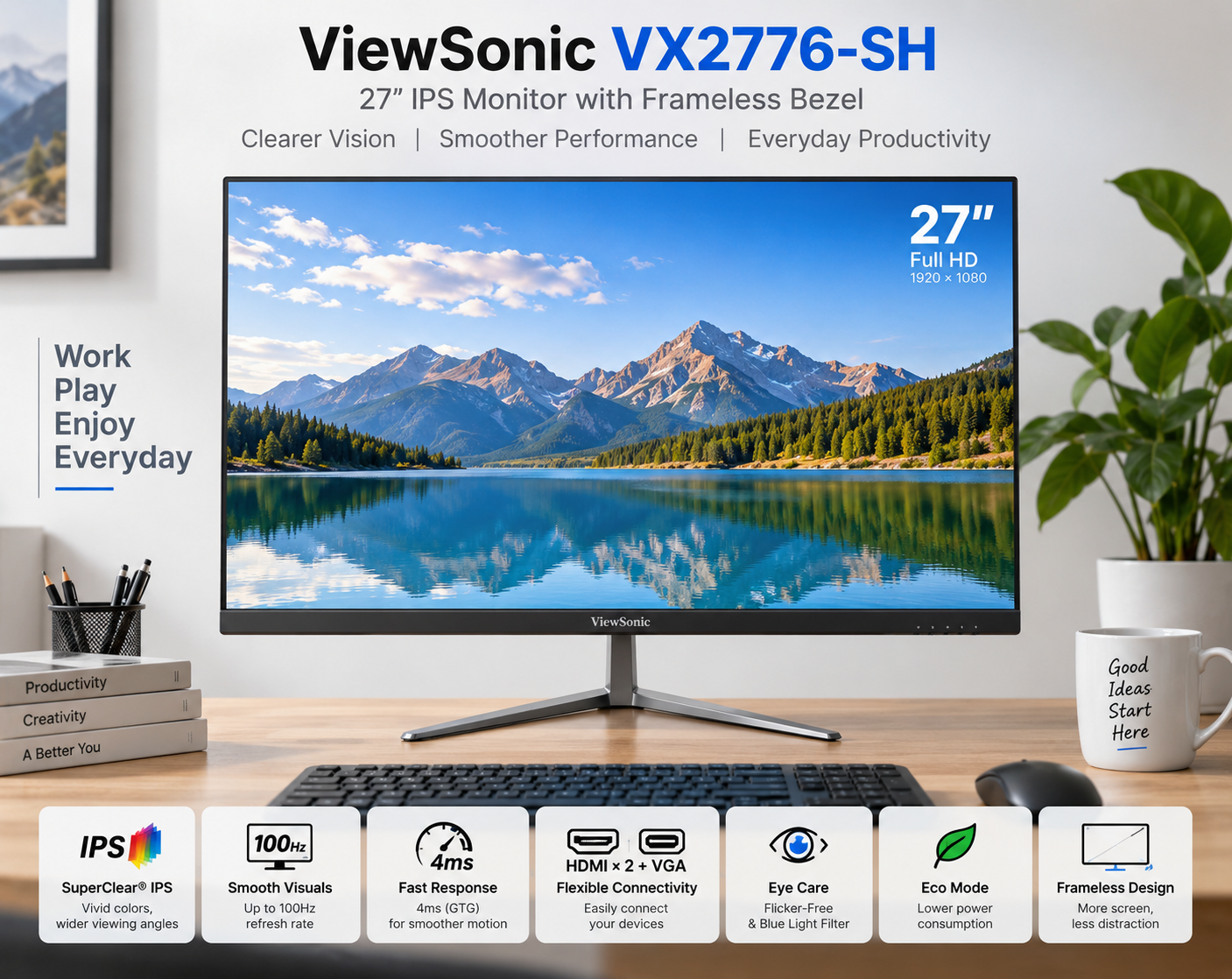
ViewSonic VX2776-SH Review 2026: 27″ IPS Monitor, 100Hz & Price

ViewSonic ColorPro VP2766-2K Review 2026 – 27″ 2K 120Hz Creative Monitor
ViewSonic ColorPro VP2766-2K 27 inch Creative Monitor

🎨 Creative Perfection: 27″ 2K 120Hz with Pantone® Validation!

Impeccable color accuracy meets 120Hz fluid clarity and 90W USB-C convenience.

🏆 Professional Creative Monitor – ColorPro Series

ViewSonic ColorPro VP2766-2K

27″ 2K QHD (2560×1440) | 120Hz | 100% sRGB | USB-C 90W

Delta E < 2 – Pantone® Validated – Hardware Calibrated – Eye ProTech+

⚡ The Ultimate Creative Workflow Hub:

• True-to-Life Colors: Factory-calibrated Delta E < 2 and Pantone® Validated

• 120Hz Smooth Clarity: Double the standard refresh rate for fluid UI and timeline scrubbing

• 100% sRGB Gamut: Industry-standard color reproduction for web and digital design

• 90W USB-C Power: Single-cable solution that powers heavy-duty laptops

• Hardware Calibration: Colorbration+ software syncs perfectly with your calibrator

• Advanced Contrast: 1,500:1 static contrast ratio for deeper blacks

• Full Ergonomics: 130mm height adjust, swivel, tilt, and bidirectional 90° pivot

• Unique Connectivity: Features 4x total USB-C ports (1 Upstream 90W, 3 Downstream 15W)

₹34,999

₹45,999

24% OFF

Model: VP2766-2K | 3-Year Warranty | Free Delivery

🛒 Buy Now on Amazon India

$399.99

Model: VP2766-2K | Premium Warranty | Free Shipping

🛒 Buy Now – USA

£349

Model: VP2766-2K | Premium Warranty | Check availability

🛒 Check UK Retailers

🌍 Global Availability

• India: ₹34,999 (Amazon / ViewSonic Authorized Dealers)

• USA: $399.99 (B&H Photo, Amazon, ViewSonic Store)

• UK: £349 (Amazon UK, Scan)

• Europe: €399-429 varies by country

• Availability: Primarily stocked at professional photography/tech retailers

Resolution

2K QHD

Refresh

120Hz

Accuracy

ΔE < 2

USB-C PD

90W

ColorPro VP2766-2K Overview – Where Ideas Spark

🎨 Uncompromised Color

  • Delta E < 2: Indistinguishable accuracy
  • Pantone® Validated: Authentic color reproduction
  • 100% sRGB: Perfect for digital media
  • 100% REC709: Broadcast video standard
  • 1,500:1 Contrast: Deeper blacks than standard IPS
  • Factory Calibrated: Individual report included
  • Hardware Calibrated: via Colorbration+

⚡ Fluid Workflow

  • 🔄 120Hz Refresh: Silky smooth UI and timelines
  • 🔌 90W USB-C: Powerful laptop charging
  • 🖥️ 2K QHD: 2560×1440 resolution
  • 🎧 4x USB-C Ports: Unmatched connectivity hub
  • 🔊 Built-in Audio: Dual 3W Speakers

🌱 Comfort & Eco-Design

  • • Fully Ergonomic: Pivot, Swivel, Tilt, Height
  • • Eye ProTech+: Hardware Low Blue Light
  • • Flicker-Free: Zero screen strobing
  • • FSC® Packaging: Sustainably sourced box
  • • Repurpose Box: Folds into desk accessories
  • • ColorPro Sense: Software color matching

🎯 What Makes the ColorPro VP2766-2K Special?

The ViewSonic ColorPro VP2766-2K bridges the gap between high-end professional color grading and modern, fluid user experiences. Historically, creators had to choose between highly accurate 60Hz displays or fast, color-inaccurate gaming monitors. By injecting a 120Hz refresh rate into a Pantone® Validated IPS panel, ViewSonic has created a display that not only ensures your work looks correct, but makes the process of creating it feel incredibly responsive.

Color accuracy is the beating heart of the VP2766-2K. It covers 100% of the sRGB and REC709 color spaces, making it the perfect canvas for web designers, digital illustrators, and video editors working in standard broadcast formats. With a factory-calibrated Delta E < 2, the difference between the color data in your file and the light emitted from the screen is imperceptible to the human eye.

Crucially, it supports Hardware Calibration via ViewSonic’s Colorbration+ software. By connecting a supported colorimeter (like an X-Rite or Datacolor Spyder), you can write color data directly to the monitor’s internal Look-Up Table (LUT), bypassing the PC’s graphics card. This ensures true-to-life colors that remain consistent for years to come.

The workflow enhancements are equally impressive. The one-cable USB-C solution provides a robust 90W of Power Delivery. Unlike standard 65W monitors, 90W is enough to charge heavy-duty 15-inch and 16-inch laptops (like the MacBook Pro 16) even under heavy rendering loads. The monitor is incredibly unique in its port selection, offering three additional USB-C downstream ports for modern peripherals, rather than legacy USB-A (though one USB-A remains).

ViewSonic has also elevated the physical design. The monitor features an advanced 1,500:1 static contrast ratio, pushing blacks deeper than standard 1000:1 IPS panels. The Eye ProTech+ system utilizes a hardware-level Low Blue Light filter, meaning it reduces harmful blue emissions without casting an ugly yellow/orange tint over your color-critical work.

Finally, ViewSonic demonstrates environmental consciousness with FSC® Mix certified packaging. Made from recycled materials and responsibly managed forests, the box is uniquely designed to be repurposed into functional desk accessories (like a pen holder or laptop stand), reducing immediate waste.

Color & Clarity – Pantone Validated Precision

🎨 Delta E < 2 & Pantone® Validated

Every VP2766-2K undergoes rigorous factory calibration before it reaches your desk, accompanied by a personalized color calibration report in the box. Boasting a Delta E < 2, it guarantees that colors are reproduced with such precision that the human eye cannot detect the difference between the intended color and the displayed color. Design confidently, knowing subtle nuances won’t be lost.

Being Pantone® Validated is a significant badge of honor in the creative industry. It means the display has been tested and certified by the experts at Pantone to accurately simulate the full range of real-world Pantone Matching System (PMS) colors. Whether you are designing digital assets or prepping files for print, what you see on the screen matches the universal standard.

Color Capabilities

  • • 100% sRGB / 100% REC709: Flawless web and video standards
  • • Hardware LUT Calibration: Direct-to-monitor color profiling
  • • Delta E < 2: Mathematically imperceptible color variance
  • • ColorPro Sense App: Explore and match digital Pantone libraries

🖥️ 2K QHD (2560×1440) Clarity

The 27-inch 2K QHD resolution is widely considered the “sweet spot” for desktop monitors. It provides 77% more screen real estate than a standard 1080p display, allowing you to comfortably fit a video timeline, tool palettes, and a preview window on one screen without UI elements feeling cramped. At 109 Pixels Per Inch (PPI), text is sharp, and images display with refined detail.

The panel also boasts an upgraded 1,500:1 static contrast ratio, which is 50% higher than traditional IPS monitors. This results in noticeably deeper blacks and better shadow detail—crucial for photo editing and video grading. While it includes HDR10 support to process high dynamic range metadata, its 350-nit peak brightness means it excels at SDR color accuracy rather than blinding HDR highlights.

Visual Specs

  • • 2K QHD Resolution: Perfect balance of space and readability
  • • 1,500:1 Contrast: Superior IPS black levels
  • • 350 Nits Brightness: Ideal for well-lit studios
  • • Anti-Glare 3H Coating: Prevents distracting room reflections

120Hz Performance – Fluidity Meets Accuracy

🔄 120Hz: Not Just For Gamers

The standout feature of the VP2766-2K is its fast 120Hz refresh rate. In the past, 120Hz was reserved exclusively for gaming monitors, but creatives benefit immensely from it. A 120Hz display refreshes twice as fast as a standard 60Hz monitor, resulting in a buttery-smooth, fluid experience when scrolling through long lines of code, panning across massive Photoshop canvases, or scrubbing through a Premiere Pro timeline.

This reduction in motion blur (screen stutter) dramatically reduces eye strain over a long workday. Your eyes don’t have to constantly refocus on jittery text when scrolling. Furthermore, UI animations in macOS and Windows 11 are optimized for 120Hz (ProMotion), making your entire operating system feel significantly more responsive and snappy.

⚡ Variable Refresh Rate (VRR)

Alongside the 120Hz panel, the monitor supports Variable Refresh Rate Technology. This ensures that the monitor’s refresh rate dynamically matches the output of your computer’s graphics card. If your system momentarily lags while rendering a heavy 3D scene or applying a complex filter, VRR prevents screen tearing and visual artifacts.

Coupled with a 5ms GTG response time (4.75ms with overdrive), the monitor handles fast-moving action scenes cleanly. This makes it an excellent choice for video editors cutting sports, action, or high-framerate content, allowing you to review footage precisely as it was captured without monitor-induced blurring.

Connectivity – The 90W USB-C Powerhouse

🔌 90W USB-C Single Cable Solution

The VP2766-2K is designed to be the ultimate laptop docking station. The primary USB-C upstream port delivers a robust 90W of Power Delivery alongside DisplayPort Alt Mode video and data transfer. While many monitors offer 60W or 65W (which is fine for Ultrabooks), 90W is powerful enough to maintain the battery on high-performance machines like the 15″ or 16″ MacBook Pro while editing 4K video.

This true one-cable setup means you can leave your laptop charger in your bag. Just plug in a single USB-C cable, and your laptop connects to the display, charges at full speed, and links to all peripherals plugged into the monitor.

🎧 A Modern Port Array (4x USB-C)

ViewSonic has taken a bold step forward in connectivity. Rather than outfitting the monitor with a hub of older USB-A ports, the VP2766-2K features an incredibly modern layout: Three downstream USB-C ports (providing data and 15W charging for accessories like phones or tablets) and one downstream USB-A port for legacy mice/keyboards.

Rounding out the I/O is an HDMI 2.1 port for secondary PCs or consoles, a 3.5mm audio jack, and internal dual 3W speakers. While monitor speakers won’t replace dedicated studio monitors for audio mixing, having built-in sound is incredibly convenient for quick audio checks, system alerts, or casual YouTube viewing without needing headphones.

Eye ProTech+ – Hardware-Level Comfort

💡 Hardware Low Blue Light

Standard monitors use “software” low blue light modes, which simply overlay an ugly yellow/orange tint across the screen, making them unusable for color-critical work. ViewSonic’s Eye ProTech+ utilizes a hardware-level solution.

The actual LED backlight is engineered to shift its light spectrum, reducing harmful high-energy blue emissions without compromising color accuracy or shifting the white balance. You get the eye-saving benefits of low blue light while retaining the Delta E < 2 color precision necessary for professional design and editing.

✨ Flicker-Free Technology

The VP2766-2K eliminates the use of Pulse Width Modulation (PWM) for backlight dimming. PWM causes microscopic screen flickering that, while often invisible to the naked eye, forces your pupils to rapidly adjust, causing tension headaches and severe eye fatigue over long editing sessions.

By utilizing a continuous DC (Direct Current) backlight, the monitor is 100% Flicker-Free at all brightness levels. Combine this with the smooth 120Hz refresh rate, and the VP2766-2K is one of the most physically comfortable monitors a creator can sit in front of for 8-10 hours a day.

Ergonomics & Eco-Design

📐 Fully Ergonomic Stand

A premium professional monitor demands premium adjustability. The VP2766-2K includes a highly robust, fully ergonomic stand right out of the box. You get a generous 130mm of height adjustment, ensuring the top of the screen aligns perfectly with your eye level to prevent neck strain.

It also features a -45° to 45° swivel base, a -5° to 20° tilt, and most importantly for coders and portrait photographers: a bidirectional 90° pivot. You can spin the monitor into portrait mode either clockwise or counter-clockwise, accommodating whatever cable routing setup you prefer. A built-in cable organization loop keeps your desk tidy.

🌱 FSC Certified Repurposable Packaging

ViewSonic has designed the ColorPro series with environmental sustainability in mind. The monitor ships in FSC® Mix certified packaging, crafted using a blend of recycled materials and wood from responsibly managed forests.

In a clever twist, the packaging is designed to be repurposed. Instead of throwing the cardboard box straight into the recycling bin, the internal packaging is pre-scored and designed to be folded into smart, functional desk accessories like pen holders or a temporary laptop stand, cutting down on immediate waste.

Who Should Buy the ViewSonic VP2766-2K?

✅ Perfect For These Users

🎨 Digital Designers & Illustrators

If you design for the web, mobile apps, or digital media, the 100% sRGB coverage and Pantone validation ensure your colors are universally accurate. The 120Hz refresh rate makes panning around Figma, Illustrator, or Photoshop canvases incredibly fluid and responsive.

💻 High-End Laptop Owners (Mac/PC)

Users with power-hungry laptops like the 15/16-inch MacBook Pro or Dell XPS 15 will love the 90W USB-C Power Delivery. It keeps heavy-duty batteries charged even while exporting video or rendering graphics, all through a single cable.

🎬 Video Editors (Web/SDR Content)

With 100% REC709 coverage and a 1,500:1 contrast ratio, standard dynamic range (SDR) video editing is a dream. The 120Hz screen means your timeline scrubbing is perfectly smooth, and you can natively review 60fps and 120fps footage without monitor-induced frame skipping.

⚠️ Consider Alternatives If You Need

🔍 4K Resolution Perfectionists

While 2K QHD is excellent for 27 inches, it is not 4K. If you are a strict Mac user who demands “Retina” PPI scaling, or a 4K video editor who wants to view their footage at 1:1 pixel mapping while retaining UI space, you should look for a 4K ColorPro model instead (though you may lose the 120Hz at this price).

📸 Adobe RGB Print Photographers

The monitor covers 100% sRGB but only 81% of Adobe RGB. If your primary job involves high-end photography destined for CMYK physical print (magazines, fine art), you need a monitor that covers 99%+ Adobe RGB to accurately soft-proof cyan and green hues.

🌟 True HDR Grading

It accepts an HDR10 signal, but with a peak brightness of 350 nits and no local dimming zones, this is an SDR monitor at heart. It cannot display the blinding highlights or inky blacks required for true HDR color grading (which requires 1000+ nits and Mini-LED/OLED tech).

Top Competitors & Alternatives

ASUS ProArt PA278CGV

27″ 2K 144Hz Professional Monitor

₹36,999

27″ 2K QHD | 144Hz | IPS | 90W USB-C

Display: 27″ 2K QHD (2560×1440), IPS, 144Hz

Features: Calman Verified, 90W PD, 95% DCI-P3

Advantage: Slightly faster 144Hz and wider DCI-P3 color gamut

Why Choose ASUS ProArt Instead?

If you do a mix of creative work and hardcore PC gaming, the 144Hz refresh rate is a slight bump up. Furthermore, it boasts 95% DCI-P3 coverage, making it slightly better for modern digital cinema color workflows compared to the ViewSonic’s 87% DCI-P3.

Why Choose ViewSonic VP2766-2K Instead?

The ViewSonic offers Hardware Calibration via Colorbration+, allowing you to write LUT profiles directly to the monitor (the ASUS relies on software OS calibration). The ViewSonic also boasts a higher 1,500:1 contrast ratio (vs 1,000:1 on the ASUS) and features 3 modern USB-C downstream ports.

Dell UltraSharp U2724D

27″ 2K 120Hz IPS Black

₹32,999

27″ 2K QHD | 120Hz | IPS Black | No USB-C PD

Display: 27″ 2K QHD (2560×1440), IPS Black, 120Hz

Features: 2,000:1 Contrast, Ambient Light Sensor, Daisy Chaining

Advantage: True 2000:1 IPS Black contrast levels

Why Choose Dell U2724D Instead?

The Dell utilizes an IPS Black panel giving a 2,000:1 contrast ratio, making blacks look exceptionally deep. It also features a sleek design with daisy-chaining DP capabilities. Great for pure office/productivity where deep blacks matter.

Why Choose ViewSonic VP2766-2K Instead?

The Dell U2724D completely lacks USB-C Power Delivery (you must buy the much more expensive U2724DE for that). The ViewSonic gives you a 90W USB-C hub, Pantone Validation, and Hardware Calibration out of the box, making it vastly superior for serious color-critical work and laptop docking.

Pros and Cons – ViewSonic VP2766-2K

✅ What We Loved

🔄 120Hz Fluid Workflow

Bringing a 120Hz refresh rate to a color-accurate creative monitor is a revelation. UI animations are buttery smooth, scrolling through code or timelines reduces eye strain, and window dragging feels incredibly responsive.

🎨 True Hardware Calibration

Unlike standard monitors that rely on OS color profiles, Colorbration+ allows you to use a colorimeter to write precision color data directly to the monitor’s internal Look-Up Table (LUT). This is a true professional-grade feature.

🔌 Robust 90W USB-C Power

90W of Power Delivery is enough to keep heavy-duty 15″ and 16″ laptops (like MacBook Pros) charged under load. The 1-cable setup for power, display, and data is a massive quality-of-life upgrade.

👁️ Hardware Low Blue Light

Eye ProTech+ reduces harmful blue light at the hardware level, protecting your eyes without casting a terrible yellow tint over your screen—crucial for maintaining color accuracy during long editing sessions.

🎛️ 4x USB-C Ports

Ditching a bunch of legacy USB-A ports for three additional 15W downstream USB-C ports is incredibly forward-thinking, allowing you to charge modern accessories directly from the monitor.

⚠️ What Could Be Better

🔍 2K Resolution, Not 4K

While 2560×1440 is the standard “sweet spot” for 27 inches, it lacks the retina-level text sharpness of a 4K display. Mac users in particular might notice the difference in text clarity compared to Apple’s native Retina displays.

🖨️ Limited Adobe RGB Coverage

Covering 100% sRGB is perfect for digital creators, but with only 81% Adobe RGB coverage, print photographers cannot rely on this monitor to accurately soft-proof physical CMYK prints.

🔆 Fake HDR

It lists HDR10 compatibility, but with a maximum brightness of 350 nits and no local dimming zones, turning HDR on will just wash out colors. Treat this strictly as a high-end SDR monitor.

🔊 Weak Internal Speakers

It includes dual 3W internal speakers, which is a nice convenience for system sounds or YouTube, but they lack the bass and clarity needed for actual video or audio editing.

Final Verdict – The Smart Creative’s Choice

🏆 Best 120Hz Creative Monitor – ColorPro Champion
9.1 /10

Fluid Performance Meets Pantone Precision

🎯 The Bottom Line

The ViewSonic ColorPro VP2766-2K brilliantly merges professional color accuracy with modern fluid performance. For years, digital artists and video editors had to settle for sluggish 60Hz displays to get Pantone validation and Delta E < 2 accuracy. By injecting a 120Hz refresh rate into this ColorPro panel, ViewSonic has made the act of creating content feel just as good as the final result looks.

Beyond the screen, it serves as a top-tier workstation hub. The 90W USB-C Power Delivery is robust enough to handle high-performance 15-inch and 16-inch laptops, and the inclusion of three downstream USB-C ports shows a forward-thinking design philosophy. Combined with a truly excellent, fully adjustable ergonomic stand and hardware-level low blue light, it is designed for all-day comfort.

Its primary limitation is the 2K resolution. While perfectly adequate for a 27-inch screen, those seeking retina-level 4K crispness for heavy text reading will have to look elsewhere. Furthermore, print photographers will want a panel with wider Adobe RGB coverage.

💡 Who Should Buy This?

Web designers, UI/UX illustrators, video editors (SDR), and digital artists will find the VP2766-2K to be the perfect companion. The 100% sRGB and REC709 color spaces perfectly align with digital media standards, and the 120Hz refresh rate makes navigating complex timelines and vector canvases a joy.

It is especially recommended for MacBook Pro and high-end Windows laptop users. The 90W USB-C connection creates a flawless, one-cable docking station that keeps your powerful machine charged while you edit.

Final Recommendation: At ₹34,999, the ViewSonic VP2766-2K is an outstanding investment for digital creatives who want guaranteed color accuracy out of the box, the flexibility of true hardware calibration, and the eye-saving, fluid luxury of a 120Hz refresh rate.

📊 Rating Breakdown

Color Accuracy (Delta E < 2) 9.8/10
Fluidity & Refresh Rate (120Hz) 9.5/10
Connectivity (90W USB-C) 9.6/10
Ergonomics & Stand Quality 9.2/10
Eye Care (Hardware LBL) 9.4/10
Resolution Sharpness (2K) 8.0/10
Print Photography (Adobe RGB) 7.5/10

Frequently Asked Questions

❓ Why does a 120Hz refresh rate matter for creators?

While high refresh rates are famously used for gaming, they offer immense benefits for creative professionals. A 120Hz monitor updates the screen twice as fast as a standard 60Hz display. This means when you scroll through dense code, pan across a massive Illustrator canvas, or drag clips on a Premiere Pro timeline, the motion is buttery smooth without motion blur (stutter). This significantly reduces eye fatigue over an 8-hour day and makes your software feel much more responsive.

❓ What does “Pantone Validated” and “Delta E < 2” actually mean?

Pantone Validated means the monitor has been rigorously tested by Pantone experts to ensure it can accurately simulate the real-world colors of the Pantone Matching System (PMS) used universally by designers. Delta E (ΔE) is a mathematical metric measuring the difference between a requested color and the color the screen actually displays. A Delta E < 2 means the color variance is so small that the human eye cannot perceive the difference. The monitor ships factory-calibrated to this standard.

❓ Is 90W USB-C Power Delivery enough for a MacBook Pro?

Yes, 90W is excellent for high-performance laptops. While 60W or 65W (found on cheaper monitors) is only enough for 13/14-inch Ultrabooks or MacBook Airs, 90W provides enough power to keep demanding 15-inch and 16-inch laptops (like the MacBook Pro 16) charged and operating smoothly, even when the CPU and GPU are under heavy load from video rendering or 3D modeling.

❓ What is Hardware Calibration via Colorbration+?

Most monitors rely on “Software Calibration,” where you use a colorimeter to create a profile that tells Windows or macOS to alter its color output. The VP2766-2K supports Hardware Calibration. Using ViewSonic’s Colorbration+ software and a supported device (like an X-Rite or Datacolor Spyder), you can write the color correction data directly into the monitor’s internal Look-Up Table (LUT). This ensures the monitor itself is perfectly accurate, regardless of what computer you plug into it.

❓ How does Hardware Low Blue Light differ from normal Night Modes?

Normal “Night Modes” or software blue light filters in Windows/Mac simply overlay a yellow or orange tint across your entire screen to block blue light. This ruins color accuracy, making it impossible to do design work. Eye ProTech+ Hardware Low Blue Light physically alters the spectrum of the LED backlight to emit less harmful high-energy blue wavelengths without shifting the screen’s white balance or ruining color accuracy.

Complete Technical Specifications

Display Specifications
Screen Size27 inches (Viewable: 27 inches)
Panel TypeIPS Technology
Resolution2560 x 1440
Resolution TypeQHD (Quad HD 2K)
Aspect Ratio16:9
Refresh Rate120Hz
Variable Refresh RateYes
Response Time (GTG Typical)5ms
Response Time (GTG w/OD)4.75ms
Brightness350 cd/m² (typ)
Static Contrast Ratio1,500:1 (typ)
Dynamic Contrast Ratio20M:1
High Dynamic RangeHDR10
Viewing Angles178º horizontal, 178º vertical
Display Colors16.7 Million Colors
Color Space Support8 bit (6 bit + Hi-FRC)
Light Source & LifeLED / 30,000 Hrs (Min)
Pixel Pitch0.233 mm (H) x 0.233 mm (V)
Surface TreatmentAnti-Glare, Hard Coating (3H)
CurvatureFlat
Color Gamut & Eye Care
sRGB Coverage121% size / 100% coverage (Typ)
REC709 Coverage121% size / 100% coverage (Typ)
DCI-P3 Coverage89% size / 87% coverage (Typ)
Adobe RGB Coverage89% size / 81% coverage (Typ)
EBU & SMPTE-C100% coverage (Typ)
Flicker-FreeYes (Eye ProTech+)
Low Blue LightYes (Hardware Solution)
Connectivity & Audio
USB Type-C (Upstream)1x (DisplayPort Alt mode, 90W Power Delivery)
USB Type-C (Downstream)3x (15W power charger & Data transfer only)
USB 3.2 Type A (Downstream)1x Port
HDMI Ports1x HDMI 2.1
Audio Out1x 3.5mm Headphone Jack
Internal Speakers3Watts x2
Ergonomics & Stand
Height Adjustment130 mm (0 ~ 130mm)
Swivel90º (-45º to +45º)
Tilt (Forward/Back)-5º / 20º
Pivot (Right/Left)90º / 90º (Bidirectional Portrait Mode)
VESA Compatible100 x 100 mm
Cable OrganizationYes
Power & Dimensions
Power Consumption18W (Typical) / 22W (Max) / 14W (Eco Conserve)
Stand-by Power0.5W
Power SupplyExternal Power Adaptor (DC Socket Center Positive)
VoltageAC 100-240V
Physical (With Stand)613.3 x 408.8~538.8 x 207 mm (W x H x D)
Physical (Without Stand)613.3 x 364.5 x 36.7 mm (W x H x D)
Weight (Net with Stand)5.5 kg (12.1 lbs)
Weight (Without Stand)3.7 kg (8.2 lbs)
Packaging SustainabilityFSC® Certified Mix (Recyclable/Repurposable)

Ready to Elevate Your Creative Workflow?

Get the ViewSonic ColorPro VP2766-2K – 27″ 120Hz Creative Monitor Today!

🛒 Buy Now on Amazon – Check Price

✓ Pantone Validated | ✓ 90W USB-C Docking | ✓ 120Hz Smooth Clarity

ViewSonic VX2762U-4K Review 2026: 27″ 4K IPS, USB-C 65W & Price

ViewSonic VX2762U-4K Review 2026: 27″ 4K IPS, USB-C 65W & Price
Monitor Review Updated September 2026
ViewSonic VX2762U-4K 27-inch 4K IPS monitor
27″ 4K UHD IPS Monitor

ViewSonic VX2762U-4K Review 2026: 27″ 4K IPS Monitor with USB-C 65W

The ViewSonic VX2762U-4K is a productivity-focused 27-inch 4K IPS monitor that combines high pixel density with USB-C 65W power delivery, HDR10, built-in speakers and a highly adjustable ergonomic stand.

Resolution
4K UHD
Panel
IPS
Refresh Rate
60Hz
USB-C
65W
Color
104% sRGB
HDR
HDR10
Current India price
Around ₹24,999

Actual price may vary by seller, offer and availability.

Image: AI-generated illustration for this review; not an official ViewSonic product photograph.

Quick Verdict

A strong 4K productivity monitor with useful extras

The VX2762U-4K is most appealing to users who want excellent 27-inch 4K sharpness, USB-C 65W charging and a flexible ergonomic stand. It is not a high-refresh gaming monitor, but for work, programming, browsing, content creation and everyday entertainment, its feature set is well balanced.

8.8
Overall / 10

ViewSonic VX2762U-4K Price in India

The monitor is currently seen around ₹24,999 in India. Monitor prices can change frequently, so treat this as a market reference rather than a guaranteed selling price.

Current Price
₹24,999
Approximate market price
Excellent Deal
Below ₹22K
Very attractive value
Compare First
Above ₹28K
More alternatives become interesting
Price note: Check the final checkout price, seller, warranty and return policy before purchasing.

ViewSonic VX2762U-4K Overview

The ViewSonic VX2762U-4K is a 27-inch flat IPS monitor with 3840 × 2160 4K UHD resolution. It is designed around image clarity and productivity rather than extreme gaming performance.

Its most interesting combination is the high-resolution IPS panel together with USB-C connectivity, up to 65W power delivery, integrated speakers, a USB hub and a four-way adjustable stand.

ViewSonic specifies 250 cd/m² typical brightness, 1000:1 typical static contrast, HDR10 support, 104% sRGB coverage and 10-bit color support through an 8-bit + FRC implementation.

27″
IPS Panel

Wide viewing angles.

4K
UHD Resolution

3840 × 2160 pixels.

65W
USB-C Power

For compatible laptops.

60Hz
Refresh Rate

Work and casual gaming.

ViewSonic VX2762U-4K Display Quality

Display quality is the main reason to buy this monitor. A 27-inch 4K IPS panel gives the VX2762U-4K high pixel density for its size, making it particularly appealing for reading text and working with detailed content.

4K Resolution at 27 Inches

The 3840 × 2160 resolution contains four times the total number of pixels found on a 1920 × 1080 Full HD display. It does not mean four times the physical desktop area because Windows and macOS scaling determine how interface elements appear.

The practical benefit is sharper text, cleaner interface elements and more detailed images. For documents, spreadsheets, coding, browsing and photo work, the difference can be immediately useful.

ResolutionTotal PixelsTypical Use
1920 × 10802.07 millionBudget/general use
2560 × 14403.69 millionBalanced work + gaming
3840 × 21608.29 millionDetailed work + media

IPS Panel and Viewing Angles

The SuperClear IPS panel is specified with 178° horizontal and 178° vertical viewing angles. This is useful for office setups, shared viewing and off-center viewing.

Color Performance

ViewSonic specifies 104% sRGB color gamut coverage, 72% NTSC and support for 1.07 billion colors. The monitor also supports 10-bit color through an 8-bit + FRC configuration.

These specifications make it suitable for general creative work, photography, design, office applications and media consumption. Professional color-critical users should still consider a display designed specifically for reference-level work.

Brightness and HDR10

The typical brightness is 250 cd/m². That is reasonable for normal indoor use, but it is not a particularly high brightness level for HDR.

HDR10 support is therefore best considered a useful compatibility feature rather than a reason to expect premium high-brightness HDR performance.

Productivity: Where the VX2762U-4K Makes the Most Sense

The VX2762U-4K is primarily a productivity monitor. Its combination of 4K resolution, 27-inch size, IPS technology, USB-C power delivery and ergonomic adjustment makes it especially useful for desk-based work.

Office Work

Documents, spreadsheets, browser tabs and office software benefit from sharp 4K resolution.

Programming

High pixel density keeps code text crisp, while portrait mode can help with long files and documentation.

Content Creation

4K resolution and wide sRGB coverage make it useful for general photo, design and content-production tasks.

Laptop Workstations

USB-C with up to 65W power delivery is particularly useful for compatible laptops.

USB-C Advantage

A cleaner laptop desk setup

Compatible laptops can use USB-C for DisplayPort video and up to 65W power delivery. This can reduce cable clutter on a laptop workstation.

65W
USB-C Power Delivery
DisplayPort Alt Mode + compatible laptop charging

Connectivity and Features

The VX2762U-4K offers a practical mix of modern and conventional connections.

USB-C 65W

USB-C supports DisplayPort Alt Mode and up to 65W power delivery for compatible devices.

HDMI and DisplayPort

Two HDMI inputs and one DisplayPort provide flexible connectivity.

USB Hub

Two USB 3.2 Type-A downstream ports and one USB 3.2 Type-B upstream connection are included.

Built-in Speakers

Two 2.5W speakers provide basic audio without separate desktop speakers.

ConnectionSpecification
USB-CDisplayPort Alt Mode, 65W power
USB-A2 × USB 3.2 downstream
USB-B1 × USB 3.2 upstream
HDMI2 × HDMI 2.1
DisplayPort1 × DisplayPort
Audio3.5mm audio out

Eye Care Features

ViewSonic includes Eye ProTech features with the VX2762U-4K. The official specifications list flicker-free technology and a software-based low-blue-light solution.

Flicker-Free

The monitor is specified as flicker-free, useful for extended screen use.

Low Blue Light

A software-based low-blue-light solution is provided.

Important: Eye-care features can improve viewing comfort for some users, but they should not be treated as a medical guarantee against eye strain or other symptoms.

Gaming Performance: Is 60Hz Enough?

The VX2762U-4K can be used for gaming, especially if image quality and resolution matter more than high refresh rates. Its 4K IPS panel provides detailed game visuals, while the specified 3.8ms GTG response time is reasonable for general gaming.

The important limitation: 60Hz

The official detailed specifications list a maximum refresh rate of 60Hz. It is therefore not aimed at users looking for 120Hz, 144Hz, 165Hz or higher competitive gaming.

Casual Gaming
Very Good

4K resolution provides detailed visuals.

Story Games
Very Good

Image quality is more important here.

Competitive FPS
Not Ideal

High-refresh monitors are a better choice.

Design and Ergonomics

The ergonomic stand is one of the VX2762U-4K’s strongest practical features. It is not a basic tilt-only stand. ViewSonic specifies height adjustment, swivel, tilt and pivot support.

150mm
Height
90°
Swivel
-3.5°–20°
Tilt
90°
Pivot

Portrait Mode

The 90° pivot can help with coding, long documents, reading and vertical content.

VESA Mounting

The monitor supports a standard 100 × 100mm VESA mounting pattern.

Is the ViewSonic VX2762U-4K Good for MacBook?

Yes. ViewSonic lists Mac support up to 3840 × 2160 resolution and states that macOS has been tested with the monitor.

USB-C with up to 65W power delivery makes it particularly interesting for compatible MacBook users. Users with high-power laptops should check their computer’s charging requirements because 65W may not be sufficient for every workload.

Who Should Buy the ViewSonic VX2762U-4K?

Recommended For

  • Office and home-office users
  • Programmers and developers
  • Content writers and researchers
  • Users who want sharp 4K text
  • Compatible USB-C laptop users
  • General photo and creative work
  • Users who want an adjustable stand
  • Casual gamers
  • Users who want built-in speakers

Look Elsewhere If

  • You need 144Hz or higher
  • You mainly play competitive FPS games
  • You want very bright premium HDR
  • You need a professional reference monitor
  • You specifically want an ultrawide display

ViewSonic VX2762U-4K vs Other 27-Inch Monitors

The best alternative depends on whether you prioritize 4K resolution, refresh rate, USB-C charging, ergonomics or gaming.

FeatureVX2762U-4K27″ QHD Monitor27″ 4K Gaming Monitor
Resolution4KQHD4K
Refresh Rate60HzOften 100–180HzOften 144Hz+
USB-C65WModel dependentModel dependent
Ergonomic StandExcellentModel dependentModel dependent
Best ForProductivity + 4KWork + gaming balanceHigh-refresh gaming

Which type should you choose?

Choose the VX2762U-4K if sharp 4K resolution, USB-C 65W and ergonomic adjustment are more important than a high refresh rate. If gaming performance is your main priority, a 144Hz-or-higher monitor will make more sense.

Pros

  • Excellent 27-inch 4K resolution
  • IPS panel with 178° viewing angles
  • 104% sRGB specification
  • 10-bit support through 8-bit + FRC
  • USB-C with up to 65W power delivery
  • 150mm height adjustment
  • Swivel, tilt and pivot adjustment
  • 100 × 100mm VESA support
  • Built-in 2 × 2.5W speakers
  • Flicker-free technology
  • Useful USB hub

Cons

  • Only 60Hz refresh rate
  • 250 cd/m² brightness limits HDR impact
  • Not intended for competitive gaming
  • Not a dedicated professional reference monitor
  • 65W USB-C may not fully replace the charger for some high-power laptops

ViewSonic VX2762U-4K Ratings

Display Quality9.3/10
Productivity9.4/10
Connectivity9.2/10
Ergonomics9.5/10
Gaming7.2/10
HDR6.8/10
Features9.0/10
Value at ₹25K8.7/10
Final Verdict

Should You Buy the ViewSonic VX2762U-4K?

If you want a sharp 27-inch 4K IPS monitor mainly for work, productivity and general entertainment, the VX2762U-4K is a compelling option around the ₹25,000 price range.

The biggest strength is the overall combination: a 4K IPS panel, 104% sRGB coverage, HDR10, USB-C 65W power delivery, a USB hub, built-in speakers and a highly adjustable stand.

The main compromise is the 60Hz refresh rate. That is acceptable for office work, programming, browsing and most everyday tasks, but it makes the monitor less attractive to competitive gamers.

Below ₹22,000
Excellent Buy
₹22K–₹25K
Recommended
Above ₹28,000
Compare

Our Recommendation

Recommended for productivity and 4K work. The VX2762U-4K is especially attractive for office users, programmers, writers, creators and compatible USB-C laptop users who want sharp 4K image quality and a flexible stand. Make sure the 60Hz refresh rate matches your needs.

ViewSonic VX2762U-4K Full Specifications

Model
VX2762U-4K
Screen Size
27 inches
Panel
IPS
Resolution
3840 × 2160
Aspect Ratio
16:9
Refresh Rate
60Hz
Response Time
3.8ms GTG with OD
Brightness
250 cd/m² typical
Static Contrast
1000:1 typical
Dynamic Contrast
50M:1
HDR
HDR10
Colors
1.07 billion
Color Support
10-bit (8-bit + FRC)
Color Gamut
104% sRGB / 72% NTSC
Viewing Angles
178° / 178°
Surface
Anti-glare, 3H hard coating
Pixel Pitch
0.155mm
Flicker-Free
Yes
Low Blue Light
Software solution
USB-C
DisplayPort Alt Mode, 65W power
USB-A
2 × USB 3.2 downstream
USB-B
1 × USB 3.2 upstream
HDMI
2 × HDMI 2.1
DisplayPort
1 × DisplayPort
Audio Out
3.5mm
Speakers
2 × 2.5W
Height Adjustment
150mm
Swivel
90°
Tilt
-3.5° to 20°
Pivot
90° / 90°
VESA
100 × 100mm
Weight with Stand
6.5kg
Weight without Stand
4.4kg

ViewSonic VX2762U-4K FAQs

Is the ViewSonic VX2762U-4K 60Hz or 180Hz?

+
The monitor is specified at 60Hz. The detailed official specifications list a 60Hz refresh rate.

Does it support USB-C charging?

+
Yes. USB-C supports DisplayPort Alt Mode and up to 65W power delivery for compatible devices.

Does the VX2762U-4K have a height-adjustable stand?

+
Yes. It supports up to 150mm height adjustment, 90° swivel, -3.5° to 20° tilt and 90° pivot.

Is the VX2762U-4K good for office work?

+
Yes. Its 27-inch 4K IPS panel, USB-C 65W connectivity and ergonomic stand make it particularly suitable for productivity.

Is HDR10 good on this monitor?

+
HDR10 is supported, but 250 cd/m² typical brightness means HDR should be considered an additional feature rather than premium high-brightness HDR.

Is it good for gaming?

+
It is suitable for casual and story-driven gaming, but the 60Hz refresh rate makes it unsuitable for users who specifically want competitive high-refresh gaming.

Is it worth buying around ₹25,000?

+
It is a strong choice around ₹25,000 if your priorities are 4K image quality, productivity, USB-C 65W and an ergonomic stand. For high-refresh gaming, consider another monitor.
Final Recommendation

A smart 4K monitor for work-focused users

If you want a 27-inch 4K IPS monitor with USB-C 65W, built-in speakers and a properly adjustable stand, the ViewSonic VX2762U-4K deserves serious consideration.

Overall
8.8/10
Productivity Focus
Prices, offers and availability may change without notice. Specifications are based primarily on manufacturer information and may vary by market or product revision.

Dell Pro Slim Plus QBS1250: How to Boost Office Work with AI Performance

Dell Pro Slim QCS1255
Dell Pro Slim Plus QBS1250 Review: Core Ultra 5 AI-Enabled Compact Workstation

Dell Pro Slim Plus QBS1250 Review: Core Ultra 5 AI-Enabled Compact Workstation

Intel Core Ultra 5 235 (14C) Up to 5.0 GHz Boost Integrated Graphics 512GB TLC SSD 16GB DDR5-5600 RAM ₹1,02,065
4.4 out of 5 stars (102 reviews) | Compact AI-Accelerated Desktop for Professional Workloads

The Dell Pro Slim Plus QBS1250 packs an Intel Core Ultra 5 235 processor with 13 TOPS NPU for AI tasks, 16GB DDR5-5600 RAM, and a 512GB TLC SSD into a ultra-compact 95mm chassis ideal for tight spaces. Featuring Windows 11 Pro, extensive PCIe/M.2 expandability, multiple high-speed ports, and 3-year support, it’s priced at ₹1,02,065 (inclusive of taxes) for business users needing versatile performance in 2025.

Power Up Your Workspace with AI Efficiency?

Slim design with robust expandability, AI acceleration, and multi-display support for demanding professional environments!

₹1,02,065
₹1,10,000 (7% off)
Inclusive of all taxes | Free delivery

No cost EMI up to 24 months | 3 Year Onsite Support | AR Preview | Tool-Less Expandability

Key Features at a Glance

Core Ultra 5 235: 14 cores up to 5.0 GHz.
Integrated Graphics: Multi-monitor support.
16GB DDR5-5600: Single DIMM, expandable.
512GB TLC SSD: Multiple M.2 slots.
Wi-Fi 6E: AX211 with internal antenna.
Slim Chassis: 95mm width, VESA mount.

1. Processor Performance: AI-Accelerated Multitasking Power

Handles intensive workloads efficiently.

Intel Core Ultra 5 235 (14C):

The Core Ultra 5 235 delivers 14 cores (6P + 8E) with up to 5.0 GHz boost and 13 TOPS NPU for AI applications like machine learning inference. It manages 20 threads effectively, scoring over 12,000 in Cinebench R23 multi-core for productivity and content creation. 28W TDP balances power and efficiency in the slim form.

Boost Clock & AI Efficiency:

5.0 GHz Turbo shines in tasks like data analysis or video encoding, with Geekbench 6 multi-core around 11,000. NPU accelerates Copilot+ features in Windows 11 Pro.

Multitasking & Professional Use:

Meteor Lake Architecture enables seamless app handling and AI workflows, 30% faster than previous gens. Expandable to Ultra 7 for heavier demands.

2. Graphics & Multi-Display: Robust Output Options

Supports expansive setups for productivity.

Integrated Graphics:

The Intel Arc Graphics handles 4K output and light editing with Quick Sync, suitable for office visuals and streaming. PCIe x16 slot allows discrete GPU upgrades for CAD or rendering.

Multi-Display Support:

3x DisplayPort 1.4a enables up to 5120×3200@60Hz per port, daisy-chaining for 4K setups. Optional HDMI 2.1 or Thunderbolt 4 for versatile connectivity.

Expansion for Visuals:

PCIe Slots support discrete cards for enhanced graphics. VESA mount compatible for all-in-one like setups.

3. Design & Cooling: Ultra-Compact Professional Build

Space-efficient with easy access.

Chassis Design:

95mm Width with tool-less side panel for quick upgrades, weighing just 3.98 kg minimum. VESA mountable and dust-filtered for durability.

Thermal Management:

Optimized Cooling with 260W PSU keeps temps below 80°C under load. Quiet fans for office environments.

Build Quality:

Professional Form includes Kensington lock and diagnostic LEDs. ENERGY STAR certified for efficiency.

4. Storage & Memory: High-Speed Expandable Capacity

Flexible for growing data needs.

512GB TLC SSD:

M.2 2230/2280 Slot delivers read speeds up to 7000 MB/s for rapid boots. Up to 3 additional M.2 and SATA HDD/ODD bays.

16GB DDR5-5600 RAM:

Single SO-DIMM non-ECC, expandable to 64GB dual-channel for intensive applications.

Expansion Options:

PCIe/SATA Slots support RAID and add-ins. Optional SD 4.0 for media.

5. Connectivity: Extensive I/O for Peripherals

Future-proof ports for diverse setups.

Front & Rear Ports:

7x USB (2.0/3.2), USB-C 20Gbps, 3x DP for 5K, optional Thunderbolt 4. 1GbE Ethernet standard, optional 5GbE.

PowerShare & Options:

SmartPower USB charges in sleep; optional serial, VGA, HDMI, or fiber for legacy/industrial use.

Wireless Networking:

Wi-Fi 6E AX211 2×2 with Bluetooth 5.3 and internal antenna for speeds up to 2.4Gbps.

6. Software & Support: Business-Ready Essentials

Secure and reliable for enterprises.

Windows 11 Pro:

Professional Edition with BitLocker and Remote Desktop. 30-day Microsoft 365 trial included.

Support Services:

3-Year Basic Onsite after remote diagnosis. Optional ProSupport Plus for AI-driven maintenance.

Included Peripherals:

Wired KB/Mouse Dell KB216 and MS116. AR QR for setup visualization.

Pros and Cons

Compact powerhouse evaluation.

Pros

  • AI NPU Built-In: 13 TOPS for efficient processing.
  • Ultra-Slim Design: Fits tight spaces, VESA ready.
  • Tool-Less Upgrades: Easy access to internals.
  • Multi-M.2 Slots: Up to 4 SSDs for storage.
  • 3-Year Onsite: Comprehensive support.
  • Wi-Fi 6E Standard: Fast wireless.

Cons

  • Integrated Graphics Base: Needs GPU add-on for heavy visuals.
  • Single RAM Slot Initial: Limits dual-channel until upgraded.
  • No Optical Drive: External needed for DVDs.
  • Wired Peripherals Only: No wireless included.
  • No Antivirus: Add separately.
  • Limited Base Ethernet: 1GbE, upgrade for faster.

Who Is This Desktop For? User Profiles

Suited for space-constrained professional environments.

Ideal For These Users

  • Business Professional:

    AI tools and multi-monitor for office productivity; 102 reviews note reliability.

  • Small Office:

    Compact size and expandability for teams; VESA for behind-monitor placement.

  • IT Deployments:

    Tool-less design for quick maintenance; optional industrial ports.

Who Might Consider Other Options?

  • Gamers:

    Seek larger towers with dedicated GPUs.

  • Home Users:

    Opt for all-in-ones with built-in displays.

  • High-Storage Needs:

    Choose mini-towers for more bays immediately.

Competitive Edge: Slim AI Desktop Leader

Excels in compactness and future-proofing.

  • Vs HP EliteDesk 800 G9 Mini:

    More M.2 slots and NPU AI edge; better multi-DP for displays, tool-less design for easier IT management.

  • Vs Lenovo ThinkCentre M70q:

    Wi-Fi 6E and 3x PCIe slots superior; optional Thunderbolt and 360W PSU for upgrades.

  • Value Points:

    102 reviews commend expandability; EMI and free delivery enhance affordability for SMEs.

  • Professional Focus:

    Windows Pro and onsite support outshine consumer models; sustainable with recycled materials.

Full Specification Details

General Information

Price
₹1,02,065
Model
QBS1250
Series
Dell Pro
Form Factor
Slim Desktop
Recommended Usage
Business & AI
Order Code
bto103_qbs1250_i2x
Chassis
Slim Plus with 260W PSU

Processor

Processor
Intel Core Ultra 5 235
Cores/Threads
14/20
Max Boost Clock
Up to 5.0 GHz
NPU
13 TOPS
Architecture
Meteor Lake
TDP
28W
Integrated Graphics
Intel Arc

Memory & Storage

Memory
16GB DDR5-5600 MT/s
Memory Configuration
1 x 16GB, Non-ECC
Storage
512GB M.2 TLC SSD
M.2 Slots
Up to 3 (2230/2280)
Max RAM
Up to 64GB
SATA Bays
2 (HDD/ODD)

Graphics & Expansion

Graphics
Integrated Intel Arc
Display Outputs
3x DP 1.4a, Optional HDMI/Thunderbolt
Max Displays
Up to 4 (5K@60Hz)
PCIe Slots
x16 Gen4, x4/x1 Gen3 (Half-Height)

Connectivity

Wireless
Wi-Fi 6E AX211, Bluetooth 5.3
Ethernet
1GbE RJ-45, Optional 5GbE
USB Ports
7x (2.0/3.2), 1x USB-C 20Gbps
Video Ports
3x DP 1.4a, Optional Others
Audio
Global Headset Jack

Power & Dimensions

Power Supply
260W Bronze (Optional 360W)
Dimensions
304 x 95 x 293 mm
Weight
3.98-6.58 kg
Mounting
VESA Compatible
Cooling
Active Fans, Dust Filters

Software & Warranty

OS
Windows 11 Pro
Included Software
Microsoft 365 Trial 30 Days
Security
No Antivirus (Optional)
Warranty
3 Year Basic Onsite Service
Peripherals
Wired Keyboard & Mouse

Audio & Environmental

Audio
Integrated, Headset Jack
Certifications
ENERGY STAR, EPEAT Gold
Security Features
Kensington Lock, Diagnostic LEDs
Optional
SD Reader, Serial Port

Final Verdict

The Dell Pro Slim Plus QBS1250 offers exceptional compactness and AI capabilities for professional use in a highly expandable package.

★★★★☆ 4.4 / 5 Stars – Expert Rating

Top pick for 2025 slim business desktops.

ASUS AiO V470 Review: Better Than Traditional Desktop?

ASUS AiO V470
ASUS AiO V470 (V470VAB) Review – In-Depth Breakdown

ASUS AiO V470 (V470VAB-KWPE001WS)

27″ FHD 100Hz Display Intel® Core™ i3-1315U Retractable IR Camera Dolby Atmos® Audio Wi-Fi 6E EPEAT Gold

The ASUS AiO V470 is a sleek, minimalist all-in-one PC that packs surprising power and a massive screen into a clean, modern design perfect for any home or office. Starting at an aggressive price of ₹44,990, it offers a huge 27-inch FHD display with a smooth 100Hz refresh rate, creating an immersive canvas for both work and entertainment.

Powered by a capable 13th Gen Intel® Core™ i3 processor and equipped with fast DDR5 RAM and a speedy PCIe 4.0 SSD, the V470 handles daily multitasking with ease. Thoughtful features like a retractable IR camera for privacy and Windows Hello login, AI-powered noise-canceling audio, and a full suite of ports make it a highly practical and user-friendly desktop solution that eliminates clutter without sacrificing performance.

Expansive Visual Experience

Immersive 27-inch NanoEdge Display

The V470’s main attraction is its vast 27-inch FHD screen. Featuring ultra-slim bezels, it achieves an impressive 93% screen-to-body ratio that draws you into the content, making it perfect for multitasking with multiple windows or enjoying movies and shows in a cinematic format.

Smooth 100Hz Refresh Rate

Experience a new level of fluidity with the display’s 100Hz refresh rate. This provides noticeably smoother motion when scrolling through websites, navigating the OS, or watching high-frame-rate content compared to standard 60Hz panels, resulting in a more responsive and pleasing user experience.

Vibrant and Comfortable Viewing

The wide-view IPS panel ensures consistent colors from any angle and covers 100% of the sRGB color gamut for rich, accurate visuals. The anti-glare display finish reduces distracting reflections, making it comfortable to use for extended periods in various lighting conditions.

Efficient & Future-Proof Performance

13th Gen Intel® Core™ Power

The Intel® Core™ i3-1315U processor features 6 cores and can boost up to 4.5 GHz, providing a solid foundation for all your daily computing needs. It handles web browsing, streaming, and Microsoft Office tasks smoothly and efficiently, ensuring a lag-free experience.

Upgradeable DDR5 Memory

Unlike many sealed AiOs, the V470 is designed for the future. It comes with 8GB of fast DDR5 RAM but features two accessible SO-DIMM slots, allowing you to easily upgrade the memory to a maximum of 32GB as your multitasking needs grow over time.

Intelligent Communication

Retractable IR Camera for Privacy

The cleverly designed 1080p FHD camera physically retracts into the chassis when not in use, offering an absolute guarantee of privacy. Its integrated IR sensor also enables fast and secure password-free logins via Windows Hello facial recognition.

AI-Powered Noise-Canceling Audio

Enhance your video calls with two-way AI Noise Cancelation. This technology uses machine learning to filter out distracting background noise from your end while also cleaning up the audio coming from the people you’re speaking with, ensuring every conversation is crystal-clear.

Full Specifications

Core Components

  • Processor:Intel® Core™ i3-1315U (6 Cores, up to 4.5 GHz)
  • Graphics:Integrated Intel® UHD Graphics
  • RAM:8GB DDR5 SO-DIMM (Expandable to 32GB)
  • Storage:512GB M.2 NVMe™ PCIe® 4.0 SSD

Display

  • Size:27-inch FHD (1920 x 1080) LCD
  • Refresh Rate:100Hz
  • Color Gamut:100% sRGB
  • Brightness:300 nits

Connectivity & Ports

  • Wireless:Wi-Fi 6E (802.11ax), Bluetooth® 5.4
  • Ports:1x HDMI out 1.4, 1x USB-C 3.2 Gen 1, 3x USB-A 3.2 Gen 1, 1x USB 2.0, RJ45 LAN, 3.5mm Combo Jack, Kensington lock

Peripherals & Security

  • Included:Wireless Keyboard & Wireless Mouse
  • Camera:Retractable 1080p FHD IR Camera
  • Security:Windows Hello, Firmware TPM

Pros and Cons: A Balanced View

Pros:

  • Excellent Value: A large 27-inch 100Hz display at an aggressive price point.
  • Sleek, Minimalist Design: Looks great and creates a clutter-free desk space.
  • Expandable RAM: Dual SO-DIMM slots allow for easy memory upgrades.
  • Smart Privacy Features: The retractable IR camera is a clever and secure solution.
  • Great Audio Quality: Dolby Atmos and AI noise canceling are premium features for this segment.
  • Full I/O Complement: Plenty of ports for all essential peripherals.

Cons:

  • Basic Processor: The Core i3 is suitable for daily tasks but not for heavy workloads.
  • Integrated Graphics Only: Not designed for gaming or intensive creative applications.
  • Bundled Peripherals: The included wireless keyboard and mouse are functional but basic.
  • FHD Resolution: While good, a QHD resolution would be sharper on a 27-inch screen.

Who Is This PC For?

  • Families and Households: An excellent central family computer for homework, browsing, and media consumption.
  • Home Office Users: A perfect solution for professionals who need a large screen for productivity and a clean setup for video calls.
  • Students: A great all-in-one for dorm rooms, providing a large display for research and writing without taking up much space.

Who Might Consider Other Options?

  • Gamers: The integrated Intel UHD graphics are not sufficient for playing modern games.
  • Professional Video Editors & Animators: These users will need a machine with a more powerful processor (Core i7/i9) and a dedicated GPU.
  • Users Needing a Higher Resolution Display: Digital artists or photographers may require a 4K panel for more detailed work.

Competitive Edge: Big Screen, Smart Features, Small Price

The ASUS AiO V470 stands out by offering a feature set and screen size typically found in more expensive models, making it a leader in the value segment.

  • Massive 27-inch 100Hz Display: Its primary advantage is offering a large, high-refresh-rate screen at a price where competitors often provide smaller 24-inch, 60Hz panels. This provides a more immersive and smoother user experience.
  • Thoughtful Premium Features: The inclusion of a retractable IR camera, Dolby Atmos audio, and AI noise canceling are features usually reserved for higher-end AiOs, adding significant value and improving the day-to-day user experience.
  • Excellent Upgradeability: Unlike many sealed all-in-one designs, the V470’s dual DDR5 SO-DIMM slots provide a clear and easy path for future memory upgrades, extending the lifespan and utility of the machine.

Final Verdict: An Unbeatable Value Proposition

The ASUS AiO V470 is a triumph of design and value, delivering a massive 27-inch screen and a suite of premium, user-friendly features at an exceptionally competitive price. It perfectly balances capable everyday performance with a sleek, minimalist aesthetic that will elevate any desk setup. While the Core i3 processor and integrated graphics won’t satisfy power users, they are more than sufficient for its target audience.

The thoughtful additions of a retractable IR camera, powerful Dolby Atmos audio, and expandable RAM make the V470 feel like a much more expensive machine. For families, students, or home office professionals looking for a stylish, clutter-free, and highly capable desktop for productivity and media consumption, the ASUS AiO V470 offers outstanding value and is incredibly easy to recommend.

★★★★☆

Overall Rating: 4.7 out of 5.0 (Exceptional Value in a Stylish Package)

Dell P2425DE Review: Better Than Full HD Monitors?

Dell Pro 24 Plus (P2425DE)
Dell Pro 24 Plus QHD USB-C Hub Monitor (P2425DE) Review: The QHD Powerhouse

Dell Pro 24 Plus QHD USB-C Hub Monitor (P2425DE) Review: The QHD Powerhouse

24″ QHD 100Hz Display 90W USB-C Hub with RJ45 4-Star Eye Comfort Daisy Chain via DisplayPort Pop-Out USB Ports ₹24,799
The ultimate single-cable docking station monitor for sharp visuals and maximum productivity.

The Dell Pro 24 Plus (P2425DE) is a masterclass in professional monitor design, perfectly blending high-resolution visuals with ultimate hub convenience. Priced at ₹24,799, it takes the standard 24-inch office display and elevates it with a sharp QHD (2560×1440) resolution and a fluid 100Hz refresh rate. But its true strength is its role as a complete workstation hub. With 90W USB-C power delivery, an integrated Gigabit Ethernet port, and a clever pop-out front-access USB hub, the P2425DE is engineered to be the single-cable centerpiece of a modern, clutter-free desk.

The Clarity and Connectivity You Need

Experience sharp QHD visuals, single-cable hub convenience, and world-class eye comfort.

₹24,799
₹25,499 (Save ₹700)
Inclusive of all taxes | Free Priority Delivery

Valid till Oct 17th | 3-Year Premium Panel Exchange

Key Features at a Glance

QHD Resolution: Sharp 2560×1440 panel makes every detail stand out.
90W USB-C Hub: Power your laptop and connect video, data, and Ethernet with a single cable.
100Hz Refresh Rate: Delivers noticeably smoother scrolling and motion than standard 60Hz.
Pop-Out USB Ports: Cleverly hidden front-access USB-A and USB-C ports for convenience.
4-Star Eye Comfort: TÜV-certified with ComfortView Plus to reduce eye strain without color distortion.
Full Ergonomics: Complete height, tilt, swivel, and pivot adjustability for perfect positioning.

1. The Ultimate Productivity Hub

One cable is all you need to power your entire workspace.

Single-Cable 90W USB-C

The powerful USB-C port is the heart of this monitor, delivering up to 90W of power. Connect your laptop to handle video, transfer data, and charge its battery—all through a single cable, completely eliminating clutter.

Full Docking Connectivity

This monitor replaces your separate dock with a built-in RJ45 Gigabit Ethernet port for stable network access and a hub of USB-A and USB-C downstream ports for peripherals, keeping your desk clean and efficient.

2. A Leap in Clarity and Fluidity

See every detail with sharp QHD resolution and enjoy a smoother workflow.

Sharp QHD Resolution

The 2560×1440 (QHD) resolution delivers 1.77 times more detail than a standard Full HD monitor. This results in significantly sharper text, clearer images, and more space to multitask effectively on the 24-inch screen.

Smooth 100Hz Refresh Rate

Experience a noticeable upgrade in fluidity with the 100Hz refresh rate. It delivers less flicker and more seamless scrolling through documents and websites, making every interaction feel more responsive.

3. World-Class Eye Comfort

Work longer with less strain, thanks to Dell’s industry-leading comfort features.

TÜV 4-Star Eye Comfort Certification

This monitor achieves a top-tier TÜV 4-star eye comfort certification. This is achieved through its advanced ComfortView Plus hardware, which reduces harmful blue light emissions to less than 35% without the yellow tint of software filters, ensuring all-day comfort with uncompromised color accuracy.

4. Designed for Your Workflow

A fully adjustable stand and clever features to enhance convenience.

Full Ergonomic Adjustability

Find your perfect viewing position with a stand that offers a complete range of motion. You can adjust the height (150mm), tilt, swivel, and pivot into a vertical orientation, ensuring all-day comfort.

Convenient Pop-Out Ports

The monitor features a brilliantly designed pop-out hub on the bottom bezel. With a simple press, you get quick access to a USB-A and USB-C port for connecting peripherals or charging your phone, which can then be hidden away for a clean look.

Ideal For These Users

Hybrid & Office Professionals

The single-cable USB-C hub functionality with 90W power and RJ45 Ethernet makes it the perfect companion for modern laptops, turning any desk into a full workstation instantly.

Users Seeking Higher Detail

The jump from FHD or WUXGA to QHD provides a significant increase in sharpness and detail, making it ideal for working with high-resolution images, detailed spreadsheets, or simply enjoying crisper text.

Multi-Monitor Power Users

With DisplayPort-out for daisy chaining, this monitor is the perfect primary display for a clean, efficient, and high-resolution dual-monitor setup.

MacBook and Windows Laptop Users

Dell has specifically tested and validated this monitor for macOS compatibility, ensuring a seamless plug-and-play experience for both Windows and Mac users via USB-C.

Who Might Consider Other Options

Gamers

Despite the 100Hz refresh rate, this is a productivity-focused monitor. It lacks the fast response times and adaptive sync technology (G-Sync/FreeSync) needed for a great gaming experience.

Creative Professionals Needing Wider Gamuts

The 99% sRGB color space is excellent for web content and general office work, but professionals working in print or cinema who need full Adobe RGB or DCI-P3 coverage should look at the UltraSharp series.

Budget-Conscious Buyers

The P2425DE commands a premium for its QHD resolution and extensive hub features. Users who don’t need a docking station or are fine with FHD resolution can save money with the standard P2425 or P2425H models.

Competitive Edge: How It Stacks Up

A perfectly balanced combination of resolution, comfort, and connectivity.

  • Vs. The P2425E (16:10 Version)

    The P2425DE is the QHD, 16:9 sibling to the WUXGA, 16:10 P2425E. While it gives up the extra vertical space of the 16:10 aspect ratio, it offers a denser, sharper image that is better for multimedia content and high-resolution work.

  • Vs. Other 24″ QHD Hub Monitors

    Many competing QHD hubs are stuck at 60Hz or 75Hz. The P2425DE stands out by offering a 100Hz refresh rate for a much smoother experience, combined with Dell’s industry-leading 4-star eye comfort and the clever pop-out front ports.

  • The Complete Productivity Package

    Its edge is the completeness of the package. It doesn’t just offer QHD resolution; it pairs it with a smooth refresh rate, a full docking station, best-in-class ergonomics, and advanced eye comfort. It’s a monitor with no major compromises for the professional user.

Full Specifications

Display

Screen Size
23.8″
Resolution
QHD (2560 x 1440)
Aspect Ratio
16:9
Panel Type
IPS
Refresh Rate
100 Hz
Brightness
350 cd/m²
Contrast Ratio
1500:1
Color Gamut
99% sRGB

Connectivity

USB-C Hub
1x USB-C (90W PD, DP Alt Mode)
Video Ports
1x DP 1.4, 1x HDMI
Video Out
1x DP 1.4 (MST)
Ethernet
1x RJ45 Gigabit Ethernet
USB Downstream
3x USB-A, 1x USB-C (15W)

Mechanical

Height Adjust
150 mm
Tilt
-5° to 21°
Swivel
-45° to 45°
Pivot
±90°

Pros and Cons

What We Liked

  • Sharp QHD resolution provides excellent detail.
  • Complete docking hub with 90W USB-C and RJ45.
  • Smooth 100Hz refresh rate enhances daily use.
  • Top-tier 4-star eye comfort certification.
  • Clever pop-out front-facing USB ports.

What Could Be Better

  • Lacks the extra vertical space of a 16:10 panel.
  • Not suitable for gaming due to slower response times.
  • Higher price than non-hub QHD monitors.

Final Verdict

The Dell P2425DE is a triumph of practical innovation, creating what might be the perfect monitor for the modern professional. It elevates the standard 24-inch display with a sharp QHD resolution and a fluid 100Hz refresh rate, making everyday work clearer and smoother. Its true genius, however, lies in its execution as a complete workstation hub. The 90W USB-C port with Ethernet transforms it into a powerful single-cable docking station that declutters your desk and streamlines your workflow.

Combined with top-tier eye comfort, full ergonomics, and clever design touches like the pop-out front ports, the P2425DE is a monitor without any significant compromises. For any professional who values clarity, comfort, and the ultimate in single-cable convenience, this monitor is an outstanding investment and a new benchmark for QHD productivity displays.

Dell E2425HM: How to Improve Work Comfort & Eye Care Setup

Dell Pro 24 (E2425HM)
Dell Pro 24 Monitor (E2425HM) Review: The Essential Workhorse, Upgraded

Dell Pro 24 Monitor (E2425HM) Review: The Essential Workhorse, Upgraded

24″ FHD 100Hz Display ComfortView Plus DP, HDMI & VGA Ports IPS Panel 3-Star Eye Comfort ₹8,399
The no-frills, high-value choice for essential everyday productivity.

The Dell Pro 24 Monitor (E2425HM) is a masterclass in essentialism, delivering key modern upgrades to the entry-level professional display segment. For an incredibly competitive price of ₹8,399, this 24-inch monitor provides a crisp Full HD IPS panel and elevates the everyday user experience with a smooth 100Hz refresh rate and Dell’s advanced ComfortView Plus hardware. By focusing on a superior viewing experience and broad connectivity (including legacy VGA) while trimming non-essential features like an adjustable stand, the E2425HM offers outstanding value for businesses and individuals seeking a reliable, comfortable, and future-proof workhorse.

Upgrade Your View, Not Your Budget

Get a smooth 100Hz refresh rate, advanced eye comfort, and versatile connectivity for an unbeatable price.

₹8,399
₹8,599 (Save ₹200)
Inclusive of all taxes | Free Priority Delivery

Valid till Oct 17th | 3-Year Advanced Exchange Service

Key Features at a Glance

100Hz Refresh Rate: Delivers smoother scrolling and motion compared to standard 60Hz.
ComfortView Plus: Hardware-level low blue light technology protects your eyes without color distortion.
IPS Panel Technology: Provides consistent colors and wide 178° viewing angles.
Versatile Connectivity: Equipped with DisplayPort, HDMI, and legacy VGA ports.
Slim Bezel Design: Modern look with thin bezels, ideal for multi-monitor setups.
Eco-Friendly Design: Thoughtfully crafted with recycled materials and sustainable packaging.

1. An Upgraded Viewing Experience

Enjoy a smoother, more comfortable view for your everyday tasks.

Smooth 100Hz Refresh Rate

A significant improvement over the 60Hz standard, the 100Hz refresh rate delivers noticeably smoother motion. This makes everything from scrolling through long documents to general OS navigation feel more fluid and pleasant.

ComfortView Plus Technology

This monitor features Dell’s always-on, built-in ComfortView Plus. It’s a TÜV-certified hardware solution that minimizes harmful blue light emissions to reduce eye fatigue during long work sessions, all without distorting the on-screen colors.

2. Dependable from Every Angle

Consistent colors and a modern design for any workspace.

Consistent IPS Viewing

The In-Plane Switching (IPS) panel technology ensures you get consistent, vibrant colors and great picture quality even from wide viewing angles of 178°. This makes it easy to collaborate and share your screen with others.

Ultra-Thin Bezel Design

The monitor features a modern design with slim bezels on three sides. This not only provides a more immersive viewing experience but also makes it an excellent choice for creating a seamless multi-monitor setup.

3. Convenient & Versatile Connectivity

Connect to a wide range of devices, both modern and legacy.

DisplayPort 1.2

HDMI 1.4

VGA

The inclusion of DisplayPort, HDMI, and a legacy VGA port ensures broad compatibility. Whether you’re connecting a brand-new laptop or an older desktop PC, this monitor has the inputs you need without requiring adapters. Both DisplayPort and HDMI support the full 100Hz refresh rate.

4. Functional, Space-Saving Design

A smart build that maximizes your desk space and minimizes clutter.

Compact Stand & Cable Management

The monitor features a compact stand to minimize its footprint on your desk. It also has built-in cable management features to help route cords neatly and keep your workspace tidy.

Tilt and VESA Mount

The included stand offers a simple tilt adjustment from -5° to +21°. For full ergonomic flexibility, the monitor is compatible with standard 100x100mm VESA mounts, allowing you to use it with any monitor arm.

Ideal For These Users

Budget-Conscious Businesses & Home Offices

This monitor offers essential modern features like a 100Hz refresh rate and hardware low blue light at an extremely competitive price, making it perfect for mass deployment or home setups.

General Office Productivity

For everyday tasks like email, web browsing, and working with documents, the combination of a smooth refresh rate and advanced eye comfort makes it a fantastic workhorse.

Organizations with Mixed-Age PCs

The inclusion of a VGA port alongside modern DisplayPort and HDMI makes it easy to deploy in environments where both new and legacy computers are in use, ensuring universal compatibility.

Who Might Consider Other Options

Users Needing Full Ergonomics

The stand is tilt-only. If you require height, swivel, or pivot adjustments, you will need to either buy a separate VESA mount or upgrade to a Dell P-Series monitor with a fully adjustable stand.

Creative Professionals

This monitor is designed for general office use and has a standard color gamut (72% NTSC). Professionals who need high color accuracy for photo or video work should consider a Dell P-Series or UltraSharp monitor.

Users Wanting a USB Hub

This monitor has no built-in USB ports for connecting peripherals. If you need a USB hub, you should look at the Dell P-Series monitors.

Competitive Edge: How It Stacks Up

Delivering next-generation essential features at an unbeatable price.

  • Vs. Older Entry-Level Monitors

    The E2425HM’s primary advantage is bringing a 100Hz refresh rate and ComfortView Plus to a price point where 60Hz and basic software-based blue light filters are the norm. It offers a significantly better and more comfortable viewing experience.

  • Vs. The Dell P-Series (P2425H)

    The E2425HM provides the same excellent 100Hz IPS panel and ComfortView Plus technology as its more expensive P-Series counterpart. It achieves its lower price by offering a simpler tilt-only stand and omitting the USB hub, making it a higher value choice for those who don’t need those specific features.

  • Maximum Value for Core Features

    Its competitive advantage is its laser focus on what matters most for the viewing experience: smoothness and eye comfort. It intelligently cuts non-essential “nice-to-have” features to deliver a superior core product at the lowest possible cost.

Full Specifications

Display

Screen Size
23.8″
Resolution
FHD (1920 x 1080)
Panel Type
IPS
Refresh Rate
100 Hz
Response Time
5ms (Fast Mode)
Brightness
250 cd/m²
Color Gamut
72% NTSC
Contrast Ratio
1000:1

Connectivity & Mechanical

Video Ports
1x DP 1.2, 1x HDMI 1.4, 1x VGA
Adjustability
Tilt (-5° to 21°)
VESA Mount
100 x 100 mm

Pros and Cons

What We Liked

  • Excellent value for money.
  • Smooth 100Hz refresh rate is a huge upgrade over 60Hz.
  • ComfortView Plus is great for reducing eye strain.
  • Wide viewing angles from the IPS panel.
  • Includes a legacy VGA port for older systems.

What Could Be Better

  • Basic tilt-only stand lacks ergonomic adjustment.
  • No built-in USB hub for peripherals.
  • Standard color gamut is not suitable for creative work.

Final Verdict

The Dell E2425HM is a brilliant execution of an essential office monitor. It smartly invests in features that have the biggest impact on the daily user experience—a 100Hz refresh rate for smoothness and ComfortView Plus for eye comfort—while trimming costs elsewhere. The result is a monitor that feels far more premium than its budget-friendly price tag suggests.

While the basic stand and lack of a USB hub are clear trade-offs, they are intelligent ones for its target audience. For businesses needing to deploy a large number of reliable and comfortable monitors, or for home users who want a superior viewing experience without paying for features they won’t use, the E2425HM offers phenomenal value and is an easy recommendation.

Lenovo Yoga 7 Gen 10: How to Get Massive Performance & Epic Battery

Lenovo Yoga 7 2-in-1 Gen 10
Lenovo Yoga 7 2-in-1 Gen 10 (14″ AMD AI 7) Review: The OLED Powerhouse

Lenovo Yoga 7 2-in-1 Gen 10 Review: The OLED Powerhouse

AMD Ryzen AI 7 350 14″ WUXGA OLED Display 32GB LPDDR5X-7500 RAM 512GB PCIe Gen4 SSD ₹1,00,000
4.8 out of 5 stars | 150 reviews | The Ultimate 2-in-1 for Power Users and Creative Professionals

Stepping up the game, the Lenovo Yoga 7 2-in-1 Gen 10 (AI 7) is the mid-tier configuration designed for power users who refuse to compromise. For ₹1,00,000, this model combines the potent AMD Ryzen AI 7 350 processor with a jaw-dropping 14-inch WUXGA OLED display. The upgrades don’t stop there; with a massive 32GB of LPDDR5X-7500 RAM, this machine is purpose-built for designers, coders, and editors who juggle demanding applications and need flawless multitasking performance wrapped in the signature flexible Yoga form factor.

Elevate Your Workflow with OLED and AI

Unleash peak performance with the Ryzen AI 7, 32GB RAM, and a stunning HDR True Black OLED display!

₹1,00,000
₹1,04,000
Inclusive of all taxes | Ships Free

1 Year Warranty | Includes Discounted Accessory Bundle

Key Features at a Glance

Ryzen AI 7 350: Elite performance with a 50 TOPS NPU, boosting to 5.0 GHz.
WUXGA OLED Display: 100% DCI-P3 color and HDR 500 True Black for stunning visuals.
32GB LPDDR5X RAM: Massive 7500MHz memory for extreme multitasking.
360° Convertible: Flexible Laptop, Tablet, Tent, and Stand modes.
Lightweight Design: Highly portable at just 1.4 kg in a premium recycled aluminum body.
Wi-Fi 7 Ready: The latest wireless standard for ultra-fast, low-latency connectivity.

1. Processor Performance: Elite AI Power

Step up to the Ryzen AI 7 for a significant boost in processing and AI capabilities.

AMD Ryzen AI 7 350

The Ryzen AI 7 350 is a powerhouse, boosting up to an impressive 5.0 GHz. This provides desktop-class performance for compiling code, rendering video, and handling complex creative projects, all within an ultra-thin convertible laptop.

50 TOPS NPU

Featuring a highly capable Neural Processing Unit (NPU) that delivers 50 TOPS (Trillion Operations Per Second), this processor excels at accelerating local AI workloads. This enhances features like Windows Copilot+, real-time translations, and AI-powered tools in creative software, making your workflow faster and more efficient.

2. Graphics & Display: A Feast for the Eyes

The WUXGA OLED display transforms the viewing experience with perfect blacks and vibrant colors.

WUXGA OLED with 100% DCI-P3

This model’s highlight is the 14-inch WUXGA (1920×1200) OLED panel. It covers 100% of the DCI-P3 color gamut, delivering exceptionally rich, accurate colors that are essential for photo and video editing. The 400-nit brightness ensures clarity in various lighting conditions.

HDR 500 True Black

Thanks to OLED technology, the display achieves perfect black levels, earning it the HDR 500 True Black certification. This creates infinite contrast for breathtaking depth and realism in movies and images, making for a truly cinematic viewing experience.

3. Design & Flexibility: Unchanged Excellence

All the power is housed in the same slim, flexible, and sustainable chassis.

360-Degree Freedom

The robust and fluid 360° hinge remains a core feature, allowing you to instantly adapt the device to any task. Effortlessly switch from a productive laptop to a collaborative tent or an immersive tablet for drawing and media consumption.

Premium & Portable

Despite its powerful internals, the Yoga 7 maintains its sleek profile, starting at just 1.4 kg. The chassis, made with 50% recycled aluminum, offers a premium, durable feel while being EPEAT Gold and Carbon-Neutral Certified.

4. Audio & Camera: Immersive and Secure

A premium AV setup for crystal-clear calls and immersive entertainment.

Quad Dolby Atmos Speakers

The quad-speaker (4 x 2W) setup with Dolby Atmos delivers a rich, spatial audio experience that punches well above its weight class. Sound is clear, loud, and immersive, whether you’re in a video call or watching an HDR movie.

FHD IR Webcam with Shutter

The sharp FHD (1080p) webcam ensures you look professional in virtual meetings. The integrated IR camera allows for quick and secure facial recognition login with Windows Hello, and the physical privacy shutter guarantees your privacy when the camera is not in use.

5. Storage & Memory: Extreme Multitasking

32GB of ultra-fast RAM makes lag a thing of the past.

512GB PCIe Gen 4 SSD

The snappy 512GB PCIe Gen 4 SSD provides ample fast storage for your OS, applications, and active projects. It ensures the entire system feels responsive, from boot-up to loading large creative files.

32GB LPDDR5X-7500 RAM

The upgrade to 32GB of blazing-fast 7500MHz RAM is a game-changer for power users. This massive amount of memory allows you to run multiple virtual machines, edit large-format photos, or keep dozens of browser tabs and apps open simultaneously without any performance penalty.

6. Connectivity: Ready for Anything

A full suite of modern ports and wireless tech keeps you connected anywhere.

Comprehensive Port Selection

With two versatile USB-C ports, a legacy USB-A port, a full-size HDMI 2.1 output, and a handy MicroSD card reader, you can connect external displays, fast storage, and other peripherals without needing a bag full of adapters.

Wi-Fi 7 & Bluetooth 5.4

This Yoga 7 is future-proofed with the latest wireless technologies. Wi-Fi 7 provides the fastest possible connection speeds with lower latency, while Bluetooth 5.4 ensures a rock-solid, power-efficient connection to your wireless devices.

Ideal For These Users

Graphic Designers & Artists

The 100% DCI-P3 OLED display provides the color accuracy needed for professional design work, while 32GB of RAM handles large files in Photoshop and Illustrator with ease.

Software Developers & Coders

The powerful Ryzen AI 7 processor and 32GB of RAM are perfect for running virtual machines, containers, and compiling large codebases without breaking a sweat.

Video & Photo Editors

The combination of a color-accurate OLED screen, a fast processor, and ample RAM makes this an excellent portable machine for editing 1080p and even some 4K video projects on the go.

Extreme Multitaskers

For users who live with dozens of browser tabs, multiple office suites, communication apps, and streaming services running at once, 32GB of RAM ensures a permanently fluid experience.

Creative Professionals

Anyone who values both performance and visual fidelity will appreciate this model as the “sweet spot” in the Yoga 7 lineup, balancing power with a stunning display.

HDR Media Enthusiasts

The HDR 500 True Black OLED screen delivers a breathtaking movie-watching experience, making it perfect for film lovers who want the best possible picture quality.

Who Might Consider Other Options

Hardcore Gamers

Even with the stronger processor, the integrated Radeon 860M graphics are not designed for demanding AAA gaming. A dedicated gaming laptop is a must for this group.

Users Needing a 2.8K/4K Screen

While the WUXGA OLED is fantastic, professionals working with 4K video or needing maximum screen real estate should consider the top-tier Yoga 7 model with the 2.8K PureSight OLED panel.

Those Requiring Upgradability

With both RAM and Wi-Fi being soldered to the motherboard, this device offers zero internal upgradability. Power users who like to tinker and upgrade their components should look elsewhere.

Competitive Edge: How It Stacks Up

A unique combination of OLED, 32GB RAM, and AI power.

  • Vs. Apple MacBook Air 13″ (M3)

    The Yoga 7 offers far greater flexibility with its 360° touchscreen design, double the RAM (32GB vs 16GB max on Air), and a superior OLED display compared to the Air’s Liquid Retina LCD. It also has a much more versatile port selection.

  • Vs. HP Spectre x360 14

    Both are premium 2-in-1s. However, the Yoga 7 gets the edge with its more powerful Ryzen AI 7 processor and faster 7500MHz RAM. It often delivers this performance and a comparable OLED screen at a more competitive price point.

  • Unmatched Value for the Specs

    Finding another 2-in-1 that combines a high-end AI processor, a color-accurate OLED display, and a massive 32GB of RAM for ₹1,00,000 is extremely difficult. This specific configuration offers unparalleled value for creative professionals and power users.

Full Specifications

General Information

Price
₹1,00,000
Model
Yoga 7 2-in-1 Gen 10 (AI 7)
Brand
Lenovo Yoga
Color
Tidal Teal
Product Type
2-in-1 Convertible Laptop
Part Number
83JRCTO1WWIN2
Operating System
Windows 11 Home 64

Processor

Processor
AMD Ryzen™ AI 7 350
Max Boost Clock
Up to 5.0 GHz
NPU
50 TOPS

Memory & Storage

Memory
32 GB LPDDR5X-7500MHz
Memory Configuration
Soldered
Storage
512 GB M.2 2242 PCIe Gen 4 SSD

Graphics & Display

Graphics
Integrated Radeon™ 860M
Display Size
14″ (35.56cms)
Resolution
WUXGA (1920 x 1200)
Panel & Features
OLED, Touchscreen
Brightness & Color
400 nits, 100% DCI-P3
HDR
HDR 500 True Black

Connectivity

Wireless
Wi-Fi 7 + Bluetooth 5.4
Ports (Left)
HDMI 2.1, USB-C, 3.5mm Jack
Ports (Right)
USB-A, USB-C, MicroSD Reader

Pros and Cons

What We Liked

  • Stunning WUXGA OLED display with 100% DCI-P3.
  • Massive 32GB of ultra-fast 7500MHz RAM.
  • Elite performance from the Ryzen AI 7 350 processor.
  • Premium, lightweight, and flexible 2-in-1 design.
  • Excellent port selection that avoids the need for dongles.
  • Great audio quality from the quad-speaker setup.

What Could Be Better

  • Display refresh rate is capped at 60Hz.
  • Integrated graphics still limit high-end gaming potential.
  • RAM and storage are not user-upgradable.
  • Can get warm under sustained heavy load.

Final Verdict

The Lenovo Yoga 7 2-in-1 Gen 10 (AI 7) is the undisputed sweet spot for creative professionals and power users. By pairing the formidable Ryzen AI 7 processor with a gorgeous WUXGA OLED display and a huge 32GB of RAM, Lenovo has created a convertible that excels at both creative work and demanding multitasking. The visual experience is second to none in this category, and the performance headroom is substantial.

While gamers or users needing a 120Hz screen will look at higher-end models, this configuration delivers an almost perfect balance of power, portability, and premium features. For anyone seeking a do-it-all machine that makes no major compromises, the Yoga 7 with 32GB RAM and an OLED screen is an outstanding investment and one of the best values on the market.

Lenovo IdeaPad Slim 3i: How to Get Smooth Performance & Better Display

Lenovo IdeaPad Slim 3i 13th Gen (Intel i5) Laptop Review – Full Details

IdeaPad Slim 3i 13th Gen, 38.86cms – Intel i5

Intel® Core™ i5-13420H 16GB DDR5 RAM 512GB SSD Intel® UHD Graphics 15.3” WUXGA IPS Windows 11 Home

The Lenovo IdeaPad Slim 3i 13th Gen strikes an impressive and highly sought-after balance between high-performance computing and everyday usability. Priced at an attractive ₹61,491, this laptop addresses the critical flaw of its predecessors by pairing a powerful H-series processor with a significantly improved display, making it a powerful contender in the mid-range market.

At its heart is the potent 13th Gen Intel® Core™ i5-13420H Processor, delivering robust performance for demanding applications. This is complemented by 16GB of DDR5 RAM (partially upgradable) and a 512GB PCIe Gen4 SSD. Crucially, the display is a 15.3-inch WUXGA (1920×1200) IPS panel, offering superior viewing angles and a taller 16:10 aspect ratio for enhanced productivity. Wrapped in a sleek Luna Grey chassis and including MS Office 2024 and Accidental Damage Protection, this model represents a well-rounded and high-value package.

Key Features at a Glance

Powerful 13th Gen H-CPU: The Intel Core i5-13420H is built for serious productivity and multitasking.
Upgraded WUXGA IPS Display: A 16:10 aspect ratio IPS screen with much better viewing angles than TN panels.
Partially Upgradable RAM: 16GB DDR5 total, with an 8GB SODIMM slot for future expansion.
300 Nits Brightness: A brighter screen that is more usable in well-lit rooms.
Productivity-Ready Bundle: Comes preloaded with a lifetime license for MS Office Home 2024.
Full Warranty Coverage: Includes 1 Year On-site support plus 1 Year Accidental Damage Protection.

Balanced Performance for Modern Workflows

13th Gen H-Series Power

The Intel® Core™ i5-13420H Processor is the heart of this machine, offering excellent multi-core performance that breezes through demanding tasks like software development, heavy data analysis, and running multiple applications at once. Its high clock speeds ensure a snappy, responsive feel in day-to-day use.

Upgradable Dual-Channel Memory

This model features a smart 16GB DDR5 memory configuration: 8GB is soldered to the board, and another 8GB is in an accessible SODIMM slot. This provides great dual-channel performance out of the box and gives users the flexibility to upgrade the 8GB stick to a 16GB or 32GB module in the future for even more memory.

Standard Integrated Graphics

The integrated Intel® UHD Graphics are perfectly adequate for standard productivity, web browsing, and video streaming. However, they are not designed for modern gaming or professional creative applications, which would necessitate a dedicated GPU.

Fast Gen4 Storage

The 512GB PCIe Gen4 SSD delivers fast system boot times, quick application loading, and speedy file transfers, contributing to the laptop’s overall responsiveness. The 512GB capacity is a good starting point for most users.

An Upgraded Display & Practical Design

A Much-Needed IPS Panel

The standout upgrade is the 15.3-inch WUXGA (1920×1200) IPS display. The IPS technology provides vastly superior viewing angles and color consistency compared to cheaper TN panels. The 300 nits brightness makes it comfortable to use in most indoor environments, while the anti-glare finish minimizes reflections.

Productive 16:10 Aspect Ratio

The 16:10 aspect ratio provides more vertical screen real estate than traditional 16:9 displays. This is a significant advantage for productivity, as it allows you to see more of a document, spreadsheet, or webpage without scrolling. However, the 45% NTSC color gamut is still basic and not suitable for color-critical creative work.

Sleek and Functional Design

Finished in an elegant Luna Grey, the laptop maintains a professional aesthetic. It includes a privacy shutter for the webcam and a comfortable ClickPad. Unlike some 15-inch models, this version appears to omit the number pad, resulting in a centered keyboard and trackpad for better typing ergonomics.

Comprehensive Connectivity & Value-Added Support

Versatile Port Selection

The laptop offers a solid array of ports for modern workflows:

  • 1x USB-C®: A versatile port for data transfer (5Gbps), Power Delivery, and DisplayPort output.
  • 2x USB-A: High-speed ports for connecting standard peripherals.
  • HDMI® 1.4: Supports external displays up to 4K at 30Hz.
  • SD card reader & Headphone/mic jack.

Reliable Wireless & Software Bonus

With Wi-Fi 6 and Bluetooth® 5.2, the device ensures fast and stable connections to networks and accessories. The pre-installed Microsoft Office Home & Student 2024 is a huge value-add, making the laptop productive right out of the box.

Complete Peace of Mind

Lenovo’s excellent warranty package provides significant value, including 1 Year of On-site Premium Care for hassle-free hardware support and 1 Year of Accidental Damage Protection (ADP) to cover unexpected drops or spills.

Full Specifications Table

General Information

  • Brand: Ideapad (Lenovo)
  • Model: IdeaPad Slim 3i 13th Gen (83K100C6IN)
  • OS: Windows 11 Home Single Language 64
  • Color: Luna Grey

Processor & Graphics

  • Processor: 13th Gen Intel® Core™ i5-13420H (E-cores up to 3.40 GHz, P-cores up to 4.60 GHz)
  • Graphics: Integrated Intel® UHD Graphics

Memory & Storage

  • Memory: 16 GB DDR5-4800MT/s (8 GB Soldered + 8 GB SODIMM)
  • Storage: 512 GB SSD M.2 2242 PCIe Gen4 QLC

Display

  • Size: 38.86cms (15.3 inch)
  • Resolution: WUXGA (1920 x 1200)
  • Technology: IPS, Anti-Glare, Non-Touch, 45% NTSC, 300 nits, 60 Hz

Input & Connectivity

  • Keyboard: Backlit, Centered – English (US)
  • Pointing Device: ClickPad
  • Wireless: Wi-Fi 6 2×2 AX & Bluetooth® 5.2
  • Ports: 1x USB-C® (USB 5Gbps/PD/DP), 2x USB-A, HDMI® 1.4, SD card reader, Headphone / mic combo, Power in

Software & Services

  • Software Preload: MS Office Home 2024
  • Warranty: 1 Year On-site + 1YR Accidental Damage Protection

Pros and Cons: A Balanced View

Pros:

  • Excellent CPU Performance: The 13th Gen Core i5-H processor is a powerhouse for demanding productivity at this price.
  • Upgraded IPS Display: The WUXGA IPS screen is a massive improvement over TN panels, with good brightness and great viewing angles.
  • Partially Upgradable RAM: The 8GB SODIMM slot provides a valuable path for future memory upgrades, enhancing longevity.
  • Productive Aspect Ratio: The 16:10 display offers more vertical space for documents and web browsing.
  • Great Value Bundle: Comes standard with MS Office 2024 and a 1-Year Accidental Damage Protection warranty.

Cons:

  • Average Color Gamut: The 45% NTSC color coverage is adequate for office work but not for creative professionals.
  • Basic Integrated Graphics: Not suitable for gaming or heavy GPU-accelerated tasks.
  • Modest Port Selection: While functional, it lacks a second USB-C port or faster USB standards.
  • Potential Battery Life: The powerful H-series CPU may lead to shorter battery life compared to more efficient U-series models.

Who Is This Laptop For? Tailored Recommendations

  • Students & Academics: An ideal machine for research, coding, and heavy multitasking, with a display that’s comfortable for long study sessions. The included Office is a major bonus.
  • Office Professionals & Programmers: The powerful CPU, upgradable RAM, and taller 16:10 screen create a highly productive environment for coding, data analysis, and document management.
  • General Home Users: A fantastic choice for users who want a fast, reliable laptop for browsing, streaming, and everyday tasks, with a display that is a clear step-up from budget offerings.

Who Might Consider Other Options?

  • Creative Professionals: Photographers, designers, and video editors will need a display with much higher color accuracy (e.g., 100% sRGB or DCI-P3).
  • Serious Gamers: The integrated Intel UHD graphics cannot handle demanding modern games; a laptop with a dedicated NVIDIA or AMD GPU is required.
  • Users Needing Maximum Battery Life: While fine for typical use, those who need all-day power away from an outlet might prefer a model with a more power-efficient U-series processor.

Competitive Edge: The Sweet Spot of Power and Polish

In the crowded ~₹60,000 market, the IdeaPad Slim 3i 13th Gen carves out a compelling niche by refusing to make the usual compromises.

  • Power AND a Good Display: This is its biggest advantage. While competitors often force buyers to choose between a strong CPU (with a poor TN screen) or a good IPS screen (with a weak U-series CPU), this model delivers both. It pairs an H-series chip with a respectable WUXGA IPS panel.
  • Upgradability: The hybrid RAM configuration (8GB soldered + 8GB SODIMM) is a rare and valuable feature in this class, offering a clear upgrade path that many sealed, all-soldered competitor laptops lack.
  • Complete Value Package: Bundling MS Office 2024 and Accidental Damage Protection as standard makes the total cost of ownership lower than many rivals where these are expensive add-ons.

Final Verdict: An Outstanding Mid-Range All-Rounder

The Lenovo IdeaPad Slim 3i 13th Gen (i5-13420H) is a resounding success and a standout recommendation in the mid-range laptop market. It intelligently corrects the critical flaws of previous budget-performance models by providing a bright, clear WUXGA IPS display that is a pleasure to use for everyday tasks. When combined with the formidable power of the H-series processor and the flexibility of partially upgradable RAM, the result is a remarkably balanced machine.

While the color accuracy won’t satisfy creative professionals and the integrated graphics aren’t for gamers, this laptop isn’t trying to be for them. It is laser-focused on the student and professional user who demands strong, responsive performance for productivity without being penalized with a subpar screen. For that audience, the IdeaPad Slim 3i hits a home run, delivering excellent performance, a quality display, and outstanding value with its software and warranty bundle.

★★★★☆

Overall Rating: 4.5 out of 5.0 (Based on Expert Analysis)

HP Series 5 27 Monitor: How to Improve Work Setup with Smooth Display

HP Series 5 27 FHD White Monitor (527sw) Review: A Sustainable & Stylish Display for Your Home

HP Series 5 27 FHD White Monitor (527sw) Review: A Sustainable & Stylish Display for Your Home

27 inches Display Full HD (1920 x 1080) Resolution 100 Hz Refresh Rate IPS Display Type 19W Typical Power 1x HDMI 1.4, 1x VGA ₹15,104

The HP Series 5 27 FHD White Monitor – 527sw (94F47AA) is a compelling display solution designed for the modern home, blending sleek aesthetics with comfortable viewing and a commitment to sustainability. Priced at ₹15,104, this 27-inch Full HD monitor offers a vibrant visual experience and practical features for everyday use, work, and entertainment. At its core, the 527sw features a 68.6 cm (27-inch) Full HD (1920 x 1080) IPS display. This anti-glare, flicker-free panel delivers crisp visuals and wide viewing angles, making it suitable for various tasks. A notable highlight is its 100 Hz refresh rate, which provides a smoother visual experience than standard 60Hz monitors. Eye comfort is prioritized with HP Eye Ease technology and Eyesafe® certification, significantly reducing blue light without compromising color accuracy. Beyond its performance, the monitor stands out for its sustainable build, incorporating 85% recycled plastic and 5% ocean-bound plastic, along with WWCB and ENERGY STAR® certifications, making it an eco-friendly upgrade for any setup. Its elegant white finish ensures it complements modern home decor. This in-depth review will explore the HP Series 5 27 FHD White Monitor’s display quality, eye-care features, design, connectivity, and overall value proposition, helping discerning buyers understand why this monitor is a smart, future-ready choice for their home.

1. Vibrant & Smooth Display: Enhanced Visuals for Daily Use

The HP Series 5 27 FHD monitor offers a comfortable and fluid viewing experience.

Expansive 27-inch Full HD IPS Display:

The 27-inch screen size provides ample real estate for multitasking. As an IPS (In-Plane Switching) panel, it ensures vibrant, consistent colors and wide viewing angles.

100 Hz Refresh Rate:

A significant upgrade over standard 60Hz monitors, the 100 Hz refresh rate provides noticeably smoother visuals, translating to more fluid scrolling and clearer video playback.

Good Brightness and Contrast:

With 300 nits of brightness and a 1500:1 static contrast ratio, the monitor delivers bright images and decent differentiation between light and dark areas.

Fast Response Time:

A 5 ms GtG (with overdrive) response time helps reduce ghosting and motion blur, ensuring clearer motion for fast-moving content and light gaming.

2. Superior Eye Comfort & Sleek Design: Health and Aesthetics Combined

This monitor is designed with user well-being and modern aesthetics in mind.

HP Eye Ease with Eyesafe® Certification:

HP Eye Ease technology actively reduces harmful blue light emissions directly from the hardware. The Eyesafe® certification provides independent verification of its low blue light performance.

Sleek White Finish:

The elegant white aesthetic of the monitor, including the stand and back, makes it a perfect fit for modern home decor, adding a touch of sophistication to any workspace.

Tilt-Adjustable Stand:

The included stand offers tilt adjustment (-5° to +25°), allowing users to find a comfortable viewing angle.

3. Sustainable Build & Versatile Connectivity: Eco-Conscious and Practical

The 527sw stands out for its commitment to environmental responsibility and essential connectivity.

Sustainable Build:

It’s constructed with 85% post-consumer recycled plastic and 5% ocean-bound plastic, significantly reducing its environmental footprint. It also holds EPEAT® Silver certification.

WWCB & ENERGY STAR® Certified:

The monitor is Works With Chromebook (WWCB) certified, ensuring seamless compatibility. It’s also ENERGY STAR® certified, indicating high energy efficiency.

Essential Connectivity:

Equipped with one HDMI 1.4 port and one VGA port, the monitor provides essential connectivity for a range of devices, from modern PCs to older systems.

Who Is This Monitor For? Tailored Recommendations

The HP Series 5 27 FHD White Monitor is an excellent choice for:

  • Home Office Users: Provides a comfortable and stylish display for daily productivity, emails, and video calls.
  • Students: Ideal for online learning, research, and document work, with eye-care features for long study sessions.
  • Users Prioritizing Eye Comfort: HP Eye Ease with Eyesafe® Certification is a significant benefit for reducing eye strain during prolonged use.
  • Eco-Conscious Consumers: Its sustainable build with recycled plastics and environmental certifications makes it a responsible choice.
  • Users Seeking a Stylish Setup: The elegant white finish seamlessly blends with modern home decor.
  • Chromebook Users: WWCB certification ensures a seamless and optimized experience.

Who Might Consider Other Options?

You might consider other options if:

  • You Need Higher Resolution: For professional graphic design or very detailed productivity, a QHD (2560×1440) or 4K monitor would offer significantly sharper images on a 27-inch screen.
  • You Are a Serious Competitive Gamer: While 100Hz is good, competitive gamers typically seek higher refresh rates (144Hz+) and adaptive sync technologies for peak performance.
  • You Require Full Ergonomic Adjustability: The stand offers only tilt adjustment, lacking height, swivel, or pivot options for precise posture customization.
  • You Need Built-in Speakers or a Webcam: This monitor lacks integrated audio and a webcam, requiring external peripherals for sound and video conferencing.
  • You Need Multiple HDMI Ports or USB-C Connectivity: With only one HDMI port and no USB-C, connecting multiple modern devices simultaneously might be inconvenient.

Competitive Edge: What Sets It Apart

The HP Series 5 27 FHD White Monitor distinguishes itself in the market with several key advantages:

  • Sustainable Design Leader: Its significant use of post-consumer recycled and ocean-bound plastics, along with EPEAT® Silver certification, sets it apart as a truly eco-conscious display.
  • Superior Eye Comfort: HP Eye Ease hardware-based low blue light and Eyesafe® certification provide exceptional eye protection without color distortion, a major advantage for prolonged use.
  • Elegant White Aesthetic: The consistent white finish offers a unique and premium look that complements modern home and office environments beautifully.
  • Works With Chromebook Certified: Guarantees a seamless and optimized experience specifically for Chromebook users, ensuring plug-and-play functionality.
  • Balanced Performance for Home Use: The 27-inch Full HD IPS panel with 100Hz refresh rate offers a great balance of screen size, visual quality, and fluidity for everyday tasks and casual entertainment.

Full Specification Details

Display

  • Display Size: 68.6 cm (27 inches)
  • Display Type: IPS, Flat with Edge-lit Backlight
  • Resolution: Full HD (1920 x 1080 @ 100 Hz)
  • Supported Resolutions: 640 x 480 up to 1920 x 1080
  • Aspect Ratio: 16:9
  • Pixel Pitch: 0.31 x 0.31 mm
  • Brightness: 300 nits
  • Contrast Ratio: 1500:1 (static)
  • Response Time: 5 ms GtG (with overdrive)
  • Color Support: Up to 16.7 million colors
  • Low Blue Light: Yes, HP Eye Ease (Eyesafe® Certified)
  • Flicker-free: Yes
  • Anti-glare: Yes
  • Refresh Rate: 100 Hz

Ports & Connectivity

  • Ports: 1 x HDMI 1.4, 1 x VGA

Ergonomics & Controls

  • Tilt Adjustment: -5° to +25°
  • On-screen Controls: Management, Input, Image, Power, Menu, Brightness+, Color, Exit

Power & Environmental

  • Power Consumption: 24W max, 19W typical, 0.5W standby
  • Input Voltage: 100–240V AC, 50/60 Hz
  • Operating Temperature: 5°C to 35°C
  • Environmental Impact: 85% post-consumer recycled plastic, 5% ocean-bound plastic, EPEAT® Silver
  • Certifications: ENERGY STAR®, Eyesafe®, WWCB, TUV Flicker Free, Microsoft WHQL, and more

Dimensions & Weight

  • Dimensions (W x D x H) without stand: 60.79 x 3.42 x 35.6 cm
  • Dimensions (W x D x H) with stand: 60.79 x 18.82 x 43.73 cm
  • Weight: 3.2 kg

General & Warranty

  • Color: White
  • Camera: No built-in webcam
  • Security: Security lock-ready
  • Included in Box: Monitor, HDMI cable, Power adapter, AC power cord, Documentation kit
  • Warranty: HP 3-year limited warranty
  • Country of Origin: Made in China

Pros & Cons: A Balanced View for Buyers

Pros:

  • Sharp and Fluid Display: Full HD resolution on a 27-inch IPS panel provides clear visuals, and the 100 Hz refresh rate ensures a smoother and more responsive experience than standard monitors.
  • Exceptional Eye Comfort: HP Eye Ease with Eyesafe® Certification and flicker-free technology effectively reduces blue light emissions and eye strain without impacting color accuracy, making it comfortable for prolonged use.
  • Elegant White Aesthetic: The sleek white finish offers a modern and clean look that seamlessly blends with contemporary home decor, enhancing the overall appeal of your workspace.
  • Environmentally Responsible: Made with significant percentages of post-consumer recycled and ocean-bound plastics, and holding EPEAT® Silver certification, it’s a great choice for eco-conscious consumers.
  • Chromebook Compatibility: WWCB (Works With Chromebook) certified, guaranteeing a seamless and reliable experience for Chromebook users.
  • Solid Warranty: Backed by HP’s 3-year limited warranty, providing long-term peace of mind.

Cons:

  • No Built-in Speakers or Webcam: Lacks integrated audio and a webcam, meaning external peripherals are required for sound and video conferencing, which might add to desk clutter.
  • Limited Ergonomic Adjustments: The stand only supports tilt adjustment, lacking height, swivel, or pivot options. This can limit personalized comfort for users with specific ergonomic needs.
  • Only One HDMI Port: Having only one HDMI 1.4 port (alongside a VGA port) means connecting multiple modern devices (e.g., PC and game console) simultaneously might be inconvenient without manual cable swapping or an external switch.
  • FHD on 27-inch Pixel Density: While acceptable for general use, some users might find the pixel density of Full HD on a 27-inch screen to be less sharp than QHD (2560×1440) for detailed text or graphics work.

Final Verdict: The HP Series 5 27 FHD White Monitor – Stylish, Sustainable, and Comfortable

The HP Series 5 27 FHD White Monitor – 527sw is a stylish and sustainable option perfectly suited for modern home setups where aesthetics, eye comfort, and general productivity are key priorities. With its vivid Full HD IPS display, a smooth 100 Hz refresh rate, and the highly effective HP Eye Ease technology for reduced eye strain, it strikes an excellent balance between performance and user well-being. Its eco-conscious design, incorporating recycled materials and boasting relevant environmental certifications, makes it a smart, future-ready choice for consumers who value sustainability. While it might not cater to professional users needing extensive ergonomic adjustments or integrated multimedia features, for everyday home use, work, casual entertainment, and especially for Chromebook users, the HP Series 5 27 FHD White Monitor offers a compelling package of style, comfort, and environmental responsibility at a competitive price.

★★★★☆

Overall Rating: 4.0 out of 5.0 (Based on Expert Analysis)