💼 Smart Monitor Revolution: 4K + USB-C 65W + Smart TV Apps!
PC-Less Productivity + Gaming Hub + Samsung Vision AI + 7 Years Updates!
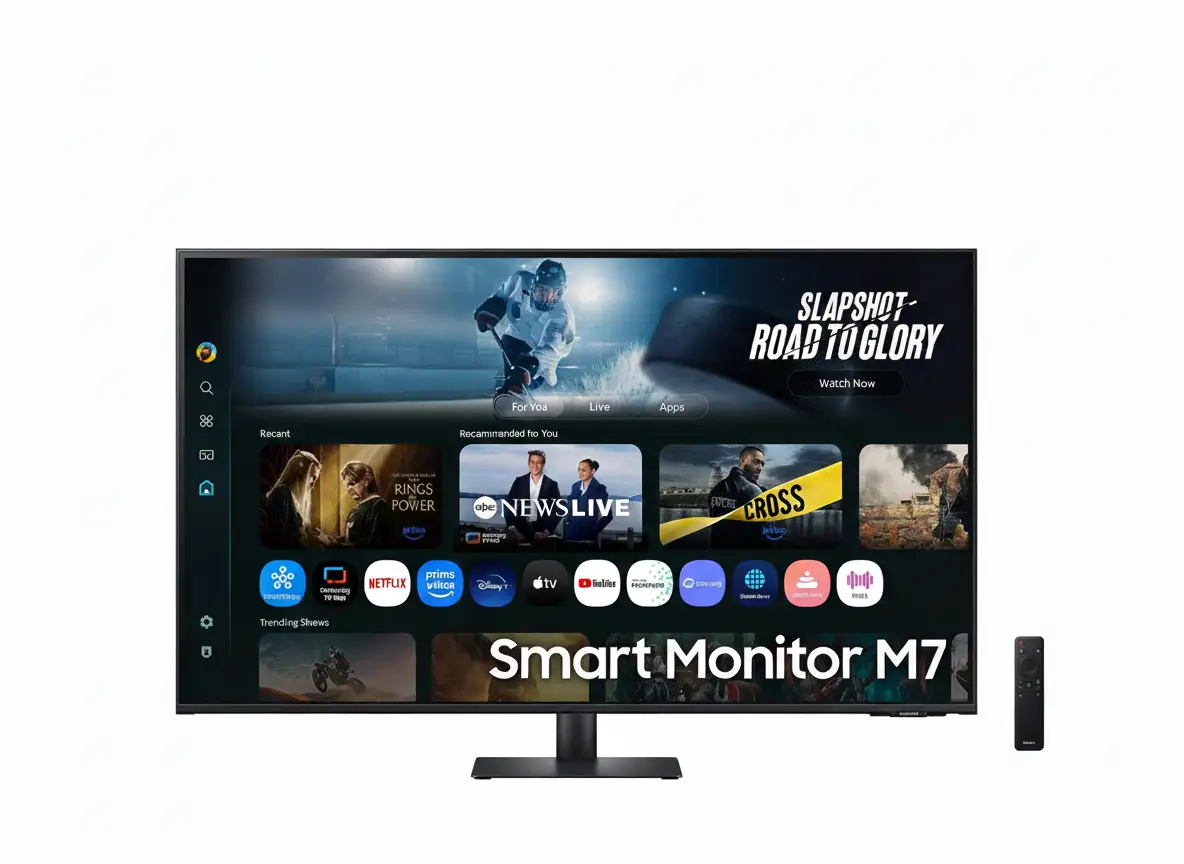
Samsung Smart Monitor M7 43″ M70F
43″ 4K UHD | USB-C 65W | Smart TV Apps | Samsung Vision AI | Tizen OS
3840×2160 VA Panel – HDR10 – 60Hz – 20W Speakers – Microsoft 365 – Gaming Hub
💼 The Ultimate All-in-One Smart Monitor:
• Display: 43″ (109cm) 4K UHD (3840×2160) VA Panel – 5,000:1 Contrast
• Smart Features: Tizen OS + Smart TV Apps + Gaming Hub + Workspace
• Connectivity: USB-C 65W + 2× HDMI 2.0 + WiFi 5 + Bluetooth 5.2
• AI Technology: Vision AI + AI Picture Optimizer + Active Voice Amplifier
• Productivity: Microsoft 365 + Multi Control + Wireless DeX + AirPlay 2
• Entertainment: Samsung TV Plus + Netflix + Prime Video + Gaming Hub
• Audio: 20W Built-in Speakers + Adaptive Sound+
• Future-Proof: 7 Years of One UI Tizen Updates + Knox Security
₹31,799
₹34,499
SAVE ₹2,700 (8% OFF!)
*Price varies ₹30,499-34,499 across retailers | Check current offers
🛒 Check Price on Amazon India$359.99
$499.99
SAVE $140.00 (28% OFF!)
*Free shipping | Model: LS43FM702UNXZA | 3-Year Warranty
🛒 Buy Now on Samsung.com (USA)🌍 Global Availability
• India: ₹30,499-34,499 (Amazon.in, Flipkart, Samsung India)
• USA: $359.99 (Samsung.com, Best Buy, Amazon.com)
• Europe: €399-499 (varies by country)
• Asia: Check Samsung regional sites
Resolution
4K UHD
USB-C Power
65W
Smart Platform
Tizen OS
Samsung Smart Monitor M7 43″ Overview – The PC-Less Revolution
💼 Productivity Highlights
- 43″ 4K UHD: Crystal-clear workspace
- USB-C 65W: Single-cable power + display
- PC-Less Work: Built-in Microsoft 365
- Wireless DeX: Samsung phone to desktop
- AirPlay 2: Seamless Apple integration
- Multi Control: One keyboard/mouse across devices
- Workspace: Remote PC access capability
- 7-Year Updates: Future-proof Tizen OS
📺 Smart Entertainment
- 📱 Smart TV Apps – Netflix, Prime, Disney+
- 📡 Samsung TV Plus – Free live channels
- 🎮 Gaming Hub – Cloud gaming built-in
- 🗣️ Bixby + Alexa – Voice control
- 🏠 SmartThings Hub – Smart home control
- 🔒 Knox Security – Data protection
⭐ Why Smart Monitor M7?
- • No PC needed: Work and stream independently
- • USB-C 65W: Charge + display laptops
- • Affordable: $360 / ₹31,799 for 43″ 4K
- • All-in-one: Monitor + TV + Smart Hub
- • AI-powered: Vision AI optimizes experience
- • Future-proof: 7 years of OS updates
🎯 What Makes Smart Monitor M7 Special?
The Samsung Smart Monitor M7 43″ (M70F) revolutionizes the monitor category by eliminating the need for a dedicated PC for everyday productivity and entertainment tasks. Running on Samsung’s Tizen OS with One UI interface, this monitor functions as a complete smart ecosystem – access Microsoft 365 apps directly, stream Netflix/Prime Video without external devices, control smart home through SmartThings, and game via Samsung Gaming Hub, all without connecting a PC.
The 43″ 4K UHD (3840×2160) VA panel provides expansive workspace equivalent to four 21.5″ 1080p monitors in a single display. The 5,000:1 native contrast ratio delivers deep blacks and vibrant colors for both productivity and entertainment. USB-C 65W Power Delivery enables single-cable connection to laptops – transmitting video, data, and charging simultaneously. This eliminates desk clutter and creates a clean, minimalist workspace.
Samsung Vision AI powers intelligent features: AI Picture Optimizer automatically adjusts image quality based on content type (documents, videos, games), Active Voice Amplifier enhances dialogue clarity in noisy environments, and Adaptive Sound+ tailors audio output to room acoustics. The monitor learns your usage patterns and optimizes settings without manual intervention.
At $359.99 USD (28% off) / ₹31,799 INR, the Smart Monitor M7 offers exceptional value. You’re getting a 43″ 4K monitor + smart TV + productivity station + IoT hub for the price of a standard 4K monitor. With 7 years of One UI Tizen OS updates guaranteed, this monitor remains relevant and feature-rich far longer than typical displays. The built-in 20W speakers with Adaptive Sound+ eliminate the need for external audio, completing the all-in-one experience.
Smart Features – Tizen OS + One UI Experience
📺 Smart TV Apps – Stream Without PC
The M7 Smart Monitor functions as a complete smart TV with direct access to all major streaming platforms. Netflix, Prime Video, Disney+, YouTube, Apple TV+, and hundreds more apps run natively on Tizen OS without requiring PC, console, or streaming stick. Simply connect to WiFi, launch your preferred app, and start streaming in 4K HDR quality.
Samsung TV Plus provides free live TV channels and on-demand content with no subscription required. Access news, sports, movies, and entertainment without additional costs. Universal Guide curates personalized content recommendations across all your installed streaming services, making content discovery effortless. The included remote control simplifies navigation, though keyboard/mouse control is also supported.
Streaming App Support
- • Video: Netflix, Prime Video, Disney+, Apple TV+, YouTube
- • Music: Spotify, Apple Music, Amazon Music, YouTube Music
- • Free: Samsung TV Plus (live channels, no subscription)
- • Sports: ESPN, DAZN, regional sports apps (varies by region)
🎯 One UI Tizen – 7 Years of Updates
One UI Tizen brings Samsung’s award-winning phone interface to monitors, creating a cohesive ecosystem across devices. The interface is intuitive, customizable, and touch-friendly (though this monitor lacks touch input, navigation via remote/keyboard is streamlined). Samsung guarantees 7 years of Tizen OS updates for 2025 models – ensuring new features, security patches, and app compatibility through 2032.
This is unprecedented in the monitor industry, where displays typically receive minimal software updates. With 7-year support, the M7 Smart Monitor remains future-proof against emerging streaming standards, app updates, and smart features. Note that OS updates don’t cover hardware-related performance or physical degradation, but software features continue evolving throughout the device lifecycle.
One UI Tizen Benefits
- • 7-year updates: New features through 2032
- • Samsung ecosystem: Seamless device integration
- • Personalization: Customizable home screen layouts
- • Voice control: Bixby and Alexa built-in
🏠 SmartThings Hub – Smart Home Control Center
🔌 Built-In IoT Hub
The M7 Smart Monitor includes SmartThings Hub functionality, transforming it into a central control point for your smart home ecosystem. View connected devices in 3D Map View, control lights/thermostats/cameras, monitor energy usage, and automate routines – all from the monitor interface without opening smartphone apps.
Compatible with thousands of smart home devices from brands like Philips Hue, Ring, Arlo, Nest, and more. Set up automation like “Good Morning” routines that adjust lighting and temperature, or monitor security cameras while working. The voice control integration (Bixby/Alexa) allows hands-free smart home management: “Alexa, dim the living room lights” works directly through the monitor.
⚡ Energy Monitoring & Control
SmartThings provides real-time energy usage tracking for connected devices, helping identify power-hungry appliances and reduce electricity costs. View consumption by device, set energy-saving modes remotely, and receive alerts for unusual usage patterns. The Eco Mode automatically puts idle devices into low-power states.
During work hours, the SmartThings interface runs in picture-in-picture mode, allowing you to monitor smart home status while maintaining productivity. Check doorbell camera feeds when deliveries arrive, adjust thermostat without interrupting work, or turn off forgotten lights – all without leaving your workflow.
🗣️ Voice Control – Bixby + Alexa Integration
🎤 Far-Field Voice Interaction
Built-in microphones with far-field voice recognition enable hands-free control from across the room. Say “Hi Bixby” or “Alexa” to activate voice assistants without pressing buttons. Adjust volume, switch inputs, launch apps, control smart home, and more via voice commands.
🌐 Multi-Language Support
Bixby supports multiple languages including US English, UK English, India English, Korean, French, German, Italian, Spanish, and Brazilian Portuguese. Language availability varies by region, with feature parity dependent on localization. Alexa provides similar multi-language support through Amazon’s cloud services.
⚙️ Voice Commands
Common commands: “Open Netflix,” “Volume up,” “Switch to HDMI 1,” “Turn off the lights,” “What’s the weather?” Voice control works system-wide across apps, settings, and smart home functions – reducing reliance on remote/keyboard navigation.
Display Quality – 4K UHD VA Panel Excellence
📺 43″ 4K UHD Resolution – Crystal Clarity
The 3840×2160 4K UHD resolution on 43″ delivers 102.46 pixels per inch – ideal for productivity workloads requiring sharp text and detailed images. At typical viewing distances (60-80cm for desk use), individual pixels are imperceptible, creating smooth, paper-like text rendering perfect for document editing, spreadsheets, and code development.
The 43″ screen size provides massive desktop real estate – equivalent to four 21.5″ 1080p monitors arranged in a 2×2 grid. Work with multiple documents side-by-side, view spreadsheets with dozens of visible columns, or edit 4K video timelines with room for preview, timeline, and effects panels simultaneously. The 37.1″ × 20.8″ active display area creates truly expansive workflows without multi-monitor complexity.
4K Productivity Benefits
- • Text clarity: Sharp, readable text even at small font sizes
- • Screen real estate: 4× more workspace than 1080p monitors
- • Multitasking: View multiple full-size documents simultaneously
- • Media editing: 4K video editing at native resolution
🎨 VA Panel – 5,000:1 Contrast Ratio
VA (Vertical Alignment) panel technology provides superior native contrast compared to IPS panels. The 5,000:1 static contrast ratio creates deep blacks and bright whites without requiring local dimming zones. This is particularly beneficial for HDR content, movie watching, and dark-themed productivity applications where black background depth enhances visual comfort.
VA panels excel at color saturation and vibrancy, making media consumption more engaging. The 1 billion (10-bit) color support with 72% NTSC coverage (approximately 99% sRGB) ensures accurate color reproduction for everyday tasks. While not matching professional-grade color accuracy, it’s more than sufficient for office work, content consumption, and casual photo editing.
VA Panel Advantages
- • Contrast: 5× better than IPS (~1000:1)
- • Deep blacks: Enhanced dark scene detail
- • Cost-effective: Better value than IPS at this price
- • Viewing angles: 178°/178° (consistent across screen)
🌟 HDR10 Support – Enhanced Dynamic Range
🎬 HDR Content Playback
HDR10 support enables playback of high dynamic range content from streaming services like Netflix, Prime Video, and Disney+. While the 300 nits typical brightness (240 nits minimum) doesn’t reach DisplayHDR certification levels, the VA panel’s high contrast ratio creates noticeably improved image depth compared to SDR content.
HDR content displays brighter highlights and deeper shadows simultaneously – sunsets appear more realistic, explosions have proper intensity, and dark scenes maintain detail without crushing shadows. For casual viewing in typical office/home environments, the HDR implementation provides meaningful quality improvement over SDR.
💡 Brightness Performance
The 300 nits typical brightness is adequate for indoor environments with controlled lighting. For typical office setups or living rooms without direct sunlight, brightness is perfectly sufficient for comfortable viewing. The anti-glare coating helps maintain visibility in moderately bright conditions.
For bright room usage or near windows, consider ambient lighting adjustments or curtains. The brightness level won’t compete with direct sunlight like 400-600 nit displays, but for $360/₹31,799 pricing, it’s appropriate for the category. Most users find 300 nits comfortable for extended viewing without eye strain.
📐 Display Specifications Summary
Resolution & PPI
3840×2160 (4K UHD) at 43″ diagonal provides 102.46 PPI – sharp text without scaling on Windows/macOS. Active display area: 37.1″ × 20.8″ for expansive workspace.
Contrast & Colors
5,000:1 static contrast delivers deep blacks. 1 billion (10-bit) colors with 72% NTSC (≈99% sRGB) ensures accurate color reproduction for productivity and media.
Refresh & Response
60Hz refresh rate with 4ms GTG response time – suitable for productivity, casual gaming, and media consumption. Not designed for competitive gaming (no high refresh).
Samsung Vision AI – Intelligent Picture & Sound Optimization
🤖 AI Picture Optimizer – Content-Aware Adjustment
AI Picture Optimizer uses machine learning to automatically detect content type and adjust display settings accordingly. When working on documents and spreadsheets, the AI reduces blue light, optimizes text clarity, and adjusts brightness for comfortable extended viewing. During video playback, it enhances color vibrancy and contrast for cinematic experience.
For gaming content, AI Picture Optimizer deepens blacks, enhances shadow detail, and boosts contrast to improve visibility in dark game environments. The system learns from your usage patterns over time, fine-tuning adjustments based on your preferences. Note: AI Picture Optimizer requires PC connection via USB-C or HDMI – it doesn’t apply to built-in smart apps.
AI Picture Modes
- • Document Mode: Optimized text clarity + reduced blue light
- • Video Mode: Enhanced colors + cinematic contrast
- • Gaming Mode: Deep blacks + shadow detail boost
- • Automatic: Seamless switching based on active content
🔊 Active Voice Amplifier – AI Audio Enhancement
Active Voice Amplifier uses AI to analyze ambient noise in your environment and automatically adjusts dialogue volume to maintain clarity. In noisy settings – open offices, household activity, street noise – the system intelligently boosts voice frequencies while maintaining overall audio balance, ensuring you catch dialogue without cranking overall volume.
This is particularly beneficial for video conferencing, movie dialogue, and educational content where speech intelligibility is critical. The AI distinguishes between background music/effects and human speech, prioritizing vocal clarity without distorting other audio elements. During quiet evening viewing, the amplification automatically reduces, preventing excessive loudness.
Voice Amplifier Benefits
- • Noisy environments: Maintain dialogue clarity
- • Video calls: Hear colleagues clearly in busy spaces
- • Movies: Catch whispered dialogue without subtitles
- • Automatic: Adjusts dynamically based on ambient noise
🎵 Adaptive Sound+ – Room-Aware Audio Tuning
🔄 Automatic Audio Optimization
Adaptive Sound+ analyzes your room acoustics and adjusts audio output to compensate for environmental factors. In large, echo-prone rooms, the system tightens bass response and adjusts mid-range frequencies to prevent muddiness. In small spaces, it optimizes for near-field listening with balanced frequency distribution.
The AI also considers content type – enhancing bass and dynamic range for action movies, clarifying mid-range for talk shows, and providing balanced output for music. This eliminates the need for manual EQ adjustments, ensuring optimal audio quality regardless of what you’re watching or where the monitor is positioned.
🎧 20W Built-In Speakers
The 20W integrated speaker system provides surprisingly robust audio for built-in monitor speakers. While not matching dedicated soundbars or studio monitors, the audio quality is perfectly adequate for video calls, casual media consumption, and background music. Adaptive Sound+ maximizes speaker potential through intelligent EQ tuning.
For private listening or superior audio quality, connect headphones via Bluetooth 5.2 or use external speakers. The monitor supports HDMI ARC/eARC for soundbar connections, allowing audio pass-through when using the monitor as a smart TV. Bluetooth latency is minimal thanks to Bluetooth 5.2 standards.
🧠 Vision AI Learning Capabilities
📊 Usage Pattern Learning
Vision AI learns your daily routines and preferences – morning productivity sessions, afternoon video calls, evening entertainment. It automatically adjusts settings based on time-of-day patterns, creating a personalized experience without manual configuration.
🎯 Content Detection
The AI identifies content types in real-time – documents, videos, games, presentations – and applies appropriate optimizations. Transitions between modes are seamless and imperceptible, maintaining visual consistency while maximizing quality for each content type.
🔒 Privacy-First Processing
All AI processing occurs on-device – no image/audio data is transmitted to cloud servers. Vision AI respects privacy while delivering intelligent features. Knox Security ensures AI algorithms operate within Samsung’s secure environment.
Productivity Features – PC-Less Work Environment
💼 Microsoft 365 Integration – Built-In Office Apps
Workspace feature provides direct access to Microsoft 365 applications without PC connection. Launch Word, Excel, PowerPoint, OneDrive, and Outlook directly from the monitor interface. Edit documents, create presentations, manage spreadsheets, and respond to emails – all without turning on your computer.
This is ideal for lightweight productivity tasks, quick document reviews, or secondary workstation scenarios. Connect a Bluetooth keyboard/mouse (or use included remote), log into your Microsoft account, and access cloud-stored documents. Note: Microsoft 365 requires Microsoft account; some features require active subscription (though free web versions of Office apps are available with basic functionality).
Workspace Use Cases
- • Quick edits: Review and edit documents without PC
- • Email triage: Respond to urgent emails from couch
- • Remote work: Access PC remotely via Workspace app
- • Secondary station: Kitchen/bedroom workspace without PC
📱 Wireless DeX – Samsung Phone as Desktop
Wireless DeX transforms compatible Samsung Galaxy phones/tablets into full desktop experiences on the 43″ display. Place your Galaxy device within range, enable Wireless DeX, and your phone interface converts to desktop mode with resizable windows, taskbar, and mouse pointer support. Access all phone apps in desktop layouts optimized for large screens.
This eliminates the need for separate PC for many tasks. Draft documents in Samsung Notes, edit photos in Gallery, browse with Samsung Internet, all while your phone handles the processing. Your phone remains functional during DeX sessions – take calls, check notifications, use it as touchpad. Wireless DeX requires Galaxy devices with One UI 3.1+ running on WiFi 5 or better.
Wireless DeX Benefits
- • PC replacement: Use phone as computer on big screen
- • Wireless: No cables required (WiFi Direct connection)
- • Multitasking: Desktop-style window management
- • Continuity: Seamlessly switch between phone and monitor
🖱️ Multi Control – Unified Keyboard/Mouse Across Devices
⌨️ Seamless Device Switching
Multi Control allows one keyboard/mouse to control multiple Samsung devices simultaneously. Connect your Galaxy phone/tablet and Smart Monitor to the same Samsung Account and WiFi network, then move your mouse cursor between devices as if they were one extended desktop. The cursor seamlessly transitions from monitor to phone/tablet screen.
Once connected, drag and drop files between devices, copy/paste text across platforms, and control all screens with unified peripherals. For example: edit document on monitor while referencing notes on Galaxy tablet, copy data from phone to monitor, or control phone apps with desktop keyboard shortcuts. Requirements: Galaxy phones with One UI 5.1.1+, Galaxy Book 2021+ models.
📋 Cross-Device Workflows
Multi Control enables powerful cross-device workflows. Copy text on phone and paste on monitor instantly. Drag photos from Galaxy tablet directly into monitor-displayed documents. Type on monitor keyboard to respond to phone messages. The unified input system eliminates constant device switching, maintaining flow state during complex tasks.
This is particularly valuable for content creators and multitaskers who juggle multiple devices. Designers can reference phone mockups while editing on monitor. Writers can research on tablet while drafting on main screen. The feature requires all devices on same WiFi network with Bluetooth enabled.
🍎 AirPlay 2 & Multi View – Apple Integration & Multitasking
📱 AirPlay 2 Support
Wirelessly stream content from iPhone, iPad, or Mac to the 43″ display via AirPlay 2. Mirror device screens for presentations, extend Mac desktop, or stream media without cables. Requires iOS 12.3+, iPadOS 13+, or macOS 10.14.5+.
🖼️ Multi View (Up to 2 Videos)
Display two video sources simultaneously in split-screen layouts. Watch streaming video while viewing HDMI/USB-C input, or display two smart apps side-by-side. Customize split ratios (50/50, 75/25, PIP) for flexible multitasking.
🔄 Screen Mirroring
Beyond AirPlay, the monitor supports screen mirroring from Android (Miracast) and Windows devices. Wirelessly display presentations, share mobile content, or extend laptop screens. Tap View enables instant Samsung phone mirroring by tapping phone to monitor.
Connectivity – USB-C 65W + HDMI + Wireless Options
⚡ USB-C 65W Power Delivery – Single Cable Solution
The USB-C port with 65W Power Delivery is the standout connectivity feature. Connect compatible laptops with a single USB-C cable that simultaneously transmits video (4K@60Hz), data (USB 2.0 speed), and 65W charging power. This eliminates cable clutter, creating a clean desk setup where your laptop charges while displaying on the 43″ screen.
65W power delivery is sufficient for most laptops including MacBook Air, MacBook Pro 13″/14″ (at reduced speed when under heavy load), Dell XPS 13, HP Spectre, ThinkPad X series, and ultrabooks. High-performance gaming laptops or MacBook Pro 16″ may require supplemental charging during intensive tasks. The monitor includes USB-C cable in the box – no separate purchase needed.
USB-C Compatible Devices
- • MacBook: Air (M1/M2/M3), Pro 13″/14″ (M1/M2/M3)
- • Windows: Dell XPS, HP Spectre, ThinkPad X/T series
- • Tablets: iPad Pro with USB-C, Galaxy Tab S series
- • Phones: Samsung Galaxy S/Note (DeX mode), USB-C Android
🔌 HDMI 2.0 + USB Ports
The Smart Monitor M7 includes 2× HDMI 2.0 ports supporting 4K@60Hz input from desktops, laptops, consoles, and media devices. HDMI 2.0 bandwidth (18 Gbps) is sufficient for 4K 60Hz with HDR10, though it doesn’t support HDMI 2.1 features like 4K 120Hz (unnecessary given the 60Hz panel). Connect PS5, Xbox Series X/S, Nintendo Switch, Blu-ray players, or cable boxes.
3× USB-A 2.0 ports provide hub functionality for connecting peripherals. Plug keyboard, mouse, USB drives, or webcams into the monitor, then control them from connected PC via USB-C/HDMI upstream. The USB hub also charges devices at standard USB rates (no fast charging). Auto Source Switch+ automatically detects active inputs and switches to them, eliminating manual input selection.
Port Configuration
- • USB-C: 1× port (65W PD, 4K@60Hz, USB 2.0 data)
- • HDMI: 2× HDMI 2.0 (4K@60Hz HDR10, HDCP 2.2)
- • USB-A: 3× USB 2.0 (hub + device charging)
- • Network: WiFi 5, Bluetooth 5.2 (no Ethernet port)
📡 Wireless Connectivity – WiFi 5 + Bluetooth 5.2
🌐 WiFi 5 (802.11ac)
The monitor includes WiFi 5 (802.11ac) wireless networking for accessing smart features, streaming apps, cloud gaming, and software updates without Ethernet cable. WiFi 5 provides sufficient bandwidth for 4K streaming, cloud gaming, and general connectivity. While not the latest WiFi 6/6E standard, WiFi 5 is perfectly adequate for monitor use cases.
Note: No Ethernet port is included on the M7 Smart Monitor. Users requiring wired networking must use WiFi or USB-C/HDMI from wired PCs. For most users, WiFi 5 performance is indistinguishable from wired connections for typical monitor tasks. Placement near WiFi router improves streaming stability.
🎧 Bluetooth 5.2 – Wireless Peripherals
Bluetooth 5.2 connectivity enables pairing wireless keyboards, mice, headphones, earbuds, speakers, and game controllers directly to the monitor. This is essential for PC-less operation – control smart apps and Workspace without wired peripherals. Bluetooth 5.2 offers improved range, stability, and lower latency compared to older Bluetooth versions.
Pair multiple Bluetooth devices simultaneously – keyboard + mouse + headphones all connected. Bluetooth audio latency is minimal for casual use, though audiophiles may prefer wired connections for critical listening. The far-field microphone array also uses Bluetooth for voice assistant connectivity.
🔄 Input Management & Switching
🎯 Auto Source Switch+
Automatic input detection and switching eliminates manual source selection. When you connect a laptop or turn on a console, the monitor automatically switches to the active input. When the device sleeps or disconnects, it returns to smart apps/previous input.
📺 HDMI-CEC Control
HDMI-CEC (Consumer Electronics Control) allows the monitor remote to control connected devices. Adjust streaming box volume, navigate menus, and power devices on/off using the Samsung remote – eliminating multi-remote clutter.
🖥️ Input Flexibility
With USB-C + 2× HDMI + wireless options, connect laptop, desktop, console, streaming device, and phone simultaneously. Switch between sources via remote, on-screen menu, or Auto Source Switch+ for seamless multi-device workflows.
Gaming Hub – Cloud Gaming Without Console or PC
🎮 Cloud Gaming Services – PC/Console Free Gaming
Gaming Hub provides direct access to cloud gaming platforms without requiring gaming PC, console, or downloads. Supported services include Xbox Cloud Gaming (Game Pass Ultimate), NVIDIA GeForce NOW, Amazon Luna, and Utomik. Simply launch Gaming Hub, select a service, log in, and start playing AAA titles streamed from remote servers.
This democratizes high-end gaming – play Starfield, Cyberpunk 2077, Forza Horizon, and hundreds more on the Smart Monitor without expensive hardware. Requirements: stable internet connection (minimum 15 Mbps, 25+ Mbps recommended), compatible game controller (sold separately), and service subscriptions. Accessing Gaming Hub is free; game services require their own subscriptions (Game Pass Ultimate, GeForce NOW membership, etc.).
Cloud Gaming Services
- • Xbox Cloud Gaming: Game Pass Ultimate library (400+ games)
- • GeForce NOW: Stream your owned Steam/Epic games
- • Amazon Luna: Luna+ subscription catalog
- • Utomik: All-you-can-play subscription service
🎯 Gaming Performance – 60Hz 4K with 4ms Response
The Smart Monitor M7 is optimized for casual gaming and cloud gaming rather than competitive esports. The 60Hz refresh rate and 4ms GTG response time are perfectly adequate for single-player adventures, RPGs, racing games, and cloud-streamed titles where visual quality and screen size matter more than millisecond precision.
For console gaming (PS5, Xbox Series X/S), the monitor supports 4K@60Hz via HDMI 2.0, delivering full visual fidelity from current-gen consoles. The large 43″ screen and HDR10 support create immersive gaming experiences. Note: No VRR (variable refresh rate) support, so screen tearing may occur in uncapped frame rate scenarios. Enable V-Sync in games to eliminate tearing.
Gaming Features
- • Game Bar: Quick access to game settings overlay
- • Virtual Aim Point: Customizable crosshair overlay
- • Super Ultrawide GameView: Aspect ratio adjustment for supported games
- • Game Mode: Optimized picture settings for gaming content
🎮 Gaming Limitations & Considerations
⚠️ Not for Competitive Esports
60Hz refresh rate with no VRR support makes the M7 Smart Monitor unsuitable for competitive FPS gaming like Valorant, CS2, or Apex Legends. Esports players require 144Hz+ refresh, 1ms response, and VRR – specs this monitor doesn’t provide. Stick to dedicated gaming monitors for competitive play.
Additionally, the 4ms response time is slower than gaming-focused displays (typically 1-2ms). While imperceptible in most games, fast-paced titles with rapid camera movements may exhibit slight motion blur. For casual gaming, RPGs, strategy games, and cloud gaming, performance is excellent.
✅ Perfect for Casual Gaming
The M7 Smart Monitor excels at casual and cloud gaming where visual quality, screen size, and convenience outweigh competitive specs. Play story-driven adventures, RPGs, racing games, sports titles, and indie games in expansive 43″ 4K glory. The built-in Gaming Hub eliminates hardware requirements entirely.
For living room console gaming or bedroom PC-free gaming, the Smart Monitor M7 is ideal. Connect PS5/Xbox via HDMI, or use cloud gaming with a Bluetooth controller. The 20W speakers provide adequate audio without external setup. It’s a complete gaming solution at an affordable price.
🕹️ Controller Compatibility & Setup
🎮 Supported Controllers
Xbox Wireless Controllers, PlayStation DualSense/DualShock 4, and third-party Bluetooth controllers pair directly to the monitor for cloud gaming. No USB dongle required – Bluetooth 5.2 provides wireless connectivity.
🔧 Quick Setup
Pairing controllers is straightforward: enable Bluetooth pairing mode on controller, navigate to Settings > Bluetooth on monitor, select controller from list. Once paired, controllers reconnect automatically when turned on near the monitor.
🎯 Input Lag
Combined monitor input lag + cloud gaming latency typically ranges 50-100ms depending on internet connection quality. Suitable for casual gaming; competitive players will notice delay. Wired Ethernet on gaming device minimizes latency.
Who Should Buy the Smart Monitor M7 43″?
✅ Perfect For
💼 Remote Workers & Hybrid Professionals
If you work from home and want a large 4K display with USB-C 65W docking, the M7 provides expansive workspace with single-cable laptop connection. Built-in Microsoft 365 and Workspace enable PC-free quick tasks.
📺 Cord-Cutters & Streaming Enthusiasts
Those wanting smart TV functionality in monitor form factor. Access Netflix, Prime, Disney+ directly without cable box or streaming stick. Perfect for bedrooms, offices, or spaces where full TV isn’t needed.
🎓 Students & Budget-Conscious Buyers
At $360/₹31,799, you get 43″ 4K monitor + smart TV + productivity station – incredible value. Students get large screen for research, streaming breaks, and cloud gaming without expensive PC requirements.
🏠 Smart Home Enthusiasts
The SmartThings Hub integration makes this a smart home control center. Monitor cameras, control lighting/HVAC, and manage IoT devices from one screen. Knox Security ensures smart home data remains protected.
📱 Samsung Galaxy Ecosystem Users
Owners of Galaxy phones/tablets/laptops benefit from seamless integration. Wireless DeX, Multi Control, and Tap View create unified multi-device workflows impossible with non-Samsung monitors.
🎮 Casual & Cloud Gamers
If you prefer story-driven games, RPGs, or cloud gaming over competitive FPS, the 43″ 4K screen with Gaming Hub provides immersive experiences without gaming PC investment.
❌ Not Ideal For
🎯 Competitive Esports Gamers
60Hz with no VRR is unacceptable for competitive FPS/MOBA gaming. Pro players need 144Hz+ monitors with 1ms response and adaptive sync. The M7 is strictly for casual gaming.
🎨 Professional Content Creators
While 72% NTSC color gamut is adequate for general use, professional photo/video editors need 99%+ Adobe RGB or DCI-P3 with hardware calibration. This monitor lacks color-critical specs and factory calibration reports.
💻 Power Users Needing High Refresh
If you’re accustomed to 120Hz+ displays for desktop navigation, the 60Hz panel will feel sluggish. Power users often prefer high-refresh monitors even for productivity – the M7’s 60Hz is strictly standard.
🖥️ Multi-Monitor Setup Builders
At 43″, the Smart Monitor M7 is meant as a single-display solution. Its size makes multi-monitor arrangements awkward and space-consuming. Those wanting 2-3 monitor setups should choose 24-27″ displays.
🔌 Users Requiring Wired Networking
No Ethernet port means WiFi-only connectivity for smart features. If your setup lacks reliable WiFi or requires wired connections for security/stability, this monitor isn’t suitable without workarounds.
🍎 Non-Samsung Android Users
While AirPlay serves Apple users, non-Samsung Android users miss key features like Wireless DeX and Multi Control. The monitor heavily favors Samsung ecosystem – generic Android integration is limited.
Competitors & Alternatives – Compare Before You Buy
Samsung Smart Monitor M8 32″
32″ 4K Smart Monitor with Webcam
Display: 32″ 4K UHD, Flat Panel
Features: Magnetic 4K Webcam, Same Smart OS
USB-C: 65W Power Delivery
Price: ~$399 USD / ₹36,999 INR
Why Choose This Instead:
- • Smaller size: 32″ easier for desks
- • Webcam included: Magnetic 4K SlimFit camera
- • Color options: White, green, pink, blue
- • Same features: Identical smart functionality
M7 43″ Advantages:
- • 43″ vs 32″ (37% more screen area)
- • Lower price ($360 vs $399)
- • Better value per inch
- • Same USB-C 65W + smart features
LG 43UN700-B
43″ 4K IPS Monitor with USB-C
Display: 43″ 4K IPS, HDR10
USB-C: 60W Power Delivery
Panel: IPS (Better viewing angles)
Price: ~$449 USD / ₹42,999 INR
Why Choose This Instead:
- • IPS panel: Better color accuracy
- • Professional: sRGB 99% coverage
- • Ergonomics: Height adjustable stand
- • Reader Mode: Blue light filter
M7 43″ Advantages:
- • $90 cheaper ($360 vs $449)
- • Smart TV apps built-in
- • Gaming Hub cloud gaming
- • VA panel (better contrast 5000:1)
- • 20W speakers vs 10W
- • 7 years OS updates
Dell P4317Q 43″
43″ 4K Professional Monitor
Display: 43″ 4K IPS, 10-bit
Professional: 99% sRGB factory calibrated
Ports: DP, HDMI, USB 3.0 hub
Price: ~$699 USD / ₹64,999 INR
Why Choose This Instead:
- • Color accuracy: Factory calibrated 99% sRGB
- • Professional: Dell UltraSharp quality
- • USB 3.0 hub: Faster data transfer
- • Build quality: Premium construction
M7 43″ Advantages:
- • $340 cheaper ($360 vs $699)
- • Smart TV functionality
- • USB-C 65W charging
- • Gaming Hub + streaming apps
- • Modern smart features
- • Better value for non-professionals
ASUS VA326HR 43″
43″ FHD Budget Gaming Monitor
Display: 43″ FHD (1920×1080), Curved
Gaming: 144Hz refresh rate
Response: 4ms GTG
Price: ~$279 USD / ₹24,999 INR
Why Choose This Instead:
- • High refresh: 144Hz for gaming
- • Curved: 1800R immersive curve
- • Lower price: $80 cheaper
- • Gaming focus: FreeSync support
M7 43″ Advantages:
- • 4K resolution vs FHD (4× pixels)
- • Smart TV + streaming apps
- • USB-C 65W productivity
- • Better for work (sharp text)
- • Modern smart features
- • Much sharper image quality
TCL 43S425 43″ Roku TV
43″ 4K Smart TV (as Monitor)
Display: 43″ 4K LED TV Panel
Smart: Roku TV built-in
HDR: HDR10 support
Price: ~$219 USD / ₹19,999 INR
Why Choose This Instead:
- • Much cheaper: $140 less
- • Roku OS: Excellent streaming interface
- • True TV: Built-in tuner for cable/antenna
- • Entertainment focus: Optimized for viewing
M7 43″ Advantages:
- • Designed as monitor (not TV)
- • USB-C 65W laptop docking
- • Better text clarity (monitor optimized)
- • Lower input lag for gaming
- • Samsung ecosystem integration
- • Professional productivity features
BenQ EW3880R 37.5″
37.5″ Ultrawide Curved Monitor
Display: 37.5″ 3840×1600 IPS Curved
USB-C: 60W Power Delivery
Audio: 5W×2 treVolo speakers
Price: ~$799 USD / ₹74,999 INR
Why Choose This Instead:
- • Ultrawide: 24:10 aspect for productivity
- • Curved IPS: Color + immersion
- • Premium audio: BenQ treVolo speakers
- • Eye care: BenQ brightness intelligence
M7 43″ Advantages:
- • $440 cheaper ($360 vs $799)
- • Larger 43″ screen area
- • 16:9 better for content
- • Smart TV apps built-in
- • Gaming Hub functionality
- • Better value proposition
Pros & Cons – The Complete Picture
✅ Pros
-
•
Exceptional Value – All-in-One Solution
At $360/₹31,799, you get 43″ 4K monitor + smart TV + productivity station + IoT hub. This replaces multiple devices and saves money compared to buying each separately.
-
•
USB-C 65W Single-Cable Docking
One cable charges laptop, transmits 4K video, and transfers data simultaneously. Eliminates desk clutter and creates clean, minimalist workspace. Cable included in box.
-
•
PC-Less Productivity & Entertainment
Built-in Microsoft 365, Smart TV apps, Gaming Hub, and Workspace enable work and entertainment without dedicated PC. Perfect for secondary spaces or budget setups.
-
•
7 Years of One UI Tizen Updates
Samsung guarantees OS updates through 2032 – unprecedented software support ensuring new features, security patches, and app compatibility far beyond typical monitor lifespans.
-
•
43″ 4K UHD – Massive Workspace
3840×2160 resolution on 43″ provides equivalent screen real estate of four 21.5″ 1080p monitors. Sharp text at 102 PPI, expansive multitasking without multi-monitor complexity.
-
•
Samsung Vision AI Intelligence
AI Picture Optimizer, Active Voice Amplifier, and Adaptive Sound+ automatically adjust settings based on content and environment. Learns usage patterns for personalized experience.
-
•
SmartThings Hub Integration
Control smart home devices, monitor energy usage, view security cameras, and automate routines directly from monitor. Knox Security protects IoT connections and data.
-
•
VA Panel – 5,000:1 Contrast Ratio
Superior native contrast creates deep blacks and vibrant colors. Better than IPS for media consumption and dark-themed applications. HDR10 support enhances streaming content.
-
•
Samsung Galaxy Ecosystem Integration
Wireless DeX, Multi Control, Tap View, and seamless device pairing create unified workflow across Samsung phones, tablets, and laptops. Unmatched ecosystem synergy.
-
•
Comprehensive Connectivity Options
USB-C 65W + 2× HDMI 2.0 + 3× USB-A + WiFi 5 + Bluetooth 5.2 + AirPlay 2 + screen mirroring. Connects to everything – laptops, desktops, consoles, phones, tablets.
❌ Cons
-
•
60Hz Refresh Rate – No High Refresh Option
Strictly 60Hz with no VRR support makes this unsuitable for competitive gaming or high-refresh enthusiasts. Desktop navigation feels less fluid than 120Hz+ displays.
-
•
4ms Response Time – Slower Than Gaming Monitors
4ms GTG response is acceptable but not exceptional. Fast-paced games may exhibit slight motion blur. Competitive gamers need 1-2ms displays for optimal clarity.
-
•
No Ethernet Port – WiFi Only
WiFi 5 is adequate but wired networking option would be ideal. Users in WiFi-challenged environments or requiring wired security must rely on WiFi or PC pass-through.
-
•
300 Nits Brightness – Modest Peak Luminance
300 nits typical (240 nits minimum) is adequate for indoor use but struggles in very bright rooms or near windows. Brighter displays (400-600 nits) handle ambient light better.
-
•
72% NTSC Color Gamut – Not Professional-Grade
While adequate for general use (~99% sRGB), professional colorists need 99%+ Adobe RGB/DCI-P3 with hardware calibration. No factory calibration report included.
-
•
Basic Stand – No Height/Pivot Adjustment
Simple tilt-only stand (-2° to +20°) lacks height adjustment, swivel, or pivot. Ergonomic positioning requires monitor arm (200×200mm VESA) or makeshift solutions.
-
•
VA Panel Viewing Angles (Minor)
While rated 178°/178°, VA panels exhibit slight color shift at extreme angles compared to IPS. The large 43″ size can show uniformity variations when viewed off-center.
-
•
20W Speakers – Adequate But Not Exceptional
Built-in audio is better than most monitors but still lacks bass depth and volume for large room use. Audiophiles and home theater users will want external speakers.
-
•
Samsung Ecosystem Bias
Many best features (Wireless DeX, Multi Control) require Samsung Galaxy devices. Non-Samsung Android users and Windows-only users miss key functionality.
-
•
Large Size – Space Requirements
43″ demands substantial desk space and 60-80cm viewing distance. Not suitable for small desks, cramped dorm rooms, or compact workspaces. Weighs 23.4 lbs with stand.
Final Verdict – Best Value 43″ Smart Monitor
Overall Rating
Excellent Value Smart Monitor
Smart Features & Value
All-in-One Champion
Gaming Performance
Casual Gaming Only
🏆 Verdict Summary
The Samsung Smart Monitor M7 43″ (M70F) is the best value proposition in the 43″ monitor category, delivering an exceptional combination of productivity, entertainment, and smart features at an accessible price point. For $359.99 USD (28% off) / ₹31,799 INR, you’re getting a 43″ 4K display with USB-C 65W docking, complete Tizen smart TV platform, Microsoft 365 integration, Gaming Hub cloud gaming, SmartThings home control, and 7 years of guaranteed OS updates.
The PC-less operation capability is transformative – this isn’t just a monitor, it’s a complete computing and entertainment ecosystem. Stream Netflix without PC, edit documents via built-in Office apps, control smart home devices, play cloud games, and dock laptops with single USB-C cable. The Samsung Vision AI automatically optimizes picture and sound based on content and environment, creating intelligent, personalized experiences without manual configuration.
However, the 60Hz refresh rate with 4ms response time clearly positions this as a productivity and casual entertainment monitor, not a competitive gaming display. The VA panel’s 5,000:1 contrast and HDR10 support create excellent image quality for media consumption, but 300 nits brightness and 72% NTSC color gamut place it in the consumer category rather than professional-grade. For remote workers, students, streaming enthusiasts, Samsung Galaxy users, and casual gamers on a budget, the Smart Monitor M7 43″ is a brilliant all-in-one solution. For competitive gamers or color-critical professionals, specialized displays better serve those needs.
✅ Buy If You:
- • Need 43″ 4K monitor + smart TV in one device
- • Want USB-C 65W laptop docking
- • Value PC-less productivity and entertainment
- • Are Samsung Galaxy ecosystem user
- • Budget-conscious (incredible $360/₹31K value)
- • Casual gamer or cloud gaming enthusiast
❌ Skip If You:
- • Need high refresh rate (120Hz+) for gaming
- • Require professional color accuracy
- • Competitive esports player (need 144Hz+ VRR)
- • Prefer smaller monitors (27-32″ range)
- • Need wired Ethernet connectivity
- • Want height-adjustable ergonomic stand
⭐ Category Ratings Breakdown
Frequently Asked Questions
Q1: Can I use the Smart Monitor M7 43″ without a PC at all?
Yes, the M7 is designed for PC-less operation. You can stream Netflix/Prime Video via Smart TV apps, work in Microsoft 365 (Word, Excel, PowerPoint) through Workspace feature, play cloud games via Gaming Hub, control smart home with SmartThings, and browse the web – all without connecting a PC. Simply connect to WiFi, pair Bluetooth keyboard/mouse, and use it standalone. For tasks requiring full PC power, connect laptop via USB-C or HDMI.
Q2: Does the 65W USB-C Power Delivery charge all laptops?
65W charges most ultrabooks and productivity laptops fully, including MacBook Air (M1/M2/M3), MacBook Pro 13″/14″ (M1/M2/M3 at moderate load), Dell XPS 13, HP Spectre, and ThinkPad X/T series. High-performance laptops like MacBook Pro 16″, gaming laptops, or workstations drawing 80W+ may charge slowly or require supplemental power during intensive tasks. Check your laptop’s power requirements – if it’s 65W or less, you’re good; if higher, expect slower charging under heavy load.
Q3: Is the Smart Monitor M7 good for gaming?
Excellent for casual/cloud gaming, not suitable for competitive esports. The 60Hz refresh rate with 4ms response time is perfect for single-player adventures, RPGs, racing games, sports titles, and cloud gaming via Gaming Hub. The 43″ 4K screen creates immersive experiences for story-driven games. However, competitive FPS/MOBA players need 144Hz+ with VRR – the M7 lacks these features. For PS5/Xbox Series X console gaming at 60fps, it’s excellent. For 120fps+ competitive PC gaming, choose a high-refresh gaming monitor instead.
Q4: What’s included with Samsung’s 7-year One UI Tizen updates?
Samsung guarantees Tizen OS software updates for 7 years from 2025 product release (through 2032). This includes new smart features, streaming app updates, security patches, Samsung Vision AI improvements, and interface enhancements. As new apps launch (new streaming services, cloud gaming platforms), they’ll be added to older models. This is unprecedented in monitors, where manufacturers typically abandon software support after 1-2 years. Note: Updates don’t cover hardware limitations – you won’t get 120Hz refresh or better speakers via software, but all smart features stay current.
Q5: How does Wireless DeX work? Do I need a Samsung phone?
Wireless DeX requires compatible Samsung Galaxy phones/tablets with One UI 3.1 or higher (Galaxy S10+ and newer, Note 10+ and newer, Tab S6 and newer). Your phone and M7 monitor must be on the same WiFi network. Enable Wireless DeX on your phone, select the Smart Monitor, and your phone interface transforms into desktop mode on the 43″ screen with resizable windows, taskbar, and full keyboard/mouse support. Your phone remains functional during DeX sessions – take calls, check notifications, use it as touchpad. Non-Samsung Android phones and iPhones cannot use DeX, though they can use screen mirroring/AirPlay instead.
Q6: Can I wall mount the Smart Monitor M7 43″?
Yes, it supports 200mm × 200mm VESA mounting. The monitor weighs 18.7 lbs (8.5 kg) without stand, so any VESA wall mount or monitor arm rated for 20+ lbs will work. Wall mounting saves desk space and allows flexible positioning. Note: The included stand is tilt-only (-2° to +20°) with no height adjustment, so many users opt for monitor arms to achieve better ergonomics. When wall mounting, ensure WiFi signal strength remains adequate – the monitor relies on wireless connectivity for smart features.
Q7: Does the monitor work with Apple devices (Mac, iPhone, iPad)?
Yes, excellent Apple compatibility. MacBooks connect via USB-C (charges + displays 4K@60Hz simultaneously) or HDMI. AirPlay 2 enables wireless streaming from iPhone, iPad, or Mac – mirror screens for presentations, extend Mac desktop, or cast media without cables. Requires iOS 12.3+, iPadOS 13+, or macOS 10.14.5+. Note: Samsung-specific features like Wireless DeX and Multi Control don’t work with Apple devices, but core smart monitor functionality (streaming apps, Gaming Hub, USB-C docking) works perfectly. You lose some ecosystem integration but retain all essential features.
Q8: How does the AI Picture Optimizer decide which mode to use?
AI Picture Optimizer analyzes screen content in real-time to detect content type – documents (white backgrounds with text), videos (motion with varied colors), or games (high contrast with HUD elements). It then applies appropriate optimizations: Document Mode reduces blue light and enhances text clarity; Video Mode boosts color vibrancy and contrast; Gaming Mode deepens blacks and enhances shadow detail. The AI learns from your usage patterns – if you always watch movies at 8 PM, it preproactively switches to Video Mode at that time. Important: AI Picture Optimizer only works with PC connections (USB-C or HDMI) – it doesn’t apply to built-in smart apps since those run independently of external video input.
Q9: Why is there no Ethernet port? Is WiFi stable enough?
Samsung omitted Ethernet to reduce costs and minimize cable clutter, banking on WiFi 5 (802.11ac) being sufficient for monitor use cases. For most users, WiFi 5 provides ample bandwidth for 4K streaming (requires ~25 Mbps), cloud gaming (~15-25 Mbps), and software updates. The monitor should be placed within strong WiFi range (same room as router ideally). If you require wired networking, connect a PC/laptop via USB-C or HDMI, and the monitor can access internet through the wired PC connection. Alternatively, use USB-to-Ethernet adapters if absolutely necessary, though WiFi works fine for 95% of users.
Q10: What’s the difference between M7 M70F (2025) and older M7 models?
The M7 M70F (2025 model, LS43FM702U) adds Samsung Vision AI features not present in older M7 versions: AI Picture Optimizer, Active Voice Amplifier, Adaptive Sound+. It also includes One UI Tizen interface with 7-year update guarantee (older models get fewer years), Knox Security enhancements, improved Gaming Hub with more services, and ScreenVitals health monitoring. The panel specs remain similar (43″ 4K VA, 60Hz, USB-C 65W), but the 2025 software improvements and AI features make it significantly more intelligent and future-proof. If buying new, always choose the M70F (2025) over discounted older M7 stock for the extended update support alone.
Complete Technical Specifications
| SAMSUNG SMART MONITOR M7 43″ M70F – FULL SPECIFICATIONS | |
|---|---|
| DISPLAY SPECIFICATIONS | |
| Screen Size (Class) | 43 inch (109.22 cm) |
| Resolution | 3840 × 2160 (4K UHD) |
| Aspect Ratio | 16:9 |
| Panel Type | VA (Vertical Alignment) |
| Curvature | Flat |
| Active Display Size | 37.1″ (H) × 20.8″ (V) |
| Brightness (Typical) | 300 cd/m² |
| Brightness (Minimum) | 240 cd/m² |
| Contrast Ratio (Static) | 5,000:1 |
| HDR Support | HDR10 |
| Response Time | 4ms (GTG) |
| Refresh Rate | 60Hz (Maximum) |
| Color Support | 1 Billion (10-bit) |
| Color Gamut | 72% NTSC (≈99% sRGB) |
| Viewing Angle | 178° (H) / 178° (V) |
| SMART FEATURES | |
| Smart Platform | Tizen™ OS with One UI |
| OS Update Support | 7 Years (2025-2032 guaranteed) |
| Samsung Vision AI | Yes (AI Picture Optimizer, Active Voice Amplifier, Adaptive Sound+) |
| Smart TV Apps | Netflix, Prime Video, Disney+, YouTube, Apple TV+, etc. |
| Samsung TV Plus | Yes (Free Live TV & On-Demand) |
| Universal Guide | Yes (Content Recommendations) |
| Gaming Hub | Yes (Xbox Cloud Gaming, GeForce NOW, Luna, Utomik) |
| Voice Assistants | Bixby (Built-in), Amazon Alexa |
| Far-Field Voice Interaction | Yes (Hands-Free Voice Control) |
| SmartThings Hub | Yes (Smart Home Control) |
| Knox Security | Yes (Multi-Layer Security) |
| PRODUCTIVITY FEATURES | |
| Workspace | Yes (Microsoft 365 Integration, Remote PC Access) |
| Microsoft 365 | Built-in (Word, Excel, PowerPoint, OneDrive, Outlook) |
| Wireless DeX | Yes (Samsung Galaxy Devices) |
| Multi Control | Yes (Unified Keyboard/Mouse Across Devices) |
| AirPlay 2 | Yes (Apple Device Integration) |
| Screen Mirroring | Yes (Mobile to Screen, Tap View, Sound Mirroring) |
| Multi View | Up to 2 Videos Simultaneously |
| Smart Calibration | Basic (via Smartphone App) |
| ScreenVitals | Yes (Health Monitoring Features) |
| GAMING FEATURES | |
| Game Mode | Yes |
| Game Bar | Yes (Quick Settings Overlay) |
| Virtual Aim Point | Yes (Customizable Crosshair) |
| Super Ultrawide GameView | Yes (Aspect Ratio Adjustment) |
| VRR (Variable Refresh Rate) | No |
| Adaptive Sync | Not Supported |
| CONNECTIVITY | |
| USB-C Port | 1× USB-C (65W Power Delivery, 4K@60Hz, USB 2.0 Data) |
| USB-C Charging Power | 65W Power Delivery |
| HDCP Version (USB-C) | HDCP 2.2 |
| HDMI Ports | 2× HDMI 2.0 |
| HDMI Version | HDMI 2.0 (4K@60Hz) |
| HDCP Version (HDMI) | HDCP 2.2 |
| USB-A Ports | 3× USB 2.0 (Hub + Device Charging) |
| USB Hub Version | USB 2.0 |
| Ethernet Port | No (WiFi Only) |
| WiFi | Yes (WiFi 5 – 802.11ac) |
| Bluetooth | Yes (Bluetooth 5.2) |
| Wireless Display | Yes (AirPlay 2, Screen Mirroring, Miracast) |
| AUDIO SPECIFICATIONS | |
| Built-In Speakers | Yes |
| Speaker Output | 20W Total |
| Audio Technology | Adaptive Sound+ |
| EYE CARE FEATURES | |
| Eye Saver Mode | Yes (Blue Light Reduction) |
| Flicker Free | Yes |
| Adaptive Picture | Yes (AI-Powered Adjustment) |
| DESIGN & ERGONOMICS | |
| Stand Type | Simple Stand (Tilt Only) |
| Tilt | -2° to +20° (±2°) |
| Height Adjustment | No |
| Swivel | No |
| Pivot | No |
| VESA Mount | 200mm × 200mm |
| Monitor Front Color | Black |
| Monitor Rear Color | Black |
| Stand Color | Black |
| DIMENSIONS & WEIGHT | |
| With Stand (W × H × D) | 38.0″ × 24.8″ × 9.7″ (965mm × 630mm × 246mm) |
| Without Stand (W × H × D) | 38.0″ × 22.0″ × 1.0″ (965mm × 559mm × 25mm) |
| Package Dimension (W × H × D) | 47.2″ × 26.7″ × 6.3″ (1199mm × 678mm × 160mm) |
| Weight with Stand | 23.4 lbs (10.6 kg) |
| Weight without Stand | 18.7 lbs (8.5 kg) |
| Shipping Weight | 30.2 lbs (13.7 kg) |
| POWER SPECIFICATIONS | |
| Power Supply | Internal (Built-in) |
| Input Voltage | AC 100-240V, 50/60Hz |
| Power Consumption (Max) | 210W |
| Power Consumption (Typical) | ~60W (General Use) / ~40W (Streaming) |
| Power Cable Length | 4.9 feet (1.5 meters) |
| OPERATING CONDITIONS | |
| Operating Temperature | 50°F to 104°F (10°C to 40°C) |
| Operating Humidity | 10% to 80% (Non-Condensing) |
| CERTIFICATIONS | |
| Windows Certification | Windows 11 Compatible |
| Factory Calibration | Yes (Factory Tuning) |
| HDMI-CEC | Yes |
| Auto Source Switch | Auto Source Switch+ (Automatic Input Detection) |
| IN THE BOX | |
| Package Contents | Smart Monitor M7 43″ Display, Simple Stand, Power Cable (4.9ft), HDMI Cable, USB Type-C Cable, Remote Controller, User Manual, Warranty Card |
| WARRANTY & SUPPORT | |
| Warranty Period | 3 Years (Standard Manufacturer Warranty) |
| Software Updates | 7 Years of Tizen OS Updates Guaranteed |
| Security Updates | Minimum 5 Years (Knox Security) |
| MODEL INFORMATION | |
| Model Number (USA) | LS43FM702UNXZA |
| Model Number (India) | LS43FM702UWXXL / LS43FM701UWXXL |
| Model Number (Global) | LS43FM702U (Region Suffix Varies) |
| Generation | 2025 Model (M70F Series) |
| Product Series | Samsung Smart Monitor M7 |
| Available Sizes | 32″ and 43″ (This model: 43″) |
Ready for the All-in-One Smart Monitor Experience?
43″ 4K Display + Smart TV + USB-C Docking + 7 Years Updates – All for $360!
43″ 4K UHD
Expansive Workspace
USB-C 65W
Single Cable Docking
Smart TV Apps
PC-Less Entertainment
7-Year Updates
Future-Proof Tizen OS