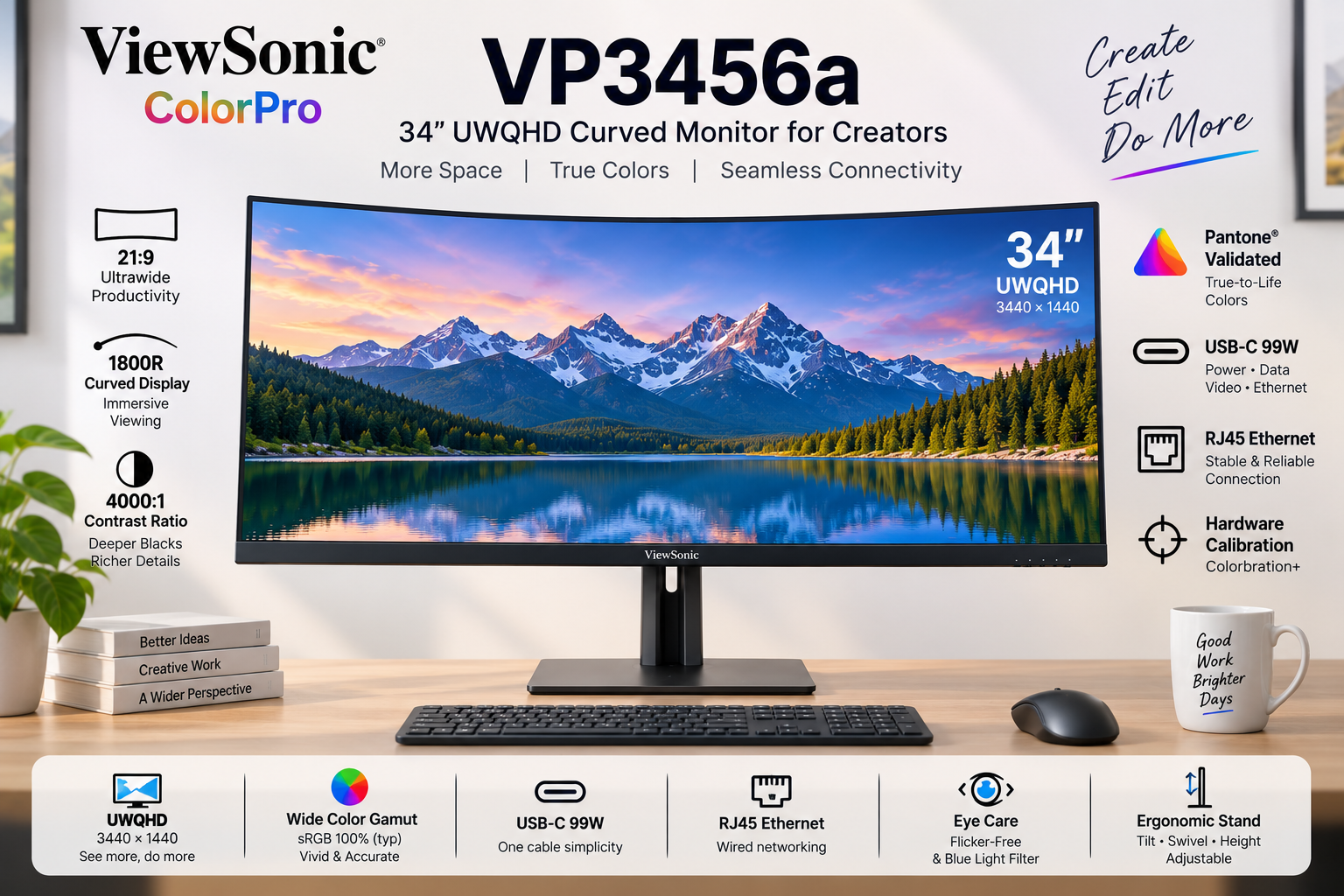
🎬 Cinematic Canvas: 34″ UWQHD 1800R Curve!
Wrap-around immersion meets Pantone-validated colors and a 99W USB-C Ethernet Dock.
ViewSonic ColorPro VP3456a
34″ UWQHD (3440×1440) | 21:9 Curved | VA Panel | 99W USB-C
4000:1 Contrast – Pantone® Validated – RJ45 Ethernet – Hardware Calibrated
⚡ Master Multitasking & Workflow:
• Wrap-Around Immersion: 1800R curve with 21:9 cinematic aspect ratio
• Deep VA Contrast: 4,000:1 static contrast ratio for incredibly deep blacks
• Ultimate Docking: 99W USB-C Power Delivery + dedicated RJ45 Ethernet port
• Color Accuracy: Pantone Validated with factory-calibrated Delta E < 2
• Hardware Calibration: Supported by Colorbration+ for long-term consistency
• Multitasking Beast: vDisplay Manager with 12 split-screen layouts
• Fluid Output: 75Hz refresh rate with Adaptive FreeSync technology
🌍 Global Availability
• India: ₹44,999 (Amazon / ViewSonic Authorized Dealers)
• USA: $499.99 (B&H Photo, Amazon, ViewSonic Store)
• UK: £429 (Amazon UK, Scan Computers)
• Europe: €459-499 varies by country
Resolution
UWQHD
Curve
1800R
Contrast
4,000:1
USB-C PD
99W
ColorPro VP3456a Overview – Brilliant First Impressions
🖥️ Immersive UWQHD Canvas
- 34″ Ultrawide: 21:9 Aspect Ratio
- UWQHD Resolution: 3440 x 1440 pixels
- 1800R Curve: Wrap-around viewing
- VA Technology: Deep 4,000:1 Contrast
- 400 Nits Brightness: Excellent SDR punch
- HDR10: Extended dynamic range
🎨 Validated Color
- Pantone® Validated: Authentic reproduction
- Delta E < 2: Indistinguishable accuracy
- 100% sRGB: Industry standard web color
- 16.7M Colors: 8-bit (6-bit + FRC) panel
- Hardware Calibration: Colorbration+ support
- Pre-Calibrated: Report included in box
🔌 The Ultimate Dock
- • 99W USB-C PD: Massive laptop charging power
- • RJ45 Ethernet: Hardwired internet for your laptop
- • Split Screen: vDisplay Manager software
- • Smooth Output: 75Hz with FreeSync
- • Extensive I/O: 2x HDMI 2.1, 1x DP, USB Hub
- • Comfort: Flicker-Free & Low Blue Light
🎯 What Makes the ColorPro VP3456a Special?
The ViewSonic ColorPro VP3456a represents a massive productivity upgrade for video editors, timeline-based creatives, and multitasking professionals. By stepping away from the standard 16:9 monitor format and embracing a 34-inch 21:9 UltraWide QHD (3440 x 1440) canvas, it completely eliminates the need for a dual-monitor setup. The 1800R curve gently wraps the edges of the screen into your peripheral vision, ensuring comfortable viewing distances across the entire massive display.
What truly sets this monitor apart in the creative space is its Vertical Alignment (VA) panel boasting a staggering 4,000:1 static contrast ratio. Traditional IPS creative monitors hover around 1,000:1. The VP3456a delivers blacks that are four times deeper, making it an absolute dream for video editors working on cinematic footage, or designers who require intense shadow detail without the “IPS glow” effect in dark rooms.
Despite being a VA panel, ViewSonic has ensured rigorous color accuracy. It is Pantone® Validated with 100% sRGB coverage and arrives factory-calibrated to a Delta E < 2. Furthermore, it supports Hardware Calibration via Colorbration+ software, allowing you to write color LUTs directly to the monitor to maintain long-term color fidelity.
Beyond visuals, the VP3456a functions as a complete, high-end docking station. It features a USB-C port delivering an incredibly robust 99W of Power Delivery—enough to keep heavy-duty 16-inch laptops fully charged under maximum rendering load. But ViewSonic went a step further by including an RJ45 Ethernet port directly on the monitor.
This means a single USB-C cable running to your MacBook or Windows laptop provides: 1) 3440x1440p video, 2) 99W of power, 3) Connection to your USB mouse and keyboard, and 4) A gigabit hardwired internet connection. It is the definition of a “Clutter-Free, One-Cable Solution.”
Finally, the workflow is accelerated by a 75Hz refresh rate with FreeSync (making timeline scrubbing smoother than standard 60Hz) and ViewSonic’s vDisplay Manager. This software allows you to instantly snap applications into 12 customizable split-screen grids, mastering the massive ultrawide real estate without the hassle of manually resizing windows.
Ultrawide Display – Wrap-Around Immersion
🖥️ UWQHD & The 1800R Curve
The UWQHD (3440 x 1440) resolution provides over twice the pixels of a standard Full HD monitor. In practical terms, this 21:9 aspect ratio gives you the horizontal space of roughly one-and-a-half 27-inch monitors, completely uninterrupted by a plastic bezel in the middle. For video editors, this means viewing your preview window in full 1080p or 4K scaled, while still having an incredibly long, un-cramped timeline spanning the bottom of the screen.
Because a flat 34-inch screen would cause color and brightness shifts at the far edges due to extreme viewing angles, ViewSonic utilizes an 1800R curvature. This gentle curve brings the edges of the display equidistant to your eyes, wrapping the digital workspace around you. It dramatically reduces neck turning and eye strain, creating a highly immersive, focused environment.
🌑 4,000:1 VA Contrast Ratio
While IPS panels are famous for viewing angles, VA (Vertical Alignment) panels are the kings of contrast. The VP3456a boasts a massive 4,000:1 static contrast ratio. Blacks on this monitor look truly black, rather than the glowing dark grey typical of IPS displays. When working on moody photography, dark UI themes, or editing cinematic video, the depth and punchiness of the image are immediately noticeable.
Combined with a bright 400 cd/m² (nits) typical brightness and HDR10 support, the dynamic range of this display is excellent for SDR content creation. Note that VA panels can exhibit slight gamma shifts when viewed from extreme off-center angles, but the 1800R curve almost entirely mitigates this issue for the primary user sitting in the center sweet spot.
Color Accuracy – Pantone Validated Precision
🎨 Delta E < 2 Out of the Box
Professional work requires professional guarantees. Every VP3456a undergoes rigorous pre-factory calibration and includes a personalized color calibration report in the box. With a Delta E < 2, the difference between the color your computer requests and the color the monitor outputs is mathematically imperceptible to the human eye. What you see is exactly what your clients will get.
The monitor is proudly Pantone® Validated, ensuring it accurately reproduces the full range of the Pantone Matching System (PMS). With 100% sRGB and 114% REC709 coverage, it serves as an impeccable reference monitor for digital web design, UI/UX creation, and standard broadcast video editing.
⚙️ Colorbration+ Hardware Calibration
Monitors drift in color accuracy over time as the backlight ages. To combat this, the VP3456a supports true Hardware Calibration via ViewSonic’s Colorbration+ software. Using supported colorimeters (like X-Rite i1Display Pro or Datacolor Spyder X), you can recalibrate the display at the hardware level.
Unlike software calibration (which just tweaks your Windows/Mac graphics card output and can cause color banding), Hardware Calibration writes the color correction data directly to the monitor’s internal scaler. This ensures brilliant, long-term color consistency regardless of what laptop or PC you plug into it.
Docking & Workflow – The 99W Command Center
🔌 99W USB-C + RJ45 Ethernet
This is where the VP3456a outshines the competition. The USB-C port provides a massive 99W of Power Delivery. While 65W monitors struggle to keep high-end 15/16-inch laptops charged during video rendering, 99W ensures your mobile workstation stays at 100% battery under maximum load.
Furthermore, the inclusion of an RJ45 Ethernet LAN port turns this monitor into a premium dock. Wi-Fi can be unreliable when transferring massive 4K video files to a NAS or server. By plugging an Ethernet cable into the monitor, your laptop receives hardwired, gigabit internet through the same single USB-C cable that provides power and video.
🪟 vDisplay Manager & 75Hz
Managing a 34-inch ultrawide canvas manually can be tedious. ViewSonic’s free vDisplay Manager software features Screen Split, offering 6 predefined layouts and 12 customizable grids. You can drag and drop applications to instantly tile them perfectly across the screen. The Windows-only Auto Launch feature will even reopen your saved layouts upon boot.
Workflow is further smoothed by the 75Hz refresh rate and FreeSync support. While not a 144Hz gaming monitor, 75Hz provides a 25% smoother experience than standard 60Hz displays. Scrolling through dense code, moving windows, and timeline scrubbing feels noticeably snappier and reduces eye strain.
Design & Ergonomics
📐 Complete Adjustability
Ultrawide monitors are notoriously heavy and often ship with rigid stands. ViewSonic breaks this trend by including a highly versatile ergonomic stand. It offers 130mm of height adjustment, allowing you to set the perfect eye-level posture to prevent neck strain during long editing sessions.
It also features a massive 120º swivel (60º left/right) and a -6º to 21º tilt. Due to the 21:9 ultra-wide format and 1800R curve, there is no portrait pivot mode (which is standard for curved ultrawides). The stand features mindful design with an integrated cable management cutout to keep your desk clutter-free.
🖥️ 3-Sided Borderless Aesthetics
The VP3456a embraces a sleek, modern industrial design with 3-side borderless bezels. The thin frame ensures that your attention remains entirely on your artwork and timeline, not on thick plastic borders. If you somehow have the desk space to run two of these side-by-side, the thin bezels create a nearly seamless panoramic view.
ViewSonic also includes comprehensive Eye Care technology. The monitor is Flicker-Free and features a software-based Low Blue Light filter, allowing you to warm up the screen temperature when reading documents late at night to protect your circadian rhythm.
Who Should Buy the ViewSonic VP3456a?
✅ Perfect For These Users
🎬 Video Editors & Motion Designers
The 21:9 aspect ratio is tailor-made for Premiere Pro, DaVinci Resolve, and After Effects. You can view massive timelines without scrolling, while the 4,000:1 VA contrast ratio ensures deep, cinematic blacks for accurate grading.
💻 High-End Laptop Owners
If you use a powerful workstation laptop (like a MacBook Pro 16 or Dell Precision), the 99W USB-C PD and RJ45 Ethernet make this the ultimate one-cable docking station. Power, display, gigabit internet, and USB peripherals all run through one cord.
📊 Financial Analysts & Multitaskers
Say goodbye to the bezel gap of a dual-monitor setup. The massive UWQHD canvas combined with vDisplay Manager’s split-screen grids allows you to comfortably view three full-size documents or spreadsheets side-by-side.
⚠️ Consider Alternatives If You Need
🎮 Hardcore Competitive Gamers
While 75Hz and FreeSync are great for casual gaming and UI smoothness, competitive gamers need 144Hz+. If your primary use is fast-paced shooters, look into dedicated ultrawide gaming monitors.
📸 Adobe RGB Print Photographers
The monitor covers 100% sRGB for web content, but only 80% of Adobe RGB. If you are a fine-art photographer soft-proofing for physical CMYK print, you need a monitor with 99%+ Adobe RGB coverage.
🔍 Retina-Level Sharpness
At 34 inches, UWQHD (3440×1440) yields roughly 109 PPI. This is standard and looks great at arm’s length, but it is not the 163+ PPI of a 4K 27-inch display. If you are extremely sensitive to text sharpness, stick to standard 4K displays.
Top Competitors & Alternatives
Dell P3424WE Hub Monitor
34″ Curved UWQHD IPS USB-C Dock
₹48,999
34″ 3440x1440p | 60Hz | IPS | 90W USB-C
Display: 34″ UWQHD (3440×1440), IPS, 60Hz, 3800R curve
Features: 90W PD, RJ45 Ethernet, KVM Switch
Advantage: Built-in KVM switch and IPS viewing angles
Why Choose Dell P3424WE Instead?
If you prefer IPS panels over VA panels for wider viewing angles, and you desperately need a built-in KVM switch to seamlessly control two different computers with one keyboard and mouse. It also acts as an excellent USB-C/RJ45 dock.
Why Choose ViewSonic VP3456a Instead?
The ViewSonic offers a much deeper 1800R curve (vs Dell’s flatter 3800R), providing better immersion. It also has a faster 75Hz refresh rate, Hardware Calibration support, and the VA panel provides 4x deeper contrast (4000:1 vs Dell’s 1000:1) for video editors.
LG 34WP65C-B
34″ Curved UWQHD VA Monitor
₹32,999
34″ 3440x1440p | 160Hz | VA | No USB-C
Display: 34″ UWQHD (3440×1440), VA, 160Hz, 1800R curve
Features: 3000:1 contrast, HDR10, built-in 7W speakers
Advantage: Much cheaper and 160Hz for gaming
Why Choose LG 34WP65C Instead?
If you are on a strict budget and want a hybrid monitor for office work by day and high-refresh PC gaming (160Hz) by night. It uses a similar 1800R VA panel but costs significantly less.
Why Choose ViewSonic VP3456a Instead?
The LG completely lacks USB-C and acts just as a dumb screen. The ViewSonic justifies its premium by being a full docking station (99W PD + Ethernet) and offering professional-grade Pantone Validated, factory-calibrated colors with Hardware LUT support.
Pros and Cons – ViewSonic VP3456a
✅ What We Loved
🔌 Ultimate 99W USB-C Dock
Delivering 99W of Power Delivery alongside an RJ45 Ethernet port transforms this monitor into a premium hub. One cable charges massive 16-inch laptops, provides gigabit hardwired internet, and connects peripherals.
🌑 4,000:1 Deep Contrast
The VA panel provides blacks that are four times deeper than standard IPS displays. Editing cinematic footage or working in dark UI modes looks incredibly rich and punchy without annoying “IPS glow.”
🎨 True Hardware Calibration
Factory-calibrated to Delta E < 2 and Pantone Validated out of the box. More importantly, it supports Colorbration+ hardware LUT calibration to maintain that accuracy for years to come.
🔄 75Hz Smooth Multitasking
The 75Hz refresh rate provides a 25% bump in smoothness over standard 60Hz office monitors. Combined with vDisplay Manager’s Screen Split, navigating massive timelines is fluid and highly efficient.
📐 Superb Ergonomics
Unlike many rigid ultrawide monitors, the VP3456a includes a highly adjustable stand featuring 130mm of height adjustment, 120º swivel, and generous tilt, ensuring neck comfort during long sessions.
⚠️ What Could Be Better
👁️ VA Panel Viewing Angles
While the 1800R curve helps mitigate this, VA panels natively suffer from slight color and gamma shifts when viewed from extreme off-center angles compared to IPS panels. You must sit in the sweet spot.
🖨️ Not for Print Photography
With only 80% coverage of the Adobe RGB color space, fine-art photographers and print designers cannot use this display for accurate CMYK soft-proofing. It is strictly for web and digital video (sRGB/REC709).
🏃♂️ 75Hz Limits Gaming
While 75Hz is great for productivity, gamers looking to fully utilize their high-end GPUs will be disappointed. It lacks the 144Hz+ speeds required for fast-paced competitive gaming.
🖥️ No Built-in KVM
For a monitor designed to be a premium productivity hub with so many inputs, the lack of a built-in KVM switch (to control two PCs with one mouse/keyboard) is a missed opportunity often found on rival Dell displays.
Final Verdict – A Creator’s Command Center
Massive Workspace Meets Unmatched USB-C Power
🎯 The Bottom Line
The ViewSonic ColorPro VP3456a is an absolute powerhouse for productivity and digital content creation. By pairing a massive 34-inch UWQHD canvas with a VA panel boasting a 4,000:1 contrast ratio, it delivers an immersive, cinematic editing experience that makes traditional IPS monitors look washed out in comparison.
However, its greatest strength lies in its connectivity. The inclusion of a 99W USB-C Power Delivery port alongside hardwired RJ45 Ethernet elevates this display from a mere monitor to a premium laptop docking station. It completely eliminates cable clutter, keeping high-performance workstation laptops charged and connected to gigabit internet through a single cord.
While the VA panel means it isn’t suited for color-critical print photography (lacking Adobe RGB coverage), its Pantone Validation, factory calibration, and Hardware LUT support make it an impeccably accurate tool for web designers and SDR video editors working in sRGB and REC709.
💡 Who Should Buy This?
Video editors, motion graphic artists, and heavy multitaskers will find the VP3456a transformative. The 21:9 aspect ratio is perfect for long Premiere Pro timelines, and the vDisplay Manager makes organizing multiple windows effortless.
It is highly recommended for MacBook Pro 16 and high-end Windows mobile workstation users. The 99W PD ensures your battery won’t slowly drain while exporting heavy projects, a common issue with cheaper 65W USB-C monitors.
Final Recommendation: At ₹44,999, the ViewSonic VP3456a commands a premium, but it justifies every penny by replacing the need for a dual-monitor setup and an expensive external thunderbolt dock. It is a brilliant, streamlined command center for digital creatives.
📊 Rating Breakdown
Complete Technical Specifications
| Display Specifications | |
|---|---|
| Screen Size | 34 inches (Viewable: 34 inches) |
| Panel Type | VA (Vertical Alignment) Technology |
| Resolution | 3440 x 1440 |
| Resolution Type | UWQHD (UltraWide QHD) |
| Aspect Ratio | 21:9 |
| Curvature | 1800R |
| Refresh Rate | 75Hz |
| Variable Refresh Rate | Yes (FreeSync) |
| Response Time (GTG Typical) | 5ms |
| Response Time (GTG w/OD) | 5ms |
| Brightness | 400 cd/m² (typ) |
| Static Contrast Ratio | 4,000:1 (typ) |
| Dynamic Contrast Ratio | 20M:1 |
| Viewing Angles | 178º horizontal, 178º vertical |
| Display Colors | 16.7 Million Colors |
| Color Space Support | 8 bit (6 bit + FRC) |
| Light Source & Life | LED / 30,000 Hrs (Min) |
| Pixel Pitch | 0.232 mm (H) x 0.232 mm (V) |
| Surface Treatment | Anti-Glare, Hard Coating (3H) |
| Color Gamut & Eye Care | |
|---|---|
| sRGB Coverage | 114% size / 100% coverage (Typ) |
| REC709 Coverage | 114% size / 100% coverage (Typ) |
| DCI-P3 Coverage | 84% size / 84% coverage (Typ) |
| Adobe RGB Coverage | 84% size / 80% coverage (Typ) |
| EBU & SMPTE-C | 100% coverage (Typ) |
| Flicker-Free | Yes |
| Low Blue Light | Yes (Software Solution) |
| Calibration | Hardware Calibration Supported (Colorbration+) |
| Connectivity & Audio | |
|---|---|
| USB Type-C (Upstream) | 1x (DisplayPort Alt mode, 99W Power Delivery) |
| Ethernet LAN (RJ45) | 1x Gigabit Ethernet |
| USB 3.2 Type A (Downstream) | 2x Ports |
| USB 3.2 Type B (Upstream) | 1x Port |
| HDMI Ports | 2x HDMI 2.1 |
| DisplayPort | 1x DisplayPort (v1.2) |
| Internal Speakers | 3Watts x2 |
| Ergonomics & Stand | |
|---|---|
| Height Adjustment | 130 mm |
| Swivel | 120º (60º left / 60º right) |
| Tilt (Forward/Back) | -6º / 21º |
| VESA Compatible | 100 x 100 mm |
| Cable Organization | Yes |
| Power & Dimensions | |
|---|---|
| Power Consumption | 47.6W (Typical) / 52.6W (Max) / 32.8W (Eco Conserve) |
| Stand-by Power | 0.5W |
| Power Supply | Internal Power Supply |
| Voltage | AC 100-240V |
| Physical (With Stand) | 809 x 480.46~539.23 x 243 mm (W x H x D) |
| Physical (Without Stand) | 809 x 366 x 105 mm (W x H x D) |
| Weight (Net with Stand) | 11.2 kg (24.7 lbs) |
| Weight (Without Stand) | 7.4 kg (16.3 lbs) |
Ready to Master Your Workflow?
Get the ViewSonic ColorPro VP3456a – 34″ UWQHD 99W USB-C Monitor Today!
🛒 Buy Now on Amazon – Check Price✓ Pantone Validated | ✓ 99W USB-C + Ethernet | ✓ 4,000:1 Deep Contrast