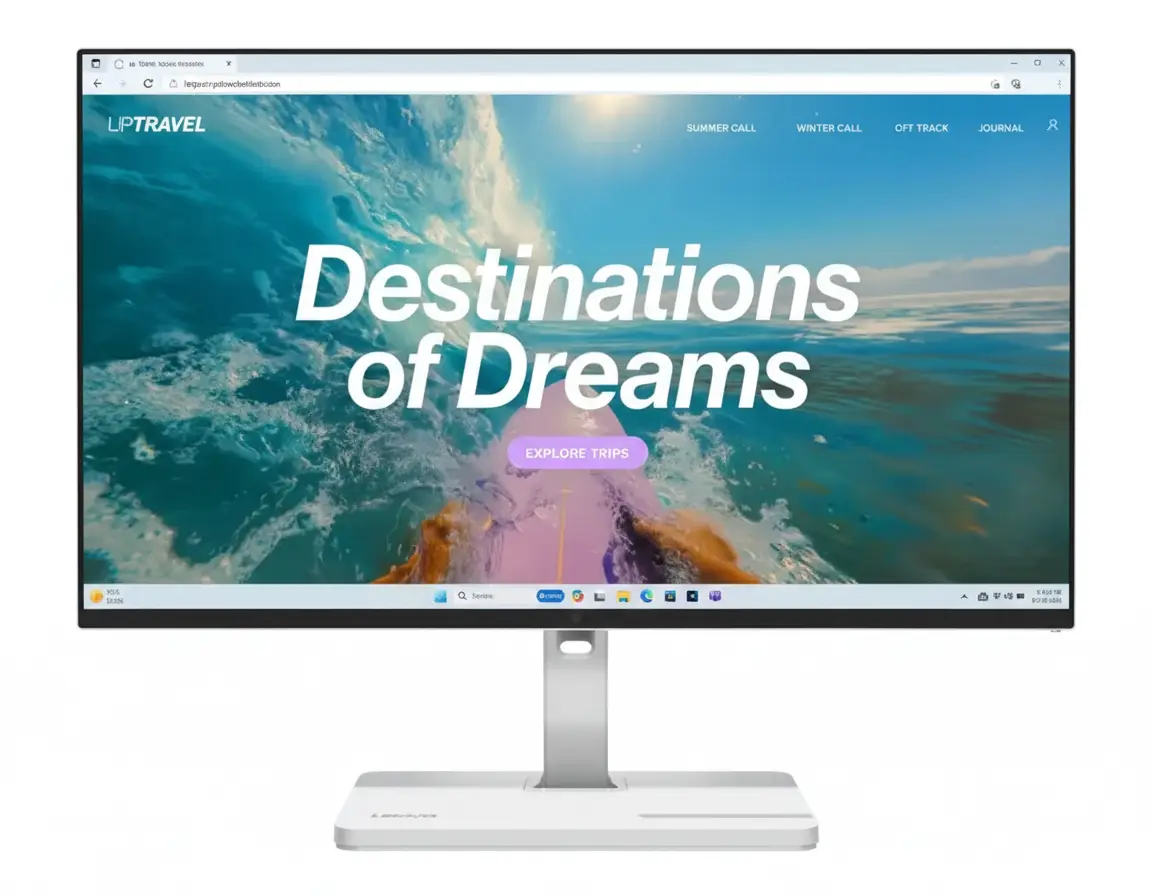
ThinkVision T24-40 Monitor Review: The Ultimate Productivity Hub
The ThinkVision T24-40 is a productivity powerhouse that brings professional-grade features to a remarkably accessible price point of ₹12,798. This 23.8-inch monitor is engineered for the modern professional, combining a crisp FHD IPS display with a game-changing 48-120Hz dynamic refresh rate for exceptionally smooth visuals. It doesn’t stop there; with a fully ergonomic stand, a comprehensive USB connectivity hub, and top-tier eye care certifications, the T24-40 is designed to maximize comfort, convenience, and performance in any workspace.
Elevate Your Productivity, Not Your Spending
Experience dynamic 120Hz smoothness, full ergonomic control, and a built-in USB hub for an unbeatable price.
3 Year Limited Warranty | Ships FREE by Oct 17
Key Features at a Glance
1. Visual Performance: Dynamically Smooth & Vivid
Experience exceptionally fluid motion and professional-grade color.
48-120Hz Dynamic Refresh Rate
The standout feature is the dynamic 48-120Hz refresh rate. The monitor intelligently increases the rate to 120Hz for ultra-smooth motion when scrolling or watching video, and lowers it for static images to save power. This provides a premium, fluid experience far superior to standard 60Hz displays.
Pro-Grade Color Accuracy
The 23.8-inch FHD IPS panel delivers not only sharpness but also excellent color fidelity. With 99% sRGB and 99% BT.709 color gamut coverage, it produces vivid, accurate colors that are reliable for general office work, presentations, and even light creative tasks.
2. Ergonomics & Design: Uncompromised Comfort
A fully adjustable stand and seamless bezels create the perfect workspace.
Full-Function Ergonomic Stand
Unlike most budget monitors, the T24-40 features a fully ergonomic stand. You can adjust the height (up to 155mm), tilt (-5°/23.5°), swivel (±45°), and even pivot the screen 90° into portrait mode, allowing you to find the perfect, most comfortable viewing position for your workflow.
4-Sided NearEdgeless Design
The display boasts ultra-thin bezels on all four sides. This creates a stunning, all-screen appearance that minimizes distractions and is ideal for building seamless multi-monitor setups, giving you an expansive and uninterrupted canvas.
3. Connectivity: A True Productivity Hub
An extensive array of ports turns your monitor into a central dock for all your devices.
Integrated USB Hub with USB-C
The monitor acts as a full connectivity hub, featuring three USB-A 3.2 ports and a USB-C port (15W PD for data and charging accessories). Connect your keyboard, mouse, and other peripherals directly to the monitor to drastically reduce cable clutter on your desk.
Versatile Video Inputs
Compatibility is key. The T24-40 includes modern DisplayPort 1.2 and HDMI 1.4 ports, along with a legacy VGA port. This ensures you can connect virtually any computer, old or new, without issue.
Ideal For These Users
For those who spend all day in front of a screen, the combination of full ergonomics, advanced eye care, and a smooth 120Hz refresh rate is a game-changer for comfort and productivity.
The ability to pivot the screen into portrait mode is invaluable for viewing long lines of code, and the crisp text of the FHD IPS panel makes it easy to read.
The extensive USB hub and multiple video inputs make it easy to switch between a work laptop, a personal PC, and all your peripherals without constantly replugging cables.
The 4-sided ultra-thin bezels create an almost perfectly seamless image when two or more monitors are placed together, perfect for expansive dashboards or timelines.
The smooth 120Hz scrolling makes navigating large spreadsheets and datasets much more pleasant, while the sharp text rendering ensures numbers are always clear.
For corporate deployment, the monitor’s manageability via LADM, TCO 10.0 compliance, and excellent price-to-performance ratio make it a very smart investment.
Who Might Consider Other Options
While 120Hz is great, competitive gamers will want even faster response times, higher refresh rates (144Hz+), and features like adaptive sync (FreeSync/G-Sync).
For professional photo and video editing, a monitor with QHD or 4K resolution and wider color gamuts (Adobe RGB/DCI-P3) would be a more suitable choice.
The USB-C port only provides 15W of power, which is not enough to charge most laptops. Users wanting a single-cable solution for video and power will need a monitor with higher PD (65W+).
Competitive Edge: Professional Features, Unmatched Price
The T24-40 packs a feature set rarely seen in its price bracket.
- Vs. ThinkVision S-Series (e.g., S24i-30)
The T24-40 is a significant step up from the S-series. For a small price increase, you gain a fully ergonomic stand (lift/swivel/pivot), a 120Hz refresh rate (vs 100Hz), a built-in USB hub with USB-C, and a superior 4-sided NearEdgeless design.
- Vs. Other 120Hz+ Office Monitors
Many monitors that offer a 120Hz refresh rate are gaming-focused and often compromise on ergonomics, color accuracy for productivity (BT.709), or professional certifications like TCO 10.0. The T24-40 provides the smoothness of a high refresh rate in a complete, professional package.
- The Complete Package Value
The true competitive edge is the total package. Finding a monitor that combines a 120Hz IPS panel, 99% sRGB/BT.709 color, a full ergonomic stand, and a USB-C hub for anywhere near this price is extremely difficult, making it one of the best value productivity monitors available.
Full Specifications
Display
Connectivity
Mechanical
Pros and Cons
What We Liked
- Super smooth 120Hz dynamic refresh rate.
- Fully ergonomic stand with lift, tilt, swivel, and pivot.
- Excellent connectivity with a full USB hub and USB-C.
- 4-sided ultra-thin bezels create a modern, seamless look.
- Incredible value for a feature-packed professional monitor.
What Could Be Better
- USB-C port only offers 15W power delivery, not enough for most laptops.
- 250 nits brightness is adequate but not ideal for very bright environments.
- No built-in speakers.
Final Verdict
The ThinkVision T24-40 is an absolute triumph of value and functionality. It takes the solid foundation of a crisp IPS panel and elevates it with features typically reserved for monitors costing twice as much. The dynamic 120Hz refresh rate, a fully ergonomic stand, and a comprehensive USB hub are a trifecta of professional-grade features that dramatically enhance daily comfort and productivity.
While the low-wattage USB-C port can’t power a laptop, its inclusion in a built-in hub at this price is still a major plus. For anyone looking to build a truly professional, comfortable, and highly functional workspace without breaking the bank, the ThinkVision T24-40 is not just a great option; it’s arguably the best all-around productivity monitor you can buy in its class.