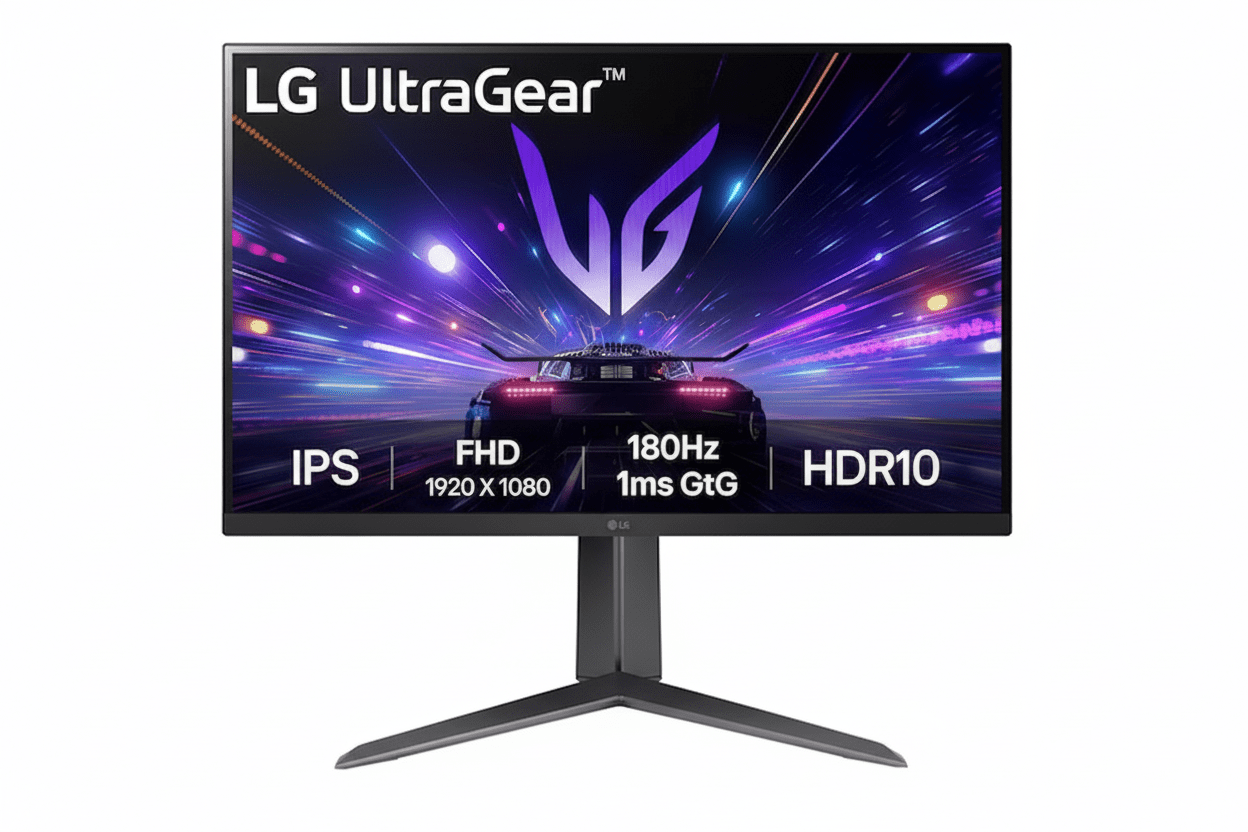
⚡ Ultimate Esports Speed: 180Hz + 1ms IPS + Full Ergonomics!
Plus G-SYNC Compatible + FreeSync + HDR10!
LG 27GS65F-B UltraGear Gaming Monitor
27″ 180Hz IPS | 1ms Response | Full Ergonomic Stand | Best Esports Value 2025
27″ FHD (1920×1080) IPS – 180Hz – 1ms GtG – G-SYNC Compatible – Height/Tilt/Pivot
⚡ Complete Competitive Gaming Package:
• Display: 27″ Full HD (1920×1080) IPS Panel
• Speed: 180Hz Refresh + 1ms (GtG) Response
• Sync: NVIDIA G-SYNC Compatible + AMD FreeSync
• Colors: sRGB 99% + HDR10 Support
• Ergonomics: Height + Tilt + Pivot (Full Adjustable!)
• Gaming Tools: Black Stabilizer + Crosshair + FPS Counter
• Ports: HDMI 2.0 + DisplayPort 1.4
• Bonus: VESA 100×100mm Mount Compatible!
₹13,874
₹23,500
SAVE ₹9,626 (41% OFF!)
*Inclusive of all taxes | Free Priority Delivery
Free Delivery | 3 Year Warranty | Full Ergonomic Stand
Refresh Rate
180 Hz
Response
1ms GtG
Panel
IPS
LG 27GS65F-B UltraGear Gaming Monitor Overview
⚡ Esports Highlights
- 27″ FHD IPS: Fast panel with sRGB 99%
- 180Hz Refresh: Elite competitive speed
- 1ms GtG Response: Zero motion blur
- G-SYNC Compatible: Official certification
- Full Ergonomics: Height/Tilt/Pivot!
- HDR10: Enhanced visuals
- Gaming Tools: Crosshair + more
- ₹13,874: 41% discount!
📦 In The Box
- 🖥️ LG 27GS65F-B Gaming Monitor
- 🏗️ Full Ergonomic Stand (Included!)
- 🔌 Power Cable
- 📄 Quick Setup Guide
- 📜 Warranty Card (3 Year)
Note: HDMI & DisplayPort cables NOT included—purchase separately.
⭐ Competitive Advantage
- • 180Hz IPS: Fast & colorful
- • 1ms Response: Zero ghosting
- • Full Ergonomics: Rare at this price!
- • G-SYNC Certified: Official validation
- • 41% OFF: Save ₹9,626!
🏆 Best Budget 27″ 180Hz IPS Gaming Monitor Under ₹14,000
Elite 180Hz + 1ms IPS Performance
The 180Hz refresh rate refreshes 180 times per second—25% faster than old-standard 144Hz monitors! Combined with a true 1ms Gray-to-Gray response time (in Faster mode), this IPS panel delivers zero motion blur and instant pixel transitions for competitive esports. You get the speed advantage of TN panels with the superior color accuracy and viewing angles of IPS technology!
Full Ergonomic Stand Included
The biggest competitive advantage—a fully adjustable stand with height adjustment (110mm range), tilt (-5° to +15°), and 90° clockwise pivot! Most budget gaming monitors only offer basic tilt, forcing you to buy a separate ₹2,000-5,000 VESA arm. This monitor includes complete ergonomics out of the box, saving money and providing perfect positioning for competitive gaming!
Unbeatable ₹13,874 Value!
At just ₹13,874 (41% off MRP ₹23,500), you get 27″ IPS + 180Hz + 1ms + full ergonomics + G-SYNC Compatible + FreeSync + HDR10 + gaming tools from a trusted LG UltraGear brand! No other budget gaming monitor offers this complete package. Perfect for esports, mid-range GPU owners, and anyone wanting competitive performance without breaking the bank!
180Hz Refresh Rate + 1ms Response – Elite Competitive Speed
⚡ 25% Faster Than 144Hz Standard
The 180Hz refresh rate is the new competitive gaming standard, surpassing the old 144Hz benchmark! The display refreshes 180 times every second, providing 25% more frames per second visibility compared to 144Hz monitors. This translates to smoother motion, reduced input lag perception, and a tangible competitive advantage in fast-paced esports titles!
180Hz vs 60Hz
3× faster refresh = 3× smoother motion!
5.5ms Frame Time
Each frame displays for just 5.5 milliseconds!
144Hz to 180Hz
25% improvement over old standard!
Esports Edge
See enemies faster in CS:GO, Valorant, Apex!
🚀 Why 180Hz Matters for Esports
Competitive Advantage in FPS Games
In fast-paced first-person shooters like Valorant, CS:GO, Apex Legends, and Overwatch 2, the 180Hz refresh rate provides a measurable advantage. You see enemy movements 36 additional times per second compared to 144Hz (180 vs 144 frames). This means you can spot, track, and eliminate opponents faster—the difference between winning and losing gunfights!
- • Smoother Tracking: Follow fast-moving targets easily
- • Reduced Input Lag Perception: Actions feel more responsive
- • Clearer Motion: See through chaotic team fights
- • Professional Standard: Pro players use 240Hz+, 180Hz closer to pros
⚠️ GPU Requirements
To utilize 180Hz, your GPU needs to output 180+ FPS! Mid-range cards like RTX 4060, RTX 3060, RX 7600 can easily hit 180+ FPS in esports titles at 1080p. Perfect pairing for budget gaming!
⚡ True 1ms (GtG) IPS Response Time
Zero Motion Blur Technology
This monitor achieves a true 1ms Gray-to-Gray (GtG) response time in Faster mode—extremely rare for IPS technology! This means pixels transition from one shade to another in just one millisecond, eliminating motion blur, ghosting, and reverse ghosting. You get the speed of TN panels with IPS color quality!
🎮 Gaming Benefits
- • Zero Ghosting: No trailing shadows behind moving objects
- • Clear Fast Panning: See details when quickly looking around
- • Competitive Edge: Instant visual feedback for pro-level play
- • IPS Benefits: Keep superior colors & viewing angles!
IPS Panel with sRGB 99% – Vibrant Gaming Colors
🎨 IPS vs TN vs VA
Why IPS is Best for Competitive Gaming
Many budget gaming monitors use TN (Twisted Nematic) panels for speed but sacrifice color and viewing angles. This monitor uses a modern IPS (In-Plane Switching) panel that delivers 1ms response time WITHOUT compromising visual quality. You get the best of both worlds!
IPS
✓ Best colors
✓ Wide angles
✓ 1ms (this monitor!)
TN
✓ Fast (1ms)
✗ Poor colors
✗ Bad angles
VA
✓ High contrast
~ Okay angles
✗ Slower (5ms+)
Wide 178° Viewing Angles
IPS technology provides 178° horizontal and vertical viewing angles. Colors remain consistent even when viewed from the side—perfect for showing gameplay to friends or multi-monitor setups!
🌈 sRGB 99% Color Accuracy
Vibrant, True-to-Life Colors
The IPS panel covers 99% of the sRGB color space (typical)—the standard for gaming, web content, and multimedia. This ensures games display with rich, accurate colors as developers intended. Reds are vibrant, blues are deep, and greens are lush!
Perfect For:
- • Competitive Gaming: Spot enemies by color cues
- • Content Viewing: YouTube, Twitch, Netflix look great
- • Casual Editing: Photo/video editing (not color-critical)
- • General Use: Better experience for all content
Universal Adaptive Sync – G-SYNC Compatible + FreeSync
🔄 Tear-Free Gaming for All GPUs
This monitor supports both NVIDIA G-SYNC Compatible AND AMD FreeSync adaptive sync technologies! No matter which graphics card you own, you’ll enjoy perfectly smooth, tear-free gaming by synchronizing the monitor’s refresh rate with your GPU’s frame output!
NVIDIA G-SYNC Compatible
Officially tested and validated by NVIDIA! This certification guarantees excellent G-SYNC performance with GeForce GTX and RTX graphics cards, eliminating screen tearing and stuttering for butter-smooth gameplay!
- • Official Certification: NVIDIA validated
- • Zero Tearing: Seamless visuals
- • Low Latency: Responsive gaming
- • Works With: All GeForce GTX/RTX cards
AMD FreeSync
Full AMD FreeSync technology support for Radeon RX graphics cards! Synchronizes the display with your AMD GPU to eliminate screen tearing, stuttering, and input lag during fast-action gameplay!
- • AMD Certified: Official FreeSync
- • Smooth Frames: No stuttering
- • Low Latency: Instant response
- • Works With: All AMD Radeon RX cards
Universal Compatibility = Future-Proof Investment
Whether you upgrade from NVIDIA to AMD or vice versa, this monitor supports both adaptive sync technologies! You’re not locked into one GPU ecosystem—maximum flexibility for future upgrades!
HDR10 Support – Enhanced Contrast & Color
🌟 High Dynamic Range Gaming
This monitor supports HDR10—the industry-standard High Dynamic Range format! In compatible games and media, HDR10 unlocks a wider range of brightness and colors, producing more impactful highlights, deeper shadows, and more lifelike visuals!
Brighter Highlights
HDR10 allows bright areas like explosions, sunlight, and muzzle flashes to display with greater intensity and detail without washing out!
Deeper Shadows
Dark scenes maintain better detail and depth instead of appearing as flat black, helping you spot enemies hiding in shadows!
Wider Color Range
HDR content displays with more vibrant and nuanced colors, making game worlds feel more realistic and immersive!
Note: This is entry-level HDR10—not HDR400 or HDR600. HDR effect is moderate due to 300 cd/m² brightness limit. Best results in dark rooms. Full HDR experience requires HDR400+ certification.
Built-in Gaming Tools – Competitive Edge Features
🔦 Black Stabilizer & Dynamic Action Sync
Black Stabilizer Technology
Brighten dark scenes without overexposing bright areas! Black Stabilizer intelligently adjusts gamma to reveal enemies hiding in shadows and dark corners. Spot campers before they see you in games like Valorant, CS:GO, and Rainbow Six Siege!
- • See in Darkness: Illuminate shadowy areas
- • Spot Campers: Find hiding enemies
- • Adjustable Levels: Customize to your preference
- • No GPU Load: Hardware-based feature
Dynamic Action Sync (DAS)
Minimize input lag by reducing signal processing delay! DAS mode ensures your mouse movements, keyboard presses, and controller inputs translate to on-screen action with minimal latency—critical for competitive play!
🎯 Crosshair & FPS Counter
Hardware Crosshair Overlay
Activate a hardware-based crosshair overlay directly on the monitor! Choose from multiple crosshair styles to improve your aim in games that have poor or no built-in crosshairs. Works in ALL games and applications—even on desktop!
- • Multiple Styles: Choose crosshair design
- • Universal: Works in ANY game
- • Hip-Fire Practice: Improve no-ADS aim
- • Toggle On/Off: Easy on-screen menu
Real-Time FPS Counter
Display a real-time frames-per-second (FPS) counter directly on-screen without external software! Monitor your GPU performance in-game to ensure you’re maintaining high frame rates for competitive play!
Full Ergonomic Stand – Height, Tilt, Pivot Adjustable
🏗️ The Budget Monitor Advantage You Never Get
This monitor’s biggest competitive advantage over other budget gaming monitors is its fully ergonomic stand included in the box! While competitors force you to buy a separate ₹2,000-5,000 VESA monitor arm for proper positioning, the LG 27GS65F-B gives you complete height, tilt, and pivot adjustment out of the box!
Height Adjustment
110mm (11cm) height adjustment range lets you raise or lower the screen to perfect eye level! Prevents neck strain during long gaming sessions!
Range: 0-110mm vertical travel
Tilt Adjustment
-5° to +15° tilt range allows you to angle the screen up or down for the perfect viewing angle based on your seated position!
Range: -5° forward to +15° backward
Pivot (Portrait Mode)
90° clockwise pivot rotates the monitor to portrait orientation! Perfect as a secondary monitor for Discord, Twitch chat, code, or web browsing!
Range: 90° clockwise rotation
💰 Save ₹2,000-5,000!
Most budget gaming monitors only offer basic tilt, forcing you to purchase a separate VESA monitor arm for ₹2,000-5,000. This monitor includes full ergonomics in the box—saving you money and hassle!
🔧 VESA 100×100mm Compatible
If you still want a monitor arm, the monitor supports VESA 100×100mm mounting! Remove the included stand and attach any compatible VESA arm for maximum flexibility!
Who Should Buy This Gaming Monitor?
🎮 Budget Esports Gamers
- Valorant Players: 180Hz + 1ms = see enemies first
- CS:GO/CS2: Fast response for instant flicks
- Apex Legends: Track fast-moving legends smoothly
- Overwatch 2: Follow team fights with clarity
- Fortnite: Build battles feel more responsive
- League/Dota 2: React faster in team fights
Perfect for: Competitive players wanting pro-level performance on a budget!
💻 Mid-Range GPU Owners
- RTX 4060/4060 Ti: Hit 180+ FPS at 1080p easily
- RTX 3060/3060 Ti: Perfect 1080p high refresh match
- RX 7600/7600 XT: Maximize AMD performance
- RTX 3070: Utilize full 180Hz potential
- Budget Builds: Don’t waste GPU power on 60Hz
- Future-Proof: Ready for GPU upgrades
Perfect for: 1080p gaming PC builds under ₹80,000!
📱 Dual Monitor Setups
- Streamers: Gaming + OBS on second screen
- Content Creators: Editing + timeline/tools
- Programmers: Code + documentation/browser
- Traders: Charts + watchlists + news
- Portrait Mode: 90° pivot for Discord/chat
- Affordable: Budget-friendly secondary monitor
Perfect for: Multi-taskers needing affordable high-refresh secondary display!
🏫 Students & First-Time Gamers
- Dorm Rooms: Compact 27″ with full ergonomics
- First Gaming PC: Learn on competitive hardware
- Budget-Conscious: Premium features, affordable price
- Multi-Purpose: Gaming + study + entertainment
- Future-Proof: Won’t outgrow quickly
- Trusted Brand: LG UltraGear quality
Perfect for: Students upgrading from 60Hz laptops!
💪 Ergonomics Priority Users
- Long Sessions: Adjust height for comfort
- Health-Conscious: Prevent neck/back strain
- Shared Setup: Multiple users adjust easily
- Standing Desk: Height-adjust with desk
- Proper Posture: Eye-level alignment
- No Extra Cost: Full ergo included!
Perfect for: Users who value health and comfort!
🚫 NOT Recommended For
- 4K Enthusiasts: This is 1080p Full HD
- 1440p Gamers: High-end GPUs want QHD
- Large Screen Lovers: 27″ at 1080p = 81 PPI
- Cinematic Gamers: VA better for story games
- Color Professionals: Not factory-calibrated
Consider alternatives if you prioritize resolution over refresh rate!
LG 27GS65F-B vs Competitors
vs ViewSonic VX2728J 27″ 180Hz IPS
ViewSonic: 27″ FHD 180Hz 0.5ms IPS – ₹12,490
LG: 27″ FHD 180Hz 1ms IPS – ₹13,874
LG Wins
- ✓ Full ergonomics (H+T+P!)
- ✓ G-SYNC Compatible certified
- ✓ LG UltraGear brand
- ✓ Better build quality
- ✓ Black Stabilizer
- ✓ 3-year warranty
ViewSonic Wins
- ✓ ₹1,384 cheaper
- ✓ 0.5ms MPRT (vs 1ms GtG)
- ✓ ClearMR technology
Verdict: LG for ergonomics & brand. ViewSonic for tightest budget.
vs Samsung Odyssey G3 27″ 180Hz VA
Samsung: 27″ FHD 180Hz VA Flat – ₹13,490
LG: 27″ FHD 180Hz IPS – ₹13,874
LG Wins
- ✓ IPS panel (better angles!)
- ✓ 1ms GtG (vs 5ms)
- ✓ Full ergonomics
- ✓ sRGB 99% accuracy
- ✓ Faster response
Samsung Wins
- ✓ ₹384 cheaper
- ✓ VA higher contrast (3000:1)
- ✓ Deeper blacks
Verdict: LG for competitive gaming. Samsung for single-player.
vs MSI G274F 27″ 180Hz IPS
MSI: 27″ FHD 180Hz 1ms IPS – ₹14,990
LG: 27″ FHD 180Hz 1ms IPS – ₹13,874
LG Wins
- ✓ ₹1,116 cheaper!
- ✓ Pivot adjustment
- ✓ G-SYNC certified
- ✓ HDR10 support
- ✓ Better value overall
MSI Wins
- ✓ Night Vision feature
- ✓ Gaming OSD App
- ✓ MSI gaming brand
Verdict: LG better value. MSI for brand preference.
vs Acer Nitro VG270 27″ 165Hz IPS
Acer: 27″ FHD 165Hz 1ms IPS – ₹11,990
LG: 27″ FHD 180Hz 1ms IPS – ₹13,874
LG Wins
- ✓ 180Hz vs 165Hz (+9%)
- ✓ Full ergonomics
- ✓ G-SYNC Compatible
- ✓ HDR10 support
- ✓ Better gaming tools
- ✓ Premium build
Acer Wins
- ✓ ₹1,884 cheaper
- ✓ Budget-friendly
Verdict: LG worth extra ₹1,884 for 180Hz + ergonomics!
vs BenQ MOBIUZ EX2710R 27″ 165Hz VA
BenQ: 27″ FHD 165Hz VA Curved – ₹17,990
LG: 27″ FHD 180Hz IPS Flat – ₹13,874
LG Wins
- ✓ ₹4,116 cheaper!
- ✓ 180Hz vs 165Hz
- ✓ 1ms vs 1ms MPRT
- ✓ IPS viewing angles
- ✓ Full ergonomics
- ✓ Better value
BenQ Wins
- ✓ 1000R curve
- ✓ HDRi technology
- ✓ 2.5W speakers
- ✓ Premium features
Verdict: LG for competitive value. BenQ for immersion.
vs AOC 27G2 27″ 165Hz IPS
AOC: 27″ FHD 165Hz 1ms IPS – ₹13,499
LG: 27″ FHD 180Hz 1ms IPS – ₹13,874
LG Wins
- ✓ 180Hz vs 165Hz (+9%)
- ✓ Pivot adjustment
- ✓ G-SYNC certified
- ✓ HDR10 support
- ✓ LG brand quality
AOC Wins
- ✓ ₹375 cheaper
- ✓ Low Blue Light
- ✓ Popular model
Verdict: LG worth extra for 180Hz + pivot + certification!
🏆 Competitive Advantage Summary
The LG 27GS65F-B’s biggest competitive advantages are its full ergonomic stand (Height + Tilt + Pivot) and official G-SYNC Compatible certification—features that budget competitors lack!
Full Ergonomics Included
Most ₹12-15K gaming monitors only offer basic tilt. LG includes height, tilt, AND pivot in the box—saving ₹2,000-5,000 on a VESA arm!
G-SYNC Certified
Official NVIDIA validation guarantees perfect G-SYNC performance. Competitors only claim “G-SYNC compatible” without certification!
180Hz IPS Speed
25% faster than 144Hz, 9% faster than 165Hz with true 1ms IPS response time—best of speed AND color!
Pros & Cons
✅ What We Love
- Elite 180Hz Refresh Rate: 25% faster than 144Hz standard—provides tangible competitive advantage in esports titles like Valorant, CS:GO, Apex Legends!
- True 1ms (GtG) IPS Response: Extremely rare—eliminates motion blur and ghosting while maintaining IPS color quality and viewing angles!
- Full Ergonomic Stand: Height (110mm) + Tilt (-5° to +15°) + Pivot (90°) adjustments included—worth ₹2,000-5,000 extra in most monitors!
- Universal Adaptive Sync: Official NVIDIA G-SYNC Compatible certification + AMD FreeSync support—works perfectly with any GPU!
- Outstanding ₹13,874 Value: 41% discount (save ₹9,626!)—best budget 180Hz IPS monitor with full ergonomics under ₹15K!
- sRGB 99% IPS Panel: Vibrant, accurate colors with 178° viewing angles—superior to TN panels without sacrificing speed!
- Complete Gaming Toolset: Black Stabilizer + Dynamic Action Sync + Crosshair Overlay + FPS Counter built-in!
- HDR10 Support: Enhanced contrast and colors in compatible games for more dramatic visuals!
- VESA 100×100mm Compatible: Can use monitor arms if desired—maximum mounting flexibility!
- 3-Side Borderless Design: Thin bezels create immersive experience and work great in multi-monitor setups!
- Perfect 1080p + Mid-Range GPU Pairing: RTX 4060/3060, RX 7600 can easily hit 180+ FPS for full refresh utilization!
- LG UltraGear Brand Trust: Reliable quality, 3-year warranty, established gaming monitor reputation!
- Low Input Lag: Dynamic Action Sync minimizes latency for instant response to your inputs!
❌ Room for Improvement
- 1080p on 27″ = 81 PPI: Text and UI elements are noticeably less sharp than 24″ 1080p (92 PPI) or 27″ 1440p (109 PPI). Competitive gamers won’t mind, but desktop users may notice pixelation.
- Not for 1440p Enthusiasts: High-end GPU owners (RTX 4070+, RX 7800 XT+) should choose 1440p monitors to maximize their graphics card potential!
- Entry-Level HDR10: HDR effect is moderate due to 300 cd/m² brightness limitation (not HDR400/600 certified). Works best in dark rooms, not dramatic HDR experience.
- No Built-in Speakers: Need external speakers or headphones for audio—no convenient built-in sound option!
- IPS 1000:1 Contrast: Standard IPS contrast ratio—VA panels offer deeper blacks (3000:1) for cinematic single-player games.
- No USB Hub: Lacks USB ports for peripherals—cannot charge devices or connect keyboard/mouse through monitor!
- HDMI/DP Cables Not Included: Need to purchase cables separately (₹300-800 for quality cables)!
- 180Hz Needs High FPS: Must consistently output 180+ FPS to utilize full refresh—lower-end GPUs won’t benefit fully!
- No Swivel Adjustment: Stand lacks left-right swivel—only height, tilt, and pivot available!
- Single HDMI 2.0 Port: Only 1× HDMI + 1× DisplayPort—limited connectivity for multiple devices (consoles + PC)!
Final Verdict
🏆 BEST BUDGET 27″ 180Hz IPS GAMING MONITOR 2025
The LG 27GS65F-B UltraGear is the new benchmark for budget esports gaming monitors, delivering a complete no-compromise package that competitors simply cannot match at this price point!
The Complete Esports Package
What makes the LG 27GS65F-B exceptional isn’t just one feature—it’s the combination of elite specs rarely found together under ₹15,000. While many budget gaming monitors force you to choose between speed, color quality, or ergonomics, this monitor delivers all three without compromise!
Elite Speed Performance
The 180Hz refresh rate + 1ms (GtG) IPS response time combination is the holy grail of competitive gaming. You get 25% more frames per second than 144Hz monitors, with zero motion blur or ghosting. In fast-paced esports titles like Valorant, CS:GO, and Apex Legends, this translates to seeing enemies earlier, tracking targets smoother, and reacting faster—measurable advantages that can mean the difference between winning and losing crucial gunfights!
IPS Color & Viewing Angles
Unlike cheap TN panels that sacrifice color quality for speed, this monitor uses a modern IPS panel with sRGB 99% color accuracy and 178° viewing angles. You get vibrant, true-to-life colors in games, making it easier to spot enemies by visual cues (red vs blue teams, camouflage detection). The wide viewing angles mean colors stay consistent even when viewing from the side—perfect for showing gameplay to friends or multi-monitor setups!
Full Ergonomics Advantage
This monitor’s biggest competitive edge—a fully adjustable stand with height (110mm), tilt (-5° to +15°), AND 90° pivot included in the box! Most ₹12-15K gaming monitors only offer basic tilt, forcing you to buy a ₹2,000-5,000 VESA monitor arm separately. LG saves you money and provides perfect ergonomic positioning for long competitive gaming sessions, preventing neck and back strain!
Unbeatable Value at ₹13,874
At just ₹13,874 (41% off MRP ₹23,500), this monitor delivers premium features that typically cost ₹18,000-25,000 in competing models:
What You Get:
- • 27″ IPS 180Hz + 1ms Response
- • Full Ergonomic Stand (H+T+P)
- • G-SYNC Compatible Certified
- • AMD FreeSync Support
- • HDR10 + sRGB 99%
- • Gaming Tools (Black Stabilizer, Crosshair, FPS Counter)
- • VESA 100×100mm Compatible
- • 3-Year LG Warranty
- • Total Value: ₹23,500+
Savings Breakdown:
- • 41% Discount: Save ₹9,626 instantly
- • Ergonomic Stand: Save ₹2,000-5,000 on VESA arm
- • G-SYNC Certification: Premium feature at budget price
- • G-SYNC Certification: Premium feature at budget price
- • Total Effective Savings: ₹11,626-14,626!
- • Your Price: Just ₹13,874!
No other 27″ 180Hz IPS gaming monitor offers this complete package under ₹15,000. Competitors either lack full ergonomics, use slower VA panels, offer only 165Hz, or don’t have official G-SYNC certification!
Who Should Buy This Monitor?
✅ Perfect For:
- • Budget esports gamers playing Valorant, CS:GO, Apex Legends, Overwatch 2
- • Mid-range GPU owners (RTX 4060/3060, RX 7600) maximizing 1080p performance
- • First-time high-refresh gamers upgrading from 60Hz laptops/monitors
- • Dual-monitor setups needing affordable 180Hz secondary display
- • Streamers and content creators wanting gaming + productivity monitor
- • Ergonomics-conscious users who value proper height/tilt/pivot adjustment
- • Students in dorms needing compact, versatile gaming monitor
- • Value-seekers wanting premium features without premium prices
❌ Not Ideal For:
- • 1440p/4K enthusiasts (this is 1080p Full HD)
- • High-end GPU owners (RTX 4070+, RX 7800 XT+) wanting QHD
- • Text-clarity prioritizers (81 PPI at 27″ is lower than 24″ 1080p)
- • Cinematic single-player gamers (VA panels better for contrast)
- • Color-critical professionals (not factory-calibrated for editing)
- • Multi-device users (limited ports—1× HDMI + 1× DisplayPort)
Our Final Rating: 9.5/10
The LG 27GS65F-B UltraGear earns our highest recommendation as the best budget 180Hz IPS gaming monitor of 2025! It delivers elite competitive performance, full ergonomics, and universal adaptive sync at an unbeatable price. While not for 1440p enthusiasts, it excels at its mission of providing professional-grade esports performance on a budget!
₹23,500
SAVE ₹9,626 (41% OFF!)
🛒 BUY NOW – LIMITED TIME OFFER!Free Delivery | 3 Year Warranty | Full Ergonomic Stand Included
20 Most Asked Questions About LG 27GS65F-B
Q1. Is 180Hz better than 144Hz?
Yes! 180Hz is 25% faster than 144Hz, displaying 36 more frames per second (180 vs 144 FPS). While the jump isn’t as dramatic as 60Hz to 144Hz, it’s noticeable in competitive esports—smoother motion tracking, reduced perceived input lag, and clearer fast-paced action. For Valorant, CS:GO, Apex Legends players, that 25% improvement can mean spotting enemies faster and landing shots more accurately!
Q2. What does 1ms (GtG) response time mean?
1ms Gray-to-Gray (GtG) means pixels change color in just 1 millisecond! This eliminates motion blur, ghosting (trailing shadows), and reverse ghosting during fast movement. The “GtG” specification measures how quickly pixels transition between different shades of gray—the most accurate response time metric. In Faster mode, this monitor achieves true 1ms GtG, making it exceptionally fast for an IPS panel (most IPS are 4-5ms)!
Q3. Is IPS better than TN for gaming?
Yes, modern 1ms IPS is better! Old TN (Twisted Nematic) panels were faster but had terrible colors and viewing angles. Modern IPS panels like this LG achieve 1ms response time while maintaining sRGB 99% color accuracy and 178° viewing angles. You get TN-level speed with IPS-level visual quality—best of both worlds! Only downside is IPS has 1000:1 contrast vs TN’s similar ratio, but the superior colors and angles make IPS the clear winner for gaming!
Q4. What is G-SYNC Compatible certification?
G-SYNC Compatible means NVIDIA officially tested and validated this monitor for excellent adaptive sync performance! While many monitors claim “G-SYNC compatible,” only officially certified displays pass NVIDIA’s rigorous testing for no screen tearing, no stuttering, and consistent VRR (Variable Refresh Rate) range. With GeForce GTX 10-series or newer / RTX cards, you’re guaranteed perfect tear-free gaming. This certification is a seal of quality!
Q5. Can AMD cards use G-SYNC Compatible monitors?
Yes! This monitor supports both G-SYNC Compatible (NVIDIA) AND AMD FreeSync! G-SYNC Compatible is built on the same DisplayPort Adaptive-Sync standard as FreeSync. AMD Radeon RX cards work perfectly with this monitor’s adaptive sync—just enable FreeSync in AMD driver settings. Universal compatibility means you’re not locked into one GPU brand—maximum flexibility for future upgrades!
Q6. Is 1080p on 27 inches too pixelated?
It depends on your use case! For competitive gaming: No problem—esports players prioritize frame rates and refresh rate over pixel density. 1080p at 27″ gives 81 PPI, which is perfectly fine for fast-paced gaming where you focus on motion, not pixel-peeping. For desktop work and text reading: It’s noticeable but manageable—text is slightly less sharp than 24″ 1080p (92 PPI) or 27″ 1440p (109 PPI). If you sit 60-80cm away (normal gaming distance), the lower PPI isn’t a major issue!
Q7. What does the Black Stabilizer feature do?
Black Stabilizer brightens dark scenes without overexposing bright areas! It intelligently adjusts gamma levels to reveal details hiding in shadows and dark corners. In games like Valorant, CS:GO, Rainbow Six Siege, enemies often camp in dark spots—Black Stabilizer illuminates these areas so you can spot them before they see you! It’s adjustable with multiple intensity levels, and it’s a hardware feature (no GPU performance impact)!
Q8. Does the monitor have built-in speakers?
No, this monitor does NOT have built-in speakers. You’ll need external speakers, a headset, or headphones for audio. Most serious gamers prefer headsets anyway for competitive advantage (directional audio, voice chat), so this isn’t a major drawback. The lack of speakers helps keep the monitor lightweight and affordable. Budget ₹1,500-5,000 for decent gaming headphones or ₹2,000-8,000 for quality desktop speakers!
Q9. What GPU do I need to run 180Hz?
To fully utilize 180Hz, your GPU needs to output 180+ FPS consistently! For esports titles (Valorant, CS:GO, Overwatch 2, League, Fortnite competitive), these mid-range GPUs easily hit 180+ FPS at 1080p: RTX 4060, RTX 3060, RTX 3060 Ti, RX 7600, RX 6600 XT. For AAA games (Cyberpunk, Red Dead 2), you’ll get 60-120 FPS depending on settings—still smoother than 60Hz! Even if you can’t hit 180 FPS, adaptive sync ensures smooth gameplay at any frame rate!
Q10. How do I enable 180Hz refresh rate?
Connect via DisplayPort 1.4 cable (NOT HDMI) for full 180Hz support! Right-click desktop → Display Settings → Advanced Display → Refresh Rate → Select 180Hz. HDMI 2.0 maxes at 144Hz on 1080p. DisplayPort cable NOT included—purchase separately (₹400-800 for quality DP 1.4 cable). Also ensure your GPU supports DisplayPort 1.4 (all modern NVIDIA/AMD cards do). Once set, verify in-game settings for 180Hz option!
Q11. Can I mount this monitor on a VESA arm?
Yes! The monitor supports VESA 100×100mm mounting standard. Remove the included stand and attach any compatible VESA monitor arm (₹1,500-5,000 for quality gas-spring arms). However, since this monitor already includes full ergonomics (height, tilt, pivot), you probably don’t need a VESA arm unless you want desk clamp mounting or multi-monitor arm setups. The included stand is excellent—save your money!
Q12. What is Dynamic Action Sync (DAS)?
Dynamic Action Sync minimizes input lag by reducing internal signal processing delay! When you press a key, move your mouse, or click, DAS ensures that action appears on-screen with minimal latency (typically under 5ms total). In competitive gaming, every millisecond counts—DAS combined with 180Hz and 1ms response gives you the fastest possible reaction time. Enable it in the monitor’s OSD menu for instantaneous input-to-display response!
Q13. How does the hardware Crosshair work?
The hardware Crosshair is a monitor-based overlay that displays a crosshair directly on the screen—it works in ALL games and even on desktop! Access it via the monitor’s on-screen menu (OSD), choose from multiple crosshair styles (dot, cross, circle), and toggle on/off. It’s perfect for improving hip-fire aim in shooters, practicing flick shots, or games with poor/no crosshairs. Since it’s hardware-based, there’s no performance impact and it can’t be detected by anti-cheat systems!
Q14. Is HDR10 support meaningful on this monitor?
It’s entry-level HDR10, not dramatic HDR experience. The monitor supports HDR10 format and can display wider color range in compatible games, but with 300 cd/m² peak brightness (not HDR400 certified), the HDR effect is moderate. You’ll see somewhat brighter highlights and deeper shadows compared to SDR, but it won’t match true HDR400/600/1000 displays. Best results in dark rooms. For competitive gaming, keep HDR off (SDR is brighter and has lower latency). For single-player story games, try HDR for enhanced visuals!
Q15. Can I use this monitor for PS5 or Xbox Series X?
Yes, but with limitations! Connect via HDMI 2.0 port (cable NOT included). PS5 and Xbox Series X will output 1080p at 120Hz (HDMI 2.0 maxes at 120Hz for 1080p on consoles). You won’t get full 180Hz via HDMI with consoles. Still, 120Hz is a huge upgrade over 60Hz for console gaming! The monitor supports FreeSync/VRR for smooth console gaming. For full 180Hz, you need a PC with DisplayPort connection!
Q16. How do I adjust the stand height and pivot?
Height adjustment: Grab the monitor from both sides and pull upward (or push down) to adjust within 110mm range—it has smooth friction adjustment. Tilt: Tilt the screen forward (-5°) or backward (+15°) by hand. Pivot: Rotate the screen 90° clockwise into portrait orientation (make sure to raise it to full height first for clearance). All adjustments are tool-free and smooth. The stand is very stable even at maximum height!
Q17. Is 27 inches too big for competitive gaming?
No, 27″ is perfect for most gamers! Professional esports players often use 24-25″ to minimize eye movement, but for home competitive gaming, 27″ provides a better balance of immersion and visibility. You see more of the game world without excessive head turning. Sit at proper distance (60-80cm), and your peripheral vision covers the entire screen comfortably. If you have limited desk space or prefer extreme competitive edge, 24″ is better. For everyone else, 27″ is the sweet spot!
Q18. What cables are included in the box?
The box includes: LG 27GS65F-B Monitor, Full Ergonomic Stand (base + neck), Power Cable, Quick Setup Guide, and Warranty Card (3 Year). Unfortunately, NO HDMI or DisplayPort cables included—you must purchase separately! For full 180Hz, buy a quality DisplayPort 1.4 cable (₹400-800). For console gaming at 120Hz, buy an HDMI 2.0 cable (₹300-600). Don’t use cheap cables—they can cause signal issues and flickering!
Q19. Can I use this for video editing or photo editing?
For casual editing: Yes! The sRGB 99% color accuracy is decent for basic YouTube video editing, Instagram photo editing, and hobbyist work. For professional color-critical work: No—this monitor is NOT factory-calibrated, doesn’t cover Adobe RGB or DCI-P3 wide gamuts, and the 1080p resolution limits workspace. Professional editors need 1440p/4K monitors with hardware calibration (Dell UltraSharp, BenQ SW series, ASUS ProArt). This is a gaming-first monitor that happens to have good colors!
Q20. Should I buy this in 2025?
Absolutely YES! The LG 27GS65F-B is the best value 180Hz IPS gaming monitor in India. At ₹13,874 with 41% discount, nothing else offers 180Hz + 1ms IPS + full ergonomics + G-SYNC Compatible certification under ₹15,000! Perfect for budget esports gamers, mid-range GPU owners (RTX 4060/3060, RX 7600), students, and anyone wanting professional competitive performance without ₹20K+ price tags. If you prioritize speed over resolution and want a complete ergonomic gaming monitor, this is THE budget gaming monitor to buy in 2025!
Complete Technical Specifications
| DISPLAY SPECIFICATIONS | |
|---|---|
| Brand | LG Electronics |
| Model Number | 27GS65F-B (UltraGear Gaming Monitor) |
| Screen Size | 27 inches (68.58 cm) Diagonal |
| Resolution | 1920 × 1080 (Full HD / FHD) |
| Aspect Ratio | 16:9 |
| Pixel Density | 81 PPI (Pixels Per Inch) |
| Panel Type | IPS (In-Plane Switching) |
| Curvature | Flat Panel (Not Curved) |
| Refresh Rate | 180 Hz |
| Response Time | 1ms (GtG at Faster Mode) |
| Brightness (Typical) | 300 cd/m² (nits) |
| Contrast Ratio (Typical) | 1000:1 |
| Color Gamut (Typical) | sRGB 99% |
| HDR Support | HDR10 |
| Viewing Angle | 178° (H) / 178° (V) |
| Surface Treatment | Anti-Glare (Matte) |
| Bezel Design | 3-Side Virtually Borderless (Slim Bezel) |
| GAMING FEATURES | |
|---|---|
| NVIDIA G-SYNC | G-SYNC Compatible (Officially Certified) |
| AMD FreeSync | Yes (FreeSync Supported) |
| Adaptive Sync Range | 48-180Hz (Variable Refresh Rate) |
| Black Stabilizer | Yes (Brighten Dark Scenes) |
| Dynamic Action Sync (DAS) | Yes (Reduce Input Lag) |
| Crosshair | Yes (Hardware Overlay) |
| FPS Counter | Yes (Real-Time Display) |
| Game Mode Presets | FPS, RTS, Custom Modes |
| Flicker-Free Technology | Yes |
| CONNECTIVITY & PORTS | |
|---|---|
| HDMI Ports | 1 × HDMI 2.0 (Supports up to 144Hz at 1080p) |
| DisplayPort | 1 × DisplayPort 1.4 (Required for 180Hz) |
| USB Ports | Not Available (No USB Hub) |
| Audio Out | 3.5mm Headphone Jack |
| Built-in Speakers | Not Available |
| ERGONOMICS & STAND | |
|---|---|
| Stand Included | Yes (Full Ergonomic Stand) |
| Height Adjustment | 110mm (0-110mm Range) |
| Tilt Adjustment | -5° to +15° |
| Swivel Adjustment | Not Available |
| Pivot (Portrait Mode) | 90° Clockwise |
| VESA Mount | 100 × 100 mm (Compatible with Monitor Arms) |
| POWER & DIMENSIONS | |
|---|---|
| Power Consumption (On) | ~30W (Typical) |
| Power Consumption (Standby) | < 0.5W |
| Power Supply | Internal (Built-in Power Supply) |
| Voltage | 100-240V AC, 50/60Hz |
| Dimensions with Stand (WxHxD) | Approx. 614 × 465 × 210 mm |
| Dimensions without Stand (WxHxD) | Approx. 614 × 365 × 47 mm |
| Weight with Stand | Approx. 5.0 kg |
| Weight without Stand | Approx. 3.8 kg |
| WARRANTY & PRICING | |
|---|---|
| Warranty | 3 Years Manufacturer Warranty |
| MRP (Official Price) | ₹23,500 |
| Current Price (December 2025) | ₹13,874 |
| Discount | ₹9,626 OFF (41% Discount!) |
| Color | Black |
| Made In | Check Product Label |
Ready to Dominate with 180Hz IPS Speed?
Upgrade your competitive gaming with elite performance and full ergonomics!
✓ Free Delivery
Fast shipping to your door
✓ 3 Year Warranty
LG manufacturer warranty
✓ Full Ergonomics
Height + Tilt + Pivot included!
✓ Easy Returns
Amazon return policy