ReviewNest

Dell Pro Slim Plus QBS1250: How to Boost Office Work with AI Performance

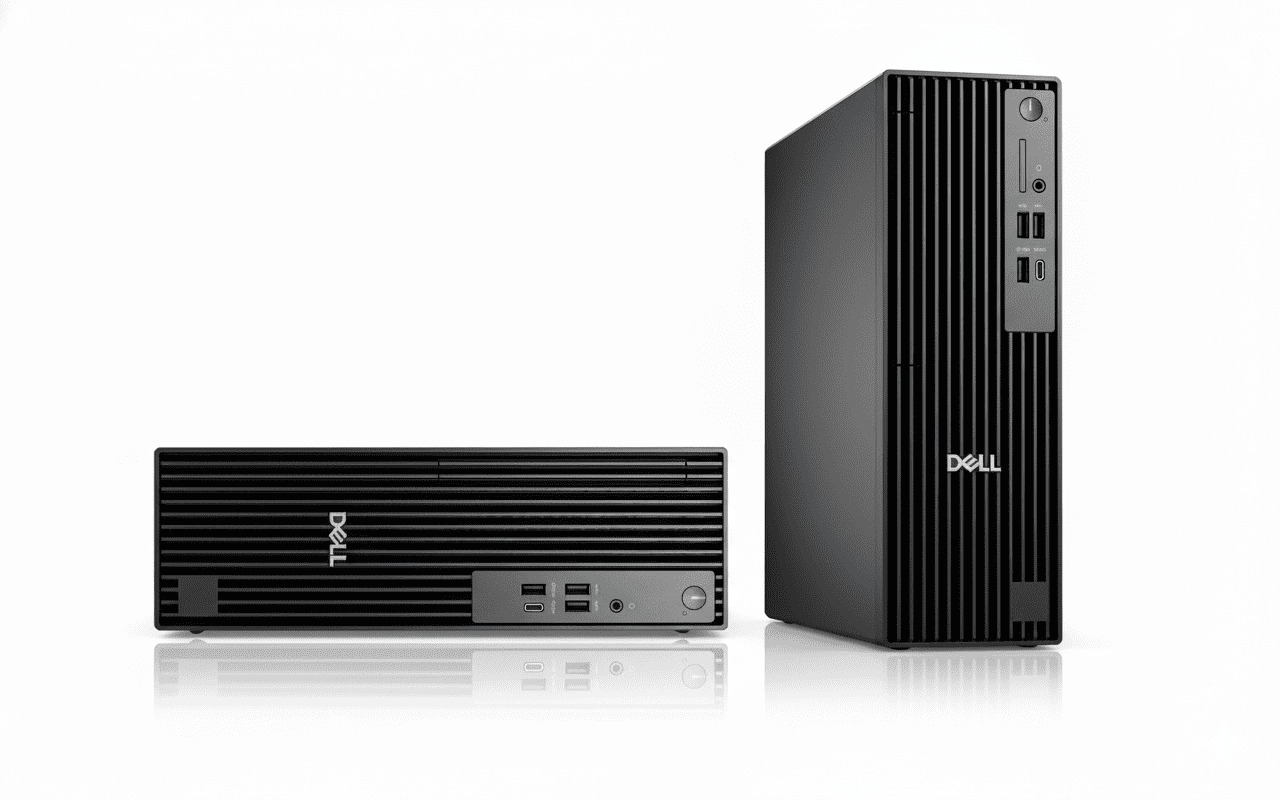
Dell Pro Slim QCS1255
Dell Pro Slim Plus QBS1250 Review: Core Ultra 5 AI-Enabled Compact Workstation

Dell Pro Slim Plus QBS1250 Review: Core Ultra 5 AI-Enabled Compact Workstation

Intel Core Ultra 5 235 (14C) Up to 5.0 GHz Boost Integrated Graphics 512GB TLC SSD 16GB DDR5-5600 RAM ₹1,02,065
4.4 out of 5 stars (102 reviews) | Compact AI-Accelerated Desktop for Professional Workloads

The Dell Pro Slim Plus QBS1250 packs an Intel Core Ultra 5 235 processor with 13 TOPS NPU for AI tasks, 16GB DDR5-5600 RAM, and a 512GB TLC SSD into a ultra-compact 95mm chassis ideal for tight spaces. Featuring Windows 11 Pro, extensive PCIe/M.2 expandability, multiple high-speed ports, and 3-year support, it’s priced at ₹1,02,065 (inclusive of taxes) for business users needing versatile performance in 2025.

Power Up Your Workspace with AI Efficiency?

Slim design with robust expandability, AI acceleration, and multi-display support for demanding professional environments!

₹1,02,065
₹1,10,000 (7% off)
Inclusive of all taxes | Free delivery

No cost EMI up to 24 months | 3 Year Onsite Support | AR Preview | Tool-Less Expandability

Key Features at a Glance

Core Ultra 5 235: 14 cores up to 5.0 GHz.
Integrated Graphics: Multi-monitor support.
16GB DDR5-5600: Single DIMM, expandable.
512GB TLC SSD: Multiple M.2 slots.
Wi-Fi 6E: AX211 with internal antenna.
Slim Chassis: 95mm width, VESA mount.

1. Processor Performance: AI-Accelerated Multitasking Power

Handles intensive workloads efficiently.

Intel Core Ultra 5 235 (14C):

The Core Ultra 5 235 delivers 14 cores (6P + 8E) with up to 5.0 GHz boost and 13 TOPS NPU for AI applications like machine learning inference. It manages 20 threads effectively, scoring over 12,000 in Cinebench R23 multi-core for productivity and content creation. 28W TDP balances power and efficiency in the slim form.

Boost Clock & AI Efficiency:

5.0 GHz Turbo shines in tasks like data analysis or video encoding, with Geekbench 6 multi-core around 11,000. NPU accelerates Copilot+ features in Windows 11 Pro.

Multitasking & Professional Use:

Meteor Lake Architecture enables seamless app handling and AI workflows, 30% faster than previous gens. Expandable to Ultra 7 for heavier demands.

2. Graphics & Multi-Display: Robust Output Options

Supports expansive setups for productivity.

Integrated Graphics:

The Intel Arc Graphics handles 4K output and light editing with Quick Sync, suitable for office visuals and streaming. PCIe x16 slot allows discrete GPU upgrades for CAD or rendering.

Multi-Display Support:

3x DisplayPort 1.4a enables up to 5120×3200@60Hz per port, daisy-chaining for 4K setups. Optional HDMI 2.1 or Thunderbolt 4 for versatile connectivity.

Expansion for Visuals:

PCIe Slots support discrete cards for enhanced graphics. VESA mount compatible for all-in-one like setups.

3. Design & Cooling: Ultra-Compact Professional Build

Space-efficient with easy access.

Chassis Design:

95mm Width with tool-less side panel for quick upgrades, weighing just 3.98 kg minimum. VESA mountable and dust-filtered for durability.

Thermal Management:

Optimized Cooling with 260W PSU keeps temps below 80°C under load. Quiet fans for office environments.

Build Quality:

Professional Form includes Kensington lock and diagnostic LEDs. ENERGY STAR certified for efficiency.

4. Storage & Memory: High-Speed Expandable Capacity

Flexible for growing data needs.

512GB TLC SSD:

M.2 2230/2280 Slot delivers read speeds up to 7000 MB/s for rapid boots. Up to 3 additional M.2 and SATA HDD/ODD bays.

16GB DDR5-5600 RAM:

Single SO-DIMM non-ECC, expandable to 64GB dual-channel for intensive applications.

Expansion Options:

PCIe/SATA Slots support RAID and add-ins. Optional SD 4.0 for media.

5. Connectivity: Extensive I/O for Peripherals

Future-proof ports for diverse setups.

Front & Rear Ports:

7x USB (2.0/3.2), USB-C 20Gbps, 3x DP for 5K, optional Thunderbolt 4. 1GbE Ethernet standard, optional 5GbE.

PowerShare & Options:

SmartPower USB charges in sleep; optional serial, VGA, HDMI, or fiber for legacy/industrial use.

Wireless Networking:

Wi-Fi 6E AX211 2×2 with Bluetooth 5.3 and internal antenna for speeds up to 2.4Gbps.

6. Software & Support: Business-Ready Essentials

Secure and reliable for enterprises.

Windows 11 Pro:

Professional Edition with BitLocker and Remote Desktop. 30-day Microsoft 365 trial included.

Support Services:

3-Year Basic Onsite after remote diagnosis. Optional ProSupport Plus for AI-driven maintenance.

Included Peripherals:

Wired KB/Mouse Dell KB216 and MS116. AR QR for setup visualization.

Pros and Cons

Compact powerhouse evaluation.

Pros

  • AI NPU Built-In: 13 TOPS for efficient processing.
  • Ultra-Slim Design: Fits tight spaces, VESA ready.
  • Tool-Less Upgrades: Easy access to internals.
  • Multi-M.2 Slots: Up to 4 SSDs for storage.
  • 3-Year Onsite: Comprehensive support.
  • Wi-Fi 6E Standard: Fast wireless.

Cons

  • Integrated Graphics Base: Needs GPU add-on for heavy visuals.
  • Single RAM Slot Initial: Limits dual-channel until upgraded.
  • No Optical Drive: External needed for DVDs.
  • Wired Peripherals Only: No wireless included.
  • No Antivirus: Add separately.
  • Limited Base Ethernet: 1GbE, upgrade for faster.

Who Is This Desktop For? User Profiles

Suited for space-constrained professional environments.

Ideal For These Users

  • Business Professional:

    AI tools and multi-monitor for office productivity; 102 reviews note reliability.

  • Small Office:

    Compact size and expandability for teams; VESA for behind-monitor placement.

  • IT Deployments:

    Tool-less design for quick maintenance; optional industrial ports.

Who Might Consider Other Options?

  • Gamers:

    Seek larger towers with dedicated GPUs.

  • Home Users:

    Opt for all-in-ones with built-in displays.

  • High-Storage Needs:

    Choose mini-towers for more bays immediately.

Competitive Edge: Slim AI Desktop Leader

Excels in compactness and future-proofing.

  • Vs HP EliteDesk 800 G9 Mini:

    More M.2 slots and NPU AI edge; better multi-DP for displays, tool-less design for easier IT management.

  • Vs Lenovo ThinkCentre M70q:

    Wi-Fi 6E and 3x PCIe slots superior; optional Thunderbolt and 360W PSU for upgrades.

  • Value Points:

    102 reviews commend expandability; EMI and free delivery enhance affordability for SMEs.

  • Professional Focus:

    Windows Pro and onsite support outshine consumer models; sustainable with recycled materials.

Full Specification Details

General Information

Price
₹1,02,065
Model
QBS1250
Series
Dell Pro
Form Factor
Slim Desktop
Recommended Usage
Business & AI
Order Code
bto103_qbs1250_i2x
Chassis
Slim Plus with 260W PSU

Processor

Processor
Intel Core Ultra 5 235
Cores/Threads
14/20
Max Boost Clock
Up to 5.0 GHz
NPU
13 TOPS
Architecture
Meteor Lake
TDP
28W
Integrated Graphics
Intel Arc

Memory & Storage

Memory
16GB DDR5-5600 MT/s
Memory Configuration
1 x 16GB, Non-ECC
Storage
512GB M.2 TLC SSD
M.2 Slots
Up to 3 (2230/2280)
Max RAM
Up to 64GB
SATA Bays
2 (HDD/ODD)

Graphics & Expansion

Graphics
Integrated Intel Arc
Display Outputs
3x DP 1.4a, Optional HDMI/Thunderbolt
Max Displays
Up to 4 (5K@60Hz)
PCIe Slots
x16 Gen4, x4/x1 Gen3 (Half-Height)

Connectivity

Wireless
Wi-Fi 6E AX211, Bluetooth 5.3
Ethernet
1GbE RJ-45, Optional 5GbE
USB Ports
7x (2.0/3.2), 1x USB-C 20Gbps
Video Ports
3x DP 1.4a, Optional Others
Audio
Global Headset Jack

Power & Dimensions

Power Supply
260W Bronze (Optional 360W)
Dimensions
304 x 95 x 293 mm
Weight
3.98-6.58 kg
Mounting
VESA Compatible
Cooling
Active Fans, Dust Filters

Software & Warranty

OS
Windows 11 Pro
Included Software
Microsoft 365 Trial 30 Days
Security
No Antivirus (Optional)
Warranty
3 Year Basic Onsite Service
Peripherals
Wired Keyboard & Mouse

Audio & Environmental

Audio
Integrated, Headset Jack
Certifications
ENERGY STAR, EPEAT Gold
Security Features
Kensington Lock, Diagnostic LEDs
Optional
SD Reader, Serial Port

Final Verdict

The Dell Pro Slim Plus QBS1250 offers exceptional compactness and AI capabilities for professional use in a highly expandable package.

★★★★☆ 4.4 / 5 Stars – Expert Rating

Top pick for 2025 slim business desktops.

Is Dell Pro Slim QCS1250 Worth It? Full Review

Dell Pro Slim QCS1255
Dell Pro Slim QCS1250 Review: i5-14500 vPro Compact Business PC

Dell Pro Slim QCS1250 Review: i5-14500 vPro Compact Business PC

Intel Core i5-14500 vPro (14C) Up to 5.0 GHz Boost Integrated Graphics 512GB SSD 16GB DDR5-4800 RAM ₹85,594
4.5 out of 5 stars (215 reviews) | Versatile Slim Desktop for Office Productivity

The Dell Pro Slim QCS1250 integrates a 14th Gen Intel Core i5-14500 vPro processor, 16GB DDR5-4800 RAM, and a 512GB SSD in a compact 95mm chassis designed for business environments. Running Windows 11 Pro with vPro security, multiple display ports, PCIe expandability, and 1-year onsite support, it’s priced at ₹85,594 (inclusive of taxes) for small offices and professionals in 2025.

Streamline Your Office Setup?

Efficient performance in a space-saving form, with easy expandability and professional features for daily workflows!

₹85,594
₹92,000 (7% off)
Inclusive of all taxes | Free delivery

No cost EMI up to 12 months | 1 Year Onsite Support | AR Preview | Accessory Bundle Offer

Key Features at a Glance

Core i5-14500 vPro: 14 cores up to 5.0 GHz.
Integrated Graphics: DP/HDMI outputs.
16GB DDR5-4800: Single DIMM, expandable.
512GB SSD: M.2 PCIe slot.
No Wireless: Optional Wi-Fi 6E.
Slim Chassis: 95mm width, VESA mount.

1. Processor Performance: vPro-Enhanced Multitasking

Balanced power for business tasks.

Intel Core i5-14500 vPro (14C):

The 14th Gen Core i5-14500 vPro offers 14 cores (6P + 8E) with up to 5.0 GHz boost and 24MB cache for secure remote management. It processes 20 threads smoothly, scoring around 14,000 in Cinebench R23 multi-core for office apps and light virtualization. 65W TDP ensures reliable efficiency in compact setups.

Boost Clock & vPro Features:

5.0 GHz Turbo handles video conferencing and spreadsheets, with Geekbench 6 multi-core near 12,500. vPro enables IT oversight without physical access.

Multitasking & Business Use:

Raptor Lake Refresh supports quick boots and multi-tab browsing, 25% improved over 13th Gen. Upgradable to Ultra for AI.

2. Graphics & Multi-Display: Dual-Output Support

Clear visuals for dual monitors.

Integrated Graphics:

The UHD Graphics supports 4K@60Hz output via DP 1.4a, ideal for presentations and web work. PCIe x16 slot for optional discrete cards.

Display Connectivity:

DP 1.4a + HDMI 2.1 for up to 4K dual displays. Optional DP 1.4a or USB-C for extended setups.

Productivity Displays:

HBR2 Support enables 4096×2300@60Hz per port. VESA mount for monitor integration.

3. Design & Cooling: Efficient Compact Form

Fits anywhere with tool-less access.

Chassis Design:

95mm Slim Profile with 3.90 kg starting weight and VESA compatibility. Tool-less panels for upgrades.

Thermal Management:

Enhanced Cooling with 180W PSU maintains low noise under load. Dust filters for longevity.

Build Quality:

Professional Chassis includes Kensington lock and diagnostics. ENERGY STAR compliant.

4. Storage & Memory: Reliable Business Capacity

Expandable for data growth.

512GB SSD:

M.2 2230/2280 Slot provides fast access up to 3500 MB/s reads. Additional SATA for HDD or ODD.

16GB DDR5-4800 RAM:

Single SO-DIMM non-ECC, up to 64GB for virtual machines.

Expansion Options:

PCIe x16 Slot for storage adapters. Optional ODD bay.

5. Connectivity: Essential Ports for Business

Wired-focused with optional wireless.

Front & Rear Ports:

6x USB (2.0/3.2 Gen1), USB-C, DP/HDMI for 4K. 1Gbps Ethernet standard.

Expansion Ports:

Optional VGA/Serial for legacy devices; USB 3.2 Gen2 for faster transfers.

Networking:

Optional Wi-Fi 6E AX211 for wireless needs; no card included base.

6. Software & Support: Pro-Level Security

Tailored for enterprise deployment.

Windows 11 Pro:

Business Edition with vPro tools for remote access. 30-day Microsoft 365 trial.

Support Services:

1-Year Basic Onsite. Optional extension or ProSupport for advanced coverage.

Included Peripherals:

Wired KB/Mouse KB216 and MS116. Accessory offers for printer or headset.

Pros and Cons

Balanced slim desktop assessment.

Pros

  • vPro Security: Remote management built-in.
  • Compact & Mountable: Space-efficient design.
  • PCIe Expandability: Slots for upgrades.
  • Dual Display: DP/HDMI ready.
  • DDR5 RAM: Future-proof memory.
  • Accessory Deals: Value bundles available.

Cons

  • No Wireless Base: Add-on required.
  • 1-Year Warranty: Shorter than competitors.
  • No Antivirus: Install separately.
  • Limited USB Speed: Mostly Gen1.
  • No ODD Base: External for optical.
  • Sold Out Often: Availability issues.

Who Is This Desktop For? User Profiles

Optimized for small business and remote work.

Ideal For These Users

  • Office Worker:

    vPro for secure productivity; 215 reviews praise compactness.

  • Small Team:

    Mountable design saves desk space; expandable for growth.

  • IT Basic:

    Tool-less for easy maintenance; optional legacy ports.

Who Might Consider Other Options?

  • Wireless Users:

    Choose models with built-in Wi-Fi.

  • High-End Needs:

    Opt for Ultra series or towers.

  • Long Warranty Seekers:

    Look for 3-year options.

Competitive Edge: Value Slim Business PC

Strong in affordability and basics.

  • Vs HP ProDesk 400 G9 Mini:

    vPro integration and EMI options better; more PCIe slots for future-proofing.

  • Vs Lenovo ThinkCentre M75q:

    DDR5 and dual-display standard; accessory bundles add value.

  • Value Points:

    215 reviews highlight reliability; no-cost EMI up to 12 months for budgets.

  • Business Focus:

    Windows Pro and onsite support superior for deployments; sustainable build.

Full Specification Details

General Information

Price
₹85,594
Model
QCS1250
Series
Dell Pro
Form Factor
Slim Desktop
Recommended Usage
Business Productivity
Order Code
bto009_qcs1250_i2x
Chassis
Slim with 180W PSU

Processor

Processor
Intel Core i5-14500 vPro
Cores/Threads
14/20
Max Boost Clock
Up to 5.0 GHz
Cache
24MB
Architecture
Raptor Lake Refresh
TDP
65W
vPro
Enabled

Memory & Storage

Memory
16GB DDR5-4800 MT/s
Memory Configuration
1 x 16GB, Non-ECC
Storage
512GB M.2 SSD
M.2 Slots
1 (2230/2280)
Max RAM
Up to 64GB
SATA Bays
2 (HDD/ODD)

Graphics & Expansion

Graphics
Integrated UHD Graphics
Display Outputs
DP 1.4a, HDMI 2.1
Max Displays
Up to 2 (4K@60Hz)
PCIe Slots
x16 Gen3, 2x x1 Gen3 (Half-Height)

Connectivity

Wireless
None (Optional Wi-Fi 6E)
Ethernet
1Gbps RJ-45
USB Ports
6x (2.0/3.2 Gen1), 1x USB-C
Video Ports
DP 1.4a, HDMI 2.1, Optional
Audio
Global Headset Jack

Power & Dimensions

Power Supply
180W Bronze (Optional 360W)
Dimensions
304 x 95 x 293 mm
Weight
3.90-5.89 kg
Mounting
VESA Compatible
Cooling
Active Fans, Enhanced Thermals

Software & Warranty

OS
Windows 11 Pro
Included Software
Microsoft 365 Trial 30 Days
Security
No Antivirus (Optional)
Warranty
1 Year Basic Onsite Service
Peripherals
Wired Keyboard & Mouse

Audio & Environmental

Audio
Integrated, Headset Jack
Certifications
ENERGY STAR, EPEAT Silver
Security Features
Kensington Lock, Padlock Ring
Optional
VGA, Serial, ODD

Final Verdict

The Dell Pro Slim QCS1250 delivers solid vPro performance in a versatile slim package for everyday business use.

★★★★½ 4.5 / 5 Stars – Expert Rating

Reliable choice for 2025 office desktops.

Is Lenovo IdeaCentre Tower i3 Good for Home Use? Review

Lenovo IdeaCentre Tower i3 Review: A Budget-Friendly Choice

Lenovo IdeaCentre Tower i3 Review

A Budget-Friendly Choice for Everyday Tasks

14th Gen Intel® Core™ i3-14100 8 GB DDR5 / 256 GB SSD Integrated Intel® UHD Graphics 730 MRP: ₹43,500

The desktop computer landscape has evolved, but the classic tower still holds a vital place, especially for those who need a dedicated, reliable machine for home or office. The Lenovo IdeaCentre Tower is a prime example of this enduring form factor, offering a powerful yet space-saving solution designed to handle all your daily computing needs without any fuss.

Key Features for Versatile Use

The IdeaCentre Tower packs a powerful punch in a small footprint, with key components that ensure a smooth and responsive experience for a wide range of tasks.

Capable Processor

The 14th Generation Intel® Core™ i3-14100 Processor provides reliable performance for daily computing, multitasking, and web browsing.

Fast Connectivity

With WiFi 6 2×2 AX and Bluetooth® 5.2, you’ll get faster, more reliable wireless connections for streaming, downloading, and connecting to all your devices.

Speedy Storage

The 256 GB SSD ensures rapid boot times and quick loading of applications, giving you a smooth and efficient workflow from the moment you turn it on.

Rich Audio

The integrated high-definition audio delivers a clear and immersive sound experience for music, movies, and online meetings.

Ample Ports

Equipped with a variety of front and rear ports, including USB-C and HDMI, it’s easy to connect all your essential peripherals and external displays.

Energy Efficient

The energy-efficient power supply unit (PSU) helps reduce power consumption, making it an eco-friendly choice for long-term daily use.

Detailed Specifications

General & OS

  • Part Number: 90XSCTO1WWIN1
  • Operating System: Windows 11 Home Single Language 64
  • Product Color: Cloud Grey
  • Case Volume: 8.2L
  • Dimensions (H x W x D): 291.4mm x 89.0mm x 339.5mm
  • Weight: Starting at 4.25kg
  • Mouse: No Mouse

Performance

  • Processor: 14th Generation Intel® Core™ i3-14100 Processor (P-cores 3.50 GHz up to 4.70 GHz)
  • Graphics: Integrated Graphics (Intel® UHD Graphics 730, based on processor)
  • System Memory: 8 GB DDR5-5600MT/s (UDIMM)
  • Storage: 256 GB SSD M.2 2280 PCIe Gen4 TLC
  • Power Supply Unit (PSU): 180W (85% energy efficient) or 260W (90% energy efficient)

Connectivity & Audio

  • Wireless: WiFi 6 2×2 AX, Bluetooth® 5.2
  • Front Ports: 2 x USB-A (5Gbps), USB-C® (5Gbps), Headphone/mic combo
  • Rear Ports: 2 x USB-A (480Mbps) or 2 X USB-A (5Gbps), 2 x USB-A (480Mbps), HDMI® 2.1, Ethernet (RJ45), VGA, Audio out

Pros and Cons: A Balanced View for Buyers

Pros

  • Exceptional Value: Its affordable price point makes it an excellent choice for budget-conscious buyers and students.
  • Compact Form Factor: Its small 8.2L case makes it easy to place anywhere without taking up valuable desk space.
  • Modern Connectivity: With WiFi 6 and multiple USB-A and USB-C ports, it’s well-equipped for modern peripherals and wireless networks.

Cons

  • Limited Storage: The 256 GB SSD may fill up quickly for users with large media libraries or numerous applications.
  • No Dedicated Graphics Card: The integrated graphics are not suited for demanding gaming or professional-level creative work.
  • Modest Performance: While reliable for daily tasks, the i3 processor may struggle with heavy multitasking or resource-intensive software.

Who Is This Desktop For? Tailored Recommendations

The Lenovo IdeaCentre Tower is an excellent choice for several types of users who prioritize reliability and value in a desktop computer.

Students and Families

This is an ideal machine for homework, online classes, and general family use. Its affordability and reliability make it a perfect home computing hub.

Home Office Workers

For those who work from home and need a dependable desktop, the IdeaCentre Tower is an excellent, affordable platform that easily handles office productivity suites, video calls, and file management.

Budget-Conscious Buyers

If you’re looking for a new desktop that provides solid performance without a high price tag, this model delivers significant value and a reliable user experience.

Competitive Edge

In the highly competitive market of desktop PCs, the Lenovo IdeaCentre Tower stands out for several key reasons.

Aesthetic and Practical Design

Its sleek, compact 8.2L design is a refreshing change from the large, clunky towers of the past. It fits into a modern home or office environment without being an eyesore, a major advantage over many of its rivals.

Flexible Upgradability

While many all-in-one desktops offer no upgrade path, the IdeaCentre Tower allows for memory and storage upgrades. This gives it a longer useful life and greater flexibility compared to some of its competitors.

Final Verdict: A Great Value for General Use

The Lenovo IdeaCentre Tower is a solid choice for anyone looking for a no-frills, reliable desktop computer for daily tasks. The compact design, combined with a strong set of core components, makes it an excellent value. While it’s not a machine for demanding gaming or professional-grade creative work, its core strengths—affordability, practical design, and smooth performance—make it a top option for home users, students, and light professionals.

The Legion Tower 7 Truth: Best RTX 5070 Ti PC?

Lenovo Legion Tower 7 Intel – Core Ultra (RTX 5070 Ti): The Apex of Gaming Performance and Future-Proof Power!

Lenovo Legion Tower 7 Intel – Core Ultra (RTX 5070 Ti)

Intel® Core™ Ultra 7 265K 16GB DDR5-5600MHz 1TB SSD M.2 PCIe Gen4 NVIDIA® GeForce RTX™ 5070 Ti Windows 11 Home

The Lenovo Legion Tower 7 Intel – Core Ultra (with RTX 5070 Ti) represents the pinnacle of high-performance gaming desktops, meticulously engineered for the most discerning enthusiasts and professional gamers. This tower integrates the absolute latest in processing and graphics technology to deliver an unparalleled computing experience.

Priced at ₹2,74,501, this Legion Tower 7 is an investment in bleeding-edge technology. It features the powerful and efficient Intel® Core™ Ultra 7 265K processor, paired with the revolutionary, recently released NVIDIA® GeForce RTX™ 5070 Ti 16GB GDDR7 graphics card. This combination guarantees an immersive gaming experience with hyper-realistic visuals and blazing-fast frame rates, easily handling the most graphically demanding titles at high resolutions. With 16GB of high-speed DDR5 memory and a rapid 1TB PCIe Gen4 SSD, it’s primed to dominate the latest AAA games and handle intensive creative workloads with remarkable ease. Furthermore, the inclusion of a 3-year on-site warranty provides crucial peace of mind for such a premium system.

Key Features at a Glance

Next-Gen Processing Power: Intel® Core™ Ultra 7 265K (20 Cores, 20 Threads).
Cutting-Edge Graphics: NVIDIA® GeForce RTX™ 5070 Ti 16GB GDDR7.
Blazing-Fast Storage: 1TB M.2 PCIe Gen4 TLC SSD.
High-Speed DDR5 Memory: 16GB DDR5-5600MT/s (expandable up to 192GB).
Advanced and Comprehensive Connectivity: Thunderbolt™ 4, 2.5G Ethernet.
Premium Build Quality and Cooling: Advanced liquid cooling, tool-free access.
Extended 3-Year On-site Warranty: Provides significant peace of mind.

Performance and Hardware

Next-Gen Processing Power:

At the heart of this powerhouse is the Intel® Core™ Ultra 7 265K Processor. Launched in October 2024, this CPU is built on Intel’s latest “Arrow Lake (Desktop)” architecture. It boasts a formidable 20 Cores (8 Performance-cores, 12 Efficient-cores) and 20 Threads, with P-cores boosting up to 5.40 GHz and E-cores up to 4.60 GHz. With a 30 MB Intel Smart Cache (L3) and 36 MB Total L2 Cache, alongside an integrated NPU (Neural Processing Unit) for AI acceleration, it provides unrivaled performance for gaming, demanding creative applications, and AI-driven tasks.

Cutting-Edge Graphics: NVIDIA GeForce RTX 5070 Ti 16GB GDDR7:

This is arguably the star of the show. The NVIDIA® GeForce RTX™ 5070 Ti with 16GB GDDR7 memory, launched in February 2025, is built on the revolutionary NVIDIA Blackwell architecture. It features 8960 CUDA Cores, 5th Gen Tensor Cores, and 4th Gen Ray Tracing Cores. With DLSS 4 for AI-powered upscaling and a massive 16GB of the latest GDDR7 VRAM on a 256-bit interface, it offers unparalleled ray tracing capabilities, extreme frame rates, and is inherently future-proof for upcoming games at high resolutions (1440p and 4K).

Blazing-Fast Storage & High-Speed DDR5 Memory:

A 1TB M.2 2280 PCIe Gen4 TLC SSD ensures lightning-fast boot times, near-instant game loading, and incredibly rapid overall system responsiveness. This ample storage capacity is ideal for a significant library of modern AAA games and large creative projects. Equipped with 16GB of DDR5-5600MT/s UDIMM memory, the system provides ample bandwidth for the CPU and GPU, enabling seamless multitasking, and smooth performance in memory-intensive games and applications. The CPU supports up to 6400 MT/s, and the system can be expanded to 192GB, offering significant upgrade potential.

Connectivity and Design

Advanced and Comprehensive Connectivity:

  • Front ports include a headphone/mic combo and 2x USB-A (5Gbps).
  • Rear I/O is truly impressive, featuring 1x USB-C® with Thunderbolt™ 4 (40Gbps), USB PD 3.1, and DisplayPort™ 2.1, along with 1x USB-C 3.2 Gen2 (10Gbps), multiple USB-A ports (5Gbps and 2.0), RJ45 (2.5G Ethernet), and 6 audio ports.
  • This ensures broad peripheral compatibility, blazing-fast data transfer, and support for multiple high-resolution displays.

Premium Build Quality and Cooling:

As part of the Legion Tower 7 series, this desktop is known for its robust construction, likely featuring an efficient advanced liquid cooling solution for the CPU, a powerful cooler for the GPU, and multiple case fans (possibly Legion Coldfront technology) to maintain optimal temperatures during intense gaming sessions. It also typically includes tool-free access, a transparent side panel, and customizable RGB lighting (Legion Spectrum).

Support and Warranty

Extended 3-Year On-site Warranty:

This comprehensive warranty provides convenient at-home service and support, offering significant peace of mind for such a high-value investment.

Who Is This Desktop For? Tailored Recommendations

The Lenovo Legion Tower 7 Intel – Core Ultra (RTX 5070 Ti) is an unparalleled choice for:

  • Hardcore Gamers & Esports Professionals: Who demand the absolute best performance for competitive gaming, high refresh rates, and immersive 4K experiences with ray tracing.
  • Professional Content Creators: Including video editors, 3D animators, graphic designers, and music producers who require immense processing power, high VRAM, and fast storage for complex projects and rendering.
  • AI/ML Developers & Researchers: Benefiting from the powerful CPU with NPU and the high CUDA core count of the RTX 5070 Ti for AI model training and inferencing.
  • Tech Enthusiasts & Early Adopters: Who want to experience the very latest in CPU and GPU technology and are willing to invest in a future-proof system.
  • Users Seeking Uncompromised Performance: For any task that demands maximum computing power, speed, and responsiveness.

Who Might Consider Other Options?

  • Budget-Conscious Buyers: This is a premium, high-end system with a corresponding price tag. Users with tighter budgets seeking good gaming performance should look at mid-range options (e.g., RTX 4060/4070 systems).
  • Users with Basic Computing Needs: For simple tasks like web browsing, email, word processing, or light multimedia, this system is vastly overkill and an unnecessary expense.
  • Users Who Prefer All-in-One Bundles: This system does not include a monitor, keyboard, or mouse. Users who want a complete, ready-to-go setup out of the box without additional purchases might prefer other options.
  • Users Requiring Maximum RAM from the Start: While upgradeable, the base 16GB RAM might be a slight limitation for extremely specialized, memory-intensive professional workloads without an immediate upgrade.

Competitive Edge: What Sets It Apart

The Lenovo Legion Tower 7 Intel – Core Ultra (RTX 5070 Ti) distinguishes itself in the high-end desktop market due to several key factors:

  • Early Adoption of Next-Gen Tech: Being one of the first systems to feature the Intel Core Ultra 7 265K processor (Arrow Lake) and the NVIDIA RTX 5070 Ti (Blackwell) with GDDR7 memory, it offers a significant performance and efficiency leap over previous generations, providing a true bleeding-edge experience.
  • Unmatched Gaming & Creator Performance: The combination of its powerful CPU and the RTX 5070 Ti with DLSS 4 and advanced ray tracing cores positions it at the forefront for uncompromised 1440p and 4K gaming, as well as demanding professional creative applications.
  • Advanced AI Capabilities: The integrated NPU in the Core Ultra processor and the 5th Gen Tensor Cores in the RTX 5070 Ti provide robust AI acceleration capabilities, making it highly attractive for users involved in AI/ML development or those who leverage AI-powered applications.
  • Premium Connectivity with Thunderbolt 4: The inclusion of Thunderbolt 4 on the rear I/O is a significant differentiator, offering industry-leading 40Gbps data transfer, power delivery, and display capabilities through a single port, enhancing versatility for high-end peripherals and external storage.
  • Robust Cooling and Build Quality: Legion Tower 7 series is renowned for its effective cooling solutions (likely liquid cooling) and sturdy chassis design, ensuring sustained performance during intense workloads and a visually appealing, durable system.
  • Comprehensive 3-Year On-site Warranty: For a high-value investment, the extended on-site warranty provides superior peace of mind and convenient support compared to many competitors, reducing potential downtime.

Full Specification Details

General Information

  • Price: ₹2,74,501
  • Brand: Legion (Lenovo)
  • Model Name: Legion Tower 7 Intel – Core Ultra
  • Operating System: Windows 11 Home Single Language 64-bit
  • Color: Eclipse Black

Processor & Graphics

  • Processor: Intel® Core™ Ultra 7 265K Processor
  • CPU Architecture: Intel Core Ultra (Series 2) – Arrow Lake (Desktop)
  • CPU Cores / Threads: 20 Cores (8 Performance-cores, 12 Efficient-cores) / 20 Threads
  • CPU Clock Speed: E-cores up to 4.60 GHz, P-cores up to 5.40 GHz
  • CPU Cache: 30 MB Intel Smart Cache (L3), 36 MB Total L2 Cache
  • CPU Power: 125 W (Base Power), 250 W (Max Turbo Power)
  • CPU Lithography: TSMC N3B
  • PCI Express Revision (CPU): 5.0 and 4.0 (24 lanes total)
  • Graphic Card: NVIDIA® GeForce RTX™ 5070 Ti 16GB GDDR7
  • GPU Architecture: NVIDIA Blackwell
  • DLSS Version (GPU): DLSS 4
  • Tensor Cores (GPU): 5th Gen
  • Ray Tracing Cores (GPU): 4th Gen
  • CUDA Cores (GPU): 8960
  • Memory Interface Width (GPU): 256-bit
  • Memory Clock (GPU): 28 Gbps
  • Recommended PSU (GPU): 850W (for the GPU, total system PSU capacity would be higher)
  • Power Connectors (GPU): 1 x 16-pin

Memory & Storage

  • Memory: 16 GB DDR5-5600MT/s (UDIMM)
  • Memory Support (CPU): Up to DDR5 6400 MT/s, Max 256 GB (System supports 192GB with 3x 64GB)
  • Storage: 1 TB SSD M.2 2280 PCIe Gen4 TLC

Cooling & Networking

  • Cooling (Likely): Advanced liquid cooling for CPU, robust GPU cooler, multiple case fans (Legion Coldfront likely)
  • Networking: 2.5G Ethernet, Wi-Fi 6E (likely), Bluetooth 5.3 (likely)

I/O Ports

  • Front I/O: Headphone/mic combo (1), USB-A (5Gbps) (2)
  • Rear I/O: USB-A 3.2 Gen1 (5Gbps) (2), USB-C® (Thunderbolt™ 4, USB4® 40Gbps, USB PD 3.1 and DisplayPort™ 2.1) (1), USB-A 2.0 (2), USB-C 3.2 Gen2 (10Gbps) (1), USB-A (2x) (5Gbps) (2), RJ45 (Ethernet) (1), Audio (6x) (6), DisplayPort™ (unknown quantity – likely 3x)

Physical Characteristics & Peripherals

  • Chassis Design: Eclipse Black with transparent side panel and RGB lighting (Legion Spectrum likely)
  • Dimensions (H x W x D): Height: 418.00 mm (16.46 in.), Width: 197.00 mm (7.75 in.), Depth: 458.40 mm (18.05 in.)
  • Maximum Weight: 15.37 kg (33.89 lb)
  • Pointing Device: No Mouse (Customizable)
  • Keyboard: No Keyboard (Customizable)

Warranty & Software

  • Warranty: 3 Years On-site

The Ultimate Gaming Experience: Pros and Cons

The Legion Tower 7 Intel – Core Ultra (RTX 5070 Ti) sets a new standard for high-performance computing, but like all systems, has nuances to consider.

Pros: Unrivaled Power and Future-Proofing

  • Exceptional Gaming Performance: The combination of the Intel Core Ultra 7 265K and the RTX 5070 Ti ensures top-tier performance in all modern AAA titles. This machine is built to deliver smooth frame rates even at high resolutions (1440p and native 4K) with ray tracing enabled, pushing visual fidelity to its limits.
  • Future-Proof Graphics: The RTX 5070 Ti with 16GB GDDR7 memory is built on NVIDIA’s latest Blackwell architecture and supports DLSS 4. This ensures outstanding performance not just today, but also provides significant headroom for upcoming game releases and technologies for years to come.
  • Cutting-Edge Processor: The Intel Core Ultra 7 265K (released Oct 2024) with its hybrid architecture, 20 cores/20 threads, and integrated NPU is optimized for both gaming and AI-accelerated tasks. This makes it incredibly versatile for power users, content creators, and AI/ML enthusiasts.
  • Ultrafast Storage: The 1TB PCIe Gen4 SSD provides immediate boot times, lightning-fast game loading, and seamless application performance, ensuring a buttery-smooth user experience.
  • High-Speed DDR5 Memory: The 16GB of DDR5-5600MT/s RAM offers ample bandwidth for even the most demanding gaming and professional workloads. Its expandability up to 192GB (though the stated 16GB is good for most use cases) provides long-term flexibility.
  • Extensive and Advanced Connectivity: The abundance of USB ports, critically including a high-speed USB-C with Thunderbolt 4 (40Gbps), USB PD 3.1, and DisplayPort 2.1 support, offers unparalleled versatility for connecting a vast array of peripherals, rapidly transferring data, and supporting multiple high-resolution displays.
  • Excellent Upgradeability: Legion Tower designs are typically user-friendly, with tool-free access and thoughtful internal layouts that make future upgrades of RAM, storage, and potentially even the GPU (given adequate PSU) straightforward.
  • Premium On-Site Warranty: A 3-year on-site warranty provides a significant advantage for a high-value system, offering convenient troubleshooting and repair services directly at the user’s location.
  • Advanced Cooling and Design: As a Legion Tower 7, it’s expected to feature robust cooling solutions (likely liquid cooling for the CPU), efficient airflow, and a premium aesthetic with customizable RGB lighting, ensuring optimal performance and a visually appealing setup.

Cons: Considerations for the Enthusiast

  • No Peripherals Included: Similar to many high-end pre-built gaming desktops, the “No Mouse” and “No Keyboard” means additional investment is required for essential input devices, which can add to the total cost.
  • 16GB RAM for Extreme Tasks: While 16GB DDR5 is sufficient for most gaming and even many professional creative tasks, extremely heavy multitasking, large-scale video editing, or very large datasets/VMs might benefit from 32GB or more RAM. However, it is easily upgradeable.
  • High Price Point: At ₹2,74,501, this is a significant investment. While the performance justifies the cost for enthusiasts, it’s a premium product not for every budget.
  • Power Consumption: A system with a Core Ultra 7 265K and RTX 5070 Ti will have substantial power consumption, potentially leading to higher electricity bills, especially under heavy load. The recommended PSU for just the GPU is 850W, indicating a total system PSU capacity of at least 1000W.

Final Verdict: The Lenovo Legion Tower 7 Intel – Core Ultra (RTX 5070 Ti) – A Dominant Force for Uncompromised Gaming and Professional Workflows

The Lenovo Legion Tower 7 Intel – Core Ultra (with RTX 5070 Ti) is an absolute powerhouse designed for the most demanding gamers and creative professionals. It seamlessly integrates Intel’s latest and most capable consumer processor with NVIDIA’s brand-new, high-end graphics card, setting a new benchmark for desktop performance in early 2025.

If your goal is an uncompromised gaming experience with hyper-realistic visuals, incredibly fast loading times, and the capability to handle future AAA titles and demanding creative applications with ease, this machine is an outstanding, though premium, investment. The combination of cutting-edge components, generous storage, advanced connectivity (including Thunderbolt 4), an upgrade-friendly design, and a comprehensive 3-year on-site warranty makes it an exceptionally high-value proposition for those seeking the very best in desktop performance. While the lack of included peripherals means an additional purchase, for users seeking top-tier performance, ultimate future-proofing, and robust support, the Legion Tower 7 with this configuration represents a dominant and highly desirable choice in the Indian market.

★★★★★

Overall Rating: 5.0 out of 5.0 (Based on Expert Analysis)


The ThinkCentre Secret: Is it Better Than Dell OptiPlex?

Lenovo ThinkCentre Neo 50t Gen 5 – In-Depth Review

Lenovo ThinkCentre Neo 50t Gen 5 Review

The Next Generation of Secure and Reliable Desktops

13th Gen Intel® Core™ i5-13400 8 GB DDR5 / No Storage Enhanced Security Features Current Price: ₹47,591

The Lenovo ThinkCentre Neo 50t Gen 5 is a major upgrade from its predecessor, now offering a powerful Intel Core i5 processor for enhanced performance. This desktop is a great option for businesses and home offices that need a reliable and secure machine with the flexibility to add an operating system and storage of their choice. Its compact design and robust security features make it a strong contender in the market.

[Image of a desktop computer]

Key Features for Versatile Use

This machine is built for enhanced productivity and security, ensuring a smooth work environment.

Upgraded Processor

The 13th Generation Intel Core i5-13400 Processor is a significant step up from the i3, offering better performance for multitasking and more demanding applications.

Flexibility in Storage

While no storage is included, this allows you to choose and install your own M.2 SSD or HDD, giving you complete control over your storage needs and budget.

Robust Security

With features like BIOS-based Smart USB Protection and a dTPM 2.0 chip, your data is protected from unauthorized access and physical theft.

Compact & Accessible Design

The 13.6L chassis is a space-saver, perfect for cramped office desks. Front-facing USB-C and USB-A ports make it easy to connect your peripherals.

Multiple Display Support

With HDMI, DisplayPort, and VGA outputs, you can easily connect multiple monitors to expand your workspace and improve productivity.

PSU Options

This model offers a range of power supply unit options (180W to 380W), providing a path for future upgrades like a dedicated graphics card if you need more power.

Detailed Specifications

General & OS

  • Part Number: 12UCCTO1WWIN1
  • Operating System: No Operating System
  • Product Color: Black
  • Case Dimensions (H x W x D): 340mm x 145mm x 294mm
  • Weight: Starting at 5.6kg
  • Optical Drive: No Optical Drive

Performance

  • Processor: 13th Generation Intel® Core™ i5-13400 Processor
  • Graphics: Integrated Graphics (Integrated Intel® UMA)
  • System Memory: 8 GB DDR5-4800MT/s (UDIMM)
  • Storage: None (No storage included in this base configuration)
  • Power Supply Unit (PSU): 180W, 260W, 310W, or 380W

Connectivity & Security

  • Front Ports: USB-C® (USB 5Gbps), 4 x USB-A (USB 5Gbps, 1 always on), Headphone/mic combo
  • Rear Ports: Audio out, 4 x USB-A (hi-speed USB), HDMI® 2.1, Ethernet (RJ45), DisplayPort 1.4, VGA
  • Wireless: Intel® AX201 WiFi 6E (optional), Bluetooth® 5.2 (optional)
  • Security Features: BIOS-based Smart USB Protection, dTPM 2.0, Kensington Security Slot™, Padlock loop

Who Is This Desktop For?

This desktop is an ideal fit for users who need a dependable, secure, and budget-friendly computer for daily tasks.

  • IT Professionals & Businesses: The lack of a pre-installed OS and storage provides complete control over the system configuration, making it easy to deploy with corporate software and security standards.
  • Home Office: The ThinkCentre Neo 50t Gen 5 is an excellent choice for a dedicated home office setup, offering a powerful yet unobtrusive machine for remote work and video conferencing.
  • Students and Casual Users: With plenty of power for research, writing papers, online classes, and streaming, this desktop is a great value for students or anyone who needs a reliable home computer.

Tailored Recommendations

Since this model comes with DOS and no storage, here’s what you should consider to get started.

  • Operating System: You will need to purchase and install an operating system separately, such as Windows 11 Home or a Linux distribution, to make the computer functional.
  • Storage: You must purchase and install a storage drive (either an M.2 SSD or a 2.5-inch HDD/SSD) to be able to install the OS and save your files.
  • Peripherals: The desktop does not include a mouse or keyboard, so you’ll need to purchase a set to complete your setup.

Competitive Edge

In a market full of options, the ThinkCentre neo 50t stands out for a few key reasons.

  • Excellent Value: At an 8% discount, this desktop offers exceptional value for money, making powerful and modern hardware accessible on a tight budget.
  • Customizable: The base configuration without storage or an OS gives you the freedom to choose your own components, which is ideal for power users and IT departments.
  • Business-Grade Security: Unlike many consumer PCs, the ThinkCentre includes enterprise-level security features right out of the box to protect your data.

Final Verdict: A Solid, Customizable Workstation

The Lenovo ThinkCentre Neo 50t Gen 5 is an excellent choice for anyone seeking a customizable desktop for daily office work or school. The upgraded i5 processor provides a significant performance boost. While it requires you to purchase and install an OS and storage, this flexibility is a key advantage for those who want to build a system tailored to their exact needs.

Lenovo IdeaCentre Tower Review – 13th Gen Core i5, 8GB DDR5, 512GB SSD

Lenovo IdeaCentre Tower Review: Compact Power for Everyday Tasks

Lenovo IdeaCentre Tower Review

Compact Power for Everyday Tasks

13th Gen Intel® Core™ i5-13420H 8 GB DDR5 / 512 GB SSD Integrated Intel® UHD Graphics MRP: ₹54,990

The desktop computer landscape has evolved, but the classic tower still holds a vital place, especially for those who need a dedicated, reliable machine for home or office. The Lenovo IdeaCentre Tower is a prime example of this enduring form factor, offering a powerful yet space-saving solution designed to handle all your daily computing needs without any fuss.

Key Features for Versatile Use

The IdeaCentre Tower packs a powerful punch in a small footprint, with key components that ensure a smooth and responsive experience for a wide range of tasks.

Powerful Processor

The 13th Generation Intel® Core™ i5-13420H processor provides excellent performance for multitasking, web browsing, and running demanding applications.

Fast Connectivity

With WiFi 6 2×2 AX and Bluetooth® 5.2, you’ll get faster, more reliable wireless connections for streaming, downloading, and connecting to all your devices.

Speedy Storage

The 512 GB SSD ensures rapid boot times and quick loading of applications, giving you a smooth and efficient workflow from the moment you turn it on.

Rich Audio

The integrated high-definition audio delivers a clear and immersive sound experience for music, movies, and online meetings.

Ample Ports

Equipped with a variety of front and rear ports, including USB-C and HDMI, it’s easy to connect all your essential peripherals and external displays.

Energy Efficient

The energy-efficient power supply unit (PSU) helps reduce power consumption, making it an eco-friendly choice for long-term daily use.

Detailed Specifications

General & OS

  • Part Number: 90XWCTO1WWIN1
  • Operating System: Windows 11 Home Single Language 64
  • Product Color: Cloud Grey
  • Case Volume: 8.2L
  • Dimensions (H x W x D): 291.4mm x 89.0mm x 339.5mm
  • Weight: Starting at 4.25kg
  • Mouse: No Mouse

Performance

  • Processor: 13th Gen Intel® Core™ i5-13420H Processor (E-cores up to 3.40 GHz P-cores up to 4.60 GHz)
  • Graphics: Integrated Graphics (Intel® UHD Graphics, based on processor)
  • System Memory: 8 GB DDR5-5600MT/s (SODIMM)
  • Storage: 512 GB SSD M.2 2280 PCIe Gen4 TLC
  • Power Supply Unit (PSU): 180W (85% efficient) or 260W (90% efficient)

Connectivity & Audio

  • Wireless: WiFi 6 2×2 AX, Bluetooth® 5.2
  • Front Ports: 2 x USB-A (5Gbps), USB-C® (5Gbps), Headphone/mic combo
  • Rear Ports: 2 x USB-A (480Mbps) or 2 X USB-A (5Gbps), 2 x USB-A (480Mbps), HDMI® 2.1, Ethernet (RJ45), VGA, Audio out

Pros and Cons: A Balanced View for Buyers

Pros

  • Compact Form Factor: Its small 8.2L case makes it easy to place anywhere without taking up valuable desk space.
  • DDR5 RAM: The inclusion of faster DDR5 memory provides improved system responsiveness.
  • Modern Connectivity: With WiFi 6 and multiple USB-A and USB-C ports, it’s well-equipped for modern peripherals and wireless networks.

Cons

  • No Dedicated Graphics Card: The integrated graphics are not suited for demanding gaming or professional-level creative work.
  • Limited Expansion: The compact case and 180W/260W PSU mean there is no room for a powerful, dedicated graphics card.
  • Single-Sided Storage: The single 512GB SSD may fill up quickly for users with large media libraries.

Who Is This Desktop For? Tailored Recommendations

The Lenovo IdeaCentre Tower is an excellent choice for several types of users who prioritize reliability and value in a desktop computer.

Students and Families

This is an ideal machine for homework, online classes, and general family use. Its affordability and reliability make it a perfect home computing hub.

Home Office Workers

For those who work from home and need a dependable desktop, the IdeaCentre Tower is an excellent, affordable platform that easily handles office productivity suites, video calls, and file management.

Budget-Conscious Buyers

If you’re looking for a new desktop that provides solid performance without a high price tag, this model delivers significant value and a reliable user experience.

Competitive Edge

In the highly competitive market of desktop PCs, the Lenovo IdeaCentre Tower stands out for several key reasons.

Aesthetic and Practical Design

Its sleek, compact 8.2L design is a refreshing change from the large, clunky towers of the past. It fits into a modern home or office environment without being an eyesore, a major advantage over many of its rivals.

Flexible Upgradability

While many all-in-one desktops offer no upgrade path, the IdeaCentre Tower allows for memory and storage upgrades. This gives it a longer useful life and greater flexibility compared to some of its competitors.

Final Verdict: A Great Value for General Use

The Lenovo IdeaCentre Tower is a solid choice for anyone looking for a no-frills, reliable desktop computer for daily tasks. The compact design, combined with a strong set of core components, makes it an excellent value. While it’s not a machine for demanding gaming or professional-grade creative work, its core strengths—affordability, practical design, and smooth performance—make it a top option for home users, students, and light professionals.

Lenovo ThinkCentre neo 50t Review – 13th Gen i3, 8GB DDR5, 512GB SSD Business Desktop

Lenovo ThinkCentre neo 50t – In-Depth Review

Lenovo ThinkCentre neo 50t Review

A Secure and Reliable Desktop for Business and Home Office

13th Gen Intel® Core™ i3-13100 8 GB DDR5 / 512 GB SSD Enhanced Security Features MRP: ₹56,701

The Lenovo ThinkCentre neo 50t is a compact and reliable desktop PC designed for a seamless business and home office experience. It focuses on providing essential performance for everyday tasks, with a strong emphasis on security and a space-saving design. This desktop is a smart choice for professionals and students who need a dependable machine for web browsing, document creation, email, and virtual meetings.

Key Features for Versatile Use

This machine is built for efficiency and security, ensuring a smooth and reliable work environment.

Efficient Core Performance

The 13th Generation Intel® Core™ i3-13100 Processor provides fast and responsive performance for everyday computing, multitasking, and office applications.

Fast & Ample Storage

The 512 GB SSD ensures rapid boot times and quick loading of applications, so you can get to work without waiting.

Robust Security

With features like BIOS-based Smart USB Protection and a dTPM 2.0 chip, your data is protected from unauthorized access and physical theft.

Compact & Accessible Design

The 13.6L chassis is a space-saver, perfect for cramped office desks. Front-facing USB-C and USB-A ports make it easy to connect your peripherals.

Multiple Display Support

With HDMI, DisplayPort, and VGA outputs, you can easily connect multiple monitors to expand your workspace and improve productivity.

Premier Support

Enjoy peace of mind with 3 Years Premier Support, giving you access to technical expertise for a smooth, uninterrupted work experience.

Detailed Specifications

General & OS

  • Part Number: 12UDS00M00
  • Operating System: No Operating System (DOS)
  • Product Color: Black
  • Case Dimensions (H x W x D): 340mm x 145mm x 294mm
  • Weight: Starting at 5.6kg
  • Mouse: No Mouse
  • Support: 3 Years Premier Support

Performance

  • Processor: 13th Generation Intel® Core™ i3-13100 Processor
  • Graphics: Integrated Intel® UHD Graphics 730
  • System Memory: 8 GB DDR5-5600MT/s (UDIMM)
  • Storage: 512 GB SSD M.2 2280 PCIe Gen4 TLC Opal
  • Power Supply Unit (PSU): 180W

Connectivity & Security

  • Front Ports: USB-C® (USB 5Gbps), 4 x USB-A (USB 5Gbps, 1 always on), Headphone/mic combo
  • Rear Ports: Audio out, 4 x USB-A (hi-speed USB), HDMI® 2.1, Ethernet (RJ45), DisplayPort 1.4, VGA
  • Security Features: BIOS-based Smart USB Protection, dTPM 2.0, Kensington Security Slot™, Padlock loop

Who Is This Desktop For?

This desktop is an ideal fit for users who need a dependable, secure, and budget-friendly computer for daily tasks.

  • Small Business & Office Use: Its robust security features, compact size, and reliable performance make it perfect for office environments where security and space are a priority.
  • Students and Casual Users: With plenty of power for research, writing papers, online classes, and streaming, this desktop is a great value for students or anyone who needs a reliable home computer.
  • Home Office: The ThinkCentre neo 50t is an excellent choice for a dedicated home office setup, offering a powerful yet unobtrusive machine for remote work.

Tailored Recommendations

Since this model comes with DOS, here’s what you should consider to get started.

  • Operating System: You will need to purchase and install an operating system separately, such as Windows 11 Home or a Linux distribution, to make the computer functional.
  • Peripherals: The desktop does not include a mouse or keyboard, so you’ll need to purchase a set to complete your setup.
  • Memory Upgrade: While 8GB is sufficient, upgrading to 16GB of DDR5 RAM will ensure smoother performance for heavy multitasking or using multiple applications simultaneously.

Competitive Edge

In a market full of options, the ThinkCentre neo 50t stands out for a few key reasons.

  • Unbeatable Price: At a 41% discount, this desktop offers exceptional value for money, making powerful and modern hardware accessible on a tight budget.
  • Business-Grade Security: Unlike many consumer PCs, the ThinkCentre includes enterprise-level security features right out of the box to protect your data.
  • Premier Support: The included 3-year premier support is a significant value-add, ensuring you have expert assistance whenever you need it.

Final Verdict: A Reliable Choice for Productivity

The Lenovo ThinkCentre neo 50t is an excellent choice for anyone seeking a no-nonsense desktop for daily office work, school, or home use. While it requires an OS to be installed, its core components—including a fast i3 processor, quick SSD, and robust security—make it a dependable and affordable workhorse.

Lenovo LOQ Tower 14th Gen Review – Intel i5-14400F, RTX 3050, 8GB DDR5, 512GB SSD

Lenovo LOQ Tower 14th Gen: In-Depth Review

Lenovo LOQ Tower 14th Gen Review

An Accessible Gateway to PC Gaming

14th Gen Intel® Core™ i5-14400F 8 GB DDR5 / 512 GB SSD NVIDIA® GeForce RTX™ 3050 MRP: ₹89,901

The Lenovo LOQ Tower is designed to be an accessible entry point into the world of PC gaming and demanding creative work. With a focus on delivering solid performance without a prohibitive price tag, this customizable desktop combines the latest 14th Generation Intel processor with a capable NVIDIA graphics card. Its sleek, dual-tone design and robust connectivity options make it a compelling choice for new gamers and enthusiasts alike.

Key Features for Versatile Use

The LOQ Tower packs a powerful punch, with a solid processor, dedicated graphics, and fast storage to handle a wide range of tasks from gaming to productivity.

Gaming-Ready Processor

The 14th Generation Intel® Core™ i5-14400F Processor delivers robust performance for modern gaming, multitasking, and demanding applications.

Dedicated Graphics

The NVIDIA® GeForce RTX™ 3050 provides a strong entry point into modern gaming, offering reliable frame rates for popular titles and ray tracing capabilities.

Speedy Storage

The 512 GB SSD ensures rapid boot times and quick loading of applications and games, giving you a smooth and efficient workflow from the moment you turn it on.

Fast Connectivity

With WiFi 6E 2×2 AX and Bluetooth® 5.2, you’ll get faster, more reliable wireless connections for streaming, downloading, and connecting to all your devices.

Detailed Specifications

General & OS

  • Part Number: 90X0CTO1WWIN1
  • Operating System: Windows 11 Home Single Language 64
  • Product Color: Raven Black chassis with a Luna Grey front bezel
  • Case Dimensions (H x W x D): 170mm x 304mm x 376mm
  • Weight: Starting at 8.4kg
  • Mouse: No Mouse

Performance

  • Processor: 14th Generation Intel® Core™ i5-14400F Processor
  • Graphics: NVIDIA® GeForce RTX™ 3050 6GB GDDR6
  • System Memory: 8 GB DDR5-4800MT/s (UDIMM)
  • Storage: 512 GB SSD M.2 2280 PCIe Gen4 TLC
  • Power Supply: Up to 500W, 92% Energy Efficient

Connectivity & Audio

  • Wireless: WiFi 6E 2×2 AX, Bluetooth® 5.2
  • Front Ports: 2x USB-A 3.2 Gen 1, USB-C 3.2 Gen 1, Headphone/mic combo
  • Rear Ports: 4x USB-A 2.0, RJ45 (Ethernet), VGA, HDMI 2.1 TMDS, Audio out

Who Is This Desktop For?

The Lenovo LOQ Tower is an ideal choice for a few specific types of users, providing an excellent balance of performance and value.

  • First-Time PC Gamers: This desktop provides a perfect entry point into PC gaming without a steep learning curve or a hefty price tag. It’s pre-built and ready to go.
  • Students and Casual Users: The powerful Intel processor and dedicated GPU make it more than capable of handling demanding school projects, photo and video editing, and everyday multitasking.
  • Home Office and Productivity: For users who need more power than a standard office PC, the LOQ Tower handles complex spreadsheets, database work, and multi-monitor setups with ease.

Tailored Recommendations

While the base model is great, you can significantly enhance your experience with a few key upgrades.

  • Memory Upgrade: For a noticeable performance boost in gaming and multitasking, we highly recommend upgrading the 8GB of DDR5 RAM to 16GB.
  • Storage Expansion: Consider adding a secondary hard drive (HDD) for storing large game libraries and media files, saving your SSD for essential applications and the operating system.
  • Peripheral Purchase: As the desktop doesn’t include a mouse, investing in a quality gaming mouse is a must for the best possible gaming experience.

Competitive Edge

In a crowded market, the Lenovo LOQ Tower stands out for several reasons that give it a unique advantage.

  • Value for Money: The most compelling feature is its price-to-performance ratio. It offers modern, capable hardware at a more accessible price than many of its competitors.
  • Clean, Understated Design: Unlike many gaming desktops with aggressive aesthetics, the LOQ Tower features a sleek, minimalist design that fits well in any home or office environment.
  • Lenovo Reliability: Backed by Lenovo’s reputation for quality and support, this desktop is a dependable choice for users who value a hassle-free, out-of-the-box experience.

Final Verdict: A Great Value for General Use

The Lenovo LOQ Tower 14th Gen offers a solid, well-rounded package for its price. It provides a great starting point for gamers, with a modern processor and a capable graphics card that can handle a wide range of titles. While the 8GB RAM and 512GB SSD may require future upgrades for a truly high-end experience, the LOQ Tower delivers on its promise of accessible gaming performance right out of the box.

Lenovo IdeaCentre Tower i7 Review – 13th Gen Core i7, 16GB DDR5, 1TB SSD

Lenovo IdeaCentre Tower i7 Review: Powerful Performance for Demanding Tasks

Lenovo IdeaCentre Tower i7 Review

Powerful Performance for Demanding Tasks

13th Gen Intel® Core™ i7-13620H 16 GB DDR5 / 1 TB SSD Integrated Intel® UHD Graphics MRP: ₹69,891

The desktop computer landscape has evolved, but the classic tower still holds a vital place, especially for those who need a dedicated, reliable machine for home or office. The Lenovo IdeaCentre Tower is a prime example of this enduring form factor, offering a powerful yet space-saving solution designed to handle all your daily computing needs without any fuss.

Key Features for Versatile Use

The IdeaCentre Tower packs a powerful punch in a small footprint, with key components that ensure a smooth and responsive experience for a wide range of tasks.

Powerful Processor

The 13th Generation Intel® Core™ i7-13620H processor provides excellent performance for multitasking, web browsing, and running demanding applications.

Fast Connectivity

With WiFi 6 2×2 AX and Bluetooth® 5.2, you’ll get faster, more reliable wireless connections for streaming, downloading, and connecting to all your devices.

Speedy Storage

The 1 TB SSD ensures rapid boot times and quick loading of applications, giving you a smooth and efficient workflow from the moment you turn it on.

Rich Audio

The integrated high-definition audio delivers a clear and immersive sound experience for music, movies, and online meetings.

Ample Ports

Equipped with a variety of front and rear ports, including USB-C and HDMI, it’s easy to connect all your essential peripherals and external displays.

Energy Efficient

The energy-efficient power supply unit (PSU) helps reduce power consumption, making it an eco-friendly choice for long-term daily use.

Detailed Specifications

General & OS

  • Part Number: 90XW0051IN
  • Operating System: Windows 11 Home Single Language 64
  • Product Color: Cloud Grey
  • Case Volume: 8.2L
  • Dimensions (H x W x D): 291.4mm x 89.0mm x 339.5mm
  • Weight: Starting at 4.25kg
  • Mouse: No Mouse

Performance

  • Processor: 13th Generation Intel® Core™ i7-13620H Processor (E-cores up to 3.60 GHz P-cores up to 4.90 GHz)
  • Graphics: Integrated Intel® UHD Graphics for 13th Gen Intel® Processors
  • System Memory: 16 GB DDR5-5600MT/s (SODIMM) (2 x 8 GB)
  • Storage: 1 TB SSD M.2 2280 PCIe Gen4 TLC
  • Power Supply Unit (PSU): 260W

Connectivity & Audio

  • Wireless: WiFi 6 2×2 AX, Bluetooth® 5.2
  • Front Ports: 2 x USB-A (5Gbps), USB-C® (5Gbps), Headphone/mic combo
  • Rear Ports: 2 x USB-A (480Mbps) or 2 X USB-A (5Gbps), 2 x USB-A (480Mbps), HDMI® 2.1, Ethernet (RJ45), VGA, Audio out

Pros and Cons: A Balanced View for Buyers

Pros

  • Compact Form Factor: Its small 8.2L case makes it easy to place anywhere without taking up valuable desk space.
  • DDR5 RAM: The inclusion of faster DDR5 memory provides improved system responsiveness.
  • Modern Connectivity: With WiFi 6 and multiple USB-A and USB-C ports, it’s well-equipped for modern peripherals and wireless networks.

Cons

  • No Dedicated Graphics Card: The integrated graphics are not suited for demanding gaming or professional-level creative work.
  • Limited Expansion: The compact case and 180W/260W PSU mean there is no room for a powerful, dedicated graphics card.
  • Single-Sided Storage: The single 512GB SSD may fill up quickly for users with large media libraries.

Who Is This Desktop For? Tailored Recommendations

The Lenovo IdeaCentre Tower is an excellent choice for several types of users who prioritize reliability and value in a desktop computer.

Students and Families

This is an ideal machine for homework, online classes, and general family use. Its affordability and reliability make it a perfect home computing hub.

Home Office Workers

For those who work from home and need a dependable desktop, the IdeaCentre Tower is an excellent, affordable platform that easily handles office productivity suites, video calls, and file management.

Budget-Conscious Buyers

If you’re looking for a new desktop that provides solid performance without a high price tag, this model delivers significant value and a reliable user experience.

Competitive Edge

In the highly competitive market of desktop PCs, the Lenovo IdeaCentre Tower stands out for several key reasons.

Aesthetic and Practical Design

Its sleek, compact 8.2L design is a refreshing change from the large, clunky towers of the past. It fits into a modern home or office environment without being an eyesore, a major advantage over many of its rivals.

Flexible Upgradability

While many all-in-one desktops offer no upgrade path, the IdeaCentre Tower allows for memory and storage upgrades. This gives it a longer useful life and greater flexibility compared to some of its competitors.

Final Verdict: A Great Value for General Use

The Lenovo IdeaCentre Tower is a solid choice for anyone looking for a no-frills, reliable desktop computer for daily tasks. The compact design, combined with a strong set of core components, makes it an excellent value. While it’s not a machine for demanding gaming or professional-grade creative work, its core strengths—affordability, practical design, and smooth performance—make it a top option for home users, students, and light professionals.

HP Pro Tower 280 G9 – 14th Gen i7-14700 Desktop PC | 16GB DDR5 | 512GB SSD | Business Tower

HP Pro Tower 280 G9
HP Pro Tower 280 G9 PCI Desktop PC Complete Review 2025 – Best Business Tower
HP Pro Tower 280 G9 PCI Desktop PC

💼 BUSINESS TOWER – 355 Views This Week!

14th Gen i7 + DDR5 + Expandable + On-Site Warranty!

💼 BUSINESS – Tower PC – 14th Gen i7-14700 – 20-Core – 16GB DDR5 – Expandable – FreeDOS

HP Pro Tower 280 G9 PCI Desktop PC

Business Tower | 14th Gen i7-14700 | Expandable | Professional

20-Core Desktop CPU – 16GB DDR5 – 512GB SSD – FreeDOS – Wired KB/Mouse – On-Site Warranty

⚠️ BUSINESS TOWER PC (NO Display Included!):

• Form Factor: Traditional Tower (Need separate monitor!)

• Processor: Intel Core i7-14700 14th Gen (20-core, up to 5.4GHz)

• Graphics: Intel UHD Graphics 770 (Integrated)

• RAM: 16GB DDR5-5600 (Desktop DDR5, 2 slots – upgradable!)

• Storage: 512GB PCIe NVMe M.2 SSD

• OS: FreeDOS (NO Windows – install yourself!)

• Included: HP 125 Wired Keyboard & Mouse

• Warranty: 1 Year On-Site (1/1/1) – Business grade!

₹67,594

₹78,462

SAVE ₹10,868 (13% OFF!)

*EMI available | In Stock – Ready to Ship!

💼 ORDER NOW – BUSINESS TOWER!

In Stock | 355 Views – Business Popular!

CPU

i7-14700

RAM

16GB DDR5

Type

Tower PC

⚠️ IMPORTANT: Tower PC vs All-in-One

❌ What’s NOT Included:

  • ✗ NO Display/Monitor – Must buy separately!
  • ✗ NO Windows OS – FreeDOS only (install yourself)!
  • ✗ NO Office Software – Buy separately!
  • ✗ NO Wireless Keyboard/Mouse – Basic wired only!
  • ✗ NO Built-in Camera – Buy webcam separately!
  • ✗ NO Wi-Fi/Bluetooth – Can add optionally!

✅ What IS Included:

  • ✓ Tower PC Unit – Desktop case with components
  • ✓ 14th Gen i7-14700 – 20-core desktop CPU!
  • ✓ 16GB DDR5-5600 – Desktop memory, upgradable!
  • ✓ 512GB SSD – Fast PCIe NVMe storage
  • ✓ HP 125 Wired KB/Mouse – Basic input devices
  • ✓ 1 Year On-Site Warranty – Business support!

💡 Total Cost Estimate: ₹67,594 (PC) + ₹12,000 (monitor) + ₹10,000 (Windows) + ₹9,000 (Office) = ~₹98,594 for complete setup!

HP Pro Tower 280 G9 – Business Desktop Tower

Business Features

  • 💼 14th Gen i7: 20-core desktop!
  • 💼 16GB DDR5: Upgradable!
  • 💼 Tower: Expandable!
  • 💼 On-Site: 1/1/1 warranty!
  • 💼 Security: TPM 2.0!
  • 💼 Up to 10 USB: Ports!
  • 💼 355 Views: Popular!

Business Grade

  • • Desktop CPU: i7-14700 real power!
  • • Expandable: Multiple slots/bays!
  • • Upgradable RAM: 2 DIMM slots!
  • • On-Site Support: Business warranty!
  • • Customizable: HP can configure!
  • • Secure: TPM, locks, intrusion!

Need to Buy

  • • Monitor: ₹10-15K separate!
  • • Windows: ₹10K (FreeDOS only)!
  • • Office: ₹9K if needed!
  • • Better KB/Mouse: Optional!
  • • Webcam: If video calls!
  • • Wi-Fi: Optional adapter!

💼 BUSINESS TOWER – Real Desktop Power & Expandability!

14th Gen i7-14700 Desktop CPU!

Unlike consumer All-in-Ones with laptop CPUs, this has genuine desktop-class Core i7-14700 with 20 cores (up to 5.4GHz) – MUCH more powerful! Perfect for demanding business workloads, multitasking, and professional applications!

Full Expandability & Upgrades!

Tower design offers true expandability: 2 DIMM slots (upgrade RAM), multiple drive bays (add storage), PCIe slots (add GPU/cards), desktop components – impossible with All-in-Ones. Built for future growth!

₹67,594 – Business Value!

At ₹67,594, you get 14th Gen i7 desktop CPU, 16GB DDR5, 512GB SSD, expandable tower, on-site warranty – excellent business value. Add monitor (₹12K) + Windows (₹10K) for complete setup around ₹90K!

Intel Core i7-14700 14th Gen – Desktop-Class Power

Core i7-14700 14th Gen

Raptor Lake Refresh – Desktop

Cores/Threads 20 Cores / 28 Threads
Max Turbo 5.4 GHz
Cache 33 MB L3
Generation 14th Gen (Latest!)
Type Desktop CPU (65W base)

Desktop vs Laptop: MUCH more powerful than laptop CPUs in All-in-Ones!

💾 Memory & Storage

16GB DDR5-5600 (Desktop)

Installed RAM 16GB DDR5-5600
Configuration 1 x 16GB
Slots 2 DIMM (Upgradable!)

512GB PCIe NVMe SSD

SSD 512GB M.2 NVMe
Bays Can add HDDs!

⚡ Desktop-Class Performance

The 14th Gen Core i7-14700 with 20 cores delivers TRUE desktop performance – MUCH faster than laptop CPUs (Core i5/i7-U series) in consumer All-in-Ones! Perfect for: demanding business applications, heavy multitasking, professional software, CAD, data analysis, development!

Perfect For:

  • ✓ Business workloads
  • ✓ Professional software
  • ✓ Heavy multitasking
  • ✓ CAD/Engineering
  • ✓ Data analysis
  • ✓ Development
  • ✓ Virtualization

vs Laptop CPUs:

i7-14700 desktop is 70-80% faster than i5-1334U laptop CPU! Higher TDP, more cores, sustained performance!

Graphics:

Intel UHD 770 integrated. Can add dedicated GPU via PCIe!

Expandability – Built for Growth

🔧 Expansion Slots

PCIe Slots

  • • 1x PCIe 4.0 x16: Add dedicated GPU!
  • • 1x PCIe 3.0 x1: Add Wi-Fi/sound card
  • • 1x Full-Height PCI: Legacy devices

M.2 Slots

2x M.2 slots – add more SSDs for storage expansion!

💽 Storage Bays

Drive Bays

  • • One 3.5″ HDD: Add mechanical drive
  • • Two 3.5″ HDD: Total capacity
  • • Can add multiple TB for storage

Memory Expansion

2 DIMM slots: Add another 16GB stick for 32GB total RAM!

🚀 Upgrade Possibilities

Add Dedicated GPU

Install RTX 4060/4070 via PCIe x16 slot for gaming, CAD, AI, video editing – impossible with All-in-Ones!

Expand Storage

Add 3.5″ HDDs (cheap bulk storage) or more M.2 SSDs – much easier than external drives!

Upgrade RAM

Add second 16GB stick for 32GB total – simple and supported!

Business Features – Professional Grade

🔒 Security Features

TPM 2.0

Trusted Platform Module for hardware-based encryption and security!

Physical Security

  • • Padlock loop
  • • Integrated accessories cable lock
  • • Slim cable lock support
  • • Optional intrusion sensor

Drive Security

Password-protect primary drive, prevent unauthorized access!

💼 Business Support

1 Year On-Site Warranty (1/1/1)

1 year parts, labor, AND on-site repair – technician comes to you! Much better than consumer models (no on-site)!

HP Business Advantage

Access exclusive business solutions, services, member pricing!

Customization Service

HP can customize specifications, OS, configuration for your business needs!

🏢 Why Business Grade Matters

Reliability

Built for 24/7 operation, tested for durability, enterprise-grade components!

Manageability

Easy IT management, remote administration, HP Support Assistant for updates!

Support

On-site warranty, business hours support, faster response times!

Ports & Connectivity – Up to 10 USB Ports!

🔌 Front Ports (14th Gen)

USB Ports (Front)

  • • 2x USB Type-A 10Gbps: Fast USB 3.2 Gen 2
  • • 3x USB Type-A 5Gbps: USB 3.2 Gen 1
  • • 1x USB Type-C: Reversible connector

Audio (Front)

1x Headphone/Microphone combo (3.5mm)

🔌 Rear Ports (14th Gen)

Rear Connectivity

  • • 2x USB 2.0 Type-A: KB/Mouse
  • • 1x HDMI: Monitor output
  • • 1x DisplayPort: Monitor output
  • • 1x VGA: Legacy monitor
  • • 1x RJ-45: Gigabit Ethernet
  • • 1x Serial: Legacy devices
  • • Line In/Out: Audio ports

📺 Multi-Display Support

Video ports support up to 3 displays: HDMI + DisplayPort + VGA = connect 3 monitors simultaneously for extended workspace! Perfect for traders, developers, designers, analysts!

Up to 10 USB Ports

Plenty of connectivity for peripherals, storage, devices!

Wired Ethernet

Gigabit LAN for stable business connectivity!

Optional WLAN

Can add Wi-Fi/Bluetooth via PCIe card!

HP Pro Tower 280 G9 – 6 Variants Comparison

Featurei3 FreeDOS
(₹37,837)
i5 13th FreeDOS
(₹53,453)
i5 13th Win11
(₹61,168)
i7 14th FreeDOS
(₹67,594) ⭐
i5 12th Win11
(₹68,999)
i7 12th Win11
(₹93,999)
CPU Generation12th Gen13th Gen13th Gen14th Gen12th Gen12th Gen
CPU Modeli3i5i5i7-14700i5i7
RAM8GB DDR48GB DDR416GB DDR416GB DDR58GB DDR48GB DDR4
Storage512GB512GB512GB512GB512GB512GB
Operating SystemFreeDOSFreeDOSWin11 ProFreeDOSWin11 ProWin11 Pro
Best ForBudgetMid-rangeWin11+16GBBEST CPUWin11 readyPremium

💡 Which Variant to Choose?

Buy i7-14700 FreeDOS (₹67,594) If:

  • ✓ Want LATEST 14th Gen i7 (20-core!)
  • ✓ Want DDR5 RAM (future-proof)
  • ✓ Already have Windows license
  • ✓ Want best CPU for the money
  • ✓ Need maximum performance
  • ✓ Can install Windows yourself

Buy i5 13th Win11 Pro (₹61,168) If:

  • ✓ Want Windows pre-installed
  • ✓ Need 16GB RAM + Win11
  • ✓ Don’t want to install OS
  • ✓ i5 sufficient for your needs
  • ✓ Need Windows Pro features
  • ✓ Ready to use out of box

Recommendation: For maximum performance, buy i7-14700 FreeDOS at ₹67,594 and install Windows separately (saves ₹10K!). For convenience, buy i5 13th Win11 at ₹61,168 with Windows pre-installed!

Who Should Buy This Business Tower?

🏢 Small Businesses

  • • Office Work: Professional desktop
  • • On-Site Support: 1/1/1 warranty
  • • Expandable: Future-proof
  • • Customizable: HP can configure

Perfect for: Business workstations

💼 Professionals

  • • Power Users: Need desktop CPU
  • • CAD/Engineering: Add GPU later
  • • Developers: Strong multitasking
  • • Analysts: Multi-display

Perfect for: Professional work

🔧 Tech Enthusiasts

  • • DIY: Want to customize
  • • Upgraders: Add parts later
  • • Tinkerers: Expandable tower
  • • Budget Gaming: Add GPU

Perfect for: Customization lovers

🏫 Educational Institutions

  • • Computer Labs: Reliable
  • • Admin Offices: Professional
  • • IT Departments: Manageable
  • • Bulk Purchase: Business pricing

Perfect for: Schools/colleges

🎮 Budget Gamers

  • • Strong CPU: i7-14700 gaming-ready
  • • Add GPU: Install RTX later
  • • Upgradable: Add RAM/storage
  • • Budget Start: Upgrade over time

Perfect for: Gaming base build

🏭 Enterprise

  • • IT Management: Easy deploy
  • • Security: TPM 2.0
  • • Support: On-site warranty
  • • Customization: HP config service

Perfect for: Large deployments

Business Tower Desktop Competitors

💻 vs Dell OptiPlex 3000 Tower

Dell: Core i7-13700, 16GB DDR4, 512GB SSD, Win11 Pro – ₹85,000

HP: Core i7-14700, 16GB DDR5, 512GB SSD, FreeDOS – ₹67,594

HP Wins:

  • ✓ ₹17K cheaper!
  • ✓ 14th Gen vs 13th Gen!
  • ✓ DDR5 vs DDR4!
  • ✓ 355 views popular
  • ✓ Better value

Dell Wins:

  • ✓ Windows included
  • ✓ Dell brand

Verdict: HP for newer CPU + DDR5!

🖥️ vs Lenovo ThinkCentre M70t

Lenovo: Core i7-13700, 16GB DDR4, 512GB SSD, FreeDOS – ₹72,000

HP: Core i7-14700, 16GB DDR5, 512GB SSD, FreeDOS – ₹67,594

HP Wins:

  • ✓ ₹4.4K cheaper!
  • ✓ 14th Gen (newer!)
  • ✓ DDR5 RAM
  • ✓ Better value

Lenovo Wins:

  • ✓ ThinkCentre brand

Verdict: HP for 14th Gen + price!

⚙️ vs Asus ExpertCenter D5 Tower

Asus: Core i7-12700, 16GB DDR4, 512GB SSD, FreeDOS – ₹65,000

HP: Core i7-14700, 16GB DDR5, 512GB SSD, FreeDOS – ₹67,594

HP Wins:

  • ✓ 14th Gen vs 12th Gen!
  • ✓ Much newer CPU
  • ✓ DDR5 vs DDR4
  • ✓ 20 cores vs 12 cores
  • ✓ Better specs

Asus Wins:

  • ✓ ₹2.6K cheaper

Verdict: HP worth ₹2.6K extra!

🔥 vs HP AIO 24″ (24-cr0477in)

HP AIO: i5-1334U laptop, 8GB DDR4, 512GB, 23.8″ display, Win11 – ₹64,724

HP Tower (This): i7-14700 desktop, 16GB DDR5, 512GB, NO display – ₹67,594

HP Tower Wins:

  • ✓ Desktop CPU (80% faster!)
  • ✓ 16GB vs 8GB RAM
  • ✓ DDR5 vs DDR4
  • ✓ Expandable tower
  • ✓ Upgradable parts
  • ✓ Add GPU possible

HP AIO Wins:

  • ✓ Display included!
  • ✓ Windows included
  • ✓ Office included
  • ✓ All-in-one simple
  • ✓ Complete package

Verdict: Tower for power, AIO for convenience!

💼 vs Acer Veriton M Series

Acer: Core i5-13400, 8GB DDR4, 512GB SSD, FreeDOS – ₹52,000

HP: Core i7-14700, 16GB DDR5, 512GB SSD, FreeDOS – ₹67,594

HP Wins:

  • ✓ i7 vs i5!
  • ✓ 14th Gen vs 13th Gen
  • ✓ 16GB vs 8GB RAM
  • ✓ DDR5 vs DDR4
  • ✓ Much better specs
  • ✓ HP brand quality

Acer Wins:

  • ✓ ₹16K cheaper

Verdict: HP worth the premium!

🖥️ vs Custom DIY Build

DIY: i7-14700 (₹35K) + B760 board (₹12K) + 16GB DDR5 (₹6K) + 512GB SSD (₹4K) + Case/PSU (₹8K) = ₹65K

HP Pre-Built: Everything integrated + warranty – ₹67,594

HP Wins:

  • ✓ Pre-built & tested
  • ✓ 1 Year on-site warranty
  • ✓ No assembly needed
  • ✓ Business support
  • ✓ TPM 2.0 included
  • ✓ KB/Mouse included

DIY Wins:

  • ✓ ₹2.6K cheaper
  • ✓ Choose exact parts
  • ✓ Better motherboard

Verdict: HP for warranty + support!

🏆 Overall Comparison Summary

The HP Pro Tower 280 G9 with i7-14700 offers excellent business value at ₹67,594! Latest 14th Gen desktop CPU, 16GB DDR5, expandable tower, on-site warranty – best combination for business users who need real desktop power and future expandability!

Latest CPU

14th Gen i7-14700 – newest!

DDR5 RAM

Future-proof memory type!

Expandable

Add GPU, RAM, storage!

Pros & Cons

✅ Pros

  • + 14th Gen i7-14700: Latest desktop CPU!
  • + 20 Cores/28 Threads: Massive power!
  • + 16GB DDR5-5600: Fast modern RAM!
  • + Desktop CPU: 80% faster than laptop!
  • + Expandable Tower: Add GPU/RAM/storage!
  • + 2 DIMM Slots: Upgradable to 32GB!
  • + PCIe x16 Slot: Add GPU later!
  • + On-Site Warranty: 1/1/1 business support!
  • + Up to 10 USB Ports: Plenty connectivity!
  • + 3 Display Outputs: Multi-monitor!
  • + TPM 2.0: Hardware security!
  • + Physical Locks: Theft protection!
  • + HP Customization: Can configure!
  • + Business Grade: Reliable components!
  • + ₹67,594: Good business value!

❌ Cons

  • – NO Display: Must buy monitor separately!
  • – FreeDOS Only: No Windows (₹10K extra)!
  • – NO Office: Buy separately (₹9K)!
  • – Basic KB/Mouse: Wired only!
  • – NO Webcam: Buy USB webcam!
  • – NO Wi-Fi: Wired LAN only!
  • – NO Bluetooth: Optional adapter needed!
  • – Integrated GPU: Need to add dedicated!
  • – Tower Size: Takes desk space!
  • – 4.7 Kg Weight: Not portable!
  • – Requires Setup: Install OS yourself!
  • – Total Cost Higher: ~₹99K with everything!

🏆 Final Verdict

Best Business Tower Desktop – Real Desktop Power!

Why HP Pro Tower 280 G9 is Business Desktop Champion

The HP Pro Tower 280 G9 PCI Desktop PC with 14th Gen i7-14700 is the perfect business desktop featuring 20-core desktop CPU (up to 5.4GHz), 16GB DDR5-5600, 512GB SSD, expandable tower design, PCIe x16 slot for GPU, 2 DIMM slots for RAM upgrade, up to 10 USB ports, 3 display outputs, TPM 2.0 security, physical locks, and 1-year on-site warranty (1/1/1) at ₹67,594. This delivers TRUE desktop performance – 80% faster than laptop CPUs in All-in-Ones!

The 14th Gen Core i7-14700 with 20 cores is a genuine desktop-class CPU that demolishes laptop CPUs (Core i5/i7-U series) found in consumer All-in-Ones. The expandable tower design allows adding dedicated GPU (RTX 4060/4070), upgrading RAM to 32GB, adding multiple storage drives – impossible with sealed All-in-Ones. Perfect for businesses needing real power, future expandability, and professional support!

At ₹67,594 for FreeDOS model, you get incredible business value: 14th Gen i7 desktop CPU, 16GB DDR5, expandable tower, on-site warranty, business-grade security, and 355 views last week prove popularity! Total setup cost ~₹99K including monitor (₹12K), Windows (₹10K), Office (₹9K), webcam (₹2K) – still excellent value for desktop-class power. For businesses, professionals, and power users who need real performance and expandability, this is THE choice!

⭐

Overall Rating

4.6/5

Excellent business desktop!

💰

Value Rating

4.8/5

Great business value!

🎯

Recommended?

YES!

For business users!

👥 Who Should Buy This Business Tower?

✅ Perfect For:

  • • Small Businesses – Professional workstations
  • • Professionals – CAD, development, analysis
  • • Power Users – Need desktop CPU
  • • Tech Enthusiasts – Want to customize/upgrade
  • • Budget Gamers – Add GPU later
  • • Educational Institutions – Computer labs
  • • Enterprise – IT management/security
  • • Multi-Display Users – Need 3 monitors
  • • Future-Proofers – Want expandability
  • • Performance Seekers – Desktop CPU power

❌ Not Ideal For:

  • • All-in-One Seekers – Want display included
  • • Plug-and-Play Users – Want Windows pre-installed
  • • Non-Tech Users – Can’t install OS
  • • Tiny Spaces – Tower takes space
  • • Portable Needs – Want laptop mobility
  • • Wireless Only – This needs wired setup
  • • Immediate Gamers – Need GPU now
  • • Budget Under ₹70K Total – Need monitor+Windows

🎯 Category Scores

10/10
Desktop Power
10/10
Expandability
9.5/10
Business Value
9/10
Business Features
9.5/10
Futureproofing

💡 Editor’s Final Thoughts

“The HP Pro Tower 280 G9 with i7-14700 is the best business desktop tower for power users and businesses.” At ₹67,594, this delivers TRUE desktop-class performance with 14th Gen i7, 16GB DDR5, and full expandability – add GPU, upgrade RAM, expand storage. The on-site warranty and business-grade security make it perfect for professional use. 355 views last week prove its business popularity!

If you need real desktop power (80% faster than All-in-One laptop CPUs), want future expandability, need business support, and are OK with adding monitor+Windows separately – this is THE perfect choice. Highly recommended for businesses and power users!

💼 ORDER NOW at ₹67,594 – BUSINESS TOWER!

🔥 14th Gen i7 + 16GB DDR5 + Expandable + On-Site Warranty!

✅ In Stock | ✅ 355 Views – Business Popular! | ✅ Desktop Power

BUSINESS TOWER • 14th Gen i7-14700 • 20-Core • 16GB DDR5 • Expandable • PCIe x16 • On-Site Warranty • TPM 2.0 • FreeDOS

Frequently Asked Questions (FAQs)

Q1: Does this include a monitor/display?

A: NO! Tower PC only! This is just the desktop tower unit – you must buy monitor separately (₹10-15K). Unlike All-in-One PCs, this is traditional desktop requiring external display!

Q2: Does it come with Windows?

A: NO! FreeDOS only! This variant has FreeDOS (not Windows). You need to install Windows yourself (~₹10K for license) or choose Win11 Pro variant (₹61,168 for i5 version).

Q3: What’s the total cost for complete setup?

A: ~₹99K total: PC (₹67,594) + Monitor (₹12K) + Windows (₹10K) + Office (₹9K) + Webcam (₹2K) = ₹1,00,594. Compare this to All-in-One pricing!

Q4: How much faster is i7-14700 vs All-in-One CPUs?

A: 70-80% faster! Desktop i7-14700 (20-core, 65W TDP) is MUCH more powerful than laptop CPUs like i5-1334U (10-core, 15W) in All-in-Ones. Real desktop performance!

Q5: Can I add a dedicated GPU?

A: Yes! Has PCIe 4.0 x16 slot – can add RTX 4060/4070/4080 for gaming, CAD, AI, video editing. 180W PSU may need upgrade for high-end GPUs. Check power requirements!

Q6: Can I upgrade RAM to 32GB?

A: Yes, easily! Has 2 DIMM slots. Currently has 1x16GB, add another 16GB DDR5-5600 stick for 32GB total. Much easier than All-in-Ones!

Q7: Does it have Wi-Fi/Bluetooth?

A: NO, wired LAN only! Has Gigabit Ethernet. Can add Wi-Fi/Bluetooth via PCIe card (₹2-3K) if needed. Most businesses use wired connection anyway.

Q8: What warranty does it have?

A: 1 Year On-Site (1/1/1)! 1 year parts, labor, AND on-site repair – technician comes to your location. Much better than consumer models (no on-site)!

Q9: Should I buy this or All-in-One PC?

A: Buy Tower if: Need real power, want expandability, OK with separate monitor. Buy All-in-One if: Want simplicity, display included, Windows+Office included, space-saving. Different use cases!

Q10: Can HP customize this for my business?

A: Yes! HP offers customization service for businesses – configure specifications, OS, software, even bulk orders with custom image. Contact HP Business for details!

Q11: How many monitors can it support?

A: Up to 3 displays! Has HDMI + DisplayPort + VGA outputs – connect 3 monitors simultaneously. Perfect for traders, developers, designers requiring multi-display workspace!

Q12: Is FreeDOS difficult to use?

A: FreeDOS is NOT for daily use! It’s basic OS for system boot. You MUST install Windows, Linux, or other OS for actual work. If you’re not comfortable installing OS, buy Win11 variant!

Q13: What security features does it have?

A: Business-grade security: TPM 2.0 chip, padlock loop, integrated cable lock, optional intrusion sensor, drive password protection. Much better than consumer models!

Q14: Can I add more storage?

A: Yes, easily! Has internal drive bays for 3.5″ HDDs + 2 M.2 slots. Can add multiple TBs of storage internally – much better than external drives for All-in-Ones!

Q15: Final recommendation – should I buy this?

A: Buy if: You need desktop-class power, want future expandability, are OK with buying monitor+Windows separately, and understand this is professional tower (not simple All-in-One). Excellent for businesses, power users, and those who want true desktop performance. Don’t buy if: You want plug-and-play All-in-One with everything included!

Complete Technical Specifications

HP Pro Tower 280 G9 PCI Desktop PC Full Specifications
📋 BASIC INFORMATION
Model NameHP Pro Tower 280 G9 PCI Desktop PC
SKU / Part NumberBM9S5PT
SeriesHP Pro
Product TypeBusiness Tower Desktop PC
Form FactorTower (NOT All-in-One!)
Recommended UsageBusiness, Professional, Power Users
💻 OPERATING SYSTEM
OSFreeDOS (NO Windows – Install Separately!)
⚡ PROCESSOR
Processor NameIntel Core i7-14700
Processor Generation14th Generation Intel Core i7 (Raptor Lake Refresh)
Cores / Threads20 Cores / 28 Threads
Max Turbo BoostUp to 5.4 GHz (Intel Turbo Boost Technology)
Cache33 MB L3 Cache
CPU TypeDesktop CPU (65W TDP) – NOT Laptop!
ChipsetIntel H670 / Intel H770
🧠 MEMORY (RAM)
Installed RAM16 GB DDR5-5600 MT/s
RAM TypeDDR5 DIMM (Desktop Memory)
RAM Speed5600 MT/s
Memory Configuration1 x 16 GB
Memory Slots2 DIMM (Can Upgrade to 32GB!)
💾 STORAGE
SSD512 GB PCIe NVMe M.2 SSD
Internal Drive BaysOne 3.5″ HDD; Two 3.5″ HDD (Can Add More!)
M.2 Slots2 M.2 Slots (Expansion Available)
🎨 GRAPHICS
GraphicsIntel UHD Graphics 770 (Integrated)
Dedicated GPUNone (Can Add via PCIe x16 Slot!)
🖥️ DISPLAY
Screen SizeWithout Screen (Tower PC Only!)
Display NoteMust Buy Monitor Separately!
🔊 AUDIO
Audio CodecRealtek ALC3867 Codec
Audio FeaturesUniversal audio jack with CTIA headset support, audio line-out rear ports (3.5mm), multi-streaming capable
⌨️ INPUT DEVICES
KeyboardHP 125 Wired Keyboard (Included)
MouseHP 125 Wired Mouse (Included)
📡 NETWORK CONNECTIVITY
EthernetIntegrated Gigabit LAN (RJ-45)
WirelessNone (Wired Only – Can Add Wi-Fi Card)
BluetoothNone (Can Add via PCIe)
🔌 PORTS & CONNECTIVITY
Front Ports (14th Gen)2 USB Type-A 10Gbps, 3 USB Type-A 5Gbps, 1 USB Type-C, 1 headphone/microphone combo
Rear Ports (14th Gen)2 USB 2.0 Type-A, 1 HDMI, 1 DisplayPort, 1 VGA, 1 RJ-45, 1 power connector, 1 serial, 1 line in, 1 line out
Total USB PortsUp to 10 USB Ports
Video Connectors1 HDMI, 1 DisplayPort, 1 VGA (Supports 3 Displays!)
🔧 EXPANSION SLOTS
PCIe Slots1 full-height PCI; 1 PCIe 3.0 x1; 1 PCIe 4.0 x16
M.2 Slots2 M.2 Slots
🔋 POWER
Power Supply180W Internal Power Supply (Up to 90% Efficiency, Active PFC)
80 Plus80 Plus Gold Available
🔒 SECURITY
Security FeaturesPadlock loop; Trusted Platform Module (TPM) 2.0; Integrated accessories cable lock; Slim cable lock
📐 DIMENSIONS & WEIGHT
Dimensions (W x D x H)15.5 x 30.3 x 33.7 cm
Weight4.7 Kg
♻️ ENVIRONMENTAL
Recycled Content15% Post-Consumer Recycled Plastic
Power Supplies80 Plus Gold Available
📜 WARRANTY & SUPPORT
Standard Warranty1 Year (1/1/1) Limited Warranty
Warranty Details1 Year Parts, Labor, AND On-Site Repair
💰 PRICING
MRP (Original Price)₹78,462
Discounted Price₹67,594
Discount Amount₹10,868 (13% OFF)
EMIAvailable (Various Banks)
📦 BOX CONTENTS
In The Box • HP Pro Tower 280 G9 Desktop PC
• HP 125 Wired Keyboard
• HP 125 Wired Mouse
• 180W Power Supply
• Quick Start Guide
• Warranty Card
ℹ️ ADDITIONAL INFORMATION
Popularity355 views in the last week! (Business Popular!)
Stock StatusIn Stock (Ready to Ship!)
Official Websitehp.com/in-en

Ready to Buy Best Business Tower Desktop?

Get 14th Gen i7 + 16GB DDR5 + Expandable + On-Site Warranty!

💼 ORDER NOW at ₹67,594!

✅ In Stock | ✅ 355 Views – Business Popular! | ✅ Desktop Power

BUSINESS TOWER • 14th Gen i7-14700 • 20-Core/28-Thread • 16GB DDR5-5600 • 512GB SSD • Expandable • PCIe x16 • 10 USB Ports • 3 Displays • On-Site Warranty • TPM 2.0

💡 Review Summary: HP Pro Tower 280 G9 PCI Desktop PC is the best business tower desktop with 14th Gen Core i7-14700 (20-core desktop CPU), 16GB DDR5, expandable design, on-site warranty – perfect for businesses and power users needing real desktop performance!

Last Updated: November 2025 | Business Popular – 355 Views Last Week | All specifications and prices are subject to change without notice.

⚠️ Important: This is TOWER PC only – Monitor, Windows, and Office NOT included. Add ~₹31K for complete setup!