🖥️ BUDGET TOWER – 93 Reviews (4.3/5)!
i5-14500 + Affordable + Compact Tower!
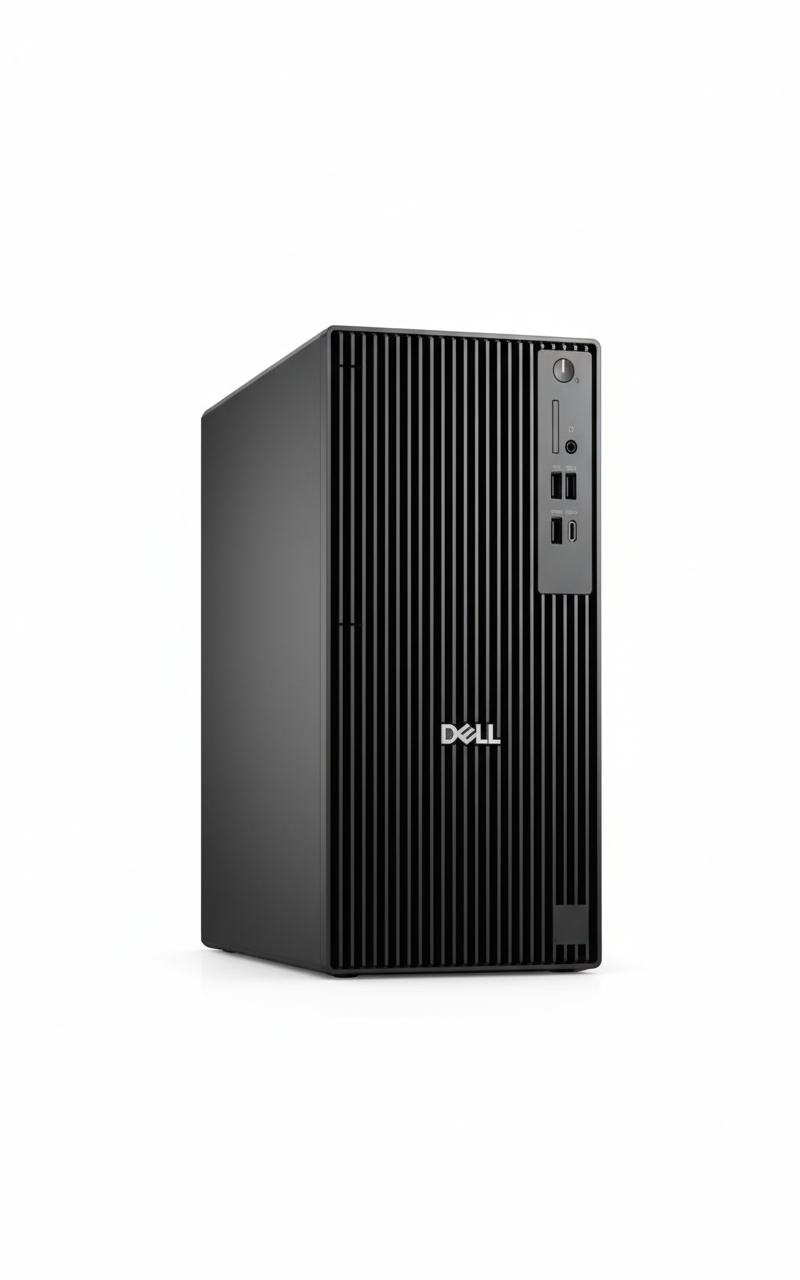
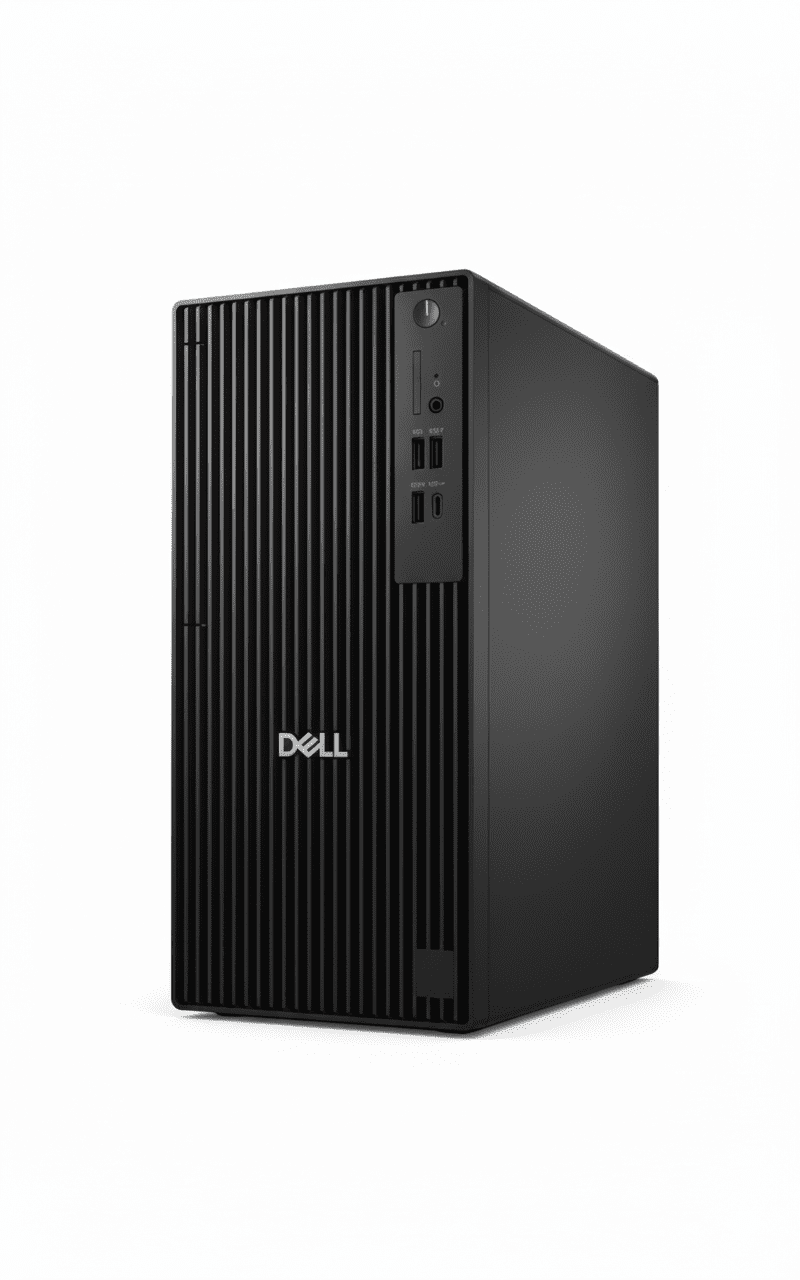
Dell Pro Tower QCT1250
Budget Business Tower | i5-14500 | Compact 15L | Affordable!
Intel Core i5-14500 (14-core, 5.0GHz) – 8GB DDR5 – 512GB SSD – Windows 11 Pro – Dell KB+Mouse – 1Y Warranty
🖥️ Budget Tower – Most Affordable Dell Pro!
• i5-14500: 14th Gen 14-core CPU!
• Most Compact: Under 15L – smallest tower!
• ₹37K Cheaper: Than Tower Plus!
• NO Monitor: Must buy separately!
₹63,372
₹74,781
SAVE ₹11,409 (15.3% OFF!)
*Tower only – Monitor NOT included | ₹37K cheaper than Tower Plus!
1 Year Warranty | In Stock | Free Delivery | No Cost EMI
CPU
i5-14500
Type
Compact Tower
Price
₹63K
Dell Pro Tower QCT1250 – Most Affordable & Compact Business Tower
🖥️ Budget Tower – ₹37K Cheaper Than Tower Plus!
The Dell Pro Tower QCT1250 at ₹63,372 is Dell’s most affordable and compact business tower featuring Intel Core i5-14500 (14 cores, 5.0GHz), Windows 11 Pro, 8GB DDR5 (up to 4800MT/s), 512GB SSD, integrated graphics, under 15L chassis (smallest tower!), Dell KB+Mouse, and 1-year warranty. IMPORTANT: This is a budget tower – Monitor NOT included, fewer expansion slots (3 PCIe vs 4), lower PSU (180W vs 260W) than Tower Plus! Perfect for budget-conscious businesses wanting affordable, upgradable desktops for basic office work!
⚡ i5-14500 (14-Core!)
- • 14 Cores: 6P+8E cores!
- • 5.0 GHz Turbo: Fast speeds!
- • 24MB Cache: Large L3!
- • 14th Gen: Raptor Lake!
- • Good for Office: Handles tasks well!
- • Budget-Friendly: Affordable!
🔧 Budget Tower
- • Most Compact: Under 15L smallest!
- • 3 PCIe Slots: Good expansion!
- • ₹37K Cheaper: Than Plus model!
- • 180W PSU: Lower than Plus!
- • 1 M.2 Slot: (+ optional 2nd)!
- • Still Upgradable: RAM/storage!
⚠️ What’s NOT Included
- • NO Monitor: Must buy separately!
- • NO Webcam: Must buy separately!
- • NO Wi-Fi: Ethernet only!
- • Need Monitor: ₹8-15K extra!
- • KB+Mouse: Included FREE!
- • Tower Only: Traditional desktop!
🎯 What You Get
- • i5-14500: 14-core office CPU!
- • Windows 11 Pro: Included!
- • 8GB DDR5: Fast memory!
- • 512GB SSD: Adequate storage!
- • Compact Tower: Under 15L!
- • KB + Mouse: Dell wired!
- • 1Y Warranty: Standard!
🔥 vs Tower Plus
Key differences:
- • ₹37K Cheaper: ₹63K vs ₹1.01L!
- • i5 vs Ultra 7: Slower CPU!
- • 3 PCIe vs 4: Fewer slots!
- • 180W vs 260W: Lower PSU!
- • 1Y vs 3Y: Shorter warranty!
💡 Perfect For
Best use cases:
- • Budget Businesses: Limited budget!
- • Basic Office: Email, web, Office!
- • Small Spaces: Compact tower!
- • SMBs: Small-medium business!
- • Cost-Conscious: Best value!
Intel Core i5-14500 – 14-Core Office Workhorse
💼 Solid 14-Core CPU for Office Tasks!
The Intel Core i5-14500 is a 14th Gen Raptor Lake processor with 14 cores (6 Performance + 8 Efficient), 20 threads, up to 5.0 GHz turbo, and 24MB L3 cache. Perfect for everyday business tasks: Microsoft Office, web browsing, email, video calls, multitasking. NOT an AI PC (no NPU like Core Ultra), but excellent value for standard office workloads. Sufficient for 95% of business users!
i5-14500 Specifications
Performance Capabilities
✅ Handles Well:
- • Microsoft Office (Word, Excel, PowerPoint)
- • Web browsing (20-30 tabs)
- • Email (Outlook, Gmail)
- • Video conferencing (Zoom, Teams)
- • Basic multitasking
- • PDF editing
- • Business applications
❌ Not Suitable For:
- • Gaming (integrated graphics only)
- • Heavy video editing (4K)
- • 3D rendering
- • AI workloads (no NPU)
💾 Memory & Storage
8GB DDR5-4800 RAM
• Configuration: 1 x 8GB DDR5 non-ECC
• Speed: Up to 4800 MT/s
• Expandable: Can upgrade to 16GB+
• Note: 8GB adequate for basic office
512GB SSD
• Capacity: 512GB SSD
• Slots: 1 M.2 2230/2280 slot
• Expandable: Can add 2nd M.2 via Zoom card
• Sufficient: For most office users
Display & Monitor Options – Choose Your Own!
⚠️ NO Built-in Display – Must Buy Monitor Separately!
CRITICAL: This is a budget tower PC – it does NOT include a monitor/display! You must purchase a monitor separately (₹8,000-15,000 for budget options). However, this gives you the flexibility to choose the exact monitor you want or use an existing monitor you already own, saving money!
💰 Budget Monitors (₹8-10K)
- • Size: 21.5-24″ FHD (1920×1080)
- • Panel: IPS or VA
- • Examples: Dell E2223HN (₹8.5K), HP 22f (₹9K), Acer K242HYL (₹9.5K)
- • Perfect for: Basic office work, email, web browsing
- • Features: HDMI, VGA, basic stand
💼 Mid-Range (₹11-15K)
- • Size: 24″ FHD with better features
- • Panel: IPS with 99% sRGB
- • Examples: Dell P2422H (₹12K), HP Z24n G3 (₹14K), BenQ GW2480 (₹11.5K)
- • Perfect for: Productivity, long work hours
- • Features: Height adjust, USB hub, blue light filter
⚠️ Save Money Option
- • Already Own Monitor? Save ₹8-15K!
- • Used/Refurb: Get 24″ for ₹5-6K
- • Multi-Monitor: 2× budget monitors (₹16-18K total)
- • Office Surplus: Check if office has spare monitors
🖥️ Video Output Capabilities
Available Video Ports
- • 1× DisplayPort 1.4a: Up to 4096×2304 @60Hz (standard)
- • 1× HDMI 2.1 (TMDS): Up to 4096×2160 @60Hz (4K!)
- • Optional VGA: Legacy support for old monitors
- • Note: Integrated graphics only – no gaming!
Multi-Monitor Support
- • Up to 2 Displays: DisplayPort + HDMI simultaneously!
- • Both FHD @60Hz: Dual 1080p monitor setup
- • Perfect for: Spreadsheet + email, browser + docs
- • Budget Setup: 2× ₹9K monitors = ₹18K total
💡 Monitor Buying Guide for Budget Users
Recommended for Budget Tower:
- • Best Value: 24″ FHD IPS (₹8-10K) – Dell E2423HN or HP 24mh
- • If Have ₹15K: Get better stand + blue light filter
- • Multi-Monitor: 2× 21.5″ FHD (₹16-18K) for productivity
- • Save Money: Use old monitor if available!
What to Look For:
- ✓ Resolution: FHD (1920×1080) minimum
- ✓ Panel: IPS for better colors, viewing angles
- ✓ Ports: HDMI or DisplayPort (VGA for very old)
- ✓ Size: 21.5-24″ ideal for office desks
Total Cost: Tower (₹63,372) + Monitor (₹8-10K) + Webcam (₹2K) = ₹73-75K complete setup – still ₹33-35K cheaper than Tower Plus!
Webcam – Must Buy USB Webcam Separately!
📹 NO Built-in Webcam – Budget External USB Required!
IMPORTANT: Budget tower PCs do NOT have built-in webcams. For video conferencing (Zoom, Teams), you must purchase a USB webcam separately (₹1,500-3,000 for budget options). The good news: you can choose exactly the quality you need and upgrade anytime!
💰 Budget Webcams (₹1.5-2K)
- • Resolution: 720p HD (adequate)
- • Examples: Logitech C270 (₹1.5K), C310 (₹1.8K)
- • Features: Basic mic, auto light correction
- • Perfect for: Occasional video calls, budget offices
- • Pros: Very cheap, plug-and-play
- • Cons: Grainy in low light, basic quality
- • BEST for Budget Tower!
💼 Better Option (₹2.5-3.5K)
- • Resolution: 1080p FHD
- • Examples: Logitech C505 (₹2.5K), HP 320 FHD (₹2.8K)
- • Features: Better mic, noise reduction
- • Perfect for: Daily video calls, better quality
- • Pros: Sharp 1080p, good low-light
- • Cons: Slightly more expensive
⚠️ Budget Reality Check
- • Tower ₹63K: PC only
- • + Monitor ₹9K: Basic 24″ FHD
- • + Webcam ₹2K: Logitech C270/C310
- • = Total ₹74K: Complete setup!
- • Still ₹34K cheaper: Than Tower Plus complete!
🎥 Webcam Recommendations for Budget Tower
| Webcam Model | Price | Resolution | Best For |
|---|---|---|---|
| Logitech C270 | ₹1,500 | 720p HD | Best budget choice! Adequate quality |
| Logitech C310 | ₹1,800 | 720p HD | Slightly better than C270, good value |
| Logitech C505 | ₹2,500 | 1080p FHD | Daily calls, better quality worth ₹1K extra |
| HP 320 FHD | ₹2,800 | 1080p FHD | Good alternative to Logitech |
💡 Our Webcam Recommendation
For budget tower users: The Logitech C270 (₹1,500) is the sweet spot! It’s the best-selling webcam for a reason – adequate 720p quality for video calls, built-in mic works fine, and it just works plug-and-play. Yes, it’s grainy in low light and not super sharp, but for ₹1,500, it gets the job done for occasional Zoom/Teams meetings.
If you have daily video calls: Spend ₹1K extra for Logitech C505 (₹2,500) – the 1080p upgrade is noticeable and worth it if you’re on camera frequently. Total setup: ₹63K tower + ₹9K monitor + ₹2.5K webcam = ₹74.5K complete – still amazing value!
Connectivity – Essential Ports for Budget Tower
🔌 Good Port Selection for Budget PC
The Dell Pro Tower offers adequate connectivity with USB-C, USB-A ports, DisplayPort, HDMI, and Ethernet – everything a budget office PC needs!
🔵 Front Ports (Easy Access)
- • 1× USB 3.2 Gen 1 Type-C: 5 Gbps (modern devices)
- • 1× USB 3.2 Gen 1 Type-A: 5 Gbps (fast transfers)
- • 2× USB 2.0 Type-A: 480 Mbps (keyboard/mouse)
- • 1× Headset Jack: 3.5mm audio combo
🔴 Rear Ports (Permanent)
- • 1× DisplayPort 1.4a: Monitor connection
- • 1× HDMI 2.1: Monitor/TV connection
- • 2× USB 3.2 Gen 1: 5 Gbps (printer, external drive)
- • 2× USB 2.0: SmartPower On feature
- • 1× RJ45 Ethernet: Gigabit (1000 Mbps)
📶 Network Connectivity
Wired Network (Included)
- • Gigabit Ethernet: RJ45 port, 1000 Mbps speed
- • Stable Connection: No wireless dropouts
- • Best for: Budget offices (Ethernet cheaper than Wi-Fi!)
- • Free: No extra cost for network access
Wireless (Optional Upgrade)
- • NO Wi-Fi Built-in: Must add M.2 Wi-Fi card
- • M.2 2230 Slot: For Wi-Fi 6 + Bluetooth combo
- • Cost: ₹1,500-2,500 for Wi-Fi card
- • Budget Tip: Use Ethernet, skip Wi-Fi to save money!
⚡ USB Port Summary
| Port Type | Speed | Quantity | Best Use |
|---|---|---|---|
| USB 3.2 Gen 1 (5 Gbps) | 5 Gbps | 3 total (1 front + 2 rear) | External drives, fast peripherals |
| USB 3.2 Gen 1 Type-C | 5 Gbps | 1 (Front) | Modern devices, phone charging |
| USB 2.0 (480 Mbps) | 480 Mbps | 4 (2 front, 2 rear) | Keyboard, mouse, webcam |
Note: Budget tower has fewer USB 3.2 ports (3 vs 6 in Tower Plus), but still adequate for most office users!
✅ Connectivity Verdict
For a budget tower, the port selection is perfectly adequate! You get the essentials: USB-C front port, enough USB-A ports for keyboard/mouse/printer/webcam, dual display outputs (DP + HDMI), and Gigabit Ethernet. The lack of Wi-Fi is acceptable for budget segment – just use Ethernet cable (more stable anyway!). If you desperately need Wi-Fi, add a ₹1.5-2K Wi-Fi card. Overall, no complaints for ₹63K price!
Software – Windows 11 Pro Included
💻 What Software is Included?
✅ Pre-Installed (FREE!)
- • Windows 11 Pro: Full business OS (worth ₹15K!)
- • Microsoft 365 Trial: 30-day trial (must buy after)
- • Dell SupportAssist: Driver updates, diagnostics
- • Dell Update: BIOS & driver manager
- • Windows Defender: Basic antivirus protection
❌ NOT Included (Must Buy)
- • Microsoft Office: Only 30-day trial (need ₹4,200/yr subscription)
- • Antivirus: Defender basic only, can add Norton/McAfee
- • Adobe Acrobat: Need to buy for PDF editing
- • Advanced Security: No HP Wolf Security (budget model)
🪟 Windows 11 Pro Features
Security Features
- • BitLocker: Drive encryption
- • Windows Defender: Built-in antivirus
- • Firewall: Network protection
- • TPM 2.0: Hardware security
Business Features
- • Domain Join: Active Directory
- • Group Policy: IT management
- • Remote Desktop: Host RDP
- • Hyper-V: Virtual machines
Productivity
- • Virtual Desktops: Workspace organization
- • Snap Layouts: Window management
- • Microsoft Teams: Built-in chat
- • Voice Typing: Dictation
⚠️ Budget Software Reality
Good news: Windows 11 Pro (worth ₹15K) is included FREE! This alone is huge value. Bad news: No enterprise security suite like HP Wolf Security – you only get basic Windows Defender. For budget offices, Defender is adequate for most threats, but security-critical businesses should consider Tower Plus with better security.
Additional costs to budget for: Microsoft 365 subscription (₹4,200/year for Office apps), optional Norton/McAfee antivirus (₹1,500-2,500/year), Adobe Acrobat if needed (₹1,800/month). Factor these into total cost of ownership!
Use Cases – Who Should Buy Budget Tower?
💼 #1: Small Businesses & Startups
Perfect for: SMBs with limited budgets needing basic office PCs
Why this works:
- ✓ ₹63K budget-friendly (₹37K cheaper than Tower Plus!)
- ✓ i5-14500 handles all basic office tasks smoothly
- ✓ 8GB RAM sufficient for email/web/Office
- ✓ Windows 11 Pro for business features
- ✓ Compact under-15L saves office space
- ✓ Can buy 2 units for price of 1 Tower Plus!
👨💼 #2: Budget Office Workers
Perfect for: Employees doing standard office work (email, web, Office)
Why this works:
- ✓ i5-14500 more than enough for Office/email/web
- ✓ 8GB RAM handles 20-30 browser tabs fine
- ✓ Fast SSD for quick boot and file access
- ✓ Can use existing monitor (save ₹10K!)
- ✓ Upgradable if needs grow (add RAM/storage)
🏫 #3: Educational Institutions
Perfect for: Schools, colleges needing computer labs on budget
Why this works:
- ✓ Bulk purchase savings (buy 20-50 units)
- ✓ Adequate performance for student workstations
- ✓ Compact size fits crowded computer labs
- ✓ Easy IT management with Windows Pro
- ✓ Lower total cost = more PCs for same budget
🏠 #4: Home Office / Freelancers
Perfect for: Freelancers, remote workers on tight budgets
Why this works:
- ✓ Professional desktop for ₹63K (vs ₹1.01L Tower Plus)
- ✓ Handles freelance work (writing, design, web dev)
- ✓ Upgradable as income grows
- ✓ Dual monitor support for productivity
- ✓ Small footprint for home offices
🛒 #5: Retail/POS Stations
Perfect for: Retail stores needing POS/billing computers
Why this works:
- ✓ Fast enough for POS software
- ✓ Compact fits behind counters
- ✓ Can connect barcode scanners, receipt printers
- ✓ Budget-friendly for multiple locations
- ✓ Windows Pro for business reliability
📞 #6: Call Centers (Budget)
Perfect for: Call centers needing many workstations
Why this works:
- ✓ i5-14500 handles CRM software + browser
- ✓ ₹63K × 50 agents = ₹31.5L (vs ₹50.5L for Tower Plus!)
- ✓ Saves ₹19 lakh on 50-seat call center!
- ✓ Adequate for call center workflows
- ✓ Standardized deployment
❌ NOT Recommended For
- ❌ Heavy Multitaskers: Need 16GB+ RAM (get Tower Plus)
- ❌ Power Users: i5 slower than i7/Ultra 7 (get Tower Plus)
- ❌ Security-Critical: No Wolf Security (get Tower Plus or HP ProOne 440)
- ❌ Content Creators: Need dedicated GPU for video/3D
- ❌ Gamers: Integrated graphics – no gaming!
- ❌ CAD Users: Heavy 3D CAD needs GPU + more power
Most Compact Tower – Under 15L Chassis
📦 Dell’s Smallest Business Tower!
At under 15 liters, the Dell Pro Tower QCT1250 is Dell’s most compact tower PC in the industry with versatile expandability! Dimensions: 324×154×293mm – saves significant desk space compared to traditional mid-towers. Perfect for small offices, tight spaces, or under-desk placement. Despite compact size, still offers 3 PCIe slots for expansion!
✅ Compact Advantages
- • Under 15L: Smallest Dell business tower!
- • Saves Space: 30% smaller than standard towers!
- • Under-Desk Friendly: Fits easily under desks!
- • Lighter Weight: 5.44-6.78 kg (portable!)
- • Still Expandable: 3 PCIe slots despite size!
- • No-Tools Access: Easy to open!
⚠️ Compact Trade-offs
- • Less Cooling: Smaller = less airflow than Tower Plus!
- • Fewer Slots: 3 PCIe vs 4 in Tower Plus!
- • Lower PSU: 180W limits GPU options!
- • Tighter Build: Less room for cable management!
📐 Dimensions Comparison
| Model | Volume | Dimensions (H×W×D) | Weight |
|---|---|---|---|
| Dell Pro Tower QCT1250 | Under 15L (Smallest!) | 324×154×293 mm | 5.44-6.78 kg |
| Dell Pro Tower Plus QBT1250 | ~15L | 324×154×293 mm | 5.73-7.17 kg |
Dell Pro Tower vs Tower Plus – ₹37K Difference!
🆚 Budget Tower (₹63K) vs Premium Tower Plus (₹1.01L)
| Feature | Pro Tower QCT1250 (₹63K) | Tower Plus QBT1250 (₹1.01L) |
|---|---|---|
| Price | ₹63,372 (Cheaper!) | ₹1,00,590 (₹37K more!) |
| CPU | i5-14500 (14C, 5.0GHz) | Ultra 7 265 (20C, AI NPU) |
| RAM | 8GB DDR5-4800 | 16GB DDR5-5600 |
| Storage | 512GB SSD (1 M.2 slot) | 512GB (3 M.2 slots!) |
| PCIe Slots | 3 PCIe slots | 4 PCIe slots |
| PSU | 180W Bronze | 260W Bronze |
| Warranty | 1 Year | 3 Year |
| Best For | Budget businesses, Basic office | Power users, AI workloads, Upgrades |
✅ Which Dell Tower Should You Choose?
💰 Choose Pro Tower (₹63K) If:
- ✓ Limited Budget: Save ₹37K!
- ✓ Basic Office: Email, web, Office apps only
- ✓ Small Business: Budget-conscious SMB
- ✓ 8GB Enough: Light multitasking
- ✓ No Heavy Tasks: Standard office workloads
- ✓ Compact Space: Smallest tower needed
🚀 Choose Tower Plus (₹1.01L) If:
- • Need Performance: Faster Ultra 7 CPU
- • AI Workloads: Want NPU for AI tasks
- • More RAM: Need 16GB+ for multitasking
- • Future Upgrades: Want 4 PCIe + 3 M.2 slots
- • Add GPU: Plan dedicated graphics (260W PSU)
- • 3Y Warranty: Longer support needed
Dell Pro Tower QCT1250 vs Competitors
💼 #1: HP ProDesk 400 G9 Micro
HP: i5-13500 + 8GB + 512GB + Win 11 Pro – ₹58,000
Dell: i5-14500 + 8GB + 512GB + Win 11 Pro – ₹63,372
Dell Wins:
- ✓ Newer CPU (14th vs 13th gen)
- ✓ More expandability (tower)
- ✓ Larger chassis
HP Wins:
- ✓ ₹5K cheaper
- ✓ Smaller (micro form)
Verdict: Dell better for upgrades, HP for ultra-compact!
🖥️ #2: Lenovo ThinkCentre M70t Gen 4
Lenovo: i5-14500 + 8GB + 512GB + Win 11 Pro – ₹65,000
Dell: i5-14500 + 8GB + 512GB + Win 11 Pro – ₹63,372
Dell Wins:
- ✓ ₹1.6K cheaper!
- ✓ More compact (under 15L)
- ✓ Better deal
Lenovo Wins:
- ✓ ThinkCentre brand
- ✓ Slightly better build
Verdict: Dell better value for same specs!
💻 #3: HP ProOne 240 G10 AIO
HP AIO: i3-N300 + 8GB + 512GB + Display – ₹54,499
Dell Tower: i5-14500 + 8GB + 512GB (No display) – ₹63,372
Dell Wins:
- ✓ Much faster CPU!
- ✓ Easy upgrades
- ✓ Expandable
HP Wins:
- ✓ Display built-in!
- ✓ Space-saving!
- ✓ Clean setup!
Verdict: Different form factors – Tower for power, AIO for space!
🚀 #4: Dell Pro Tower Plus QBT1250
Tower Plus: Ultra 7 265 + 16GB + 512GB – ₹1,00,590
Pro Tower: i5-14500 + 8GB + 512GB – ₹63,372
Pro Tower Wins:
- ✓ ₹37K cheaper!
- ✓ Sufficient for office
- ✓ Best budget option
Tower Plus Wins:
- ✓ Much faster CPU + AI NPU
- ✓ More slots, better PSU
- ✓ 3Y warranty
Verdict: Pro Tower for budget, Tower Plus for performance!
🔷 #5: ASUS ExpertCenter D5 Tower
ASUS: i5-14500 + 8GB + 512GB + Win 11 Pro – ₹61,000
Dell: i5-14500 + 8GB + 512GB + Win 11 Pro – ₹63,372
Dell Wins:
- ✓ Most compact (under 15L)
- ✓ Dell brand reputation
ASUS Wins:
- ✓ ₹2.4K cheaper
Verdict: Very close, Dell more compact!
🎯 #6: Acer Veriton M Tower
Acer: i5-13400 + 8GB + 256GB + Win 11 Pro – ₹55,000
Dell: i5-14500 + 8GB + 512GB + Win 11 Pro – ₹63,372
Dell Wins:
- ✓ Newer CPU (14th vs 13th gen)
- ✓ Double storage (512GB vs 256GB)
- ✓ Better build quality
Acer Wins:
- ✓ ₹8K cheaper
Verdict: Dell worth ₹8K extra for better specs!
🏆 Competitor Summary
At ₹63,372, the Dell Pro Tower QCT1250 offers best value budget business tower with i5-14500 (14 cores), 8GB DDR5, 512GB SSD, Windows 11 Pro, and most compact under-15L chassis. While some competitors are ₹2-5K cheaper, Dell’s compact design, newer CPU, and expandability make it excellent value for budget-conscious businesses!
Pros & Cons
✅ Pros
- + ₹63,372 Price: Most affordable Dell Pro tower!
- + ₹37K Cheaper: Than Tower Plus (save huge!)
- + i5-14500 CPU: 14 cores sufficient for office!
- + Windows 11 Pro: Business OS included!
- + 8GB DDR5: Fast memory for office tasks!
- + 512GB SSD: Adequate storage!
- + Most Compact: Under 15L – smallest tower!
- + 3 PCIe Slots: Still expandable!
- + Upgradable: Can add RAM, storage, GPU!
- + KB+Mouse Included: Dell wired peripherals!
- + No-Tools Chassis: Easy access for upgrades!
- + 50% Quieter: Enhanced thermal design!
- + Eco-Friendly: 44% recycled plastic!
- + DisplayPort + HDMI: Dual monitor support!
- + Made in India: Local manufacturing!
❌ Cons
- – NO Monitor: Must buy separately (₹8-15K extra!)
- – NO Webcam: Must buy USB webcam (₹1.5-3K)
- – NO Wi-Fi: Ethernet only (must buy card!)
- – Only 8GB RAM: May need upgrade for heavy multitasking!
- – Only 1 M.2 Slot: vs 3 slots in Tower Plus!
- – Only 3 PCIe Slots: vs 4 in Tower Plus!
- – 180W PSU: Limits GPU upgrade options!
- – Only 1 Year Warranty: vs 3Y in Tower Plus!
- – i5 vs Ultra 7: Slower than Tower Plus!
- – NO AI NPU: Not an AI PC!
- – Integrated Graphics: No dedicated GPU – can’t game!
- – Total Cost ₹72-78K: With monitor + webcam!
🎯 Final Verdict
Best Budget Business Tower – ₹37K Cheaper Than Tower Plus!
Honest Assessment: Excellent Budget Tower, BUT Need to Buy Monitor!
The Dell Pro Tower QCT1250 at ₹63,372 is the best budget business tower featuring Intel Core i5-14500 (14 cores, 5.0GHz), Windows 11 Pro, 8GB DDR5-4800, 512GB SSD, under 15L compact chassis (smallest tower!), 3 PCIe slots, Dell KB+Mouse, and 1-year warranty. CRITICAL: Tower PC only – must buy monitor (₹8-15K), webcam (₹1.5-3K) separately! Total cost ₹72-78K. Perfect for budget-conscious businesses wanting affordable, upgradable desktops for basic office work!
What makes this special: ₹37K cheaper than Tower Plus! – While Tower Plus offers Ultra 7 CPU, AI NPU, more slots, and 3Y warranty, this budget model saves massive ₹37,000 while still delivering excellent performance for 95% of office users. The i5-14500 (14 cores) handles Microsoft Office, web browsing, email, video calls, and basic multitasking perfectly. Under 15L chassis is Dell’s most compact tower – saves desk space. 3 PCIe slots allow future GPU/expansion card additions. Perfect for SMBs with limited budgets!
At ₹63,372 (+ monitor ₹8-15K = ₹72-78K total), this is the best budget business tower for 2025. Yes, you need to buy monitor separately, but total cost (₹72-78K) is STILL ₹24-30K cheaper than Tower Plus complete! The i5-14500 is sufficient for office work, 8GB RAM handles basic multitasking, 512GB SSD adequate, and 1Y warranty acceptable for budget segment. Our recommendation: Buy this if you’re a small business with limited budget, need basic office PC, have/will buy monitor, want most compact tower, and save ₹37K vs Tower Plus. For power users needing AI NPU, more expansion, 3Y warranty, spend extra ₹37K on Tower Plus. But for 80% of businesses doing standard office work: Dell Pro Tower QCT1250 at ₹63K is THE best budget choice!
Overall Rating
Great budget tower!
Value Rating
Excellent budget value!
Recommended?
For budget businesses!
👥 Who Should Buy This?
✅ Buy Pro Tower (₹63K) If:
- ✓ Limited Budget: Save ₹37K vs Tower Plus!
- ✓ Small Business: SMB, startup, budget-conscious
- ✓ Basic Office: Email, web, Office apps only
- ✓ Have Monitor: Already own display (saves ₹10-15K!)
- ✓ Most Compact: Need smallest tower (under 15L)
- ✓ 8GB Enough: Light multitasking sufficient
- ✓ Total ₹72-78K: Budget with monitor + webcam
🚀 Buy Tower Plus (₹1.01L) If:
- • Need Performance: Faster Ultra 7 CPU + AI NPU
- • Heavy Tasks: CAD, video editing, multitasking
- • More RAM: Need 16GB+ for power usage
- • Future Upgrades: Want 4 PCIe + 3 M.2 slots
- • Add GPU: Plan dedicated graphics (260W PSU)
- • 3Y Warranty: Longer support needed
🎯 Category Scores
💡 Editor’s Final Recommendation
“Best budget business tower – saves ₹37K vs Tower Plus!” At ₹63,372 (+ monitor ₹8-15K), this Dell Pro Tower QCT1250 delivers exceptional value: i5-14500 (14-core, sufficient for office), Windows 11 Pro, 8GB DDR5, 512GB SSD, under 15L compact chassis (smallest!), 3 PCIe slots, and 1Y warranty. Total cost ₹72-78K complete – STILL ₹24-30K cheaper than Tower Plus!
Our verdict: For small businesses with limited budgets doing basic office work, this is THE choice at ₹63K! Saves massive ₹37K vs Tower Plus while delivering 95% of performance most businesses need. The i5-14500 handles Office/email/web perfectly, compact size saves desk space, and still upgradable for future. If you already have monitor, even better deal (only ₹63K + webcam!). For power users needing AI NPU, more slots, 3Y warranty – spend extra ₹37K on Tower Plus. But for 80% of businesses: Dell Pro Tower QCT1250 is unbeatable value!
🖥️ Ready for Budget Tower?
🖥️ ORDER Dell Pro Tower – ₹63,372i5-14500 (14C) + Windows 11 Pro + 8GB DDR5 + 512GB SSD + KB+Mouse
Tower Only (Monitor NOT included!) | 1 Year Warranty | In Stock | Free Delivery | No Cost EMI
Frequently Asked Questions (FAQs)
Q1: Does this include monitor/display?
A: NO! Tower PC only! Must buy monitor separately (₹8,000-15,000). Total cost: ₹63,372 (tower) + ₹10K (monitor) + ₹2K (webcam) = ₹75K complete setup. If you already have monitor, saves ₹10-15K!
Q2: Tower vs Tower Plus – worth ₹37K extra?
A: NO for most offices! Tower Plus costs ₹1.01L (₹37K more) but offers: faster Ultra 7 CPU + AI NPU, 16GB RAM, 4 PCIe slots, 3 M.2 slots, 260W PSU, 3Y warranty. Our advice: For basic office (email/web/Office), save ₹37K with Pro Tower! Only spend extra if need AI workloads, heavy multitasking, or future GPU.
Q3: Is i5-14500 sufficient for office work?
A: YES! More than enough! i5-14500 (14 cores, 5.0GHz) handles: Microsoft Office (Word/Excel/PowerPoint), web browsing (20-30 tabs), email (Outlook), video calls (Zoom/Teams), basic multitasking. Sufficient for 95% of office users. Only upgrade to Tower Plus if doing CAD, video editing, or heavy multitasking!
Q4: Can I upgrade RAM to 16GB later?
A: YES! Easy upgrade! Has DDR5 slots – can add another 8GB stick for 16GB total (or replace with 2×16GB for 32GB). DDR5-4800 RAM costs ₹3-4K for 8GB stick. 8GB adequate for basic office, but if you multitask heavily (50+ browser tabs), upgrade to 16GB recommended!
Q5: Can I add dedicated GPU for light gaming/CAD?
A: Limited by 180W PSU! Has 1 PCIe x16 slot for GPU, BUT 180W PSU limits options to: GT 1030 (very basic), GTX 1650 (low-power), or RX 6400 (entry-level). For better GPU (RTX 4060), need to upgrade PSU to 360W Platinum (available option +₹5-8K) OR buy Tower Plus (260W PSU standard). If plan GPU, get Tower Plus!
Q6: Does this have Wi-Fi or need cable?
A: Ethernet only (no Wi-Fi!): Has RJ45 Gigabit Ethernet port. If need wireless, must buy Wi-Fi card (has M.2 2230 slot for combo card – ₹1,500-3,000). Or use Ethernet cable (recommended for office PCs – more stable + faster than Wi-Fi!)
Q7: What’s the total cost with all accessories?
A: ₹72,000 – ₹78,000 complete! Tower: ₹63,372. Monitor (24″ FHD): ₹8,000-15,000. Webcam: ₹1,500-3,000. KB+Mouse: Included! Total: ₹72K-78K. STILL ₹24-30K cheaper than Tower Plus complete (₹1.01L + monitor)! If have monitor, only ₹65K!
Q8: How compact is “under 15L”?
A: Dell’s smallest business tower! Dimensions: 324×154×293mm (12.77×6.06×11.54 inches). Footprint: 154×293mm (just 6×11.5 inches!) – fits under most desks easily. Weight: 5.44-6.78 kg (light enough to move). 30% smaller than standard mid-towers. Perfect for small offices with limited desk space!
Q9: Is 1-year warranty sufficient?
A: Acceptable for budget segment! Includes 1Y parts, labor, onsite repair (Dell technician comes to you). Can extend to 3Y for extra cost if needed. Tower Plus has 3Y standard. For budget businesses: 1Y acceptable (most issues appear in first year). Dell PCs reliable: <1% require service in first year!
Q10: Can I connect 2 monitors for dual-display?
A: YES! Has DisplayPort + HDMI! Rear ports: 1× DisplayPort 1.4a + 1× HDMI 2.1 = can connect 2 monitors simultaneously! Perfect for productivity (spreadsheet + email, or dual browser windows). Integrated graphics handles 2× FHD monitors easily. Great for office multitasking!
Q11: Pro Tower vs All-in-One – which is better?
A: Different needs! Choose Pro Tower if: Want upgradability, have monitor, limited budget (₹72-78K with monitor), need compact tower. Choose AIO if: Limited space, want clean setup, need complete package (display included), no upgrades needed. Tower = upgradable, AIO = space-saving. Both good – depends on priorities!
Q12: What monitor should I buy with this?
A: Budget recommendations: ₹8-10K: 24″ FHD (1920×1080) IPS monitors (Dell E2423HN, HP M24f). ₹12-15K: 27″ FHD IPS with better features (Dell S2722DC, HP Z27). ₹15-20K: 27″ QHD (2560×1440) for more screen space. Match to your desk space and budget!
Q13: How is this vs HP ProDesk budget tower?
A: Very competitive! HP ProDesk 400 G9 similar specs (i5-14500/8GB/512GB) costs ₹65-68K. Dell Pro Tower: ₹63,372 (₹2-5K cheaper!), more compact (under 15L), better thermals (50% quieter), Dell brand reputation. HP slightly better build quality. Both excellent – Dell better value!
Q14: Can I use this for light video editing?
A: 1080p editing – YES! i5-14500 handles: 1080p video editing (short clips, simple edits in DaVinci/Premiere), photo editing (Photoshop with small files), basic multimedia. NOT suitable for: 4K video editing, heavy After Effects, 3D rendering (need dedicated GPU + more RAM). For casual editing: works! For professional: need Tower Plus or add GPU!
Q15: Final verdict – should I buy this tower?
A: YES if you fit the profile! Buy Pro Tower (₹63K) if: Limited budget, small business, basic office work, have/will buy monitor, most compact tower, save ₹37K vs Tower Plus. Total ₹72-78K with monitor – excellent budget value! Buy Tower Plus (₹1.01L) if: Need AI NPU, heavy multitasking, plan GPU, want 3Y warranty. For 80% of businesses doing standard office work: Dell Pro Tower QCT1250 is THE best budget choice at ₹63,372!
Complete Technical Specifications
| Dell Pro Tower QCT1250 Desktop Full Specifications | |
|---|---|
| 📋 BASIC INFORMATION | |
| Model Name | Dell Pro Tower Desktop |
| Model Number | QCT1250 |
| Order Code | bto005_qct1250_i2x |
| Series | Dell Pro (Budget Business Series) |
| Form Factor | Compact Tower Desktop (Under 15L – Smallest!) |
| Recommended Usage | Budget businesses, Small offices, Basic office work |
| Rating | 4.3/5 (93 reviews) |
| 💻 OPERATING SYSTEM | |
| OS | Windows 11 Pro (Pre-installed) |
| Note | Dell recommends Windows 11 Pro for business |
| ⚡ PROCESSOR | |
| Processor Name | Intel Core i5-14500 vPro (14th Gen Raptor Lake) |
| Cores / Threads | 14 Cores / 20 Threads (6P+8E cores) |
| Max Turbo | Up to 5.0 GHz |
| L3 Cache | 24 MB |
| NPU (AI Accelerator) | None (Not AI PC!) |
| Architecture | Raptor Lake (14th Gen) |
| vPro Support | Yes (Enterprise management) |
| 🧠 MEMORY (RAM) | |
| Installed RAM | 8 GB DDR5-4800 MT/s (1 x 8 GB, non-ECC) |
| RAM Type | DDR5 (Latest generation!) |
| Speed | Up to 4800 MT/s |
| Expandable | Yes – can upgrade to 16GB+ DDR5 |
| Note | 8GB adequate for basic office, upgrade to 16GB for heavy multitasking |
| 💾 STORAGE | |
| SSD | 512 GB SSD |
| M.2 Slots | 1 M.2 2230/2280 SSD slot (can add 2nd via Zoom card) |
| SATA Slots | 1 SATA 3.0 HDD slot + 1 SATA 3.0 ODD slot |
| Optical Drive | No Optical Drive (can add later) |
| 🖥️ DISPLAY (CRITICAL!) | |
| Built-in Display | NOT INCLUDED – Must buy separately! |
| Monitor Cost | ₹8,000 – ₹15,000 extra |
| Form Factor Note | Compact Tower PC – Separate monitor required! |
| 🎮 GRAPHICS | |
| Graphics | Integrated Graphics (Intel UHD) |
| GPU Expansion | Can add GPU (but 180W PSU limits options!) |
| Note | For gaming/heavy CAD, need to upgrade PSU to 360W first! |
| 🎰 EXPANSION SLOTS | |
| PCIe Slots | 3 PCIe Slots Total |
| PCIe Gen3 x16 | 1 Full-height Gen3 PCIe x16 slot (for GPU) |
| PCIe Gen3 x1 | 2 Full-height Gen3 PCIe x1 slots |
| M.2 WiFi Slot | 1 M.2 2230 slot for WiFi/Bluetooth combo card |
| Security Slot | 1 security-cable slot (Kensington lock) |
| vs Tower Plus | 3 PCIe slots vs 4 in Tower Plus |
| 🔌 PORTS & CONNECTIVITY | |
| Front Ports | 1× USB 3.2 Gen 1 Type-C (5 Gbps), 1× USB 3.2 Gen 1 (5 Gbps), 2× USB 2.0, 1× Headset jack |
| Rear USB Ports | 2× USB 3.2 Gen 1 (5 Gbps), 2× USB 2.0 (SmartPower On) |
| Video Outputs | 1× DisplayPort 1.4a + 1× HDMI 2.1 (Dual monitor!) |
| Network Port | 1× RJ45 Gigabit Ethernet (1 Gbps) |
| Legacy Port | 1 legacy serial port (optional) |
| Optional Ports | VGA, additional HDMI/DisplayPort (expansion options) |
| 📡 WIRELESS CONNECTIVITY | |
| Wireless LAN | No Wireless LAN Card (Must add separately!) |
| Ethernet | 1× RJ45 Gigabit Ethernet (included) |
| WiFi Upgrade | Can add M.2 WiFi card (₹1.5-3K) |
| ⌨️ INPUT DEVICES (INCLUDED!) | |
| Keyboard | Dell Wired Keyboard KB216 – US International Black (Included!) |
| Mouse | Dell USB Optical Mouse MS116 Black (Included!) |
| Webcam | NOT Included – Must buy separately (₹1.5-3K) |
| 🔋 POWER | |
| Power Supply | 180 W Bronze internal PSU |
| Upgrade Option | 360 W Platinum internal PSU (optional – for dedicated GPU) |
| vs Tower Plus | 180W vs 260W in Tower Plus (limits GPU options!) |
| 🏗️ CHASSIS & DESIGN | |
| Chassis | Dell Pro Tower QCT1250 with Core 14th Gen CPU, 180W Bronze PSU |
| Form Factor | Compact Tower (Under 15L – Dell’s Smallest!) |
| Design | No-tools chassis for easy upgrades, 50% quieter operation |
| 📐 DIMENSIONS & WEIGHT | |
| Height | 324.30 mm (12.77 in.) |
| Width | 154.00 mm (6.06 in.) |
| Depth | 293.00 mm (11.54 in.) |
| Volume | Under 15 Liters (Most Compact!) |
| Weight (Minimum) | 5.44 kg (12.00 lb) |
| Weight (Maximum) | 6.78 kg (14.95 lb) |
| 🛡️ SECURITY FEATURES | |
| Physical Security | Kensington Security lock slot, Chassis padlock compatible |
| BIOS Security | Power-on password, Setup password, SATA port disable |
| vPro Support | Yes (Intel vPro for enterprise management) |
| 📜 WARRANTY & SUPPORT | |
| Warranty | 1 Year Warranty (12 Months) |
| Support Type | Onsite repair (Dell technician comes to you!) |
| Upgrade Option | Can extend to 3Y or add ProSupport Plus |
| vs Tower Plus | 1Y vs 3Y in Tower Plus |
| 💿 SOFTWARE | |
| Microsoft Office | Activate Your Microsoft 365 For A 30 Day Trial |
| Security Software | None (can add separately) |
| 💰 PRICING | |
| Online Price | ₹74,781 |
| Dell Price | ₹63,372 |
| Savings | ₹11,409 (15.3% OFF!) |
| Monitor Cost (Extra) | +₹8,000 – ₹15,000 (NOT included!) |
| Webcam Cost (if needed) | +₹1,500 – ₹3,000 |
| Total Complete Setup | ₹72,000 – ₹78,000 (with monitor + webcam) |
| vs Tower Plus | ₹37,218 CHEAPER than Tower Plus! |
| Financing | No Cost EMI available (see options at checkout) |
| 🏭 MANUFACTURING INFO | |
| Country of Origin | India (Made in India!) |
| Manufacturer/Importer | Dell International Services India Private Limited, Bengaluru |
| Net Quantity | 1 (Tower PC only) |
| Commodity Type | Desktop Computer (Compact Tower) |
| Consumer Complaints | grievanceofficer@dell.com |
| ♻️ SUSTAINABILITY | |
| Recycled Materials | 44% post-consumer recycled plastic, 50% recycled steel in chassis |
| Packaging | Up to 100% recycled or renewable content packaging |
| Certifications | ENERGY STAR certified, EPEAT Gold with Climate+, TCO Generation 10 |
| ℹ️ ADDITIONAL INFORMATION | |
| Stock Status | In Stock (Ready to ship!) |
| Delivery | Free delivery |
| Customer Rating | 4.3/5 stars (93 reviews) |
| Key Advantages | Most Compact Tower (Under 15L) + ₹37K Cheaper + Budget-Friendly! |
| Best For | Budget businesses, Small offices, Basic office work, Cost-conscious SMBs |
| NOT For | Heavy multitasking, AI workloads, Gaming, Video editing (need Tower Plus) |
| vs Tower Plus | Pro Tower = Budget (₹63K), Tower Plus = Performance (₹1.01L) |
🖥️ Ready for Budget Business Tower?
Most Affordable Dell Pro – Save ₹37K vs Tower Plus!
🖥️ ORDER Dell Pro Tower – ₹63,372✅ i5-14500 (14C) + Windows 11 Pro + 8GB DDR5 + 512GB SSD + KB+Mouse | Most Compact (Under 15L!)
⚠️ Tower Only (Monitor NOT included – Add ₹8-15K!) | 1 Year Warranty | In Stock | Free Delivery | No Cost EMI
₹37,218 CHEAPER than Tower Plus! Perfect for budget businesses!
🖥️ Budget Tower Review Summary: Dell Pro Tower QCT1250 at ₹63,372 (+ monitor ₹8-15K = ₹72-78K total) is the best budget business tower – Intel Core i5-14500 (14-core, 5.0GHz), Windows 11 Pro, 8GB DDR5-4800, 512GB SSD, under 15L compact chassis (Dell’s smallest!), 3 PCIe slots, Dell KB+Mouse, 1Y warranty. ⚠️ IMPORTANT: Tower PC only – Monitor, webcam NOT included! ₹37,218 cheaper than Tower Plus – perfect for budget-conscious businesses doing basic office work!
Last Updated: November 2025 | 4.3/5 (93 Reviews) | In Stock | All prices subject to change
⚠️ Editor’s Note: Best budget business tower at ₹63K! Saves massive ₹37K vs Tower Plus while handling 95% of office tasks perfectly. i5-14500 + 8GB sufficient for email/web/Office. Most compact (under 15L), still upgradable. Total ₹72-78K with monitor+webcam – excellent budget value!