🎁 FREE HDMI 1.4 Cable Worth ₹500!
Plus 3 Year Comprehensive Warranty!
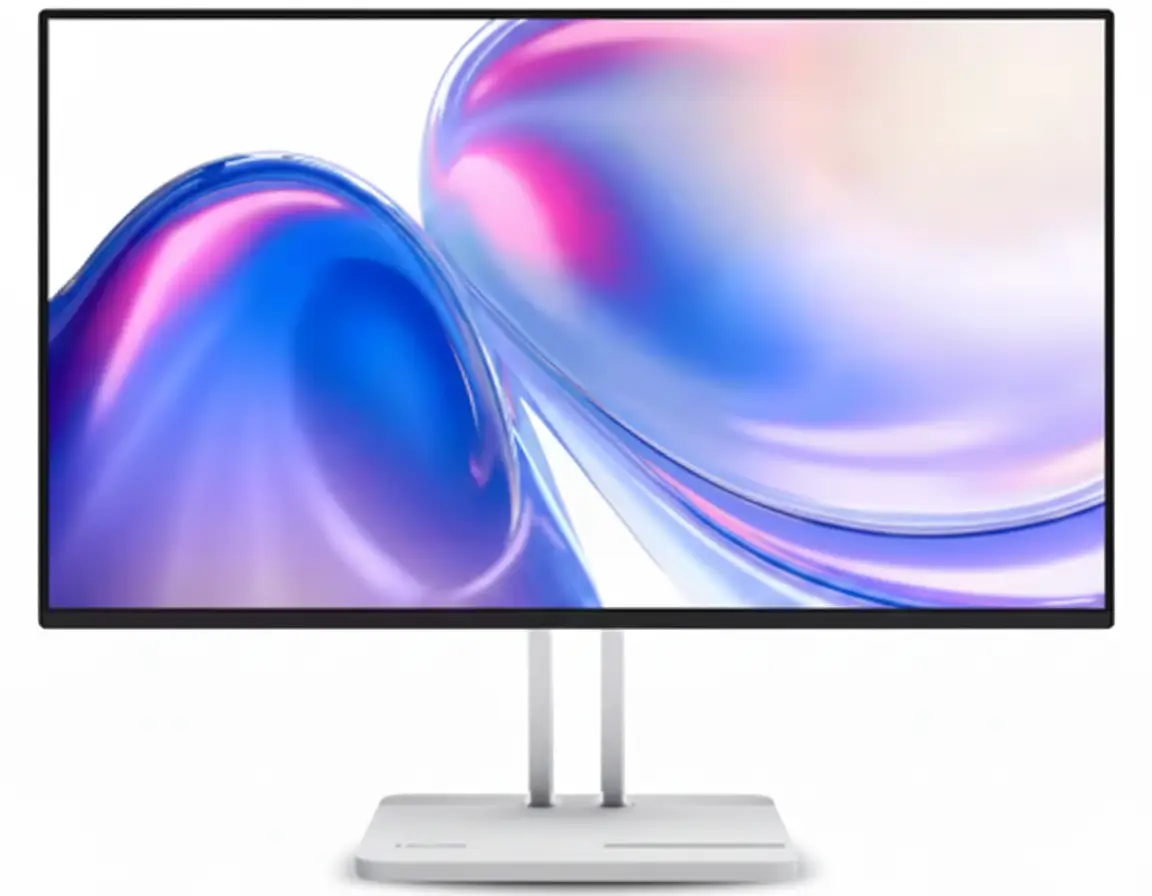
Lenovo L24-4C 23.8″ Gaming Monitor
144Hz IPS Display | 99% sRGB | 1ms MPRT | Best Budget Gaming Monitor 2025
23.8″ FHD IPS – 144Hz – 1ms Response – AMD FreeSync – 3W x 2 Speakers – Cloud Grey
🎮 Ultimate Budget Gaming Configuration:
• Display: 23.8″ FHD (1920×1080) IPS Panel
• Refresh Rate: 144Hz Ultra-Smooth Gaming
• Response Time: 1ms MPRT / 4ms GTG
• Color Accuracy: 99% sRGB (CIE 1931)
• Contrast: 1500:1 (Best in Class!)
• Sync Tech: AMD FreeSync (Tear-Free Gaming)
• Bonus: TÜV Flicker-Free + Low Blue Light!
₹9,230
₹11,591
SAVE ₹2,361 (20% OFF!)
*Includes Free Shipping & All Taxes | EMI from ₹308/month
Ships FREE by Wed, Dec 10 | My Lenovo Rewards: Earn 391 Points!
Refresh Rate
144Hz
Response
1ms MPRT
Color
99% sRGB
Lenovo L24-4C Monitor Overview
Gaming Monitor Highlights
- ✓ 144Hz: Ultra-smooth gaming
- ✓ IPS Panel: Wide viewing angles
- ✓ 1ms MPRT: Lightning fast
- ✓ 99% sRGB: Vivid colors
- ✓ AMD FreeSync: No tearing
- ✓ Built-in Speakers: 2 x 3W audio
- ✓ 20% OFF: Save ₹2,361!
In The Box
- 📦 Lenovo L24-4C Monitor with Stand
- 🔌 Power Cable (1.8m)
- 📺 HDMI 1.4 Cable (1.8m – FREE!)
- 📄 Quick Setup Guide
- 📜 Warranty Booklet
- 🔩 Mounting Screw
Bonus: FREE Lenovo Artery Software!
L24-4C Advantage
- • Latest Launch: December 2025
- • Best Value: 144Hz under ₹10K
- • Superior IPS: Better than VA
- • Eye Care: TÜV certified
- • Audio: Built-in speakers
- • 3 Year Warranty: Peace of mind
💼 Best Budget 144Hz Gaming Monitor Under ₹10,000
144Hz IPS Display Excellence
Experience buttery-smooth gaming with 144Hz refresh rate on premium IPS panel technology. Unlike VA panels, IPS delivers 178° wide viewing angles with consistent colors from any position. Perfect for competitive gaming and multimedia!
99% sRGB Color Accuracy
99% sRGB color coverage ensures vivid, true-to-life colors for gaming, content creation, and entertainment. 1500:1 contrast ratio delivers deep blacks and bright whites—significantly better than most competitors at this price!
Unbeatable ₹9,230 Price!
Get 144Hz IPS + AMD FreeSync + 1ms MPRT + Built-in Speakers + 3 Year Warranty at just ₹9,230 with 20% discount! The most affordable 144Hz IPS monitor in India—perfect for gamers and professionals!
23.8″ FHD IPS Panel Technology
📺 Display Specifications
Premium IPS Panel
IPS Advantage: Superior color accuracy and viewing angles!
🎨 Image Quality
Color Performance
Brightness & Contrast
🏆 Why IPS Panel is Superior to VA/TN
The IPS (In-Plane Switching) technology delivers exceptional color accuracy and 178° viewing angles both horizontally and vertically. Unlike VA panels with limited viewing angles or TN panels with poor colors, IPS ensures consistent picture quality from any position!
Wide Viewing Angles
178° horizontal and vertical viewing ensures no color shift when viewed from the side—perfect for multi-viewer setups!
Accurate Colors
99% sRGB coverage provides professional-grade color accuracy for content creation, photo editing, and design work!
Better for Eyes
TÜV-certified flicker-free technology and hardware low blue light reduce eye strain during extended use!
144Hz Gaming Performance
⚡ 144Hz Refresh Rate
Ultra-Smooth Gaming
144Hz: 2.4x smoother than 60Hz monitors!
🎮 AMD FreeSync Technology
Tear-Free Gaming
AMD FreeSync synchronizes monitor refresh rate with GPU frame rate, eliminating screen tearing and stuttering for buttery-smooth gameplay!
- • No Screen Tearing: Smooth visuals
- • Reduced Input Lag: Responsive gaming
- • AMD & NVIDIA Compatible: Works with both!
Fast Response Time
1ms MPRT response time ensures minimal motion blur and ghosting in fast-paced games. Perfect for competitive FPS, racing, and action games!
🎯 Ultimate Budget Gaming Experience
The 144Hz refresh rate delivers 2.4x more frames per second than standard 60Hz monitors, providing ultra-smooth motion in competitive games. Combined with 1ms MPRT response time and AMD FreeSync, you get a tear-free, lag-free gaming experience at an unbeatable price!
✅ Perfect For
- Valorant: 144 FPS competitive edge
- CS2: Smooth aiming precision
- Fortnite: Fluid building & edits
- Apex Legends: Fast tracking
- League of Legends: Quick reactions
- Rocket League: Smooth aerials
🎮 Gaming Advantages
- • Reduced Motion Blur: Clear visuals
- • Lower Input Lag: Faster response
- • Competitive Edge: See enemies first
- • Smoother Gameplay: No stuttering
- • Better Tracking: Aim accuracy
💡 Pro Tips
- • Enable AMD FreeSync in settings
- • Use Extreme Mode for 4ms GTG
- • Connect via HDMI 1.4 for 144Hz
- • Adjust brightness to 80%
- • Use Lenovo Artery software
99% sRGB Color Accuracy
🎨 Professional-Grade Color Performance
The Lenovo L24-4C delivers 99% sRGB color coverage (CIE 1931 standard) with 16.7 million colors and 8-bit color depth. This ensures accurate, vivid, and true-to-life colors for content creation, photo editing, graphic design, and immersive gaming!
99% sRGB
Professional color accuracy
16.7M Colors
Rich color palette
8-bit Depth
Smooth gradients
1500:1 Contrast
Deep blacks & whites
🎬 Content Creation
- • Photo Editing: Accurate colors
- • Video Editing: True color grading
- • Graphic Design: sRGB workflow
- • Digital Art: Vibrant output
- • YouTube: Preview quality
- • Social Media: True representation
🎮 Gaming Immersion
- • Vivid Worlds: Rich environments
- • Clear Enemy Visibility: Better contrast
- • HDR-Like Visuals: Deep blacks
- • Realistic Shadows: 1500:1 ratio
- • Bright Highlights: Pop effect
📺 Entertainment
- • Movies: Cinema-like colors
- • Streaming: Netflix, Prime
- • YouTube: Creator-intended look
- • Sports: Vivid grass & sky
- • Anime: Vibrant animation
✅ 99% sRGB Coverage: Covers 99% of the standard RGB color space used by web, photography, and design industries. This ensures colors appear exactly as intended by content creators!
Eye Care & Smart Features
👁️ TÜV-Certified Eye Care
Flicker-Free Technology
TÜV Rheinland-certified flicker-free technology eliminates harmful screen flicker that causes eye strain and headaches. Built-in hardware solution—not just a software filter!
- • Zero Flicker: DC dimming
- • Reduced Fatigue: Extended viewing
- • TÜV Certified: Independent testing
Low Blue Light (Hardware)
Hardware-based low blue light reduces harmful blue light emissions without compromising color accuracy. Protects eyes during long work/gaming sessions!
🔊 Built-in Audio System
Built-in Speakers: Saves desk space! Perfect for casual gaming, YouTube, and video calls. For serious gaming, use headphones via 3.5mm jack.
💻 Lenovo Artery Display Manager Software
Customized Display Control
Lenovo Artery (formerly Lenovo Display Control Center) provides comprehensive control over display settings, audio management, and advanced gaming features—all from your desktop!
- • Brightness Control: Software adjustment
- • Color Modes: Gaming, sRGB, Movie
- • Volume Control: Audio management
- • Quick Settings: One-click presets
Compatibility & Features
Supports Windows 10 & 11, macOS (functions vary). FREE download from Lenovo website. Create custom profiles for gaming, work, and entertainment!
- • Gaming Mode: Enhanced visuals
- • Reading Mode: Reduced blue light
- • Movie Mode: Optimized colors
- • Custom Profiles: Save settings
Cloud Grey Minimalist Design
🏗️ Build Quality & Dimensions
📐 Exact Dimensions
🖼️ Ultra-Thin Bezel Design
4-Side NearEdgeless Display
The 4-side ultra-thin bezels create a seamless, borderless viewing experience that blends effortlessly into any home or office environment. Maximizes screen real estate for immersive gaming and productivity!
- • Minimal Bezels: Immersive viewing
- • Modern Aesthetics: Premium look
- • Multi-Monitor Setup: Seamless array
Ergonomic Stand & VESA Mount
Tilt-adjustable stand (-5° to 22°) ensures comfortable viewing angles for extended use. 100 x 100 VESA mounting compatible for wall mounting or monitor arms!
- • Tilt Range: -5° to +22°
- • VESA Mount: 100 x 100 mm
- • Kensington Lock: Security slot
Ports & Connectivity
🔌 Physical Ports
Video Inputs
- 1 x HDMI 1.4: 1080p 144Hz gaming
- 1 x VGA (D-Sub): Legacy devices
Audio Ports
- 1 x Audio Out (3.5mm): Headphones/speakers
Power
- AC 100-240V (50-60Hz): Universal voltage
🎮 Compatibility & Cable Info
HDMI 1.4 – 144Hz Support
The HDMI 1.4 port supports Full HD (1920×1080) at 144Hz. FREE 1.8m HDMI cable included in the box!
- • 144Hz: Full refresh rate
- • 1080p: Maximum resolution
- • FREE Cable: Ready to game
VGA Port – Legacy Support
VGA (D-Sub) port supports older laptops and desktops. Note: VGA limited to 1080p 60Hz—use HDMI for 144Hz gaming!
Compatible Devices
- • PC, Mac, PS5™, PS4™, Xbox
- • Gaming Laptops, Notebooks
- • Mobile Devices (with adapter)
📺 Multi-Device Setup
The L24-4C supports 2 simultaneous input sources (HDMI + VGA) for easy switching between devices. Perfect for connecting both desktop PC and laptop without cable swapping!
⚡ Energy Efficiency
🌿 ENERGY STAR 8.0
💰 Cost Savings
ENERGY STAR 8.0 certified ensures maximum energy efficiency. At 14.7W typical consumption, this monitor costs approximately ₹270-360 per year to run (based on 8 hours daily use)!
Daily Cost (8 hrs)
₹0.94
Monthly Cost
₹28.20
Yearly Cost
₹338.40
*Based on ₹8 per kWh average electricity rate
Who Should Buy This Monitor?
🎮 Gamers
- Competitive Gamers: 144Hz advantage
- FPS Players: Valorant, CS2, Apex
- MOBA Players: League, Dota 2
- Console Gamers: PS5, Xbox
- Budget Gamers: Best value
Perfect for: E-sports, fast-paced gaming at budget price
💼 Professionals
- Office Workers: Productivity apps
- Remote Workers: Video calls
- Programmers: Code editing
- Data Analysts: Excel, reports
- Students: Online classes
Perfect for: Work from home, multitasking
🎨 Creators
- Photo Editors: 99% sRGB accuracy
- Video Editors: Color grading
- Graphic Designers: sRGB workflow
- YouTubers: Content preview
- Digital Artists: Illustration
Perfect for: Entry-level content creation
🏠 Home Users
- Families: Shared computer
- Entertainment: Netflix, streaming
- General Browsing: Web, email
- Movie Watching: 1500:1 contrast
- YouTube: Vivid playback
Perfect for: All-around family use
🎓 Students
- College Students: Assignments
- Engineering: CAD software
- Computer Science: Programming
- Design Students: Photoshop
- Gaming Students: After study
Perfect for: Study + gaming combo
💻 Tech Enthusiasts
- PC Builders: New setups
- Upgraders: From 60Hz
- Multi-Monitor: Dual setup
- Value Seekers: Best price
- First 144Hz: Entry point
Perfect for: Budget-conscious enthusiasts
Lenovo L24-4C vs Competitors
vs AOC 24G42E 144Hz Gaming Monitor
AOC: 23.8″ VA, 144Hz, 1ms – ₹8,499
Lenovo: 23.8″ IPS, 144Hz, 1ms – ₹9,230
Lenovo Wins
- ✓ IPS panel vs VA
- ✓ Better viewing angles
- ✓ 99% sRGB certified
- ✓ Built-in speakers
- ✓ Lenovo brand trust
- ✓ TÜV eye care
AOC Wins
- ✓ ₹731 cheaper
- ✓ DisplayPort included
- ✓ HDMI 2.0
Verdict: Lenovo for IPS quality and speakers. AOC for budget.
vs MSI G244F E2 144Hz Gaming Monitor
MSI: 23.8″ IPS, 180Hz, 1ms – ₹8,999
Lenovo: 23.8″ IPS, 144Hz, 1ms – ₹9,230
Lenovo Wins
- ✓ 1500:1 contrast (vs 1000:1)
- ✓ 99% sRGB certified
- ✓ Built-in speakers
- ✓ Better build quality
- ✓ Lenovo Artery software
MSI Wins
- ✓ ₹231 cheaper
- ✓ 180Hz vs 144Hz
- ✓ DisplayPort 1.2a
- ✓ 2x HDMI 2.0b
Verdict: MSI for higher refresh rate. Lenovo for better color & audio.
vs LG 24MR400 FHD Monitor
LG: 23.8″ IPS, 100Hz, 5ms – ₹7,199
Lenovo: 23.8″ IPS, 144Hz, 1ms – ₹9,230
Lenovo Wins
- ✓ 144Hz vs 100Hz
- ✓ 1ms vs 5ms response
- ✓ AMD FreeSync
- ✓ Better for gaming
- ✓ 1500:1 contrast (vs 1000:1)
- ✓ Built-in speakers
- ✓ 99% sRGB
LG Wins
- ✓ ₹2,031 cheaper
- ✓ LG brand premium
Verdict: Lenovo for gaming. LG for basic use only.
vs Samsung Essential S3 LS24C330 Monitor
Samsung: 24″ VA, 75Hz, 4ms – ₹7,399
Lenovo: 23.8″ IPS, 144Hz, 1ms – ₹9,230
Lenovo Wins
- ✓ 144Hz vs 75Hz (92% faster!)
- ✓ IPS vs VA panel
- ✓ 1ms vs 4ms
- ✓ AMD FreeSync
- ✓ Gaming-focused
- ✓ Built-in speakers
- ✓ Better eye care
Samsung Wins
- ✓ ₹1,831 cheaper
- ✓ Samsung brand
Verdict: Lenovo far superior for gaming. Samsung for basic office work.
vs Acer Nitro VG240Y M3 Gaming Monitor
Acer: 23.8″ IPS, 180Hz, 1ms – ₹8,999
Lenovo: 23.8″ IPS, 144Hz, 1ms – ₹9,230
Lenovo Wins
- ✓ 99% sRGB certified
- ✓ 1500:1 contrast
- ✓ Built-in speakers
- ✓ Better build quality
- ✓ TÜV certified eye care
- ✓ Lenovo Artery software
Acer Wins
- ✓ ₹231 cheaper
- ✓ 180Hz vs 144Hz
- ✓ Acer Nitro branding
Verdict: Very close! Acer for pure FPS gaming. Lenovo for all-around quality.
vs BenQ GW2480 Office Monitor
BenQ: 23.8″ IPS, 60Hz, 5ms – ₹8,900
Lenovo: 23.8″ IPS, 144Hz, 1ms – ₹9,230
Lenovo Wins
- ✓ 144Hz vs 60Hz (2.4x faster!)
- ✓ 1ms vs 5ms response
- ✓ AMD FreeSync gaming
- ✓ Built-in speakers
- ✓ Better for multitasking
- ✓ Latest 2025 launch
BenQ Wins
- ✓ ₹330 cheaper
- ✓ BenQ eye care
- ✓ Office-focused
Verdict: Lenovo wins decisively! 144Hz worth the tiny extra cost.
vs LG 24GS60F Gaming Monitor
LG: 24″ IPS, 180Hz, 1ms – ₹9,599
Lenovo: 23.8″ IPS, 144Hz, 1ms – ₹9,230
Lenovo Wins
- ✓ ₹369 cheaper
- ✓ 99% sRGB certified
- ✓ Built-in speakers
- ✓ 1500:1 contrast
- ✓ Better value for money
LG Wins
- ✓ 180Hz vs 144Hz
- ✓ LG UltraGear brand
- ✓ AMD FreeSync Premium
- ✓ DisplayPort
Verdict: LG for competitive e-sports. Lenovo for budget-conscious gamers.
vs MSI PRO MP241X Business Monitor
MSI: 23.8″ VA, 75Hz, 4ms – ₹7,649
Lenovo: 23.8″ IPS, 144Hz, 1ms – ₹9,230
Lenovo Wins
- ✓ 144Hz vs 75Hz (92% faster)
- ✓ IPS vs VA panel
- ✓ 1ms vs 4ms
- ✓ AMD FreeSync
- ✓ Better viewing angles
- ✓ Gaming-capable
- ✓ Built-in speakers
MSI Wins
- ✓ ₹1,581 cheaper
- ✓ 3000:1 contrast (VA)
- ✓ 105% sRGB
Verdict: Lenovo for gaming + work. MSI for office-only use.
Pros & Cons
✅ Pros
- ✓ 144Hz IPS Panel: Best combination at this price—smooth gaming with excellent colors and viewing angles
- ✓ 99% sRGB Coverage: Professional color accuracy for content creation, photo editing, and design work
- ✓ 1ms MPRT / 4ms GTG: Lightning-fast response time eliminates motion blur in fast-paced games
- ✓ AMD FreeSync Support: Tear-free, stutter-free gaming experience with adaptive sync technology
- ✓ 1500:1 Contrast Ratio: 50% better than most competitors—deeper blacks and brighter whites
- ✓ TÜV-Certified Eye Care: Hardware flicker-free and low blue light reduce eye strain during extended use
- ✓ Built-in 2x3W Speakers: Saves desk space and eliminates need for external speakers
- ✓ 4-Side NearEdgeless Design: Ultra-thin bezels for immersive viewing and multi-monitor setups
- ✓ Lenovo Artery Software: FREE comprehensive display management software for Windows and Mac
- ✓ 3 Year Warranty: Industry-leading warranty coverage for peace of mind
- ✓ ENERGY STAR 8.0: Only 14.7W typical power consumption—saves electricity costs
- ✓ FREE HDMI Cable: 1.8m HDMI 1.4 cable included—ready to use out of box
- ✓ Latest 2025 Launch: Brand new model with modern features and design
- ✓ VESA 100×100 Mount: Wall mounting or monitor arm compatible for ergonomic setups
- ✓ ₹9,230 Price: Best value 144Hz IPS monitor under ₹10,000 in India
❌ Cons
- ✗ No DisplayPort: Only HDMI 1.4 and VGA—no DP for multi-monitor daisy chaining
- ✗ HDMI 1.4 Limitation: Not HDMI 2.0—limits future 4K upgrade path (though 1080p 144Hz works fine)
- ✗ No Height Adjustment: Stand only tilts (-5° to 22°)—no height, swivel, or pivot adjustments
- ✗ Limited Stand Ergonomics: Basic tilt-only stand—may need VESA mount for better positioning
- ✗ 250 nits Brightness: Average brightness—not ideal for very bright rooms or direct sunlight
- ✗ Speaker Quality: Built-in speakers are basic 3W each—good for convenience but not audiophile quality
- ✗ No USB Ports: No USB hub functionality—can’t charge devices or connect peripherals
- ✗ VGA Port Instead of DP: VGA is outdated—most would prefer DisplayPort over VGA in 2025
- ✗ No HDR Support: Lacks HDR10—though not expected at this price range
- ✗ 144Hz Not 180Hz: Some competitors offer 180Hz at similar price (though 144Hz is still excellent)
Category Scores
Gaming Performance
9.0
/ 10
144Hz + 1ms + FreeSync
Display Quality
8.5
/ 10
IPS + 99% sRGB
Value for Money
9.5
/ 10
Best price in segment
Build & Design
7.5
/ 10
Good, basic stand
Features
8.0
/ 10
Eye care + speakers
Overall Score
8.5 / 10
Excellent Budget Gaming Monitor
Final Verdict
🏆 Editor’s Choice – Best Budget 144Hz IPS Monitor 2025
The Lenovo L24-4C delivers exceptional gaming performance, professional color accuracy, and unbeatable value at ₹9,230. Highly Recommended!
🎯 Who Should Buy This Monitor?
Perfect For:
- • Budget Gamers: Best 144Hz under ₹10K
- • First-time 144Hz Buyers: Great entry point
- • Students: Gaming + study combo
- • Content Creators: 99% sRGB accuracy
- • Office Workers: Eye care features
- • Value Seekers: Maximum features for price
Not Recommended For:
- • Pro E-sports Players: Need 240Hz+
- • 4K Enthusiasts: This is 1080p only
- • Audiophiles: Built-in speakers are basic
- • Multi-monitor Daisy Chain: No DisplayPort
- • HDR Content: No HDR support
✅ Final Recommendation
The Lenovo L24-4C is the best budget 144Hz IPS gaming monitor you can buy in India right now at ₹9,230. The combination of 144Hz refresh rate, premium IPS panel technology, 99% sRGB color accuracy, 1ms MPRT response time, AMD FreeSync support, and TÜV-certified eye care makes this an unbeatable package.
What sets the L24-4C apart from competitors is the IPS panel with 1500:1 contrast ratio—most budget monitors use VA panels with poor viewing angles or sacrifice contrast. The 99% sRGB coverage ensures professional-grade color accuracy for content creation, while the 4-side nearEdgeless design and built-in speakers add tremendous value.
Yes, it lacks DisplayPort and advanced stand ergonomics, but at this price point, those are acceptable trade-offs. The 3-year warranty, ENERGY STAR certification, and Lenovo brand trust provide peace of mind that budget brands can’t match.
For ₹9,230, you’re getting a monitor that competes with ₹12,000-15,000 models. Whether you’re gaming competitively, creating content, or working from home, the Lenovo L24-4C delivers exceptional performance at an incredible price. Highly Recommended Buy!
Free Shipping | 3 Year Warranty | My Lenovo Rewards: Earn 391 Points!
Frequently Asked Questions (FAQs)
Q1. Does the Lenovo L24-4C support 144Hz on HDMI?
Yes! The HDMI 1.4 port supports 1920×1080 (Full HD) at 144Hz. HDMI 1.4 has sufficient bandwidth for 1080p 144Hz. A FREE 1.8m HDMI cable is included in the box, so you can start gaming at 144Hz immediately after setup.
Q2. Is this monitor good for competitive gaming (Valorant, CS2, Fortnite)?
Absolutely! The 144Hz refresh rate + 1ms MPRT response time + AMD FreeSync combination makes this excellent for competitive gaming. You’ll get smoother motion, reduced input lag, and tear-free gameplay. Professional e-sports players might prefer 240Hz+, but for 99% of gamers, 144Hz is more than sufficient and provides a massive upgrade from 60Hz.
Q3. What’s the difference between IPS and VA panel? Why is IPS better?
IPS panels offer 178° wide viewing angles with consistent colors from any position, while VA panels suffer from color shift when viewed from the side. IPS also provides better color accuracy (99% sRGB) and faster response times. VA panels have higher contrast (3000:1) but slower response causing ghosting. For gaming and content creation, IPS is superior—which is why the L24-4C’s IPS panel at ₹9,230 is exceptional value.
Q4. Can I use this monitor for photo editing and graphic design?
Yes! The 99% sRGB color coverage (CIE 1931 standard) provides professional-grade color accuracy suitable for photo editing, graphic design, and web content creation. The IPS panel ensures consistent colors from all viewing angles. While not Adobe RGB calibrated (needed only for professional print work), the 99% sRGB coverage is perfect for digital content creators, YouTubers, and designers working on screen-based media.
Q5. Does AMD FreeSync work with NVIDIA graphics cards?
Yes! Since 2019, NVIDIA GPUs support AMD FreeSync monitors (called “G-SYNC Compatible”). As long as you have an NVIDIA GTX 10-series or newer GPU and connect via HDMI, you can enable adaptive sync in NVIDIA Control Panel. AMD GPUs (Radeon RX 400 series and newer) support FreeSync natively. This makes the L24-4C compatible with both AMD and NVIDIA systems for tear-free gaming.
Q6. What is the response time? Is 1ms MPRT same as 1ms GTG?
The monitor offers 1ms MPRT (Moving Picture Response Time) and 4ms GTG (Gray to Gray) in Extreme Mode. MPRT measures motion blur reduction, while GTG measures pixel transition speed. The 1ms MPRT is excellent for eliminating motion blur in fast-paced games. The 4ms GTG is also very good for an IPS panel (VA panels can have 6-8ms GTG). For reference, anything under 5ms GTG is considered good for gaming.
Q7. Are the built-in speakers good quality?
The built-in 2 x 3W stereo speakers are convenient for casual use, YouTube, video calls, and background gaming audio. They save desk space and eliminate cable clutter. However, they’re not audiophile quality—serious gamers and music lovers should use headphones or external speakers via the 3.5mm audio-out jack. The speakers are a nice bonus feature that most budget monitors lack.
Q8. Can I wall mount this monitor? What is the VESA mount size?
Yes! The L24-4C supports VESA 100 x 100mm mounting. You can use any standard monitor arm or wall mount bracket with 100x100mm hole pattern. This is useful since the included stand only tilts (-5° to 22°) without height, swivel, or pivot adjustment. A monitor arm provides full ergonomic flexibility and frees up desk space.
Q9. What is TÜV-certified flicker-free technology?
TÜV Rheinland flicker-free certification means the monitor has been independently tested and verified to eliminate screen flicker that causes eye strain and headaches. Unlike software-based flicker reduction, this monitor uses hardware DC dimming to maintain constant brightness without flickering. Combined with hardware low blue light, this makes the L24-4C comfortable for 8+ hour daily use—important for students and professionals.
Q10. Does this monitor support 4K resolution?
No, this is a Full HD (1920×1080) monitor. It does NOT support 4K (3840×2160). However, 1080p is perfect for 23.8″ screen size, providing sharp 92 PPI pixel density. At this screen size, 4K would be overkill and require powerful GPU to drive 144Hz. For gaming at 144Hz, 1080p is the sweet spot for budget GPU performance.
Q11. What is the contrast ratio and why is 1500:1 better?
The 1500:1 static contrast ratio is 50% higher than typical IPS monitors (1000:1). Higher contrast means deeper blacks and brighter whites, creating more vivid images with better depth. While VA panels can reach 3000:1 contrast, they sacrifice viewing angles and response time. The L24-4C’s 1500:1 contrast is the best of both worlds—excellent contrast for an IPS panel without VA’s disadvantages.
Q12. Can I connect PS5, PS4, or Xbox to this monitor?
Yes! The HDMI 1.4 port supports all gaming consoles including PS5, PS4, Xbox Series X/S, Xbox One, and Nintendo Switch. You’ll get smooth 1080p 120Hz gaming on PS5/Xbox Series X (console supports up to 120fps at 1080p). PS4 and Xbox One are limited to 60fps by hardware. The AMD FreeSync also works with Xbox consoles for tear-free gaming.
Q13. What is Lenovo Artery software? Is it necessary?
Lenovo Artery (formerly Display Control Center) is FREE software for Windows 10/11 and macOS that provides on-screen display control from your desktop. You can adjust brightness, color modes, volume, and gaming settings without using physical monitor buttons. It’s not necessary—you can use OSD buttons—but it’s convenient for quick adjustments. Features include gaming mode, reading mode, movie mode, and custom profiles.
Q14. How much power does this monitor consume? What are electricity costs?
The monitor is ENERGY STAR 8.0 certified with 14.7W typical power consumption and 35W maximum. At 8 hours daily use, annual cost is approximately ₹270-360 (based on ₹8/kWh electricity rate). Sleep mode uses less than 0.5W. This is very energy efficient—some older monitors use 40-50W. Lower power also means less heat generation.
Q15. What warranty does Lenovo provide? Is on-site service available?
The L24-4C comes with 3-year limited warranty from Lenovo India. This covers manufacturing defects and hardware failures. Warranty service is typically carry-in (you ship to service center), though Lenovo may provide on-site service depending on location and issue. The 3-year warranty is longer than most competitors who offer 1-2 years, adding significant value and peace of mind.
Q16. Is 250 nits brightness enough for well-lit rooms?
The 250 cd/m² (nits) brightness is adequate for normal indoor use and moderately lit rooms. It’s sufficient for most home and office environments. However, if you have very bright room with direct sunlight hitting the screen, you might want 300+ nits. The anti-glare coating helps reduce reflections. For reference, most budget monitors offer 250 nits—only premium models go 300-400 nits.
Q17. Does the monitor have HDR support?
No, the L24-4C does NOT support HDR (High Dynamic Range). HDR requires 400+ nits brightness and 10-bit color depth, which would increase cost significantly. At this price point, HDR isn’t expected. However, the 1500:1 contrast ratio and 99% sRGB still provide excellent image quality for SDR content (which is 99% of current content anyway).
Q18. Can I use dual monitors side-by-side with thin bezels?
Yes! The 4-side nearEdgeless design makes this perfect for dual or triple monitor setups. The ultra-thin bezels create a near-seamless multi-monitor array. Buy two L24-4C monitors for a killer dual 144Hz setup under ₹19,000! You’ll need two HDMI ports on your GPU (or one HDMI + one DisplayPort with adapter). Note: Can’t daisy-chain since there’s no DisplayPort-out.
Q19. What GPU do I need to run games at 144Hz on this monitor?
For competitive e-sports (Valorant, CS2, League), even NVIDIA GTX 1650 or AMD RX 6500 XT can hit 144+ FPS. For AAA games at high settings, you’ll need RTX 4060 / RX 7600 or better. Lower-end GPUs can still benefit from 144Hz for smoother desktop experience and variable refresh rate. The monitor doesn’t limit you—any GPU with HDMI can connect, and FreeSync ensures smooth gameplay at any FPS.
Q20. How does this compare to 60Hz monitors? Is 144Hz worth it?
The difference is massive and immediately noticeable. 144Hz provides 2.4x more frames per second than 60Hz, resulting in ultra-smooth motion, reduced input lag, and better gaming performance. Even desktop cursor movement feels smoother. Once you experience 144Hz, going back to 60Hz feels choppy. For just ₹2,000-3,000 more than basic 60Hz monitors, the upgrade to 144Hz is 100% worth it—especially for gaming.
Complete Technical Specifications
| DISPLAY SPECIFICATIONS | |
|---|---|
| Brand | Lenovo |
| Model | L24-4C (67DDKAC6IN) |
| Screen Size | 23.8″ (60.45 cm) |
| Panel Type | IPS (In-Plane Switching) |
| Resolution | 1920 x 1080 (Full HD) |
| Aspect Ratio | 16:9 |
| Refresh Rate | 144 Hz |
| Response Time (MPRT) | 1 ms |
| Response Time (GTG Extreme) | 4 ms (Gray to Gray) |
| Response Time (GTG Normal) | 6 ms (Gray to Gray) |
| Brightness | 250 cd/m² (nits) |
| Contrast Ratio | 1500:1 (Static) |
| Color Coverage | 99% sRGB (CIE 1931) |
| Color Depth | 8-bit |
| Color Support | 16.7 Million Colors |
| Backlight Technology | WLED (White LED) |
| Viewing Angle | 178° / 178° (H/V) |
| Bezel Design | 4-Side NearEdgeless |
| Surface Treatment | Anti-Glare / Matte |
| CONNECTIVITY | |
|---|---|
| Video Inputs | 1 x HDMI 1.4, 1 x VGA (D-Sub) |
| Audio Ports | 1 x Audio Out (3.5mm jack) |
| USB Ports | None |
| Integrated Speakers | Yes – 2 x 3W Stereo Speakers |
| GAMING FEATURES | |
|---|---|
| Adaptive Sync | AMD FreeSync |
| NVIDIA G-SYNC Compatible | Yes (Unofficial – works with GTX 10-series+) |
| Low Input Lag | Yes |
| Gaming Modes | Available via Lenovo Artery Software |
| EYE CARE FEATURES | |
|---|---|
| Flicker-Free Technology | Yes – TÜV Rheinland Certified |
| Low Blue Light | Yes – Hardware-based |
| Anti-Glare Coating | Yes |
| DESIGN & BUILD | |
|---|---|
| Color | Cloud Grey |
| Stand Adjustments | Tilt: -5° to +22° |
| Height Adjustment | No |
| Swivel | No |
| Pivot (Portrait Mode) | No |
| VESA Mount | 100 x 100 mm |
| Kensington Lock Slot | Yes |
| DIMENSIONS & WEIGHT | |
|---|---|
| Dimensions (Head Only) | 539.4 mm x 41.0 mm x 315.2 mm (W x D x H) |
| Dimensions (With Stand) | 539.4 mm x 182.9 mm x 433.8 mm (W x D x H) |
| Weight (Head Only) | 3.0 kg (6.6 lbs) |
| Weight (With Stand) | 3.8 kg (8.4 lbs) |
| Package Weight | 5.6 kg (12.3 lbs) |
| Thickness (Head Only) | 41 mm (Ultra-Thin!) |
| POWER CONSUMPTION | |
|---|---|
| Power Input | AC 100-240V (50-60 Hz) – Universal Voltage |
| Typical Power Consumption | 14.7 W |
| Maximum Power Consumption | 35 W |
| Sleep/Off Mode | < 0.5 W |
| Switch-Off Mode | < 0.3 W |
| Energy Star Rating | ENERGY STAR 8.0 Certified |
| Annual Energy Consumption (TEC) | 45.6 kWh/year |
| Estimated Yearly Cost | ₹270-360 (@ ₹8/kWh, 8 hrs/day) |
| SOFTWARE & COMPATIBILITY | |
|---|---|
| Display Management Software | Lenovo Artery (Lenovo Accessories and Display Manager) |
| Software Compatibility | Windows 10, Windows 11, macOS (functions vary) |
| Thin Client Support (Tiny) | Yes |
| WARRANTY & PACKAGE CONTENTS | |
|---|---|
| Warranty | 3 Year Limited Warranty |
| Part Number | 67DDKAC6IN |
| Package Contents |
• Lenovo L24-4C Monitor with Stand • Power Cable (1.8m) • HDMI 1.4 Cable (1.8m) – FREE! • Quick Setup Guide • Warranty Booklet • Mounting Screw |
| PRICING & AVAILABILITY | |
|---|---|
| MRP (Maximum Retail Price) | ₹11,591 |
| Current Selling Price | ₹9,230 |
| Discount | 20% OFF (Save ₹2,361) |
| Shipping | FREE Shipping |
| Taxes | All Taxes Included |
| EMI Options | Starting from ₹308/month |
| My Lenovo Rewards | Earn 391 Points |
| Exchange Offer | Up to ₹20,000 + Exchange Value |
| Delivery | Ships by Wed, Dec 10, 2025 |
| Availability | In Stock – Latest Launch |
Ready to Upgrade Your Gaming Experience?
Get the Lenovo L24-4C 144Hz IPS Gaming Monitor at an unbeatable price!
₹9,230
₹11,591
SAVE ₹2,361 (20% OFF!)
Includes FREE Shipping & All Taxes | FREE HDMI Cable
Free Shipping
Ships by Dec 10
Warranty
3 Year Limited
EMI Available
From ₹308/month
Rewards
Earn 391 Points
Last Updated: December 9, 2025 | Model: Lenovo L24-4C (67DDKAC6IN)
Prices and availability subject to change. Check Lenovo India website for latest offers.