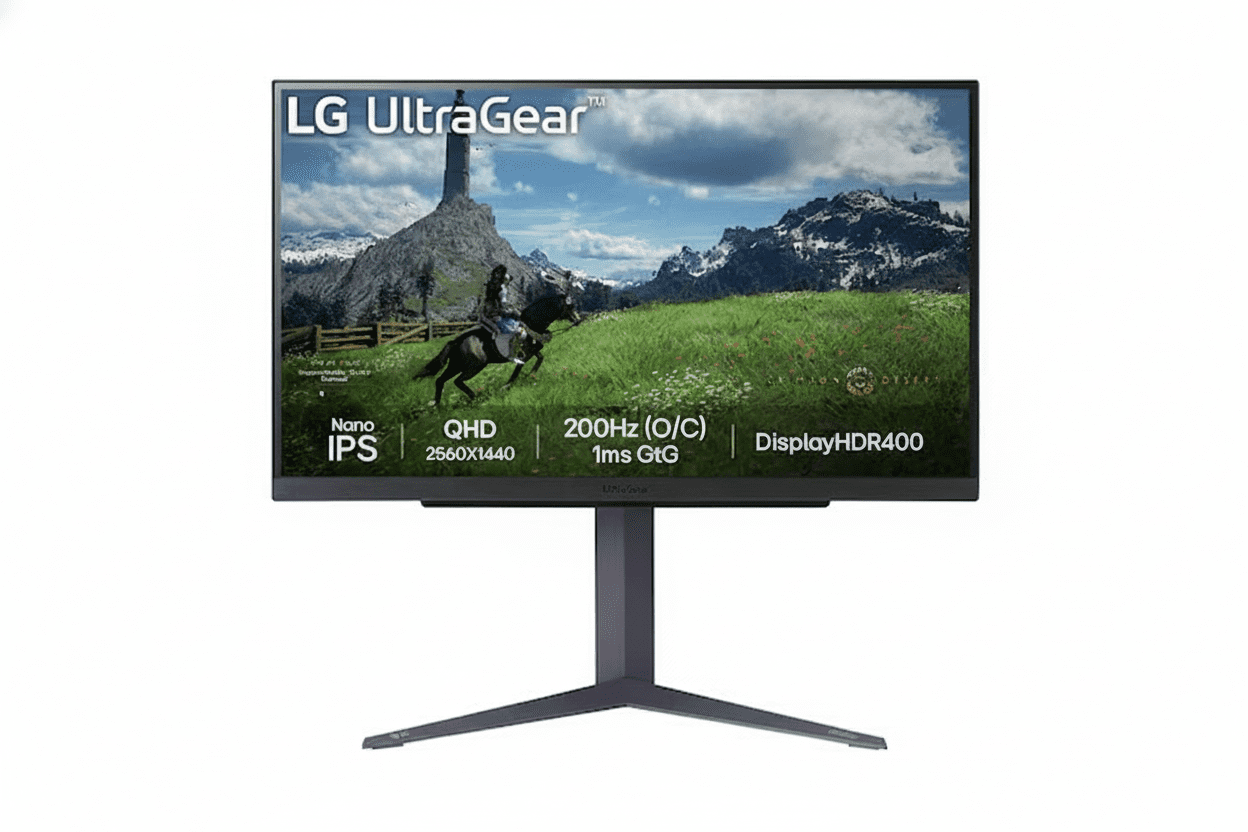
⚡ 27″ QHD Sweet Spot: 200Hz + Nano IPS + DCI-P3 98%!
G-SYNC + FreeSync + HDR 400 + Full Ergonomics + USB Hub.
LG 27GS85Q-B UltraGear Gaming Monitor
27″ QHD 200Hz Nano IPS | 1ms GtG | DCI-P3 98% | G-SYNC & FreeSync | HDR 400 | USB Hub
27″ QHD (2560×1440) Nano IPS – 180Hz (OC 200Hz) – 1ms GtG – Full Ergonomics
⚡ The Perfect 1440p “Sweet Spot” Monitor:
• Display: 27″ QHD (2560×1440) Nano IPS Panel
• Speed: 180Hz Native (Overclockable to 200Hz) + 1ms (GtG)
• Colors: DCI-P3 98% Wide Gamut + Factory Calibration
• HDR: VESA DisplayHDR 400 (400 cd/m² Peak)
• Sync: G-SYNC Compatible + AMD FreeSync + VESA AdaptiveSync
• Gaming Tools: Black Stabilizer, Crosshair, FPS Counter
• Ergonomics: Height (110mm) + Tilt + Pivot 90°
• Ports: 2× HDMI + 1× DP 1.4 + 2× USB-A + 1× USB-B Upstream
• Use Case: Esports + Single-player + Content Creation
₹25,099
₹35,000
SAVE ₹9,901 (28% OFF!)
Inclusive of all taxes | Free Priority Delivery
Free Delivery | 3-Year Warranty | Elite 27″ QHD Gaming
Resolution
QHD 1440p
Refresh Rate
200 Hz OC
Color Gamut
DCI-P3 98%
LG 27GS85Q-B UltraGear Overview – The New 1440p Sweet Spot
⚡ Gaming Highlights
- 27″ QHD 1440p: Perfect size + sharpness
- 180Hz / 200Hz OC: Ultra-fast refresh
- 1ms GtG Nano IPS: Esports-grade clarity
- DCI-P3 98%: Wide cinema colors
- HDR 400: Brighter, more vivid scenes
- Universal Sync: G-SYNC, FreeSync & AdaptiveSync
- USB Hub: 2× USB 3.0 downstream
- Full Ergonomics: Height + Tilt + Pivot
📦 In the Box
- 🖥️ LG 27GS85Q-B Monitor
- 🏗️ Height/Tilt/Pivot Stand
- 🔌 Power Cable
- 📄 Quick Setup Guide
- 📜 Warranty Card (3 Years)
Note: HDMI/DP and USB cables are usually not included—budget ~₹800–1,200 extra.
⭐ Why This Monitor?
- • 27″ QHD = Sweet Spot: 109 PPI sharpness
- • 200Hz OC: Faster than 144/165Hz rivals
- • Nano IPS: Speed + wide color
- • DCI-P3 98%: Creator-friendly
- • USB Hub: Quality-of-life boost
- • ₹25,099: Aggressive price for specs
🏆 The 27″ QHD, 200Hz “Do-It-All” Gaming Monitor
Perfect Resolution & Size
27″ at 2560×1440 delivers ~109 PPI, which is significantly sharper than 1080p while still being practical for most GPUs. Text, UI, and in-game details look clean without scaling headaches.
Speed Without Compromise
180Hz native and 200Hz overclock with true 1ms GtG keeps motion razor-sharp in fast shooters and esports, while Nano IPS and DCI-P3 98% ensure it still looks gorgeous for single‑player titles.
High-End Package, Mid-Range Price
For just over ₹25K, you get features that older 144–165Hz QHD monitors lack: higher refresh, wider color, HDR 400, USB hub, and fully adjustable stand, making older models hard to justify.
Why 27″ QHD is the True Gaming Sweet Spot
🖥️ 27″ + 1440p = 109 PPI
On a 27″ panel, 2560×1440 delivers ~109 pixels per inch—much sharper than 24″ 1080p (~92 PPI) and dramatically clearer than 27″ 1080p (~82 PPI). That makes HUDs, text, enemies at distance, and fine details easier to see without oversharpening.
📐 24″ FHD vs 27″ QHD vs 32″ QHD
Resolution & PPI Comparison
| Size | Resolution | PPI | Use Case |
|---|---|---|---|
| 24″ | 1920×1080 | ~92 PPI | Budget / compact setups |
| 27″ | 2560×1440 | ~109 PPI | Sweet spot for gaming + work |
| 32″ | 2560×1440 | ~93 PPI | Immersion-first setups |
Why 27″ QHD Works So Well
You get a huge improvement in clarity over 1080p without the GPU burden of 4K. At typical desktop distances (60–80 cm), 27″ QHD looks crisp without scaling and is easier to drive to high frame rates.
🎮 Practical Benefits in Games
- • Sharper targets: Heads, silhouettes, and scoped targets are clearer at distance.
- • UI readability: Ability icons, minimaps, and small text are easier on the eyes.
- • Better screenshots: Streams and screenshots look cleaner at 1440p.
- • Balanced GPU load: A mid‑range GPU (RTX 4060 / RX 7600) can still push 144–200 FPS in esports titles at QHD.
Bottom line: 27″ QHD is the right choice if you want “next-level” image quality without needing RTX 4080‑class hardware.
Elite Speed: 180Hz Native, Overclockable to 200Hz
⚡ 200Hz vs 144Hz vs 60Hz
A 200Hz panel refreshes more than three times as often as 60Hz (every ~5 ms vs 16.7 ms). Combined with 1ms GtG, you get exceptionally clean motion clarity, reduced blur, and easier target tracking in high‑speed shooters and battle royales.
60Hz
• 16.7 ms frame time
• Good for office work
• Noticeable blur and judder in FPS.
144Hz
• ~6.9 ms frame time
• Huge upgrade over 60Hz
• Now “entry” level for serious gaming.
180–200Hz
• ~5.6–5.0 ms frame time
• Smoother tracking & flicks
• Noticeable gain over 144Hz for FPS.
🎮 Esports & Competitive Play
For games like Valorant, CS2, Apex Legends, Overwatch 2, and Fortnite, higher refresh directly translates into better perceived responsiveness and tracking smoothness. The 27GS85Q-B gives you a panel that can keep up with 200 FPS output if your GPU can drive it.
- • Esports titles: Easily push 200 FPS with RTX 4060 / RX 7600‑class cards at tuned settings.
- • Input-lag synergy: High refresh + low response + adaptive sync = minimal latency chain.
🎯 1ms (GtG) True Response
Unlike older IPS panels that quoted 4–5ms GtG, this Nano IPS implementation is specified at a true 1ms GtG. That means transitions between grey levels are much faster, which directly reduces ghosting around moving edges.
- • Cleaner edges: Less trailing behind enemies when you flick.
- • Better readability: Text and UI elements stay legible while strafing.
Nano IPS – Speed and Color in One Panel
🎨 What is Nano IPS?
Nano IPS is LG’s enhanced IPS technology that uses nano‑sized particles on the backlight to absorb excess wavelengths and boost color saturation. The result is a wider color gamut (DCI‑P3 98%) while preserving IPS advantages like wide viewing angles and fast pixel transitions.
IPS vs TN vs VA
- • TN: Fast, but washed‑out colors and poor viewing angles.
- • VA: Great contrast, but slower response and more smearing in dark scenes.
- • Nano IPS (this monitor): Near‑TN responsiveness with much better color and off‑axis performance.
Why Nano IPS Matters
For a monitor that aims to be both a competitive esports display and a cinematic single‑player screen, Nano IPS gives you the best trade‑off: fast 1ms GtG for clarity and a color gamut that makes HDR scenes, vibrant worlds, and creative workloads look far better than sRGB‑only panels.
DCI-P3 98% – Creator-Grade Color for Gamers
🌈 Wider Than sRGB
DCI‑P3 covers a significantly wider slice of the visible spectrum than sRGB. At ~98% DCI‑P3, this panel can display more saturated reds and greens, which is exactly what modern games, HDR content, and cinema‑grade color grading target.
🎮 In-Game Impact
Environments in titles like Cyberpunk 2077, Horizon, and open‑world RPGs benefit from this wider gamut. Neon lights, foliage, explosions, spell effects, and skies all look more vivid without pushing into oversaturated “cartoonish” territory if you leave the monitor in calibrated modes.
🎬 Great for Hobby Creators
If you do YouTube thumbnails, light photo editing, or video work, having DCI‑P3 coverage and factory calibration means what you see is much closer to how your content will appear on other wide‑gamut displays and modern phones.
VESA DisplayHDR 400 – Entry-Level, but Real, HDR
🌟 Certified, Not Just “HDR Ready”
DisplayHDR 400 means the panel can reach 400 nits peak brightness and meets VESA’s minimum HDR criteria. It won’t compete with 600–1000 nit FALD or OLED, but it’s noticeably better than SDR and fake HDR labels on 250–300 nit panels.
🎮 HDR Gaming & Movies
In HDR‑aware games and streaming apps, you get brighter highlights (sun, explosions, specular reflections) and somewhat improved shadow detail. Combined with wide color, HDR content looks more impactful than SDR, especially in dark environments.
⚠️ Expectations Check
This is not an HDR1000 mini‑LED or OLED. Blacks remain IPS‑typical, and there are no complex local dimming zones. Treat it as “nice bonus HDR” rather than the primary reason to buy—speed, resolution, and color are the real stars here.
Universal Adaptive Sync – G-SYNC, FreeSync & AdaptiveSync
✅ NVIDIA G-SYNC Compatible
The 27GS85Q-B is listed as G‑SYNC Compatible, meaning NVIDIA has validated it to work with variable refresh on GeForce RTX and GTX 10‑series or newer. You enable it in the control panel and enjoy tear‑free, low‑stutter gameplay.
✅ AMD FreeSync & VESA AdaptiveSync
On the AMD side, it supports FreeSync and additionally carries VESA AdaptiveSync certification, signalling stable and well‑behaved VRR behaviour across the advertised range. That makes it a safe pick regardless of which GPU brand you run today or in future.
Full Ergonomics + USB Hub
🏗️ Height, Tilt & Pivot
The stand supports height adjustment up to about 110 mm, tilt from roughly –5° to +15°, and clockwise pivot for portrait mode. That’s ideal for both long desk sessions and secondary portrait‑mode workflows (chat, code, timelines).
🧍 Ergonomics for Comfort
Being able to get the top of the screen at or just below eye level is key for neck comfort. Many cheaper 1440p monitors are tilt‑only. Here, you don’t need to budget an extra ₹2–5K for a third‑party arm unless you want multi‑monitor stacks.
🔌 USB Hub Convenience
A simple USB 3.0 hub (USB‑B upstream + two USB‑A downstream) lets you park mouse, keyboard, or dongles on the monitor. It’s not a USB‑C docking solution, but it’s a neat quality‑of‑life extra for PC gamers.
Who is the LG 27GS85Q-B For?
🎯 Esports & Competitive FPS
- • 180–200Hz + 1ms GtG for motion clarity.
- • VRR for stable frametime feel.
- • Black Stabilizer & Crosshair tools.
🎮 Hybrid Gamers
- • QHD sharpness for RPGs and open worlds.
- • DCI‑P3 gamut for cinematic visuals.
- • Enough speed for nightly ranked sessions.
🧑💻 Work + Play Users
- • 27″ QHD is excellent for productivity layouts.
- • Portrait pivot for code/docs.
- • Wide gamut for hobby photo/video.
📸 Hobby Content Creators
- • DCI‑P3 98% and IPS consistency.
- • Factory calibration starting point.
- • Good enough for YouTube, Insta, basic grading.
🚫 Who Should Skip It
- • Users needing USB‑C + PD single‑cable dock.
- • Pro colorists needing hardware LUT monitors.
- • Console‑only users (many won’t exploit 200Hz).
How the 27GS85Q-B Stacks Up
vs Older 27″ QHD 144–165Hz IPS
Most previous‑gen 27″ 1440p gaming monitors top out at 144–165Hz, sRGB‑only gamut, and 4–5ms GtG.
- • 27GS85Q-B brings 180/200Hz, Nano IPS, DCI‑P3 98%, HDR 400, and USB hub at a similar or slightly higher street price.
- • For new buyers, it largely makes those older panels obsolete unless heavily discounted.
vs LG 32GS75Q-B (32″ Sibling)
| 27GS85Q-B | 32GS75Q-B | |
|---|---|---|
| Size | 27″ | 31.5″ |
| Refresh | 180 / 200Hz | 180Hz |
| Gamut | DCI‑P3 98% | sRGB‑class |
| Use Case | Sharpened + creator‑friendly | Immersion‑first big screen |
Pick 27″ if you value pixel density and color work; pick 32″ if immersion and size matter more.
Who Should Buy the LG 27GS85Q-B?
🎯 The Perfect Fit
The LG 27GS85Q-B is designed for PC gamers who refuse to compromise. Whether you’re grinding ranked matches in competitive shooters or exploring vast open worlds in single-player RPGs, this monitor delivers the performance and visual quality to excel in both scenarios without breaking the bank.
✅ Perfect For These Gamers
🎮 Competitive Esports Players
If you play Valorant, CS2, Apex Legends, Overwatch 2, Rainbow Six Siege, or any competitive FPS, this monitor gives you the edge you need. 180Hz native (200Hz OC) + 1ms GtG response means you see enemies faster and track targets more smoothly than opponents stuck on 60Hz or even 144Hz displays.
- • Why it works: 200Hz refresh shows 40% more frames per second than 144Hz—smoother motion tracking
- • Response advantage: True 1ms GtG eliminates ghosting for crystal-clear flicks and peeks
- • GPU requirement: RTX 4060/3060 Ti or RX 7600 can hit 180-200 FPS in esports titles at QHD
- • Tools included: Black Stabilizer reveals enemies in shadows, Crosshair overlay for hip-fire precision
🌍 Immersive Single-Player Gamers
Love story-driven adventures like Cyberpunk 2077, Red Dead Redemption 2, Elden Ring, Horizon Forbidden West, or The Witcher 3? DCI-P3 98% wide color gamut + HDR 400 certification makes these worlds look dramatically more vibrant and realistic than standard sRGB monitors.
- • Color advantage: DCI-P3 98% displays 25% more colors than sRGB—neon cities, sunsets, and fantasy worlds pop
- • HDR benefit: 400 cd/m² peak brightness makes explosions, fire, and sunlight more impactful
- • Sharpness: 27″ QHD at 109 PPI reveals fine details in textures, foliage, and architecture
- • Smooth exploration: Even 80-120 FPS feels buttery smooth with VRR enabled
🎨 Hybrid Work + Gaming Users
Need one monitor for 9-to-5 productivity and evening gaming sessions? 27″ QHD provides excellent workspace for coding, design, and multitasking, while gaming features activate when you launch your favorite titles.
- • Productivity: 2560×1440 fits two browser windows side-by-side or massive Excel sheets
- • Ergonomics: Height + Tilt + Pivot adjustments prevent neck strain during 8-hour work sessions
- • Portrait mode: Rotate 90° for coding, reading documents, or timeline editing
- • USB hub: Connect keyboard, mouse, and peripherals directly to monitor for cleaner desk
📸 Hobby Content Creators
Edit YouTube videos, Instagram photos, or Twitch stream overlays? DCI-P3 98% color accuracy and factory calibration mean your content looks professional without spending ₹50K+ on reference monitors.
- • Wide gamut: DCI-P3 coverage matches modern phones and TVs—your edits look consistent everywhere
- • Factory calibrated: Good color accuracy out of box for hobbyist photo/video work
- • Real estate: 27″ QHD fits full Premiere/DaVinci timelines with room for preview windows
- • Dual purpose: Edit during the day, game at night—no need for separate monitors
🔄 Upgraders from 1080p or 144Hz
Currently using a 1080p 144Hz or older 1440p 60-75Hz monitor? This is the perfect next-generation upgrade that delivers meaningful improvements across the board.
- • From 1080p 144Hz: Massive visual clarity boost (77% more pixels) while maintaining competitive speed
- • From 1440p 60-75Hz: Triple the refresh rate for dramatically smoother motion
- • From old 1440p 144Hz: Faster refresh (200Hz), better colors (DCI-P3 vs sRGB), and modern features
- • Future-proof: Won’t need another upgrade for 4-5 years—this spec will age well
💰 Value-Conscious Enthusiasts
Want flagship-tier features without flagship prices? ₹25,099 for this spec combination is extraordinary value—comparable monitors cost ₹32K-40K.
- • Premium specs: 200Hz + Nano IPS + DCI-P3 98% + HDR 400 + Full ergo stand
- • Budget saved: ₹9,901 discount + no need for separate monitor arm (₹3K-5K saved)
- • Better than rivals: Beats older Samsung/ASUS 1440p 165Hz models at similar prices
- • Smart purchase: Best price-to-performance in 27″ QHD gaming category
❌ Look Elsewhere If You Are…
💼 Single-Cable Laptop Docker
Need to connect your laptop with one USB-C cable for video, data, and charging? This monitor has NO USB-C port with Power Delivery—it only has HDMI/DisplayPort video inputs plus basic USB-A hub.
- • What’s missing: No USB-C input, no 65W/90W laptop charging, no single-cable docking
- • Workaround: You’ll need separate power adapter + HDMI/DP cable + USB cable (3 cables total)
- • Better alternative: Business monitors like Dell P2723DE or HP E27 G5 offer USB-C with PD
- • Note: If you have a desktop gaming PC, this limitation doesn’t matter—DP cable is ideal
🎬 Professional Colorist / Video Editor
Working on client projects requiring 100% Adobe RGB or Rec.2020? Need hardware calibration with LUT storage? This is a great gaming monitor, not a reference-grade color-critical display.
- • Limitations: No hardware LUT, no Adobe RGB coverage, no 14-bit processing, no calibration probe included
- • What it has: DCI-P3 98% is good for hobbyist work but not certified for color-critical professional workflows
- • Better alternative: BenQ SW270C, ASUS ProArt PA279CV, or Dell UltraSharp UP2720Q for pro color work
- • Who it works for: Hobbyist YouTubers, Instagram photographers, Twitch streamers—just not paid color grading
🎥 Dark Room Movie Enthusiast
Watch movies in a completely dark room and want deep, inky blacks with high native contrast? IPS panels have typical 1000-1200:1 contrast—VA panels or OLED are better for pure movie watching.
- • IPS limitation: Blacks look grayish in dark scenes compared to VA (3000:1) or OLED (infinite contrast)
- • IPS glow: Some backlight glow visible in corners during dark movie scenes at high brightness
- • Better alternative: Samsung Odyssey G5 (VA) for movies, or LG OLED if budget allows
- • When IPS is fine: If you watch in normal room lighting or game more than watch movies, IPS works great
🎮 Budget GPU Owner (GTX 1650 / RX 6500 XT)
Running an entry-level GPU that struggles with 1080p? QHD 1440p at 180-200Hz is too demanding—you won’t utilize this monitor’s capabilities and will be stuck at 50-80 FPS in most games.
- • GPU requirement: You need at least RTX 3060/4060 or RX 6600 XT/7600 for good QHD gaming
- • Performance reality: GTX 1650 gets ~40-60 FPS at 1440p medium settings—wasted 200Hz capability
- • Better alternative: Stick with 1080p 144Hz monitors until you upgrade GPU, or get 1080p 240Hz
- • Future-proofing: Only buy if you plan to upgrade GPU within 6-12 months
🏆 Professional Esports Players (Top 0.1%)
Competing in official tournaments or top-500 ranked globally? True pros often prefer 24.5″ 1080p 360-540Hz TN monitors for absolute minimum input latency over visual quality.
- • Pro preference: BenQ Zowie XL2566K, ASUS ROG Swift PG259QN—smaller, faster, tournament-standard
- • 27GS85Q-B trade-off: Prioritizes visual quality (QHD + colors) over max competitive edge (360Hz+)
- • Reality check: For 99.9% of competitive players, 200Hz is MORE than enough—difference is imperceptible
- • Recommendation: If you’re not playing in LAN finals, this monitor is perfect for competitive gaming
🎮 Console-Only Gamers (PS5 / Xbox Series X)
Only playing on PlayStation 5 or Xbox Series X with no PC? Consoles max out at 1440p 120Hz—you won’t use 180-200Hz capability and PC-focused features go to waste.
- • Console limit: PS5 and Xbox Series X output maximum 1440p 120Hz—not 180Hz or 200Hz
- • Wasted features: No need for 200Hz OC, USB hub, or ultra-wide color for SDR console games
- • Better alternative: Get a 4K 120Hz TV or monitor designed for consoles with HDMI 2.1
- • Exception: If you plan to build a gaming PC soon, this is future-ready—buy it!
💻 Tiny Desk / Small Room Setup
Desk depth less than 50cm or sitting very close to screen? 27″ might feel overwhelming at close distances—you’ll need to turn your head to see corners.
- • Ideal distance: 27″ QHD works best at 60-80cm viewing distance for comfortable gaming
- • Desk requirement: Minimum 60cm desk depth recommended—50cm is tight
- • Better alternative: 24″ 1440p monitors (rare) or 24″ 1080p 240Hz for compact setups
- • Workaround: Mount on monitor arm and push farther back, but that negates included stand
🔊 Users Wanting Built-In Audio
Need built-in speakers for casual YouTube, music, or games without headset? This monitor has NO built-in speakers—you’ll need external speakers or headphones.
- • What’s missing: Zero integrated speakers—monitor is video-only output
- • Workaround: Budget ₹2K-8K for desktop speakers or use gaming headset
- • Industry standard: Most gaming monitors skip speakers—gamers prefer headsets anyway
- • Audio out: 3.5mm headphone jack available for routing display audio to headphones/speakers
🎯 Quick Decision Matrix
| Your Profile | Should You Buy? | Reason |
|---|---|---|
| Desktop PC gamer (RTX 4060+ or RX 7600+) | ✅ YES | Perfect match—GPU can drive QHD 180-200 FPS in esports, 100+ in AAA |
| Competitive FPS player (Valorant, CS2, Apex) | ✅ YES | 200Hz + 1ms GtG + Black Stabilizer = competitive edge |
| Single-player story game lover (RPGs, open world) | ✅ YES | DCI-P3 98% + HDR 400 makes games look stunning |
| Hybrid work + gaming user (coding, design, evening gaming) | ✅ YES | 27″ QHD excellent productivity, full ergo for comfort, gaming after hours |
| Hobby YouTuber / content creator | ✅ YES | DCI-P3 coverage good enough for hobbyist photo/video editing |
| Laptop user needing USB-C dock with PD charging | ❌ NO | No USB-C port—needs 3 separate cables (power, video, USB) |
| Professional colorist / video editor (client work) | ❌ NO | No hardware calibration or Adobe RGB—get reference monitor instead |
| Dark room movie enthusiast (cinema purist) | ⚠️ MAYBE | IPS contrast okay but not deep—VA or OLED better for pure movies |
| Budget GPU owner (GTX 1650, RX 6500 XT) | ❌ NO | GPU too weak for QHD gaming—stick with 1080p until upgrade |
| Console-only gamer (PS5 / Xbox Series X) | ⚠️ MAYBE | Works but wasted potential—consoles max 120Hz, get 4K TV instead |
| Professional esports player (tournament competitor) | ⚠️ MAYBE | Great for ranked, but pros prefer 24.5″ 360-540Hz tournament monitors |
🏆 Bottom Line: Who Wins with This Monitor?
✅ PERFECT FIT (90%+ of Gamers)
If you’re a desktop PC gamer with a mid-range or better GPU (RTX 3060+, RX 6600 XT+) who wants the absolute best balance of:
- • Competitive speed (200Hz refresh for esports)
- • Visual quality (DCI-P3 colors for story games)
- • Sharpness (QHD 1440p clarity)
- • Value (₹25K for flagship-tier specs)
This is THE monitor to buy in 2025. No compromises, no regrets.
❌ WRONG CHOICE (10% Edge Cases)
Skip this monitor ONLY if you:
- • Need USB-C docking with single-cable laptop connection + charging
- • Do professional color work requiring Adobe RGB and hardware calibration
- • Watch movies only in dark rooms and want VA/OLED contrast
- • Have budget GPU that can’t handle 1440p gaming (upgrade GPU first!)
- • Play console-only with no plans for PC gaming
For these specific use cases, specialized alternatives exist—but they’re rare exceptions.
LG 27GS85Q-B vs Competitors – How It Stacks Up
🏆 Market Position
The LG 27GS85Q-B redefines the 27″ QHD gaming monitor category by offering features that were previously exclusive to ₹35K-45K premium models at just ₹25,099. Let’s see how it compares to the closest rivals and siblings in the LG UltraGear lineup.
🆚 LG 27GS85Q-B vs LG 32GS75Q-B (Sibling Showdown)
Both are 2025 UltraGear models, but target different priorities: 27GS85Q-B prioritizes pixel density and color accuracy, while 32GS75Q-B emphasizes immersive screen size. Here’s the breakdown:
| Feature | LG 27GS85Q-B (This Review) |
LG 32GS75Q-B (32″ Sibling) |
Winner |
|---|---|---|---|
| Screen Size | 27″ (68.5 cm) | 31.5″ (80 cm) ✓ | 32″ for immersion |
| Resolution | QHD 2560×1440 | QHD 2560×1440 | Tie |
| Pixel Density (PPI) | 109 PPI ✓ (Sharper) | 93 PPI | 27″ sharper text/UI |
| Refresh Rate | 180Hz (OC 200Hz) ✓ | 180Hz | 27″ (200Hz OC) |
| Panel Type | Nano IPS ✓ | IPS | 27″ (Nano tech) |
| Response Time | 1ms (GtG) | 1ms (GtG) | Tie |
| Color Gamut | DCI-P3 98% ✓ | sRGB 99% (~73% DCI-P3) | 27″ (creator-grade) |
| HDR | DisplayHDR 400 | DisplayHDR 400 | Tie |
| Adaptive Sync | G-SYNC + FreeSync + AdaptiveSync | G-SYNC + FreeSync | 27″ (triple cert) |
| USB Hub | Yes (2× USB 3.0) ✓ | No | 27″ (convenience) |
| Ergonomics | Height + Tilt + Pivot | Height + Tilt + Pivot | Tie |
| Price | ₹25,099 ✓ | ₹28,499 | 27″ (₹3,400 cheaper) |
| Best For | Competitive gamers, hybrid users, content creators, sharp visuals | Immersive single-player gamers, cinematic experiences, big screen lovers | Depends on priority! |
🎯 Which Should You Choose?
- • Choose 27GS85Q-B if: You want sharper text (109 PPI), wider colors (DCI-P3 98%), faster refresh (200Hz OC), USB hub, and save ₹3,400. Perfect for competitive FPS, work + gaming hybrid, and content creation.
- • Choose 32GS75Q-B if: Screen size is priority #1 for immersive single-player games (RDR2, Cyberpunk, Elden Ring). The extra 4.5″ diagonal creates dramatically more cinematic experiences, worth the ₹3,400 premium if immersion > sharpness.
🆚 vs Older 27″ QHD 144-165Hz Monitors
The 27GS85Q-B essentially makes most 2022-2023 era 27″ 1440p 144-165Hz monitors obsolete. Let’s compare against typical previous-gen specs:
| Feature | LG 27GS85Q-B (2025 New) |
Typical 2022-23 27″ 1440p 165Hz |
Upgrade Value |
|---|---|---|---|
| Refresh Rate | 180Hz (OC 200Hz) ✓ | 144-165Hz | +21-39% faster |
| Response Time | 1ms (GtG) ✓ | 4-5ms (GtG) | 75-80% faster pixels |
| Panel Tech | Nano IPS ✓ | Standard IPS | Enhanced backlight |
| Color Gamut | DCI-P3 98% ✓ | sRGB 99% only | +25% wider spectrum |
| HDR | DisplayHDR 400 ✓ | Fake “HDR” or none | Real certified HDR |
| USB Hub | Yes (2× USB 3.0) ✓ | Rare / No | Added convenience |
| Ergonomics | Height + Tilt + Pivot ✓ | Often tilt-only | Save ₹3K+ on arm |
| Typical Price | ₹25,099 ✓ | ₹22K-28K | Similar or cheaper! |
💡 Why This Matters
If you’re shopping for a 27″ 1440p gaming monitor in 2025, there’s almost no reason to buy older 144-165Hz models unless they’re heavily discounted (under ₹18K). The 27GS85Q-B delivers meaningfully better performance across every metric at a competitive price—making it the new baseline standard.
🆚 vs ASUS / Samsung / Acer Competitors
How does the 27GS85Q-B compare to similarly-priced 27″ QHD gaming monitors from other major brands?
| Monitor Model | Refresh | Panel | Color | Price | Notes |
|---|---|---|---|---|---|
| LG 27GS85Q-B | 200Hz OC | Nano IPS | DCI-P3 98% | ₹25,099 | Best all-around value! |
| ASUS TUF VG27AQ3A | 180Hz | IPS | sRGB 99% | ~₹24K | Slightly cheaper but no Nano IPS or wide gamut |
| Samsung Odyssey G5 (27″) | 165Hz | VA | sRGB | ~₹22K | Better contrast, slower response, slower refresh |
| Acer Nitro XV272U | 170Hz | IPS | DCI-P3 95% | ~₹26K | Similar color but slower refresh and pricier |
| MSI MAG274QRF-QD | 165Hz | Quantum Dot | DCI-P3 97% | ~₹32K | Great color but expensive and slower refresh |
🏆 Competitive Verdict
The 27GS85Q-B offers the best combination of refresh rate (200Hz OC), color accuracy (DCI-P3 98%), and price (₹25K) in its class. Rivals are either slower (165-180Hz), have worse colors (sRGB-only), or cost more. If ASUS/Samsung/Acer release competitive 200Hz Nano IPS models, they’ll likely price ₹28K-32K+—making this LG a standout value.
📊 Competitive Summary
🥇 Beats Older 144-165Hz
Faster refresh, better colors, real HDR, better ergonomics—at similar or lower prices. Makes previous-gen obsolete.
🤝 Complements 32GS75Q-B
Choose 27″ for sharpness + colors + speed; choose 32″ for immersion + size. Both excellent, different priorities.
💪 Undercuts Rivals
ASUS/Samsung/Acer competitors cost ₹28K-35K for similar specs. This is ₹3K-10K cheaper with better or equal performance.
Pros & Cons
✅ What We Liked
- Perfect 27″ QHD Sweet Spot: 109 PPI looks crisp for both games and work.
- 180Hz Native, 200Hz OC: Faster than typical 144–165Hz competitors.
- Nano IPS + 1ms GtG: Esports‑ready response with IPS color and angles.
- DCI‑P3 98% Gamut: Wide color for both gaming and hobby content creation.
- DisplayHDR 400: Real entry‑level HDR rather than fake marketing HDR.
- Universal VRR: G-SYNC Compatible, FreeSync, and AdaptiveSync certified.
- Full Ergonomic Stand: Height, tilt, and pivot included in the price.
- USB Hub: Integrated 2‑port USB 3.0 hub for peripherals.
- Price–Feature Ratio: At ~₹25K, it massively undercuts many “premium” 1440p models with weaker specs.
❌ What Could Be Better
- Typical IPS Contrast: Blacks are fine but not deep; VA panels still win for dark‑room movie watching.
- No USB-C with PD: You get a USB hub, but no single‑cable laptop docking or charging.
- No Built-in Speakers: Not a big deal for gamers (headsets are better), but some users expect basic speakers.
- HDR 400 Limits: Noticeably better than SDR, but not in the same league as HDR600/1000 mini‑LED or OLED.
- Needs Decent GPU: To really leverage 1440p at 180–200Hz, you want at least an RTX 3060 Ti / 4060 or RX 6700 XT / 7600 XT for esports.
Final Verdict – The 1440p Standard to Beat
🏆 27″ QHD SWEET SPOT KING – 9.4/10
The LG 27GS85Q-B nails the modern PC gaming brief: sharp 1440p resolution, ultra‑fast 200Hz refresh, great color, real HDR, and solid ergonomics at a price that undercuts many weaker rivals.
Who Should Buy It?
✅ Highly Recommended For
- • PC gamers who want the best 27″ 1440p experience under ~₹30K.
- • Esports players upgrading from 1080p 144Hz panels.
- • Hybrid users who game, work, and do light creative tasks on one screen.
❌ Look Elsewhere If
- • You need USB‑C with power delivery for a one‑cable laptop dock.
- • You’re a pro colorist needing hardware‑calibrated reference displays.
- • You mostly watch movies in a dark room and want VA‑level contrast or OLED black.
Our Rating: 9.4 / 10
For most PC gamers in 2025, this is exactly what a “no‑regrets” 1440p monitor should look like. If your budget and GPU can handle it, the LG 27GS85Q‑B is an easy recommendation.
₹35,000
SAVE ₹9,901 (28% OFF!)
🛒 BUY NOW – LIMITED TIME DEALFree Delivery | 3-Year Warranty | 27″ QHD 200Hz Nano IPS
20 Most Asked Questions About LG 27GS85Q-B
Q1. How do I enable 200Hz overclock?
Use the monitor’s OSD to enable the 200Hz overclock mode, then in Windows/NVIDIA/AMD display settings select 200Hz at 2560×1440. Always use DisplayPort 1.4 for full refresh; HDMI may be limited to lower rates depending on GPU.
Q2. Is QHD too heavy for my GPU?
Esports titles like Valorant, CS2, LoL, and Overwatch 2 are light enough that even mid‑range cards (RTX 3060 / 4060 / RX 7600) can push 144–200 FPS with tuned settings at QHD. For big AAA games, expect 80–140 FPS depending on your GPU and quality preset.
Q3. Does G-SYNC work on this monitor?
Yes, it’s G‑SYNC Compatible. Connect via DisplayPort, enable VRR in the monitor OSD, then turn on G‑SYNC in NVIDIA Control Panel. You’ll get tear‑free, low‑stutter gameplay across its VRR range.
Q4. Does it support FreeSync on AMD GPUs?
Yes, it supports AMD FreeSync and is also AdaptiveSync certified. Enable FreeSync in AMD’s driver panel and ensure VRR is enabled in the monitor OSD for smooth, tear‑free performance on Radeon cards.
Q5. Is this good for PS5 / Xbox Series X?
It will work and look great at 1440p 120Hz with HDR on consoles, but you won’t use the full 180–200Hz capability. If you’re mainly a console gamer, you may not fully exploit what you’re paying for on the PC side.
Q6. Can I use it for photo and video editing?
Yes, for hobby and semi‑pro work it’s an excellent choice thanks to DCI‑P3 98% coverage, factory calibration, and 27″ QHD real estate. Serious colorists still need reference‑grade, hardware‑calibrated monitors in addition.
Q7. Is there any noticeable IPS glow or backlight bleed?
As with any IPS, some glow and minor variance is normal and varies panel‑to‑panel. For most units it’s only visible in very dark scenes at high brightness in a dark room; for typical mixed use it shouldn’t be distracting.
Q8. Does it have built-in speakers?
No, there are no integrated speakers. Gamers normally prefer headsets or external speakers anyway. The monitor provides audio out via the 3.5 mm jack if you want to route sound from HDMI/DP to headphones or speakers.
Q9. Is the USB hub powered enough for external drives?
The USB hub is fine for peripherals (mouse, keyboard, wireless dongles, gamepads). For bus‑powered HDDs/SSDs, use ports on your PC or a powered hub instead to ensure stable power delivery.
Q10. Is there any difference in latency at 180Hz vs 200Hz?
The difference is small but real. 180Hz has a ~5.6 ms frame interval; 200Hz reduces that to 5.0 ms. On top of pixel response and VRR, the overclock squeezes a bit more responsiveness, noticeable mainly to highly sensitive competitive players.
Q11. Does 1440p at 27″ make text too small?
Most users find 27″ QHD comfortable at 100% or 125% scaling in Windows. Text is sharper than 1080p and still very readable; you can slightly bump scaling in the OS if you sit further away or prefer larger UI elements.
Q12. Does it ship with color calibration?
Units are factory‑calibrated to reasonable targets out of the box (particularly for sRGB/DCI‑P3 modes). For critical work you can still profile it with your own colorimeter, but for gaming and casual creation, stock modes are already good.
Q13. Is there noticeable overshoot or inverse ghosting?
Overdrive is adjustable. In the recommended middle setting you get a good balance of clarity without much overshoot. Max overdrive can induce some halos, so sticking to the “fast” but not “fastest” mode is ideal for most use cases.
Q14. Can this be mounted on a monitor arm?
Yes, it supports a standard 100 × 100 mm VESA mount. The stand detaches, allowing you to use single or dual‑arm gas springs or wall mounts if you prefer a custom layout.
Q15. How good is it for long coding or office sessions?
27″ QHD gives you great workspace; height/tilt/pivot help you dial in comfortable ergonomics. As long as brightness is set sanely and you use a neutral picture mode, it’s very comfortable as a daily‑driver productivity display.
Q16. Does it support 10-bit color?
It uses 8‑bit + FRC to achieve 10‑bit support, which is typical in this class and enough to avoid harsh banding in gradients when used with HDR and proper content/pipeline support.
Q17. Is the stand wobbly?
The UltraGear stand is generally solid. You may see minor shake if your desk is flimsy and you type heavily, but there’s no inherent instability problem with normal setups and desk quality.
Q18. Is this overkill if I only play single-player games?
Not at all. Even in single‑player titles, the combination of 1440p, wide color, HDR 400, and high refresh dramatically improves smoothness, camera movement, and visual impact. You simply get more headroom if you ever jump into competitive modes later.
Q19. What cable should I buy?
Get a certified DisplayPort 1.4 cable from a reputable brand to guarantee 1440p at 180–200Hz. Any basic 1.4‑rated cable is fine; avoid ultra‑cheap no‑name DP cables that often cause flicker or dropouts at high refresh.
Q20. Is this still a good buy in late 2025?
Yes. Even as higher‑end OLED and mini‑LED panels push the flagship segment, this spec mix at this price remains a “sweet spot” recommendation for the majority of PC gamers who want excellent performance without paying a flagship premium.
Complete Technical Specifications – LG 27GS85Q-B
| DISPLAY | |
|---|---|
| Screen Size | 27″ (68.5 cm) |
| Resolution | QHD 2560 × 1440 |
| Panel Type | Nano IPS |
| Aspect Ratio | 16:9 |
| Pixel Density | ~109 PPI |
| Surface | Anti‑glare, 3H |
| PERFORMANCE | |
|---|---|
| Refresh Rate | 180Hz (Overclockable to 200Hz) |
| Response Time | 1ms (GtG) |
| Adaptive Sync | NVIDIA G‑SYNC Compatible, AMD FreeSync, VESA AdaptiveSync |
| Gaming Features | Black Stabilizer, Crosshair, FPS Counter, Game Modes |
| COLOR & HDR | |
|---|---|
| Color Gamut | DCI‑P3 98% (typ.) |
| Color Depth | 10‑bit (8‑bit + FRC) |
| HDR | VESA DisplayHDR 400 |
| Brightness | Up to 400 cd/m² (HDR peak) |
| Contrast | Typical IPS (around 1000–1200:1) |
| CONNECTIVITY | |
|---|---|
| HDMI | 2 × HDMI (high‑refresh QHD support, GPU‑dependent) |
| DisplayPort | 1 × DisplayPort 1.4 |
| USB Upstream | 1 × USB‑B 3.0 |
| USB Downstream | 2 × USB‑A 3.0 |
| Headphone Out | 1 × 3.5 mm audio jack |
| USB‑C | No |
| ERGONOMICS & MOUNT | |
|---|---|
| Height Adjustment | Yes (approx. 110 mm) |
| Tilt | Yes (around –5° to +15°) |
| Pivot | Yes (90° clockwise) |
| Swivel | Not specified / limited |
| VESA Mount | 100 × 100 mm |
| MISCELLANEOUS | |
|---|---|
| Series | LG UltraGear |
| Model | 27GS85Q‑B |
| Warranty | 3‑Year Limited |
| MRP | ₹35,000 |
| Typical Selling Price | ₹25,099 (at time of review) |
Upgrade to the 1440p Sweet Spot Today
27″ QHD 200Hz Nano IPS | DCI-P3 98% | HDR 400 | Only ₹25,099
🛒 BUY NOW – 28% OFFFree Delivery | 3-Year Warranty | LG UltraGear Reliability

These are in fact impressive ideas in regarding blogging.
You have touched some good things here. Any way keep up wrinting.
Thank you so much for your kind words! I’m really glad you found the ideas about blogging helpful. Your encouragement means a lot, and I’ll definitely keep sharing more content. Thanks again for the support! 😊