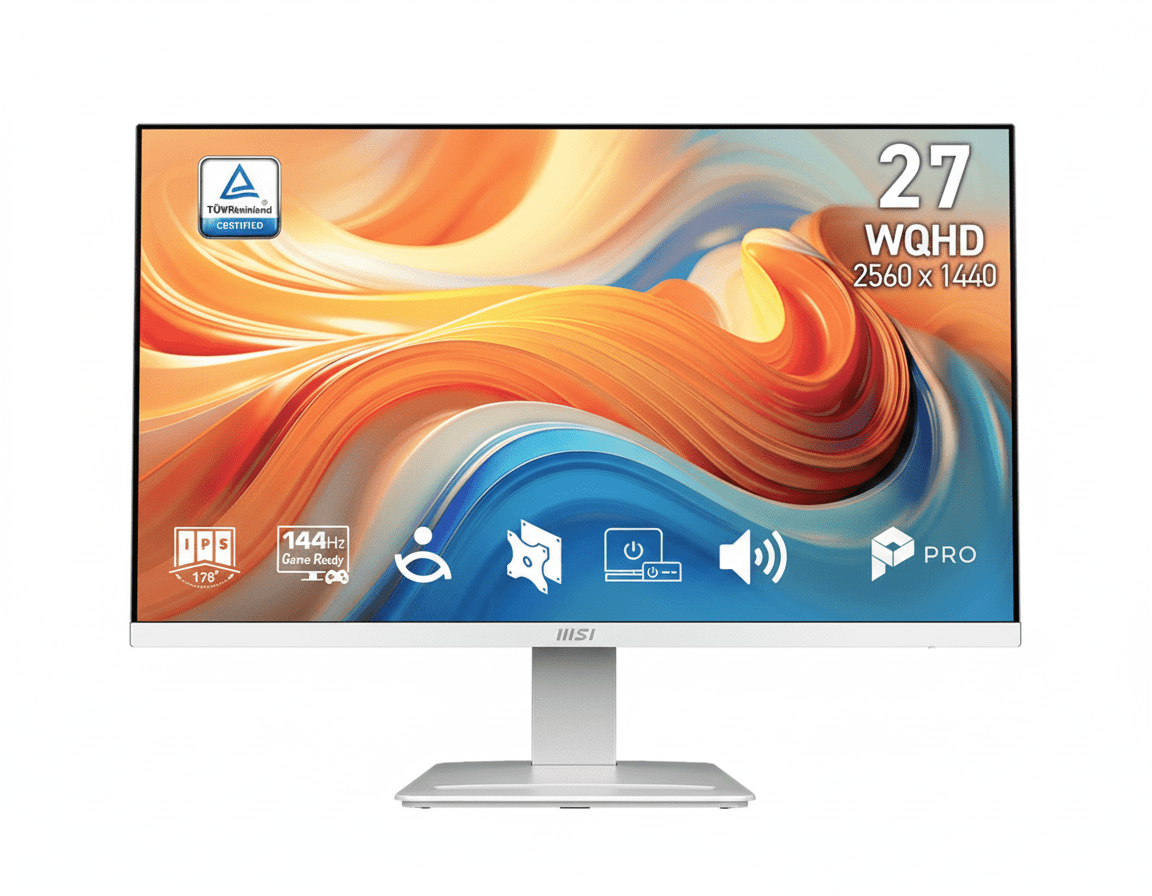
⚡ Efficiency by Day, Dominance by Night – The Ultimate Hybrid Experience
27″ WQHD + 144Hz smoothness + EyesErgo protection + smart mini-PC integration
MSI PRO MP273QW E14
27″ WQHD 144Hz IPS | HDR Ready | EyesErgo Tech | Built-in Speakers | Mini-PC Mountable
2560×1440 – 1ms MPRT – 300 nits – 118% sRGB – Adaptive-Sync – Power Link CEC
🎯 Designed for the Modern Professional:
• WQHD Sharpness: 77% more pixels than Full HD for crystal-clear multitasking
• 144Hz Fluidity: Ultra-smooth scrolling, light gaming & creative workflows
• EyesErgo Technology: TÜV-certified full eye protection suite + Eye-Q Check
• Built-in 2W×2 Speakers: Clear audio without desktop clutter
• Mini-PC Mount + Power Link: Clean desk + one-button mini-PC power-on
• Accessory Slot: Smart storage for cables & dongles
• HDR Ready: Enhanced contrast & colors for media & creative work
₹19,999
₹26,999
26% OFFModel: PRO MP273QW E14 | 3-Year Warranty | Free Shipping
🛒 Buy Now on Amazon India🌍 Global Pricing Overview
• India: ₹19,999–₹21,999 (frequent 22–28% discounts)
• USA: $229.99–$249.99
• Europe: €219–€249
Resolution
2560×1440
Refresh Rate
144Hz
Eye Care
EyesErgo + TÜV
MSI PRO MP273QW E14 Overview – The Modern Professional’s Perfect Hybrid Companion
🖥️ WQHD Productivity Powerhouse
- 27″ Screen Size: Perfect balance for multitasking & focused work
- 2560×1440 Resolution: 109 PPI – razor-sharp text & details
- IPS Panel Technology: Perfect colors & 178° viewing angles
- 118% sRGB Coverage: Professional-grade color vibrancy
- 300 cd/m² Brightness: Excellent visibility in bright rooms
- 1500:1 Contrast: Deeper blacks than standard IPS
⚡ Smooth & Responsive Performance
- 🔄144Hz Refresh Rate: Ultra-fluid scrolling & animations
- ⚡1ms MPRT: Dramatically reduced motion blur
- 🎮Adaptive-Sync 48–144Hz: Tear-free experience
- 🌟HDR Ready: Enhanced dynamic range
💎 Health & Productivity Focused Features
- • EyesErgo + TÜV Certification: Full eye protection suite
- • Eye-Q Check Tool: Built-in eye health self-test
- • Built-in 2W×2 Speakers: Clean audio solution
- • Mini-PC Mount + Power Link CEC: One-button workflow
- • Accessory Slot Design: Organized desk
- • Easy Firmware Update: Always optimized
🎯 Why the PRO MP273QW E14 Stands Out in 2026
The MSI PRO MP273QW E14 is not just another office monitor — it’s the perfect embodiment of modern professional life: razor-sharp WQHD clarity for serious work, buttery 144Hz smoothness for fluid daily use, and comprehensive EyesErgo technology that genuinely protects your vision during 10+ hour days.
At the heart of the experience is the 27-inch 2560×1440 IPS panel with 109 PPI pixel density — the sweet spot where text is pin-sharp, UI elements are perfectly sized, and you get dramatically more usable workspace than 1080p without the GPU demands of 4K.
The 144Hz refresh rate transforms everyday tasks: web pages scroll like silk, cursor movement feels precise, window animations are buttery, and even light competitive gaming or creative timeline scrubbing becomes enjoyable.
What truly elevates this monitor into premium territory is MSI’s focus on long-term user health and workflow efficiency: TÜV-certified EyesErgo suite, integrated Eye-Q Check self-diagnostic tool, mini-PC mounting with HDMI-CEC Power Link (turn on your mini-PC from the monitor button), accessory slot for dongles/cables, built-in speakers, and easy firmware updates via DisplayPort.
For ₹19,999–₹21,999, you’re getting features normally found in ₹28,000–₹35,000 productivity displays — making the PRO MP273QW E14 one of the strongest value propositions of 2026 for coders, designers, office professionals, students, and anyone who spends serious hours in front of a screen.
Display Quality – WQHD IPS Visual Excellence
📺 27-Inch WQHD – The Productivity Sweet Spot
The 27-inch screen with 2560×1440 resolution delivers the ideal pixel density of ~109 PPI — the Goldilocks zone where text remains razor-sharp, icons look perfectly proportioned, and UI scaling feels natural without wasting screen real estate or demanding excessive GPU power.
Compared to 1080p on the same size, you get 77% more usable pixels — meaning significantly more code lines visible, larger spreadsheets, more timeline space in editing software, and dramatically better multitasking capabilities.
WQHD Advantages for Professionals
- • 3.68 million pixels vs 2.07 million in FHD
- • Perfect scaling for Windows 11 & macOS
- • Ideal for coding, design, spreadsheets, documents
- • Future-proof for next 4–6 years
🎨 IPS Panel + Wide Color Gamut
The high-quality IPS panel guarantees 178°/178° viewing angles with zero color shift or gamma distortion — perfect when collaborating or watching content from the side.
With 118% sRGB coverage (typical ~95–100% real-world after calibration), colors are noticeably more vibrant and accurate than standard office monitors — making this display suitable for photo editing, UI/UX design, content creation, and media consumption alongside productivity tasks.
The combination of 300 nits brightness and excellent anti-glare matte coating ensures great visibility even in bright office environments or near windows.
Performance – 144Hz Smoothness Meets Professional Reliability
🔄 144Hz – The New Standard for Productivity
144Hz means the screen refreshes approximately every 6.94 milliseconds — more than twice as fast as conventional 60Hz office monitors and noticeably smoother than 75/100Hz panels.
The difference is immediately apparent: web pages, documents, code editors, design tools, spreadsheets — everything feels significantly more fluid and responsive. Even basic window dragging and scrolling becomes a premium experience.
Real-World 144Hz Benefits
- • Cursor movement feels laser-precise
- • Long code & document scrolling is buttery
- • UI animations & transitions look polished
- • Light gaming & creative timeline work much smoother
🎮 Adaptive-Sync + 1ms MPRT
Adaptive-Sync (48–144Hz VRR range) eliminates screen tearing and stuttering during variable frame rates — useful for light gaming, video playback, and creative software with fluctuating performance.
The 1ms MPRT (Moving Picture Response Time) significantly reduces perceived motion blur compared to standard IPS panels, making fast-scrolling content and casual gaming much clearer and more comfortable.
Eye Care Technology – EyesErgo: Serious Protection for Long Hours
💡 Complete EyesErgo Protection Suite
MSI’s EyesErgo technology combines hardware-level Less Blue Light, DC Anti-Flicker dimming, advanced Anti-Glare coating, and TÜV Rheinland certification — delivering genuine eye comfort during marathon work sessions.
Unlike software filters that distort colors, MSI’s solution reduces harmful blue light while maintaining excellent color accuracy — crucial for professionals who need precise visuals all day.
🩺 Built-in Eye-Q Check Diagnostic Tool
The monitor includes MSI’s exclusive Eye-Q Check — an on-screen self-test tool that helps detect early signs of eye strain, astigmatism, and posture issues.
Features Amsler Grid test, astigmatism checker, and posture guidance — encouraging users to take necessary breaks and adjust positioning before fatigue becomes serious.
👁️ Why This Level of Eye Care Matters in 2026
Most people now spend 8–14 hours daily in front of screens. Cumulative digital eye strain leads to headaches, dry eyes, blurred vision, neck pain, and disrupted sleep. The PRO MP273QW E14 addresses all major risk factors with:
- • Hardware Low Blue Light (no orange tint)
- • Zero-flicker DC dimming across all brightness levels
- • High-quality anti-reflective matte coating
- • Wide viewing angles prevent neck craning
- • Built-in diagnostic & reminder tools
Result: Dramatically more comfortable marathon sessions — many users report being able to work 2–4 extra focused hours per day without discomfort.
Smart Features – Designed for Real-World Productivity
🖥️ Mini-PC Mount + MSI Power Link (HDMI CEC)
The stand includes a dedicated mini-PC VESA mount point — allowing you to attach popular mini-PCs (Intel NUC, ASUS PN, Beelink, etc.) directly behind the monitor for an ultra-clean all-in-one workstation look.
MSI Power Link uses HDMI-CEC to let you power on/off the mini-PC using the monitor’s power button — one-button start for your entire setup.
🎧 Built-in Speakers + Accessory Slot + Firmware
2W × 2 built-in speakers deliver surprisingly clear sound for meetings, videos, and casual music — eliminating the need for external desktop speakers in most cases.
The clever accessory slot keeps dongles, cables, and adapters organized. Firmware updates via DisplayPort ensure the monitor stays optimized with future improvements.
Design & Ergonomics – Clean, Professional, Adjustable
🖼️ Modern Minimalist Aesthetic
Refined back engravings, slim bezels, and matte black finish — looks professional in any office or home setup while maintaining a premium feel.
⚙️ Ergonomics & Mounting
-5° ~ +20° tilt, 100×100 VESA mount compatibility, and built-in mini-PC mounting point. While tilt-only out of box, VESA arm support unlocks full ergonomic freedom.
Who Should Buy the MSI PRO MP273QW E14?
✅ Perfect For These Users
💼 Office Professionals & Remote Workers
Long hours, meetings, documents, spreadsheets — this monitor makes every task more comfortable and productive.
👨💻 Developers & Programmers
144Hz smooth scrolling through long code files + sharp WQHD text + eye protection = significantly better daily coding experience.
🎨 UI/UX Designers & Content Creators (casual)
Wide color gamut + good accuracy + smooth interface make light creative work enjoyable.
🎮 Light/Casual Gamers + Media Lovers
144Hz + Adaptive-Sync + HDR Ready + built-in speakers = excellent secondary gaming & entertainment display.
⚠️ Consider Alternatives If You Need
⚡ Hardcore Competitive Gaming
Want 180Hz+ & 1ms GtG gaming panels → look at MSI MAG/G series or ASUS TUF VG series.
🖼️ Professional Color-Critical Work
Need hardware calibration, 99%+ Adobe RGB → Dell UltraSharp, BenQ PD series, ASUS ProArt.
🔌 Full USB-C Docking
Want 65W+ USB-C PD charging → Dell S2722QC, LG 27UP series, or dedicated docking monitors.
Pros & Cons – MSI PRO MP273QW E14
✅ What We Loved
🖥️ Perfect WQHD + 144Hz Combination
The ideal balance of sharpness, workspace size, and everyday smoothness — transforms office work into a premium experience.
👁️ Best-in-Class Eye Care Suite
EyesErgo + TÜV + Eye-Q Check — one of the most comprehensive eye protection systems available under ₹25,000.
🧠 Smart Productivity Features
Mini-PC mount, Power Link CEC, accessory slot, firmware updates — thoughtful details that improve daily life.
🔊 Convenient Built-in Audio
Surprisingly good 2×2W speakers for meetings, videos, casual music — eliminates extra clutter.
💰 Exceptional Value in 2026
Delivers ₹30K+ level features at aggressive street pricing — one of the strongest hybrid monitor deals currently available.
⚠️ What Could Be Better
🎮 Not a Dedicated Gaming Monitor
144Hz is excellent for productivity & casual play — serious competitive gamers will want 165Hz/180Hz+ models.
⚙️ Tilt-Only Stand Out of Box
No height, swivel, or pivot adjustment (solved with affordable VESA arm — still a limitation compared to fully adjustable stands).
🔌 No USB-C Power Delivery
Lacks USB-C video + charging (common in higher-priced productivity monitors).
🔇 Speakers Not Audiophile Grade
Good for meetings & casual use — serious music lovers will still want external speakers/headphones.
Final Verdict – The Modern Professional’s New Standard
Outstanding All-Day Professional Value
🎯 The Bottom Line
The MSI PRO MP273QW E14 is the perfect representation of what a 2026 productivity monitor should be: stunning WQHD clarity, genuinely useful 144Hz smoothness, comprehensive eye protection, thoughtful smart features, and aggressive pricing that makes premium feel accessible.
For anyone who spends serious hours working, creating, learning, or casually gaming — this monitor dramatically improves daily comfort, productivity, and visual enjoyment.
💡 Who Should Buy This?
Highly recommended for:
- Office professionals & remote workers doing 8–12+ hour days
- Software developers & programmers
- UI/UX designers, light content creators
- Students & researchers needing sharp, comfortable long-session display
- Anyone wanting a clean mini-PC workstation with one-button workflow
At current street prices of ₹19,999–₹21,999, it’s one of the strongest monitor recommendations of 2026.
📊 Detailed Rating Breakdown
Frequently Asked Questions – MSI PRO MP273QW E14
❓ Is 144Hz really noticeable for normal office work & browsing?
Yes — very much so. Scrolling long documents, code files, web pages, spreadsheets, and even moving windows feels dramatically smoother and more premium compared to 60Hz or 75Hz monitors. Most users notice and appreciate the difference within minutes.
❓ How good is the eye protection for 10+ hour work days?
Outstanding. The combination of TÜV-certified Low Blue Light, zero-flicker DC dimming, high-quality anti-glare coating, wide viewing angles, and the built-in Eye-Q Check tool makes this one of the most comfortable monitors available for extremely long sessions.
❓ Can I mount a mini-PC behind this monitor?
Yes — the stand has a dedicated VESA-compatible mounting point for mini-PCs (Intel NUC, ASUS PN, Beelink, etc.). Combined with MSI Power Link (HDMI-CEC), you can power the entire setup on/off with the monitor button — extremely clean and efficient workstation.
❓ Are the built-in speakers good enough for daily use?
Yes — surprisingly clear and loud enough for Teams/Zoom meetings, YouTube videos, casual music, and system sounds. Most users find them sufficient for everyday needs and appreciate not needing external speakers cluttering the desk.
❓ Is this monitor good for light gaming?
Excellent for casual & light competitive gaming. 144Hz + Adaptive-Sync + 1ms MPRT delivers smooth, tear-free experience in titles like Valorant, League of Legends, Fortnite, Rocket League, etc. Serious esports players may still prefer 180Hz+ gaming monitors.
❓ Does it support firmware updates? How?
Yes — MSI provides easy firmware updates directly through the DisplayPort connection. When new versions are released (improving compatibility, color, or features), you can update yourself without sending the monitor for service.
❓ How is the color accuracy for creative work?
Very good for the price — 118% sRGB coverage with good factory calibration. Suitable for UI/UX design, photo editing, content creation, and video work. For absolute color-critical professional work (print, film), dedicated calibrated monitors are still recommended.
Complete Technical Specifications
| Display Specifications | |
|---|---|
| Panel Size | 27 inches |
| Panel Type | IPS |
| Resolution | 2560 × 1440 (WQHD) |
| Aspect Ratio | 16:9 |
| Refresh Rate | 144Hz |
| Response Time | 1ms (MPRT) / 4ms (GtG) |
| Brightness | 300 cd/m² (typical) |
| Contrast Ratio | 1500:1 (static) |
| Dynamic Contrast | 100,000,000:1 |
| Viewing Angle | 178° Horizontal / 178° Vertical |
| Color Gamut | 118% sRGB |
| Display Colors | 16.7M (8-bit) |
| Surface Treatment | Anti-Glare (Matte 3H) |
| HDR Support | HDR Ready |
| Connectivity & Audio | |
|---|---|
| HDMI Ports | 2× HDMI 2.0b (WQHD @ 144Hz) |
| DisplayPort | 1× DisplayPort 1.2a (WQHD @ 144Hz) |
| Audio | Built-in 2W × 2 Speakers + 1× Headphone-out |
| Special | HDMI-CEC (MSI Power Link), Firmware Update via DP |
| Ergonomics & Physical | |
|---|---|
| Tilt Adjustment | -5° ~ +20° |
| VESA Mounting | 100 × 100 mm |
| Mini-PC Mount | Yes (built-in stand support) |
| Dimensions with Stand | 613.49 × 201.01 × 470.61 mm |
| Weight (Net / Gross) | 4.5 kg / 6.2 kg |
| Power & Certifications | |
|---|---|
| Power Type | Internal Power Board |
| Power Input | 100–240V, 50/60Hz |
| Adaptive-Sync Range | 48–144Hz |
| Certifications | TÜV Rheinland Eye Comfort, CB, CE, Energy Star |
Ready to Upgrade Your Daily Work Experience?
Get the MSI PRO MP273QW E14 – 27″ WQHD 144Hz EyesErgo Hybrid Monitor Today!
🛒 Buy Now on Amazon – Starting ₹19,999 (Up to 28% OFF)✓ 3-Year MSI Warranty • ✓ Free Delivery • ✓ Easy Returns