🎯 Revolutionary Mobility: World’s First Rolling Stand Smart Monitor!
Height Adjustable + Pivot + Swivel + Tilt + Wheels = Ultimate Flexibility!
Samsung Movingstyle M7 32″
32″ 4K UHD | Rolling Stand | Smart TV Apps | Height Adjustable | Pivot & Swivel
3840×2160 VA Panel – HDR10 – 60Hz – USB-C 65W – Weighted Rolling Base – 13ft Cable
🎡 The Most Flexible Smart Monitor Ever Created:
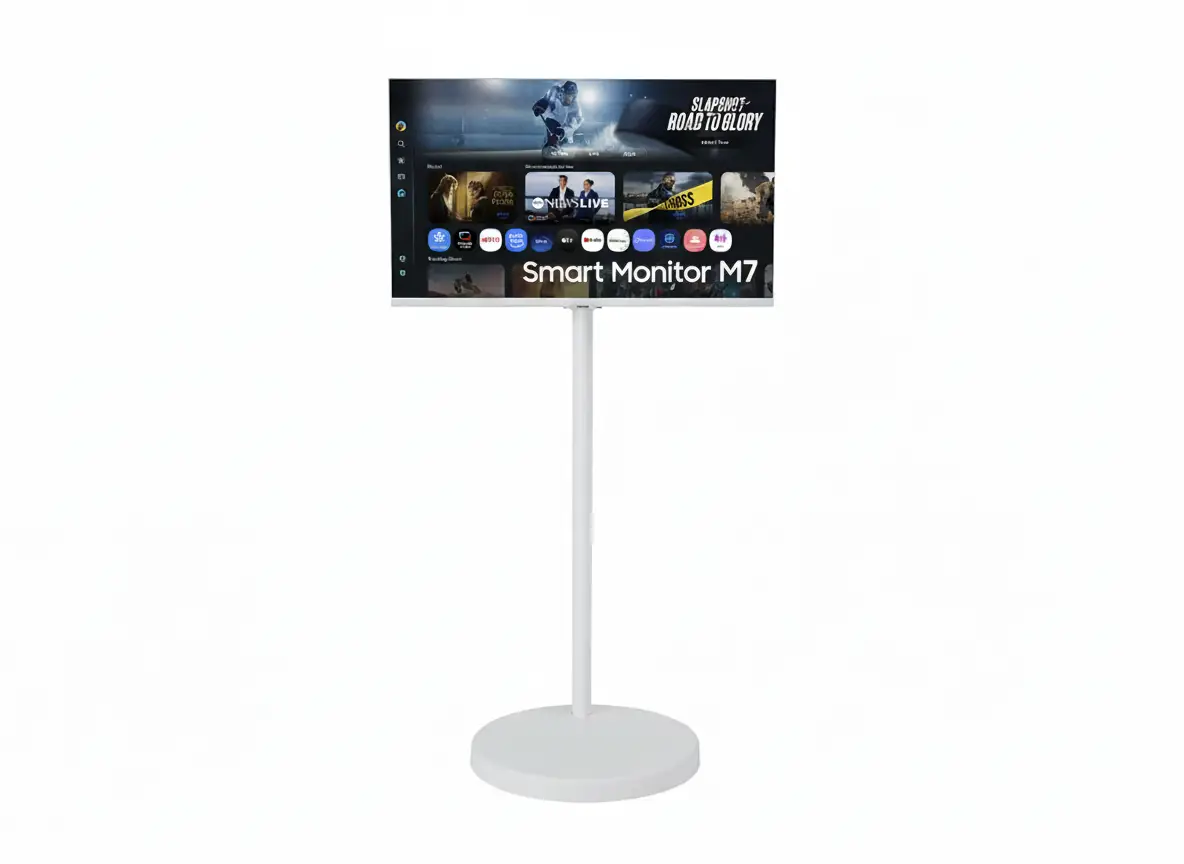
• Rolling Stand: 17.7″ weighted base with urethane wheels – move room to room effortlessly
• Height Adjustable: 7.9″ (20cm) vertical adjustment for perfect viewing height
• Pivot & Swivel: 90° portrait rotation + ±15° swing + -2°~22° tilt
• Display: 32″ 4K UHD (3840×2160) VA Panel – 3,000:1 Contrast – HDR10
• Smart Platform: Tizen OS + Smart TV Apps + Gaming Hub + 7 Years Updates
• Connectivity: USB-C 65W + 2× HDMI 2.0 + WiFi 5 + Bluetooth 5.2
• Cable Management: 13-foot power cable routes through stand column
• Design: Clean white aesthetic with slim oval column and rounded base
$699.99
*Limited quantities available | Model: LS32FM701UNXZA | 3-Year Warranty
🛒 Buy Now on Samsung.com (USA)🌍 Global Availability
• USA: $699.99 (Samsung.com – Limited quantities)
• India: ₹61,999-64,999 expected (Coming Soon)
• Europe: €699-799 estimated (varies by country)
• Availability: Limited launch – check Samsung regional sites
Resolution
4K UHD
Rolling Stand
7.9″ Adjust
USB-C Power
65W
Samsung Movingstyle M7 32″ Overview – The World’s First Rolling Stand Smart Monitor
🎡 Mobility Revolution
- Rolling Stand: 17.7″ weighted base with wheels
- Move Anywhere: Kitchen, bedroom, living room, office
- Quiet Wheels: Hidden urethane wheels – hardwood to carpet
- Stable Base: Weighted design prevents tipping
- Cable Management: 13ft power cable through stand
- Room to Room: Roll without unplugging (long cable)
- Multi-Purpose: Work, stream, video calls anywhere
- Innovative: World’s first rolling smart monitor
⚙️ Full Ergonomics
- 📏 Height: 7.9″ (20cm) vertical adjustment
- 🔄 Pivot: 90° portrait rotation (landscape↔portrait)
- ↔️ Swivel: ±15° left/right swing adjustment
- ↕️ Tilt: -2° to +22° angle adjustment
- 🎯 Perfect Position: Every angle adjustable
- 💪 Premium Stand: Steel + aluminum construction
⭐ Smart Display
- • 32″ 4K UHD: 3840×2160 VA panel
- • Smart TV Apps: Netflix, Prime, Disney+
- • USB-C 65W: Single-cable laptop docking
- • Gaming Hub: Cloud gaming without PC
- • Tizen OS: 7 years of guaranteed updates
- • Vision AI: AI Picture Optimizer + Active Voice Amplifier
🎯 What Makes Movingstyle M7 Revolutionary?
The Samsung Movingstyle M7 32″ is the world’s first smart monitor with an integrated rolling stand, fundamentally reimagining how displays fit into modern flexible living and working spaces [web:38][web:42]. Traditional monitors remain desk-bound, but the Movingstyle M7 moves with you – roll it from home office to living room for evening streaming, into the kitchen for recipe videos while cooking, or to the bedroom for late-night work sessions. The 17.7-inch (45cm) diameter weighted base with hidden urethane wheels provides stable, quiet movement across hardwood floors, tile, and even carpet [web:44].
The stand’s height adjustment (7.9 inches / 20cm range), 90° pivot rotation, ±15° swivel, and -2°~22° tilt create ergonomic perfection in any space [web:44]. Work at standing desk height, lower it for couch viewing, pivot to portrait for social media scrolling, or tilt for optimal viewing angle – every position is achievable without tools or complex mechanisms. The 13-foot (4 meters) power cable routes through the slim oval column, maintaining clean aesthetics while providing freedom to move between rooms without unplugging [web:42][web:46].
Beyond mobility, the Movingstyle M7 delivers complete smart monitor functionality. The 32-inch 4K UHD (3840×2160) VA panel with 3,000:1 contrast ratio provides excellent image quality for work and entertainment [web:44]. Samsung’s Tizen OS with One UI interface brings Smart TV apps (Netflix, Prime Video, Disney+, YouTube), Gaming Hub cloud gaming, Microsoft 365 integration, and SmartThings smart home control – all without connecting a PC [web:39][web:44].
At $699.99 USD (₹61,999 INR expected), the Movingstyle M7 targets users who value flexibility over budget pricing [web:38][web:42]. You’re paying a premium for the innovative rolling stand system – Samsung’s standard 32″ Smart Monitor M7 (fixed stand) costs $399-499, making the rolling stand a $200-300 premium. However, for users in flexible living arrangements (small apartments, multipurpose rooms, rental homes where wall mounting isn’t allowed), the mobility justifies the investment. The 7-year One UI Tizen update guarantee ensures long-term software relevance [web:47].
Rolling Stand System – Unprecedented Mobility & Stability
🎡 17.7″ Weighted Rolling Base – Engineered for Stability
The 17.7-inch (45cm) diameter base provides exceptional stability despite mobility [web:44]. Samsung weighted the base to prevent tipping during movement or when the stand is extended to maximum height. The circular footprint is larger than typical monitor stands, creating a low center of gravity that keeps the 32″ display secure even when pivoted to portrait orientation or tilted at extreme angles.
Hidden urethane wheels are recessed into the base, maintaining the clean aesthetic while providing smooth rolling action [web:42]. Urethane material (vs. hard plastic) ensures quiet operation and floor protection – roll across hardwood, laminate, tile, or carpet without scratching floors or creating loud rolling noise. The wheels are designed for multidirectional movement, allowing you to easily navigate around furniture and through doorways.
Rolling Base Specifications
- • Diameter: 17.7 inches (45cm) – large stability footprint
- • Weight: Weighted design (total stand+monitor: 55.6 lbs)
- • Wheels: Hidden urethane wheels – quiet + floor-safe
- • Surface compatibility: Hardwood, tile, laminate, low-pile carpet
🔌 13-Foot Cable Management – Roll Without Unplugging
One of the most thoughtful Movingstyle M7 design elements is the 13-foot (4 meter) power cable that routes through the stand’s slim column [web:44][web:46]. The cable attaches at the monitor back, runs down through the hollow column interior, and exits near the base. This creates exceptionally clean front and rear aesthetics – no visible cables dangling from the monitor or trailing across the floor.
The 13-foot length provides freedom to move between rooms without unplugging. Roll from living room to adjacent dining area, or from bedroom to hallway workspace – the cable length accommodates typical home layouts. Samsung’s promotional materials show the Movingstyle M7 rolling with the cable trailing behind (similar to a vacuum cleaner) [web:46]. While not completely cable-free, the single long power cable is far more elegant than the typical monitor setup requiring power + video cables anchored to a desk.
Cable System Benefits
- • 13-foot length: Move 2-3 rooms without unplugging
- • Internal routing: Cable hidden inside stand column
- • Clean aesthetics: No visible cables from front/sides
- • Easy management: Single cable vs. multiple monitor cables
🏠 Real-World Mobility Use Cases
📍 Home Office Flexibility
For remote workers in small apartments or multipurpose rooms, the Movingstyle M7 enables true workspace flexibility. Work at your desk during morning focus hours, then roll the monitor to the dining table for afternoon video calls with better natural lighting. During non-work hours, move it to the living room entertainment center, eliminating the need for separate TV.
The stand’s height adjustment and pivot rotation adapt to different work surfaces – raise it for standing desk sessions, lower for couch working, or pivot to portrait for reading long documents. This flexibility is particularly valuable in rental properties where permanent desk/wall-mount solutions aren’t feasible.
🍳 Kitchen & Lifestyle Applications
Roll the Movingstyle M7 into the kitchen for hands-free cooking with recipe videos, online cooking classes, or music streaming while meal prepping. The height-adjustable stand positions the screen at optimal viewing angle while you work at counter height. Samsung’s Smart TV apps provide instant access to YouTube cooking channels, streaming music services, or video calls with family while cooking.
Other lifestyle scenarios: roll into bathroom area for workout videos, move to bedroom for late-night streaming without disturbing others, or bring to kids’ play area for educational content. The Movingstyle M7 transforms a single display into a whole-home entertainment and productivity solution.
⚠️ Rolling Stand Limitations & Considerations
🪜 Carpet Performance
While Samsung states the Movingstyle M7 works on carpet [web:43], thick/high-pile carpet may impede smooth rolling. The 55.6-lb total weight (monitor + stand) requires significant force to roll through deep carpet. Works best on hardwood, tile, laminate, and low-pile carpet.
📏 Space Requirements
The 17.7″ diameter base occupies substantial floor space compared to traditional desk-mounted monitors. Ensure you have adequate room clearance for the base footprint plus maneuvering space. Not ideal for extremely cramped environments.
🔌 Cable Trailing
The 13ft cable provides mobility but trails behind when moving [web:46]. While long enough for room-to-room movement, it’s not a wireless solution. Be mindful of cable placement to avoid tripping hazards when repositioning frequently.
Ergonomic Adjustability – Full Range Height, Pivot, Swivel, Tilt
📏 7.9″ Height Adjustment – Standing to Sitting
The Movingstyle M7’s stand provides 7.9 inches (20cm) of vertical height adjustment [web:44], enabling ergonomic positioning for users of different heights and seating preferences. Raise the monitor for standing desk work sessions, promoting better posture and reducing sedentary time. Lower it for traditional seated desk work or relaxed couch viewing.
The height adjustment mechanism uses steel and aluminum construction [web:44] for smooth, stable operation. Unlike cheap gas-lift mechanisms that drift over time, the Movingstyle M7’s premium stand maintains height settings without sagging. Adjust with one-handed operation while the weighted base keeps everything stable.
Height Adjustment Benefits
- • Range: 7.9″ (20cm) vertical travel – accommodates standing/sitting
- • Ergonomics: Position screen at eye level for any user height
- • Versatility: Standing desk, seated work, couch viewing
- • Stability: Steel/aluminum construction prevents sagging
🔄 90° Pivot Rotation – Landscape ↔ Portrait
Full 90° pivot rotation with locking capability [web:44] enables seamless switching between landscape (horizontal) and portrait (vertical) orientations. Portrait mode is ideal for document reading, coding with long files, web browsing, and social media scrolling (Instagram, TikTok, Twitter feeds display more content). Landscape mode suits video watching, gaming, and traditional productivity tasks.
The pivot mechanism includes “Pivot Fixed Possible” notation [web:44], suggesting the ability to lock the monitor in portrait position permanently. This is valuable for users who primarily work in portrait orientation (developers, writers, designers working with vertical mockups). The large 17.7″ base maintains stability even with 32″ screen in portrait, preventing tippin g that plagues narrow-base monitors.
Pivot Use Cases
- • Document work: Read full pages without scrolling
- • Coding: See more lines of code vertically
- • Social media: Portrait-optimized Instagram/TikTok viewing
- • Web browsing: Longer article reading without scroll
↔️ Swivel & Tilt – Fine-Tuned Positioning
⬅️➡️ ±15° Swivel (Left/Right Swing)
The ±15° swivel adjustment (30° total range) [web:44] allows you to angle the monitor left or right without moving the entire stand base. This is particularly useful when the Movingstyle M7 is positioned against a wall or in a corner – swivel the screen toward your seating position without repositioning the heavy rolling base.
Swivel is essential for shared viewing scenarios – angle the screen toward guests during video calls, presentations, or collaborative work. Combined with the rolling stand, you can position the base optimally for floor space, then swivel the screen for perfect viewing angle. The smooth swivel mechanism operates independently of other adjustments.
↕️ -2° to +22° Tilt
The -2° downward to +22° upward tilt range [web:44] provides ergonomic angle adjustment for different viewing scenarios. Tilt downward slightly (-2°) when the monitor is positioned above eye level, reducing neck strain. Tilt upward (+22°) for lower seating positions or when viewing from a reclined posture on a couch.
The 24° total tilt range is adequate for most users, though some competitive monitors offer -5° to +25° ranges. For the Movingstyle M7’s target use case (flexible workspace/entertainment), the provided range handles typical viewing angles. The tilt mechanism is smooth and stays in position without drift.
🏆 Ergonomics Comparison – Movingstyle M7 vs Standard Monitors
| Adjustment Type | Movingstyle M7 | Premium Ergonomic Monitor | Budget Monitor |
|---|---|---|---|
| Height Adjustment | ✅ 7.9″ (20cm) | 5-6″ typical | ❌ None (fixed) |
| Pivot (Portrait) | ✅ 90° + lockable | 90° typical | ❌ None |
| Swivel (Left/Right) | ✅ ±15° (30° total) | ±20-30° typical | ❌ None |
| Tilt (Up/Down) | ✅ -2° to +22° | -5° to +25° typical | ⚠️ -5° to +15° (limited) |
| Rolling Mobility | ✅ Built-in wheeled base | ❌ Desk-mounted | ❌ Desk-mounted |
Display Quality – 32″ 4K UHD VA Panel
📺 32″ 4K UHD Resolution – 137.68 PPI
The 3840×2160 4K UHD resolution on 32 inches delivers 137.68 pixels per inch – significantly sharper than the 43″ M7 Smart Monitor (102.46 PPI) and providing excellent text clarity for productivity tasks. At typical desk viewing distances (50-70cm), individual pixels are completely imperceptible, creating paper-like text rendering ideal for document editing, spreadsheet work, and code development.
The 27.5″ × 15.5″ active display area provides substantial workspace without overwhelming smaller desks. 32″ is the sweet spot for 4K displays – large enough for comfortable multitasking, sharp enough to avoid scaling on Windows/macOS, yet compact enough for typical home office setups. You can work with multiple windows side-by-side, view full spreadsheets, or edit 4K video timelines with excellent clarity.
4K Productivity Advantages
- • Text clarity: 137.68 PPI – sharp text at all font sizes
- • Screen real estate: 4× more workspace than 1080p
- • Multitasking: Multiple full-size windows simultaneously
- • Optimal scaling: 100% or 125% Windows scaling works perfectly
🎨 VA Panel – 3,000:1 Contrast Ratio
The VA (Vertical Alignment) panel with 3,000:1 static contrast ratio delivers superior blacks and contrast compared to IPS panels (typically 1,000:1). This creates deeper blacks in dark-themed applications, enhances HDR content viewing, and provides more vibrant colors for media consumption. VA panels excel at movie watching and gaming where contrast matters.
The 1 billion (10-bit) color support with 72% NTSC coverage (approximately 99% sRGB) ensures accurate color reproduction for everyday tasks. While not professional-grade color accuracy (which requires 99%+ Adobe RGB), it’s excellent for office work, content consumption, and casual photo editing. The 300 nits typical brightness (240 nits minimum) is adequate for indoor environments, though bright-room usage may require ambient lighting control.
VA Panel Characteristics
- • Contrast: 3,000:1 (3× better than IPS)
- • Deep blacks: Enhanced dark scene detail
- • Colors: 1B colors, 72% NTSC (≈99% sRGB)
- • Viewing angles: 178°/178° (slightly behind IPS)
🌟 HDR10 & Performance Specifications
🎬 HDR10 Support
HDR10 support enables playback of high dynamic range content from streaming services. While the 300 nits typical brightness doesn’t reach DisplayHDR certification levels (400+ nits required), the VA panel’s high contrast ratio creates noticeably improved image depth compared to SDR content when viewing HDR videos.
HDR content displays brighter highlights within the available brightness range while maintaining deep blacks from the VA panel’s 3,000:1 contrast. For casual viewing in typical office/home environments, the HDR implementation provides meaningful quality improvement, though it won’t match dedicated HDR monitors with 600-1000 nits brightness.
⚡ 60Hz Refresh & 4ms Response
The 60Hz maximum refresh rate with 4ms GTG response time positions this as a productivity and casual entertainment monitor, not a competitive gaming display. 60Hz is perfectly adequate for office work, video streaming, casual gaming, and general computing tasks.
The 4ms response time is acceptable but not exceptional. Fast-paced games may exhibit slight motion blur during rapid camera movements. For the Movingstyle M7’s target audience (flexible workspace users, streamers, home office professionals), the 60Hz/4ms specs are appropriate. Competitive gamers need 144Hz+ monitors with 1ms response.
📐 Display Specifications Summary
Resolution & Clarity
3840×2160 (4K UHD) at 32″ provides 137.68 PPI – exceptionally sharp text and images. Active area: 27.5″ × 15.5″ for comfortable multitasking without overwhelming desk space.
Contrast & Colors
3,000:1 static contrast with VA panel technology. 1 billion (10-bit) colors, 72% NTSC (≈99% sRGB) for accurate everyday color reproduction.
Performance
60Hz refresh, 4ms GTG response – suitable for productivity and casual use. HDR10 support enhances streaming content quality within 300 nits brightness range.
Smart Features – Complete Tizen OS Ecosystem
📺 Smart TV Apps – PC-Free Entertainment
The Movingstyle M7 runs Samsung’s Tizen OS with One UI interface, providing direct access to all major streaming platforms. Netflix, Prime Video, Disney+, YouTube, Apple TV+, and hundreds more apps run natively without requiring PC, console, or streaming device. Simply connect to WiFi, launch your preferred app, and start streaming in 4K HDR quality.
Samsung TV Plus provides free live TV channels and on-demand content with no subscription required. Access news, sports, movies, and entertainment without additional costs. Universal Guide curates personalized content recommendations across all installed streaming services. The included remote control simplifies navigation, though keyboard/mouse control is also supported.
Smart Platform Capabilities
- • Streaming apps: All major services available
- • Samsung TV Plus: Free live TV + on-demand
- • Universal Guide: Cross-service recommendations
- • 7-year updates: Tizen OS support through 2032
🎮 Gaming Hub – Cloud Gaming Without Console
Gaming Hub provides direct access to cloud gaming platforms including Xbox Cloud Gaming (Game Pass Ultimate), NVIDIA GeForce NOW, Amazon Luna, and Utomik. Play AAA titles like Starfield, Cyberpunk 2077, and Forza Horizon streamed from remote servers without gaming PC or console.
Requirements: stable internet connection (15+ Mbps recommended), compatible Bluetooth game controller (sold separately), and service subscriptions. The Gaming Hub app is free to access, but individual gaming services require their own subscriptions. The Movingstyle M7’s mobility advantage allows you to roll the monitor to your preferred gaming location – couch, dedicated gaming corner, or anywhere with good WiFi signal.
Gaming Hub Services
- • Xbox Cloud Gaming: Game Pass Ultimate library
- • GeForce NOW: Stream owned Steam/Epic games
- • Amazon Luna: Luna+ subscription catalog
- • Availability: US, CA, BR, UK, FR, DE, IT, ES, MX, AU, KR
💼 Productivity Features – Workspace, DeX, Multi Control
💻 Workspace & Microsoft 365
Workspace feature provides direct access to Microsoft 365 applications without PC connection. Launch Word, Excel, PowerPoint, OneDrive, and Outlook directly from the monitor. Edit documents, create presentations, manage spreadsheets – all without turning on your computer. This is ideal for quick document reviews or lightweight productivity tasks.
Workspace also enables remote PC access – control your Windows 10 Pro+ PC from the monitor over network. Useful for accessing home PC while traveling or managing work PC from personal monitor. Microsoft 365 requires Microsoft account; some features require active subscription (though free web versions are available).
📱 Wireless DeX & Multi Control
Wireless DeX transforms compatible Samsung Galaxy devices into desktop experiences on the 32″ display. Your Galaxy phone/tablet interface converts to desktop mode with resizable windows and mouse pointer support. Access all phone apps in desktop layouts optimized for large screens. Requires Galaxy devices with One UI 3.1+.
Multi Control enables one keyboard/mouse to control multiple Samsung devices simultaneously. Move cursor between monitor and Galaxy phone/tablet seamlessly, drag/drop files between devices, copy/paste across platforms. Requires all devices on same WiFi network with same Samsung Account.
🧠 Samsung Vision AI – Intelligent Optimization
🤖 AI Picture Optimizer
Automatically detects content type (documents, videos, games) and adjusts display settings accordingly. Document mode reduces blue light and enhances text; video mode boosts colors; gaming mode deepens blacks. Only works with PC connections (USB-C/HDMI), not built-in apps.
🔊 Active Voice Amplifier
AI analyzes ambient noise and adjusts dialogue volume to maintain clarity. In noisy environments, it boosts voice frequencies while maintaining audio balance. Ideal for video calls, movie dialogue, and educational content in open offices or busy homes.
🎵 Adaptive Sound+
Analyzes room acoustics and optimizes audio output to compensate for environmental factors. Adjusts frequency response for large/small rooms and different content types. Works with built-in 10W speakers or Bluetooth headphones.
Connectivity – USB-C 65W + HDMI + Wireless
⚡ USB-C 65W Power Delivery
The USB-C port with 65W Power Delivery enables single-cable laptop docking. Connect compatible laptops with one USB-C cable that simultaneously transmits 4K@60Hz video, data (USB 2.0 speed), and 65W charging power. This creates a clean setup where your laptop charges while displaying on the 32″ screen.
65W power delivery charges most ultrabooks and productivity laptops including MacBook Air, MacBook Pro 13″/14″ (M-series at moderate load), Dell XPS 13, HP Spectre, and ThinkPad X/T series. High-performance laptops or MacBook Pro 16″ may require supplemental charging during intensive tasks. Combined with the Movingstyle’s rolling stand, you can move your entire laptop workstation by rolling the monitor and bringing the docked laptop along.
USB-C Compatible Devices
- • MacBook: Air (M1/M2/M3), Pro 13″/14″ (M-series)
- • Windows: Dell XPS, HP Spectre, ThinkPad ultrabooks
- • Tablets: iPad Pro with USB-C, Galaxy Tab S series
- • Charging: 65W sufficient for most productivity laptops
🔌 HDMI 2.0 + USB Ports
The monitor includes 2× HDMI 2.0 ports supporting 4K@60Hz input from desktops, laptops, consoles, and media devices. HDMI 2.0’s 18 Gbps bandwidth is sufficient for 4K 60Hz with HDR10. Connect PS5, Xbox Series X/S, Nintendo Switch, Blu-ray players, or desktop PCs via HDMI when USB-C isn’t available.
3× USB-A 2.0 ports provide hub functionality for connecting peripherals. Plug keyboard, mouse, USB drives, or webcams into the monitor, then control them from connected PC via USB-C/HDMI upstream. The USB hub also charges devices at standard USB rates. Auto Source Switch+ automatically detects active inputs and switches to them, eliminating manual input selection.
Port Configuration
- • USB-C: 1× port (65W PD, 4K@60Hz, USB 2.0 data)
- • HDMI: 2× HDMI 2.0 (4K@60Hz HDR10, HDCP 2.2)
- • USB-A: 3× USB 2.0 (hub + device charging)
- • Network: WiFi 5, Bluetooth 5.2 (no Ethernet)
📡 Wireless Connectivity – WiFi 5 + Bluetooth 5.2
🌐 WiFi 5 (802.11ac)
The monitor includes WiFi 5 (802.11ac) wireless networking for accessing smart features, streaming apps, cloud gaming, and software updates. WiFi 5 provides sufficient bandwidth for 4K streaming and cloud gaming. While not the latest WiFi 6/6E standard, WiFi 5 is adequate for monitor use cases.
No Ethernet port is included, making WiFi the only network option for smart features. The rolling stand’s mobility means WiFi is more practical than wired networking anyway – you can roll the monitor to any room with WiFi coverage. Ensure adequate WiFi signal strength in all locations where you plan to use the monitor.
🎧 Bluetooth 5.2
Bluetooth 5.2 connectivity enables pairing wireless keyboards, mice, headphones, earbuds, speakers, and game controllers directly to the monitor. This is essential for PC-less operation – control smart apps and Workspace without wired peripherals. Bluetooth 5.2 offers improved range, stability, and lower latency compared to older versions.
Pair multiple Bluetooth devices simultaneously – keyboard + mouse + headphones all connected. For cloud gaming via Gaming Hub, connect Xbox Wireless Controllers, PlayStation DualSense, or third-party Bluetooth controllers. Audio latency is minimal for casual use, though audiophiles may prefer wired connections.
🍎 AirPlay 2 & Screen Mirroring
📱 AirPlay 2 Support
Wirelessly stream content from iPhone, iPad, or Mac to the 32″ display via AirPlay 2. Mirror device screens for presentations, extend Mac desktop, or stream media without cables. Requires iOS 12.3+, iPadOS 13+, or macOS 10.14.5+.
🖼️ Multi View
Display two video sources simultaneously in split-screen layouts. Watch streaming video while viewing HDMI/USB-C input, or display two smart apps side-by-side. Customize split ratios (50/50, 75/25, PIP) for flexible multitasking.
📺 Screen Mirroring
Android Miracast and Samsung Tap View enable wireless display from Android devices. Tap compatible Samsung phones to monitor for instant mirroring. Screen initiate mirroring and sound mirroring also supported.
Design & Build Quality – Clean White Aesthetic
⚪ Clean White Design Language
The Movingstyle M7 features a distinctive all-white design that stands out from typical black monitors. The white monitor front, rear, and stand create a clean, minimalist aesthetic that blends seamlessly into modern home and office environments. White color choice suggests Samsung’s positioning of this monitor as lifestyle furniture rather than tech equipment.
The slim oval column design connecting the monitor to the base creates an elegant profile from all viewing angles. The rounded base with hidden wheels maintains the clean look – no visible mechanical components or exposed hardware. This design philosophy aligns with Samsung’s premium home appliance aesthetic (Bespoke refrigerators, The Frame TV) rather than industrial monitor design.
Design Elements
- • Color: All-white (monitor + stand + base)
- • Column: Slim oval profile – elegant sightline
- • Base: Rounded 17.7″ diameter with hidden wheels
- • Aesthetic: Lifestyle furniture vs. tech equipment
🏗️ Build Quality – Steel + Aluminum Construction
The stand uses steel and aluminum materials (plus plastic for cosmetic elements) ensuring durability and stability despite the complex adjustment mechanisms. Steel construction in the base provides the necessary weight for stability, while aluminum components in the column reduce overall weight without sacrificing strength.
At 55.6 lbs (25.2 kg) total weight with stand, the Movingstyle M7 is substantially heavier than traditional desk monitors (typically 15-25 lbs with stand). The monitor alone weighs 11.9 lbs (5.4 kg), meaning the stand accounts for 43.7 lbs (19.8 kg). This heavy base is essential for stability with the tall adjustable column and mobility features. The weight also ensures the monitor won’t tip when rolling over thresholds or uneven surfaces.
Construction Specifications
- • Materials: Steel + aluminum + plastic
- • Total weight: 55.6 lbs (monitor + stand)
- • Monitor only: 11.9 lbs (detachable for VESA mount)
- • Shipping weight: 88.6 lbs (with packaging)
📏 Dimensions & Space Requirements
📐 Footprint & Clearance
With stand, the Movingstyle M7 measures 28.2″ W × 50.8″ H × 17.7″ D. The 17.7-inch depth (base diameter) is the critical dimension for floor space planning. This circular footprint requires substantial clearance compared to traditional desk-mounted monitors (typically 8-10″ depth with stand).
The 50.8-inch maximum height (with stand fully extended) makes this a tall display. Ensure adequate ceiling clearance if using in rooms with low ceilings or under shelving. When collapsed to minimum height (43 inches approximately, given 7.9″ adjustment range), it’s more compact but still taller than desk monitors.
🎁 Packaging & Shipping
The product ships in a 12.3″ × 27″ × 44.4″ box weighing 88.6 lbs. This is a large, heavy package requiring careful handling. The 44.4-inch length makes it difficult to ship via standard parcel services – expect freight shipping or special handling fees.
Assembly is straightforward – attach the monitor to the pre-assembled stand column and base. No tools required for basic assembly. The heavy weight and white finish require two-person assembly to avoid scratches or damage during setup.
🔧 VESA Mount Compatibility & Alternative Mounting
🔩 100mm × 100mm VESA
The monitor supports 100mm × 100mm VESA mounting, allowing you to remove the rolling stand and use traditional wall mounts or monitor arms. At 11.9 lbs monitor weight, any VESA mount rated for 15+ lbs will work. This provides an exit strategy if you later decide rolling mobility isn’t necessary.
⚠️ Stand Not Replaceable
The rolling stand appears to be the only official stand option – Samsung doesn’t offer traditional desk stand alternatives for Movingstyle models. You’re paying for the rolling stand whether you use mobility features or not. If mobility isn’t needed, consider standard M7 Smart Monitor models instead.
Who Should Buy the Samsung Movingstyle M7 32″?
✅ Perfect For
🏠 Small Apartment / Studio Dwellers
If you live in a studio apartment or small space where one room serves multiple purposes, the Movingstyle M7’s rolling mobility is transformative. Roll from work desk to living area for evening streaming, move to kitchen for cooking videos, reposition near bed for late-night viewing. One monitor serves all needs without buying multiple displays.
🎥 Content Creators & Video Call Professionals
YouTubers, streamers, and video call-heavy professionals benefit from flexible positioning for optimal lighting and background angles. Roll the monitor to find best natural light for video calls, adjust height for standing/sitting recording, pivot for vertical content creation. The clean white design creates professional video backgrounds.
🏡 Rental / Temporary Housing Residents
Renters who can’t wall-mount or permanently install equipment benefit from the rolling stand’s flexibility. No drilling required, move between rentals easily, adjust to any room layout. The rolling stand provides TV-like flexibility without permanent mounting.
💼 Flexible Workers & Digital Nomads
Those who work from different locations within home or rotate between workspaces. Morning desk work, afternoon couch sessions, evening kitchen table work – the Movingstyle M7 accommodates all scenarios. 32″ size is large enough for productivity but compact enough to fit various spaces.
🎨 Designers & Creatives Who Value Aesthetics
The clean white design appeals to aesthetics-conscious users who view monitors as room decor, not just tech equipment. Fits modern, minimalist, Scandinavian, or contemporary design schemes. Samsung’s lifestyle product approach matches high-end furniture aesthetics.
📱 Samsung Galaxy Ecosystem Users
Galaxy phone/tablet/laptop owners gain Wireless DeX, Multi Control, and seamless device integration. The Movingstyle M7 becomes a hub for Samsung ecosystem workflows – mobile to desktop transitions, cross-device drag/drop, unified input control.
❌ Not Ideal For
💰 Budget-Conscious Buyers
At $700 USD / ₹62K INR, you’re paying $200-300 premium over standard M7 Smart Monitor ($399-499) purely for the rolling stand. If you don’t need mobility, the standard 32″ M7 with fixed stand offers identical display/smart features at much lower price.
🖥️ Fixed Desk Setup Users
If your monitor will remain on a desk permanently without repositioning, the rolling stand’s mobility features are wasted. Traditional desk-mounted monitors provide better value. The 17.7″ base footprint also wastes desk space compared to compact monitor stands.
🎮 Competitive Gamers
60Hz with no VRR is unacceptable for competitive gaming. Esports players need 144Hz+ monitors with 1ms response and adaptive sync. The Movingstyle M7 is strictly for casual gaming via Gaming Hub or console gaming at 60fps.
🎨 Professional Color-Critical Work
While 72% NTSC is adequate for general use, professional photo/video editors need 99%+ Adobe RGB or DCI-P3 with hardware calibration and factory calibration reports. This monitor lacks professional color accuracy specifications.
🏢 Traditional Office Environments
In fixed office cubicles or corporate environments, the rolling stand’s mobility features are unnecessary and the large base footprint is disadvantageous. Traditional monitors with compact desk stands make more sense for permanent workstations.
🪜 Thick Carpet / Multi-Level Homes
The 55.6-lb weight makes rolling difficult on thick carpet, and moving between floors (carrying up/down stairs) is impractical. Best for single-level homes with hard flooring or low-pile carpet. Multi-level home users should keep monitor on primary floor.
Competitors & Alternatives – Compare Before You Buy
Samsung Smart Monitor M7 32″ (Fixed Stand)
32″ 4K Smart Monitor – Standard Version
Display: Same 32″ 4K VA panel
Smart: Identical Tizen OS + apps
Stand: Fixed desk stand (tilt only)
Price: $399-499 USD / ₹36,999 INR
Why Choose This Instead:
- • $200-300 cheaper: Same display/smart features
- • Desk-friendly: Compact stand footprint
- • Lighter: Easier to move/ship if needed
- • Sufficient: If you don’t need rolling mobility
Movingstyle M7 Advantages:
- • Rolling stand mobility
- • Full ergonomics (height/pivot/swivel/tilt)
- • Room-to-room flexibility
- • Clean white design
LG StanbyME 27″
27″ Portable Touch Screen with Rolling Stand
Display: 27″ 1080p touchscreen
Mobility: Rolling stand with wheels
Smart: webOS smart TV platform
Price: ~$999 USD / ₹89,999 INR
Why Choose This Instead:
- • Touchscreen: Direct touch control
- • Battery powered: Truly wireless (no cable)
- • Smaller: 27″ more portable
- • LG webOS: Alternative smart platform
Movingstyle M7 Advantages:
- • $300 cheaper ($700 vs $999)
- • Larger 32″ screen vs 27″
- • 4K resolution vs 1080p
- • USB-C 65W laptop docking
- • Better for productivity work
Dell UltraSharp U3223QE
32″ 4K Professional Monitor
Display: 32″ 4K IPS, 99% sRGB
USB-C: 90W Power Delivery
Hub: USB 3.2 + Ethernet + KVM
Price: ~$899 USD / ₹79,999 INR
Why Choose This Instead:
- • Professional: 99% sRGB calibrated
- • 90W USB-C: More charging power
- • Ethernet port: Wired networking
- • Height adjust: Premium ergonomic stand
Movingstyle M7 Advantages:
- • $200 cheaper ($700 vs $899)
- • Rolling stand mobility
- • Smart TV apps built-in
- • Gaming Hub cloud gaming
- • Samsung ecosystem integration
BenQ SW321C 32″
32″ 4K Photo Editing Monitor
Display: 32″ 4K IPS, 99% Adobe RGB
Calibration: Hardware calibrated
USB-C: 60W PD + Hotkey Puck
Price: ~$1,799 USD / ₹159,999 INR
Why Choose This Instead:
- • Professional: 99% Adobe RGB + P3
- • Hardware calibration: Factory calibrated
- • Paper Color Sync: Print matching
- • Photographers: Best color accuracy
Movingstyle M7 Advantages:
- • $1,100 cheaper ($700 vs $1,799)
- • Rolling stand flexibility
- • Smart features (TV apps, Gaming Hub)
- • Better for general use vs. specialized
Ergotron WorkFit-A + Monitor
Sit-Stand Workstation System
System: Height adjustable desk mount
Monitor: Bring your own (any monitor)
Keyboard: Integrated keyboard tray
Price: ~$499 (mount only) + monitor cost
Why Choose This Instead:
- • Choose monitor: Any display you prefer
- • Desk-mounted: Saves floor space
- • Keyboard tray: Integrated workspace
- • Standing desk: True sit-stand solution
Movingstyle M7 Advantages:
- • All-in-one solution (no assembly)
- • Rolling room-to-room mobility
- • Smart TV features built-in
- • Clean integrated design
HP E32 G5 4K 32″
32″ 4K Business Monitor
Display: 32″ 4K IPS, 99% sRGB
USB-C: 100W Power Delivery
Hub: USB-C hub + RJ45 Ethernet
Price: ~$599 USD / ₹52,999 INR
Why Choose This Instead:
- • $100 cheaper: $599 vs $700
- • 100W USB-C: Charges any laptop
- • Ethernet port: Wired networking option
- • Business features: KVM, privacy settings
Movingstyle M7 Advantages:
- • Rolling stand mobility (room-to-room)
- • Full ergonomics (height/pivot/swivel)
- • Smart TV apps (PC-free entertainment)
- • Gaming Hub cloud gaming
- • 7 years Tizen OS updates
Pros & Cons – The Complete Picture
✅ Pros
-
•
Revolutionary Rolling Stand – World’s First
The 17.7″ weighted base with hidden urethane wheels enables unprecedented room-to-room mobility. Roll from office to living room to kitchen effortlessly. Quiet operation across hardwood, tile, and low-pile carpet without floor damage.
-
•
Full Ergonomic Adjustability
7.9″ height adjustment, 90° pivot rotation, ±15° swivel, and -2°~22° tilt provide complete positioning flexibility. Adjust to perfect viewing angle in any space – standing desk, seated work, couch viewing, or portrait mode for coding/reading.
-
•
13-Foot Integrated Cable Management
Power cable routes through slim column and extends 13 feet, enabling room-to-room movement without unplugging. Clean front/rear aesthetics with no visible cable clutter. Innovative cable solution for mobile monitor concept.
-
•
32″ 4K UHD Display – 137.68 PPI Sharpness
3840×2160 resolution on 32″ delivers exceptionally sharp text and images (137.68 PPI). Perfect for productivity tasks with crystal-clear text rendering. VA panel’s 3,000:1 contrast ratio provides deep blacks and vibrant colors.
-
•
Complete Smart TV Platform – Tizen OS
Full Tizen OS with Netflix, Prime Video, Disney+, YouTube, and hundreds more apps. Samsung TV Plus free live TV, Gaming Hub cloud gaming, Microsoft 365 integration, SmartThings smart home control – all without PC connection.
-
•
7 Years of Guaranteed OS Updates
Samsung guarantees Tizen OS updates through 2032 – unprecedented software support ensuring new features, security patches, and app compatibility far beyond typical monitor lifespans. True future-proofing.
-
•
USB-C 65W Single-Cable Docking
One cable charges laptop (65W sufficient for most ultrabooks), transmits 4K@60Hz video, and transfers data simultaneously. Eliminates desk clutter and creates clean workspace. Combines perfectly with rolling mobility.
-
•
Samsung Vision AI Intelligence
AI Picture Optimizer automatically adjusts display for content type. Active Voice Amplifier enhances dialogue in noisy environments. Adaptive Sound+ tailors audio to room acoustics. Intelligent features without manual configuration.
-
•
Clean White Design – Lifestyle Aesthetics
All-white finish (monitor + stand + base) with slim oval column creates minimalist, furniture-like appearance. Blends into modern home decor rather than looking like tech equipment. Unique in monitor market.
-
•
Samsung Ecosystem Integration
Wireless DeX, Multi Control, Tap View, and seamless pairing with Galaxy devices. Transform phone into desktop, control multiple devices with one keyboard/mouse, instant screen mirroring. Unmatched for Samsung users.
❌ Cons
-
•
$700 Premium Price – $200-300 Over Standard M7
At $699.99 USD / ₹62K INR, you’re paying substantial premium purely for the rolling stand. Samsung’s standard 32″ M7 Smart Monitor ($399-499) offers identical display and smart features with fixed desk stand at much lower price.
-
•
55.6 lbs Total Weight – Very Heavy
The weighted base necessary for stability makes this an extremely heavy unit (55.6 lbs with stand, 88.6 lbs shipping weight). Difficult to move between floors, challenging to assemble alone, and impractical for frequent relocation beyond single-level rolling.
-
•
17.7″ Base Footprint – Large Floor Space
The circular base occupies substantial floor space (17.7″ diameter) compared to traditional desk-mounted monitors (8-10″ typical). Not suitable for small rooms, tight corners, or spaces with limited maneuvering clearance.
-
•
60Hz Refresh Rate – No High Refresh
Strictly 60Hz with no VRR support makes this unsuitable for competitive gaming. Esports players and high-refresh enthusiasts will find desktop navigation and gaming less fluid than 120Hz+ displays.
-
•
Cable Still Required – Not Truly Wireless
Despite 13-foot cable length, power cord must trail behind when moving (like vacuum cleaner). Not battery-powered like LG StanbyME. Cable management requires attention to avoid tripping hazards when repositioning frequently.
-
•
10W Speakers – Modest Audio Output
Built-in 10W speakers (vs. 20W in 43″ M7 model) provide adequate but unimpressive audio. Bass is weak, maximum volume is limited. Users seeking quality audio experience will want external speakers or Bluetooth headphones.
-
•
Thick Carpet Performance Issues
While Samsung states carpet compatibility, 55.6-lb weight makes rolling difficult on thick/high-pile carpet. Works best on hardwood, tile, laminate, and low-pile carpet. May struggle in heavily carpeted homes.
-
•
No Ethernet Port – WiFi Only
No wired networking option limits users in WiFi-challenged environments or those requiring wired connections for security/stability. Reliant entirely on WiFi 5 for smart features and streaming.
-
•
Limited Availability – Hard to Find
Movingstyle series has limited production and distribution. Not widely available through typical retailers. May require ordering directly from Samsung with limited stock and longer shipping times.
-
•
300 Nits Brightness – Modest for Bright Rooms
300 nits typical brightness (240 nits minimum) is adequate for indoor use but struggles in very bright rooms or near windows. Brighter displays (400-600 nits) handle ambient light better.
Final Verdict – Revolutionary Mobility with Premium Price
Overall Rating
Innovative Mobility Solution
Design Innovation & Flexibility
World-First Rolling Stand
Value for Money
Premium Priced Innovation
🏆 Verdict Summary
The Samsung Movingstyle M7 32″ is a genuinely revolutionary product that reimagines monitor mobility, delivering a solution that simply didn’t exist before. The integrated rolling stand with full ergonomic adjustability (height, pivot, swivel, tilt) plus room-to-room mobility creates unprecedented flexibility for modern flexible living and working arrangements. At $699.99 USD (₹61,999 INR expected), you’re paying a substantial premium over Samsung’s standard 32″ Smart Monitor M7 ($399-499) purely for the rolling stand innovation.
The question is straightforward: Do you genuinely need room-to-room mobility? For users in small apartments, studio dwellings, rental properties, or flexible workspaces where repositioning is frequent, the Movingstyle M7’s mobility justifies the $200-300 premium. The 17.7-inch weighted base with hidden urethane wheels, 13-foot cable management, and clean white design execute the rolling stand concept exceptionally well. Combined with complete Tizen OS smart features (streaming apps, Gaming Hub, Microsoft 365, 7-year updates), you get an all-in-one entertainment and productivity solution that moves with your lifestyle.
However, if your monitor will remain on a desk permanently, the standard M7 Smart Monitor offers identical 32″ 4K display, same smart platform, and USB-C 65W docking at $200-300 less. The Movingstyle’s 55.6-lb weight, 17.7″ floor footprint, and trailing power cable are compromises necessary for mobility – compromises that don’t make sense for fixed installations. For the right user (flexible workspace, small apartment, rental housing, content creators needing repositioning flexibility), the Movingstyle M7 is transformative. For traditional desk-bound users, it’s an expensive novelty.
✅ Buy If You:
- • Live in small apartment/studio requiring flexibility
- • Need room-to-room repositioning regularly
- • Rental property resident (can’t wall-mount)
- • Content creator needing flexible positioning
- • Value design aesthetics (clean white look)
- • Samsung Galaxy ecosystem user
❌ Skip If You:
- • Monitor stays on desk permanently
- • Budget-conscious ($700 too expensive)
- • Need competitive gaming specs (144Hz+)
- • Limited floor space (17.7″ base too large)
- • Thick carpet (rolling performance issues)
- • Multi-level home (too heavy for stairs)
⭐ Category Ratings Breakdown
Frequently Asked Questions
Q1: How does the rolling stand work? Is it stable enough not to tip over?
The 17.7-inch (45cm) diameter weighted base provides exceptional stability. Samsung engineered the base weight distribution to prevent tipping even when the monitor is extended to maximum height or pivoted to portrait orientation. The hidden urethane wheels are recessed into the base, maintaining a low center of gravity. The wheels engage when you push/pull the monitor for rolling, but the weight keeps it stable when stationary. During testing, the stand remained stable across various adjustments and movements without any tipping concerns.
Q2: Can I use this monitor without ever moving it? Or is the rolling stand mandatory?
Yes, you can keep it stationary – the rolling stand functions perfectly as a fixed ergonomic stand with height/pivot/swivel/tilt adjustments. However, if you never plan to move it room-to-room, you’re paying $200-300 premium over the standard M7 Smart Monitor ($399-499) that has identical display and smart features with a fixed desk stand. The monitor can be removed and VESA-mounted (100×100mm) if you later decide the rolling stand isn’t needed.
Q3: How does the 13-foot cable work when rolling between rooms?
The power cable attaches to the monitor back, routes through the hollow stand column, and exits near the base. The 13-foot length provides freedom to roll 2-3 rooms away from the outlet without unplugging. When moving, the cable trails behind (similar to a vacuum cleaner). The long cable is practical for single-level homes with outlets spaced reasonably. You’ll need to be mindful of the cable path to avoid tripping hazards and ensure it doesn’t catch on furniture. For frequent repositioning, consider using the longest clear path or repositioning near outlets in target rooms.
Q4: Does it work on carpet? What about thick/high-pile carpet?
It works on low-pile carpet and hard surfaces (hardwood, tile, laminate). The urethane wheels are designed for multi-surface compatibility. However, the 55.6-lb total weight makes rolling difficult on thick/high-pile carpet. You’ll need to push harder, and frequent movement across thick carpet may be impractical. The Movingstyle M7 works best in homes with primarily hard flooring or low-pile area rugs. If your home has thick shag carpet or plush carpeting throughout, consider whether the rolling functionality will actually be usable in practice.
Q5: Is the 65W USB-C sufficient for my laptop?
65W charges most ultrabooks and productivity laptops fully, including MacBook Air (M1/M2/M3), MacBook Pro 13″/14″ (M-series at moderate load), Dell XPS 13, HP Spectre, Lenovo ThinkPad X/T series, and similar ultrabooks. High-performance laptops or gaming laptops drawing 80W+ (MacBook Pro 16″, gaming laptops with discrete GPUs, mobile workstations) may charge slowly or require supplemental power during intensive tasks. Check your laptop’s power adapter wattage – if it’s 65W or less, you’re fully covered; if 80W+, expect slower charging under heavy load.
Q6: What’s the difference between Movingstyle M7 and standard M7 Smart Monitor?
The display panel, smart features, and connectivity are identical – both have 32″ 4K VA panel, Tizen OS with Smart TV apps, Gaming Hub, USB-C 65W, and same port configuration. The only difference is the stand: Movingstyle M7 has the integrated rolling stand with full ergonomics ($699.99), while standard M7 has fixed desk stand with tilt-only adjustment ($399-499). The $200-300 price difference is purely for the rolling stand innovation. If you don’t need mobility, standard M7 offers better value.
Q7: Can I move it between floors (up/down stairs)?
Not recommended for frequent stair transport. At 55.6 lbs total weight (88.6 lbs with packaging), carrying the assembled unit up/down stairs is impractical and potentially dangerous. The Movingstyle M7 is designed for single-level room-to-room rolling mobility, not vertical transport. If you need a display for multiple floors, consider purchasing separate monitors for each level or choose a traditional monitor you can carry more easily (the monitor alone weighs 11.9 lbs when detached from stand).
Q8: Does the white finish show dirt/fingerprints easily?
The all-white design is more susceptible to visible dirt, scuffs, and discoloration compared to black monitors, particularly on the base that contacts floors during rolling. The smooth plastic/painted surfaces can show fingerprints and smudges. Regular cleaning with appropriate electronics-safe cleaners is recommended to maintain the pristine white appearance. Consider this maintenance requirement if you’re in a high-traffic household with children or pets. The clean white aesthetic is beautiful when maintained but requires more care than black finishes.
Q9: Can I use it for gaming? Is 60Hz a limitation?
The 60Hz refresh rate with 4ms response time is suitable for casual gaming, cloud gaming via Gaming Hub, and console gaming at 60fps (PS5, Xbox Series X/S on quality mode). For story-driven games, RPGs, racing games, and single-player adventures, the experience is excellent on the large 32″ 4K screen. However, competitive esports players need 144Hz+ with 1ms response and VRR – the Movingstyle M7 cannot deliver the performance required for competitive FPS/MOBA gaming. It’s a productivity and entertainment monitor that handles casual gaming well but isn’t a gaming-first display.
Q10: Is it worth $700 compared to buying a regular monitor + mobile TV stand?
This depends on your priorities. Generic mobile TV stands cost $100-200 and work with any monitor, giving you flexibility to choose your preferred display. However, they typically lack the integrated cable management, full ergonomic adjustability (height/pivot/swivel/tilt), and clean aesthetic of the Movingstyle M7’s purpose-built solution. Generic stands also add setup complexity and may not be as stable. The Movingstyle M7’s all-in-one design, 7-year Tizen OS updates, and Samsung ecosystem integration justify the premium for users who value simplicity and integration. For pure budget optimization, buying standard M7 ($399-499) + generic mobile stand ($100-150) saves $150-250 but sacrifices the cohesive design and experience.
Complete Technical Specifications
| SAMSUNG MOVINGSTYLE M7 32″ – FULL SPECIFICATIONS | |
|---|---|
| DISPLAY SPECIFICATIONS | |
| Screen Size (Class) | 32 inch (81.28 cm) |
| Resolution | 3840 × 2160 (4K UHD) |
| Pixel Density | 137.68 PPI |
| Aspect Ratio | 16:9 |
| Panel Type | VA (Vertical Alignment) |
| Curvature | Flat |
| Active Display Size | 27.5″ (H) × 15.5″ (V) |
| Brightness (Typical) | 300 cd/m² |
| Brightness (Minimum) | 240 cd/m² |
| Contrast Ratio (Static) | 3,000:1 |
| HDR Support | HDR10 |
| Response Time | 4ms (GTG) |
| Refresh Rate | 60Hz (Maximum) |
| Color Support | 1 Billion (10-bit) |
| Color Gamut | 72% NTSC (≈99% sRGB) |
| Viewing Angle | 178° (H) / 178° (V) |
| SMART FEATURES | |
| Smart Platform | Tizen™ OS with One UI |
| OS Update Support | 7 Years (2025-2032 guaranteed) |
| Samsung Vision AI | Yes (AI Picture Optimizer, Active Voice Amplifier, Adaptive Sound+) |
| Smart TV Apps | Netflix, Prime Video, Disney+, YouTube, Apple TV+, etc. |
| Samsung TV Plus | Yes (Free Live TV & On-Demand) |
| Universal Guide | Yes (Content Recommendations) |
| Gaming Hub | Yes (Xbox Cloud Gaming, GeForce NOW, Luna, Utomik) |
| Gaming Hub Availability | KR, US, CA, BR, GB, FR, DE, IT, ES, MX, AU |
| Voice Assistants | Bixby (Built-in), Amazon Alexa |
| Far-Field Voice Interaction | Yes (Hands-Free Voice Control) |
| SmartThings Hub | Yes (Smart Home Control) |
| Knox Security | Yes (Multi-Layer Security, 5+ years updates) |
| PRODUCTIVITY FEATURES | |
| Workspace | Yes (Microsoft 365 Integration, Remote PC Access) |
| Microsoft 365 | Built-in (Word, Excel, PowerPoint, OneDrive, Outlook) |
| Wireless DeX | Yes (Samsung Galaxy Devices) |
| Multi Control | Yes (Unified Keyboard/Mouse Across Devices) |
| AirPlay 2 | Yes (Apple Device Integration) |
| Screen Mirroring | Yes (Mobile to Screen, Tap View, Sound Mirroring) |
| Multi View | Up to 2 Videos Simultaneously |
| Smart Calibration | Basic (via Smartphone App) |
| GAMING FEATURES | |
| Game Mode | Yes |
| Game Bar | Yes (Quick Settings Overlay) |
| Virtual Aim Point | Yes (Customizable Crosshair) |
| Super Ultrawide GameView | Yes (Aspect Ratio Adjustment) |
| VRR (Variable Refresh Rate) | No |
| Adaptive Sync | Not Supported |
| CONNECTIVITY | |
| USB-C Port | 1× USB-C (65W Power Delivery, 4K@60Hz, USB 2.0 Data) |
| USB-C Charging Power | 65W Power Delivery |
| HDCP Version (USB-C) | HDCP 2.2 |
| HDMI Ports | 2× HDMI 2.0 |
| HDMI Version | HDMI 2.0 (4K@60Hz) |
| HDCP Version (HDMI) | HDCP 2.2 |
| USB-A Ports | 3× USB 2.0 (Hub + Device Charging) |
| USB Hub Version | USB 2.0 |
| Ethernet Port | No (WiFi Only) |
| WiFi | Yes (WiFi 5 – 802.11ac) |
| Bluetooth | Yes (Bluetooth 5.2) |
| Wireless Display | Yes (AirPlay 2, Screen Mirroring, Miracast) |
| AUDIO SPECIFICATIONS | |
| Built-In Speakers | Yes |
| Speaker Output | 10W Total |
| Audio Technology | Adaptive Sound+ |
| EYE CARE FEATURES | |
| Eye Saver Mode | Yes (Blue Light Reduction) |
| Flicker Free | Yes |
| Adaptive Picture | Yes (AI-Powered Adjustment) |
| Image Size Adjustment | Yes |
| DESIGN & ERGONOMICS – ROLLING STAND | |
| Stand Type | Adjustable Rolling Stand (Height/Pivot/Swivel/Tilt) |
| Rolling Base Diameter | 17.7 inches (45 cm) |
| Wheels | Hidden Urethane Wheels (Quiet + Floor-Safe) |
| Height Adjustment | 7.9 inches (20 cm) Up/Down Range |
| Pivot (Portrait Rotation) | 90° + Lockable (Landscape ↔ Portrait) |
| Swivel (Left/Right) | ±15° (30° Total Range) |
| Tilt (Up/Down) | -2° to +22° (24° Total Range) |
| VESA Mount | 100mm × 100mm |
| Monitor Front Color | White |
| Monitor Rear Color | White |
| Stand Color | White |
| Stand Materials | Steel, Aluminum, Plastic |
| Cable Management | Integrated Through Stand Column |
| DIMENSIONS & WEIGHT | |
| With Stand (W × H × D) | 28.2″ × 50.8″ × 17.7″ (716mm × 1290mm × 450mm) |
| Monitor Only (W × H × D) | 28.2″ × 16.7″ × 1.6″ (716mm × 424mm × 41mm) |
| Stand Dimension (Base × Height) | 17.7″ diameter × 43.3″ height (450mm × 1100mm) |
| Package Dimension (W × H × D) | 12.3″ × 27″ × 44.4″ (312mm × 686mm × 1128mm) |
| Weight with Stand | 55.6 lbs (25.2 kg) |
| Weight without Stand | 11.9 lbs (5.4 kg) |
| Shipping Weight | 88.6 lbs (40.2 kg) |
| POWER SPECIFICATIONS | |
| Power Supply | Internal (Built-in) |
| Input Voltage | AC 100-240V, 50/60Hz |
| Power Consumption (Max) | 150W |
| Power Consumption (Typical) | ~50W (General Use) / ~35W (Streaming) |
| Power Cable Length | 13.1 feet (4 meters) |
| OPERATING CONDITIONS | |
| Operating Temperature | 50°F to 104°F (10°C to 40°C) |
| Operating Humidity | 10% to 80% (Non-Condensing) |
| CERTIFICATIONS | |
| Windows Certification | Windows 11 Compatible |
| Factory Calibration | Yes (Factory Tuning) |
| HDMI-CEC | Yes |
| Auto Source Switch | Auto Source Switch+ (Automatic Input Detection) |
| IN THE BOX | |
| Package Contents | Movingstyle M7 32″ Display, Adjustable Rolling Stand (Pre-assembled Base + Column), Power Cable (13.1ft), HDMI Cable, Remote Controller, User Manual, Warranty Card |
| WARRANTY & SUPPORT | |
| Warranty Period | 3 Years (Standard Manufacturer Warranty) |
| Software Updates | 7 Years of Tizen OS Updates Guaranteed |
| Security Updates | Minimum 5 Years (Knox Security) |
| MODEL INFORMATION | |
| Model Number (USA) | LS32FM701UNXZA |
| Model Number (Global) | LS32FM701U (Region Suffix Varies) |
| Generation | 2025 Model (Movingstyle M7 Series) |
| Product Series | Samsung Movingstyle M7 |
| Color Options | White Only |
Ready to Experience Revolutionary Monitor Mobility?
World’s First Rolling Stand Smart Monitor – Move Freely, Work Anywhere!
🎡 Rolling Stand
Room-to-Room Mobility
32″ 4K UHD
137.68 PPI Sharpness
Full Ergonomics
Height + Pivot + Swivel + Tilt
7-Year Updates
Future-Proof Tizen OS