🎮 $450 OFF! Now $749.99 (Was $1,199.99) – Premium WUHD Ultrawide!
40″ WUHD 5120×2160 | 180Hz | 1ms | DisplayHDR 600 | Factory Calibrated!
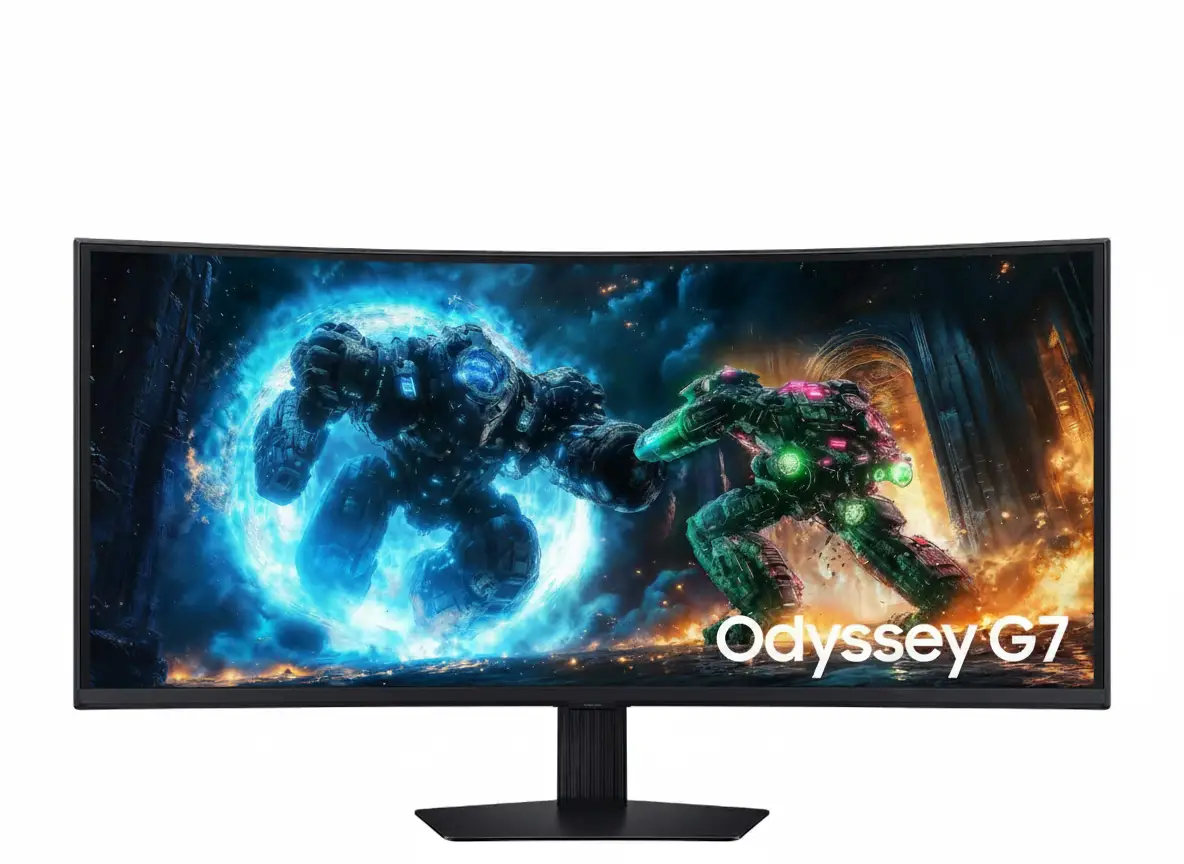
Samsung Odyssey G7 G75F 40″
40″ WUHD 21:9 | 5120×2160 | 180Hz | 1ms GTG | DisplayHDR 600 | 1000R Curved
AMD FreeSync Premium Pro – Factory Calibrated – VA Panel 3000:1 – 90% DCI-P3
🎯 The Ultimate Ultrawide Gaming Experience:
• WUHD Resolution: 5120×2160 (2× QHD pixels) – 140 PPI razor-sharp clarity
• 40″ Ultrawide: 21:9 aspect ratio – 33% wider than 16:9 for immersive gaming
• 180Hz + 1ms: Ultra-fast refresh rate + GTG response – competitive gaming ready
• DisplayHDR 600: VESA certified HDR with 600 nits peak brightness – stunning visuals
• HDR10+ Gaming: Dynamic tone mapping for optimal HDR in every scene
• Factory Calibrated: Includes calibration report – professional color accuracy
• 1000R Curve: Extreme wraparound immersion – matches human eye curvature
• VA Panel: 3000:1 contrast ratio – deep blacks + 90% DCI-P3 + 99% sRGB color
$749.99
$1,199.99
Save $450!
Model: LS40FG75DENXZA | 3-Year Warranty | Free Shipping | 4.9/5 (36 reviews)
🛒 Buy Now on Samsung.com – $749.99 ($450 OFF!)₹62,999
Expected price | Check Samsung India for availability | 3-Year Warranty
🛒 Check Samsung India Website£699
Expected price | Check Samsung UK for availability | 3-Year Warranty
🛒 Check Samsung UK Website🌍 Global Availability
• USA: $749.99 (Samsung.com – $450 OFF MSRP!)
• India: ₹62,999-69,999 expected
• UK: £699-749 estimated
• Europe: €799-899 varies by country
• Australia: AU$1,599 (Check retailers)
Resolution
5120×2160
Refresh Rate
180Hz
HDR
HDR 600
Samsung Odyssey G7 G75F 40″ Overview – Premium WUHD Gaming
🖥️ WUHD Display Excellence
- 40″ WUHD: 5120×2160 resolution – 140 PPI
- 21:9 Aspect: 33% wider than 16:9
- 1000R Curve: Extreme wraparound immersion
- VA Panel: 3000:1 contrast – deep blacks
- DisplayHDR 600: 600 nits peak brightness
- 90% DCI-P3: Wide color gamut
- 99% sRGB: Accurate standard colors
- Factory Calibrated: Includes calibration report
⚡ Elite Gaming Performance
- 🎮 180Hz: Ultra-fast refresh rate
- ⚡ 1ms GTG: Eliminate ghosting/blur
- 🔄 FreeSync Premium Pro: VRR + HDR
- 🌟 HDR10+ Gaming: Dynamic tone mapping
- 🎯 Virtual Aim Point: Crosshair overlay
- 🔦 Black Equalizer: Brighten dark areas
⭐ Premium Features
- • PIP/PBP: Multi-source viewing modes
- • Auto Source Switch+: Instant input detection
- • CoreSync: 16.7M color ambient lighting
- • CoreLighting+: Dynamic RGB effects
- • Super Arena Gaming UX: Enhanced OSD
- • Eye Saver Mode: Blue light reduction
- • Flicker Free: DC dimming
- • Energy Saving: Eco-friendly operation
🎯 What Makes Odyssey G7 40″ Special?
The Samsung Odyssey G7 G75F 40″ represents the pinnacle of ultrawide gaming technology in late 2024 and early 2025. While most ultrawide gaming monitors settle for 3440×1440 QHD resolution at 100-144Hz refresh rates, the Odyssey G7 40″ delivers WUHD (5120×2160) resolution with 180Hz refresh rate and DisplayHDR 600 certification – specifications typically reserved for monitors costing $1,500-2,500. At $749.99 (discounted from $1,199.99), this monitor provides flagship performance at mid-premium pricing.
The WUHD resolution creates transformative visual clarity compared to standard QHD ultrawides. With 11.06 million total pixels (versus 4.95 million in 3440×1440), the display renders game environments, UI elements, and text with exceptional sharpness. The 140 PPI pixel density approaches 27″ 4K monitors (163 PPI) while maintaining ultrawide’s immersive 21:9 aspect ratio. In competitive FPS games like Counter-Strike 2, Valorant, Call of Duty, or Apex Legends, the resolution advantage helps spot distant enemies through foliage, identify player silhouettes in shadows, and read small HUD elements without squinting.
The 180Hz refresh rate combined with 1ms GTG response time positions this monitor as legitimate esports hardware despite its 40″ size. Many assume large ultrawides compromise competitive performance for cinematic experiences, but the Odyssey G7 delivers both. The 180Hz refresh provides 25% more frames per second than 144Hz competitors, creating smoother motion tracking, reduced input lag perception, and competitive advantage in fast-paced games. The 1ms GTG response eliminates ghosting artifacts during rapid camera panning, ensuring sharp object definition during movement.
The DisplayHDR 600 certification represents genuine HDR capability that most monitors claiming “HDR support” cannot match. VESA’s DisplayHDR 600 standard requires 600 nits peak brightness, 350 nits full-screen brightness, and true 10-bit color processing. Lower-tier DisplayHDR 400 monitors (350 nits peak) provide marginal HDR improvements over SDR, while uncertified “HDR-compatible” displays often lack the brightness and local dimming for impactful HDR. The Odyssey G7’s 600-nit peaks create spectacular highlights in game explosions, sunlight rays, magic effects, and car headlights at night.
The HDR10+ Gaming support with dynamic tone mapping automatically optimizes HDR settings scene-by-scene rather than applying static tone curves. Traditional HDR10 uses fixed metadata for entire games, causing suboptimal results when lighting changes dramatically between indoor/outdoor scenes or day/night cycles. HDR10+ Gaming analyzes each frame and adjusts tone mapping dynamically, ensuring optimal contrast and brightness in every situation. This is particularly beneficial in open-world games with varying environments like Cyberpunk 2077, Red Dead Redemption 2, or Elden Ring.
The VA panel with 3000:1 static contrast ratio delivers 3× better black levels than IPS ultrawides limited to 1000:1. Deep blacks enhance HDR’s effectiveness – bright highlights appear more dramatic when contrasted against true blacks rather than grayish IPS blacks. The contrast advantage transforms horror games (Resident Evil, Silent Hill, Alan Wake), space simulators (Star Citizen, Elite Dangerous), racing games with night tracks (Forza, Gran Turismo), and cinematic story games emphasizing atmosphere. Combined with 90% DCI-P3 color gamut and factory calibration, the display provides professional-grade color accuracy suitable for content creation alongside gaming.
Display Quality – WUHD 5120×2160 Resolution Breakdown
📺 WUHD Resolution – 11.06 Million Pixels
The WUHD (Wide Ultra HD) resolution of 5120×2160 pixels represents a massive leap beyond standard ultrawide specifications. While typical 34″ QHD ultrawides display 3440×1440 (4.95 million pixels), the Odyssey G7 40″ renders 11.06 million pixels – 2.23× more pixel density. This resolution maintains the 21:9 ultrawide aspect ratio while doubling vertical resolution from 1440p to 2160p (4K height).
At 40 inches diagonal, the 140 pixels per inch (PPI) density delivers razor-sharp clarity comparable to 27″ 4K monitors (163 PPI) and significantly sharper than 34″ QHD ultrawides (110 PPI). At typical desktop viewing distances of 60-80cm, the 140 PPI ensures text remains crisp without UI scaling, game textures show fine details, and anti-aliasing becomes less critical. The pixel density rivals high-end productivity monitors while maintaining gaming-optimized refresh rates.
WUHD Resolution Advantages
- • 5120×2160: 11.06M pixels (2.23× more than 3440×1440)
- • 140 PPI: Sharp clarity without UI scaling
- • 21:9 aspect: Maintains ultrawide benefits
- • 4K vertical: Full 2160p height resolution
🌊 1000R Curvature – Maximum Immersion
The 1000R curvature (1-meter radius) represents the most aggressive curve commercially available for desktop monitors. This extreme curvature wraps the 40″ display around your peripheral vision, creating unprecedented immersion where screen edges remain equidistant from your eyes. At 40 inches width, the curve prevents the edge-distortion and focus-shift common with flat ultrawides of this size.
For gaming, the 1000R curve enhances situational awareness in competitive titles. Your peripheral vision naturally captures screen edges showing radar, minimaps, health bars, and enemy indicators without head turning. In racing simulators and flight games, the curve mimics natural cockpit wraparound. In first-person games, the immersion increases presence and reduces the “looking through a window” sensation of flat displays.
1000R Curve Benefits
- • Maximum immersion: Wraparound viewing
- • Equal distance: All pixels equidistant from eyes
- • Reduced distortion: Maintains geometry at edges
- • Peripheral awareness: See edges naturally
🎨 VA Panel – 3000:1 Contrast Excellence
🌑 Superior Black Levels
The VA (Vertical Alignment) panel technology delivers 3000:1 static contrast ratio – three times better than IPS panels typically limited to 1000:1. This creates significantly deeper blacks approaching OLED’s infinite contrast, though without self-emissive pixel control. In dark game scenes (horror games, space simulators, nighttime environments), blacks appear truly black rather than grayish.
The contrast advantage enhances HDR effectiveness – bright highlights appear more dramatic when contrasted against true blacks. The 3000:1 native contrast reduces the need for aggressive local dimming zones that can cause blooming artifacts. For games emphasizing atmosphere and lighting (Cyberpunk 2077, Metro Exodus, Resident Evil), the superior contrast creates more cinematic visuals than IPS alternatives.
🎨 Professional Color Accuracy
The monitor achieves 90% DCI-P3 color gamut coverage – the digital cinema standard for film production and professional content creation. DCI-P3 encompasses wider color range than standard sRGB (99% coverage also achieved), producing more vibrant reds, greens, and blues. The 1.07 billion color support (10-bit processing) eliminates color banding in gradients.
Factory calibration with included calibration report verifies color accuracy out-of-box. Each monitor undergoes individual calibration at the factory, with Delta E values documented in the included report. This ensures consistent, accurate colors without manual calibration – critical for content creators and professionals requiring color accuracy alongside gaming performance.
📊 Display Specifications Summary
Resolution & Size
5120×2160 WUHD at 40″ provides 140 PPI sharp clarity. 21:9 aspect ratio – 33% wider than 16:9. Active display: 36.5″ × 15.4″ viewing area.
Panel Quality
VA panel, 3000:1 contrast, DisplayHDR 600 with 1.07B colors. 1000R curve maximum immersion. 90% DCI-P3, 99% sRGB color. Factory calibrated.
Brightness
600 nits peak (DisplayHDR 600). 350 nits typical, 280 nits minimum. HDR10+ Gaming dynamic tone mapping.
Gaming Performance – 180Hz + 1ms Response Time
⚡ 180Hz Refresh Rate – Competitive Edge
The 180Hz maximum refresh rate delivers ultra-smooth motion exceeding most ultrawide competitors limited to 100-144Hz. At 180 frames per second, the display updates every 5.56 milliseconds – 25% faster than 144Hz (6.94ms) and 80% faster than 100Hz (10ms). This creates noticeably smoother camera panning, reduced motion blur, and more responsive input feel during competitive gaming.
The refresh rate advantage becomes critical in competitive FPS games (Counter-Strike 2, Valorant, Apex Legends, Call of Duty) where tracking moving targets and quick reflex shots determine outcomes. The 180Hz refresh reduces perceived input lag – the delay between mouse movement and on-screen response. Even if your PC can’t sustain 180 FPS consistently, running 120-150 FPS at 180Hz feels smoother than 120 FPS capped at 144Hz due to reduced frame pacing issues.
180Hz Advantages
- • 180Hz: 5.56ms refresh interval (vs 6.94ms @ 144Hz)
- • Smoother motion: 25% more frames than 144Hz
- • Reduced input lag: More responsive feel
- • Competitive advantage: Spot moving targets easier
🎯 1ms GTG Response – Zero Ghosting
The 1ms Gray-to-Gray (GTG) response time eliminates ghosting artifacts that plague slower panels. Response time measures how quickly pixels transition between colors – slower response causes motion blur and trailing “ghosts” behind moving objects. At 1ms GTG (in Extreme mode), pixels transition fast enough to maintain sharp object definition during rapid motion.
Fast response time is critical for competitive gaming where tracking moving enemies, following fast-paced action, and maintaining visual clarity during camera panning determine performance. In racing games, 1ms response keeps trackside objects sharp at high speeds. In FPS games, enemy player models remain defined during strafing and jumping. The combination of 180Hz refresh + 1ms response creates motion clarity rivaling professional esports monitors.
1ms Response Benefits
- • 1ms GTG: Eliminates ghosting/trailing
- • Sharp motion: Objects stay defined
- • Competitive gaming: Track targets clearly
- • Fast-paced action: Racing, FPS, fighting games
🔄 AMD FreeSync Premium Pro – Adaptive Sync
🎮 Variable Refresh Rate Technology
AMD FreeSync Premium Pro certification provides adaptive synchronization between GPU frame output and monitor refresh rate. When GPU renders frames at variable rates (80 FPS, 120 FPS, 160 FPS fluctuating), traditional fixed refresh monitors cause screen tearing (horizontal split lines) or stuttering (repeated frames). FreeSync dynamically matches monitor refresh to GPU output, eliminating these artifacts.
The Premium Pro tier includes Low Framerate Compensation (LFC) which multiplies frame display when GPU drops below minimum VRR range. If minimum VRR is 48Hz but GPU outputs 40 FPS, LFC displays each frame 2× at 80Hz to maintain tear-free smoothness. The tier also includes HDR support in VRR mode and auto low-latency mode for competitive gaming.
🎯 Gaming Enhancement Features
The monitor includes Samsung’s Super Arena Gaming UX – an enhanced on-screen display with game-specific optimizations. Black Equalizer brightens dark areas without overexposing highlights, revealing enemies hiding in shadows crucial for competitive advantage in tactical shooters. Virtual Aim Point overlays customizable crosshairs for precision aiming in games without built-in crosshairs.
Picture-in-Picture and Picture-by-Picture modes enable multi-source viewing – watch game guides, monitor Discord/Twitch chat, or view secondary gameplay simultaneously. The 40″ WUHD resolution provides ample space for PBP split-screen without cramped viewing. Auto Source Switch+ detects active inputs and switches automatically when devices power on.
HDR & Color – DisplayHDR 600 Certified Performance
🌟 DisplayHDR 600 Certification
VESA DisplayHDR 600 certification represents genuine HDR capability far exceeding basic “HDR support” claims. The certification requires rigorous testing: 600 nits peak brightness in small highlight areas, 350 nits full-screen sustained brightness, 10-bit color processing, and black level performance. Most monitors claiming HDR fail to meet DisplayHDR 400 minimum (350 nits peak), let alone the 600-tier specifications.
The 600-nit peak brightness creates spectacular HDR highlights – explosions, sunlight rays, magic spells, car headlights, neon signs, and muzzle flashes appear dramatically brighter than surroundings. Combined with VA panel’s 3000:1 contrast delivering deep blacks, the dynamic range between darkest shadows and brightest highlights expands significantly beyond SDR’s limitations. This is particularly impactful in games with high-contrast scenes like cyberpunk cities, space environments, or dramatic lighting.
DisplayHDR 600 Requirements
- • Peak brightness: 600 nits (small areas)
- • Full-screen: 350 nits sustained brightness
- • Color depth: 10-bit processing (1.07B colors)
- • Black levels: <0.1 nits (VA panel advantage)
🎮 HDR10+ Gaming – Dynamic Optimization
HDR10+ Gaming support with dynamic tone mapping automatically optimizes HDR parameters scene-by-scene rather than using static tone curves. Traditional HDR10 applies fixed metadata for entire games, causing suboptimal results when lighting changes dramatically. Outdoor daytime scenes might be perfectly exposed while indoor areas appear too dark, or vice versa.
HDR10+ Gaming analyzes each frame’s luminance distribution and adjusts tone mapping dynamically. When you enter a dark building from bright outdoors in Cyberpunk 2077, the monitor immediately adjusts shadow detail without washing out highlights. This is transformative in open-world games with varying environments (Red Dead Redemption 2, Elden Ring, Starfield) and games with day/night cycles affecting lighting dramatically.
HDR10+ Gaming Benefits
- • Dynamic metadata: Per-scene optimization
- • Auto adjustment: Indoor/outdoor transitions
- • Consistent quality: Optimal HDR everywhere
- • Open-world games: Handles varied lighting
🎨 Factory Calibration – Professional Color Accuracy
📊 Included Calibration Report
Factory calibration with included calibration report ensures accurate colors out-of-box without manual calibration hardware. Each monitor undergoes individual calibration at Samsung’s factory, with color accuracy measurements documented in a printed report included with the monitor. The report shows Delta E values (color accuracy metric) for various color targets.
Delta E <3 is generally considered accurate for professional work, with Delta E <2 representing excellent accuracy. Factory calibration ensures consistent color reproduction across units and over time, eliminating the color lottery where monitors of the same model vary significantly. For content creators, streamers, and professionals requiring color accuracy alongside gaming performance, factory calibration saves the $200-500 cost of calibration hardware (X-Rite i1Display Pro, Datacolor SpyderX).
🌈 Wide Color Gamut Coverage
The monitor achieves 90% DCI-P3 color gamut coverage – the digital cinema standard for film production and professional content creation. DCI-P3 encompasses approximately 25% more color volume than standard sRGB, producing more vibrant reds, greens, and blues particularly noticeable in natural scenes (sunsets, foliage, skies) and saturated game environments (fantasy games, cyberpunk aesthetics, racing games).
The 99% sRGB coverage ensures accurate standard color reproduction for web content, UI design, and applications targeting sRGB color space. The monitor can switch between DCI-P3 and sRGB color modes depending on content requirements. The 1.07 billion color support (10-bit processing) eliminates banding in color gradients – smooth transitions in skies, lighting effects, and shadows without visible color steps.
Connectivity & Features – Complete Gaming Setup
🔌 Comprehensive Input Options
📺 Video Inputs
The monitor includes 1× DisplayPort 1.4 and 2× HDMI 2.1 inputs for versatile device connectivity. DisplayPort 1.4 supports full 5120×2160@180Hz with 10-bit color and HDR – the primary connection for high-end gaming PCs with NVIDIA RTX 4000/3000 series or AMD Radeon RX 7000/6000 series GPUs. DisplayPort provides sufficient bandwidth for maximum performance without compromise.
HDMI 2.1 ports support 5120×2160@120Hz – ideal for PS5, Xbox Series X, or secondary PCs. While HDMI 2.1 bandwidth limits refresh to 120Hz at WUHD resolution (versus 180Hz via DisplayPort), 120Hz still delivers excellent console gaming performance exceeding the 60-120 FPS most console games target. The dual HDMI ports enable simultaneous console + PC connectivity or PC + Mac setup.
🔗 USB Hub & Audio
The built-in USB 3.2 Gen 1 hub includes 2× USB-A downstream ports for connecting peripherals like keyboard, mouse, USB microphone, or external storage. The USB-B upstream port connects to PC, enabling peripherals plugged into monitor to communicate with computer. This reduces cable clutter and centralizes peripheral connectivity at the monitor.
USB 3.2 Gen 1 (formerly USB 3.0) provides 5 Gbps data transfer – sufficient for most peripherals except ultra-high-speed external SSDs requiring USB 3.2 Gen 2 (10 Gbps). The 3.5mm headphone jack provides audio output for wired headphones, headsets, or external speakers. Note that the monitor does not include built-in speakers – external audio solution required.
💡 Ambient Lighting – CoreSync & CoreLighting+
🌈 CoreSync Technology
CoreSync projects on-screen colors into the real world with 16.7 million color ambient lighting system integrated into the monitor’s rear casing. The system analyzes displayed content and synchronizes RGB lighting to match dominant on-screen colors. When explosions flash orange, the room lighting pulses orange. When underwater scenes show blue, ambient light shifts blue.
The effect enhances immersion by extending game environments beyond screen boundaries – similar to Philips Ambilight technology. CoreSync is particularly impactful in dimly-lit gaming rooms where ambient lighting creates atmospheric effects. Users can customize intensity, color zones, and sync modes through OSD settings. While not essential for gaming performance, CoreSync adds premium ambiance distinguishing the Odyssey G7 from basic gaming monitors.
✨ CoreLighting+ Effects
CoreLighting+ provides dynamic RGB lighting effects independent of on-screen content. Users can select static colors, breathing effects, color cycling, and reactive patterns that respond to audio or system activity. The lighting system includes multiple addressable zones for complex lighting patterns and synchronization with RGB peripherals.
For streamers and content creators, CoreLighting+ enables branded color schemes matching streaming overlays or team colors. Competitive gamers can use subtle red lighting during intense matches, switching to calming blue when relaxing. The RGB system integrates into gaming setups with RGB keyboards, mice, and desk lighting for cohesive aesthetics.
Design & Ergonomics – Premium Build Quality
🏗️ Height Adjustable Stand
The included Height Adjustable Stand (HAS) provides 120mm (4.7 inches) vertical adjustment for positioning display at optimal eye level. Proper monitor height places the top edge at or slightly below eye level, promoting neutral neck posture during extended gaming sessions. The adjustment range accommodates various desk heights and seating preferences.
Additional adjustments include -20° to +20° swivel (40° total) for angling display left/right, and -5° to +20° tilt (25° total range) for vertical viewing angle optimization. The swivel enables easy screen sharing or repositioning for glare reduction from windows. Combined adjustments provide comprehensive ergonomic flexibility matching premium office monitors.
Stand Adjustments
- • Height: 120mm (4.7″) adjustment
- • Swivel: -20° to +20° (40° total)
- • Tilt: -5° to +20° (25° total)
- • VESA: 100×100mm mount compatible
🖼️ VESA Mount Support
The 100mm × 100mm VESA mount pattern enables attachment to aftermarket monitor arms or wall mounts. Premium gas-spring arms from Ergotron LX, Ergotron HX, Amazon Basics, or VIVO provide unlimited height adjustment, extended reach up to 30+ inches from desk/wall, superior cable management, and quick-release mechanisms for monitor swapping.
The monitor weighs 16.1 lbs (7.3 kg) without stand – within capacity of most monitor arms rated for 20-35 lbs. Given the 40″ width and 1000R curve, ensure your chosen arm supports curved monitors and provides adequate extension to position screen at comfortable 60-80cm viewing distance. Monitor arms maximize desk space by eliminating the footprint of the included stand.
VESA Mounting
- • VESA: 100mm × 100mm standard
- • Weight: 16.1 lbs (7.3 kg) without stand
- • Compatible: Ergotron LX/HX, Amazon Basics
- • Note: Ensure arm supports curved displays
📐 Dimensions & Desk Space Requirements
📏 Physical Dimensions
With stand: 36.6″ W × 23.6″ H × 12″ D (930mm × 599mm × 305mm). The 12-inch depth is substantial – ensure adequate desk depth to prevent screen sitting too close. The 36.6″ width requires at least 37-40 inches of desk width clearance. Without stand: 36.6″ W × 16.6″ H × 7.7″ D (930mm × 422mm × 196mm) when VESA mounted.
Weight with stand: 24.9 lbs (11.3 kg) – manageable for one-person setup though two-person installation recommended for safety. The substantial build quality indicates premium materials and sturdy construction. Plan for at least 40″ wide × 13″ deep desk space for comfortable stand placement with room for keyboard/mouse.
🎨 Design Aesthetics
The all-black design across front bezel, rear casing, and stand creates aggressive gaming aesthetic appropriate for RGB gaming setups. The CoreSync/CoreLighting+ RGB illumination on rear panel adds customizable color accents. Slim bezels on three sides maximize screen-to-body ratio for immersive viewing where display dominates the visual field.
The 1000R curve creates striking visual profile from side angles, emphasizing the monitor’s premium positioning. The curved design adds desk presence compared to flat displays. Cable management routing through stand column keeps cables organized. Overall aesthetics balance gaming aggression with professional quality suitable for enthusiast gaming rooms and dedicated game setups.
Who Should Buy the Samsung Odyssey G7 G75F 40″?
✅ Perfect For
🎮 Competitive Gamers Seeking Ultrawide Advantage
The 180Hz + 1ms response time + WUHD resolution delivers competitive performance in FPS, battle royale, and MOBA games. The 21:9 ultrawide format provides peripheral vision advantage for spotting flanking enemies while maintaining 180Hz smoothness rare in ultrawides. Perfect for gamers wanting both competitive specs and immersive ultrawide experience.
🏎️ Racing Sim & Flight Sim Enthusiasts
The 40″ 1000R curved display creates unparalleled cockpit immersion in racing simulators (iRacing, Assetto Corsa Competizione, Gran Turismo) and flight sims (Microsoft Flight Simulator, DCS World). The WUHD resolution displays intricate cockpit details, instrument panels, and track/terrain features with exceptional clarity. The curve mimics natural peripheral vision in cockpit environments.
🎬 AAA Single-Player Gamers
For immersive single-player experiences (Cyberpunk 2077, Red Dead Redemption 2, Starfield, Elden Ring), the DisplayHDR 600 + 90% DCI-P3 + WUHD resolution creates cinema-quality visuals. The 1000R curve enhances story-game immersion where you want to lose yourself in game worlds. The HDR10+ Gaming ensures optimal HDR in every scene.
💻 Creative Professionals Who Game
The factory calibration + 90% DCI-P3 + WUHD resolution supports professional photo/video editing, graphic design, and content creation. The 5120×2160 resolution provides timeline real estate for video editing with room for panels and tools. Gaming performance ensures the display excels for after-hours gaming sessions – best of both worlds in single monitor.
🖥️ Multi-Tasking Power Users
The WUHD resolution + 40″ size + PIP/PBP modes enable extensive multitasking. Run game fullscreen with Discord/Twitch chat in PIP window. Display game + walkthrough simultaneously in PBP. The ultrawide format shows 3-4 applications side-by-side without cramping. Perfect for streamers, content creators, and gamers who multitask heavily.
💰 Premium Gaming Enthusiasts ($750 Budget)
At $749.99 ($450 off MSRP), this monitor delivers flagship specs at mid-premium pricing. If your budget is $700-900 and you want the absolute best gaming monitor for the money, the Odyssey G7 40″ provides WUHD + 180Hz + DisplayHDR 600 + factory calibration – specifications typically reserved for $1,500-2,000 monitors. Exceptional value for enthusiasts.
❌ Not Ideal For
💰 Budget-Conscious Gamers
At $749.99, this is premium pricing unsuitable for tight budgets. Budget ultrawide alternatives exist: AOC CU34G2X ($350), Gigabyte M34WQ ($400), LG 34WP65C ($450). If you don’t need WUHD resolution, DisplayHDR 600, or 180Hz refresh, save $300-400 with basic QHD ultrawides. The Odyssey G7 40″ targets enthusiasts willing to pay premium for top-tier specs.
🖥️ Productivity-First Users
While WUHD resolution benefits productivity, the gaming-focused features add cost unnecessary for pure office work. Productivity users needing ultrawide should choose Dell U3421WE ($800 with USB-C), LG 34WN80C ($500) with productivity features like USB-C charging, USB hubs, and flat screens better for reading text. The 1000R curve isn’t optimal for spreadsheet/document work.
🎮 Console-Only Gamers
PS5 and Xbox Series X output maximum 4K@120Hz (3840×2160) – they won’t utilize the monitor’s WUHD resolution fully and max at 120Hz versus 180Hz capability. While consoles work via HDMI 2.1, you’re paying for PC gaming specs consoles can’t exploit. Console gamers should choose 4K 144Hz displays like LG C3 OLED ($1,200) or Samsung Odyssey Neo G7 ($800) optimized for 16:9 console content.
💻 Mid-Range PC Gamers
Running 5120×2160@180Hz requires high-end GPUs – NVIDIA RTX 4080/4090 or AMD Radeon RX 7900 XT/XTX minimum for demanding games. Mid-range GPUs (RTX 4060 Ti, RX 7600 XT) struggle to maintain 60+ FPS at WUHD in AAA titles. If your GPU budget is under $600, choose 3440×1440 ultrawides your hardware can actually drive at high framerates.
🏢 Small Desk Setups
The 36.6″ width × 12″ depth requires substantial desk space. Small desks under 48″ wide or under 24″ deep won’t comfortably accommodate this monitor. The 40″ size also requires 60-80cm viewing distance for optimal experience – difficult in cramped spaces. For smaller desks, choose 34″ ultrawides (31.5″ width) like Samsung G5 Odyssey or LG 34GP83A.
🎨 Professional Color-Critical Work
While factory calibrated with 90% DCI-P3, this remains a gaming monitor, not professional display. Photographers and videographers needing 99%+ Adobe RGB, Delta E <1, hardware LUT, uniformity compensation should choose BenQ SW321C ($1,500), EIZO ColorEdge CG319X ($4,000), or ASUS ProArt PA32UCR ($1,800). The VA panel’s viewing angle shifts aren’t acceptable for critical color work.
Competitors & Alternatives – Compare Before You Buy
LG 45GR95QE-B
45″ OLED Ultrawide Gaming Monitor
Display: 45″ 3440×1440 OLED, 240Hz
Panel: OLED, Infinite contrast
Response: 0.03ms GTG ultra-fast
Price: $1,699 USD
Why Choose This Instead:
- • OLED panel: Infinite contrast, perfect blacks
- • 240Hz refresh: 60Hz faster than Odyssey G7
- • 0.03ms response: Instantaneous pixel response
- • 45″ size: Larger screen real estate
Odyssey G7 Advantages:
- • $950 cheaper ($750 vs $1,699)
- • WUHD 5120×2160 vs QHD 3440×1440
- • 2.23× more pixels (140 PPI vs 82 PPI)
- • No OLED burn-in risk (VA panel)
- • DisplayHDR 600 (OLED uncertified)
- • Better for productivity (higher resolution)
ASUS ROG Swift PG49WCD
49″ OLED Super Ultrawide Gaming
Display: 49″ 5120×1440 OLED, 144Hz
Aspect: 32:9 super ultrawide
Panel: OLED, 0.03ms response
Price: $1,499 USD
Why Choose This Instead:
- • OLED technology: Perfect blacks
- • 49″ super wide: Massive screen
- • 32:9 aspect: Dual monitor replacement
- • Same 5120 width: Matching horizontal res
Odyssey G7 Advantages:
- • $750 cheaper ($750 vs $1,499)
- • 2160p vertical vs 1440p (50% taller)
- • 180Hz vs 144Hz (36Hz faster)
- • No burn-in risk (VA panel safe)
- • DisplayHDR 600 certified
- • Better for productivity (taller screen)
- • 21:9 more versatile than 32:9
Dell Alienware AW3423DWF
34″ QD-OLED Ultrawide Gaming
Display: 34″ 3440×1440 QD-OLED, 165Hz
Panel: QD-OLED, True HDR 400
Response: 0.1ms response time
Price: $899 USD
Why Choose This Instead:
- • QD-OLED: Best color + contrast
- • True HDR: 1000 nits peak
- • 0.1ms response: Near-instant
- • Smaller size: Fits smaller desks
Odyssey G7 Advantages:
- • $150 cheaper ($750 vs $899)
- • WUHD 5120×2160 vs QHD 3440×1440
- • 2.23× more pixels for clarity
- • 40″ vs 34″ (larger screen)
- • 180Hz vs 165Hz refresh
- • No OLED burn-in concerns
- • Better for productivity uses
Samsung Odyssey Neo G9 G95NC
57″ Dual 4K Mini-LED Gaming
Display: 57″ 7680×2160 Mini-LED, 240Hz
HDR: DisplayHDR 1000, 1196 zones
Curve: 1000R curved panel
Price: $2,499 USD
Why Choose This Instead:
- • Dual 4K: 7680×2160 resolution
- • DisplayHDR 1000: 1000 nits
- • 240Hz refresh: Ultra-smooth
- • 57″ massive: Dual monitor replacement
Odyssey G7 Advantages:
- • $1,750 cheaper ($750 vs $2,499)
- • More manageable 40″ size
- • Fits normal desks (36.6″ width)
- • Less demanding on GPU
- • 21:9 more versatile than 32:9
- • Better value for most users
LG 34GP950G-B
34″ Nano IPS Ultrawide 144Hz
Display: 34″ 3440×1440 Nano IPS, 144Hz
HDR: DisplayHDR 600 certified
G-Sync: NVIDIA G-Sync Ultimate
Price: $999 USD
Why Choose This Instead:
- • Nano IPS: Better viewing angles
- • G-Sync Ultimate: NVIDIA certified
- • DisplayHDR 600: Same HDR tier
- • 34″ standard: More desk-friendly
Odyssey G7 Advantages:
- • $250 cheaper ($750 vs $999)
- • WUHD 5120×2160 vs QHD 3440×1440
- • 2.23× more pixels/sharpness
- • 180Hz vs 144Hz (36Hz faster)
- • 40″ vs 34″ (larger screen)
- • 3000:1 contrast vs 1000:1 IPS
- • Better blacks for gaming
AOC AGON AG405UXC
40″ 4K Ultrawide 144Hz Budget
Display: 40″ 5120×2160 IPS, 144Hz
Panel: IPS, HDR10 support
Curve: 1900R curved
Price: $899 USD
Why Choose This Instead:
- • IPS panel: Better viewing angles
- • Same WUHD res: 5120×2160
- • 40″ size match: Same screen area
- • Budget option: Save $150 vs discounted G7
Odyssey G7 Advantages:
- • Currently $150 cheaper ($750 vs $899)
- • 180Hz vs 144Hz (36Hz faster)
- • DisplayHDR 600 vs basic HDR10
- • 3000:1 contrast vs 1000:1 IPS
- • 1ms vs 4ms response time
- • 1000R vs 1900R (tighter curve)
- • Factory calibration included
- • Superior gaming features
Pros & Cons – The Complete Picture
✅ Pros
-
•
WUHD 5120×2160 Resolution – Exceptional Clarity
11.06 million pixels deliver 2.23× the pixel density of standard 3440×1440 QHD ultrawides. The 140 PPI ensures razor-sharp text, UI elements, and game textures without requiring UI scaling. Significantly sharper than 34″ QHD ultrawides (110 PPI) while maintaining 21:9 ultrawide benefits. Competitive advantage in FPS games for spotting distant enemies.
-
•
180Hz Refresh Rate – Elite Gaming Performance
180Hz refresh delivers 25% more frames per second than 144Hz competitors, creating ultra-smooth motion in competitive FPS, MOBA, and racing games. Rare specification in ultrawides – most 34″ models offer 100-144Hz. Combined with 1ms GTG response time, eliminates ghosting and provides competitive esports-level performance despite 40″ immersive size.
-
•
DisplayHDR 600 Certification – Genuine HDR Quality
VESA DisplayHDR 600 certification requires 600 nits peak brightness, 350 nits full-screen brightness, and true 10-bit processing – specifications most “HDR-compatible” monitors fail to achieve. Creates spectacular highlights in explosions, sunlight, and effects. HDR10+ Gaming with dynamic tone mapping optimizes HDR scene-by-scene for consistent quality across varying lighting conditions.
-
•
VA Panel 3000:1 Contrast – Deep Black Levels
3000:1 static contrast ratio delivers 3× better black levels than IPS panels limited to 1000:1. Deep blacks enhance HDR effectiveness and create cinematic visuals in horror games, space simulators, and dark scenes. Combined with DisplayHDR 600, provides exceptional contrast range between deepest shadows and brightest highlights rivaling OLED without burn-in risk.
-
•
Factory Calibration with Report – Professional Color Accuracy
Each monitor undergoes individual factory calibration with included calibration report documenting Delta E color accuracy values. Achieves 90% DCI-P3 and 99% sRGB color gamut coverage with accurate out-of-box colors. Eliminates need for $200-500 calibration hardware and ensures consistent color reproduction. Suitable for content creation alongside gaming without manual calibration.
-
•
1000R Curve – Maximum Immersion
Aggressive 1000R curvature (1-meter radius) creates unprecedented wraparound immersion where screen edges remain equidistant from eyes. Particularly impactful on 40″ size where flat panels cause edge distortion and focus issues. Enhances peripheral awareness in competitive games and creates cinema-quality immersion in story-driven titles. Ideal for racing/flight simulators mimicking cockpit environments.
-
•
1ms GTG Response Time – Zero Ghosting
1ms Gray-to-Gray response time eliminates ghosting and motion blur during fast camera panning and object tracking. Pixels transition quickly enough to maintain sharp object definition during rapid motion. Critical for competitive FPS gaming where tracking moving targets determines success. Combined with 180Hz, delivers motion clarity rivaling professional 240Hz esports monitors.
-
•
AMD FreeSync Premium Pro – Complete VRR Solution
FreeSync Premium Pro certification includes variable refresh rate synchronization, Low Framerate Compensation when GPU drops below minimum VRR range, HDR support in FreeSync mode, and auto low-latency mode. Eliminates screen tearing and stuttering while maintaining tear-free gaming at any framerate. Works with both AMD and NVIDIA GPUs (G-Sync Compatible mode).
-
•
Comprehensive Connectivity – HDMI 2.1 + DisplayPort 1.4
1× DisplayPort 1.4 supports full 5120×2160@180Hz with 10-bit HDR for PC gaming. 2× HDMI 2.1 ports enable 5120×2160@120Hz for PS5/Xbox Series X console gaming or secondary PC connectivity. USB 3.2 Gen 1 hub with 2× USB-A ports for peripherals. Versatile connectivity handles multi-device gaming setups without input switching hassles.
-
•
Exceptional Value – $749.99 ($450 OFF MSRP!)
At $749.99 discounted from $1,199.99 MSRP, delivers flagship WUHD + 180Hz + DisplayHDR 600 specifications typically reserved for $1,500-2,500 monitors. Costs less than Dell Alienware AW3423DWF ($899 QD-OLED) while offering higher resolution. Undercuts LG OLED ultrawides ($1,700+) and Samsung Neo G9 ($2,500) by $950-1,750. Best performance-per-dollar in premium ultrawide gaming December 2025.
❌ Cons
-
•
Requires High-End GPU – Demanding Resolution
5120×2160@180Hz requires high-end graphics cards – NVIDIA RTX 4080/4090 ($1,000-1,600) or AMD Radeon RX 7900 XT/XTX ($800-1,000) minimum for demanding AAA games at high settings. Mid-range GPUs (RTX 4060 Ti, RX 7600 XT) struggle to maintain 60+ FPS at WUHD in modern titles. Total system cost including GPU investment reaches $2,000-3,000+ for optimal performance.
-
•
No Built-in Speakers – External Audio Required
Monitor completely lacks built-in speakers, requiring external speakers or headphones for audio. This adds $50-300 cost for basic desktop speakers (Logitech Z333 $80, Creative Pebble $25) or gaming headsets (HyperX Cloud $100, SteelSeries Arctis $150). For clean desk setups, the absence of even basic speakers is inconvenient compared to monitors with adequate built-in audio.
-
•
VA Panel Viewing Angle Limitations
Despite 178°/178° specifications, VA panels exhibit color and contrast shifts at extreme off-angles more than IPS technology. Not problematic for centered single-user gaming, but side viewers (friends watching, collaborative work) notice color changes. Content creators streaming or recording monitor footage may observe color inconsistency at camera angles. IPS maintains color better for multi-viewer scenarios.
-
•
1000R Curve Not Ideal for Productivity
Aggressive 1000R curve can make straight lines appear slightly curved in productivity applications – spreadsheets, CAD software, architectural plans, technical drawings, and document editing. While excellent for gaming immersion, the curve compromises geometric accuracy needed for professional design work. Flat panels better for mixed gaming/productivity where straight-line accuracy matters.
-
•
Large Physical Footprint – Requires Substantial Desk Space
36.6″ width × 12″ depth with stand requires at least 40″ wide × 14″ deep desk space. The 40″ screen size also needs 60-80cm viewing distance for comfortable experience – difficult in cramped setups. Small desks under 48″ wide or gaming in small rooms won’t comfortably accommodate this monitor. 34″ ultrawides (31.5″ width) better for space-constrained environments.
-
•
No USB-C Connectivity – PC Gaming Focus
Lacks USB-C input with Power Delivery that would enable single-cable laptop connectivity. Productivity monitors like Dell U3421WE include USB-C with 90W charging, USB hub access, and video transmission through one cable. The Odyssey G7 40″ requires separate DisplayPort/HDMI video cable and USB cable for hub functionality – more cable management complexity for mixed gaming/work setups.
-
•
Limited USB Ports – Only 2× USB-A Downstream
USB hub provides only 2× USB 3.2 Gen 1 downstream ports – fewer than premium monitors offering 4-6 ports. Gamers with keyboard, mouse, external SSD, USB microphone, and other peripherals quickly exhaust available ports. Requires additional USB hub purchase ($20-50) for adequate peripheral connectivity. More generous port selection would improve hub utility.
-
•
HDR Limited to Edge-Lit Implementation – No Local Dimming Zones
While DisplayHDR 600 certified, the monitor uses edge-lit backlighting without local dimming zones. Premium HDR monitors like Samsung Neo G9 (1196 Mini-LED zones) or OLED displays (per-pixel control) provide superior HDR with precise highlight control and zero blooming. Edge-lit can cause blooming halos around bright objects against dark backgrounds. Not true HDR experience like OLED or high-end Mini-LED.
-
•
Console Gaming Limited to 120Hz via HDMI
While HDMI 2.1 supports 5120×2160 resolution on PS5/Xbox Series X, refresh rate caps at 120Hz versus 180Hz maximum via DisplayPort. Console gamers miss 60Hz potential refresh advantage. Additionally, most console games target 60-120 FPS, not utilizing full resolution. Console-primary users better served by 16:9 4K displays optimized for console content aspect ratio.
-
•
Heavy and Bulky – 24.9 lbs Setup Challenge
24.9 lbs (11.3 kg) with stand makes one-person installation challenging and risky for the expensive monitor. Two-person setup recommended for safety. The 36.6″ width and curved design make maneuvering through doorways and positioning on desk awkward. Once installed, the weight and size make repositioning or desk rearrangement difficult. 16.1 lbs without stand still substantial for VESA arm mounting.
Final Verdict – Premium Ultrawide Gaming Champion
Overall Rating
Premium Gaming Excellence
Gaming Performance
WUHD + 180Hz + 1ms
Value for Money
$750 Flagship Specs
🏆 Verdict Summary
The Samsung Odyssey G7 G75F 40″ represents the pinnacle of ultrawide gaming monitor technology in late 2024 and early 2025, delivering flagship WUHD (5120×2160) resolution, elite 180Hz refresh rate, and DisplayHDR 600 certification at unprecedented $749.99 pricing ($450 off $1,199.99 MSRP). This combination of specifications – 11.06 million pixels providing 140 PPI clarity, 180Hz ultra-smooth refresh exceeding most ultrawide competitors, genuine 600-nit HDR peak brightness, factory calibration with 90% DCI-P3 color, and extreme 1000R wraparound curve – typically costs $1,500-2,500 in competing monitors.
The WUHD resolution delivers transformative visual quality compared to standard 3440×1440 QHD ultrawides. With 2.23× more pixels, the display renders game environments, UI elements, and text with exceptional sharpness approaching 27″ 4K monitors while maintaining ultrawide’s immersive 21:9 aspect ratio. In competitive FPS games, the resolution advantage helps spot distant enemies, identify player silhouettes in complex environments, and read small HUD elements clearly. For racing simulators and flight sims, the 140 PPI renders intricate cockpit instruments, track details, and environmental features with unprecedented clarity in curved ultrawide format.
The 180Hz + 1ms GTG combination positions this as legitimate competitive esports hardware despite its 40″ cinematic size. The 180Hz refresh provides 25% more frames than 144Hz competitors, creating smoother motion tracking, reduced perceived input lag, and competitive advantage in fast-paced gaming. The 1ms response eliminates ghosting during rapid camera movements. Combined with AMD FreeSync Premium Pro (G-Sync Compatible), the monitor delivers tear-free, stutter-free gaming at any framerate with auto low-latency mode for competitive advantage.
At $749.99, the Odyssey G7 40″ delivers exceptional value, costing $950 less than LG OLED ultrawides ($1,700), $1,750 less than Samsung Neo G9 ($2,500), and $150 less than Dell Alienware QD-OLED ($899) while offering higher 5120×2160 resolution. The VA panel’s 3000:1 contrast, DisplayHDR 600 certification, factory calibration, and premium build quality rival monitors costing twice the price. For enthusiast gamers with high-end GPUs and $700-900 monitor budgets seeking the absolute best ultrawide gaming experience, the Odyssey G7 G75F 40″ is the definitive choice in December 2025.
✅ Buy If You:
- • Want best ultrawide gaming monitor under $1,000
- • Have high-end GPU (RTX 4080/4090, RX 7900 XT/XTX)
- • Play racing/flight sims needing immersive curve
- • Prioritize resolution clarity (140 PPI WUHD)
- • Value competitive 180Hz + HDR gaming
- • Want factory-calibrated accurate colors
❌ Skip If You:
- • Have mid-range GPU (can’t drive WUHD)
- • Primarily console gamer (limited to 120Hz)
- • Need flat screen for productivity/CAD work
- • Have small desk (<48" wide)
- • Want OLED perfect blacks (accept burn-in risk)
- • Budget under $500 (need cheaper ultrawide)
⭐ Category Ratings Breakdown
Frequently Asked Questions
Q1: What GPU do I need to run 5120×2160@180Hz?
For competitive gaming at high settings, you need high-end GPUs: NVIDIA RTX 4080 ($1,000), RTX 4090 ($1,600), AMD Radeon RX 7900 XT ($800), or RX 7900 XTX ($1,000) minimum. These provide 60-120+ FPS in demanding AAA games at WUHD resolution. Mid-range GPUs like RTX 4060 Ti or RX 7600 XT struggle to maintain playable framerates in modern titles at this resolution – you’ll need to lower settings significantly or play less demanding games. For esports titles (Valorant, CS2, League of Legends), mid-range GPUs can achieve 180+ FPS. Consider total system cost including GPU investment.
Q2: Does this monitor support NVIDIA G-Sync?
Yes, the monitor is G-Sync Compatible despite AMD FreeSync Premium Pro certification. NVIDIA’s G-Sync Compatible mode allows FreeSync monitors to work with NVIDIA GPUs (GTX 10-series and newer). Simply connect via DisplayPort, enable G-Sync in NVIDIA Control Panel, and adaptive sync functions identically to native G-Sync. The monitor does not include G-Sync Ultimate hardware module (which adds $200-300 cost), but G-Sync Compatible provides same tear-free gaming experience at no premium.
Q3: Can PS5 and Xbox Series X use this monitor?
Yes, via HDMI 2.1 ports supporting 5120×2160@120Hz. Both consoles output the monitor’s full WUHD resolution at 120Hz maximum (versus 180Hz via DisplayPort on PC). Most console games target 60-120 FPS, making 120Hz adequate. However, consoles don’t fully utilize 21:9 aspect ratio – most games display 16:9 with black bars on sides or offer limited ultrawide support. Console gamers benefit more from 16:9 4K displays designed for console content. This monitor excels for PC gaming; console support is secondary feature.
Q4: Is the 1000R curve too aggressive for regular use?
For gaming, the 1000R curve enhances immersion – particularly in racing sims, flight sims, and first-person games where wraparound viewing increases presence. The curve keeps all screen areas equidistant from eyes, reducing edge distortion common with flat 40″ displays. However, for productivity work involving straight lines (CAD, spreadsheets, documents), the curve can distort geometry. Text editing shows slight curvature in long horizontal lines. If primary use is productivity, consider flat ultrawides. For gaming-first use, 1000R curve is beneficial.
Q5: Does it include built-in speakers?
No, the monitor has no built-in speakers – external speakers or headphones required. This is common for premium gaming monitors where built-in speakers compromise audio quality. Budget for external audio: basic desktop speakers cost $25-100 (Creative Pebble $25, Logitech Z333 $80), gaming headsets cost $80-200 (HyperX Cloud $100, SteelSeries Arctis $150), or audiophile solutions $200-800+. The 3.5mm headphone jack provides audio output when connected via DisplayPort/HDMI carrying audio signal.
Q6: How does WUHD compare to standard QHD ultrawides?
WUHD (5120×2160) provides 2.23× more pixels than QHD (3440×1440) ultrawides. WUHD delivers 11.06 million pixels at 140 PPI versus QHD’s 4.95 million at 110 PPI on 34″ screens. This creates significantly sharper text, UI elements, and game textures. You’ll notice crisper edges on buildings, clearer distant details in landscapes, sharper character models, and more readable small text without UI scaling. The downside: WUHD requires 2.23× more GPU power to render. If your GPU struggles with 3440×1440, it won’t handle WUHD well.
Q7: Can I mount this monitor on a monitor arm?
Yes, 100mm × 100mm VESA mount standard enables attachment to aftermarket monitor arms. The monitor weighs 16.1 lbs (7.3 kg) without stand – within capacity of most arms rated for 20-35 lbs. Choose heavy-duty gas-spring arms like Ergotron HX ($180-250) or Ergotron LX ($140-180) rather than basic arms struggling with weight. Ensure your arm supports curved displays and provides adequate extension (20-30″) to position 40″ screen at comfortable 60-80cm viewing distance. Monitor arms free desk space and offer superior positioning flexibility.
Q8: Is factory calibration good enough for content creation?
For most content creation, yes – factory calibration with 90% DCI-P3 and included calibration report ensures accurate colors out-of-box. Suitable for YouTube content creation, Twitch streaming, hobbyist photo/video editing, and graphic design not requiring absolute color accuracy. However, professional photographers and videographers needing 99%+ Adobe RGB and Delta E <1 should choose dedicated professional displays like BenQ SW321C ($1,500), EIZO ColorEdge ($2,000-4,000), or ASUS ProArt PA32UCR ($1,800). The Odyssey G7 excels at gaming with good-enough color for casual content creation.
Q9: How much desk space does this monitor need?
With stand: 36.6″ W × 23.6″ H × 12″ D (930mm × 599mm × 305mm). You need at least 40 inches (102cm) desk width and 14 inches (36cm) depth for comfortable placement with room for keyboard/mouse. The 12-inch depth is substantial – measure your desk carefully. Additionally, 40″ screen requires 60-80cm viewing distance for optimal immersion without neck strain. Ensure your desk depth + chair position allows 24-32 inches between eyes and screen. For smaller desks <48" wide, consider 34" ultrawides (31.5" width).
Q10: Is the $450 discount temporary or permanent?
The $749.99 price ($450 off $1,199.99 MSRP) appears to be promotional pricing as of December 2025. Samsung frequently runs sales on Odyssey gaming monitors, especially during holiday periods. The discounted price makes this exceptional value – at $1,200 MSRP, it competes directly with premium ultrawides; at $750, it’s mid-premium pricing for flagship specs. If purchasing, buy during current sale period. If price returns to $1,200, value proposition changes – competitors like AOC AG405UXC ($900) or LG ultrawides become more attractive alternatives.
Complete Technical Specifications
| SAMSUNG ODYSSEY G7 G75F 40″ – FULL SPECIFICATIONS | |
|---|---|
| DISPLAY SPECIFICATIONS | |
| Screen Size (Class) | 40 inch |
| Resolution | 5120 × 2160 (WUHD – Wide Ultra HD) |
| Aspect Ratio | 21:9 (Ultrawide) |
| Panel Type | VA (Vertical Alignment) |
| Curve | Curved |
| Screen Curvature | 1000R (1-meter radius) |
| Active Display Size (H × V) | 36.5″ × 15.4″ (927mm × 391mm) |
| Brightness (Typical) | 350 cd/m² |
| Brightness (Minimum) | 280 cd/m² |
| Brightness (Peak HDR) | 600 cd/m² (DisplayHDR 600 Certified) |
| Contrast Ratio (Static) | 3000:1 |
| HDR (High Dynamic Range) | VESA DisplayHDR 600 |
| HDR10+ | HDR10+ Gaming (Dynamic Tone Mapping) |
| Response Time (ms) | 1ms (GTG – Gray to Gray in Extreme mode) |
| Refresh Rate | Max 180Hz |
| Frame Rate | Max 180Hz |
| Color Support | Max 1.07 Billion (10-bit color depth) |
| Color Gamut (DCI-P3 Coverage) | 90% DCI-P3 |
| sRGB Coverage | 99% sRGB |
| Viewing Angle (H/V) | 178° (H) / 178° (V) |
| CONNECTIVITY & PORTS | |
| Display Port | 1 EA |
| Display Port Version | DisplayPort 1.4 |
| HDCP Version (DP) | HDCP 2.2 |
| HDMI | 2 EA |
| HDMI Version | HDMI 2.1 |
| HDCP Version (HDMI) | HDCP 2.2 |
| USB-C | No |
| USB-B Upstream Port | 1 EA |
| USB Type-A Downstream Port | 2 EA |
| USB Type-A Downstream Version | USB 3.2 Gen 1 (5 Gbps) |
| Headphone | Yes (3.5mm Audio Jack) |
| GAMING FEATURES | |
| FreeSync | AMD FreeSync Premium Pro |
| G-Sync | No (G-Sync Compatible mode supported) |
| Black Equalizer | Yes (Brighten dark areas) |
| Virtual AIM Point | Yes (Crosshair overlay) |
| Core Sync | Yes (16.7M color ambient lighting) |
| CoreLighting+ | Yes (Dynamic RGB effects) |
| Super Arena Gaming UX | Yes (Enhanced gaming OSD) |
| PICTURE FEATURES | |
| Picture-In-Picture | Yes (PIP) |
| Picture-By-Picture | Yes (PBP) |
| Auto Source Switch | Auto Source Switch+ |
| Image Size | Yes (Adjustable) |
| Eye Saver Mode | Yes (Blue Light Reduction) |
| Flicker Free | Yes (DC Dimming) |
| Energy Saving Solution | Yes |
| Off Timer Plus | Yes |
| AUDIO SPECIFICATIONS | |
| Speaker | No (External speakers/headphones required) |
| CALIBRATION | |
| Factory Tuning | Yes (Factory Calibrated) |
| Factory Calibration Report | Yes (Included with monitor) |
| ERGONOMICS & DESIGN | |
| Monitor Front Color | BLACK |
| Monitor Rear Color | BLACK |
| Stand Color | Black |
| Stand Type | HAS (Height Adjustable Stand) |
| HAS (Height Adjustable Stand) | 120.0mm (±5.0mm) / 4.7 inches |
| Swivel | -20.0° (±3.0°) to +20.0° (±3.0°) [40° total] |
| Tilt | -5.0° (±2.0°) to +20.0° (±2.0°) [25° total] |
| Wall Mount | 100mm × 100mm VESA Standard |
| DIMENSIONS & WEIGHT | |
| Set Dimension with Stand (W × H × D) | 36.6″ × 23.6″ × 12″ (930mm × 599mm × 305mm) |
| Set Dimension without Stand (W × H × D) | 36.6″ × 16.6″ × 7.7″ (930mm × 422mm × 196mm) |
| Package Dimension (W × H × D) | 40.6″ × 11.1″ × 20.5″ (1031mm × 282mm × 521mm) |
| Set Weight with Stand | 24.9 lbs (11.3 kg) |
| Set Weight without Stand | 16.1 lbs (7.3 kg) |
| Shipping Weight | 33.7 lbs (15.3 kg) |
| POWER SPECIFICATIONS | |
| Power Supply | AC 100-240V (Universal Voltage) |
| Power Consumption (Max) | 140W |
| Type | External Adaptor |
| Power Cable Length | 4.9 feet (1.5 meters) |
| OPERATING CONDITIONS | |
| Temperature | 10-40°C (50-104°F) |
| Humidity | 10-80% (Non-Condensing) |
| CERTIFICATIONS | |
| Windows Certification | Windows 11 |
| ENVIRONMENTAL SUSTAINABILITY | |
| Recycled Plastic | 10% or more recycled plastic content |
| INCLUDED ACCESSORIES | |
| HDMI Cable | Yes (Included) |
| DP Cable | Yes (DisplayPort cable included) |
| USB Type A to B Upstream Cable | Yes (Included) |
| Power Cable | Yes (4.9 feet / 1.5m included) |
| MODEL INFORMATION | |
| Model Number (USA) | LS40FG75DENXZA |
| Product Series | Samsung Odyssey G7 G75F |
| Category | Premium Ultrawide Gaming Monitor |
| Release Date | 2024 (Available December 2025) |
Ready for Ultimate WUHD Gaming?
$450 OFF! 5120×2160 + 180Hz + DisplayHDR 600 – Only $749.99!
🖥️ WUHD
5120×2160 Resolution
⚡ 180Hz
Ultra-Fast Refresh
🌟 HDR 600
DisplayHDR Certified
🎯 1ms GTG
Zero Ghosting