🎯 Ultimate Productivity Hub: USB-C 90W + Built-in Camera + KVM Switch!
Everything built-in: 5MP Camera, Speakers, KVM, 90W Charging – Zero Clutter Setup!
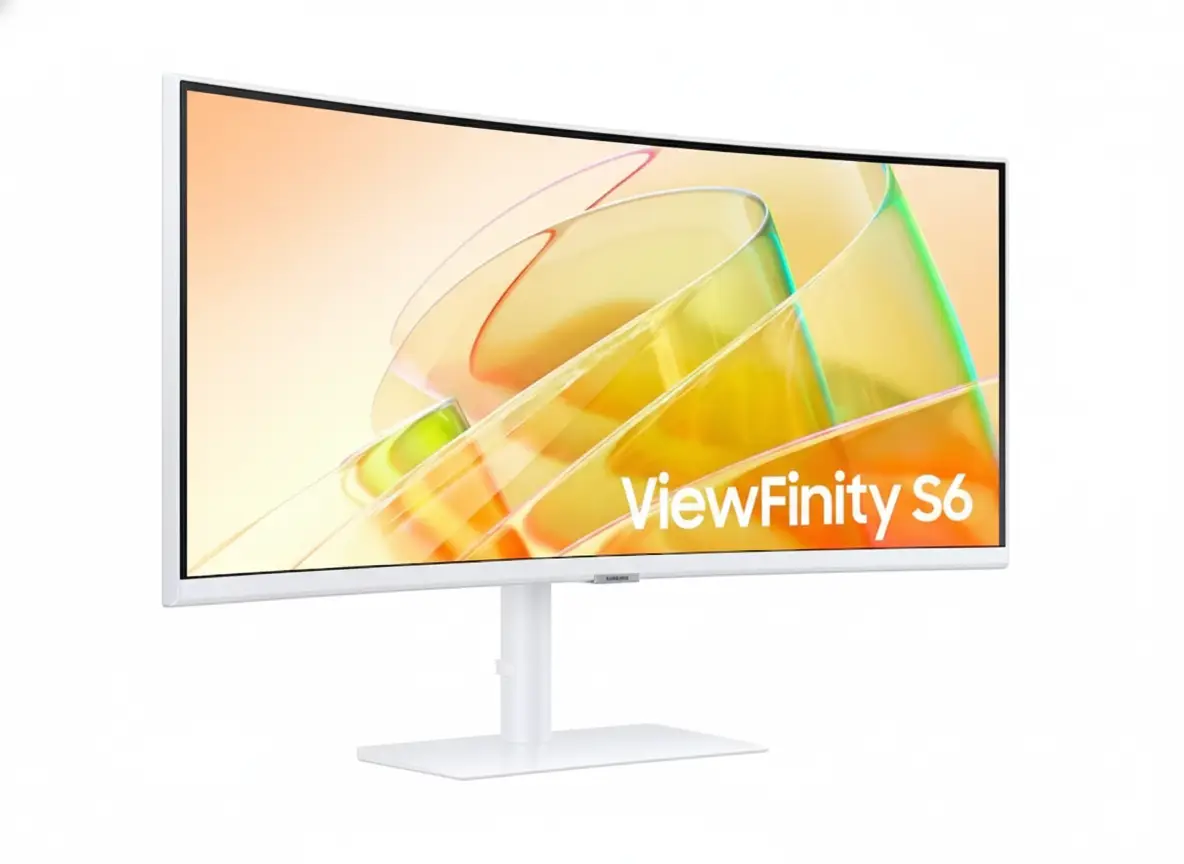
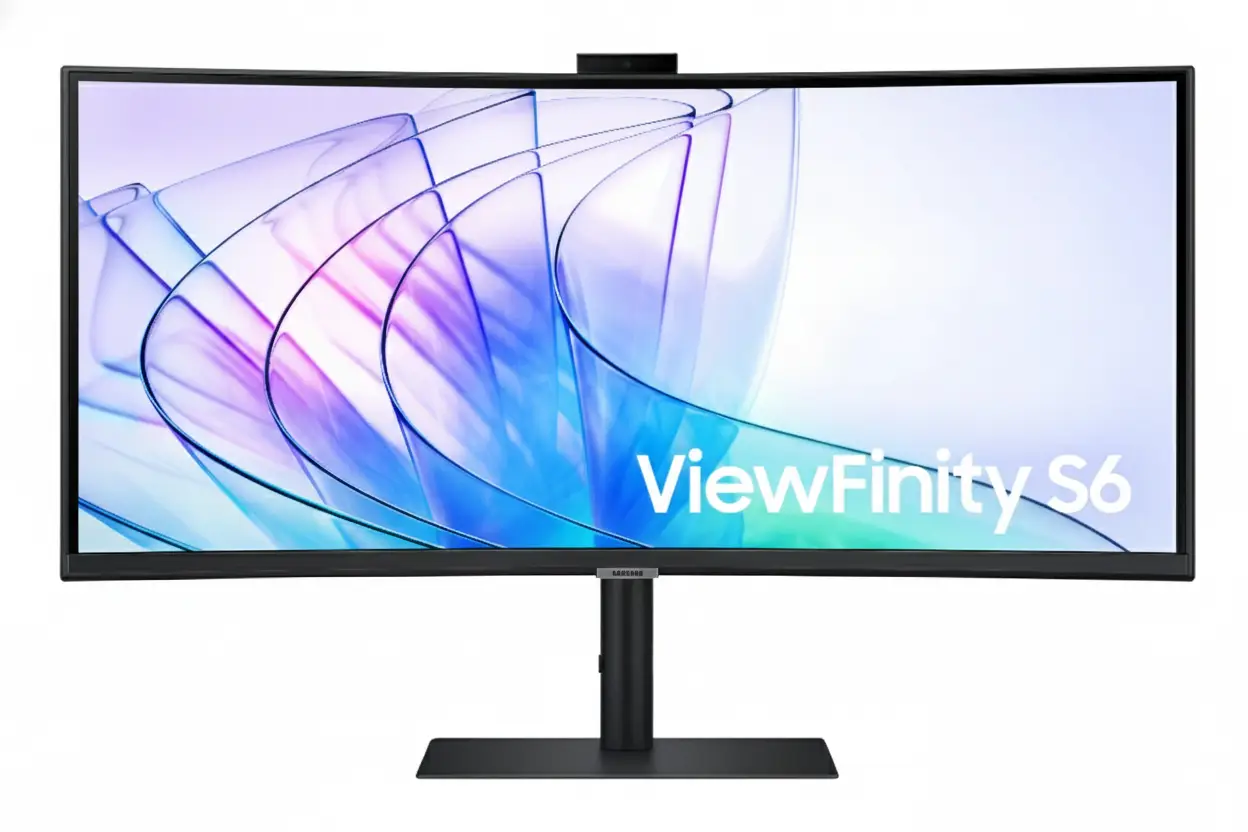
Samsung ViewFinity S65VC 34″
34″ Ultra-WQHD 21:9 | USB-C 90W | Built-in 5MP Camera | KVM Switch | 1000R Curved
3440×1440 VA Panel – HDR10 – 100Hz – Windows Hello – Built-in Speakers – LAN Port
💼 The Ultimate Desk Simplification Solution:
• USB-C 90W: Single cable charges laptop + transmits 3440×1440 video + data transfer
• Built-in 5MP Camera: Slides down when not in use – Windows Hello facial recognition
• KVM Switch: Control 2 PCs with 1 keyboard/mouse – PIP/PBP multi-source viewing
• Display: 34″ Ultra-WQHD (3440×1440) 21:9 – 1000R curve – 3000:1 contrast VA panel
• HDR10: 1.07 billion colors – 115% sRGB coverage – 350 nits brightness
• 100Hz Refresh: AMD FreeSync – smooth scrolling and casual gaming performance
• Connectivity: USB-C 90W + DisplayPort 1.2 + 2× HDMI 2.0 + LAN + USB 3.0 hub
• Ergonomics: Height adjustable stand (4.72″) + tilt + ±30° swivel + 100×100mm VESA
$699.99
Model: LS34C650VANXGO | S34C650VAN | 3-Year Warranty | Free Shipping
🛒 Buy Now on Samsung.com (USA)₹57,999
Expected price | Check Samsung India for availability | 3-Year Warranty
🛒 Check Samsung India Website£649
Expected price | Check Samsung UK for availability | 3-Year Warranty
🛒 Check Samsung UK Website🌍 Global Availability
• USA: $699.99 (Samsung.com – Available Now)
• India: ₹57,999-59,999 expected (Check availability)
• UK: £649-699 estimated
• Europe: €749-799 varies by country
• Availability: Check Samsung regional websites for stock
Resolution
3440×1440
USB-C Power
90W PD
Built-in Camera
5MP + IR
Samsung ViewFinity S65VC 34″ Overview – The Ultimate Productivity Hub Monitor
🖥️ Ultrawide Display Excellence
- 34″ Ultra-WQHD: 3440×1440 resolution – 110 PPI
- 21:9 Aspect: 33% more width vs 16:9
- 1000R Curve: Immersive wraparound viewing
- VA Panel: 3000:1 contrast – deep blacks
- HDR10: 1.07 billion colors
- 115% sRGB: Wide color gamut
- 350 Nits: 280 nits minimum brightness
- 100Hz: Smooth scrolling + casual gaming
⚡ All-in-One Connectivity
- 🔌 USB-C 90W: Single cable charges + video + data
- 📹 5MP Camera: Windows Hello + pop-up privacy
- 🎛️ KVM Switch: Control 2 PCs with 1 keyboard/mouse
- 🔊 Built-in Speakers: 5W audio saves desk space
- 🌐 LAN Port: Ethernet for laptops
- 🔗 USB 3.0 Hub: 2 downstream ports
⭐ Productivity Features
- • PIP/PBP: Multi-source viewing modes
- • Auto Source Switch+: Automatic input detection
- • Eye Saver Mode: Blue light reduction
- • Flicker Free: DC dimming eliminates flicker
- • Adaptive Picture: Auto brightness adjustment
- • AMD FreeSync: Smooth gaming performance
🎯 What Makes ViewFinity S65VC Special?
The Samsung ViewFinity S65VC 34″ is the ultimate desk simplification solution, consolidating $650-1,350 worth of separate accessories into a single $699.99 monitor. Most ultrawide monitors require external webcams ($50-150), USB-C hubs or docks ($80-300), KVM switches ($50-200), speakers ($50-150), and Ethernet adapters ($20-40) to achieve complete productivity setup. The S65VC integrates all these components natively, eliminating 5-10 cables, freeing desk space, and reducing total cost.
The USB-C port with 90W Power Delivery enables true single-cable setup for modern laptops. Connect your MacBook Pro, Dell XPS, HP Spectre, or Lenovo ThinkPad with one USB-C cable that simultaneously charges at 90W, transmits 3440×1440@100Hz video, and provides USB 3.0 data access. This eliminates the need for $80-400 USB-C docks like CalDigit TS4 ($400), Anker PowerExpand ($200), or basic hubs ($80-150). The integrated Ethernet port provides wired networking through the same cable – critical for modern ultrabooks that omit RJ45 jacks.
The built-in 5MP camera with infrared sensor delivers sharp, professional-quality video calls without external webcams. The 5-megapixel resolution surpasses typical 720p/1080p webcams, providing clear image quality for client meetings, job interviews, and presentations. The infrared sensor enables Windows Hello facial recognition for passwordless login to Windows 11 devices, apps, and websites – superior security and convenience compared to password typing. The camera’s pop-up design slides down into monitor body when unused, addressing privacy concerns and maintaining slim aesthetics.
The integrated KVM (Keyboard, Video, Mouse) switch eliminates the need for $50-200 external KVM devices. Control two connected computers with single keyboard and mouse – common for professionals managing work laptop + personal desktop, MacBook + Windows PC, or primary + secondary systems. Picture-in-Picture mode displays both sources simultaneously (one fullscreen, one window overlay), while Picture-by-Picture splits screen 50/50 for side-by-side workflows. This is invaluable for IT professionals, developers, content creators, and anyone maintaining separate work/personal computers.
The 34-inch Ultra-WQHD (3440×1440) resolution with 21:9 aspect ratio provides 33% more horizontal workspace than standard 16:9 displays. View spreadsheets with dozens of visible columns, edit video timelines with room for panels and tools, code with multiple files side-by-side, or browse with multiple full-size windows simultaneously. The 1000R curvature keeps all content equidistant from your eyes, reducing the edge distortion and refocusing fatigue common with flat ultrawides. At 110 PPI, text and images remain sharp without requiring scaling.
At $699.99 USD, the ViewFinity S65VC costs less than many basic ultrawides while including premium features. Competitors like Dell U3421WE ($1,149 with USB-C but no camera/KVM), LG 34WN80C-B ($599 basic without USB-C/camera/KVM), and BenQ PD3420U ($1,099 with USB-C but no camera/KVM) either cost more or lack integrated features. The S65VC’s all-inclusive approach provides exceptional value for professionals wanting clean, simplified desk setups.
Display Quality – 34″ Ultra-WQHD 3440×1440 Curved VA Panel
📺 34″ Ultra-WQHD Resolution – 21:9 Productivity Powerhouse
The 3440×1440 Ultra-WQHD resolution on 34 inches delivers 110 pixels per inch – sharp enough for detailed text and graphics without requiring UI scaling. At typical desktop distances (60-80cm), the pixel density provides crisp readability for extended document work, coding, and content creation. Ultra-WQHD contains 2.4× more pixels than standard 1920×1080 Full HD, creating significantly more screen real estate for productivity applications.
The 21:9 aspect ratio provides 33% more horizontal space than traditional 16:9 monitors of equivalent height. This extra width is transformative for multitasking – view three documents side-by-side, edit video timelines with visible panels, display trading dashboards with multiple charts, or code with file tree + editor + terminal simultaneously visible. The active display area measures 797.22mm × 333.72mm (31.4″ × 13.1″), providing expansive workspace without the excessive vertical height of 32:9 super-ultrawides.
Ultra-WQHD Advantages
- • Resolution: 3440×1440 (110 PPI) – sharp productivity
- • Aspect Ratio: 21:9 – 33% wider than 16:9
- • Multitasking: 3-4 windows side-by-side comfortably
- • Size: 34″ perfect for desk viewing
🌊 1000R Curvature – Immersive Productivity
The 1000R curvature (1-meter radius) matches the natural curvature of human peripheral vision, creating immersive viewing where the screen wraps around your field of sight. This aggressive curve is particularly beneficial for 34-inch ultrawide format – on flat ultrawides, screen edges sit 6-8 inches further away than center, causing constant refocusing and edge distortion. The curve maintains equal viewing distance across entire display.
For extended productivity work, the 1000R curve reduces eye strain by eliminating the need to refocus when viewing different screen areas. The curve also minimizes glare and reflections by angling screen edges away from overhead lighting. Content at screen periphery remains clearly visible without head turning, improving awareness of notifications, monitoring dashboards, or reference materials placed at edges.
1000R Curve Benefits
- • Ergonomics: Equal viewing distance reduces strain
- • Immersion: Wraparound effect increases focus
- • Glare reduction: Angled edges minimize reflections
- • Peripheral awareness: See edges without head turn
🎨 VA Panel – 3000:1 Contrast & HDR10 Color
🌑 Superior Contrast for Content Creation
The VA (Vertical Alignment) panel with 3000:1 static contrast ratio delivers significantly better blacks than IPS panels (typically 1000:1). This creates deeper shadows and more visible details in dark content – valuable for photo editing, video color grading, and any work involving high-contrast imagery. Dark UI themes (common in coding, design apps) appear more visually appealing with true blacks instead of grayish IPS “blacks”.
The 1.07 billion color support (10-bit color depth) ensures smooth gradients without color banding, particularly noticeable in skies, skin tones, and lighting effects. The 115% sRGB color gamut coverage exceeds standard 100% sRGB, producing vibrant, saturated colors suitable for content creation. While not factory-calibrated for professional color-critical work, the out-of-box color accuracy is excellent for general productivity and casual content creation.
🌟 HDR10 Support – Enhanced Visual Range
HDR10 support provides wider dynamic range than standard SDR content, displaying brighter highlights and darker shadows simultaneously. While the 350 nits typical brightness (280 minimum) doesn’t achieve the 600-1000+ nit peak of premium HDR displays, HDR10 compatibility ensures proper HDR content playback from streaming services, games, and HDR-enabled applications.
The VA panel’s high 3000:1 contrast enhances HDR effectiveness beyond what IPS HDR displays achieve with 1000:1 contrast. Deep blacks provide the foundation for HDR’s expanded dynamic range – highlights appear more dramatic when contrasted against true blacks. For content consumption and casual creation, the HDR10 support adds value without the premium pricing of DisplayHDR 600/1000 certified monitors.
🔄 100Hz Refresh Rate – Smooth Productivity & Casual Gaming
⚡ Enhanced Desktop Experience
The 100Hz refresh rate provides 67% more frames per second than standard 60Hz office monitors. This creates noticeably smoother cursor movement, window dragging, scrolling through documents and web pages, and video playback. While not targeting competitive gaming like 240Hz monitors, 100Hz significantly improves daily desktop usability – once you experience high refresh rate productivity, 60Hz feels stuttery.
AMD FreeSync support eliminates screen tearing during dynamic content like video playback, presentations with animations, and casual gaming. FreeSync synchronizes monitor refresh rate with GPU frame rate, creating smooth, tear-free visuals. The 5ms response time enables casual gaming in strategy games, MOBAs, RPGs, and single-player titles during work breaks.
🎮 Casual Gaming Capability
While not designed for competitive esports, 100Hz + FreeSync enables enjoyable casual gaming in League of Legends, Civilization, Stardew Valley, strategy games, and single-player RPGs. The ultrawide 21:9 aspect ratio enhances immersion in supported games, providing wider field of view. The 5ms response time is adequate for non-competitive gaming.
For professionals wanting single monitor for both work and play, the S65VC balances productivity features with sufficient gaming capability. Serious competitive gamers should choose dedicated 240Hz gaming monitors, but casual gamers will find the 100Hz performance satisfying for after-hours gaming sessions.
📐 Display Specifications Summary
Resolution & Size
3440×1440 Ultra-WQHD at 34″ provides 110 PPI – sharp productivity without scaling. 21:9 aspect ratio – 33% wider than 16:9 for multitasking.
Panel Quality
VA panel, 3000:1 contrast, HDR10 with 1.07B colors. 1000R curve for immersive viewing. 115% sRGB wide color gamut. 178°/178° viewing angles.
Performance
100Hz refresh rate – smooth desktop and casual gaming. AMD FreeSync tear-free. 5ms response time. 350 nits brightness (280 min).
USB-C & Connectivity – 90W Power Delivery Single-Cable Solution
🔌 USB-C 90W Power Delivery – True Single-Cable Setup
The USB-C port with 90W Power Delivery enables true single-cable connectivity for modern laptops. Connect your MacBook Pro, Dell XPS 13/15, HP Spectre, Lenovo ThinkPad X1, or Surface Laptop with one USB-C cable that simultaneously charges at 90W, transmits 3440×1440@100Hz video, and provides USB 3.0 data transfer. This eliminates the typical multi-cable mess requiring separate power adapter, video cable, and USB hub.
The 90W power delivery charges most productivity laptops including MacBook Pro 14″ (70W), MacBook Air (65W), Dell XPS 13 (65W), HP Spectre x360 (65W), and Lenovo ThinkPad X1 Carbon (65W). Note that high-performance gaming laptops requiring 100-180W won’t charge from 90W – those systems need separate chargers. For typical productivity ultrabooks, 90W provides fast charging while working.
USB-C 90W Capabilities
- • Power Delivery: 90W charges most laptops
- • Video: 3440×1440@100Hz transmission
- • Data: USB 3.0 hub access for peripherals
- • Ethernet: LAN connectivity through USB-C
🌐 Integrated Ethernet LAN Port
The built-in RJ45 Ethernet (LAN) port addresses a growing issue: modern ultrabooks increasingly omit Ethernet jacks to achieve thin profiles. MacBook Air, MacBook Pro 14″/16″, Dell XPS 13, HP Spectre, and Lenovo X1 Carbon lack native Ethernet ports. The S65VC’s integrated LAN port provides wired network connectivity through the USB-C cable – your laptop gains Ethernet without carrying separate USB-Ethernet adapters.
For professionals in network-intensive environments – IT administrators, video editors transferring large files (50GB+ project files), remote desktop users, financial traders requiring low latency, and VPN users – wired Ethernet provides superior reliability, consistency, and speed compared to Wi-Fi 6/6E. Even fast Wi-Fi suffers from interference, congestion, and variable latency. Wired Ethernet delivers consistent gigabit speeds with <1ms latency.
Ethernet Advantages
- • Speed: Consistent gigabit (1000 Mbps)
- • Latency: <1ms vs 2-20ms Wi-Fi
- • Reliability: No interference or dropout
- • Security: Harder to intercept than wireless
🔗 Complete Connectivity Portfolio
📺 Video Inputs – Multi-Source Flexibility
The monitor includes 1× USB-C, 1× DisplayPort 1.2, and 2× HDMI 2.0 inputs for versatile device connectivity. Connect laptop via USB-C (with charging), desktop via DisplayPort, and secondary devices (Mac Mini, gaming console, streaming PC) via HDMI simultaneously. The Auto Source Switch+ feature automatically detects active inputs and switches to powered-on devices, eliminating manual input selection.
DisplayPort 1.2 supports full 3440×1440@100Hz for desktop PCs. HDMI 2.0 handles 3440×1440@100Hz for most devices. USB-C supports 3440×1440@100Hz with DisplayPort Alt Mode. All inputs support the monitor’s maximum resolution and refresh rate without compromise.
🔌 USB Hub – Peripheral Expansion
The integrated USB 3.0 hub provides 2 downstream ports for connecting peripherals like keyboard, mouse, external SSD, USB microphone, or webcam (if not using built-in camera). When laptop connects via USB-C, these peripherals become accessible to the laptop through the single cable – true docking station functionality without separate dock purchase.
USB 3.0 specification delivers 5 Gbps data transfer speeds, sufficient for external SSDs (500-1000 MB/s real-world), USB microphones, and most peripherals. The upstream USB-B port allows desktop PC connection to access the hub. This eliminates the $80-300 cost of external USB-C hubs or docking stations for basic connectivity needs.
💡 Dock Replacement Value Analysis
🔌 What External Docks Cost
High-end docks: CalDigit TS4 ($400), OWC Thunderbolt Dock ($300), Anker 777 ($250). Mid-range docks: Anker PowerExpand ($150-200), Plugable TBT4 ($180). Basic USB-C hubs: $80-120. S65VC eliminates this $80-400 expense.
✅ Built-in Features Save Money
S65VC includes: 90W PD charging, 3× video inputs, USB 3.0 hub, Ethernet port, headphone jack – matching mid-range dock functionality. Plus 5MP camera ($80-150 value) and KVM switch ($50-200) – total $210-550 in integrated features.
Built-in Camera – 5MP with Windows Hello & Privacy Pop-Up Design
📹 5MP Camera – Professional Video Quality
The built-in 5-megapixel camera delivers significantly better video quality than typical 720p (0.9MP) or 1080p (2MP) external webcams. The higher resolution provides sharper, more detailed video calls suitable for professional presentations, client meetings, job interviews, and online teaching. Facial features, gestures, and backgrounds appear clearer, creating more engaging remote communication.
Camera placement at top-center of the monitor provides natural eye-level framing during video calls – superior to laptop webcams positioned below screen that create unflattering up-the-nose angles. The camera delivers good low-light performance for typical office environments, though dedicated lighting improves results in dim conditions. For remote workers conducting frequent video calls, the 5MP camera quality rivals external webcams costing $80-150 (Logitech C920/C922, Razer Kiyo).
5MP Camera Benefits
- • Resolution: 5MP (2560×1920) vs 1080p (2MP)
- • Placement: Eye-level at screen top
- • Quality: Matches $80-150 external webcams
- • Integration: No desk clutter or setup
🔐 Windows Hello – Secure Facial Recognition
The integrated infrared (IR) sensor enables Windows Hello facial recognition for passwordless login to Windows 11 devices, apps, and websites. Simply look at the camera to authenticate – faster and more secure than typing passwords. Windows Hello uses biometric authentication that’s extremely difficult to spoof compared to passwords that can be stolen, guessed, or phished.
The IR sensor works in various lighting conditions including complete darkness – unlike standard RGB cameras requiring visible light. This ensures reliable authentication regardless of ambient lighting. For professionals handling sensitive data (finance, healthcare, legal, IT), Windows Hello provides enterprise-grade security meeting strict compliance requirements while offering superior convenience compared to password management.
Windows Hello Advantages
- • Security: Biometric > passwords
- • Speed: Instant login vs typing
- • Lighting: IR works in darkness
- • Compliance: Meets enterprise security
🔒 Privacy Pop-Up Design – Physical Security
👁️ Slide-Down Privacy Mechanism
The camera features pop-up design that slides down into monitor body when not in use, providing physical privacy assurance that software solutions cannot match. When camera slides down, the lens is physically covered and cannot capture video – preventing potential malware camera hijacking or accidental activation. This addresses the growing privacy concern around always-on webcams.
The mechanism also maintains the monitor’s slim profile aesthetic when camera is retracted. Many monitors with built-in cameras feature protruding camera bumps that disrupt clean design – the S65VC’s pop-up solution keeps the top bezel smooth and minimal when camera is unused. Simply slide camera up when needed for video calls, slide down for privacy and aesthetics.
💰 Cost Savings vs External Webcams
Quality external webcams cost $80-150: Logitech C920 ($80), C922 ($100), Brio 4K ($200), Razer Kiyo ($100), Anker PowerConf C300 ($90). These devices clutter desks, require USB ports, add cables, and often need monitor mounting clips. The S65VC’s built-in 5MP camera eliminates this $80-200 expense while providing integrated, clean solution.
For organizations outfitting multiple employees with work-from-home setups, the integrated camera represents significant per-seat cost savings. A company equipping 50 employees saves $4,000-7,500 on webcams alone (50 × $80-150), plus reduced support costs from eliminating separate webcam setup and troubleshooting.
KVM Switch – Control 2 PCs with 1 Keyboard & Mouse
🎛️ Integrated KVM Functionality
The built-in KVM (Keyboard, Video, Mouse) switch allows control of two connected computers using single keyboard and mouse. This is invaluable for professionals managing multiple systems: work laptop + personal desktop, MacBook + Windows PC, primary workstation + secondary system, or development machine + testing rig. Switch between computers instantly without maintaining duplicate keyboards and mice for each system.
Setup is simple: connect both computers to the monitor (e.g., laptop via USB-C, desktop via DisplayPort), then connect keyboard and mouse to the monitor’s USB ports. The KVM routes keyboard/mouse input to whichever computer’s video input is active. Switch between systems using monitor’s input selection – keyboard and mouse automatically follow. This eliminates the $50-200 cost of external KVM switches like ATEN CS22U ($70), StarTech SV231USB ($90), or USB-C KVM models ($150-200).
KVM Use Cases
- • Work + Personal: Separate systems, one desk
- • Mac + Windows: Cross-platform workflows
- • Development + Testing: Code on one, test on other
- • Primary + Backup: Quick failover capability
🖥️ PIP & PBP Multi-Source Viewing
Picture-in-Picture (PIP) mode displays two video sources simultaneously – one source fills the screen while the second appears as resizable window overlay. Monitor work laptop fullscreen while keeping personal desktop visible in corner for notifications, monitoring tasks, or reference material. PIP window can be positioned and resized for optimal workflow.
Picture-by-Picture (PBP) mode splits the 34-inch screen 50/50 showing both computers side-by-side. Each gets 1720×1440 effective resolution – equivalent to two 24″ 16:10 monitors. This is perfect for cross-platform workflows: code on Mac while testing on Windows, monitor server logs while working on laptop, or manage trading platform on one system while researching on another. The ultrawide format makes PBP practical where 27″ monitors feel cramped.
PIP/PBP Advantages
- • PIP: Monitor secondary system while working
- • PBP: Full side-by-side workflows
- • Flexibility: Switch between modes as needed
- • Ultrawide: 34″ provides space for both sources
💡 KVM Cost Savings & Desk Simplification
💰 External KVM Switch Costs
Basic 2-port HDMI KVM: $50-80 (ATEN CS22U $70, TRENDnet TK-240DP $60). USB-C KVM switches: $150-200 (StarTech DK30CH2DEP $180, Cable Matters USB-C KVM $160). S65VC eliminates this expense entirely with integrated KVM functionality.
✅ Integrated Benefits
Saves $50-200 on external KVM purchase. Eliminates cables – no KVM box cables cluttering desk. Cleaner setup – KVM functionality built into monitor OSD. PIP/PBP modes provide viewing flexibility external KVMs lack.
Productivity Features – Eye Care, Ergonomics, & Smart Functions
👁️ TUV-Certified Intelligent Eye Care
TUV certification for Intelligent Eye Care validates the monitor’s eye-friendly features meet strict German safety standards. The certification process tests flicker elimination, blue light reduction effectiveness, and overall ergonomic design. For professionals spending 8-12 hours daily in front of screens, TUV certification provides independent verification of eye safety claims.
Eye Saver Mode reduces blue light emission that disrupts circadian rhythms and causes eye fatigue. High-energy blue light (400-490nm wavelength) strains eyes and suppresses melatonin production, interfering with sleep quality. Eye Saver Mode shifts color temperature warmer, reducing blue content while maintaining usable image quality. For late-night work sessions or evening use, this feature reduces eye strain and improves post-work sleep quality.
⚡ Flicker Free & Adaptive Picture
Flicker Free technology uses DC (Direct Current) dimming instead of PWM (Pulse Width Modulation) to control brightness. PWM rapidly flickers the backlight on/off at 200-300Hz to adjust brightness – imperceptible consciously but causes subconscious eye strain, headaches, and fatigue during extended viewing. DC dimming provides continuous illumination at all brightness levels, eliminating flicker completely.
Adaptive Picture automatically adjusts brightness and color temperature based on ambient lighting conditions detected by light sensor. As room lighting changes throughout the day (bright morning sunlight, dim afternoon, evening darkness), the monitor optimizes display settings for comfortable viewing. This eliminates manual brightness adjustments, maintaining optimal viewing experience automatically.
⚙️ Smart Productivity Functions
🔄 Auto Source Switch+
Auto Source Switch+ automatically detects when connected devices power on and switches to that input instantly. Power on your work laptop, and the monitor automatically switches from desktop to laptop input without manual OSD navigation. This eliminates the frustration of manually cycling through inputs, getting you to work faster.
For professionals switching between multiple computers throughout the day, Auto Source Switch+ saves significant time and mental overhead. The feature intelligently handles multi-device environments, prioritizing newly powered-on devices while remembering previous input when devices power off.
🎨 Optimized Picture Modes
The monitor includes multiple picture modes optimized for different content types: Entertain (movies/video), Graphic (design work), Eco (power saving), Game modes (Standard, RPG, RTS, FPS, Sports), Original (neutral), and Custom (user-defined). Each mode adjusts brightness, contrast, color saturation, and sharpness for optimal viewing.
Quick switching between modes adapts the display for current task – Graphic mode for photo editing, Entertain mode for lunch-break YouTube, Game mode for after-work gaming. The variety ensures optimal visual experience across diverse use cases without requiring manual picture adjustments.
🔊 Built-in Speakers – Desk Space Savings
🎵 5W Integrated Audio
The built-in 5W speakers provide functional audio for video calls, system sounds, casual YouTube/Netflix viewing, and background music without requiring external speakers. While not audiophile-grade or suitable for music production, the speakers deliver clear voice reproduction for video conferencing and adequate volume for typical office environments.
For professionals prioritizing minimal desk clutter, the integrated speakers eliminate the need for $50-150 external desktop speakers (Logitech Z333 $80, Creative Pebble $25, Edifier R1280T $100). This saves desk space, reduces cable management, and simplifies setup. Serious music listeners can still connect headphones or external speakers via 3.5mm audio jack.
🎧 Headphone Jack Included
The 3.5mm headphone jack provides audio output for wired headphones, earbuds, or external speakers. This is particularly valuable when laptop connects via USB-C – audio routes through the single cable to monitor, eliminating need to connect headphones directly to laptop. Headphones plug into monitor for centralized, convenient access.
For open office environments or shared spaces where speaker audio disturbs others, the headphone jack ensures private audio without Bluetooth pairing hassles. Wired headphones provide zero-latency audio critical for video editing, music production, or gaming where Bluetooth’s 100-300ms latency creates sync issues.
🌱 Environmental Sustainability Features
♻️ Recycled Materials
Over 3% of rear cover made from recycled plastic including Ocean Bound Plastic (OBP) – plastic waste collected from coastal regions before entering oceans. ENERGY STAR certified for energy efficiency. TCO certified for comprehensive environmental, social, economic sustainability meeting strict criteria.
📦 Eco-Friendly Packaging
Eco-packaging design minimizes waste and encourages reuse – packaging can be transformed into practical items (laptop stand, desk organizer, storage boxes) rather than immediate disposal. Reduced packaging materials lower shipping weight and carbon footprint. Recyclable materials facilitate responsible end-of-life disposal.
Ergonomics & Design – Height Adjustable Stand & VESA Mount
🔧 Height Adjustable Stand (HAS)
The included Height Adjustable Stand provides 4.72 inches (±0.2″) of vertical adjustment – approximately 120mm range. This allows positioning the display at optimal eye level for comfortable viewing, reducing neck strain during extended work sessions. Proper monitor height places the top of screen at or slightly below eye level, encouraging neutral neck posture.
Additional adjustments include ±30° swivel (60° total range) for angling display left/right, and -2° to +20° tilt for vertical viewing angle adjustment. The swivel enables easy screen sharing with colleagues or repositioning for glare reduction. The tilt range accommodates various seating heights and desk configurations. Combined, these adjustments provide comprehensive ergonomic flexibility for individual preferences.
Stand Adjustments
- • Height: 4.72″ (120mm) adjustment range
- • Swivel: ±30° (60° total left/right)
- • Tilt: -2° to +20° (22° total range)
- • VESA: 100×100mm mount compatible
🖼️ VESA Mount Support – 100×100mm
The 100mm × 100mm VESA mount pattern enables attachment to aftermarket monitor arms or wall mounts. Premium ergonomic arms from Ergotron LX, Amazon Basics, VIVO, or North Bayou provide gas spring tensioning for effortless height/depth/angle adjustment, extended reach up to 25-32″ from wall/desk, superior cable management, and quick-release mechanisms for monitor swapping.
Monitor arms maximize desk space by eliminating the stand footprint – critical for smaller desks or users preferring clean, minimalist workspaces. The monitor weighs 11.7 lbs (5.3 kg) without stand – well within capacity of most monitor arms rated for 15-30 lbs. For ultrawide monitors specifically, arms with depth adjustment help position the 1000R curved screen at optimal viewing distance (60-80cm).
VESA Mounting Benefits
- • VESA: 100mm × 100mm standard pattern
- • Weight: 11.7 lbs without stand (5.3 kg)
- • Arms: Ergotron LX, Amazon Basics compatible
- • Space: Eliminates stand footprint
📐 Dimensions & Footprint
📏 Physical Dimensions
With stand: 31.8″ W × 22.1″ H × 9.5″ D (808mm × 561mm × 241mm). The 9.5″ depth requires adequate desk space, though typical for curved monitors. The 31.8″ width means you need at least 32″ of desk width clearance. Without stand: 31.8″ W × 14.5″ H × 4.9″ D (808mm × 368mm × 124mm) – compact when VESA mounted.
Weight with stand: 17.9 lbs (8.1 kg) – manageable for one-person setup. Weight without stand: 11.7 lbs (5.3 kg) makes VESA mounting straightforward. The substantial build quality indicates premium materials and sturdy construction. Plan for at least 32″ wide × 10″ deep desk space for the stand footprint.
🎨 Design Aesthetics
The all-black design across front bezel, rear casing, and stand creates professional aesthetic suitable for any office environment. The slim bezels on three sides (top and left/right) maximize screen-to-body ratio, creating immersive viewing where the display dominates, not the frame. The curved design adds visual interest compared to flat panels.
The matte black finish resists fingerprints and dust better than glossy alternatives. The camera’s pop-up mechanism maintains clean top bezel when retracted. Cable routing through the stand column keeps cables organized. Overall, the design balances professional appearance with practical ergonomics – suitable for corporate offices, home offices, and creative studios.
Who Should Buy the Samsung ViewFinity S65VC 34″?
✅ Perfect For
💼 Remote Workers & Video Call Professionals
If you conduct frequent video calls, virtual meetings, webinars, or online presentations, the S65VC is ideal. The 5MP camera with Windows Hello provides professional video quality without external webcam expense ($80-150 saved). The pop-up privacy design addresses security concerns. Built-in speakers eliminate desk clutter. USB-C 90W single-cable setup creates clean workspace perfect for video backgrounds.
💻 Multi-Device Professionals (Work + Personal PCs)
The integrated KVM switch with PIP/PBP modes makes this perfect for managing work laptop + personal desktop, MacBook + Windows PC, or multiple business systems. Control both computers with one keyboard/mouse, view both simultaneously in PBP mode, or monitor secondary system in PIP while working. Saves $50-200 on external KVM switches while providing superior viewing flexibility.
📊 Financial Analysts & Data Professionals
The 34″ Ultra-WQHD 21:9 ultrawide format excels for spreadsheet analysis, financial modeling, data visualization, and multi-chart dashboards. View 50-80 spreadsheet columns without scrolling, display multiple datasets side-by-side, or monitor real-time trading platforms with comprehensive visibility. The 3000:1 VA contrast ensures numbers and text remain crisp and readable.
🎬 Video Editors & Content Creators
The 21:9 ultrawide provides timeline real estate for Adobe Premiere, DaVinci Resolve, or Final Cut with room for tool panels. HDR10 support with 115% sRGB ensures accurate color for content creation (though not factory-calibrated for professional color-critical work). The USB-C 90W charges laptop while editing. 100Hz smooth playback without rendering.
💻 Software Developers & Programmers
The ultrawide format is transformative for coding workflows. Display file tree + code editor + terminal + documentation simultaneously without window switching. Split screen between development and testing environments. The KVM switch enables dual-system development – code on Mac, test on Windows PC. 100Hz smooth scrolling through thousands of code lines.
🏢 Corporate & Enterprise IT
For organizations outfitting multiple employees, the S65VC provides $210-550 per-seat cost savings by eliminating separate webcam ($80-150), USB-C hub ($80-300), KVM switch ($50-200), and speakers ($50-150) purchases. Single SKU procurement simplifies inventory. Built-in features reduce support calls. Enterprise-grade Windows Hello security meets compliance requirements.
❌ Not Ideal For
🎮 Competitive Gamers & Esports Players
The 100Hz refresh rate and 5ms response time won’t satisfy competitive FPS, MOBA, or esports gamers. Serious gamers need 240Hz+ gaming monitors with 1ms response like Samsung Odyssey G65B ($800), ASUS ROG Swift ($600-900), or BenQ Zowie XL2546K ($500). The S65VC targets productivity first, casual gaming second. Save $700 and buy dedicated gaming monitor if gaming is primary use.
🎨 Professional Photographers & Color-Critical Work
While 115% sRGB is good, the monitor lacks factory calibration and professional certifications. No Delta E ratings, no Adobe RGB coverage data, no uniformity compensation. Professional photo/video color grading requires monitors with 99%+ Adobe RGB, Delta E <2, hardware calibration like BenQ SW271C ($800), ASUS ProArt PA278CV ($400), or EIZO ColorEdge ($1,000+). The S65VC suits casual content creation, not professional color-critical workflows.
🔌 Gaming Laptop Users (100W+ Power)
The 90W Power Delivery won’t sufficiently charge high-performance gaming laptops requiring 100-180W (ASUS ROG, MSI GE/GP, Alienware, Razer Blade). While 90W prevents battery drain during light use, gaming will deplete battery. Gaming laptop users should keep dedicated chargers or choose monitors with 100W+ PD like Dell U4025QW (140W PD) or LG 34WK95U-W (85W PD insufficient too).
📐 CAD Engineers & Technical Drawing Specialists
The 1000R curve can make straight lines appear slightly curved in CAD software, technical drawings, architectural plans, and engineering schematics. Professionals requiring geometric accuracy prefer flat panels like Dell U3423WE ($1,149 flat), LG 34WK95U (flat), or BenQ PD3420U (flat). The curve optimizes for immersion and productivity at expense of geometric precision.
🎵 Audio Professionals & Music Producers
The built-in 5W speakers are functional but not audiophile-grade. Music producers, audio engineers, and serious music listeners need dedicated studio monitors or high-fidelity speakers like KRK Rokit ($300/pair), Yamaha HS5 ($400/pair), or Edifier S3000 Pro ($600/pair). The S65VC’s speakers suit video calls and casual media, not critical audio work. Budget for separate audio solution.
💰 Extreme Budget Shoppers
At $699.99, this is mid-premium pricing. Budget ultrawide alternatives exist: AOC CU34G2X ($350), Sceptre C345B ($300), LG 34WN80C-B ($500). If you don’t need USB-C 90W PD, built-in camera, KVM switch, or integrated features, save $200-400 with basic ultrawides. The S65VC’s value lies in all-in-one integration – if you’ll buy separate webcam/hub/KVM anyway, cheaper monitors + separate accessories may cost less.
Competitors & Alternatives – Compare Before You Buy
Dell UltraSharp U3421WE
34″ Ultrawide with USB-C Hub
Display: 34″ 3440×1440 IPS, 60Hz
USB-C: 90W Power Delivery
Panel: IPS, 1000:1 contrast
Price: $1,149 USD
Why Choose This Instead:
- • IPS panel: Better viewing angles than VA
- • Flat design: Better for CAD/technical work
- • RJ45 + USB hub: Similar connectivity
- • Dell brand: Premium support reputation
S65VC Advantages:
- • $449 cheaper ($700 vs $1,149)
- • 100Hz vs 60Hz (67% faster refresh)
- • Built-in 5MP camera (Dell has none)
- • KVM switch integrated (Dell lacks)
- • 3000:1 contrast vs 1000:1
- • 1000R immersive curve
LG 34WN80C-B
34″ Ultrawide with USB-C 60W
Display: 34″ 3440×1440 IPS, 60Hz
USB-C: 60W Power Delivery
Panel: IPS, HDR10, 99% sRGB
Price: ~$599 USD
Why Choose This Instead:
- • $100 cheaper: $599 vs $700
- • IPS panel: Better color accuracy
- • 99% sRGB: Accurate standard colors
- • Flat design: Productivity-friendly
S65VC Advantages:
- • 90W PD vs 60W (charges more laptops)
- • 100Hz vs 60Hz (67% smoother)
- • Built-in 5MP camera (LG has none)
- • KVM switch (LG lacks)
- • Built-in speakers (LG has none)
- • 3000:1 contrast vs 1000:1
- • 1000R curve immersion
BenQ PD3420Q
34″ Designer Ultrawide USB-C
Display: 34″ 3440×1440 IPS, 60Hz
USB-C: 65W Power Delivery
Color: 98% P3, Factory calibrated
Price: ~$899 USD
Why Choose This Instead:
- • Factory calibrated: Professional color
- • 98% DCI-P3: Wide gamut accurate
- • KVM switch: Like S65VC
- • Designer features: CAD/CAM modes
S65VC Advantages:
- • $200 cheaper ($700 vs $899)
- • 100Hz vs 60Hz refresh rate
- • 90W PD vs 65W charging
- • Built-in 5MP camera (BenQ none)
- • 3000:1 contrast vs 1000:1
- • 1000R curve (BenQ flat)
AOC CU34G2X
34″ Budget Curved Gaming
Display: 34″ 3440×1440 VA, 144Hz
Curve: 1500R curved panel
Response: 1ms MPRT gaming
Price: ~$350 USD
Why Choose This Instead:
- • $350 cheaper: Half price of S65VC
- • 144Hz gaming: Better for gaming
- • 1ms MPRT: Fast response time
- • Budget friendly: Basic ultrawide
S65VC Advantages:
- • USB-C 90W PD (AOC lacks completely)
- • Built-in 5MP camera (AOC none)
- • KVM switch (AOC lacks)
- • Built-in speakers (AOC none)
- • LAN port (AOC lacks)
- • 1000R tighter curve vs 1500R
- • Premium build quality
Samsung M8 Smart Monitor
32″ 4K Smart Monitor USB-C
Display: 32″ 3840×2160 4K, 60Hz
USB-C: 65W Power Delivery
Smart: Tizen OS + Camera + Speakers
Price: ~$699 USD
Why Choose This Instead:
- • 4K resolution: Higher pixel density
- • Same price: $699 like S65VC
- • Smart TV features: Netflix, streaming
- • Built-in camera: Similar features
S65VC Advantages:
- • 21:9 ultrawide vs 16:9 (33% wider)
- • 90W PD vs 65W (more charging power)
- • 100Hz vs 60Hz (smoother desktop)
- • KVM switch (M8 lacks)
- • LAN port (M8 lacks)
- • 34″ curved immersion
Lenovo ThinkVision P34w-20
34″ Business Ultrawide USB-C
Display: 34″ 3440×1440 IPS, 60Hz
USB-C: 75W Power Delivery
Business: USB hub, KVM, LAN
Price: ~$799 USD
Why Choose This Instead:
- • IPS panel: Better viewing angles
- • KVM + LAN: Similar business features
- • ThinkVision brand: Enterprise support
- • Flat design: CAD-friendly
S65VC Advantages:
- • $100 cheaper ($700 vs $799)
- • 100Hz vs 60Hz refresh
- • 90W PD vs 75W charging
- • Built-in 5MP camera (Lenovo none)
- • 3000:1 contrast vs 1000:1
- • 1000R immersive curve
Pros & Cons – The Complete Picture
✅ Pros
-
•
USB-C 90W Power Delivery – True Single-Cable Setup
90W Power Delivery charges most productivity laptops (MacBook Pro 14″, Dell XPS, HP Spectre, ThinkPad X1) while transmitting 3440×1440@100Hz video and providing USB 3.0 data access through single cable. Eliminates $80-300 USB-C dock expense and creates clean desk setup.
-
•
Built-in 5MP Camera with Windows Hello
5-megapixel camera delivers sharp professional video calls superior to typical 720p/1080p webcams. Infrared sensor enables Windows Hello facial recognition for passwordless secure login. Pop-up privacy design slides camera into monitor body when unused. Saves $80-150 on external webcams.
-
•
Integrated KVM Switch – Control 2 PCs Seamlessly
Built-in KVM switch controls two computers with one keyboard/mouse. Picture-in-Picture and Picture-by-Picture modes display both sources simultaneously. Perfect for work laptop + personal desktop or MacBook + Windows PC workflows. Saves $50-200 on external KVM switches.
-
•
34″ Ultra-WQHD 21:9 Ultrawide – 33% More Workspace
3440×1440 resolution with 21:9 aspect ratio provides 33% more horizontal space than 16:9 monitors. Perfect for spreadsheets, video timelines, coding with multiple files, or multi-window workflows. 110 PPI delivers sharp text without scaling. Transformative productivity boost.
-
•
1000R Curvature – Immersive Ergonomics
Aggressive 1000R curve (1-meter radius) matches human eye curvature for immersive viewing. Every screen area sits at equal distance from eyes, reducing refocusing fatigue. Minimizes glare and edge distortion common with flat ultrawides. Enhances peripheral awareness without head turning.
-
•
VA Panel – 3000:1 Contrast with HDR10
VA panel delivers 3000:1 static contrast – 3× better than IPS (1000:1). Deep blacks enhance dark UI themes, content creation, and HDR media. HDR10 support with 1.07 billion colors and 115% sRGB coverage. 350 nits brightness (280 min) sufficient for typical office environments.
-
•
100Hz Refresh Rate – Smooth Desktop & Casual Gaming
100Hz refresh provides 67% more frames than 60Hz office monitors for noticeably smoother cursor movement, scrolling, and window dragging. AMD FreeSync eliminates tearing. 5ms response enables casual gaming in MOBAs, strategy, and single-player games. Enhances daily usability significantly.
-
•
Integrated Ethernet LAN Port
Built-in RJ45 Ethernet port provides wired networking through USB-C cable for laptops lacking Ethernet jacks (MacBook, Dell XPS, HP Spectre). Gigabit Ethernet delivers consistent speed, <1ms latency, and reliability superior to Wi-Fi. Critical for IT admins, video editors, remote desktop users.
-
•
TUV-Certified Eye Care Features
TUV certification validates Eye Saver Mode (blue light reduction), Flicker Free DC dimming, and Adaptive Picture auto-brightness. Critical for professionals spending 8-12 hours daily viewing screens. Reduces eye strain, headaches, and sleep disruption during extended work sessions.
-
•
Exceptional Value – $699 All-Inclusive
At $699.99, the S65VC costs less than Dell U3421WE ($1,149) while including camera, KVM, and higher refresh rate. Saves $210-550 vs buying monitor + webcam + hub + KVM separately. Competitive pricing with budget ultrawides while offering premium integrated features. Best value in productivity ultrawides.
❌ Cons
-
•
100Hz Not Enough for Competitive Gaming
100Hz refresh rate and 5ms response time won’t satisfy competitive FPS/MOBA/esports gamers who need 240Hz+ and 1ms. The monitor targets productivity first, casual gaming second. Serious gamers should buy dedicated 240Hz gaming monitors ($400-800). If gaming is primary use, look elsewhere.
-
•
Not Factory Calibrated – Unsuitable for Pro Color Work
While 115% sRGB is good, the monitor lacks factory calibration, Delta E ratings, Adobe RGB coverage data, or professional certifications. Photographers and videographers needing 99%+ Adobe RGB with Delta E <2 should choose calibrated monitors like BenQ SW271C, ASUS ProArt, or EIZO ColorEdge costing $400-1,000+.
-
•
90W PD Insufficient for Gaming Laptops
90W Power Delivery won’t adequately charge high-performance gaming laptops requiring 100-180W (ASUS ROG, MSI GE/GP, Alienware, Razer Blade). While 90W prevents battery drain during light use, heavy gaming depletes battery. Gaming laptop owners need to keep dedicated chargers or choose monitors with 100W+ PD.
-
•
1000R Curve Not Ideal for CAD/Technical Work
Aggressive 1000R curve can make straight lines appear slightly curved in CAD software, technical drawings, architectural plans, and engineering schematics. CAD engineers, architects, and technical drawing specialists prefer flat panels for geometric accuracy. The curve optimizes for immersion at expense of precision.
-
•
VA Panel Viewing Angle Limitations
Despite 178°/178° spec, VA panels exhibit more color/contrast shift at extreme angles than IPS. Not problematic for centered single-user viewing, but side viewers (colleagues looking at screen, presentations) notice color changes. IPS panels maintain color better at off-angles for collaborative viewing scenarios.
-
•
Built-in Speakers Are Basic Quality
5W built-in speakers provide functional audio for video calls and casual media but lack volume, bass, clarity for music listening or content creation. Audio professionals, music enthusiasts, and content creators still need external speakers ($80-600) or headphones. The speakers are convenience feature, not quality audio solution.
-
•
Limited USB Hub – Only 2 Downstream Ports
USB hub provides only 2× USB 3.0 downstream ports – fewer than premium monitors offering 4-6 ports. Users with many peripherals (keyboard, mouse, external SSD, microphone, USB drive, printer) may need additional USB hub. More generous port selection would improve hub functionality.
-
•
60Hz HDMI Limitation (Not 100Hz)
While DisplayPort and USB-C support full 3440×1440@100Hz, HDMI 2.0 may be limited to 3440×1440@50-60Hz depending on implementation. Devices connected via HDMI (older laptops, consoles, secondary PCs) may not achieve the full 100Hz refresh rate. DisplayPort or USB-C required for maximum performance.
-
•
No USB-C Upstream – Requires Separate Cable
Monitor uses traditional USB Type-B upstream for hub connectivity instead of USB-C upstream that would enable single-cable hub access. Desktop PC users need separate USB cable (USB-B to USB-A) to access the monitor’s USB hub. USB-C upstream would provide cleaner single-cable solution.
-
•
Limited Height Adjustment Range
4.72″ (120mm) height adjustment is adequate but less than premium monitors offering 5-6″ range. Taller users or those with standing desks may find adjustment range limiting. VESA mount compatibility (100×100mm) allows upgrading to monitor arms with unlimited height adjustment if needed.
Final Verdict – Best All-in-One Productivity Monitor
Overall Rating
Exceptional Productivity Value
Feature Integration
Best All-in-One Solution
Value for Money
$699 Saves $200-550
🏆 Verdict Summary
The Samsung ViewFinity S65VC 34″ is the ultimate desk simplification solution, delivering exceptional value at $699.99 by integrating $210-550 worth of accessories (5MP webcam, USB-C dock, KVM switch, speakers) into a single high-quality ultrawide monitor. The USB-C 90W Power Delivery, built-in camera with Windows Hello, integrated KVM switch, and Ethernet port eliminate cable clutter, free desk space, and create clean professional workspace that would typically require 5-10 separate devices and cables.
What distinguishes the S65VC from competing ultrawides is comprehensive feature integration that addresses real productivity pain points. Remote workers gain professional 5MP video call quality without $80-150 external webcam purchases. Multi-device professionals control work laptop + personal desktop seamlessly through built-in KVM saving $50-200 on external switches. Laptop users enjoy true single-cable setup – one USB-C cable charges at 90W, transmits 3440×1440@100Hz video, provides Ethernet access, and enables USB hub connectivity.
The 34-inch Ultra-WQHD (3440×1440) resolution with 1000R curvature balances productivity real estate with ergonomic comfort. The 21:9 aspect ratio provides 33% more horizontal workspace than 16:9 monitors – transformative for spreadsheet analysis, video editing timelines, multi-window coding, or financial dashboards. At $699.99, the S65VC costs less than Dell U3421WE ($1,149) while offering camera, KVM, and higher refresh rate. For professionals prioritizing clean setups and integrated functionality, the S65VC delivers unmatched value.
✅ Buy If You:
- • Conduct frequent video calls/virtual meetings
- • Manage multiple computers (work + personal)
- • Want clean desk with minimal cables/devices
- • Need ultrawide for spreadsheets/coding/video
- • Value USB-C 90W single-cable simplicity
- • Prioritize productivity over competitive gaming
❌ Skip If You:
- • Competitive gamer (need 240Hz gaming monitor)
- • Professional photographer (need factory calibration)
- • Gaming laptop user (need 100W+ PD)
- • CAD engineer (prefer flat for geometric accuracy)
- • Audiophile (basic speakers, need external audio)
- • Extreme budget (<$500 ultrawides exist)
⭐ Category Ratings Breakdown
Frequently Asked Questions
Q1: Will the 90W Power Delivery charge my laptop?
90W charges most productivity laptops including MacBook Pro 14″ (70W), MacBook Air (65W), Dell XPS 13/15 (65W), HP Spectre (65W), Lenovo ThinkPad X1 Carbon (65W), Surface Laptop (65W). However, high-performance gaming laptops requiring 100-180W won’t charge adequately – ASUS ROG (150W+), MSI GE/GP (150-180W), Alienware (180W+), Razer Blade (100-230W). Gaming laptop users should keep dedicated chargers. Check your laptop’s power adapter wattage to confirm compatibility.
Q2: How does the KVM switch work with two computers?
Connect both computers to the monitor (e.g., laptop via USB-C, desktop via DisplayPort), then connect keyboard and mouse to monitor’s USB ports. The KVM automatically routes keyboard/mouse input to whichever computer’s video input is active. Switch between computers using monitor’s input selection button – keyboard and mouse follow automatically. PIP mode displays both sources simultaneously (one fullscreen, one window), while PBP mode splits screen 50/50 for true side-by-side workflows.
Q3: Does the built-in camera work with Mac and Linux?
Yes, the 5MP camera functions as standard USB webcam on macOS, Linux, Chrome OS, and Windows. It works with Zoom, Microsoft Teams, Google Meet, Skype, Discord, and all video conferencing applications. However, Windows Hello facial recognition only works on Windows 11/10 – Mac and Linux users can use the camera for video calls but not biometric login. The IR sensor provides no benefit on non-Windows systems.
Q4: Can I use the monitor for gaming?
Yes, but with limitations. The 100Hz refresh rate and AMD FreeSync support casual gaming in League of Legends, strategy games, MOBAs, RPGs, and single-player titles. The 5ms response time is adequate for non-competitive gaming. However, the monitor isn’t suitable for competitive esports – serious FPS/MOBA players need 240Hz+ gaming monitors with 1ms response. If gaming is primary use (50%+ of time), buy dedicated gaming monitor instead.
Q5: Is the 1000R curve too aggressive for productivity work?
For most productivity users, the 1000R curve enhances comfort and immersion. It reduces edge distortion, maintains equal viewing distance, and minimizes refocusing fatigue common with flat ultrawides. However, CAD engineers, architects, and technical drawing specialists may find the curve problematic as straight lines can appear slightly curved in design software. For general productivity (spreadsheets, coding, video editing, document work), the curve is beneficial. Try viewing 1000R curved monitors in-store if possible before purchasing.
Q6: How does the Ethernet LAN port work through USB-C?
When laptop connects via USB-C, the monitor’s Ethernet port becomes available to the laptop as USB Ethernet adapter. Your laptop gains wired gigabit network connectivity without carrying separate USB-Ethernet dongles. Plug Ethernet cable into monitor’s RJ45 port, and laptop accesses wired network through the single USB-C cable. This is particularly valuable for modern ultrabooks (MacBook, Dell XPS, HP Spectre) that omit Ethernet jacks. Provides consistent gigabit speeds with <1ms latency superior to Wi-Fi.
Q7: Can I mount this monitor on a monitor arm?
Yes, the monitor supports 100mm × 100mm VESA mount standard. Compatible with popular monitor arms from Ergotron LX ($140-180), Amazon Basics ($100-130), VIVO ($80-120), and North Bayou ($60-100). The monitor weighs 11.7 lbs (5.3 kg) without stand – well within capacity of most arms rated for 15-30 lbs. Monitor arms provide unlimited height adjustment, extended reach, and cable management superior to the included stand. For curved ultrawides, choose arms with depth adjustment to position screen at optimal 60-80cm viewing distance.
Q8: Is this monitor good for photo/video editing?
Yes for casual/hobbyist content creation, no for professional color-critical work. The 115% sRGB coverage, HDR10 support, and 3000:1 contrast provide good color for YouTube content creation, social media video editing, or hobbyist photography. The ultrawide format benefits video timeline editing. However, professional photographers and videographers need factory-calibrated monitors with 99%+ Adobe RGB, Delta E <2, and uniformity compensation like BenQ SW271C ($800), ASUS ProArt PA32UCG ($1,200+), or EIZO ColorEdge ($1,000+). The S65VC lacks calibration reports and professional certifications.
Q9: Do I need to buy any cables or accessories?
Everything needed is included: HDMI cable, USB Type-C cable, USB 3.0 cable (for desktop PC hub connection), and power cable (1.5m). For laptop users with USB-C, just plug in the included USB-C cable for power, video, data, and Ethernet – no additional purchases required. Desktop PC users may want DisplayPort cable (not included) for 3440×1440@100Hz – USB-C cable works for laptops. Keyboard and mouse connect to monitor’s USB ports for KVM functionality.
Q10: How much desk space does this monitor need?
With stand: 31.8″ W × 22.1″ H × 9.5″ D (808mm × 561mm × 241mm). You need at least 32 inches (81cm) of desk width and 10 inches (25cm) of depth for the stand footprint. The 9.5″ depth is typical for curved monitors. For smaller desks, consider VESA mounting to monitor arm which eliminates stand footprint entirely – without stand, monitor is only 4.9″ deep. The 34″ width means the monitor dominates smaller desks but is manageable on 48-60″ wide desks common for home offices.
Complete Technical Specifications
| SAMSUNG VIEWFINITY S65VC 34″ – FULL SPECIFICATIONS | |
|---|---|
| DISPLAY SPECIFICATIONS | |
| Screen Size (Class) | 34 inch |
| Screen Size (Inch) | 34″ |
| Display Type | 34″ Ultrawide |
| Resolution | 3440 × 1440 (Ultra-WQHD / UWQHD) |
| Aspect Ratio | 21:9 |
| Panel Type | VA (Vertical Alignment) |
| Flat/Curved | Curved |
| Screen Curvature | 1000R (1-meter radius) |
| Active Display Size (H × V) | 797.22mm × 333.72mm (31.4″ × 13.1″) |
| Brightness (Typical) | 350 cd/m² |
| Brightness (Minimum) | 280 cd/m² |
| Contrast Ratio (Static) | 3000:1 (Typical) |
| Contrast Ratio (Dynamic) | Mega ∞ DCR (Dynamic Contrast Ratio) |
| HDR (High Dynamic Range) | HDR10 |
| Response Time (ms) | 5ms |
| Refresh Rate | Max 100Hz |
| Frame Rate | Max 100Hz |
| Color Support | Max 1.07 Billion (10-bit) |
| Color Gamut (sRGB Coverage) | 115% (1.15× sRGB) |
| Viewing Angle (Horizontal/Vertical) | 178° (H) / 178° (V) |
| CONNECTIVITY & PORTS | |
| USB-C | 1 EA (90W Power Delivery) |
| USB-C Charging Power | 90W Power Delivery |
| Display Port | 1 EA |
| Display Port Version | DisplayPort 1.2 |
| HDMI | 2 EA |
| HDMI Version | HDMI 2.0 |
| HDCP Version (HDMI) | HDCP 2.2 |
| HDCP Version (USB-C) | HDCP 2.2 |
| USB Ports | 2 (Downstream) |
| USB Hub Version | USB 3.0 × 2EA (Downstream), USB Type-B 1EA (Upstream) |
| Ethernet (LAN) | 1 EA (RJ45 Gigabit) |
| Headphone | Yes (3.5mm Audio Jack) |
| BUILT-IN CAMERA | |
| Built-in Camera | 5MP (5 Megapixel) + IR Sensor |
| Camera Resolution | 5 Megapixels (2560×1920 approx.) |
| Windows Hello Certification | Yes (Facial Recognition via IR Sensor) |
| Camera Design | Pop-up Privacy Design (Slides Down into Monitor) |
| AUDIO SPECIFICATIONS | |
| Speaker | Yes (Built-in) |
| Speaker Output (W) | 5W Total |
| PRODUCTIVITY FEATURES | |
| KVM Switch | Yes (Built-in) |
| Picture-in-Picture | Yes (PIP) |
| Picture-By-Picture | Yes (PBP) |
| Auto Source Switch | Auto Source Switch+ |
| FreeSync | AMD FreeSync |
| Eye Saver Mode | Yes (Blue Light Reduction) |
| Flicker Free | Yes (DC Dimming) |
| Adaptive Picture | Yes (Auto Brightness Adjustment) |
| Image Size | Yes (Adjustable) |
| ERGONOMICS & DESIGN | |
| Stand Type | HAS (Height Adjustable Stand) |
| HAS (Height Adjustable Stand) | 4.72 inches (±0.2 inches) / 120mm |
| Swivel | -30° to +30° (60° total) |
| Tilt | -2° (±3°) to +20° (±3°) |
| Wall Mount | 100 × 100mm VESA Standard |
| Front Color | BLACK |
| Rear Color | BLACK |
| Stand Color | Black |
| DIMENSIONS & WEIGHT | |
| Set Dimension with Stand (W × H × D) | 31.8″ × 22.1″ × 9.5″ (808mm × 561mm × 241mm) |
| Set Dimension without Stand (W × H × D) | 31.8″ × 14.5″ × 4.9″ (808mm × 368mm × 124mm) |
| Package Dimension (W × H × D) | 31.8″ × 4.9″ × 14.4″ (808mm × 124mm × 366mm) |
| Set Weight with Stand | 17.9 lbs (8.1 kg) |
| Set Weight without Stand | 11.7 lbs (5.3 kg) |
| Product Weight With Stand | 22.3 lb (10.1 kg) |
| Product Weight Without Stand | 11.7 lb (5.3 kg) |
| Shipping Weight | 23.373 lbs (10.6 kg) |
| Package Weight | 22.3 lbs (10.1 kg) |
| POWER SPECIFICATIONS | |
| General Feature | Internal Power |
| Power Supply | AC 100~240V (Universal Voltage) |
| Power Consumption (Max) | 200 W |
| Power Cable Length | 1.5 meters (4.9 feet) |
| OPERATING CONDITIONS | |
| Temperature | 10°C to 40°C (50°F to 104°F) |
| Humidity | 10% to 80% (Non-Condensing) |
| CERTIFICATIONS | |
| Windows Certification | Windows 10 |
| Off Timer Plus | Yes |
| ENERGY STAR® Certified | Yes |
| TCO Certified | Yes |
| ENVIRONMENTAL SUSTAINABILITY | |
| Recycled Plastic | Over 3% (Including Ocean Bound Plastic) |
| Eco-Packaging | Yes (Recyclable and Reusable Design) |
| PICTURE MODES | |
| Color Mode | Entertain / Graphic / Eco / Game Standard / RPG / RTS / FPS / Sports / Original / Custom |
| INCLUDED ACCESSORIES | |
| HDMI Cable | Yes (Included) |
| USB Type-C Cable | Yes (Included) |
| USB 3.0 Cable | Yes (Included – USB Type-B to Type-A) |
| Power Cable Length | 1.5 meters (4.9 feet – Included) |
| MODEL INFORMATION | |
| Model Number (USA) | LS34C650VANXGO |
| Series Code | S34C650VAN |
| Product Series | Samsung ViewFinity S65VC |
| Category | Business/Productivity Ultrawide Monitor |
Ready to Simplify Your Desk Setup?
Best All-in-One Productivity Monitor with Camera, KVM, & USB-C 90W!
📹 5MP Camera
Windows Hello Built-in
🔌 USB-C 90W
Single Cable Setup
🎛️ KVM Switch
Control 2 PCs
34″ UWQHD
21:9 Ultrawide