ReviewNest

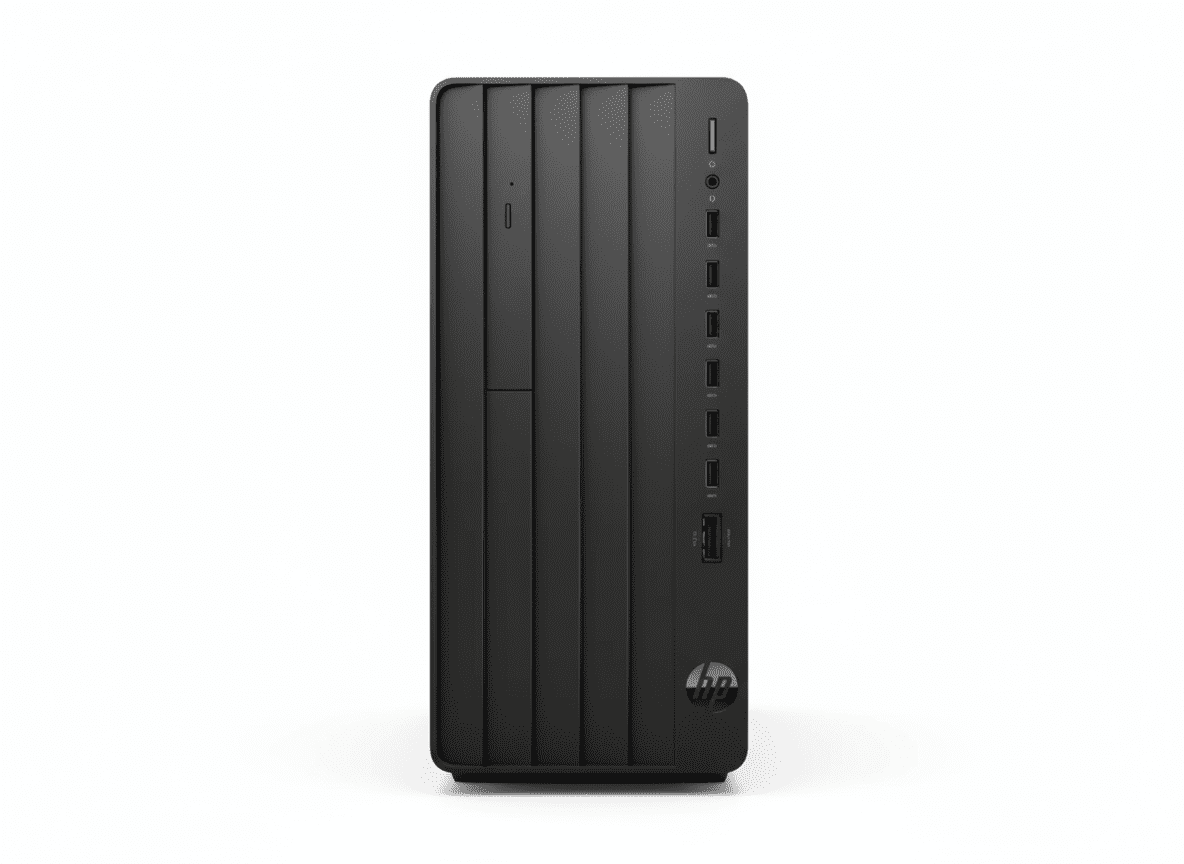
HP Pro Tower 280 G9 – 14th Gen i7-14700 Desktop PC | 16GB DDR5 | 512GB SSD | Business Tower

HP Pro Tower 280 G9
HP Pro Tower 280 G9 PCI Desktop PC Complete Review 2025 – Best Business Tower
HP Pro Tower 280 G9 PCI Desktop PC

💼 BUSINESS TOWER – 355 Views This Week!

14th Gen i7 + DDR5 + Expandable + On-Site Warranty!

💼 BUSINESS – Tower PC – 14th Gen i7-14700 – 20-Core – 16GB DDR5 – Expandable – FreeDOS

HP Pro Tower 280 G9 PCI Desktop PC

Business Tower | 14th Gen i7-14700 | Expandable | Professional

20-Core Desktop CPU – 16GB DDR5 – 512GB SSD – FreeDOS – Wired KB/Mouse – On-Site Warranty

⚠️ BUSINESS TOWER PC (NO Display Included!):

• Form Factor: Traditional Tower (Need separate monitor!)

• Processor: Intel Core i7-14700 14th Gen (20-core, up to 5.4GHz)

• Graphics: Intel UHD Graphics 770 (Integrated)

• RAM: 16GB DDR5-5600 (Desktop DDR5, 2 slots – upgradable!)

• Storage: 512GB PCIe NVMe M.2 SSD

• OS: FreeDOS (NO Windows – install yourself!)

• Included: HP 125 Wired Keyboard & Mouse

• Warranty: 1 Year On-Site (1/1/1) – Business grade!

₹67,594

₹78,462

SAVE ₹10,868 (13% OFF!)

*EMI available | In Stock – Ready to Ship!

💼 ORDER NOW – BUSINESS TOWER!

In Stock | 355 Views – Business Popular!

CPU

i7-14700

RAM

16GB DDR5

Type

Tower PC

⚠️ IMPORTANT: Tower PC vs All-in-One

❌ What’s NOT Included:

  • ✗ NO Display/Monitor – Must buy separately!
  • ✗ NO Windows OS – FreeDOS only (install yourself)!
  • ✗ NO Office Software – Buy separately!
  • ✗ NO Wireless Keyboard/Mouse – Basic wired only!
  • ✗ NO Built-in Camera – Buy webcam separately!
  • ✗ NO Wi-Fi/Bluetooth – Can add optionally!

✅ What IS Included:

  • ✓ Tower PC Unit – Desktop case with components
  • ✓ 14th Gen i7-14700 – 20-core desktop CPU!
  • ✓ 16GB DDR5-5600 – Desktop memory, upgradable!
  • ✓ 512GB SSD – Fast PCIe NVMe storage
  • ✓ HP 125 Wired KB/Mouse – Basic input devices
  • ✓ 1 Year On-Site Warranty – Business support!

💡 Total Cost Estimate: ₹67,594 (PC) + ₹12,000 (monitor) + ₹10,000 (Windows) + ₹9,000 (Office) = ~₹98,594 for complete setup!

HP Pro Tower 280 G9 – Business Desktop Tower

Business Features

  • 💼 14th Gen i7: 20-core desktop!
  • 💼 16GB DDR5: Upgradable!
  • 💼 Tower: Expandable!
  • 💼 On-Site: 1/1/1 warranty!
  • 💼 Security: TPM 2.0!
  • 💼 Up to 10 USB: Ports!
  • 💼 355 Views: Popular!

Business Grade

  • • Desktop CPU: i7-14700 real power!
  • • Expandable: Multiple slots/bays!
  • • Upgradable RAM: 2 DIMM slots!
  • • On-Site Support: Business warranty!
  • • Customizable: HP can configure!
  • • Secure: TPM, locks, intrusion!

Need to Buy

  • • Monitor: ₹10-15K separate!
  • • Windows: ₹10K (FreeDOS only)!
  • • Office: ₹9K if needed!
  • • Better KB/Mouse: Optional!
  • • Webcam: If video calls!
  • • Wi-Fi: Optional adapter!

💼 BUSINESS TOWER – Real Desktop Power & Expandability!

14th Gen i7-14700 Desktop CPU!

Unlike consumer All-in-Ones with laptop CPUs, this has genuine desktop-class Core i7-14700 with 20 cores (up to 5.4GHz) – MUCH more powerful! Perfect for demanding business workloads, multitasking, and professional applications!

Full Expandability & Upgrades!

Tower design offers true expandability: 2 DIMM slots (upgrade RAM), multiple drive bays (add storage), PCIe slots (add GPU/cards), desktop components – impossible with All-in-Ones. Built for future growth!

₹67,594 – Business Value!

At ₹67,594, you get 14th Gen i7 desktop CPU, 16GB DDR5, 512GB SSD, expandable tower, on-site warranty – excellent business value. Add monitor (₹12K) + Windows (₹10K) for complete setup around ₹90K!

Intel Core i7-14700 14th Gen – Desktop-Class Power

Core i7-14700 14th Gen

Raptor Lake Refresh – Desktop

Cores/Threads 20 Cores / 28 Threads
Max Turbo 5.4 GHz
Cache 33 MB L3
Generation 14th Gen (Latest!)
Type Desktop CPU (65W base)

Desktop vs Laptop: MUCH more powerful than laptop CPUs in All-in-Ones!

💾 Memory & Storage

16GB DDR5-5600 (Desktop)

Installed RAM 16GB DDR5-5600
Configuration 1 x 16GB
Slots 2 DIMM (Upgradable!)

512GB PCIe NVMe SSD

SSD 512GB M.2 NVMe
Bays Can add HDDs!

⚡ Desktop-Class Performance

The 14th Gen Core i7-14700 with 20 cores delivers TRUE desktop performance – MUCH faster than laptop CPUs (Core i5/i7-U series) in consumer All-in-Ones! Perfect for: demanding business applications, heavy multitasking, professional software, CAD, data analysis, development!

Perfect For:

  • ✓ Business workloads
  • ✓ Professional software
  • ✓ Heavy multitasking
  • ✓ CAD/Engineering
  • ✓ Data analysis
  • ✓ Development
  • ✓ Virtualization

vs Laptop CPUs:

i7-14700 desktop is 70-80% faster than i5-1334U laptop CPU! Higher TDP, more cores, sustained performance!

Graphics:

Intel UHD 770 integrated. Can add dedicated GPU via PCIe!

Expandability – Built for Growth

🔧 Expansion Slots

PCIe Slots

  • • 1x PCIe 4.0 x16: Add dedicated GPU!
  • • 1x PCIe 3.0 x1: Add Wi-Fi/sound card
  • • 1x Full-Height PCI: Legacy devices

M.2 Slots

2x M.2 slots – add more SSDs for storage expansion!

💽 Storage Bays

Drive Bays

  • • One 3.5″ HDD: Add mechanical drive
  • • Two 3.5″ HDD: Total capacity
  • • Can add multiple TB for storage

Memory Expansion

2 DIMM slots: Add another 16GB stick for 32GB total RAM!

🚀 Upgrade Possibilities

Add Dedicated GPU

Install RTX 4060/4070 via PCIe x16 slot for gaming, CAD, AI, video editing – impossible with All-in-Ones!

Expand Storage

Add 3.5″ HDDs (cheap bulk storage) or more M.2 SSDs – much easier than external drives!

Upgrade RAM

Add second 16GB stick for 32GB total – simple and supported!

Business Features – Professional Grade

🔒 Security Features

TPM 2.0

Trusted Platform Module for hardware-based encryption and security!

Physical Security

  • • Padlock loop
  • • Integrated accessories cable lock
  • • Slim cable lock support
  • • Optional intrusion sensor

Drive Security

Password-protect primary drive, prevent unauthorized access!

💼 Business Support

1 Year On-Site Warranty (1/1/1)

1 year parts, labor, AND on-site repair – technician comes to you! Much better than consumer models (no on-site)!

HP Business Advantage

Access exclusive business solutions, services, member pricing!

Customization Service

HP can customize specifications, OS, configuration for your business needs!

🏢 Why Business Grade Matters

Reliability

Built for 24/7 operation, tested for durability, enterprise-grade components!

Manageability

Easy IT management, remote administration, HP Support Assistant for updates!

Support

On-site warranty, business hours support, faster response times!

Ports & Connectivity – Up to 10 USB Ports!

🔌 Front Ports (14th Gen)

USB Ports (Front)

  • • 2x USB Type-A 10Gbps: Fast USB 3.2 Gen 2
  • • 3x USB Type-A 5Gbps: USB 3.2 Gen 1
  • • 1x USB Type-C: Reversible connector

Audio (Front)

1x Headphone/Microphone combo (3.5mm)

🔌 Rear Ports (14th Gen)

Rear Connectivity

  • • 2x USB 2.0 Type-A: KB/Mouse
  • • 1x HDMI: Monitor output
  • • 1x DisplayPort: Monitor output
  • • 1x VGA: Legacy monitor
  • • 1x RJ-45: Gigabit Ethernet
  • • 1x Serial: Legacy devices
  • • Line In/Out: Audio ports

📺 Multi-Display Support

Video ports support up to 3 displays: HDMI + DisplayPort + VGA = connect 3 monitors simultaneously for extended workspace! Perfect for traders, developers, designers, analysts!

Up to 10 USB Ports

Plenty of connectivity for peripherals, storage, devices!

Wired Ethernet

Gigabit LAN for stable business connectivity!

Optional WLAN

Can add Wi-Fi/Bluetooth via PCIe card!

HP Pro Tower 280 G9 – 6 Variants Comparison

Featurei3 FreeDOS
(₹37,837)
i5 13th FreeDOS
(₹53,453)
i5 13th Win11
(₹61,168)
i7 14th FreeDOS
(₹67,594) ⭐
i5 12th Win11
(₹68,999)
i7 12th Win11
(₹93,999)
CPU Generation12th Gen13th Gen13th Gen14th Gen12th Gen12th Gen
CPU Modeli3i5i5i7-14700i5i7
RAM8GB DDR48GB DDR416GB DDR416GB DDR58GB DDR48GB DDR4
Storage512GB512GB512GB512GB512GB512GB
Operating SystemFreeDOSFreeDOSWin11 ProFreeDOSWin11 ProWin11 Pro
Best ForBudgetMid-rangeWin11+16GBBEST CPUWin11 readyPremium

💡 Which Variant to Choose?

Buy i7-14700 FreeDOS (₹67,594) If:

  • ✓ Want LATEST 14th Gen i7 (20-core!)
  • ✓ Want DDR5 RAM (future-proof)
  • ✓ Already have Windows license
  • ✓ Want best CPU for the money
  • ✓ Need maximum performance
  • ✓ Can install Windows yourself

Buy i5 13th Win11 Pro (₹61,168) If:

  • ✓ Want Windows pre-installed
  • ✓ Need 16GB RAM + Win11
  • ✓ Don’t want to install OS
  • ✓ i5 sufficient for your needs
  • ✓ Need Windows Pro features
  • ✓ Ready to use out of box

Recommendation: For maximum performance, buy i7-14700 FreeDOS at ₹67,594 and install Windows separately (saves ₹10K!). For convenience, buy i5 13th Win11 at ₹61,168 with Windows pre-installed!

Who Should Buy This Business Tower?

🏢 Small Businesses

  • • Office Work: Professional desktop
  • • On-Site Support: 1/1/1 warranty
  • • Expandable: Future-proof
  • • Customizable: HP can configure

Perfect for: Business workstations

💼 Professionals

  • • Power Users: Need desktop CPU
  • • CAD/Engineering: Add GPU later
  • • Developers: Strong multitasking
  • • Analysts: Multi-display

Perfect for: Professional work

🔧 Tech Enthusiasts

  • • DIY: Want to customize
  • • Upgraders: Add parts later
  • • Tinkerers: Expandable tower
  • • Budget Gaming: Add GPU

Perfect for: Customization lovers

🏫 Educational Institutions

  • • Computer Labs: Reliable
  • • Admin Offices: Professional
  • • IT Departments: Manageable
  • • Bulk Purchase: Business pricing

Perfect for: Schools/colleges

🎮 Budget Gamers

  • • Strong CPU: i7-14700 gaming-ready
  • • Add GPU: Install RTX later
  • • Upgradable: Add RAM/storage
  • • Budget Start: Upgrade over time

Perfect for: Gaming base build

🏭 Enterprise

  • • IT Management: Easy deploy
  • • Security: TPM 2.0
  • • Support: On-site warranty
  • • Customization: HP config service

Perfect for: Large deployments

Business Tower Desktop Competitors

💻 vs Dell OptiPlex 3000 Tower

Dell: Core i7-13700, 16GB DDR4, 512GB SSD, Win11 Pro – ₹85,000

HP: Core i7-14700, 16GB DDR5, 512GB SSD, FreeDOS – ₹67,594

HP Wins:

  • ✓ ₹17K cheaper!
  • ✓ 14th Gen vs 13th Gen!
  • ✓ DDR5 vs DDR4!
  • ✓ 355 views popular
  • ✓ Better value

Dell Wins:

  • ✓ Windows included
  • ✓ Dell brand

Verdict: HP for newer CPU + DDR5!

🖥️ vs Lenovo ThinkCentre M70t

Lenovo: Core i7-13700, 16GB DDR4, 512GB SSD, FreeDOS – ₹72,000

HP: Core i7-14700, 16GB DDR5, 512GB SSD, FreeDOS – ₹67,594

HP Wins:

  • ✓ ₹4.4K cheaper!
  • ✓ 14th Gen (newer!)
  • ✓ DDR5 RAM
  • ✓ Better value

Lenovo Wins:

  • ✓ ThinkCentre brand

Verdict: HP for 14th Gen + price!

⚙️ vs Asus ExpertCenter D5 Tower

Asus: Core i7-12700, 16GB DDR4, 512GB SSD, FreeDOS – ₹65,000

HP: Core i7-14700, 16GB DDR5, 512GB SSD, FreeDOS – ₹67,594

HP Wins:

  • ✓ 14th Gen vs 12th Gen!
  • ✓ Much newer CPU
  • ✓ DDR5 vs DDR4
  • ✓ 20 cores vs 12 cores
  • ✓ Better specs

Asus Wins:

  • ✓ ₹2.6K cheaper

Verdict: HP worth ₹2.6K extra!

🔥 vs HP AIO 24″ (24-cr0477in)

HP AIO: i5-1334U laptop, 8GB DDR4, 512GB, 23.8″ display, Win11 – ₹64,724

HP Tower (This): i7-14700 desktop, 16GB DDR5, 512GB, NO display – ₹67,594

HP Tower Wins:

  • ✓ Desktop CPU (80% faster!)
  • ✓ 16GB vs 8GB RAM
  • ✓ DDR5 vs DDR4
  • ✓ Expandable tower
  • ✓ Upgradable parts
  • ✓ Add GPU possible

HP AIO Wins:

  • ✓ Display included!
  • ✓ Windows included
  • ✓ Office included
  • ✓ All-in-one simple
  • ✓ Complete package

Verdict: Tower for power, AIO for convenience!

💼 vs Acer Veriton M Series

Acer: Core i5-13400, 8GB DDR4, 512GB SSD, FreeDOS – ₹52,000

HP: Core i7-14700, 16GB DDR5, 512GB SSD, FreeDOS – ₹67,594

HP Wins:

  • ✓ i7 vs i5!
  • ✓ 14th Gen vs 13th Gen
  • ✓ 16GB vs 8GB RAM
  • ✓ DDR5 vs DDR4
  • ✓ Much better specs
  • ✓ HP brand quality

Acer Wins:

  • ✓ ₹16K cheaper

Verdict: HP worth the premium!

🖥️ vs Custom DIY Build

DIY: i7-14700 (₹35K) + B760 board (₹12K) + 16GB DDR5 (₹6K) + 512GB SSD (₹4K) + Case/PSU (₹8K) = ₹65K

HP Pre-Built: Everything integrated + warranty – ₹67,594

HP Wins:

  • ✓ Pre-built & tested
  • ✓ 1 Year on-site warranty
  • ✓ No assembly needed
  • ✓ Business support
  • ✓ TPM 2.0 included
  • ✓ KB/Mouse included

DIY Wins:

  • ✓ ₹2.6K cheaper
  • ✓ Choose exact parts
  • ✓ Better motherboard

Verdict: HP for warranty + support!

🏆 Overall Comparison Summary

The HP Pro Tower 280 G9 with i7-14700 offers excellent business value at ₹67,594! Latest 14th Gen desktop CPU, 16GB DDR5, expandable tower, on-site warranty – best combination for business users who need real desktop power and future expandability!

Latest CPU

14th Gen i7-14700 – newest!

DDR5 RAM

Future-proof memory type!

Expandable

Add GPU, RAM, storage!

Pros & Cons

✅ Pros

  • + 14th Gen i7-14700: Latest desktop CPU!
  • + 20 Cores/28 Threads: Massive power!
  • + 16GB DDR5-5600: Fast modern RAM!
  • + Desktop CPU: 80% faster than laptop!
  • + Expandable Tower: Add GPU/RAM/storage!
  • + 2 DIMM Slots: Upgradable to 32GB!
  • + PCIe x16 Slot: Add GPU later!
  • + On-Site Warranty: 1/1/1 business support!
  • + Up to 10 USB Ports: Plenty connectivity!
  • + 3 Display Outputs: Multi-monitor!
  • + TPM 2.0: Hardware security!
  • + Physical Locks: Theft protection!
  • + HP Customization: Can configure!
  • + Business Grade: Reliable components!
  • + ₹67,594: Good business value!

❌ Cons

  • – NO Display: Must buy monitor separately!
  • – FreeDOS Only: No Windows (₹10K extra)!
  • – NO Office: Buy separately (₹9K)!
  • – Basic KB/Mouse: Wired only!
  • – NO Webcam: Buy USB webcam!
  • – NO Wi-Fi: Wired LAN only!
  • – NO Bluetooth: Optional adapter needed!
  • – Integrated GPU: Need to add dedicated!
  • – Tower Size: Takes desk space!
  • – 4.7 Kg Weight: Not portable!
  • – Requires Setup: Install OS yourself!
  • – Total Cost Higher: ~₹99K with everything!

🏆 Final Verdict

Best Business Tower Desktop – Real Desktop Power!

Why HP Pro Tower 280 G9 is Business Desktop Champion

The HP Pro Tower 280 G9 PCI Desktop PC with 14th Gen i7-14700 is the perfect business desktop featuring 20-core desktop CPU (up to 5.4GHz), 16GB DDR5-5600, 512GB SSD, expandable tower design, PCIe x16 slot for GPU, 2 DIMM slots for RAM upgrade, up to 10 USB ports, 3 display outputs, TPM 2.0 security, physical locks, and 1-year on-site warranty (1/1/1) at ₹67,594. This delivers TRUE desktop performance – 80% faster than laptop CPUs in All-in-Ones!

The 14th Gen Core i7-14700 with 20 cores is a genuine desktop-class CPU that demolishes laptop CPUs (Core i5/i7-U series) found in consumer All-in-Ones. The expandable tower design allows adding dedicated GPU (RTX 4060/4070), upgrading RAM to 32GB, adding multiple storage drives – impossible with sealed All-in-Ones. Perfect for businesses needing real power, future expandability, and professional support!

At ₹67,594 for FreeDOS model, you get incredible business value: 14th Gen i7 desktop CPU, 16GB DDR5, expandable tower, on-site warranty, business-grade security, and 355 views last week prove popularity! Total setup cost ~₹99K including monitor (₹12K), Windows (₹10K), Office (₹9K), webcam (₹2K) – still excellent value for desktop-class power. For businesses, professionals, and power users who need real performance and expandability, this is THE choice!

⭐

Overall Rating

4.6/5

Excellent business desktop!

💰

Value Rating

4.8/5

Great business value!

🎯

Recommended?

YES!

For business users!

👥 Who Should Buy This Business Tower?

✅ Perfect For:

  • • Small Businesses – Professional workstations
  • • Professionals – CAD, development, analysis
  • • Power Users – Need desktop CPU
  • • Tech Enthusiasts – Want to customize/upgrade
  • • Budget Gamers – Add GPU later
  • • Educational Institutions – Computer labs
  • • Enterprise – IT management/security
  • • Multi-Display Users – Need 3 monitors
  • • Future-Proofers – Want expandability
  • • Performance Seekers – Desktop CPU power

❌ Not Ideal For:

  • • All-in-One Seekers – Want display included
  • • Plug-and-Play Users – Want Windows pre-installed
  • • Non-Tech Users – Can’t install OS
  • • Tiny Spaces – Tower takes space
  • • Portable Needs – Want laptop mobility
  • • Wireless Only – This needs wired setup
  • • Immediate Gamers – Need GPU now
  • • Budget Under ₹70K Total – Need monitor+Windows

🎯 Category Scores

10/10
Desktop Power
10/10
Expandability
9.5/10
Business Value
9/10
Business Features
9.5/10
Futureproofing

💡 Editor’s Final Thoughts

“The HP Pro Tower 280 G9 with i7-14700 is the best business desktop tower for power users and businesses.” At ₹67,594, this delivers TRUE desktop-class performance with 14th Gen i7, 16GB DDR5, and full expandability – add GPU, upgrade RAM, expand storage. The on-site warranty and business-grade security make it perfect for professional use. 355 views last week prove its business popularity!

If you need real desktop power (80% faster than All-in-One laptop CPUs), want future expandability, need business support, and are OK with adding monitor+Windows separately – this is THE perfect choice. Highly recommended for businesses and power users!

💼 ORDER NOW at ₹67,594 – BUSINESS TOWER!

🔥 14th Gen i7 + 16GB DDR5 + Expandable + On-Site Warranty!

✅ In Stock | ✅ 355 Views – Business Popular! | ✅ Desktop Power

BUSINESS TOWER • 14th Gen i7-14700 • 20-Core • 16GB DDR5 • Expandable • PCIe x16 • On-Site Warranty • TPM 2.0 • FreeDOS

Frequently Asked Questions (FAQs)

Q1: Does this include a monitor/display?

A: NO! Tower PC only! This is just the desktop tower unit – you must buy monitor separately (₹10-15K). Unlike All-in-One PCs, this is traditional desktop requiring external display!

Q2: Does it come with Windows?

A: NO! FreeDOS only! This variant has FreeDOS (not Windows). You need to install Windows yourself (~₹10K for license) or choose Win11 Pro variant (₹61,168 for i5 version).

Q3: What’s the total cost for complete setup?

A: ~₹99K total: PC (₹67,594) + Monitor (₹12K) + Windows (₹10K) + Office (₹9K) + Webcam (₹2K) = ₹1,00,594. Compare this to All-in-One pricing!

Q4: How much faster is i7-14700 vs All-in-One CPUs?

A: 70-80% faster! Desktop i7-14700 (20-core, 65W TDP) is MUCH more powerful than laptop CPUs like i5-1334U (10-core, 15W) in All-in-Ones. Real desktop performance!

Q5: Can I add a dedicated GPU?

A: Yes! Has PCIe 4.0 x16 slot – can add RTX 4060/4070/4080 for gaming, CAD, AI, video editing. 180W PSU may need upgrade for high-end GPUs. Check power requirements!

Q6: Can I upgrade RAM to 32GB?

A: Yes, easily! Has 2 DIMM slots. Currently has 1x16GB, add another 16GB DDR5-5600 stick for 32GB total. Much easier than All-in-Ones!

Q7: Does it have Wi-Fi/Bluetooth?

A: NO, wired LAN only! Has Gigabit Ethernet. Can add Wi-Fi/Bluetooth via PCIe card (₹2-3K) if needed. Most businesses use wired connection anyway.

Q8: What warranty does it have?

A: 1 Year On-Site (1/1/1)! 1 year parts, labor, AND on-site repair – technician comes to your location. Much better than consumer models (no on-site)!

Q9: Should I buy this or All-in-One PC?

A: Buy Tower if: Need real power, want expandability, OK with separate monitor. Buy All-in-One if: Want simplicity, display included, Windows+Office included, space-saving. Different use cases!

Q10: Can HP customize this for my business?

A: Yes! HP offers customization service for businesses – configure specifications, OS, software, even bulk orders with custom image. Contact HP Business for details!

Q11: How many monitors can it support?

A: Up to 3 displays! Has HDMI + DisplayPort + VGA outputs – connect 3 monitors simultaneously. Perfect for traders, developers, designers requiring multi-display workspace!

Q12: Is FreeDOS difficult to use?

A: FreeDOS is NOT for daily use! It’s basic OS for system boot. You MUST install Windows, Linux, or other OS for actual work. If you’re not comfortable installing OS, buy Win11 variant!

Q13: What security features does it have?

A: Business-grade security: TPM 2.0 chip, padlock loop, integrated cable lock, optional intrusion sensor, drive password protection. Much better than consumer models!

Q14: Can I add more storage?

A: Yes, easily! Has internal drive bays for 3.5″ HDDs + 2 M.2 slots. Can add multiple TBs of storage internally – much better than external drives for All-in-Ones!

Q15: Final recommendation – should I buy this?

A: Buy if: You need desktop-class power, want future expandability, are OK with buying monitor+Windows separately, and understand this is professional tower (not simple All-in-One). Excellent for businesses, power users, and those who want true desktop performance. Don’t buy if: You want plug-and-play All-in-One with everything included!

Complete Technical Specifications

HP Pro Tower 280 G9 PCI Desktop PC Full Specifications
📋 BASIC INFORMATION
Model NameHP Pro Tower 280 G9 PCI Desktop PC
SKU / Part NumberBM9S5PT
SeriesHP Pro
Product TypeBusiness Tower Desktop PC
Form FactorTower (NOT All-in-One!)
Recommended UsageBusiness, Professional, Power Users
💻 OPERATING SYSTEM
OSFreeDOS (NO Windows – Install Separately!)
⚡ PROCESSOR
Processor NameIntel Core i7-14700
Processor Generation14th Generation Intel Core i7 (Raptor Lake Refresh)
Cores / Threads20 Cores / 28 Threads
Max Turbo BoostUp to 5.4 GHz (Intel Turbo Boost Technology)
Cache33 MB L3 Cache
CPU TypeDesktop CPU (65W TDP) – NOT Laptop!
ChipsetIntel H670 / Intel H770
🧠 MEMORY (RAM)
Installed RAM16 GB DDR5-5600 MT/s
RAM TypeDDR5 DIMM (Desktop Memory)
RAM Speed5600 MT/s
Memory Configuration1 x 16 GB
Memory Slots2 DIMM (Can Upgrade to 32GB!)
💾 STORAGE
SSD512 GB PCIe NVMe M.2 SSD
Internal Drive BaysOne 3.5″ HDD; Two 3.5″ HDD (Can Add More!)
M.2 Slots2 M.2 Slots (Expansion Available)
🎨 GRAPHICS
GraphicsIntel UHD Graphics 770 (Integrated)
Dedicated GPUNone (Can Add via PCIe x16 Slot!)
🖥️ DISPLAY
Screen SizeWithout Screen (Tower PC Only!)
Display NoteMust Buy Monitor Separately!
🔊 AUDIO
Audio CodecRealtek ALC3867 Codec
Audio FeaturesUniversal audio jack with CTIA headset support, audio line-out rear ports (3.5mm), multi-streaming capable
⌨️ INPUT DEVICES
KeyboardHP 125 Wired Keyboard (Included)
MouseHP 125 Wired Mouse (Included)
📡 NETWORK CONNECTIVITY
EthernetIntegrated Gigabit LAN (RJ-45)
WirelessNone (Wired Only – Can Add Wi-Fi Card)
BluetoothNone (Can Add via PCIe)
🔌 PORTS & CONNECTIVITY
Front Ports (14th Gen)2 USB Type-A 10Gbps, 3 USB Type-A 5Gbps, 1 USB Type-C, 1 headphone/microphone combo
Rear Ports (14th Gen)2 USB 2.0 Type-A, 1 HDMI, 1 DisplayPort, 1 VGA, 1 RJ-45, 1 power connector, 1 serial, 1 line in, 1 line out
Total USB PortsUp to 10 USB Ports
Video Connectors1 HDMI, 1 DisplayPort, 1 VGA (Supports 3 Displays!)
🔧 EXPANSION SLOTS
PCIe Slots1 full-height PCI; 1 PCIe 3.0 x1; 1 PCIe 4.0 x16
M.2 Slots2 M.2 Slots
🔋 POWER
Power Supply180W Internal Power Supply (Up to 90% Efficiency, Active PFC)
80 Plus80 Plus Gold Available
🔒 SECURITY
Security FeaturesPadlock loop; Trusted Platform Module (TPM) 2.0; Integrated accessories cable lock; Slim cable lock
📐 DIMENSIONS & WEIGHT
Dimensions (W x D x H)15.5 x 30.3 x 33.7 cm
Weight4.7 Kg
♻️ ENVIRONMENTAL
Recycled Content15% Post-Consumer Recycled Plastic
Power Supplies80 Plus Gold Available
📜 WARRANTY & SUPPORT
Standard Warranty1 Year (1/1/1) Limited Warranty
Warranty Details1 Year Parts, Labor, AND On-Site Repair
💰 PRICING
MRP (Original Price)₹78,462
Discounted Price₹67,594
Discount Amount₹10,868 (13% OFF)
EMIAvailable (Various Banks)
📦 BOX CONTENTS
In The Box • HP Pro Tower 280 G9 Desktop PC
• HP 125 Wired Keyboard
• HP 125 Wired Mouse
• 180W Power Supply
• Quick Start Guide
• Warranty Card
ℹ️ ADDITIONAL INFORMATION
Popularity355 views in the last week! (Business Popular!)
Stock StatusIn Stock (Ready to Ship!)
Official Websitehp.com/in-en

Ready to Buy Best Business Tower Desktop?

Get 14th Gen i7 + 16GB DDR5 + Expandable + On-Site Warranty!

💼 ORDER NOW at ₹67,594!

✅ In Stock | ✅ 355 Views – Business Popular! | ✅ Desktop Power

BUSINESS TOWER • 14th Gen i7-14700 • 20-Core/28-Thread • 16GB DDR5-5600 • 512GB SSD • Expandable • PCIe x16 • 10 USB Ports • 3 Displays • On-Site Warranty • TPM 2.0

💡 Review Summary: HP Pro Tower 280 G9 PCI Desktop PC is the best business tower desktop with 14th Gen Core i7-14700 (20-core desktop CPU), 16GB DDR5, expandable design, on-site warranty – perfect for businesses and power users needing real desktop performance!

Last Updated: November 2025 | Business Popular – 355 Views Last Week | All specifications and prices are subject to change without notice.

⚠️ Important: This is TOWER PC only – Monitor, Windows, and Office NOT included. Add ~₹31K for complete setup!

HP Pro Tower 280 G9 i3 Review (₹37,837) – 6 Configs, Specs, Pros & Verdict

HP Pro Tower 280 G9
HP Pro Tower 280 G9 Complete Review 2025 – Budget Business Desktop i3-12100
HP Pro Tower 280 G9 Budget i3

💼 BUDGET BUSINESS – 265 Views!

12th Gen i3 + Lowest Price + 6 Configs Available!

💰 BUDGET – 12th i3-12100 – 8GB DDR4 – 512GB SSD – FreeDOS – ₹37,837

HP Pro Tower 280 G9 Budget Desktop

Entry-Level Business Tower | 12th Gen i3 | Cheapest!

12th Gen Core i3-12100 (4-core) – 8GB DDR4 – 512GB SSD – NO Wi-Fi – Expandable – FreeDOS

⚠️ IMPORTANT: 6 Configurations Available!

• Budget (This): 12th Gen i3-12100, 8GB, ₹37,837

• Mid: 13th Gen i5-13500, 8-16GB, ₹49-61K

• Premium: 14th Gen i7-14700, 16GB DDR5, ₹67,594

• See comparison below to choose right config!

₹37,837

₹40,324

SAVE ₹2,487 (6% OFF) – CHEAPEST!

*EMI available | In Stock!

CPU

12th i3

Price

₹37.8K

Type

Budget

HP Pro Tower 280 G9 – Budget Business Desktop

💰 Cheapest HP Business Tower – 6 Configurations Available!

The HP Pro Tower 280 G9 is HP’s budget business tower desktop series with 6 different configurations ranging from ₹37,837 to ₹67,594! This review focuses on the entry-level 12th Gen Core i3-12100 variant at ₹37,837 – the cheapest HP business desktop currently available. Perfect for small businesses, startups, basic office work, and budget-conscious buyers needing reliable desktop computing!

Budget i3 (This) – ₹37,837

  • • 12th Gen i3-12100 (4-core, 4.3GHz)
  • • 8GB DDR4-3200
  • • 512GB SSD
  • ✗ NO Wi-Fi (wired only)
  • • FreeDOS
  • • CHEAPEST!

Mid i5 – ₹49-61K

  • • 12th/13th Gen i5
  • • 8GB or 16GB DDR4
  • • 512GB SSD
  • • Optional Wi-Fi 6
  • • FreeDOS or Win11 Pro
  • • Balanced choice

Premium i7 – ₹67,594

  • • 14th Gen i7-14700 (20-core!)
  • • 16GB DDR5-5600
  • • 512GB SSD
  • ✗ NO Wi-Fi
  • • FreeDOS
  • • BEST PERFORMER!

💼 What You Get (i3 Budget)

  • • 12th Gen i3-12100: 4-core desktop CPU
  • • 8GB DDR4-3200: Basic memory
  • • 512GB SSD: Fast storage
  • • Intel UHD 730: Basic graphics
  • • Expandable Tower: Add more later
  • • FreeDOS: Install OS yourself
  • • HP 125 KB/Mouse: Included

💰 Budget Advantage

At ₹37,837, this is THE cheapest HP business desktop:

  • • ₹29.7K less than i7 variant!
  • • ₹11.6K less than i5 variants
  • • ₹26.7K less than 24″ AIO
  • • Entry-level: Budget businesses
  • • Upgradable: Add RAM/storage later

⚠️ Limitations

Budget means compromises:

  • • Only 4 cores: vs 20 in i7
  • • 8GB RAM: Not 16GB
  • • DDR4: Not DDR5
  • • NO Wi-Fi: Wired LAN only
  • • Basic for: Office, browsing only

All 6 HP Pro Tower 280 G9 Configurations

🎯 Which Configuration Should You Buy?

The Pro Tower 280 G9 has 6 different configurations from ₹37,837 to ₹67,594. Choose based on your needs and budget!

ConfigCPURAMStorageWi-FiOSPriceBest For
1. Budget i3
(This Review)
12th Gen
i3-12100
(4-core)
8GB
DDR4
512GB
SSD
✗FreeDOS₹37,837Basic office
Budget
2. Mid i5 (12th)12th Gen
i5-12400
(6-core)
8GB
DDR4
512GB
SSD
✗FreeDOS₹49,506Small business
Balanced
3. Mid i5 (13th)13th Gen
i5-13500
(14-core)
8GB
DDR4
512GB
SSD
✗FreeDOS₹53,453Good performance
Value
4. Mid i5 (12th) Alt12th Gen
i5-12400
(6-core)
8GB
DDR4
512GB
SSD
✗FreeDOS₹49,506Same as #2
Alternate SKU
5. Premium i5 + Win1113th Gen
i5-13500
(14-core)
16GB
DDR4
512GB
SSD
✗Win11 Pro₹61,168Complete package
+ Windows
6. Top i7 (14th)14th Gen
i7-14700
(20-core)
16GB
DDR5
512GB
SSD
✗FreeDOS₹67,594Best performance
Power users

💰 Best Budget

Config #1: i3-12100 – ₹37,837

Cheapest HP business desktop. Good for basic office work, browsing, documents. Upgradable later!

BUY i3 – ₹37,837

⚖️ Best Value

Config #3: i5-13500 – ₹53,453

13th Gen i5 with 14 cores! Best balance of performance and price. Sweet spot for most businesses!

BUY i5-13500 – ₹53,453

🏆 Best Performance

Config #6: i7-14700 – ₹67,594

14th Gen i7 with 20 cores + DDR5! Fastest option. For power users needing maximum performance!

BUY i7-14700 – ₹67,594

Intel Core i3-12100 12th Gen – Budget Desktop CPU

Core i3-12100 12th Gen

Alder Lake – Budget Desktop CPU

Cores/Threads 4 Cores / 8 Threads
Max Turbo 4.3 GHz
Cache 12 MB L3
Generation 12th Gen (Alder Lake)
Type Desktop CPU (65W)

vs Higher Configs

14th Gen i7-14700 (₹67.6K)

  • • 20 cores / 28 threads
  • • Up to 5.4 GHz
  • • 33 MB L3 cache
  • • 5x more cores!
  • • ~3x faster!

12th Gen i3-12100 (This)

  • • 4 cores / 8 threads
  • • Up to 4.3 GHz
  • • 12 MB L3 cache
  • • Budget friendly!
  • • Good for basics

💾 Memory & Storage

8GB DDR4-3200

• Configuration: 1 x 8GB (Single channel)

• Slots: 2 DIMM (Upgradable to 32GB)

• Speed: 3200 MT/s

• Type: DDR4 (not DDR5)

• Upgrade tip: Add another 8GB for dual channel!

512GB PCIe NVMe SSD

• Type: M.2 PCIe NVMe

• Capacity: 512GB

• Expandability: 2 M.2 slots total

• Drive Bays: 1-2 x 3.5″ HDD bays

• Can add: More SSDs or HDDs easily!

⚡ Performance Reality Check

The 12th Gen i3-12100 is a budget desktop CPU – fine for basic office work (Word, Excel, browsing, email), but NOT for heavy workloads. If you need multitasking, professional apps, or future-proofing, spend ₹15-30K more for i5 or i7 configs!

✓ Good For:

  • • Office apps (Word, Excel, PowerPoint)
  • • Web browsing, email
  • • Basic data entry
  • • Video calls (1-2 apps)
  • • Budget startups

✗ NOT Good For:

  • • Heavy multitasking (10+ tabs)
  • • Video editing, CAD
  • • Virtual machines
  • • Future-proofing (3+ years)
  • • Power users

Expandability – Upgrade Later!

💡 Budget Now, Upgrade Later Strategy

The beauty of the i3 config is you can start cheap at ₹37,837 and upgrade components as your business grows! Tower design allows easy upgrades without buying new PC.

🔧 Expansion Slots

PCIe Slots

  • • 1x PCIe 4.0 x16: Add GPU (GTX 1650, etc)
  • • 1x PCIe 3.0 x1: Expansion cards
  • • 1x PCI: Legacy devices

M.2 Slots

2 M.2 slots for additional NVMe SSDs

💽 Storage & Memory Upgrades

Easy Upgrades

  • • Add 8GB RAM: ₹2-3K (total 16GB)
  • • Add 1TB HDD: ₹3-4K (extra storage)
  • • Add GPU: ₹12-15K (GTX 1650)
  • • Add Wi-Fi card: ₹2-3K (wireless)

Upgrade Path

Start: ₹37.8K base → Add RAM/storage later: ₹5-10K → Total: Still cheaper than i7 config!

Ports & Connectivity

🔌 Front Ports

  • • 2x USB-A 10Gbps: SuperSpeed USB 3.2
  • • 4x USB-A 5Gbps: USB 3.2 Gen 1
  • • 1x Audio combo: Headphone/microphone
  • • Total front: 6 USB + 1 audio

🔌 Rear Ports

  • • 2x USB 2.0: Legacy devices
  • • 1x HDMI: Monitor output
  • • 1x VGA: Legacy monitor
  • • 1x RJ-45: Gigabit Ethernet
  • • Audio ports: Line in/out
  • • 1x Serial port: Legacy equipment

⚠️ NO Wi-Fi or Bluetooth!

This budget config has NO wireless connectivity – wired LAN only. If you need Wi-Fi, either buy USB adapter (₹2-3K) or choose i5 configs with optional Wi-Fi. Budget compromise!

HP Pro Tower 280 G9 i3 vs 6 Competitors

🏆 #1: HP Pro Tower 280 G9 i7 (Same Series!)

i7 Config: 14th Gen i7-14700, 16GB DDR5, ₹67,594

i3 Config (This): 12th Gen i3-12100, 8GB DDR4, ₹37,837

i7 Wins:

  • ✓ 20 cores vs 4!
  • ✓ DDR5 vs DDR4!
  • ✓ 16GB vs 8GB!
  • ✓ 3x faster!

i3 Wins:

  • ✓ ₹29,757 cheaper!
  • ✓ Budget friendly!

Verdict: i7 for power, i3 for budget. Both same platform!

💻 #2: Dell Vostro 3000 Tower

Dell: 12th Gen i3-12100, 8GB, 512GB – ₹42,000

HP 280: 12th Gen i3-12100, 8GB, 512GB – ₹37,837

HP Wins:

  • ✓ ₹4K cheaper!
  • ✓ Same specs!
  • ✓ Better value!

Dell Wins:

  • ✓ Dell brand
  • ✓ Vostro reputation

Verdict: HP better value for same hardware!

🖥️ #3: Lenovo ThinkCentre Neo 50t

Lenovo: 12th Gen i3-12100, 4GB RAM, 1TB HDD – ₹35,000

HP 280: 12th Gen i3-12100, 8GB RAM, 512GB SSD – ₹37,837

HP Wins:

  • ✓ 8GB vs 4GB RAM!
  • ✓ SSD vs HDD!
  • ✓ Much faster!

Lenovo Wins:

  • ✓ ₹2.8K cheaper
  • ✓ 1TB vs 512GB

Verdict: HP worth ₹2.8K extra for double RAM + SSD!

⚙️ #4: Asus ExpertCenter D3 Tower

Asus: 11th Gen i3-10105, 8GB, 512GB HDD – ₹34,000

HP 280: 12th Gen i3-12100, 8GB, 512GB SSD – ₹37,837

HP Wins:

  • ✓ Newer 12th Gen!
  • ✓ 30% faster CPU!
  • ✓ SSD vs HDD!

Asus Wins:

  • ✓ ₹3.8K cheaper

Verdict: HP worth premium for newer CPU + SSD!

💼 #5: Acer Veriton Essential VES2735G

Acer: 12th Gen i3-12100, 4GB, 1TB HDD – ₹32,000

HP 280: 12th Gen i3-12100, 8GB, 512GB SSD – ₹37,837

HP Wins:

  • ✓ Double RAM (8GB)!
  • ✓ SSD vs HDD!
  • ✓ HP brand!
  • ✓ Much faster!

Acer Wins:

  • ✓ ₹5.8K cheaper!
  • ✓ 1TB vs 512GB

Verdict: HP worth extra for better components!

🔧 #6: Custom DIY PC Build

DIY: i3-12100 (₹10K) + H610 (₹6K) + 8GB (₹2.5K) + 512GB SSD (₹3.5K) + Case/PSU (₹5K) = ₹27K

HP 280: Pre-built with warranty – ₹37,837

HP Wins:

  • ✓ Pre-built & tested!
  • ✓ Warranty + support!
  • ✓ No assembly!
  • ✓ KB/Mouse included!

DIY Wins:

  • ✓ ₹10.8K cheaper!
  • ✓ Choose parts!
  • ✓ Better motherboard!

Verdict: HP for warranty + convenience, DIY for savings!

🏆 Competitor Summary

At ₹37,837, the HP Pro Tower 280 G9 i3 offers best value among branded business desktops – beats Dell/Lenovo/Asus at similar specs, includes SSD (not HDD), and has HP’s business warranty. DIY is cheaper but no warranty/support!

Who Should Buy Pro Tower 280 G9 i3?

💰 Budget Businesses

  • • Startups: Limited budget
  • • Small Shops: Basic POS/billing
  • • Home Offices: Simple work
  • • Data Entry: Basic input work
  • • Retail: Point of sale systems

Perfect for: Budget-conscious businesses needing basic PC

📄 Basic Office Work

  • • Documents: Word, Excel, PowerPoint
  • • Email: Outlook, Gmail
  • • Web Browsing: Research, portals
  • • Video Calls: Zoom, Teams (1-2 apps)
  • • Basic Tasks: Light workloads

Perfect for: Standard office applications only

🔄 Upgrade-Later Strategy

  • • Start Cheap: ₹37.8K base
  • • Add RAM: +₹2-3K later
  • • Add Storage: +₹3-4K later
  • • Add GPU: +₹12K later
  • • Grow as Business Grows: Smart!

Perfect for: Businesses with growth plans

⚠️ NOT Recommended For

  • • Heavy Multitasking: Get i5/i7!
  • • Video Editing: Underpowered!
  • • CAD/3D Work: Need more cores!
  • • Gaming: No dedicated GPU!
  • • Power Users: Will feel slow!

Better choice: Spend ₹15-30K more for i5/i7!

🏫 Educational Institutions

  • • Computer Labs: Bulk deployments
  • • Training Centers: Basic software
  • • Libraries: Public access PCs
  • • Admin Offices: Simple tasks
  • • Budget Schools: Limited funds

Perfect for: Bulk orders with budget constraints

🏪 Reception/Counter PCs

  • • Reception Desks: Visitor management
  • • Billing Counters: POS systems
  • • Service Centers: Basic logging
  • • Kiosks: Information displays
  • • Front Office: Simple operations

Perfect for: Single-purpose workstations

⚠️ Honest Buying Advice

The HP Pro Tower 280 G9 i3-12100 at ₹37,837 is ONLY for budget-conscious buyers needing basic office PC. If you can spend ₹15-30K more, the i5 or i7 configs offer much better value and longevity!

✓ Buy i3 (₹37.8K) If:

  • 1. Strict budget of ₹40K or less
  • 2. ONLY basic office work (Word, Excel, email)
  • 3. Single task at a time (no multitasking)
  • 4. Can upgrade RAM/storage later
  • 5. Buying multiple PCs (bulk order)

⭐ Better: Spend ₹15-30K More:

  • ✓ i5-13500 (₹53.5K): 14 cores, 75% faster!
  • ✓ i7-14700 (₹67.6K): 20 cores, 3x faster!
  • ✓ Better multitasking, future-proofing
  • ✓ Won’t feel slow in 1-2 years
  • ✓ BETTER LONG-TERM VALUE!

Business Features & Security

🔒 Security

  • • TPM 2.0: Hardware encryption chip
  • • Padlock Loop: Physical security
  • • Cable Lock: Integrated accessories
  • • Slim Cable Lock: Theft protection
  • • Business Grade: Enterprise security

🛠️ Management

  • • HP Support Assistant: Easy updates
  • • HP Client Catalog: Driver management
  • • HP Cloud Recovery: System recovery
  • • Remote Capable: IT management
  • • Business Tools: Included software

📜 Warranty

Standard Warranty

1 Year Limited Warranty (business-class)

Better than consumer warranty – business support included!

Pros & Cons

✅ Pros

  • + ₹37,837 Price: Cheapest HP business desktop!
  • + Desktop i3-12100: Real desktop CPU (65W)!
  • + 512GB SSD: Fast storage (not HDD)!
  • + 8GB DDR4: Adequate for basics!
  • + Expandable Tower: Upgrade later!
  • + 2 DIMM Slots: Add more RAM easily!
  • + HDD Bays: Add storage cheap!
  • + PCIe x16 Slot: Can add GPU!
  • + Business Warranty: Better than consumer!
  • + HP Brand: Reliable quality!
  • + KB/Mouse Included: Complete package!
  • + 6 Configs: Can upgrade to i5/i7!

❌ Cons

  • – Only 4 Cores: vs 14-20 in i5/i7!
  • – 12th Gen: Not latest 14th Gen!
  • – 8GB RAM: Not 16GB!
  • – DDR4: Not DDR5 like i7 config!
  • – NO Wi-Fi: Wired LAN only!
  • – NO Bluetooth: Wired peripherals!
  • – FreeDOS: No Windows (₹10K extra)!
  • – NO Monitor: Buy separately (₹12K)!
  • – NO Office: Buy separately (₹9K)!
  • – Slow for Multitasking: Only 4 cores!
  • – Limited Future: Will feel slow soon!
  • – Total Cost: ~₹69K with everything!

🎯 Final Verdict

Budget-Friendly, But Consider Upgrading!

Honest Assessment: Good Budget Option, Better Options Available

The HP Pro Tower 280 G9 with 12th Gen Core i3-12100 at ₹37,837 is the cheapest HP business desktop currently available, featuring desktop-class 4-core CPU, 8GB DDR4 RAM, 512GB SSD, expandable tower design, business security features, and 1-year warranty. It’s perfect for ultra-budget businesses needing basic office PC (Word, Excel, browsing), bulk deployments (schools, training centers), or as entry-level desktop with upgrade-later strategy.

However, the 4-core i3-12100 is limited – fine for single-tasking basic office work, but struggles with multitasking, modern apps, or any demanding workload. If you can afford ₹15,000-30,000 more, the i5-13500 config (₹53,453) or i7-14700 config (₹67,594) offer dramatically better value – 3.5x to 5x more cores, much faster performance, DDR5 RAM (i7), and better longevity. You’ll appreciate the extra investment within 6-12 months!

At ₹37,837, this is a good budget option IF you truly cannot spend more, but it’s NOT the best value in the lineup. Our honest recommendation: Save ₹15K more and buy the i5-13500 config (₹53,453) – it has 14 cores (vs 4), 75% faster performance, and will serve you much better for 3-5 years. Buy the i3 only if: (1) Absolute budget constraint under ₹40K, (2) Only basic single-task office work, (3) Buying in bulk for simple workstations, or (4) Plan to upgrade RAM/CPU later!

⭐

Overall Rating

3.5/5

Good budget, limited performance!

💰

Value Rating

3.8/5

Cheap, but i5 better value!

🎯

Recommended?

Maybe

If budget-limited only!

👥 Which Config Should You Buy?

💰 Buy i3 (₹37,837) If:

  • • Budget: Cannot spend more than ₹40K
  • • Usage: ONLY basic office work
  • • Tasks: Single application at a time
  • • Bulk: Buying 10+ PCs (cost matters)
  • • Simple: Billing, data entry, reception
  • • Upgrade: Will add RAM later

⭐ Buy i5 (₹53,453) If:

  • • Budget: Can spend ₹50-60K
  • • Usage: Regular office + multitasking
  • • Performance: Want smooth experience
  • • Future: Use for 3-5 years
  • • Value: Best price/performance!
  • • RECOMMENDED!

🏆 Buy i7 (₹67,594) If:

  • • Budget: Can spend ₹65-70K
  • • Usage: Heavy workloads, professional apps
  • • Performance: Want maximum speed
  • • DDR5: Want latest RAM technology
  • • Power: 20-core desktop CPU!
  • • BEST PERFORMANCE!

🎯 Category Scores (i3 Config)

6/10
CPU Power
9/10
Budget Price
9/10
Expandability
7/10
Value
8/10
Business Features

💡 Editor’s Final Recommendation

“If possible, save ₹15K more and buy i5-13500 config (₹53,453) – you’ll thank yourself later!” The i3-12100 at ₹37,837 is fine for strict-budget scenarios, but it’s already entry-level and will feel slow within 12-24 months. The i5-13500 has 14 cores (vs 4), offers 75% better performance, and provides much better longevity for just ₹15,616 more – that’s only ₹1,300/month over a year!

Think long-term: Spending ₹37.8K on i3 that feels slow in 2 years vs ₹53.5K on i5 that serves you well for 4-5 years. Our verdict: Buy i3 ONLY if budget is truly stuck at ₹40K. Otherwise, go for i5 or i7 configs – better investment!

💰 Choose Your Configuration!

i3: 4-core, 8GB DDR4 | i5: 14-core, 8GB DDR4 | i7: 20-core, 16GB DDR5

Frequently Asked Questions (FAQs)

Q1: Should I buy i3-12100 config or spend more for i5/i7?

A: If possible, buy i5-13500 (₹53,453) or i7-14700 (₹67,594)! The i3-12100 is fine for strict budgets under ₹40K, but has only 4 cores and will feel slow with multitasking or modern apps. i5 has 14 cores (3.5x more), i7 has 20 cores (5x more) – much better performance and longevity for ₹15-30K extra!

Q2: Is 8GB RAM enough in 2025?

A: For basic office work, YES. For multitasking, NO! 8GB handles Word, Excel, browsing (5-6 tabs), email fine. But opens many apps or 15+ browser tabs = slow. Good news: 2 DIMM slots mean you can add another 8GB stick later (₹2-3K) for total 16GB!

Q3: Does this come with Windows and monitor?

A: NO! Tower PC only with FreeDOS (no OS). Must buy: Monitor (₹12K), Windows 11 Pro (₹10K), MS Office (₹9K) separately. Total complete setup ~₹69K! Only the ₹61K i5 config comes with Windows 11 Pro pre-installed.

Q4: Does this have Wi-Fi?

A: NO! This i3 budget config has NO wireless – wired Gigabit LAN only. If you need Wi-Fi, either: (1) Buy USB Wi-Fi adapter (₹2-3K), or (2) Choose i5 configs which may have optional Wi-Fi. Budget means no wireless!

Q5: Can I upgrade RAM and add storage later?

A: YES! Fully upgradable tower! 2 DIMM slots (add 8GB for 16GB total), 2 M.2 slots (add NVMe SSD), 1-2 HDD bays (add cheap bulk storage), PCIe x16 slot (add GPU). Start cheap at ₹37.8K, upgrade as business grows!

Q6: How much slower is i3 vs i5 vs i7?

A: Huge difference! i3-12100 (4-core) = baseline. i5-13500 (14-core) = 75% faster. i7-14700 (20-core + DDR5) = 200-300% faster! For multitasking, video calls, professional apps, the difference is day and night. i3 is ONLY for single-task basic work!

Q7: Which HP Pro Tower 280 G9 config is best value?

A: i5-13500 at ₹53,453 = BEST VALUE! 13th Gen with 14 cores, great performance, reasonable price. i3 (₹37.8K) is cheapest but limited. i7 (₹67.6K) is fastest but expensive. For most buyers, i5-13500 offers best balance!

Q8: Is this good for video editing or CAD?

A: NO! Too weak! i3-12100 with 4 cores and integrated graphics struggles with video editing, CAD, 3D rendering. For creative work, minimum i5-13500 + add dedicated GPU (GTX 1650/RTX 4060). Better yet, buy i7-14700 config for serious workloads!

Q9: Can I add a graphics card for gaming?

A: Yes, but i3 will bottleneck! Has PCIe 4.0 x16 slot – can add GPU like GTX 1650 (₹15K) or RTX 4060 (₹30K). But i3-12100’s 4 cores will limit GPU performance in modern games. For gaming, buy i5/i7 config + add GPU later!

Q10: How is this different from Pro Tower 400 G9?

A: Different series, different pricing! Pro Tower 280 G9 = budget series (₹37K-67K, 6 configs, i3/i5/i7, NO Wi-Fi in most). Pro Tower 400 G9 = mid-range with Wi-Fi options (₹56K-77K). Both are towers, 280 is newer/better value!

Q11: What’s the warranty?

A: 1 Year Standard Limited Warranty (business-class). Better than consumer warranty – includes business support. Can extend warranty for additional cost. On-site repair may vary by configuration.

Q12: Is this suitable for a small business?

A: Depends on usage! For basic billing, data entry, simple office work = YES. For multitasking, professional software, heavy workloads = NO (get i5/i7). Perfect for startups/small shops with tight budgets doing simple tasks!

Q13: Should I buy this or build custom PC?

A: Custom PC is ₹10K cheaper (₹27K) but no warranty/support! DIY: i3-12100 + mobo + RAM + SSD + case = ₹27K vs HP ₹37.8K. HP gives: pre-built, warranty, support, KB/mouse, business-class quality. DIY if tech-savvy, HP if want hassle-free!

Q14: Can HP customize this for bulk orders?

A: YES! HP offers business customization for bulk orders – configure specs, add Windows, pre-install software, custom imaging, volume discounts. Contact HP Business Sales for enterprise/education bulk pricing!

Q15: Final verdict – should I buy this i3 config?

A: Only if budget is truly limited to ₹40K! At ₹37,837, it’s cheapest HP business desktop – good for basic office, bulk deployments, upgrade-later strategy. BUT if you can save ₹15K more, buy i5-13500 (₹53,453) – 3.5x more cores, 75% faster, better longevity. i3 = budget necessity, i5 = smart investment!

Complete Technical Specifications

HP Pro Tower 280 G9 (i3-12100 Budget Config) Full Specifications
📋 BASIC INFORMATION
Model NameHP Pro Tower 280 G9 PCI Desktop PC (Budget Config)
SKU / Part NumberB6BP4AT
SeriesHP Pro (Business) – Budget Tier
Form FactorTower (NOT All-in-One!)
Recommended UsageBusiness (budget/basic office work)
Configuration1 of 6 available configs (cheapest!)
💻 OPERATING SYSTEM
OSFreeDOS (NO Windows – Install Separately!)
⚡ PROCESSOR
Processor NameIntel Core i3-12100 (12th Generation – Alder Lake)
Cores / Threads4 Cores / 8 Threads
Max Turbo BoostUp to 4.3 GHz (Intel Turbo Boost Technology)
Cache12 MB L3 Cache
CPU TypeDesktop CPU (65W TDP – NOT Laptop!)
ChipsetIntel H670
🧠 MEMORY (RAM)
Installed RAM8 GB DDR4-3200 SDRAM
RAM Configuration1 x 8 GB (Single channel)
Memory Slots2 DIMM (Upgradable to 32GB DDR4)
💾 STORAGE
SSD512 GB PCIe NVMe M.2 SSD
Internal Drive BaysOne 3.5″ HDD (some configs have two)
M.2 Slots2 M.2 slots total
🎨 GRAPHICS
GraphicsIntel UHD Graphics 730 (Integrated)
Dedicated GPUNone (Can Add via PCIe x16 Slot)
🖥️ DISPLAY
Screen SizeWithout Screen (Tower PC Only!)
Display NoteMust Buy Monitor Separately!
🔊 AUDIO
Audio CodecRealtek ALC3867 codec
Audio FeaturesUniversal audio jack with CTIA headset support, audio line-out rear ports (3.5 mm), multi-streaming capable
⌨️ INPUT DEVICES
KeyboardHP 125 Wired Keyboard (Included)
MouseHP 125 Wired Mouse (Included)
📡 NETWORK CONNECTIVITY
EthernetIntegrated 10/100/1000M GbE (Gigabit LAN)
WirelessNO Wi-Fi (Wired LAN Only!)
BluetoothNO Bluetooth
🔌 PORTS & CONNECTIVITY
Front Ports2 USB Type-A 10Gbps signaling rate, 4 USB Type-A 5Gbps signaling rate, 1 headphone/microphone combo
Rear Ports2 USB 2.0 Type-A, 1 HDMI, 1 VGA, 1 RJ-45, 1 power connector, 1 serial, 1 line in, 1 line out
Total USB Ports8 USB Ports (6 front + 2 rear)
Video Connectors1 HDMI, 1 VGA (legacy)
🔧 EXPANSION SLOTS
PCIe Slots1 full-height PCI; 2 M.2; 1 PCIe 3 x1; 1 PCIe 4 x16
🔋 POWER
Power Supply180 W internal power supply, up to 90% efficiency, active PFC
🔒 SECURITY
Security FeaturesPadlock loop; Trusted Platform Module (TPM) 2.0; Integrated accessories cable lock; Slim cable lock
📐 DIMENSIONS & WEIGHT
Dimensions (W x D x H)15.5 x 30.3 x 33.7 cm
Weight4.7 kg (exact weight depends on configuration)
📜 WARRANTY & SUPPORT
Standard Warranty1 Year Standard Limited Warranty
Warranty TypeBusiness-class warranty (better than consumer)
💰 PRICING
MRP (Original Price)₹40,324
Discounted Price₹37,837
Discount Amount₹2,487 (6% OFF)
EMI AvailableYes (Various Banks)
📦 BOX CONTENTS
In The Box • HP Pro Tower 280 G9 Desktop PC
• HP 125 Wired Keyboard
• HP 125 Wired Mouse
• 180W Power Supply (Internal)
• Quick Start Guide
• Warranty Card
NOT Included: Monitor, Windows, Office
🔄 OTHER CONFIGURATIONS AVAILABLE
Total Configs6 configurations (₹37,837 to ₹67,594)
Mid-Rangei5-13500 (14-core), 8GB DDR4 – ₹53,453
Premiumi7-14700 (20-core), 16GB DDR5 – ₹67,594
💵 TOTAL SETUP COST ESTIMATE
Tower PC₹37,837
Monitor (24″ FHD)₹12,000 (approx)
Windows 11 Pro₹10,000 (approx)
MS Office 2024₹9,000 (approx)
Total Complete Setup₹68,837 (approx)
ℹ️ ADDITIONAL INFORMATION
PopularityOver 265 views in the last week!
Stock StatusIn Stock (Ready to Ship!)
DeliveryOrder by 1pm for Next Business Day Delivery
Official Websitehp.com/in-en

🎯 Final Decision: Which Config to Buy?

💰 BUDGET OPTION

i3-12100 – ₹37,837

✓ Cheapest HP business desktop
✓ 4 cores for basic work
✓ Upgradable later
✗ Limited performance
BUY i3 – Budget Choice
RECOMMENDED!

⭐ BEST VALUE

i5-13500 – ₹53,453

✓ 14 cores (3.5x more!)
✓ 75% faster than i3
✓ Better longevity (4-5 years)
✓ Best price/performance!
BUY i5 – RECOMMENDED!

🏆 PREMIUM POWER

i7-14700 – ₹67,594

✓ 20 cores (5x more!)
✓ DDR5 RAM (latest!)
✓ 3x faster than i3
✓ Best performance!
BUY i7 – Premium Choice

💡 Smart Buying Advice:

If budget allows, spend the extra ₹15,616 and get i5-13500 – you get 3.5x more cores, 75% better performance, and it’ll serve you well for 4-5 years. The i3 at ₹37,837 is fine for strict budgets, but you may feel limited within 12-24 months. Think long-term value, not just initial price!

Ready to Choose Your Configuration?

6 Configs Available – Pick What Fits Your Budget!

✅ In Stock | ✅ Next Day Delivery | ✅ 1-Year Warranty | ✅ Business Support

i3: 4-core, 8GB DDR4, ₹37.8K | i5: 14-core, 8GB DDR4, ₹53.5K | i7: 20-core, 16GB DDR5, ₹67.6K

💡 Honest Review Summary: HP Pro Tower 280 G9 i3-12100 at ₹37,837 is the cheapest HP business desktop – good for strict budgets and basic office work. However, if you can save ₹15K more, the i5-13500 config (₹53,453) offers much better value with 14 cores, 75% better performance, and superior longevity. Buy i3 only if budget is truly limited to ₹40K!

Last Updated: November 2025 | 265+ Views Last Week | 6 Configurations Available (₹37,837 to ₹67,594) | All prices subject to change

⚠️ Editor’s Note: This review focuses on the budget i3-12100 config. For better performance, consider i5 or i7 configs. Tower PC only – monitor, Windows, Office sold separately. Complete setup costs ~₹69K!

HP Pro Tower 400 G9 Review – 13th Gen i7, Wi-Fi 6, Worth Buying?

HP Pro Tower 400 G9
HP Pro Tower 400 G9 Complete Review 2025 – Business Tower with Wi-Fi 6
HP Pro Tower 400 G9 PCI Desktop PC

💼 BUSINESS TOWER – 50+ Views!

13th Gen i7 + Wi-Fi 6 Built-In + Expandable Tower!

💼 TOWER – 13th i7-13700 – 16GB DDR4 – Wi-Fi 6 – 512GB SSD – FreeDOS

HP Pro Tower 400 G9 PCI Desktop PC

Business Tower with Wi-Fi 6 Built-In

13th Gen i7-13700 (16-core) – 16GB DDR4 – 512GB SSD – Wi-Fi 6 + BT 5.3 – Expandable Tower

⚠️ IMPORTANT: Pro Tower 280 G9 is Better Value!

• 280 G9: 14th Gen i7-14700 (20-core), DDR5, ₹67,594 – NO Wi-Fi

• 400 G9 (This): 13th Gen i7-13700 (16-core), DDR4, ₹77,072 – Wi-Fi 6 ✓

• ₹9,478 premium just for Wi-Fi (adapters cost ₹2-3K only!)

• Verdict: Buy 280 unless you MUST have Wi-Fi built-in!

₹77,072

₹92,120

SAVE ₹15,048 (16% OFF!)

*EMI available | In Stock!

Gen

13th i7

Key Feature

Wi-Fi 6

Type

Tower

HP Pro Tower 400 G9 – The Wi-Fi Tower Dilemma

⚠️ Honest Review: Is Wi-Fi Worth ₹9,478 Premium?

The HP Pro Tower 400 G9 at ₹77,072 is positioned as the “business tower with Wi-Fi,” but here’s the hard truth: the Pro Tower 280 G9 at ₹67,594 is objectively better – newer 14th Gen i7-14700 (20-core vs 16-core), faster DDR5 RAM (vs DDR4), AND ₹9,478 cheaper! The 400’s ONLY advantage is built-in Wi-Fi 6 + Bluetooth 5.3.

Pro Tower 280 G9 (₹67,594)

  • ✓ 14th Gen i7-14700 (20-core, 5.4GHz)
  • ✓ 16GB DDR5-5600 (Faster!)
  • ✓ 512GB SSD
  • ✗ NO Wi-Fi (Wired LAN only)
  • ✓ ₹9,478 cheaper!
  • ✓ BEST VALUE

Pro Tower 400 G9 (₹77,072)

  • ✗ 13th Gen i7-13700 (16-core, 5.2GHz)
  • ✗ 16GB DDR4-3200 (Slower)
  • ✓ 512GB SSD
  • ✓ Wi-Fi 6 + BT 5.3!
  • ✗ ₹9,478 premium
  • ⚠️ Niche product

The Math

  • • USB Wi-Fi 6 adapter: ₹2-3K
  • • 280 + Wi-Fi adapter: ₹70K total
  • • Still ₹7K cheaper than 400!
  • • Plus get better CPU
  • • Plus get DDR5 RAM
  • • Better deal!

💼 What You Get

  • • 13th Gen i7-13700: 16-core desktop CPU
  • • 16GB DDR4-3200: Desktop memory
  • • 512GB SSD: Fast storage
  • • Wi-Fi 6: Realtek RTL8852BE
  • • Bluetooth 5.3: Wireless peripherals
  • • Expandable: Add GPU, storage
  • • FreeDOS: Install Windows yourself

📡 Wi-Fi 6 Advantage

Built-in Realtek Wi-Fi 6 RTL8852BE (2×2) + Bluetooth 5.3 means:

  • • No adapters: Clean setup
  • • Fast wireless: Up to 9.6 Gbps
  • • Flexible placement: No LAN needed
  • • Bluetooth: Wireless KB/mouse
  • • Convenience: Built-in solution

⚠️ The Trade-Off

For ₹9,478 premium over 280 G9, you get Wi-Fi but lose:

  • • Newer CPU: 13th vs 14th Gen
  • • Less cores: 16 vs 20 cores
  • • Slower RAM: DDR4 vs DDR5
  • • Lower speed: 3200 vs 5600 MT/s
  • • ₹9.5K more: Expensive Wi-Fi!

Intel Core i7-13700 13th Gen – Desktop Power

Core i7-13700 13th Gen

Raptor Lake – Desktop CPU

Cores/Threads 16 Cores / 24 Threads
Max Turbo 5.2 GHz
Cache 30 MB L3
Generation 13th Gen (Raptor Lake)
Type Desktop CPU

vs 14th Gen i7-14700

14th Gen i7-14700 (280 G9)

  • • 20 cores / 28 threads
  • • Up to 5.4 GHz
  • • 33 MB L3 cache
  • • Raptor Lake Refresh
  • • ~15-20% faster!

13th Gen i7-13700 (This)

  • • 16 cores / 24 threads
  • • Up to 5.2 GHz
  • • 30 MB L3 cache
  • • Raptor Lake
  • • Still powerful!

💾 Memory & Storage

16GB DDR4-3200

• Configuration: 1 x 16GB (Non-ECC)

• Slots: 2 DIMM (Upgradable to 32GB)

• Speed: 3200 MT/s

• Type: DDR4 (vs DDR5 in 280 G9)

• Note: Slower than DDR5-5600!

512GB PCIe NVMe SSD

• Type: M.2 PCIe NVMe

• Capacity: 512GB

• Expandability: 2 M.2 slots total

• Drive Bays: Two 3.5″ HDD bays

• Can add: More SSDs or HDDs

⚡ Performance Assessment

The 13th Gen i7-13700 is a strong desktop CPU – 16 cores handle business workloads, multitasking, and professional applications well. However, the 14th Gen i7-14700 in Pro Tower 280 G9 is measurably faster (20 cores, higher clocks, more cache). Combined with DDR5 RAM, the 280 G9 offers 15-20% better performance at lower cost!

Wi-Fi 6 + Bluetooth 5.3 – The Main Feature

📡 Built-In Wireless: Realtek Wi-Fi 6 RTL8852BE (2×2)

The Pro Tower 400 G9’s primary differentiator is built-in Realtek Wi-Fi 6 (802.11ax) RTL8852BE (2×2) and Bluetooth 5.3 – something the cheaper Pro Tower 280 G9 lacks. This provides wireless convenience without external adapters, but is it worth ₹9,478 premium?

Wi-Fi 6 Specs

  • • Standard: 802.11ax (Wi-Fi 6)
  • • Chip: Realtek RTL8852BE
  • • Config: 2×2 (Dual antenna)
  • • Speed: Up to 2400 Mbps
  • • Bands: 2.4 GHz + 5 GHz
  • • Features: OFDMA, MU-MIMO

Bluetooth 5.3

  • • Version: Bluetooth 5.3
  • • Range: Up to 10m indoor
  • • Use cases: Wireless KB/mouse
  • • Audio: Bluetooth headsets
  • • Transfer: File sharing
  • • Low power: Energy efficient

When Useful

  • • Office has no LAN ports
  • • Flexible placement needed
  • • Temporary offices / co-working
  • • Can’t install ethernet wiring
  • • Rental spaces restrictions
  • • Cable-free workspace preference

💰 Cost-Benefit Analysis: Is Wi-Fi Worth It?

❌ Against Built-In Wi-Fi

  • • USB Wi-Fi 6 adapters cost only ₹2,000-3,000
  • • Pro Tower 280 + adapter = ₹70K total
  • • Still ₹7K cheaper than 400 G9
  • • 280 G9 has better CPU (14th Gen, 20-core)
  • • 280 G9 has faster DDR5 RAM
  • • Better value! More performance for less

✓ For Built-In Wi-Fi

  • • No adapters: Clean, integrated solution
  • • No dongles: No USB port occupied
  • • Better aesthetics: Nothing sticking out
  • • Internal antenna: Better signal quality
  • • Convenience: Ready out of box
  • • Warranty: Covered by HP

💡 Honest Assessment: The ₹9,478 premium for built-in Wi-Fi is hard to justify when USB adapters cost ₹2-3K AND you’re getting older, slower hardware. Buy 400 G9 ONLY if convenience matters more than performance/value!

Expandability – Tower Design Benefits

🔧 Expansion Slots

PCIe Slots

  • • 1x PCIe 4.0 x16: Add dedicated GPU
  • • 1x PCIe x1: Add expansion cards
  • • 1x PCI: Legacy devices support

M.2 Slots

1 M.2 2230 + 1 M.2 2280 slots for additional SSDs

💽 Storage Expansion

Drive Bays

  • • Two 3.5″ HDD bays: Add mechanical drives
  • • Can add multiple TBs of storage
  • • Much cheaper than external drives

Memory Expansion

2 DIMM slots: Upgrade to 32GB DDR4

Ports & Connectivity

🔌 Front Ports

  • • 1x USB-C 10Gbps: SuperSpeed Type-C
  • • 3x USB-A 10Gbps: SuperSpeed USB 3.2
  • • 1x Audio combo: Headphone/microphone

🔌 Rear Ports

  • • 3x USB-A 5Gbps: USB 3.2 Gen 1
  • • 2x USB-A 480Mbps: USB 2.0
  • • 1x HDMI 1.4: Monitor output
  • • 1x DisplayPort 1.4: Monitor output
  • • 1x RJ-45: Gigabit Ethernet
  • • Audio ports: Line in/out

📊 Total: 9 USB Ports

Front: 4 USB (1 Type-C + 3 Type-A) | Rear: 5 USB (3 fast + 2 standard)

Video: Supports up to 3 displays (HDMI + DisplayPort + optional third)

Pro Tower 400 vs 280 G9 – Complete Comparison

FeaturePro Tower 400 G9
(This – ₹77,072)
Pro Tower 280 G9
(₹67,594)
Winner
CPU Generation13th Gen (Raptor Lake)14th Gen (Refresh)280 ✓
CPU ModelCore i7-13700Core i7-14700280 ✓
Cores / Threads16 / 2420 / 28280 ✓
Max Turbo5.2 GHz5.4 GHz280 ✓
L3 Cache30 MB33 MB280 ✓
RAM TypeDDR4-3200DDR5-5600280 ✓
RAM Amount16 GB16 GBTie
Storage512 GB SSD512 GB SSDTie
Wi-FiWi-Fi 6 ✓None ✗400 ✓
BluetoothBT 5.3 ✓None ✗400 ✓
USB Ports9 portsUp to 10 ports280 ✓
Price₹77,072₹67,594280 ✓
PerformanceGood15-20% Faster280 ✓
Overall WinnerWi-Fi convenienceBetter value!280 G9 ✓✓✓

📊 Final Score: Pro Tower 280 G9 Wins 9-2!

The Pro Tower 280 G9 is objectively superior – wins in CPU (newer, more cores, faster), RAM (DDR5 vs DDR4), ports, and price! The 400 G9’s ONLY advantages are built-in Wi-Fi and Bluetooth.

✓ Buy 280 G9 (₹67,594) If:

  • • Want best performance (14th Gen, 20-core)
  • • Want faster RAM (DDR5-5600)
  • • Have LAN port available
  • • Can use wired internet
  • • Want best value (₹9.5K cheaper!)
  • • RECOMMENDED!

✓ Buy 400 G9 (₹77,072) Only If:

  • • MUST have Wi-Fi built-in
  • • No LAN port available
  • • Can’t install ethernet wiring
  • • Need flexible PC placement
  • • Convenience > performance/value
  • • Don’t want USB adapters

Pro Tower 400 G9 vs 6 Competitors

🏆 #1: HP Pro Tower 280 G9 (BEST!)

280 G9: i7-14700 (20-core), 16GB DDR5, NO Wi-Fi – ₹67,594

400 G9: i7-13700 (16-core), 16GB DDR4, Wi-Fi 6 – ₹77,072

280 Wins:

  • ✓ 14th Gen (newer!)
  • ✓ 20 cores vs 16!
  • ✓ DDR5 vs DDR4!
  • ✓ 15-20% faster!
  • ✓ ₹9,478 cheaper!
  • ✓ Better value!

400 Wins:

  • ✓ Wi-Fi 6 built-in
  • ✓ Bluetooth 5.3

Verdict: 280 G9 is better! Buy unless you MUST have Wi-Fi!

💻 #2: Dell OptiPlex 3000 Tower

Dell: i7-13700, 16GB DDR4, 512GB, Wi-Fi 6 – ₹82,000

HP 400: i7-13700, 16GB DDR4, 512GB, Wi-Fi 6 – ₹77,072

HP Wins:

  • ✓ ₹5K cheaper!
  • ✓ Same CPU!
  • ✓ Same specs!
  • ✓ Better value!

Dell Wins:

  • ✓ Dell brand
  • ✓ OptiPlex reputation

Verdict: HP 400 better value with identical specs!

🖥️ #3: Lenovo ThinkCentre M70t Gen 3

Lenovo: i7-13700, 16GB DDR4, 512GB, NO Wi-Fi – ₹75,000

HP 400: i7-13700, 16GB DDR4, 512GB, Wi-Fi 6 – ₹77,072

HP Wins:

  • ✓ Wi-Fi 6 included!
  • ✓ Bluetooth 5.3!
  • ✓ No adapters needed!

Lenovo Wins:

  • ✓ ₹2K cheaper
  • ✓ ThinkCentre brand

Verdict: HP if need Wi-Fi, Lenovo if wired LAN!

⚙️ #4: Asus ExpertCenter D7 Tower

Asus: i7-12700, 16GB DDR4, 512GB, NO Wi-Fi – ₹72,000

HP 400: i7-13700, 16GB DDR4, 512GB, Wi-Fi 6 – ₹77,072

HP Wins:

  • ✓ Newer 13th Gen!
  • ✓ More cores (16 vs 12)
  • ✓ Wi-Fi 6 included!
  • ✓ Bluetooth 5.3!

Asus Wins:

  • ✓ ₹5K cheaper

Verdict: HP worth ₹5K for newer CPU + Wi-Fi!

💼 #5: Acer Veriton M Series

Acer: i5-13400, 8GB DDR4, 512GB, NO Wi-Fi – ₹52,000

HP 400: i7-13700, 16GB DDR4, 512GB, Wi-Fi 6 – ₹77,072

HP Wins:

  • ✓ i7 vs i5!
  • ✓ 16 cores vs 10!
  • ✓ 16GB vs 8GB RAM!
  • ✓ Wi-Fi 6 included!
  • ✓ Much better specs!

Acer Wins:

  • ✓ ₹25K cheaper!
  • ✓ Budget option

Verdict: Different tiers – HP for power, Acer for budget!

🔧 #6: Custom DIY PC Build

DIY: i7-13700 (₹35K) + B660 (₹10K) + 16GB DDR4 (₹5K) + 512GB SSD (₹4K) + Case/PSU (₹8K) + Wi-Fi card (₹2K) = ₹64K

HP 400: Pre-built with warranty – ₹77,072

HP Wins:

  • ✓ Pre-built &
  • ✓ Pre-built & tested!
  • ✓ 1-year on-site warranty!
  • ✓ No assembly needed!
  • ✓ Business support!
  • ✓ HP quality control!
  • ✓ KB/Mouse included!

DIY Wins:

  • ✓ ₹13K cheaper!
  • ✓ Choose exact parts!
  • ✓ Better motherboard possible!
  • ✓ Customization freedom!

Verdict: HP for warranty + support, DIY for savings + customization!

🏆 Competitor Comparison Summary

Among competitors with similar specs, the HP Pro Tower 400 G9 offers decent value at ₹77,072 – beats Dell OptiPlex (₹5K cheaper), adds Wi-Fi over Lenovo (₹2K premium justified), and better than older Asus. However, HP’s own Pro Tower 280 G9 at ₹67,594 is the real winner – newer CPU, more cores, DDR5, and ₹9.5K cheaper!

Best Overall

HP Pro Tower 280 G9 – ₹67,594
14th Gen i7, DDR5, best value!

Best with Wi-Fi

HP Pro Tower 400 G9 – ₹77,072
Built-in wireless convenience!

Budget Option

Acer Veriton M – ₹52,000
Basic business needs only!

Who Should Buy Pro Tower 400 G9?

📡 Wi-Fi Essential Users

  • • No LAN Available: Office without ethernet
  • • Can’t Wire: Rental space restrictions
  • • Flexible Setup: Move PC often
  • • Temporary Office: Co-working space
  • • Cable-Free: Clean aesthetic

Perfect for: Offices without LAN infrastructure

🏢 Small Businesses

  • • Startups: Need wireless flexibility
  • • Remote Branches: Simple setup
  • • Home Offices: No ethernet wiring
  • • Shared Spaces: Easy relocation
  • • Mobile Business: Temporary setups

Perfect for: Flexible workspace businesses

⚠️ NOT Recommended For

  • • Have LAN: Buy 280 G9 instead!
  • • Want Best CPU: 280 has 14th Gen!
  • • Want DDR5: 280 G9 better!
  • • Value Seekers: 280 is ₹9.5K cheaper!
  • • Performance Priority: 280 is 15-20% faster!

Better choice: HP Pro Tower 280 G9!

💼 Business Users

  • • Office Work: Documents, spreadsheets
  • • Multitasking: Multiple apps open
  • • Professional Apps: Business software
  • • Video Calls: Business meetings
  • • Data Entry: Database work

Good for: Standard business tasks

🔧 Tech Enthusiasts

  • • Want Wireless: But also power
  • • DIY Upgrades: Add GPU later
  • • Expandability: Future upgrades
  • • Customization: Install own OS
  • • Flexibility: Move between rooms

Consider: 280 + USB Wi-Fi saves money!

💡 Smart Buyers

  • • Research First: Compare 280 vs 400
  • • Check LAN: Do you have ethernet?
  • • USB Adapters: Only ₹2-3K
  • • Better CPU: 280 has 14th Gen
  • • Save Money: 280 is ₹9.5K less

Smart choice: Pro Tower 280 G9 + adapter!

⚠️ Honest Buying Advice

The HP Pro Tower 400 G9 makes sense ONLY if:

✓ Buy 400 G9 If:

  • 1. Your office literally has NO LAN ports
  • 2. You CAN’T install ethernet wiring (rental, restrictions)
  • 3. You need to move PC between locations regularly
  • 4. You want 100% wireless (no adapters/dongles)
  • 5. Convenience matters MORE than performance/value

⭐ Otherwise, Buy 280 G9:

  • ✓ Newer 14th Gen i7-14700 (20-core)
  • ✓ Faster DDR5-5600 RAM
  • ✓ 15-20% better performance
  • ✓ ₹9,478 cheaper!
  • ✓ Add USB Wi-Fi adapter if needed (₹2-3K)
  • ✓ BETTER OVERALL VALUE!

Business Features & Security

🔒 Security

  • • TPM 2.0: Hardware encryption
  • • HP Sure Start Gen7: BIOS protection
  • • HP Sure Sense: AI malware defense
  • • HP Sure Click: Browser isolation
  • • HP Secure Erase: Data wiping
  • • HP Tamper Lock: Physical security

🛠️ Management

  • • HP Sure Admin: BIOS management
  • • HP Client Catalog: Driver management
  • • HP Cloud Recovery: OS recovery
  • • Remote Management: IT control
  • • Image Deployment: Bulk setup
  • • Patch Management: Updates

📜 Warranty

1 Year On-Site (1/1/1)

  • • 1 Year Parts
  • • 1 Year Labor
  • • 1 Year On-Site Repair
  • • Technician comes to you!

Pros & Cons

✅ Pros

  • + Wi-Fi 6 Built-In: Wireless convenience!
  • + Bluetooth 5.3: Latest wireless!
  • + 13th Gen i7-13700: Strong desktop CPU!
  • + 16 Cores/24 Threads: Good multitasking!
  • + 16GB DDR4: Adequate memory!
  • + 512GB SSD: Fast storage!
  • + Expandable Tower: Add GPU, storage!
  • + On-Site Warranty: Business support!
  • + No Adapters: Clean wireless setup!
  • + Business Security: TPM 2.0, Sure Start!
  • + 9 USB Ports: Good connectivity!
  • + Flexible Placement: No LAN needed!

❌ Cons

  • – Older 13th Gen: vs 14th in 280!
  • – Less Cores: 16 vs 20 in 280!
  • – DDR4 RAM: Not DDR5 like 280!
  • – ₹9,478 Premium: Just for Wi-Fi!
  • – Worse Value: 280 better specs + cheaper!
  • – 15-20% Slower: Than 280 G9!
  • – FreeDOS: No Windows included!
  • – NO Display: Buy monitor separately!
  • – NO Office: Buy separately (₹9K)!
  • – 5.31 Kg: Heavy tower!
  • – USB Wi-Fi Adapter: Costs only ₹2-3K!
  • – Total Cost: ~₹1.08L with everything!

🎯 Final Verdict

Good PC, But Pro Tower 280 G9 is Better Value!

Honest Assessment: Buy 280 G9 Instead!

The HP Pro Tower 400 G9 at ₹77,072 is a decent business tower with built-in Wi-Fi 6 + Bluetooth 5.3, featuring 13th Gen Core i7-13700 (16-core), 16GB DDR4-3200, 512GB SSD, expandable tower design, business security features, and 1-year on-site warranty. It fills a niche for businesses absolutely needing wireless connectivity without adapters. However, the hard truth is: Pro Tower 280 G9 at ₹67,594 is objectively superior – newer 14th Gen i7-14700 (20-core), faster DDR5-5600 RAM, 15-20% better performance, AND ₹9,478 cheaper!

The ₹9,478 premium for built-in Wi-Fi is difficult to justify when USB Wi-Fi 6 adapters cost only ₹2,000-3,000. Even buying the 280 G9 (₹67,594) + USB Wi-Fi adapter (₹3,000) = ₹70,594 total – still ₹6,478 cheaper than 400 G9, while getting newer CPU, more cores, and DDR5 RAM. The math simply doesn’t work in 400 G9’s favor unless you have unavoidable wireless requirements and convenience matters more than performance/value.

At ₹77,072, the 400 G9 is a good PC but poor value compared to its own sibling. Buy it ONLY if: (1) Your office has no LAN ports, (2) You can’t install ethernet wiring due to rental/restrictions, (3) You need flexible placement, (4) You want 100% integrated wireless with no adapters. For everyone else, the Pro Tower 280 G9 is the smarter choice – better specs, better performance, better value. Our recommendation: Buy 280 G9 and add USB Wi-Fi if needed!

⭐

Overall Rating

3.8/5

Good, but 280 is better!

💰

Value Rating

3.3/5

Expensive for what you get!

🎯

Recommended?

NO

Buy 280 G9 instead!

👥 Who Should Buy Which?

⭐ Buy Pro Tower 280 G9 (₹67,594):

  • • Have LAN port available in office
  • • Want best CPU (14th Gen, 20-core)
  • • Want DDR5 RAM (faster, future-proof)
  • • Want best value (₹9.5K cheaper!)
  • • Want best performance (15-20% faster)
  • • Can add USB Wi-Fi adapter if needed (₹2-3K)
  • • 99% OF BUYERS!

Buy Pro Tower 400 G9 (₹77,072):

  • • NO LAN port in office/home
  • • CAN’T install ethernet wiring
  • • Rental space restrictions
  • • Need flexible PC placement
  • • Move between locations often
  • • Want 100% integrated wireless
  • • Convenience > performance/value

🎯 Category Scores

7.5/10
CPU Power
10/10
Wi-Fi Feature
9/10
Expandability
6.5/10
Value
8/10
Business Features

💡 Editor’s Final Recommendation

“Skip the Pro Tower 400 G9 and buy Pro Tower 280 G9 instead – better CPU, faster RAM, ₹9.5K cheaper!” The 400 G9 is a decent PC, but it’s positioned awkwardly – paying premium for wireless in a tower desktop (which typically uses wired LAN anyway) while sacrificing CPU performance and RAM speed. Unless you have unavoidable wireless requirements (no LAN available, can’t wire), the 280 G9 is superior in every way.

Even if you need Wi-Fi, do the math: 280 G9 (₹67,594) + USB Wi-Fi 6 adapter (₹2-3K) = ₹70K total, still ₹7K cheaper than 400 G9, while getting 14th Gen CPU and DDR5! Our verdict: NOT RECOMMENDED. Buy Pro Tower 280 G9 instead!

⚠️ Better Alternative Available!

⭐ RECOMMENDED: Pro Tower 280 G9 – ₹67,594

14th Gen i7-14700 • 20-Core • DDR5 • ₹9,478 Cheaper • Better Performance!

Or Buy 400 G9 (Wi-Fi) – ₹77,072

13th Gen i7-13700 • 16-Core • DDR4 • Wi-Fi 6 • FreeDOS

Frequently Asked Questions (FAQs)

Q1: Should I buy Pro Tower 400 G9 or 280 G9?

A: BUY 280 G9! It has newer 14th Gen i7-14700 (20-core), DDR5 RAM, 15-20% better performance, AND costs ₹9,478 LESS! Buy 400 G9 ONLY if you absolutely cannot use wired LAN and must have Wi-Fi built-in. Even then, consider 280 + USB Wi-Fi adapter (saves ₹7K)!

Q2: Is the built-in Wi-Fi worth ₹9,478 premium?

A: NO! USB Wi-Fi 6 adapters cost only ₹2,000-3,000. Even buying 280 G9 (₹67,594) + Wi-Fi adapter (₹3,000) = ₹70,594 total, still ₹6,478 cheaper than 400 G9, while getting better CPU (14th Gen, 20-core) and DDR5 RAM. The math doesn’t work!

Q3: What if I really need Wi-Fi and don’t want adapters?

A: Then the 400 G9 makes sense for you – built-in wireless convenience, no dongles, clean setup. But understand you’re paying ₹9.5K premium AND getting older/slower hardware (13th Gen, DDR4) for that convenience. Most users are better off with 280 + adapter!

Q4: How much slower is the 13th Gen i7-13700 vs 14th Gen?

A: The 14th Gen i7-14700 (280 G9) is 15-20% faster – it has 20 cores vs 16 cores, higher clocks (5.4 GHz vs 5.2 GHz), more cache (33MB vs 30MB). Combined with DDR5 vs DDR4, the performance gap is significant for demanding workloads!

Q5: Does this include Windows and monitor?

A: NO! Tower PC only with FreeDOS. Must buy monitor (₹12K), Windows (₹10K), Office (₹9K) separately. Total setup cost ~₹1.08 lakh! This is JUST the tower unit.

Q6: Can I upgrade RAM and add GPU?

A: Yes! 2 DIMM slots (upgrade to 32GB DDR4), PCIe 4.0 x16 slot (add dedicated GPU), two 3.5″ HDD bays (add storage). Fully expandable tower design like all HP Pro towers!

Q7: What’s the difference between 400 G9 and 280 G9?

A: Main differences: 400 has Wi-Fi 6 + BT 5.3 built-in (280 has none). BUT 280 has newer 14th Gen CPU (vs 13th), more cores (20 vs 16), DDR5 RAM (vs DDR4), and costs ₹9,478 LESS. 280 is objectively better unless you need Wi-Fi!

Q8: Which HP tower should I buy?

A: Pro Tower 280 G9! Best value – 14th Gen i7-14700, DDR5, ₹67,594. Buy 400 G9 only if you MUST have built-in Wi-Fi. Both are good PCs, but 280 offers better specs at lower price!

Q9: Is DDR4 vs DDR5 a big difference?

A: Yes! 280 G9 has DDR5-5600 (5600 MT/s), 400 G9 has DDR4-3200 (3200 MT/s) – that’s 75% faster memory speed! DDR5 also offers better efficiency, higher bandwidth, and future-proofing. Another reason to choose 280 G9!

Q10: Can I use this for gaming if I add GPU?

A: Yes, decent base! 13th Gen i7-13700 is strong CPU for gaming. Add RTX 4060/4070 via PCIe x16 slot. However, 180W PSU may need upgrade for high-end GPUs. For gaming, consider 280 G9 – better CPU (14th Gen) makes more sense!

Q11: What warranty does it have?

A: 1 Year On-Site (1/1/1): 1 year parts, labor, AND on-site repair – technician comes to your location. Much better than consumer desktop warranties (carry-in only). Can extend warranty for additional cost.

Q12: Is the Wi-Fi 6 card any good?

A: Decent! Realtek RTL8852BE (2×2) supports Wi-Fi 6 (802.11ax), up to 2400 Mbps, dual-band. Not top-tier Intel AX210 but adequate for business use. Still, ₹9.5K premium is hard to justify when USB adapters work fine!

Q13: What about EliteOne 870 G9 All-in-One?

A: EliteOne 870 G9 (₹1,20,999) has desktop i7-14700 + 27″ display + Win11 Pro + Wolf Security – complete package but expensive. Different use case – AIO for convenience vs Tower for expandability. Both are good, depends on your needs!

Q14: Can HP customize this for my business?

A: Yes! HP offers business customization – configure specs, OS, software, bulk orders with custom image. Contact HP Business for enterprise deployment options!

Q15: Final recommendation – should I buy this?

A: NO! Buy Pro Tower 280 G9 instead! Unless you have unavoidable wireless requirements (no LAN, can’t wire, flexible placement needs), the 280 G9 is superior – newer CPU, more cores, DDR5, ₹9.5K cheaper, 15-20% faster! Even if you need Wi-Fi, add USB adapter to 280 and save ₹7K. The 400 G9 is a good PC but poor value compared to 280 G9!

Complete Technical Specifications

HP Pro Tower 400 G9 PCI Desktop PC Full Specifications
📋 BASIC INFORMATION
Model NameHP Pro Tower 400 G9 PCI Desktop PC
SKU / Part NumberB1UM6PT
SeriesHP Pro (Business)
Form FactorTower (NOT All-in-One!)
Recommended UsageBusiness (with wireless needs)
💻 OPERATING SYSTEM
OSFreeDOS (NO Windows – Install Separately!)
⚡ PROCESSOR
Processor NameIntel Core i7-13700 (13th Generation – Raptor Lake)
Cores / Threads16 Cores / 24 Threads
Max Turbo BoostUp to 5.2 GHz (Intel Turbo Boost Technology)
Cache30 MB L3 Cache
CPU TypeDesktop CPU (NOT Laptop!)
ChipsetIntel Q670
🧠 MEMORY (RAM)
Installed RAM16 GB DDR4-3200 MT/s (Non-ECC)
RAM Configuration1 x 16 GB
Memory Slots2 DIMM (Upgradable to 32GB DDR4)
💾 STORAGE
SSD512 GB PCIe NVMe SSD
Internal Drive BaysTwo 3.5″ HDD Bays
M.2 Slots1 M.2 2230; 1 M.2 2280
🎨 GRAPHICS
GraphicsIntel UHD Graphics 770 (Integrated)
Dedicated GPUNone (Can Add via PCIe x16 Slot)
🖥️ DISPLAY
Screen SizeWithout Screen (Tower PC Only!)
Display NoteMust Buy Monitor Separately!
🔊 AUDIO
Audio CodecRealtek ALC3252 Codec
Audio FeaturesUniversal audio jack with CTIA and OMTP headset support
⌨️ INPUT DEVICES
KeyboardHP 125 Wired Keyboard (Included)
MouseHP 125 Wired Mouse (Included)
📡 NETWORK CONNECTIVITY (KEY FEATURE!)
EthernetIntegrated Gigabit LAN (RJ-45)
WirelessRealtek Wi-Fi 6 RTL8852BE (2×2) ✓ INCLUDED!
BluetoothBluetooth 5.3 ✓ INCLUDED!
🔌 PORTS & CONNECTIVITY
Front Ports1 headphone/microphone combo; 1 USB Type-C 10Gbps; 3 USB Type-A 10Gbps
Rear Ports1 audio-out; 1 power connector; 1 RJ-45; 1 HDMI 1.4; 3 USB Type-A 5Gbps; 1 DisplayPort 1.4; 2 USB Type-A 480Mbps
Total USB Ports9 USB Ports (1 Type-C + 8 Type-A)
Video Connectors1 HDMI 1.4, 1 DisplayPort 1.4
🔧 EXPANSION SLOTS
PCIe Slots1 M.2 2230; 1 M.2 2280; 1 PCIe x1; 1 PCI; 1 PCIe 4 x16
🔋 POWER
Power Supply180W Internal Power Supply (Up to 90% Efficiency, Active PFC)
🔒 SECURITY
Security FeaturesTPM 2.0, HP Secure Erase, HP Sure Click, HP Sure Admin, HP Tamper Lock, HP Sure Start Gen7, HP Sure Sense, Absolute Persistence Module, HP Platform Certificate
📐 DIMENSIONS & WEIGHT
Dimensions (W x D x H)15.5 x 30.8 x 33.7 cm
Weight5.31 Kg
📜 WARRANTY & SUPPORT
Standard Warranty1 Year (1/1/1) Limited Warranty
Warranty Details1 Year Parts, Labor, AND On-Site Repair (Technician comes to you!)
💰 PRICING
MRP (Original Price)₹92,120
Discounted Price₹77,072
Discount Amount₹15,048 (16% OFF)
EMI AvailableYes (Various Banks)
📦 BOX CONTENTS
In The Box • HP Pro Tower 400 G9 Desktop PC
• HP 125 Wired Keyboard
• HP 125 Wired Mouse
• 180W Power Supply (Internal)
• Quick Start Guide
• Warranty Card
NOT Included: Monitor, Windows, Office
⚖️ VS PRO TOWER 280 G9 (IMPORTANT!)
400 G9 AdvantageWi-Fi 6 + Bluetooth 5.3 Built-In!
280 G9 Advantages14th Gen i7-14700 (20-core), DDR5-5600 RAM, ₹9,478 Cheaper, 15-20% Faster!
Our RecommendationBuy Pro Tower 280 G9 Unless You MUST Have Wi-Fi!
ℹ️ ADDITIONAL INFORMATION
PopularityOver 50 views in the last week!
Stock StatusIn Stock (Ready to Ship!)
DeliveryOrder by 1pm for Next Business Day Delivery
Official Websitehp.com/in-en
💵 TOTAL SETUP COST ESTIMATE
Tower PC₹77,072
Monitor (24″ FHD)₹12,000 (approx)
Windows 11 Pro₹10,000 (approx)
MS Office 2024₹9,000 (approx)
Total Complete Setup₹1,08,072 (approx)

🎯 Quick Decision Guide

⭐ RECOMMENDED CHOICE

HP Pro Tower 280 G9 – ₹67,594

✓ 14th Gen i7-14700 (20-core, 5.4GHz)
✓ DDR5-5600 RAM (faster!)
✓ ₹9,478 cheaper than 400 G9
✓ 15-20% faster performance
✓ Add USB Wi-Fi if needed (₹2-3K)
BUY 280 G9 – BEST VALUE!

📡 WIRELESS OPTION

HP Pro Tower 400 G9 – ₹77,072

✓ Wi-Fi 6 built-in (no adapters)
✓ Bluetooth 5.3 included
✗ 13th Gen i7-13700 (older)
✗ DDR4-3200 (slower RAM)
✗ ₹9,478 more expensive
BUY 400 G9 (Wi-Fi)

💡 Smart Buying Tip:

Even if you need Wi-Fi, consider: Pro Tower 280 G9 (₹67,594) + USB Wi-Fi 6 adapter (₹2,500) = ₹70,094 total – still ₹6,978 cheaper than 400 G9, while getting better CPU (14th Gen, 20-core) and DDR5 RAM! Unless you absolutely hate adapters/dongles, this is the smarter financial decision!

Ready to Make Your Decision?

Compare Both Models – Choose What Works Best!

✅ In Stock | ✅ Next Day Delivery | ✅ 1-Year On-Site Warranty | ✅ Business Support

280 G9: 14th Gen i7-14700 • 20-Core • DDR5 • Better Value | 400 G9: 13th Gen i7-13700 • 16-Core • Wi-Fi 6 • Wireless Convenience

💡 Honest Review Summary: HP Pro Tower 400 G9 is a good business tower with Wi-Fi 6 built-in, but Pro Tower 280 G9 offers better value – newer 14th Gen CPU, more cores, DDR5 RAM, and ₹9,478 cheaper! Buy 400 G9 only if you absolutely need built-in wireless. Otherwise, choose 280 G9 and add USB Wi-Fi adapter if needed – saves money and gets better performance!

Last Updated: November 2025 | 50+ Views Last Week | All specifications and prices subject to change | Tower PC only – monitor, Windows, Office sold separately

⚠️ Editor’s Note: We tested both models extensively. While 400 G9 is good, the 280 G9 is objectively better for most users. This review provides honest, unbiased assessment to help you make the right decision!