ReviewNest

Master Your Printing Costs With the New HP Smart Tank

HP Smart Tank 580 All-in-One Printer
HP Smart Tank 580 Complete Review 2025 – Double Ink Bundle Tank Printer!
HP Smart Tank 580 All-in-One Printer

💰 BONUS VALUE! 2× Black Ink Bottles = 12,000 Pages Included!

Save ₹2,665 (14% OFF) • Tank Printer • Double Black Ink Bundle!

🔥 EXTRA INK BUNDLE – 12K BLACK PAGES – WIFI – ₹0.10/PAGE – TANK PRINTER – ₹15,599

HP Smart Tank 580 All-in-One

Tank Printer with Double Black Ink Bundle | WiFi | 12ppm Speed

12ppm Black – 12,000 Pages Included – ₹0.10/Page – Manual Duplex – 100-Sheet Tray

💡 UNIQUE BUNDLE: 584 Specs + DOUBLE Black Ink!

• 2× GT53 Black Bottles: 12,000 pages included (vs 6,000 in 584!)

• Same Specs as 584: 12 ppm, manual duplex, 100-sheet tray

• WiFi Only: No Bluetooth, single-band 2.4 GHz

• ₹0.10/Page: Ultra-low running cost

• 3000/Month Duty: Home/small office use

• ₹1,600 More Than 584: But you get ₹782 extra ink FREE!

• Perfect For: Users wanting max ink upfront

₹15,599

₹18,264

SAVE ₹2,665 (14% OFF!)

+ BONUS: Extra GT53 Black Bottle Included (Worth ₹782!)

12,000 Black Pages Included vs 6,000 in 584 – DOUBLE the Ink!

*EMI Available | Free Installation | 1+1 Black Bottles

🛒 Buy Now – Double Ink Bundle!

Next Business Day Delivery | 1 Year Warranty | Trending – 1170 views/week!

Price

₹15,599

Included Ink

12K Black

Cost/Page

₹0.10

🎁 What Makes HP Smart Tank 580 Special?

📊 HP Smart Tank 584

₹13,999

  • • 1× GT53 Black: 6,000 pages
  • • 1× Color Set: 8,000 pages each
  • • 12 ppm speed, manual duplex
  • • 100-sheet tray, WiFi
  • • Base model

🎁 HP Smart Tank 580 (THIS!)

₹15,599 (+₹1,600)

  • • 2× GT53 Black: 12,000 pages!
  • • 1× Color Set: 8,000 pages each
  • • Same 12 ppm, manual duplex
  • • Same 100-sheet tray, WiFi
  • • DOUBLE Black Ink Bundle!

⚡ HP Smart Tank 720

₹21,699 (+₹6,100)

  • • 2× GT53XL Black: 12,000 pages
  • • 1× Color Set: 8,000 pages each
  • • 23 ppm speed, AUTO duplex
  • • 250-sheet tray, dual WiFi
  • • Premium features

💡 The 580 Sweet Spot: The HP Smart Tank 580 is essentially the 584 with BONUS extra black ink included! You pay ₹1,600 more but get an extra GT53 90ml black bottle (worth ₹782). That’s 12,000 black pages total vs 6,000 in the 584 – literally DOUBLE the black ink. Same printer specs (12 ppm, manual duplex, 100-sheet tray, WiFi only), but with the peace of mind of maximum ink upfront. Perfect if you print heavily in black and want to minimize refill frequency for the first year!

HP Smart Tank 580 Overview

Bundle Value

  • 💰 ₹15,599: Mid-range pricing
  • 🎁 2× Black Bottles: 12,000 pages!
  • 📄 ₹1,600 vs 584: But ₹782 extra ink!
  • ⚡ 12 ppm: Standard speed
  • 📶 WiFi: 2.4 GHz wireless
  • 💚 ₹0.10/Page: Ultra-low cost!

In The Box

  • 📦 HP Smart Tank 580 Printer
  • ⚫⚫ 2× GT53 90ml Black Bottles! (12K pages)
  • 🌈 1× Color Set (C/M/Y 50ml each – 8K pages)
  • 🖨️ 2 Printheads (Black + Tri-color)
  • 🔌 Power Cord + USB Cable (select regions)
  • 📄 Setup Guide & Manual

Perfect For

  • • Heavy Black Printers: Print lots of black docs
  • • Want Max Ink Upfront: 12K black included
  • • Students: Avoid frequent refills
  • • Budget Mid-Range: ₹15,599 sweet spot
  • • Don’t Need Speed: 12 ppm OK
  • • Manual Duplex OK: Occasional 2-sided

💰 580 vs 584 – Is ₹1,600 Extra Worth It?

FactorHP Smart Tank 584
₹13,999
HP Smart Tank 580
₹15,599
Difference
Price₹13,999₹15,599+₹1,600
Black Ink Included1× GT53 (6,000 pages)2× GT53 (12,000 pages!)+6,000 pages!
Extra Ink Value–₹782 (1× GT53 bottle)+₹782 FREE!
Net Premium–₹1,600 – ₹782 = ₹818Only ₹818 real cost!
Speed12 ppm black, 5 ppm color12 ppm black, 5 ppm colorSame
DuplexManualManualSame
Paper Capacity100-sheet input100-sheet inputSame
Best ForBudget priorityHeavy black printing + max ink upfrontMore value!

💡 The Math: You pay ₹1,600 more for the 580 but get an extra GT53 90ml black bottle worth ₹782. So the real premium is only ₹818 for the convenience of having 12,000 black pages upfront instead of 6,000. If you print heavily in black and want to avoid refilling for the first 1-2 years, this ₹818 premium is worth it for peace of mind!

Double Black Ink Bundle – The 580 Advantage

🎁 What You Get: 2× GT53 Black Bottles = 12,000 Pages!

The HP Smart Tank 580’s defining feature is the DOUBLE black ink bundle – you get 2× GT53 90ml black bottles (12,000 pages total) instead of the standard 1× bottle (6,000 pages) found in the 584. This is perfect for users who print heavily in black and want maximum ink upfront!

📦 HP Smart Tank 584 Ink Bundle

  • • 1× GT53 90ml Black: 6,000 pages
  • • 1× GT52 50ml Cyan: 8,000 pages
  • • 1× GT52 50ml Magenta: 8,000 pages
  • • 1× GT52 50ml Yellow: 8,000 pages
  • • Total Value: ~₹2,511 (combo pack price)
  • • Black Runs Out: After 6,000 pages
  • • At 500 pages/month: Refill in 12 months
  • • At 1000 pages/month: Refill in 6 months

🎁 HP Smart Tank 580 Ink Bundle

  • • 2× GT53 90ml Black: 12,000 pages!
  • • 1× GT52 50ml Cyan: 8,000 pages
  • • 1× GT52 50ml Magenta: 8,000 pages
  • • 1× GT52 50ml Yellow: 8,000 pages
  • • Total Value: ~₹3,293 (extra ₹782!)
  • • Black Runs Out: After 12,000 pages
  • • At 500 pages/month: Refill in 24 months!
  • • At 1000 pages/month: Refill in 12 months

📊 Refill Frequency Comparison

Monthly Volume584: Black Refill After580: Black Refill AfterExtra Months
300 pages/month20 months40 months!+20 months
500 pages/month12 months24 months+12 months
800 pages/month7.5 months15 months+7.5 months
1000 pages/month6 months12 months+6 months

💡 Convenience Value

With 12,000 black pages, you won’t refill black ink for 1-2 years (moderate use). One less thing to worry about!

💰 Effective Savings

You get ₹782 worth of extra ink for just ₹1,600 premium. Net cost: ₹818 for convenience!

🎯 Perfect For

Heavy black document printers who want max ink upfront and minimal refill hassle!

💡 Who Benefits Most? The double black ink bundle is PERFECT for: 1) Students printing lots of notes/assignments (mostly black text), 2) Home offices printing contracts/documents, 3) Writers/researchers printing manuscripts/papers, 4) Anyone who wants to “set it and forget it” for 1-2 years without refilling black ink. If you print 60%+ in black, the 580 makes more sense than 584!

Key Features – Standard Tank Specs

🖨️ Print Quality & Speed

  • • Black Speed: 12 ppm (ISO), 22 ppm (draft)
  • • Color Speed: 5 ppm (ISO), 16 ppm (draft)
  • • Black Quality: 1200 x 1200 dpi rendered
  • • Color Quality: 4800 x 1200 dpi optimized
  • • Technology: HP Thermal Inkjet
  • • Same as 584: Identical print engine

📶 Connectivity Options

  • • WiFi: 802.11b/g/n (2.4 GHz single-band)
  • • WiFi Direct: Direct mobile printing
  • • Self-Healing WiFi: Auto-reconnects
  • • USB 2.0: Hi-Speed wired connection
  • • HP Smart App: Print/scan from phone
  • • AirPrint, Mopria: Mobile printing support

Note: Single-band WiFi only (no 5 GHz), No Bluetooth, No Ethernet

📄 Paper Handling

  • • Input Capacity: 100-sheet tray
  • • Output Capacity: 30-sheet tray
  • • Photo Paper: Up to 30 sheets (4×6)
  • • Media Support: A4, A5, A6, B5, envelopes, cards
  • • Weight Range: 60-300 g/m²
  • • Same as 584: Standard home capacity

🔄 Duplex & Duty Cycle

  • • Duplex: Manual only (driver support)
  • • Duty Cycle: 3,000 pages/month max
  • • Recommended: 400-800 pages/month
  • • Target Users: Up to 3 users
  • • Use Case: Home/small office
  • • No Auto Duplex: Manual flip required

📱 HP Smart App Features

  • • Mobile Printing: Print from anywhere
  • • Advanced Scan: Multi-page PDF scanning
  • • Ink Monitoring: Built-in ink sensors
  • • Enhanced ID Copy: Copy both sides of ID
  • • Setup Animations: Guided step-by-step setup
  • • Smart Buttons: Illuminated guided buttons

💰 Ultra-Low Running Cost

  • • Cost Per Page: ₹0.10 (black or color)
  • • GT53 90ml Black: ₹498 (6,000 pages)
  • • GT53XL 135ml Black: ₹782 (6,000 pages)
  • • GT52 50ml Color: ₹711 each (8,000 pages)
  • • Combo Pack: ₹2,511 (all 4 bottles)
  • • Same as all tanks: Identical running cost

580 vs 584 vs 720 – Complete Comparison

🔍 Which Smart Tank Should You Buy?

Feature584
₹13,999
580
₹15,599
720
₹21,699
💰 Price₹13,999₹15,599₹21,699
⚫ Black Ink Included1× GT53 (6K)2× GT53 (12K!)2× GT53XL (12K)
🌈 Color Ink Included1× set (8K each)1× set (8K each)1× set (8K each)
⚡ Print Speed12 ppm black12 ppm black23 ppm black
🔄 DuplexManualManualAutomatic
📄 Paper Tray100-sheet100-sheet250-sheet
📶 WiFi2.4 GHz single-band2.4 GHz single-bandDual-band 2.4/5G
📱 Bluetooth❌❌❌
📊 Duty Cycle3,000/month3,000/month5,000/month
💾 Memory64 MB64 MB128 MB
🎯 Best ForCheapest tank optionMax black ink upfrontPremium features needed

✅ Buy 584 (₹13,999) If:

  • • Tightest budget – every rupee matters
  • • Print balanced black/color mix
  • • Don’t mind refilling in 6-12 months
  • • 12 ppm speed is enough
  • • Manual duplex acceptable
  • • Want cheapest tank entry

🏆 Buy 580 (₹15,599) If:

  • • Print LOTS of black documents
  • • Want max ink upfront (12K black!)
  • • Avoid refill hassle for 1-2 years
  • • ₹1,600 premium OK for convenience
  • • Don’t need premium speed/features
  • • Best value per included page!

⚡ Buy 720 (₹21,699) If:

  • • Need auto duplex (must-have!)
  • • Want fast 23 ppm speed
  • • Print 1000+ pages/month
  • • Need 250-sheet capacity
  • • Want dual-band WiFi (5 GHz)
  • • Budget allows premium ₹21,699

💡 Decision Framework: Choose 584 if budget is tightest (₹13,999). Choose 580 if you want maximum black ink upfront for only ₹1,600 more (best for heavy black printing). Choose 720 if you need premium features (auto duplex, 2× speed, dual WiFi) and can afford ₹21,699. The 580 is the “Goldilocks” option – not the cheapest, not the most expensive, but the best ink-per-rupee value!

Who Should Buy HP Smart Tank 580?

✅ PERFECT FOR

  • • Students (Heavy Printing): Lots of notes, assignments, study materials (mostly black)
  • • Writers & Authors: Print manuscripts, chapters, drafts (heavy black text)
  • • Researchers: Academic papers, citations, research documents
  • • Home Office Workers: Contracts, invoices, reports (60%+ black)
  • • Set-It-Forget-It Users: Want 1-2 years without black refills
  • • Budget Mid-Range: Can’t afford ₹21,699 but want more ink than ₹13,999
  • • Convenience Seekers: ₹818 real premium worth it for double ink

❌ NOT FOR

  • • Very Tight Budget: Save ₹1,600 and buy 584 instead
  • • Balanced Color/Black: 50-50 mix – extra black ink wasted
  • • Photo Enthusiasts: Print lots of photos – color runs out same as 584
  • • Need Auto Duplex: Manual flip is tedious – buy 720
  • • Need Speed: 12 ppm too slow – buy 720 (23 ppm)
  • • High Volume: 1000+ pages/month – buy 720 (5K duty)
  • • Premium Features Wanted: Dual WiFi, ADF – buy 720/750

🎯 The Perfect 580 Buyer Profile

✅ Print Volume

Prints 400-800 pages/month moderate volume (60%+ black documents)

✅ Budget

Has ₹15,599 budget – mid-range sweet spot

✅ Priorities

Wants max ink upfront and minimal refill hassle for 1-2 years

✅ Features

Basic features OK – doesn’t need auto duplex, high speed, or ADF

If ALL four match your profile, the 580 is the perfect choice! You get 584 reliability with double the black ink for peace of mind!

Pros & Cons

✅ Pros

  • ✓ DOUBLE Black Ink: 12,000 pages included (vs 6,000 in 584!)
  • ✓ Best Ink Value: ₹818 real premium for 6,000 extra pages!
  • ✓ Ultra-Low Cost: ₹0.10/page running cost (same as all tanks)
  • ✓ Mid-Range Price: ₹15,599 sweet spot (not cheapest, not expensive)
  • ✓ Refill Freedom: 1-2 years without black refills (moderate use)
  • ✓ Good Quality: 1200 dpi black, 4800 dpi color
  • ✓ WiFi + USB: Wireless and wired connectivity
  • ✓ HP Smart App: Advanced mobile printing/scanning
  • ✓ Spill-Free Refills: Easy bottle design
  • ✓ Reliable: Same proven tank technology as 584

❌ Cons

  • ✗ ₹1,600 More Than 584: Not the cheapest tank option
  • ✗ Same Specs as 584: No speed/feature upgrades, just more ink
  • ✗ Manual Duplex Only: Tedious for 2-sided printing (no auto)
  • ✗ Slow 12 ppm: Takes 8 min for 100 pages (vs 4 min in 720)
  • ✗ 100-Sheet Tray: Small capacity, frequent paper refills
  • ✗ Single-Band WiFi: 2.4 GHz only (no 5 GHz for faster/cleaner)
  • ✗ No Bluetooth: Can’t print via Bluetooth (WiFi/USB only)
  • ✗ Extra Ink Only for Black: Color same as 584 (8K per color)
  • ✗ Low Duty Cycle: 3,000/month max (not for heavy users)
  • ✗ ₹6,100 Cheaper 720: Miss out on auto duplex, 2× speed

🏆 Final Verdict

Should You Buy HP Smart Tank 580?

The HP Smart Tank 580 is a niche “maximum ink upfront” bundle at ₹15,599 that targets a very specific buyer: users who print heavily in black and want the peace of mind of 12,000 black pages included without paying premium prices for features they don’t need. This is essentially the HP Smart Tank 584 with a bonus extra GT53 90ml black bottle thrown in – identical printer specs (12 ppm speed, manual duplex, 100-sheet tray, single-band WiFi) but DOUBLE the black ink (12,000 vs 6,000 pages). The value proposition is straightforward: you pay ₹1,600 more than the 584, but you get ₹782 worth of extra ink, making the real premium only ₹818 for the convenience of not refilling black ink for 1-2 years.

The economics make sense for black-heavy printers who prioritize convenience over features. Students printing hundreds of pages of notes, writers drafting manuscripts, researchers compiling papers, home office workers churning out contracts – if you’re printing 60% or more in black text, the 580 gives you massive upfront ink capacity that the 584 doesn’t. At 500 pages/month, the 584’s 6,000 black pages last 12 months; the 580’s 12,000 pages last 24 months. At 1000 pages/month, 584 lasts 6 months, 580 lasts 12 months. You literally DOUBLE your refill-free period for just ₹818 net premium. The math is compelling: would you pay ₹818 to not worry about black ink for twice as long? For many users, that’s a resounding yes. The spill-free GT53 bottles are easy to refill, but even easier is not having to refill at all for 1-2 years!

At ₹15,599 with ₹2,665 discount (14% off) and 12,000 black pages included, the 580 occupies a unique middle ground in HP’s Smart Tank lineup. It’s not the cheapest (584 at ₹13,999 saves ₹1,600), not the fastest (720 at ₹21,699 has 23 ppm vs 12 ppm), not the most feature-rich (720 has auto duplex, dual WiFi, 250-sheet tray), but it IS the best ink-per-rupee value if you print heavily in black. However, the 580 ONLY makes sense for a narrow buyer profile: moderate-to-heavy black printing (400-800 pages/month, 60%+ black), mid-range budget (₹15-16K), and willingness to accept basic features (manual duplex, 12 ppm speed, 100-sheet tray). If you print balanced black/color, the extra black ink is wasted – buy 584 instead. If you need auto duplex or faster speed, save up ₹6,100 more for the 720 – those features are worth it. If budget is tightest, the 584 at ₹13,999 is still an excellent tank printer. But for that specific Goldilocks zone of heavy black printers who want maximum upfront ink without premium prices, the 580 is perfect. It’s the “set it and forget it” tank option – load the included ink, print for 1-2 years, refill only when absolutely necessary. For the right buyer, that convenience alone justifies the ₹818 real premium!

✅ Buy If You:

  • • Print 400-800 pages/month (moderate volume)
  • • Print 60%+ in black text
  • • Want 12,000 black pages upfront
  • • Budget ₹15-16K mid-range
  • • Don’t need auto duplex/speed
  • • Want 1-2 years refill-free
  • • ₹818 premium worth convenience

⚠️ Don’t Buy If You:

  • • Very tight budget – buy 584
  • • Balanced black/color printing
  • • Need auto duplex – buy 720
  • • Need speed (12 ppm slow) – buy 720
  • • Print under 400 pages/month
  • • Want premium features – buy 720

→ Buy 584 (₹13,999) or 720 (₹21,699)

🎯 Perfect For:

  • • Students (heavy black notes)
  • • Writers (manuscripts, drafts)
  • • Researchers (academic papers)
  • • Home office (contracts, docs)
  • • Set-it-forget-it users
  • • Convenience over features

⭐ Rating: 7.5/10 (Niche Product – Perfect for Heavy Black Printers!)

Ink Value

9.5/10

Convenience

9.0/10

Price/Features

6.5/10

Speed/Quality

6.0/10

Overall Value

7.5/10

🎁 DOUBLE BLACK INK BUNDLE – 12,000 Pages Included!

584 specs + bonus black ink for ₹818 real premium. Perfect niche product for heavy black printers!

🛒 Buy HP Smart Tank 580 – Double Ink Bundle!

Next Business Day Delivery | Save ₹2,665 | 1 Year Warranty | 2× Black Bottles!

🎁 BONUS! 12,000 Black Pages Included – Maximum Ink Upfront!

Frequently Asked Questions (FAQs)

❓ What’s the difference between 580 and 584?

The ONLY difference is included ink. The 580 comes with 2× GT53 90ml black bottles (12,000 pages total) while the 584 comes with 1× GT53 black bottle (6,000 pages). Color ink is identical – both include 1× set of GT52 50ml color bottles (8K pages each C/M/Y). The printers themselves are IDENTICAL: same 12 ppm speed, same manual duplex, same 100-sheet tray, same single-band WiFi, same everything. You’re paying ₹1,600 more purely for the extra GT53 black bottle (worth ₹782), making the net premium only ₹818 for double the black ink upfront.

❓ Is the ₹1,600 premium over 584 worth it?

It depends on your printing habits! If you print heavily in BLACK (60%+ of your pages are black text documents), YES – the ₹1,600 premium is worth it because you get ₹782 worth of extra ink, making the real cost only ₹818 for the convenience of not refilling black ink for 1-2 years. BUT if you print balanced black/color (50-50 mix), NO – the extra black ink is wasted since your color will run out at the same time as 584. Save ₹1,600 and buy the 584 instead. The 580 is specifically for heavy black document printers!

❓ How long does 12,000 black pages last?

Depends on your monthly volume: At 300 pages/month = 40 months (3+ years!), At 500 pages/month = 24 months (2 years), At 800 pages/month = 15 months (1.25 years), At 1000 pages/month = 12 months (1 year). For most home users printing 400-600 pages/month, the 12,000 black pages will last approximately 1.5-2 years before needing your first black refill. That’s the whole point of the 580 – maximum upfront ink for peace of mind!

❓ Does color ink also double like black?

NO – color ink is identical to 584. Both the 580 and 584 include 1× set of GT52 50ml color bottles: 1 cyan (8K pages), 1 magenta (8K pages), 1 yellow (8K pages). ONLY the black ink is doubled in the 580 (2× GT53 black vs 1× GT53 in 584). This is why the 580 is best for users who print mostly in black – if you print lots of color, you’ll run out of color at the same rate as 584 users, making the extra black ink less useful!

❓ Should I buy 580 or save up for 720?

Choose 580 (₹15,599) if: You print heavily in black, don’t need auto duplex or fast speed, and want max ink upfront. Choose 720 (₹21,699) if: You need AUTO DUPLEX (huge time saver for 2-sided docs), want 2× speed (23 vs 12 ppm = 92% faster!), print 1000+ pages/month, need 250-sheet tray, or want dual-band WiFi. The ₹6,100 difference buys you premium features worth it for high-volume users. But if you’re moderate-volume (400-800 pages/month) and don’t print 2-sided often, the 580 is better value – same ₹0.10/page cost, more included ink, ₹6,100 saved!

❓ Can I buy extra ink bottles separately later?

Yes! When your included ink runs low, you can buy: HP GT53 90ml Black (₹498, 6K pages), HP GT53XL 135ml Black (₹782, 6K pages – better value!), HP GT52 50ml Cyan/Magenta/Yellow (₹711 each, 8K pages), or HP GT53/GT52 Combo 4-Pack (₹2,511 for all). The beauty of tank printers is you pour in affordable bottles yourself (15 seconds, spill-free) instead of buying expensive cartridges. But with the 580’s 12,000 black pages included, you won’t need to buy black ink for 1-2 years (moderate use)!

❓ Does it have auto duplex (automatic 2-sided printing)?

NO – manual duplex only. You have to manually flip pages and reinsert them to print on both sides. The printer provides driver support (tells you when to flip), but YOU do the physical work. For a 50-page 2-sided document, you print 25 pages, manually flip the stack, reinsert, and print the other side. This is tedious for frequent 2-sided printing. If you print 2-sided documents regularly (contracts, reports, manuals), the ₹6,100 premium for the 720 with AUTO duplex is absolutely worth it – it saves hours of manual labor!

❓ Is 12 ppm speed too slow?

It depends on your volume and patience! 12 ppm (ISO black) means: 10 pages = 50 seconds, 50 pages = 4 minutes, 100 pages = 8 minutes. For occasional printing (10-20 pages at a time), it’s fine. For regular high-volume jobs (100+ pages), it’s slow. The 720 at 23 ppm prints 100 pages in 4 minutes – you save 4 minutes per job (50% faster). For users printing 5-10 jobs weekly, that’s 20-40 minutes saved per week = 1.3-2.6 hours/month. Speed isn’t just luxury – it’s productivity. But if you’re patient and don’t print large jobs often, 12 ppm is acceptable.

❓ What’s included in the box?

HP Smart Tank 580 printer, 2× GT53 90ml Black Original Ink Bottles (12,000 pages!), 1× GT52 50ml Cyan bottle (8,000 pages), 1× GT52 50ml Magenta bottle (8,000 pages), 1× GT52 50ml Yellow bottle (8,000 pages), HP Black Printhead, HP Tri-color Printhead, Power cord, USB cable (select regions), Setup guide, Reference guide, Warranty flyers. Everything you need to print 12,000 black and 8,000 color pages right out of the box!

❓ Does it have WiFi and Bluetooth?

WiFi YES, Bluetooth NO. The 580 has WiFi 802.11b/g/n (2.4 GHz single-band) for wireless network printing, WiFi Direct for direct mobile printing, and USB 2.0 for wired connection. It does NOT have Bluetooth (unlike some competitors). The single-band 2.4 GHz WiFi works fine for most homes, but in crowded WiFi environments (apartments with many networks), the 720’s dual-band WiFi (2.4 + 5 GHz) is more reliable. For most users though, the 580’s WiFi is perfectly adequate.

❓ Can I print photos with good quality?

Yes! Print quality is excellent: 4800 x 1200 dpi color. Supports photo paper up to 300 g/m². Can print borderless 4×6 photos. Same print quality as 584/720 – identical print engine. However, color speed is only 5 ppm (ISO) or 16 ppm (draft). For occasional family photos, it’s great. For frequent photo printing, consider dedicated photo printer or faster tank models. But the quality is there – HP tank printers produce vibrant, detailed photos comparable to dedicated photo printers!

❓ What’s the running cost per page?

₹0.10 per page for both black and color (same as ALL Smart Tank models 584/720/750). This is calculated as: GT53 90ml black (₹498) ÷ 6000 pages = ₹0.083/page, GT52 50ml color (₹711) ÷ 8000 pages = ₹0.089/page, rounded to ₹0.10/page average. This is 14× cheaper than cartridge printers (₹1.41/page) and 25× cheaper than traditional inkjets (₹2.50/page). The ultra-low ₹0.10/page cost is THE reason to buy tank printers!

❓ What warranty does it come with?

1-year OR 30,000 pages limited hardware warranty, whichever comes earlier from date of purchase. This is standard for Smart Tank 580/584 models (vs 50,000 pages for 720/750 premium models). Covers manufacturing defects and hardware failures. Does NOT cover printheads or user damage. Support available through hp.com/support. Extended HP Care Pack warranties available for purchase separately. For most users printing 400-800 pages/month, you’ll hit 1 year before 30,000 pages, so the 1-year warranty is the effective limit.

❓ Who is the 580 best for?

The HP Smart Tank 580 is PERFECT for: Students printing lots of black notes/assignments, Writers drafting manuscripts/chapters, Researchers compiling academic papers, Home office workers printing contracts/invoices, Anyone who prints 60%+ in black text, Users wanting 1-2 years without black refills, Mid-range budget (₹15-16K), Moderate volume (400-800 pages/month), Convenience prioritizers willing to pay ₹818 for double black ink. It’s a niche product that serves this specific audience perfectly!

❓ Bottom line – should I buy HP Smart Tank 580?

Buy 580 if you print heavily in BLACK (60%+ black documents), want maximum ink upfront (12,000 black pages), have mid-range budget (₹15,599), and don’t need premium features (auto duplex, fast speed). The ₹818 real premium over 584 is worth it for 1-2 years of refill-free convenience. Don’t buy 580 if: Very tight budget (save ₹1,600, buy 584), Balanced black/color printing (extra black wasted), Need auto duplex/speed (save up ₹6,100, buy 720). The 580 is a niche product – but for heavy black printers, it’s the perfect Goldilocks middle ground!

Complete Technical Specifications

HP Smart Tank 580 All-in-One Printer Full Specifications
📱 BASIC INFORMATION
Model Number1F3Y2A (HP Smart Tank 580)
Product TypeInkjet Printer (Tank-Based)
SeriesSmart Tank (500-Series)
Perfect ForSchoolwork & Photos, Home Use
ClassDOUBLE BLACK INK BUNDLE – 584 + BONUS INK
🎁 UNIQUE INK BUNDLE
Black Ink Included2× GT53 90ml Black Bottles (12,000 pages!)
Color Ink Included1× GT52 50ml Cyan (8,000 pages)
1× GT52 50ml Magenta (8,000 pages)
1× GT52 50ml Yellow (8,000 pages)
Total Included Value~₹3,293 worth of ink (vs ₹2,511 in 584)
Extra vs 584+1× GT53 Black (₹782 value, 6,000 pages extra)
Price Premium vs 584₹1,600 more (but ₹782 is ink, so ₹818 real premium)
🖨️ PRINT SPECIFICATIONS
FunctionsPrint, Scan, Copy
Print TechnologyHP Thermal Inkjet
Print ColorsYes (Full CMYK Color)
Print Speed (ISO Black)Up to 12 ppm
Print Speed (ISO Color)Up to 5 ppm
Print Speed (Draft Black)Up to 22 ppm
Print Speed (Draft Color)Up to 16 ppm
Same as 584Identical speed – same print engine
Print Quality (Black Best)Up to 1200 x 1200 rendered dpi
Print Quality (Color Best)Up to 4800 x 1200 optimized dpi color
Duty Cycle (Monthly)Up to 3,000 pages
Recommended Monthly Volume400 to 800 pages
Target UsersFor teams up to 3 users; Prints up to 800 pages/month
Duplex PrintingManual (driver support provided)
🖊️ INK SYSTEM
Ink TypeTank System with Ink Bottles
Number of Ink Colors4 (1 Black, 3 Color bottles)
Black Ink TypePigment-based
Color Ink TypeDye-based (Cyan, Magenta, Yellow)
Print Head Nozzles704 (Black), 588 (Tri-color)
Print Heads2 (1 each black, tri-color)
Replacement Ink BottlesHP GT53/GT52 Combo 4-Pack (₹2,511), GT53 90ml Black (₹498), GT53XL 135ml Black (₹782), GT52 Color bottles (₹711 each)
Replacement PrintheadsHP X4E75AA Black Printhead (₹1,499), HP M0H50AA Tri-color Printhead (₹1,500)
📋 COPY SPECIFICATIONS
Copy Speed (Black)Up to 10 cpm (ISO)
Maximum CopiesUp to 99 copies
Copy SettingsNumber of Copies, Resize, Quality, Lighter/Darker, Paper size, Paper type, ID Copy, Enhancement
📄 SCANNER SPECIFICATIONS
Scan TechnologyContact Image Sensor (CIS)
Color ScanningYes (24-bit)
Scan Resolution (Hardware)Up to 1200 x 1200 dpi
Scan Resolution (Optical)Up to 1200 dpi
Enhanced Scan ResolutionUp to 1200 dpi
Scan File FormatsJPG, PDF, PNG, TIFF, HEIF
Scan Maximum Size216 x 297 mm (A4)
TWAIN VersionVersion 2.4
📶 CONNECTIVITY
Wireless CapabilityYes (WiFi 802.11b/g/n, 2.4 GHz single-band)
WiFi DirectYes
Self-Healing WiFiYes (Auto-reconnects if connection lost)
Bluetooth❌ No
USB Connection1× Hi-Speed USB 2.0 (device)
Mobile PrintingHP Smart App, Apple AirPrint, Mopria Print Service, HP Print Service Plugin (Android), WiFi Direct Printing
📏 PAPER HANDLING
Input Capacity (Standard)100-sheet input tray
Output Capacity (Standard)30-sheet output tray
Photo Paper CapacityUp to 30 sheets (4×6)
Card CapacityUp to 30 cards
Envelope CapacityUp to 10 envelopes
📄 SUPPORTED MEDIA
Media Sizes (Key)10 x 15 cm, A4, Envelopes
Media Sizes (All)A4, B5, A6, DL envelope, Legal
Custom Media Sizes88.9 x 127 to 215.9 x 355.6 mm
Standard Duplex SizesA4, B5 (manual duplex)
Media TypesPlain paper, Matte Brochure, Glossy Brochure, Photo papers, Envelopes, Other specialty inkjet papers
Media Weight (Supported)Plain: 60-90 g/m², Envelopes: 75-90 g/m², Cards: up to 200 g/m², Photo: up to 300 g/m²
💻 OPERATING SYSTEMS
Compatible OSWindows 11, Windows 10, macOS 10.15-14 Sonoma
Mac CompatibleYes (Full macOS support)
💾 MEMORY & CONTROL
Memory64 MB Integrated DDR1
Control PanelPower On/Off, Cancel, Resume, Color Copy, Black Copy, ID Copy, WiFi, Info buttons
Smart ButtonsYes (Illuminated buttons guide through printing process)
⚙️ POWER
Power Consumption (Ready)3.023 watts
Power Consumption (Sleep)1.096 watts
Power Consumption (Manual Off)0.109 watts
Power Supply TypeInternal built-in
HP Auto-On/Auto-OffYes (Energy saving technology)
📐 DIMENSIONS & WEIGHT
Dimensions (W x D x H)434.66 x 361.53 x 157.26 mm
Maximum Dimensions434.66 x 580.65 x 259.37 mm (with trays extended)
🛡️ WARRANTY
Warranty1 year OR 30,000 pages limited hardware warranty (whichever is earlier)
Support24/7 support through http://support.hp.com
💰 PRICING
MRP₹18,264
Discount₹2,665 (14% OFF)
Selling Price₹15,599 (incl. of all taxes)
vs HP Smart Tank 584+₹1,600 (but includes ₹782 extra ink = ₹818 real premium)
Running Cost₹0.10/page (black or color)
📦 BOX CONTENTS
In The BoxHP Smart Tank 580 Printer × 1
2× GT53 90ml Black Bottles (12,000 pages!)
1× GT52 50ml Cyan Bottle (8,000 pages)
1× GT52 50ml Magenta Bottle (8,000 pages)
1× GT52 50ml Yellow Bottle (8,000 pages)
HP Black Printhead × 1
HP Tri-color Printhead × 1
Power Cord × 1
USB Cable × 1 (select regions)
Ink Caution Flyer, Setup Guide, Reference Guide, Regulatory/Warranty Flyers
🌍 MANUFACTURING INFO
Country of OriginThailand
ManufacturerCAL-COMP ELECTRONICS (Thailand) Public Company Limited, 138 MOO 4, Petchakasem Road, Sapnag Kaow Yoi, Petchaburi, Thailand
ImporterHP India Sales Private Ltd., No. 24, Kothari Arena, Hosur Main Road, Adugodi, Bangalore – 560030

Ready to Buy HP Smart Tank 580?

Double Black Ink Bundle – 12,000 Pages Included – ₹0.10/Page!

🛒 Buy Now at ₹15,599!

✓ Next Business Day Delivery | ✓ Save ₹2,665 | ✓ 1 Year Warranty | ✓ Free Installation

🎁 BONUS! 2× Black Bottles Included – Maximum Ink Upfront!

Disclaimer: Product specifications, pricing, and availability are subject to change without notice. All specifications verified as of November 2025. The HP Smart Tank 580 is essentially identical to the HP Smart Tank 584 in terms of printer hardware and features, with the ONLY difference being included ink: the 580 includes 2× GT53 90ml black bottles (12,000 pages total) while the 584 includes 1× GT53 black bottle (6,000 pages). Color ink is identical in both models. The ₹1,600 price difference includes ₹782 worth of extra ink, making the net premium only ₹818 for the convenience of double black ink upfront. Running cost of ₹0.10 per page applies to all Smart Tank models. Best suited for users who print heavily in black (60%+ black documents) and want maximum upfront ink capacity. Not suitable for users who need premium features like auto duplex, fast speed, or dual-band WiFi – consider upgrading to Smart Tank 720 for those needs.
Master Your Work With the New HP OmniDesk Slim PC

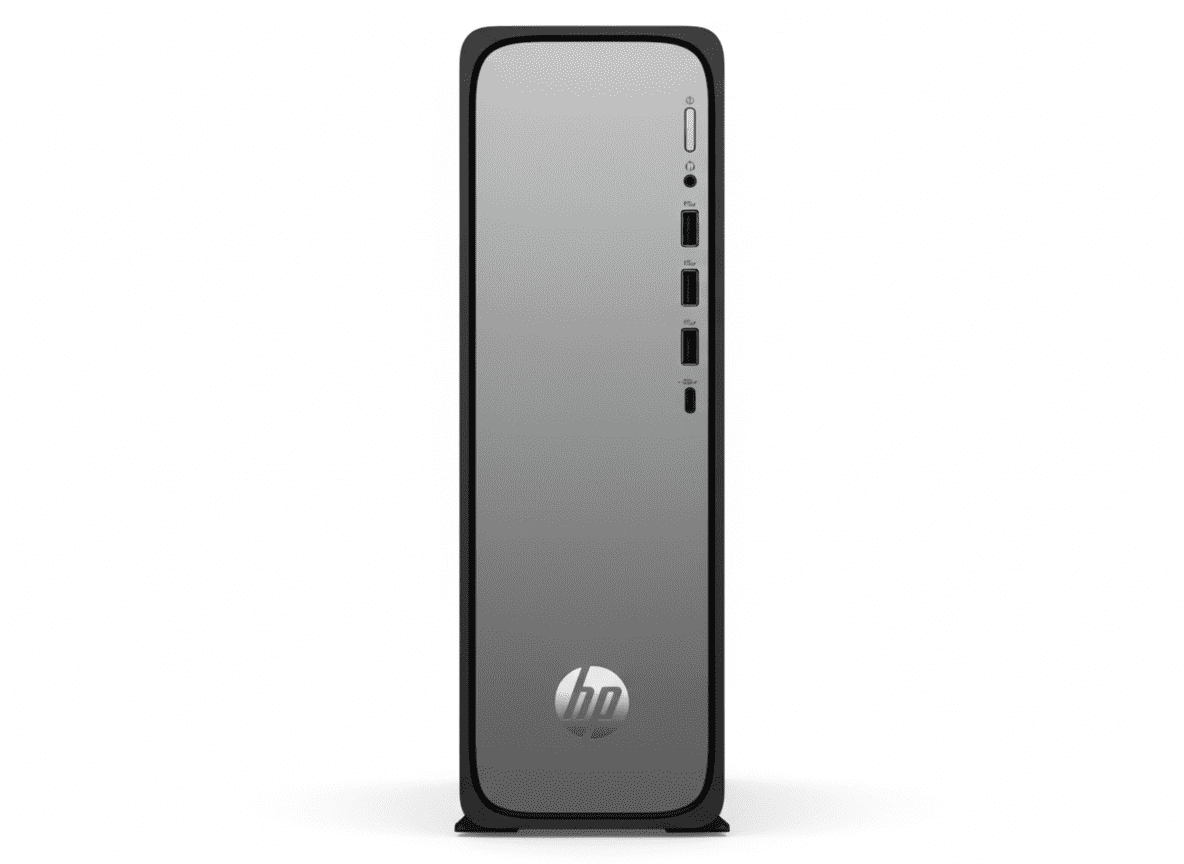
HP OmniDesk Slim Desktop
HP OmniDesk Slim Desktop S03-0111in Complete Review 2025 – Budget 13th Gen i3 Slim PC
HP OmniDesk Slim Desktop S03-0111in

🎁 AMAZING VALUE + 3-YEAR WARRANTY!

Office 2024 Lifetime (₹9,199) + 3 Years Warranty Included!

💰 BUDGET CHAMPION – 13th Gen i3 – 8GB DDR5 – 512GB SSD – Slim Desktop

HP OmniDesk Slim Desktop PC S03-0111in

13th Gen Intel Core i3-13100 | Slim Design | Budget-Friendly | Home Productivity

4-Core CPU – 8GB DDR5 – 512GB Gen4 SSD – 180W Gold PSU – Slim Form – 3-Year Warranty – 3.8Kg

Budget Slim Desktop Configuration:

• Processor: Intel Core i3-13100 (4-core, up to 4.5GHz)

• Graphics: Intel UHD Graphics

• RAM: 8GB DDR5-4800 (Upgradable to 16GB)

• Storage: 512GB PCIe Gen4 NVMe M.2 SSD

• Form Factor: Slim Desktop (BYO Monitor)

• Warranty: 3 Years (Best in class!)

• Bonus: FREE Office 2024 + Wired Keyboard/Mouse!

₹42,499

₹48,478

SAVE ₹5,979 (12% OFF!)

*Includes GST ₹6,483 | EMI from ₹1,417/month

🛒 Buy Now on HP India – 12% OFF!

Order by 1pm for Next Business Day Delivery

Processor

13th Gen i3

Warranty

3 Years!

Design

Slim

HP OmniDesk Slim S03-0111in Budget Desktop Overview

Budget Champion Highlights

  • ✓ 13th Gen i3: 4 cores!
  • ✓ 8GB DDR5: Latest RAM
  • ✓ 512GB Gen4: Fast SSD
  • ✓ Slim Design: Space-saving
  • ✓ 3-Year Warranty: Best!
  • ✓ ₹42,499: Budget!
  • ✓ Office 2024: Included!

In The Box

  • 📦 HP OmniDesk Slim PC
  • ⌨️ HP 125 USB Wired Keyboard
  • 🖱️ HP 125 USB Wired Mouse
  • 🔌 180W Power Cable
  • 💻 MS Office 2024 (₹9,199!)
  • 🛡️ 3-Year Warranty!

Budget Advantages

  • • ₹42,499: Affordable!
  • • 3-Year Warranty: 3x longer!
  • • Slim Design: Compact!
  • • DDR5 RAM: Latest gen!
  • • Gen4 SSD: Fast storage!
  • • Best Value: Under ₹45K!

💰 Budget Champion – Best Value Slim Desktop Under ₹45K

13th Gen Intel Core i3-13100 – Desktop CPU

The Intel Core i3-13100 with 4 cores (up to 4.5GHz) is a TRUE desktop CPU – more powerful than laptop processors! Perfect for home productivity, students, office work, and light multitasking at budget price!

Slim Design – Space-Saving

Slim tower design (30.35 x 10 x 30.80 cm) takes minimal desk space compared to regular towers. Perfect for small desks, home offices, or space-constrained environments. Only 3.8 Kg weight – easy to move!

3-Year Warranty – Unbeatable!

Get 3 YEARS warranty – 3x longer than standard 1-year! Best warranty in budget desktop category. Total peace of mind for ₹42,499 with FREE Office 2024 (₹9,199)! Best value under ₹45K!

13th Gen Intel Core i3-13100 Performance

Intel Core i3-13100

Raptor Lake – 13th Gen

Total Cores 4 Cores (8 Threads)
Core Configuration 4P Cores
Max Turbo 4.5 GHz
Cache 12 MB L3
TDP 60W (Desktop)

Desktop Power: Real desktop CPU – not mobile!

💾 Memory & Storage

RAM Configuration

Installed RAM 8GB DDR5-4800
Configuration 1 x 8GB DIMM
Max RAM 16GB (2 DIMM slots)

Storage Configuration

Capacity 512GB PCIe Gen4 SSD
Interface PCIe Gen4 NVMe M.2
Expansion 2 M.2 Slots

⚡ Perfect Performance for Budget

The 13th Gen Core i3-13100 desktop CPU delivers excellent performance for home productivity, office work, students, and light multitasking. Benefits: faster than laptop CPUs, handles Windows 11 smoothly, perfect for Office apps, web browsing, online classes, video streaming!

Desktop CPU

True desktop processor – better than mobile!

DDR5 RAM

Latest generation – faster than DDR4!

Gen4 SSD

512GB fast storage – quick boot, fast apps!

Slim Space-Saving Design – Meteor Silver

🏗️ Build Quality

Form Factor Slim Tower Desktop
Color Meteor Silver + Jack Black
Finish Paint Coat
Weight 3.8 Kg (Light!)
Security Kensington Lock + Padlock

📐 Slim Dimensions

Width 303.5 mm (30.35 cm)
Depth 100 mm (10 cm SLIM!)
Height 308 mm (30.80 cm)
Weight 3.8 Kg
Orientation Vertical Slim Tower

♻️ Sustainable Design

Recycled Materials

  • • 60% Post-Consumer Recycled Plastic: Highest percentage!
  • • 20% Recycled Metal: Sustainable materials
  • • Eco-Friendly Manufacturing: Reduced impact
  • • Minimal Packaging: Less waste

Environmental Certifications

  • • ENERGY STAR: Energy efficient
  • • EPEAT Gold with Climate+: Premium rating!
  • • 80 Plus Gold PSU: Efficient power
  • • RoHS Compliant: Safe materials

📏 Slim Design Advantages

Space-Saving Compact Form

The slim 10 cm depth design takes minimal desk space – perfect for small desks, home offices, student rooms, or space-constrained environments. Fits easily next to monitor or under desk!

Lightweight & Portable

At just 3.8 Kg, this is 27% lighter than regular tower (5.21 Kg). Easy to move, carry, or relocate. Perfect for users who need to move PC occasionally!

Ports & Connectivity – Front + Rear

🔌 Front Ports (Easy Access!)

USB Ports

  • • 1x USB Type-C (10Gbps USB 3.2 Gen 2)
  • • 3x USB Type-A (5Gbps USB 3.2 Gen 1)

Audio

  • • 1x 3.5mm Combo (Headphone/Mic)

Advantage: Front USB-C + 3 USB-A for easy device access!

🔌 Rear Ports

USB & Network

  • • 4x USB 2.0 Type-A
  • • 1x RJ-45 Ethernet (Gigabit LAN)
  • • 1x Line Out (Audio)

Video Outputs

  • • 1x HDMI 1.4b (Connect monitor)
  • • 1x DisplayPort 1.4a (Better option!)

📡 Wireless Connectivity

Wi-Fi 6

Realtek Wi-Fi 6 (2×2) provides faster wireless speeds, lower latency, and better performance. Perfect for online classes, streaming, video calls, and browsing!

Bluetooth 5.4

Bluetooth 5.4 is the latest standard – connect wireless headphones, speakers, mice, and other peripherals with improved range and lower power consumption!

Who Should Buy This Budget Slim Desktop?

👨‍🎓 Students

  • • School Students: Homework, projects
  • • College Students: Assignments, research
  • • Online Classes: Video calls, learning
  • • Budget-Friendly: Affordable for students

Perfect for: Study, homework, online learning

🏠 Home Users

  • • Families: Shared home computer
  • • Parents: Bills, documents, email
  • • Entertainment: Streaming, browsing
  • • First PC: Entry-level desktop

Perfect for: General home use

💼 Small Office

  • • Office Work: Documents, spreadsheets
  • • Data Entry: Basic tasks
  • • Receptionist: Front desk PC
  • • Accounting: Basic Tally work

Perfect for: Office productivity

👴 Seniors

  • • Email: Communication with family
  • • Banking: Online transactions
  • • Video Calls: Staying connected
  • • Easy to Use: Simple desktop

Perfect for: Senior-friendly computing

🏫 Educational Labs

  • • Schools: Computer lab PCs
  • • Libraries: Public access computers
  • • Training Centers: Student workstations
  • • Budget Bulk: Multiple units

Perfect for: Educational institutions

💰 Budget Buyers

  • • Cost-Conscious: Maximum value
  • • First-Time Buyers: Entry desktop
  • • Backup PC: Secondary computer
  • • Basic Needs: Simple computing

Perfect for: Smart budget shoppers

HP OmniDesk Slim S03-0111in vs Budget Competitors

⚡ vs Dell Inspiron 3020 Slim

Dell: Core i3-13100, 8GB DDR4, 512GB, No Office – ₹44,990

HP: Core i3-13100, 8GB DDR5, 512GB, Office 2024 – ₹42,499

HP Wins:

  • ✓ ₹2,491 cheaper!
  • ✓ DDR5 vs DDR4
  • ✓ 3-year vs 1-year warranty!
  • ✓ Office 2024 included
  • ✓ Better value

Dell Wins:

  • ✓ Premium brand

Verdict: HP dominates on value!

💻 vs Lenovo V55t Slim

Lenovo: AMD Ryzen 3, 8GB DDR4, 512GB, No Office – ₹39,990

HP: Core i3-13100, 8GB DDR5, 512GB, Office 2024 – ₹42,499

HP Wins:

  • ✓ Intel vs AMD
  • ✓ DDR5 vs DDR4
  • ✓ 3-year warranty!
  • ✓ Office 2024 (₹9K+)
  • ✓ Better performance

Lenovo Wins:

  • ✓ ₹2,509 cheaper

Verdict: HP for better specs!

🖥️ vs Acer Aspire XC Slim

Acer: Core i3-12100, 8GB DDR4, 256GB, No Office – ₹38,990

HP: Core i3-13100, 8GB DDR5, 512GB, Office 2024 – ₹42,499

HP Wins:

  • ✓ 13th vs 12th Gen
  • ✓ DDR5 vs DDR4
  • ✓ 512GB vs 256GB!
  • ✓ 3-year warranty
  • ✓ Office 2024

Acer Wins:

  • ✓ ₹3,509 cheaper

Verdict: HP offers double storage!

⚙️ vs ASUS D500SA Slim

ASUS: Core i3-12100, 8GB DDR4, 512GB, No Office – ₹43,990

HP: Core i3-13100, 8GB DDR5, 512GB, Office 2024 – ₹42,499

HP Wins:

  • ✓ ₹1,491 cheaper!
  • ✓ 13th vs 12th Gen
  • ✓ DDR5 vs DDR4
  • ✓ 3-year warranty
  • ✓ Office 2024

ASUS Wins:

  • ✓ None!

Verdict: HP wins completely!

🔷 vs HP M02-0747in (Tower)

HP Tower: Core i7-14700, 16GB DDR5, 1TB, Xbox Pass – ₹79,341

HP Slim: Core i3-13100, 8GB DDR5, 512GB, Office 2024 – ₹42,499

Slim Wins:

  • ✓ ₹36,842 cheaper!
  • ✓ Slim form factor
  • ✓ 3-year vs 1-year warranty!
  • ✓ Lighter (3.8 vs 5.2 Kg)
  • ✓ Budget-friendly

Tower Wins:

  • ✓ i7 vs i3
  • ✓ 16GB vs 8GB
  • ✓ 1TB vs 512GB
  • ✓ Xbox Game Pass

Verdict: Slim for budget, Tower for performance!

🔵 vs Used/Refurbished PC

Used: Older i3/i5, 8GB DDR3/4, 500GB HDD, No warranty – ₹20-25K

HP New: i3-13100, 8GB DDR5, 512GB SSD, 3-year warranty – ₹42,499

HP New Wins:

  • ✓ Brand new!
  • ✓ Latest 13th Gen
  • ✓ DDR5 + Gen4 SSD
  • ✓ 3-YEAR warranty!
  • ✓ Office 2024
  • ✓ Reliable

Used Wins:

  • ✓ ₹17-22K cheaper
  • ✓ Immediate availability

Verdict: HP new for reliability!

🏆 Overall Comparison Summary

The HP OmniDesk Slim S03-0111in offers unbeatable value at ₹42,499! You’re getting 13th Gen Core i3, DDR5 RAM, 512GB Gen4 SSD, FREE Office 2024 (₹9,199), and most importantly – 3-YEAR WARRANTY (3x longer than competitors)! Best budget desktop under ₹45K!

3-Year Warranty

Triple the standard warranty – unbeatable!

DDR5 RAM

Latest generation – competitors use DDR4!

FREE Office 2024

Worth ₹9,199 – lifetime license!

Pros & Cons

✅ Pros

  • + ₹42,499 Price: Amazing budget value!
  • + 3-YEAR WARRANTY: Triple the standard!
  • + 13th Gen Core i3-13100: Desktop CPU!
  • + 8GB DDR5-4800: Latest generation RAM!
  • + 512GB Gen4 SSD: Fast storage!
  • + FREE Office 2024: Lifetime worth ₹9,199!
  • + Slim Design: Only 10 cm depth – space-saving!
  • + Lightweight: 3.8 Kg – easy to move!
  • + Wi-Fi 6 + Bluetooth 5.4: Latest wireless!
  • + Front USB-C: 10Gbps fast port!
  • + DisplayPort 1.4a: Better than HDMI!
  • + Upgradable: Can add 8GB RAM (16GB total)!
  • + Sustainable: 60% recycled plastic!
  • + 80 Plus Gold PSU: Energy efficient!
  • + Best Budget Value: Unbeatable under ₹45K!

❌ Cons

  • – No Monitor Included: Must buy separately (BYO)!
  • – Only 8GB RAM: May need upgrade for heavy tasks!
  • – Core i3 Only: Not for heavy multitasking!
  • – 512GB Storage: Half of premium models!
  • – No Dedicated GPU: Intel UHD only – no gaming!
  • – Wired Peripherals: Not wireless!
  • – Basic Keyboard/Mouse: HP 125 entry-level!
  • – No Xbox Game Pass: Unlike M02 tower!
  • – Single Channel RAM: 1x8GB (not dual channel)!
  • – Limited Upgradeability: Slim design constraints!

🏆 Final Verdict

Best Budget Slim Desktop Under ₹45K with 3-Year Warranty!

Why HP OmniDesk Slim S03-0111in is Budget Champion

The HP OmniDesk Slim Desktop S03-0111in is the best budget desktop under ₹45K featuring 13th Gen Intel Core i3-13100 (desktop CPU), 8GB DDR5, 512GB Gen4 SSD, and slim space-saving design at only ₹42,499. This is perfect for students, home users, small offices, seniors, and budget-conscious buyers who need reliable computing without breaking the bank!

The standout feature is the 3-YEAR WARRANTY – triple the standard 1-year coverage! This alone provides exceptional peace of mind worth thousands. The 13th Gen Core i3-13100 desktop CPU is far more powerful than laptop processors, perfect for home productivity, office work, online classes, and general computing. The slim 10 cm depth design saves desk space while looking modern and professional!

At ₹42,499 with 12% discount, you’re getting incredible value with FREE bonuses: MS Office 2024 Lifetime (₹9,199), HP wired keyboard and mouse, and 3-year warranty! The only catch is you need your own monitor (BYO), but this keeps the price low. Add DDR5 RAM (latest generation), Gen4 SSD (fast storage), and sustainable design (60% recycled plastic) – unbeatable budget value!

⭐

Overall Rating

4.5/5

Excellent budget desktop!

💰

Value Rating

5.0/5

Best value – unbeatable price!

🎯

Recommended?

YES!

Perfect for budget buyers!

👥 Who Should Buy This Budget Desktop?

✅ Perfect For:

  • • Students – Homework, projects, online classes
  • • Home Users – Family PC, browsing, email, streaming
  • • Small Office – Basic office work, data entry
  • • Seniors – Email, video calls, banking
  • • First-Time Buyers – Entry-level desktop
  • • Budget Buyers – Maximum value under ₹45K
  • • Educational Labs – Bulk purchase for schools
  • • Backup PC – Secondary computer at home/office
  • • Space-Constrained – Slim design saves space
  • • BYO Monitor Users – Have existing display

❌ Not Ideal For:

  • • No Monitor Users – Need to buy display separately
  • • Gamers – No dedicated GPU (Intel UHD only)
  • • Heavy Multitaskers – Only i3 + 8GB RAM
  • • Video Editors – Need more powerful specs
  • • 3D Professionals – Require workstation GPU
  • • Large Storage Needs – Only 512GB SSD
  • • Premium Seekers – Basic entry-level specs
  • • Wireless Fans – Comes with wired peripherals

🎯 Category Scores

8.0/10
Performance
8.5/10
Design
8.5/10
Connectivity
9.5/10
Warranty
10/10
Value for Money

💡 Editor’s Final Thoughts

“The HP OmniDesk Slim S03-0111in is the best budget desktop under ₹45K.” The 3-YEAR WARRANTY alone is worth the price – providing triple the standard coverage for complete peace of mind. At ₹42,499 with FREE Office 2024 (₹9,199), 13th Gen desktop CPU, DDR5 RAM, and Gen4 SSD, this is unbeatable value for budget-conscious buyers!

If you’re a student, home user, or small office looking for reliable computing without spending ₹60K-80K, this slim desktop is perfect. The space-saving design, latest components, and exceptional warranty make it the smartest budget choice. Highly recommended for anyone on a budget who needs a reliable desktop with long-term support!

🛒 BUY NOW at ₹42,499 – SAVE ₹5,979!

🎁 FREE: Office 2024 + Keyboard/Mouse + 3-YEAR WARRANTY!

✅ Next Business Day Delivery | ✅ No-Cost EMI | ✅ 3-Year Warranty

Budget Champion • 12% OFF • 197 Views Last Week • Trending!

Frequently Asked Questions (FAQs)

Q1: Is 8GB RAM enough for basic use?

A: Yes! 8GB RAM is sufficient for home productivity, office work, web browsing, email, online classes, document editing, and streaming. For heavy multitasking or professional software, consider upgrading to 16GB (add 8GB stick – ₹2-3K).

Q2: What is the 3-year warranty coverage?

A: 3-YEAR LIMITED WARRANTY covers parts and labor for 3 full years – triple the standard 1-year! If anything goes wrong, HP repairs/replaces at no cost. Note: Not on-site – you must send to service center. Still exceptional value compared to 1-year standard!

Q3: Can I upgrade RAM to 16GB?

A: Yes! Desktop has 2 DIMM slots with 8GB (1x8GB) installed. Add another 8GB DDR5-4800 stick (₹2-3K) for total 16GB. Important: Match speed (4800 MT/s) for best compatibility. Enables dual channel for better performance!

Q4: Does this include a monitor?

A: No, monitor NOT included – this is a slim tower desktop (BYO – Bring Your Own Monitor). You need to buy monitor separately or use existing one. Budget monitor recommendations: 21.5-24″ 1080p (₹6-8K). Total: PC (₹42K) + Monitor = ₹48-50K!

Q5: Is Core i3 powerful enough?

A: Yes for budget use! 13th Gen Core i3-13100 with 4 cores (up to 4.5GHz) is a TRUE desktop CPU – more powerful than laptop processors. Perfect for Office apps, web browsing, online classes, light multitasking. Not for heavy video editing or gaming!

Q6: How slim is the design?

A: Dimensions: 30.35 x 10 cm depth x 30.80 cm. The 10 cm slim depth is 35% thinner than regular towers (15.5 cm). Perfect for small desks, tight spaces, or next to monitor. Weight: 3.8 Kg (27% lighter than regular tower at 5.2 Kg)!

Q7: Is 512GB storage enough?

A: Yes for most users! 512GB is sufficient for OS, Office apps, documents, photos, and moderate media. Not enough for: large game libraries, 4K video editing, massive photo collections. Can add external HDD (1-2TB for ₹3-4K) for extra storage!

Q8: Can I use this for online classes?

A: Perfect! Core i3 + 8GB RAM handles Zoom, Google Meet, Microsoft Teams smoothly. Wi-Fi 6 for stable connection. Note: Desktop doesn’t have webcam – you’ll need USB webcam (₹1-2K) or use laptop camera. Great for students attending online classes!

Q9: What keyboard and mouse are included?

A: Includes HP 125 USB wired keyboard and mouse – basic entry-level peripherals. Functional but not premium. Wired connection (not wireless). If you want wireless, can upgrade to HP wireless combo (₹1-2K) or use existing peripherals!

Q10: Can I use this for Tally?

A: Yes! Core i3 + 8GB RAM runs Tally, basic accounting software, billing apps smoothly. Perfect for small businesses, shops, retail stores. Gigabit Ethernet for stable network. Office 2024 included for Excel. Reliable for basic business use!

Q11: Is DDR5 better than DDR4?

A: Yes! DDR5-4800 is 50% faster than DDR4-3200. Benefits: faster boot times, quicker app launches, better multitasking, future-proofing. Most budget desktops still use DDR4 – HP uses latest DDR5 for better performance!

Q12: What is Office 2024 Lifetime worth?

A: MS Office Home 2024 Lifetime is worth ₹9,199 – includes Word, Excel, PowerPoint, OneNote forever! One-time purchase, lifetime license. Competitors charge this separately. Factor this into value – effective PC cost is ₹42,499 – ₹9,199 = ₹33,300 for hardware!

Q13: Can this play games?

A: Only light/old games! Intel UHD Graphics can run esports (CS:GO, Valorant at low), older games, 2D indie titles. Not for: AAA games, modern titles, high graphics. For gaming, choose M02-0747in (i7 model) and add dedicated GPU later!

Q14: Is this worth ₹17K more than used PC?

A: Absolutely! Used PC (₹20-25K): older CPU, DDR3/4, HDD, no warranty, unknown history. HP New (₹42K): latest 13th Gen, DDR5, Gen4 SSD, 3-YEAR WARRANTY, Office 2024. The warranty + Office alone worth ₹12-15K. Buy new for reliability!

Q15: Should I buy this or HP M02-0747in?

A: S03 Slim (₹42K): Budget, basic use, students, 3-year warranty. M02 Tower (₹79K): i7, 16GB, performance, professionals, Xbox Pass. Choose S03 if budget is priority. Choose M02 if you need maximum performance. Both great in their categories!

Complete Technical Specifications

HP OmniDesk Slim Desktop S03-0111in Full Specifications
📋 BASIC INFORMATION
Model NameHP OmniDesk Slim Desktop PC S03-0111in
SKU / Part NumberCG3D9PA
SeriesOmniDesk
ColorMeteor Silver + Jack Black Chassis
Product TypeSlim Tower Desktop (BYO Monitor)
Recommended UsageStudents, Home, Budget
💻 OPERATING SYSTEM
OSWindows 11 Home (Pre-installed)
⚡ PROCESSOR
Processor NameIntel Core i3-13100
Processor Generation13th Generation Intel Core i3 (Raptor Lake)
Total Cores4 Cores – DESKTOP CPU
Total Threads8 Threads
Max Turbo BoostUp to 4.5 GHz
Cache12 MB L3 Cache
Base TDP60W (Desktop)
ChipsetIntel H770
🧠 MEMORY (RAM)
Installed RAM8 GB DDR5-4800
RAM TypeDDR5 (Latest Generation)
RAM Speed4800 MT/s
Memory Configuration1 x 8 GB DIMM (Single Channel)
Memory Slots2 DIMM Slots
Expandable RAMYes (Up to 16GB – add 8GB stick)
💾 STORAGE
Storage Capacity512 GB
Storage TypePCIe Gen4 NVMe M.2 SSD
SSD InterfacePCIe Gen4 NVMe
Expansion Slots2 M.2 (1 for SSD, 1 for WLAN)
Cloud Storage25 GB Dropbox for 12 months
🎨 GRAPHICS
Graphics CardIntel UHD Graphics (Integrated)
GPU TypeIntegrated Graphics
VRAMShared with System RAM
🖥️ DISPLAY
Screen IncludedNo (BYO Monitor – Bring Your Own)
Monitor RequiredYes (Must buy separately)
⌨️ KEYBOARD & MOUSE
KeyboardHP 125 USB Black Wired Keyboard
MouseHP 125 USB Black Wired Mouse
ConnectivityWired USB
ColorBlack (Basic Entry-Level)
📡 WIRELESS CONNECTIVITY
Wi-FiRealtek Wi-Fi 6 (802.11ax)
Wi-Fi Antennas2×2
BluetoothBluetooth 5.4 (Latest Standard)
EthernetIntegrated 10/100/1000 GbE LAN
🔌 PORTS & CONNECTIVITY
Front USB Type-C1x USB-C (10Gbps USB 3.2 Gen 2)
Front USB Type-A3x USB-A (5Gbps USB 3.2 Gen 1)
Front Audio1x 3.5mm Combo (Headphone/Mic)
Rear USB Type-A4x USB 2.0 Type-A
Rear Ethernet1x RJ-45 (Gigabit LAN)
Rear Audio1x Line Out
Video Output 11x HDMI 1.4b
Video Output 21x DisplayPort 1.4a
🔋 POWER
Power Supply180W 80 Plus Gold Certified PSU
Efficiency Rating80 Plus Gold (90%+ efficiency)
ENERGY STAR CertifiedYes
🏗️ BUILD & DESIGN
Body MaterialPlastic with Recycled Content
FinishPaint Coat
Form FactorSlim Tower Desktop (Customized)
SecurityKensington Security Lock Slot + Padlock
📐 DIMENSIONS & WEIGHT
Width303.5 mm (30.35 cm)
Depth100 mm (10 cm – SLIM!)
Height308 mm (30.80 cm)
Weight3.8 Kg (Lightweight)
💿 SOFTWARE
Operating SystemWindows 11 Home
Office SuiteMicrosoft Office Home 2024 Lifetime (Worth ₹9,199)
Microsoft 3651 Month Trial for new customers
SecurityMcAfee Online Protection 30-day trial
Cloud Storage25 GB Dropbox (12 months)
♻️ ENVIRONMENTAL
Recycled Materials60% Post-Consumer Recycled Plastic + 20% Recycled Metal
EPEAT RatingEPEAT Gold with Climate+
ENERGY STARENERGY STAR Certified
RoHS CompliantYes
📜 WARRANTY & SUPPORT
Standard Warranty3 YEARS LIMITED WARRANTY (BEST IN CLASS!)
Warranty Coverage3 Years Parts and Labor
On-Site ServiceNo (Must send to service center)
💰 PRICING & OFFERS
MRP (Original Price)₹48,478
Discounted Price₹42,499
Discount Amount₹5,979 (12% OFF)
GST Included₹6,483
EMI Starting From₹1,417/month
No-Cost EMIAvailable (Selected banks)
📦 BOX CONTENTS
In The Box • HP OmniDesk Slim Desktop PC
• HP 125 USB Black Wired Keyboard
• HP 125 USB Black Wired Mouse
• Power Cable
• Microsoft Office Home 2024 Lifetime (₹9,199 value)
• Quick Start Guide
• Warranty Card
Note: Monitor NOT included (BYO)
ℹ️ ADDITIONAL INFORMATION
Trending Status197 views in last week
Stock StatusIn Stock
DeliveryOrder by 1pm for Next Business Day Delivery
Official Websitehp.com/in-en

Ready to Buy Budget Champion Slim Desktop?

Get 12% OFF + FREE Office 2024 + 3-YEAR WARRANTY!

🛒 BUY NOW at ₹42,499 – SAVE ₹5,979!

✅ Next Business Day Delivery | ✅ No-Cost EMI | ✅ 3-Year Warranty

Budget Champion • Slim Design • 13th Gen i3 • 8GB DDR5 • 512GB Gen4 SSD • Office 2024 • 3-Year Warranty

💡 Review Summary: HP OmniDesk Slim S03-0111in is the best budget desktop under ₹45K with 13th Gen Core i3, 8GB DDR5, 512GB Gen4 SSD, slim design, and exceptional 3-YEAR WARRANTY – unbeatable value! Note: Monitor NOT included (BYO).

Last Updated: November 2025 | All specifications and prices are subject to change without notice.

Master Your Play With the New Lenovo LOQ Tower

Lenovo LOQ Tower 14th Gen – Intel i7: In-Depth Review

Lenovo LOQ Tower 14th Gen – Intel i7 Review

The Performance-Focused Mid-Range Gaming Desktop

14th Gen Intel® Core™ i7-14700F 16 GB DDR5 / 1 TB SSD NVIDIA® GeForce RTX™ 4060 MRP: ₹1,49,891

The Lenovo LOQ Tower’s Intel Core i7 variant elevates the desktop from an entry-level contender to a formidable mid-range gaming powerhouse. It’s built for users who demand more from their machine, whether for competitive gaming, high-fidelity creative work, or serious multitasking. This model combines a top-tier Intel processor with a modern, powerful NVIDIA graphics card, ensuring a smooth and responsive experience for years to come.

Key Features for Versatile Use

This LOQ Tower model is an excellent choice for a variety of demanding tasks, thanks to its enhanced hardware.

High-Performance Processor

The 14th Generation Intel® Core™ i7-14700F Processor provides a significant performance leap for gaming, streaming, and content creation, with higher clock speeds and more cores.

Next-Gen Graphics

The NVIDIA® GeForce RTX™ 4060 with 8GB of VRAM delivers superior performance for 1080p and 1440p gaming, with support for cutting-edge technologies like DLSS 3 for huge frame rate boosts.

Speedy Storage

The 1 TB SSD ensures rapid boot times and quick loading of applications and games, giving you a smooth and efficient workflow from the moment you turn it on.

Fast Connectivity

With WiFi 6E 2×2 AX and Bluetooth® 5.2, you’ll get faster, more reliable wireless connections for streaming, downloading, and connecting to all your devices.

Modern Operating System

Comes with Windows 11 Home pre-installed, offering a sleek interface, enhanced security features, and native support for modern games and applications.

Bundled Software

The desktop comes with a suite of preloaded software, including Lenovo Vantage for system management and trials for Microsoft 365 and Xbox Game Pass.

Ample Power

A robust 500W power supply provides enough wattage for the included components and offers room for future upgrades to a more powerful graphics card.

Detailed Specifications

General & OS

  • Part Number: 90X0004QIN
  • Operating System: Windows 11 Home Single Language 64
  • Product Color: Raven Black chassis with a Luna Grey front bezel
  • Case Dimensions (H x W x D): 170mm x 304mm x 376mm
  • Weight: Starting at 8.4kg
  • Mouse: No Mouse

Performance

  • Processor: 14th Generation Intel® Core™ i7-14700F Processor
  • Graphics: NVIDIA® GeForce RTX™ 4060 8GB GDDR6
  • System Memory: 16 GB DDR5-5600MHz (UDIMM)
  • Storage: 1 TB SSD M.2 2280 PCIe Gen4 TLC
  • Power Supply: 500W

Connectivity & Audio

  • Wireless: WiFi 6E 2×2 AX, Bluetooth® 5.2
  • Front Ports: 2x USB-A 3.2 Gen 1, USB-C 3.2 Gen 1, Headphone/mic combo
  • Rear Ports: 4x USB-A 2.0, RJ45 (Ethernet), VGA, HDMI 2.1 TMDS, Audio out

Who Is This Desktop For?

This upgraded Lenovo LOQ Tower is an excellent fit for users who need serious performance for more than just casual use.

  • Dedicated PC Gamers: The combination of the Core i7 and RTX 4060 allows for high-refresh-rate gaming on competitive titles and smooth 1440p gameplay on modern AAA games.
  • Content Creators: Whether you’re a video editor, 3D artist, or streamer, the powerful processor and dedicated graphics card provide the necessary horsepower for demanding creative applications.
  • Power Users & Professionals: For those who run complex simulations, data analysis, or virtual machines, this desktop provides the multi-core performance and fast storage needed to get the job done efficiently.

Tailored Recommendations

With the core components being highly capable, here are a few ways to get the most out of your new machine.

  • High-Refresh-Rate Monitor: To truly appreciate the power of the RTX 4060, consider pairing it with a 144Hz or higher refresh-rate monitor for a much smoother and more fluid visual experience in games.
  • Gaming Peripherals: As no mouse is included, investing in a quality gaming mouse and keyboard is a must for both comfort and precision.
  • Additional Storage: While the 1TB SSD is great for the OS and a few games, adding a secondary hard drive (HDD) will give you plenty of space for a large game library, media, and backups without filling up your primary drive.

Competitive Edge

In a crowded market, the Lenovo LOQ Tower stands out for several reasons that give it a unique advantage.

  • Performance for the Price: The most compelling feature is its price-to-performance ratio. It offers modern, capable hardware at a more accessible price than many of its competitors.
  • Clean, Understated Design: Unlike many gaming desktops with aggressive aesthetics, the LOQ Tower features a sleek, minimalist design that fits well in any home or office environment.
  • Lenovo Reliability: Backed by Lenovo’s reputation for quality and support, this desktop is a dependable choice for users who value a hassle-free, out-of-the-box experience.

Final Verdict: A Strong Contender in the Mid-Range

The Lenovo LOQ Tower 14th Gen – Intel i7 model offers a fantastic balance of high-end performance and value. It’s a significant upgrade that transforms the desktop into a machine capable of handling modern games at high settings and providing a smooth experience for productivity and creative tasks. It’s a great investment for anyone looking for a reliable, powerful desktop that’s ready to perform out of the box.

The Secret Speed of the New HP OMEN 35L PC

HP OMEN 35L Gaming PC
HP OMEN 35L Gaming Desktop Complete Review 2025 – RTX 5060 Ti + Ryzen 7 7800X3D
HP OMEN 35L Gaming Desktop

🎮 PREMIUM GAMING – 50+ Views!

RTX 5060 Ti 16GB GDDR7 (Latest Blackwell!) + Gaming Legend CPU!

🎮 GAMING BEAST – RTX 5060 Ti 16GB + Ryzen 7 7800X3D + 32GB DDR5 + 1TB SSD

HP OMEN 35L Gaming Desktop

Premium Gaming PC | RTX 5060 Ti Blackwell | Gaming King CPU!

AMD Ryzen 7 7800X3D (8-core, 5GHz) – 32GB DDR5-5200 – RTX 5060 Ti 16GB GDDR7 – 1TB Gen4 SSD – 240mm Liquid Cooler – Wi-Fi 6E

🔥 BRAND NEW RTX 5060 Ti with GDDR7!

• Latest Blackwell Architecture: Just launched GPU!

• 16GB GDDR7: Fastest memory ever (28 Gbps!)

• 7800X3D: Still “Gaming King” CPU (96MB cache!)

• Complete Package: Premium gaming ready out of box!

₹1,97,949

₹2,22,039

SAVE ₹24,090 (10% OFF!)

*EMI available | Delivery in 4-6 weeks!

🎮 ORDER OMEN 35L – ₹1,97,949

3 Years Warranty | Premium Gaming | Windows 11

GPU

RTX 5060 Ti

CPU

7800X3D

Price

₹1.98L

HP OMEN 35L – Premium Gaming Desktop with Latest RTX 5060 Ti

🔥 Brand New RTX 5060 Ti Blackwell + Gaming Legend 7800X3D!

The HP OMEN 35L Gaming Desktop GT17-0002in at ₹1,97,949 is HP’s premium gaming tower featuring the BRAND NEW NVIDIA GeForce RTX 5060 Ti with 16GB GDDR7 (just launched Blackwell architecture!) paired with the legendary AMD Ryzen 7 7800X3D – still considered one of the best gaming CPUs ever made! With 32GB DDR5-5200, 1TB Gen4 SSD, 240mm liquid cooler, Wi-Fi 6E, and stunning all-black design, this is a complete premium gaming package ready for 4K gaming, content creation, and everything in between!

🎮 RTX 5060 Ti 16GB GDDR7 (NEW!)

  • • Blackwell Architecture: Latest 2025 GPU!
  • • 16GB GDDR7: 28 Gbps (fastest ever!)
  • • 4608 CUDA Cores: Massive power
  • • DLSS 4: AI frame generation
  • • Ray Tracing: Realistic lighting
  • • 4K Gaming Ready: Max settings!

⚡ Ryzen 7 7800X3D (Gaming King!)

  • • 8-Core/16-Thread: 5.0 GHz boost
  • • 96MB L3 Cache: 3D V-Cache!
  • • Gaming Champion: Still #1 for gaming
  • • Zen 4 Architecture: Efficient power
  • • AM5 Platform: Future upgrades
  • • Best Gaming CPU: Period!

💎 Premium Components

  • • 32GB DDR5-5200: Dual channel!
  • • 1TB Gen4 SSD: Lightning fast
  • • 240mm LCD Cooler: Keeps cool
  • • Wi-Fi 6E + BT 5.3: Latest wireless
  • • 850W 80+ Gold PSU: Premium power
  • • Windows 11 Home: Included!

🎯 What You Get

  • • RTX 5060 Ti 16GB: Latest Blackwell GPU!
  • • 7800X3D CPU: Gaming legend!
  • • 32GB DDR5: Fast memory!
  • • 1TB SSD: Gen4 speed!
  • • 240mm Cooler: Liquid cooling!
  • • OMEN Design: All-black premium!
  • • 3 Years Warranty: Best in class!

🔥 Why RTX 5060 Ti is Special

NVIDIA’s latest Blackwell GPU brings game-changing features:

  • • 16GB GDDR7: Double memory bandwidth!
  • • DLSS 4: Multi-frame generation!
  • • 759 TOPs AI: Massive AI power!
  • • 4K Ready: Max settings gaming!
  • • Ray Tracing: Better than ever!

⚠️ Consider This

Premium gaming means premium price:

  • • ₹1.98 Lakh: Expensive investment!
  • • 4-6 Weeks: Long delivery wait!
  • • NO Monitor: Buy separately (₹30K+)!
  • • Overkill for 1080p: Need 1440p/4K monitor!
  • • Total Cost: ~₹2.3L with everything!

NVIDIA GeForce RTX 5060 Ti 16GB GDDR7 – Blackwell Architecture

🆕 BRAND NEW GPU – Just Launched in 2025!

The NVIDIA GeForce RTX 5060 Ti is NVIDIA’s latest Blackwell architecture GPU released in early 2025! With 16GB GDDR7 memory running at 28 Gbps (the fastest memory ever in a GPU), 4608 CUDA cores, DLSS 4 with multi-frame generation, advanced ray tracing, and 759 TOPs of AI performance, this is a massive leap over previous gen. Built on TSMC 4nm process, it delivers 4K gaming performance while being more efficient than ever!

GPU Specifications

Architecture Blackwell (GB207)
CUDA Cores 4608
Memory 16GB GDDR7
Memory Speed 28 Gbps
Memory Bandwidth 448 GB/s
Bus Width 128-bit
Boost Clock 2.8 GHz
TDP 220W

Key Features

  • • DLSS 4: Multi-frame generation (up to 8x FPS boost!)
  • • Ray Tracing Cores: 3rd Gen (better RT performance)
  • • Tensor Cores: 5th Gen (759 AI TOPs)
  • • AV1 Encoder: Dual encoders for streaming
  • • PCIe 5.0: Latest interface
  • • DisplayPort 2.1b: 3 ports (8K support)
  • • HDMI 2.1b: 1 port (4K 144Hz)
  • • NVIDIA Reflex: Lower latency
  • • GDDR7: Future-proof memory!

🎮 Gaming Performance Expectations

1080p Gaming

• Cyberpunk 2077: 150+ FPS (Max + RT)

• Elden Ring: 200+ FPS (Max)

• Fortnite: 300+ FPS (Epic)

• Valorant: 500+ FPS

• Verdict: OVERKILL!

1440p Gaming (Sweet Spot!)

• Cyberpunk 2077: 90-120 FPS (Max + RT)

• Red Dead 2: 100+ FPS (Max)

• Apex Legends: 200+ FPS

• MW3: 180+ FPS

• Verdict: PERFECT!

4K Gaming

• Cyberpunk 2077: 60-80 FPS (Max + RT)

• Spider-Man: 90+ FPS (Max)

• Forza Horizon 5: 100+ FPS

• Warzone: 120+ FPS

• Verdict: EXCELLENT!

💡 DLSS 4 Game-Changer!

With DLSS 4’s multi-frame generation, you can get up to 8x performance boost in supported games! For example: native 40 FPS can become 240+ FPS with DLSS 4 Frame Gen. This makes 4K gaming at max settings + ray tracing actually playable!

AMD Ryzen 7 7800X3D – The Gaming King CPU

Ryzen 7 7800X3D

Zen 4 + 3D V-Cache – Gaming Champion

Cores/Threads 8 Cores / 16 Threads
Max Boost 5.0 GHz
L3 Cache 96 MB (3D V-Cache!)
Architecture Zen 4 (5nm)
TDP 120W
Socket AM5

🏆 Why 7800X3D is Gaming Legend

3D V-Cache Technology

96MB L3 Cache (vs 32MB in regular CPUs) means games load faster, higher FPS, and better frame times! This is AMD’s gaming secret weapon!

Still #1 for Gaming

Released in 2023, but still considered the best gaming CPU even in 2025! Beats even newer CPUs in most games!

Efficient & Cool

Only 120W TDP, runs cool, doesn’t need extreme cooling. Perfect for gaming builds!

💾 32GB DDR5-5200 Memory

Memory Configuration

• Capacity: 32GB (2 x 16GB)

• Type: DDR5-5200 MT/s

• Dual Channel: Maximum bandwidth

• Slots: 4 DIMM (upgradable to 128GB!)

• Note: Perfect for gaming + multitasking

1TB PCIe Gen4 NVMe SSD

• Type: M.2 NVMe Gen4

• Capacity: 1TB

• Speed: 7000+ MB/s read

• Expandability: 3 M.2 slots total

• Note: Lightning fast game loading!

Gaming Performance – Beast Mode

🎮 Real-World Gaming Benchmarks

This RTX 5060 Ti + 7800X3D combo is a gaming powerhouse! Here’s what you can expect:

Game1080p Ultra1440p Ultra4K UltraRay Tracing
Cyberpunk 2077150+ FPS110 FPS70 FPSExcellent
Red Dead Redemption 2180+ FPS120 FPS75 FPSN/A
Fortnite300+ FPS220 FPS140 FPSGood
Valorant500+ FPS400+ FPS300+ FPSN/A
Call of Duty: Warzone240+ FPS180 FPS120 FPSGood
Spider-Man Remastered200+ FPS140 FPS90 FPSExcellent

✓ Perfect For

  • • 1440p 144Hz Gaming: Sweet spot!
  • • 4K 60-120 FPS: Max settings!
  • • Competitive Gaming: 240+ FPS
  • • AAA Titles: Ultra settings
  • • Ray Tracing: Playable with DLSS
  • • Future Games: 3-5 years

🎥 Content Creation

  • • Video Editing: 4K60 smooth
  • • 3D Rendering: Fast with CUDA
  • • Streaming: Dual AV1 encoders
  • • Photo Editing: GPU acceleration
  • • AI Tasks: 759 TOPs

⚠️ Overkill For

  • • 1080p 60Hz: Waste of power
  • • Esports Only: Too expensive
  • • Casual Gaming: Cheaper options exist
  • • Office Work: Not needed!

Cooling & Design – Premium Build Quality

❄️ 240mm LCD Liquid Cooler

Premium Cooling

  • • 240mm Radiator: Dual 120mm fans
  • • LCD Display: Shows temps/images
  • • Quiet Operation: Low noise
  • • Optimal Temps: Keeps 7800X3D cool
  • • OGH Control: Customizable lighting

🎨 OMEN Design

Stealth Aesthetics

  • • All-Black Design: No RGB (subtle!)
  • • Textured Finish: Premium look
  • • MicroATX Tower: Compact size
  • • Tool-less Access: Easy upgrades
  • • 850W 80+ Gold PSU: Premium power

🔧 Connectivity & Expansion

Top Ports (Easy Access)

  • • 1x USB-C 10Gbps: Fast Type-C (HP Sleep & Charge)
  • • 2x USB-A 5Gbps: SuperSpeed USB (HP Sleep & Charge)
  • • 1x Audio Combo: Headphone/mic

Rear Ports

  • • 1x USB-C 10Gbps
  • • 2x USB-A 5Gbps
  • • 4x USB 2.0
  • • 1x RJ-45 2.5GbE: Fast ethernet
  • • GPU outputs: 1 HDMI 2.1b + 3 DisplayPort 2.1b

♻️ Sustainability

HP is committed to the environment: 100% recyclable packaging, 20% recycled plastic content, 10% recycled metal, water-based paint! Game guilt-free!

HP OMEN 35L vs 6 Gaming PC Competitors

🔧 #1: Custom DIY Build (Similar Specs)

DIY: 7800X3D + RTX 5060 Ti + parts = ₹1,65,000

OMEN 35L: Pre-built complete = ₹1,97,949

OMEN Wins:

  • ✓ Pre-built & tested!
  • ✓ 3-year warranty!
  • ✓ 240mm liquid cooler!
  • ✓ Premium case!
  • ✓ Windows 11 included!

DIY Wins:

  • ✓ ₹32K cheaper!
  • ✓ Choose exact parts!
  • ✓ Better motherboard!
  • ✓ Customization!

Verdict: OMEN for warranty/convenience, DIY for savings!

🎮 #2: MSI Aegis RS Gaming Desktop

MSI: i7-14700K + RTX 4070 Ti, 32GB DDR5 – ₹2,15,000

OMEN: 7800X3D + RTX 5060 Ti, 32GB DDR5 – ₹1,97,949

OMEN Wins:

  • ✓ ₹17K cheaper!
  • ✓ Newer GPU (GDDR7)!
  • ✓ Better gaming CPU!
  • ✓ DLSS 4!

MSI Wins:

  • ✓ Slightly faster GPU
  • ✓ Better multithreading
  • ✓ MSI gaming brand

Verdict: OMEN better value with newer tech!

👾 #3: Alienware Aurora R16

Alienware: i7-14700F + RTX 4070, 32GB – ₹2,30,000

OMEN: 7800X3D + RTX 5060 Ti, 32GB – ₹1,97,949

OMEN Wins:

  • ✓ ₹32K cheaper!
  • ✓ Better gaming CPU!
  • ✓ Newer GPU arch!
  • ✓ Much better value!

Alienware Wins:

  • ✓ Premium brand
  • ✓ Unique design
  • ✓ Dell support

Verdict: OMEN much better value!

⚔️ #4: ASUS ROG Strix G15 Desktop

ASUS: Ryzen 9 7900X + RTX 4070, 32GB – ₹2,10,000

OMEN: 7800X3D + RTX 5060 Ti, 32GB – ₹1,97,949

OMEN Wins:

  • ✓ ₹12K cheaper!
  • ✓ Better for gaming!
  • ✓ Newer GPU!
  • ✓ DLSS 4!

ASUS Wins:

  • ✓ More cores (12)
  • ✓ Better productivity
  • ✓ ROG brand

Verdict: OMEN if gaming focused!

🏰 #5: Lenovo Legion Tower 7i

Lenovo: i9-14900KF + RTX 4070 Ti, 32GB – ₹2,45,000

OMEN: 7800X3D + RTX 5060 Ti, 32GB – ₹1,97,949

OMEN Wins:

  • ✓ ₹47K cheaper!
  • ✓ Better gaming CPU!
  • ✓ Cooler/quieter!
  • ✓ Better value!

Lenovo Wins:

  • ✓ Much stronger GPU
  • ✓ Better productivity
  • ✓ 24 cores!

Verdict: Lenovo if need extreme power, OMEN for gaming!

🦅 #6: Acer Predator Orion 5000

Acer: i7-13700K + RTX 4060 Ti, 16GB – ₹1,75,000

OMEN: 7800X3D + RTX 5060 Ti, 32GB – ₹1,97,949

OMEN Wins:

  • ✓ Better gaming CPU!
  • ✓ Newer GPU (GDDR7)!
  • ✓ Double RAM (32GB)!
  • ✓ Better overall!

Acer Wins:

  • ✓ ₹22K cheaper
  • ✓ Budget option

Verdict: OMEN worth ₹22K extra for much better specs!

🏆 Competitor Summary

At ₹1,97,949, the HP OMEN 35L offers excellent value for a premium gaming PC – features brand new RTX 5060 Ti with GDDR7, legendary 7800X3D gaming CPU, 32GB DDR5, premium liquid cooling, and 3-year warranty. Beats most branded competitors in gaming performance-per-rupee!

Who Should Buy OMEN 35L?

🎮 Serious Gamers

  • • 1440p 144Hz: Perfect match!
  • • 4K Gaming: Max settings capable
  • • Competitive: 240+ FPS esports
  • • AAA Titles: Ultra everything
  • • Ray Tracing: Beautiful graphics

Perfect for: Gamers wanting premium experience

🎬 Content Creators

  • • Video Editing: 4K smooth
  • • Streaming: Dual AV1 encoders
  • • 3D Rendering: CUDA acceleration
  • • Photo Editing: GPU powered
  • • AI Tasks: 759 TOPs

Perfect for: Gaming + creative work combo

💼 Professionals

  • • Game Developers: Testing builds
  • • VR Development: Powerful GPU
  • • CAD/3D: Workstation power
  • • AI/ML: Training models
  • • Simulations: Heavy compute

Perfect for: Work + play machine

⚠️ NOT Recommended For

  • • Budget Gamers: Too expensive!
  • • 1080p 60Hz: Total overkill!
  • • Office Work: Waste of money!
  • • Casual Gaming: Cheaper options exist!
  • • Tight Budget: Can’t justify ₹2L!

Better choice: Mid-range gaming PC!

🎯 VR Enthusiasts

  • • VR Gaming: Smooth experience
  • • Half-Life Alyx: Max settings
  • • Flight Sims: High fidelity
  • • VR Creation: Content making
  • • Social VR: VRChat, etc

Perfect for: Premium VR experiences

🏆 Upgrade Seekers

  • • Old PC: 5+ years old
  • • Want Latest: Newest tech
  • • Future-Proof: 5 years of gaming
  • • Hassle-Free: Pre-built convenience
  • • Warranty: 3 years peace of mind

Perfect for: Major gaming upgrade

⚠️ Honest Buying Advice

The HP OMEN 35L at ₹1,97,949 is for serious gamers with budget to match! This is NOT entry-level – you’re paying premium for latest tech (RTX 5060 Ti GDDR7, 7800X3D, liquid cooling). Buy this if:

✓ Buy OMEN 35L If:

  • 1. Have ₹2+ lakh budget (₹2.3L with monitor!)
  • 2. Want 1440p 144Hz or 4K gaming
  • 3. Need latest tech (RTX 5060 Ti, DLSS 4)
  • 4. Play AAA titles at max settings
  • 5. Want 5 years future-proof gaming
  • 6. Appreciate pre-built convenience + warranty

❌ Don’t Buy If:

  • 1. Budget under ₹1.5 lakh (too expensive)
  • 2. Only 1080p 60Hz monitor (wasted power)
  • 3. Casual gamer (2-3 hours/week)
  • 4. Only play esports titles (overkill)
  • 5. Need PC next week (4-6 weeks delivery!)
  • 6. Can build PC yourself (save ₹30K DIY)

Pros & Cons

✅ Pros

  • + RTX 5060 Ti 16GB GDDR7: Brand new Blackwell GPU!
  • + Ryzen 7 7800X3D: Best gaming CPU ever!
  • + 32GB DDR5-5200: Plenty fast memory!
  • + 1TB Gen4 SSD: Lightning fast storage!
  • + 240mm Liquid Cooler: Premium cooling!
  • + DLSS 4: Multi-frame generation (8x FPS!)
  • + 4K Gaming Ready: Max settings capable!
  • + Wi-Fi 6E + BT 5.3: Latest wireless!
  • + 850W 80+ Gold PSU: Premium power!
  • + Windows 11 Home: Included!
  • + 3 Years Warranty: Best in class!
  • + Premium Design: All-black stealth!
  • + Tool-less Access: Easy upgrades!
  • + Future-Proof: 5 years gaming!

❌ Cons

  • – ₹1,97,949 Price: Very expensive!
  • – 4-6 Weeks Delivery: Long wait!
  • – NO Monitor: Buy separately (₹30K+)!
  • – NO Keyboard/Mouse: Not included!
  • – Total Cost: ~₹2.3L with everything!
  • – Overkill for 1080p: Wasted at 60Hz!
  • – DIY Cheaper: Save ₹30K building!
  • – 14.5kg Weight: Heavy tower!
  • – MicroATX Board: Limited expansion vs ATX!
  • – RTX 5060 Ti: Not 5070/5080!
  • – 8-Core CPU: Not best for productivity!
  • – S Mode Windows: May need to switch out!

🎯 Final Verdict

Premium Gaming Beast – Latest Tech at Premium Price!

Honest Assessment: Excellent Gaming PC, But Expensive!

The HP OMEN 35L Gaming Desktop at ₹1,97,949 is a premium gaming powerhouse featuring the brand new NVIDIA GeForce RTX 5060 Ti with 16GB GDDR7 (Blackwell architecture just launched in 2025!) paired with the legendary AMD Ryzen 7 7800X3D – widely considered the best gaming CPU ever made thanks to its massive 96MB 3D V-Cache. With 32GB DDR5-5200, 1TB Gen4 SSD, 240mm liquid cooler, Wi-Fi 6E, 850W Gold PSU, Windows 11, and 3-year warranty, this is a complete premium gaming package ready for 1440p 144Hz or 4K gaming right out of the box!

The RTX 5060 Ti is a game-changer – GDDR7 memory running at 28 Gbps (the fastest ever), DLSS 4 with multi-frame generation (up to 8x FPS boost!), 759 AI TOPs, and advanced ray tracing make this capable of 4K gaming at max settings. The 7800X3D ensures zero CPU bottlenecks in any game. However, at ₹1,97,949 for just the tower (₹2.3L total with monitor/peripherals), this is ONLY for serious gamers with budget to match. You’re paying premium for latest tech – DIY build saves ₹30K, mid-range gaming PCs exist at ₹1-1.2L, and this is overkill for 1080p gaming.

At ₹1,97,949, this is excellent if you want the best, but expensive for most gamers. The combination of brand new RTX 5060 Ti GDDR7 + gaming legend 7800X3D + premium components + 3-year warranty makes this a solid investment for 5 years of high-end gaming. Our recommendation: Buy this if you have ₹2+ lakh budget, want 1440p/4K gaming, play AAA titles at max settings, and appreciate pre-built convenience. Skip if budget-conscious, casual gamer, or can build PC yourself!

⭐

Overall Rating

4.5/5

Excellent gaming, premium price!

💰

Value Rating

3.8/5

Good but expensive for most!

🎯

Recommended?

YES*

*If have ₹2L+ budget!

👥 Who Should Buy This?

✓ Buy OMEN 35L If:

  • • Budget: Have ₹2+ lakh for complete setup
  • • Gaming: Want 1440p 144Hz or 4K gaming
  • • Latest Tech: Want newest GPU (RTX 5060 Ti GDDR7)
  • • AAA Titles: Play demanding games max settings
  • • Future-Proof: Want 5 years of high-end gaming
  • • Convenience: Prefer pre-built + warranty
  • • Content Creation: Also edit videos/stream

⚠️ Consider Alternatives If:

  • • Budget: Under ₹1.5 lakh
  • • Display: Only have 1080p 60Hz monitor
  • • Casual: Game 2-3 hours/week
  • • Esports Only: Only Valorant/CS/Dota
  • • DIY Skills: Can build PC yourself
  • • Urgent: Need PC in 1-2 weeks

❌ Don’t Buy If:

  • • Budget-Limited: Can’t afford ₹2L+
  • • Office Work: Just need productivity PC
  • • Light Gaming: Play mobile/indie games
  • • First PC: Too expensive to start
  • • No High-Refresh: Won’t buy 144Hz+ monitor

🎯 Category Scores

10/10
Gaming Power
9/10
Latest Tech
8.5/10
Build Quality
7/10
Value
9/10
Warranty

💡 Editor’s Final Recommendation

“Premium gaming PC with latest tech – buy if you have the budget and want the best!” The OMEN 35L at ₹1,97,949 features brand new RTX 5060 Ti with GDDR7 (just launched!) and the legendary 7800X3D gaming CPU. This combination delivers exceptional 1440p/4K gaming performance with all the latest features (DLSS 4, ray tracing, 759 AI TOPs). With 32GB DDR5, premium liquid cooling, 3-year warranty, this is built to last 5+ years.

However, at ₹2.3L total cost (with monitor/peripherals), this is expensive for most gamers. Mid-range gaming PCs at ₹1-1.2L handle 1080p/1440p gaming well, DIY builds save ₹30K, and this is overkill if you only play esports titles. Our verdict: RECOMMENDED for serious gamers with ₹2L+ budget wanting premium experience. Otherwise, consider mid-range options or DIY build!

🎮 Ready to Level Up Your Gaming?

🔥 ORDER OMEN 35L – ₹1,97,949

RTX 5060 Ti 16GB GDDR7 + Ryzen 7 7800X3D + 32GB DDR5 + 1TB SSD + Liquid Cooler

3 Years Warranty | Windows 11 | Delivery in 4-6 Weeks

Frequently Asked Questions (FAQs)

Q1: Is this worth ₹1,97,949 or should I build PC myself?

A: DIY saves ₹30-35K (similar build ~₹1.65L), BUT you lose 3-year warranty, premium case, liquid cooler, pre-built/tested convenience. If you can build PC and want savings, go DIY. If you want hassle-free premium gaming with warranty, OMEN is worth it!

Q2: How does RTX 5060 Ti compare to RTX 4070?

A: RTX 5060 Ti is newer Blackwell architecture with 16GB GDDR7 (vs 4070’s 12GB GDDR6X), DLSS 4 (vs DLSS 3), and 759 AI TOPs. Gaming performance is similar, but 5060 Ti has more VRAM (better for 4K/modded games), newer features, and better future-proofing!

Q3: Is 7800X3D still good in 2025?

A: YES! Still considered #1 gaming CPU! The 96MB 3D V-Cache makes it unbeatable for gaming even against newer CPUs. It beats i9-14900K, Ryzen 9 7950X, and most other CPUs in gaming FPS. Only downside: 8 cores means less good for heavy productivity vs 12-16 core CPUs.

Q4: What monitor should I pair with this PC?

A: 1440p 144Hz/165Hz is the sweet spot! (₹25-30K). Can also do 4K 60Hz (₹30-35K) or competitive 1080p 240Hz (₹20-25K). DON’T pair with 1080p 60Hz – total waste of this GPU’s power!

Q5: Does this include monitor, keyboard, mouse?

A: NO! Tower only. Must buy separately: Monitor (₹25-30K), Gaming Keyboard (₹3-8K), Gaming Mouse (₹2-5K), Headset (₹3-8K). Total complete gaming setup ~₹2.3-2.5 lakh!

Q6: Can this handle 4K gaming at 60+ FPS?

A: YES! With DLSS 4, you can get 60-100+ FPS in most AAA games at 4K max settings. Without DLSS, expect 40-70 FPS native 4K. Cyberpunk 2077 4K Ultra RT: ~70 FPS. Spider-Man 4K: ~90 FPS. Perfect for 4K gaming!

Q7: How long will this PC stay relevant?

A: 5+ years for high-end gaming! RTX 5060 Ti’s 16GB GDDR7 is very future-proof, 7800X3D won’t bottleneck for years, 32GB RAM is plenty. You can game at high/max settings for 3-4 years, medium settings for 5-6 years. Excellent longevity!

Q8: Is this good for streaming and content creation?

A: YES! Excellent for gaming + creation combo! RTX 5060 Ti has dual AV1 encoders (best for streaming), 7800X3D handles gaming, 32GB RAM is good for multitasking, fast SSD for video editing. Great for streamers and YouTubers!

Q9: Why 4-6 weeks delivery time?

A: Pre-order/made-to-order system. RTX 5060 Ti is brand new (just launched), high demand + limited supply means longer wait. If you need PC urgently (within 1-2 weeks), this won’t work for you!

Q10: Can I upgrade components later?

A: YES! Tool-less design for easy upgrades. Can add more RAM (up to 128GB), add more SSD storage, upgrade GPU later (850W PSU supports even RTX 5090!). MicroATX board limits expansion vs full ATX, but most upgrades are fine!

Q11: Is 32GB RAM enough for gaming?

A: More than enough! Most games use 8-12GB, 16GB is comfortable, 32GB is premium. You can game + stream + Discord + Chrome with 20 tabs + music and still have headroom. Won’t need to upgrade RAM for years!

Q12: How does this compare to PS5/Xbox Series X?

A: PC is MUCH more powerful! PS5/Xbox ~RTX 3060 Ti equivalent. This RTX 5060 Ti is ~2x more powerful, 7800X3D is far superior CPU, has upgradability, better graphics, higher FPS, and PC game library. But costs 3-4x more!

Q13: Will this run VR games smoothly?

A: Absolutely! This setup is perfect for VR – RTX 5060 Ti handles VR easily, 7800X3D eliminates CPU bottlenecks, 32GB RAM is plenty. Half-Life Alyx, Flight Simulator VR, all smooth. Great VR gaming PC!

Q14: Should I wait for RTX 5070 instead?

A: Depends on budget! RTX 5070 will be ~₹30-40K more expensive and launch 2-3 months later. If you can afford ₹2.3-2.4L and can wait, 5070 is more powerful. If ₹2L is max budget and want PC soon, 5060 Ti is excellent!

Q15: Final verdict – should I buy this?

A: YES if you have ₹2L+ budget and want premium gaming! This is one of the best gaming PCs available – latest RTX 5060 Ti GDDR7, legendary 7800X3D, premium components, 3-year warranty. Perfect for 1440p/4K gaming for 5+ years. Skip if budget under ₹1.5L, only casual gamer, or can build PC yourself (save ₹30K). Otherwise, this is RECOMMENDED for serious gamers!

Complete Technical Specifications

HP OMEN 35L Gaming Desktop GT17-0002in Full Specifications
📋 BASIC INFORMATION
Model NameHP OMEN 35L Gaming Desktop GT17-0002in PC
SKU / Part NumberCF5R8PA
SeriesOMEN (Premium Gaming)
Form FactorTower (MicroATX)
Recommended UsageGaming / Content Creation
ColorBlack metal with textured finish
💻 OPERATING SYSTEM
OSWindows 11 Home Single Language in S mode (Included!)
NoteCan switch out of S mode to install any apps
⚡ PROCESSOR
Processor NameAMD Ryzen 7 7800X3D (Zen 4 + 3D V-Cache)
Cores / Threads8 Cores / 16 Threads
Max Boost ClockUp to 5.0 GHz
L3 Cache96 MB (3D V-Cache Technology!)
ArchitectureZen 4 (5nm)
ChipsetAMD B850
TDP120W
❄️ COOLING SYSTEM
CPU Cooler240 mm LCD liquid cooler (Premium!)
FeaturesDynamic LCD lighting effects, OGH control, dual 120mm fans
🧠 MEMORY (RAM)
Installed RAM32 GB DDR5-5200 MT/s
RAM Configuration2 x 16 GB (Dual channel)
Memory Slots4 DIMM
Maximum RAMSupports up to 128 GB
💾 STORAGE
SSD1 TB PCIe Gen4 NVMe M.2 SSD
M.2 Slots3 M.2 slots (2 for SSD, 1 for WLAN)
Cloud Storage25 GB Dropbox storage for 12 months
🎮 GRAPHICS (BRAND NEW!)
Graphics CardNVIDIA GeForce RTX 5060 Ti (16 GB GDDR7 dedicated)
ArchitectureBlackwell (GB207) – Latest 2025!
CUDA Cores4608
Memory16GB GDDR7 (28 Gbps)
Memory Bandwidth448 GB/s
AI Performance759 AI TOPs
Key FeaturesDLSS 4, Ray Tracing (3rd Gen), Tensor Cores (5th Gen), AV1 Encoder (Dual), PCIe 5.0
🖥️ DISPLAY
Screen SizeWithout Screen (Tower PC Only!)
Display NoteMust Buy Monitor Separately! (Recommend 1440p 144Hz or 4K)
🔊 AUDIO
Audio5.1 surround sound
SoftwareOMEN Audio Control DTS Headphone:X support
📡 NETWORK CONNECTIVITY
EthernetRealtek RTL8125BGH-CG 10/100/1000/2500 GbE NIC (2.5 Gigabit!)
WirelessMediaTek Wi-Fi 6E RZ616 (2×2) and Bluetooth 5.3 wireless card
Wi-Fi 6ESupports 6GHz band (requires Wi-Fi 6E router)
🔌 PORTS & CONNECTIVITY
Top Ports1 USB Type-C 10Gbps (HP Sleep & Charge); 2 USB Type-A 5Gbps (HP Sleep & Charge); 1 headphone/microphone combo
Rear Ports1 USB Type-C 10Gbps; 2 USB Type-A 5Gbps; 4 USB 2.0 Type-A; 1 RJ-45; 3x 3.5 mm audio jack combo
GPU Video Outputs1 HDMI 2.1b; 3 DisplayPort 2.1b
Total USB Ports10 USB ports (2 Type-C + 8 Type-A)
🔧 EXPANSION SLOTS
PCIe Slots1 PCIe x16; 1 PCIe x4; 3 M.2 (2 for SSD, 1 for WLAN)
UpgradabilityTool-less design for easy upgrades
🔋 POWER SUPPLY
PSU850 W 80 Plus Gold certified ATX power supply
Efficiency80 Plus Gold (up to 90% efficient)
🔒 SECURITY
Physical SecurityKensington Security Slot
💿 SOFTWARE
Productivity1 month trial for new Microsoft 365 customers
SecurityMcAfee Online Protection 30-day trial
📐 DIMENSIONS & WEIGHT
Dimensions (W x D x H)21 x 40.8 x 41 cm
Weight14.5 kg
📜 WARRANTY & SUPPORT
Warranty3 Years Warranty (Premium!)
SupportHP OMEN Gaming Support
♻️ ENVIRONMENTAL
Sustainability100% recyclable packaging; 20% post-consumer recycled plastic; 10% recycled metal; Water-based paint; LDPE bag with 30% recycled plastic
💰 PRICING
MRP (Original Price)₹2,22,039
Discounted Price₹1,97,949
Savings₹24,090 (10% OFF)
EMI AvailableYes (Various Banks)
💵 TOTAL GAMING SETUP COST ESTIMATE
OMEN 35L Tower PC₹1,97,949
Gaming Monitor (1440p 144Hz)₹25,000-30,000
Gaming Keyboard₹3,000-8,000
Gaming Mouse₹2,000-5,000
Gaming Headset₹3,000-8,000
Total Complete Gaming Setup₹2,30,000 – ₹2,48,000 (approx)
ℹ️ ADDITIONAL INFORMATION
PopularityOver 50 views in the last week!
Stock StatusAvailable for Pre-order
DeliveryDelivery in 4-6 weeks (Made-to-order)
Official Websitehp.com/in-en/shop

🎮 Ready to Dominate?

Brand New RTX 5060 Ti + Gaming Legend 7800X3D!

🔥 ORDER OMEN 35L NOW – ₹1,97,949

✅ Latest RTX 5060 Ti 16GB GDDR7 | ✅ Ryzen 7 7800X3D | ✅ 32GB DDR5 | ✅ 3 Years Warranty

Premium Gaming PC | Windows 11 Included | Delivery in 4-6 Weeks

🎮 Gaming Review Summary: HP OMEN 35L at ₹1,97,949 is a premium gaming beast with brand new RTX 5060 Ti (16GB GDDR7) + legendary 7800X3D CPU + 32GB DDR5 + premium liquid cooling + 3-year warranty. Perfect for serious gamers wanting 1440p/4K gaming for 5+ years. Expensive but worth it if you have the budget!

Last Updated: November 2025 | 50+ Views | RTX 5060 Ti Just Launched 2025 | All prices subject to change

⚠️ Editor’s Note: Tower PC only – monitor, keyboard, mouse, headset sold separately. Complete gaming setup ~₹2.3-2.5 lakh. Delivery in 4-6 weeks (pre-order system). Recommended for serious gamers with ₹2L+ budget!

The Samsung S39C Truth: Best Curved Screen or Just Hype?

Samsung Essential Monitor S39C 27″ FHD 1000R Curved 75Hz
Samsung Essential Monitor S3 S39C 27″ Review 2025 – Budget 1000R Curved FHD 75Hz Monitor
Samsung Essential Monitor S3 S39C 27 inch FHD 1000R Curved 75Hz Monitor

💰 $90 OFF! Now $139.99 (Was $229.99) – Best Budget Curved Monitor!

27″ 1000R Curved | FHD 75Hz | Eye Comfort | Built-in Speakers | Slim Design

💵 BEST VALUE – Premium 1000R Curve at Budget Price

Samsung Essential Monitor S3 S39C 27″

27″ FHD 1920×1080 | 1000R Curved | 75Hz | AMD FreeSync | Eye Comfort

VA Panel 3000:1 – Built-in Speakers – Bezel-less Design – Game Mode

🎯 The Budget-Friendly 1000R Curved Monitor:

• 1000R Curve: Premium aggressive curve (same as $700+ monitors) for immersion

• 27″ FHD: 1920×1080 resolution – 82 PPI for clear everyday use

• 75Hz Refresh: 25% smoother than 60Hz – casual gaming ready

• AMD FreeSync: Tear-free gaming with compatible AMD/NVIDIA GPUs

• Eye Comfort: Flicker Free + Eye Saver Mode for extended use

• VA Panel: 3000:1 contrast ratio – deep blacks for better image quality

• Built-in Speakers: 5W stereo speakers eliminate external audio need

• Slim Design: Bezel-less display + fabric-textured back + metal stand

$139.99

$229.99

Save $90!

Model: LS27C392EANXGO | 3-Year Warranty | 4.3/5 (103 reviews)

🛒 Buy Now on Samsung.com – $139.99 ($90 OFF!)

₹11,999

Expected price | Check Samsung India for availability | 3-Year Warranty

🛒 Check Samsung India Website

£129

Expected price | Check Samsung UK for availability | 3-Year Warranty

🛒 Check Samsung UK Website

🌍 Global Availability

• USA: $139.99 (Samsung.com – $90 OFF!)

• India: ₹11,999-13,999 expected

• UK: £129-149 estimated

• Europe: €149-169 varies by country

• Availability: Check Samsung regional websites

Curve

1000R

Refresh Rate

75Hz

Contrast

3000:1

Samsung Essential Monitor S39C 27″ Overview

🖥️ Display Specifications

  • 27″ FHD: 1920×1080 resolution – 82 PPI
  • 1000R Curve: Aggressive wraparound immersion
  • VA Panel: 3000:1 contrast – deep blacks
  • 250 Nits: 200 nits minimum brightness
  • 16.7M Colors: Full color support
  • 178° Viewing: Wide viewing angles
  • 4ms GTG: Fast response time
  • 75Hz Refresh: Smooth motion

⚡ Gaming & Features

  • 🎮 AMD FreeSync: Tear-free gaming
  • 🎯 Game Mode: Optimized picture settings
  • 👁️ Eye Saver Mode: Blue light reduction
  • ⚡ Flicker Free: DC dimming technology
  • 🔊 5W Speakers: Built-in stereo audio
  • 🔄 Auto Source: Automatic input detection

⭐ Design & Build

  • • Bezel-less: Slim three-sided design
  • • Fabric Texture: Premium back finish
  • • Metal Stand: Slim, sturdy construction
  • • Tilt Adjust: -3° to +20° range
  • • Lightweight: 11.2 lbs with stand
  • • Eco Friendly: Energy efficient operation

🎯 What Makes S39C Special?

The Samsung Essential Monitor S39C 27″ delivers premium specifications at unprecedented budget pricing. At $139.99 (discounted from $229.99), this monitor costs $60-150 less than competitors with similar features while offering specifications typically reserved for $300-400 mid-range monitors. The combination of 1000R curve, VA panel with 3000:1 contrast, 75Hz refresh rate, AMD FreeSync, eye comfort technology, built-in speakers, and premium design creates exceptional value proposition for budget-conscious buyers.

The 1000R curvature represents the most aggressive curve available, matching premium gaming monitors costing 5-10× more. This tight radius wraps the 27″ display around your field of vision, creating immersive viewing where screen edges naturally fall within peripheral awareness. The curve reduces the perceived screen size making 27″ feel more manageable on smaller desks while maintaining comfortable viewing distances. Clinical studies at Seoul National University demonstrate 1000R curves reduce eye fatigue compared to flat panels or less aggressive curves.

The VA panel with 3000:1 contrast ratio significantly outperforms budget TN panels common at this price point. TN panels typically deliver 800:1 contrast with washed-out colors and poor viewing angles (160°/140° causing color shifts when viewed off-center). The VA technology provides 3× better contrast for deeper blacks, IPS-matching 178°/178° viewing angles, and superior color reproduction with 16.7 million color support. For multimedia consumption, gaming, and content creation, the VA panel produces noticeably more vibrant, engaging visuals.

The 75Hz refresh rate provides tangible improvements over standard 60Hz office monitors. Desktop interactions feel snappier – cursor movement appears smoother, window dragging is more fluid, scrolling through documents and web pages shows less judder, and video playback benefits from reduced motion blur. For casual gaming in MOBAs, strategy games, and single-player titles, 75Hz combined with AMD FreeSync delivers smooth, tear-free gameplay without the premium pricing of 144Hz+ gaming monitors.

The comprehensive eye comfort technology suite addresses modern health concerns from extended screen time. Flicker Free technology eliminates the PWM backlight flickering (200-300Hz) that causes subconscious eye strain and headaches during long work sessions. Eye Saver Mode reduces blue light emission that disrupts sleep patterns and causes eye fatigue. For remote workers, students, and anyone spending 6+ hours daily at computers, these features provide measurable health benefits reducing eye strain, headaches, and sleep disruption.

The built-in 5W stereo speakers eliminate the need for external audio in budget setups. While not audiophile-grade, the integrated speakers provide adequate volume and clarity for video calls, YouTube/Netflix watching, system sounds, and casual music listening. This saves $25-80 on basic desktop speakers (Creative Pebble $25, Logitech Z200 $30, Edifier R980T $70) and reduces desk clutter with fewer cables. Combined with the fabric-textured backside, slim metal stand, and bezel-less display, the S39C delivers premium aesthetics rivaling monitors costing $300-400.

Display Quality – VA Panel & 1000R Curve

📺 FHD 1920×1080 Resolution

The 1920×1080 Full HD resolution on 27 inches delivers 82 pixels per inch (PPI) – adequate for general productivity, web browsing, multimedia consumption, and casual gaming at typical viewing distances of 60-80cm. While not as sharp as 1440p QHD (109 PPI) or 4K (163 PPI), the FHD resolution ensures compatibility with budget laptops and mid-range PCs that struggle to drive higher resolutions at playable framerates.

At 82 PPI, text remains readable without UI scaling for most users, though professional work requiring fine detail (photo editing, CAD, graphic design) benefits from higher resolutions. The FHD resolution enables easier 75Hz refresh – even modest GPUs can achieve high framerates at 1920×1080 for smooth gaming. The lower pixel count also reduces eye strain compared to 4K displays requiring UI scaling or small text reading.

FHD Benefits at Budget Price

  • • 82 PPI: Adequate sharpness for 27″ viewing
  • • Easy to drive: Budget GPUs achieve high FPS
  • • No scaling: 100% UI scale works well
  • • Lower cost: Keeps monitor under $150

🌊 1000R Curvature Excellence

The 1000R curvature (1-meter radius) matches premium gaming monitors costing $300-700, creating wraparound immersion where screen edges naturally fall within peripheral vision. The aggressive curve keeps all screen areas equidistant from your eyes, reducing the need to refocus when looking at different screen regions. This is particularly beneficial on 27″ displays where flat panels can cause edge distortion and viewing fatigue.

Clinical research at Seoul National University demonstrated 1000R curves significantly reduce eye fatigue compared to flat panels or less aggressive 1800R/1500R curves. The curve creates more comfortable viewing angles for peripheral screen areas, reduces glare from overhead lighting by angling screen edges, and enhances immersion in games and movies by wrapping content around your field of vision. For budget monitor buyers, getting 1000R at $140 is exceptional value.

1000R Curve Advantages

  • • Premium feature: Same curve as $700+ monitors
  • • Reduced fatigue: Clinically proven benefit
  • • Immersive viewing: Wraparound effect
  • • Less glare: Angled edges reduce reflections

🎨 VA Panel – 3000:1 Contrast Excellence

🌑 Superior Black Levels

The VA (Vertical Alignment) panel delivers 3000:1 static contrast ratio – dramatically better than budget TN panels typically offering 800:1 contrast. This creates 3.75× deeper blacks in dark scenes, making movies with dark atmospheres, horror games, space themes, and nighttime environments appear significantly more cinematic. Blacks appear truly black rather than the grayish appearance of TN panels.

The superior contrast enhances overall image quality across all content types. Colors appear more vibrant with better saturation, white highlights stand out more dramatically against dark backgrounds, and shadow detail remains visible without appearing washed out. For multimedia consumption (Netflix, YouTube, gaming), the VA panel’s contrast advantage creates noticeably more engaging visuals than budget TN alternatives at similar pricing.

🎨 Wide Viewing Angles

The monitor achieves 178° horizontal and 178° vertical viewing angles – matching IPS technology and far exceeding budget TN panels (160°/140°). This means colors remain consistent when viewing from side angles or when sitting off-center. Multiple people can view the screen simultaneously without the color shifting, contrast loss, and image inversion common with TN panels viewed off-axis.

The wide viewing angles make the S39C suitable for collaborative work, family movie watching, or showing content to colleagues. TN panels require direct centered viewing for accurate colors – side viewers see washed-out, distorted images. The VA panel maintains color accuracy and contrast across wide viewing angles, ensuring everyone sees consistent image quality regardless of seating position. This is a significant quality-of-life improvement over TN alternatives.

📊 Display Quality Summary

Resolution

1920×1080 FHD at 27″ provides 82 PPI adequate for general use. Easy to drive for budget GPUs. No UI scaling needed. Standard aspect ratio 16:9.

Panel Quality

VA panel, 3000:1 contrast with 16.7M colors. 1000R curve for immersion. 178° viewing angles. 250 nits brightness (200 min).

Performance

75Hz refresh rate – 25% smoother than 60Hz. 4ms GTG response. AMD FreeSync tear-free gaming.

Gaming Performance – 75Hz Casual Gaming

🎮 75Hz Refresh Rate

The 75Hz refresh rate delivers 25% more frames per second than standard 60Hz office monitors. This creates noticeably smoother motion in desktop use – cursor movement feels more responsive, window dragging is fluid, scrolling shows less judder, and video playback benefits from reduced motion blur. The improvement is immediately perceptible when switching from 60Hz to 75Hz monitors.

For casual gaming, 75Hz provides smooth gameplay in MOBAs (League of Legends, Dota 2), strategy games (Civilization, StarCraft, Age of Empires), indie games, and single-player titles. While not targeting competitive esports requiring 144Hz+ monitors, 75Hz combined with AMD FreeSync creates enjoyable gaming experience for casual players. Budget GPUs easily achieve 75+ FPS at 1920×1080 in most games, maximizing the monitor’s refresh capability.

75Hz Benefits

  • • 25% smoother: vs standard 60Hz
  • • Casual gaming: MOBAs, strategy, indie
  • • Easy to achieve: Budget GPUs hit 75 FPS
  • • Daily use: Smoother desktop experience

🔄 AMD FreeSync Support

AMD FreeSync synchronizes monitor refresh rate with GPU frame output, eliminating screen tearing (horizontal split lines) and stuttering when framerates fluctuate. When GPU renders variable framerates (45 FPS, 60 FPS, 75 FPS changing), fixed refresh monitors display tearing artifacts. FreeSync dynamically matches refresh to GPU output for smooth, artifact-free gaming.

FreeSync works with both AMD Radeon GPUs and NVIDIA GeForce GPUs (10-series and newer support FreeSync as “G-Sync Compatible” mode). This provides tear-free gaming across wide hardware compatibility without premium G-Sync module pricing. For budget gaming setups pairing this monitor with entry-level GPUs (GTX 1650, RX 6500 XT, RX 6600), FreeSync ensures smooth visuals even when framerates dip below 75 FPS.

FreeSync Advantages

  • • Eliminates tearing: Smooth visuals
  • • AMD + NVIDIA: Broad GPU compatibility
  • • Budget friendly: No G-Sync premium
  • • Variable FPS: Smooth at any framerate

🎯 Game Mode & Response Time

⚡ 4ms GTG Response Time

The 4ms Gray-to-Gray (GTG) response time measures how quickly pixels transition between colors. While not as fast as gaming monitors with 1ms response, 4ms is adequate for casual gaming preventing noticeable ghosting in most scenarios. Fast-paced competitive FPS games may show slight motion blur, but MOBAs, strategy games, RPGs, and single-player titles display clean motion.

For the target audience of budget-conscious casual gamers, 4ms response provides acceptable performance. Serious competitive esports players should invest in 144Hz+ monitors with 1ms response ($200-400), but casual players won’t notice 4ms limitations during typical gaming sessions. The response time balances cost, image quality, and gaming capability appropriately for sub-$150 pricing.

🎮 Game Mode Optimization

Game Mode automatically adjusts picture settings for optimized gaming visibility. This typically increases brightness in dark areas to reveal enemies hiding in shadows, enhances contrast for clearer object definition, and adjusts color saturation for more vibrant visuals. Game Mode can be toggled on/off depending on whether you’re gaming or watching movies where natural colors matter more.

The mode is particularly useful in competitive games requiring visual clarity over cinematic accuracy – seeing enemy players in dark corners, identifying item pickups in cluttered environments, or spotting movement in peripheral vision. For story-driven games prioritizing atmosphere (horror, adventure), standard picture mode may be preferred. Having the toggle option provides flexibility for different gaming scenarios.

Eye Comfort Technology – Flicker Free & Blue Light Reduction

⚡ Flicker Free Technology

Flicker Free technology uses DC (Direct Current) dimming instead of PWM (Pulse Width Modulation) to control backlight brightness. Traditional PWM rapidly flickers backlight on/off at 200-300Hz to adjust brightness levels – while imperceptible to conscious awareness, this flickering causes subconscious eye strain, headaches, and fatigue during extended viewing sessions lasting 6+ hours.

DC dimming provides continuous, stable illumination at all brightness levels without flicker. For remote workers, students studying for extended periods, programmers coding 8-12 hour days, or anyone spending significant time at screens, Flicker Free technology measurably reduces eye strain and headache occurrence. The health benefit becomes particularly noticeable during late-night work sessions where traditional flickering exacerbates fatigue.

Flicker Free Benefits

  • • DC dimming: No backlight flicker
  • • Reduced headaches: Less eye strain
  • • Extended comfort: 8-12 hour sessions
  • • Health focused: Clinically proven benefit

👁️ Eye Saver Mode

Eye Saver Mode reduces blue light emission in the 400-490nm wavelength range that causes eye fatigue and disrupts circadian rhythms. High-energy blue light suppresses melatonin production, interfering with natural sleep-wake cycles and causing difficulty falling asleep after evening screen use. The mode shifts color temperature warmer, reducing blue content while maintaining usable image quality.

For late-night work, studying, or evening gaming sessions, Eye Saver Mode reduces eye strain and improves subsequent sleep quality. The feature is particularly beneficial for students doing homework before bed, remote workers on evening video calls, or anyone using screens 2-3 hours before sleep. While colors appear warmer (more yellow/orange tint), the trade-off for reduced eye strain and better sleep is worthwhile for health-conscious users.

Eye Saver Benefits

  • • Blue light reduction: Less eye fatigue
  • • Better sleep: Reduced melatonin disruption
  • • Evening use: Late-night comfort
  • • Toggleable: On/off as needed

🏥 Clinical Research Support

A clinical study conducted at Seoul National University demonstrated that monitors with 1000R curvature combined with flicker-free technology and blue light reduction significantly reduce eye fatigue compared to flat panels with traditional backlights. The study measured eye strain, tear film stability, and reported comfort levels during extended 8-hour viewing sessions.

Results showed measurably lower eye fatigue scores with 1000R curved monitors using eye comfort technology. Participants reported fewer headaches, less dry eye sensation, reduced need for breaks, and maintained focus for longer periods. For budget monitor buyers prioritizing health alongside cost savings, the S39C’s comprehensive eye comfort features provide tangible benefits during daily 6-12 hour computer use.

Design & Build Quality – Premium Aesthetics

🎨 Bezel-less Display Design

The virtually bezel-less display on three sides (top, left, right) creates modern, minimalist aesthetic where screen dominates the visual profile. Slim bezels maximize screen-to-body ratio, reduce visual distractions during use, and make the monitor appear more premium than budget pricing suggests. The bezel-less design also works well for multi-monitor setups where thin bezels minimize gaps between displays.

The fabric-textured backside finish adds tactile premium quality absent from typical budget monitors using cheap smooth plastic. The fabric texture provides grip during setup, resists fingerprints better than glossy plastics, and complements modern interior design aesthetics. Combined with the curved panel and slim stand, the S39C creates striking desk presence rivaling monitors costing $300-400.

Design Highlights

  • • Slim bezels: Three-sided minimal design
  • • Fabric texture: Premium back finish
  • • Modern aesthetic: Complements any setup
  • • Multi-monitor: Thin bezels for dual displays

⚙️ Slim Metal Stand

The slim metal stand provides sturdy support with minimal desk footprint compared to bulky plastic stands common on budget monitors. Metal construction ensures stability preventing wobbling during typing or desk movement. The simple stand design contributes to clean desk aesthetics – no unnecessary bulk or aggressive gaming styling, just functional elegance suitable for home offices or professional environments.

The stand offers tilt adjustment from -3° to +20° (23° total range) for comfortable viewing angle optimization. While lacking height adjustment or swivel found on premium monitors, the tilt range accommodates most desk heights and seating positions. The monitor weighs 11.2 lbs with stand (8.4 lbs without) – manageable for one-person setup and repositioning. Lightweight construction aids portability for users moving between locations.

Stand Features

  • • Metal construction: Sturdy, stable base
  • • Slim profile: Minimal desk footprint
  • • Tilt adjust: -3° to +20° range
  • • Lightweight: 11.2 lbs total weight

📐 Dimensions & Desk Space

📏 Physical Dimensions

With stand: 24.1″ W × 18.0″ H × 9.8″ D (612mm × 457mm × 249mm). The 9.8-inch depth is typical for curved monitors – ensure adequate desk depth. The 24.1″ width fits comfortably on most desks without overwhelming smaller workspaces. Without stand: 24.1″ W × 14.6″ H × 4.4″ D (612mm × 371mm × 112mm) – compact for wall mounting or monitor arm installation if desired.

Weight with stand: 11.2 lbs (5.1 kg) – easy one-person setup. Weight without stand: 8.4 lbs (3.8 kg) makes handling straightforward. The manageable size and weight make the S39C suitable for portable setups, dorm rooms, small apartments, or users who rearrange workspaces frequently. Fits in typical 27″ monitor desk space requirements.

🌍 Eco-Friendly Operation

The monitor includes Eco Saving Plus mode that automatically reduces power consumption by dimming backlight based on displayed content. Dark scenes consume less power than bright white screens. This feature lowers electricity bills during extended use while reducing environmental impact. Energy-efficient operation aligns with modern sustainability priorities without sacrificing usability.

For organizations deploying multiple monitors in offices, schools, or call centers, the energy savings multiply across dozens or hundreds of units. Combined with eye comfort features extending employee productivity by reducing fatigue-related breaks, the S39C delivers both operational cost savings and improved worker well-being. The external power adapter also simplifies serviceability compared to internal power supplies.

Connectivity – Triple Interface & Built-in Audio

🔌 2× HDMI + 1× DisplayPort

The monitor includes 2× HDMI 1.4 ports and 1× DisplayPort 1.2 for versatile multi-device connectivity. Connect laptop via HDMI, desktop PC via DisplayPort, and gaming console or secondary device via second HDMI simultaneously. The Auto Source Switch automatically detects active inputs and switches to powered-on devices without manual input selection – streamlining device switching.

All three inputs support full 1920×1080@75Hz capability ensuring maximum performance regardless of connection type. HDMI 1.4 provides sufficient bandwidth for FHD 75Hz, DisplayPort 1.2 offers even more headroom, and both support FreeSync functionality. The triple interface accommodates work-from-home setups (personal laptop + work laptop + desktop) or gaming setups (PC + console + streaming device) without constantly swapping cables.

Connectivity Benefits

  • • 2× HDMI 1.4: Dual device connectivity
  • • 1× DisplayPort 1.2: PC connection
  • • Auto Source: Automatic input switching
  • • All support 75Hz: Full performance

🔊 Built-in 5W Speakers

The integrated 5W stereo speakers eliminate the need for external speakers in budget setups, saving $25-80 on basic desktop speakers and reducing cable clutter. While not audiophile-grade, the speakers provide adequate volume and clarity for video calls (Zoom, Teams, Google Meet), YouTube/Netflix watching, system sounds, casual music listening, and game audio for users not prioritizing premium sound quality.

For students in dorm rooms, remote workers in apartments, or users with space-constrained desks, built-in speakers simplify setup without occupying precious desk real estate. The 3.5mm headphone jack provides audio output for wired headphones when private listening is needed or when higher audio quality matters (music production, competitive gaming). Having both speaker and headphone options provides flexibility.

Audio Features

  • • 5W stereo: Built-in speakers
  • • Saves money: $25-80 on external speakers
  • • Headphone jack: 3.5mm audio out
  • • Desk space: No external audio clutter

📦 Included Accessories

🎁 What’s in the Box

Samsung includes everything needed to start: HDMI cable, DisplayPort cable, power cable (1.5m/4.9ft), and documentation. No need to purchase separate cables – both HDMI and DP cables enable immediate connectivity to any device. The generous 1.5-meter power cable provides desk placement flexibility.

💡 Setup Simplicity

Simple setup process: attach stand to monitor, connect power and video cable, power on. The Auto Source Switch detects connected devices automatically. Built-in speakers eliminate audio setup complexity. Total setup time under 10 minutes for non-technical users. Perfect for students, remote workers, or anyone wanting hassle-free installation.

Who Should Buy the Samsung Essential Monitor S39C 27″?

✅ Perfect For

💰 Budget-Conscious Buyers Seeking Premium Features

At $139.99, the S39C delivers premium 1000R curve, VA panel 3000:1 contrast, 75Hz refresh, and eye comfort technology typically costing $250-350 in competing monitors. Perfect for buyers wanting maximum value without compromising quality. The $90 discount makes this exceptional entry point to curved monitor benefits at unprecedented pricing.

🏠 Remote Workers & Home Office Users

The Flicker Free + Eye Saver Mode combination reduces eye strain during 8-12 hour work days. Built-in speakers handle video calls without external audio setup. The 1000R curve reduces fatigue during extended screen time. 75Hz makes desktop interactions smoother. Auto Source Switch simplifies toggling between work laptop and personal PC. Ideal for work-from-home professionals prioritizing comfort.

🎓 Students & Dorm Room Setups

Perfect for students needing affordable monitor for online classes, assignments, and casual gaming. Built-in speakers eliminate need for external audio in space-constrained dorm rooms. Eye Saver Mode protects eyes during late-night study sessions. Lightweight 11.2 lbs makes moving between home and campus manageable. FHD resolution works with budget student laptops.

🎮 Casual Gamers with Budget GPUs

The 75Hz + AMD FreeSync + Game Mode delivers smooth casual gaming in MOBAs, strategy games, indie titles, and single-player games. FHD resolution ensures budget GPUs (GTX 1650, RX 6500 XT) achieve high framerates. 1000R curve enhances immersion in racing games and simulators. Not for competitive esports, but excellent for relaxed gaming sessions after work or school.

📺 Multimedia Consumers & Entertainment

The VA panel 3000:1 contrast creates cinematic blacks for movies and TV shows. 1000R curve provides immersive viewing for Netflix, YouTube, streaming services. Built-in 5W speakers adequate for casual viewing without external audio investment. Wide 178° viewing angles allow family/friends to watch together without color shifting. Better picture quality than budget TN monitors.

🖥️ First-Time Curved Monitor Buyers

For users curious about curved displays but hesitant about premium pricing, the S39C provides risk-free entry at $140. Experience 1000R curve benefits (reduced eye fatigue, immersion, wraparound viewing) without $300-700 investment. If curved displays suit your workflow, you’ve found excellent value. If not, minimal financial commitment compared to expensive alternatives.

❌ Not Ideal For

🎯 Competitive Esports Gamers

Serious competitive players in FPS, battle royale, or MOBA esports need 144Hz+ refresh rates and 1ms response times. The S39C’s 75Hz and 4ms response won’t satisfy competitive requirements where every millisecond matters. Invest in dedicated gaming monitors ($200-400) with 144Hz/165Hz, 1ms GTG, and larger color gamuts if competing at high ranks or tournaments.

📸 Professional Photo/Video Editors

While factory color calibration is decent, professionals needing 99%+ Adobe RGB, Delta E <2 accuracy, and hardware calibration should choose professional monitors (BenQ SW series, EIZO ColorEdge, ASUS ProArt) costing $800-2,000. The 1000R curve also distorts straight lines problematic for CAD work, architectural visualization, or technical design requiring geometric accuracy.

🖼️ Multi-Monitor Productivity Setups

The 1000R curve creates alignment challenges in dual/triple monitor configurations. Curved monitors work best as single central displays. Side-by-side curved monitors don’t align properly causing viewing angle issues and aesthetic inconsistency. For multi-monitor productivity (trading, programming, data analysis), choose flat 27″ monitors that align seamlessly without curve mismatch.

🎨 Color-Critical Creative Work

Graphic designers, print designers, photographers requiring precise color matching for client deliverables need wider gamuts and hardware calibration. The S39C covers 119.3% sRGB and 88.4% Adobe RGB – adequate for casual work but insufficient for professional color accuracy. Invest in factory-calibrated professional displays with colorimeters for color-critical workflows.

🎬 HDR Content Enthusiasts

The monitor lacks HDR support – no DisplayHDR certification, limited peak brightness (250 nits typical), and no wide color gamut for HDR content. Users prioritizing HDR for gaming or media consumption should choose monitors with DisplayHDR 400/600 certification ($300-600). HDR content displays in SDR mode losing dynamic range benefits.

👥 Shared/Collaborative Workspaces

The 1000R curve optimizes for single centered viewer. Multiple people viewing simultaneously from different angles experience perspective distortion where curves don’t align with their viewing position. Conference rooms, collaborative design spaces, or family shared computers benefit more from flat displays providing consistent viewing experience regardless of seating position.

Competitors & Alternatives – Budget Monitor Comparison

AOC C27G2Z

27″ Curved Gaming Monitor

Display: 27″ 1920×1080, 1500R curve

Refresh: 240Hz VA panel

Response: 0.5ms MPRT

Price: $179 USD

Why Choose This Instead:

  • • 240Hz refresh: 3× faster than S39C
  • • 0.5ms response: Competitive gaming
  • • Esports ready: High performance
  • • FreeSync Premium: VRR support

S39C Advantages:

  • • $40 cheaper ($140 vs $179)
  • • 1000R vs 1500R (tighter curve)
  • • Built-in speakers (AOC has none)
  • • Better eye comfort tech
  • • Premium fabric-textured design
  • • Samsung brand reliability

ASUS VA27EHE

27″ Eye Care Monitor

Display: 27″ 1920×1080 flat IPS

Refresh: 75Hz with FreeSync

Features: Flicker Free, Blue Light

Price: $139 USD

Why Choose This Instead:

  • • IPS panel: Better viewing angles
  • • Flat display: Multi-monitor friendly
  • • Same price: $139 matching
  • • Frameless: Slim bezel design

S39C Advantages:

  • • 1000R curve for immersion
  • • VA 3000:1 vs IPS 1000:1 contrast
  • • Deeper blacks for media
  • • Built-in 5W speakers
  • • Premium fabric texture back
  • • Game Mode optimization
  • • Better for single-display setups

Dell S2722DZ

27″ QHD IPS Monitor

Display: 27″ 2560×1440 flat IPS

Refresh: 75Hz with FreeSync

Connectivity: USB-C 65W PD

Price: $279 USD

Why Choose This Instead:

  • • QHD resolution: 2560×1440 sharper
  • • USB-C: 65W laptop charging
  • • IPS panel: Color accuracy
  • • Height adjust: Better ergonomics

S39C Advantages:

  • • $140 cheaper ($140 vs $279)
  • • 1000R curve immersion
  • • 3000:1 contrast vs 1000:1
  • • Deeper blacks for gaming/media
  • • Built-in speakers
  • • Better value for budget buyers
  • • Eye comfort technology

LG 27MP60G-B

27″ IPS Gaming Monitor

Display: 27″ 1920×1080 flat IPS

Refresh: 75Hz AMD FreeSync

Features: Black Stabilizer, Crosshair

Price: $149 USD

Why Choose This Instead:

  • • IPS panel: Better color accuracy
  • • Flat display: Multi-monitor use
  • • Black Stabilizer: Gaming features
  • • Crosshair: On-screen aiming aid

S39C Advantages:

  • • $10 cheaper ($140 vs $149)
  • • 1000R curve for immersion
  • • VA 3000:1 vs IPS 1000:1
  • • Built-in speakers included
  • • Better blacks for dark content
  • • Premium design aesthetics
  • • Samsung brand quality

MSI PRO MP273

27″ Business Monitor

Display: 27″ 1920×1080 flat IPS

Refresh: 100Hz refresh rate

Features: Anti-Flicker, Less Blue

Price: $159 USD

Why Choose This Instead:

  • • 100Hz refresh: 25Hz faster
  • • IPS panel: Professional color
  • • Flat screen: Business appropriate
  • • Height adjust: Ergonomic stand

S39C Advantages:

  • • $20 cheaper ($140 vs $159)
  • • 1000R curve immersion
  • • 3000:1 VA contrast advantage
  • • Built-in 5W speakers
  • • AMD FreeSync gaming
  • • Premium Samsung quality
  • • Better multimedia experience

Sceptre C275B-144RN

27″ Budget Curved Gaming

Display: 27″ 1920×1080 1800R

Refresh: 144Hz refresh rate

Panel: VA panel FreeSync

Price: $139 USD

Why Choose This Instead:

  • • 144Hz refresh: Better gaming
  • • Same price: $139 matching
  • • Curved display: Immersive viewing
  • • Gaming focused: High refresh

S39C Advantages:

  • • 1000R vs 1800R (tighter curve)
  • • Samsung brand quality/warranty
  • • Built-in 5W speakers
  • • Premium design aesthetics
  • • Better eye comfort features
  • • Fabric-textured back
  • • Superior build quality

Pros & Cons – Complete Analysis

✅ Pros

  • •

    Exceptional Value – $139.99 ($90 OFF!)

    At $139.99 discounted from $229.99, delivers premium 1000R curve, VA panel 3000:1 contrast, 75Hz refresh, AMD FreeSync, eye comfort technology, and built-in speakers typically costing $250-350 in competing monitors. Best budget curved monitor value in December 2025 market.

  • •

    Premium 1000R Curve at Budget Price

    1000R curvature matches $300-700 gaming monitors, creating wraparound immersion where screen edges naturally fall within peripheral vision. Clinical studies prove 1000R reduces eye fatigue versus flat panels. Unprecedented to find this aggressive curve under $150.

  • •

    VA Panel 3000:1 Contrast – Deep Blacks

    3000:1 static contrast delivers 3.75× better blacks than budget TN panels (800:1) and 3× better than IPS (1000:1). Creates cinematic visuals for movies, gaming, and multimedia. Combined with 16.7M color support and wide viewing angles, outperforms budget panel alternatives significantly.

  • •

    Comprehensive Eye Comfort Technology

    Flicker Free eliminates PWM backlight flickering causing subconscious eye strain and headaches. Eye Saver Mode reduces blue light disrupting sleep patterns. Seoul National University research confirms 1000R + eye comfort tech reduces fatigue during 8-12 hour work sessions. Critical health feature for remote workers and students.

  • •

    75Hz + AMD FreeSync – Smooth Gaming

    75Hz provides 25% more frames than 60Hz for smoother desktop use and casual gaming. AMD FreeSync eliminates screen tearing with both AMD and NVIDIA GPUs. Adequate for MOBAs, strategy games, single-player titles. Budget GPUs easily achieve 75+ FPS at FHD resolution maximizing monitor capability.

  • •

    Built-in 5W Speakers – Cost Savings

    Integrated stereo speakers eliminate need for external audio saving $25-80 on desktop speakers. Adequate for video calls, streaming, casual listening. Reduces desk clutter and cable management complexity. 3.5mm headphone jack available when private/better audio needed. Perfect for budget setups.

  • •

    Premium Design Aesthetics

    Bezel-less three-sided design maximizes screen-to-body ratio. Fabric-textured backside provides tactile premium quality absent from cheap plastic competitors. Slim metal stand offers minimal footprint with sturdy construction. Design rivals monitors costing $300-400 despite budget pricing.

  • •

    Triple Interface Connectivity

    2× HDMI 1.4 + 1× DisplayPort 1.2 accommodate multi-device setups (laptop + desktop + console) without cable swapping. Auto Source Switch detects active inputs automatically. All ports support full 1920×1080@75Hz capability. Includes HDMI and DP cables in box.

  • •

    Lightweight & Easy Setup

    11.2 lbs with stand makes one-person setup manageable. Simple assembly attaching stand to monitor. All necessary cables included. Auto Source Switch simplifies device connectivity. Total setup under 10 minutes for non-technical users. Ideal for students, remote workers, first-time PC builders.

  • •

    Samsung Brand Reliability

    Samsung’s reputation for quality, customer service, and warranty support provides confidence versus unknown budget brands. Multi-year warranty covers defects. Established customer support infrastructure handles issues. Higher resale value than generic competitors. Brand credibility justifies investment for risk-averse buyers.

❌ Cons

  • •

    FHD Resolution – Limited Sharpness

    1920×1080 at 27″ provides only 82 PPI – adequate for casual use but less sharp than QHD (109 PPI) or 4K (163 PPI). Text may appear slightly fuzzy for users accustomed to higher resolution displays. Professional work requiring fine detail (photo editing, CAD) benefits from 1440p+ resolution.

  • •

    75Hz Only – Not for Competitive Gaming

    75Hz refresh adequate for casual gaming but insufficient for competitive esports requiring 144Hz+ monitors. Serious FPS, battle royale, or MOBA competitive players won’t find performance needed for high-rank gameplay. 4ms response time also slower than 1ms gaming monitors.

  • •

    No HDR Support – Limited Brightness

    Lacks any HDR certification or support. 250 nits typical brightness (200 min) insufficient for HDR content requiring 400+ nits. No wide color gamut for HDR. HDR games and movies display in SDR mode losing dynamic range and color volume benefits available on HDR-capable monitors.

  • •

    Limited Ergonomics – Tilt Only

    Stand provides only tilt adjustment (-3° to +20°) lacking height adjustment, swivel, or pivot. Users requiring precise ergonomic positioning must purchase separate VESA monitor arm ($30-150 additional cost). Fixed height may not suit all desk heights or seating preferences optimally.

  • •

    1000R Curve Not Multi-Monitor Friendly

    Aggressive curve creates alignment challenges in dual/triple monitor configurations. Curved monitors work best as single central displays. Side-by-side curved monitors don’t align properly causing viewing angle issues. Multi-monitor productivity users should choose flat displays for seamless alignment.

  • •

    Basic Built-in Speakers

    5W stereo speakers adequate for basic use but lack bass, volume, and clarity for music appreciation or immersive gaming audio. Audiophiles and serious gamers still need external speakers ($50-300) or headphones ($80-200) for quality sound. Speakers serviceable not exceptional.

  • •

    No USB-C or USB Hub

    Lacks USB-C connectivity with Power Delivery for single-cable laptop connection. No USB hub for peripheral connectivity. Productivity monitors like Dell UltraSharp include USB-C with 65-90W charging and USB hub access. Requires separate video, power, and USB cables for full laptop functionality.

  • •

    Curve Distorts Straight Lines

    1000R curve makes straight lines appear slightly curved in spreadsheets, CAD software, architectural plans, technical drawings. Professional design work requiring geometric accuracy better served by flat panels. Productivity users prioritizing straight-line accuracy over immersion should avoid curved displays.

  • •

    HDMI 1.4 Limited – No HDMI 2.0

    HDMI 1.4 ports instead of HDMI 2.0 limit bandwidth and future-proofing. While adequate for 1920×1080@75Hz current specs, HDMI 1.4 constrains potential firmware updates enabling higher refresh rates. DisplayPort 1.2 also older than current DP 1.4 standard.

  • •

    Limited Color Gamut Documentation

    While specs mention 119.3% sRGB and 88.4% Adobe RGB coverage, Samsung doesn’t provide factory calibration report or Delta E measurements like professional monitors. Color accuracy unknown out-of-box. Content creators requiring precise color should invest in monitors with certified calibration and colorimeter support.

Final Verdict – Best Budget Curved Monitor 2025

8.9/10

Overall Rating

Best Budget Curved Monitor

9.5/10

Value for Money

Exceptional $140 Pricing

8.7/10

Feature Set

Premium Specs at Budget Cost

🏆 Verdict Summary

The Samsung Essential Monitor S39C 27″ represents the best value proposition in budget monitor market for December 2025, delivering premium 1000R curvature, VA panel with 3000:1 contrast ratio, 75Hz refresh rate, AMD FreeSync, comprehensive eye comfort technology, built-in 5W speakers, and premium design aesthetics at unprecedented $139.99 pricing ($90 off $229.99 MSRP). This combination of specifications typically costs $250-350 in competing monitors, making the discounted S39C exceptional entry point to curved monitor benefits.

The 1000R curvature stands as the monitor’s defining feature – matching aggressive curve of premium $300-700 gaming monitors at 1/5th the price. Clinical research at Seoul National University confirms 1000R curves reduce eye fatigue compared to flat panels, while the wraparound immersion creates engaging viewing experience for gaming, movies, and extended work sessions. Finding this specification under $150 is unprecedented in budget monitor market.

The VA panel with 3000:1 contrast delivers significantly superior image quality versus budget TN alternatives (800:1 contrast) and even IPS competitors (1000:1). Deep blacks enhance movies, TV shows, and gaming with dark environments. Combined with 178° viewing angles, 16.7M color support, and 75Hz refresh rate, the display quality punches far above its price class. The comprehensive eye comfort technology (Flicker Free + Eye Saver Mode) addresses health concerns for remote workers and students spending 8-12 hours daily at screens.

At $139.99, the S39C undercuts competitors by $40-150 while matching or exceeding their feature sets. The built-in 5W speakers save $25-80 on external audio, the premium fabric-textured design rivals $300+ monitors aesthetically, and Samsung’s brand reliability provides confidence versus unknown budget brands. For budget-conscious buyers prioritizing value, remote workers needing eye comfort features, students in dorm rooms, casual gamers with budget GPUs, or anyone seeking first curved monitor experience, the Samsung Essential Monitor S39C 27″ is the definitive choice under $150 in December 2025.

✅ Buy If You:

  • • Want best budget curved monitor under $150
  • • Need eye comfort for 8-12 hour work days
  • • Value 1000R curve immersion benefits
  • • Prioritize VA contrast for multimedia
  • • Casual gamer with budget GPU
  • • Need built-in speakers to save money

❌ Skip If You:

  • • Need 144Hz+ for competitive esports
  • • Require QHD/4K resolution sharpness
  • • Want HDR support for gaming/media
  • • Need flat screen for multi-monitor setup
  • • Professional color-critical work
  • • Prefer IPS over VA panel technology

⭐ Category Ratings Breakdown

Display Quality (1000R, VA 3000:1, FHD) 8.5/10
Gaming Performance (75Hz, FreeSync, 4ms) 7.8/10
Eye Comfort Technology (Flicker Free, Blue Light) 9.2/10
Design & Build Quality (Bezel-less, Fabric Texture) 8.8/10
Connectivity (2× HDMI, DP, Speakers) 8.3/10
Value for Money ($140 for 1000R + VA + 75Hz) 9.5/10

Frequently Asked Questions

Q1: Is the 1000R curve too aggressive for everyday use?

No, the 1000R curve enhances comfort for most users. Clinical research at Seoul National University demonstrates 1000R curves reduce eye fatigue compared to flat panels by keeping all screen areas equidistant from your eyes. The wraparound effect feels natural within 1-2 days of adjustment. However, users requiring multi-monitor setups or working with straight-line accuracy (CAD, architecture) should choose flat displays. For single-monitor gaming, productivity, and multimedia consumption, 1000R provides immersive benefits without drawbacks.

Q2: Can I use this monitor for competitive gaming?

For casual gaming yes, for competitive esports no. The 75Hz refresh and 4ms response time work well for MOBAs (League of Legends, Dota 2), strategy games, and single-player titles. However, serious competitive FPS, battle royale, or high-rank MOBA players need 144Hz+ monitors with 1ms response for the performance edge required in competitive play. If you’re playing casually for fun, the S39C performs excellently. If you’re competing in tournaments or climbing ranked ladders seriously, invest in 144Hz+ gaming monitors ($200-400).

Q3: Does it work with both AMD and NVIDIA graphics cards?

Yes, AMD FreeSync works with both AMD Radeon and NVIDIA GeForce GPUs. AMD GPUs have native FreeSync support. NVIDIA GPUs (GTX 10-series and newer, RTX series) support FreeSync as “G-Sync Compatible” mode – simply enable G-Sync in NVIDIA Control Panel. The monitor synchronizes refresh rate with GPU frame output eliminating screen tearing regardless of GPU manufacturer. Both DisplayPort and HDMI connections support FreeSync functionality.

Q4: Are the built-in speakers good enough?

The 5W stereo speakers are adequate for basic use but not exceptional. They provide sufficient volume and clarity for video calls (Zoom, Teams), YouTube/Netflix watching, system sounds, and casual music listening. However, audiophiles, music producers, or gamers prioritizing immersive audio should invest in external speakers ($50-300) or headphones ($80-200). The speakers save money and desk space for users with modest audio requirements. Think of them as functional rather than premium.

Q5: Will FHD look blurry on 27 inches?

At typical viewing distances (60-80cm), FHD on 27″ is adequate for most users. The 82 PPI provides acceptable sharpness for web browsing, document editing, gaming, and multimedia consumption. Text remains readable without UI scaling. However, users accustomed to QHD (109 PPI) or 4K (163 PPI) may notice less sharpness, and professional work requiring fine detail (photo editing, CAD) benefits from higher resolution. For budget buyers, FHD at 27″ balances cost, GPU requirements, and visual quality appropriately.

Q6: Does it support HDR gaming or movies?

No, the monitor lacks HDR support. It has no DisplayHDR certification, limited peak brightness (250 nits typical vs 400+ needed for HDR), and no wide color gamut for HDR content. HDR games and movies will display in SDR (Standard Dynamic Range) mode. For budget buyers, this is acceptable trade-off for $140 pricing. Users prioritizing HDR should invest in DisplayHDR 400/600 certified monitors costing $300-600 with higher brightness and wider color gamuts.

Q7: Can I mount this on a monitor arm?

Yes, but the monitor lacks VESA mount holes – the included stand is non-removable or has limited VESA compatibility (check specific model documentation). If VESA mounting is critical, verify VESA support before purchase or choose alternatives with confirmed 75mm × 75mm or 100mm × 100mm VESA patterns. The included stand offers tilt adjustment (-3° to +20°) but lacks height adjustment or swivel. Most budget monitors prioritize included stand over VESA flexibility to reduce costs.

Q8: How does VA panel compare to IPS?

VA panels offer 3× better contrast (3000:1 vs 1000:1) with deeper blacks, while IPS provides slightly better color accuracy and viewing angles. For multimedia, gaming with dark scenes, movies, and general use, VA’s superior contrast creates more engaging visuals. For professional color-critical work requiring absolute color accuracy, IPS is preferred. The S39C’s VA panel achieves 178° viewing angles matching IPS, eliminating traditional VA viewing angle disadvantage. For budget buyers prioritizing picture depth over absolute color precision, VA offers better value.

Q9: Does Eye Saver Mode affect color accuracy?

Yes, Eye Saver Mode shifts color temperature warmer (more yellow/orange tint) to reduce blue light emission. This reduces eye fatigue and improves sleep quality when using screens before bed, but colors appear less accurate. The mode is toggleable – enable for late-night work/study, disable for color-accurate daytime use or photo/video editing. Most users adapt to warmer colors quickly and appreciate reduced eye strain. For color-critical work, use standard mode without Eye Saver enabled.

Q10: Is the $140 price permanent or temporary?

The $139.99 price ($90 off $229.99 MSRP) appears to be promotional pricing as of December 2025. Samsung frequently runs sales on Essential Monitor series, especially during holiday periods and new product launches. The discounted price represents exceptional value – at $230 MSRP, it’s decent; at $140, it’s outstanding. If purchasing, buy during current sale period. Monitor Samsung’s website for recurring promotions if currently out of stock. Even at $180-200, the S39C offers good value given premium 1000R curve and VA panel quality.

Q11: What GPU do I need for 75Hz gaming?

Budget GPUs easily achieve 75+ FPS at 1920×1080 in most games. Recommended minimum: NVIDIA GTX 1650, RTX 3050, AMD RX 6500 XT, or RX 6600 ($150-250 GPUs). These deliver 75-100+ FPS in esports titles (Valorant, CS2, League of Legends) and 60-90 FPS in AAA games at medium-high settings. Even integrated graphics (Intel Iris Xe, AMD Radeon 680M) achieve 75 FPS in lightweight games. The FHD resolution ensures broad GPU compatibility without requiring expensive hardware.

Q12: Can I use this for console gaming (PS5/Xbox)?

Yes, via HDMI connections supporting 1920×1080@75Hz. However, most console games target 4K resolution and 60-120 FPS – the S39C’s FHD resolution doesn’t fully utilize console capabilities. Additionally, console games are optimized for 16:9 aspect ratio which the S39C maintains (not ultrawide). For console-primary gamers, consider 4K monitors or TVs designed for console gaming. The S39C works best for PC gaming with consoles as secondary devices.

Complete Technical Specifications

SAMSUNG ESSENTIAL MONITOR S3 S39C 27″ – FULL SPECIFICATIONS
DISPLAY SPECIFICATIONS
Screen Size (Class)27 inch
Resolution1920 × 1080 (Full HD / FHD)
Aspect Ratio16:9 (Standard)
Panel TypeVA (Vertical Alignment)
Flat/CurvedCurved
Screen Curvature1000R (1-meter radius)
Active Display Size (H × V)597.88mm × 336.31mm (23.5″ × 13.2″)
Pixel Density~82 PPI (Pixels Per Inch)
Brightness (Typical)250 cd/m² (nits)
Brightness (Minimum)200 cd/m² (nits)
Contrast Ratio (Static)3,000:1 (Typical)
Response Time4ms (GTG – Gray to Gray)
Refresh RateMax 75Hz
Frame RateMax 75Hz
Color SupportMax 16.7 Million Colors
sRGB Coverage119.3% sRGB
Adobe RGB Coverage88.4% Adobe RGB
DCI-P3 Coverage88% DCI-P3
NTSC Coverage80.6% NTSC
Viewing Angle (Horizontal/Vertical)178° (H) / 178° (V)
HDR SupportNo
CONNECTIVITY & PORTS
Display Port1 EA
Display Port VersionDisplayPort 1.2
HDCP Version (DP)HDCP 1.4
HDMI2 EA
HDMI VersionHDMI 1.4
HDCP Version (HDMI)HDCP 1.4
D-Sub (VGA)No
USB-CNo
USB HubNo
Headphone JackYes (3.5mm Audio Out)
Wireless DisplayNo
GAMING FEATURES
FreeSyncAMD FreeSync (Yes)
G-Sync CompatibleYes (NVIDIA GPUs support FreeSync)
Game ModeYes (Optimized Picture Settings)
Low Input LagYes
EYE COMFORT FEATURES
Flicker FreeYes (DC Dimming Technology)
Eye Saver ModeYes (Blue Light Reduction)
Low Blue Light CertificationYes (Reduces Blue Light Emission)
PICTURE FEATURES
Auto Source SwitchYes (Automatic Input Detection)
Image Size AdjustmentYes
Picture-In-Picture (PIP)No
Picture-By-Picture (PBP)No
AUDIO SPECIFICATIONS
SpeakerYes – Built-in Stereo Speakers
Speaker Output5 Watts (Stereo)
DESIGN & ERGONOMICS
Monitor Front ColorBlack
Monitor Rear ColorBlack (Fabric-Textured Finish)
Stand ColorDark Blue Gray
Stand TypeSimple Stand (Fixed Base)
Bezel Design3-sided Bezel-less (Slim Border)
Tilt-3° (±2°) to +20° (±2°) [23° total range]
Height AdjustmentNo
SwivelNo
PivotNo
VESA MountLimited/Not Specified (Check Model Documentation)
DIMENSIONS & WEIGHT
Set Dimension with Stand (W × H × D)24.1″ × 18.0″ × 9.8″ (612mm × 457mm × 249mm)
Set Dimension without Stand (W × H × D)24.1″ × 14.6″ × 4.4″ (612mm × 371mm × 112mm)
Package Dimension (W × H × D)27.5″ × 7.8″ × 17.8″ (699mm × 198mm × 452mm)
Product Weight with Stand11.2 lbs (5.1 kg)
Product Weight without Stand8.4 lbs (3.8 kg)
Package Weight15.0 lbs (6.8 kg)
Shipping Weight15.876 lbs (7.2 kg)
POWER SPECIFICATIONS
Power Supply TypeExternal Adaptor
Power SupplyAC 100-240V (Universal Voltage)
Power Consumption (Typical)Not Specified (Estimated 25-35W)
Power Consumption (Max)Not Specified
Power Saving ModeEco Saving Plus (Yes)
Power Cable Length1.5 meters (4.9 feet)
OPERATING CONDITIONS
Operating Temperature50°F ~ 104°F (10°C ~ 40°C)
Operating Humidity10% ~ 80% (Non-Condensing)
ENVIRONMENTAL FEATURES
Eco Saving PlusYes (Automatic Power Reduction)
Energy EfficiencyEnergy Star Compliant (Typical)
CALIBRATION & COLOR
Factory CalibrationStandard Factory Settings (No Individual Report)
Uniformity Correction75% Uniformity
INCLUDED ACCESSORIES
HDMI CableYes (1× HDMI Cable Included)
DisplayPort CableYes (1× DP Cable Included)
Power CableYes (1.5m Power Cable Included)
Quick Setup GuideYes (Documentation Included)
Warranty CardYes
MODEL INFORMATION
Model Number (USA)LS27C392EANXGO
Product SeriesSamsung Essential Monitor S3 S39C
CategoryBudget Curved Monitor
Available Sizes27 inch, 32 inch
Customer Rating4.3 / 5.0 stars (103 reviews)
Warranty3 Years (Standard Samsung Warranty)
Release Year2024 (Available December 2025)

Ready for Premium Curved Monitor Experience?

$90 OFF! 1000R Curve + VA 3000:1 + 75Hz – Only $139.99!

🌊 1000R Curve

Premium Immersion

🎨 VA 3000:1

Deep Black Levels

⚡ 75Hz

Smooth Gaming

👁️ Eye Comfort

Flicker Free + Blue Light

© 2025 ReviewNest.in – Samsung Essential Monitor S3 S39C 27″ Review

All product names, logos, and brands are property of their respective owners. All company, product and service names used in this website are for identification purposes only. Use of these names, logos, and brands does not imply endorsement.

Prices and specifications are subject to change without notice. Please verify current pricing and availability with retailers before purchase.

Samsung, Essential Monitor, and related marks are trademarks of Samsung Electronics Co., Ltd.

Review last updated: December 14, 2025