ReviewNest

5 Things to Love About the New Predator Helios Neo 16 AI

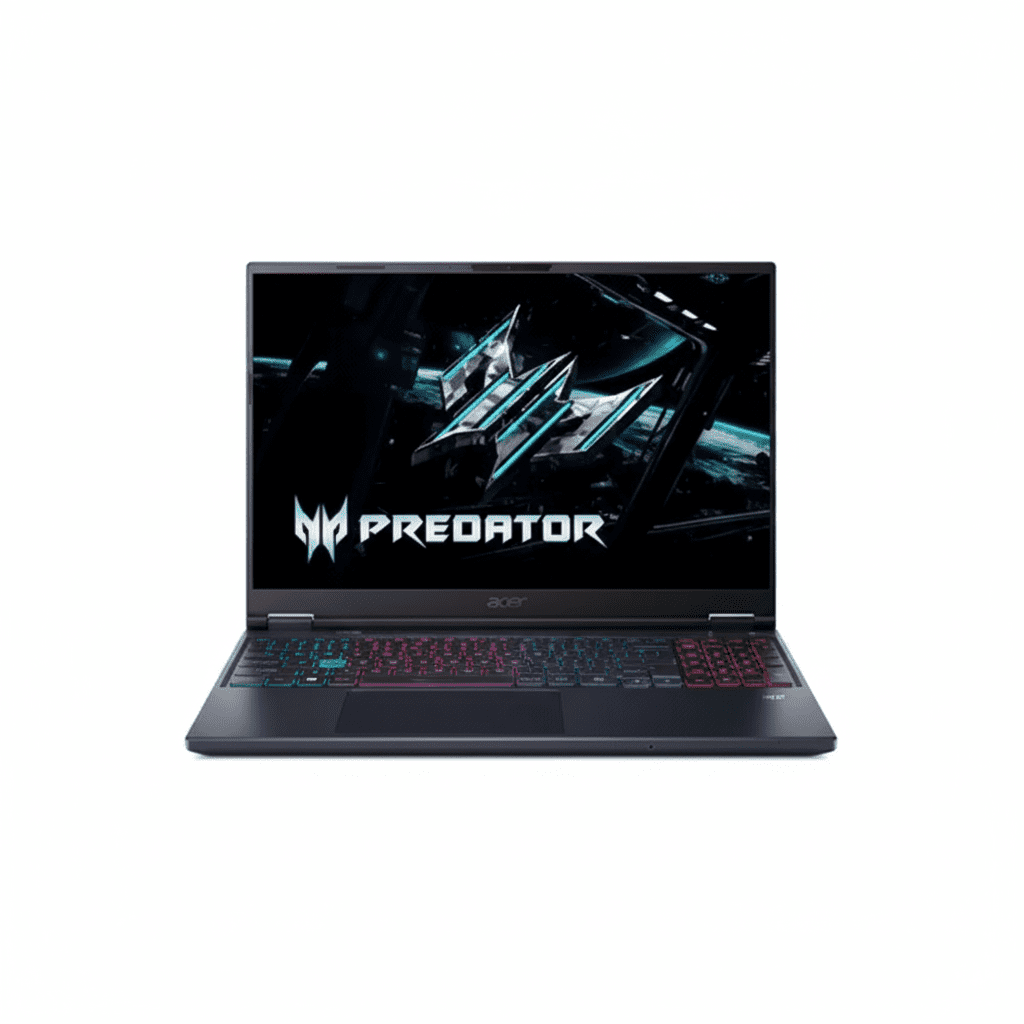
Acer Predator Helios Neo 16
Acer Predator Helios Neo 16 AI (Ultra 9) Review: A Desktop-Replacement Titan

Acer Predator Helios Neo 16 AI Review: A Desktop-Replacement Titan

Intel® Core™ Ultra 9 NVIDIA® RTX™ 5070 (8GB GDDR7) 16″ WQXGA 240Hz IPS Display 32 GB DDR5 RAM & 2 TB SSD Advanced AI Capabilities ₹229,999
An absolute monster of a laptop that pairs a flagship CPU and GPU with a top-tier display.

The Acer Predator Helios Neo 16 AI (PHN16-73) represents the bleeding edge of mobile gaming, a true desktop replacement built for enthusiasts who demand nothing less than the absolute best. Priced at ₹229,999, this machine is an exercise in excess, centered around a holy trinity of flagship components: the monstrous Intel® Core™ Ultra 9 processor, the next-generation NVIDIA® GeForce RTX 5070 GPU with GDDR7 memory, and a breathtaking 16-inch, 240Hz WQXGA IPS display. Stocked with a massive 32 GB of DDR5 RAM and 2 TB of Gen4 storage out of the box, the Helios Neo 16 AI is engineered to crush any game or creative task thrown its way, setting a new benchmark for what a high-end gaming laptop can be.

Command Unrivaled Power

Experience peak performance with the Core Ultra 9, RTX 5070, and a 240Hz WQXGA display.

₹229,999
MRP ₹232,999
Limited Time Offer

One-Year International Travelers Warranty

Key Features at a Glance

Intel® Core™ Ultra 9: Intel’s top-of-the-line mobile processor for unparalleled performance.
RTX 5070 8GB GDDR7: Next-gen GPU with ultra-fast GDDR7 memory for extreme gaming.
240Hz WQXGA Display: An incredibly fast and sharp 16-inch screen with 500 nits of brightness.
32GB DDR5 & 2TB SSD: A massive, no-compromise memory and storage configuration out of the box.
Advanced Cooling System: A robust thermal solution with liquid metal to sustain peak performance.
Excellent Upgradability: Supports up to 64GB of RAM for incredible future-proofing.

1. Apex Predator Performance

A flagship CPU and GPU combination that delivers truly desktop-class power.

Intel® Core™ Ultra 9

The Core™ Ultra 9 is Intel’s flagship mobile processor, featuring an incredibly high core count and a blistering turbo speed of 5.4 GHz. This CPU is designed for ultimate performance, crushing CPU-intensive games, 4K video rendering, and complex computational tasks without breaking a sweat.

NVIDIA® GeForce RTX 5070 8GB GDDR7

The next-generation RTX 5070 GPU is a gaming powerhouse. It features 8GB of the latest, ultra-fast GDDR7 memory, providing a significant bandwidth advantage for high-resolution gaming. Combined with DLSS 3, it delivers spectacular frame rates with ray tracing enabled.

2. An Elite Tier Gaming Display

A screen built without compromise for the ultimate competitive and visual experience.

240Hz Pro-Level Speed

An incredibly fast 240Hz refresh rate and a rapid 3ms response time provide supreme motion clarity and responsiveness, giving competitive gamers the sharpest possible view of the action.

Sharp WQXGA Resolution

The 2560×1600 (WQXGA) resolution on the 16-inch, 16:10 aspect ratio screen offers a significant step up in sharpness and detail over standard Full HD, making games and content look incredibly crisp.

Bright, Vibrant IPS Panel

This is not a dim, washed-out gaming panel. The high-quality IPS screen boasts a peak brightness of 500 nits, ensuring excellent visibility in any lighting condition and making HDR content pop.

3. Massive Default Configuration

Equipped with a no-compromise memory and storage setup right out of the box.

32GB of DDR5 RAM

The Helios Neo 16 AI ships with a massive 32GB of high-speed DDR5 memory. This is more than enough for any current game and provides enormous headroom for heavy multitasking, streaming, and running virtual machines simultaneously.

2TB of Blazing-Fast SSD Storage

Configured with two 1TB PCIe Gen4 NVMe SSDs, the laptop offers a total of 2TB of storage. This dual-drive setup is likely configured in RAID 0 for maximum speed, resulting in near-instantaneous game load times and file transfers.

4. Next-Generation Cooling System

A sophisticated thermal solution to keep the flagship components running at peak speed.

5th Gen AeroBlade™ 3D Fans

Acer’s proprietary AeroBlade™ fans feature an ultra-thin, all-metal design that maximizes airflow while minimizing turbulence and noise, ensuring the system stays cool and quiet under pressure.

Liquid Metal & Vector Heat Pipes

Liquid metal thermal compound is applied to the CPU for superior heat dissipation. This is complemented by a network of vector heat pipes that efficiently draw heat away from all critical components, preventing thermal throttling.

5. Superior Conferencing and Streaming

Look and sound professional with a high-quality webcam and AI-enhanced audio.

1080p 60FPS Webcam

A high-quality 1080p webcam that operates at a fluid 60 frames per second provides a sharp, smooth video feed that is far superior to standard webcams, perfect for high-quality streaming and professional video calls.

AI-Powered Audio

Temporal Noise Reduction cleans up the video signal in low light, while Acer’s AI-driven microphone technology ensures your voice is crystal clear by filtering out background noise.

6. Fully-Featured and Upgradable

A chassis that’s packed with ports and designed for long-term ownership.

Extensive Port Selection

The Helios Neo doesn’t skimp on connectivity. It features two USB-C ports (likely with Thunderbolt), multiple high-speed USB-A ports, and a full-size HDMI 2.1 port, providing all the connections a power user needs.

RAM and Storage for the Future

With two accessible soDIMM slots supporting up to 64GB of DDR5 RAM and two M.2 SSD slots, this laptop is built to be upgraded, ensuring it remains a top-tier performer for years to come.

Ideal For These Users

Hardcore Gaming Enthusiasts

This is a dream machine for gamers who want to play the latest AAA titles at max settings, high resolution, and ultra-high frame rates.

Professional Content Creators

The flagship CPU, powerful GPU, and massive RAM/storage make this a video editing and 3D rendering powerhouse.

Desktop Replacement Seekers

Anyone looking for true desktop-level performance in a portable (but not ultra-portable) form factor will find it here.

Who Might Consider Other Options

Users on a Budget

This is a top-of-the-line machine with a price tag to match. It is overkill for anyone but the most demanding users.

Frequent Travelers

At 2.7 kg plus a large 230W power brick, this is a heavy system designed to stay on a desk most of the time. It is not built for portability.

Competitive Edge: How It Stacks Up

A no-compromise approach to performance gives the Helios Neo 16 AI an edge over nearly everything else.

  • The Holy Trinity of Specs

    Its primary advantage is the sheer power of its core components. The combination of a flagship Intel Core Ultra 9 processor, an RTX 5070 with GDDR7 memory, and a 240Hz WQXGA display is a trifecta of performance that few, if any, competitors can match.

  • Massive Out-of-the-Box Configuration

    Shipping with 32GB of DDR5 RAM and 2TB of Gen4 SSD storage as standard is a massive competitive advantage. Most rivals require expensive post-purchase upgrades to reach this level of memory and storage.

  • A True Desktop Replacement

    With its immense power, large and high-quality screen, full-size keyboard, and extensive port selection, the Helios Neo 16 AI isn’t just a powerful laptop; it’s a genuine desktop replacement that can serve as a user’s single, do-it-all machine for gaming, creating, and working.

Full Specifications

General Information

Model Name
Acer Predator Helios Neo 16 AI (PHN16-73)
Model Number
NH.QX3SI.001
Operating System
Windows 11 Home
Color
Abyssal Black

Processor & Chipset

Processor
Intel® Core™ Ultra 9
Base Speed
2.7 GHz
Max Turbo Speed
5.4 GHz

Memory & Storage

RAM
32 GB DDR5 (Upgradable to 64 GB)
Storage
2 TB PCIe Gen4 NVMe SSD (2x1TB)

Display & Graphics

Screen Size
16.0-inch (40.64 cm)
Resolution
WQXGA (2560 x 1600)
Panel Type
IPS, 240Hz, 500 nits
GPU
NVIDIA® GeForce RTX™ 5070 (8GB GDDR7)

Network & Communication

Wireless LAN
Wi-Fi 6 (802.11ax)
Bluetooth
Bluetooth® 5.4 or later

Built-in Devices & Input

Keyboard
FineTip RGB-Backlit Keyboard w/ Numpad
Webcam
1080p HD @ 60fps with TNR
Speakers
Stereo Speakers

Battery & Physical Characteristics

Battery
90Wh Li-Ion
Power Adapter
230W adapter
Weight
2.7 kg
Height
23.90 mm (max)

Pros and Cons

What We Liked

  • Absolute top-tier performance from Core Ultra 9 and RTX 5070.
  • Superb 240Hz WQXGA display is both fast and sharp.
  • Massive 32GB RAM and 2TB SSD configuration as standard.
  • Excellent upgradability for long-term ownership.
  • High-quality 1080p 60fps webcam.

What Could Be Better

  • Extremely high price tag.
  • Very heavy (2.7 kg) and not ideal for portability.
  • Large 90Wh battery will still drain quickly under load.
  • The IPS display, while fast, lacks the contrast of the OLED on the other model.

Final Verdict

The Acer Predator Helios Neo 16 AI (PHN16-73) is a true desktop replacement that makes almost no concessions on performance. It is an enthusiast’s dream, pairing Intel’s most powerful mobile CPU with a next-generation NVIDIA GPU and backing them up with a colossal amount of RAM and storage right out of the box. The 240Hz WQXGA display is the perfect canvas for this power, offering an elite-tier experience for both competitive gaming and high-fidelity single-player titles.

It is unapologetically big, heavy, and expensive. This isn’t a laptop for casual users or road warriors. It is a portable powerhouse for those who need to deploy desktop-class performance wherever they go. If you are seeking one of the most powerful gaming and creation laptops money can buy, and portability is a secondary concern, the Helios Neo 16 AI stands as a titan in its class.

5 Reasons to Love the Acer Swift Neo Ultra 7 OLED Laptop

Acer Swift Neo Ultra 7
Acer Swift Neo (Ultra 7) Review: OLED Beauty Meets AI Brawn

Acer Swift Neo (Ultra 7) Review: OLED Beauty Meets AI Brawn

Intel® Core™ Ultra 7 155U 14″ WUXGA OLED Display Thunderbolt 4 1.3 kg Lightweight 16 GB LPDDR5 RAM ₹74,999
The perfect blend of high-end processing power, a stunning OLED screen, and extreme portability.

Acer elevates its popular ultralight lineup with the new Swift Neo (SFN14-54H), a model that perfectly balances high-end performance with premium features. For a highly competitive price of ₹74,999, this laptop is powered by the formidable Intel® Core™ Ultra 7 155U processor, bringing top-tier AI-enhanced performance to the thin-and-light category. The main attraction is a gorgeous 14-inch WUXGA OLED display, offering vibrant, accurate colors in a portable 1.3 kg package. Complete with Thunderbolt 4 connectivity and 16GB of LPDDR5 RAM, the Swift Neo is a mobile powerhouse for demanding students and professionals.

Experience OLED & Ultra 7 Power

Get the ultimate thin-and-light laptop for high-performance productivity and stunning visuals.

₹74,999
MRP ₹109,999
32% OFF | Limited Time Offer

One-Year International Travelers Warranty

Key Features at a Glance

Intel® Core™ Ultra 7 155U: High-performance processor with AI Boost for demanding tasks.
14″ WUXGA OLED Display: Gorgeous, bright, and color-accurate screen with 100% sRGB coverage.
16GB LPDDR5 RAM: A generous amount of the latest high-speed memory for fluid multitasking.
Thunderbolt 4 Port: Ultra-fast connectivity for displays, storage, and external GPUs.
Extremely Portable: Weighs just 1.3 kg and features a slim 14.9mm chassis.
Premium Features: Includes a 1080p FHD webcam and a fingerprint reader for security.

1. Flagship-Level Processing Power

Powered by Intel’s high-end Core Ultra 7 for uncompromising performance.

Intel® Core™ Ultra 7 155U

The Core™ Ultra 7 155U is a top-tier mobile processor designed for peak performance and efficiency. With a high core count and a blazing fast turbo speed of 4.8 GHz, it chews through demanding tasks, from heavy multitasking to light content creation, with ease.

Integrated AI Boost

This processor includes Intel’s dedicated Neural Processing Unit (NPU). This AI engine efficiently accelerates AI-powered tasks like real-time video effects and noise cancellation, improving performance and extending battery life.

2. A Spectacular OLED Display

A screen that brings your content to life with perfect blacks and vibrant colors.

Stunning Visuals

The 14-inch OLED panel is the laptop’s centerpiece. It offers infinite contrast and perfect black levels for an incredibly immersive viewing experience. The sharp WUXGA (1920×1200) resolution and modern 16:10 aspect ratio are perfect for both work and media.

Bright and Color-Accurate

With a high brightness of 400 nits and 100% sRGB color gamut coverage, this display is excellent for content creation tasks like photo editing, ensuring that what you see on screen is true to life.

3. Ultra-Fast Connectivity with Thunderbolt 4

One port to rule them all, offering incredible speed and versatility.

40Gbps Transfer Speeds

The inclusion of a Thunderbolt 4 port provides up to 40Gbps of bandwidth, allowing you to transfer massive files from an external SSD in mere seconds.

Connect Multiple Displays

Thunderbolt 4 lets you drive up to two 4K displays or one 8K display from a single port, turning your ultralight laptop into a powerful desktop workstation.

Single-Cable Simplicity

Charge your laptop, transfer data, and output video all through the same USB-C port, simplifying your setup and reducing cable clutter.

4. Designed for Supreme Portability

A premium, featherlight design that you’ll barely notice in your bag.

Just 1.3 kg

Weighing an exceptionally light 1.3 kg, the Swift Neo is the perfect companion for students, frequent flyers, and anyone who works on the move.

Ultra-Slim Profile

With a height of just 14.9mm, this laptop is incredibly thin, allowing it to slide easily into any backpack or briefcase without adding bulk.

5. Effortless Productivity & Security

Packed with features that make your daily workflow smoother and safer.

1080p FHD Webcam

The crisp 1080p Full HD webcam provides a clear, high-quality video feed, making you look sharp and professional on all your video calls.

Fingerprint Reader

Log in instantly and securely with the integrated fingerprint reader. It’s faster and more secure than typing a password.

Backlit Keyboard

The FineTip backlit keyboard provides a comfortable typing experience and ensures you can see the keys clearly, even in dimly lit environments.

6. Fluid Multitasking & Ample Storage

A powerful memory and storage combo that keeps pace with your workflow.

16GB LPDDR5 RAM

With 16GB of fast LPDDR5 memory, you can effortlessly switch between dozens of browser tabs, high-resolution media, and demanding applications without any slowdown.

512GB Gen4 SSD

The speedy 512GB PCIe Gen4 NVMe SSD offers plenty of space for your essential apps and files, with lightning-fast boot and load times that make the entire system feel responsive.

Ideal For These Users

Business Professionals

The high performance, premium design, extreme portability, and Thunderbolt port make it a perfect choice for executives on the move.

University Students

A fantastic option for students who need a lightweight yet powerful machine that can handle demanding coursework and last all day.

Casual Content Creators

The beautiful and color-accurate OLED screen, combined with the powerful Ultra 7 CPU, is great for photo editing and light video work.

Who Might Consider Other Options

Gamers

The integrated Intel Graphics are not powerful enough for playing modern AAA games; a laptop with a dedicated GPU is a must for gaming.

Users Needing Maximum Storage

While the 512GB SSD is fast, users who work with very large video files or have huge photo libraries might find it limiting.

Competitive Edge: How It Stacks Up

A potent combination of power and premium features gives the Swift Neo a clear advantage.

  • Core Ultra 7 and OLED Screen

    Its primary advantage is packing a high-end Intel® Core™ Ultra 7 processor and a stunning OLED display into a package that significantly undercuts other premium ultrabooks with similar specs.

  • Thunderbolt 4 Connectivity

    The inclusion of Thunderbolt 4 is a major benefit typically found on more expensive machines. It offers unparalleled versatility for connecting high-speed peripherals and creating powerful desktop setups.

  • Premium Features, Mainstream Price

    Features like the 1080p FHD webcam, fingerprint reader, and ultra-light 1.3 kg weight create a premium user experience that feels like it belongs to a laptop costing much more.

Full Specifications

General Information

Model Name
Acer Swift Neo (SFN14-54H)
Model Number
UN.35GSI.00D
Operating System
Windows 11 Home + MS Office
Color
Silver

Processor & Chipset

Processor
Intel® Core™ Ultra 7 155U
Base Speed
1.7 GHz
Max Turbo Speed
4.8 GHz

Memory & Storage

RAM
16 GB LPDDR5 (onboard)
Storage
512 GB PCIe Gen4 NVMe SSD

Display & Graphics

Screen Size
14.0-inch (35.56 cm)
Resolution
WUXGA (1920 x 1200)
Panel Type
OLED with IPS Technology
Graphics
Intel® Graphics

Network & Communication

Wireless LAN
Wi-Fi 6 (802.11ax)
Bluetooth
Bluetooth® 5.2 or later

Built-in Devices & Input

Keyboard
FineTip Backlit Keyboard
Webcam
1080p FHD
Fingerprint Reader
Yes

Battery & Physical Characteristics

Battery
55Wh Li-Ion
Power Adapter
65W USB-C PD Adapter
Weight
1.3 kg
Height
14.9 mm

Pros and Cons

What We Liked

  • Powerful Core Ultra 7 processor delivers top-tier performance.
  • Beautiful and bright WUXGA OLED display.
  • Extremely lightweight and portable at just 1.3 kg.
  • Versatile connectivity with a Thunderbolt 4 port.
  • Excellent 1080p FHD webcam for video calls.

What Could Be Better

  • Integrated graphics are not suitable for serious gaming.
  • RAM is onboard and not user-upgradable.
  • Display is limited to a 60Hz refresh rate.

Final Verdict

The Acer Swift Neo (SFN14-54H) with the Core Ultra 7 is a masterclass in building a high-performance ultrabook. It successfully combines the raw power of a top-tier Intel processor with the visual brilliance of an OLED screen, all while maintaining an incredibly light and portable form factor. The addition of Thunderbolt 4 pushes its productivity potential even further.

While it’s not meant for gamers, it excels at its intended purpose. For professionals, students, and creators who need a powerful, portable laptop with a stunning display and excellent connectivity, the Swift Neo offers a premium, flagship-level experience at a surprisingly competitive price.

Is ASUS ProArt P16 Good for Creators? Full Review

ASUS ProArt P16 (H7606WV) Review: A High-End Creator’s Powerhouse

ASUS ProArt P16 (H7606WV)

AMD Ryzen™ AI 9 HX 370 50 TOPS NPU GeForce RTX™ 4060 32GB LPDDR5X / 2TB SSD 16.0″ 4K OLED Touch

The ASUS ProArt P16 H7606WV is the pinnacle of the new ProArt series, meticulously engineered for the most demanding creative workflows. Building upon the strong foundation of its predecessors, this model elevates the core components to deliver a truly professional-grade experience. It combines the latest AI-ready processor with a more powerful GPU and double the storage, making it a definitive choice for creators who require maximum performance and reliability in a mobile form factor. This review for September 2025 details how the H7606WV justifies its position as a high-end creator powerhouse.

Key Features at a Glance

Top-Tier AI Performance: AMD Ryzen AI 9 HX 370 with a 50 TOPS NPU.
Powerful Graphics: NVIDIA® GeForce RTX™ 4060 Laptop GPU.
Professional-Grade Display: 16-inch 4K OLED touch screen.
Ample Memory & Storage: 32GB of LPDDR5X RAM and a 2TB PCIe 4.0 SSD.
Comprehensive Connectivity: Includes USB 4.0, HDMI 2.1, and an SD Express 7.0 reader.
Enhanced Productivity: Features a Copilot key, virtual DialPad, and a stylus.

ProArt P16 H7606WV: In-Depth Features

Core Performance: Processor & AI

The H7606WV is powered by the AMD Ryzen™ AI 9 HX 370 processor, featuring 12 cores and 24 threads with a boost clock of up to 5.1GHz. This CPU is a powerhouse for creative applications, easily handling complex rendering tasks, compiling code, and running demanding multitasking sessions. Its AMD XDNA™ NPU provides up to 50 TOPS of AI processing power, ready for the next generation of on-device AI features that will be enabled by upcoming Windows updates.

Creative Powerhouse: Graphics

A significant upgrade in the H7606WV is the NVIDIA® GeForce RTX™ 4060 Laptop GPU with 8GB of GDDR6 VRAM. This is a substantial performance leap from the RTX 4050, offering more power for rendering, 3D modeling, and high-resolution video editing. The additional VRAM is particularly beneficial for large, complex scenes and high-res textures, preventing bottlenecks and speeding up workflows in professional software.

Professional-Grade Display

  • 4K OLED Technology: The 16.0-inch 4K OLED display delivers perfect blacks and an infinite contrast ratio, making every image and video pop with stunning clarity and color.
  • VESA Certified DisplayHDR True Black 500: This certification ensures the screen can produce deep blacks and bright highlights, offering a truly immersive viewing experience for HDR content.
  • PANTONE Validated: The display is factory calibrated and meets a Delta E < 1, ensuring professional-grade color accuracy that is vital for designers and photographers.
  • Touch & Stylus Support: The intuitive touch screen and included stylus add an extra layer of creative control for sketching, designing, and annotating.

Memory & Storage

  • RAM: The H7606WV comes standard with 32GB of LPDDR5X onboard memory. This ample amount of high-speed RAM is a game-changer for professionals working with massive file sizes and complex project timelines.
  • Storage: A spacious 2TB M.2 NVMe™ PCIe® 4.0 SSD provides both lightning-fast speeds and plenty of room to store all your projects, assets, and applications without needing an external drive.

Connectivity & Ports

  • USB-C Ports: A combination of a USB 4.0 Gen 3 Type-C and a USB 3.2 Gen 2 Type-C port provides high-speed data transfer, video output, and Power Delivery for charging.
  • SD Express 7.0 Card Reader: This professional-grade card reader supports the latest, fastest SD cards, making it an essential tool for photographers and videographers.
  • HDMI 2.1 FRL: The HDMI 2.1 port allows you to connect to high-resolution external displays with high refresh rates for a multi-monitor setup.

Durability & User Interface

Built to the US MIL-STD 810H military-grade standard, the ProArt P16 is highly durable and designed to withstand the rigors of travel. The seamless touchpad features a virtual DialPad, a unique and intuitive tool for creators that allows for quick adjustments in creative software like Adobe Photoshop. The backlit keyboard includes a dedicated Copilot key for easy access to AI features.

Competitive Edge

The ASUS ProArt P16 H7606WV distinguishes itself by offering a robust feature set and a balance of performance that is rare in its class.

Focused AI and Graphics

The combination of a high-TOPS NPU and the capable RTX 4060 ensures smooth operation for a wide range of creative tasks, from AI-accelerated effects to video encoding, without the higher cost and power consumption of a more powerful GPU.

Display Quality that Matters

The 4K OLED display is a standout feature that sets the ProArt P16 apart from many laptops in its price range. The PANTONE validation and VESA HDR True Black certification provide a level of color accuracy and visual depth that is essential for professionals and is often reserved for much more expensive machines.

Integrated Productivity Tools

Features like the virtual DialPad and included stylus are not just additions but integrated tools that streamline the creative workflow. This attention to a holistic user experience, including a comprehensive port selection and military-grade durability, makes the H7606WV a more complete and reliable solution for mobile professionals.

Full Specification Details

General Information

  • Model:ProArt P16 (H7606WV)
  • Color:Nano Black
  • Operating System:Windows 11 Pro

Processor & Graphics

  • Processor:AMD Ryzen™ AI 9 HX 370
  • Discrete Graphics:NVIDIA® GeForce RTX™ 4060 Laptop GPU (8GB GDDR6)
  • Integrated Graphics:AMD Radeon™ 890M Graphics
  • Neural Processor:AMD XDNA™ NPU (up to 50 TOPS)

Display

  • Panel:16.0-inch, 4K (3840 x 2400) OLED, 16:10, Touch screen
  • Refresh Rate:60Hz
  • Brightness & HDR:500 nits HDR peak brightness, VESA Certified Display HDR True Black 500
  • Color Validation:PANTONE Validated, 100% DCI-P3

Memory & Storage

  • Memory:32GB LPDDR5X on board
  • Storage:2TB M.2 NVMe™ PCIe® 4.0 SSD

Connectivity

  • I/O Ports:1x USB 4.0 Gen 3 Type-C, 1x USB 3.2 Gen 2 Type-C, 2x USB 3.2 Gen 2 Type-A, 1x HDMI 2.1, 1x 3.5mm Combo Audio Jack, 1x DC-in, 1x SD Express 7.0 card reader
  • Wireless:Wi-Fi 7, Bluetooth 5.4

Power & Dimensions

  • Power Supply:200W AC Adapter, 90WHrs Battery
  • Weight:1.85 kg (4.08 lbs)
  • Dimensions:35.49 x 24.69 x 1.73 cm

Included Accessories

  • In the box:Backpack, USB-A to RJ45 gigabit ethernet adapter, Stylus, Power adapter

Pros & Cons: A Balanced View

Pros:

  • Excellent AI Performance: The 50 TOPS NPU offers leading performance for Copilot+ and AI-accelerated tasks.
  • Powerful RTX 4060 GPU: A major performance upgrade for professional 3D rendering and video editing.
  • Huge 2TB Storage: More than enough space for large projects and extensive asset libraries.
  • Professional Features: Thoughtful additions like the virtual DialPad, SD Express reader, and stylus support.
  • Robust and Durable: US MIL-STD 810H military-grade build for peace of mind.

Cons:

  • High Price Point: The premium components will make this model more expensive than the H7606WU.
  • Soldered Memory: The memory is soldered to the board, so future upgrades are not possible.

Who Is This Laptop For?

  • 3D Artists & Animators: The RTX 4060 and 32GB of RAM provide the necessary power for complex rendering and animation projects.
  • Advanced Video Editors: The 4K OLED screen and high-end components are ideal for working with high-resolution footage and effects-heavy projects.
  • AI & Machine Learning Developers: The powerful NPU and GPU combination is perfect for training and running complex AI models.
  • Mobile Professionals: The combination of a powerful CPU, solid graphics, and a durable chassis makes it perfect for creators who need a reliable workstation on the go.

Who Might Consider Other Options?

  • Those on a Budget: If the RTX 4060 and 2TB SSD are beyond your needs, a more affordable configuration might be a better value.
  • Hardcore Gamers: While capable, this laptop is optimized for creative workflows, and a dedicated gaming laptop may offer a higher refresh rate display and more powerful GPU for a better gaming experience.

Final Verdict: A No-Compromise Workstation for the Elite Creator

The ASUS ProArt P16 H7606WV is a true powerhouse, taking all the best features of the series and upgrading them to a professional standard. With its powerful RTX 4060 GPU and spacious 2TB SSD, it is a no-compromise solution for creators who demand the best performance, display, and reliability in a mobile workstation.

If your creative work requires high-end performance for demanding rendering, video editing, or AI tasks, the H7606WV is a fantastic investment. It delivers a premium experience that will future-proof your workflow for years to come.

★★★★★

Highly Recommended

Is Dell Pro Slim QCS1250 Worth It? Full Review

Dell Pro Slim QCS1255
Dell Pro Slim QCS1250 Review: i5-14500 vPro Compact Business PC

Dell Pro Slim QCS1250 Review: i5-14500 vPro Compact Business PC

Intel Core i5-14500 vPro (14C) Up to 5.0 GHz Boost Integrated Graphics 512GB SSD 16GB DDR5-4800 RAM ₹85,594
4.5 out of 5 stars (215 reviews) | Versatile Slim Desktop for Office Productivity

The Dell Pro Slim QCS1250 integrates a 14th Gen Intel Core i5-14500 vPro processor, 16GB DDR5-4800 RAM, and a 512GB SSD in a compact 95mm chassis designed for business environments. Running Windows 11 Pro with vPro security, multiple display ports, PCIe expandability, and 1-year onsite support, it’s priced at ₹85,594 (inclusive of taxes) for small offices and professionals in 2025.

Streamline Your Office Setup?

Efficient performance in a space-saving form, with easy expandability and professional features for daily workflows!

₹85,594
₹92,000 (7% off)
Inclusive of all taxes | Free delivery

No cost EMI up to 12 months | 1 Year Onsite Support | AR Preview | Accessory Bundle Offer

Key Features at a Glance

Core i5-14500 vPro: 14 cores up to 5.0 GHz.
Integrated Graphics: DP/HDMI outputs.
16GB DDR5-4800: Single DIMM, expandable.
512GB SSD: M.2 PCIe slot.
No Wireless: Optional Wi-Fi 6E.
Slim Chassis: 95mm width, VESA mount.

1. Processor Performance: vPro-Enhanced Multitasking

Balanced power for business tasks.

Intel Core i5-14500 vPro (14C):

The 14th Gen Core i5-14500 vPro offers 14 cores (6P + 8E) with up to 5.0 GHz boost and 24MB cache for secure remote management. It processes 20 threads smoothly, scoring around 14,000 in Cinebench R23 multi-core for office apps and light virtualization. 65W TDP ensures reliable efficiency in compact setups.

Boost Clock & vPro Features:

5.0 GHz Turbo handles video conferencing and spreadsheets, with Geekbench 6 multi-core near 12,500. vPro enables IT oversight without physical access.

Multitasking & Business Use:

Raptor Lake Refresh supports quick boots and multi-tab browsing, 25% improved over 13th Gen. Upgradable to Ultra for AI.

2. Graphics & Multi-Display: Dual-Output Support

Clear visuals for dual monitors.

Integrated Graphics:

The UHD Graphics supports 4K@60Hz output via DP 1.4a, ideal for presentations and web work. PCIe x16 slot for optional discrete cards.

Display Connectivity:

DP 1.4a + HDMI 2.1 for up to 4K dual displays. Optional DP 1.4a or USB-C for extended setups.

Productivity Displays:

HBR2 Support enables 4096×2300@60Hz per port. VESA mount for monitor integration.

3. Design & Cooling: Efficient Compact Form

Fits anywhere with tool-less access.

Chassis Design:

95mm Slim Profile with 3.90 kg starting weight and VESA compatibility. Tool-less panels for upgrades.

Thermal Management:

Enhanced Cooling with 180W PSU maintains low noise under load. Dust filters for longevity.

Build Quality:

Professional Chassis includes Kensington lock and diagnostics. ENERGY STAR compliant.

4. Storage & Memory: Reliable Business Capacity

Expandable for data growth.

512GB SSD:

M.2 2230/2280 Slot provides fast access up to 3500 MB/s reads. Additional SATA for HDD or ODD.

16GB DDR5-4800 RAM:

Single SO-DIMM non-ECC, up to 64GB for virtual machines.

Expansion Options:

PCIe x16 Slot for storage adapters. Optional ODD bay.

5. Connectivity: Essential Ports for Business

Wired-focused with optional wireless.

Front & Rear Ports:

6x USB (2.0/3.2 Gen1), USB-C, DP/HDMI for 4K. 1Gbps Ethernet standard.

Expansion Ports:

Optional VGA/Serial for legacy devices; USB 3.2 Gen2 for faster transfers.

Networking:

Optional Wi-Fi 6E AX211 for wireless needs; no card included base.

6. Software & Support: Pro-Level Security

Tailored for enterprise deployment.

Windows 11 Pro:

Business Edition with vPro tools for remote access. 30-day Microsoft 365 trial.

Support Services:

1-Year Basic Onsite. Optional extension or ProSupport for advanced coverage.

Included Peripherals:

Wired KB/Mouse KB216 and MS116. Accessory offers for printer or headset.

Pros and Cons

Balanced slim desktop assessment.

Pros

  • vPro Security: Remote management built-in.
  • Compact & Mountable: Space-efficient design.
  • PCIe Expandability: Slots for upgrades.
  • Dual Display: DP/HDMI ready.
  • DDR5 RAM: Future-proof memory.
  • Accessory Deals: Value bundles available.

Cons

  • No Wireless Base: Add-on required.
  • 1-Year Warranty: Shorter than competitors.
  • No Antivirus: Install separately.
  • Limited USB Speed: Mostly Gen1.
  • No ODD Base: External for optical.
  • Sold Out Often: Availability issues.

Who Is This Desktop For? User Profiles

Optimized for small business and remote work.

Ideal For These Users

  • Office Worker:

    vPro for secure productivity; 215 reviews praise compactness.

  • Small Team:

    Mountable design saves desk space; expandable for growth.

  • IT Basic:

    Tool-less for easy maintenance; optional legacy ports.

Who Might Consider Other Options?

  • Wireless Users:

    Choose models with built-in Wi-Fi.

  • High-End Needs:

    Opt for Ultra series or towers.

  • Long Warranty Seekers:

    Look for 3-year options.

Competitive Edge: Value Slim Business PC

Strong in affordability and basics.

  • Vs HP ProDesk 400 G9 Mini:

    vPro integration and EMI options better; more PCIe slots for future-proofing.

  • Vs Lenovo ThinkCentre M75q:

    DDR5 and dual-display standard; accessory bundles add value.

  • Value Points:

    215 reviews highlight reliability; no-cost EMI up to 12 months for budgets.

  • Business Focus:

    Windows Pro and onsite support superior for deployments; sustainable build.

Full Specification Details

General Information

Price
₹85,594
Model
QCS1250
Series
Dell Pro
Form Factor
Slim Desktop
Recommended Usage
Business Productivity
Order Code
bto009_qcs1250_i2x
Chassis
Slim with 180W PSU

Processor

Processor
Intel Core i5-14500 vPro
Cores/Threads
14/20
Max Boost Clock
Up to 5.0 GHz
Cache
24MB
Architecture
Raptor Lake Refresh
TDP
65W
vPro
Enabled

Memory & Storage

Memory
16GB DDR5-4800 MT/s
Memory Configuration
1 x 16GB, Non-ECC
Storage
512GB M.2 SSD
M.2 Slots
1 (2230/2280)
Max RAM
Up to 64GB
SATA Bays
2 (HDD/ODD)

Graphics & Expansion

Graphics
Integrated UHD Graphics
Display Outputs
DP 1.4a, HDMI 2.1
Max Displays
Up to 2 (4K@60Hz)
PCIe Slots
x16 Gen3, 2x x1 Gen3 (Half-Height)

Connectivity

Wireless
None (Optional Wi-Fi 6E)
Ethernet
1Gbps RJ-45
USB Ports
6x (2.0/3.2 Gen1), 1x USB-C
Video Ports
DP 1.4a, HDMI 2.1, Optional
Audio
Global Headset Jack

Power & Dimensions

Power Supply
180W Bronze (Optional 360W)
Dimensions
304 x 95 x 293 mm
Weight
3.90-5.89 kg
Mounting
VESA Compatible
Cooling
Active Fans, Enhanced Thermals

Software & Warranty

OS
Windows 11 Pro
Included Software
Microsoft 365 Trial 30 Days
Security
No Antivirus (Optional)
Warranty
1 Year Basic Onsite Service
Peripherals
Wired Keyboard & Mouse

Audio & Environmental

Audio
Integrated, Headset Jack
Certifications
ENERGY STAR, EPEAT Silver
Security Features
Kensington Lock, Padlock Ring
Optional
VGA, Serial, ODD

Final Verdict

The Dell Pro Slim QCS1250 delivers solid vPro performance in a versatile slim package for everyday business use.

★★★★½ 4.5 / 5 Stars – Expert Rating

Reliable choice for 2025 office desktops.

Is HP OfficeJet Pro 9130 Worth It? Full Review

HP OfficeJet Pro 9130 Printer
HP OfficeJet Pro 9130 All-in-One Printer Complete Review 2025 – DUAL 500 Sheets, FAX, 2-Sided Scan, 25ppm!
HP OfficeJet Pro 9130 Printer

🏆 PREMIUM A4 BUSINESS: DUAL 500 Sheets + FAX + 2-Sided Scan + 25ppm + USB Host!

Save ₹5,900 (11% OFF) • Next Day Delivery • 1 Year Warranty!

🔥 PREMIUM A4 – DUAL 500 SHEETS – FAX – 2-SIDED SCAN – 25PPM FASTEST – USB HOST – 4.3″ SCREEN – BUSINESS PRO

HP OfficeJet Pro 9130 All-in-One Printer

Premium A4 Business | DUAL 500 Sheets | FAX | 2-Sided Scan | 25ppm | WiFi+LAN

DUAL Trays 500 Sheets – FAX Capability – 2-Sided ADF – 25ppm Fastest – USB Host – 4.3″ Screen

🏆 PREMIUM A4 Business Printer – Best Features Without A3!

• DUAL Trays: 2×250-sheet = 500 sheets total (like 9730!)

• FASTEST Speed: 25 ppm black, 20 ppm color (beats all!)

• FAX Capability: Color FAX + 2 RJ-11 ports (ONLY model!)

• 2-Sided ADF: Duplex scanning (like 9730!)

• USB Host: Print from USB drives (like 9730!)

• 4.3″ Screen: Large touchscreen (like 9730!)

• A4 Only: NO A3 support (like 8120)

• High Volume: 30,000 duty, 2000/month recommended

• HP 938: Same cartridges as 9720/9730

• Warranty: 1 Year Limited Warranty

₹43,449

₹49,349

SAVE ₹5,900 (11% OFF!)

+ BONUS: Setup Cartridges + USB Cable Included!

*₹23,050 MORE than 8120 | ₹19,550 MORE than 9720 | ₹8,000 MORE than 9730!

🛒 Buy Now – Premium Business Printer!

Next Day Delivery (Order by 1pm) | 1 Year Warranty | Instant Ink Eligible

Paper Trays

DUAL 500

FAX

Yes

Speed

25ppm

HP OfficeJet Pro 9130 Overview

Premium Features

  • 📦 DUAL 500: 2×250 trays!
  • 📠 FAX: ONLY model!
  • 🔁 2-Sided Scan: Duplex ADF!
  • ⚡ 25ppm: FASTEST A4!
  • 💾 USB Host: Flash drives!
  • 📱 4.3″ Screen: Large display!
  • 📄 A4 Only: NO A3 support!

In The Box

  • 📦 HP OfficeJet Pro 9130 Printer
  • ⚫ HP 938 Setup Black Cartridge
  • 🔵🔴🟡 HP 938 Setup CMY Cartridges
  • 🔌 Power Cord
  • 📀 USB Cable (INCLUDED!)
  • 📄 Setup Poster & Reference Guide

Why 9130?

  • • Best A4 Pro: Premium features
  • • DUAL 500: Like 9730!
  • • FAX Built-in: Only model!
  • • 2-Sided Scan: Duplex ADF!
  • • 25ppm: Fastest A4!
  • • High Volume: 2000/month!

🏆 Premium A4 Business – Best Features Without A3 Premium!

DUAL 500 Sheets – Half the Refills!

Two 250-sheet trays = 500 sheets total (same as 9730!) This is DOUBLE the 8120’s 225 sheets and double the 9720’s single 250-sheet tray. Refill paper half as often!

FAX + 2-Sided Scan – Business Essentials!

ONLY OfficeJet Pro with built-in FAX (2 RJ-11 ports, color fax) PLUS 2-sided ADF scanning (duplex). Perfect for traditional businesses needing fax and scanning!

25ppm Speed – FASTEST A4 OfficeJet!

25ppm black, 20ppm color beats ALL other models (9720: 22/18, 8120: 20/10). Perfect for high-volume offices needing speed!

DUAL 500-Sheet Trays – Same as 9730!

📦 Two 250-Sheet Trays = 500 Total – Premium Capacity!

The 9130’s DUAL paper trays (250+250 = 500 sheets total) match the 9730’s capacity – this is DOUBLE the 8120’s 225 sheets and double the 9720’s single 250-sheet tray! Less refilling, more productivity!

✅ DUAL 500-Sheet Benefits

  • • 500 Sheets Total: 2×250 trays = DOUBLE 8120/9720!
  • • Half the Refills: Refill 50% less often!
  • • Multi-Type Setup: Plain in Tray 1, Special in Tray 2
  • • Quick Switching: Select tray from print dialog
  • • Less Downtime: Print while refilling one tray
  • • High-Volume Ready: 2000 pages/month capacity
  • • Same as 9730: Premium capacity at A4 price!
  • • Business Essential: For offices printing 1000+ pages/month!

📊 Capacity Comparison

9130 Capacity: 500 sheets (2 trays)
9730 Capacity: 500 sheets (2 trays)
9720 Capacity: 250 sheets (1 tray)
8120 Capacity: 225 sheets (1 tray)
9130 Advantage: 2× more than others!
Refill Frequency: Half as often!

💡 Productivity Impact: For the 9130’s recommended 2000 pages/month volume, you’d refill the 8120 (225 sheets) 9 times/month, 9720 (250 sheets) 8 times/month, but 9130 (500 sheets) only 4 times/month! At 5 minutes per refill, you save 20-25 minutes/month = 4-5 hours/year. For high-volume offices, the DUAL trays alone justify the premium over single-tray models!

FAX Capability – ONLY OfficeJet Pro Model!

📠 Built-in FAX – EXCLUSIVE to 9130!

The 9130 is the ONLY HP OfficeJet Pro model with built-in FAX capability! Features 2 RJ-11 ports (fax/modem + phone line), color fax support, 4 sec/page transmission speed, and full fax management features. The 8120, 9720, and 9730 do NOT have fax!

✅ Built-in FAX Features

  • • EXCLUSIVE: ONLY OfficeJet Pro with fax!
  • • Color FAX: Send color faxes (not just black)
  • • 2 RJ-11 Ports: Fax line + Phone line
  • • 4 Sec/Page: Fast fax transmission speed
  • • Auto Fax Reduction: Fits pages automatically
  • • Delayed Sending: Schedule fax send times
  • • Fax Forwarding: Forward to email/another fax
  • • Junk Fax Barrier: Block unwanted faxes
  • • Distinctive Ring: Multiple fax numbers support
  • • No Phone Handset: Fax machine only (not phone)

❌ Other Models DON’T Have FAX!

  • • 8120: NO fax (mobile app fax only)
  • • 9720: NO fax (mobile app fax only)
  • • 9730: NO fax (mobile app fax only)
  • • Mobile App Fax: All models can fax via HP Smart app
  • • But NOT Traditional: App fax requires internet + HP account
  • • 9130 Advantage: Traditional fax line, no internet needed!
  • • Industries Need FAX: Legal, medical, government require it
  • • Dedicated Fax Line: 9130 can have dedicated fax number
  • • Why 9130? If you NEED fax, 9130 is ONLY choice!

📋 Who Needs Built-in FAX?

⚖️ Legal Firms

Courts and legal professionals still require fax for official documents. Email not accepted in many cases.

🏥 Medical Offices

HIPAA compliance often requires fax for patient records. Secure transmission vs email vulnerabilities.

🏛️ Government

Government agencies and contractors still use fax extensively. Required for many official submissions.

🏢 Traditional Business

Many businesses with legacy systems, older clients, or industries that haven’t modernized still need fax capability.

💡 FAX Still Relevant? While email and digital documents have largely replaced fax, certain industries (legal, medical, government) STILL REQUIRE fax for regulatory/compliance reasons. If your business needs to send/receive faxes regularly, the 9130 is your ONLY OfficeJet Pro option! The 8120, 9720, and 9730 offer “mobile app fax” via HP Smart app, but this requires internet connection and HP account – NOT the same as traditional dedicated fax line. For businesses that need true fax capability, the 9130’s ₹23,050 premium over 8120 may be justified!

2-Sided ADF Scanning – Automatic Duplex!

🔁 Duplex ADF – Scan Both Sides Automatically!

The 9130’s 35-sheet ADF can scan BOTH SIDES automatically (same as 9730)! This is a MAJOR advantage over the 8120 and 9720 which only have 1-sided ADF (manual flip required). Perfect for scanning contracts, invoices, and double-sided documents!

✅ 2-Sided ADF Scan (9130)

  • • Automatic Duplex: Scans front + back WITHOUT manual flip!
  • • 35 Sheets Both Sides: Load 35, scan 70 sides auto
  • • Huge Time Saver: 10× faster than manual flipping
  • • Perfect for Contracts: Legal docs usually 2-sided
  • • Invoice Scanning: Most invoices printed both sides
  • • Set & Forget: Load docs, walk away
  • • Single PDF: Creates one PDF with all pages
  • • Same as 9730: Premium feature at A4 price!

❌ 1-Sided ADF (8120/9720)

  • • Manual Flip: Scan front, flip, scan back manually
  • • Double Time: Must scan TWICE
  • • Error Prone: Easy to flip wrong or lose order
  • • Two Files: Creates 2 PDFs, must merge
  • • Tedious: Frustrating for large jobs
  • • Not Professional: Inadequate for busy offices
  • • 8120 & 9720: Both lack duplex ADF!
  • • 9130 Advantage: Worth ₹23K premium for this!

💡 Time Savings Example: Scanning 35 double-sided pages (70 total sides). With 8120/9720: Scan 35 fronts (3 min) + flip stack + scan 35 backs (3 min) + merge PDFs (2 min) = 8+ minutes. With 9130: Load 35 pages, press scan, walk away = 3-4 minutes automatic. You save 4-5 minutes per job! For offices scanning double-sided documents daily (contracts, invoices), that’s 20+ hours saved per year. The 9130’s duplex ADF alone can justify the premium for document-heavy businesses!

25ppm Speed – FASTEST A4 OfficeJet Pro!

⚡ 25/20ppm – Beats ALL Other Models!

At 25 ppm black and 20 ppm color (ISO speed), plus up to 39 ppm in draft mode, the 9130 is the FASTEST A4 OfficeJet Pro printer! It beats the 9720 (22/18 ppm), 8120 (20/10 ppm), and even matches Smart Tank speeds!

Document Size9130 (25ppm) FASTEST9720 (22ppm)8120 (20ppm)
10 Pages24 seconds27 seconds30 seconds
50 Pages2 min2 min 16 sec2 min 30 sec
100 Pages4 min4 min 32 sec5 min
500 Pages20 min22 min 44 sec25 min
2000 Pages (Max Recommended)80 min (1h 20m)90 min 54 sec (1h 31m)100 min (1h 40m)

📊 ISO Speed (Standard)

Official ISO/IEC 24734 ratings:

Black: Up to 25 ppm (FASTEST!)

Color: Up to 20 ppm (FASTEST!)

Beats all A4 models!

⚡ Draft Speed (Fast)

Maximum draft mode speeds:

Black: Up to 39 ppm

Color: Up to 39 ppm

56% faster for drafts!

💼 Time Savings

Monthly at 2000 pages:

9130: 80 minutes

9720: 91 minutes

Save 11 min/month!

💡 Speed Advantage: The 9130’s 25 ppm black is 14% faster than 9720’s 22 ppm and 25% faster than 8120’s 20 ppm. The 20 ppm color is 11% faster than 9720’s 18 ppm and 100% faster than 8120’s 10 ppm! For the 9130’s recommended 2000 pages/month, you save 11 minutes/month vs 9720 (2+ hours/year) and 20 minutes/month vs 8120 (4 hours/year). For high-volume offices where time is money, the 9130’s speed advantage significantly improves productivity!

9130 vs 9720 vs 8120 – Complete Comparison

💰 ₹43,449 (9130) vs ₹23,999 (9720) vs ₹20,399 (8120)

The 9130 at ₹43,449 is the MOST EXPENSIVE A4 OfficeJet Pro. Let’s see if the premium features justify ₹23,050 more than 8120 and ₹19,450 more than 9720:

Feature9130 (₹43,449) PREMIUM9720 (₹23,999) MID8120 (₹20,399) BUDGET
Price₹43,449 (Most expensive!)₹23,999 (₹19K less)₹20,399 (₹23K less!)
Paper SizeA4 onlyA3 + A4A4 only
P3 Color GamutNO (sRGB only)YES (World’s First!)NO (sRGB only)
Print Speed (ISO)25/20 ppm (FASTEST!)22/18 ppm20/10 ppm (Slowest)
Paper Trays2 trays (DUAL!)1 tray1 tray
Total Input500 sheets (250×2)250 sheets225 sheets (Smallest)
Output Capacity100 sheets75 sheets60 sheets (Smallest)
FAX CapabilityYES (Built-in, 2 RJ-11)NO (App fax only)NO (App fax only)
ADF Type2-sided (Duplex!)1-sided only1-sided only
USB Host PortYESNONO
Touchscreen4.3″ (Large!)2.7″ (Smaller)2.7″ (Smaller)
Quiet ModeNONOYES (Exclusive!)
Duty Cycle/Month30,000 pages30,000 pages20,000 pages
Recommended VolumeUp to 2000/month250-1500/monthUp to 800/month
CartridgesHP 938 seriesHP 938 seriesHP 925 series (smaller)
Cost Per Page~₹2.84 black (Same as 9720)~₹2.84 black~₹4.56 black (Higher!)
Best ForHigh-volume A4 + FAX needsA3 needs + P3 colorBudget A4 + Quiet mode

Choose 9130 (₹43,449) IF:

  • ✅ You NEED built-in FAX (ONLY option!)
  • ✅ You print 1000-2000 pages/month A4
  • ✅ You want DUAL 500-sheet trays
  • ✅ You need 2-sided ADF scanning
  • ✅ You want FASTEST speed (25/20ppm)
  • ✅ You don’t need A3 or P3 color
  • ✅ ₹23K premium justified by features!

Choose 9720 (₹23,999) IF:

  • ✅ You need A3 printing (9130 can’t!)
  • ✅ You want P3 color (design work)
  • ✅ You’re a designer/photographer
  • ✅ You don’t need FAX capability
  • ✅ You can manage 1-sided ADF
  • ✅ You save ₹19,450 vs 9130!
  • ✅ Best value for A3+P3!

Choose 8120 (₹20,399) IF:

  • ✅ You want lowest price (₹23K less!)
  • ✅ You need Quiet Mode (exclusive!)
  • ✅ You print under 800 pages/month
  • ✅ You only need A4 printing
  • ✅ You don’t need FAX/duplex scan
  • ✅ You have small desk space
  • ✅ Best budget A4 option!

💡 Quick Decision: Buy 9130 IF you absolutely need built-in FAX (ONLY option!) or need DUAL 500-sheet trays + 2-sided ADF for high-volume A4 office. Buy 9720 IF you need A3 printing or P3 color for design/photo work (save ₹19,450!). Buy 8120 IF you want lowest price + Quiet Mode for basic A4 office (save ₹23,050!). The 9130 is the MOST EXPENSIVE but offers the BEST A4 business features – justify the premium only if you need FAX or high-volume dual-tray capacity!

Who Should Buy the HP OfficeJet Pro 9130?

⚖️ Legal Firms

FAX + 2-sided scan essential!

  • • Built-in FAX for court filings
  • • 2-sided ADF for contracts
  • • High-volume 2000 pages/month
  • • DUAL trays for letterhead + plain
  • • 25ppm speed for productivity
  • • Professional document management

🏥 Medical Offices

HIPAA-compliant FAX!

  • • FAX for patient records (HIPAA)
  • • Secure fax vs email vulnerabilities
  • • 2-sided scan for medical forms
  • • High-volume prescription printing
  • • DUAL trays for forms + plain paper
  • • 30,000 duty cycle for clinics

🏛️ Government Offices

Traditional FAX required!

  • • Government still requires fax
  • • Official document submissions
  • • High-volume printing capacity
  • • 2-sided ADF for forms/applications
  • • DUAL trays for multi-form printing
  • • Reliable business-grade printer

🏢 High-Volume A4 Offices

1000-2000 pages/month!

  • • DUAL 500-sheet trays essential
  • • 25ppm speed for productivity
  • • 2-sided ADF for scanning stacks
  • • A4 documents (no A3 needed)
  • • Professional office environment
  • • Justify ₹43K with high volume

💼 Accounting Firms

FAX + dual-sided docs!

  • • FAX for IRS/tax submissions
  • • 2-sided scanning for receipts/bills
  • • High-volume tax season printing
  • • DUAL trays for different paper types
  • • Fast 25ppm for client deadlines
  • • Professional document handling

📞 Traditional Businesses

Still rely on FAX!

  • • Industries that haven’t modernized
  • • Clients who still use fax
  • • Purchase orders via fax
  • • High-volume A4 printing needs
  • • 2-sided scanning for archival
  • • ONLY OfficeJet Pro with fax!

❌ NOT Recommended For: Users needing A3 (buy 9720 – 9130 can’t print A3!), Designers/photographers (buy 9720 for P3 color!), Budget-conscious (buy 8120 – save ₹23,050!), Home offices without FAX needs (8120 better value), Low-volume users (under 500 pages/month – 8120 adequate), Users wanting Quiet Mode (only 8120 has it!). The 9130 is ONLY for businesses that absolutely NEED built-in FAX or justify the premium with high-volume A4 printing (1000-2000 pages/month)!

Pros & Cons

✅ Pros – What We Love

  • ✓ BUILT-IN FAX: ONLY OfficeJet Pro with fax (2 RJ-11 ports, color fax)!
  • ✓ DUAL 500-Sheet Trays: 2×250 sheets = DOUBLE others!
  • ✓ 2-Sided ADF Scan: Duplex scanning automatic (like 9730)!
  • ✓ FASTEST Speed: 25/20 ppm beats ALL A4 models!
  • ✓ USB Host Port: Print from USB flash drives!
  • ✓ 4.3″ Touchscreen: Large display (like 9730, bigger than 9720/8120)!
  • ✓ High Volume: 30,000 duty, 2000/month recommended!
  • ✓ 100-Sheet Output: Larger output tray than 9720/8120!
  • ✓ Auto Duplex: Automatic 2-sided printing (A4/Letter)!
  • ✓ Premium A4: Best business features without A3 complexity!

❌ Cons – What Could Be Better

  • ✗ VERY EXPENSIVE: ₹43,449 – ₹23K MORE than 8120!
  • ✗ NO A3 Support: A4 only – 9720 has A3 for LESS money!
  • ✗ NO P3 Color: Standard sRGB – 9720 has P3 for LESS!
  • ✗ ₹19,450 MORE than 9720: But 9720 has A3+P3 (better value!)!
  • ✗ High Ink Costs: ₹2.84/page (same as 9720, vs ₹0.10 tanks!)!
  • ✗ NO Quiet Mode: 8120 has it, 9130 doesn’t!
  • ✗ FAX Niche: Most users don’t need fax anymore!
  • ✗ Instant Ink Essential: High ink costs prohibitive without!
  • ✗ Overkill for Most: Only justify if you NEED fax or 2000 pages/month!

Final Verdict

⭐ 4.2/5.0 STARS – EXCELLENT IF YOU NEED FAX!

🏆 Premium A4 Business – Best Features But Very Expensive!

✅ Highly Recommended For:

  • • Businesses NEEDING built-in FAX (legal, medical, government – ONLY option!)
  • • High-volume A4 offices (1000-2000 pages/month)
  • • Users needing DUAL 500-sheet trays (less refilling)
  • • Offices requiring 2-sided ADF scanning (contracts, invoices)
  • • Users wanting FASTEST A4 speed (25/20ppm)
  • • Businesses that DON’T need A3 (save vs 9730)
  • • Users who can justify ₹43K with business needs

⚠️ NOT Recommended For:

  • • Users needing A3 (buy 9720 – ₹19K less + A3+P3!)
  • • Designers/photographers (9720 has P3 color for less!)
  • • Budget-conscious users (8120 is ₹23K less!)
  • • Users who DON’T need FAX (main reason to buy 9130)
  • • Low-volume users (under 800 pages/month – 8120 adequate)
  • • Home offices (overkill – 8120 or 9720 better)
  • • Users wanting best value (9720 offers more for less!)

💡 Bottom Line – Premium A4 Niche Product!

The HP OfficeJet Pro 9130 at ₹43,449 is a NICHE product for specific business needs. It’s the ONLY OfficeJet Pro with built-in FAX capability (legal, medical, government industries NEED this!), plus premium features like DUAL 500-sheet trays, 2-sided ADF scanning, and FASTEST 25/20ppm speed. However, it’s ₹19,450 MORE than the 9720 which offers A3 printing AND P3 color (better value for most!).

The 9130’s main problem: it’s TOO EXPENSIVE for what it offers to most users. You’re paying ₹43K for an A4-only printer (no A3, no P3 color) when the 9720 at ₹23,999 gives you A3+P3+good features. The 9130 ONLY makes sense if you absolutely NEED built-in FAX (ONLY option) OR you print 1000-2000 A4 pages/month and need the DUAL trays + 2-sided ADF + fastest speed.

For 95% of users, the 9720 (A3+P3 for ₹19K less!) or 8120 (budget for ₹23K less!) are better choices. Buy 9130 ONLY if FAX or high-volume A4 dual-tray needs justify the premium. It’s an excellent printer for its niche, but that niche is VERY small!

🛒 Buy HP OfficeJet Pro 9130 – ₹43,449 (IF YOU NEED FAX!)

Next Day Delivery • 1 Year Warranty • Instant Ink Eligible

OR save ₹19K with 9720 (A3+P3!) or ₹23K with 8120 (Budget!) →

Frequently Asked Questions

Q1: Why is the 9130 so expensive (₹43,449)?

The 9130 costs ₹43,449 because it’s the ONLY OfficeJet Pro with built-in FAX capability (2 RJ-11 ports, color fax) PLUS premium features: DUAL 500-sheet trays (2×250), 2-sided ADF scanning, FASTEST speed (25/20ppm), USB host port, and 4.3″ touchscreen. However, it’s ₹19,450 MORE than 9720 which has A3+P3 color (arguably better value). The 9130 is expensive because it targets niche businesses that NEED fax, not mainstream users.

Q2: Should I buy 9130 or 9720?

Buy 9130 (₹43,449) IF: You absolutely NEED built-in FAX (legal/medical/government) OR you print 1000-2000 A4 pages/month and need DUAL trays + 2-sided ADF + fastest speed. Buy 9720 (₹23,999) IF: You need A3 printing OR P3 color for design work OR want better value (save ₹19,450!). For MOST users, the 9720 is better value – same cartridges, has A3+P3, costs ₹19K less! Buy 9130 ONLY if FAX is essential or high-volume A4 justifies premium.

Q3: Does the 9130 support A3 printing?

NO – the 9130 is A4 ONLY! Maximum print size is A4 (215.9×355.6mm). It cannot print A3 posters, brochures, or wide-format documents. This is ironic because the 9720 at ₹23,999 (₹19,450 LESS!) has A3 support PLUS P3 color! If you need A3, the 9130 is NOT an option – buy 9720 or 9730. The 9130’s high price buys you FAX + DUAL trays + 2-sided scan, NOT A3 capability.

Q4: Is built-in FAX better than mobile app fax?

YES, for traditional business needs! The 9130’s built-in FAX uses dedicated phone line (2 RJ-11 ports), works offline without internet, supports traditional fax numbers, and meets regulatory requirements. The 8120/9720/9730 offer “mobile app fax” via HP Smart app, but this requires internet connection, HP account, and sends fax digitally (not via phone line). For industries requiring traditional fax (legal, medical, government), 9130’s built-in FAX is essential and worth the premium!

Q5: What are HP 938 cartridges and costs?

The 9130 uses HP 938 series cartridges (same as 9720/9730). Costs: Black 938 (4S6X8PA): ₹3,552 for 1,250 pages = ₹2.84/page, Color 938 Cyan/Magenta/Yellow (4S6X5PA/6PA/7PA): ₹2,332 each for 800 pages = ₹3.05/page each. Color page cost = ₹8.75 (₹3.05×3). These are expensive but same as 9720/9730. Instant Ink subscription essential to save up to 50%! The 9130’s advantage: better page yield than 8120’s HP 925 cartridges (500 black, 400 color).

Q6: Can I scan double-sided documents automatically?

YES – the 9130 has 2-sided (duplex) ADF scanning! The 35-sheet ADF automatically scans both sides of documents without manual flipping. Load up to 35 double-sided pages, press scan, and get one PDF with all 70 sides automatically scanned. This is the same premium feature as 9730 and a MAJOR advantage over 8120/9720 which only have 1-sided ADF (manual flip required). Perfect for scanning contracts, invoices, and legal documents!

Q7: What’s the difference between DUAL 250-sheet trays vs single 250-sheet?

The 9130’s DUAL trays (250+250 = 500 sheets total) mean you refill paper HALF as often vs 9720’s single 250 or 8120’s single 225! Plus you can load different paper types (plain in Tray 1, special in Tray 2) and switch instantly. For the 9130’s recommended 2000 pages/month, single-tray models require 8 refills/month vs 9130’s 4 refills/month. At 5 minutes per refill, you save 20 minutes/month = 4 hours/year. The DUAL trays are essential for high-volume offices!

Q8: Is 25ppm significantly faster than 22ppm (9720) or 20ppm (8120)?

YES for high-volume printing! The 9130’s 25ppm is 14% faster than 9720’s 22ppm and 25% faster than 8120’s 20ppm. For 2000 pages/month, you save 11 minutes/month vs 9720 (2+ hours/year) and 20 minutes/month vs 8120 (4 hours/year). For offices where time is money and you print 1000-2000 pages/month, the speed advantage significantly improves productivity. For light users (under 500 pages/month), the speed difference is negligible.

Q9: Should I buy 9130 (₹43,449) or 9730 (₹35,999)?

This is tricky! The 9130 costs ₹7,450 MORE than 9730 but is A4-only (9730 has A3+A4). They have similar features: both have DUAL 500-sheet trays, 2-sided ADF, 4.3″ screen, USB host. 9730 advantages: A3 printing + A3 duplex + P3 color + larger scan area. 9130 advantages: Built-in FAX + faster 25/20ppm speed. Recommendation: Buy 9730 unless you NEED FAX! The 9730 at ₹35,999 offers A3+P3 which 9130 lacks, making it better value despite ₹7K less!

Q10: Does the 9130 have Quiet Mode like the 8120?

NO – the 9130 does NOT have Quiet Mode! Quiet Mode is EXCLUSIVE to the 8120. If you need noise reduction for home office or apartment, the 8120 is your only choice (and it’s ₹23,050 cheaper!). The 9130, 9720, and 9730 all lack Quiet Mode. This is one area where the budget 8120 has a feature

Q10: Does the 9130 have Quiet Mode like the 8120?

NO – the 9130 does NOT have Quiet Mode! Quiet Mode is EXCLUSIVE to the 8120. If you need noise reduction for home office or apartment, the 8120 is your only choice (and it’s ₹23,050 cheaper!). The 9130, 9720, and 9730 all lack Quiet Mode. This is one area where the budget 8120 has a feature the premium models don’t!

Q11: What is the maximum monthly print volume?

The 9130 has a maximum duty cycle of 30,000 pages/month (absolute maximum, same as 9720/9730) and recommended monthly volume of UP TO 2000 pages (highest among A4 models – vs 1500 on 9720, 800 on 8120). This makes it suitable for high-volume A4 business environments. The DUAL 500-sheet trays and fast 25ppm speed support this high-volume capacity. Perfect for offices printing 1000-2000 pages/month.

Q12: Does it come with full ink cartridges?

No, the 9130 includes HP 938 Setup cartridges with limited ink (~200-400 pages) – same as other models. The box contains HP 938 Setup Black, Cyan, Magenta, and Yellow cartridges meant only for initial setup and testing. You’ll need to purchase full cartridges soon after setup. Recommendation: Sign up for HP Instant Ink immediately to save up to 50% on cartridge costs – essential given the 9130’s high-volume usage!

Q13: Can I use the USB host port to print from flash drives?

YES! The 9130 has a USB host port (same as 9730) allowing you to print directly from USB flash drives without a computer. Plug in a USB drive with PDF, JPEG, PNG, or TIFF files, select files on the 4.3″ touchscreen, and print. Useful for presentations, trade shows, or guest printing. The 8120 and 9720 do NOT have USB host port. This is a convenient premium feature included with the 9130!

Q14: Is the 9130 worth ₹23,050 more than the 8120?

ONLY if you need FAX or high-volume features! The ₹23,050 premium buys you: Built-in FAX (ONLY option), DUAL 500-sheet trays (vs 225), 2-sided ADF (vs 1-sided), 25ppm speed (vs 20ppm), 4.3″ screen (vs 2.7″), USB host, 100-sheet output (vs 60), and 2000/month volume (vs 800). For businesses that NEED fax or print 1000-2000 pages/month, the premium is justified. For budget A4 offices printing under 800 pages/month, the 8120 is FAR better value!

Q15: What’s included in the box?

Box includes: HP OfficeJet Pro 9130 printer, HP 938 Setup cartridges (Black, Cyan, Magenta, Yellow – limited ink), power cord, USB cable (included!), setup poster, reference guide, regulatory flyer, ink caution flyer. Setup cartridges have limited yield (~200-400 pages) for initial setup only. You’ll need full cartridges soon. The 9130 includes USB cable which some printers don’t. Sign up for Instant Ink immediately for best ink cost management!

Complete Technical Specifications

HP OfficeJet Pro 9130 All-in-One Printer
BASIC INFORMATION
Model Number404L7C
SeriesOfficeJet Pro 9100 Series
Product TypePremium A4 Inkjet All-in-One Printer with FAX
FunctionsPrint, Copy, Scan, FAX (Built-in, 2 RJ-11 ports)
Perfect ForSmall WorkTeams, Hybrid Offices, High-Volume A4 Business (1-5 Users)
Price (November 2025)₹43,449 (MRP ₹49,349 – Save ₹5,900 / 11% OFF)
Price Comparison₹23,050 MORE than 8120 | ₹19,450 MORE than 9720 | ₹7,450 MORE than 9730!
PRINT SPECIFICATIONS
Print TechnologyHP Thermal Inkjet
Print Colors4-color (Black, Cyan, Magenta, Yellow) – Pigment-based inks
Color GamutStandard sRGB ONLY (NO P3 color like 9720/9730)
Print Speed (ISO)Up to 25 ppm (Black), 20 ppm (Color) – FASTEST A4!
Print Speed (Draft)Up to 39 ppm (Black), 39 ppm (Color)
Print ResolutionUp to 4800×1200 optimized dpi (color), 1200×1200 dpi (black)
Print Head Nozzles6,272 nozzles total (same as 9720/9730)
Automatic DuplexYES – Automatic for A4/Letter/B5 (Standard)
Duty Cycle (Monthly)Up to 30,000 pages (same as 9720/9730)
Recommended VolumeUp to 2000 pages per month (HIGHEST A4 volume!)
Number of Users1-5 Users
PAPER HANDLING (DUAL TRAYS!)
Paper Trays2 trays (DUAL!) – Same as 9730!
Total Input Capacity500 SHEETS (250+250) – DOUBLE 8120/9720!
Tray 1 CapacityUp to 250 sheets
Tray 2 CapacityUp to 250 sheets
Photo/Card CapacityUp to 50 sheets
Output Capacity100 sheets (vs 75 on 9720, vs 60 on 8120)
Paper SizesA4, A5, A6, B5, Envelopes, Cards ONLY (NO A3!)
Maximum SizeA4 (215.9×355.6mm) – NO A3 SUPPORT!
Custom SizesTray 1: 76.2×127 to 215.9×355.6 mm | Tray 2: N/A
Media TypesTray 1: Plain, Photo, Brochure, Presentation, Glossy, Tri-fold, etc. | Tray 2: Plain only
Media Weight60-105 g/m² (plain), 220-280 g/m² (photo), 75-90 g/m² (envelope)
SCAN SPECIFICATIONS (2-SIDED ADF!)
Scan TechnologyContact Image Sensor (CIS)
Scan ResolutionUp to 1200×1200 dpi (Optical and Hardware)
ADF Capacity35 sheets (same as 8120/9720/9730)
ADF Scan Type2-SIDED (DUPLEX!) – Same as 9730!
Scan Size (Max)215.9×297 mm (A4 size, smaller than 9720/9730)
Color ScanningYes (24-bit color depth, 256 grayscale levels)
Scan File FormatsJPG, BMP, TIFF, PDF, RTF, TXT, PNG
Smart Advance ScanYes (AI-powered scanning features)
COPY SPECIFICATIONS
Copy Speed (ISO)Up to 23 cpm (copies per minute)
Maximum CopiesUp to 99 copies
Copy FeaturesNumber of Copies, 2-Sided, Lighter/Darker, HP Copy Fix, ID Copy, Resize (25-400%), Quality, Paper Size/Type, Collate, Margin Shift, Crop, Copy Preview, Tray Select, Enhancements
FAX SPECIFICATIONS (EXCLUSIVE!)
FaxingYES – Color FAX (ONLY OfficeJet Pro!)
Fax Ports2 RJ-11 Ports (Fax/Modem port + Phone line)
Fax Transmission Speed4 seconds per page
Auto Fax ReductionYes (fits pages automatically)
Fax Delayed SendingYes (schedule fax send times)
Fax ForwardingYes (black only)
Junk Fax BarrierYes (block unwanted faxes)
Distinctive Ring DetectionYes (support multiple fax numbers)
Telephone HandsetNo (fax machine only, not phone)
INK CARTRIDGES (HP 938 SERIES)
Cartridge SystemHP 938 Series (4 separate cartridges) – SAME as 9720/9730!
Black CartridgeHP 938 Black (4S6X8PA): 1,250 pages at ₹3,552
Cyan CartridgeHP 938 Cyan (4S6X5PA): 800 pages at ₹2,332
Magenta CartridgeHP 938 Magenta (4S6X6PA): 800 pages at ₹2,332
Yellow CartridgeHP 938 Yellow (4S6X7PA): 800 pages at ₹2,332
EvoMore CartridgesHP 938e EvoMore series also available (higher yield options)
Instant InkYES – Eligible! ESSENTIAL to reduce costs!
Cost Per Page Black~₹2.84 (₹3,552 ÷ 1,250 pages) – SAME as 9720/9730
Cost Per Page Color~₹8.75 (₹2,332×3 ÷ 2,400 pages) – SAME as 9720/9730
CONNECTIVITY
WiFiDual-Band 802.11 a/b/g/n/ac (2.4GHz + 5GHz with Self-Healing)
EthernetYes – Gigabit Ethernet/LAN port
USB (Device)Hi-Speed USB 2.0 for computer connection
USB (Host)YES – Print from USB flash drives! (Same as 9730)
FAX Ports2 RJ-11 Ports (Fax/Modem + Phone line)
WiFi DirectYes (Print without router)
Mobile PrintingHP Smart App, Apple AirPrint, Mopria, Chrome OS, WiFi Direct
SecurityHP Wolf Pro Security (Business-grade protection)
DISPLAY & CONTROL
Display4.3″ (10.92 cm) Color Touchscreen (Same as 9730, larger than 9720/8120!)
Display TypeCGD (Color Graphic Display) with touchscreen
SYSTEM REQUIREMENTS
WindowsWindows 11, Windows 10, Windows Server (32-bit or 64-bit), 2GB disk
macOSmacOS 11 Big Sur, 12 Monterey, 13 Ventura, 14 Sonoma, 2GB disk
Other OSLinux, Chrome OS
InternetRequired for full functionality, setup, and HP account
MEMORY & PROCESSOR
Memory (RAM)512 MB (Same as 9720/9730, vs 256MB on 8120)
POWER CONSUMPTION
Power SupplyInternal (Built-in) Universal Power Supply
Power Usage0.14W (Manual-Off), 1.22W (Sleep), 5.58W (Ready)
PHYSICAL DIMENSIONS
Dimensions (Minimum)437×396.3×318.3 mm (W×D×H) – Storage mode
Dimensions (Extended)437×547×318.3 mm (W×D×H) – Output tray extended
WeightApproximately 9.8 kg
WARRANTY & SUPPORT
Standard Warranty1 Year Limited Hardware Warranty (Included)
Extended WarrantyHP Care Pack available for purchase
SupportVisit http://support.hp.com or Call 1800 108 4749
ENVIRONMENTAL
Recycled Plastic40% recycled plastic content (More than 9720/9730’s 30%!)
Recycling ProgramHP Planet Partners – Free cartridge recycling
Forest PositiveHP protects forests with every page printed
MANUFACTURING
Country of OriginThailand
ManufacturerCAL-COMP ELECTRONICS (Thailand) Public Company Limited, Petchaburi, Thailand
ImporterHP India Sales Pvt Ltd., Bangalore-560030

🎯 Quick Decision Guide – Is 9130 Right For You?

✅ Buy 9130 (₹43,449) IF:

  • ✅ You MUST have built-in FAX (legal/medical/gov)
  • ✅ You print 1000-2000 A4 pages/month
  • ✅ You need DUAL 500-sheet trays
  • ✅ You need 2-sided ADF scanning
  • ✅ You want FASTEST 25/20ppm speed
  • ✅ You DON’T need A3 or P3 color
  • ✅ Premium features justify ₹43K cost

💰 Buy 9720 (₹23,999) IF:

  • ✅ You need A3 printing (9130 can’t!)
  • ✅ You want P3 color (design work)
  • ✅ You don’t need built-in FAX
  • ✅ You can manage 1-sided ADF
  • ✅ You save ₹19,450 vs 9130!
  • ✅ You get A3+P3 for LESS!
  • ✅ BEST VALUE for most users!

💵 Buy 8120 (₹20,399) IF:

  • ✅ You want lowest price!
  • ✅ You need Quiet Mode (exclusive!)
  • ✅ You print under 800 pages/month
  • ✅ You only need basic A4
  • ✅ You don’t need FAX/duplex scan
  • ✅ You save ₹23,050 vs 9130!
  • ✅ Best budget A4 option!

💡 THE TRUTH: For 95% of users, the 9720 (A3+P3 at ₹23,999) or 8120 (budget at ₹20,399) are BETTER value than the 9130 (₹43,449)! Buy 9130 ONLY if you absolutely NEED built-in FAX or can justify ₹43K with high-volume A4 business needs!

Ready for Premium A4 Business with FAX?

DUAL 500 Sheets + FAX + 2-Sided Scan + 25ppm – IF You Need It!

Next Day Delivery • 1 Year Warranty • Instant Ink Eligible • Business Leasing

9130: FAX + DUAL trays • 9720: A3 + P3 color • 8120: Budget + Quiet

Review Date: November 28, 2025 | Prices and specifications subject to change

Visit ReviewNest.in for more detailed product reviews

9130: Premium A4 + FAX • 9720: A3 + P3 Color • 8120: Budget + Quiet • 9730: A3 DUAL trays

Is Dell Pro 22 Plus Monitor Worth It? Full Review

Dell Pro 22 Plus Monitor
Dell Pro 22 Plus Monitor (P2225H) Review: The Productivity Powerhouse

Dell Pro 22 Plus Monitor (P2225H) Review: The Productivity Powerhouse

21.5″ FHD IPS Display 100Hz Refresh Rate Fully Ergonomic Stand USB Hub with 15W USB-C 4-Star Eye Comfort ₹11,799
The ultimate ergonomic and connected monitor for all-day office work.

The Dell Pro 22 Plus Monitor (P2225H) is engineered from the ground up to be the ideal companion for all-day productivity. Priced at a competitive ₹11,799, this 21.5-inch monitor elevates the standard office display with features focused on comfort, clarity, and connectivity. It combines a crisp FHD IPS panel with a smooth 100Hz refresh rate, top-tier eye comfort certifications, and a fully ergonomic stand. Topped off with a versatile USB hub that includes USB-C, the P2225H is a masterclass in professional efficiency.

Upgrade Your Workday Comfort

Experience smooth 100Hz scrolling, advanced eye comfort, and full ergonomic control.

₹11,799
₹12,099 (Save ₹300)
Inclusive of all taxes | Free Priority Delivery

Offer valid till Oct 17th

Key Features at a Glance

100Hz Refresh Rate: Delivers smoother scrolling and motion than standard 60Hz monitors.
Full Ergonomics: Complete height, tilt, swivel, and pivot adjustability.
Advanced Eye Comfort: TÜV 4-star certified with improved ComfortView Plus.
Extensive Connectivity: DP, HDMI, VGA, and a USB hub with USB-C (15W).
High Contrast IPS: 1500:1 contrast ratio for deeper blacks and vibrant colors.
Sustainable Design: Made with 85% recycled plastics and eco-friendly packaging.

1. Enhanced Visuals: Smooth and Vivid

Experience less flicker, more seamless scrolling, and vibrant, consistent colors.

100Hz Refresh Rate

A key upgrade for productivity, the 100Hz refresh rate provides significantly smoother motion compared to standard 60Hz office monitors. This makes everything from scrolling through long documents and websites to watching videos a more fluid and pleasant experience.

Vibrant IPS Panel

The FHD IPS panel delivers 99% sRGB color coverage for accurate, vivid colors. It also boasts an improved 1500:1 contrast ratio, resulting in deeper blacks and brighter whites for a more dynamic and detailed image, perfect for presentations and content viewing.

2. All-Day Eye Comfort

Certified to reduce eye strain without compromising on color.

TÜV 4-Star Certification

This monitor achieves the rigorous TÜV Rheinland® 4-star eye comfort certification, a leading industry standard. This ensures the display is engineered to minimize eye fatigue during extended periods of use, making it ideal for professionals.

Improved ComfortView Plus

The P2225H features an enhanced, hardware-based ComfortView Plus. This built-in technology reduces harmful blue light emissions to less than 35% without the yellow tint of software solutions, preserving color accuracy while protecting your eyes.

3. Superior Ergonomics: Designed for You

A full range of adjustments to create your perfect, comfortable workspace.

Fully Ergonomic Stand

This monitor excels in adjustability. The stand provides 150mm of height adjustment, tilt (-5°/+21°), and swivel (±45°), allowing you to position the screen perfectly at eye level and reduce neck strain.

Pivot to Portrait

For developers, writers, and researchers, the 90° pivot function is a game-changer. Rotate the monitor into a vertical orientation to easily view long documents, lines of code, or web pages with less scrolling.

4. Extensive Connectivity: Your Productivity Hub

Connect all your devices and reduce cable clutter with a wide variety of ports.

Versatile Video Inputs

The P2225H is ready for any office environment with a comprehensive selection of video ports. It includes modern DisplayPort 1.2 and HDMI 1.4 inputs, as well as a legacy VGA port to ensure compatibility with older PCs.

Quick Access USB Hub

The monitor serves as a convenient USB hub. It features four downstream ports (3x USB-A, 1x USB-C) for connecting your keyboard, mouse, and other peripherals. The USB-C port provides up to 15W of power for charging phones or accessories.

5. Dell Display Manager: Smart Productivity

Unlock the full potential of your monitor with powerful software tools.

Improved Multitasking

Dell Display Manager (DDM) software enhances productivity. Use Easy Arrange to tile and organize application windows in various preset layouts. Easy Arrange Memory even remembers your layouts and restores them upon reconnection.

Easy Management & Customization

For IT managers, DDM allows for easy asset management of an entire fleet of Dell monitors. For users, the menu launcher and hotkeys provide quick access to your favorite features and settings without needing to use the OSD joystick.

6. Sustainability: Environmentally Forward Thinking

Designed with recycled materials and packaged for a lower environmental impact.

Thoughtful Material Choices

This monitor is crafted with a high percentage of sustainable materials, including 85% recycled plastics, 50% recycled steel, 100% recycled aluminum, and at least 20% recycled glass, reducing its environmental footprint from the start.

Top Environmental Standards

The P2225H meets leading environmental regulations, including ENERGY STAR® 8.0, TCO Certified Edge, and is registered EPEAT Gold with Climate+, signifying it meets industry best practices for decarbonization.

Ideal For These Users

Office Professionals & Home Office Users

The combination of full ergonomics, advanced eye comfort, and a 100Hz refresh rate makes it perfect for those who spend many hours a day working on a computer.

Corporate IT Departments

With its versatile connectivity (including VGA), remote asset management via DDM, and top environmental certifications, it’s an ideal choice for mass deployment in a business environment.

Programmers and Writers

The pivot function allows for a vertical screen orientation, which is excellent for viewing long sections of code or text with minimal scrolling.

Dual-Monitor Setup Builders

The thin bezels and full adjustability make it easy to place two of these monitors side-by-side (or one horizontally and one vertically) for a seamless and productive multi-screen setup.

Who Might Consider Other Options

Gamers

While the 100Hz refresh rate is great for productivity, gamers will want faster response times, higher refresh rates, and features like adaptive sync found in dedicated gaming monitors.

Creative Professionals

Although it has good 99% sRGB color, photographers and video editors will need monitors with wider color gamuts (like DCI-P3 or Adobe RGB) and higher resolution for color-critical work.

Users Needing a Single-Cable Solution

The USB-C port only provides 15W of power and does not carry a video signal. Users who want to connect and charge their laptop with a single USB-C cable will need to look at Dell’s UltraSharp series.

Competitive Edge: How It Stacks Up

Packing professional-grade features into an accessible productivity monitor.

  • Vs. Standard Office Monitors

    The P2225H blows away typical 60Hz office monitors. The combination of a 100Hz refresh rate, a fully ergonomic stand, and a USB-C port are features rarely found together in this price category, offering a vastly superior user experience.

  • Vs. Dell UltraSharp Monitors

    While UltraSharp monitors offer more features like higher-power USB-C and wider color gamuts, the P2225H provides the most essential productivity upgrades—100Hz and full ergonomics—at a much more affordable price point, making it a better value for most office users.

  • The Complete Productivity Package

    Its true competitive edge is the completeness of the package for its intended user. It doesn’t just have one good feature; it has the perfect combination of features (smoothness, ergonomics, eye care, connectivity) that directly enhance all-day office productivity.

Full Specifications

Display

Screen Size
21.5″
Resolution
FHD (1920 x 1080)
Panel Type
IPS
Refresh Rate
100 Hz
Response Time
5ms (Fast Mode)
Brightness
250 cd/m²
Color Gamut
99% sRGB
Contrast Ratio
1500:1

Connectivity

Video Ports
1x DP 1.2, 1x HDMI 1.4, 1x VGA
USB Hub
3x USB-A, 1x USB-C (15W)
USB Upstream
1x USB-B 3.2 Gen 1

Mechanical

Height Adjust
150 mm
Tilt
-5° to 21°
Swivel
-45° to 45°
Pivot
±90°

Pros and Cons

What We Liked

  • Superb ergonomics with full height, tilt, swivel, and pivot.
  • Smooth 100Hz refresh rate is a big step up for office work.
  • Excellent connectivity, including legacy VGA and a USB-C port.
  • Top-tier eye comfort certifications for all-day use.
  • Great value for a feature-packed professional monitor.

What Could Be Better

  • 21.5-inch screen size may feel small for some users.
  • USB-C port is data/low-power only, cannot charge a laptop.
  • Not suitable for serious gaming or color-critical creative work.

Final Verdict

The Dell Pro 22 Plus Monitor (P2225H) is an outstanding choice for any professional seeking to maximize their comfort and productivity. It thoughtfully combines the most impactful upgrades for office work—a smooth 100Hz refresh rate, elite eye-care technology, and a fully adjustable ergonomic stand—into one affordable package. The addition of a versatile USB hub with modern and legacy ports further solidifies its position as a central piece of a productive workspace.

While its compact size isn’t for everyone and it lacks single-cable laptop connectivity, these are minor trade-offs for a monitor so squarely focused on its purpose. For anyone building a home office or outfitting a corporate environment where all-day comfort and efficiency are paramount, the P2225H is arguably the best value-for-money productivity monitor on the market.

Is HP 27-cr1078in All-in-One Worth It? Full Review

HP 24-cr0485in All-in-One Desktop
HP 27-cr1078in All-in-One Desktop PC Complete Review 2025 – 27″ Core Ultra 7 with 32GB RAM
HP 27-cr1078in All-in-One Desktop

🎁 FREE MS Office 2024 Lifetime + 1 Year Microsoft 365!

Total Value: ₹9,199 + Microsoft 365 Subscription!

🔥 27″ FHD IPS – Core Ultra 7 – 32GB DDR5 – 1TB SSD – Ultimate All-in-One

HP 27-cr1078in All-in-One Desktop PC

Intel Core Ultra 7 155U | 27″ Display | Dual Channel RAM | Professional Powerhouse

27″ FHD IPS – 32GB DDR5 Dual Channel – 1TB SSD – 300 nits – FHD IR Camera – 6.72Kg

Ultimate AI All-in-One Configuration:

• Processor: Intel Core Ultra 7 155U (12-core, up to 4.8GHz)

• Graphics: Intel Graphics (AI-Enhanced)

• RAM: 32GB DDR5-5600 DUAL CHANNEL (2x16GB)

• Storage: 1TB PCIe NVMe M.2 SSD

• Display: 27″ FHD (1920×1080) IPS Anti-Glare 300 nits

• Webcam: FHD 1080p IR Camera with Windows Hello

• Bonus: FREE HP 710 Wireless Peripherals + Office 2024 + 365!

₹1,09,499

₹1,21,731

SAVE ₹12,232 (10% OFF!)

*Includes GST ₹16,703 | EMI from ₹3,650/month

🛒 Buy Now on HP India – 10% OFF!

Order by 1pm for Next Business Day Delivery

Display

27″ FHD IPS

RAM

32GB DDR5

Storage

1TB SSD

HP 27-cr1078in Ultimate AI All-in-One Overview

Ultimate AI PC Highlights

  • ✓ 27″ Display: Larger screen!
  • ✓ 32GB DDR5: Dual channel!
  • ✓ 1TB SSD: Massive storage
  • ✓ 300 nits: Brighter display
  • ✓ Core Ultra 7: AI processor
  • ✓ Shell White: Premium design
  • ✓ Office + 365: Included!

In The Box

  • 📦 HP 27 All-in-One AI PC
  • ⌨️ HP 710 White Wireless Keyboard
  • 🖱️ HP White Wireless Mouse
  • 🔌 90W Power Adapter
  • 💻 MS Office 2024 (₹9,199!)
  • ☁️ 1 Year Microsoft 365!

Ultimate Advantages

  • • 27″ Screen: 13% larger!
  • • 32GB Dual Channel: Maximum RAM!
  • • 300 nits: 20% brighter!
  • • Dual Channel: 2x16GB config!
  • • Microsoft 365: Included free!
  • • Professional: Best specs!

💼 Ultimate 27″ AI All-in-One with Maximum Performance

27″ FHD IPS Display – 300 Nits

The 27″ (68.6 cm) FHD IPS display with 300 nits brightness offers 13% more screen real estate than 23.8″ models. Perfect for multitasking, spreadsheets, video editing, and professional work with more workspace!

32GB DDR5 Dual Channel RAM

32GB DDR5-5600 in DUAL CHANNEL (2x16GB) delivers double the bandwidth compared to single channel. Perfect for heavy multitasking, VMs, data analysis, and professional applications requiring maximum memory!

Best Premium Value!

Get 27″ display + Core Ultra 7 + 32GB DDR5 dual channel + 1TB SSD at ₹1,09,499 with FREE Office 2024 + Microsoft 365! Best value for professionals needing maximum performance!

Intel Core Ultra 7 155U + 32GB Dual Channel Performance

Intel Core Ultra 7 155U

Meteor Lake AI Processor

Total Cores 12 Cores (14 Threads)
Core Configuration 2P + 8E + 2LP-E
Max Turbo 4.8 GHz
Cache 12 MB L3
AI Acceleration Intel AI Boost

💾 Maximum Memory & Storage

RAM Configuration

Installed RAM 32GB DDR5-5600
Configuration 2 x 16GB DUAL CHANNEL
Advantage 2x Bandwidth!

Storage Configuration

Capacity 1TB NVMe SSD
Interface PCIe NVMe M.2
Expansion 2 M.2 Slots

⚡ Dual Channel Memory Advantage

The 32GB DDR5-5600 in DUAL CHANNEL configuration (2x16GB) delivers DOUBLE the memory bandwidth compared to single channel! Benefits: faster multitasking, better performance in creative apps, improved rendering, and enhanced responsiveness in professional applications!

2x Bandwidth

Dual channel doubles data transfer rate for better performance!

Maximum Multitasking

32GB handles multiple VMs, Chrome tabs, professional apps simultaneously!

Future-Proof

Maximum RAM capacity for years of heavy professional use!

27″ FHD IPS Display – 300 Nits Brightness

📺 Display Specs

Size 27″ (68.6 cm)
Resolution FHD (1920 x 1080)
Panel Type IPS
Surface Anti-Glare
Refresh Rate 60 Hz

💡 Display Quality

Brightness 300 nits
Color Coverage 99% sRGB
Viewing Angles 178°
Bezel Three-sided Micro-edge
Screen Ratio 98.16% STB

📹 FHD IR Camera

  • • 1080p FHD
  • • IR Sensor (Windows Hello)
  • • Temporal Noise Reduction
  • • Privacy Tilt Camera
  • • Dual Array Mics

🖥️ 27″ Display Advantages

Larger Screen Real Estate

The 27″ (68.6 cm) display offers 13% more screen area than 23.8″ models – perfect for multitasking with multiple windows side-by-side. Ideal for spreadsheets, video editing, coding, and professional work requiring more workspace!

Three-sided micro-edge bezels give 98.16% screen-to-body ratio for immersive viewing!

300 Nits Brightness

The 300 nits brightness is 20% brighter than standard 250 nits displays – better visibility in bright rooms and office environments. Flicker-free DC dimming eliminates screen flicker for extended use without eye strain!

99% sRGB color coverage ensures accurate colors for professional work!

Premium Shell White Design – 27″

🏗️ Build Quality

Material Plastic with Recycled Content
Color Shell White
Finish Textured Finish
Weight 6.72 Kg
Stand Tiltable Stand

📐 Dimensions

Width 612.5 mm
Depth 186.3 mm
Height 516.8 mm
Weight 6.72 Kg
Screen Ratio 98.16% STB

♻️ Sustainable Design

Recycled Materials

  • • 40% Post-Consumer Recycled Plastic: Reduces environmental impact
  • • Ocean-Bound Plastic: Helps clean oceans
  • • 10% Recycled Metal: Sustainable materials
  • • Eco-Friendly Packaging: Recyclable materials

Environmental Certifications

  • • ENERGY STAR: Energy efficient design
  • • EPEAT Gold Registered: Highest environmental rating
  • • Low Power: 90W power adapter
  • • RoHS Compliant: Safe materials

Ports & Connectivity

🔌 Physical Ports (Rear)

USB Ports

  • • 1x USB Type-C (5Gbps USB 3.2)
  • • 2x USB Type-A (5Gbps USB 3.2)
  • • 2x USB Type-A (USB 2.0)

Other Ports

  • • 1x HDMI-out 1.4 (External display)
  • • 1x RJ-45 Ethernet (Gigabit LAN)
  • • 1x 3.5mm Combo (Headphone/Mic)

📡 Wireless Connectivity

Realtek Wi-Fi 6

Wi-Fi Standard Wi-Fi 6 (802.11ax)
Max Speed Up to 2.4 Gbps
Antennas 2×2

Bluetooth 5.3

  • • Latest Standard: Bluetooth 5.3
  • • Range: Up to 10m
  • • Devices: Wireless peripherals included

Gigabit Ethernet

  • • Speed: 10/100/1000 Mbps
  • • Connection: RJ-45 port

🔊 Audio Features

Dual 2W Speakers

Built-in dual 2W stereo speakers provide clear audio for video calls, music streaming, and video playback. Perfect for everyday entertainment and professional video conferences!

HP 710 Wireless Peripherals

Includes premium HP 710 White wireless keyboard and mouse combo – matching shell white design! Clean, cable-free desktop setup with professional appearance!

Who Should Buy This Ultimate AI PC?

💼 Business Executives

  • • C-Suite Executives: Premium PC for office
  • • Senior Management: Professional appearance
  • • Department Heads: Maximum performance
  • • Business Owners: Top-tier workstation

Perfect for: Leadership, presentations, strategy

🎬 Video Editors

  • • 4K Editing: 27″ display for timeline
  • • 32GB RAM: Multiple layers
  • • Color Grading: 99% sRGB
  • • Rendering: Fast processor

Perfect for: Premiere, DaVinci, Final Cut

📊 Data Analysts

  • • Large Datasets: 32GB RAM
  • • Visualization: 27″ display
  • • AI Tools: Intel AI Boost
  • • Spreadsheets: Excel power

Perfect for: Python, R, Tableau, Power BI

💻 Software Architects

  • • Multiple VMs: 32GB RAM
  • • Docker Containers: Development
  • • Large Codebase: 27″ display
  • • Testing: Fast processor

Perfect for: Enterprise development

🎨 Graphic Designers

  • • Large Canvas: 27″ workspace
  • • Color Accuracy: 99% sRGB
  • • Multiple Apps: 32GB RAM
  • • File Storage: 1TB SSD

Perfect for: Photoshop, Illustrator, InDesign

🏢 Corporate Offices

  • • Executive Desks: Premium appearance
  • • Conference Rooms: Presentations
  • • Design Teams: Creative work
  • • IT Department: System admin

Perfect for: Corporate environments

Other HP 27″ All-in-One Configurations

HP 27-cr1009in (Core Ultra 7)

16GB RAM Configuration

Processor Core Ultra 7 155U
RAM 16GB DDR5
Storage 1TB SSD
Display 27″ FHD IPS
OS S Mode

₹94,999

₹14,500 cheaper than 27-cr1078in

View Details →

HP 27-cr1027in (Core Ultra 5)

Budget-Friendly Option

Processor Core Ultra 5
RAM 16GB DDR5-5600
Storage 1TB SSD
Display 27″ FHD IPS
Graphics Intel UHD

₹81,999

₹27,500 cheaper – Core Ultra 5

View Details →

HP 27-cr1418in (Core Ultra 7)

Alternative Configuration

Processor Core Ultra 7
RAM 16GB DDR5
Storage 1TB SSD
Display 27″ FHD IPS
Graphics Intel Integrated

₹1,13,999

₹4,500 more expensive

View Details →

HP 27-cr1078in (YOU ARE HERE)

Ultimate 32GB Configuration

Processor Core Ultra 7 155U
RAM 32GB DDR5 Dual Channel
Storage 1TB SSD
Display 27″ FHD IPS 300 nits
Bonus Office 2024 + 365

₹1,09,499

MAXIMUM PERFORMANCE CONFIGURATION!

📊 Configuration Comparison

ModelProcessorRAMPrice
27-cr1027inCore Ultra 516GB₹81,999
27-cr1009inCore Ultra 716GB₹94,999
27-cr1078inCore Ultra 732GB Dual₹1,09,499
27-cr1418inCore Ultra 716GB₹1,13,999

Why choose 27-cr1078in? Maximum 32GB dual channel RAM for professional workloads, brighter 300 nits display, includes Microsoft 365 subscription, and best price for 32GB configuration!

HP 27-cr1078in vs Premium 27″ Competitors

⚡ vs Lenovo IdeaCentre AIO 5 27″

Lenovo: Core i7-13700H, 16GB DDR4, 1TB, 27″ FHD – ₹1,15,990

HP: Core Ultra 7 155U, 32GB DDR5, 1TB, 27″ FHD – ₹1,09,499

HP Wins:

  • ✓ ₹6,491 cheaper!
  • ✓ 32GB vs 16GB!
  • ✓ DDR5 vs DDR4
  • ✓ AI processor
  • ✓ Office + 365

Lenovo Wins:

  • ✓ Higher TDP CPU
  • ✓ Adjustable stand

Verdict: HP offers double RAM at lower price!

💻 vs Dell Inspiron 27 7730 AIO

Dell: Core i7-1355U, 16GB DDR4, 512GB, 27″ FHD Touch – ₹1,18,990

HP: Core Ultra 7 155U, 32GB DDR5, 1TB, 27″ FHD – ₹1,09,499

HP Wins:

  • ✓ ₹9,491 cheaper!
  • ✓ 32GB vs 16GB
  • ✓ DDR5 vs DDR4
  • ✓ 1TB vs 512GB
  • ✓ AI processor

Dell Wins:

  • ✓ Touchscreen
  • ✓ Premium brand

Verdict: HP for professional specs!

🖥️ vs ASUS Zen AIO 27″

ASUS: Core i7-1355U, 16GB DDR4, 512GB, 27″ FHD – ₹1,12,990

HP: Core Ultra 7 155U, 32GB DDR5, 1TB, 27″ FHD – ₹1,09,499

HP Wins:

  • ✓ ₹3,491 cheaper!
  • ✓ 32GB vs 16GB
  • ✓ DDR5 vs DDR4
  • ✓ 1TB vs 512GB
  • ✓ Newer AI CPU

ASUS Wins:

  • ✓ Better speakers
  • ✓ Premium design

Verdict: HP dominates on specs!

⚙️ vs Acer Aspire C27 AIO

Acer: Core i5-1335U, 16GB, 512GB, 27″ FHD – ₹98,990

HP: Core Ultra 7 155U, 32GB DDR5, 1TB, 27″ FHD – ₹1,09,499

HP Wins:

  • ✓ Core Ultra 7 vs i5
  • ✓ 32GB vs 16GB
  • ✓ DDR5 RAM
  • ✓ 1TB vs 512GB
  • ✓ AI features

Acer Wins:

  • ✓ ₹10,509 cheaper
  • ✓ Budget option

Verdict: HP for professionals!

🔷 vs Apple iMac 24″ M3

Apple: M3 chip, 8GB, 256GB, 24″ 4.5K Retina – ₹1,34,900

HP: Core Ultra 7 155U, 32GB DDR5, 1TB, 27″ FHD – ₹1,09,499

HP Wins:

  • ✓ ₹25,401 cheaper!
  • ✓ 32GB vs 8GB
  • ✓ 1TB vs 256GB
  • ✓ Larger 27″ display
  • ✓ Windows

iMac Wins:

  • ✓ M3 chip power
  • ✓ 4.5K Retina
  • ✓ macOS
  • ✓ Premium design

Verdict: HP for Windows professionals!

🔵 vs MSI Modern AM272P 27″

MSI: Core i7-1355U, 16GB DDR4, 512GB, 27″ FHD – ₹1,08,990

HP: Core Ultra 7 155U, 32GB DDR5, 1TB, 27″ FHD – ₹1,09,499

HP Wins:

  • ✓ 32GB vs 16GB!
  • ✓ DDR5 vs DDR4
  • ✓ 1TB vs 512GB
  • ✓ AI processor
  • ✓ Office + 365

MSI Wins:

  • ✓ ₹509 cheaper
  • ✓ Gaming brand

Verdict: HP dominates on RAM!

🏆 Overall Comparison Summary

The HP 27-cr1078in stands out with its 32GB DDR5 dual channel RAM – most competitors only offer 16GB! At ₹1,09,499, you’re getting the most RAM for professional workloads. The 27″ display, Core Ultra 7 AI processor, 1TB SSD, and FREE Office 2024 + Microsoft 365 make this unbeatable value!

Maximum RAM

32GB dual channel – competitors offer only 16GB!

Best Value

Lowest price for 27″ with 32GB RAM!

Professional Grade

Perfect for demanding workflows!

Pros & Cons

✅ Pros

  • + 27″ Display: 13% larger screen than 23.8″ models!
  • + 32GB DDR5 Dual Channel: Maximum RAM configuration!
  • + Intel Core Ultra 7 155U: Latest AI processor!
  • + 1TB NVMe SSD: Massive fast storage!
  • + 300 nits Brightness: 20% brighter than standard displays!
  • + 99% sRGB Color: Professional color accuracy!
  • + FHD IR Camera: Windows Hello face recognition!
  • + FREE Office 2024: Lifetime subscription worth ₹9,199!
  • + FREE Microsoft 365: 1-year subscription included!
  • + HP 710 Peripherals: Premium wireless keyboard & mouse!
  • + Wi-Fi 6: Fast wireless with Bluetooth 5.3!
  • + Dual Channel: 2x16GB for double bandwidth!
  • + Sustainable: 40% recycled plastic + EPEAT Gold!
  • + Professional Grade: Perfect for demanding workloads!

❌ Cons

  • – Expensive: ₹1,09,499 is premium pricing!
  • – FHD Only: Not QHD or 4K resolution at 27″!
  • – No Dedicated GPU: Not for gaming or 3D work!
  • – Basic Stand: Limited tilt, no height/swivel!
  • – No Touchscreen: Display doesn’t support touch!
  • – Pixel Density: 82 PPI lower than 24″ FHD!
  • – Heavier: 6.72 Kg – difficult to move!
  • – No Optical Drive: No DVD/CD drive!
  • – Limited Upgradeability: Can’t upgrade CPU/GPU!
  • – No On-Site Warranty: Must send to service center!

🏆 Final Verdict

Best 27″ All-in-One with Maximum 32GB RAM!

Why HP 27-cr1078in Stands Out

The HP 27-cr1078in All-in-One Desktop PC is the best 27″ all-in-one with maximum performance featuring Intel Core Ultra 7 155U, 32GB DDR5 dual channel RAM, 1TB SSD, and 27″ FHD IPS 300 nits display at ₹1,09,499. This is perfect for professionals, content creators, developers, and power users who need maximum RAM and larger screen real estate!

The standout feature is the 32GB DDR5-5600 in DUAL CHANNEL configuration (2x16GB) – most competitors only offer 16GB! Dual channel provides DOUBLE the memory bandwidth for better performance in professional applications, virtual machines, data analysis, and heavy multitasking. The 27″ display offers 13% more screen area than 23.8″ models – perfect for spreadsheets, video editing, coding with multiple windows!

At ₹1,09,499 with 10% discount, this is the most affordable 27″ all-in-one with 32GB RAM! Competitors charge ₹1.15L-1.2L for similar configs. The included FREE MS Office 2024 Lifetime (₹9,199) + 1 Year Microsoft 365 subscription adds exceptional value. With 300 nits brightness, sustainable design, and professional-grade specifications, this is the ultimate all-in-one for serious professionals!

⭐

Overall Rating

4.8/5

Outstanding professional all-in-one!

💰

Value Rating

4.9/5

Best value – most affordable 32GB config!

🎯

Recommended?

YES!

Perfect for professionals and power users!

👥 Who Should Buy This Ultimate Desktop?

✅ Perfect For:

  • • Video Editors – 32GB RAM for 4K editing, large timeline
  • • Software Architects – Multiple VMs, Docker containers
  • • Data Scientists – Large datasets, AI/ML workloads
  • • Graphic Designers – 27″ canvas, multiple Adobe apps
  • • Business Executives – Premium workstation for office
  • • 3D Modelers – CAD software (without GPU rendering)
  • • Finance Professionals – Complex spreadsheets, Bloomberg
  • • Photographers – Large catalogs, batch processing
  • • Web Developers – Multiple browsers, testing environments
  • • Power Users – Maximum multitasking capability

❌ Not Ideal For:

  • • Budget Buyers – ₹1.09L is expensive
  • • Casual Users – 32GB overkill for basic tasks
  • • Gamers – No dedicated GPU
  • • 4K Enthusiasts – Display is FHD only
  • • 3D Rendering Professionals – Need workstation GPU
  • • Users Wanting QHD – 27″ FHD = lower pixel density
  • • Portable Needs – 6.72 Kg heavy
  • • Touchscreen Users – No touch support

🎯 Category Scores

9.6/10
Performance
8.5/10
Display Quality
8.5/10
Build Quality
9.0/10
Connectivity
9.8/10
Value for Money

💡 Editor’s Final Thoughts

“The HP 27-cr1078in is the ultimate 27″ all-in-one for professionals.” The 32GB DDR5 dual channel RAM is the star – most competitors offer only 16GB. Combined with 27″ display, Core Ultra 7 AI, and 1TB SSD at ₹1,09,499, this is unbeatable for professional workflows requiring maximum memory!

If you need maximum RAM for VMs, large datasets, heavy multitasking, or professional applications, this is the best Windows all-in-one available. The larger 27″ screen provides essential workspace for productivity. Highly recommended for professionals and power users who need the best!

🛒 BUY NOW at ₹1,09,499 – SAVE ₹12,232!

🎁 FREE: MS Office 2024 + Microsoft 365 + HP 710 Wireless Keyboard & Mouse!

✅ Next Business Day Delivery | ✅ No-Cost EMI Available | ✅ 1-Year Warranty

Limited Time Offer • 10% OFF • 256 Views Last Week • Trending!

Frequently Asked Questions (FAQs)

Q1: Why is 32GB dual channel better than 16GB single channel?

A: 32GB DDR5 in dual channel (2x16GB) provides DOUBLE the memory bandwidth compared to single channel! Benefits: faster multitasking, better performance in professional apps (video editing, VMs, data analysis), improved responsiveness, and future-proofing. Perfect for professionals who run multiple demanding applications simultaneously!

Q2: Is FHD resolution enough for 27″ display?

A: FHD (1920×1080) at 27″ gives 82 PPI pixel density – slightly lower than 24″ (92 PPI) but still acceptable for productivity work, web browsing, and office tasks. Not ideal for photo editing requiring pixel-perfect detail, but perfect for spreadsheets, coding, multitasking with multiple windows. Text remains readable at normal viewing distance!

Q3: How much better is 27″ than 23.8″ for productivity?

A: 27″ (68.6 cm) offers 13% more screen area than 23.8″ – significant difference! Benefits: can view 2-3 windows side-by-side comfortably, larger spreadsheets visible without scrolling, video editing timeline more spacious, coding with multiple files visible. Worth the upgrade for professionals who multitask heavily!

Q4: Can I run virtual machines on this?

A: Yes! 32GB RAM is perfect for running multiple VMs simultaneously. Can run 2-3 VMs with 8GB each comfortably, or 4-6 lighter VMs with 4GB. Ideal for software developers, testers, IT professionals who need to run Windows, Linux, or Docker containers. VMware Workstation, VirtualBox, Hyper-V all work smoothly!

Q5: Is 300 nits brightness sufficient?

A: Yes! 300 nits is 20% brighter than standard 250 nits displays – excellent for well-lit offices and rooms with windows. Comfortable viewing even in bright environments. Not ideal for direct sunlight, but perfect for indoor professional use. Anti-glare coating further reduces reflections!

Q6: How does this compare to 24-cr1485in (23.8″)?

A: 27-cr1078in advantages: Larger 27″ display (13% more area), 32GB vs 16GB RAM (double!), 300 vs 250 nits brightness, includes Microsoft 365 subscription. 24-cr1485in advantages: Higher pixel density (92 vs 82 PPI), ₹19,000 cheaper. Choose 27″ if you need maximum RAM and larger screen!

Q7: Can I use this for 4K video editing?

A: Yes! Core Ultra 7 155U with Intel Graphics supports 4K video editing in Premiere Pro, DaVinci Resolve with hardware acceleration. 32GB RAM handles multiple 4K clips, color grading, and effects smoothly. For professional 8K editing or heavy 3D effects, consider dedicated GPU workstation!

Q8: What is Microsoft 365 Basic subscription?

A: 1-year Microsoft 365 Basic (included free!) provides: 100GB OneDrive cloud storage, Outlook.com ad-free email, advanced security features, Microsoft Editor. Different from Office 2024 Lifetime (desktop apps). Both are included – Office 2024 for desktop apps, Microsoft 365 for cloud features!

Q9: Can I connect external monitors?

A: Yes! HDMI-out 1.4 port supports connecting an external monitor. You can use the built-in 27″ display PLUS one external monitor (up to 4K 30Hz or 1080p 60Hz) for dual-screen productivity! Perfect for traders, developers, designers who need multiple displays!

Q10: Is this suitable for data analysis?

A: Perfect! 32GB RAM handles large datasets in Python, R, SQL, Tableau, Power BI smoothly. 27″ display great for dashboards and visualizations. Core Ultra 7 with AI acceleration benefits data analysis tools. Can run Jupyter notebooks, data pipelines, and BI tools without slowdowns!

Q11: How much desk space does it need?

A: Dimensions: 61.25cm (W) x 18.63cm (D) x 51.68cm (H). Requires approximately 62cm x 20cm desk space. Larger footprint than 23.8″ models but still space-efficient compared to traditional desktop + 27″ monitor setup which needs 70-80cm width!

Q12: Can I upgrade RAM beyond 32GB?

A: No. 32GB is maximum – desktop has 2 SODIMM slots with 2x16GB installed. Cannot upgrade further. However, 32GB is sufficient for 99% of professional workflows including VMs, video editing, data analysis, and heavy multitasking. Future-proof for years!

Q13: What is the weight and is it portable?

A: Weight: 6.72 Kg (heavier than 24″ models at 5.5 Kg due to larger display). Not designed for portability – intended as stationary desktop. Setup once and leave in place. Difficult to move frequently due to size and weight!

Q14: Is this worth ₹19K more than HP 24-cr1485in?

A: Yes for professionals needing maximum RAM! You get: 32GB vs 16GB (double!), 27″ vs 23.8″ (13% larger), 300 vs 250 nits (brighter), Microsoft 365 included. Worth it for video editors, developers, data scientists, architects who need maximum memory. Not worth it for general office use!

Q15: Can I use this for Adobe Creative Cloud?

A: Absolutely! 32GB RAM + Core Ultra 7 handles Adobe Creative Cloud smoothly: Photoshop (large files, many layers), Premiere Pro (4K editing), After Effects (motion graphics), Illustrator (complex vectors), InDesign (large publications). Can run 2-3 Adobe apps simultaneously without slowdowns!

Complete Technical Specifications

HP 27-cr1078in All-in-One Desktop PC Full Specifications
📋 BASIC INFORMATION
Model NameHP 68.6 cm (27) All-in-One Desktop PC 27-cr1078in
SKU / Part NumberBC9Z9PA
SeriesHP Essentials
ColorShell White
Product TypePremium 27″ AI All-in-One Desktop PC
Recommended UsageProfessionals, Students, Home, Power Users
💻 OPERATING SYSTEM
OSWindows 11 Home Single Language (Pre-installed)
⚡ PROCESSOR
Processor NameIntel Core Ultra 7 155U
Processor GenerationIntel Core Ultra 7 (Meteor Lake – Series 1)
Total Cores12 Cores (2P + 8E + 2LP-E cores)
Total Threads14 Threads
Max Turbo BoostUp to 4.8 GHz
Cache12 MB L3 Cache
AI AccelerationIntel AI Boost NPU
TDP15W (configurable 12-57W)
🧠 MEMORY (RAM)
Installed RAM32 GB DDR5-5600 (MAXIMUM CONFIGURATION)
RAM TypeDDR5 (Latest Generation)
RAM Speed5600 MT/s
Memory Configuration2 x 16 GB SODIMM (DUAL CHANNEL)
Memory Slots2 SODIMM Slots (Both Occupied)
Expandable RAMNo (Maximum 32GB Already Installed)
Dual ChannelYes (2x16GB for Double Bandwidth)
💾 STORAGE
Storage Capacity1 TB (1000 GB)
Storage TypePCIe NVMe M.2 SSD
SSD InterfacePCIe NVMe
Expansion Slots2 M.2 (1 for SSD, 1 for WLAN)
Cloud Storage25 GB Dropbox for 12 months + 100GB OneDrive (Microsoft 365)
🖥️ DISPLAY
Screen Size27 inch (68.6 cm diagonal) – LARGER DISPLAY
ResolutionFHD (1920 x 1080 pixels)
Display TypeIPS (In-Plane Switching)
Pixel Density82 PPI
Refresh Rate60 Hz
Brightness300 nits (20% BRIGHTER than standard)
Color Coverage99% sRGB
Surface TreatmentAnti-Glare
BezelThree-sided Micro-edge
Screen-to-Body Ratio98.16%
TouchscreenNo
Flicker-FreeYes (DC Dimming)
🎨 GRAPHICS
Graphics CardIntel Integrated Graphics (Intel Graphics)
GPU TypeIntegrated Graphics with AI Enhancement
VRAMShared with System RAM
⌨️ KEYBOARD & MOUSE
KeyboardHP 710 White Wireless Keyboard
MouseHP White Wireless Mouse
ConnectivityWireless (Single USB Receiver)
ColorShell White (Premium Matching)
📷 CAMERA & AUDIO
WebcamHP True Vision 1080p FHD IR Tilt Privacy Camera
Camera Resolution1080p Full HD
IR SensorYes (Windows Hello Face Recognition)
Camera FeaturesTemporal Noise Reduction, Tilt Privacy Camera
MicrophoneDual Array Digital Microphones
SpeakersDual 2W Stereo Speakers
📡 WIRELESS CONNECTIVITY
Wi-FiRealtek RTL8852BE Wi-Fi 6 (802.11ax)
Wi-Fi SpeedUp to 2.4 Gbps (supporting gigabit data rate)
Wi-Fi Antennas2×2
BluetoothBluetooth 5.3
EthernetIntegrated 10/100/1000 GbE LAN
🔌 PORTS & CONNECTIVITY
USB Type-C1x USB-C (5Gbps USB 3.2 Gen 1)
USB Type-A (High Speed)2x USB-A (5Gbps USB 3.2 Gen 1)
USB Type-A (Standard)2x USB 2.0 Type-A
Video Output1x HDMI-out 1.4
Ethernet Port1x RJ-45 (Gigabit LAN)
Audio Jack1x 3.5mm Combo (Headphone/Microphone)
Port LocationRear
🔋 POWER
Power Supply90W Smart AC Power Adapter
ENERGY STAR CertifiedYes
🏗️ BUILD & DESIGN
Body MaterialPlastic (with Recycled Content)
FinishTextured Finish
Color OptionsShell White (Premium)
Form FactorAll-in-One PC (27″ Display)
StandTiltable Stand
📐 DIMENSIONS & WEIGHT
Width612.5 mm (61.25 cm)
Depth186.3 mm (18.63 cm)
Height516.8 mm (51.68 cm)
Weight6.72 Kg
💿 SOFTWARE
Operating SystemWindows 11 Home Single Language (Pre-installed)
Office SuiteMicrosoft Office Home 2024 Lifetime (Worth ₹9,199)
Microsoft 3651 Year Microsoft 365 Basic Subscription (100GB OneDrive)
Cloud Storage25 GB Dropbox (12 months) + 100GB OneDrive
♻️ ENVIRONMENTAL
Recycled Materials40% Post-Consumer Recycled Plastic, Ocean-Bound Plastic, 10% Recycled Metal
EPEAT RatingEPEAT Gold Registered
ENERGY STARENERGY STAR Certified
RoHS CompliantYes
📜 WARRANTY & SUPPORT
Standard Warranty1 Year (1/1/0) Limited Warranty
Warranty Coverage1 Year Parts and Labor (No On-Site Repair)
Extended WarrantyAvailable (2-year for ₹1,499)
💰 PRICING & OFFERS
MRP (Original Price)₹1,21,731
Discounted Price₹1,09,499
Discount Amount₹12,232 (10% OFF)
GST Included₹16,703
EMI Starting From₹3,650/month
No-Cost EMIAvailable (Selected banks)
📦 BOX CONTENTS
In The Box • HP 27 All-in-One AI Desktop PC
• HP 710 White Wireless Keyboard
• HP White Wireless Mouse
• 90W AC Power Adapter
• Power Cable
• Microsoft Office Home 2024 Lifetime (₹9,199 value)
• 1 Year Microsoft 365 Basic Subscription
• Quick Start Guide
• Warranty Card
ℹ️ ADDITIONAL INFORMATION
Trending Status256 views in last week
Stock StatusIn Stock
DeliveryOrder by 1pm for Next Business Day Delivery
ManufacturerQUANTA CQ, Tech-Front (Chongqing) Computer Co., Ltd.
Country of OriginChina
Official Websitehp.com/in-en

Ready to Buy HP 27″ Ultimate All-in-One?

Get 10% OFF + FREE Office 2024 + Microsoft 365 + HP 710 Peripherals!

🛒 BUY NOW at ₹1,09,499 – SAVE ₹12,232!

✅ Next Business Day Delivery | ✅ EMI Available | ✅ 1-Year Warranty

Ultimate 27″ All-in-One • 32GB DDR5 Dual Channel • Core Ultra 7 • 1TB SSD • 300 nits • Office 2024 + 365

💡 Review Summary: HP 27-cr1078in is the ultimate 27″ all-in-one with maximum 32GB DDR5 dual channel RAM, Core Ultra 7 AI processor, and 27″ FHD IPS 300 nits display – perfect for professionals and power users!

Last Updated: November 2025 | All specifications and prices are subject to change without notice.

HP Smart Tank 584 Review: Best Budget Ink Tank Printer?

HP Smart Tank 584 All-in-One Printer Review

HP Smart Tank 584 All-in-One Printer Review: The Budget-Friendly Ink Tank Powerhouse for Indian Homes

Print, Copy, Scan Wi-Fi, Wi-Fi Direct, USB 6,000 Black / 8,000 Color Pages Included 3,000 pages/month duty cycle Ideal for Home Use

In the bustling Indian market, where both efficiency and affordability are paramount, the HP Smart Tank 584 All-in-One Printer stands out as an exceptionally compelling choice. This versatile ink tank printer is meticulously designed for home users, students, and small teams seeking a reliable and cost-effective solution for their everyday printing needs. Priced at an attractive ₹14,870, the Smart Tank 584 promises not just print, copy, and scan functionalities, but also the revolutionary ultra-low-cost printing characteristic of HP’s Smart Tank series. It comes ready to deliver an astounding 6,000 black pages and 8,000 color pages right out of the box, significantly cutting down on long-term ink expenses. With robust wireless connectivity, impressive print quality, and support for mobile printing, could this be the ideal budget-friendly workhorse for your Indian household or small setup? Let’s dive deeper into its features, performance, and overall value.

Key Advantages: Why the HP Smart Tank 584 is a Smart Buy for Indian Consumers

The HP Smart Tank 584 is engineered to deliver a seamless, economical, and high-quality printing experience, making it a valuable addition to any home or small office.

Revolutionary Ultra-Low Running Costs with High-Yield Inks:

This is the printer’s absolute standout feature. The Smart Tank 584 uses refillable ink tanks and comes generously pre-filled with enough Original HP Ink to print an incredible 6,000 black pages and 8,000 color pages. This translates to an exceptionally low cost per page, drastically reducing your long-term printing expenses.

All-in-One Versatility for Comprehensive Tasks:

The 584 efficiently combines print, copy, and scan functionalities into a single, compact device. From printing school projects and financial documents to digitizing old photographs or quickly duplicating important papers, this multifunctionality streamlines your home or small office tasks.

Seamless Wireless and Mobile Printing:

Embrace the freedom of wireless printing! The 584 features Wi-Fi 802.11b/g/n and Wi-Fi Direct, allowing you to print from virtually anywhere in your home. It offers broad mobile printing support through the HP Smart App, Apple AirPrint, and Mopria, making it incredibly convenient to print directly from your smartphone, tablet, or laptop.

Impressive Print Quality for Both Documents and Photos:

Don’t let the low running costs fool you on quality. The 584 delivers crisp, sharp text with its pigment-based black ink (up to 1200 x 1200 rendered dpi), ensuring professional-looking documents. For color output, the dye-based inks produce vibrant and rich results (up to 4800 x 1200 optimized dpi), perfect for stunning photos.

Respectable Print Speeds for Everyday Use:

While not a speed demon, the Smart Tank 584 offers good performance for its segment, with ISO print speeds of up to 12 ppm for black and 5 ppm for color. For everyday home printing and typical small team workloads, these speeds are more than adequate.

Compact Design & Efficient Energy Consumption:

Its thoughtful design ensures it fits easily into home setups with limited space. Furthermore, with low power consumption in off, ready, and sleep modes, it’s an energy-efficient choice, helping to keep your electricity bills in check.

Borderless Printing Support:

For creative projects, photo prints, or marketing materials, the ability to print without borders adds a professional touch, making your output truly stand out.

Full Specifications: HP Smart Tank 584 All-in-One Printer

Model & Type

  • Model Name: HP Smart Tank 584 All-in-One Printer
  • Product Type: Inkjet All-in-One
  • Functions: Print, Copy, Scan

Print Performance

  • Print Technology: HP Thermal Inkjet
  • Print Speed (Black): Up to 12 ppm (ISO), 22 ppm (draft)
  • Print Speed (Color): Up to 5 ppm (ISO), 16 ppm (draft)
  • Duty Cycle (Monthly): Up to 3,000 pages
  • Recommended Volume: 400–800 pages/month
  • Print Resolution (Color): Up to 4800 x 1200 optimized dpi
  • Print Resolution (Black): Up to 1200 x 1200 rendered dpi

Ink System

  • Ink Type: Pigment-based (black), Dye-based (color)
  • Cartridges: 4 (1x Black, 1x Cyan, 1x Magenta, 1x Yellow)
  • Initial Ink Yield Included: ~6,000 pages (black) and ~8,000 pages (color)

Paper Handling

  • Media Support: A4, B5, A6, DL envelopes, Legal, various photo/brochure papers
  • Input Capacity: Up to 100 sheets
  • Output Capacity: Up to 30 sheets

Scan & Copy

  • Copy Speed (Black): Up to 10 cpm
  • Scan Resolution: Up to 1200 x 1200 dpi
  • Scanner Type: Flatbed CIS

Connectivity & System

  • Mobile Printing: HP Smart App, AirPrint, Mopria, Wi-Fi Direct
  • Connectivity: USB 2.0, Wi-Fi 802.11b/g/n, Wi-Fi Direct
  • Control Panel: Power, Cancel, Resume, Copy Buttons, Wi-Fi, Info (Icon LCD)
  • Memory: 64 MB
  • OS Compatibility: Windows 11/10, macOS 10.15+ (up to Sonoma)

Dimensions & Power

  • Power Consumption: 0.109W (off), 3.023W (ready), 1.096W (sleep)
  • Dimensions (WxDxH): 434.66 x 361.53 x 157.26 mm
  • Weight: Approx. 5.14 kg

Box Contents & Warranty

  • Warranty: 1-year or 30,000 pages limited hardware warranty
  • Box Contents: Printer, 4 Ink Bottles (1 black, 3 color), Black & Tri-color Printheads, Power Cord, Setup Guides, Reference Guides, Regulatory Flyers, CD (for APJ only)
  • Country of Origin: Thailand

Compatible Ink Bottles (Long-Term Savings!)

These affordable refill bottles further underscore the Smart Tank 584’s commitment to ultra-low running costs, making it a truly economical choice in the long run for the Indian consumer.

HP GT52 Cyan/Magenta/Yellow (70ml)

~8,000 pages | ₹711 each (for color)

HP GT53XL Black (135ml)

~6,000 pages | ₹782 (for high-volume black)

HP GT53 Black (90ml)

~4,000 pages | ₹499 (for standard black)

Making the Smart Choice: Pros and Cons for the Indian User

Pros: What You’ll Absolutely Love

  • Unbeatable Ink Efficiency & Page Yield (Massive Savings!): This is the game-changer. The initial ink yield of 6,000 black pages and 8,000 color pages is simply phenomenal for the price. This translates to incredibly low cost per page and significantly reduces the frequency and expense of buying new ink, offering a true relief to your wallet in the long run.
  • Seamless Mobile & Wireless Printing: Enjoy the flexibility of printing from anywhere in your home or small office. With Wi-Fi, Wi-Fi Direct, and comprehensive support for the HP Smart App, AirPrint, and Mopria, printing from your smartphone, tablet, or laptop is effortless and intuitive.
  • High-Resolution Color Prints: Whether it’s vibrant school projects, colorful family photos, or professional-looking brochures, the 4800 x 1200 optimized dpi resolution for color prints ensures impressive visual quality that stands out.
  • Easy-to-Refill Ink Tanks: The design of the ink tanks makes refilling a clean and hassle-free process. The spill-free bottles connect directly to the tanks, preventing mess and ensuring a smooth replenishment, further enhancing the user experience.
  • Borderless Printing Supported: This feature is perfect for printing photos or creative documents without white margins, giving your output a professional and polished finish.
  • Broad Paper Type Support: It handles a wide range of media, from plain paper and envelopes to various photo and brochure papers, offering versatility for different printing needs.
  • Compact & Space-Efficient Design: Its small footprint makes it an ideal fit for homes or small offices with limited desk space, without compromising on functionality.

Cons: What to Be Aware Of (with practical insights)

  • No Automatic Duplex Printing: This printer does not automatically print on both sides of a page. You’ll need to manually flip the paper for two-sided documents. Insight: For occasional duplex printing, the manual method is manageable. If you frequently print long, double-sided documents (e.g., extensive reports), you might need to consider a slightly higher-priced model with automatic duplexing, like the HP Smart Tank 720.
  • No ADF (Automatic Document Feeder): For scanning or copying multiple pages, each sheet must be placed individually on the flatbed scanner. Impact: This is a limitation if you regularly scan or copy multi-page contracts, invoices, or reports. For occasional multi-page tasks or single-page scans, the flatbed is perfectly adequate.
  • Slower Color Print Speed for Heavy Workloads: While black print speed is decent, the 5 ppm ISO for color can feel slow if you have large color print jobs or frequent color printing demands. Expectation Management: This printer is optimized for ultra-low costs and moderate use. For very high-volume color printing, especially in a business setting, a faster and more robust (and more expensive) printer might be necessary.
  • Basic Control Panel: It uses an icon LCD panel with buttons, which is functional but not as intuitive or feature-rich as a full color touchscreen. Workaround: The HP Smart App on your smartphone or computer offers a much more comprehensive and user-friendly interface for managing all printer functions, largely mitigating this limitation.

Final Verdict: The HP Smart Tank 584 – A Smart Investment for Budget-Conscious Indian Users?

The HP Smart Tank 584 All-in-One Printer is an excellent choice for home users, students, and small teams in India who prioritize ultra-low running costs, high-volume printing, and reliable wireless connectivity. Its defining advantage is the incredible amount of ink included, which translates to a truly budget-friendly printing experience over time. While it intelligently foregoes advanced features like automatic duplexing and an ADF to keep its price accessible, its robust wireless capabilities, impressive print quality for both documents and photos, and intuitive mobile app support make it a highly practical and efficient solution for everyday printing, copying, and scanning. If you’re seeking a printer that delivers exceptional value, long-term savings on ink, and consistent performance for moderate usage in your Indian household or small setup, the HP Smart Tank 584 is a smart investment that delivers on its promises.

★★★★☆

Overall Rating: 4.0 out of 5.0 (Based on Expert Analysis)


LG 27US500-W Review: Best 4K Monitor Under ₹20K?

LG 27US500-W UltraFine 4K Monitor Review
LG 27US500-W UltraFine Monitor Review 2025 – Best Budget 4K Monitor with DCI-P3 90% for Creatives Under ₹19,000
LG 27US500-W UltraFine 4K Monitor

🎨 Professional Color: DCI-P3 90% Coverage!

Plus HDR10 Support + 4K UHD Resolution!

🏆 Best Budget 4K – DCI-P3 90% – HDR10 – Creative Pro

LG 27US500-W UltraFine 4K Monitor

27″ 4K UHD Display | DCI-P3 90% Color | Best Budget Monitor for Creatives 2025

27″ 4K (3840×2160) IPS – DCI-P3 90% – HDR10 – 300 nits – 3-Side Borderless – LG Switch App

🎨 Creative Professional Configuration:

• Display: 27″ 4K UHD (3840×2160) IPS Panel

• Color Gamut: DCI-P3 90% (Wide Color)

• HDR: HDR10 Support

• Brightness: 300 cd/m² (nits)

• Pixel Density: 163 PPI (8.29M Pixels)

• Ports: 2x HDMI + DisplayPort 1.4

• Bonus: LG Switch App + Reader Mode!

₹18,999

₹30,000

SAVE ₹11,001 (37% OFF!)

*Inclusive of all taxes | Free Priority Delivery

🛒 Buy Now on Amazon – 37% OFF!

Free Delivery | Standard Warranty Included

Resolution

4K UHD

Color Gamut

DCI-P3 90%

HDR

HDR10

LG 27US500-W UltraFine Monitor Overview

🎨 Creative Pro Highlights

  • 4K UHD: 3840×2160 resolution
  • DCI-P3 90%: Wide color gamut
  • HDR10: Enhanced contrast
  • IPS Panel: 178° viewing angles
  • 163 PPI: Ultra-sharp clarity
  • LG Switch: Productivity app
  • ₹18,999: Unbeatable value!

📦 In The Box

  • 📺 LG 27US500-W Monitor with Stand
  • 🔌 Power Cable
  • 📄 Quick Setup Guide
  • 📜 Warranty Card

Note: HDMI/DP cable sold separately

💎 27US500-W Advantage

  • • Best Value: 4K + DCI-P3 90% under ₹19K
  • • Creative Focused: Professional color
  • • HDR10: Enhanced visuals
  • • LG Quality: Trusted brand
  • • 163 PPI: Ultra-sharp text
  • • 37% OFF: Save ₹11,001!

🏆 Best Budget 4K Monitor for Creatives Under ₹19,000

4K UHD Clarity

Experience 8.29 million pixels (3840×2160) with 163 PPI pixel density on a 27-inch IPS panel. The 4K resolution provides 4x the detail of Full HD—perfect for photo editing, video production, and design work where every pixel matters!

DCI-P3 90% Wide Color

90% DCI-P3 color gamut coverage is a professional-grade feature rarely found under ₹19K. This 25% wider than sRGB, delivering vibrant, cinema-quality colors for content creation, photo editing, and media consumption!

Unbeatable ₹18,999 Price!

Get 4K UHD + DCI-P3 90% + HDR10 + IPS Panel + DisplayPort 1.4 + LG Switch App at just ₹18,999 with 37% discount! The most affordable professional 4K monitor in India—perfect for budget-conscious creatives!

27″ 4K UHD IPS Panel – 8.29 Million Pixels

📺 4K Display Specifications

Ultra High Definition

Screen Size 27″ (68.58 cm)
Resolution 3840 × 2160 (4K UHD)
Panel Type IPS
Pixel Density 163 PPI
Total Pixels 8.29 Million
Aspect Ratio 16:9

🎨 Image Quality

Brightness & Contrast

Brightness 300 cd/m² (Typ.)
Contrast Ratio (Typ.) 1000:1
Contrast Ratio (Min.) 700:1

Viewing & Refresh

Viewing Angle 178° / 178° (H/V)
Refresh Rate 60 Hz
Response Time 5ms (GtG)

🏆 Why 4K UHD Matters for Creative Work

The 3840×2160 4K UHD resolution delivers 8.29 million pixels—4x more than Full HD. At 27 inches, this creates a pixel density of 163 PPI, providing ultra-sharp text, crisp images, and breathtaking detail that’s essential for professional creative work!

Pixel-Perfect Precision

163 PPI means razor-sharp text and images. See every detail in your photos, videos, and designs with clarity that 1080p can’t match!

More Screen Real Estate

4K resolution gives you 4x the workspace of 1080p. Open multiple windows, timelines, and toolbars without compromising visibility!

Future-Proof Investment

4K is the standard for modern creative work. Work with 4K footage, photos, and designs at their native resolution without downscaling!

DCI-P3 90% Professional Color Gamut

🎨 Cinema-Grade Color Performance

The LG 27US500-W delivers 90% DCI-P3 color gamut coverage—the same color space used in digital cinemas. This is approximately 25% wider than standard sRGB, providing more vibrant reds, greens, and saturated colors that make content truly pop!

DCI-P3 90%

Cinema-grade color space

1.07B Colors

Rich color depth

25% Wider

Than standard sRGB

Pro Colors

Content creation ready

📸 Photography

  • • Vibrant Colors: See true-to-life saturation
  • • Wide Gamut: More colors than sRGB
  • • Accurate Reds/Greens: DCI-P3 specialty
  • • Professional Edit: Cinema-grade output
  • • 4K Detail: Every pixel visible

🎬 Video Editing

  • • DCI-P3: Digital cinema standard
  • • Color Grading: Accurate adjustments
  • • 4K Timeline: Edit at native resolution
  • • HDR10: Enhanced contrast
  • • Wide Color: Vibrant footage

🎨 Graphic Design

  • • Brand Colors: Accurate reproduction
  • • Print Preview: CMYK conversion
  • • Web Design: Wide color support
  • • 4K Canvas: Detailed artwork
  • • Pro Tools: Adobe RGB overlap

HDR10 Support – Enhanced Contrast

💡 HDR10 Technology

High Dynamic Range

HDR10 support allows the monitor to display HDR-mastered content with enhanced contrast and brightness. This reveals more detail in both the brightest highlights and darkest shadows for a more lifelike, dramatic picture!

  • • Brighter Whites: Enhanced peak brightness
  • • Deeper Blacks: Better shadow detail
  • • More Colors: Wider color volume

HDR Content

Compatible with HDR10 movies, games, and streaming content from Netflix, Prime Video, YouTube, and more!

🎬 HDR Benefits

Media Consumption

Watch 4K HDR movies and shows with cinema-like visual quality. HDR content appears more vibrant, realistic, and immersive than standard SDR!

  • • Netflix: HDR content support
  • • Prime Video: HDR streaming
  • • YouTube: HDR videos
  • • Gaming: HDR10 games

Content Creation

Preview HDR content while editing videos or photos. See how your work will look on HDR displays!

⚠️ HDR10 Limitations

While HDR10 support is excellent at this price, the monitor’s 300 nits peak brightness means it won’t deliver the full HDR experience of premium HDR monitors (which have 600-1000+ nits). The HDR effect will be noticeable but not as dramatic as high-end displays. Still, it’s a fantastic feature to have at ₹18,999!

Enhanced Productivity & Multitasking

💼 LG Switch App

Screen Partition Management

The free LG Switch app supercharges multitasking by allowing you to divide the 4K screen into up to 6 custom partitions. Arrange applications perfectly without manually resizing windows!

  • • Up to 6 Windows: Custom layouts
  • • Hotkey Mapping: Quick switching
  • • Theme Options: Customizable UI
  • • Workflow Boost: Maximum efficiency

Compatible Platforms

LG Switch app available for Windows and macOS. Free download from LG website!

📊 4K Workspace Benefits

Massive Screen Real Estate

With 8.29 million pixels, the 4K resolution provides 4x the workspace of 1080p. Open multiple applications, documents, and browser tabs simultaneously without compromising visibility!

  • • Excel: See entire spreadsheets
  • • Code Editors: Multiple files side-by-side
  • • Video Editing: Timeline + preview + tools
  • • Design Work: Canvas + toolbars + references

Multi-Monitor Replacement

One 4K 27″ monitor can replace two 1080p 24″ monitors with cleaner desk setup!

Full Connectivity for Best Performance

🔌 Physical Ports

DisplayPort 1.4

DisplayPort 1.4 input is the recommended connection for best image quality. Ensures you get a full, uncompressed 4K signal at 60Hz with maximum color depth!

  • • 4K@60Hz: Full bandwidth
  • • DCI-P3 90%: Complete color range
  • • HDR10: Full support

Dual HDMI Ports

2 HDMI ports provide versatility for connecting gaming consoles, streaming devices, or a second computer. Note: HDMI may be limited to 30Hz at 4K on some devices—use DisplayPort for 60Hz!

Headphone Out

3.5mm headphone jack for audio output. No built-in speakers—use headphones or external speakers!

💻 Compatibility & Setup

Recommended Connection

For best performance, use DisplayPort 1.4 connection from your PC/Mac. This ensures:

  • • 60Hz Refresh: Smooth desktop
  • • Full Color Depth: 1.07B colors
  • • HDR10: Complete support
  • • 4K@60Hz: No compromises

HDMI Limitations

HDMI 2.0 supports 4K@60Hz, but older HDMI 1.4 devices limited to 4K@30Hz. Check your GPU specs!

Compatible Devices

  • • Windows PC, Mac, Linux
  • • PS5, Xbox Series X/S (HDMI 4K@60Hz)
  • • Streaming devices (4K content)

Gaming & Comfort Features

🎮 Casual Gaming Features

Dynamic Action Sync (DAS)

Reduces input lag for a more responsive gaming feel. Especially noticeable in fast-paced games and competitive titles!

Black Stabilizer

Brightens dark scenes without overexposing bright areas. Helps you spot enemies hiding in shadows!

Gaming Limitations

60Hz refresh rate and no FreeSync/G-SYNC means this isn’t ideal for competitive gaming. Perfect for casual single-player games and console gaming!

👁️ Eye Comfort Features

Reader Mode

Reduces blue light emissions to create a paper-like viewing experience. Perfect for reading documents, ebooks, and long work sessions!

  • • Blue Light Reduction: Less eye strain
  • • Paper-like Display: Comfortable reading
  • • Sleep Protection: Better sleep cycles

Flicker Safe

Eliminates invisible screen flicker that causes headaches and eye fatigue. Hardware-based solution for all-day comfort!

Ergonomic & Stylish Design

🏗️ 3-Side Virtually Borderless

Modern Minimal Aesthetic

The 3-side virtually borderless design features thin bezels on the top and sides, creating a modern, immersive look. Perfect for dual-monitor setups with nearly seamless viewing!

  • • Slim Bezels: Maximum screen
  • • Dual Monitor: Side-by-side setup
  • • Professional Look: Clean aesthetic

White Finish

Elegant white color blends perfectly with modern workspaces, Apple aesthetics, and minimalist setups!

📐 Tilt Adjustable Stand

Basic Ergonomics

The simple, elegant stand provides tilt adjustment (-5° to +15°) to help you find a comfortable viewing angle. Easy to assemble without tools!

  • • Tilt Range: -5° to +15°
  • • No Height Adjust: Fixed height
  • • No Swivel/Pivot: Basic stand

VESA Mount Compatible

100x100mm VESA mount support allows you to use monitor arms for full ergonomic flexibility (height, swivel, pivot, tilt)!

Monitor Arm Recommended

For full ergonomics, consider a VESA monitor arm (₹1,500-3,000). Adds height, swivel, and desk space savings!

Who Should Buy This Monitor?

🎨 Budget-Conscious Creatives

  • Photographers: 4K detail + DCI-P3 90%
  • Video Editors: 4K timeline + wide color
  • Graphic Designers: Accurate brand colors
  • Illustrators: Vibrant digital art
  • Content Creators: YouTube, social media

Perfect for: Creative work without pro price tag

💼 Productivity Power Users

  • Data Analysts: Large spreadsheets visible
  • Developers: Multiple code windows
  • Financial Analysts: Complex models
  • Traders: Multiple charts/data feeds
  • Researchers: Documents + references

Perfect for: 4K workspace for multitasking

📺 Media Consumers

  • Movie Enthusiasts: 4K HDR content
  • Streamers: Netflix, Prime, YouTube
  • Anime Fans: Vibrant DCI-P3 colors
  • Sports Fans: Sharp 4K broadcasts
  • Casual Gamers: Console gaming 4K@60Hz

Perfect for: Cinematic viewing experience

🎓 Students & Academics

  • Design Students: Portfolio work
  • Film Students: Video editing projects
  • Architecture: CAD work + renderings
  • CS Students: Coding + testing
  • Research: Multiple papers open

Perfect for: Affordable 4K for studies

🏠 Home Office Workers

  • Remote Workers: Professional setup
  • Freelancers: Multi-client work
  • Consultants: Presentations + analysis
  • Writers: Comfortable reading mode
  • Virtual Assistants: Multiple apps

Perfect for: Work-from-home productivity

🚫 NOT Recommended For

  • Competitive Gamers: Need 144Hz+ with FreeSync
  • Full Ergonomics Needed: Tilt-only stand
  • USB Hub Required: No USB ports
  • True HDR: Need 600+ nits for HDR1000
  • Print Professionals: Need Adobe RGB

Consider alternatives for these specific needs

LG 27US500-W vs Competitors

vs MSI Pro MP273U 4K Monitor

MSI: 27″ 4K, 60Hz, sRGB – ₹18,999

LG: 27″ 4K, 60Hz, DCI-P3 90% – ₹18,999

LG Wins

  • ✓ DCI-P3 90% vs sRGB only
  • ✓ 25% wider color gamut
  • ✓ HDR10 support
  • ✓ LG Switch app included
  • ✓ Better brand trust
  • ✓ Reader Mode + Flicker Safe
  • ✓ Same price!

MSI Wins

  • ✓ Built-in speakers (2W)
  • ✓ MSI gaming brand

Verdict: LG vastly superior for color-critical work!

vs BenQ GW2790Q 27″ QHD Monitor

BenQ: 27″ QHD (1440p), IPS, 75Hz – ₹14,990

LG: 27″ 4K UHD, IPS, 60Hz – ₹18,999

LG Wins

  • ✓ 4K vs 1440p (77% more pixels!)
  • ✓ DCI-P3 90% vs sRGB
  • ✓ HDR10 support
  • ✓ 163 PPI vs 109 PPI
  • ✓ Professional color gamut
  • ✓ Better for creative work

BenQ Wins

  • ✓ ₹4,009 cheaper
  • ✓ 75Hz vs 60Hz
  • ✓ Built-in speakers
  • ✓ BenQ eye-care modes

Verdict: LG if you need 4K. BenQ if budget is tight.

vs Dell S2722DC 27″ QHD Monitor

Dell: 27″ QHD, IPS, 75Hz, USB-C – ₹24,999

LG: 27″ 4K, IPS, 60Hz, No USB-C – ₹18,999

LG Wins

  • ✓ ₹6,000 cheaper!
  • ✓ 4K vs 1440p resolution
  • ✓ DCI-P3 90% color
  • ✓ HDR10 support
  • ✓ Better value for money
  • ✓ Higher pixel density

Dell Wins

  • ✓ USB-C with 65W PD
  • ✓ 75Hz refresh rate
  • ✓ Full ergonomic stand
  • ✓ Built-in speakers
  • ✓ USB hub

Verdict: LG for 4K on budget. Dell for premium features.

vs Samsung UR59C 32″ 4K Curved Monitor

Samsung: 32″ 4K, VA, 60Hz, Curved – ₹22,999

LG: 27″ 4K, IPS, 60Hz, Flat – ₹18,999

LG Wins

  • ✓ ₹4,000 cheaper!
  • ✓ IPS vs VA panel
  • ✓ DCI-P3 90% color
  • ✓ Better viewing angles
  • ✓ Accurate colors
  • ✓ Professional color gamut

Samsung Wins

  • ✓ 32″ larger screen
  • ✓ 1500R curved
  • ✓ 3000:1 contrast (VA)
  • ✓ Immersive gaming

Verdict: LG for creatives. Samsung for immersive media.

vs ASUS PA247CV ProArt Monitor

ASUS: 23.8″ FHD, IPS, 75Hz, USB-C – ₹17,999

LG: 27″ 4K, IPS, 60Hz, No USB-C – ₹18,999

LG Wins

  • ✓ 4K vs 1080p (4x pixels!)
  • ✓ 27″ vs 23.8″ screen
  • ✓ DCI-P3 90% vs sRGB
  • ✓ HDR10 support
  • ✓ Much higher resolution
  • ✓ Better for 4K work

ASUS Wins

  • ✓ ₹1,000 cheaper
  • ✓ USB-C with 65W PD
  • ✓ 75Hz refresh
  • ✓ Calman verified
  • ✓ Full ergonomic stand

Verdict: LG wins for 4K resolution and color!

vs ViewSonic VP2768-4K 4K Monitor

ViewSonic: 27″ 4K, IPS, 60Hz, sRGB 100% – ₹35,999

LG: 27″ 4K, IPS, 60Hz, DCI-P3 90% – ₹18,999

LG Wins

  • ✓ ₹17,000 cheaper!
  • ✓ 47% lower price
  • ✓ DCI-P3 90% (wider than sRGB)
  • ✓ HDR10 support
  • ✓ Best value for money
  • ✓ LG brand trust

ViewSonic Wins

  • ✓ Hardware calibration
  • ✓ sRGB 100% accuracy
  • ✓ Full ergonomic stand
  • ✓ USB-C + USB hub
  • ✓ Professional grade

Verdict: LG incredible value. ViewSonic for pros with budget.

vs AOC U27G3X 4K Gaming Monitor

AOC: 27″ 4K, IPS, 144Hz, FreeSync – ₹28,999

LG: 27″ 4K, IPS, 60Hz, No FreeSync – ₹18,999

LG Wins

  • ✓ ₹10,000 cheaper!
  • ✓ DCI-P3 90% vs sRGB
  • ✓ Better for creative work
  • ✓ Professional color
  • ✓ Best value

AOC Wins

  • ✓ 144Hz vs 60Hz (gaming!)
  • ✓ AMD FreeSync Premium
  • ✓ 1ms MPRT response
  • ✓ Gaming-focused
  • ✓ Better for competitive play

Verdict: LG for creatives. AOC for gamers with budget.

vs HP E27 G5 27″ QHD Monitor

HP: 27″ QHD (1440p), IPS, 75Hz – ₹16,999

LG: 27″ 4K, IPS, 60Hz – ₹18,999

LG Wins

  • ✓ 4K vs 1440p (77% more pixels)
  • ✓ DCI-P3 90% wide color
  • ✓ HDR10 support
  • ✓ Higher pixel density
  • ✓ Better for creative work
  • ✓ Professional color gamut

HP Wins

  • ✓ ₹2,000 cheaper
  • ✓ 75Hz refresh
  • ✓ Height adjustable stand
  • ✓ HP brand premium

Verdict: LG for 4K resolution. HP for basic productivity.

Pros & Cons

✅ Pros

  • ✓ ₹18,999 for 4K + DCI-P3 90%: Incredible price for professional-grade 4K IPS monitor with wide color gamut—best value in India!
  • ✓ DCI-P3 90% Color Gamut: Cinema-grade color space (25% wider than sRGB) for vibrant, accurate creative work—rare under ₹20K!
  • ✓ 4K UHD Resolution: 8.29 million pixels (3840×2160) with 163 PPI density for ultra-sharp text and detailed images
  • ✓ HDR10 Support: Enhanced contrast and brightness for HDR content (movies, games, streaming)
  • ✓ IPS Panel Technology: 178°/178° wide viewing angles with accurate, consistent colors from any position
  • ✓ DisplayPort 1.4 Included: Full uncompressed 4K@60Hz signal with complete color depth and HDR support
  • ✓ LG Switch App: FREE productivity software for screen partitioning (up to 6 windows) and workflow optimization
  • ✓ 3-Side Borderless Design: Modern slim bezels perfect for dual-monitor setups and immersive viewing
  • ✓ Reader Mode + Flicker Safe: Blue light reduction and flicker-free technology for all-day eye comfort
  • ✓ Dual HDMI Ports: Connect multiple devices (PC + console, etc.) without cable swapping
  • ✓ LG Brand Quality: Trusted brand with reliable IPS panels and quality control
  • ✓ 37% Discount: Save ₹11,001 from MRP ₹30,000—exceptional deal!

❌ Cons

  • ✗ Tilt-Only Stand: Basic stand with -5° to +15° tilt only—no height, swivel, or pivot adjustments (VESA mount available)
  • ✗ 60Hz Refresh Rate: Not suitable for competitive gaming—limited to 60Hz (no 144Hz+ for fast-paced games)
  • ✗ No Built-in Speakers: Requires external speakers or headphones for audio (common trade-off at this price)
  • ✗ No USB-C Port: Lacks USB-C connectivity with Power Delivery—no single-cable solution for laptops
  • ✗ No USB Hub: No USB ports for connecting peripherals (mouse, keyboard, webcam)
  • ✗ Limited HDR Performance: 300 nits peak brightness insufficient for true HDR experience (need 600+ nits for HDR1000)
  • ✗ No AMD FreeSync/G-SYNC: Lacks adaptive sync technology—may have screen tearing in games
  • ✗ Cables Not Included: HDMI and DisplayPort cables sold separately (add ₹500-1,000 to budget)
  • ✗ 5ms Response Time: Decent but not ultra-fast—gaming monitors have 1-2ms (acceptable for creative work)
  • ✗ Typical 1000:1 Contrast: Standard IPS contrast—VA panels offer 3000:1 for deeper blacks

Category Scores

Creative Work

9.5

/ 10

4K + DCI-P3 90%

Display Quality

9.0

/ 10

Excellent IPS + HDR10

Value for Money

10

/ 10

Unbeatable!

Build & Design

7.0

/ 10

Basic stand

Features

8.0

/ 10

HDR10 + Switch App

Overall Score

9.0 / 10

Best Budget 4K Monitor for Creatives

Final Verdict

🏆 Best Budget 4K Monitor for Creatives 2025

The LG 27US500-W delivers professional 4K clarity, cinema-grade DCI-P3 90% color, and outstanding value at ₹18,999. The undisputed champion of budget clarity and color!

🎯 Perfect For Budget-Conscious Creatives

Highly Recommended For:

  • • Photographers: 4K detail + vibrant DCI-P3 colors
  • • Video Editors: Edit 4K footage at native resolution
  • • Graphic Designers: Wide color gamut accuracy
  • • Content Creators: YouTube, social media work
  • • Students: Affordable 4K for creative studies
  • • Productivity Users: Massive 4K workspace

Not Recommended For:

  • • Competitive Gamers: Need 144Hz+ with FreeSync
  • • Full Ergonomics: Only tilt adjustment
  • • USB-C Requirement: No USB-C port
  • • Print Professionals: Need Adobe RGB calibration
  • • True HDR: Need 600+ nits brightness

✅ Final Recommendation

The LG 27US500-W is a stunning achievement, making true 4K resolution and wide-gamut DCI-P3 90% color accessible to more creators than ever before. The combination of 8.29 million pixels, cinema-grade color space, HDR10 support, and IPS panel technology at just ₹18,999 is simply unmatched in this price segment!

What sets the L27US500-W apart is LG’s focus on delivering the best possible panel quality for the lowest possible price. The DCI-P3 90% color coverage—25% wider than standard sRGB—is a professional-grade feature typically reserved for ₹40,000+ monitors. For photographers, video editors, and designers who prioritize visual fidelity above all else, this is a game-changer!

Yes, it makes smart compromises—a basic tilt-only stand, 60Hz refresh rate, and lack of built-in speakers or USB hub. But these are logical sacrifices to achieve this incredible value. The ₹18,999 price point makes professional 4K creative work accessible to students, freelancers, and aspiring creators who previously couldn’t afford it!

If you’re looking for an entry point into the world of 4K creative work, the LG 27US500-W is the undisputed champion. At ₹18,999, you’re getting monitor quality that competes with ₹30,000-40,000 models. Whether you’re editing photos, grading videos, designing graphics, or simply want the sharpest text and most vibrant colors for productivity, this monitor delivers exceptional performance at an unbeatable price. The Best Budget 4K Monitor in India—Highly Recommended!

🛒 Buy LG 27US500-W Now – Save 37% (₹18,999)

Free Delivery | Standard Warranty Included

Frequently Asked Questions (FAQs)

Q1. What is DCI-P3 90% color gamut and why does it matter?

DCI-P3 is a wide color gamut used in digital cinema that covers approximately 25% more color space than standard sRGB. The LG 27US500-W’s 90% DCI-P3 coverage means it can display more vibrant, saturated colors—especially reds and greens—than typical monitors. This is crucial for photographers, video editors, and designers who need accurate color representation for creative work. At ₹18,999, finding DCI-P3 90% coverage is extremely rare and makes this monitor exceptional value!

Q2. Can I use DisplayPort to get 4K at 60Hz?

Yes! The DisplayPort 1.4 input is the recommended connection for this monitor. It ensures you get a full, uncompressed 4K (3840×2160) signal at 60Hz with complete color depth and HDR10 support. This is the best way to experience the monitor’s DCI-P3 90% color gamut. Make sure your graphics card has a DisplayPort output!

Q3. Will HDMI work for 4K at 60Hz?

It depends on your device. HDMI 2.0 supports 4K@60Hz, which most modern graphics cards and consoles have (PS5, Xbox Series X). However, older HDMI 1.4 devices are limited to 4K@30Hz. For guaranteed 60Hz performance, use the DisplayPort 1.4 connection. The monitor has 2 HDMI ports for connecting multiple devices like gaming consoles or streaming devices.

Q4. Is this monitor good for photo editing?

Absolutely! The DCI-P3 90% color gamut coverage provides professional-grade color accuracy that’s perfect for photo editing. The 4K resolution (8.29 million pixels) lets you see every detail in your images, while the IPS panel ensures consistent colors from all viewing angles. The 163 PPI pixel density means razor-sharp image clarity. This is one of the best budget monitors for photography work under ₹20,000!

Q5. Can I use this monitor for video editing?

Yes! This monitor is excellent for video editing. The 4K UHD resolution allows you to edit 4K footage at native resolution without downscaling. The DCI-P3 90% color space is the same standard used in digital cinema, making it perfect for color grading. The HDR10 support lets you preview HDR content. Combined with the LG Switch app for timeline management, this is a fantastic budget video editing monitor!

Q6. Is this monitor good for gaming?

The LG 27US500-W is decent for casual gaming but NOT ideal for competitive gaming. The 60Hz refresh rate and lack of FreeSync/G-SYNC mean it’s not suitable for fast-paced competitive titles. However, it’s excellent for single-player story games, RPGs, and console gaming (PS5/Xbox) where you can enjoy the stunning 4K HDR visuals and vibrant colors. The Dynamic Action Sync and Black Stabilizer features help improve gaming performance.

Q7. What is HDR10 and does this monitor support it properly?

HDR10 is a high dynamic range standard that displays content with enhanced contrast and brightness. The LG 27US500-W supports HDR10, allowing it to show more detail in bright and dark areas. However, with 300 nits peak brightness, it won’t deliver the full HDR experience of premium monitors (600-1000+ nits). You’ll notice improved visuals in HDR content, but it’s not true cinema-grade HDR. Still, it’s a great feature to have at this ₹18,999 price point!

Q8. Does this monitor have built-in speakers?

No, the LG 27US500-W does NOT have built-in speakers. You’ll need to use external speakers or headphones for audio. The monitor has a 3.5mm headphone jack for audio output. This is a common trade-off in budget 4K monitors to keep the price low while prioritizing panel quality and color accuracy.

Q9. Can I adjust the monitor height or rotate it?

The included stand only provides tilt adjustment (-5° to +15°). There is NO height adjustment, swivel, or pivot (portrait mode). However, the monitor is VESA 100x100mm mount compatible, so you can use a monitor arm or wall mount for full ergonomic flexibility. Consider budgeting ₹1,500-3,000 for a quality VESA monitor arm if you need height/swivel/pivot adjustments.

Q10. What is the LG Switch app and how does it help productivity?

The free LG Switch app (available for Windows and macOS) allows you to divide the 4K screen into up to 6 custom partitions. You can arrange multiple applications side-by-side without manually resizing windows. The app also supports hotkey mapping for quick window switching and theme customization. This is incredibly useful for multitasking with the huge 4K workspace—perfect for video editors, designers, and productivity users!

Q11. What cables are included in the box?

The LG 27US500-W box includes the monitor with stand, power cable, quick setup guide, and warranty card. Unfortunately, HDMI and DisplayPort cables are NOT included and must be purchased separately. Budget an additional ₹500-1,000 for a quality DisplayPort 1.4 cable to get the full 4K@60Hz experience.

Q12. Is 163 PPI enough for sharp text at 27 inches?

Yes! 163 PPI (pixels per inch) is excellent for 27-inch 4K displays. Text will be razor-sharp and images incredibly detailed. This is significantly sharper than 27-inch 1440p monitors (109 PPI) and massively better than 27-inch 1080p (82 PPI). At normal viewing distances, you won’t see individual pixels. The high pixel density is perfect for text-heavy work, coding, spreadsheets, and detailed creative work!

Q13. Does this monitor work with MacBook Pro/Mac?

Yes, the LG 27US500-W works perfectly with MacBook Pro, iMac, and Mac Mini. Use a USB-C to DisplayPort cable or USB-C to HDMI cable to connect your Mac. The DCI-P3 90% color space matches Apple’s wide color displays, making it a great external monitor for Macs. The white aesthetic also complements Apple’s design language. Note: There’s NO USB-C port on the monitor—you need an adapter cable.

Q14. What is Reader Mode and how does it help?

Reader Mode reduces blue light emissions to create a paper-like viewing experience that’s easier on your eyes. This is perfect for reading documents, ebooks, articles, and long work sessions. It helps reduce eye strain and protects your sleep cycle by minimizing harmful blue light. Combined with Flicker Safe technology (eliminates screen flicker), this monitor is very comfortable for all-day use!

Q15. Can I use this monitor for dual-monitor setup?

Absolutely! The 3-side virtually borderless design with thin bezels makes it perfect for dual-monitor setups. Place two LG 27US500-W monitors side-by-side for a massive 7680×2160 (8K wide) workspace—ideal for video editing, trading, data analysis, and productivity. The slim bezels create a nearly seamless viewing experience. Total cost for dual setup: ₹37,998 (₹18,999 × 2).

Q16. How does DCI-P3 90% compare to sRGB 100%?

DCI-P3 color space is approximately 25% wider than sRGB, covering more vibrant colors especially in reds and greens. A monitor with DCI-P3 90% coverage shows more saturated, cinema-quality colors than an sRGB 100% monitor. This is why the LG 27US500-W is superior for creative work—you get richer, more vivid colors that standard sRGB monitors simply cannot display. DCI-P3 is the future standard for content creation!

Q17. What graphics card do I need for 4K@60Hz?

For desktop work and productivity, any modern GPU with DisplayPort 1.4 will handle 4K@60Hz easily—even integrated graphics (Intel UHD, AMD Radeon). For 4K gaming at 60 FPS, you’ll need at least an NVIDIA RTX 3060/4060 or AMD RX 6600 XT for medium settings in modern games. For high/ultra settings, consider RTX 4070 or RX 7700 XT. For creative work (not gaming), the GPU requirements are minimal.

Q18. Is 300 nits brightness enough?

The 300 cd/m² (nits) brightness is adequate for normal indoor use in offices and home environments. It’s bright enough for comfortable viewing in moderately lit rooms. However, if you work in a very bright room with direct sunlight or want true HDR performance, you’d ideally want 400-600+ nits. For most users, 300 nits is perfectly fine for daily use, creative work, and media consumption.

Q19. How does this compare to 1440p monitors at similar price?

At ₹18,999, you typically find 1440p (2560×1440) monitors with standard sRGB color. The LG 27US500-W offers 4K (3840×2160)—77% more pixels than 1440p—PLUS DCI-P3 90% wide color gamut. This is a HUGE advantage for creative work. While 1440p monitors might offer 75Hz or better stands, the LG’s superior resolution and color make it the clear winner for photographers, video editors, and designers.

Q20. Should I buy this monitor in 2025?

Absolutely YES! The LG 27US500-W remains the best budget 4K monitor with wide color gamut in India. At ₹18,999, nothing else comes close to offering 4K UHD + DCI-P3 90% + HDR10 + IPS panel from a trusted brand. It’s future-proof for the next 5+ years, supports all modern content (4K streaming, HDR movies, creative software), and provides professional color accuracy. If you’re a creative on a budget or want the best productivity workspace under ₹20K, this is THE monitor to buy!

Complete Technical Specifications

DISPLAY SPECIFICATIONS
BrandLG Electronics
Model27US500-W (UltraFine)
Screen Size27″ (68.58 cm)
Panel TypeIPS (In-Plane Switching)
Resolution3840 × 2160 (4K UHD)
Aspect Ratio16:9
Pixel Density163 PPI
Total Pixels8,294,400 (8.29 Million)
Refresh Rate60 Hz
Response Time5ms (GtG at Faster Setting)
Brightness (Typical)300 cd/m² (nits)
Contrast Ratio (Typical)1000:1
Contrast Ratio (Minimum)700:1
Color GamutDCI-P3 90% (Typical)
Color Depth10-bit (8-bit + FRC)
Color Support1.07 Billion Colors
HDR SupportHDR10
Viewing Angle178° / 178° (H/V)
Bezel Design3-Side Virtually Borderless
Surface TreatmentAnti-Glare / Matte
CONNECTIVITY
HDMI2 ports (HDMI 2.0)
DisplayPort1 port (DisplayPort 1.4)
USB-CNone
USB PortsNone (No USB Hub)
Headphone OutYes (3.5mm jack)
Built-in SpeakersNo
GAMING & SPECIAL FEATURES
Adaptive SyncNone (No FreeSync/G-SYNC)
Dynamic Action Sync (DAS)Yes – Reduces Input Lag
Black StabilizerYes – Brightens Dark Scenes
HDR EffectYes (Enhanced Contrast Mode)
EYE CARE & COMFORT
Reader ModeYes – Blue Light Reduction
Flicker SafeYes – Flicker-Free Technology
Low Blue LightYes (Reader Mode)
Anti-Glare CoatingYes
SOFTWARE & PRODUCTIVITY
LG Switch AppYes – FREE Download (Win/Mac)
Screen PartitionUp to 6 Windows
Hotkey MappingYes
Theme CustomizationYes
OnScreen ControlYes (OSD Management Software)
DESIGN & ERGONOMICS
ColorWhite
Stand AdjustmentsTilt: -5° to +15°
Height AdjustmentNo
SwivelNo
Pivot (Portrait Mode)No
VESA Mount100 x 100 mm
Kensington Lock SlotYes
DIMENSIONS & WEIGHT
Dimensions (With Stand)613.2 x 465.0 x 230.5 mm (W x H x D)
Dimensions (Without Stand)613.2 x 364.0 x 53.5 mm (W x H x D)
Weight (With Stand)5.3 kg (11.7 lbs)
Weight (Without Stand)4.3 kg (9.5 lbs)
POWER CONSUMPTION
Power InputAC 100-240V (50-60 Hz) – Universal Voltage
Typical Power Consumption27 W
Maximum Power Consumption40 W
Sleep/Standby Mode< 0.3 W
Estimated Yearly Cost₹500-650 (@ ₹8/kWh, 8 hrs/day)
WARRANTY & PACKAGE CONTENTS
WarrantyStandard Warranty (Check with Retailer)
Part Number27US500-W
Package Contents • LG 27US500-W Monitor with Stand
• Power Cable
• Quick Setup Guide
• Warranty Card
• Note: HDMI/DP cables NOT included
PRICING & AVAILABILITY
MRP (Maximum Retail Price)₹30,000
Current Selling Price₹18,999
Discount37% OFF (Save ₹11,001)
ShippingFree Priority Delivery
TaxesInclusive of All Taxes
AvailabilityIn Stock – Amazon India
Recommended AccessoriesDisplayPort 1.4 Cable (₹500-800), VESA Monitor Arm (₹1,500-3,000)

Ready to Upgrade to Professional 4K?

Get the LG 27US500-W 4K UltraFine Monitor with DCI-P3 90% Color at an unbeatable price!

₹18,999

₹30,000

SAVE ₹11,001 (37% OFF!)

Inclusive of all taxes | Free Priority Delivery

🛒 BUY NOW – LIMITED TIME OFFER!

Resolution

4K UHD (8.29M Pixels)

Color Gamut

DCI-P3 90%

HDR Support

HDR10 Enabled

Panel Type

IPS – 178° View

Last Updated: December 9, 2025 | Model: LG 27US500-W UltraFine

Prices and availability subject to change. Check Amazon India for latest offers.

🏆 Best Budget 4K Monitor for Creatives – Highly Recommended!

Is ASUS Zenbook 14 OLED (2025) Worth It? Full Review

ASUS Zenbook 14 OLED
ASUS Zenbook 14 OLED (UX3405CA) Review – In-Depth Breakdown

ASUS Zenbook 14 OLED (UX3405CA)

AI Powered Intel® Core™ Ultra 5 14″ 3K 120Hz OLED Touch 1.28 kg | 1.49 cm Slim Dual Thunderbolt™ 4 Wi-Fi 7

The ASUS Zenbook 14 OLED (UX3405CA) represents a new era of ultraportable computing, blending effortless portability with the power of next-generation AI. Starting at ₹92,990, this laptop is engineered for sophisticated users who demand top-tier performance on the go. Its sleek, 1.49 cm thin and 1.28 kg light all-aluminum chassis houses the powerful Intel® Core™ Ultra 5 processor, featuring an integrated NPU for accelerated on-device AI tasks.

The user experience is elevated by a breathtaking 14-inch 3K 120Hz ASUS Lumina OLED touchscreen, providing visuals of unparalleled quality. Combined with a long-lasting 75Wh battery, super-linear speakers with Dolby Atmos, and a full suite of essential ports including dual Thunderbolt™ 4, the Zenbook 14 OLED is a stylish, powerful, and eco-friendly powerhouse designed for modern productivity and entertainment.

Intelligent Performance

Intel® Core™ Ultra 5 Processor

This laptop is powered by the new Intel® Core™ Ultra 5 225H processor, a powerful chip with 14 cores and 16 threads that can boost up to 4.9 GHz. More importantly, it includes an integrated Intel® AI Boost NPU, a dedicated engine for efficiently handling on-device AI workloads and enabling next-generation AI features in Windows.

Fast Memory and Storage

The processor is paired with 16GB of fast LPDDR5X RAM and a spacious 1TB PCIe 4.0 SSD. This high-speed combination ensures that applications load instantly, files transfer quickly, and multitasking between numerous demanding programs remains incredibly smooth and responsive.

Unrivaled Audio-Visuals

3K 120Hz Lumina OLED Display

The 14-inch ASUS Lumina OLED touchscreen is a class leader, boasting a stunning 3K (2880×1800) resolution and a fluid 120Hz refresh rate. With 100% DCI-P3 color coverage, VESA DisplayHDR True Black 500 certification, and PANTONE® validation, it delivers exceptionally vivid, accurate, and immersive visuals for both creative professionals and media enthusiasts.

Super-Linear Speakers

The audio experience is just as impressive, with new super-linear speakers tuned by Harman Kardon and enhanced with Dolby Atmos®. This system, powered by a Smart Amplifier, produces powerful, crystal-clear, and multi-dimensional sound that punches well above the laptop’s slim form factor.

Premium Portability and Design

Ultra-Slim and Light

The Zenbook 14 OLED is the epitome of portability. Its all-aluminum chassis measures just 1.49 cm thick and weighs a mere 1.28 kg, making it an ideal companion for professionals, students, and travelers who need to work or create from anywhere without being weighed down.

All-Day Battery Life

Despite its slim frame, the laptop houses a large 75Wh extended-life battery. This provides long hours of usage, easily lasting through a full workday or long-haul flight, ensuring you stay productive and entertained without constantly searching for a power outlet.

Seamless Connectivity & Input

Future-Proof I/O

The Zenbook 14 doesn’t compromise on ports. It includes two Thunderbolt™ 4 ports for ultra-fast data transfer, charging, and external displays, alongside a USB-A 3.2 Gen 1 port and a full-size HDMI 2.1 port, eliminating the need for dongles. The inclusion of Wi-Fi 7 ensures the fastest possible wireless speeds.

Intelligent Touchpad

The large, precision touchpad enhances productivity with integrated NumberPad 2.0 support. This innovative feature allows the touchpad to double as an LED-illuminated numeric keypad for rapid data entry, a clever solution for a compact laptop without a physical numpad.

Full Specifications

Processor & Graphics

  • Processor:Intel® Core™ Ultra 5 225H (14 Cores, 16 Threads)
  • Graphics:Integrated Intel® Arc™ Graphics
  • NPU:Intel® AI Boost NPU

Memory & Storage

  • RAM:16GB LPDDR5X (onboard)
  • Storage:1TB M.2 NVMe™ PCIe® 4.0 SSD

Display

  • Type:14″ 3K (2880×1800) OLED Touchscreen
  • Refresh Rate:120Hz
  • Color & HDR:100% DCI-P3, DisplayHDR True Black 500
  • Validation:PANTONE® Validated, TÜV Rheinland Certified

Connectivity & Ports

  • Wireless:Wi-Fi 7 (802.11be), Bluetooth® 5.4
  • Ports:2x Thunderbolt™ 4, 1x USB-A 3.2 Gen 1, 1x HDMI 2.1, 3.5mm Combo Jack

Input & Security

  • Keyboard:Backlit Chiclet Keyboard
  • Camera:FHD IR camera with privacy shutter
  • Security:Windows Hello, Firmware TPM
  • Touchpad:Precision touchpad with NumberPad support

Pros and Cons: A Balanced View

Pros:

  • Stunning 3K 120Hz OLED Display: Class-leading visuals for work and play.
  • Powerful Core™ Ultra 5 CPU: Excellent performance with dedicated AI acceleration.
  • Extremely Thin and Light: Superb portability at just 1.28 kg and 1.49 cm.
  • Excellent Connectivity: Dual Thunderbolt™ 4 ports and Wi-Fi 7 are future-proof.
  • Long-Lasting Battery: The 75Wh battery provides all-day power.
  • Premium Build and Design: Sleek all-aluminum chassis with military-grade durability.

Cons:

  • Premium Price Point: A significant investment compared to non-OLED ultrabooks.
  • Soldered RAM: 16GB is sufficient now, but cannot be upgraded later.
  • Glossy Touchscreen: Can be prone to glare and reflections in bright light.
  • Integrated Graphics: Not powerful enough for demanding 3D rendering or high-end gaming.

Who Is This Laptop For?

  • Mobile Professionals: Those who need a lightweight, powerful, and stylish machine for meetings and travel.
  • University Students: Perfect for students who want a premium, long-lasting device for lectures, research, and media consumption.
  • Content Consumers & Casual Creators: Anyone who values a best-in-class display for watching movies, browsing photos, and light creative work.

Who Might Consider Other Options?

  • Hardcore Gamers: The integrated Intel® Arc™ graphics are not designed for playing AAA games at high settings.
  • Users on a Strict Budget: The premium features command a higher price; more affordable Vivobook models offer better value for basic needs.
  • Heavy 3D Modelers/Animators: Professionals in these fields will require a laptop with a more powerful dedicated GPU.

Competitive Edge: The Ultimate Ultraportable Display

The Zenbook 14 OLED outshines its competition by bringing a flagship-tier display and next-gen AI processing to a remarkably thin and light form factor.

  • Best-in-Class Screen: Its primary advantage is the 3K 120Hz Lumina OLED display. This combination of resolution, refresh rate, and OLED technology is rare in the 14-inch category and provides a visual experience that is significantly superior to most rivals.
  • Balanced Power and Portability: While other laptops might be as thin, few manage to pack in a powerful 14-core Core™ Ultra processor, a large 75Wh battery, and a full set of ports (including dual Thunderbolt 4) without compromises.
  • Future-Proof Technologies: With its integrated AI Boost NPU and the latest Wi-Fi 7 standard, the Zenbook 14 is built from the ground up for the next generation of AI-driven software and ultra-fast wireless connectivity.

Final Verdict: The Ultraportable Perfected

The ASUS Zenbook 14 OLED (UX3405CA) is a masterclass in what a modern premium ultraportable should be. It delivers a near-perfect balance of raw power, stunning visuals, and incredible portability. The integration of the AI-ready Intel® Core™ Ultra processor provides a snappy and intelligent user experience, while the 3K 120Hz OLED display remains the star of the show, setting a new standard for visual excellence in this category.

ASUS has thoughtfully refined every aspect, from the long-lasting battery and premium speakers to the comprehensive port selection, leaving virtually no stone unturned. While it commands a premium price, it justifies every rupee with its quality, performance, and future-proof features. For professionals, students, and anyone who wants a beautiful, powerful, and lightweight laptop without major compromises, the Zenbook 14 OLED is an outstanding choice and one of the best ultraportables on the market today.

★★★★★

Overall Rating: 4.8 out of 5.0 (The Benchmark for Premium Ultraportables)