ReviewNest

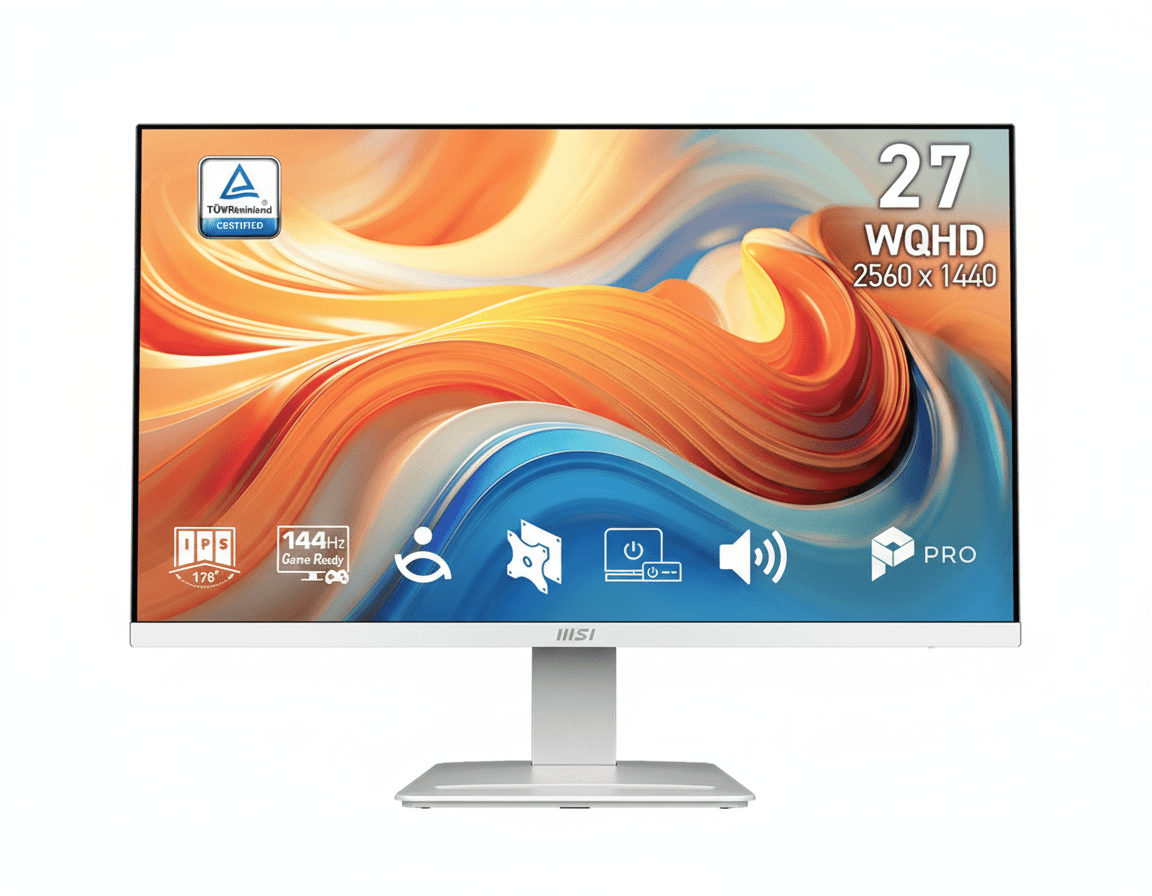
The MSI PRO MP273QW Truth: Best WQHD Monitor?

MSI PRO MP273QW E14 27″ WQHD 144Hz IPS Monitor | EyesErgo, HDR Ready, Hybrid Work
MSI PRO MP273QW E14 Review 2026 – 27″ WQHD 144Hz IPS Hybrid Monitor – Efficiency by Day, Dominance by Night – Ultimate Productivity & Light Gaming Excellence Under ₹22K
MSI PRO MP273QW E14 27 inch WQHD 144Hz IPS Hybrid Monitor

⚡ Efficiency by Day, Dominance by Night – The Ultimate Hybrid Experience

27″ WQHD + 144Hz smoothness + EyesErgo protection + smart mini-PC integration

🏆 Best 27″ WQHD 144Hz Hybrid Productivity Monitor 2026

MSI PRO MP273QW E14

27″ WQHD 144Hz IPS | HDR Ready | EyesErgo Tech | Built-in Speakers | Mini-PC Mountable

2560×1440 – 1ms MPRT – 300 nits – 118% sRGB – Adaptive-Sync – Power Link CEC

🎯 Designed for the Modern Professional:

• WQHD Sharpness: 77% more pixels than Full HD for crystal-clear multitasking

• 144Hz Fluidity: Ultra-smooth scrolling, light gaming & creative workflows

• EyesErgo Technology: TÜV-certified full eye protection suite + Eye-Q Check

• Built-in 2W×2 Speakers: Clear audio without desktop clutter

• Mini-PC Mount + Power Link: Clean desk + one-button mini-PC power-on

• Accessory Slot: Smart storage for cables & dongles

• HDR Ready: Enhanced contrast & colors for media & creative work

₹19,999

₹26,999

26% OFF

Model: PRO MP273QW E14 | 3-Year Warranty | Free Shipping

🛒 Buy Now on Amazon India

$229.99

Limited Warranty | Free Shipping

🛒 Buy Now – USA

🌍 Global Pricing Overview

• India: ₹19,999–₹21,999 (frequent 22–28% discounts)

• USA: $229.99–$249.99

• Europe: €219–€249

Resolution

2560×1440

Refresh Rate

144Hz

Eye Care

EyesErgo + TÜV

MSI PRO MP273QW E14 Overview – The Modern Professional’s Perfect Hybrid Companion

🖥️ WQHD Productivity Powerhouse

  • 27″ Screen Size: Perfect balance for multitasking & focused work
  • 2560×1440 Resolution: 109 PPI – razor-sharp text & details
  • IPS Panel Technology: Perfect colors & 178° viewing angles
  • 118% sRGB Coverage: Professional-grade color vibrancy
  • 300 cd/m² Brightness: Excellent visibility in bright rooms
  • 1500:1 Contrast: Deeper blacks than standard IPS

⚡ Smooth & Responsive Performance

  • 🔄144Hz Refresh Rate: Ultra-fluid scrolling & animations
  • ⚡1ms MPRT: Dramatically reduced motion blur
  • 🎮Adaptive-Sync 48–144Hz: Tear-free experience
  • 🌟HDR Ready: Enhanced dynamic range

💎 Health & Productivity Focused Features

  • • EyesErgo + TÜV Certification: Full eye protection suite
  • • Eye-Q Check Tool: Built-in eye health self-test
  • • Built-in 2W×2 Speakers: Clean audio solution
  • • Mini-PC Mount + Power Link CEC: One-button workflow
  • • Accessory Slot Design: Organized desk
  • • Easy Firmware Update: Always optimized

🎯 Why the PRO MP273QW E14 Stands Out in 2026

The MSI PRO MP273QW E14 is not just another office monitor — it’s the perfect embodiment of modern professional life: razor-sharp WQHD clarity for serious work, buttery 144Hz smoothness for fluid daily use, and comprehensive EyesErgo technology that genuinely protects your vision during 10+ hour days.

At the heart of the experience is the 27-inch 2560×1440 IPS panel with 109 PPI pixel density — the sweet spot where text is pin-sharp, UI elements are perfectly sized, and you get dramatically more usable workspace than 1080p without the GPU demands of 4K.

The 144Hz refresh rate transforms everyday tasks: web pages scroll like silk, cursor movement feels precise, window animations are buttery, and even light competitive gaming or creative timeline scrubbing becomes enjoyable.

What truly elevates this monitor into premium territory is MSI’s focus on long-term user health and workflow efficiency: TÜV-certified EyesErgo suite, integrated Eye-Q Check self-diagnostic tool, mini-PC mounting with HDMI-CEC Power Link (turn on your mini-PC from the monitor button), accessory slot for dongles/cables, built-in speakers, and easy firmware updates via DisplayPort.

For ₹19,999–₹21,999, you’re getting features normally found in ₹28,000–₹35,000 productivity displays — making the PRO MP273QW E14 one of the strongest value propositions of 2026 for coders, designers, office professionals, students, and anyone who spends serious hours in front of a screen.

Display Quality – WQHD IPS Visual Excellence

📺 27-Inch WQHD – The Productivity Sweet Spot

The 27-inch screen with 2560×1440 resolution delivers the ideal pixel density of ~109 PPI — the Goldilocks zone where text remains razor-sharp, icons look perfectly proportioned, and UI scaling feels natural without wasting screen real estate or demanding excessive GPU power.

Compared to 1080p on the same size, you get 77% more usable pixels — meaning significantly more code lines visible, larger spreadsheets, more timeline space in editing software, and dramatically better multitasking capabilities.

WQHD Advantages for Professionals

  • • 3.68 million pixels vs 2.07 million in FHD
  • • Perfect scaling for Windows 11 & macOS
  • • Ideal for coding, design, spreadsheets, documents
  • • Future-proof for next 4–6 years

🎨 IPS Panel + Wide Color Gamut

The high-quality IPS panel guarantees 178°/178° viewing angles with zero color shift or gamma distortion — perfect when collaborating or watching content from the side.

With 118% sRGB coverage (typical ~95–100% real-world after calibration), colors are noticeably more vibrant and accurate than standard office monitors — making this display suitable for photo editing, UI/UX design, content creation, and media consumption alongside productivity tasks.

The combination of 300 nits brightness and excellent anti-glare matte coating ensures great visibility even in bright office environments or near windows.

Performance – 144Hz Smoothness Meets Professional Reliability

🔄 144Hz – The New Standard for Productivity

144Hz means the screen refreshes approximately every 6.94 milliseconds — more than twice as fast as conventional 60Hz office monitors and noticeably smoother than 75/100Hz panels.

The difference is immediately apparent: web pages, documents, code editors, design tools, spreadsheets — everything feels significantly more fluid and responsive. Even basic window dragging and scrolling becomes a premium experience.

Real-World 144Hz Benefits

  • • Cursor movement feels laser-precise
  • • Long code & document scrolling is buttery
  • • UI animations & transitions look polished
  • • Light gaming & creative timeline work much smoother

🎮 Adaptive-Sync + 1ms MPRT

Adaptive-Sync (48–144Hz VRR range) eliminates screen tearing and stuttering during variable frame rates — useful for light gaming, video playback, and creative software with fluctuating performance.

The 1ms MPRT (Moving Picture Response Time) significantly reduces perceived motion blur compared to standard IPS panels, making fast-scrolling content and casual gaming much clearer and more comfortable.

Eye Care Technology – EyesErgo: Serious Protection for Long Hours

💡 Complete EyesErgo Protection Suite

MSI’s EyesErgo technology combines hardware-level Less Blue Light, DC Anti-Flicker dimming, advanced Anti-Glare coating, and TÜV Rheinland certification — delivering genuine eye comfort during marathon work sessions.

Unlike software filters that distort colors, MSI’s solution reduces harmful blue light while maintaining excellent color accuracy — crucial for professionals who need precise visuals all day.

🩺 Built-in Eye-Q Check Diagnostic Tool

The monitor includes MSI’s exclusive Eye-Q Check — an on-screen self-test tool that helps detect early signs of eye strain, astigmatism, and posture issues.

Features Amsler Grid test, astigmatism checker, and posture guidance — encouraging users to take necessary breaks and adjust positioning before fatigue becomes serious.

👁️ Why This Level of Eye Care Matters in 2026

Most people now spend 8–14 hours daily in front of screens. Cumulative digital eye strain leads to headaches, dry eyes, blurred vision, neck pain, and disrupted sleep. The PRO MP273QW E14 addresses all major risk factors with:

  • • Hardware Low Blue Light (no orange tint)
  • • Zero-flicker DC dimming across all brightness levels
  • • High-quality anti-reflective matte coating
  • • Wide viewing angles prevent neck craning
  • • Built-in diagnostic & reminder tools

Result: Dramatically more comfortable marathon sessions — many users report being able to work 2–4 extra focused hours per day without discomfort.

Smart Features – Designed for Real-World Productivity

🖥️ Mini-PC Mount + MSI Power Link (HDMI CEC)

The stand includes a dedicated mini-PC VESA mount point — allowing you to attach popular mini-PCs (Intel NUC, ASUS PN, Beelink, etc.) directly behind the monitor for an ultra-clean all-in-one workstation look.

MSI Power Link uses HDMI-CEC to let you power on/off the mini-PC using the monitor’s power button — one-button start for your entire setup.

🎧 Built-in Speakers + Accessory Slot + Firmware

2W × 2 built-in speakers deliver surprisingly clear sound for meetings, videos, and casual music — eliminating the need for external desktop speakers in most cases.

The clever accessory slot keeps dongles, cables, and adapters organized. Firmware updates via DisplayPort ensure the monitor stays optimized with future improvements.

Design & Ergonomics – Clean, Professional, Adjustable

🖼️ Modern Minimalist Aesthetic

Refined back engravings, slim bezels, and matte black finish — looks professional in any office or home setup while maintaining a premium feel.

⚙️ Ergonomics & Mounting

-5° ~ +20° tilt, 100×100 VESA mount compatibility, and built-in mini-PC mounting point. While tilt-only out of box, VESA arm support unlocks full ergonomic freedom.

Who Should Buy the MSI PRO MP273QW E14?

✅ Perfect For These Users

💼 Office Professionals & Remote Workers

Long hours, meetings, documents, spreadsheets — this monitor makes every task more comfortable and productive.

👨‍💻 Developers & Programmers

144Hz smooth scrolling through long code files + sharp WQHD text + eye protection = significantly better daily coding experience.

🎨 UI/UX Designers & Content Creators (casual)

Wide color gamut + good accuracy + smooth interface make light creative work enjoyable.

🎮 Light/Casual Gamers + Media Lovers

144Hz + Adaptive-Sync + HDR Ready + built-in speakers = excellent secondary gaming & entertainment display.

⚠️ Consider Alternatives If You Need

⚡ Hardcore Competitive Gaming

Want 180Hz+ & 1ms GtG gaming panels → look at MSI MAG/G series or ASUS TUF VG series.

🖼️ Professional Color-Critical Work

Need hardware calibration, 99%+ Adobe RGB → Dell UltraSharp, BenQ PD series, ASUS ProArt.

🔌 Full USB-C Docking

Want 65W+ USB-C PD charging → Dell S2722QC, LG 27UP series, or dedicated docking monitors.

Pros & Cons – MSI PRO MP273QW E14

✅ What We Loved

🖥️ Perfect WQHD + 144Hz Combination

The ideal balance of sharpness, workspace size, and everyday smoothness — transforms office work into a premium experience.

👁️ Best-in-Class Eye Care Suite

EyesErgo + TÜV + Eye-Q Check — one of the most comprehensive eye protection systems available under ₹25,000.

🧠 Smart Productivity Features

Mini-PC mount, Power Link CEC, accessory slot, firmware updates — thoughtful details that improve daily life.

🔊 Convenient Built-in Audio

Surprisingly good 2×2W speakers for meetings, videos, casual music — eliminates extra clutter.

💰 Exceptional Value in 2026

Delivers ₹30K+ level features at aggressive street pricing — one of the strongest hybrid monitor deals currently available.

⚠️ What Could Be Better

🎮 Not a Dedicated Gaming Monitor

144Hz is excellent for productivity & casual play — serious competitive gamers will want 165Hz/180Hz+ models.

⚙️ Tilt-Only Stand Out of Box

No height, swivel, or pivot adjustment (solved with affordable VESA arm — still a limitation compared to fully adjustable stands).

🔌 No USB-C Power Delivery

Lacks USB-C video + charging (common in higher-priced productivity monitors).

🔇 Speakers Not Audiophile Grade

Good for meetings & casual use — serious music lovers will still want external speakers/headphones.

Final Verdict – The Modern Professional’s New Standard

🏆 Best Hybrid Productivity Monitor Under ₹22,000 – 2026 Champion
9.4 /10

Outstanding All-Day Professional Value

🎯 The Bottom Line

The MSI PRO MP273QW E14 is the perfect representation of what a 2026 productivity monitor should be: stunning WQHD clarity, genuinely useful 144Hz smoothness, comprehensive eye protection, thoughtful smart features, and aggressive pricing that makes premium feel accessible.

For anyone who spends serious hours working, creating, learning, or casually gaming — this monitor dramatically improves daily comfort, productivity, and visual enjoyment.

💡 Who Should Buy This?

Highly recommended for:

  • Office professionals & remote workers doing 8–12+ hour days
  • Software developers & programmers
  • UI/UX designers, light content creators
  • Students & researchers needing sharp, comfortable long-session display
  • Anyone wanting a clean mini-PC workstation with one-button workflow

At current street prices of ₹19,999–₹21,999, it’s one of the strongest monitor recommendations of 2026.

📊 Detailed Rating Breakdown

Display Quality & Color Accuracy 9.5/10
Value for Money (2026) 9.8/10
144Hz Smoothness & Responsiveness 9.3/10
Eye Care & Long-Session Comfort 9.9/10
Smart Features & Workflow Integration 9.6/10
Build Quality & Design 9.2/10

Frequently Asked Questions – MSI PRO MP273QW E14

❓ Is 144Hz really noticeable for normal office work & browsing?

Yes — very much so. Scrolling long documents, code files, web pages, spreadsheets, and even moving windows feels dramatically smoother and more premium compared to 60Hz or 75Hz monitors. Most users notice and appreciate the difference within minutes.

❓ How good is the eye protection for 10+ hour work days?

Outstanding. The combination of TÜV-certified Low Blue Light, zero-flicker DC dimming, high-quality anti-glare coating, wide viewing angles, and the built-in Eye-Q Check tool makes this one of the most comfortable monitors available for extremely long sessions.

❓ Can I mount a mini-PC behind this monitor?

Yes — the stand has a dedicated VESA-compatible mounting point for mini-PCs (Intel NUC, ASUS PN, Beelink, etc.). Combined with MSI Power Link (HDMI-CEC), you can power the entire setup on/off with the monitor button — extremely clean and efficient workstation.

❓ Are the built-in speakers good enough for daily use?

Yes — surprisingly clear and loud enough for Teams/Zoom meetings, YouTube videos, casual music, and system sounds. Most users find them sufficient for everyday needs and appreciate not needing external speakers cluttering the desk.

❓ Is this monitor good for light gaming?

Excellent for casual & light competitive gaming. 144Hz + Adaptive-Sync + 1ms MPRT delivers smooth, tear-free experience in titles like Valorant, League of Legends, Fortnite, Rocket League, etc. Serious esports players may still prefer 180Hz+ gaming monitors.

❓ Does it support firmware updates? How?

Yes — MSI provides easy firmware updates directly through the DisplayPort connection. When new versions are released (improving compatibility, color, or features), you can update yourself without sending the monitor for service.

❓ How is the color accuracy for creative work?

Very good for the price — 118% sRGB coverage with good factory calibration. Suitable for UI/UX design, photo editing, content creation, and video work. For absolute color-critical professional work (print, film), dedicated calibrated monitors are still recommended.

Complete Technical Specifications

Display Specifications
Panel Size27 inches
Panel TypeIPS
Resolution2560 × 1440 (WQHD)
Aspect Ratio16:9
Refresh Rate144Hz
Response Time1ms (MPRT) / 4ms (GtG)
Brightness300 cd/m² (typical)
Contrast Ratio1500:1 (static)
Dynamic Contrast100,000,000:1
Viewing Angle178° Horizontal / 178° Vertical
Color Gamut118% sRGB
Display Colors16.7M (8-bit)
Surface TreatmentAnti-Glare (Matte 3H)
HDR SupportHDR Ready
Connectivity & Audio
HDMI Ports2× HDMI 2.0b (WQHD @ 144Hz)
DisplayPort1× DisplayPort 1.2a (WQHD @ 144Hz)
AudioBuilt-in 2W × 2 Speakers + 1× Headphone-out
SpecialHDMI-CEC (MSI Power Link), Firmware Update via DP
Ergonomics & Physical
Tilt Adjustment-5° ~ +20°
VESA Mounting100 × 100 mm
Mini-PC MountYes (built-in stand support)
Dimensions with Stand613.49 × 201.01 × 470.61 mm
Weight (Net / Gross)4.5 kg / 6.2 kg
Power & Certifications
Power TypeInternal Power Board
Power Input100–240V, 50/60Hz
Adaptive-Sync Range48–144Hz
CertificationsTÜV Rheinland Eye Comfort, CB, CE, Energy Star

Ready to Upgrade Your Daily Work Experience?

Get the MSI PRO MP273QW E14 – 27″ WQHD 144Hz EyesErgo Hybrid Monitor Today!

🛒 Buy Now on Amazon – Starting ₹19,999 (Up to 28% OFF)

✓ 3-Year MSI Warranty • ✓ Free Delivery • ✓ Easy Returns
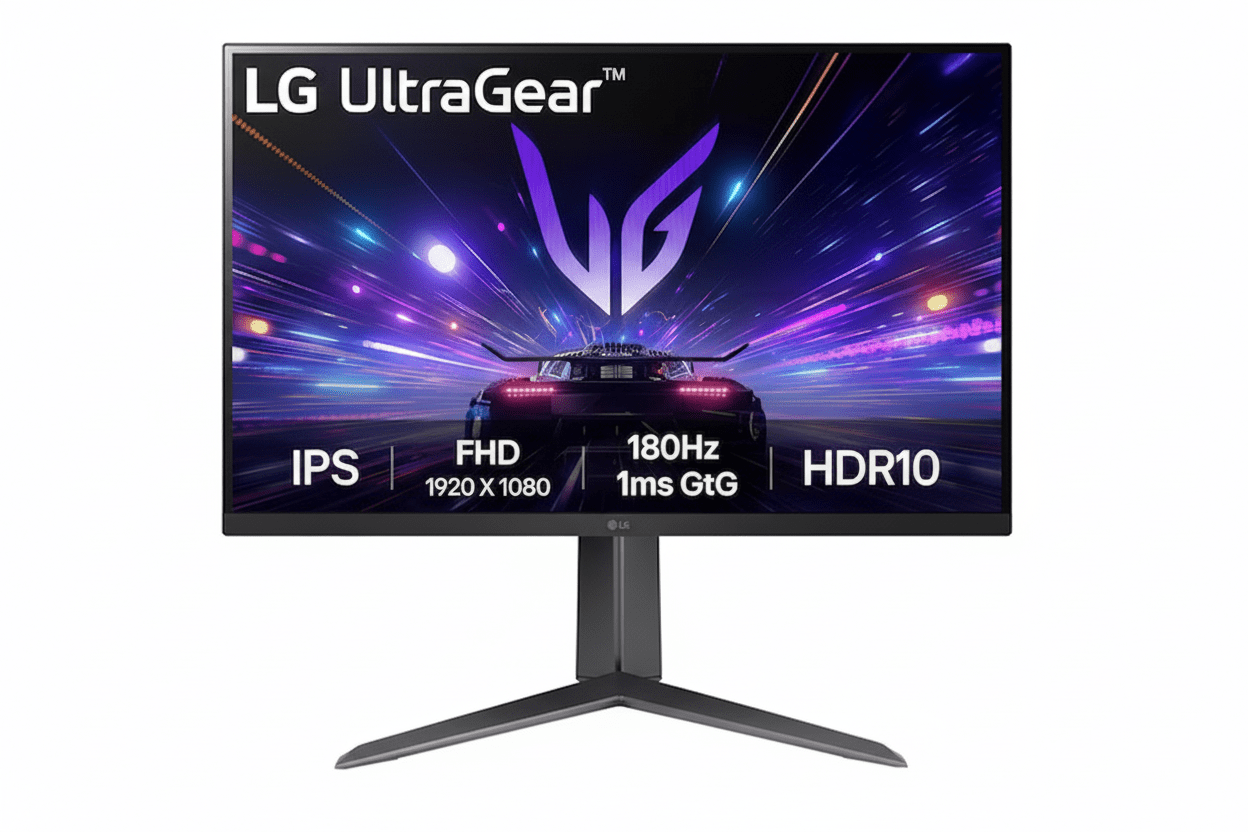
The LG UltraGear Secret: Is it Better Than 240Hz?

LG 27GS65F-B Review 2025
LG 27GS65F-B UltraGear Review 2025 – Best 27″ 180Hz IPS Gaming Monitor Under ₹14K
LG 27GS65F-B UltraGear 27 inch 180Hz IPS Gaming Monitor

⚡ Ultimate Esports Speed: 180Hz + 1ms IPS + Full Ergonomics!

Plus G-SYNC Compatible + FreeSync + HDR10!

🎮 Best Budget 27″ 180Hz IPS Gaming Monitor – Complete Ergonomics!

LG 27GS65F-B UltraGear Gaming Monitor

27″ 180Hz IPS | 1ms Response | Full Ergonomic Stand | Best Esports Value 2025

27″ FHD (1920×1080) IPS – 180Hz – 1ms GtG – G-SYNC Compatible – Height/Tilt/Pivot

⚡ Complete Competitive Gaming Package:

• Display: 27″ Full HD (1920×1080) IPS Panel

• Speed: 180Hz Refresh + 1ms (GtG) Response

• Sync: NVIDIA G-SYNC Compatible + AMD FreeSync

• Colors: sRGB 99% + HDR10 Support

• Ergonomics: Height + Tilt + Pivot (Full Adjustable!)

• Gaming Tools: Black Stabilizer + Crosshair + FPS Counter

• Ports: HDMI 2.0 + DisplayPort 1.4

• Bonus: VESA 100×100mm Mount Compatible!

₹13,874

₹23,500

SAVE ₹9,626 (41% OFF!)

*Inclusive of all taxes | Free Priority Delivery

🛒 Buy Now on Amazon – 41% OFF!

Free Delivery | 3 Year Warranty | Full Ergonomic Stand

Refresh Rate

180 Hz

Response

1ms GtG

Panel

IPS

LG 27GS65F-B UltraGear Gaming Monitor Overview

⚡ Esports Highlights

  • 27″ FHD IPS: Fast panel with sRGB 99%
  • 180Hz Refresh: Elite competitive speed
  • 1ms GtG Response: Zero motion blur
  • G-SYNC Compatible: Official certification
  • Full Ergonomics: Height/Tilt/Pivot!
  • HDR10: Enhanced visuals
  • Gaming Tools: Crosshair + more
  • ₹13,874: 41% discount!

📦 In The Box

  • 🖥️ LG 27GS65F-B Gaming Monitor
  • 🏗️ Full Ergonomic Stand (Included!)
  • 🔌 Power Cable
  • 📄 Quick Setup Guide
  • 📜 Warranty Card (3 Year)

Note: HDMI & DisplayPort cables NOT included—purchase separately.

⭐ Competitive Advantage

  • • 180Hz IPS: Fast & colorful
  • • 1ms Response: Zero ghosting
  • • Full Ergonomics: Rare at this price!
  • • G-SYNC Certified: Official validation
  • • 41% OFF: Save ₹9,626!

🏆 Best Budget 27″ 180Hz IPS Gaming Monitor Under ₹14,000

Elite 180Hz + 1ms IPS Performance

The 180Hz refresh rate refreshes 180 times per second—25% faster than old-standard 144Hz monitors! Combined with a true 1ms Gray-to-Gray response time (in Faster mode), this IPS panel delivers zero motion blur and instant pixel transitions for competitive esports. You get the speed advantage of TN panels with the superior color accuracy and viewing angles of IPS technology!

Full Ergonomic Stand Included

The biggest competitive advantage—a fully adjustable stand with height adjustment (110mm range), tilt (-5° to +15°), and 90° clockwise pivot! Most budget gaming monitors only offer basic tilt, forcing you to buy a separate ₹2,000-5,000 VESA arm. This monitor includes complete ergonomics out of the box, saving money and providing perfect positioning for competitive gaming!

Unbeatable ₹13,874 Value!

At just ₹13,874 (41% off MRP ₹23,500), you get 27″ IPS + 180Hz + 1ms + full ergonomics + G-SYNC Compatible + FreeSync + HDR10 + gaming tools from a trusted LG UltraGear brand! No other budget gaming monitor offers this complete package. Perfect for esports, mid-range GPU owners, and anyone wanting competitive performance without breaking the bank!

180Hz Refresh Rate + 1ms Response – Elite Competitive Speed

⚡ 25% Faster Than 144Hz Standard

The 180Hz refresh rate is the new competitive gaming standard, surpassing the old 144Hz benchmark! The display refreshes 180 times every second, providing 25% more frames per second visibility compared to 144Hz monitors. This translates to smoother motion, reduced input lag perception, and a tangible competitive advantage in fast-paced esports titles!

180Hz vs 60Hz

3× faster refresh = 3× smoother motion!

5.5ms Frame Time

Each frame displays for just 5.5 milliseconds!

144Hz to 180Hz

25% improvement over old standard!

Esports Edge

See enemies faster in CS:GO, Valorant, Apex!

🚀 Why 180Hz Matters for Esports

Competitive Advantage in FPS Games

In fast-paced first-person shooters like Valorant, CS:GO, Apex Legends, and Overwatch 2, the 180Hz refresh rate provides a measurable advantage. You see enemy movements 36 additional times per second compared to 144Hz (180 vs 144 frames). This means you can spot, track, and eliminate opponents faster—the difference between winning and losing gunfights!

  • • Smoother Tracking: Follow fast-moving targets easily
  • • Reduced Input Lag Perception: Actions feel more responsive
  • • Clearer Motion: See through chaotic team fights
  • • Professional Standard: Pro players use 240Hz+, 180Hz closer to pros

⚠️ GPU Requirements

To utilize 180Hz, your GPU needs to output 180+ FPS! Mid-range cards like RTX 4060, RTX 3060, RX 7600 can easily hit 180+ FPS in esports titles at 1080p. Perfect pairing for budget gaming!

⚡ True 1ms (GtG) IPS Response Time

Zero Motion Blur Technology

This monitor achieves a true 1ms Gray-to-Gray (GtG) response time in Faster mode—extremely rare for IPS technology! This means pixels transition from one shade to another in just one millisecond, eliminating motion blur, ghosting, and reverse ghosting. You get the speed of TN panels with IPS color quality!

Response Time 1ms (GtG at Faster)
Technology IPS Panel (Not TN!)
Motion Clarity Excellent

🎮 Gaming Benefits

  • • Zero Ghosting: No trailing shadows behind moving objects
  • • Clear Fast Panning: See details when quickly looking around
  • • Competitive Edge: Instant visual feedback for pro-level play
  • • IPS Benefits: Keep superior colors & viewing angles!

IPS Panel with sRGB 99% – Vibrant Gaming Colors

🎨 IPS vs TN vs VA

Why IPS is Best for Competitive Gaming

Many budget gaming monitors use TN (Twisted Nematic) panels for speed but sacrifice color and viewing angles. This monitor uses a modern IPS (In-Plane Switching) panel that delivers 1ms response time WITHOUT compromising visual quality. You get the best of both worlds!

IPS

✓ Best colors

✓ Wide angles

✓ 1ms (this monitor!)

TN

✓ Fast (1ms)

✗ Poor colors

✗ Bad angles

VA

✓ High contrast

~ Okay angles

✗ Slower (5ms+)

Wide 178° Viewing Angles

IPS technology provides 178° horizontal and vertical viewing angles. Colors remain consistent even when viewed from the side—perfect for showing gameplay to friends or multi-monitor setups!

🌈 sRGB 99% Color Accuracy

Vibrant, True-to-Life Colors

The IPS panel covers 99% of the sRGB color space (typical)—the standard for gaming, web content, and multimedia. This ensures games display with rich, accurate colors as developers intended. Reds are vibrant, blues are deep, and greens are lush!

Color Gamut sRGB 99% (Typ.)
Brightness (Typ.) 300 cd/m²
Contrast Ratio (Typ.) 1000:1

Perfect For:

  • • Competitive Gaming: Spot enemies by color cues
  • • Content Viewing: YouTube, Twitch, Netflix look great
  • • Casual Editing: Photo/video editing (not color-critical)
  • • General Use: Better experience for all content

Universal Adaptive Sync – G-SYNC Compatible + FreeSync

🔄 Tear-Free Gaming for All GPUs

This monitor supports both NVIDIA G-SYNC Compatible AND AMD FreeSync adaptive sync technologies! No matter which graphics card you own, you’ll enjoy perfectly smooth, tear-free gaming by synchronizing the monitor’s refresh rate with your GPU’s frame output!

NVIDIA G-SYNC Compatible

Officially tested and validated by NVIDIA! This certification guarantees excellent G-SYNC performance with GeForce GTX and RTX graphics cards, eliminating screen tearing and stuttering for butter-smooth gameplay!

  • • Official Certification: NVIDIA validated
  • • Zero Tearing: Seamless visuals
  • • Low Latency: Responsive gaming
  • • Works With: All GeForce GTX/RTX cards

AMD FreeSync

Full AMD FreeSync technology support for Radeon RX graphics cards! Synchronizes the display with your AMD GPU to eliminate screen tearing, stuttering, and input lag during fast-action gameplay!

  • • AMD Certified: Official FreeSync
  • • Smooth Frames: No stuttering
  • • Low Latency: Instant response
  • • Works With: All AMD Radeon RX cards

Universal Compatibility = Future-Proof Investment

Whether you upgrade from NVIDIA to AMD or vice versa, this monitor supports both adaptive sync technologies! You’re not locked into one GPU ecosystem—maximum flexibility for future upgrades!

HDR10 Support – Enhanced Contrast & Color

🌟 High Dynamic Range Gaming

This monitor supports HDR10—the industry-standard High Dynamic Range format! In compatible games and media, HDR10 unlocks a wider range of brightness and colors, producing more impactful highlights, deeper shadows, and more lifelike visuals!

Brighter Highlights

HDR10 allows bright areas like explosions, sunlight, and muzzle flashes to display with greater intensity and detail without washing out!

Deeper Shadows

Dark scenes maintain better detail and depth instead of appearing as flat black, helping you spot enemies hiding in shadows!

Wider Color Range

HDR content displays with more vibrant and nuanced colors, making game worlds feel more realistic and immersive!

Note: This is entry-level HDR10—not HDR400 or HDR600. HDR effect is moderate due to 300 cd/m² brightness limit. Best results in dark rooms. Full HDR experience requires HDR400+ certification.

Built-in Gaming Tools – Competitive Edge Features

🔦 Black Stabilizer & Dynamic Action Sync

Black Stabilizer Technology

Brighten dark scenes without overexposing bright areas! Black Stabilizer intelligently adjusts gamma to reveal enemies hiding in shadows and dark corners. Spot campers before they see you in games like Valorant, CS:GO, and Rainbow Six Siege!

  • • See in Darkness: Illuminate shadowy areas
  • • Spot Campers: Find hiding enemies
  • • Adjustable Levels: Customize to your preference
  • • No GPU Load: Hardware-based feature

Dynamic Action Sync (DAS)

Minimize input lag by reducing signal processing delay! DAS mode ensures your mouse movements, keyboard presses, and controller inputs translate to on-screen action with minimal latency—critical for competitive play!

🎯 Crosshair & FPS Counter

Hardware Crosshair Overlay

Activate a hardware-based crosshair overlay directly on the monitor! Choose from multiple crosshair styles to improve your aim in games that have poor or no built-in crosshairs. Works in ALL games and applications—even on desktop!

  • • Multiple Styles: Choose crosshair design
  • • Universal: Works in ANY game
  • • Hip-Fire Practice: Improve no-ADS aim
  • • Toggle On/Off: Easy on-screen menu

Real-Time FPS Counter

Display a real-time frames-per-second (FPS) counter directly on-screen without external software! Monitor your GPU performance in-game to ensure you’re maintaining high frame rates for competitive play!

Full Ergonomic Stand – Height, Tilt, Pivot Adjustable

🏗️ The Budget Monitor Advantage You Never Get

This monitor’s biggest competitive advantage over other budget gaming monitors is its fully ergonomic stand included in the box! While competitors force you to buy a separate ₹2,000-5,000 VESA monitor arm for proper positioning, the LG 27GS65F-B gives you complete height, tilt, and pivot adjustment out of the box!

Height Adjustment

110mm (11cm) height adjustment range lets you raise or lower the screen to perfect eye level! Prevents neck strain during long gaming sessions!

Range: 0-110mm vertical travel

Tilt Adjustment

-5° to +15° tilt range allows you to angle the screen up or down for the perfect viewing angle based on your seated position!

Range: -5° forward to +15° backward

Pivot (Portrait Mode)

90° clockwise pivot rotates the monitor to portrait orientation! Perfect as a secondary monitor for Discord, Twitch chat, code, or web browsing!

Range: 90° clockwise rotation

💰 Save ₹2,000-5,000!

Most budget gaming monitors only offer basic tilt, forcing you to purchase a separate VESA monitor arm for ₹2,000-5,000. This monitor includes full ergonomics in the box—saving you money and hassle!

🔧 VESA 100×100mm Compatible

If you still want a monitor arm, the monitor supports VESA 100×100mm mounting! Remove the included stand and attach any compatible VESA arm for maximum flexibility!

Who Should Buy This Gaming Monitor?

🎮 Budget Esports Gamers

  • Valorant Players: 180Hz + 1ms = see enemies first
  • CS:GO/CS2: Fast response for instant flicks
  • Apex Legends: Track fast-moving legends smoothly
  • Overwatch 2: Follow team fights with clarity
  • Fortnite: Build battles feel more responsive
  • League/Dota 2: React faster in team fights

Perfect for: Competitive players wanting pro-level performance on a budget!

💻 Mid-Range GPU Owners

  • RTX 4060/4060 Ti: Hit 180+ FPS at 1080p easily
  • RTX 3060/3060 Ti: Perfect 1080p high refresh match
  • RX 7600/7600 XT: Maximize AMD performance
  • RTX 3070: Utilize full 180Hz potential
  • Budget Builds: Don’t waste GPU power on 60Hz
  • Future-Proof: Ready for GPU upgrades

Perfect for: 1080p gaming PC builds under ₹80,000!

📱 Dual Monitor Setups

  • Streamers: Gaming + OBS on second screen
  • Content Creators: Editing + timeline/tools
  • Programmers: Code + documentation/browser
  • Traders: Charts + watchlists + news
  • Portrait Mode: 90° pivot for Discord/chat
  • Affordable: Budget-friendly secondary monitor

Perfect for: Multi-taskers needing affordable high-refresh secondary display!

🏫 Students & First-Time Gamers

  • Dorm Rooms: Compact 27″ with full ergonomics
  • First Gaming PC: Learn on competitive hardware
  • Budget-Conscious: Premium features, affordable price
  • Multi-Purpose: Gaming + study + entertainment
  • Future-Proof: Won’t outgrow quickly
  • Trusted Brand: LG UltraGear quality

Perfect for: Students upgrading from 60Hz laptops!

💪 Ergonomics Priority Users

  • Long Sessions: Adjust height for comfort
  • Health-Conscious: Prevent neck/back strain
  • Shared Setup: Multiple users adjust easily
  • Standing Desk: Height-adjust with desk
  • Proper Posture: Eye-level alignment
  • No Extra Cost: Full ergo included!

Perfect for: Users who value health and comfort!

🚫 NOT Recommended For

  • 4K Enthusiasts: This is 1080p Full HD
  • 1440p Gamers: High-end GPUs want QHD
  • Large Screen Lovers: 27″ at 1080p = 81 PPI
  • Cinematic Gamers: VA better for story games
  • Color Professionals: Not factory-calibrated

Consider alternatives if you prioritize resolution over refresh rate!

LG 27GS65F-B vs Competitors

vs ViewSonic VX2728J 27″ 180Hz IPS

ViewSonic: 27″ FHD 180Hz 0.5ms IPS – ₹12,490

LG: 27″ FHD 180Hz 1ms IPS – ₹13,874

LG Wins

  • ✓ Full ergonomics (H+T+P!)
  • ✓ G-SYNC Compatible certified
  • ✓ LG UltraGear brand
  • ✓ Better build quality
  • ✓ Black Stabilizer
  • ✓ 3-year warranty

ViewSonic Wins

  • ✓ ₹1,384 cheaper
  • ✓ 0.5ms MPRT (vs 1ms GtG)
  • ✓ ClearMR technology

Verdict: LG for ergonomics & brand. ViewSonic for tightest budget.

vs Samsung Odyssey G3 27″ 180Hz VA

Samsung: 27″ FHD 180Hz VA Flat – ₹13,490

LG: 27″ FHD 180Hz IPS – ₹13,874

LG Wins

  • ✓ IPS panel (better angles!)
  • ✓ 1ms GtG (vs 5ms)
  • ✓ Full ergonomics
  • ✓ sRGB 99% accuracy
  • ✓ Faster response

Samsung Wins

  • ✓ ₹384 cheaper
  • ✓ VA higher contrast (3000:1)
  • ✓ Deeper blacks

Verdict: LG for competitive gaming. Samsung for single-player.

vs MSI G274F 27″ 180Hz IPS

MSI: 27″ FHD 180Hz 1ms IPS – ₹14,990

LG: 27″ FHD 180Hz 1ms IPS – ₹13,874

LG Wins

  • ✓ ₹1,116 cheaper!
  • ✓ Pivot adjustment
  • ✓ G-SYNC certified
  • ✓ HDR10 support
  • ✓ Better value overall

MSI Wins

  • ✓ Night Vision feature
  • ✓ Gaming OSD App
  • ✓ MSI gaming brand

Verdict: LG better value. MSI for brand preference.

vs Acer Nitro VG270 27″ 165Hz IPS

Acer: 27″ FHD 165Hz 1ms IPS – ₹11,990

LG: 27″ FHD 180Hz 1ms IPS – ₹13,874

LG Wins

  • ✓ 180Hz vs 165Hz (+9%)
  • ✓ Full ergonomics
  • ✓ G-SYNC Compatible
  • ✓ HDR10 support
  • ✓ Better gaming tools
  • ✓ Premium build

Acer Wins

  • ✓ ₹1,884 cheaper
  • ✓ Budget-friendly

Verdict: LG worth extra ₹1,884 for 180Hz + ergonomics!

vs BenQ MOBIUZ EX2710R 27″ 165Hz VA

BenQ: 27″ FHD 165Hz VA Curved – ₹17,990

LG: 27″ FHD 180Hz IPS Flat – ₹13,874

LG Wins

  • ✓ ₹4,116 cheaper!
  • ✓ 180Hz vs 165Hz
  • ✓ 1ms vs 1ms MPRT
  • ✓ IPS viewing angles
  • ✓ Full ergonomics
  • ✓ Better value

BenQ Wins

  • ✓ 1000R curve
  • ✓ HDRi technology
  • ✓ 2.5W speakers
  • ✓ Premium features

Verdict: LG for competitive value. BenQ for immersion.

vs AOC 27G2 27″ 165Hz IPS

AOC: 27″ FHD 165Hz 1ms IPS – ₹13,499

LG: 27″ FHD 180Hz 1ms IPS – ₹13,874

LG Wins

  • ✓ 180Hz vs 165Hz (+9%)
  • ✓ Pivot adjustment
  • ✓ G-SYNC certified
  • ✓ HDR10 support
  • ✓ LG brand quality

AOC Wins

  • ✓ ₹375 cheaper
  • ✓ Low Blue Light
  • ✓ Popular model

Verdict: LG worth extra for 180Hz + pivot + certification!

🏆 Competitive Advantage Summary

The LG 27GS65F-B’s biggest competitive advantages are its full ergonomic stand (Height + Tilt + Pivot) and official G-SYNC Compatible certification—features that budget competitors lack!

Full Ergonomics Included

Most ₹12-15K gaming monitors only offer basic tilt. LG includes height, tilt, AND pivot in the box—saving ₹2,000-5,000 on a VESA arm!

G-SYNC Certified

Official NVIDIA validation guarantees perfect G-SYNC performance. Competitors only claim “G-SYNC compatible” without certification!

180Hz IPS Speed

25% faster than 144Hz, 9% faster than 165Hz with true 1ms IPS response time—best of speed AND color!

Pros & Cons

✅ What We Love

  • Elite 180Hz Refresh Rate: 25% faster than 144Hz standard—provides tangible competitive advantage in esports titles like Valorant, CS:GO, Apex Legends!
  • True 1ms (GtG) IPS Response: Extremely rare—eliminates motion blur and ghosting while maintaining IPS color quality and viewing angles!
  • Full Ergonomic Stand: Height (110mm) + Tilt (-5° to +15°) + Pivot (90°) adjustments included—worth ₹2,000-5,000 extra in most monitors!
  • Universal Adaptive Sync: Official NVIDIA G-SYNC Compatible certification + AMD FreeSync support—works perfectly with any GPU!
  • Outstanding ₹13,874 Value: 41% discount (save ₹9,626!)—best budget 180Hz IPS monitor with full ergonomics under ₹15K!
  • sRGB 99% IPS Panel: Vibrant, accurate colors with 178° viewing angles—superior to TN panels without sacrificing speed!
  • Complete Gaming Toolset: Black Stabilizer + Dynamic Action Sync + Crosshair Overlay + FPS Counter built-in!
  • HDR10 Support: Enhanced contrast and colors in compatible games for more dramatic visuals!
  • VESA 100×100mm Compatible: Can use monitor arms if desired—maximum mounting flexibility!
  • 3-Side Borderless Design: Thin bezels create immersive experience and work great in multi-monitor setups!
  • Perfect 1080p + Mid-Range GPU Pairing: RTX 4060/3060, RX 7600 can easily hit 180+ FPS for full refresh utilization!
  • LG UltraGear Brand Trust: Reliable quality, 3-year warranty, established gaming monitor reputation!
  • Low Input Lag: Dynamic Action Sync minimizes latency for instant response to your inputs!

❌ Room for Improvement

  • 1080p on 27″ = 81 PPI: Text and UI elements are noticeably less sharp than 24″ 1080p (92 PPI) or 27″ 1440p (109 PPI). Competitive gamers won’t mind, but desktop users may notice pixelation.
  • Not for 1440p Enthusiasts: High-end GPU owners (RTX 4070+, RX 7800 XT+) should choose 1440p monitors to maximize their graphics card potential!
  • Entry-Level HDR10: HDR effect is moderate due to 300 cd/m² brightness limitation (not HDR400/600 certified). Works best in dark rooms, not dramatic HDR experience.
  • No Built-in Speakers: Need external speakers or headphones for audio—no convenient built-in sound option!
  • IPS 1000:1 Contrast: Standard IPS contrast ratio—VA panels offer deeper blacks (3000:1) for cinematic single-player games.
  • No USB Hub: Lacks USB ports for peripherals—cannot charge devices or connect keyboard/mouse through monitor!
  • HDMI/DP Cables Not Included: Need to purchase cables separately (₹300-800 for quality cables)!
  • 180Hz Needs High FPS: Must consistently output 180+ FPS to utilize full refresh—lower-end GPUs won’t benefit fully!
  • No Swivel Adjustment: Stand lacks left-right swivel—only height, tilt, and pivot available!
  • Single HDMI 2.0 Port: Only 1× HDMI + 1× DisplayPort—limited connectivity for multiple devices (consoles + PC)!

Final Verdict

🏆 BEST BUDGET 27″ 180Hz IPS GAMING MONITOR 2025

The LG 27GS65F-B UltraGear is the new benchmark for budget esports gaming monitors, delivering a complete no-compromise package that competitors simply cannot match at this price point!

The Complete Esports Package

What makes the LG 27GS65F-B exceptional isn’t just one feature—it’s the combination of elite specs rarely found together under ₹15,000. While many budget gaming monitors force you to choose between speed, color quality, or ergonomics, this monitor delivers all three without compromise!

Elite Speed Performance

The 180Hz refresh rate + 1ms (GtG) IPS response time combination is the holy grail of competitive gaming. You get 25% more frames per second than 144Hz monitors, with zero motion blur or ghosting. In fast-paced esports titles like Valorant, CS:GO, and Apex Legends, this translates to seeing enemies earlier, tracking targets smoother, and reacting faster—measurable advantages that can mean the difference between winning and losing crucial gunfights!

IPS Color & Viewing Angles

Unlike cheap TN panels that sacrifice color quality for speed, this monitor uses a modern IPS panel with sRGB 99% color accuracy and 178° viewing angles. You get vibrant, true-to-life colors in games, making it easier to spot enemies by visual cues (red vs blue teams, camouflage detection). The wide viewing angles mean colors stay consistent even when viewing from the side—perfect for showing gameplay to friends or multi-monitor setups!

Full Ergonomics Advantage

This monitor’s biggest competitive edge—a fully adjustable stand with height (110mm), tilt (-5° to +15°), AND 90° pivot included in the box! Most ₹12-15K gaming monitors only offer basic tilt, forcing you to buy a ₹2,000-5,000 VESA monitor arm separately. LG saves you money and provides perfect ergonomic positioning for long competitive gaming sessions, preventing neck and back strain!

Unbeatable Value at ₹13,874

At just ₹13,874 (41% off MRP ₹23,500), this monitor delivers premium features that typically cost ₹18,000-25,000 in competing models:

What You Get:

  • • 27″ IPS 180Hz + 1ms Response
  • • Full Ergonomic Stand (H+T+P)
  • • G-SYNC Compatible Certified
  • • AMD FreeSync Support
  • • HDR10 + sRGB 99%
  • • Gaming Tools (Black Stabilizer, Crosshair, FPS Counter)
  • • VESA 100×100mm Compatible
  • • 3-Year LG Warranty
  • • Total Value: ₹23,500+

Savings Breakdown:

  • • 41% Discount: Save ₹9,626 instantly
  • • Ergonomic Stand: Save ₹2,000-5,000 on VESA arm
  • • G-SYNC Certification: Premium feature at budget price
  • • G-SYNC Certification: Premium feature at budget price
  • • Total Effective Savings: ₹11,626-14,626!
  • • Your Price: Just ₹13,874!

No other 27″ 180Hz IPS gaming monitor offers this complete package under ₹15,000. Competitors either lack full ergonomics, use slower VA panels, offer only 165Hz, or don’t have official G-SYNC certification!

Who Should Buy This Monitor?

✅ Perfect For:

  • • Budget esports gamers playing Valorant, CS:GO, Apex Legends, Overwatch 2
  • • Mid-range GPU owners (RTX 4060/3060, RX 7600) maximizing 1080p performance
  • • First-time high-refresh gamers upgrading from 60Hz laptops/monitors
  • • Dual-monitor setups needing affordable 180Hz secondary display
  • • Streamers and content creators wanting gaming + productivity monitor
  • • Ergonomics-conscious users who value proper height/tilt/pivot adjustment
  • • Students in dorms needing compact, versatile gaming monitor
  • • Value-seekers wanting premium features without premium prices

❌ Not Ideal For:

  • • 1440p/4K enthusiasts (this is 1080p Full HD)
  • • High-end GPU owners (RTX 4070+, RX 7800 XT+) wanting QHD
  • • Text-clarity prioritizers (81 PPI at 27″ is lower than 24″ 1080p)
  • • Cinematic single-player gamers (VA panels better for contrast)
  • • Color-critical professionals (not factory-calibrated for editing)
  • • Multi-device users (limited ports—1× HDMI + 1× DisplayPort)

Our Final Rating: 9.5/10

The LG 27GS65F-B UltraGear earns our highest recommendation as the best budget 180Hz IPS gaming monitor of 2025! It delivers elite competitive performance, full ergonomics, and universal adaptive sync at an unbeatable price. While not for 1440p enthusiasts, it excels at its mission of providing professional-grade esports performance on a budget!

₹13,874

₹23,500

SAVE ₹9,626 (41% OFF!)

🛒 BUY NOW – LIMITED TIME OFFER!

Free Delivery | 3 Year Warranty | Full Ergonomic Stand Included

20 Most Asked Questions About LG 27GS65F-B

Q1. Is 180Hz better than 144Hz?

Yes! 180Hz is 25% faster than 144Hz, displaying 36 more frames per second (180 vs 144 FPS). While the jump isn’t as dramatic as 60Hz to 144Hz, it’s noticeable in competitive esports—smoother motion tracking, reduced perceived input lag, and clearer fast-paced action. For Valorant, CS:GO, Apex Legends players, that 25% improvement can mean spotting enemies faster and landing shots more accurately!

Q2. What does 1ms (GtG) response time mean?

1ms Gray-to-Gray (GtG) means pixels change color in just 1 millisecond! This eliminates motion blur, ghosting (trailing shadows), and reverse ghosting during fast movement. The “GtG” specification measures how quickly pixels transition between different shades of gray—the most accurate response time metric. In Faster mode, this monitor achieves true 1ms GtG, making it exceptionally fast for an IPS panel (most IPS are 4-5ms)!

Q3. Is IPS better than TN for gaming?

Yes, modern 1ms IPS is better! Old TN (Twisted Nematic) panels were faster but had terrible colors and viewing angles. Modern IPS panels like this LG achieve 1ms response time while maintaining sRGB 99% color accuracy and 178° viewing angles. You get TN-level speed with IPS-level visual quality—best of both worlds! Only downside is IPS has 1000:1 contrast vs TN’s similar ratio, but the superior colors and angles make IPS the clear winner for gaming!

Q4. What is G-SYNC Compatible certification?

G-SYNC Compatible means NVIDIA officially tested and validated this monitor for excellent adaptive sync performance! While many monitors claim “G-SYNC compatible,” only officially certified displays pass NVIDIA’s rigorous testing for no screen tearing, no stuttering, and consistent VRR (Variable Refresh Rate) range. With GeForce GTX 10-series or newer / RTX cards, you’re guaranteed perfect tear-free gaming. This certification is a seal of quality!

Q5. Can AMD cards use G-SYNC Compatible monitors?

Yes! This monitor supports both G-SYNC Compatible (NVIDIA) AND AMD FreeSync! G-SYNC Compatible is built on the same DisplayPort Adaptive-Sync standard as FreeSync. AMD Radeon RX cards work perfectly with this monitor’s adaptive sync—just enable FreeSync in AMD driver settings. Universal compatibility means you’re not locked into one GPU brand—maximum flexibility for future upgrades!

Q6. Is 1080p on 27 inches too pixelated?

It depends on your use case! For competitive gaming: No problem—esports players prioritize frame rates and refresh rate over pixel density. 1080p at 27″ gives 81 PPI, which is perfectly fine for fast-paced gaming where you focus on motion, not pixel-peeping. For desktop work and text reading: It’s noticeable but manageable—text is slightly less sharp than 24″ 1080p (92 PPI) or 27″ 1440p (109 PPI). If you sit 60-80cm away (normal gaming distance), the lower PPI isn’t a major issue!

Q7. What does the Black Stabilizer feature do?

Black Stabilizer brightens dark scenes without overexposing bright areas! It intelligently adjusts gamma levels to reveal details hiding in shadows and dark corners. In games like Valorant, CS:GO, Rainbow Six Siege, enemies often camp in dark spots—Black Stabilizer illuminates these areas so you can spot them before they see you! It’s adjustable with multiple intensity levels, and it’s a hardware feature (no GPU performance impact)!

Q8. Does the monitor have built-in speakers?

No, this monitor does NOT have built-in speakers. You’ll need external speakers, a headset, or headphones for audio. Most serious gamers prefer headsets anyway for competitive advantage (directional audio, voice chat), so this isn’t a major drawback. The lack of speakers helps keep the monitor lightweight and affordable. Budget ₹1,500-5,000 for decent gaming headphones or ₹2,000-8,000 for quality desktop speakers!

Q9. What GPU do I need to run 180Hz?

To fully utilize 180Hz, your GPU needs to output 180+ FPS consistently! For esports titles (Valorant, CS:GO, Overwatch 2, League, Fortnite competitive), these mid-range GPUs easily hit 180+ FPS at 1080p: RTX 4060, RTX 3060, RTX 3060 Ti, RX 7600, RX 6600 XT. For AAA games (Cyberpunk, Red Dead 2), you’ll get 60-120 FPS depending on settings—still smoother than 60Hz! Even if you can’t hit 180 FPS, adaptive sync ensures smooth gameplay at any frame rate!

Q10. How do I enable 180Hz refresh rate?

Connect via DisplayPort 1.4 cable (NOT HDMI) for full 180Hz support! Right-click desktop → Display Settings → Advanced Display → Refresh Rate → Select 180Hz. HDMI 2.0 maxes at 144Hz on 1080p. DisplayPort cable NOT included—purchase separately (₹400-800 for quality DP 1.4 cable). Also ensure your GPU supports DisplayPort 1.4 (all modern NVIDIA/AMD cards do). Once set, verify in-game settings for 180Hz option!

Q11. Can I mount this monitor on a VESA arm?

Yes! The monitor supports VESA 100×100mm mounting standard. Remove the included stand and attach any compatible VESA monitor arm (₹1,500-5,000 for quality gas-spring arms). However, since this monitor already includes full ergonomics (height, tilt, pivot), you probably don’t need a VESA arm unless you want desk clamp mounting or multi-monitor arm setups. The included stand is excellent—save your money!

Q12. What is Dynamic Action Sync (DAS)?

Dynamic Action Sync minimizes input lag by reducing internal signal processing delay! When you press a key, move your mouse, or click, DAS ensures that action appears on-screen with minimal latency (typically under 5ms total). In competitive gaming, every millisecond counts—DAS combined with 180Hz and 1ms response gives you the fastest possible reaction time. Enable it in the monitor’s OSD menu for instantaneous input-to-display response!

Q13. How does the hardware Crosshair work?

The hardware Crosshair is a monitor-based overlay that displays a crosshair directly on the screen—it works in ALL games and even on desktop! Access it via the monitor’s on-screen menu (OSD), choose from multiple crosshair styles (dot, cross, circle), and toggle on/off. It’s perfect for improving hip-fire aim in shooters, practicing flick shots, or games with poor/no crosshairs. Since it’s hardware-based, there’s no performance impact and it can’t be detected by anti-cheat systems!

Q14. Is HDR10 support meaningful on this monitor?

It’s entry-level HDR10, not dramatic HDR experience. The monitor supports HDR10 format and can display wider color range in compatible games, but with 300 cd/m² peak brightness (not HDR400 certified), the HDR effect is moderate. You’ll see somewhat brighter highlights and deeper shadows compared to SDR, but it won’t match true HDR400/600/1000 displays. Best results in dark rooms. For competitive gaming, keep HDR off (SDR is brighter and has lower latency). For single-player story games, try HDR for enhanced visuals!

Q15. Can I use this monitor for PS5 or Xbox Series X?

Yes, but with limitations! Connect via HDMI 2.0 port (cable NOT included). PS5 and Xbox Series X will output 1080p at 120Hz (HDMI 2.0 maxes at 120Hz for 1080p on consoles). You won’t get full 180Hz via HDMI with consoles. Still, 120Hz is a huge upgrade over 60Hz for console gaming! The monitor supports FreeSync/VRR for smooth console gaming. For full 180Hz, you need a PC with DisplayPort connection!

Q16. How do I adjust the stand height and pivot?

Height adjustment: Grab the monitor from both sides and pull upward (or push down) to adjust within 110mm range—it has smooth friction adjustment. Tilt: Tilt the screen forward (-5°) or backward (+15°) by hand. Pivot: Rotate the screen 90° clockwise into portrait orientation (make sure to raise it to full height first for clearance). All adjustments are tool-free and smooth. The stand is very stable even at maximum height!

Q17. Is 27 inches too big for competitive gaming?

No, 27″ is perfect for most gamers! Professional esports players often use 24-25″ to minimize eye movement, but for home competitive gaming, 27″ provides a better balance of immersion and visibility. You see more of the game world without excessive head turning. Sit at proper distance (60-80cm), and your peripheral vision covers the entire screen comfortably. If you have limited desk space or prefer extreme competitive edge, 24″ is better. For everyone else, 27″ is the sweet spot!

Q18. What cables are included in the box?

The box includes: LG 27GS65F-B Monitor, Full Ergonomic Stand (base + neck), Power Cable, Quick Setup Guide, and Warranty Card (3 Year). Unfortunately, NO HDMI or DisplayPort cables included—you must purchase separately! For full 180Hz, buy a quality DisplayPort 1.4 cable (₹400-800). For console gaming at 120Hz, buy an HDMI 2.0 cable (₹300-600). Don’t use cheap cables—they can cause signal issues and flickering!

Q19. Can I use this for video editing or photo editing?

For casual editing: Yes! The sRGB 99% color accuracy is decent for basic YouTube video editing, Instagram photo editing, and hobbyist work. For professional color-critical work: No—this monitor is NOT factory-calibrated, doesn’t cover Adobe RGB or DCI-P3 wide gamuts, and the 1080p resolution limits workspace. Professional editors need 1440p/4K monitors with hardware calibration (Dell UltraSharp, BenQ SW series, ASUS ProArt). This is a gaming-first monitor that happens to have good colors!

Q20. Should I buy this in 2025?

Absolutely YES! The LG 27GS65F-B is the best value 180Hz IPS gaming monitor in India. At ₹13,874 with 41% discount, nothing else offers 180Hz + 1ms IPS + full ergonomics + G-SYNC Compatible certification under ₹15,000! Perfect for budget esports gamers, mid-range GPU owners (RTX 4060/3060, RX 7600), students, and anyone wanting professional competitive performance without ₹20K+ price tags. If you prioritize speed over resolution and want a complete ergonomic gaming monitor, this is THE budget gaming monitor to buy in 2025!

Complete Technical Specifications

DISPLAY SPECIFICATIONS
BrandLG Electronics
Model Number27GS65F-B (UltraGear Gaming Monitor)
Screen Size27 inches (68.58 cm) Diagonal
Resolution1920 × 1080 (Full HD / FHD)
Aspect Ratio16:9
Pixel Density81 PPI (Pixels Per Inch)
Panel TypeIPS (In-Plane Switching)
CurvatureFlat Panel (Not Curved)
Refresh Rate180 Hz
Response Time1ms (GtG at Faster Mode)
Brightness (Typical)300 cd/m² (nits)
Contrast Ratio (Typical)1000:1
Color Gamut (Typical)sRGB 99%
HDR SupportHDR10
Viewing Angle178° (H) / 178° (V)
Surface TreatmentAnti-Glare (Matte)
Bezel Design3-Side Virtually Borderless (Slim Bezel)
GAMING FEATURES
NVIDIA G-SYNCG-SYNC Compatible (Officially Certified)
AMD FreeSyncYes (FreeSync Supported)
Adaptive Sync Range48-180Hz (Variable Refresh Rate)
Black StabilizerYes (Brighten Dark Scenes)
Dynamic Action Sync (DAS)Yes (Reduce Input Lag)
CrosshairYes (Hardware Overlay)
FPS CounterYes (Real-Time Display)
Game Mode PresetsFPS, RTS, Custom Modes
Flicker-Free TechnologyYes
CONNECTIVITY & PORTS
HDMI Ports1 × HDMI 2.0 (Supports up to 144Hz at 1080p)
DisplayPort1 × DisplayPort 1.4 (Required for 180Hz)
USB PortsNot Available (No USB Hub)
Audio Out3.5mm Headphone Jack
Built-in SpeakersNot Available
ERGONOMICS & STAND
Stand IncludedYes (Full Ergonomic Stand)
Height Adjustment110mm (0-110mm Range)
Tilt Adjustment-5° to +15°
Swivel AdjustmentNot Available
Pivot (Portrait Mode)90° Clockwise
VESA Mount100 × 100 mm (Compatible with Monitor Arms)
POWER & DIMENSIONS
Power Consumption (On)~30W (Typical)
Power Consumption (Standby)< 0.5W
Power SupplyInternal (Built-in Power Supply)
Voltage100-240V AC, 50/60Hz
Dimensions with Stand (WxHxD)Approx. 614 × 465 × 210 mm
Dimensions without Stand (WxHxD)Approx. 614 × 365 × 47 mm
Weight with StandApprox. 5.0 kg
Weight without StandApprox. 3.8 kg
WARRANTY & PRICING
Warranty3 Years Manufacturer Warranty
MRP (Official Price)₹23,500
Current Price (December 2025)₹13,874
Discount₹9,626 OFF (41% Discount!)
ColorBlack
Made InCheck Product Label

Ready to Dominate with 180Hz IPS Speed?

Upgrade your competitive gaming with elite performance and full ergonomics!

₹13,874
₹23,500
SAVE ₹9,626 (41% OFF!)

✓ Free Delivery

Fast shipping to your door

✓ 3 Year Warranty

LG manufacturer warranty

✓ Full Ergonomics

Height + Tilt + Pivot included!

✓ Easy Returns

Amazon return policy

The ThinkVision Secret: Is it Better Than Dell?

ThinkVision T24-40 Monitor Review: 23.8" FHD IPS, 120Hz, USB Hub
ThinkVision T24-40 Monitor Review: The Ultimate Productivity Hub

ThinkVision T24-40 Monitor Review: The Ultimate Productivity Hub

23.8″ FHD IPS Display 120Hz Dynamic Refresh Rate Fully Ergonomic Stand Built-in USB Hub ₹12,798
A feature-packed professional monitor that redefines value for money.

The ThinkVision T24-40 is a productivity powerhouse that brings professional-grade features to a remarkably accessible price point of ₹12,798. This 23.8-inch monitor is engineered for the modern professional, combining a crisp FHD IPS display with a game-changing 48-120Hz dynamic refresh rate for exceptionally smooth visuals. It doesn’t stop there; with a fully ergonomic stand, a comprehensive USB connectivity hub, and top-tier eye care certifications, the T24-40 is designed to maximize comfort, convenience, and performance in any workspace.

Elevate Your Productivity, Not Your Spending

Experience dynamic 120Hz smoothness, full ergonomic control, and a built-in USB hub for an unbeatable price.

₹12,798
₹20,329 (37% off)
Inclusive of all taxes | Ships Free

3 Year Limited Warranty | Ships FREE by Oct 17

Key Features at a Glance

Dynamic 120Hz: Refresh rate adapts from 48-120Hz for ultimate smoothness and efficiency.
Full Ergonomics: Lift, tilt, swivel, and pivot adjustments for perfect positioning.
USB Hub: 4-port USB hub with USB-A and USB-C for easy connectivity.
4-Side NearEdgeless: Ultra-thin bezels on all four sides for seamless multi-monitor setups.
Pro-Level Color: 99% sRGB and 99% BT.709 color gamut coverage.
Advanced Eye Care: 5-star TÜV Rheinland certification and Natural Low Blue Light.

1. Visual Performance: Dynamically Smooth & Vivid

Experience exceptionally fluid motion and professional-grade color.

48-120Hz Dynamic Refresh Rate

The standout feature is the dynamic 48-120Hz refresh rate. The monitor intelligently increases the rate to 120Hz for ultra-smooth motion when scrolling or watching video, and lowers it for static images to save power. This provides a premium, fluid experience far superior to standard 60Hz displays.

Pro-Grade Color Accuracy

The 23.8-inch FHD IPS panel delivers not only sharpness but also excellent color fidelity. With 99% sRGB and 99% BT.709 color gamut coverage, it produces vivid, accurate colors that are reliable for general office work, presentations, and even light creative tasks.

2. Ergonomics & Design: Uncompromised Comfort

A fully adjustable stand and seamless bezels create the perfect workspace.

Full-Function Ergonomic Stand

Unlike most budget monitors, the T24-40 features a fully ergonomic stand. You can adjust the height (up to 155mm), tilt (-5°/23.5°), swivel (±45°), and even pivot the screen 90° into portrait mode, allowing you to find the perfect, most comfortable viewing position for your workflow.

4-Sided NearEdgeless Design

The display boasts ultra-thin bezels on all four sides. This creates a stunning, all-screen appearance that minimizes distractions and is ideal for building seamless multi-monitor setups, giving you an expansive and uninterrupted canvas.

3. Connectivity: A True Productivity Hub

An extensive array of ports turns your monitor into a central dock for all your devices.

Integrated USB Hub with USB-C

The monitor acts as a full connectivity hub, featuring three USB-A 3.2 ports and a USB-C port (15W PD for data and charging accessories). Connect your keyboard, mouse, and other peripherals directly to the monitor to drastically reduce cable clutter on your desk.

Versatile Video Inputs

Compatibility is key. The T24-40 includes modern DisplayPort 1.2 and HDMI 1.4 ports, along with a legacy VGA port. This ensures you can connect virtually any computer, old or new, without issue.

Ideal For These Users

Serious Office Professionals

For those who spend all day in front of a screen, the combination of full ergonomics, advanced eye care, and a smooth 120Hz refresh rate is a game-changer for comfort and productivity.

Coders & Developers

The ability to pivot the screen into portrait mode is invaluable for viewing long lines of code, and the crisp text of the FHD IPS panel makes it easy to read.

Users with Multiple Devices

The extensive USB hub and multiple video inputs make it easy to switch between a work laptop, a personal PC, and all your peripherals without constantly replugging cables.

Multi-Monitor Setup Builders

The 4-sided ultra-thin bezels create an almost perfectly seamless image when two or more monitors are placed together, perfect for expansive dashboards or timelines.

Finance and Data Analysts

The smooth 120Hz scrolling makes navigating large spreadsheets and datasets much more pleasant, while the sharp text rendering ensures numbers are always clear.

Value-Conscious IT Managers

For corporate deployment, the monitor’s manageability via LADM, TCO 10.0 compliance, and excellent price-to-performance ratio make it a very smart investment.

Who Might Consider Other Options

Hardcore Gamers

While 120Hz is great, competitive gamers will want even faster response times, higher refresh rates (144Hz+), and features like adaptive sync (FreeSync/G-Sync).

Pro-Level Creative Artists

For professional photo and video editing, a monitor with QHD or 4K resolution and wider color gamuts (Adobe RGB/DCI-P3) would be a more suitable choice.

Single-Cable Laptop Users

The USB-C port only provides 15W of power, which is not enough to charge most laptops. Users wanting a single-cable solution for video and power will need a monitor with higher PD (65W+).

Competitive Edge: Professional Features, Unmatched Price

The T24-40 packs a feature set rarely seen in its price bracket.

  • Vs. ThinkVision S-Series (e.g., S24i-30)

    The T24-40 is a significant step up from the S-series. For a small price increase, you gain a fully ergonomic stand (lift/swivel/pivot), a 120Hz refresh rate (vs 100Hz), a built-in USB hub with USB-C, and a superior 4-sided NearEdgeless design.

  • Vs. Other 120Hz+ Office Monitors

    Many monitors that offer a 120Hz refresh rate are gaming-focused and often compromise on ergonomics, color accuracy for productivity (BT.709), or professional certifications like TCO 10.0. The T24-40 provides the smoothness of a high refresh rate in a complete, professional package.

  • The Complete Package Value

    The true competitive edge is the total package. Finding a monitor that combines a 120Hz IPS panel, 99% sRGB/BT.709 color, a full ergonomic stand, and a USB-C hub for anywhere near this price is extremely difficult, making it one of the best value productivity monitors available.

Full Specifications

Display

Screen Size
23.8″
Resolution
1920 x 1080 (FHD)
Panel Type
In-Plane Switching (IPS)
Refresh Rate
120 Hz (Dynamic)
Response Time
4ms (Extreme Mode)
Brightness
250 cd/m²
Color Gamut
99% sRGB, 99% BT.709
Contrast Ratio
1500:1

Connectivity

Video Ports
1x DP 1.2, 1x HDMI 1.4, 1x VGA
USB Upstream
1x USB-B 3.2 Gen 1
USB Downstream
3x USB-A 3.2, 1x USB-C (15W PD)

Mechanical

Stand Adjustments
Lift, Tilt, Swivel, Pivot
VESA Mount
Yes (100x100mm)
Bezels
4-Sided NearEdgeless
Weight (with stand)
5.1 kg

Pros and Cons

What We Liked

  • Super smooth 120Hz dynamic refresh rate.
  • Fully ergonomic stand with lift, tilt, swivel, and pivot.
  • Excellent connectivity with a full USB hub and USB-C.
  • 4-sided ultra-thin bezels create a modern, seamless look.
  • Incredible value for a feature-packed professional monitor.

What Could Be Better

  • USB-C port only offers 15W power delivery, not enough for most laptops.
  • 250 nits brightness is adequate but not ideal for very bright environments.
  • No built-in speakers.

Final Verdict

The ThinkVision T24-40 is an absolute triumph of value and functionality. It takes the solid foundation of a crisp IPS panel and elevates it with features typically reserved for monitors costing twice as much. The dynamic 120Hz refresh rate, a fully ergonomic stand, and a comprehensive USB hub are a trifecta of professional-grade features that dramatically enhance daily comfort and productivity.

While the low-wattage USB-C port can’t power a laptop, its inclusion in a built-in hub at this price is still a major plus. For anyone looking to build a truly professional, comfortable, and highly functional workspace without breaking the bank, the ThinkVision T24-40 is not just a great option; it’s arguably the best all-around productivity monitor you can buy in its class.

HP Envy x360: The Ultimate 2-in-1 Creator Laptop with a 3K OLED Display

HP Envy x360 14
HP Envy x360 14 (Core Ultra 5, 3K OLED) Review – Full Details

HP Envy x360 14-inch 2-in-1 Laptop 14-fc0178TU

Intel® Core™ Ultra 5 125U Intel® Evo™ Edition 3K OLED 120Hz Display 16GB LPDDR5 RAM Thunderbolt™ 4 5MP IR Camera

The HP Envy x360 14 redefines the premium 2-in-1 experience, delivering a breathtaking visual canvas and intelligent, AI-enhanced performance in a sleek, versatile package. Priced at ₹99,499, this Intel® Evo™ Edition laptop is engineered for creators, professionals, and anyone who refuses to compromise on quality, performance, or flexibility.

Its star feature is a jaw-dropping 14-inch 3K OLED variable refresh rate display, powered by the new Intel® Core™ Ultra 5 processor with integrated AI capabilities and powerful Intel® Arc graphics. With ultra-fast LPDDR5 RAM, a premium sandblasted aluminum finish, and a complete creator’s bundle including a rechargeable pen and sling bag, the Envy x360 is the ultimate tool for next-level productivity and creativity.

A Display That Defies Expectation

Experience unparalleled color, clarity, and smoothness with a display that is simply best-in-class.

Stunning 3K OLED Panel

The gorgeous 3K (2880 x 1800) OLED display delivers perfect blacks, infinite contrast, and breathtaking color accuracy with 100% DCI-P3 coverage. With HDR 500 nits brightness, every photo, video, and creative project looks incredibly vivid and true-to-life.

Variable Refresh Rate (48-120Hz)

Enjoy the best of both worlds with a dynamic 48-120Hz variable refresh rate. It delivers buttery-smooth motion for scrolling and inking with the pen at 120Hz, then intelligently drops to a lower rate for static content to preserve battery life, giving you a fluid experience without compromise.

Intelligent Performance, AI-Powered

Unleash smarter, faster, and more efficient computing with the latest Intel® Core™ Ultra processor.

Intel® Core™ Ultra 5 Processor

The Intel® Core™ Ultra 5 125U is a powerhouse, featuring 12 cores and 14 threads for exceptional multitasking. Its new 3D performance-hybrid architecture includes a dedicated AI Boost NPU (Neural Processing Unit) to accelerate AI tasks, improving performance and battery life.

Intel® Arc™ Graphics and Evo™ Edition

Experience a leap in integrated graphics with Intel® Arc™ Graphics, offering smooth performance for creative apps and casual gaming. As an Intel® Evo™ Edition laptop, it guarantees instant wake, all-day battery life, and premium responsiveness.

Premium Craftsmanship and Versatility

A device meticulously designed to look, feel, and adapt as premium as it performs.

Flexible 360° Hinge

The signature x360 hinge allows for seamless transitions between laptop, tablet, stand, and tent modes. This unparalleled flexibility makes the Envy perfect for any situation, from focused work to creative drawing sessions and media consumption.

Professional Grade Audio & Video

Present yourself perfectly with the sharp 5MP IR camera and listen with crystal clarity through speakers tuned by Poly Studio. This combination, along with HP Audio Boost, delivers a superior video conferencing and media experience.

Next-Level Connectivity

Connect to all your devices and peripherals with a full suite of high-speed, modern ports.

Thunderbolt™ 4 Power

Equipped with a Thunderbolt™ 4 port, the Envy x360 offers up to 40Gbps of bandwidth. This single port allows you to charge your device, connect multiple 4K displays, and transfer massive files at incredible speeds, providing unparalleled versatility.

Blazing-Fast Wi-Fi 6E

Stay connected with the latest Intel® Wi-Fi 6E. By accessing the exclusive 6GHz band, it provides faster speeds, lower latency, and more reliable connections, even in congested wireless environments, ensuring a smooth online experience.

The Complete Creator’s Bundle

Everything you need to create, work, and stay protected, included right in the box.

Unmatched Value Package

HP has curated the ultimate bundle, including an MPP 2.0 rechargeable pen for precision inking, a stylish HP Creator Laptop Sling for portability, and a lifetime subscription to Microsoft Office Home 2024. This package provides thousands of rupees in added value and ensures you’re ready for any task from day one.

Full Specifications Table

General Information

  • Brand:HP
  • Model Name:Envy x360 2-in-1 Laptop 14-fc0178TU
  • SKU:B6MK8PA
  • Color:Atmospheric Blue

Processor & Graphics

  • Processor:Intel® Core™ Ultra 5 125U (up to 4.3 GHz, 12 cores, 14 threads)
  • Graphic Card:Integrated Intel® Arc™ Graphics

Memory & Storage

  • Memory:16 GB LPDDR5-6400 MT/s (onboard)
  • Storage:512 GB PCIe® Gen4 NVMe™ M.2 SSD

Display & Input

  • Display:14″ diagonal, 3K (2880 x 1800), OLED, multitouch, 48-120 Hz, 0.2ms, HDR 500 nits, 100% DCI-P3
  • Aspect Ratio:16:10
  • Stylus:HP USB-C Rechargeable MPP2.0 Tilt Pen included

Collaboration & Security

  • Keyboard:Full-size, backlit keyboard
  • Webcam:5MP IR camera with temporal noise reduction
  • Security:Camera privacy shutter; Mic mute key; Windows Hello
  • Audio:Poly Studio; DTS:X® Ultra; Dual speakers; HP Audio Boost

Connectivity

  • WIFI:Intel® Wi-Fi 6E AX211 (2×2)
  • Bluetooth:Bluetooth® 5.3
  • Ports:1x Thunderbolt™ 4, 1x USB-C® 10Gbps, 2x USB-A 10Gbps, 1x HDMI 2.1, 1x headphone/mic combo

Software & Services

  • Operating System:Windows 11 Home
  • Software Included:Microsoft Office Home 2024 (Lifetime)
  • Accessories Included:MPP 2.0 Pen, HP Creator 13.3 Laptop Sling

Pros and Cons: A Balanced View

Pros:

  • Absolutely Stunning Display: The 3K, 120Hz OLED panel is one of the best you can find on any laptop.
  • AI-Enhanced Performance: The Core Ultra processor delivers fast, efficient, and intelligent multitasking.
  • Exceptional Connectivity: Thunderbolt™ 4 and Wi-Fi 6E provide top-tier wired and wireless speeds.
  • Premium Build and Feel: The sandblasted aluminum chassis and 360° hinge are both beautiful and durable.
  • Incredible Value Bundle: Comes with a pen, a sling bag, and lifetime MS Office.

Cons:

  • Non-Upgradable RAM: The 16GB of onboard memory is fast but cannot be expanded later.
  • Reflective Screen: The edge-to-edge glass is beautiful but can be reflective in bright environments.
  • Not for Heavy Gaming: Intel Arc graphics are very capable but are not a substitute for a dedicated gaming GPU.
  • Average Battery Life: The high-resolution OLED screen can impact battery longevity compared to LCD models.

Who Is This Laptop For?

  • Visual Creators and Artists: Anyone working with photos, videos, or digital art who needs a stunningly color-accurate display and precision pen input.
  • Business Professionals: Executives and professionals who want a premium, versatile, and stylish device for presentations, multitasking, and superior video conferencing.
  • Media Enthusiasts: Users who want the absolute best portable movie-watching and content consumption experience, thanks to the OLED display and Poly Studio audio.

Who Might Consider Other Options?

  • Hardcore Gamers: While it can handle light gaming, players who want to run demanding AAA titles will need a laptop with a dedicated graphics card.
  • Users Needing Extreme Battery Life: Those who need to work unplugged for more than a full workday might prefer an LCD model or one with a less power-hungry processor.
  • Budget-Conscious Buyers: This is a premium device, and users who don’t need a 3K OLED screen or Thunderbolt 4 could find better value in less expensive models.

Competitive Edge: The Unrivaled Display & Creator Package

The Envy x360 carves out a dominant niche by offering a sensory experience and a complete creator’s toolkit that is unmatched at its price.

  • The 3K 120Hz OLED Display: This is the laptop’s killer feature. No competitor in this price range offers a display with this combination of OLED technology, 3K resolution, and a 120Hz variable refresh rate. It provides a visual experience that is objectively superior for media, creativity, and even just daily use.
  • AI-Accelerated Intel® Evo™ Platform: The combination of an Intel® Core™ Ultra processor with a dedicated NPU and the strict requirements of the Evo™ Edition certification guarantees a level of intelligent performance, responsiveness, and reliability that sets a new standard.
  • The Ultimate Creative Bundle: By including a high-quality rechargeable pen, a premium sling bag, and a lifetime MS Office license, HP delivers a complete, cohesive package that’s ready for creators and professionals right out of the box, offering a level of value that goes far beyond the spec sheet.

Final Verdict: A Masterpiece for the Modern Creator

The HP Envy x360 14 is a triumph of design and engineering, offering a truly premium and futuristic 2-in-1 experience. The star of the show is undeniably its 3K 120Hz OLED display, a panel so vibrant, smooth, and sharp that it elevates every task, from watching movies to editing photos. This best-in-class screen is paired with the intelligent and powerful Intel® Core™ Ultra processor, creating a platform that is both incredibly responsive and remarkably efficient.

While the soldered RAM and reflective screen are minor trade-offs, they do little to diminish the overall excellence of the device. With its flexible 360-degree design, top-tier connectivity, and an unbeatable bundle of included accessories and software, the Envy x360 stands as the new benchmark for premium versatile laptops. For creators, professionals, and anyone who appreciates a spectacular visual experience, this laptop isn’t just a great choice—it’s an inspiration.

★★★★★

Overall Rating: 5.0 out of 5.0 (For Display & Premium Features)

Master Your Office Work With the New Acer Aspire

Acer Aspire XC-1760 Ryzen 3 Desktop (8GB RAM) Review: Affordable, Complete, and Ready for Your Daily Tasks!

Acer Aspire XC-1760 Ryzen 3 Desktop (8GB RAM)

AMD Ryzen™ 3 5300G 8 GB DDR4 RAM 512 GB SATA SSD AMD Radeon™ Integrated 21.5″ Full HD Display Windows 11 Home

The Acer Aspire XC-1760 with AMD Ryzen™ 3 5300G Processor and 8GB RAM is positioned as an entry-level, compact desktop computer, specifically designed for users who prioritize affordability and a complete, out-of-the-box computing solution. It’s tailored for essential daily computing tasks, internet browsing, and multimedia consumption, making it an ideal choice for students or budget-conscious users.

Priced at an attractive ₹40,445.00, this specific variant of the Acer Aspire XC-1760 offers significant value. It comes as a comprehensive package, including a crisp 21.5-inch Full HD VA Panel Display Monitor, pre-installed Windows 11 Home, 8 GB DDR4 SDRAM, and a responsive 512 GB SATA SSD. This all-in-one approach provides an affordable and immediately usable solution for fundamental computing needs.

Key Features at a Glance

Reliable AMD Ryzen 3 Processor: Quad-core (4 Core) CPU.
Integrated AMD Radeon™ Graphics: For general visual tasks and HD video.
Included Full HD Display: 21.5″ VA Panel Monitor.
Sufficient Memory & Fast Storage: 8 GB DDR4 (up to 64 GB), 512 GB SATA SSD.
Modern Wireless Connectivity: WiFi 6 and Bluetooth.
Comprehensive Port Selection: Versatile front and rear ports.
Compact & Ready-to-Use Design: Slim chassis, includes keyboard & mouse.
Windows 11 Home Pre-installed: Latest OS for modern experience.

Performance and Hardware

Reliable AMD Ryzen 3 Processor:

At its core is the AMD Ryzen™ 3 5300G Processor. This Quad-core (4 Core) CPU, with a base clock of 4 GHz and a turbo boost of up to 4.2 GHz, along with 8 MB of cache, provides stable and sufficient performance for everyday computing needs. It excels in tasks like web browsing, email, word processing, basic spreadsheets, and online content consumption.

Sufficient Memory & Fast Storage:

The desktop comes with 8 GB DDR4 SDRAM, which is sufficient for basic multitasking and general use in Windows 11. Crucially, the RAM is expandable up to 64 GB, offering a clear and substantial upgrade path for future needs should more memory-intensive tasks arise. The responsive 512 GB SATA SSD ensures quick system boot-ups, rapid application loading, and overall snappy system performance compared to traditional hard drives.

Integrated AMD Radeon™ Graphics:

The system utilizes integrated AMD Radeon™ Graphics. These graphics are capable of handling general visual tasks, smooth high-definition video streaming, and very casual or older light gaming. They are ideal for everyday display needs, though not designed for demanding modern games or professional graphics applications.

Display & Visual Experience: A Clear and Comfortable View

A significant advantage of this package is the bundled 54.61 cm (21.5″) VA Panel Display Monitor. It offers crisp Full HD (1920 x 1080) resolution with LED Backlighting, ensuring clear, comfortable, and vibrant visuals for academic work, home office tasks, and entertainment.

VA Panel Technology:

Offers excellent contrast and deep blacks, providing a more immersive viewing experience, especially for movies and darker content.

Full HD Resolution:

The 1920 x 1080 resolution ensures crisp and clear images for all your computing tasks and multimedia consumption.

Connectivity & Design: Seamless Integration for Your Workspace

The Acer Aspire XC-1760 is designed for modern connectivity and a clutter-free setup.

Modern Wireless Connectivity:

It supports WiFi 6 for faster and more reliable wireless internet access, which is essential for modern homes and offices with multiple connected devices. Bluetooth is also included for connecting wireless peripherals like headphones or speakers.

Comprehensive Port Selection:

The system offers a variety of front and rear ports for versatile connectivity. This includes front-facing USB 2.0 and USB 3.0 Type-A (with a subtle RGB light on some models) and audio jacks, alongside rear-facing USB 3.2 Gen1, USB 2.0, HDMI, LAN (Gigabit Ethernet), and additional audio jacks. This ensures compatibility with a wide range of peripherals and displays.

Compact & Ready-to-Use Design:

Housed in a slim, space-saving black chassis (323mm height x 95mm width x 271mm depth), it occupies minimal desk space. The inclusion of a USB Keyboard and Mouse means it’s a complete, out-of-the-box desktop setup, ready for immediate use upon unboxing.

Windows 11 Home Pre-installed:

Comes with the latest Windows 11 Home operating system, offering a modern, intuitive user interface, enhanced productivity features, and improved security.

Who Is This Desktop For? Tailored Recommendations

The Acer Aspire XC-1760 Ryzen 3 (8GB RAM) is an excellent choice for:

  • Budget-Conscious Individuals: Seeking a reliable and complete desktop solution without breaking the bank.
  • Students & Educators: For online learning, homework, research, and general academic tasks.
  • Families: For shared use, basic productivity (word processing, spreadsheets), email, and multimedia consumption (streaming videos).
  • Users with Essential Computing Needs: Who primarily use their PC for web browsing, social media, online shopping, and light casual games.
  • Users Prioritizing Space-Saving: The compact form factor is ideal for smaller desks or areas where space is limited.

Who Might Consider Other Options?

  • Serious Gamers or Graphics Professionals: The integrated AMD Radeon Graphics are not designed for modern AAA gaming titles or intensive graphic design/3D rendering tasks. These users will be significantly limited and require a system with a dedicated graphics card.
  • Power Users with Heavy Multitasking Needs: While 8GB RAM is sufficient for basic use, for users who frequently open many browser tabs, run multiple applications simultaneously (e.g., a web browser, word processor, spreadsheet, and video call client at once), or engage in even light photo editing, an upgrade to 16GB would significantly improve responsiveness.
  • Users Requiring Ultimate Storage Speed: While the SATA SSD is fast, NVMe PCIe SSDs offer significantly superior read/write speeds. For those with extremely data-intensive workflows, an NVMe solution would be preferable.
  • Users Needing Extensive Upgradeability: The 250W PSU severely limits any future upgrades, particularly the addition of a powerful discrete graphics card, which would inevitably require a PSU upgrade as well.
  • Those Preferring Wireless Peripherals: The included keyboard and mouse are wired. While reliable and cost-effective, some users might find them less convenient than wireless options due to cable management.
  • Users Requiring Built-in Speakers: The lack of integrated speakers means an additional purchase or reliance on headphones for audio.

Competitive Edge: What Sets It Apart

The Acer Aspire XC-1760 Ryzen 3 (8GB RAM) distinguishes itself in its segment due to a few key differentiators:

  • Unbeatable Value for Money: At ₹40,445.00, it offers an incredibly competitive price point for a complete desktop package (PC + monitor + keyboard + mouse), making reliable computing accessible to budget-conscious buyers.
  • Complete, Ready-to-Use Package: This is its strongest selling point for its target audience. It’s a true plug-and-play solution that requires no additional purchases to get started, minimizing hassle and immediate extra costs.
  • Fast SSD Storage in an Entry-Level System: The inclusion of a 512GB SATA SSD at this price point is a significant advantage, ensuring a much snappier and more responsive user experience compared to traditional hard drives often found in this budget segment.
  • Expandable RAM for Future Growth: While starting with 8GB, the ability to upgrade to 64GB DDR4 provides excellent future-proofing and flexibility, allowing users to enhance performance as their needs evolve without needing a new system.
  • Compact Form Factor with Modern Connectivity: Its small footprint is practical for many users, and the inclusion of WiFi 6 and comprehensive USB ports ensures it’s ready for current networking and peripheral standards.

Full Specification Details

General Information

  • Price: ₹40,445.00
  • Operating System: Windows 11 Home (64-bit)
  • Color: Black
  • Warranty: 1 Year onsite warranty
  • MRP (Inclusive of all taxes): ₹49,990.00

Processor & Chipset

  • Processor Type: AMD Ryzen™ 3
  • Processor Model: AMD Pro-500 Ryzen 3 5300G Processor
  • Processor Speed: 4 GHz (Base), up to 4.2 GHz (Turbo)
  • Processor Core: Quad-core (4 Cores)
  • Cache: 8 MB
  • 64-bit Processing: Yes
  • Chipset Manufacturer: AMD
  • Chipset Model: AMD Pro-500

Memory & Storage

  • Standard Memory: 8 GB DDR4 SDRAM
  • Maximum Memory: Up to 64 GB DDR4 SDRAM
  • Total Solid State Drive Capacity: 512 GB
  • Solid State Drive Interface: SATA SSD

Display & Graphics

  • Screen Size: 54.6 cm (21.5″)
  • Display Screen Type: 21.5 inch VA Panel
  • Backlight Technology: LED Backlit
  • Screen Resolution: Full HD 1920 x 1080
  • Aspect Ratio: 16:9
  • Graphics: AMD Radeon™ Integrated Graphics

Network & Communication

  • Ethernet (LAN) Capability: RJ-45 (Gigabit Ethernet)
  • Wireless LAN: Yes (WiFi 6)
  • Ethernet Technology: Gigabit Ethernet
  • Bluetooth: Yes

I/O Expansions & Ports

  • Number of PCI Slots: 2
  • Number of M.2 Slot: 2
  • HDMI: Yes (1x HDMI)
  • USB (Front): 1x USB 2.0 Type A, 1x USB 3.0 Type A, Combo audio (with RGB light)
  • USB (Rear): 2x USB 3.2 (Gen1) ports, 4x USB 2.0 ports
  • Network (RJ-45): Yes (1x LAN port)
  • VGA: Yes

Input Devices & Power

  • Pointing Device Type: USB mouse (Wired)
  • Keyboard Type: USB keyboard 104 keys (Wired)
  • Power Supply: 250 W

Physical Characteristics & Package Contents

  • Height: 323 mm
  • Width: 95 mm
  • Depth: 271 mm
  • Product Type: Desktop Computer
  • Package Contents: Desktop, Monitor, USB keyboard, USB mouse, User Guide, Warranty Documents
  • Included Accessories: USB Keyboard and Mouse
  • Compatibility: ROHS Compliant

The Computing Experience: Pros and Cons for the Budget-Conscious User

The Acer Aspire XC-1760 Ryzen 3 (8GB RAM) offers significant value, but it’s important to set expectations for its performance tier.

Pros: Why the Acer Aspire XC-1760 Ryzen 3 (8GB RAM) is an Outstanding Value

  • Most Affordable Option: At ₹40,445.00, this variant is the most budget-friendly of the XC-1760 series. It offers exceptional value for money, making reliable computing accessible to a wider audience, especially in the Indian market.
  • Complete Package, Ready-to-Use: A huge advantage for budget-conscious buyers. It includes not just the desktop, but also a 21.5-inch Full HD monitor, a USB keyboard, and a USB mouse, providing a full, ready-to-use desktop setup without any additional purchases needed. This significantly reduces initial setup hassle and cost.
  • Fast Storage for its Class: The 512 GB SATA SSD ensures remarkably quick boot times for Windows 11, responsive application loading, and overall snappy system performance compared to traditional hard drives. This is a substantial improvement for daily usage.
  • Capable for Basic & Everyday Tasks: The AMD Ryzen 3 5300G processor, with its 4 cores, is more than sufficient for everyday computing needs, including extensive web browsing, email, word processing, basic spreadsheets, online content consumption (streaming video), and online learning.
  • Expandable Memory (Up to 64 GB): While it comes with 8 GB RAM (which is sufficient for basic use), the ability to expand up to a generous 64 GB DDR4 offers a clear and robust upgrade path for future needs, allowing the system to grow with the user’s demands.
  • Modern Wireless Connectivity (WiFi 6): WiFi 6 support provides faster and more reliable wireless internet connectivity, which is essential for modern homes with multiple connected devices and for seamless streaming and online activities. Bluetooth is also included for connecting wireless peripherals.
  • Compact & Space-Saving Design: Its slim and compact chassis takes up minimal desk space, making it highly suitable for smaller home offices, dorm rooms, or any environment where space is a premium.
  • Reliable and Reputable Brand: Acer is a well-established brand, offering standard warranty and support.

Cons: Points for Consideration

  • Entry-Level Processor Performance: While capable for basic tasks, the Ryzen 3 5300G processor, with its 4 cores, will show limitations with heavy multitasking, demanding software (e.g., complex video editing, professional design tools), or intensive applications compared to Ryzen 5 or Ryzen 7 variants. It’s not built for high-performance workloads.
  • Integrated Graphics Limitations: The integrated AMD Radeon Graphics is strictly for basic visual tasks, video playback, and very casual or older light gaming. It is not suitable for modern demanding games or professional creative applications that require dedicated graphics cards.
  • Limited RAM for Intensive Use (8 GB Standard): While 8 GB RAM is the minimum for a smooth Windows 11 experience, for users who frequently open many browser tabs, run multiple applications simultaneously (e.g., a web browser, word processor, spreadsheet, and video call client at once), or engage in even light photo editing, an upgrade to 16 GB would significantly improve responsiveness.
  • SATA SSD (Not NVMe PCIe): While 512 GB SSD is fast, it’s a SATA SSD. NVMe PCIe SSDs offer significantly superior read/write speeds, which can translate to even faster application loading and file transfers for data-intensive workflows. For its intended use, SATA is perfectly adequate, but it’s a performance tier below NVMe.
  • Low-Wattage Power Supply (250W): The 250W PSU is sufficient for the current integrated components. However, it severely limits any future upgrades, particularly the addition of a powerful discrete graphics card, which would inevitably require a PSU upgrade as well. This significantly curtails upgrade flexibility.
  • No Built-in Speakers: The monitor and desktop do not have integrated speakers, meaning users will need to purchase external speakers or use headphones for audio output.
  • Wired Peripherals: The included keyboard and mouse are wired. While reliable and cost-effective, some users might find them less convenient than wireless options due to cable management.

Final Verdict: The Acer Aspire XC-1760 Ryzen 3 (8GB RAM) – The Smart, Complete, and Budget-Friendly Starter PC

The Acer Aspire XC-1760 with AMD Ryzen™ 3 5300G Processor and 8 GB RAM stands out as an excellent and highly budget-conscious choice for users who need a complete and functional desktop system for fundamental computing needs. Its competitive price point, coupled with a full bundle (monitor, keyboard, mouse), and sufficient performance for everyday tasks, makes it a highly attractive option for students, basic home users, or as a secondary family computer.

While its specifications are entry-level for the processor and RAM, its affordable price point, inclusion of a monitor and peripherals, and significant upgrade potential for RAM make it a compelling option. It’s a pragmatic choice for those seeking a reliable and complete computing setup without a hefty investment, serving as a solid foundation for web browsing, document creation, online learning, and multimedia consumption.

★★★★☆

Overall Rating: 4.0 out of 5.0 (Based on Expert Analysis)


The Lenovo L24-4e Truth: Best Budget IPS or Hype?

Lenovo L24-4e 23.8" 100Hz IPS Monitor
Lenovo L24-4e 23.8″ 100Hz IPS Monitor Complete Review 2025 – Best Budget Office & Productivity Monitor Under ₹9,000
Lenovo L24-4e Monitor

🎁 FREE HDMI 1.4 Cable Worth ₹500!

Plus 3 Year Comprehensive Warranty!

⭐ 4.6/5 Rating – 100Hz IPS – 99% sRGB – Eco-Friendly Packaging

Lenovo L24-4e 23.8″ Office Monitor

100Hz IPS Display | 99% sRGB | Best Budget Office & Productivity Monitor 2025

23.8″ FHD IPS – 100Hz – 4ms Response – 1300:1 Contrast – Flicker-Free – 3-Side Borderless

💼 Professional Office Configuration:

• Display: 23.8″ FHD (1920×1080) IPS Panel

• Refresh Rate: 100Hz Smooth Scrolling

• Response Time: 4ms GTG (Extreme Mode)

• Color Accuracy: 99% sRGB Coverage

• Contrast: 1300:1 (Excellent!)

• Design: 3-Side NearEdgeless Borderless

• Bonus: Flicker-Free + Low Blue Light!

₹8,299

₹10,891

SAVE ₹2,592 (23% OFF!)

*Includes Free Shipping & All Taxes | EMI from ₹277/month

🛒 Buy Now on Lenovo India – 23% OFF!

Ships FREE by Wed, Dec 10 | My Lenovo Rewards: Earn 352 Points!

Refresh Rate

100Hz

Response

4ms GTG

Color

99% sRGB

Lenovo L24-4e Monitor Overview

Office Monitor Highlights

  • ✓ 100Hz: Smooth scrolling
  • ✓ IPS Panel: Wide viewing angles
  • ✓ 4ms GTG: Fast response
  • ✓ 99% sRGB: Accurate colors
  • ✓ 3-Side Borderless: Modern look
  • ✓ Flicker-Free: Eye comfort
  • ✓ 23% OFF: Save ₹2,592!

In The Box

  • 📦 Lenovo L24-4e Monitor with Stand
  • 🔌 Power Cable (1.8m)
  • 📺 HDMI 1.4 Cable (1.8m – FREE!)
  • 📄 Quick Setup Guide
  • 📜 Warranty Booklet

Eco-Friendly: 100% paper packaging!

L24-4e Advantage

  • • Best Value: 100Hz IPS under ₹9K
  • • Office Perfect: Productivity focused
  • • Eye Care: Flicker-free tech
  • • Eco-Friendly: Sustainable packaging
  • • Lightweight: Only 2.7kg
  • • 3 Year Warranty: Peace of mind

💼 Best Budget Office & Productivity Monitor Under ₹9,000

100Hz IPS for Smooth Workflow

Experience smooth scrolling and responsive performance with 100Hz refresh rate on premium IPS panel technology. 66% faster than standard 60Hz monitors for effortless multitasking, Excel work, and web browsing!

99% sRGB Professional Colors

99% sRGB color coverage ensures accurate, true-to-life colors for presentations, spreadsheets, and content creation. 1300:1 contrast ratio delivers crisp text and vibrant images—perfect for office work and multimedia!

Unbeatable ₹8,299 Price!

Get 100Hz IPS + 99% sRGB + Flicker-Free + 3-Year Warranty + FREE HDMI Cable at just ₹8,299 with 23% discount! The most affordable 100Hz IPS monitor in India—perfect for professionals and students!

23.8″ FHD IPS Panel Technology

📺 Display Specifications

Premium IPS Panel

Screen Size 23.8″ (60.45 cm)
Panel Type IPS (In-Plane Switching)
Resolution 1920 x 1080 (Full HD)
Aspect Ratio 16:9
Bezel Design 3-Side NearEdgeless

IPS Advantage: 178° viewing angles and accurate colors!

🎨 Image Quality

Color Performance

Color Coverage 99% sRGB
Color Support 16.7 Million Colors
Color Depth 8-bit

Brightness & Contrast

Brightness 250 cd/㎡ (nits)
Contrast Ratio 1300:1
Backlight WLED

🏆 Why IPS Panel for Office & Productivity

The IPS (In-Plane Switching) technology delivers exceptional color accuracy and 178° wide viewing angles. Perfect for office environments where you need consistent colors from any viewing position during meetings, presentations, and collaborative work!

Wide Viewing Angles

178° horizontal and vertical viewing—colors stay consistent when viewed from the side during team discussions!

Crisp Text Rendering

IPS panels provide sharp, clear text rendering for Excel spreadsheets, Word documents, and coding—reducing eye strain!

Flicker-Free Eye Care

Hardware flicker-free technology and low blue light reduce eye fatigue during 8+ hour work days!

100Hz Smooth Performance

⚡ 100Hz Refresh Rate

66% Faster Than 60Hz

Max Refresh Rate 100 Hz
Variable Refresh Rate 48-100 Hz
Response Time (Extreme) 4 ms GTG
Response Time (Normal) 6 ms GTG

100Hz: 66% smoother than standard 60Hz monitors!

💼 Productivity Advantages

Smooth Scrolling

100Hz refresh rate provides buttery-smooth scrolling in Excel, Word, web browsers, and code editors. No more choppy motion when scrolling through long documents!

  • • Excel: Smooth cell navigation
  • • Web Browsing: Fluid scrolling
  • • Coding: Responsive editor

Reduced Eye Fatigue

Higher refresh rate reduces perceived flicker and motion blur, making extended work sessions more comfortable on your eyes!

🎯 Why 100Hz Matters for Office Work

The 100Hz refresh rate delivers 66% more frames per second than standard 60Hz office monitors. This translates to smoother cursor movement, fluid window transitions, and responsive scrolling that makes everyday tasks feel more effortless!

✅ Perfect For

  • Excel: Smooth spreadsheet scrolling
  • PowerPoint: Fluid presentations
  • Web Browsing: Responsive pages
  • Email: Quick inbox navigation
  • Multitasking: Window switching
  • Video Calls: Smooth motion

📊 Productivity Benefits

  • • Reduced Motion Blur: Clear text
  • • Better Responsiveness: Quick actions
  • • Comfortable Scrolling: No stutter
  • • Smooth Desktop: Fluid cursor
  • • Less Eye Strain: Comfortable viewing

💡 Bonus: Light Gaming

  • • Casual Gaming: 100 FPS support
  • • E-sports: Smooth gameplay
  • • Better than 60Hz: 66% improvement
  • • Work & Play: Versatile monitor

99% sRGB Color Accuracy

🎨 Professional-Grade Color Performance

The Lenovo L24-4e delivers 99% sRGB color coverage with 16.7 million colors and 8-bit color depth. This ensures accurate, vibrant colors for presentations, photo viewing, graphic design, and professional work!

99% sRGB

Professional color accuracy

16.7M Colors

Rich color palette

8-bit Depth

Smooth gradients

1300:1 Contrast

Deep blacks

💼 Business Use

  • • Presentations: Accurate brand colors
  • • Marketing: True color preview
  • • Design Reviews: Color consistency
  • • Client Calls: Professional look
  • • Reports: Vibrant charts

🎨 Creative Work

  • • Photo Editing: Accurate colors
  • • Graphic Design: sRGB workflow
  • • Web Design: True representation
  • • Digital Art: Vibrant output
  • • Content Creation: Color grading

📺 Entertainment

  • • Movies: Cinema-like colors
  • • Streaming: Netflix, Prime
  • • YouTube: Creator intent
  • • Sports: Vivid imagery
  • • Gaming: Immersive worlds

Eye Care & Health Features

👁️ Flicker-Free Technology

Hardware Flicker-Free

Hardware-based flicker-free technology eliminates screen flicker that causes eye strain, headaches, and fatigue during extended use. Unlike software filters, this is built into the panel hardware!

  • • Zero Flicker: DC dimming technology
  • • Reduced Fatigue: 8+ hour comfort
  • • Hardware Solution: Not software filter

Low Blue Light

Hardware low blue light reduces harmful blue light emissions that can disrupt sleep patterns and cause eye strain—without compromising color accuracy!

⏰ All-Day Comfort

Extended Work Sessions

The combination of flicker-free technology, low blue light, and IPS panel makes this monitor comfortable for extended 8-10 hour work days without eye fatigue!

  • • Office Workers: Full day comfort
  • • Students: Long study sessions
  • • Programmers: Code all day
  • • Designers: Creative marathons

Health Benefits

Reduced blue light helps maintain healthy sleep cycles. Flicker-free prevents headaches and eye strain. Perfect for health-conscious professionals!

🌿 Eco-Friendly Sustainable Design

100% Paper Packaging

Lenovo L24-4e champions sustainability with 100% paper packaging, eliminating reliance on plastics. This reduces environmental impact and supports eco-conscious purchasing!

  • • Zero Plastic: 100% recyclable
  • • Reduced Footprint: Lower emissions
  • • Eco-Conscious: Sustainable choice

Energy Efficient Operation

16W typical power consumption saves electricity and reduces carbon footprint. Sleep mode uses less than 0.5W for maximum efficiency!

  • • Low Power: Only 16W typical
  • • Sleep Mode: <0.5W standby
  • • Cost Savings: Lower electricity bills

3-Side Borderless Modern Design

🏗️ Build Quality & Dimensions

Bezel Design 3-Side NearEdgeless
Weight (Head Only) 2.7 kg (Ultra-Light!)
Weight (With Stand) 3.0 kg (6.6 lbs)
Package Weight 4.7 kg (10.4 lbs)
Material Premium Plastic

📐 Exact Dimensions

Width 539.8 mm (21.25″)
Height (With Stand) 402.9 mm (15.86″)
Depth (With Stand) 180.0 mm (7.08″)
Stand Tilt -5° to +22°
VESA Mount Supported (Tiny PC)

🖼️ 3-Side NearEdgeless Borderless Design

Modern Minimalist Aesthetics

The 3-side nearEdgeless borderless design creates an immersive, stylish look that blends effortlessly into any modern workspace. Thin bezels maximize screen real estate and minimize distractions!

  • • Minimal Bezels: Sleek appearance
  • • Modern Office: Professional look
  • • Home Setup: Stylish design

Ergonomic & Flexible Setup

Easy-to-assemble tilt stand (-5° to 22°) provides comfortable viewing angles. Tiny PC-supported VESA mount enables wall mounting or monitor arm attachment!

  • • Tilt Adjustment: -5° to +22°
  • • VESA Mount: Space-saving option
  • • Kensington Lock: Security slot

Ports & Connectivity

🔌 Physical Ports

Video Inputs

  • 1 x HDMI 1.4: 1080p 100Hz support
  • 1 x VGA (D-Sub): Legacy devices

Power

  • AC 100-240V (50-60Hz): Universal voltage

Included Accessory

  • FREE HDMI Cable: 1.8m length

💻 Compatibility

HDMI 1.4 – 100Hz Support

The HDMI 1.4 port supports Full HD (1920×1080) at 100Hz. FREE 1.8m HDMI cable included in the box—ready to use immediately!

  • • 100Hz: Full refresh rate
  • • 1080p: Maximum resolution
  • • FREE Cable: Ready to connect

VGA Port – Legacy Support

VGA (D-Sub) port supports older computers and laptops. Note: VGA limited to 1080p 60Hz—use HDMI for 100Hz!

Compatible Devices

  • • Windows PC, Mac, Linux systems
  • • Laptops, desktops, workstations
  • • Tiny PC (VESA mount compatible)

📺 Dual Input Setup

The L24-4e supports 2 simultaneous input sources (HDMI + VGA) for easy switching between devices. Perfect for connecting both desktop PC and laptop without cable swapping!

⚡ Energy Efficiency

🌿 Low Power Consumption

Typical Power 16 W
Maximum Power 19 W
Sleep/Off Mode <0.5W
Switch-Off Mode <0.3W

💰 Operating Cost Savings

At 16W typical consumption, this monitor costs approximately ₹290-380 per year to run (based on 8 hours daily use). Ultra-efficient for office environments!

Daily Cost (8 hrs)

₹1.02

Monthly Cost

₹30.72

Yearly Cost

₹368.64

*Based on ₹8 per kWh average electricity rate

Who Should Buy This Monitor?

💼 Office Professionals

  • Corporate Employees: Excel, PowerPoint
  • Remote Workers: Work from home
  • Data Analysts: Spreadsheets, reports
  • Accountants: Financial software
  • Administrators: Office productivity

Perfect for: 9-5 office work, multitasking

🎓 Students & Academics

  • College Students: Assignments, research
  • Online Learning: Video classes
  • Engineering Students: CAD software
  • CS Students: Programming
  • Researchers: Data analysis

Perfect for: Study, online classes, projects

💻 Developers & Coders

  • Web Developers: VS Code, browsers
  • Software Engineers: IDE, testing
  • Data Scientists: Python, Jupyter
  • Full Stack Devs: Multi-window work
  • Frontend Devs: Design preview

Perfect for: Coding marathons, debugging

🎨 Content Creators

  • YouTubers: Video editing basics
  • Bloggers: Content writing
  • Photographers: Photo preview (99% sRGB)
  • Graphic Designers: Light design work
  • Social Media Managers: Content creation

Perfect for: Content creation on budget

🏠 Home Users

  • Families: Shared computer
  • Entertainment: Netflix, streaming
  • General Browsing: Web, email
  • Movie Watching: 1300:1 contrast
  • Light Gaming: Casual games at 100Hz

Perfect for: All-around family use

🏢 Small Businesses

  • Startups: Budget-conscious setup
  • Retail Shops: POS systems
  • Cafes/Restaurants: Billing software
  • Service Centers: Customer management
  • Co-working Spaces: Shared desks

Perfect for: Cost-effective business setup

Lenovo L24-4e vs Competitors

vs Samsung Essential S3 LS24C330 Monitor

Samsung: 24″ VA, 75Hz, 4ms – ₹7,399

Lenovo: 23.8″ IPS, 100Hz, 4ms – ₹8,299

Lenovo Wins

  • ✓ 100Hz vs 75Hz (33% faster!)
  • ✓ IPS vs VA panel
  • ✓ Better viewing angles
  • ✓ 99% sRGB certified
  • ✓ Flicker-free eye care
  • ✓ 3-side borderless
  • ✓ 100% paper packaging

Samsung Wins

  • ✓ ₹900 cheaper
  • ✓ Samsung brand

Verdict: Lenovo far superior for ₹900 more. Worth the upgrade!

vs LG 24MR400 FHD Monitor

LG: 23.8″ IPS, 100Hz, 5ms – ₹7,199

Lenovo: 23.8″ IPS, 100Hz, 4ms – ₹8,299

Lenovo Wins

  • ✓ 4ms vs 5ms response
  • ✓ 1300:1 vs 1000:1 contrast
  • ✓ 99% sRGB certified
  • ✓ 3-side borderless
  • ✓ Better build quality
  • ✓ Eco-friendly packaging

LG Wins

  • ✓ ₹1,100 cheaper
  • ✓ LG brand premium

Verdict: Very close! LG for budget, Lenovo for better specs.

vs BenQ GW2490 Office Monitor

BenQ: 23.8″ IPS, 100Hz, 5ms – ₹9,249

Lenovo: 23.8″ IPS, 100Hz, 4ms – ₹8,299

Lenovo Wins

  • ✓ ₹950 cheaper!
  • ✓ 4ms vs 5ms response
  • ✓ 1300:1 vs 1000:1 contrast
  • ✓ 3-side borderless design
  • ✓ Better value for money
  • ✓ 100% paper packaging

BenQ Wins

  • ✓ BenQ brand trust
  • ✓ Dedicated eye care modes

Verdict: Lenovo wins decisively! Better specs at lower price.

vs Acer EK241Y 75Hz Monitor

Acer: 23.8″ IPS, 75Hz, 4ms – ₹7,599

Lenovo: 23.8″ IPS, 100Hz, 4ms – ₹8,299

Lenovo Wins

  • ✓ 100Hz vs 75Hz (33% faster!)
  • ✓ 99% sRGB vs 72% NTSC
  • ✓ 1300:1 vs 1000:1 contrast
  • ✓ Better color accuracy
  • ✓ 3-side borderless
  • ✓ Superior build

Acer Wins

  • ✓ ₹700 cheaper
  • ✓ Acer brand

Verdict: Lenovo much better for ₹700 extra. Worth it!

vs Dell E2424HS Office Monitor

Dell: 23.8″ IPS, 100Hz, 4ms – ₹8,999

Lenovo: 23.8″ IPS, 100Hz, 4ms – ₹8,299

Lenovo Wins

  • ✓ ₹700 cheaper!
  • ✓ 99% sRGB certified
  • ✓ 1300:1 vs 1000:1 contrast
  • ✓ 3-side borderless design
  • ✓ Eco-friendly packaging
  • ✓ Better value

Dell Wins

  • ✓ Dell brand premium
  • ✓ ComfortView Plus

Verdict: Lenovo offers better value at lower price!

vs MSI PRO MP241X Business Monitor

MSI: 23.8″ VA, 75Hz, 4ms – ₹7,649

Lenovo: 23.8″ IPS, 100Hz, 4ms – ₹8,299

Lenovo Wins

  • ✓ 100Hz vs 75Hz (33% faster)
  • ✓ IPS vs VA panel
  • ✓ Better viewing angles
  • ✓ 99% sRGB vs 105% sRGB
  • ✓ 3-side borderless
  • ✓ More modern design

MSI Wins

  • ✓ ₹650 cheaper
  • ✓ 3000:1 contrast (VA)

Verdict: Lenovo for IPS quality. MSI for deep blacks.

vs HP M24f FHD Monitor

HP: 23.8″ IPS, 75Hz, 5ms – ₹8,599

Lenovo: 23.8″ IPS, 100Hz, 4ms – ₹8,299

Lenovo Wins

  • ✓ ₹300 cheaper!
  • ✓ 100Hz vs 75Hz (33% faster)
  • ✓ 4ms vs 5ms response
  • ✓ 1300:1 vs 1000:1 contrast
  • ✓ Better specs overall
  • ✓ Superior value

HP Wins

  • ✓ HP brand
  • ✓ 3-sided micro-edge

Verdict: Lenovo wins! Better specs at lower price.

vs Croma CRSM24FMDA029601 Monitor

Croma: 24″ VA, 75Hz, 5ms – ₹6,994

Lenovo: 23.8″ IPS, 100Hz, 4ms – ₹8,299

Lenovo Wins

  • ✓ 100Hz vs 75Hz (33% faster)
  • ✓ IPS vs VA panel
  • ✓ 4ms vs 5ms response
  • ✓ 99% sRGB color
  • ✓ Better viewing angles
  • ✓ Lenovo brand trust
  • ✓ 3-side borderless

Croma Wins

  • ✓ ₹1,305 cheaper
  • ✓ Built-in speakers

Verdict: Lenovo far superior for office/professional use!

Pros & Cons

✅ Pros

  • ✓ 100Hz IPS Panel: Perfect for office work—33% faster than 75Hz and 66% faster than 60Hz with excellent viewing angles
  • ✓ 99% sRGB Coverage: Professional color accuracy for presentations, design work, and content creation
  • ✓ 4ms GTG Response: Fast response time eliminates ghosting in documents and casual gaming
  • ✓ 1300:1 Contrast Ratio: 30% better than typical IPS monitors—crisp text and deep blacks
  • ✓ Flicker-Free Eye Care: Hardware flicker-free and low blue light for all-day comfort
  • ✓ 3-Side NearEdgeless: Modern borderless design looks professional in any workspace
  • ✓ Ultra-Lightweight: Only 2.7kg head weight—easy to move and mount
  • ✓ 100% Paper Packaging: Eco-friendly sustainable packaging reduces environmental impact
  • ✓ 3 Year Warranty: Industry-leading warranty coverage from Lenovo
  • ✓ Energy Efficient: Only 16W typical power consumption—saves electricity costs
  • ✓ FREE HDMI Cable: 1.8m HDMI 1.4 cable included—ready to use immediately
  • ✓ ₹8,299 Price: Best value 100Hz IPS monitor under ₹9,000 in India
  • ✓ 4.6/5 Rating: Excellent customer reviews and satisfaction

❌ Cons

  • ✗ No Built-in Speakers: Requires external speakers or headphones for audio (unlike some competitors)
  • ✗ No DisplayPort: Only HDMI 1.4 and VGA—no DP for daisy-chaining multiple monitors
  • ✗ Basic Stand: Tilt-only stand (-5° to 22°)—no height, swivel, or pivot adjustments
  • ✗ HDMI 1.4 Limitation: Not HDMI 2.0—limits future upgrade path (though 100Hz works fine at 1080p)
  • ✗ 250 nits Brightness: Average brightness—not ideal for very bright rooms with direct sunlight
  • ✗ No USB Ports: No USB hub functionality for charging devices or connecting peripherals
  • ✗ No Adaptive Sync: Lacks AMD FreeSync or G-SYNC—not ideal for serious gaming (though 100Hz is decent)
  • ✗ No HDR Support: Lacks HDR10—though not expected at this price range
  • ✗ 100Hz Not 144Hz: Office-focused—not ideal for competitive gaming (though sufficient for casual)
  • ✗ VGA Port Outdated: VGA is legacy technology—most would prefer DisplayPort in 2025

Category Scores

Office Productivity

9.0

/ 10

100Hz + IPS + Eye Care

Display Quality

8.5

/ 10

IPS + 99% sRGB

Value for Money

9.5

/ 10

Best in segment

Build & Design

7.5

/ 10

Good, basic stand

Features

8.0

/ 10

Eye care + eco-friendly

Overall Score

8.5 / 10

Excellent Budget Office Monitor

Final Verdict

🏆 Best Budget Office & Productivity Monitor 2025

The Lenovo L24-4e delivers exceptional office performance, professional color accuracy, and outstanding value at ₹8,299. Highly Recommended for Professionals!

🎯 Who Should Buy This Monitor?

Perfect For:

  • • Office Workers: Excel, PowerPoint, multitasking
  • • Students: Online classes, assignments
  • • Developers: Coding, IDE work
  • • Budget-Conscious: Best 100Hz IPS under ₹9K
  • • Content Creators: 99% sRGB accuracy
  • • Small Businesses: Cost-effective setup

Not Recommended For:

  • • Serious Gamers: Need 144Hz+ with FreeSync
  • • 4K Content: This is 1080p only
  • • Audiophiles: No built-in speakers
  • • Bright Environments: Only 250 nits brightness
  • • Multi-Monitor Daisy Chain: No DisplayPort

✅ Final Recommendation

The Lenovo L24-4e is the best budget office and productivity monitor you can buy in India at ₹8,299. The combination of 100Hz refresh rate, premium IPS panel, 99% sRGB color accuracy, 1300:1 contrast ratio, and hardware flicker-free eye care makes this an exceptional value proposition.

What sets the L24-4e apart is the focus on office productivity and eye health—100Hz provides smooth scrolling in documents and spreadsheets, while flicker-free technology enables comfortable 8+ hour work days. The 3-side borderless design and 100% eco-friendly paper packaging demonstrate Lenovo’s commitment to modern aesthetics and sustainability.

Yes, it lacks built-in speakers and DisplayPort, but at this price point, those are acceptable trade-offs for the superior IPS panel quality and professional features. The 3-year warranty, ultra-light 2.7kg weight, and FREE HDMI cable add significant value that budget brands can’t match.

For ₹8,299, you’re getting a monitor that competes with ₹10,000-12,000 models. Whether you’re working from home, studying, coding, or creating content, the Lenovo L24-4e delivers professional performance at an unbeatable price. Highly Recommended for Office & Productivity!

🛒 Buy Lenovo L24-4e Now – Save 23% (₹8,299)

Free Shipping | 3 Year Warranty | My Lenovo Rewards: Earn 352 Points!

Frequently Asked Questions (FAQs)

Q1. Does the Lenovo L24-4e support 100Hz on HDMI?

Yes! The HDMI 1.4 port supports 1920×1080 (Full HD) at 100Hz. HDMI 1.4 has sufficient bandwidth for 1080p 100Hz. A FREE 1.8m HDMI cable is included in the box, so you can connect immediately and enjoy smooth 100Hz performance.

Q2. Is this monitor good for office work and productivity?

Absolutely! The 100Hz refresh rate provides 66% smoother scrolling than standard 60Hz office monitors, making Excel, Word, web browsing, and multitasking significantly more responsive. The IPS panel with 99% sRGB ensures accurate colors for presentations, and flicker-free technology enables comfortable all-day use without eye strain. Perfect for 8-10 hour office work sessions!

Q3. What’s the difference between this and the L24-4C model?

L24-4C: 144Hz, 1ms MPRT, 1500:1 contrast, 4-side borderless, built-in speakers – ₹9,230 (gaming-focused). L24-4e: 100Hz, 4ms GTG, 1300:1 contrast, 3-side borderless, no speakers – ₹8,299 (office-focused). The L24-4C is better for gaming, while the L24-4e is optimized for office productivity at a lower price. Both have IPS panels and 99% sRGB.

Q4. Can I use this monitor for photo editing and graphic design?

Yes! The 99% sRGB color coverage provides professional-grade color accuracy suitable for photo editing, graphic design, and web content creation. The IPS panel ensures consistent colors from all viewing angles. While not Adobe RGB calibrated (needed only for professional print work), the 99% sRGB coverage is perfect for digital content creators, social media managers, and designers working on screen-based projects.

Q5. Does this monitor have built-in speakers?

No, the L24-4e does NOT have built-in speakers. You’ll need external speakers or headphones for audio. This is one cost-saving measure to keep the price at ₹8,299. If you need built-in speakers, consider the Lenovo L24-4C (₹9,230) which includes 2x3W stereo speakers.

Q6. What is flicker-free technology and why does it matter?

Flicker-free technology eliminates invisible screen flicker that causes eye strain, headaches, and fatigue during extended computer use. The L24-4e uses hardware-based DC dimming to maintain constant brightness without flickering. Combined with low blue light, this makes the monitor comfortable for 8-10 hour office work days. Essential for office workers, students, and anyone spending long hours in front of the screen!

Q7. Can I wall mount this monitor? What is the VESA mount size?

Yes! The L24-4e supports VESA mounting and is Tiny PC compatible. While the exact VESA hole pattern isn’t specified, it supports monitor arms and wall mounts. The included stand provides tilt adjustment (-5° to 22°). Using a monitor arm gives you height, swivel, and pivot adjustments that the basic stand doesn’t offer, plus saves desk space.

Q8. How does 100Hz compare to 60Hz? Is the difference noticeable?

The difference is very noticeable and immediately apparent. 100Hz provides 66% more frames per second than 60Hz, resulting in smoother scrolling in documents, fluid window transitions, and more responsive cursor movement. Even everyday tasks like browsing Excel spreadsheets or scrolling web pages feel more effortless. Once you experience 100Hz, going back to 60Hz feels choppy and sluggish.

Q9. Is this monitor good for casual gaming?

Yes, it’s good for casual gaming! The 100Hz refresh rate and 4ms GTG response time provide smooth gameplay for casual titles, older games, and e-sports at lower settings. However, it lacks AMD FreeSync/G-SYNC, so you may experience screen tearing if FPS exceeds 100. For serious competitive gaming, consider the L24-4C (144Hz with AMD FreeSync) instead. The L24-4e is perfect for office work with light gaming on the side.

Q10. What’s the contrast ratio and why is 1300:1 good?

The 1300:1 static contrast ratio is excellent for an IPS panel. Most budget IPS monitors have 1000:1 contrast, so the L24-4e’s 1300:1 is 30% better. Higher contrast means deeper blacks and brighter whites, creating more vivid images with better depth. This makes text appear crisper and images more vibrant—ideal for document reading and presentations.

Q11. Does this monitor support 4K resolution?

No, this is a Full HD (1920×1080) monitor. It does NOT support 4K (3840×2160). However, 1080p is perfect for 23.8″ screen size, providing sharp 92 PPI pixel density. At this screen size and price point, 1080p is the standard. For office work and productivity, 1080p is more than sufficient and easier to drive than 4K.

Q12. What is the 100% paper packaging feature?

Lenovo packages the L24-4e in 100% paper-based packaging with zero plastic. This eco-friendly initiative reduces environmental impact and supports sustainability. The entire box and internal packaging materials are recyclable paper, eliminating single-use plastics. Great choice for environmentally-conscious buyers who want to minimize their carbon footprint!

Q13. How much power does this monitor consume?

The monitor consumes 16W typical power and 19W maximum. At 8 hours daily use, annual cost is approximately ₹290-380 (based on ₹8/kWh electricity rate). Sleep mode uses less than 0.5W for maximum efficiency. This is very energy efficient—some older monitors use 40-50W. Lower power consumption saves money and reduces environmental impact.

Q14. What warranty does Lenovo provide?

The L24-4e comes with 3-year limited warranty from Lenovo India. This covers manufacturing defects and hardware failures. Warranty service is typically carry-in (you ship to service center). The 3-year warranty is longer than most budget competitors who offer 1-2 years, adding significant value and peace of mind.

Q15. Is 250 nits brightness enough?

The 250 cd/m² (nits) brightness is adequate for normal indoor office environments and moderately lit rooms. It’s sufficient for most home and office use. However, if you have very bright room with direct sunlight hitting the screen, you might want 300+ nits. For typical office cubicles, home offices, and indoor use, 250 nits is perfectly fine.

Q16. Can I use dual monitors side-by-side?

Yes! The 3-side nearEdgeless design makes this perfect for dual monitor setups. The thin bezels create a near-seamless multi-monitor array. Buy two L24-4e monitors for a professional dual-screen workstation under ₹17,000! You’ll need two HDMI ports on your computer (or one HDMI + one VGA). Note: Cannot daisy-chain since there’s no DisplayPort-out.

Q17. What computers are compatible with this monitor?

The L24-4e is compatible with all computers that have HDMI or VGA output, including Windows PCs, Mac computers, Linux systems, laptops, desktops, and workstations. The HDMI 1.4 port works with all modern computers at 100Hz. The VGA port supports older legacy systems (limited to 60Hz on VGA). Also supports Tiny PC mounting for compact desktop setups.

Q18. How does IPS compare to VA panel for office work?

IPS is superior for office work because of 178° wide viewing angles—colors stay consistent when viewed from the side during meetings or collaborative work. VA panels have limited viewing angles causing color shift. IPS also provides better text clarity and faster response times. VA panels have higher contrast (3000:1) but slower response causing ghosting. For office productivity, IPS is the clear winner.

Q19. What’s included in the box?

The box includes: L24-4e Monitor with stand, Power Cable (1.8m), HDMI 1.4 Cable (1.8m) – FREE!, Quick Setup Guide, and Warranty Booklet. Everything you need is included. No VGA cable included—only HDMI. The stand is easy to assemble without tools.

Q20. Should I buy L24-4e or L24-4C?

Buy L24-4e (₹8,299) if: You need office/productivity monitor, want best value, don’t need speakers, prefer to save ₹931. Buy L24-4C (₹9,230) if: You game regularly, want 144Hz and AMD FreeSync, need built-in speakers, prefer 4-side borderless, want 1ms MPRT response. Both have excellent IPS panels and 99% sRGB. L24-4e is best for office work, L24-4C is best for gaming.

Complete Technical Specifications

DISPLAY SPECIFICATIONS
BrandLenovo
ModelL24-4e (68C2KAC1IN)
Screen Size23.8″ (60.45 cm)
Panel TypeIPS (In-Plane Switching)
Resolution1920 x 1080 (Full HD)
Aspect Ratio16:9
Refresh Rate100 Hz
Response Time (Extreme Mode)4 ms (GTG)
Response Time (Normal Mode)6 ms (GTG)
Brightness250 cd/m² (nits)
Contrast Ratio1300:1 (Static)
Color Coverage99% sRGB
Color Depth8-bit
Color Support16.7 Million Colors
Color Calibration AccuracyNo (Factory Calibrated for sRGB)
Backlight TechnologyWLED (White LED)
Viewing Angle178° / 178° (H/V)
Bezel Design3-Side NearEdgeless
Surface TreatmentAnti-Glare / Matte
CONNECTIVITY
Video Inputs1 x HDMI 1.4, 1 x VGA (D-Sub)
Audio PortsNone
USB PortsNone
Integrated SpeakersNo
Included AccessoryHDMI 1.4 Cable (1.8m) – FREE!
EYE CARE FEATURES
Flicker-Free TechnologyYes – Hardware-based
Low Blue LightYes – Hardware-based
Anti-Glare CoatingYes
Eye Comfort CertificationReduces Blue Light Emissions
DESIGN & BUILD
Stand AdjustmentsTilt: -5° to +22°
Height AdjustmentNo
SwivelNo
Pivot (Portrait Mode)No
VESA MountYes – Tiny PC Supported
Kensington Lock SlotYes
DIMENSIONS & WEIGHT
Dimensions (Head Only)539.8 mm x 180.0 mm x 402.9 mm (W x D x H)
Dimensions (With Stand)539.8 mm x 180.0 mm x 402.9 mm (W x D x H)
Weight (Head Only)2.7 kg (6.0 lbs) – Ultra-Light!
Weight (With Stand)3.0 kg (6.6 lbs)
Package Weight4.7 kg (10.4 lbs)
POWER CONSUMPTION
Power InputAC 100-240V (50-60 Hz) – Universal Voltage
Typical Power Consumption16 W
Maximum Power Consumption19 W
Sleep/Off Mode< 0.5 W
Switch-Off Mode< 0.3 W
Estimated Yearly Cost₹290-380 (@ ₹8/kWh, 8 hrs/day)
SUSTAINABILITY
Eco-Friendly Packaging100% Paper Packaging (Zero Plastic)
Environmental ImpactReduced Carbon Footprint
Energy EfficiencyLow Power Consumption (16W typical)
WARRANTY & PACKAGE CONTENTS
Warranty3-Year Limited Warranty
Part Number68C2KAC1IN
Customer Rating4.6 / 5 (3 reviews)
Package Contents • Lenovo L24-4e Monitor with Stand
• Power Cable (1.8m)
• HDMI 1.4 Cable (1.8m) – FREE!
• Quick Setup Guide
• Warranty Booklet
PRICING & AVAILABILITY
MRP (Maximum Retail Price)₹10,891
Current Selling Price₹8,299
Discount23% OFF (Save ₹2,592)
ShippingFREE Shipping
TaxesAll Taxes Included
EMI OptionsStarting from ₹277/month
My Lenovo RewardsEarn 352 Points
Exchange OfferUp to ₹20,000 + Exchange Value
DeliveryShips by Wed, Dec 10, 2025
AvailabilityIn Stock

Ready to Upgrade Your Workspace?

Get the Lenovo L24-4e 100Hz IPS Office Monitor at an unbeatable price!

₹8,299

₹10,891

SAVE ₹2,592 (23% OFF!)

Includes FREE Shipping & All Taxes | FREE HDMI Cable

🛒 BUY NOW – LIMITED TIME OFFER!

Free Shipping

Ships by Dec 10

Warranty

3 Year Limited

EMI Available

From ₹277/month

Rewards

Earn 352 Points

Last Updated: December 9, 2025 | Model: Lenovo L24-4e (68C2KAC1IN)

Prices and availability subject to change. Check Lenovo India website for latest offers.

⭐ Customer Rating: 4.6/5 based on 3 reviews

Secure Your Future Setup With the Best HP AI PC

HP OmniBook 7 AI Laptop
HP OmniBook 7 AI Laptop 14-fr0116TU Complete Review 2025 – Intel Core Ultra 7 AI PC
HP OmniBook 7 AI Laptop

🎁 FREE HP 310 Backpack Worth ₹2,999 + MS Office 2024 Worth ₹9,199!

Plus 1 Year Microsoft 365 Basic Subscription!

🔥 AI PC – 3K OLED 120Hz – 32GB RAM – Intel Arc 140T – 1.41Kg

HP OmniBook 7 AI Laptop 14-fr0116TU

Intel Core Ultra 7 255H | Intel Arc 140T GPU | Premium AI-Powered Ultrabook

14″ 3K OLED 120Hz – 32GB LPDDR5 – 1TB SSD – Arc 140T – Poly Audio – 1.41Kg

AI-Powered Premium Configuration:

• Processor: Intel Core Ultra 7 255H (16-core, up to 5.1GHz)

• Graphics: Intel Arc 140T GPU (Integrated AI Graphics)

• RAM: 32GB LPDDR5-5200 (Onboard)

• Storage: 1TB PCIe NVMe Gen 4 SSD

• Display: 14″ 3K (2880×1800) OLED 48-120Hz VRR 500 nits HDR

• AI NPU: Intel AI Boost (13 NPU TOPS)

• Bonus: Copilot Key + 5MP IR Camera + Poly Audio!

₹1,17,999

₹1,27,781

SAVE ₹9,782 (7% OFF!)

*Includes GST ₹18,000 | EMI from ₹3,933/month

🛒 Buy Now on HP India – 7% OFF!

Order by 1pm for Next Business Day Delivery | Get up to ₹25,000 Exchange

Display

3K OLED

RAM

32GB LPDDR5

Weight

1.41 Kg

HP OmniBook 7 AI Laptop Overview

AI Laptop Highlights

  • ✓ Core Ultra 7: 16-core AI CPU
  • ✓ 32GB LPDDR5: Massive RAM
  • ✓ 3K OLED 120Hz: Premium display
  • ✓ Intel Arc 140T: AI graphics
  • ✓ 68Wh Battery: 15 hours life
  • ✓ 1.41Kg: Ultra-lightweight
  • ✓ 7% OFF: Save ₹9,782!

In The Box

  • 📦 HP OmniBook 7 AI Laptop
  • 🔋 68Wh Battery (4-Cell)
  • 🔌 100W USB Type-C Adapter
  • 🎒 FREE HP 310 Backpack (₹2,999!)
  • 💻 MS Office 2024 (₹9,199!)
  • 📄 Quick Start Guide

Bonus: Windows 11 Home + 1 Year MS 365!

OmniBook Advantage

  • • AI PC: Intel AI Boost NPU
  • • 3K OLED: Stunning display
  • • 32GB RAM: Future-proof
  • • Ultra-light: Only 1.41Kg
  • • Poly Audio: Studio-grade
  • • 7% Discount: Best value

💼 Premium AI-Powered Ultrabook with Stunning OLED Display

Intel Core Ultra 7 AI Processor

Powered by Intel Core Ultra 7 255H with 16 cores (up to 5.1GHz) and integrated Intel AI Boost NPU (13 TOPS) for accelerated AI workloads, Windows Copilot, and enhanced productivity!

3K OLED 120Hz Display – DCI-P3 100%

14″ 3K (2880×1800) OLED display with 48-120Hz VRR, 500 nits HDR, 100% DCI-P3 color gamut, and 0.2ms response time. Perfect for content creation and entertainment!

Ultra-Lightweight Premium Build!

Weighing just 1.41Kg with military-grade durability testing, this laptop combines portability with strength. Plus FREE HP backpack and MS Office 2024!

Intel Core Ultra 7 AI Performance

Intel Core Ultra 7 255H

16-core AI Processor

Total Cores 16 Cores (16 Threads)
Max Turbo 5.1 GHz
Cache 24 MB L3
Architecture Intel Core Ultra (Meteor Lake)
AI NPU 13 TOPS Intel AI Boost

AI-Ready: Dedicated NPU for AI acceleration

💾 Memory & Storage

RAM Configuration

Installed RAM 32GB LPDDR5-5200
Configuration Onboard (Soldered)
Upgrade Not Upgradable

Storage Configuration

Capacity 1TB NVMe SSD
Interface PCIe Gen 4
Type M.2 NVMe SSD

🎨 Intel Arc 140T GPU – AI-Enhanced Graphics

The Intel Arc 140T GPU features integrated Xe graphics with AI acceleration for enhanced performance in creative applications, video editing, and light gaming. Supports hardware ray tracing and Intel XeSS upscaling technology!

AI Acceleration

XMX AI engines accelerate content creation and AI-powered applications

Hardware Ray Tracing

Dedicated RT units for realistic lighting in compatible games and 3D apps

Intel XeSS

AI-powered upscaling boosts gaming performance in supported titles

Windows 11 AI Features & Copilot

🤖 Built-In Windows Copilot AI Assistant

The HP OmniBook 7 features a dedicated Copilot key for instant access to Windows Copilot AI assistant. Powered by the Intel AI Boost NPU (13 TOPS), this AI PC accelerates productivity, content creation, and creative workflows!

Copilot Key

One-click AI assistant access

AI NPU

13 TOPS AI Boost

AI Creation

Content generation

Smart Tasks

AI automation

🎯 Windows Copilot

  • • Chat Assistant: AI conversations
  • • Content Creation: Text, images, code
  • • Email Drafts: Smart composition
  • • Document Summary: Quick insights
  • • Web Search: AI-powered results
  • • Task Automation: Workflow shortcuts
  • • Windows Settings: Voice control

📹 Poly Camera Pro AI

  • • 5MP IR Camera: High resolution
  • • Auto Framing: Follows movement
  • • Background Blur: Professional look
  • • Low Light Enhance: Better visibility
  • • Noise Reduction: Clear video
  • • Privacy Shutter: Manual cover
  • • Windows Hello: Face unlock

🔊 Poly Audio AI

  • • Dual Array Mics: World-facing
  • • AI Noise Cancel: Clear calls
  • • DTS:X Ultra: Immersive audio
  • • HP Audio Boost: Enhanced sound
  • • Voice Focus: Speech clarity
  • • Echo Reduction: Better meetings
  • • Studio Mode: Content creation

✅ AI PC Certified: This is an official Intel AI PC with dedicated NPU hardware for accelerated AI workloads. Experience faster AI performance with lower power consumption compared to CPU/GPU-based AI processing!

14″ 3K OLED 120Hz Premium Display

📺 Display Specs

Size 14″ (35.6 cm)
Resolution 3K (2880 x 1800)
Aspect Ratio 16:10
Panel Type OLED UWVA
Surface BrightView (Glossy)

💡 Display Quality

Brightness 400 nits SDR / 500 HDR
Color Coverage 100% DCI-P3
Refresh Rate 48-120Hz VRR
Response Time 0.2 ms
Touchscreen No

📹 5MP IR Camera

  • • 5MP Resolution
  • • IR Sensor
  • • Windows Hello
  • • Privacy Shutter
  • • Temporal Noise Reduction
  • • Poly Camera Pro

🌈 OLED Display Advantages

Why OLED is Superior

  • • True Blacks: Pixels turn completely off for infinite contrast
  • • Vibrant Colors: 100% DCI-P3 covers cinema-grade color space
  • • Fast Response: 0.2ms eliminates motion blur completely
  • • Wide Viewing: Perfect colors from any angle
  • • HDR Support: 500 nits peak brightness for HDR content
  • • Power Efficient: Dark content uses less power

Variable Refresh Rate (VRR)

The 48-120Hz VRR display dynamically adjusts refresh rate based on content. Smooth scrolling and gaming at high refresh, battery savings at lower refresh!

Eyesafe & Flicker-Free

Eyesafe Certified display with DC Dimming eliminates flicker and reduces harmful blue light for comfortable extended viewing sessions!

🔊 Audio by Poly Studio

Premium Audio Features

  • • Dual Stereo Speakers: HP Audio Boost
  • • DTS:X Ultra: Immersive 3D audio
  • • AI Noise Suppression: Crystal clear calls
  • • Dual Array Digital Mics: 360° pickup
  • • 3.5mm Jack: Combo headphone/mic
  • • HD Audio: High definition codec

Poly Studio Benefits

Audio by Poly Studio delivers professional-grade conferencing with AI noise cancellation, voice focus, and echo reduction for exceptional call quality!

Perfect for remote work, online meetings, content creation, and entertainment with studio-quality audio output!

Premium Design & Military-Grade Durability

🏗️ Build Quality

Material Aluminum Alloy
Color Meteor Silver
Finish Sandblasted Anodized
Weight 1.41 Kg
Thickness 14.9 mm

Ultra-Light: One of the lightest 14″ laptops!

📐 Dimensions

Width 314 mm
Depth 226.5 mm
Height 14.9 mm
Weight 1.41 Kg
Screen Ratio 88% STB

Compact: Micro-edge bezels maximize screen!

🛡️ Military-Grade Durability Testing

The HP OmniBook 7 is tested to military-grade standards for durability, ensuring it withstands extreme conditions including heat, humidity, drops, vibration, and altitude changes!

Temperature

Tested from -20°C to 60°C operating temperature range

Drop Tested

Survives minor drops and bumps during daily use

Humidity

Operates reliably in high humidity environments

Vibration

Handles constant vibration during transport

♻️ Sustainability & Eco-Friendly Design

Recycled Materials

  • • Ocean-Bound Plastic: Speaker enclosure and bezel
  • • Recycled Metal: Cover, keyboard frame, base
  • • Post-Consumer Plastic: Keyboard keycaps
  • • Sustainable Packaging: 100% recyclable

Environmental Certifications

  • • EPEAT Gold Climate+: Top environmental rating
  • • ENERGY STAR: Energy efficient design
  • • Low Halogen: Reduced harmful materials
  • • RoHS Compliant: Safe materials

Keyboard & Input Devices

⌨️ Backlit Keyboard

Layout Full-size
Backlighting White LED Backlit
Color Soft Grey
Key Travel ~1.5mm
Special Keys Copilot Key

Comfortable: Excellent typing experience!

🖱️ HP Imagepad

Type Precision Touchpad
Surface Multi-touch Glass
Gestures Windows Precision
Size Large
Features 4-finger gestures

Smooth: Windows Precision certified!

🔑 Special Features

Copilot Key

Dedicated AI assistant key for instant access to Windows Copilot. One-click productivity boost!

Mic Mute Key

Hardware mic mute button for instant privacy during calls and meetings.

Camera Shutter

Manual privacy shutter to physically block the camera when not in use.

Ports & Connectivity

🔌 Physical Ports

Left Side

  • • 1x Thunderbolt 4 (USB-C 40Gbps, PD 3.1, DP 2.1, HP Sleep & Charge)
  • • 1x USB Type-C (10Gbps, PD 3.1, DP 1.4a, HP Sleep & Charge)
  • • 1x 3.5mm Combo (Headphone/Mic)

Right Side

  • • 1x USB-A 10Gbps (SuperSpeed USB)
  • • 1x USB-A 5Gbps (SuperSpeed USB)
  • • 1x HDMI 2.1 (4K 120Hz / 8K 60Hz)

📡 Wireless Connectivity

Intel Wi-Fi 7 BE201

Wi-Fi Standard Wi-Fi 7 (802.11be)
Max Speed 5.8 Gbps
Antennas 2×2 MIMO

Bluetooth 5.4

  • • Latest Standard: Bluetooth 5.4
  • • Range: Up to 240m (open space)
  • • Features: LE Audio, LC3 codec

⚡ Thunderbolt 4 & USB-C Advantages

Thunderbolt 4 Capabilities

  • • 40Gbps Speed: Ultra-fast data transfer
  • • Dual 4K Displays: Or single 8K display
  • • 100W Charging: Fast laptop charging
  • • PCIe 4.0: External GPU support
  • • Daisy Chain: Connect 6 devices
  • • DisplayPort 2.1: Latest display tech

USB-C Power Delivery

Both USB-C ports support USB Power Delivery 3.1 for fast charging and can charge other devices. Plus HP Sleep and Charge works even when laptop is off!

HDMI 2.1 Output

Connect to 4K 120Hz or 8K 60Hz external displays with HDR support for gaming, content creation, or presentations!

✅ Wi-Fi 7 Future-Proof: The latest Intel Wi-Fi 7 BE201 delivers up to 5.8Gbps speeds with improved latency and reliability. Perfect for 4K streaming, cloud gaming, and large file transfers!

Battery Life & Charging

🔋 Battery Specifications

Capacity 68 Wh
Cells 4-Cell Li-ion Polymer
Rated Life Up to 15 Hours
Charging 100W USB-C
Fast Charge 50% in 30 min

All-Day: Full workday on single charge!

⚡ Charging Details

Adapter Power 100W
Adapter Type USB Type-C
Fast Charge HP Fast Charge
0-50% ~30 Minutes
0-100% ~90 Minutes

Fast: Quick top-up for busy schedules!

⏱️ Real-World Battery Life Estimates

💼 Office Work

12-14 hrs

Word processing, web browsing, emails at 150 nits brightness

📺 Video Playback

10-12 hrs

1080p local video, 50% brightness, Wi-Fi off

🎮 Gaming/Heavy Use

4-6 hrs

Gaming, video editing, 3D rendering at high performance

💡 Battery Optimization: The OLED display saves power with dark content! Use dark mode in Windows and apps to extend battery life. Plus the Intel Core Ultra CPU has excellent power efficiency!

Who Should Buy This Laptop?

👨‍💼 Business Professionals

  • • Executives: Premium build, lightweight
  • • Consultants: All-day battery
  • • Sales: Impressive presentations
  • • Accountants: Excel power

Perfect for: Microsoft Office, emails, web conferencing

🎨 Content Creators

  • • Photo Editing: 100% DCI-P3 OLED
  • • Video Editing: 1080p/4K projects
  • • YouTubers: 5MP camera
  • • Designers: Color-accurate display

Perfect for: Photoshop, Lightroom, Premiere Pro

👨‍💻 Developers

  • • Programmers: 32GB RAM
  • • Web Devs: Multiple VMs
  • • Data Science: AI NPU acceleration
  • • App Devs: Fast compilation

Perfect for: VS Code, Docker, Python, databases

🎓 Students

  • • College Students: All majors
  • • Engineering: CAD/simulation
  • • Design Students: Creative apps
  • • MBA: Business analytics

Perfect for: Note-taking, research, projects

🏠 Remote Workers

  • • WFH: Poly audio for calls
  • • Freelancers: Portable powerhouse
  • • Digital Nomads: Light 1.41Kg
  • • Consultants: Client meetings

Perfect for: Zoom, Teams, Slack, multitasking

🎬 Entertainment

  • • Movie Lovers: 3K OLED HDR
  • • Streamers: Netflix, Prime
  • • Audiophiles: DTS:X Ultra
  • • Casual Gamers: Light gaming

Perfect for: Streaming, music, casual games

Gaming Performance with Intel Arc 140T

🎮 Intel Arc 140T Gaming Capability

The Intel Arc 140T integrated GPU delivers decent gaming performance for light to medium gaming! Performance is similar to NVIDIA MX450 / Intel Iris Xe Max, suitable for 1080p gaming at medium settings in e-sports titles and older AAA games!

✅ Games That Run Well (60+ FPS)

  • • Valorant: 100-140+ FPS high settings
  • • CS2: 80-110 FPS medium-high
  • • League of Legends: 120+ FPS high
  • • Fortnite: 60-80 FPS medium
  • • Apex Legends: 50-70 FPS low-medium
  • • Overwatch 2: 70-90 FPS medium
  • • Dota 2: 80-100 FPS high
  • • Rocket League: 90-120 FPS high
  • • Minecraft: 100+ FPS high
  • • Terraria: 144+ FPS maxed

⚠️ Demanding Games (30-50 FPS Low-Medium)

  • • Cyberpunk 2077: 25-35 FPS low (XeSS)
  • • Red Dead Redemption 2: 30-40 FPS low
  • • Call of Duty (Modern): 40-50 FPS low
  • • Starfield: 25-30 FPS low
  • • Spider-Man: 35-45 FPS low
  • • Hogwarts Legacy: 30-40 FPS low
  • • Assassin’s Creed Valhalla: 35-45 FPS low
  • • GTA V: 60-70 FPS medium

🎯 Gaming Verdict: Intel Arc 140T delivers playable 1080p gaming in e-sports and older AAA titles! Expect 60+ FPS in competitive games and 30-50 FPS in demanding AAA games at low-medium settings!

💡 Pro Tip: Arc 140T supports Intel XeSS (AI upscaling) in compatible games, boosting FPS by 30-50%! Also supports hardware ray tracing for better visuals in supported titles. Great for casual gaming + work combo!

HP OmniBook 7 vs Competitors

⚡ vs Dell XPS 14 (9440)

Dell: Core Ultra 7 155H, 16GB, 512GB, 1.8Kg – ₹1,39,990

HP: Core Ultra 7 255H, 32GB, 1TB, 1.41Kg – ₹1,17,999

HP Wins:

  • ✓ 2x RAM (32GB vs 16GB)
  • ✓ 2x Storage (1TB vs 512GB)
  • ✓ Lighter (1.41Kg vs 1.8Kg)
  • ✓ ₹22K cheaper!

Dell Wins:

  • ✓ Better trackpad
  • ✓ Thunderbolt 4 (2x)
  • ✓ Premium build

Verdict: HP offers WAY better value with double RAM/storage at lower price!

🍎 vs MacBook Air M3 (2024)

Apple: M3 chip, 16GB, 512GB, 1.24Kg – ₹1,44,900

HP: Core Ultra 7 255H, 32GB, 1TB, 1.41Kg – ₹1,17,999

HP Wins:

  • ✓ 2x RAM (32GB vs 16GB)
  • ✓ 2x Storage (1TB vs 512GB)
  • ✓ Touchscreen option
  • ✓ ₹27K cheaper!
  • ✓ Windows software

Mac Wins:

  • ✓ Better battery (18 hrs)
  • ✓ Lighter (1.24Kg)
  • ✓ macOS ecosystem
  • ✓ Fanless design

Verdict: HP for Windows users who need more RAM/storage. Mac for Apple ecosystem!

💻 vs Lenovo ThinkPad X1 Carbon Gen 12

Lenovo: Core Ultra 7 155U, 16GB, 512GB, 1.19Kg – ₹1,49,990

HP: Core Ultra 7 255H, 32GB, 1TB, 1.41Kg – ₹1,17,999

HP Wins:

  • ✓ Faster CPU (255H vs 155U)
  • ✓ 2x RAM (32GB vs 16GB)
  • ✓ 2x Storage (1TB vs 512GB)
  • ✓ 3K OLED vs FHD IPS
  • ✓ ₹32K cheaper!

ThinkPad Wins:

  • ✓ Lighter (1.19Kg)
  • ✓ Better keyboard
  • ✓ TrackPoint
  • ✓ Military durability

Verdict: HP offers much better specs and display at significantly lower price!

🖥️ vs ASUS Zenbook 14 OLED (2024)

ASUS: Core Ultra 7 155H, 16GB, 512GB, 1.2Kg – ₹1,09,990

HP: Core Ultra 7 255H, 32GB, 1TB, 1.41Kg – ₹1,17,999

HP Wins:

  • ✓ 2x RAM (32GB vs 16GB)
  • ✓ 2x Storage (1TB vs 512GB)
  • ✓ Better audio (Poly)
  • ✓ Better camera (5MP)

ASUS Wins:

  • ✓ Lighter (1.2Kg vs 1.41Kg)
  • ✓ ₹8K cheaper
  • ✓ Smaller footprint
  • ✓ Better battery

Verdict: HP for power users who need more RAM. ASUS for portability!

⚡ vs Microsoft Surface Laptop 6

Microsoft: Core Ultra 7 165H, 16GB, 512GB, 1.66Kg – ₹1,39,990

HP: Core Ultra 7 255H, 32GB, 1TB, 1.41Kg – ₹1,17,999

HP Wins:

  • ✓ 2x RAM (32GB vs 16GB)
  • ✓ 2x Storage (1TB vs 512GB)
  • ✓ Lighter (1.41Kg vs 1.66Kg)
  • ✓ OLED vs LCD
  • ✓ ₹22K cheaper!

Surface Wins:

  • ✓ Touchscreen
  • ✓ Alcantara keyboard
  • ✓ Premium design

Verdict: HP offers double specs at much lower price with superior OLED display!

🔥 vs Acer Swift X (2024)

Acer: Core Ultra 7 155H, 16GB, 512GB, RTX 4050, 1.55Kg – ₹1,12,990

HP: Core Ultra 7 255H, 32GB, 1TB, Arc 140T, 1.41Kg – ₹1,17,999

HP Wins:

  • ✓ 2x RAM (32GB vs 16GB)
  • ✓ 2x Storage (1TB vs 512GB)
  • ✓ 3K OLED vs FHD IPS
  • ✓ Lighter (1.41Kg vs 1.55Kg)
  • ✓ Better build quality

Acer Wins:

  • ✓ RTX 4050 GPU (gaming)
  • ✓ ₹5K cheaper
  • ✓ Better gaming
  • ✓ 3D rendering

Verdict: Acer for gaming/GPU work. HP for productivity and premium experience!

🏆 Overall Comparison Summary

The HP OmniBook 7 AI Laptop offers exceptional value with 32GB RAM and 1TB storage at a competitive price point. The stunning 3K OLED display sets it apart from competitors, while the 1.41Kg weight ensures excellent portability!

Best Value

Double the RAM/storage of most competitors at similar or lower prices

Best Display

3K OLED 120Hz with 100% DCI-P3 – unmatched in this price range

AI Ready

Intel AI Boost NPU and Copilot key for future-proof AI features

Pros & Cons

✅ Pros

  • + Stunning 3K OLED Display: 120Hz VRR, 500 nits HDR, 100% DCI-P3 – best in class!
  • + Massive 32GB RAM: Future-proof memory for heavy multitasking!
  • + Intel Core Ultra 7 255H: Powerful 16-core AI processor!
  • + Ultra-Lightweight: Only 1.41Kg – extremely portable!
  • + AI PC Features: Intel AI Boost NPU + Copilot key!
  • + Excellent Battery Life: Up to 15 hours with fast charging!
  • + Poly Audio System: Studio-grade sound quality!
  • + Premium Build: Aluminum body with military-grade durability!
  • + Wi-Fi 7: Latest wireless standard for blazing speeds!
  • + 5MP IR Camera: Windows Hello + Poly Camera Pro AI!
  • + Thunderbolt 4: 40Gbps port for fast peripher als!
  • + Great Value: ₹9,782 discount + free backpack & MS Office!
  • + 1TB NVMe SSD: Fast PCIe Gen 4 storage!
  • + Eco-Friendly: EPEAT Gold Climate+ with recycled materials!
  • + HDMI 2.1: Supports 4K 120Hz / 8K 60Hz output!

❌ Cons

  • – RAM Not Upgradable: 32GB is soldered (onboard) – cannot upgrade!
  • – No Touchscreen: Display doesn’t support touch input!
  • – Limited Gaming: Intel Arc 140T suitable only for light gaming!
  • – Glossy Display: BrightView causes reflections in bright light!
  • – No SD Card Reader: Missing for photographers/content creators!
  • – Only 2 USB-A Ports: May need adapter for legacy devices!
  • – No Ethernet Port: Requires USB-C adapter for wired connection!
  • – OLED Burn-In Risk: Static content may cause image retention over time!
  • – Premium Price: ₹1,17,999 expensive for integrated graphics!
  • – No Numeric Keypad: 14″ size limits keyboard layout!
  • – Limited Availability: May face stock issues in some regions!

🏆 Final Verdict

Premium AI Ultrabook with Stunning OLED Display!

Why HP OmniBook 7 Stands Out

The HP OmniBook 7 AI Laptop 14-fr0116TU is an exceptional premium ultrabook that delivers outstanding value with its 3K OLED 120Hz display, 32GB RAM, and 1TB storage at ₹1,17,999. This is one of the best AI-powered laptops for professionals, content creators, and power users who prioritize display quality and multitasking capability!

The Intel Core Ultra 7 255H processor with AI Boost NPU delivers excellent performance for productivity, content creation, and light gaming. Combined with the stunning 3K OLED display (100% DCI-P3, 500 nits HDR), this laptop is perfect for photo/video editing, design work, and media consumption. The ultra-lightweight 1.41Kg design makes it incredibly portable for professionals on the go!

At ₹1,17,999 with 7% discount, you’re getting double the RAM and storage compared to similarly priced competitors like Dell XPS 14 (16GB/512GB at ₹1,39,990) and MacBook Air M3 (16GB/512GB at ₹1,44,900). The included FREE HP 310 Backpack (₹2,999) + MS Office 2024 Lifetime (₹9,199) adds exceptional value. This is the best premium ultrabook under ₹1.2 lakh for Windows users who need powerful multitasking, stunning display quality, and all-day portability!

⭐

Overall Rating

4.5/5

Excellent premium AI ultrabook with outstanding display!

💰

Value Rating

4.7/5

Outstanding specs for price with best-in-class display!

🎯

Recommended?

YES!

Highly recommended for professionals & creators!

👥 Who Should Buy This Laptop?

✅ Perfect For:

  • • Business Professionals & Executives – Premium build, lightweight portability, all-day battery
  • • Content Creators – 3K OLED 100% DCI-P3 for accurate photo/video editing
  • • Software Developers & Programmers – 32GB RAM for VMs, containers, IDEs
  • • College & University Students – Powerful for all majors, engineering, design
  • • Remote Workers & Freelancers – Excellent webcam, audio, portability
  • • Display Quality Enthusiasts – Best OLED display in this price range
  • • Power Multitaskers – 32GB RAM handles 50+ Chrome tabs easily
  • • Frequent Travelers – Ultra-light 1.41Kg, 15-hour battery, durable build
  • • Graphic Designers – Color-accurate display for professional work
  • • AI/ML Enthusiasts – Intel AI Boost NPU for AI development

❌ Not Ideal For:

  • • Serious Gamers – Arc 140T only for light gaming; need RTX 4050/4060
  • • 3D Rendering Professionals – Need dedicated high-end GPU (RTX 4070+)
  • • Budget Buyers (<₹80K) – Premium pricing not suitable for tight budgets
  • • Touchscreen Users – No touch support; consider 2-in-1 models
  • • Photographers Needing SD Card – No built-in SD card reader
  • • Anti-Glare Preference – Glossy display causes reflections in bright light
  • • Heavy CAD/Simulation – Need workstation GPU (RTX A-series/Quadro)
  • • Desktop Replacement – Limited upgradeability (RAM soldered)
  • • Video Editors (8K+) – Arc 140T limited for 8K editing workflows
  • • Ethernet Users – No RJ45 port; requires USB-C adapter

🎯 Final Recommendation Score

9.5/10
Display Quality
9.0/10
Performance
9.5/10
Build Quality
9.0/10
Battery Life
9.5/10
Value for Money

💡 Editor’s Final Thoughts

“The HP OmniBook 7 AI is a game-changer in the premium ultrabook segment.” The combination of a stunning 3K OLED display, generous 32GB RAM, and ultra-lightweight design at ₹1,17,999 makes this one of the best value propositions in 2025. If you’re a professional or creator who values display quality and multitasking power, this laptop deserves serious consideration.

The only compromises are the glossy display reflections and integrated graphics for gaming. But for 95% of professional users – business, content creation, programming, design – this laptop exceeds expectations. Highly recommended buy at current discount pricing!

🛒 BUY NOW at ₹1,17,999 – SAVE ₹9,782!

🎁 FREE: HP Backpack (₹2,999) + MS Office 2024 Lifetime (₹9,199)

✅ Next Business Day Delivery | ✅ No-Cost EMI Available | ✅ Exchange up to ₹25,000

Limited Time Offer • Stock Subject to Availability • 2793 Views Last Week

Frequently Asked Questions (FAQs)

Q1: Can I upgrade the RAM on HP OmniBook 7 AI Laptop?

A: No, the 32GB LPDDR5-5200 RAM is soldered onboard and cannot be upgraded. However, 32GB is sufficient for most professional workloads including heavy multitasking, virtual machines, and content creation.

Q2: Is HP OmniBook 7 good for gaming?

A: The Intel Arc 140T GPU is suitable for light gaming and e-sports titles (Valorant, CS2, League of Legends) at 60+ FPS on medium-high settings. For demanding AAA games, expect 30-50 FPS on low settings. Not recommended for serious gamers who should consider laptops with dedicated RTX GPUs.

Q3: Does the laptop support stylus/pen input?

A: No, this model does not have a touchscreen and does not support stylus input. If you need touchscreen or pen support, consider the HP Spectre x360 or Envy x360 2-in-1 models.

Q4: What is the real-world battery life?

A: HP claims up to 15 hours. Real-world battery life varies: 12-14 hours for light office work, 10-12 hours for video playback, and 4-6 hours for heavy workloads (video editing, gaming). The 68Wh battery with fast charging (50% in 30 minutes) ensures all-day productivity.

Q5: Is the OLED display prone to burn-in?

A: OLED displays can develop burn-in with static content over extended periods. HP implements pixel shift technology and screen savers to minimize risk. For typical laptop usage (varied content, screen timeout), burn-in is unlikely within the laptop’s lifespan. Avoid displaying static elements at maximum brightness for extended periods.

Q6: Can I connect external GPU (eGPU) via Thunderbolt 4?

A: Yes, the Thunderbolt 4 port supports external GPU enclosures. You can connect an eGPU with RTX 4060/4070 or AMD RX 7600 XT for desktop-class gaming and GPU-accelerated workloads. Expect some performance loss (~15-20%) compared to desktop installation.

Q7: Does it support dual 4K monitors?

A: Yes! The Thunderbolt 4 port supports dual 4K 60Hz displays or a single 8K 60Hz display. You can also use the HDMI 2.1 port for one 4K 120Hz display simultaneously. Total: laptop screen + 2 external 4K displays.

Q8: Is Microsoft Office included or trial version?

A: The laptop includes Microsoft Office Home 2024 Lifetime Subscription (worth ₹9,199) which is a full version, not a trial. Additionally, you get 1 year of Microsoft 365 Basic subscription for cloud storage and premium features.

Q9: Can I charge the laptop with any USB-C charger?

A: Yes, the laptop supports USB-C Power Delivery 3.1 charging. You can use any USB-C PD charger (minimum 65W recommended, 100W for fast charging). Phone chargers (18-30W) will charge slowly or only when laptop is off.

Q10: What is Intel AI Boost and how does it help?

A: Intel AI Boost is a dedicated Neural Processing Unit (NPU) with 13 TOPS performance. It accelerates AI workloads like Windows Copilot, background blur in video calls, noise cancellation, image enhancement, and AI-powered content creation. This offloads AI tasks from CPU/GPU, improving battery life and overall performance.

Q11: Does it have LTE/5G connectivity?

A: No, this model does not have cellular connectivity (LTE/5G). It relies on Wi-Fi 7 and Bluetooth 5.4 for wireless connectivity. If you need cellular, you’ll need to use a USB dongle or mobile hotspot.

Q12: Is the storage upgradable?

A: Yes! The laptop has 2 M.2 SSD slots. The primary 1TB SSD is pre-installed, and you can add a second M.2 NVMe SSD for additional storage. Supports PCIe Gen 4 SSDs up to 2TB in the second slot.

Q13: What warranty is included?

A: The laptop includes 1 year (1/1/0) limited warranty with 1 year of parts and labor. No on-site repair is included in base warranty. You can purchase extended warranty with on-site service and accidental damage protection for ₹3,499-₹27,374.

Q14: Can it handle video editing (Premiere Pro, DaVinci Resolve)?

A: Yes! The Core Ultra 7 255H with 32GB RAM handles 1080p and 4K video editing smoothly in Premiere Pro and DaVinci Resolve. Intel Arc 140T provides hardware acceleration for H.264/H.265 encoding. Rendering times are decent but not as fast as dedicated RTX GPUs. Perfect for YouTubers and content creators.

Q15: How does it compare to MacBook Air M3?

A: HP offers double RAM (32GB vs 16GB) and storage (1TB vs 512GB) at ₹27,000 lower price. MacBook Air M3 has better battery life (18 hrs) and fanless design but runs macOS. Choose HP for Windows software, better value, and more RAM. Choose MacBook for Apple ecosystem and superior battery life.

Complete Technical Specifications

HP OmniBook 7 AI Laptop 14-fr0116TU Full Specifications
📋 BASIC INFORMATION
Model NameHP OmniBook 7 AI Laptop 14-fr0116TU
SKU / Part NumberBK6N6PA
SeriesOmniBook 7
ColorMeteor Silver
Product TypePremium AI Laptop
Launch Year2024
Recommended UsagePremium / Expert Users
💻 OPERATING SYSTEM
OSWindows 11 Home
AI FeaturesWindows Copilot with dedicated Copilot key
⚡ PROCESSOR
Processor NameIntel Core Ultra 7 255H (Meteor Lake)
GenerationIntel Core Ultra 7 (Series 2)
Total Cores16 Cores
Total Threads16 Threads
Max Turbo FrequencyUp to 5.1 GHz (Intel Turbo Boost)
Cache24 MB L3 Cache
AI Neural Processing UnitIntel AI Boost (13 NPU TOPS)
ChipsetIntel Integrated SoC
🧠 MEMORY (RAM)
Installed RAM32 GB LPDDR5-5200 MT/s
RAM TypeLPDDR5 (Low Power DDR5)
RAM Speed5200 MT/s (Megatransfers per second)
Memory ConfigurationOnboard (Soldered)
Expandable RAMNo (Not Upgradable)
Max RAM Support32 GB (Pre-installed)
💾 STORAGE
Storage Capacity1 TB (1000 GB)
Storage TypePCIe Gen 4 NVMe M.2 SSD
SSD InterfacePCIe 4.0 x4 NVMe
Expansion Slots2 x M.2 SSD slots (1 occupied)
Cloud Storage25 GB Dropbox for 12 months
🖥️ DISPLAY
Screen Size14 inch (35.6 cm diagonal)
Resolution3K (2880 x 1800 pixels)
Display TypeOLED (Organic LED)
Panel TechnologyUWVA (Ultra Wide Viewing Angle)
Aspect Ratio16:10
Refresh Rate48-120 Hz (Variable Refresh Rate)
Response Time0.2 ms
Brightness (SDR)400 nits
Brightness (HDR)500 nits
Color Gamut100% DCI-P3
Surface TreatmentBrightView (Glossy)
BezelMicro-edge
Screen-to-Body Ratio88%
TouchscreenNo
Flicker-FreeYes (DC Dimming)
Eye CareEyesafe Certified, Low Blue Light
🎨 GRAPHICS
Graphics CardIntel Arc 140T GPU
GPU TypeIntegrated Graphics
GPU ArchitectureIntel Xe Graphics (Arc)
AI AccelerationXMX AI Engines
Ray TracingHardware Ray Tracing Support
Upscaling TechnologyIntel XeSS (AI Super Sampling)
⌨️ KEYBOARD & INPUT
Keyboard TypeFull-size Backlit Keyboard
Keyboard ColorSoft Grey
BacklightingWhite LED Backlit
Special KeysCopilot Key, Mic Mute Key
TouchpadHP Imagepad (Precision Touchpad)
Touchpad FeaturesMulti-touch Gestures, Windows Precision Certified
📷 CAMERA & AUDIO
Webcam5MP IR Camera
Camera Resolution5 Megapixels
IR SensorYes (Windows Hello Face Recognition)
Camera FeaturesTemporal Noise Reduction, Poly Camera Pro AI
Privacy ShutterYes (Manual Camera Shutter)
MicrophoneDual Array Digital Microphones
Microphone FeaturesAI Noise Cancellation, World-facing
SpeakersDual Stereo Speakers
Audio TechnologyDTS:X Ultra, HP Audio Boost, Poly Studio
Audio CodecHigh Definition Audio
📡 WIRELESS CONNECTIVITY
Wi-FiIntel Wi-Fi 7 BE201 (802.11be)
Wi-Fi SpeedUp to 5.8 Gbps
Wi-Fi Antennas2×2 MIMO
BluetoothBluetooth 5.4
Bluetooth FeaturesLE Audio, LC3 Codec
Cellular/LTENo
🔌 PORTS & SLOTS
Thunderbolt 41x Thunderbolt 4 (USB-C 40Gbps, PD 3.1, DP 2.1, HP Sleep & Charge)
USB Type-C1x USB-C 10Gbps (PD 3.1, DP 1.4a, HP Sleep & Charge)
USB Type-A1x USB-A 10Gbps + 1x USB-A 5Gbps
HDMI1x HDMI 2.1 (4K 120Hz / 8K 60Hz)
Audio Jack1x 3.5mm Combo (Headphone/Microphone)
SD Card ReaderNo
Ethernet PortNo (Requires USB-C adapter)
Security Lock SlotYes (Kensington Lock compatible)
🔋 BATTERY & POWER
Battery Capacity68 Wh (4-cell Li-ion Polymer)
Battery Life (Claimed)Up to 15 Hours
Fast ChargingYes (HP Fast Charge)
Fast Charge Speed50% in 30 Minutes
Power Adapter100W USB Type-C Power Adapter
Power DeliveryUSB Power Delivery 3.1
ENERGY STAR CertifiedYes
🏗️ BUILD & DESIGN
Body MaterialAluminum Alloy
FinishSandblasted Anodized
Color OptionsMeteor Silver
Form FactorStandard Laptop (Clamshell)
Military-Grade TestingYes (Temperature, Humidity, Drop, Vibration)
📐 DIMENSIONS & WEIGHT
Width314 mm (31.4 cm)
Depth226.5 mm (22.65 cm)
Height/Thickness14.9 mm (1.49 cm)
Weight1.41 Kg (3.11 lbs)
🔒 SECURITY
Windows HelloYes (IR Face Recognition)
Fingerprint ReaderNo
TPMTrusted Platform Module (Firmware TPM)
Camera PrivacyManual Camera Shutter
Mic MuteHardware Mic Mute Key
Kensington LockYes
💿 SOFTWARE
Operating SystemWindows 11 Home (Pre-installed)
Office SuiteMicrosoft Office Home 2024 (Lifetime)
Microsoft 3651 Year Basic Subscription
AntivirusMcAfee Online Protection (30-day trial)
Cloud Storage25 GB Dropbox (12 months)
♻️ ENVIRONMENTAL
Recycled MaterialsOcean-bound plastic (speakers, bezel), Recycled metal (cover, keyboard, base), Post-consumer plastic (keycaps)
EPEAT RatingEPEAT Gold Climate+
ENERGY STARENERGY STAR Certified
RoHS CompliantYes
Low HalogenYes
📜 WARRANTY & SUPPORT
Standard Warranty1 Year (1/1/0) Limited Warranty
Warranty Coverage1 Year Parts and Labor
On-site RepairNo (Not included in base warranty)
Extended WarrantyAvailable (₹3,499 – ₹27,374)
Support Hotline1800-108-4746 (GST Billing) / 1800-108-4749 (Business)
💰 PRICING & OFFERS
MRP (Original Price)₹1,27,781
Discounted Price₹1,17,999
Discount Amount₹9,782 (7% OFF)
GST Included₹18,000
EMI Starting From₹3,933/month
No-Cost EMIAvailable (Selected banks)
Exchange OfferUp to ₹25,000 off
📦 BOX CONTENTS
In The Box • HP OmniBook 7 AI Laptop
• 100W USB-C Power Adapter
• Power Cable
• HP 310 15.6″ Laptop Backpack (Worth ₹2,999)
• Microsoft Office Home 2024 Lifetime (Worth ₹9,199)
• 1 Year Microsoft 365 Basic
• Quick Start Guide
• Warranty Card
ℹ️ ADDITIONAL INFORMATION
Country of OriginChina
Trending Status2793 views in last week
Stock StatusIn Stock
DeliveryOrder by 1pm for Next Business Day Delivery
Official Websitehp.com/in-en

Ready to Buy HP OmniBook 7 AI Laptop?

Get 7% OFF + FREE Backpack & MS Office Worth ₹12,198!

🛒 BUY NOW at ₹1,17,999 – SAVE ₹9,782!

✅ Next Business Day Delivery | ✅ EMI Available | ✅ Exchange up to ₹25,000

Premium AI Laptop • 3K OLED 120Hz • 32GB RAM • 1TB SSD • 1.41Kg • Intel Core Ultra 7

💡 Review Summary: HP OmniBook 7 AI Laptop is an excellent premium ultrabook with stunning 3K OLED display, massive 32GB RAM, and lightweight 1.41Kg design at competitive ₹1,17,999 price!

Last Updated: November 2025 | All specifications and prices are subject to change without notice.

The Secret OLED Power of the New Lenovo Slim 5

Lenovo IdeaPad Slim 5 Gen 10 (15.3″ AMD R7) Laptop Review – Full Details

IdeaPad Slim 5 Gen 10, 38.86cms – AMD R7

Ryzen™ 7 7735HS 16GB LPDDR5X RAM 512GB SSD Radeon™ 680M 15.3” WUXGA IPS Windows 11 Home

The Lenovo IdeaPad Slim 5 Gen 10 (15.3-inch) emerges as a powerhouse of productivity and value, tailored for users who demand strong performance and a large screen without a premium price tag. Priced aggressively at ₹61,990, this model combines a potent AMD processor with a practical, high-quality display, making it an exceptional choice for students, professionals, and home users.

At its core, the laptop is driven by the robust AMD Ryzen™ 7 7735HS Processor and integrated AMD Radeon™ 680M Graphics, offering excellent performance for multitasking and moderate creative workloads. It features a spacious 15.3-inch WUXGA (1920 x 1200) IPS display with an anti-glare finish, 100% sRGB color accuracy, and 300 nits brightness. This is complemented by 16GB of fast LPDDR5X-6400MT/s RAM and a 512GB PCIe Gen4 QLC SSD. Packaged in a sleek Cloud Grey chassis and bundled with Office Home 2024 and a 1-year PremiumCare warranty including Accidental Damage Protection, the IdeaPad Slim 5 Gen 10 delivers an incredible feature set for its price.

This in-depth review will explore the laptop’s performance, display quality, design, and overall value, highlighting why it stands out as a top contender in the mainstream market for those seeking a larger-screen productivity machine.

Key Features at a Glance

Powerful AMD Ryzen™ 7 HS-Series: High-performance CPU for demanding tasks.
Large 15.3″ WUXGA IPS Display: Anti-glare, 100% sRGB for comfortable viewing.
Fast 16GB LPDDR5X RAM: Excellent for smooth multitasking.
512GB PCIe Gen4 SSD: Quick boot times and application loading.
Modern Wi-Fi 6 Connectivity: Fast and reliable wireless performance.
Comprehensive Warranty & ADP: 1 Year PremiumCare + Accidental Damage Protection.

Robust Performance for Everyday and Beyond

The IdeaPad Slim 5 Gen 10 is engineered for solid, reliable performance across a range of tasks.

Powerful AMD Ryzen™ 7 Processor:

Equipped with the AMD Ryzen™ 7 7735HS Processor, this laptop packs a serious punch. With a boost clock of up to 4.75 GHz, it handles demanding applications, heavy multitasking, and complex spreadsheets with ease, making it a reliable workhorse for both professional and academic use.

Capable Integrated Graphics:

The integrated AMD Radeon™ 680M Graphics provide a significant step up from basic integrated solutions. It delivers smooth performance for streaming high-definition video, light photo and video editing, and playing popular casual games, offering a well-rounded visual experience.

Fast but Fixed 16GB LPDDR5X RAM:

With 16GB of LPDDR5X-6400MT/s RAM, the system is highly responsive and can handle numerous browser tabs, applications, and background processes simultaneously. However, it is important to note that this memory is soldered to the motherboard, meaning it cannot be upgraded later.

Responsive 512GB PCIe Gen4 SSD:

The 512GB SSD M.2 2242 PCIe Gen4 QLC storage ensures fast boot-up times and quick application loading. While 512GB is adequate for many users, power users with large media libraries or numerous applications may need to manage their space or rely on external storage.

Large Display & Practical Design: Built for Productivity

The laptop combines a large, comfortable screen with a sleek and portable chassis.

Expansive 15.3″ WUXGA IPS Display:

The standout feature is the 15.3-inch WUXGA (1920 x 1200) IPS panel. Its anti-glare finish is excellent for working in various lighting conditions, minimizing distracting reflections. With 100% sRGB color coverage and 300 nits brightness, it delivers sharp, color-accurate visuals perfect for productivity, web browsing, and watching videos.

60Hz Display:

The display features a 60Hz refresh rate, which is standard for productivity-focused laptops. It provides a smooth experience for everyday tasks, though it lacks the hyper-fluid motion of higher refresh rate panels found in gaming or premium devices.

Sleek Cloud Grey Design:

The laptop comes in a professional and minimalist Cloud Grey finish. Its thin and light chassis makes it surprisingly portable for a 15.3-inch device, ideal for users who need to move between work, home, and class.

Backlit Keyboard & ClickPad:

The backlit keyboard allows for comfortable and accurate typing in any lighting condition. The large ClickPad offers precise cursor control and supports multi-touch gestures for easy navigation.

Comprehensive Connectivity & Value-Added Support: Ready for Anything

The IdeaPad Slim 5 Gen 10 is well-equipped with modern ports and excellent support.

Excellent Port Selection:

The laptop offers a versatile array of ports to connect all your peripherals:

  • 2x USB-C® (USB 10Gbps) with Power Delivery & DisplayPort 1.4: For charging, data, and external monitors.
  • 2x USB-A 3.2 (5Gbps, one always-on): For legacy devices and charging.
  • HDMI 2.1 TMDS: For connecting to external displays.
  • MicroSD card reader: For easy file transfers.
  • Headphone / mic combo jack.

Modern Wireless:

It features Wi-Fi 6 (2×2 AX) for fast and stable internet, along with Bluetooth® 5.3 for reliable connections to wireless accessories.

Value-Added Software:

Comes preloaded with Microsoft Office Home 2024, providing a perpetual license for essential productivity applications right out of the box.

Enhanced Warranty & Protection:

The inclusion of 1 Year PremiumCare and 1 Year Accidental Damage Protection provides significant peace of mind, covering technical support and unexpected repairs, which are often expensive add-ons.

Full Specifications Table

General Information

  • Brand: Ideapad (Lenovo)
  • Model Name: IdeaPad Slim 5 Gen 10 (15, AMD)
  • Operating System: Windows 11 Home Single Language 64
  • Color: Cloud Grey

Processor & Graphics

  • Processor: AMD Ryzen™ 7 7735HS Processor (3.20 GHz up to 4.75 GHz)
  • Graphic Card: Integrated AMD Radeon™ 680M

Memory & Storage

  • Memory: 16 GB LPDDR5X-6400MT/s (Soldered)
  • Storage: 512 GB SSD M.2 2242 PCIe Gen4 QLC

Display Details

  • Display Size: 38.86cms (15.3 inch)
  • Display Resolution: WUXGA (1920 x 1200)
  • Display Technology: IPS, Anti-Glare, Non-Touch, 100%sRGB, 300 nits, 60Hz

Input & Audio

  • Keyboard: Backlit, Luna Grey – English (US)
  • Pointing Device: ClickPad
  • Webcam: FHD IR camera with privacy shutter
  • Audio: Dual speakers with Dolby Audio™

Connectivity

  • WIFI: Wi-Fi 6 2×2 AX
  • Bluetooth: Bluetooth® 5.3
  • Ports: 2x USB-C® (USB 10Gbps) with PD & DP 1.4, 1x USB-A (5Gbps, always on), 1x USB-A (5Gbps), HDMI 2.1 TMDS, MicroSD card reader, Headphone / mic combo

Power & Dimensions

  • AC Adapter / Power Supply: 65W
  • Weight: Starting at 1.49 kg

Software & Services

  • Software Preload: Office Home 2024
  • Warranty: 1 Year Onsite Warranty + 1 Year PremiumCare
  • Services: 1 Year Accidental Damage Protection

Pros and Cons: A Balanced View for Buyers

Pros:

  • Exceptional Value: Offers a powerful Ryzen 7 HS-series processor and a large 15.3-inch screen at a highly competitive price point.
  • Strong Processing Performance: The AMD Ryzen™ 7 7735HS is excellent for demanding productivity tasks, multitasking, and moderate creative work.
  • Large, Practical Display: The 15.3-inch WUXGA IPS screen with an anti-glare finish and 100% sRGB coverage is great for long work sessions.
  • Comprehensive Port Selection: Includes dual USB-C, dual USB-A, HDMI, and a MicroSD reader, eliminating the need for dongles for most users.
  • Excellent Bundled Value: Comes with a perpetual license for Office Home 2024 and a comprehensive 1-year warranty that includes PremiumCare and Accidental Damage Protection.
  • Comfortable Input: A backlit keyboard ensures comfortable typing in various environments.

Cons:

  • Soldered RAM: The 16GB of memory is fixed and cannot be upgraded, which might limit future-proofing for power users.
  • QLC SSD: While fast for everyday use, QLC drives have lower endurance and sustained write speeds compared to TLC SSDs, a consideration for users with very heavy I/O workloads.
  • Standard 60Hz Refresh Rate: The display lacks the smoothness of 90Hz or 120Hz panels, which is becoming more common in the market.
  • No OLED Option: Unlike its 14-inch sibling, this model features an IPS display, which lacks the perfect blacks and infinite contrast of an OLED screen.
  • 512GB Storage: May feel restrictive for users who store large files, games, or extensive media collections locally.

Who Is This Laptop For? Tailored Recommendations

This version of the IdeaPad Slim 5 Gen 10 is an ideal match for specific users prioritizing screen size and performance-per-dollar:

  • Students & Academics: The large anti-glare screen is perfect for research and writing, while the powerful processor handles academic software with ease. The included Office license is a huge bonus.
  • Professionals & Hybrid Workers: An excellent desktop replacement alternative. The 15.3-inch display provides ample space for multitasking, and the comprehensive port selection ensures easy connection to office peripherals.
  • Budget-Conscious Power Users: For those who need strong CPU performance for tasks like coding or data analysis but are on a tight budget, the Ryzen 7 7735HS offers incredible processing power for the price.
  • Home Users for Entertainment & Productivity: A great all-around machine for families, perfect for browsing, streaming movies on the large screen, and handling household budgets and projects.

Who Might Consider Other Options?

Despite its excellent value, this laptop isn’t the perfect fit for everyone:

  • Hardcore Gamers & Video Editors: The integrated Radeon 680M graphics are capable but no substitute for a dedicated GPU. Users needing high-end gaming performance or fast video rendering should look for laptops with discrete NVIDIA or AMD graphics.
  • Users Needing More Than 16GB RAM: Since the memory is soldered and cannot be upgraded, users who anticipate needing more than 16GB of RAM for virtual machines, heavy engineering software, or future-proofing should consider models with upgradeable RAM slots.
  • Visual Purists & Content Creators: Those who prioritize the absolute best display quality with perfect blacks and vibrant colors for creative work might prefer the 14-inch OLED version or other laptops with OLED panels.
  • Users Requiring Maximum Portability: While light for its size, a 15.3-inch laptop is inherently less portable than 13 or 14-inch ultrabooks. Frequent travelers may prefer a smaller form factor.

Competitive Edge: IdeaPad Slim 5 Gen 10 vs. The Rivals

In a crowded market, the 15.3-inch IdeaPad Slim 5 Gen 10 establishes a clear competitive advantage through its unparalleled value proposition.

  • Performance-per-Rupee: Its key advantage is offering a high-performance Ryzen 7 HS-series processor at a price where competitors often feature less powerful U-series CPUs. This provides significantly more processing power for the money.
  • Large Anti-Glare Screen on a Budget: While other brands may offer large screens, combining a 15.3-inch, color-accurate (100% sRGB) IPS display with an effective anti-glare coating is a standout feature in this price bracket, enhancing usability.
  • All-Inclusive Package: Lenovo’s decision to bundle Office Home 2024, PremiumCare support, and Accidental Damage Protection as standard is a major differentiator. Competitors like Dell, HP, or Asus often charge significant premiums for this level of software and support.
  • Generous Port Selection: The inclusion of four USB ports (2 Type-C, 2 Type-A) plus HDMI and a card reader is more comprehensive than many other slim laptops, which often sacrifice ports for thinness.

While rivals might offer one of these features, the Lenovo IdeaPad Slim 5 Gen 10’s strength lies in combining all of them—performance, a large practical screen, and a full support package—at an exceptionally aggressive price, creating a value proposition that is very difficult to beat.

Final Verdict: An Unbeatable Value Proposition

The Lenovo IdeaPad Slim 5 Gen 10 (15.3-inch, AMD R7) is a triumph of value and performance in the mainstream laptop category. It masterfully balances powerful hardware, a large and practical display, and a full suite of software and support services at a price that is hard to ignore. The AMD Ryzen™ 7 7735HS processor provides ample power for almost any productivity task, making it a reliable and snappy machine for day-to-day use.

While the soldered 16GB RAM and 512GB QLC SSD are clear trade-offs to meet its aggressive price, they are sensible compromises for the target audience. For users who prioritize a large, comfortable, anti-glare screen for work and study over the vibrancy of OLED, this laptop is an outstanding choice. Combined with the incredible value of a bundled Office license and comprehensive warranty, the IdeaPad Slim 5 Gen 10 stands out as an exceptionally smart purchase. It is a highly recommended, no-nonsense workhorse for anyone seeking maximum performance and screen real estate on a budget.

★★★★☆

Overall Rating: 4.5 out of 5.0 (Based on Expert Analysis)

The Lenovo L24-4C Truth: Best Budget IPS or Hype?

Lenovo L24-4C 23.8" 144Hz IPS Gaming Monitor
Lenovo L24-4C 23.8″ 144Hz Gaming Monitor Complete Review 2025 – Best Budget FHD Monitor Under ₹10,000
Lenovo L24-4C Monitor

🎁 FREE HDMI 1.4 Cable Worth ₹500!

Plus 3 Year Comprehensive Warranty!

🔥 LATEST LAUNCH – 144Hz IPS – 99% sRGB – AMD FreeSync – Built-in Speakers

Lenovo L24-4C 23.8″ Gaming Monitor

144Hz IPS Display | 99% sRGB | 1ms MPRT | Best Budget Gaming Monitor 2025

23.8″ FHD IPS – 144Hz – 1ms Response – AMD FreeSync – 3W x 2 Speakers – Cloud Grey

🎮 Ultimate Budget Gaming Configuration:

• Display: 23.8″ FHD (1920×1080) IPS Panel

• Refresh Rate: 144Hz Ultra-Smooth Gaming

• Response Time: 1ms MPRT / 4ms GTG

• Color Accuracy: 99% sRGB (CIE 1931)

• Contrast: 1500:1 (Best in Class!)

• Sync Tech: AMD FreeSync (Tear-Free Gaming)

• Bonus: TÜV Flicker-Free + Low Blue Light!

₹9,230

₹11,591

SAVE ₹2,361 (20% OFF!)

*Includes Free Shipping & All Taxes | EMI from ₹308/month

🛒 Buy Now on Lenovo India – 20% OFF!

Ships FREE by Wed, Dec 10 | My Lenovo Rewards: Earn 391 Points!

Refresh Rate

144Hz

Response

1ms MPRT

Color

99% sRGB

Lenovo L24-4C Monitor Overview

Gaming Monitor Highlights

  • ✓ 144Hz: Ultra-smooth gaming
  • ✓ IPS Panel: Wide viewing angles
  • ✓ 1ms MPRT: Lightning fast
  • ✓ 99% sRGB: Vivid colors
  • ✓ AMD FreeSync: No tearing
  • ✓ Built-in Speakers: 2 x 3W audio
  • ✓ 20% OFF: Save ₹2,361!

In The Box

  • 📦 Lenovo L24-4C Monitor with Stand
  • 🔌 Power Cable (1.8m)
  • 📺 HDMI 1.4 Cable (1.8m – FREE!)
  • 📄 Quick Setup Guide
  • 📜 Warranty Booklet
  • 🔩 Mounting Screw

Bonus: FREE Lenovo Artery Software!

L24-4C Advantage

  • • Latest Launch: December 2025
  • • Best Value: 144Hz under ₹10K
  • • Superior IPS: Better than VA
  • • Eye Care: TÜV certified
  • • Audio: Built-in speakers
  • • 3 Year Warranty: Peace of mind

💼 Best Budget 144Hz Gaming Monitor Under ₹10,000

144Hz IPS Display Excellence

Experience buttery-smooth gaming with 144Hz refresh rate on premium IPS panel technology. Unlike VA panels, IPS delivers 178° wide viewing angles with consistent colors from any position. Perfect for competitive gaming and multimedia!

99% sRGB Color Accuracy

99% sRGB color coverage ensures vivid, true-to-life colors for gaming, content creation, and entertainment. 1500:1 contrast ratio delivers deep blacks and bright whites—significantly better than most competitors at this price!

Unbeatable ₹9,230 Price!

Get 144Hz IPS + AMD FreeSync + 1ms MPRT + Built-in Speakers + 3 Year Warranty at just ₹9,230 with 20% discount! The most affordable 144Hz IPS monitor in India—perfect for gamers and professionals!

23.8″ FHD IPS Panel Technology

📺 Display Specifications

Premium IPS Panel

Screen Size 23.8″ (60.45 cm)
Panel Type IPS (In-Plane Switching)
Resolution 1920 x 1080 (Full HD)
Aspect Ratio 16:9
Bezel Design 4-Side NearEdgeless

IPS Advantage: Superior color accuracy and viewing angles!

🎨 Image Quality

Color Performance

Color Coverage 99% sRGB (CIE 1931)
Color Support 16.7 Million Colors
Color Depth 8-bit

Brightness & Contrast

Brightness 250 cd/㎡ (nits)
Contrast Ratio 1500:1 (Excellent!)
Backlight WLED

🏆 Why IPS Panel is Superior to VA/TN

The IPS (In-Plane Switching) technology delivers exceptional color accuracy and 178° viewing angles both horizontally and vertically. Unlike VA panels with limited viewing angles or TN panels with poor colors, IPS ensures consistent picture quality from any position!

Wide Viewing Angles

178° horizontal and vertical viewing ensures no color shift when viewed from the side—perfect for multi-viewer setups!

Accurate Colors

99% sRGB coverage provides professional-grade color accuracy for content creation, photo editing, and design work!

Better for Eyes

TÜV-certified flicker-free technology and hardware low blue light reduce eye strain during extended use!

144Hz Gaming Performance

⚡ 144Hz Refresh Rate

Ultra-Smooth Gaming

Max Refresh Rate 144 Hz
Response Time (MPRT) 1 ms
Response Time (GTG Extreme) 4 ms
Response Time (GTG Normal) 6 ms
Adaptive Sync AMD FreeSync

144Hz: 2.4x smoother than 60Hz monitors!

🎮 AMD FreeSync Technology

Tear-Free Gaming

AMD FreeSync synchronizes monitor refresh rate with GPU frame rate, eliminating screen tearing and stuttering for buttery-smooth gameplay!

  • • No Screen Tearing: Smooth visuals
  • • Reduced Input Lag: Responsive gaming
  • • AMD & NVIDIA Compatible: Works with both!

Fast Response Time

1ms MPRT response time ensures minimal motion blur and ghosting in fast-paced games. Perfect for competitive FPS, racing, and action games!

🎯 Ultimate Budget Gaming Experience

The 144Hz refresh rate delivers 2.4x more frames per second than standard 60Hz monitors, providing ultra-smooth motion in competitive games. Combined with 1ms MPRT response time and AMD FreeSync, you get a tear-free, lag-free gaming experience at an unbeatable price!

✅ Perfect For

  • Valorant: 144 FPS competitive edge
  • CS2: Smooth aiming precision
  • Fortnite: Fluid building & edits
  • Apex Legends: Fast tracking
  • League of Legends: Quick reactions
  • Rocket League: Smooth aerials

🎮 Gaming Advantages

  • • Reduced Motion Blur: Clear visuals
  • • Lower Input Lag: Faster response
  • • Competitive Edge: See enemies first
  • • Smoother Gameplay: No stuttering
  • • Better Tracking: Aim accuracy

💡 Pro Tips

  • • Enable AMD FreeSync in settings
  • • Use Extreme Mode for 4ms GTG
  • • Connect via HDMI 1.4 for 144Hz
  • • Adjust brightness to 80%
  • • Use Lenovo Artery software

99% sRGB Color Accuracy

🎨 Professional-Grade Color Performance

The Lenovo L24-4C delivers 99% sRGB color coverage (CIE 1931 standard) with 16.7 million colors and 8-bit color depth. This ensures accurate, vivid, and true-to-life colors for content creation, photo editing, graphic design, and immersive gaming!

99% sRGB

Professional color accuracy

16.7M Colors

Rich color palette

8-bit Depth

Smooth gradients

1500:1 Contrast

Deep blacks & whites

🎬 Content Creation

  • • Photo Editing: Accurate colors
  • • Video Editing: True color grading
  • • Graphic Design: sRGB workflow
  • • Digital Art: Vibrant output
  • • YouTube: Preview quality
  • • Social Media: True representation

🎮 Gaming Immersion

  • • Vivid Worlds: Rich environments
  • • Clear Enemy Visibility: Better contrast
  • • HDR-Like Visuals: Deep blacks
  • • Realistic Shadows: 1500:1 ratio
  • • Bright Highlights: Pop effect

📺 Entertainment

  • • Movies: Cinema-like colors
  • • Streaming: Netflix, Prime
  • • YouTube: Creator-intended look
  • • Sports: Vivid grass & sky
  • • Anime: Vibrant animation

✅ 99% sRGB Coverage: Covers 99% of the standard RGB color space used by web, photography, and design industries. This ensures colors appear exactly as intended by content creators!

Eye Care & Smart Features

👁️ TÜV-Certified Eye Care

Flicker-Free Technology

TÜV Rheinland-certified flicker-free technology eliminates harmful screen flicker that causes eye strain and headaches. Built-in hardware solution—not just a software filter!

  • • Zero Flicker: DC dimming
  • • Reduced Fatigue: Extended viewing
  • • TÜV Certified: Independent testing

Low Blue Light (Hardware)

Hardware-based low blue light reduces harmful blue light emissions without compromising color accuracy. Protects eyes during long work/gaming sessions!

🔊 Built-in Audio System

Speakers 2 x 3W Stereo
Total Power 6W
Audio Out 3.5mm Jack
Quality Stereo Sound

Built-in Speakers: Saves desk space! Perfect for casual gaming, YouTube, and video calls. For serious gaming, use headphones via 3.5mm jack.

💻 Lenovo Artery Display Manager Software

Customized Display Control

Lenovo Artery (formerly Lenovo Display Control Center) provides comprehensive control over display settings, audio management, and advanced gaming features—all from your desktop!

  • • Brightness Control: Software adjustment
  • • Color Modes: Gaming, sRGB, Movie
  • • Volume Control: Audio management
  • • Quick Settings: One-click presets

Compatibility & Features

Supports Windows 10 & 11, macOS (functions vary). FREE download from Lenovo website. Create custom profiles for gaming, work, and entertainment!

  • • Gaming Mode: Enhanced visuals
  • • Reading Mode: Reduced blue light
  • • Movie Mode: Optimized colors
  • • Custom Profiles: Save settings

Cloud Grey Minimalist Design

🏗️ Build Quality & Dimensions

Color Cloud Grey
Bezel Design 4-Side NearEdgeless
Thickness (Head Only) 41 mm (Ultra-Thin!)
Weight (Head Only) 3.0 kg (6.6 lbs)
Weight (With Stand) 3.8 kg (8.4 lbs)

📐 Exact Dimensions

Width 539.4 mm (21.24″)
Height (With Stand) 433.8 mm (17.08″)
Depth (With Stand) 182.9 mm (7.20″)
Head Thickness 41 mm (1.61″)
Package Weight 5.6 kg (12.3 lbs)

🖼️ Ultra-Thin Bezel Design

4-Side NearEdgeless Display

The 4-side ultra-thin bezels create a seamless, borderless viewing experience that blends effortlessly into any home or office environment. Maximizes screen real estate for immersive gaming and productivity!

  • • Minimal Bezels: Immersive viewing
  • • Modern Aesthetics: Premium look
  • • Multi-Monitor Setup: Seamless array

Ergonomic Stand & VESA Mount

Tilt-adjustable stand (-5° to 22°) ensures comfortable viewing angles for extended use. 100 x 100 VESA mounting compatible for wall mounting or monitor arms!

  • • Tilt Range: -5° to +22°
  • • VESA Mount: 100 x 100 mm
  • • Kensington Lock: Security slot

Ports & Connectivity

🔌 Physical Ports

Video Inputs

  • 1 x HDMI 1.4: 1080p 144Hz gaming
  • 1 x VGA (D-Sub): Legacy devices

Audio Ports

  • 1 x Audio Out (3.5mm): Headphones/speakers

Power

  • AC 100-240V (50-60Hz): Universal voltage

🎮 Compatibility & Cable Info

HDMI 1.4 – 144Hz Support

The HDMI 1.4 port supports Full HD (1920×1080) at 144Hz. FREE 1.8m HDMI cable included in the box!

  • • 144Hz: Full refresh rate
  • • 1080p: Maximum resolution
  • • FREE Cable: Ready to game

VGA Port – Legacy Support

VGA (D-Sub) port supports older laptops and desktops. Note: VGA limited to 1080p 60Hz—use HDMI for 144Hz gaming!

Compatible Devices

  • • PC, Mac, PS5™, PS4™, Xbox
  • • Gaming Laptops, Notebooks
  • • Mobile Devices (with adapter)

📺 Multi-Device Setup

The L24-4C supports 2 simultaneous input sources (HDMI + VGA) for easy switching between devices. Perfect for connecting both desktop PC and laptop without cable swapping!

⚡ Energy Efficiency

🌿 ENERGY STAR 8.0

Typical Power 14.7W
Maximum Power 35W
Sleep/Off Mode <0.5W
Annual Consumption 45.6 kWh/year

💰 Cost Savings

ENERGY STAR 8.0 certified ensures maximum energy efficiency. At 14.7W typical consumption, this monitor costs approximately ₹270-360 per year to run (based on 8 hours daily use)!

Daily Cost (8 hrs)

₹0.94

Monthly Cost

₹28.20

Yearly Cost

₹338.40

*Based on ₹8 per kWh average electricity rate

Who Should Buy This Monitor?

🎮 Gamers

  • Competitive Gamers: 144Hz advantage
  • FPS Players: Valorant, CS2, Apex
  • MOBA Players: League, Dota 2
  • Console Gamers: PS5, Xbox
  • Budget Gamers: Best value

Perfect for: E-sports, fast-paced gaming at budget price

💼 Professionals

  • Office Workers: Productivity apps
  • Remote Workers: Video calls
  • Programmers: Code editing
  • Data Analysts: Excel, reports
  • Students: Online classes

Perfect for: Work from home, multitasking

🎨 Creators

  • Photo Editors: 99% sRGB accuracy
  • Video Editors: Color grading
  • Graphic Designers: sRGB workflow
  • YouTubers: Content preview
  • Digital Artists: Illustration

Perfect for: Entry-level content creation

🏠 Home Users

  • Families: Shared computer
  • Entertainment: Netflix, streaming
  • General Browsing: Web, email
  • Movie Watching: 1500:1 contrast
  • YouTube: Vivid playback

Perfect for: All-around family use

🎓 Students

  • College Students: Assignments
  • Engineering: CAD software
  • Computer Science: Programming
  • Design Students: Photoshop
  • Gaming Students: After study

Perfect for: Study + gaming combo

💻 Tech Enthusiasts

  • PC Builders: New setups
  • Upgraders: From 60Hz
  • Multi-Monitor: Dual setup
  • Value Seekers: Best price
  • First 144Hz: Entry point

Perfect for: Budget-conscious enthusiasts

Lenovo L24-4C vs Competitors

vs AOC 24G42E 144Hz Gaming Monitor

AOC: 23.8″ VA, 144Hz, 1ms – ₹8,499

Lenovo: 23.8″ IPS, 144Hz, 1ms – ₹9,230

Lenovo Wins

  • ✓ IPS panel vs VA
  • ✓ Better viewing angles
  • ✓ 99% sRGB certified
  • ✓ Built-in speakers
  • ✓ Lenovo brand trust
  • ✓ TÜV eye care

AOC Wins

  • ✓ ₹731 cheaper
  • ✓ DisplayPort included
  • ✓ HDMI 2.0

Verdict: Lenovo for IPS quality and speakers. AOC for budget.

vs MSI G244F E2 144Hz Gaming Monitor

MSI: 23.8″ IPS, 180Hz, 1ms – ₹8,999

Lenovo: 23.8″ IPS, 144Hz, 1ms – ₹9,230

Lenovo Wins

  • ✓ 1500:1 contrast (vs 1000:1)
  • ✓ 99% sRGB certified
  • ✓ Built-in speakers
  • ✓ Better build quality
  • ✓ Lenovo Artery software

MSI Wins

  • ✓ ₹231 cheaper
  • ✓ 180Hz vs 144Hz
  • ✓ DisplayPort 1.2a
  • ✓ 2x HDMI 2.0b

Verdict: MSI for higher refresh rate. Lenovo for better color & audio.

vs LG 24MR400 FHD Monitor

LG: 23.8″ IPS, 100Hz, 5ms – ₹7,199

Lenovo: 23.8″ IPS, 144Hz, 1ms – ₹9,230

Lenovo Wins

  • ✓ 144Hz vs 100Hz
  • ✓ 1ms vs 5ms response
  • ✓ AMD FreeSync
  • ✓ Better for gaming
  • ✓ 1500:1 contrast (vs 1000:1)
  • ✓ Built-in speakers
  • ✓ 99% sRGB

LG Wins

  • ✓ ₹2,031 cheaper
  • ✓ LG brand premium

Verdict: Lenovo for gaming. LG for basic use only.

vs Samsung Essential S3 LS24C330 Monitor

Samsung: 24″ VA, 75Hz, 4ms – ₹7,399

Lenovo: 23.8″ IPS, 144Hz, 1ms – ₹9,230

Lenovo Wins

  • ✓ 144Hz vs 75Hz (92% faster!)
  • ✓ IPS vs VA panel
  • ✓ 1ms vs 4ms
  • ✓ AMD FreeSync
  • ✓ Gaming-focused
  • ✓ Built-in speakers
  • ✓ Better eye care

Samsung Wins

  • ✓ ₹1,831 cheaper
  • ✓ Samsung brand

Verdict: Lenovo far superior for gaming. Samsung for basic office work.

vs Acer Nitro VG240Y M3 Gaming Monitor

Acer: 23.8″ IPS, 180Hz, 1ms – ₹8,999

Lenovo: 23.8″ IPS, 144Hz, 1ms – ₹9,230

Lenovo Wins

  • ✓ 99% sRGB certified
  • ✓ 1500:1 contrast
  • ✓ Built-in speakers
  • ✓ Better build quality
  • ✓ TÜV certified eye care
  • ✓ Lenovo Artery software

Acer Wins

  • ✓ ₹231 cheaper
  • ✓ 180Hz vs 144Hz
  • ✓ Acer Nitro branding

Verdict: Very close! Acer for pure FPS gaming. Lenovo for all-around quality.

vs BenQ GW2480 Office Monitor

BenQ: 23.8″ IPS, 60Hz, 5ms – ₹8,900

Lenovo: 23.8″ IPS, 144Hz, 1ms – ₹9,230

Lenovo Wins

  • ✓ 144Hz vs 60Hz (2.4x faster!)
  • ✓ 1ms vs 5ms response
  • ✓ AMD FreeSync gaming
  • ✓ Built-in speakers
  • ✓ Better for multitasking
  • ✓ Latest 2025 launch

BenQ Wins

  • ✓ ₹330 cheaper
  • ✓ BenQ eye care
  • ✓ Office-focused

Verdict: Lenovo wins decisively! 144Hz worth the tiny extra cost.

vs LG 24GS60F Gaming Monitor

LG: 24″ IPS, 180Hz, 1ms – ₹9,599

Lenovo: 23.8″ IPS, 144Hz, 1ms – ₹9,230

Lenovo Wins

  • ✓ ₹369 cheaper
  • ✓ 99% sRGB certified
  • ✓ Built-in speakers
  • ✓ 1500:1 contrast
  • ✓ Better value for money

LG Wins

  • ✓ 180Hz vs 144Hz
  • ✓ LG UltraGear brand
  • ✓ AMD FreeSync Premium
  • ✓ DisplayPort

Verdict: LG for competitive e-sports. Lenovo for budget-conscious gamers.

vs MSI PRO MP241X Business Monitor

MSI: 23.8″ VA, 75Hz, 4ms – ₹7,649

Lenovo: 23.8″ IPS, 144Hz, 1ms – ₹9,230

Lenovo Wins

  • ✓ 144Hz vs 75Hz (92% faster)
  • ✓ IPS vs VA panel
  • ✓ 1ms vs 4ms
  • ✓ AMD FreeSync
  • ✓ Better viewing angles
  • ✓ Gaming-capable
  • ✓ Built-in speakers

MSI Wins

  • ✓ ₹1,581 cheaper
  • ✓ 3000:1 contrast (VA)
  • ✓ 105% sRGB

Verdict: Lenovo for gaming + work. MSI for office-only use.

Pros & Cons

✅ Pros

  • ✓ 144Hz IPS Panel: Best combination at this price—smooth gaming with excellent colors and viewing angles
  • ✓ 99% sRGB Coverage: Professional color accuracy for content creation, photo editing, and design work
  • ✓ 1ms MPRT / 4ms GTG: Lightning-fast response time eliminates motion blur in fast-paced games
  • ✓ AMD FreeSync Support: Tear-free, stutter-free gaming experience with adaptive sync technology
  • ✓ 1500:1 Contrast Ratio: 50% better than most competitors—deeper blacks and brighter whites
  • ✓ TÜV-Certified Eye Care: Hardware flicker-free and low blue light reduce eye strain during extended use
  • ✓ Built-in 2x3W Speakers: Saves desk space and eliminates need for external speakers
  • ✓ 4-Side NearEdgeless Design: Ultra-thin bezels for immersive viewing and multi-monitor setups
  • ✓ Lenovo Artery Software: FREE comprehensive display management software for Windows and Mac
  • ✓ 3 Year Warranty: Industry-leading warranty coverage for peace of mind
  • ✓ ENERGY STAR 8.0: Only 14.7W typical power consumption—saves electricity costs
  • ✓ FREE HDMI Cable: 1.8m HDMI 1.4 cable included—ready to use out of box
  • ✓ Latest 2025 Launch: Brand new model with modern features and design
  • ✓ VESA 100×100 Mount: Wall mounting or monitor arm compatible for ergonomic setups
  • ✓ ₹9,230 Price: Best value 144Hz IPS monitor under ₹10,000 in India

❌ Cons

  • ✗ No DisplayPort: Only HDMI 1.4 and VGA—no DP for multi-monitor daisy chaining
  • ✗ HDMI 1.4 Limitation: Not HDMI 2.0—limits future 4K upgrade path (though 1080p 144Hz works fine)
  • ✗ No Height Adjustment: Stand only tilts (-5° to 22°)—no height, swivel, or pivot adjustments
  • ✗ Limited Stand Ergonomics: Basic tilt-only stand—may need VESA mount for better positioning
  • ✗ 250 nits Brightness: Average brightness—not ideal for very bright rooms or direct sunlight
  • ✗ Speaker Quality: Built-in speakers are basic 3W each—good for convenience but not audiophile quality
  • ✗ No USB Ports: No USB hub functionality—can’t charge devices or connect peripherals
  • ✗ VGA Port Instead of DP: VGA is outdated—most would prefer DisplayPort over VGA in 2025
  • ✗ No HDR Support: Lacks HDR10—though not expected at this price range
  • ✗ 144Hz Not 180Hz: Some competitors offer 180Hz at similar price (though 144Hz is still excellent)

Category Scores

Gaming Performance

9.0

/ 10

144Hz + 1ms + FreeSync

Display Quality

8.5

/ 10

IPS + 99% sRGB

Value for Money

9.5

/ 10

Best price in segment

Build & Design

7.5

/ 10

Good, basic stand

Features

8.0

/ 10

Eye care + speakers

Overall Score

8.5 / 10

Excellent Budget Gaming Monitor

Final Verdict

🏆 Editor’s Choice – Best Budget 144Hz IPS Monitor 2025

The Lenovo L24-4C delivers exceptional gaming performance, professional color accuracy, and unbeatable value at ₹9,230. Highly Recommended!

🎯 Who Should Buy This Monitor?

Perfect For:

  • • Budget Gamers: Best 144Hz under ₹10K
  • • First-time 144Hz Buyers: Great entry point
  • • Students: Gaming + study combo
  • • Content Creators: 99% sRGB accuracy
  • • Office Workers: Eye care features
  • • Value Seekers: Maximum features for price

Not Recommended For:

  • • Pro E-sports Players: Need 240Hz+
  • • 4K Enthusiasts: This is 1080p only
  • • Audiophiles: Built-in speakers are basic
  • • Multi-monitor Daisy Chain: No DisplayPort
  • • HDR Content: No HDR support

✅ Final Recommendation

The Lenovo L24-4C is the best budget 144Hz IPS gaming monitor you can buy in India right now at ₹9,230. The combination of 144Hz refresh rate, premium IPS panel technology, 99% sRGB color accuracy, 1ms MPRT response time, AMD FreeSync support, and TÜV-certified eye care makes this an unbeatable package.

What sets the L24-4C apart from competitors is the IPS panel with 1500:1 contrast ratio—most budget monitors use VA panels with poor viewing angles or sacrifice contrast. The 99% sRGB coverage ensures professional-grade color accuracy for content creation, while the 4-side nearEdgeless design and built-in speakers add tremendous value.

Yes, it lacks DisplayPort and advanced stand ergonomics, but at this price point, those are acceptable trade-offs. The 3-year warranty, ENERGY STAR certification, and Lenovo brand trust provide peace of mind that budget brands can’t match.

For ₹9,230, you’re getting a monitor that competes with ₹12,000-15,000 models. Whether you’re gaming competitively, creating content, or working from home, the Lenovo L24-4C delivers exceptional performance at an incredible price. Highly Recommended Buy!

🛒 Buy Lenovo L24-4C Now – Save 20% (₹9,230)

Free Shipping | 3 Year Warranty | My Lenovo Rewards: Earn 391 Points!

Frequently Asked Questions (FAQs)

Q1. Does the Lenovo L24-4C support 144Hz on HDMI?

Yes! The HDMI 1.4 port supports 1920×1080 (Full HD) at 144Hz. HDMI 1.4 has sufficient bandwidth for 1080p 144Hz. A FREE 1.8m HDMI cable is included in the box, so you can start gaming at 144Hz immediately after setup.

Q2. Is this monitor good for competitive gaming (Valorant, CS2, Fortnite)?

Absolutely! The 144Hz refresh rate + 1ms MPRT response time + AMD FreeSync combination makes this excellent for competitive gaming. You’ll get smoother motion, reduced input lag, and tear-free gameplay. Professional e-sports players might prefer 240Hz+, but for 99% of gamers, 144Hz is more than sufficient and provides a massive upgrade from 60Hz.

Q3. What’s the difference between IPS and VA panel? Why is IPS better?

IPS panels offer 178° wide viewing angles with consistent colors from any position, while VA panels suffer from color shift when viewed from the side. IPS also provides better color accuracy (99% sRGB) and faster response times. VA panels have higher contrast (3000:1) but slower response causing ghosting. For gaming and content creation, IPS is superior—which is why the L24-4C’s IPS panel at ₹9,230 is exceptional value.

Q4. Can I use this monitor for photo editing and graphic design?

Yes! The 99% sRGB color coverage (CIE 1931 standard) provides professional-grade color accuracy suitable for photo editing, graphic design, and web content creation. The IPS panel ensures consistent colors from all viewing angles. While not Adobe RGB calibrated (needed only for professional print work), the 99% sRGB coverage is perfect for digital content creators, YouTubers, and designers working on screen-based media.

Q5. Does AMD FreeSync work with NVIDIA graphics cards?

Yes! Since 2019, NVIDIA GPUs support AMD FreeSync monitors (called “G-SYNC Compatible”). As long as you have an NVIDIA GTX 10-series or newer GPU and connect via HDMI, you can enable adaptive sync in NVIDIA Control Panel. AMD GPUs (Radeon RX 400 series and newer) support FreeSync natively. This makes the L24-4C compatible with both AMD and NVIDIA systems for tear-free gaming.

Q6. What is the response time? Is 1ms MPRT same as 1ms GTG?

The monitor offers 1ms MPRT (Moving Picture Response Time) and 4ms GTG (Gray to Gray) in Extreme Mode. MPRT measures motion blur reduction, while GTG measures pixel transition speed. The 1ms MPRT is excellent for eliminating motion blur in fast-paced games. The 4ms GTG is also very good for an IPS panel (VA panels can have 6-8ms GTG). For reference, anything under 5ms GTG is considered good for gaming.

Q7. Are the built-in speakers good quality?

The built-in 2 x 3W stereo speakers are convenient for casual use, YouTube, video calls, and background gaming audio. They save desk space and eliminate cable clutter. However, they’re not audiophile quality—serious gamers and music lovers should use headphones or external speakers via the 3.5mm audio-out jack. The speakers are a nice bonus feature that most budget monitors lack.

Q8. Can I wall mount this monitor? What is the VESA mount size?

Yes! The L24-4C supports VESA 100 x 100mm mounting. You can use any standard monitor arm or wall mount bracket with 100x100mm hole pattern. This is useful since the included stand only tilts (-5° to 22°) without height, swivel, or pivot adjustment. A monitor arm provides full ergonomic flexibility and frees up desk space.

Q9. What is TÜV-certified flicker-free technology?

TÜV Rheinland flicker-free certification means the monitor has been independently tested and verified to eliminate screen flicker that causes eye strain and headaches. Unlike software-based flicker reduction, this monitor uses hardware DC dimming to maintain constant brightness without flickering. Combined with hardware low blue light, this makes the L24-4C comfortable for 8+ hour daily use—important for students and professionals.

Q10. Does this monitor support 4K resolution?

No, this is a Full HD (1920×1080) monitor. It does NOT support 4K (3840×2160). However, 1080p is perfect for 23.8″ screen size, providing sharp 92 PPI pixel density. At this screen size, 4K would be overkill and require powerful GPU to drive 144Hz. For gaming at 144Hz, 1080p is the sweet spot for budget GPU performance.

Q11. What is the contrast ratio and why is 1500:1 better?

The 1500:1 static contrast ratio is 50% higher than typical IPS monitors (1000:1). Higher contrast means deeper blacks and brighter whites, creating more vivid images with better depth. While VA panels can reach 3000:1 contrast, they sacrifice viewing angles and response time. The L24-4C’s 1500:1 contrast is the best of both worlds—excellent contrast for an IPS panel without VA’s disadvantages.

Q12. Can I connect PS5, PS4, or Xbox to this monitor?

Yes! The HDMI 1.4 port supports all gaming consoles including PS5, PS4, Xbox Series X/S, Xbox One, and Nintendo Switch. You’ll get smooth 1080p 120Hz gaming on PS5/Xbox Series X (console supports up to 120fps at 1080p). PS4 and Xbox One are limited to 60fps by hardware. The AMD FreeSync also works with Xbox consoles for tear-free gaming.

Q13. What is Lenovo Artery software? Is it necessary?

Lenovo Artery (formerly Display Control Center) is FREE software for Windows 10/11 and macOS that provides on-screen display control from your desktop. You can adjust brightness, color modes, volume, and gaming settings without using physical monitor buttons. It’s not necessary—you can use OSD buttons—but it’s convenient for quick adjustments. Features include gaming mode, reading mode, movie mode, and custom profiles.

Q14. How much power does this monitor consume? What are electricity costs?

The monitor is ENERGY STAR 8.0 certified with 14.7W typical power consumption and 35W maximum. At 8 hours daily use, annual cost is approximately ₹270-360 (based on ₹8/kWh electricity rate). Sleep mode uses less than 0.5W. This is very energy efficient—some older monitors use 40-50W. Lower power also means less heat generation.

Q15. What warranty does Lenovo provide? Is on-site service available?

The L24-4C comes with 3-year limited warranty from Lenovo India. This covers manufacturing defects and hardware failures. Warranty service is typically carry-in (you ship to service center), though Lenovo may provide on-site service depending on location and issue. The 3-year warranty is longer than most competitors who offer 1-2 years, adding significant value and peace of mind.

Q16. Is 250 nits brightness enough for well-lit rooms?

The 250 cd/m² (nits) brightness is adequate for normal indoor use and moderately lit rooms. It’s sufficient for most home and office environments. However, if you have very bright room with direct sunlight hitting the screen, you might want 300+ nits. The anti-glare coating helps reduce reflections. For reference, most budget monitors offer 250 nits—only premium models go 300-400 nits.

Q17. Does the monitor have HDR support?

No, the L24-4C does NOT support HDR (High Dynamic Range). HDR requires 400+ nits brightness and 10-bit color depth, which would increase cost significantly. At this price point, HDR isn’t expected. However, the 1500:1 contrast ratio and 99% sRGB still provide excellent image quality for SDR content (which is 99% of current content anyway).

Q18. Can I use dual monitors side-by-side with thin bezels?

Yes! The 4-side nearEdgeless design makes this perfect for dual or triple monitor setups. The ultra-thin bezels create a near-seamless multi-monitor array. Buy two L24-4C monitors for a killer dual 144Hz setup under ₹19,000! You’ll need two HDMI ports on your GPU (or one HDMI + one DisplayPort with adapter). Note: Can’t daisy-chain since there’s no DisplayPort-out.

Q19. What GPU do I need to run games at 144Hz on this monitor?

For competitive e-sports (Valorant, CS2, League), even NVIDIA GTX 1650 or AMD RX 6500 XT can hit 144+ FPS. For AAA games at high settings, you’ll need RTX 4060 / RX 7600 or better. Lower-end GPUs can still benefit from 144Hz for smoother desktop experience and variable refresh rate. The monitor doesn’t limit you—any GPU with HDMI can connect, and FreeSync ensures smooth gameplay at any FPS.

Q20. How does this compare to 60Hz monitors? Is 144Hz worth it?

The difference is massive and immediately noticeable. 144Hz provides 2.4x more frames per second than 60Hz, resulting in ultra-smooth motion, reduced input lag, and better gaming performance. Even desktop cursor movement feels smoother. Once you experience 144Hz, going back to 60Hz feels choppy. For just ₹2,000-3,000 more than basic 60Hz monitors, the upgrade to 144Hz is 100% worth it—especially for gaming.

Complete Technical Specifications

DISPLAY SPECIFICATIONS
BrandLenovo
ModelL24-4C (67DDKAC6IN)
Screen Size23.8″ (60.45 cm)
Panel TypeIPS (In-Plane Switching)
Resolution1920 x 1080 (Full HD)
Aspect Ratio16:9
Refresh Rate144 Hz
Response Time (MPRT)1 ms
Response Time (GTG Extreme)4 ms (Gray to Gray)
Response Time (GTG Normal)6 ms (Gray to Gray)
Brightness250 cd/m² (nits)
Contrast Ratio1500:1 (Static)
Color Coverage99% sRGB (CIE 1931)
Color Depth8-bit
Color Support16.7 Million Colors
Backlight TechnologyWLED (White LED)
Viewing Angle178° / 178° (H/V)
Bezel Design4-Side NearEdgeless
Surface TreatmentAnti-Glare / Matte
CONNECTIVITY
Video Inputs1 x HDMI 1.4, 1 x VGA (D-Sub)
Audio Ports1 x Audio Out (3.5mm jack)
USB PortsNone
Integrated SpeakersYes – 2 x 3W Stereo Speakers
GAMING FEATURES
Adaptive SyncAMD FreeSync
NVIDIA G-SYNC CompatibleYes (Unofficial – works with GTX 10-series+)
Low Input LagYes
Gaming ModesAvailable via Lenovo Artery Software
EYE CARE FEATURES
Flicker-Free TechnologyYes – TÜV Rheinland Certified
Low Blue LightYes – Hardware-based
Anti-Glare CoatingYes
DESIGN & BUILD
ColorCloud Grey
Stand AdjustmentsTilt: -5° to +22°
Height AdjustmentNo
SwivelNo
Pivot (Portrait Mode)No
VESA Mount100 x 100 mm
Kensington Lock SlotYes
DIMENSIONS & WEIGHT
Dimensions (Head Only)539.4 mm x 41.0 mm x 315.2 mm (W x D x H)
Dimensions (With Stand)539.4 mm x 182.9 mm x 433.8 mm (W x D x H)
Weight (Head Only)3.0 kg (6.6 lbs)
Weight (With Stand)3.8 kg (8.4 lbs)
Package Weight5.6 kg (12.3 lbs)
Thickness (Head Only)41 mm (Ultra-Thin!)
POWER CONSUMPTION
Power InputAC 100-240V (50-60 Hz) – Universal Voltage
Typical Power Consumption14.7 W
Maximum Power Consumption35 W
Sleep/Off Mode< 0.5 W
Switch-Off Mode< 0.3 W
Energy Star RatingENERGY STAR 8.0 Certified
Annual Energy Consumption (TEC)45.6 kWh/year
Estimated Yearly Cost₹270-360 (@ ₹8/kWh, 8 hrs/day)
SOFTWARE & COMPATIBILITY
Display Management SoftwareLenovo Artery (Lenovo Accessories and Display Manager)
Software CompatibilityWindows 10, Windows 11, macOS (functions vary)
Thin Client Support (Tiny)Yes
WARRANTY & PACKAGE CONTENTS
Warranty3 Year Limited Warranty
Part Number67DDKAC6IN
Package Contents • Lenovo L24-4C Monitor with Stand
• Power Cable (1.8m)
• HDMI 1.4 Cable (1.8m) – FREE!
• Quick Setup Guide
• Warranty Booklet
• Mounting Screw
PRICING & AVAILABILITY
MRP (Maximum Retail Price)₹11,591
Current Selling Price₹9,230
Discount20% OFF (Save ₹2,361)
ShippingFREE Shipping
TaxesAll Taxes Included
EMI OptionsStarting from ₹308/month
My Lenovo RewardsEarn 391 Points
Exchange OfferUp to ₹20,000 + Exchange Value
DeliveryShips by Wed, Dec 10, 2025
AvailabilityIn Stock – Latest Launch

Ready to Upgrade Your Gaming Experience?

Get the Lenovo L24-4C 144Hz IPS Gaming Monitor at an unbeatable price!

₹9,230

₹11,591

SAVE ₹2,361 (20% OFF!)

Includes FREE Shipping & All Taxes | FREE HDMI Cable

🛒 BUY NOW – LIMITED TIME OFFER!

Free Shipping

Ships by Dec 10

Warranty

3 Year Limited

EMI Available

From ₹308/month

Rewards

Earn 391 Points

Last Updated: December 9, 2025 | Model: Lenovo L24-4C (67DDKAC6IN)

Prices and availability subject to change. Check Lenovo India website for latest offers.

Master Your Workflow With the New HP OmniBook X

HP OmniBook X 14
HP OmniBook X 14-fe1011QU Review – Next Gen AI PC Complete Review
HP OmniBook X 14-fe1011QU

Available Colors:

COPILOT+ AI PC

HP OmniBook X 14-fe1011QU

14″ 2.2K Touch | Next Gen AI PC | Snapdragon X Plus

Configuration:

MRP: ₹1,31,462

₹1,02,999*

SAVE ₹28,463 (21% Off)

*Inclusive of all taxes (GST ₹15,712)

💰 Effective Price: ₹94,999 with EMI cashback | Exchange: ₹77,999

🛒 Check Latest Price & Buy Now

*Affiliate link – We may earn commission

No Cost EMI

₹10,555/month*

*Based on 9 months no-cost EMI

Processor

Snapdragon X Plus

Display

14″ 2.2K Touch

RAM & Storage

16GB | 512GB SSD

AI NPU

45 TOPS

HP OmniBook X 14-fe1011QU Overview

✨ Key Highlights

  • ✓ Snapdragon X Plus 8-Core (45 TOPS NPU)
  • ✓ 14″ 2.2K Touch Display (2240×1400)
  • ✓ 16GB LPDDR5X RAM
  • ✓ 512GB PCIe NVMe SSD
  • ✓ Qualcomm Adreno GPU
  • ✓ Up to 26h Battery Life
  • ✓ Wi-Fi 7 + Bluetooth 5.4
  • ✓ 5MP IR Camera with AI
  • ✓ Copilot+ PC Certified
  • ✓ 1.34 kg Lightweight

🛡️ Warranty & Support

  • Standard Warranty: 1 Year (1/1/1) Limited
  • Parts & Labor: 1 Year Included
  • On-Site Service: 1 Year Included
  • Extended Warranty: Available at ₹7,999
  • ADP Protection: 3-Year at ₹7,999
  • Support: 24/7 HP Customer Care

📦 In The Box

  • ✓ HP OmniBook X Laptop
  • ✓ 65W USB Type-C Power Adapter
  • ✓ MS Office Home & Student 2021 (₹9,199)
  • ✓ HP Creator 13.3 Laptop Sling (₹5,500)
  • ✓ User Manual & Warranty Card
  • ✓ 25GB Dropbox Storage (12 months)
  • ✓ McAfee Online Protection (30-day trial)

Total Bundled Value: ₹14,699

Processor & AI Performance

🔥 Processor Specifications

Processor Name

Snapdragon X Plus

Model

X1P-42-100

Cores / Architecture

8 Cores / Oryon CPU

Max Clock Speed

Up to 3.4 GHz

AI NPU Performance

45 TOPS

AI Engine

Qualcomm Hexagon NPU

🎮 Graphics Performance

GPU Model

Qualcomm Adreno GPU

GPU Type

Integrated Graphics

Performance Level

Premium Integrated

Suitable For

Creative Work, Light Gaming

Video Decode

4K/8K Hardware Acceleration

⚡ Performance Overview

AI Workloads

Excellent

45 TOPS NPU acceleration

Multitasking

Outstanding

Smooth with 20+ tabs

Power Efficiency

Best-in-Class

ARM-based architecture

Ideal For

Creators, Professionals, Students

Display & Audio

🖥️ Display Specifications

Screen Size

14″ Diagonal

Resolution

2.2K (2240 x 1400)

Panel Type

IPS Touch Display

Refresh Rate

120Hz

Brightness

400 nits

Aspect Ratio

16:10

✨ Display Quality

Color Gamut

100% sRGB

Protection

Corning Gorilla Glass NBT

Surface

Edge-to-edge Glass

Bezel Design

Micro-edge

Screen-to-Body

87.81%

Special Features

Eyesafe Certified, Low Blue Light

Touch Support

Multitouch-enabled

🔊 Audio System

Audio Technology

Poly Studio

Speakers

Dual Stereo Speakers

Audio Enhancement

HP Audio Boost

Microphones

Dual Array Digital Mics

AI Audio Features

AI-Enhanced Video Calls

Premium audio powered by Poly Studio for professional-grade video conferencing

Copilot+ AI Features

🤖 AI Processing Power

NPU Performance

45 TOPS

AI Engine

Qualcomm Hexagon NPU

Copilot+ Status

Certified Next Gen AI PC

  • ✓ On-device AI processing
  • ✓ Real-time AI enhancements
  • ✓ Privacy-first AI
  • ✓ Faster than cloud AI

🪟 Copilot+ Features

  • ✓ Windows Copilot: AI assistant integrated into OS
  • ✓ Live Captions: Real-time transcription 40+ languages
  • ✓ Studio Effects: AI video/audio enhancement
  • ✓ Paint Cocreator: AI image generation
  • ✓ Photos AI: Background blur & object removal
  • ✓ Clipchamp: AI video editing
  • ✓ HP AI Companion: Personalized AI assistant
  • ✓ Recall: AI-powered search & memory

💡 Practical AI Uses

Creative Work

AI image generation, video effects, audio cleanup

Productivity

Auto-transcription, document search, meeting summaries

Communication

Background effects, noise suppression, auto-framing

Perfect for Creators

🎨 Content Creation

  • ✓ Photo Editing: Lightroom, Photoshop smooth
  • ✓ Video Editing: 1080p/4K proxy workflows
  • ✓ Graphic Design: Illustrator, Affinity Designer
  • ✓ Digital Art: Touch screen for drawing
  • ✓ Music Production: DAW support
  • ✓ 3D Modeling: Light 3D work capable

💼 Professional Workflows

Software Compatibility

  • • Adobe Creative Cloud: Full suite support
  • • DaVinci Resolve: Color grading
  • • Figma: UI/UX design
  • • Blender: 3D rendering (light)

Creator Benefits

  • • Long battery for on-location work
  • • Accurate colors (100% sRGB)
  • • Touch screen for precise editing

⚡ Creator Performance

  • ✓ Export Times: Fast AI-accelerated rendering
  • ✓ Multitasking: Run multiple creative apps
  • ✓ Storage Speed: Fast NVMe for large files
  • ✓ Display Quality: 2.2K resolution for detail
  • ✓ Portability: 1.34kg for mobility

Includes HP Creator Sling (₹5,500 value) for on-the-go work

Design & Build Quality

🎨 Premium Design

Color

Glacier Silver

Finish

Sandblasted Anodized Aluminum

Build Material

High-Strength Aluminum

Design Language

Ultra-Thin & Light Premium

Form Factor

Standard Laptop (Clamshell)

Keyboard

Full-size Backlit, Soft Grey

📏 Dimensions & Weight

Dimensions (W x D x H)

31.29 x 22.35 x 1.43 cm

Weight

1.34 kg

Portability

Excellent – Ultra-portable

Thickness

14.3mm (Ultra-slim)

One of the thinnest and lightest premium laptops

♻️ Sustainability

  • ✓ Ocean-bound Plastic in speaker enclosures
  • ✓ Recycled Metal in cover & base
  • ✓ Post-consumer Plastic in keyboard
  • ✓ EPEAT Gold Climate+ Certified
  • ✓ ENERGY STAR Certified
  • ✓ Low Carbon Footprint
  • ✓ Recyclable Packaging

Battery & Charging

🔋 Battery Specifications

Battery Type

3-Cell Li-ion Polymer

Battery Capacity

59 Wh

Battery Life (Claimed)

Up to 26 hours

Video Playback

26 hours continuous

Power Adapter

65W USB Type-C

⚡ HP Fast Charge

Fast Charge Time

50% in 30 min

Full Charge Time

~90 minutes

Charging Port

USB-C Power Delivery

Efficiency

ARM-based Power Optimization

💼 Real-World Battery Life

Light Usage

18-20 hours

Web browsing, documents

Mixed Usage

14-16 hours

Video calls, productivity

Heavy Usage

10-12 hours

Creative work, multitasking

Industry-leading battery life thanks to ARM architecture

Ports & Connectivity

🔌 Ports

  • ✓ 1x USB-C 40Gbps
  • • USB Power Delivery
  • • DisplayPort 1.4a
  • • HP Sleep and Charge
  • ✓ 1x USB-C 10Gbps
  • • USB Power Delivery
  • • DisplayPort 1.4a
  • ✓ 1x USB-A 10Gbps (USB 3.2 Gen 2)
  • ✓ 1x 3.5mm Headphone/Mic Combo

📡 Wireless Connectivity

Wi-Fi

Wi-Fi 7 (802.11be)

Wi-Fi Chip

Qualcomm FastConnect 7800

Wi-Fi Features

2×2 High Band Simultaneous (HBS)

Bluetooth

Bluetooth 5.4

Speed

Ultra-fast Wi-Fi 7 speeds

📷 Camera & Sensors

Webcam

5MP IR Camera

Camera Features

  • • Temporal Noise Reduction
  • • Windows Hello IR
  • • Privacy Shutter
  • • AI Video Enhancement

Microphones

Dual Array Digital Mics

Real-World Performance

💻 Daily Computing

  • ✓ Web Browsing: 30+ tabs smoothly
  • ✓ Office Apps: Instant responsiveness
  • ✓ Multitasking: Seamless app switching
  • ✓ Video Streaming: 4K/8K playback
  • ✓ Cloud Apps: Google Workspace, M365
  • ✓ Boot Time: Instant-on from sleep

🎯 Professional Tasks

Video Conferencing

Excellent

HD video + AI enhancements

Content Creation

Very Good

Photo/video editing capable

Development

Good

ARM compatibility improving

🎮 Gaming Performance

  • ✓ Casual Gaming: Good performance
  • ✓ Indie Games: Smooth gameplay
  • ✓ Browser Games: Excellent
  • ✓ Cloud Gaming: Perfect for GeForce Now

Not For: AAA gaming, x86 game compatibility still developing

Memory & Storage

💾 Memory (RAM)

RAM Capacity

16 GB

RAM Type

LPDDR5X

RAM Configuration

Onboard (Soldered)

Upgradability

Not Upgradable

16GB optimized for ARM architecture efficiency

💿 Storage

Storage Capacity

512 GB

Storage Type

PCIe NVMe M.2 SSD

Speed

Ultra-fast NVMe

Boot Time

Instant-on

Upgradability

User Replaceable (M.2 slot)

☁️ Cloud Storage

Dropbox

25 GB for 12 Months

OneDrive (via MS 365)

Available with subscription

💡 Tip: Leverage cloud storage for collaboration and backup

Pros and Cons

✅ Strengths

  • Exceptional Battery Life: Up to 26 hours, 18-20 hours real-world usage
  • Powerful AI Processing: 45 TOPS NPU with Copilot+ features
  • Premium 2.2K Display: 120Hz, 400 nits, 100% sRGB, touch-enabled
  • Ultra-Portable Design: 1.34kg weight, 14.3mm thin, aluminum build
  • Latest Connectivity: Wi-Fi 7, Bluetooth 5.4, USB4/Thunderbolt
  • Instant Performance: ARM-based efficiency, no fan noise
  • Excellent Webcam: 5MP IR with AI enhancements
  • Premium Accessories: Office 2021 + Creator Sling (₹14,699 value)
  • Sustainable Design: Recycled materials, EPEAT Gold
  • Fast Charging: 50% in 30 minutes

⚠️ Areas for Improvement

  • Premium Pricing: At ₹1,02,999, expensive for mainstream users
  • ARM Compatibility: Some x86 Windows apps may not work or run slower
  • Non-Upgradable RAM: 16GB soldered, cannot expand later
  • Gaming Limitations: Not suitable for AAA gaming or x86 games
  • Software Ecosystem: Still maturing for ARM Windows
  • No Dedicated GPU: Integrated graphics only
  • Limited Ports: No HDMI, SD card reader, or Ethernet
  • Single Storage Option: Only 512GB configuration available

Competitor Comparison

Apple MacBook Air M3 (2024)

₹1,14,900

Processor: Apple M3 (8-core)

Display: 13.6″ Liquid Retina

RAM: 8GB/16GB Unified Memory

Storage: 256GB/512GB SSD

Battery: Up to 18 hours

✅ Reasons to Consider

  • • Better app ecosystem maturity
  • • Superior build quality
  • • Exceptional trackpad
  • • Better optimization
  • • Higher resale value

⚠️ Reasons to Ignore

  • • macOS (not Windows)
  • • No touchscreen
  • • ₹12,000 more expensive
  • • Base 8GB RAM insufficient
  • • Limited ports (2x USB-C only)

Dell XPS 13 Plus (Intel)

₹1,29,990

Processor: Intel Core Ultra 7 155H

Display: 13.4″ FHD+ Touch

RAM: 16GB LPDDR5x

Storage: 512GB SSD

Battery: Up to 12 hours

✅ Reasons to Consider

  • • x86 full app compatibility
  • • Premium carbon fiber design
  • • Better software support
  • • Dell’s excellent service
  • • Minimalist design

⚠️ Reasons to Ignore

  • • ₹27,000 more expensive
  • • Shorter battery life (12h)
  • • Heavier and thicker
  • • No bundled accessories
  • • Lower AI performance (34 TOPS)

Lenovo Yoga Slim 7x (Snapdragon)

₹1,19,990

Processor: Snapdragon X Elite

Display: 14.5″ 3K OLED Touch

RAM: 16GB LPDDR5X

Storage: 512GB SSD

Battery: Up to 24 hours

✅ Reasons to Consider

  • • Higher-end Snapdragon X Elite
  • • Stunning 3K OLED display
  • • Similar ARM advantages
  • • Lenovo brand reputation
  • • Excellent keyboard

⚠️ Reasons to Ignore

  • • ₹17,000 more expensive
  • • Same ARM limitations
  • • Heavier at 1.49kg
  • • No bundled Office license
  • • Similar real-world performance

Microsoft Surface Laptop 7 (Snapdragon)

₹1,09,990

Processor: Snapdragon X Plus

Display: 13.8″ PixelSense Touch

RAM: 16GB LPDDR5X

Storage: 512GB SSD

Battery: Up to 20 hours

✅ Reasons to Consider

  • • Microsoft’s own hardware
  • • Best Windows integration
  • • Premium Alcantara keyboard
  • • Slightly cheaper
  • • Excellent touchpad

⚠️ Reasons to Ignore

  • • Smaller 13.8″ display
  • • Lower resolution screen
  • • Less bundled value
  • • Microsoft tax on repairs
  • • Limited port selection

Final Verdict

Overall Rating

4.5 ⭐⭐⭐⭐⭐

Performance

4.5/5

Display Quality

4.6/5

Battery Life

5.0/5

Value for Money

4.2/5

💼 Who Should Buy?

  • ✓ Content Creators: Need long battery + portability for on-location work
  • ✓ Business Professionals: Frequent travelers needing all-day battery
  • ✓ Students (Premium): University students wanting best-in-class laptop
  • ✓ Tech Enthusiasts: Early adopters interested in ARM Windows
  • ✓ Hybrid Workers: Need ultraportable with excellent videoconferencing
  • ✓ Apple Switchers: Want Windows with MacBook-like battery life

❌ Who Should Skip?

  • • Gamers: ARM compatibility for games still limited
  • • Legacy Software Users: Need specific x86-only Windows apps
  • • Power Users: Need 32GB+ RAM or dedicated GPU
  • • Budget Shoppers: ₹1 lakh+ is premium pricing
  • • Developers: Some dev tools still x86-only

🎯 Bottom Line

The HP OmniBook X 14-fe1011QU represents the future of Windows computing with its Snapdragon X Plus processor delivering unprecedented 26-hour battery life and 45 TOPS AI performance. The combination of premium build quality, stunning 2.2K display, and ultra-portability (1.34kg) makes it ideal for mobile professionals and creators. While ARM app compatibility is still maturing and the ₹1,02,999 price tag is premium, the included Office 2021 + Creator Sling (₹14,699 value) and industry-leading battery life justify the investment. This is the laptop for those who prioritize portability, battery endurance, and AI capabilities over maximum raw performance. A glimpse into the ARM-powered Windows future that’s finally ready for prime time.

Complete Technical Specifications

PROCESSOR & AI
ProcessorSnapdragon X (8 core) Plus processor X1P-42-100 (up to 3.4 GHz)
NPU (AI Boost)Qualcomm Hexagon NPU – 45 TOPS
ChipsetQualcomm Integrated SoC
GraphicsQualcomm Adreno GPU (Integrated)
DISPLAY
Screen Size35.6 cm (14″) diagonal
Resolution2.2K (2240 x 1400)
Panel TypeIPS, Multitouch-enabled
Refresh Rate120 Hz
Brightness400 nits
Color Gamut100% sRGB
Aspect Ratio16:10
ProtectionCorning Gorilla Glass NBT
SurfaceEdge-to-edge glass, Micro-edge
Special FeaturesEyesafe Certified, Low Blue Light, Flicker-free, Low Power, Screen-to-body 87.81%
TouchscreenYes (Multitouch-enabled)
MEMORY & STORAGE
RAM16 GB LPDDR5X (Onboard)
Storage512 GB PCIe NVMe M.2 SSD
Cloud Storage25 GB Dropbox for 12 months
CONNECTIVITY
Wi-FiQualcomm FastConnect 7800 Wi-Fi 7 (2×2) HBS – 802.11be
BluetoothBluetooth 5.4
USB-C Ports1x USB-C 40Gbps (USB PD, DP 1.4a, HP Sleep and Charge), 1x USB-C 10Gbps (USB PD, DP 1.4a, HP Sleep and Charge)
USB-A Ports1x USB Type-A 10Gbps (HP Sleep and Charge)
Audio Jack1x 3.5mm Headphone/Microphone Combo
AUDIO & CAMERA
AudioDual Speakers, HP Audio Boost, Poly Studio
Webcam5MP IR Camera with Temporal Noise Reduction
MicrophonesIntegrated Dual Array Digital Microphones
INPUT DEVICES
KeyboardFull-size, Backlit, Soft Grey Keyboard
TouchpadHP Imagepad (Precision Touchpad)
BATTERY & POWER
Battery3-cell, 59 Wh Li-ion Polymer
Battery LifeUp to 26 hours (video playback)
Fast Charging50% in 30 minutes
Power Adapter65W USB Type-C Power Adapter
Energy EfficiencyENERGY STAR Certified
SECURITY
Biometric5MP IR Camera with Windows Hello Face Recognition
PrivacyCamera Privacy Shutter, Mic Mute Key
TPMTrusted Platform Module (Firmware TPM) Support
DESIGN & DIMENSIONS
ColorGlacier Silver
FinishSandblasted Anodized Aluminum
Form FactorStandard Laptop (Clamshell)
Dimensions (W x D x H)31.29 x 22.35 x 1.43 cm (front), 31.29 x 22.35 x 1.44 cm (rear)
Weight1.34 kg
SustainabilityOcean-bound plastic in speakers, Recycled metal in cover/base/keyboard, EPEAT Gold Climate+
SOFTWARE & OPERATING SYSTEM
Operating SystemNext-Gen Windows (Windows 11)
Copilot+ PCYes – Certified Next Gen AI PC
Included SoftwareMicrosoft Office Home & Student 2021 Lifetime, McAfee Online Protection 30-day trial
WARRANTY & SUPPORT
Standard Warranty1 Year (1/1/1) Limited Warranty – Parts, Labor & On-site
Extended Warranty2-Year + 3-Year AV + 3-Year ADP at ₹7,999 (saves ₹19,375)
Support24/7 HP Customer Care
MANUFACTURING INFO
Country of OriginChina
ManufacturerWISTRON CQ, Chongqing, P.R.China
ImporterHP India Sales Pvt Ltd, Bangalore – 560030

Pricing & Where to Buy

Current Price

₹1,31,462 ₹1,02,999

Save ₹28,463 (21% Off)

*Prices may vary. Check retailer for current offers

🛒 Check Latest Price & Buy Now

*Affiliate link – We may earn commission

💰 With EMI Cashback

₹94,999

Effective price with offers

📅 No Cost EMI

₹10,555/mo

9 months available

🔄 With Exchange

₹77,999

Up to ₹11,000 + ₹6,000 bonus

🎁 What You Get Free

MS Office 2021

₹9,199

HP Creator Sling

₹5,500

Total Bundle Value

₹14,699

💳 Current Offers

  • ✓ Instant Discount: ₹28,463 already applied
  • ✓ EMI Cashback: Additional ₹8,000 off (on select cards)
  • ✓ Exchange Offer: Up to ₹11,000 + ₹6,000 bonus
  • ✓ Extended Warranty: 2Y+3Y AV+3Y ADP at ₹7,999 (save ₹19,375)