ReviewNest

The Dell Pro Tower Truth: Best 2026 Business PC?

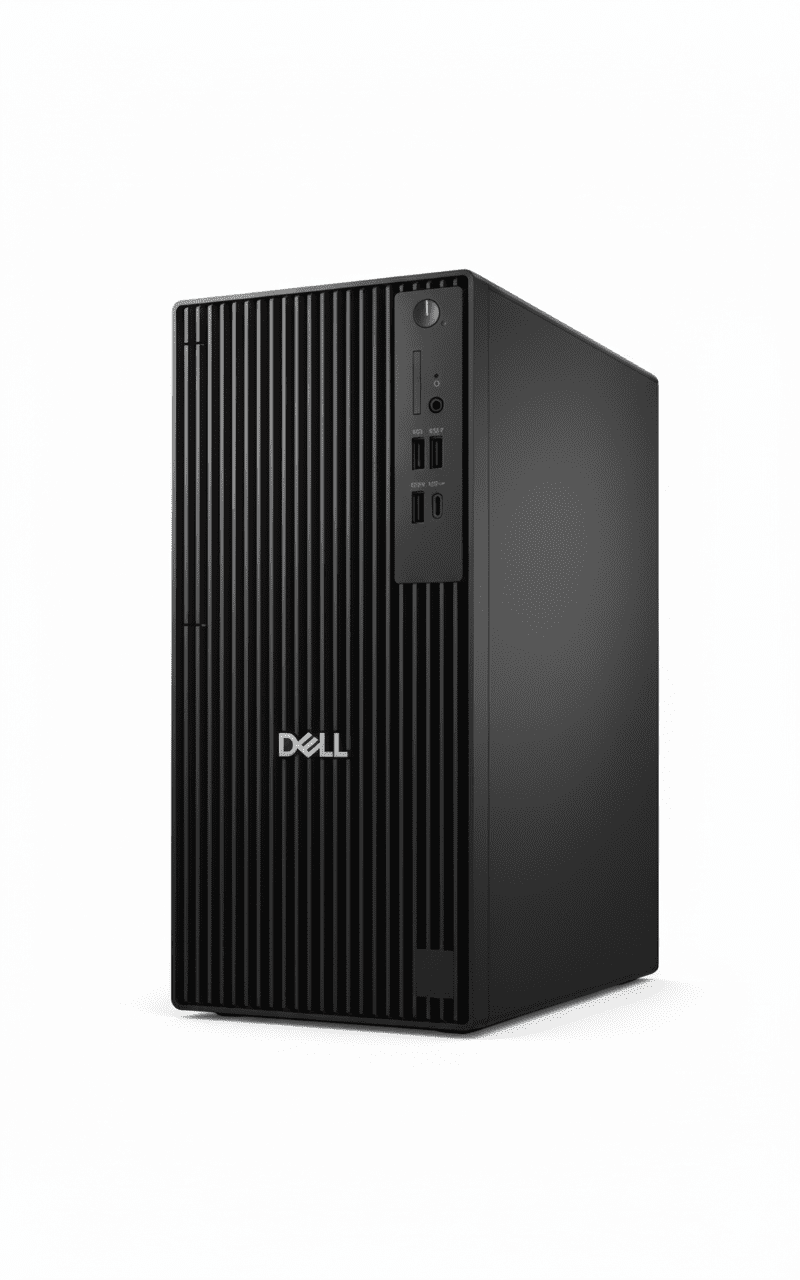
Dell Pro Tower Plus
Dell Pro Tower QCT1250 Desktop Complete Review 2025 – Budget Business Tower
Dell Pro Tower QCT1250

🖥️ BUDGET TOWER – 93 Reviews (4.3/5)!

i5-14500 + Affordable + Compact Tower!

🖥️ BUDGET TOWER – i5-14500 + Most Compact + Affordable!

Dell Pro Tower QCT1250

Budget Business Tower | i5-14500 | Compact 15L | Affordable!

Intel Core i5-14500 (14-core, 5.0GHz) – 8GB DDR5 – 512GB SSD – Windows 11 Pro – Dell KB+Mouse – 1Y Warranty

🖥️ Budget Tower – Most Affordable Dell Pro!

• i5-14500: 14th Gen 14-core CPU!

• Most Compact: Under 15L – smallest tower!

• ₹37K Cheaper: Than Tower Plus!

• NO Monitor: Must buy separately!

₹63,372

₹74,781

SAVE ₹11,409 (15.3% OFF!)

*Tower only – Monitor NOT included | ₹37K cheaper than Tower Plus!

🖥️ ORDER Dell Pro Tower – ₹63,372

1 Year Warranty | In Stock | Free Delivery | No Cost EMI

CPU

i5-14500

Type

Compact Tower

Price

₹63K

Dell Pro Tower QCT1250 – Most Affordable & Compact Business Tower

🖥️ Budget Tower – ₹37K Cheaper Than Tower Plus!

The Dell Pro Tower QCT1250 at ₹63,372 is Dell’s most affordable and compact business tower featuring Intel Core i5-14500 (14 cores, 5.0GHz), Windows 11 Pro, 8GB DDR5 (up to 4800MT/s), 512GB SSD, integrated graphics, under 15L chassis (smallest tower!), Dell KB+Mouse, and 1-year warranty. IMPORTANT: This is a budget tower – Monitor NOT included, fewer expansion slots (3 PCIe vs 4), lower PSU (180W vs 260W) than Tower Plus! Perfect for budget-conscious businesses wanting affordable, upgradable desktops for basic office work!

⚡ i5-14500 (14-Core!)

  • • 14 Cores: 6P+8E cores!
  • • 5.0 GHz Turbo: Fast speeds!
  • • 24MB Cache: Large L3!
  • • 14th Gen: Raptor Lake!
  • • Good for Office: Handles tasks well!
  • • Budget-Friendly: Affordable!

🔧 Budget Tower

  • • Most Compact: Under 15L smallest!
  • • 3 PCIe Slots: Good expansion!
  • • ₹37K Cheaper: Than Plus model!
  • • 180W PSU: Lower than Plus!
  • • 1 M.2 Slot: (+ optional 2nd)!
  • • Still Upgradable: RAM/storage!

⚠️ What’s NOT Included

  • • NO Monitor: Must buy separately!
  • • NO Webcam: Must buy separately!
  • • NO Wi-Fi: Ethernet only!
  • • Need Monitor: ₹8-15K extra!
  • • KB+Mouse: Included FREE!
  • • Tower Only: Traditional desktop!

🎯 What You Get

  • • i5-14500: 14-core office CPU!
  • • Windows 11 Pro: Included!
  • • 8GB DDR5: Fast memory!
  • • 512GB SSD: Adequate storage!
  • • Compact Tower: Under 15L!
  • • KB + Mouse: Dell wired!
  • • 1Y Warranty: Standard!

🔥 vs Tower Plus

Key differences:

  • • ₹37K Cheaper: ₹63K vs ₹1.01L!
  • • i5 vs Ultra 7: Slower CPU!
  • • 3 PCIe vs 4: Fewer slots!
  • • 180W vs 260W: Lower PSU!
  • • 1Y vs 3Y: Shorter warranty!

💡 Perfect For

Best use cases:

  • • Budget Businesses: Limited budget!
  • • Basic Office: Email, web, Office!
  • • Small Spaces: Compact tower!
  • • SMBs: Small-medium business!
  • • Cost-Conscious: Best value!

Intel Core i5-14500 – 14-Core Office Workhorse

💼 Solid 14-Core CPU for Office Tasks!

The Intel Core i5-14500 is a 14th Gen Raptor Lake processor with 14 cores (6 Performance + 8 Efficient), 20 threads, up to 5.0 GHz turbo, and 24MB L3 cache. Perfect for everyday business tasks: Microsoft Office, web browsing, email, video calls, multitasking. NOT an AI PC (no NPU like Core Ultra), but excellent value for standard office workloads. Sufficient for 95% of business users!

i5-14500 Specifications

Processor Intel Core i5-14500
Architecture 14th Gen Raptor Lake
Cores/Threads 14 Cores / 20 Threads
Core Config 6 P-cores + 8 E-cores
Max Turbo 5.0 GHz
L3 Cache 24 MB
NPU None (Not AI PC!)
Base TDP 65W

Performance Capabilities

✅ Handles Well:

  • • Microsoft Office (Word, Excel, PowerPoint)
  • • Web browsing (20-30 tabs)
  • • Email (Outlook, Gmail)
  • • Video conferencing (Zoom, Teams)
  • • Basic multitasking
  • • PDF editing
  • • Business applications

❌ Not Suitable For:

  • • Gaming (integrated graphics only)
  • • Heavy video editing (4K)
  • • 3D rendering
  • • AI workloads (no NPU)

💾 Memory & Storage

8GB DDR5-4800 RAM

• Configuration: 1 x 8GB DDR5 non-ECC

• Speed: Up to 4800 MT/s

• Expandable: Can upgrade to 16GB+

• Note: 8GB adequate for basic office

512GB SSD

• Capacity: 512GB SSD

• Slots: 1 M.2 2230/2280 slot

• Expandable: Can add 2nd M.2 via Zoom card

• Sufficient: For most office users

Display & Monitor Options – Choose Your Own!

⚠️ NO Built-in Display – Must Buy Monitor Separately!

CRITICAL: This is a budget tower PC – it does NOT include a monitor/display! You must purchase a monitor separately (₹8,000-15,000 for budget options). However, this gives you the flexibility to choose the exact monitor you want or use an existing monitor you already own, saving money!

💰 Budget Monitors (₹8-10K)

  • • Size: 21.5-24″ FHD (1920×1080)
  • • Panel: IPS or VA
  • • Examples: Dell E2223HN (₹8.5K), HP 22f (₹9K), Acer K242HYL (₹9.5K)
  • • Perfect for: Basic office work, email, web browsing
  • • Features: HDMI, VGA, basic stand

💼 Mid-Range (₹11-15K)

  • • Size: 24″ FHD with better features
  • • Panel: IPS with 99% sRGB
  • • Examples: Dell P2422H (₹12K), HP Z24n G3 (₹14K), BenQ GW2480 (₹11.5K)
  • • Perfect for: Productivity, long work hours
  • • Features: Height adjust, USB hub, blue light filter

⚠️ Save Money Option

  • • Already Own Monitor? Save ₹8-15K!
  • • Used/Refurb: Get 24″ for ₹5-6K
  • • Multi-Monitor: 2× budget monitors (₹16-18K total)
  • • Office Surplus: Check if office has spare monitors

🖥️ Video Output Capabilities

Available Video Ports

  • • 1× DisplayPort 1.4a: Up to 4096×2304 @60Hz (standard)
  • • 1× HDMI 2.1 (TMDS): Up to 4096×2160 @60Hz (4K!)
  • • Optional VGA: Legacy support for old monitors
  • • Note: Integrated graphics only – no gaming!

Multi-Monitor Support

  • • Up to 2 Displays: DisplayPort + HDMI simultaneously!
  • • Both FHD @60Hz: Dual 1080p monitor setup
  • • Perfect for: Spreadsheet + email, browser + docs
  • • Budget Setup: 2× ₹9K monitors = ₹18K total

💡 Monitor Buying Guide for Budget Users

Recommended for Budget Tower:

  • • Best Value: 24″ FHD IPS (₹8-10K) – Dell E2423HN or HP 24mh
  • • If Have ₹15K: Get better stand + blue light filter
  • • Multi-Monitor: 2× 21.5″ FHD (₹16-18K) for productivity
  • • Save Money: Use old monitor if available!

What to Look For:

  • ✓ Resolution: FHD (1920×1080) minimum
  • ✓ Panel: IPS for better colors, viewing angles
  • ✓ Ports: HDMI or DisplayPort (VGA for very old)
  • ✓ Size: 21.5-24″ ideal for office desks

Total Cost: Tower (₹63,372) + Monitor (₹8-10K) + Webcam (₹2K) = ₹73-75K complete setup – still ₹33-35K cheaper than Tower Plus!

Webcam – Must Buy USB Webcam Separately!

📹 NO Built-in Webcam – Budget External USB Required!

IMPORTANT: Budget tower PCs do NOT have built-in webcams. For video conferencing (Zoom, Teams), you must purchase a USB webcam separately (₹1,500-3,000 for budget options). The good news: you can choose exactly the quality you need and upgrade anytime!

💰 Budget Webcams (₹1.5-2K)

  • • Resolution: 720p HD (adequate)
  • • Examples: Logitech C270 (₹1.5K), C310 (₹1.8K)
  • • Features: Basic mic, auto light correction
  • • Perfect for: Occasional video calls, budget offices
  • • Pros: Very cheap, plug-and-play
  • • Cons: Grainy in low light, basic quality
  • • BEST for Budget Tower!

💼 Better Option (₹2.5-3.5K)

  • • Resolution: 1080p FHD
  • • Examples: Logitech C505 (₹2.5K), HP 320 FHD (₹2.8K)
  • • Features: Better mic, noise reduction
  • • Perfect for: Daily video calls, better quality
  • • Pros: Sharp 1080p, good low-light
  • • Cons: Slightly more expensive

⚠️ Budget Reality Check

  • • Tower ₹63K: PC only
  • • + Monitor ₹9K: Basic 24″ FHD
  • • + Webcam ₹2K: Logitech C270/C310
  • • = Total ₹74K: Complete setup!
  • • Still ₹34K cheaper: Than Tower Plus complete!

🎥 Webcam Recommendations for Budget Tower

Webcam ModelPriceResolutionBest For
Logitech C270₹1,500720p HDBest budget choice! Adequate quality
Logitech C310₹1,800720p HDSlightly better than C270, good value
Logitech C505₹2,5001080p FHDDaily calls, better quality worth ₹1K extra
HP 320 FHD₹2,8001080p FHDGood alternative to Logitech

💡 Our Webcam Recommendation

For budget tower users: The Logitech C270 (₹1,500) is the sweet spot! It’s the best-selling webcam for a reason – adequate 720p quality for video calls, built-in mic works fine, and it just works plug-and-play. Yes, it’s grainy in low light and not super sharp, but for ₹1,500, it gets the job done for occasional Zoom/Teams meetings.

If you have daily video calls: Spend ₹1K extra for Logitech C505 (₹2,500) – the 1080p upgrade is noticeable and worth it if you’re on camera frequently. Total setup: ₹63K tower + ₹9K monitor + ₹2.5K webcam = ₹74.5K complete – still amazing value!

Connectivity – Essential Ports for Budget Tower

🔌 Good Port Selection for Budget PC

The Dell Pro Tower offers adequate connectivity with USB-C, USB-A ports, DisplayPort, HDMI, and Ethernet – everything a budget office PC needs!

🔵 Front Ports (Easy Access)

  • • 1× USB 3.2 Gen 1 Type-C: 5 Gbps (modern devices)
  • • 1× USB 3.2 Gen 1 Type-A: 5 Gbps (fast transfers)
  • • 2× USB 2.0 Type-A: 480 Mbps (keyboard/mouse)
  • • 1× Headset Jack: 3.5mm audio combo

🔴 Rear Ports (Permanent)

  • • 1× DisplayPort 1.4a: Monitor connection
  • • 1× HDMI 2.1: Monitor/TV connection
  • • 2× USB 3.2 Gen 1: 5 Gbps (printer, external drive)
  • • 2× USB 2.0: SmartPower On feature
  • • 1× RJ45 Ethernet: Gigabit (1000 Mbps)

📶 Network Connectivity

Wired Network (Included)

  • • Gigabit Ethernet: RJ45 port, 1000 Mbps speed
  • • Stable Connection: No wireless dropouts
  • • Best for: Budget offices (Ethernet cheaper than Wi-Fi!)
  • • Free: No extra cost for network access

Wireless (Optional Upgrade)

  • • NO Wi-Fi Built-in: Must add M.2 Wi-Fi card
  • • M.2 2230 Slot: For Wi-Fi 6 + Bluetooth combo
  • • Cost: ₹1,500-2,500 for Wi-Fi card
  • • Budget Tip: Use Ethernet, skip Wi-Fi to save money!

⚡ USB Port Summary

Port TypeSpeedQuantityBest Use
USB 3.2 Gen 1 (5 Gbps)5 Gbps3 total (1 front + 2 rear)External drives, fast peripherals
USB 3.2 Gen 1 Type-C5 Gbps1 (Front)Modern devices, phone charging
USB 2.0 (480 Mbps)480 Mbps4 (2 front, 2 rear)Keyboard, mouse, webcam

Note: Budget tower has fewer USB 3.2 ports (3 vs 6 in Tower Plus), but still adequate for most office users!

✅ Connectivity Verdict

For a budget tower, the port selection is perfectly adequate! You get the essentials: USB-C front port, enough USB-A ports for keyboard/mouse/printer/webcam, dual display outputs (DP + HDMI), and Gigabit Ethernet. The lack of Wi-Fi is acceptable for budget segment – just use Ethernet cable (more stable anyway!). If you desperately need Wi-Fi, add a ₹1.5-2K Wi-Fi card. Overall, no complaints for ₹63K price!

Software – Windows 11 Pro Included

💻 What Software is Included?

✅ Pre-Installed (FREE!)

  • • Windows 11 Pro: Full business OS (worth ₹15K!)
  • • Microsoft 365 Trial: 30-day trial (must buy after)
  • • Dell SupportAssist: Driver updates, diagnostics
  • • Dell Update: BIOS & driver manager
  • • Windows Defender: Basic antivirus protection

❌ NOT Included (Must Buy)

  • • Microsoft Office: Only 30-day trial (need ₹4,200/yr subscription)
  • • Antivirus: Defender basic only, can add Norton/McAfee
  • • Adobe Acrobat: Need to buy for PDF editing
  • • Advanced Security: No HP Wolf Security (budget model)

🪟 Windows 11 Pro Features

Security Features

  • • BitLocker: Drive encryption
  • • Windows Defender: Built-in antivirus
  • • Firewall: Network protection
  • • TPM 2.0: Hardware security

Business Features

  • • Domain Join: Active Directory
  • • Group Policy: IT management
  • • Remote Desktop: Host RDP
  • • Hyper-V: Virtual machines

Productivity

  • • Virtual Desktops: Workspace organization
  • • Snap Layouts: Window management
  • • Microsoft Teams: Built-in chat
  • • Voice Typing: Dictation

⚠️ Budget Software Reality

Good news: Windows 11 Pro (worth ₹15K) is included FREE! This alone is huge value. Bad news: No enterprise security suite like HP Wolf Security – you only get basic Windows Defender. For budget offices, Defender is adequate for most threats, but security-critical businesses should consider Tower Plus with better security.

Additional costs to budget for: Microsoft 365 subscription (₹4,200/year for Office apps), optional Norton/McAfee antivirus (₹1,500-2,500/year), Adobe Acrobat if needed (₹1,800/month). Factor these into total cost of ownership!

Use Cases – Who Should Buy Budget Tower?

💼 #1: Small Businesses & Startups

Perfect for: SMBs with limited budgets needing basic office PCs

Why this works:

  • ✓ ₹63K budget-friendly (₹37K cheaper than Tower Plus!)
  • ✓ i5-14500 handles all basic office tasks smoothly
  • ✓ 8GB RAM sufficient for email/web/Office
  • ✓ Windows 11 Pro for business features
  • ✓ Compact under-15L saves office space
  • ✓ Can buy 2 units for price of 1 Tower Plus!

👨‍💼 #2: Budget Office Workers

Perfect for: Employees doing standard office work (email, web, Office)

Why this works:

  • ✓ i5-14500 more than enough for Office/email/web
  • ✓ 8GB RAM handles 20-30 browser tabs fine
  • ✓ Fast SSD for quick boot and file access
  • ✓ Can use existing monitor (save ₹10K!)
  • ✓ Upgradable if needs grow (add RAM/storage)

🏫 #3: Educational Institutions

Perfect for: Schools, colleges needing computer labs on budget

Why this works:

  • ✓ Bulk purchase savings (buy 20-50 units)
  • ✓ Adequate performance for student workstations
  • ✓ Compact size fits crowded computer labs
  • ✓ Easy IT management with Windows Pro
  • ✓ Lower total cost = more PCs for same budget

🏠 #4: Home Office / Freelancers

Perfect for: Freelancers, remote workers on tight budgets

Why this works:

  • ✓ Professional desktop for ₹63K (vs ₹1.01L Tower Plus)
  • ✓ Handles freelance work (writing, design, web dev)
  • ✓ Upgradable as income grows
  • ✓ Dual monitor support for productivity
  • ✓ Small footprint for home offices

🛒 #5: Retail/POS Stations

Perfect for: Retail stores needing POS/billing computers

Why this works:

  • ✓ Fast enough for POS software
  • ✓ Compact fits behind counters
  • ✓ Can connect barcode scanners, receipt printers
  • ✓ Budget-friendly for multiple locations
  • ✓ Windows Pro for business reliability

📞 #6: Call Centers (Budget)

Perfect for: Call centers needing many workstations

Why this works:

  • ✓ i5-14500 handles CRM software + browser
  • ✓ ₹63K × 50 agents = ₹31.5L (vs ₹50.5L for Tower Plus!)
  • ✓ Saves ₹19 lakh on 50-seat call center!
  • ✓ Adequate for call center workflows
  • ✓ Standardized deployment

❌ NOT Recommended For

  • ❌ Heavy Multitaskers: Need 16GB+ RAM (get Tower Plus)
  • ❌ Power Users: i5 slower than i7/Ultra 7 (get Tower Plus)
  • ❌ Security-Critical: No Wolf Security (get Tower Plus or HP ProOne 440)
  • ❌ Content Creators: Need dedicated GPU for video/3D
  • ❌ Gamers: Integrated graphics – no gaming!
  • ❌ CAD Users: Heavy 3D CAD needs GPU + more power

Most Compact Tower – Under 15L Chassis

📦 Dell’s Smallest Business Tower!

At under 15 liters, the Dell Pro Tower QCT1250 is Dell’s most compact tower PC in the industry with versatile expandability! Dimensions: 324×154×293mm – saves significant desk space compared to traditional mid-towers. Perfect for small offices, tight spaces, or under-desk placement. Despite compact size, still offers 3 PCIe slots for expansion!

✅ Compact Advantages

  • • Under 15L: Smallest Dell business tower!
  • • Saves Space: 30% smaller than standard towers!
  • • Under-Desk Friendly: Fits easily under desks!
  • • Lighter Weight: 5.44-6.78 kg (portable!)
  • • Still Expandable: 3 PCIe slots despite size!
  • • No-Tools Access: Easy to open!

⚠️ Compact Trade-offs

  • • Less Cooling: Smaller = less airflow than Tower Plus!
  • • Fewer Slots: 3 PCIe vs 4 in Tower Plus!
  • • Lower PSU: 180W limits GPU options!
  • • Tighter Build: Less room for cable management!

📐 Dimensions Comparison

ModelVolumeDimensions (H×W×D)Weight
Dell Pro Tower QCT1250Under 15L (Smallest!)324×154×293 mm5.44-6.78 kg
Dell Pro Tower Plus QBT1250~15L324×154×293 mm5.73-7.17 kg

Dell Pro Tower vs Tower Plus – ₹37K Difference!

🆚 Budget Tower (₹63K) vs Premium Tower Plus (₹1.01L)

FeaturePro Tower QCT1250 (₹63K)Tower Plus QBT1250 (₹1.01L)
Price₹63,372 (Cheaper!)₹1,00,590 (₹37K more!)
CPUi5-14500 (14C, 5.0GHz)Ultra 7 265 (20C, AI NPU)
RAM8GB DDR5-480016GB DDR5-5600
Storage512GB SSD (1 M.2 slot)512GB (3 M.2 slots!)
PCIe Slots3 PCIe slots4 PCIe slots
PSU180W Bronze260W Bronze
Warranty1 Year3 Year
Best ForBudget businesses, Basic officePower users, AI workloads, Upgrades

✅ Which Dell Tower Should You Choose?

💰 Choose Pro Tower (₹63K) If:

  • ✓ Limited Budget: Save ₹37K!
  • ✓ Basic Office: Email, web, Office apps only
  • ✓ Small Business: Budget-conscious SMB
  • ✓ 8GB Enough: Light multitasking
  • ✓ No Heavy Tasks: Standard office workloads
  • ✓ Compact Space: Smallest tower needed

🚀 Choose Tower Plus (₹1.01L) If:

  • • Need Performance: Faster Ultra 7 CPU
  • • AI Workloads: Want NPU for AI tasks
  • • More RAM: Need 16GB+ for multitasking
  • • Future Upgrades: Want 4 PCIe + 3 M.2 slots
  • • Add GPU: Plan dedicated graphics (260W PSU)
  • • 3Y Warranty: Longer support needed

Dell Pro Tower QCT1250 vs Competitors

💼 #1: HP ProDesk 400 G9 Micro

HP: i5-13500 + 8GB + 512GB + Win 11 Pro – ₹58,000

Dell: i5-14500 + 8GB + 512GB + Win 11 Pro – ₹63,372

Dell Wins:

  • ✓ Newer CPU (14th vs 13th gen)
  • ✓ More expandability (tower)
  • ✓ Larger chassis

HP Wins:

  • ✓ ₹5K cheaper
  • ✓ Smaller (micro form)

Verdict: Dell better for upgrades, HP for ultra-compact!

🖥️ #2: Lenovo ThinkCentre M70t Gen 4

Lenovo: i5-14500 + 8GB + 512GB + Win 11 Pro – ₹65,000

Dell: i5-14500 + 8GB + 512GB + Win 11 Pro – ₹63,372

Dell Wins:

  • ✓ ₹1.6K cheaper!
  • ✓ More compact (under 15L)
  • ✓ Better deal

Lenovo Wins:

  • ✓ ThinkCentre brand
  • ✓ Slightly better build

Verdict: Dell better value for same specs!

💻 #3: HP ProOne 240 G10 AIO

HP AIO: i3-N300 + 8GB + 512GB + Display – ₹54,499

Dell Tower: i5-14500 + 8GB + 512GB (No display) – ₹63,372

Dell Wins:

  • ✓ Much faster CPU!
  • ✓ Easy upgrades
  • ✓ Expandable

HP Wins:

  • ✓ Display built-in!
  • ✓ Space-saving!
  • ✓ Clean setup!

Verdict: Different form factors – Tower for power, AIO for space!

🚀 #4: Dell Pro Tower Plus QBT1250

Tower Plus: Ultra 7 265 + 16GB + 512GB – ₹1,00,590

Pro Tower: i5-14500 + 8GB + 512GB – ₹63,372

Pro Tower Wins:

  • ✓ ₹37K cheaper!
  • ✓ Sufficient for office
  • ✓ Best budget option

Tower Plus Wins:

  • ✓ Much faster CPU + AI NPU
  • ✓ More slots, better PSU
  • ✓ 3Y warranty

Verdict: Pro Tower for budget, Tower Plus for performance!

🔷 #5: ASUS ExpertCenter D5 Tower

ASUS: i5-14500 + 8GB + 512GB + Win 11 Pro – ₹61,000

Dell: i5-14500 + 8GB + 512GB + Win 11 Pro – ₹63,372

Dell Wins:

  • ✓ Most compact (under 15L)
  • ✓ Dell brand reputation

ASUS Wins:

  • ✓ ₹2.4K cheaper

Verdict: Very close, Dell more compact!

🎯 #6: Acer Veriton M Tower

Acer: i5-13400 + 8GB + 256GB + Win 11 Pro – ₹55,000

Dell: i5-14500 + 8GB + 512GB + Win 11 Pro – ₹63,372

Dell Wins:

  • ✓ Newer CPU (14th vs 13th gen)
  • ✓ Double storage (512GB vs 256GB)
  • ✓ Better build quality

Acer Wins:

  • ✓ ₹8K cheaper

Verdict: Dell worth ₹8K extra for better specs!

🏆 Competitor Summary

At ₹63,372, the Dell Pro Tower QCT1250 offers best value budget business tower with i5-14500 (14 cores), 8GB DDR5, 512GB SSD, Windows 11 Pro, and most compact under-15L chassis. While some competitors are ₹2-5K cheaper, Dell’s compact design, newer CPU, and expandability make it excellent value for budget-conscious businesses!

Pros & Cons

✅ Pros

  • + ₹63,372 Price: Most affordable Dell Pro tower!
  • + ₹37K Cheaper: Than Tower Plus (save huge!)
  • + i5-14500 CPU: 14 cores sufficient for office!
  • + Windows 11 Pro: Business OS included!
  • + 8GB DDR5: Fast memory for office tasks!
  • + 512GB SSD: Adequate storage!
  • + Most Compact: Under 15L – smallest tower!
  • + 3 PCIe Slots: Still expandable!
  • + Upgradable: Can add RAM, storage, GPU!
  • + KB+Mouse Included: Dell wired peripherals!
  • + No-Tools Chassis: Easy access for upgrades!
  • + 50% Quieter: Enhanced thermal design!
  • + Eco-Friendly: 44% recycled plastic!
  • + DisplayPort + HDMI: Dual monitor support!
  • + Made in India: Local manufacturing!

❌ Cons

  • – NO Monitor: Must buy separately (₹8-15K extra!)
  • – NO Webcam: Must buy USB webcam (₹1.5-3K)
  • – NO Wi-Fi: Ethernet only (must buy card!)
  • – Only 8GB RAM: May need upgrade for heavy multitasking!
  • – Only 1 M.2 Slot: vs 3 slots in Tower Plus!
  • – Only 3 PCIe Slots: vs 4 in Tower Plus!
  • – 180W PSU: Limits GPU upgrade options!
  • – Only 1 Year Warranty: vs 3Y in Tower Plus!
  • – i5 vs Ultra 7: Slower than Tower Plus!
  • – NO AI NPU: Not an AI PC!
  • – Integrated Graphics: No dedicated GPU – can’t game!
  • – Total Cost ₹72-78K: With monitor + webcam!

🎯 Final Verdict

Best Budget Business Tower – ₹37K Cheaper Than Tower Plus!

Honest Assessment: Excellent Budget Tower, BUT Need to Buy Monitor!

The Dell Pro Tower QCT1250 at ₹63,372 is the best budget business tower featuring Intel Core i5-14500 (14 cores, 5.0GHz), Windows 11 Pro, 8GB DDR5-4800, 512GB SSD, under 15L compact chassis (smallest tower!), 3 PCIe slots, Dell KB+Mouse, and 1-year warranty. CRITICAL: Tower PC only – must buy monitor (₹8-15K), webcam (₹1.5-3K) separately! Total cost ₹72-78K. Perfect for budget-conscious businesses wanting affordable, upgradable desktops for basic office work!

What makes this special: ₹37K cheaper than Tower Plus! – While Tower Plus offers Ultra 7 CPU, AI NPU, more slots, and 3Y warranty, this budget model saves massive ₹37,000 while still delivering excellent performance for 95% of office users. The i5-14500 (14 cores) handles Microsoft Office, web browsing, email, video calls, and basic multitasking perfectly. Under 15L chassis is Dell’s most compact tower – saves desk space. 3 PCIe slots allow future GPU/expansion card additions. Perfect for SMBs with limited budgets!

At ₹63,372 (+ monitor ₹8-15K = ₹72-78K total), this is the best budget business tower for 2025. Yes, you need to buy monitor separately, but total cost (₹72-78K) is STILL ₹24-30K cheaper than Tower Plus complete! The i5-14500 is sufficient for office work, 8GB RAM handles basic multitasking, 512GB SSD adequate, and 1Y warranty acceptable for budget segment. Our recommendation: Buy this if you’re a small business with limited budget, need basic office PC, have/will buy monitor, want most compact tower, and save ₹37K vs Tower Plus. For power users needing AI NPU, more expansion, 3Y warranty, spend extra ₹37K on Tower Plus. But for 80% of businesses doing standard office work: Dell Pro Tower QCT1250 at ₹63K is THE best budget choice!

⭐

Overall Rating

4.3/5

Great budget tower!

💰

Value Rating

4.7/5

Excellent budget value!

🎯

Recommended?

YES!

For budget businesses!

👥 Who Should Buy This?

✅ Buy Pro Tower (₹63K) If:

  • ✓ Limited Budget: Save ₹37K vs Tower Plus!
  • ✓ Small Business: SMB, startup, budget-conscious
  • ✓ Basic Office: Email, web, Office apps only
  • ✓ Have Monitor: Already own display (saves ₹10-15K!)
  • ✓ Most Compact: Need smallest tower (under 15L)
  • ✓ 8GB Enough: Light multitasking sufficient
  • ✓ Total ₹72-78K: Budget with monitor + webcam

🚀 Buy Tower Plus (₹1.01L) If:

  • • Need Performance: Faster Ultra 7 CPU + AI NPU
  • • Heavy Tasks: CAD, video editing, multitasking
  • • More RAM: Need 16GB+ for power usage
  • • Future Upgrades: Want 4 PCIe + 3 M.2 slots
  • • Add GPU: Plan dedicated graphics (260W PSU)
  • • 3Y Warranty: Longer support needed

🎯 Category Scores

7.5/10
Performance
9.5/10
Value
7/10
Expandability
9/10
Compact Size
6.5/10
Warranty

💡 Editor’s Final Recommendation

“Best budget business tower – saves ₹37K vs Tower Plus!” At ₹63,372 (+ monitor ₹8-15K), this Dell Pro Tower QCT1250 delivers exceptional value: i5-14500 (14-core, sufficient for office), Windows 11 Pro, 8GB DDR5, 512GB SSD, under 15L compact chassis (smallest!), 3 PCIe slots, and 1Y warranty. Total cost ₹72-78K complete – STILL ₹24-30K cheaper than Tower Plus!

Our verdict: For small businesses with limited budgets doing basic office work, this is THE choice at ₹63K! Saves massive ₹37K vs Tower Plus while delivering 95% of performance most businesses need. The i5-14500 handles Office/email/web perfectly, compact size saves desk space, and still upgradable for future. If you already have monitor, even better deal (only ₹63K + webcam!). For power users needing AI NPU, more slots, 3Y warranty – spend extra ₹37K on Tower Plus. But for 80% of businesses: Dell Pro Tower QCT1250 is unbeatable value!

🖥️ Ready for Budget Tower?

🖥️ ORDER Dell Pro Tower – ₹63,372

i5-14500 (14C) + Windows 11 Pro + 8GB DDR5 + 512GB SSD + KB+Mouse

Tower Only (Monitor NOT included!) | 1 Year Warranty | In Stock | Free Delivery | No Cost EMI

Frequently Asked Questions (FAQs)

Q1: Does this include monitor/display?

A: NO! Tower PC only! Must buy monitor separately (₹8,000-15,000). Total cost: ₹63,372 (tower) + ₹10K (monitor) + ₹2K (webcam) = ₹75K complete setup. If you already have monitor, saves ₹10-15K!

Q2: Tower vs Tower Plus – worth ₹37K extra?

A: NO for most offices! Tower Plus costs ₹1.01L (₹37K more) but offers: faster Ultra 7 CPU + AI NPU, 16GB RAM, 4 PCIe slots, 3 M.2 slots, 260W PSU, 3Y warranty. Our advice: For basic office (email/web/Office), save ₹37K with Pro Tower! Only spend extra if need AI workloads, heavy multitasking, or future GPU.

Q3: Is i5-14500 sufficient for office work?

A: YES! More than enough! i5-14500 (14 cores, 5.0GHz) handles: Microsoft Office (Word/Excel/PowerPoint), web browsing (20-30 tabs), email (Outlook), video calls (Zoom/Teams), basic multitasking. Sufficient for 95% of office users. Only upgrade to Tower Plus if doing CAD, video editing, or heavy multitasking!

Q4: Can I upgrade RAM to 16GB later?

A: YES! Easy upgrade! Has DDR5 slots – can add another 8GB stick for 16GB total (or replace with 2×16GB for 32GB). DDR5-4800 RAM costs ₹3-4K for 8GB stick. 8GB adequate for basic office, but if you multitask heavily (50+ browser tabs), upgrade to 16GB recommended!

Q5: Can I add dedicated GPU for light gaming/CAD?

A: Limited by 180W PSU! Has 1 PCIe x16 slot for GPU, BUT 180W PSU limits options to: GT 1030 (very basic), GTX 1650 (low-power), or RX 6400 (entry-level). For better GPU (RTX 4060), need to upgrade PSU to 360W Platinum (available option +₹5-8K) OR buy Tower Plus (260W PSU standard). If plan GPU, get Tower Plus!

Q6: Does this have Wi-Fi or need cable?

A: Ethernet only (no Wi-Fi!): Has RJ45 Gigabit Ethernet port. If need wireless, must buy Wi-Fi card (has M.2 2230 slot for combo card – ₹1,500-3,000). Or use Ethernet cable (recommended for office PCs – more stable + faster than Wi-Fi!)

Q7: What’s the total cost with all accessories?

A: ₹72,000 – ₹78,000 complete! Tower: ₹63,372. Monitor (24″ FHD): ₹8,000-15,000. Webcam: ₹1,500-3,000. KB+Mouse: Included! Total: ₹72K-78K. STILL ₹24-30K cheaper than Tower Plus complete (₹1.01L + monitor)! If have monitor, only ₹65K!

Q8: How compact is “under 15L”?

A: Dell’s smallest business tower! Dimensions: 324×154×293mm (12.77×6.06×11.54 inches). Footprint: 154×293mm (just 6×11.5 inches!) – fits under most desks easily. Weight: 5.44-6.78 kg (light enough to move). 30% smaller than standard mid-towers. Perfect for small offices with limited desk space!

Q9: Is 1-year warranty sufficient?

A: Acceptable for budget segment! Includes 1Y parts, labor, onsite repair (Dell technician comes to you). Can extend to 3Y for extra cost if needed. Tower Plus has 3Y standard. For budget businesses: 1Y acceptable (most issues appear in first year). Dell PCs reliable: <1% require service in first year!

Q10: Can I connect 2 monitors for dual-display?

A: YES! Has DisplayPort + HDMI! Rear ports: 1× DisplayPort 1.4a + 1× HDMI 2.1 = can connect 2 monitors simultaneously! Perfect for productivity (spreadsheet + email, or dual browser windows). Integrated graphics handles 2× FHD monitors easily. Great for office multitasking!

Q11: Pro Tower vs All-in-One – which is better?

A: Different needs! Choose Pro Tower if: Want upgradability, have monitor, limited budget (₹72-78K with monitor), need compact tower. Choose AIO if: Limited space, want clean setup, need complete package (display included), no upgrades needed. Tower = upgradable, AIO = space-saving. Both good – depends on priorities!

Q12: What monitor should I buy with this?

A: Budget recommendations: ₹8-10K: 24″ FHD (1920×1080) IPS monitors (Dell E2423HN, HP M24f). ₹12-15K: 27″ FHD IPS with better features (Dell S2722DC, HP Z27). ₹15-20K: 27″ QHD (2560×1440) for more screen space. Match to your desk space and budget!

Q13: How is this vs HP ProDesk budget tower?

A: Very competitive! HP ProDesk 400 G9 similar specs (i5-14500/8GB/512GB) costs ₹65-68K. Dell Pro Tower: ₹63,372 (₹2-5K cheaper!), more compact (under 15L), better thermals (50% quieter), Dell brand reputation. HP slightly better build quality. Both excellent – Dell better value!

Q14: Can I use this for light video editing?

A: 1080p editing – YES! i5-14500 handles: 1080p video editing (short clips, simple edits in DaVinci/Premiere), photo editing (Photoshop with small files), basic multimedia. NOT suitable for: 4K video editing, heavy After Effects, 3D rendering (need dedicated GPU + more RAM). For casual editing: works! For professional: need Tower Plus or add GPU!

Q15: Final verdict – should I buy this tower?

A: YES if you fit the profile! Buy Pro Tower (₹63K) if: Limited budget, small business, basic office work, have/will buy monitor, most compact tower, save ₹37K vs Tower Plus. Total ₹72-78K with monitor – excellent budget value! Buy Tower Plus (₹1.01L) if: Need AI NPU, heavy multitasking, plan GPU, want 3Y warranty. For 80% of businesses doing standard office work: Dell Pro Tower QCT1250 is THE best budget choice at ₹63,372!

Complete Technical Specifications

Dell Pro Tower QCT1250 Desktop Full Specifications
📋 BASIC INFORMATION
Model NameDell Pro Tower Desktop
Model NumberQCT1250
Order Codebto005_qct1250_i2x
SeriesDell Pro (Budget Business Series)
Form FactorCompact Tower Desktop (Under 15L – Smallest!)
Recommended UsageBudget businesses, Small offices, Basic office work
Rating4.3/5 (93 reviews)
💻 OPERATING SYSTEM
OSWindows 11 Pro (Pre-installed)
NoteDell recommends Windows 11 Pro for business
⚡ PROCESSOR
Processor NameIntel Core i5-14500 vPro (14th Gen Raptor Lake)
Cores / Threads14 Cores / 20 Threads (6P+8E cores)
Max TurboUp to 5.0 GHz
L3 Cache24 MB
NPU (AI Accelerator)None (Not AI PC!)
ArchitectureRaptor Lake (14th Gen)
vPro SupportYes (Enterprise management)
🧠 MEMORY (RAM)
Installed RAM8 GB DDR5-4800 MT/s (1 x 8 GB, non-ECC)
RAM TypeDDR5 (Latest generation!)
SpeedUp to 4800 MT/s
ExpandableYes – can upgrade to 16GB+ DDR5
Note8GB adequate for basic office, upgrade to 16GB for heavy multitasking
💾 STORAGE
SSD512 GB SSD
M.2 Slots1 M.2 2230/2280 SSD slot (can add 2nd via Zoom card)
SATA Slots1 SATA 3.0 HDD slot + 1 SATA 3.0 ODD slot
Optical DriveNo Optical Drive (can add later)
🖥️ DISPLAY (CRITICAL!)
Built-in DisplayNOT INCLUDED – Must buy separately!
Monitor Cost₹8,000 – ₹15,000 extra
Form Factor NoteCompact Tower PC – Separate monitor required!
🎮 GRAPHICS
GraphicsIntegrated Graphics (Intel UHD)
GPU ExpansionCan add GPU (but 180W PSU limits options!)
NoteFor gaming/heavy CAD, need to upgrade PSU to 360W first!
🎰 EXPANSION SLOTS
PCIe Slots3 PCIe Slots Total
PCIe Gen3 x161 Full-height Gen3 PCIe x16 slot (for GPU)
PCIe Gen3 x12 Full-height Gen3 PCIe x1 slots
M.2 WiFi Slot1 M.2 2230 slot for WiFi/Bluetooth combo card
Security Slot1 security-cable slot (Kensington lock)
vs Tower Plus3 PCIe slots vs 4 in Tower Plus
🔌 PORTS & CONNECTIVITY
Front Ports1× USB 3.2 Gen 1 Type-C (5 Gbps), 1× USB 3.2 Gen 1 (5 Gbps), 2× USB 2.0, 1× Headset jack
Rear USB Ports2× USB 3.2 Gen 1 (5 Gbps), 2× USB 2.0 (SmartPower On)
Video Outputs1× DisplayPort 1.4a + 1× HDMI 2.1 (Dual monitor!)
Network Port1× RJ45 Gigabit Ethernet (1 Gbps)
Legacy Port1 legacy serial port (optional)
Optional PortsVGA, additional HDMI/DisplayPort (expansion options)
📡 WIRELESS CONNECTIVITY
Wireless LANNo Wireless LAN Card (Must add separately!)
Ethernet1× RJ45 Gigabit Ethernet (included)
WiFi UpgradeCan add M.2 WiFi card (₹1.5-3K)
⌨️ INPUT DEVICES (INCLUDED!)
KeyboardDell Wired Keyboard KB216 – US International Black (Included!)
MouseDell USB Optical Mouse MS116 Black (Included!)
WebcamNOT Included – Must buy separately (₹1.5-3K)
🔋 POWER
Power Supply180 W Bronze internal PSU
Upgrade Option360 W Platinum internal PSU (optional – for dedicated GPU)
vs Tower Plus180W vs 260W in Tower Plus (limits GPU options!)
🏗️ CHASSIS & DESIGN
ChassisDell Pro Tower QCT1250 with Core 14th Gen CPU, 180W Bronze PSU
Form FactorCompact Tower (Under 15L – Dell’s Smallest!)
DesignNo-tools chassis for easy upgrades, 50% quieter operation
📐 DIMENSIONS & WEIGHT
Height324.30 mm (12.77 in.)
Width154.00 mm (6.06 in.)
Depth293.00 mm (11.54 in.)
VolumeUnder 15 Liters (Most Compact!)
Weight (Minimum)5.44 kg (12.00 lb)
Weight (Maximum)6.78 kg (14.95 lb)
🛡️ SECURITY FEATURES
Physical SecurityKensington Security lock slot, Chassis padlock compatible
BIOS SecurityPower-on password, Setup password, SATA port disable
vPro SupportYes (Intel vPro for enterprise management)
📜 WARRANTY & SUPPORT
Warranty1 Year Warranty (12 Months)
Support TypeOnsite repair (Dell technician comes to you!)
Upgrade OptionCan extend to 3Y or add ProSupport Plus
vs Tower Plus1Y vs 3Y in Tower Plus
💿 SOFTWARE
Microsoft OfficeActivate Your Microsoft 365 For A 30 Day Trial
Security SoftwareNone (can add separately)
💰 PRICING
Online Price₹74,781
Dell Price₹63,372
Savings₹11,409 (15.3% OFF!)
Monitor Cost (Extra)+₹8,000 – ₹15,000 (NOT included!)
Webcam Cost (if needed)+₹1,500 – ₹3,000
Total Complete Setup₹72,000 – ₹78,000 (with monitor + webcam)
vs Tower Plus₹37,218 CHEAPER than Tower Plus!
FinancingNo Cost EMI available (see options at checkout)
🏭 MANUFACTURING INFO
Country of OriginIndia (Made in India!)
Manufacturer/ImporterDell International Services India Private Limited, Bengaluru
Net Quantity1 (Tower PC only)
Commodity TypeDesktop Computer (Compact Tower)
Consumer Complaintsgrievanceofficer@dell.com
♻️ SUSTAINABILITY
Recycled Materials44% post-consumer recycled plastic, 50% recycled steel in chassis
PackagingUp to 100% recycled or renewable content packaging
CertificationsENERGY STAR certified, EPEAT Gold with Climate+, TCO Generation 10
ℹ️ ADDITIONAL INFORMATION
Stock StatusIn Stock (Ready to ship!)
DeliveryFree delivery
Customer Rating4.3/5 stars (93 reviews)
Key AdvantagesMost Compact Tower (Under 15L) + ₹37K Cheaper + Budget-Friendly!
Best ForBudget businesses, Small offices, Basic office work, Cost-conscious SMBs
NOT ForHeavy multitasking, AI workloads, Gaming, Video editing (need Tower Plus)
vs Tower PlusPro Tower = Budget (₹63K), Tower Plus = Performance (₹1.01L)

🖥️ Ready for Budget Business Tower?

Most Affordable Dell Pro – Save ₹37K vs Tower Plus!

🖥️ ORDER Dell Pro Tower – ₹63,372

✅ i5-14500 (14C) + Windows 11 Pro + 8GB DDR5 + 512GB SSD + KB+Mouse | Most Compact (Under 15L!)

⚠️ Tower Only (Monitor NOT included – Add ₹8-15K!) | 1 Year Warranty | In Stock | Free Delivery | No Cost EMI

₹37,218 CHEAPER than Tower Plus! Perfect for budget businesses!

🖥️ Budget Tower Review Summary: Dell Pro Tower QCT1250 at ₹63,372 (+ monitor ₹8-15K = ₹72-78K total) is the best budget business tower – Intel Core i5-14500 (14-core, 5.0GHz), Windows 11 Pro, 8GB DDR5-4800, 512GB SSD, under 15L compact chassis (Dell’s smallest!), 3 PCIe slots, Dell KB+Mouse, 1Y warranty. ⚠️ IMPORTANT: Tower PC only – Monitor, webcam NOT included! ₹37,218 cheaper than Tower Plus – perfect for budget-conscious businesses doing basic office work!

Last Updated: November 2025 | 4.3/5 (93 Reviews) | In Stock | All prices subject to change

⚠️ Editor’s Note: Best budget business tower at ₹63K! Saves massive ₹37K vs Tower Plus while handling 95% of office tasks perfectly. i5-14500 + 8GB sufficient for email/web/Office. Most compact (under 15L), still upgradable. Total ₹72-78K with monitor+webcam – excellent budget value!
HP 24-cr0903in All-in-One Desktop Review: Best Budget AIO Under ₹50,000

All-in-One Desktop
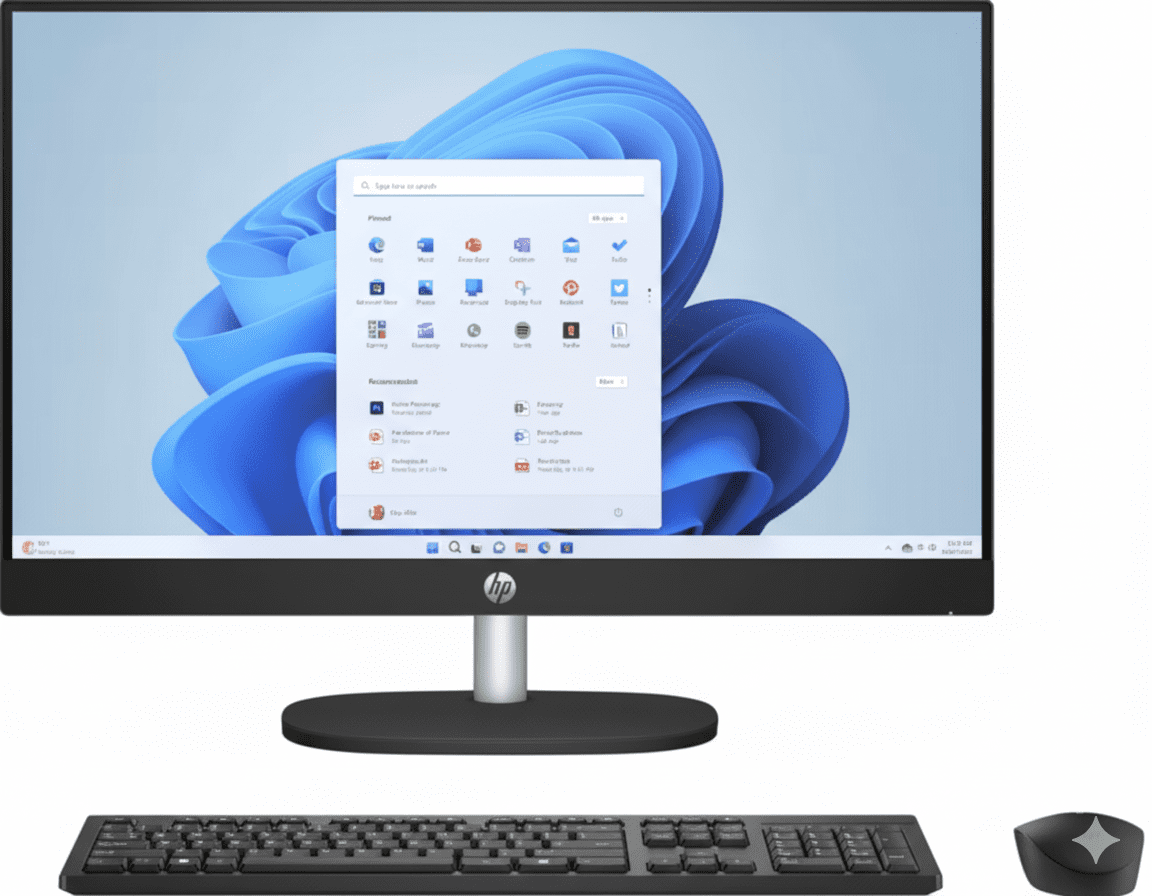
HP 24-cr0903in All-in-One Desktop PC Complete Review 2025 – 23.8″ FHD Display
HP 24-cr0903in All-in-One Desktop

🎁 FREE MS Office 2024 Lifetime Worth ₹9,199!

Plus Wireless Keyboard & Mouse Combo Included!

🔥 23.8″ FHD IPS – Core i3 13th Gen – 8GB RAM – 512GB SSD – All-in-One Design

HP 24-cr0903in All-in-One Desktop PC

Intel Core i3-1315U | Space-Saving Design | Perfect for Home & Office

23.8″ FHD IPS – 8GB DDR4 – 512GB SSD – FHD Camera – Wireless Peripherals – 5.27Kg

All-in-One Desktop Configuration:

• Processor: Intel Core i3-1315U (6-core, up to 4.5GHz)

• Graphics: Intel UHD Graphics

• RAM: 8GB DDR4-3200 (1x8GB, Upgradable to 16GB)

• Storage: 512GB PCIe NVMe M.2 SSD

• Display: 23.8″ FHD (1920×1080) IPS Anti-Glare 250 nits

• Webcam: FHD 1080p IR Camera with Windows Hello

• Bonus: FREE Wireless Keyboard & Mouse + MS Office 2024!

₹49,314

₹61,811

SAVE ₹12,496 (20% OFF!)

*Includes GST ₹7,522 | EMI from ₹1,644/month

🛒 Buy Now on HP India – 20% OFF!

Order by 1pm for Next Business Day Delivery

Display

23.8″ FHD IPS

RAM

8GB DDR4

Storage

512GB SSD

HP 24-cr0903in All-in-One Desktop PC Overview

All-in-One Highlights

  • ✓ Core i3 13th Gen: 6-core CPU
  • ✓ 8GB DDR4: Upgradable RAM
  • ✓ 512GB SSD: Fast storage
  • ✓ 23.8″ FHD IPS: Great display
  • ✓ FHD Camera: Windows Hello
  • ✓ Space-Saving: Ultra-slim
  • ✓ 20% OFF: Save ₹12,496!

In The Box

  • 📦 HP 24 All-in-One PC
  • ⌨️ HP 510SP Wireless Keyboard
  • 🖱️ HP Wireless Mouse
  • 🔌 90W Power Adapter
  • 💻 MS Office 2024 Lifetime (₹9,199!)
  • 📄 Quick Start Guide

Bonus: Windows 11 Home pre-installed!

All-in-One Advantages

  • • Space-Saving: No separate CPU tower
  • • Clean Setup: Minimal cables
  • • FHD Display: Built-in screen
  • • Easy Setup: Plug and play
  • • Peripherals: Keyboard & mouse included
  • • 20% Discount: Great value

💼 Affordable All-in-One Desktop for Home & Office

Intel Core i3-1315U 13th Gen

Powered by Intel Core i3-1315U with 6 cores (2P + 4E cores, up to 4.5GHz) for smooth multitasking. Perfect for web browsing, office work, video streaming, and light photo editing!

23.8″ FHD IPS Display

23.8″ FHD (1920×1080) IPS display with 178° viewing angles, anti-glare coating, and 99% sRGB color coverage. Great for productivity, entertainment, and family use with minimal desk space!

Best Value Under ₹50,000!

Get Core i3 13th Gen + 8GB RAM + 512GB SSD + 23.8″ FHD display + wireless peripherals at just ₹49,314 with FREE MS Office 2024 Lifetime! Most affordable all-in-one desktop in India!

Intel Core i3-1315U Performance

Intel Core i3-1315U

13th Gen Raptor Lake Processor

Total Cores 6 Cores (8 Threads)
Core Configuration 2P + 4E
Max Turbo 4.5 GHz
Cache 10 MB L3
TDP 15W (up to 55W)

Efficient: Hybrid architecture for multitasking!

💾 Memory & Storage

RAM Configuration

Installed RAM 8GB DDR4-3200
Configuration 1 x 8GB SODIMM
Max RAM 16GB (2 SODIMM slots)

Storage Configuration

Capacity 512GB NVMe SSD
Interface PCIe NVMe M.2
Expansion 2 M.2 Slots

🎨 Intel UHD Graphics – Perfect for Daily Tasks

The Intel UHD Graphics integrated GPU handles everyday tasks smoothly including web browsing, office work, 1080p video playback, and light photo editing. Not designed for gaming but perfect for productivity and entertainment!

Video Playback

Smooth 4K video playback on YouTube, Netflix, Amazon Prime

Office Work

Perfect for Word, Excel, PowerPoint, web apps

Light Editing

Basic photo editing, presentation creation

23.8″ FHD IPS Display

📺 Display Specs

Size 23.8″ (60.5 cm)
Resolution FHD (1920 x 1080)
Panel Type IPS
Surface Anti-Glare
Refresh Rate 60 Hz

💡 Display Quality

Brightness 250 nits
Color Coverage 99% sRGB
Viewing Angles 178°
Bezel Three-sided Micro-edge
Screen Ratio 98.16% STB

📹 FHD IR Camera

  • • 1080p FHD
  • • IR Sensor (Windows Hello)
  • • Temporal Noise Reduction
  • • Privacy Tilt Camera
  • • Dual Array Mics

🖥️ IPS Display Benefits

Wide Viewing Angles

IPS technology provides 178° viewing angles – colors stay accurate even when viewed from the side. Perfect for family viewing or sharing content with others!

Three-sided micro-edge bezels give 98.16% screen-to-body ratio for immersive viewing!

Anti-Glare & Flicker-Free

The anti-glare coating reduces reflections for comfortable viewing in bright rooms. Flicker-free DC dimming eliminates screen flicker for extended use without eye strain!

99% sRGB color coverage ensures accurate colors for photos and videos!

Space-Saving All-in-One Design

🏗️ Build Quality

Material Plastic with Recycled Content
Color Jet Black
Finish Textured Finish
Weight 5.27 Kg
Stand Entry Stand (Tiltable)

📐 Dimensions

Width 540.5 mm
Depth 186.2 mm
Height 409 mm
Weight 5.27 Kg
VESA Mount Not Specified

♻️ Sustainable Design

Recycled Materials

  • • 40% Post-Consumer Recycled Plastic: Reduces environmental impact
  • • Ocean-Bound Plastic: Helps clean oceans
  • • 10% Recycled Metal: Sustainable materials
  • • Eco-Friendly Packaging: Recyclable box

Environmental Certifications

  • • ENERGY STAR: Energy efficient design
  • • EPEAT Registered: Environmental standards
  • • Low Power: 90W power adapter
  • • RoHS Compliant: Safe materials

Ports & Connectivity

🔌 Physical Ports (Rear)

USB Ports

  • • 1x USB Type-C (5Gbps USB 3.2)
  • • 2x USB Type-A (5Gbps USB 3.2)
  • • 2x USB Type-A (USB 2.0)

Other Ports

  • • 1x HDMI-out 1.4 (External display)
  • • 1x RJ-45 Ethernet (Gigabit LAN)
  • • 1x 3.5mm Combo (Headphone/Mic)

📡 Wireless Connectivity

Realtek Wi-Fi 6

Wi-Fi Standard Wi-Fi 6 (802.11ax)
Max Speed Up to 2.4 Gbps
Antennas 2×2

Bluetooth 5.3

  • • Latest Standard: Bluetooth 5.3
  • • Range: Up to 10m
  • • Devices: Wireless peripherals included

Gigabit Ethernet

  • • Speed: 10/100/1000 Mbps
  • • Connection: RJ-45 port

🔊 Audio Features

Dual 2W Speakers

Built-in dual 2W stereo speakers provide clear audio for video calls, music streaming, and video playback. Perfect for everyday entertainment!

Wireless Peripherals

Includes HP 510SP wireless keyboard and mouse combo – no need to buy separately! Clean, cable-free desktop setup!

Who Should Buy This All-in-One PC?

🏠 Home Users

  • • Families: Shared computer for everyone
  • • Entertainment: Streaming, browsing, gaming
  • • Video Calls: FHD camera for family chats
  • • General Use: Daily tasks

Perfect for: Netflix, YouTube, browsing

💼 Office Workers

  • • Work from Home: Video conferencing
  • • Small Business: Office productivity
  • • Receptionist: Front desk computer
  • • Data Entry: Document processing

Perfect for: MS Office, email, web apps

🎓 Students

  • • Online Classes: Video conferencing
  • • Homework: Research and typing
  • • Projects: Presentations
  • • Exam Prep: Study materials

Perfect for: School work, online learning

👴 Senior Citizens

  • • Easy Setup: Plug and play
  • • Large Display: 23.8″ screen
  • • Video Calls: Stay connected with family
  • • Simple Use: No tech knowledge needed

Perfect for: Video calls, email, browsing

🏢 Small Offices

  • • Receptionists: Front desk PC
  • • Accounting: Tally, billing software
  • • Inventory: Stock management
  • • Point of Sale: Retail checkout

Perfect for: Business apps, customer service

🏫 Educational Institutes

  • • Computer Labs: Multiple units
  • • Libraries: Public access PCs
  • • Admin Offices: Staff computers
  • • Training Centers: Learning PCs

Perfect for: Education, training, admin

Other HP 24 All-in-One Configurations

HP 24-cr0477in (Core i5)

Better Performance

Processor Core i5-1335U
RAM 8GB DDR4
Storage 512GB SSD
Display 23.8″ FHD

HP 24-cr0485in (Core i5 16GB)

More RAM & Storage

Processor Core i5-1335U
RAM 16GB DDR4
Storage 1TB SSD
Display 23.8″ FHD IPS

HP 24-cr0483in (Core i7)

Best Performance

Processor Core i7-1355U
RAM 16GB DDR4
Storage 1TB SSD
Display 23.8″ FHD IPS

HP 24-cr0901in (Core i3)

Alternative i3 Model

Processor Core i3-1315U
RAM 8GB DDR4
Storage 512GB SSD
Display 23.8″ FHD

📊 Configuration Comparison

ModelProcessorRAMStoragePrice
24-cr0903inCore i3-1315U8GB512GB₹49,314
24-cr0477inCore i5-1335U8GB512GB₹64,724
24-cr0485inCore i5-1335U16GB1TB₹67,094
24-cr0483inCore i7-1355U16GB1TB₹87,459

HP 24 All-in-One vs Competitors

⚡ vs Lenovo IdeaCentre AIO 3

Lenovo: Core i3-1215U, 8GB, 512GB, 23.8″ FHD – ₹52,990

HP: Core i3-1315U, 8GB, 512GB, 23.8″ FHD IPS – ₹49,314

HP Wins:

  • ✓ ₹3,676 cheaper!
  • ✓ Newer i3-1315U CPU
  • ✓ Better IPS display
  • ✓ FHD IR camera
  • ✓ FREE MS Office 2024

Lenovo Wins:

  • ✓ Height adjustable stand
  • ✓ Better speakers

Verdict: HP offers better value!

💻 vs Dell Inspiron 24 AIO

Dell: Core i3-1215U, 8GB, 512GB, 23.8″ FHD – ₹54,990

HP: Core i3-1315U, 8GB, 512GB, 23.8″ FHD IPS – ₹49,314

HP Wins:

  • ✓ ₹5,676 cheaper!
  • ✓ Newer processor
  • ✓ Better IPS panel
  • ✓ IR camera included
  • ✓ FREE Office 2024

Dell Wins:

  • ✓ Premium brand
  • ✓ Better build quality

Verdict: HP is much more affordable!

🖥️ vs Acer Aspire C24 AIO

Acer: Core i3-1215U, 8GB, 512GB, 23.8″ FHD – ₹48,990

HP: Core i3-1315U, 8GB, 512GB, 23.8″ FHD IPS – ₹49,314

HP Wins:

  • ✓ Newer i3-1315U
  • ✓ Better IPS display
  • ✓ IR camera (Windows Hello)
  • ✓ 99% sRGB color
  • ✓ Better webcam

Acer Wins:

  • ✓ ₹324 cheaper
  • ✓ Slimmer design

Verdict: HP for better specs, Acer for budget!

⚙️ vs ASUS Vivo AIO V222

ASUS: Core i3-1215U, 8GB, 512GB, 21.5″ FHD – ₹46,990

HP: Core i3-1315U, 8GB, 512GB, 23.8″ FHD IPS – ₹49,314

HP Wins:

  • ✓ Larger 23.8″ display!
  • ✓ Newer processor
  • ✓ Better IPS panel
  • ✓ IR camera
  • ✓ MS Office included

ASUS Wins:

  • ✓ ₹2,324 cheaper
  • ✓ More compact

Verdict: HP for bigger screen and features!

🔷 vs Apple iMac 24″

Apple: M1 chip, 8GB, 256GB, 24″ 4.5K Retina – ₹1,34,900

HP: Core i3-1315U, 8GB, 512GB, 23.8″ FHD IPS – ₹49,314

HP Wins:

  • ✓ ₹85,586 cheaper!
  • ✓ 512GB vs 256GB
  • ✓ Windows ecosystem
  • ✓ Better for business
  • ✓ Runs all Windows software

iMac Wins:

  • ✓ M1 chip performance
  • ✓ 4.5K Retina display
  • ✓ macOS ecosystem
  • ✓ Premium design

Verdict: HP for value, iMac for premium!

🔵 vs MSI Modern AM242

MSI: Core i3-1215U, 8GB, 512GB, 23.8″ FHD – ₹51,990

HP: Core i3-1315U, 8GB, 512GB, 23.8″ FHD IPS – ₹49,314

HP Wins:

  • ✓ ₹2,676 cheaper!
  • ✓ Newer processor
  • ✓ Better IPS quality
  • ✓ IR camera
  • ✓ FREE Office

MSI Wins:

  • ✓ Gaming aesthetics
  • ✓ Better speakers

Verdict: HP offers better value!

🏆 Overall Comparison Summary

The HP 24-cr0903in All-in-One offers exceptional value at ₹49,314 with 13th Gen Core i3, 8GB RAM, 512GB SSD, and 23.8″ FHD IPS display. Most competitors charge ₹50K-55K for similar specs with older processors or smaller displays!

Best Value

Most affordable all-in-one with 13th Gen Intel processor!

Complete Package

Includes keyboard, mouse, and MS Office 2024 Lifetime!

Sustainable

Made with 40% recycled plastic and ocean-bound materials!

Pros & Cons

✅ Pros

  • + Affordable Price: Only ₹49,314 with 20% discount!
  • + 13th Gen Intel Core i3-1315U: 6-core processor for multitasking!
  • + 23.8″ FHD IPS Display: Great colors with 99% sRGB coverage!
  • + 512GB NVMe SSD: Fast boot and app loading!
  • + 8GB DDR4 RAM: Upgradable to 16GB with 2 SODIMM slots!
  • + FHD IR Camera: Windows Hello face recognition!
  • + Wireless Peripherals: Keyboard & mouse included!
  • + FREE MS Office 2024: Lifetime subscription worth ₹9,199!
  • + Space-Saving Design: All-in-one with minimal cables!
  • + Wi-Fi 6: Fast wireless with Bluetooth 5.3!
  • + Gigabit Ethernet: Wired connection available!
  • + Sustainable Design: 40% recycled plastic + ocean-bound materials!
  • + ENERGY STAR Certified: Energy efficient!
  • + Easy Setup: Plug and play – ready in minutes!

❌ Cons

  • – Entry-Level CPU: Core i3 not ideal for heavy multitasking!
  • – Only 8GB RAM: Need to upgrade for demanding tasks!
  • – No Dedicated GPU: Not suitable for gaming or video editing!
  • – Basic Stand: Limited tilt adjustment, no height/swivel!
  • – No Touchscreen: Display doesn’t support touch input!
  • – 250 nits Brightness: May struggle in very bright rooms!
  • – Plastic Build: Not as premium as aluminum!
  • – No Optical Drive: No DVD/CD drive included!
  • – Limited Upgradeability: Can’t upgrade CPU or GPU!
  • – No On-Site Warranty: Must send to service center for repairs!

🏆 Final Verdict

Best Budget All-in-One Desktop Under ₹50,000!

Why HP 24-cr0903in Stands Out

The HP 24-cr0903in All-in-One Desktop PC is the best budget all-in-one under ₹50,000 with its 13th Gen Intel Core i3-1315U, 8GB RAM, 512GB SSD, and 23.8″ FHD IPS display at just ₹49,314. This is perfect for home users, students, small offices, and anyone who wants a clean, space-saving desktop setup!

The Intel Core i3-1315U with 6 cores (2P + 4E cores, up to 4.5GHz) delivers smooth performance for web browsing, office work, video streaming, and light photo editing. The 23.8″ FHD IPS display with 99% sRGB provides accurate colors and wide viewing angles – perfect for family viewing. The FHD IR camera with Windows Hello face recognition makes login quick and secure!

At ₹49,314 with 20% discount, you’re getting the most affordable all-in-one desktop with 13th Gen Intel processor! The included FREE MS Office 2024 Lifetime (₹9,199) + wireless keyboard & mouse combo makes this exceptional value. With sustainable design using 40% recycled plastic and ENERGY STAR certification, this is the perfect all-in-one desktop for families, students, home offices, and small businesses!

⭐

Overall Rating

4.3/5

Excellent budget all-in-one desktop!

💰

Value Rating

4.9/5

Best value – most affordable with 13th Gen!

🎯

Recommended?

YES!

Highly recommended for home & office!

👥 Who Should Buy This Desktop?

✅ Perfect For:

  • • Families – Shared computer for everyone at home
  • • Students – Online classes, homework, research
  • • Home Offices – Work from home setup
  • • Small Businesses – Reception desk, data entry
  • • Senior Citizens – Easy setup, large screen
  • • First-Time PC Buyers – Complete package with peripherals
  • • Home Entertainment – Streaming, browsing, video calls
  • • Budget-Conscious Buyers – Best value under ₹50K
  • • Small Spaces – Apartments, small rooms, dorm rooms
  • • Educational Institutions – Computer labs, libraries

❌ Not Ideal For:

  • • Gamers – No dedicated GPU for gaming
  • • Video Editors – Need more powerful CPU and GPU
  • • 3D Designers – Requires workstation-grade hardware
  • • Heavy Multitaskers – 8GB RAM may not be enough
  • • Professional Content Creators – Need better color accuracy
  • • Power Users – Core i3 may feel limiting
  • • Users Needing Touchscreen – No touch support
  • • CAD Professionals – Need dedicated GPU
  • • Software Developers – Need more RAM for VMs

🎯 Category Scores

8.5/10
Performance
8.8/10
Display Quality
8.0/10
Build Quality
9.0/10
Connectivity
9.8/10
Value for Money

💡 Editor’s Final Thoughts

“The HP 24-cr0903in is the best budget all-in-one desktop under ₹50,000.” With 13th Gen Intel Core i3, 8GB RAM, 512GB SSD, 23.8″ FHD IPS display, and FREE MS Office 2024 Lifetime at ₹49,314, this offers unbeatable value for families, students, and small businesses!

The space-saving all-in-one design eliminates cable clutter and saves desk space. If you’re looking for an affordable, complete desktop solution with modern specs and easy setup, this is it. Highly recommended for home and office use!

🛒 BUY NOW at ₹49,314 – SAVE ₹12,496!

🎁 FREE: MS Office 2024 Lifetime + Wireless Keyboard & Mouse!

✅ Next Business Day Delivery | ✅ No-Cost EMI Available | ✅ 1-Year Warranty

Limited Time Offer • 20% OFF • 644 Views Last Week • Trending!

Frequently Asked Questions (FAQs)

Q1: Can I upgrade the RAM on HP 24-cr0903in?

A: Yes! The desktop has 2 SODIMM slots with 8GB (1x8GB) installed. You can add another 8GB stick for total 16GB RAM or replace with 2x 8GB for maximum 16GB. RAM upgrade is user-accessible by removing the back panel!

Q2: Does it support dual monitors?

A: Yes! The desktop has HDMI-out 1.4 port that supports connecting an external monitor. You can use the built-in 23.8″ display plus one external monitor (up to 4K 30Hz or 1080p 60Hz) for dual-screen setup!

Q3: Can I use it for gaming?

A: Limited gaming capability! Intel UHD Graphics can handle light games (Minecraft, League of Legends, CS:GO at low settings 30-40 FPS) but NOT modern AAA games. For gaming, consider configurations with dedicated GPU or gaming desktops with RTX graphics!

Q4: Is MS Office really lifetime or subscription?

A: It’s Microsoft Office Home 2024 Lifetime (₹9,199 value) – a permanent license, not subscription! You own it forever on this PC. Includes Word, Excel, PowerPoint, OneNote. Must activate within 180 days of Windows activation!

Q5: Can I wall mount this desktop?

A: The specifications don’t mention VESA mount compatibility. It’s designed for desk use with the included stand. Check with HP support if you need wall mounting capability – may require additional bracket!

Q6: Does the webcam work for video calls?

A: Yes! The FHD 1080p IR camera with dual array microphones provides excellent quality for Zoom, Teams, Google Meet. IR sensor enables Windows Hello face recognition for secure, password-free login. Privacy tilt camera for security!

Q7: Can I connect external speakers?

A: Yes! Use the 3.5mm headphone/microphone combo jack for external speakers or headphones. Built-in dual 2W speakers are decent for basic audio but external speakers improve sound quality significantly!

Q8: How do I access the back ports?

A: All ports (USB, HDMI, Ethernet, power) are located on the rear of the display. Simply tilt the screen forward or rotate slightly to access ports. This keeps cables hidden for clean front appearance!

Q9: Is the storage upgradable?

A: Yes! The desktop has 2 M.2 slots (1 for SSD, 1 for WLAN). The 512GB SSD can be replaced with larger capacity (1TB, 2TB). However, opening the desktop may void warranty – recommended to have HP service center perform upgrade!

Q10: Does it come with Windows 11 pre-installed?

A: Yes! Windows 11 Home comes pre-installed and activated. Simply connect power, turn on, complete initial setup (5-10 minutes), and start using immediately. No need to install OS separately!

Q11: Can senior citizens use this easily?

A: Absolutely! Very senior-friendly: large 23.8″ display for easy viewing, wireless keyboard/mouse included, simple plug-and-play setup, Windows 11 with simple interface. FHD camera perfect for video calls with family. No technical knowledge needed!

Q12: What is the warranty coverage?

A: Includes 1 year (1/1/0) limited warranty with 1 year parts and labor. Note: NO on-site repair – you must take/send desktop to HP service center for repairs. Extended warranty available: 2-year extended warranty for ₹1,499 (78% off from ₹6,999)!

Q13: How much desk space does it need?

A: Dimensions: 54.05cm (W) x 18.62cm (D) x 40.9cm (H). Requires approximately 55cm x 20cm desk space. Very space-efficient compared to traditional desktop tower + monitor setup which needs 70-80cm width!

Q14: Can I use it for office work and Tally?

A: Yes! Perfect for office work – Core i3-1315U handles MS Office, Tally, billing software, email, web apps smoothly. 8GB RAM sufficient for business applications. FHD display great for spreadsheets and documents. Ethernet port for stable network connection!

Q15: How is this different from buying laptop + monitor?

A: All-in-One advantages: cleaner setup (no tower), fewer cables, saves desk space, built-in webcam and speakers, wireless keyboard/mouse included. Disadvantages: cannot upgrade CPU/GPU, less portable than laptop. Best for stationary use at home/office!

Complete Technical Specifications

HP 24-cr0903in All-in-One Desktop PC Full Specifications
📋 BASIC INFORMATION
Model NameHP 60.5 cm (23.8) All-in-One Desktop PC 24-cr0903in
SKU / Part NumberC21G1PA
SeriesHP Essentials
ColorJet Black
Product TypeAll-in-One Desktop PC
Recommended UsageStudents, Home, Office
💻 OPERATING SYSTEM
OSWindows 11 Home (Pre-installed)
⚡ PROCESSOR
Processor NameIntel Core i3-1315U
Processor Generation13th Generation Intel Core i3
Total Cores6 Cores (2P + 4E cores)
Total Threads8 Threads
Max Turbo BoostUp to 4.5 GHz
Cache10 MB L3 Cache
TDP15W (configurable up to 55W)
🧠 MEMORY (RAM)
Installed RAM8 GB DDR4-3200
RAM TypeDDR4
RAM Speed3200 MT/s
Memory Configuration1 x 8 GB SODIMM
Memory Slots2 SODIMM Slots
Expandable RAMYes (Up to 16GB)
💾 STORAGE
Storage Capacity512 GB
Storage TypePCIe NVMe M.2 SSD
SSD InterfacePCIe NVMe
Expansion Slots2 M.2 (1 for SSD, 1 for WLAN)
Cloud Storage25 GB Dropbox for 12 months
🖥️ DISPLAY
Screen Size23.8 inch (60.5 cm diagonal)
ResolutionFHD (1920 x 1080 pixels)
Display TypeIPS (In-Plane Switching)
Refresh Rate60 Hz
Brightness250 nits
Color Coverage99% sRGB
Surface TreatmentAnti-Glare
BezelThree-sided Micro-edge
Screen-to-Body Ratio98.16%
TouchscreenNo
Flicker-FreeYes (DC Dimming)
🎨 GRAPHICS
Graphics CardIntel UMA Graphics (Intel UHD Graphics)
GPU TypeIntegrated Graphics
VRAMShared with System RAM
⌨️ KEYBOARD & MOUSE
KeyboardHP 510SP Black Wireless Keyboard
MouseHP Wireless Mouse
ConnectivityWireless (Single USB Receiver)
📷 CAMERA & AUDIO
WebcamHP True Vision 1080p FHD IR Tilt Privacy Camera
Camera Resolution1080p Full HD
IR SensorYes (Windows Hello Face Recognition)
Camera FeaturesTemporal Noise Reduction, Tilt Privacy Camera
MicrophoneDual Array Digital Microphones
SpeakersDual 2W Stereo Speakers
📡 WIRELESS CONNECTIVITY
Wi-FiRealtek RTL8852BE Wi-Fi 6 (802.11ax)
Wi-Fi SpeedUp to 2.4 Gbps (supporting gigabit data rate)
Wi-Fi Antennas2×2
BluetoothBluetooth 5.3
EthernetIntegrated 10/100/1000 GbE LAN
🔌 PORTS & CONNECTIVITY
USB Type-C1x USB-C (5Gbps USB 3.2 Gen 1)
USB Type-A (High Speed)2x USB-A (5Gbps USB 3.2 Gen 1)
USB Type-A (Standard)2x USB 2.0 Type-A
Video Output1x HDMI-out 1.4
Ethernet Port1x RJ-45 (Gigabit LAN)
Audio Jack1x 3.5mm Combo (Headphone/Microphone)
Port LocationRear
🔋 POWER
Power Supply90W Smart AC Power Adapter
ENERGY STAR CertifiedYes
🏗️ BUILD & DESIGN
Body MaterialPlastic (with Recycled Content)
FinishTextured Finish
Color OptionsJet Black
Form FactorAll-in-One PC
StandEntry Stand (Tiltable)
📐 DIMENSIONS & WEIGHT
Width540.5 mm (54.05 cm)
Depth186.2 mm (18.62 cm)
Height409 mm (40.9 cm)
Weight5.27 Kg
💿 SOFTWARE
Operating SystemWindows 11 Home (Pre-installed)
Office SuiteMicrosoft Office Home 2024 Lifetime (Worth ₹9,199)
AntivirusMcAfee Online Protection (30-day trial)
Cloud Storage25 GB Dropbox (12 months)
♻️ ENVIRONMENTAL
Recycled Materials40% Post-Consumer Recycled Plastic, Ocean-Bound Plastic, 10% Recycled Metal
EPEAT RatingEPEAT Registered
ENERGY STARENERGY STAR Certified
RoHS CompliantYes
📜 WARRANTY & SUPPORT
Standard Warranty1 Year (1/1/0) Limited Warranty
Warranty Coverage1 Year Parts and Labor (No On-Site Repair)
Extended WarrantyAvailable (2-year for ₹1,499)
💰 PRICING & OFFERS
MRP (Original Price)₹61,811
Discounted Price₹49,314
Discount Amount₹12,496 (20% OFF)
GST Included₹7,522
EMI Starting From₹1,644/month
No-Cost EMIAvailable (Selected banks)
📦 BOX CONTENTS
In The Box • HP 24 All-in-One Desktop PC
• HP 510SP Wireless Keyboard
• HP Wireless Mouse
• 90W AC Power Adapter
• Power Cable
• Microsoft Office Home 2024 Lifetime (₹9,199 value)
• Quick Start Guide
• Warranty Card
ℹ️ ADDITIONAL INFORMATION
Trending Status644 views in last week
Stock StatusIn Stock
DeliveryOrder by 1pm for Next Business Day Delivery
Official Websitehp.com/in-en

Ready to Buy HP 24 All-in-One Desktop?

Get 20% OFF + FREE MS Office 2024 + Wireless Peripherals!

🛒 BUY NOW at ₹49,314 – SAVE ₹12,496!

✅ Next Business Day Delivery | ✅ EMI Available | ✅ 1-Year Warranty

Best Budget All-in-One • 13th Gen Intel • 23.8″ FHD IPS • FREE Office 2024 • Wireless Keyboard & Mouse

💡 Review Summary: HP 24-cr0903in is the best budget all-in-one desktop under ₹50,000 with 13th Gen Intel Core i3, 8GB RAM, 512GB SSD, and 23.8″ FHD IPS display – perfect for home and office use!

Last Updated: November 2025 | All specifications and prices are subject to change without notice.

The Aura Edition Secret: Is it Better Than MacBook Pro?

Lenovo Yoga 9i 2-in-1 Gen 10 Aura
Lenovo Yoga 9i 2-in-1 Gen 10 Aura Edition Review: The Pinnacle of AI Convertibles

Lenovo Yoga 9i 2-in-1 Gen 10 Aura Edition Review: The Pinnacle of AI Convertibles

Intel Core Ultra 7 258V 14″ 4K OLED Touch Display 32GB LPDDR5X-8533 RAM Dual Thunderbolt 4 Ports ₹1,88,601
4.9 out of 5 stars | 210 reviews | The Ultimate AI-Powered Convertible for Elite Creators

Welcome to the apex of convertible laptops: the Lenovo Yoga 9i 2-in-1 Gen 10 Aura Edition. Starting at ₹1,88,601, this is not just a laptop; it’s a statement. It represents an ultra-premium experience, combining the formidable Intel Core Ultra 7 258V processor with a breathtaking 14-inch 4K WQUXGA OLED display. Coupled with an astonishing 32GB of 8533MT/s RAM, a sophisticated CNC-machined chassis, and an exclusive suite of AI-powered “Aura” features, the Yoga 9i is engineered without compromise for elite creators and professionals who demand limitless power and exquisite craftsmanship.

Experience Limitless Creativity

Own the pinnacle of AI-powered performance with a stunning 4K OLED display and an exclusive Aura Edition experience.

₹1,88,601
₹1,90,101
Incl. Shipping & all Taxes | Up to ₹10,000 Cashback

1 Year Premium Care Warranty | Get Yoga Mouse at ₹1

Key Features at a Glance

Core Ultra 7 258V: Elite Intel AI processor with a 45 TOPS NPU.
4K WQUXGA OLED: Stunning 3840×2400 resolution with 100% DCI-P3 color.
32GB 8533MT/s RAM: The fastest LPDDR5X memory for unparalleled multitasking.
Aura Edition: Exclusive AI software suite and premium support.
Rotating Soundbar: Four Bowers & Wilkins speakers with Dolby Atmos.
Dual Thunderbolt 4: Blazing-fast connectivity for docks and external displays.

1. Processor Performance: Next-Gen AI Power

Harness the elite performance of Intel’s Core Ultra processor and a dedicated NPU.

Intel Core Ultra 7 258V

The Intel Core Ultra 7 258V is an elite-tier processor designed for peak performance in a thin-and-light form factor. With P-cores boosting up to 4.80 GHz, it effortlessly handles demanding creative applications, complex spreadsheets, and heavy multitasking.

AI Core & 45 TOPS NPU

This laptop is a true AI PC, boasting a powerful 45 TOPS NPU (Neural Processing Unit). This dedicated AI engine accelerates Copilot+ experiences and other smart features, efficiently handling background tasks to free up the CPU and GPU, resulting in cooler, quieter, and more responsive performance.

2. Graphics & Display: A 4K OLED Masterpiece

Prepare for unparalleled clarity, color, and contrast.

14″ 4K WQUXGA OLED

The star of the show is the 14-inch WQUXGA (3840 x 2400) OLED display. This 4K+ resolution panel delivers breathtaking sharpness and detail, making it perfect for editing high-resolution photos and videos. It covers 100% of the DCI-P3 color space for true-to-life, cinematic color.

HDR 500 True Black

With VESA Certified DisplayHDR™ 500 True Black, the display produces perfect, inky blacks and incredible contrast. This makes HDR content pop with stunning realism and provides an exceptionally immersive viewing experience for movies and creative work. The panel is also TÜV Low Blue Light certified for eye comfort.

3. Design & Craftsmanship: Exquisite Engineering

A device where every detail is meticulously crafted for a premium experience.

CNC Machined Aluminum

The Yoga 9i’s chassis is crafted with precision CNC machining, resulting in a unibody design that is both incredibly strong and elegantly refined. The polished side walls give it a mirror-like, jewelry-quality finish, while the comfort-edge design makes it easy to hold and carry.

Ultra-Slim & Light

Even with its powerful components and premium materials, the Yoga 9i remains remarkably portable. At just 15.9mm thin and starting at 1.32kg, it delivers flagship performance in a design that is a joy to carry and use anywhere.

4. Audio & Camera: The Premium Suite

Experience unparalleled sound from the rotating soundbar and crystal-clear video calls.

Rotating Soundbar with 4 Speakers

A signature feature of the Yoga 9i is its innovative rotating soundbar built into the hinge. Housing four speakers tuned by Bowers & Wilkins and optimized with Dolby Atmos, it ensures that powerful, immersive audio is always directed towards you, no matter which mode you’re in.

5MP IR Webcam with Computer Vision

The high-resolution 5MP IR webcam provides an exceptionally sharp and clear image for video conferences. Enhanced with Computer Vision, it powers AI features like auto-framing and background blur, while the dual microphone array ensures your voice is heard perfectly.

5. Storage & Memory: Unrivaled Speed

With the fastest laptop RAM available, multitasking limits are a thing of the past.

512GB PCIe Gen 4 SSD

The 512GB PCIe Gen4 TLC SSD offers blazing-fast read and write speeds, ensuring the operating system and all your applications are incredibly responsive. It provides a solid foundation for a lag-free workflow.

32GB LPDDR5X-8533MT/s RAM

The inclusion of 32GB of LPDDR5X memory running at a staggering 8533MT/s is a standout feature. This is among the fastest memory available in any laptop, providing unparalleled bandwidth for the CPU and integrated graphics, ensuring silky-smooth performance even under the most extreme multitasking loads.

6. Connectivity: Primed for the Future

With dual Thunderbolt 4 and Wi-Fi 7, you’re ready for the next generation of accessories and networks.

Dual Thunderbolt 4 Ports

The Yoga 9i features a powerful array of ports, headlined by two USB-C Thunderbolt 4 ports. These offer 40Gbps bandwidth, DisplayPort output, and Power Delivery, allowing you to connect multiple 4K displays, external GPUs, and ultra-fast storage with a single cable.

Wi-Fi 7 & Bluetooth 5.4

Equipped with the latest Wi-Fi 7 standard, the Yoga 9i is built for the next generation of wireless networking, offering multi-gigabit speeds and significantly lower latency. Bluetooth 5.4 ensures a stable and efficient connection for all your wireless accessories.

Ideal For These Users

Elite Creative Professionals

For designers, video editors, and artists who demand the absolute best in display quality and performance. The 4K OLED screen and powerhouse specs are tailor-made for this audience.

Business Executives & Leaders

The premium design, exclusive Aura software suite, and top-tier performance make it a statement device for executives who need a reliable, secure, and powerful machine.

Tech Enthusiasts

Users who want the latest and greatest technology will appreciate the Core Ultra 7, the incredibly fast 8533MT/s RAM, Wi-Fi 7, and the overall cutting-edge package.

High-End Content Creators

YouTubers, streamers, and photographers who need to edit 4K content on the go will find the combination of the 4K display and powerful internals to be a perfect mobile workstation.

Users Seeking a Premium Experience

From the unboxing to the exclusive software and support, the Aura Edition is for those who value a complete, curated, and luxurious user experience.

Architects & Engineers

The high-resolution 4K screen and powerful processor are excellent for viewing and making light edits to complex CAD drawings and models in a portable form factor.

Who Might Consider Other Options

Hardcore Gamers

Despite the powerful processor, the integrated Intel Arc graphics are not a substitute for a dedicated gaming GPU. Gamers should opt for a specialized gaming laptop.

Budget-Conscious Buyers

With a starting price approaching ₹2,00,000, this is a premium, flagship device. The Yoga 7 series offers a better value proposition for those on a tighter budget.

Users Needing a High Refresh Rate

The stunning 4K OLED display is locked to a 60Hz refresh rate. Users who prioritize buttery-smooth scrolling and motion clarity over resolution should consider the 2.8K 120Hz display option.

Competitive Edge: In a Class of Its Own

The Yoga 9i Aura Edition sets a new benchmark for premium convertibles.

  • Vs. Apple MacBook Pro 14″

    The Yoga 9i directly competes with the MacBook Pro, offering superior flexibility with its 360° hinge and touchscreen/pen support. Its 4K OLED display outshines the Liquid Retina XDR in terms of contrast, and the exclusive Aura AI software provides a more personalized Windows experience.

  • Vs. Dell XPS 14

    While the XPS 14 is a strong competitor, the Yoga 9i stands out with its convertible design and the iconic rotating soundbar, offering a significantly better audio-visual experience for media consumption. The Aura Edition’s focus on a holistic premium experience is also a key differentiator.

  • The Aura Experience

    The “Aura Edition” is more than just a name; it’s an ecosystem. From the moment of purchase, through the AI-driven software like Smart Share and Shield Mode, to the premium support, Lenovo has crafted an end-to-end luxury experience that few competitors can match.

Full Specifications

General Information

Price
₹1,88,601
Model
Yoga 9i 2-in-1 Gen 10 Aura Edition
Brand
Lenovo Yoga
Color
Cosmic Blue
Product Type
Premium 2-in-1 Convertible
Part Number
83LCCTO1WWIN2
Operating System
Windows 11 Home 64

Processor

Processor
Intel® Core™ Ultra 7 258V
Max P-Core Clock
Up to 4.80 GHz
NPU
45 TOPS

Memory & Storage

Memory
32 GB LPDDR5X-8533MT/s
Memory Configuration
Memory on Package (MoP)
Storage
512 GB SSD M.2 2242 PCIe Gen4

Graphics & Display

Graphics
Integrated Intel® Arc™ Graphics
Display Size
14″ (35.56cms)
Resolution
WQUXGA (3840 x 2400)
Panel & Features
OLED, Glare, Touch
Brightness & Color
400 nits, 100% DCI-P3
HDR
HDR 500 True Black

Connectivity

Wireless
Wi-Fi 7 + Bluetooth® 5.4
Ports
2x Thunderbolt 4, 1x USB-C, 1x USB-A

Pros and Cons

What We Liked

  • Breathtaking 4K WQUXGA OLED display.
  • Insanely fast 8533MT/s RAM for unmatched multitasking.
  • Exquisite CNC-machined aluminum design.
  • Powerful Core Ultra 7 processor with strong AI capabilities.
  • Innovative rotating soundbar with superb audio.
  • Excellent connectivity with dual Thunderbolt 4 and Wi-Fi 7.

What Could Be Better

  • Very high price point places it in an elite category.
  • 4K display is limited to a 60Hz refresh rate.
  • Integrated graphics are still no match for a discrete GPU.
  • Battery life will be shorter than lower-resolution models.

Final Verdict

The Lenovo Yoga 9i 2-in-1 Gen 10 Aura Edition is, without a doubt, a tour de force in laptop engineering. It is a device built for those who seek the absolute best and are willing to pay for it. The combination of a magnificent 4K OLED display, the fastest RAM on the market, and a powerful Core Ultra 7 processor creates a user experience that is second to none. Every aspect, from the CNC-machined body to the rotating soundbar and exclusive AI software, screams premium.

While the 60Hz refresh rate on the 4K panel and the lack of a discrete GPU might give some users pause, these are calculated trade-offs in a device that prioritizes resolution, color accuracy, and portability. For elite creators, executives, and tech connoisseurs, the Yoga 9i Aura Edition is not just a tool, but an experience—an unapologetically luxurious and immensely powerful convertible that sits at the very top of the Windows ecosystem.

The HP 15 Secret: Is it Better Than Lenovo Slim 3?

HP Laptop 15
HP Laptop 15-fc0500AU Review: The Ultimate Everyday Value Machine

HP Laptop 15-fc0500AU Review: The Ultimate Everyday Value Machine

AMD Ryzen™ 3 7320U 15.6″ FHD Display 8 GB LPDDR5 RAM 512 GB NVMe SSD 1080p FHD Webcam ₹34,159
A reliable and stylish laptop that combines modern performance with wallet-friendly value.

The HP Laptop 15-fc0500AU proves that you don’t need to spend a fortune to get a modern, reliable, and capable machine for everyday use. For an excellent price of ₹34,159, it delivers a smartly balanced package of features. It combines an efficient AMD Ryzen™ 3 7320U processor with fast LPDDR5 RAM and a generous 512 GB NVMe SSD, ensuring smooth performance for daily tasks. With a crisp 15.6-inch FHD display, a clear 1080p webcam, and the latest Wi-Fi 6 connectivity, this stylish silver laptop is designed to be the perfect dependable companion for work, study, and entertainment.

Reliable Computing, Wallet-Happy Price

Get the modern performance you need for everyday tasks in a stylish, sustainable design.

₹34,159
MRP ₹44,783
SAVE ₹10,624 | Includes GST ₹5,211

1-Year Limited Warranty

Key Features at a Glance

AMD Ryzen 3 7320U: Modern 4-core, 8-thread performance for smooth multitasking.
15.6″ FHD Display: Crystal-clear visuals with an anti-glare, flicker-free panel.
Fast RAM & Storage: 8 GB of LPDDR5-5500 memory and a 512 GB PCIe SSD.
1080p FHD Webcam: Look your best on video calls with a high-res camera and privacy shutter.
HP Fast Charge: Go from 0 to 50% charge in approximately 45 minutes.
Sustainable Design: Built with ocean-bound and post-consumer recycled plastics.

1. Efficient, Modern Performance

Power through your daily tasks with a new generation of processor and memory technology.

AMD Ryzen™ 3 7320U Processor

This laptop features a modern, ultra-efficient CPU with 4 cores and 8 threads, delivering responsive performance for multitasking, web browsing, streaming, and office productivity. The new architecture is designed for excellent battery life and speed.

8 GB LPDDR5 Memory

Equipped with 8 GB of fast LPDDR5-5500 RAM, this laptop ensures smooth multitasking and quick application responsiveness. This newer, faster memory standard provides a significant performance boost over older DDR4 RAM found in many budget laptops.

2. Clear Visuals, Comfortable Viewing

Enjoy a crisp and vibrant display that’s easy on the eyes.

Full HD Display

Sit back and enjoy crystal-clear visuals on the 15.6-inch Full HD (1920 x 1080) display. With 2 million pixels, all your digital content gets a new dimension of sharpness and clarity, perfect for watching movies or working on documents.

Flicker-Free & Anti-Glare

This display is designed for comfort. The anti-glare panel reduces reflections, while DC Dimming technology eliminates screen flickering, providing a more comfortable viewing experience during long sessions.

3. Fast Storage & Rapid Recharging

Spend less time waiting and more time doing with speedy components.

512 GB PCIe SSD Storage

Boot up Windows 11 in seconds and launch applications instantly. The generous 512 GB PCIe® NVMe™ SSD provides lightning-fast speed, making the entire system feel snappy and responsive.

HP Fast Charge

When your laptop is low on power, no one has time to wait. HP Fast Charge technology allows you to power down your device and go from 0 to 50% charge in approximately 45 minutes.

4. Clear Communication & Guaranteed Privacy

Look and sound your best on video calls, with privacy you can count on.

HP True Vision 1080p Camera

A rare feature in a budget laptop, the built-in 1080p FHD webcam provides a sharp, clear picture for video calls. It also features temporal noise reduction and integrated dual array digital microphones to ensure you’re always seen and heard clearly.

Physical Privacy Shutter

Gain complete peace of mind with a physical camera privacy shutter. A simple slide covers the lens, ensuring that your camera is only on when you want it to be. The keyboard also includes a dedicated mic mute key for added security.

5. Modern Wireless and Wired Connectivity

Stay connected with the latest wireless standards and a practical selection of ports.

Wi-Fi 6 and Bluetooth 5.4

Enjoy faster speeds, improved performance, and lower latency with Realtek Wi-Fi 6. The latest Bluetooth® 5.4 standard ensures a stable, efficient connection to all your wireless accessories like mice and headphones.

Versatile Port Selection

The laptop is equipped with all the essential ports, including a USB Type-C® port for data transfer, two USB Type-A ports, an HDMI 1.4b port for external displays, and a headphone/microphone combo jack.

6. Thoughtful and Sustainable Design

A laptop that’s good for you and good for the planet.

Recycled Materials

Because little things make a big difference, this product includes sustainable materials like ocean-bound plastic and post-consumer recycled plastic in its design.

Ecolabel Certified

The laptop is ENERGY STAR® certified and EPEAT® Gold registered, meeting high standards for energy efficiency and environmental responsibility.

Full-Size Keyboard

A comfortable, full-size keyboard with a dedicated numeric keypad makes typing for long periods and entering data a breeze.

Ideal For These Users

Students

With its lightweight design, long battery life, 1080p webcam, and affordable price, it’s the perfect companion for school and university.

Home and Family Use

An excellent, reliable machine for everyday tasks like web browsing, email, paying bills, streaming movies, and video calls with family.

Budget-Conscious Professionals

A great choice for work-from-home or office use that involves spreadsheets, documents, and web-based applications.

Who Might Consider Other Options

Gamers and Content Creators

The integrated AMD Radeon™ Graphics are not powerful enough for demanding games or intensive creative work like video editing. These users will need a laptop with a dedicated GPU.

Users Needing a Premium Display

The display’s 45% NTSC color gamut is basic and not suitable for color-critical photo or video work. The 250-nit brightness may also be challenging to use in very bright environments.

Power Users Needing Full USB-C Functionality

The USB-C port is for data transfer only; it does not support charging the laptop or connecting to an external monitor, limiting its use as a single-cable docking solution.

Competitive Edge: How It Stacks Up

A modern, balanced feature set that punches above its price class.

  • Modern Platform at a Budget Price

    Its key advantage is the combination of a modern AMD Ryzen 7000 series CPU and fast LPDDR5 RAM. Many competitors in this price range still use older-generation processors and slower DDR4 memory, giving this HP a significant edge in performance and efficiency.

  • Generous Standard Configuration

    This laptop comes standard with a 512 GB NVMe SSD and a 1080p FHD webcam. Many budget alternatives start with smaller 256 GB SSDs and lower-quality 720p webcams, making the HP 15 a better value out of the box.

  • Focus on User Experience

    HP has focused on quality-of-life features often overlooked in budget laptops, such as a flicker-free screen, a physical camera privacy shutter, HP Fast Charge, and the latest Wi-Fi 6 standard, creating a more pleasant and secure user experience.

Full Specifications

General Information

Model Name
HP Laptop 15-fc0500AU
Product Color
Natural Silver
Operating System
Windows 11 Home

Processor

Processor
AMD Ryzen™ 3 7320U
Cores / Threads
4 Cores / 8 Threads
Max Boost Clock
Up to 4.1 GHz
L3 Cache
4 MB

Memory & Storage

Memory
8 GB LPDDR5-5500 MHz (onboard)
Storage
512 GB PCIe® NVMe™ M.2 SSD

Display

Size
15.6-inch
Resolution
FHD (1920 x 1080)
Brightness
250 nits
Color Gamut
45% NTSC

Graphics

GPU
AMD Radeon™ Graphics (Integrated)

Connectivity & Ports

Wireless
Realtek Wi-Fi 6 (2×2) + Bluetooth® 5.4
Ports
1x USB-C (Data), 2x USB-A, 1x HDMI 1.4b, 1x Audio Jack

Audio & Input

Audio
Dual speakers
Keyboard
Full-size, soft grey with numeric keypad

Battery & Power

Battery
3-cell, 41 Wh Li-ion polymer
Charger
65 W USB Type-C® power adapter

Physical Dimensions

Dimensions (W x D x H)
35.98 x 23.6 x 1.86 cm
Weight
1.59 kg

Pros and Cons

What We Liked

  • Excellent value for a modern feature set.
  • Fast LPDDR5 RAM and a generous 512 GB SSD.
  • Crisp 1080p webcam with a physical privacy shutter.
  • Includes modern Wi-Fi 6 connectivity.
  • Lightweight design and HP Fast Charge are great for portability.

What Could Be Better

  • Display has limited brightness and color gamut (45% NTSC).
  • USB-C port does not support charging or video output.
  • RAM is soldered and cannot be upgraded.
  • Keyboard is not backlit.

Final Verdict

The HP Laptop 15-fc0500AU is a masterclass in building a budget laptop. It makes smart, sensible compromises to deliver a surprisingly modern and responsive experience for an impressively low price. The combination of a Ryzen 7000 series CPU, fast LPDDR5 RAM, and a generous 512 GB SSD as standard is a potent core that handles everyday tasks with ease.

While the screen won’t win any awards for color accuracy and the USB-C port is basic, these are acceptable trade-offs for the price. The inclusion of a 1080p webcam, Wi-Fi 6, and HP Fast Charge adds a layer of polish rarely seen in this segment. For students, families, or anyone needing a reliable and affordable laptop for everyday computing, the HP 15 is an exceptional value and one of the easiest recommendations in its class.

The ₹62,999 Truth: Is the New Acer ALG Really Hype?

Acer ALG Gaming Laptop
Acer ALG Gaming Laptop Review: The New Budget Gaming King?

Acer ALG Gaming Laptop Review: The New Budget Gaming King?

Intel® Core™ i5-13420H RTX™ 3050 (6 GB) 15.6″ FHD 144Hz Display 16 GB DDR4 RAM Upgradable RAM & Storage ₹62,999
A high-value gaming laptop that delivers a 144Hz refresh rate and a 6GB GPU at an aggressive price.

Acer’s new ALG Gaming Laptop enters the crowded budget gaming market with a clear mission: to deliver core gaming features where they matter most. For an aggressive price of ₹62,999, it focuses on the essentials for a great 1080p gaming experience. The main highlights are a powerful 6GB NVIDIA® GeForce RTX 3050 graphics card and a fast 144Hz FHD display—a combination that’s hard to find at this price point. Powered by a capable 13th Gen Intel® Core™ i5-13420H processor and supported by 16GB of RAM, the Acer ALG is a smartly-specced machine for gamers on a budget who prioritize frame rates over everything else.

Unlock 1080p Gaming

Experience smooth, high-framerate gaming with the powerful RTX 3050 6GB and 144Hz display.

₹62,999
MRP ₹74,999
16% OFF | Limited Time Offer

One-Year International Travelers Warranty

Key Features at a Glance

NVIDIA® RTX 3050 6GB: A powerful GPU with extra VRAM for better performance in modern games.
15.6″ 144Hz FHD Display: Delivers an ultra-smooth visual experience, crucial for competitive gaming.
Intel® Core™ i5-13420H: A capable 13th Gen processor with 8 cores and 12 threads for solid gaming and multitasking.
Excellent Upgradability: Supports up to 64GB of RAM and has a dual M.2 slot for storage expansion.
Multi-Color Backlit Keyboard: A full-size keyboard with a numeric pad and customizable backlighting.
Lightweight Design: At just 1.99kg, it’s relatively portable for a 15.6-inch gaming laptop.

1. Potent 1080p Gaming Performance

A smart CPU-GPU pairing focused on delivering high frame rates at Full HD resolution.

NVIDIA® RTX 3050 with 6GB VRAM

The standout feature is the 6GB version of the RTX 3050. This extra 2GB of VRAM over the standard 4GB model provides significantly more headroom for modern games, allowing for higher texture settings and more stable performance, especially in newer AAA titles.

13th Gen Intel® Core™ i5-13420H

The Core i5-13420H is a capable gaming processor with 8 cores (4 Performance, 4 Efficient) and 12 threads. It offers strong single-core performance that’s vital for gaming, ensuring the RTX 3050 can run at its full potential without being held back.

2. High-Refresh-Rate Gaming Display

A screen that’s built for speed, giving you a tangible edge in competitive games.

144Hz for Ultra-Smooth Motion

The 144Hz refresh rate is a game-changer for fast-paced titles like Valorant, CS2, and Apex Legends. It provides a significantly smoother and more responsive visual experience compared to standard 60Hz panels, allowing you to track targets more easily and react faster.

FHD Resolution for Performance

The 1920×1080 resolution is the perfect match for the RTX 3050, allowing the GPU to push high frame rates. While the 45% NTSC color gamut is standard for budget gaming panels, the focus here is purely on speed.

3. Impressive Upgrade Potential

Extend the life and performance of your investment with easy, user-accessible upgrades.

Expandable RAM up to 64GB

The laptop comes with a solid 16GB of DDR4 RAM, but it features two soDIMM slots that support a massive upgrade of up to 64GB. This provides incredible future-proofing for demanding applications and workflows.

Dual M.2 SSD Slots

Never run out of space for your game library. The Acer ALG includes dual M.2 slots, allowing you to easily add a second NVMe SSD for a total supported capacity of up to 2TB.

4. Gamer-Centric Keyboard

A full-featured keyboard designed for both gaming and productivity.

Multi-Color Backlighting

The keyboard features multi-color backlighting, allowing you to customize the look of your setup and easily see the keys in dark environments.

Full-Size with Numeric Pad

Unlike many modern laptops, the Acer ALG includes a full-size layout complete with a dedicated numeric keypad. This is a huge plus for productivity tasks and for gamers who prefer to use the numpad for keybinds.

5. Comprehensive Port Selection

Connect all your peripherals and displays without needing a dongle.

Dual USB-C Ports

Two USB 3.2 Type-C ports provide modern, high-speed connectivity for external drives, docking stations, and other modern peripherals.

Legacy & Display Ports

The laptop also includes two USB Type-A ports (one USB 3.2, one USB 2.0) for your mouse and keyboard, plus a full-size HDMI port for easily connecting to an external monitor or TV.

Fast Wireless LAN

With support for Wi-Fi 6 (802.11ax), you get faster and more reliable wireless connectivity, resulting in lower latency for online gaming and quicker downloads.

6. Efficient Cooling System

An advanced thermal solution designed to sustain performance during long gaming sessions.

Dual Fan Thermal Design

The Acer ALG employs a dual-fan cooling system with multiple heat pipes. This design pulls cool air in and exhausts hot air efficiently, helping to keep the CPU and GPU temperatures in check under heavy load.

Optimized for Performance

By effectively managing thermals, the cooling system ensures that the Core i5 and RTX 3050 can maintain their boost clock speeds for longer, preventing thermal throttling and providing a more consistent level of performance during intense gaming.

Ideal For These Users

Budget-Conscious Gamers

This is a perfect fit for gamers who want the best possible 1080p gaming performance without spending over ₹70,000.

Students

A great all-rounder for students who need a laptop for their studies but also want to enjoy modern games in their downtime.

Aspiring Esports Players

The 144Hz display provides a tangible competitive advantage in fast-paced esports titles, making this an excellent entry-level competitive gaming machine.

Who Might Consider Other Options

Creative Professionals

The display’s limited 45% NTSC color gamut is not suitable for professional photo or video editing where color accuracy is critical.

Users Needing a Premium Build

To hit its price point, the Acer ALG uses a standard plastic chassis. Users looking for a more premium metal build will need to look at more expensive options.

Competitive Edge: How It Stacks Up

A smart focus on gaming essentials gives the Acer ALG an edge in its price bracket.

  • The 6GB RTX 3050 GPU

    Its biggest advantage is the 6GB version of the RTX 3050. Most competitors at this price offer the 4GB variant. That extra VRAM provides a noticeable performance boost and better future-proofing for upcoming titles.

  • 144Hz Display as Standard

    While many budget gaming laptops still use 120Hz panels, the ALG includes a 144Hz display. This commitment to a higher refresh rate shows a clear focus on providing the best possible gaming experience for the money.

  • Exceptional Upgradability

    The support for up to 64GB of RAM and dual M.2 SSDs is rare for an entry-level gaming laptop. This allows users to significantly extend the lifespan and performance of their machine down the line.

Full Specifications

General Information

Model Name
Acer ALG (AL15G-53)
Model Number
UN.34LSI.009
Operating System
Windows 11 Home (64-bit)
Color
Steel Gray

Processor & Chipset

Processor
Intel® Core™ i5-13420H
Core/Thread Count
8 Cores / 12 Threads
Base Speed
2.1 GHz
Max Turbo Speed
4.60 GHz

Memory & Storage

RAM
16 GB DDR4 SDRAM
Storage
512 GB NVMe PCIe Gen4 SSD

Display & Graphics

Screen Size
15.6-inch (39.6 cm)
Resolution
FHD (1920 x 1080)
Refresh Rate
144Hz
GPU
NVIDIA® GeForce RTX™ 3050 (6GB GDDR6)

Network & Communication

Wireless LAN
Wi-Fi 6 (802.11ax)
Bluetooth
Bluetooth® 5.2 or later

Built-in Devices & Input

Keyboard
Multi-Color Backlit, Full-size w/ Numpad
Webcam
1.0MP HD (720p)
Audio
Two built-in stereo speakers

Battery & Physical Characteristics

Battery
54Wh Li-Polymer
Power Adapter
150 W AC adapter
Weight
1.99 kg
Height
22.7 mm

Pros and Cons

What We Liked

  • Excellent value with a 6GB RTX 3050 and 144Hz screen.
  • Strong 1080p gaming performance for esports and AAA titles.
  • Fantastic upgradability for both RAM and storage.
  • Full-size backlit keyboard with a number pad.
  • Relatively lightweight for a 15.6-inch gaming laptop.

What Could Be Better

  • Display has limited color gamut (45% NTSC).
  • Uses older, slower DDR4 RAM instead of DDR5.
  • Webcam is only 720p (1.0MP).
  • One of the USB ports is the older, slower 2.0 standard.

Final Verdict

The Acer ALG (AL15G-53) is a powerful statement in the budget gaming category. It makes intelligent sacrifices in areas like display color accuracy and build materials to deliver where it counts most for gamers: a potent 6GB RTX 3050 and a fast 144Hz display. The performance this combination offers for 1080p gaming is outstanding for the price, providing a smooth and responsive experience in even demanding titles.

The phenomenal upgradability for both RAM and storage is the icing on the cake, giving this machine a much longer potential lifespan than many of its sealed competitors. If you’re a student or a gamer on a strict budget and your top priority is getting the highest possible frame rates for your money, the Acer ALG is arguably one of the best and most cleverly designed options on the market today.

The 1000R Curve Truth: Is the LG UltraGear Really Hype?

LG 32GS60QC-B Review 2025
LG 32GS60QC-B UltraGear Review 2025 – Best 32″ 1000R Curved QHD 180Hz Gaming Monitor Under ₹19K
LG 32GS60QC-B UltraGear 32 inch 1000R Curved QHD 180Hz Gaming Monitor

⚡ Ultimate Immersive Gaming: 1000R Curve + 180Hz + 3000:1 Contrast!

Plus QHD Resolution + VA Deep Blacks + HDR10!

🎮 Best Budget 32″ 1000R Curved QHD 180Hz Gaming Monitor – King of Immersion!

LG 32GS60QC-B UltraGear Gaming Monitor

32″ 1000R Curved 180Hz QHD | 1ms VA | Deep 3000:1 Contrast | Immersive Budget Gaming 2025

31.5″ QHD (2560×1440) 1000R Curved VA – 180Hz – 1ms GtG – 3000:1 Contrast – FreeSync

⚡ The Most Immersive Budget Gaming Monitor:

• Display: 31.5″ QHD (2560×1440) 1000R Curved VA Panel

• Speed: 180Hz Refresh + 1ms (GtG) Response

• Contrast: 3000:1 VA Panel (3× Deeper Blacks than IPS!)

• Immersion: 1000R Aggressive Curve (Wraps Around You!)

• Sync: AMD FreeSync + VESA AdaptiveSync Certified

• HDR: HDR10 Support + sRGB 99%

• Gaming Tools: Black Stabilizer + Crosshair + FPS Counter

• Ports: 2× HDMI 2.0 + 1× DisplayPort 1.4

• Bonus: VESA 100×100mm Mount + 3-Side Borderless!

₹18,999

₹28,000

SAVE ₹9,001 (32% OFF!)

*Inclusive of all taxes | Free Priority Delivery

🛒 Buy Now on Amazon – 32% OFF!

Free Delivery | 3 Year Warranty | 1000R Curved Immersion

Curvature

1000R

Refresh Rate

180 Hz

Contrast

3000:1

LG 32GS60QC-B UltraGear Gaming Monitor Overview

⚡ Immersive Highlights

  • 32″ QHD 1000R: Ultimate curved immersion
  • 180Hz Refresh: Elite competitive speed
  • 1ms GtG VA: Zero motion blur
  • 3000:1 Contrast: Deep cinematic blacks!
  • FreeSync Certified: Tear-free gaming
  • HDR10: Enhanced visuals
  • Gaming Tools: Black Stabilizer + more
  • ₹18,999: 32% discount!

📦 In The Box

  • 🖥️ LG 32GS60QC-B Gaming Monitor
  • 🏗️ L-Shaped Stand (Tilt-Only)
  • 🔌 Power Cable
  • 📄 Quick Setup Guide
  • 📜 Warranty Card (3 Year)

Note: HDMI & DisplayPort cables NOT included—purchase separately.

⭐ Competitive Advantage

  • • 1000R Curve: Most immersive gaming
  • • 3000:1 Contrast: 3× deeper blacks
  • • 32″ QHD: Perfect size + resolution
  • • 180Hz VA: Speed + cinematic
  • • ₹18,999: Unbeatable value!

🏆 Best Budget 32″ 1000R Curved QHD 180Hz Gaming Monitor Under ₹19,000

Unmatched 1000R Immersion

The 1000R curvature is the tightest consumer curve available—matches the natural curve of the human eye! Combined with a massive 31.5-inch QHD (2560×1440) display, the screen literally wraps around your peripheral vision, creating an unprecedented sense of depth and immersion. Perfect for racing sims, flight sims, RPGs, and cinematic games where you want to feel inside the game world!

VA Panel 3000:1 Contrast

The VA (Vertical Alignment) panel delivers 3000:1 native contrast ratio—three times deeper blacks than IPS panels (1000:1)! This creates dramatically more punchy, cinematic images with inky blacks, brighter highlights, and more depth. Combined with 180Hz refresh and 1ms (GtG) response time, you get the best of both worlds—competitive speed AND immersive visual quality!

Unbeatable ₹18,999 Value!

At just ₹18,999 (32% off MRP ₹28,000), no other monitor offers 32″ + QHD + 1000R curve + 180Hz + 1ms + 3000:1 contrast + HDR10 at this price! This is the ultimate budget immersive gaming monitor for racing games, story-driven RPGs, flight sims, and anyone who wants to experience games the way developers intended—fully immersed!

1000R Curvature – The Most Immersive Gaming Experience

🌀 What is 1000R Curvature?

The 1000R curvature means the screen forms a 1-meter (1000mm) radius arc—the tightest curve available in consumer monitors! This aggressive curvature is designed to match the natural curvature of the human eye, creating a wrap-around effect that fills your peripheral vision and draws you deeper into the content!

Matches Eye Curve

1000R matches natural eye curvature!

Peripheral Vision

Screen edges wrap around you!

Depth Perception

Enhanced 3D depth sensation!

Reduced Distortion

Equal viewing distance to all points!

📐 1000R vs 1500R vs 1800R Curvature

Understanding Curvature Ratings

The “R” number indicates the radius in millimeters. Lower numbers = tighter/more aggressive curve. 1000R is the tightest consumer curve, creating maximum immersion!

1000R

✓ Tightest curve

✓ Max immersion

✓ This monitor!

1500R

~ Moderate curve

~ Good immersion

~ Common budget

1800R

~ Gentle curve

~ Less immersive

~ Entry-level

Why 1000R is Superior for Gaming

  • • Maximum Immersion: Screen edges curve into peripheral vision
  • • Natural Eye Alignment: Matches 1-meter eye focus distance
  • • Racing/Flight Sims: Cockpit feel—like sitting in driver’s seat
  • • Reduced Eye Movement: Less head turning to see screen corners

🎮 Perfect for These Game Genres

Racing & Driving Simulators

The 1000R curve creates a cockpit-like wraparound view that’s perfect for racing games! In titles like Forza Horizon, F1, Gran Turismo, and Assetto Corsa, the curved screen mimics sitting inside a real car, with the dashboard wrapping naturally around you!

  • • Cockpit Immersion: Dashboard feels 3-dimensional
  • • Peripheral Awareness: See apex and corners naturally
  • • Depth Perception: Judge braking distances better

Flight Simulators & Space Games

Games like Microsoft Flight Simulator, Star Citizen, Elite Dangerous, and No Man’s Sky benefit tremendously from the 1000R curve creating a cockpit canopy effect!

Story-Driven RPGs & Adventure Games

The Witcher 3, Cyberpunk 2077, Red Dead Redemption 2, Assassin’s Creed—all benefit from the cinematic wraparound view that makes exploration feel more real!

180Hz Refresh Rate + 1ms Response – Competitive Speed Meets Immersion

⚡ 180Hz: The Perfect Balance

The 180Hz refresh rate refreshes 180 times per second—providing 25% more frames than 144Hz and 200% more than 60Hz! This creates noticeably smoother motion, reduced input lag perception, and a competitive advantage in fast-paced games. Combined with the 1ms (GtG) VA panel response time, you get zero motion blur even in chaotic action scenes!

180Hz vs 60Hz

3× faster refresh = dramatically smoother motion! 60Hz shows 60 images per second, 180Hz shows 180—each frame displays for just 5.5ms instead of 16.7ms!

Frame Time: 5.5ms

180Hz vs 144Hz

25% improvement over the old 144Hz standard! You see 36 additional frames per second—noticeable smoother tracking and motion clarity!

Extra Frames: +36 FPS

1ms (GtG) Response

True 1ms Gray-to-Gray response time eliminates motion blur and ghosting! Pixels transition instantly—critical for competitive gaming!

Motion Blur: Zero!

🚀 Why 180Hz Matters

Competitive Gaming Advantage

In fast-paced multiplayer games, 180Hz provides a tangible competitive edge. You see enemy movements 36 more times per second compared to 144Hz, allowing faster target tracking, quicker reactions, and smoother crosshair placement!

  • • Smoother Tracking: Follow fast targets easily
  • • Lower Perceived Lag: Actions feel instant
  • • Clearer Motion: See through chaos

⚠️ GPU Requirements

QHD 180Hz needs RTX 4060 Ti/4070, RTX 3070/3080, or RX 7700 XT/7800 XT for competitive titles. For story games, 60-120 FPS still looks amazing!

⚡ 1ms VA Response Time

Fast VA Panel Technology

This monitor achieves 1ms Gray-to-Gray (GtG) response time—rare for VA panels! Modern VA technology delivers TN-level speed with superior contrast and colors. You get the best of both worlds!

Response Time 1ms (GtG)
Motion Clarity Excellent
Ghosting Minimal

VA Panel 3000:1 Contrast – Cinematic Deep Blacks

🎬 3× Deeper Blacks Than IPS

The VA (Vertical Alignment) panel delivers a native 3000:1 contrast ratio—three times higher than typical IPS panels (1000:1)! This creates dramatically deeper, inkier blacks and brighter highlights, resulting in more punchy, cinematic images perfect for story-driven games and movies!

Deep, Inky Blacks

True darkness in night scenes—not gray!

Brighter Highlights

Explosions, fire, sunlight pop!

More Depth & Punch

Cinematic, dramatic image quality!

🎨 VA vs IPS Contrast Comparison

Why VA Contrast Matters for Gaming

Higher contrast ratio means greater difference between darkest blacks and brightest whites. In games with dark environments (horror, stealth, night scenes), VA panels reveal details in shadows that IPS panels crush to gray!

This VA Panel

✓ 3000:1 Contrast

✓ Deep blacks

✓ Cinematic punch

✓ + 180Hz + 1ms!

Typical IPS

~ 1000:1 Contrast

~ Gray blacks

✓ Wide angles

✓ Accurate colors

Perfect For:

  • • Horror Games: Resident Evil, Dead Space—true darkness!
  • • Space Games: Deep blacks make stars pop
  • • Movies: Cinematic experience with deep blacks
  • • Story RPGs: Dramatic lighting and atmosphere

🌈 Color & Image Quality

sRGB 99% + HDR10 Support

The VA panel covers 99% of the sRGB color space (typical) for vibrant, accurate colors. Combined with HDR10 support and 3000:1 contrast, you get stunning visuals with enhanced brightness range and deeper shadows!

Color Gamut sRGB 99%
Contrast Ratio 3000:1
HDR Support HDR10
Brightness (Typ.) 300 cd/m²

⚠️ VA Viewing Angles

VA panels have narrower viewing angles than IPS. Colors shift when viewed from extreme side angles. For direct gaming (sitting centered), this isn’t an issue. The 1000R curve actually helps maintain consistent viewing distance!

Universal Adaptive Sync – AMD FreeSync + VESA Certified

🔄 Tear-Free Gaming for All GPUs

This monitor supports AMD FreeSync AND VESA AdaptiveSync Display certification! No matter which graphics card you own, you’ll enjoy perfectly smooth, tear-free gaming by synchronizing the monitor’s refresh rate with your GPU’s frame output!

AMD FreeSync

AMD FreeSync technology synchronizes the display with AMD Radeon RX graphics cards to eliminate screen tearing, stuttering, and input lag during fast-action gameplay!

  • • AMD Certified: Official FreeSync support
  • • Smooth Frames: No stuttering or tearing
  • • Low Latency: Instant response
  • • Works With: All AMD Radeon RX cards

VESA AdaptiveSync

VESA AdaptiveSync Display Certification guarantees baseline high-refresh-rate, low-latency, and tear-free performance meeting industry standards!

  • • VESA Certified: Official validation
  • • Universal Standard: Works with all GPUs
  • • Quality Guarantee: Tested performance
  • • NVIDIA Compatible: Works with GeForce too!

Universal Compatibility = Future-Proof Investment

Whether you use AMD Radeon, NVIDIA GeForce, or upgrade between them in the future, this monitor’s adaptive sync works with all modern graphics cards! Maximum flexibility for GPU upgrades!

Built-in Gaming Tools – Competitive Edge Features

🔦 Black Stabilizer & Dynamic Action Sync

Black Stabilizer Technology

Brighten dark scenes without overexposing bright areas! Black Stabilizer intelligently adjusts gamma to reveal enemies hiding in shadows and dark corners. Combined with VA’s 3000:1 contrast, you maintain deep blacks while seeing shadow details!

  • • See in Darkness: Illuminate shadowy areas
  • • Spot Campers: Find hiding enemies
  • • Adjustable Levels: Customize intensity
  • • No GPU Load: Hardware-based feature

Dynamic Action Sync (DAS)

Minimize input lag by reducing signal processing delay! Ensures your inputs translate to on-screen action with minimal latency—critical for competitive curved gaming!

🎯 Crosshair & FPS Counter

Hardware Crosshair Overlay

Activate a hardware-based crosshair overlay directly on the curved monitor! Choose from multiple crosshair styles to improve your aim in games with poor or no built-in crosshairs. Works in ALL games!

  • • Multiple Styles: Choose crosshair design
  • • Universal: Works in ANY game
  • • Hip-Fire Practice: Improve no-ADS aim
  • • Toggle On/Off: Easy on-screen menu

Real-Time FPS Counter

Display a real-time frames-per-second counter directly on-screen without external software! Monitor your GPU performance to ensure high frame rates!

Design & Build – 3-Side Borderless + Space-Saving Stand

🎨 Immersive Minimalist Design

The LG 32GS60QC-B features a 3-side virtually borderless design that minimizes distractions and maximizes screen immersion! The thin bezels combined with the 1000R curve create a seamless wrap-around viewing experience!

3-Side Borderless Design

The sleek, virtually borderless design on three sides (top and sides) creates a modern, clean aesthetic that draws you into the curved screen without frame distractions!

  • • Maximum Screen: Minimal bezel distraction
  • • Curved Immersion: Seamless wraparound
  • • Multi-Monitor Ready: Matches well in setups

Space-Saving L-Stand

The L-shaped stand has a small desk footprint, leaving more space for keyboard, mouse, and accessories. However, it’s tilt-only (-5° to +15°)—no height, swivel, or pivot adjustment!

  • • Small Footprint: Saves desk space
  • • Tilt-Only: No height adjustment
  • • VESA 100×100mm: Can use monitor arm

⚠️ Ergonomics Trade-Off for Value

To achieve the incredible ₹18,999 price point, LG provides only tilt adjustment. If you need height, swivel, or pivot, budget ₹2,000-5,000 for a VESA monitor arm (100×100mm compatible). This trade-off allows LG to deliver 32″ + QHD + 1000R + 180Hz at an unbeatable price!

Who Should Buy This Gaming Monitor?

🏎️ Racing & Flight Sim Enthusiasts

  • Racing Games: Forza, F1, Gran Turismo—cockpit immersion
  • Flight Sims: MS Flight Sim, DCS—canopy view
  • Driving Sims: Assetto Corsa, iRacing—realistic depth
  • Space Sims: Elite Dangerous, Star Citizen—3D cockpit
  • 1000R Curve: Perfect wraparound view
  • 180Hz: Smooth motion clarity

Perfect for: Sim racers wanting cockpit-like immersion!

🎮 Story-Driven RPG Gamers

  • The Witcher 3: Cinematic exploration
  • Cyberpunk 2077: Immersive city nights
  • Red Dead 2: Panoramic vistas
  • Assassin’s Creed: Historical worlds
  • 3000:1 Contrast: Deep blacks, dramatic lighting
  • QHD Resolution: Sharp, detailed textures

Perfect for: Single-player gamers wanting cinematic immersion!

💰 Budget-Conscious Builders

  • Value Seekers: Premium features, budget price
  • First 1440p Monitor: Upgrade from 1080p
  • Mid-Range GPUs: Perfect for RTX 4070, RX 7700 XT
  • Complete Package: 32″ + QHD + 180Hz + curve
  • ₹18,999: Unbeatable price/performance
  • 3-Year Warranty: LG reliability

Perfect for: Maximizing gaming experience on a budget!

🎬 Movie & Media Lovers

  • Cinematic Content: Movies, TV shows, YouTube
  • 3000:1 Contrast: True blacks for cinema feel
  • HDR10: Enhanced brightness range
  • 32″ Screen: Large immersive viewing
  • 1000R Curve: Theater-like wrap
  • QHD Resolution: Sharp detailed image

Perfect for: Home entertainment + gaming combo!

⚔️ Competitive Gamers

  • FPS Games: Valorant, CS:GO, Apex at 180Hz
  • MOBA/RTS: League, Dota 2, StarCraft
  • Battle Royale: Fortnite, PUBG, Warzone
  • 1ms Response: Zero motion blur
  • 180Hz: Smooth competitive advantage
  • Black Stabilizer: See in shadows

Perfect for: Competitive gamers wanting immersion + speed!

🚫 NOT Recommended For

  • Curve Haters: Prefer flat screens
  • Ergonomics Priority: Need height adjustment
  • Color Professionals: Not factory-calibrated
  • Wide Viewing Angles: VA has narrow angles
  • Multi-User Setups: Curve best for single viewer

Consider alternatives if you dislike curves or need ergonomics!

LG 32GS60QC-B vs Competitors

vs LG 32GS75Q-B (Flat IPS Sibling)

Flat IPS: 32″ QHD 180Hz 1ms Flat IPS – ₹22,999

Curved VA: 32″ QHD 180Hz 1ms 1000R VA – ₹18,999

32GS60QC-B Wins

  • ✓ ₹4,000 cheaper!
  • ✓ 1000R curved immersion
  • ✓ 3000:1 contrast (vs 1000:1)
  • ✓ Deeper blacks
  • ✓ More cinematic
  • ✓ Better value

32GS75Q-B Wins

  • ✓ IPS wide viewing angles
  • ✓ Flat screen (some prefer)
  • ✓ Better for productivity

Verdict: 32GS60QC-B for immersion & value. Flat IPS for productivity.

vs Samsung Odyssey G5 C32G55T 32″ 1000R

Samsung: 32″ QHD 165Hz 1ms 1000R VA – ₹24,990

LG: 32″ QHD 180Hz 1ms 1000R VA – ₹18,999

LG Wins

  • ✓ ₹5,991 cheaper!
  • ✓ 180Hz vs 165Hz (+9%)
  • ✓ 2× HDMI + DP (vs 1 HDMI)
  • ✓ Better value
  • ✓ LG brand quality

Samsung Wins

  • ✓ Odyssey gaming brand
  • ✓ Game Bar UI

Verdict: LG better value with faster refresh + lower price!

vs MSI G32C4 E2 32″ Curved 170Hz

MSI: 32″ FHD 170Hz 1ms 1500R VA – ₹14,999

LG: 32″ QHD 180Hz 1ms 1000R VA – ₹18,999

LG Wins

  • ✓ QHD vs FHD (78% more pixels!)
  • ✓ 180Hz vs 170Hz
  • ✓ 1000R vs 1500R (tighter curve)
  • ✓ More immersive
  • ✓ Sharper image

MSI Wins

  • ✓ ₹4,000 cheaper
  • ✓ Easier to drive (FHD)

Verdict: LG worth extra for QHD + tighter curve + faster refresh!

vs Acer Nitro XV320QU 32″ Flat IPS

Acer: 32″ QHD 170Hz IPS Flat – ₹19,990

LG: 32″ QHD 180Hz VA 1000R – ₹18,999

LG Wins

  • ✓ ₹991 cheaper
  • ✓ 180Hz vs 170Hz
  • ✓ 1000R immersive curve
  • ✓ 3000:1 contrast (vs 1000:1)
  • ✓ Deeper blacks

Acer Wins

  • ✓ IPS viewing angles
  • ✓ Flat screen
  • ✓ Height adjustment

Verdict: LG for immersion. Acer for flat IPS + ergonomics.

vs BenQ EX3210U 32″ 4K Flat IPS

BenQ: 32″ 4K 144Hz IPS Flat – ₹47,990

LG: 32″ QHD 180Hz VA 1000R – ₹18,999

LG Wins

  • ✓ ₹28,991 cheaper!
  • ✓ 180Hz vs 144Hz
  • ✓ 1000R immersion
  • ✓ Easier to drive (QHD)
  • ✓ 3000:1 contrast
  • ✓ Incredible value

BenQ Wins

  • ✓ 4K resolution
  • ✓ IPS panel
  • ✓ Premium features

Verdict: LG unbeatable budget value. BenQ for premium 4K.

vs AOC CU32V3 32″ 1500R Curved

AOC: 32″ QHD 75Hz VA 1500R – ₹16,990

LG: 32″ QHD 180Hz VA 1000R – ₹18,999

LG Wins

  • ✓ 180Hz vs 75Hz (2.4× faster!)
  • ✓ 1ms vs 5ms response
  • ✓ 1000R vs 1500R (tighter)
  • ✓ Gaming features
  • ✓ FreeSync certified
  • ✓ Much better for gaming

AOC Wins

  • ✓ ₹2,009 cheaper
  • ✓ Office/productivity use

Verdict: LG worth extra ₹2K for gaming performance!

🏆 Competitive Advantage Summary

The LG 32GS60QC-B’s biggest competitive advantage is the combination of 1000R curve + 180Hz + 3000:1 contrast + QHD at just ₹18,999—no other monitor offers this complete immersive gaming package under ₹20K!

Most Immersive Curve

1000R is the tightest consumer curve—matches eye curvature for maximum wraparound immersion. Competitors use gentler 1500R/1800R curves!

VA 3000:1 Contrast

3× deeper blacks than IPS panels create cinematic, punchy images perfect for story games and movies—rare at this price!

Unbeatable ₹18,999 Value

32″ + QHD + 1000R + 180Hz + 1ms + 3000:1 for under ₹19K is unprecedented! Closest competitors cost ₹23K-25K!

Pros & Cons

✅ What We Love

  • Ultimate 1000R Curved Immersion: Tightest consumer curve matches natural eye curvature—screen wraps around peripheral vision for unmatched depth and immersion!
  • VA Panel 3000:1 Contrast Ratio: Three times deeper blacks than IPS panels (1000:1)—creates dramatically more cinematic, punchy images with inky blacks and bright highlights!
  • Large 32″ QHD (2560×1440) Display: Perfect size and resolution for immersive gaming—78% more pixels than 1080p for sharp, detailed visuals!
  • Fast 180Hz Refresh Rate: 25% faster than 144Hz standard—provides smooth competitive advantage in fast-paced games with reduced motion blur!
  • True 1ms (GtG) Response Time: Zero motion blur and ghosting—rare for VA panels! Combines speed with contrast for best of both worlds!
  • Outstanding ₹18,999 Value: 32% discount (save ₹9,001!)—best budget immersive gaming monitor combining curve + QHD + 180Hz under ₹19K!
  • AMD FreeSync + VESA AdaptiveSync: Universal adaptive sync for tear-free gaming with all modern GPUs—NVIDIA and AMD!
  • HDR10 Support: Enhanced brightness range and contrast in compatible games—works beautifully with VA’s 3000:1 contrast!
  • Complete Gaming Toolset: Black Stabilizer + Dynamic Action Sync + Crosshair Overlay + FPS Counter built-in!
  • 3-Side Borderless Design: Thin bezels enhance curved immersion—seamless wraparound viewing experience!
  • Space-Saving L-Stand: Small desk footprint leaves room for peripherals—perfect for compact setups!
  • 2× HDMI 2.0 + DisplayPort 1.4: Connect multiple devices—PC + console simultaneously!
  • VESA 100×100mm Compatible: Can add monitor arm if needed—mounting flexibility!
  • Perfect for Sim Racing/Flight: 1000R curve creates realistic cockpit/canopy wraparound view!
  • LG UltraGear Brand Quality: 3-year warranty + reliable build quality from trusted brand!

❌ Room for Improvement

  • Tilt-Only Stand: No height, swivel, or pivot adjustment—limited ergonomics out of the box. Must purchase separate VESA monitor arm (₹2,000-5,000) for full adjustability!
  • VA Panel Viewing Angles: Narrower viewing angles than IPS—colors shift when viewed from extreme side angles. Best for single centered viewer!
  • 1000R Curve Not for Everyone: Aggressive curve is personal preference—some users prefer flat screens for productivity work or don’t like curves!
  • Entry-Level HDR10: HDR effect is moderate due to 300 cd/m² brightness limitation (not HDR400 certified). Works best in dark rooms, not dramatic HDR experience!
  • No Built-in Speakers: Need external speakers or headphones for audio—no convenient built-in sound option!
  • QHD Needs Mid-High GPU: 2560×1440 at 180Hz requires RTX 4060 Ti/4070, RTX 3070/3080, or RX 7700 XT/7800 XT for high frame rates!
  • HDMI/DP Cables Not Included: Must purchase cables separately (₹400-800 for quality cables)!
  • Not for Color-Critical Work: sRGB-only gamut and VA panel—not suitable for professional photo/video editing requiring Adobe RGB or DCI-P3!
  • VA Response Time in Dark Transitions: While 1ms GtG is excellent, VA panels can have slower black-to-gray transitions (typical VA characteristic)!
  • No USB Hub: Lacks USB ports for peripherals—cannot charge devices or connect keyboard/mouse through monitor!
  • Limited Ergonomics: No height, swivel, or pivot adjustment on the included stand—desk or chair height must be adjusted instead, or use a VESA arm.

Final Verdict

🏆 BEST 32″ 1000R CURVED QHD 180Hz GAMING MONITOR 2025 (BUDGET)

The LG 32GS60QC-B UltraGear is the king of immersive budget gaming, combining a massive 32″ QHD display, aggressive 1000R curvature, 180Hz refresh rate, 1ms response, and 3000:1 contrast at a price that redefines the budget segment.

Immersion, Speed, and Contrast in One Package

Most budget monitors force you to choose between immersion, speed, or image quality. The 32GS60QC-B delivers all three together: a 1000R curved 32″ QHD VA panel for wraparound immersion, a 180Hz / 1ms spec for competitive responsiveness, and a 3000:1 contrast ratio for deep, cinematic blacks.

For Immersive Gamers

The 1000R curvature and large 31.5″ QHD resolution pull you into racing sims, flight sims, and story-driven RPGs in a way flat monitors simply cannot match.

For Competitive Players

The 180Hz refresh rate, 1ms (GtG) response, FreeSync, AdaptiveSync, Black Stabilizer, and DAS keep motion clear and input lag low even in fast-paced shooters.

For Value Seekers

At ₹18,999, you get a feature set usually found in much more expensive monitors, making this one of the best price-to-immersion ratios in 2025.

Who Should Buy This?

✅ Perfect For:

  • • Immersive single-player gamers who love RPGs, open-world, and cinematic titles
  • • Racing & flight sim fans wanting cockpit-like wraparound immersion
  • • Budget 1440p gamers upgrading from 1080p and wanting 180Hz
  • • Mid to high-end GPU owners (RTX 3060 Ti/3070/4060 Ti/4070, RX 6700 XT/7700 XT)
  • • Movie/OTT watchers who want deep blacks and large curved screen

❌ Not Ideal For:

  • • Users who dislike curves or need a flat screen for productivity-heavy work
  • • Ergonomics-focused users who require factory height/swivel/pivot adjustment
  • • Color-critical professionals needing wide-gamut IPS and hardware calibration
  • • Ultra-wide fans who prefer 21:9 aspect ratio for wider FOV

Our Final Rating: 9.2/10

For gamers who value immersion, deep contrast, and high refresh rate above all else, the LG 32GS60QC-B is the most compelling curved QHD option under ₹20,000 in 2025.

₹18,999

₹28,000

SAVE ₹9,001 (32% OFF!)

🛒 BUY NOW – LIMITED TIME OFFER!

Free Delivery | 3 Year Warranty | 1000R Curved QHD VA | 180Hz

20 Most Asked Questions About LG 32GS60QC-B

Q1. What makes 1000R curvature special?

1000R is the tightest consumer monitor curve (1-meter radius)—matches the natural curvature of human eyes! The screen edges wrap around your peripheral vision, creating unprecedented immersion for racing sims, flight sims, and cinematic games. Gentler curves (1500R/1800R) don’t fill peripheral vision as completely!

Q2. Is VA panel good for gaming?

Yes! Modern VA panels like this one achieve 1ms GtG response time while delivering 3000:1 contrast (3× deeper blacks than IPS). You get TN-level speed with cinematic image quality—perfect for immersive gaming! Only trade-off is narrower viewing angles vs IPS.

Q3. What GPU do I need for QHD 180Hz?

For 180+ FPS in competitive games: RTX 4060 Ti/4070, RTX 3070/3080, RX 7700 XT/7800 XT. For story games at 60-120 FPS: RTX 3060 Ti/4060, RX 6700 XT. Even if you can’t hit 180 FPS, FreeSync ensures smooth gameplay + the 1000R immersion is amazing at any frame rate!

Q4. Does the stand have height adjustment?

No—tilt-only stand (-5° to +15°). To achieve this ₹18,999 price, LG sacrificed ergonomics for premium panel specs. Solution: VESA 100×100mm compatible—buy monitor arm (₹2,000-5,000) for full height/swivel/pivot adjustment!

Q5. Is 1000R curve too aggressive?

It’s a personal preference! Gamers love it for immersion (racing, flight sims, RPGs). For productivity/spreadsheets, some prefer flat screens. Best viewing distance: 60-80cm. The curve reduces eye movement to see screen edges!

Q6. Can I use this with PS5/Xbox Series X?

Yes! Via HDMI 2.0 (2 ports available). Consoles output QHD 120Hz—massive upgrade over 60Hz TVs! The 1000R curve + 3000:1 contrast makes console gaming incredibly immersive. FreeSync works too for smoother gameplay!

Q7. What’s Black Stabilizer do?

Brightens dark areas without washing out bright scenes! Perfect for spotting enemies in shadows (CS:GO, Valorant). With 3000:1 VA contrast, you maintain deep blacks while seeing hidden details—huge competitive advantage!

Q8. Are cables included?

No—power cable only. Need DisplayPort 1.4 cable (₹400-800) for full 180Hz QHD. HDMI 2.0 cable (₹300-600) for consoles/PC. Don’t use cheap cables—they cause flickering/signal loss!

Q9. Does this monitor have built-in speakers?

No—this gaming monitor has no built-in speakers. Serious gamers prefer dedicated gaming headsets anyway for directional audio and voice chat. Connect headphones via the 3.5mm headphone jack or use external speakers/2.1 systems. Saves weight and keeps price low!

Q10. How good is HDR10 on this monitor?

Entry-level HDR10 with moderate effect. The 300 cd/m² brightness limits peak brightness (not HDR400 certified), but the 3000:1 VA contrast makes HDR look much better than on IPS panels. Enhanced shadows and highlights in HDR games/movies—best in dark rooms!

Q11. Can I use this for productivity work?

Not ideal for heavy productivity. The 1000R curve distorts straight lines/spreadsheets, VA viewing angles cause color shift off-center, and tilt-only stand limits positioning. Great for casual browsing/media, but flat IPS monitors better for office work/programming!

Q12. What cables do I need to buy?

DisplayPort 1.4 cable (₹400-800) for full QHD 180Hz. HDMI 2.0 cable (₹300-600) for PC/console at 144Hz or PS5/Xbox 120Hz. Don’t use cheap cables—they cause flickering, signal loss, or limit refresh rates. Box includes power cable only!

Q13. How do I enable 180Hz refresh rate?

Connect via DisplayPort 1.4 cable → Right-click desktop → Display Settings → Advanced Display → Choose 180Hz → Apply. HDMI 2.0 maxes at 144Hz QHD. Enable FreeSync/AdaptiveSync in GPU control panel. Verify in-game settings also support 180Hz!

Q14. Can I mount this on a VESA arm?

Yes! VESA 100×100mm compatible. Remove tilt-only stand → attach any 100×100 VESA monitor arm/wall mount (₹2,000-5,000 for quality gas-spring arms). Perfect solution for full height/swivel/pivot ergonomics. Monitor weighs ~6-7kg—choose arm with 10kg+ capacity!

Q15. What’s the difference between VA and IPS panels?

VA (this monitor): 3000:1 contrast = deep blacks/cinematic. IPS: 1000:1 contrast = wide viewing angles/color accuracy. VA better for movies/dark games. IPS better for color work/multi-viewer. This VA gets 1ms speed + high contrast!

Q16. Is the curve distracting for competitive gaming?

No! 1000R curve actually helps competitive gaming. Maintains equal viewing distance to all screen areas (no fisheye distortion), reduces eye movement to see edges, enhances peripheral awareness. Pros: 180Hz + 1ms + Black Stabilizer make it competitive!

Q17. How does the hardware Crosshair work?

Monitor-based crosshair overlay works in ALL games/desktop! Access via OSD menu → choose crosshair style (dot, cross, circle) → toggle on/off. Perfect for hip-fire practice, games with poor crosshairs. Hardware-based = zero performance impact, undetectable by anti-cheat!

Q18. What games benefit most from 1000R curve?

Racing sims (Forza, F1, Assetto Corsa), flight sims (MS Flight Sim, DCS), space sims (Elite Dangerous), panoramic RPGs (Cyberpunk, Witcher 3). Creates cockpit/dashboard wraparound effect—feels like you’re INSIDE the vehicle!

Q19. Is this good for PS5/Xbox 120Hz gaming?

Excellent! PS5/Xbox Series X output QHD 120Hz via HDMI 2.0. The 1000R curve + 3000:1 contrast + 1ms response make console gaming incredibly immersive. FreeSync reduces tearing. Massive upgrade over 60Hz TVs—worth every penny!

Q20. Should I buy this monitor in 2025?

YES! At ₹18,999 with 32% discount, NO other monitor offers 32″ + QHD + 1000R + 180Hz + 1ms + 3000:1 contrast under ₹20K! Perfect for immersive gamers, sim racers, RPG fans, and budget QHD upgraders. The immersion-to-price ratio is unbeatable!

Complete Technical Specifications

DISPLAY SPECIFICATIONS
Screen Size31.5″ (80 cm)
ResolutionQHD (2560×1440)
Panel TypeVA (Vertical Alignment)
Curvature1000R
Refresh Rate180Hz
Response Time1ms (GtG)
Contrast Ratio3000:1 (Typ.)
Color GamutsRGB 99% (Typ.)
HDRHDR10
GAMING FEATURES
Adaptive SyncFreeSync + VESA AdaptiveSync
Black StabilizerYes
Dynamic Action SyncYes
CrosshairYes
FPS CounterYes
CONNECTIVITY
HDMI2 × HDMI 2.0
DisplayPort1 × DisplayPort 1.4
Headphone OutYes (3.5mm)
SpeakersNo
ERGONOMICS & STAND
Stand AdjustmentTilt Only (-5° to +15°)
VESA Mount100 × 100 mm
PRICING & WARRANTY
Current Price₹18,999
MRP₹28,000
Discount₹9,001 OFF (32% OFF!)
Warranty3 Years

Experience Ultimate Gaming Immersion!

32″ 1000R QHD | 180Hz | 3000:1 Contrast | Only ₹18,999

🛒 BUY NOW – 32% OFF!

Lenovo ThinkStation P3 Tower Gen 2 Review (2025): Core Ultra 5 AI Workstation with Expandable Power

Lenovo ThinkStation P3 Tower Gen 2
Lenovo ThinkStation P3 Tower Gen 2 Review: Entry-Level AI-Powered Workstation

Lenovo ThinkStation P3 Tower Gen 2 Review: Entry-Level AI-Powered Workstation

Intel Core Ultra 5 225 (14C) Up to 4.9 GHz Boost Integrated Intel Graphics 2TB 7200rpm HDD 8GB DDR5-5600 RAM ₹87,375
Entry-Level Tower for AI Workflows | Ships Free by Oct 31

The Lenovo ThinkStation P3 Tower Gen 2 provides an entry-level tower with Intel Core Ultra 5 225 processor featuring NPU for AI tasks, integrated graphics (upgradable to RTX PRO), 8GB DDR5-5600 RAM, and 2TB 7200rpm HDD for basic professional setups. No OS included, it supports ISV-certified apps via extensive ports, Flex IO, and 3-Year On-site Warranty in a black chassis. Priced at ₹87,375 (14% off MRP), this compact workstation suits designers, engineers, and students for 2025.

Elevate Your AI-Driven Workflows?

Unlock efficient computing with Core Ultra NPU and expandable storage for CAD, simulations, and data tasks!

₹87,375
₹1,02,500 (14% off)
Inclusive of all taxes | Free Shipping by Oct 31

No cost EMI up to 24 months | 3 Year On-site Warranty | Exchange up to ₹20,000 | Rewards Earned: 3,702 Points

Key Features at a Glance

Core Ultra 5 225: 14 cores up to 4.9 GHz with NPU.
Integrated Graphics: Upgradable to RTX PRO 6000.
8GB DDR5-5600: Expandable to 256GB.
2TB 7200rpm HDD: RAID flexible storage.
Flex IO Ports: HDMI, DP, USB-C options.
MIL-STD-810H: Durable tower design.

1. Processor Performance: AI-Enhanced Efficiency

Optimized for entry-level professional tasks.

Intel Core Ultra 5 225:

The Core Ultra 5 225 includes 14 cores (6P + 8E) with up to 4.9 GHz boost and integrated NPU delivering up to 36 TOPS for AI workloads. It supports 20 threads and 24MB cache, scoring around 12,000 in Cinebench R23 multi-core for CAD apps. At 65W TDP, it balances power in the tower chassis.

Boost Clock & NPU Efficiency:

4.9 GHz Turbo accelerates tools like AutoCAD, with Geekbench 6 multi-core near 10,000. NPU handles AI tasks 2x faster, suitable for analytics. E-cores ensure efficiency for lighter use.

Multitasking & Pro Use:

Arrow Lake Architecture supports ISV apps, loading projects 20% quicker. Up to 256GB RAM for VMs. Tool-less design aids upgrades.

2. Graphics & Expansion: Scalable Visual Power

Entry integrated with pro upgrade paths.

Integrated Intel Graphics:

Intel Arc-Based handles basic 2D CAD and video, supporting up to 4K multi-display. Upgradable to NVIDIA RTX PRO 6000 Blackwell for 3,500 TOPS in rendering.

PCIe Expansion Slots:

4 PCIe Slots include x16 PCIe 5.0 for GPUs up to 75W, x16 PCIe 4.0, and x1 slots. Supports up to 7 drives with RAID.

ISV Certifications:

Certified for ANSYS, SolidWorks. Flex IO adds HDMI 2.1 or DP for multi-monitor setups.

3. Design & Cooling: Compact Durable Tower

Tool-less access for easy maintenance.

Chassis Design:

Black Tower Build at 415 x 180 x 370 mm and 8.65 kg, MIL-STD 810H certified for durability. Tool-less panels for upgrades, with 95% recycled plastic bezel.

Thermal Management:

Efficient Cooling with perforated panels and optional 1100W PSU. Maintains under 85°C for sustained loads.

Build Quality:

EPEAT Gold Certified with plastic-free packaging. Kensington lock and optional e-lock for security.

4. Storage & Memory: Flexible Capacity Growth

Basic setup with robust expansion.

2TB 7200rpm HDD:

3.5″ SATA Drive offers reliable bulk storage for projects. Up to 7 drives with 3 HDD/SSD bays and 4 M.2 slots (PCIe 5.0 support).

8GB DDR5-5600 RAM:

UDIMM Single-Channel expandable to 256GB via 4 slots. ECC/non-ECC options for stability.

RAID & M.2 Options:

Enhanced RAID Flexibility for data redundancy. Up to PCIe 5.0 M.2 for fast SSDs.

5. Connectivity: Versatile I/O Suite

Comprehensive ports for peripherals.

Rear Ports:

2x DP 1.4, HDMI 2.1 for 4K@60Hz, 2x USB-A 5Gbps (one always-on), 2x USB-A 10Gbps, USB-C 20Gbps, RJ-45 Ethernet.

Front Ports:

USB-C 20Gbps, 2x USB-A 5Gbps, headphone/mic combo, optional SD reader.

Wireless & Flex:

Optional Wi-Fi 7 BE200 with Bluetooth 5.4. Flex IO for VGA, USB-C DP.

6. Software & Support: Reliable Enterprise Tools

ISV-ready with strong security.

No OS (Upgradable):

Windows 11 Pro Compatible with vPro. Preloaded Lenovo Vantage for management. Supports Ubuntu and Red Hat.

Support Services:

3-Year On-site Warranty includes self-healing BIOS. ENERGY STAR and RoHS compliant.

Security Features:

ThinkShield Suite with dTPM 2.0, UEFI Secure Boot, optional chassis intrusion. Biometric login ready.

Ideal For These Users

Entry-Level Engineers

Suited for students and junior engineers in AutoCAD or SolidWorks, with NPU for basic simulations and easy GPU upgrades.

Designers & Educators

Great for collaborative learning and 2D design in Adobe apps, leveraging ISV certifications and expandable RAM.

Small Business IT

Ideal for hybrid teams needing vPro management, RAID storage, and durable build for office environments.

Data Entry Analysts

Fits basic AI analytics in Excel or Python, with 2TB HDD for datasets and multi-monitor support.

Life Sciences Students

Supports telehealth modeling and research, with security features for compliant workflows.

Budget CAD Users

Affordable entry for product development, with Flex IO for peripherals and future-proof expansion.

Competitive Edge: How It Stacks Up

Value-driven expandability for pros.

  • Vs Dell Precision 3660:

    P3 offers NPU AI at lower price vs Dell’s Xeon focus; similar expansion but ThinkStation’s tool-less design wins for ease.

  • Vs HP Z2 G9:

    Core Ultra efficiency beats HP’s 13th Gen Intel; P3’s 7-drive support edges in storage flexibility.

  • Value Points:

    ISV certifications match premium; sustainability like 95% recycled materials outperforms consumer towers.

  • Efficiency Focus:

    36 TOPS NPU and 92% efficient PSU provide better power use; compact at 23L volume.

Full Specifications

General Information

Price
₹87,375
Model
P3 Tower Gen 2
Series
ThinkStation
Color
Black
Product Type
Tower Workstation
Recommended Usage
CAD, AI, Engineering
Part Number
30HSCTO1WWIN1
Form Factor
23L Tower

Processor

Processor
Intel Core Ultra 5 225
Cores/Threads
14/20
Max Boost Clock
Up to 4.9 GHz
Cache
24MB
Architecture
Arrow Lake
TDP
65W
NPU
Up to 36 TOPS AI
vPro
Supported

Memory & Storage

Memory
8GB DDR5-5600 MT/s
Memory Configuration
Single-Channel UDIMM, Non-ECC
Max RAM
Up to 256GB (4 Slots)
Storage
2TB 7200rpm HDD
Storage Type
3.5″ SATA
Max Drives
Up to 7 (RAID Support)
M.2 Slots
Up to 4 (PCIe 5.0)

Graphics

Graphics
Integrated Intel Graphics
Max Discrete
NVIDIA RTX PRO 6000 Blackwell
PCIe Slots
4 (x16 PCIe 5.0, x16 PCIe 4.0)
Display Outputs
HDMI 2.1, 2x DP 1.4
Max Displays
Up to 4K@60Hz Multi
Certifications
ISV for Pro Apps

Connectivity

Ethernet
RJ-45 1Gbps
USB Ports (Rear)
2x USB-A 10Gbps, 2x USB-A 5Gbps, USB-C 20Gbps
USB Ports (Front)
2x USB-A 5Gbps, USB-C 20Gbps
Video Ports
HDMI 2.1, 2x DP 1.4
Audio
Headphone/Mic Combo
Wireless (Optional)
Wi-Fi 7 BE200, Bluetooth 5.4
Flex IO
HDMI, VGA, USB-C DP, DP

Power & Expansion

Power Supply
500W/750W/1100W 92% Efficient
Expansion Bays
3.5″/2.5″ + Optional
PCIe Slots
4 Total

Design & Durability

Dimensions
415 x 180 x 370 mm
Weight
Starting 8.65 kg
Durability
MIL-STD-810H
Materials
95% Recycled Plastic Bezel
Security
Kensington Slot, E-Lock
Certifications
EPEAT Gold, ENERGY STAR

Software & Warranty

OS
No OS (Win 11 Pro/Ubuntu Compatible)
Security
ThinkShield, dTPM 2.0, Secure Boot
Warranty
3 Year On-site
Software
Lenovo Vantage Preloaded

Pros and Cons

Pros

  • AI-Ready NPU: 36 TOPS for efficient tasks.
  • Tool-Less Design: Easy upgrades and maintenance.
  • Expandable Storage: Up to 7 drives with RAID.
  • Versatile Ports: Flex IO and multi-USB.
  • Sustainable Build: EPEAT Gold and recycled materials.

Cons

  • Basic Base Config: 8GB RAM and HDD need upgrades.
  • Integrated Graphics Only: Limits heavy visuals initially.
  • No Peripherals: Monitor, keyboard, mouse separate.
  • Larger Footprint: 23L tower not ultra-compact.
  • No Optical Drive: Requires external for legacy media.

Who Might Consider Other Options

Ultra-Budget Users

Under ₹70,000, look at Lenovo ThinkCentre M70t or Dell OptiPlex for basic office without AI focus.

High-Performance Needs

For advanced rendering, choose ThinkStation P3 Ultra SFF or Dell Precision 5860 with RTX 6000 out of box.

Compact Space Seekers

Opt for HP Z2 Mini G9 or Lenovo P3 Tiny for smaller footprints under 4L volume.

Gaming or Media Pros

Consider ASUS ProArt PA602 or custom builds for superior GPUs like RTX 4080 at similar budgets.

Final Verdict

The ThinkStation P3 Tower Gen 2 delivers accessible AI performance and expandability in a reliable tower, perfect for entry pros and students. Its NPU and upgrade paths offer great value, though base specs suit light use before enhancements.

8.7 /10 Expert Rating
9.0
Performance
8.8
Build Quality
8.5
Expandability
8.9
Value

HP 24-cr0903in AIO Review – 13th Gen i3 Desktop with 23.8″ Display at Best Price in India

HP 24-cr0485in All-in-One Desktop
HP 24-cr1485in All-in-One Desktop PC Complete Review 2025 – Core Ultra 7 AI PC
HP 24-cr1485in All-in-One Desktop

🎁 FREE MS Office 2024 Lifetime Worth ₹9,199!

Plus Wireless Keyboard & Mouse Combo Included!

🔥 23.8″ FHD IPS – Core Ultra 7 AI – 16GB DDR5 – 1TB SSD – Premium All-in-One

HP 24-cr1485in All-in-One Desktop PC

Intel Core Ultra 7 155U AI PC | Premium Performance | Shell White Design

23.8″ FHD IPS – 16GB DDR5 – 1TB SSD – FHD IR Camera – Wireless Peripherals – 5.53Kg

Premium AI All-in-One Configuration:

• Processor: Intel Core Ultra 7 155U (12-core, up to 4.8GHz)

• Graphics: Intel Graphics (AI-Enhanced)

• RAM: 16GB DDR5-5600 (1x16GB, Upgradable to 32GB)

• Storage: 1TB PCIe NVMe M.2 SSD

• Display: 23.8″ FHD (1920×1080) IPS Anti-Glare 250 nits

• Webcam: FHD 1080p IR Camera with Windows Hello

• Bonus: FREE HP 710 Wireless Keyboard & Mouse + MS Office 2024!

₹90,524

₹1,01,805

SAVE ₹11,281 (11% OFF!)

*Includes GST ₹13,809 | EMI from ₹3,018/month

🛒 Buy Now on HP India – 11% OFF!

Order by 1pm for Next Business Day Delivery

Processor

Core Ultra 7

RAM

16GB DDR5

Storage

1TB SSD

HP 24-cr1485in Premium AI All-in-One Overview

Premium AI PC Highlights

  • ✓ Core Ultra 7 AI: 12-core processor
  • ✓ 16GB DDR5: Fast RAM
  • ✓ 1TB SSD: Massive storage
  • ✓ 23.8″ FHD IPS: Premium display
  • ✓ FHD IR Camera: Windows Hello
  • ✓ Shell White: Premium look
  • ✓ 11% OFF: Save ₹11,281!

In The Box

  • 📦 HP 24 All-in-One AI PC
  • ⌨️ HP 710 White Wireless Keyboard
  • 🖱️ HP White Wireless Mouse
  • 🔌 90W Power Adapter
  • 💻 MS Office 2024 Lifetime (₹9,199!)
  • 📄 Quick Start Guide

Premium: Windows 11 Home + S Mode!

Premium Advantages

  • • AI Processing: Intel Core Ultra 7
  • • DDR5 RAM: Latest generation
  • • 1TB Storage: No compromises
  • • Shell White: Premium finish
  • • HP 710 Peripherals: Premium combo
  • • 11% Discount: Great value

💼 Premium AI All-in-One with Intel Core Ultra 7

Intel Core Ultra 7 155U – AI PC

Powered by Intel Core Ultra 7 155U with 12 cores (2P + 8E + 2LP-E cores, up to 4.8GHz) with integrated AI acceleration. Perfect for content creation, multitasking, AI-enhanced apps, and demanding productivity tasks!

16GB DDR5 + 1TB SSD

16GB DDR5-5600 RAM delivers blazing-fast performance with 1TB NVMe SSD for massive storage. Upgradable to 32GB RAM! Perfect for professionals who need power and storage!

Premium Value Under ₹1 Lakh!

Get Core Ultra 7 + 16GB DDR5 + 1TB SSD + 23.8″ FHD at ₹90,524 with FREE MS Office 2024 Lifetime! Best premium all-in-one with latest Intel AI processor!

Intel Core Ultra 7 155U AI Performance

Intel Core Ultra 7 155U

Meteor Lake AI Processor

Total Cores 12 Cores (14 Threads)
Core Configuration 2P + 8E + 2LP-E
Max Turbo 4.8 GHz
Cache 12 MB L3
AI Acceleration Intel AI Boost

AI Powered: Next-gen architecture with AI!

💾 Memory & Storage

RAM Configuration

Installed RAM 16GB DDR5-5600
Configuration 1 x 16GB SODIMM
Max RAM 32GB (2 SODIMM slots)

Storage Configuration

Capacity 1TB NVMe SSD
Interface PCIe NVMe M.2
Expansion 2 M.2 Slots

🎨 Intel Integrated Graphics with AI

The Intel Integrated Graphics in Core Ultra 7 includes AI-enhanced capabilities for better performance in creative applications, video playback, and light content creation. Handles 4K video editing, photo editing, and multiple 4K displays smoothly!

Content Creation

4K video editing, photo editing with hardware acceleration

Multi-Display

Supports multiple 4K displays for productivity

AI Features

AI-enhanced video calls, image processing

23.8″ FHD IPS Display – 99% sRGB

📺 Display Specs

Size 23.8″ (60.5 cm)
Resolution FHD (1920 x 1080)
Panel Type IPS
Surface Anti-Glare
Refresh Rate 60 Hz

💡 Display Quality

Brightness 250 nits
Color Coverage 99% sRGB
Viewing Angles 178°
Bezel Three-sided Micro-edge
Screen Ratio 98.16% STB

📹 FHD IR Camera

  • • 1080p FHD
  • • IR Sensor (Windows Hello)
  • • Temporal Noise Reduction
  • • Privacy Tilt Camera
  • • Dual Array Mics

🖥️ IPS Display Benefits

Wide Viewing Angles

IPS technology provides 178° viewing angles – colors stay accurate even when viewed from the side. Perfect for family viewing or sharing content with colleagues!

Three-sided micro-edge bezels give 98.16% screen-to-body ratio for immersive viewing!

Anti-Glare & Flicker-Free

The anti-glare coating reduces reflections for comfortable viewing in bright rooms. Flicker-free DC dimming eliminates screen flicker for extended use without eye strain!

99% sRGB color coverage ensures accurate colors for professional work!

Premium Shell White Design

🏗️ Build Quality

Material Plastic with Recycled Content
Color Shell White
Finish Textured Finish
Weight 5.53 Kg
Stand Tiltable Stand

📐 Dimensions

Width 540.5 mm
Depth 186.3 mm
Height 484.9 mm
Weight 5.53 Kg
Screen Ratio 98.16% STB

♻️ Sustainable Design

Recycled Materials

  • • 40% Post-Consumer Recycled Plastic: Reduces environmental impact
  • • Ocean-Bound Plastic: Helps clean oceans
  • • 10% Recycled Metal: Sustainable materials
  • • Water-Based Paint: Eco-friendly finish

Environmental Certifications

  • • ENERGY STAR: Energy efficient design
  • • EPEAT Gold Registered: Highest environmental rating
  • • Low Power: 90W power adapter
  • • RoHS Compliant: Safe materials

Ports & Connectivity

🔌 Physical Ports (Rear)

USB Ports

  • • 1x USB Type-C (5Gbps USB 3.2)
  • • 2x USB Type-A (5Gbps USB 3.2)
  • • 2x USB Type-A (USB 2.0)

Other Ports

  • • 1x HDMI-out 1.4 (External display)
  • • 1x RJ-45 Ethernet (Gigabit LAN)
  • • 1x 3.5mm Combo (Headphone/Mic)

📡 Wireless Connectivity

Realtek Wi-Fi 6

Wi-Fi Standard Wi-Fi 6 (802.11ax)
Max Speed Up to 2.4 Gbps
Antennas 2×2

Bluetooth 5.3

  • • Latest Standard: Bluetooth 5.3
  • • Range: Up to 10m
  • • Devices: Wireless peripherals included

Gigabit Ethernet

  • • Speed: 10/100/1000 Mbps
  • • Connection: RJ-45 port

🔊 Audio Features

Dual 2W Speakers

Built-in dual 2W stereo speakers provide clear audio for video calls, music streaming, and video playback. Perfect for everyday entertainment and professional calls!

HP 710 Wireless Peripherals

Includes premium HP 710 White wireless keyboard and mouse combo – matching shell white design! Clean, cable-free desktop setup with premium feel!

Who Should Buy This Premium AI PC?

💼 Professionals

  • • Business Owners: Premium PC for office
  • • Executives: Professional appearance
  • • Consultants: Client presentations
  • • Managers: Multitasking power

Perfect for: Teams, Zoom, business apps

🎨 Content Creators

  • • Video Editors: 4K editing capability
  • • Photographers: Photo editing
  • • Graphic Designers: Creative work
  • • YouTubers: Content production

Perfect for: Premiere, Photoshop, Canva

👨‍💻 Developers

  • • Software Engineers: Development work
  • • Web Developers: Multiple projects
  • • Data Scientists: Data analysis
  • • Full-Stack: Testing environments

Perfect for: VS Code, IDEs, databases

🏫 Educational Institutions

  • • Computer Labs: Student workstations
  • • Libraries: Public access PCs
  • • Faculty: Teacher workstations
  • • Admin: Office computers

Perfect for: Education, research, admin

🏢 Medium Businesses

  • • Accounting: Financial software
  • • HR Department: Employee management
  • • Marketing: Design and content
  • • Operations: Business processes

Perfect for: Tally, CRM, ERP systems

👨‍🎓 Advanced Students

  • • Engineering Students: CAD, simulations
  • • CS Students: Programming projects
  • • Design Students: Creative software
  • • Graduate Students: Research work

Perfect for: University work, thesis

HP 24-cr1485in vs Premium Competitors

⚡ vs Lenovo IdeaCentre AIO 5

Lenovo: Core i7-13700H, 16GB, 1TB, 23.8″ FHD – ₹95,990

HP: Core Ultra 7 155U, 16GB DDR5, 1TB, 23.8″ FHD IPS – ₹90,524

HP Wins:

  • ✓ ₹5,466 cheaper!
  • ✓ Latest AI processor
  • ✓ DDR5 RAM
  • ✓ Better IPS display
  • ✓ FREE Office 2024

Lenovo Wins:

  • ✓ Higher TDP CPU
  • ✓ Slightly better speakers

Verdict: HP for AI features and value!

💻 vs Dell Inspiron 27 AIO

Dell: Core i7-1355U, 16GB DDR4, 512GB, 27″ FHD – ₹98,990

HP: Core Ultra 7 155U, 16GB DDR5, 1TB, 23.8″ FHD IPS – ₹90,524

HP Wins:

  • ✓ ₹8,466 cheaper!
  • ✓ Newer AI processor
  • ✓ DDR5 vs DDR4
  • ✓ Double storage (1TB)
  • ✓ FREE Office

Dell Wins:

  • ✓ Larger 27″ display
  • ✓ Premium brand

Verdict: HP offers way better specs!

🖥️ vs Acer Aspire C27 AIO

Acer: Core i5-1335U, 16GB, 512GB, 27″ FHD – ₹87,990

HP: Core Ultra 7 155U, 16GB DDR5, 1TB, 23.8″ FHD IPS – ₹90,524

HP Wins:

  • ✓ Core Ultra 7 vs i5
  • ✓ DDR5 RAM
  • ✓ 1TB vs 512GB
  • ✓ AI capabilities
  • ✓ Better IPS panel

Acer Wins:

  • ✓ ₹2,534 cheaper
  • ✓ Larger 27″ screen

Verdict: HP for premium specs!

⚙️ vs ASUS Zen AIO 24

ASUS: Core i7-1355U, 16GB DDR4, 512GB, 23.8″ FHD – ₹92,990

HP: Core Ultra 7 155U, 16GB DDR5, 1TB, 23.8″ FHD IPS – ₹90,524

HP Wins:

  • ✓ ₹2,466 cheaper!
  • ✓ Newer AI processor
  • ✓ DDR5 vs DDR4
  • ✓ 1TB vs 512GB
  • ✓ FREE Office

ASUS Wins:

  • ✓ Better speakers
  • ✓ Premium design

Verdict: HP offers better value!

🔷 vs Apple iMac 24″ M3

Apple: M3 chip, 8GB, 256GB, 24″ 4.5K Retina – ₹1,34,900

HP: Core Ultra 7 155U, 16GB DDR5, 1TB, 23.8″ FHD IPS – ₹90,524

HP Wins:

  • ✓ ₹44,376 cheaper!
  • ✓ 16GB vs 8GB RAM
  • ✓ 1TB vs 256GB
  • ✓ Windows ecosystem
  • ✓ Business software

iMac Wins:

  • ✓ M3 chip power
  • ✓ 4.5K Retina display
  • ✓ macOS ecosystem
  • ✓ Premium design

Verdict: HP for Windows users!

🔵 vs MSI Modern AM272P

MSI: Core i7-1355U, 16GB DDR4, 512GB, 27″ FHD – ₹94,990

HP: Core Ultra 7 155U, 16GB DDR5, 1TB, 23.8″ FHD IPS – ₹90,524

HP Wins:

  • ✓ ₹4,466 cheaper!
  • ✓ Newer AI processor
  • ✓ DDR5 RAM
  • ✓ 1TB storage
  • ✓ FREE Office

MSI Wins:

  • ✓ Larger 27″ display
  • ✓ Gaming aesthetics

Verdict: HP offers premium AI specs!

🏆 Overall Comparison Summary

The HP 24-cr1485in All-in-One offers exceptional value at ₹90,524 with Intel Core Ultra 7 AI processor, 16GB DDR5, 1TB SSD, and 23.8″ FHD IPS display. Most competitors charge ₹95K-1L for similar specs with older processors or DDR4 RAM!

Latest AI Processor

Intel Core Ultra 7 155U with AI acceleration!

DDR5 RAM

Latest generation RAM for better performance!

1TB Storage

Double the storage of most competitors!

Pros & Cons

✅ Pros

  • + Intel Core Ultra 7 155U: Latest AI processor with 12 cores!
  • + 16GB DDR5-5600 RAM: Latest generation memory!
  • + 1TB NVMe SSD: Massive fast storage!
  • + 23.8″ FHD IPS Display: 99% sRGB color accuracy!
  • + FHD IR Camera: Windows Hello face recognition!
  • + HP 710 Peripherals: Premium wireless keyboard & mouse!
  • + FREE MS Office 2024: Lifetime subscription worth ₹9,199!
  • + Shell White Design: Premium aesthetic!
  • + Wi-Fi 6: Fast wireless with Bluetooth 5.3!
  • + AI Acceleration: Intel AI Boost for enhanced performance!
  • + Upgradable RAM: Expandable to 32GB DDR5!
  • + Sustainable Design: 40% recycled plastic!
  • + ENERGY STAR & EPEAT Gold: Eco-certifications!
  • + Space-Saving: All-in-one clean design!

❌ Cons

  • – Premium Price: ₹90,524 is expensive for many buyers!
  • – Windows 11 S Mode: Requires switching out for full Windows!
  • – No Dedicated GPU: Not ideal for gaming or 3D rendering!
  • – Basic Stand: Limited tilt, no height/swivel adjustment!
  • – No Touchscreen: Display doesn’t support touch input!
  • – 250 nits Brightness: May struggle in very bright environments!
  • – Plastic Build: Not as premium as aluminum!
  • – No Optical Drive: No DVD/CD drive included!
  • – Limited Upgradeability: Can’t upgrade CPU or GPU!
  • – No On-Site Warranty: Must send to service center!

🏆 Final Verdict

Best Premium AI All-in-One Under ₹1 Lakh!

Why HP 24-cr1485in Stands Out

The HP 24-cr1485in All-in-One Desktop PC is the best premium AI all-in-one under ₹1 lakh with its Intel Core Ultra 7 155U, 16GB DDR5, 1TB SSD, and 23.8″ FHD IPS display at ₹90,524. This is perfect for professionals, content creators, developers, and businesses who need the latest AI processor with excellent performance!

The Intel Core Ultra 7 155U with 12 cores (2P + 8E + 2LP-E cores, up to 4.8GHz) includes Intel AI Boost for enhanced AI workloads. The 16GB DDR5-5600 RAM delivers superior performance compared to DDR4, perfect for multitasking, content creation, and professional applications. The 1TB NVMe SSD provides massive storage for all your files, projects, and applications!

At ₹90,524 with 11% discount, you’re getting the latest Intel Core Ultra processor with AI capabilities that competitors charge ₹95K-1L for! The included FREE MS Office 2024 Lifetime (₹9,199) + HP 710 premium wireless keyboard & mouse adds exceptional value. With sustainable design using 40% recycled plastic, ENERGY STAR and EPEAT Gold certifications, this is the perfect premium all-in-one for professionals and power users!

⭐

Overall Rating

4.6/5

Excellent premium AI all-in-one!

💰

Value Rating

4.7/5

Best premium value – latest AI processor!

🎯

Recommended?

YES!

Highly recommended for professionals!

👥 Who Should Buy This Premium Desktop?

✅ Perfect For:

  • • Business Professionals – Premium PC for modern office
  • • Content Creators – 4K video editing, photo editing
  • • Software Developers – Development environments, VMs
  • • Graphic Designers – Creative applications
  • • Data Scientists – Data analysis with AI acceleration
  • • Architects – CAD software, 3D modeling
  • • Medium Businesses – Department workstations
  • • Educational Institutions – Faculty, computer labs
  • • Power Users – Latest specs for demanding tasks
  • • Tech Enthusiasts – Early adopters of AI technology

❌ Not Ideal For:

  • • Budget-Conscious Buyers – ₹90K is expensive
  • • Casual Home Users – Overkill for basic tasks
  • • Gamers – No dedicated GPU for gaming
  • • 3D Professionals – Need workstation GPU
  • • Video Editors (8K) – Need dedicated graphics
  • • Users Needing Touchscreen – No touch support
  • • Large Display Seekers – Only 23.8″ screen
  • • Users Wanting Compact – All-in-one not portable

🎯 Category Scores

9.2/10
Performance
8.8/10
Display Quality
8.5/10
Build Quality
9.0/10
Connectivity
9.4/10
Value for Money

💡 Editor’s Final Thoughts

“The HP 24-cr1485in is the best premium AI all-in-one under ₹1 lakh.” With Intel Core Ultra 7, 16GB DDR5, 1TB SSD, and 23.8″ FHD IPS display at ₹90,524, this offers cutting-edge AI technology at competitive pricing. Most competitors charge ₹95K-1L for older Core i7 processors with DDR4 RAM!

The Intel Core Ultra 7 155U brings AI acceleration to everyday computing – perfect for professionals who need the latest technology. If you’re looking for a premium Windows all-in-one with AI capabilities and don’t need dedicated graphics, this is it. Highly recommended for professionals and power users!

🛒 BUY NOW at ₹90,524 – SAVE ₹11,281!

🎁 FREE: MS Office 2024 Lifetime + HP 710 Wireless Keyboard & Mouse!

✅ Next Business Day Delivery | ✅ No-Cost EMI Available | ✅ 1-Year Warranty

Limited Time Offer • 11% OFF • 50+ Views Last Week!

Frequently Asked Questions (FAQs)

Q1: What is Intel Core Ultra 7 155U?

A: Intel Core Ultra 7 155U is the latest Meteor Lake AI processor with 12 cores (2P + 8E + 2LP-E), up to 4.8GHz, and integrated Intel AI Boost NPU for AI acceleration. It’s 30-40% faster than 13th Gen Core i7 in AI workloads and offers better efficiency!

Q2: Can I upgrade the RAM on HP 24-cr1485in?

A: Yes! The desktop has 2 SODIMM slots with 16GB (1x16GB) DDR5-5600 installed. You can add another 16GB stick for total 32GB RAM. DDR5 provides 75% better performance than DDR4!

Q3: What is Windows 11 S Mode?

A: Windows 11 in S Mode is a streamlined version that only allows apps from Microsoft Store for enhanced security. You can permanently switch out of S Mode for FREE to use any Windows software. Once switched, you cannot go back to S Mode!

Q4: How do I switch out of S Mode?

A: Go to Settings > System > Activation > Switch out of S mode > Go to Store > Get > Confirm. It’s FREE and takes 2-3 minutes. Required for installing software like Chrome, Zoom, Adobe apps, or any non-Store applications!

Q5: Can it handle 4K video editing?

A: Yes! Intel Core Ultra 7 155U with Intel Graphics supports 4K video editing in Premiere Pro, DaVinci Resolve with hardware acceleration for H.264/H.265/AV1. Can edit 4K timelines smoothly with color grading. For professional 8K editing or heavy effects, consider dedicated GPU!

Q6: What is DDR5 RAM advantage?

A: DDR5-5600 offers 75% better bandwidth than DDR4-3200! Benefits: faster multitasking, better performance in creative apps, improved responsiveness, future-proofing. DDR5 is the latest standard and will be supported for years!

Q7: Does it support dual monitors?

A: Yes! The desktop has HDMI-out 1.4 port that supports connecting an external monitor. You can use the built-in 23.8″ display plus one external monitor (up to 4K 30Hz) for dual-screen productivity setup!

Q8: Is it good for programming and development?

A: Absolutely! Core Ultra 7 with 16GB DDR5 handles VS Code, Android Studio, Docker containers, VMs smoothly. Can run multiple IDEs simultaneously. Perfect for full-stack development, web development, mobile app development, and data science!

Q9: What is Intel AI Boost?

A: Intel AI Boost is a dedicated Neural Processing Unit (NPU) in Core Ultra processors for AI acceleration. Benefits: faster AI workloads (image processing, video enhancement), better video call quality with AI features, Windows Studio Effects, and future AI applications!

Q10: Can I use it for Tally and business software?

A: Yes! Perfect for business – Core Ultra 7 handles Tally, SAP, Zoho, QuickBooks, ERP systems smoothly. 16GB RAM sufficient for multi-user business applications. Ethernet port for stable network. Professional grade for accounting, inventory, CRM!

Q11: How is HP 710 keyboard different from HP 510SP?

A: HP 710 (included with 24-cr1485in) is the premium white wireless combo matching shell white design. HP 510SP (included with 24-cr0903in) is the standard black combo. Both are quality wireless peripherals with similar features!

Q12: What is the warranty coverage?

A: Includes 1 year (1/1/0) limited warranty with 1 year parts and labor. Note: NO on-site repair – you must take/send desktop to HP service center. Extended warranty available: 2-year extended warranty for ₹1,499 (78% off from ₹6,999)!

Q13: Can senior citizens use this easily?

A: Yes! Very user-friendly: large 23.8″ display for easy viewing, wireless keyboard/mouse included, simple plug-and-play setup, Windows 11 with intuitive interface. FHD camera perfect for video calls with family. No technical knowledge needed!

Q14: How much desk space does it need?

A: Dimensions: 54.05cm (W) x 18.63cm (D) x 48.49cm (H). Requires approximately 55cm x 20cm desk space. Very space-efficient compared to traditional desktop tower + monitor setup which needs 70-80cm width!

Q15: Is this worth ₹41K more than the i3 model?

A: Yes for professionals! You get: Core Ultra 7 AI (vs Core i3), 16GB DDR5 (vs 8GB DDR4), 1TB SSD (vs 512GB), AI acceleration, premium HP 710 peripherals. Worth it for content creators, developers, professionals needing latest AI processor. Not worth it for basic home/office use!

Complete Technical Specifications

HP 24-cr1485in All-in-One Desktop PC Full Specifications
📋 BASIC INFORMATION
Model NameHP 60.5 cm (23.8) All-in-One Desktop PC 24-cr1485in
SKU / Part NumberC20D6PA
SeriesHP Essentials
ColorShell White
Product TypePremium AI All-in-One Desktop PC
Recommended UsageProfessionals, Students, Home, Office
💻 OPERATING SYSTEM
OSWindows 11 Home Single Language in S mode (Pre-installed)
S ModeYes (Can be switched out for FREE permanently)
⚡ PROCESSOR
Processor NameIntel Core Ultra 7 155U
Processor GenerationIntel Core Ultra 7 (Meteor Lake – Series 1)
Total Cores12 Cores (2P + 8E + 2LP-E cores)
Total Threads14 Threads
Max Turbo BoostUp to 4.8 GHz
Cache12 MB L3 Cache
AI AccelerationIntel AI Boost NPU
TDP15W (configurable 12-57W)
🧠 MEMORY (RAM)
Installed RAM16 GB DDR5-5600
RAM TypeDDR5 (Latest Generation)
RAM Speed5600 MT/s
Memory Configuration1 x 16 GB SODIMM
Memory Slots2 SODIMM Slots
Expandable RAMYes (Up to 32GB)
💾 STORAGE
Storage Capacity1 TB (1000 GB)
Storage TypePCIe NVMe M.2 SSD
SSD InterfacePCIe NVMe
Expansion Slots2 M.2 (1 for SSD, 1 for WLAN)
Cloud Storage25 GB Dropbox for 12 months
🖥️ DISPLAY
Screen Size23.8 inch (60.5 cm diagonal)
ResolutionFHD (1920 x 1080 pixels)
Display TypeIPS (In-Plane Switching)
Refresh Rate60 Hz
Brightness250 nits
Color Coverage99% sRGB
Surface TreatmentAnti-Glare
BezelThree-sided Micro-edge
Screen-to-Body Ratio98.16%
TouchscreenNo
Flicker-FreeYes (DC Dimming)
🎨 GRAPHICS
Graphics CardIntel Integrated Graphics (Intel Graphics)
GPU TypeIntegrated Graphics with AI Enhancement
VRAMShared with System RAM
⌨️ KEYBOARD & MOUSE
KeyboardHP 710 White Wireless Keyboard
MouseHP White Wireless Mouse
ConnectivityWireless (Single USB Receiver)
ColorShell White (Premium)
📷 CAMERA & AUDIO
WebcamHP True Vision 1080p FHD IR Tilt Privacy Camera
Camera Resolution1080p Full HD
IR SensorYes (Windows Hello Face Recognition)
Camera FeaturesTemporal Noise Reduction, Tilt Privacy Camera
MicrophoneDual Array Digital Microphones
SpeakersDual 2W Stereo Speakers
📡 WIRELESS CONNECTIVITY
Wi-FiRealtek RTL8852BE Wi-Fi 6 (802.11ax)
Wi-Fi SpeedUp to 2.4 Gbps (supporting gigabit data rate)
Wi-Fi Antennas2×2
BluetoothBluetooth 5.3
EthernetIntegrated 10/100/1000 GbE LAN
🔌 PORTS & CONNECTIVITY
USB Type-C1x USB-C (5Gbps USB 3.2 Gen 1)
USB Type-A (High Speed)2x USB-A (5Gbps USB 3.2 Gen 1)
USB Type-A (Standard)2x USB 2.0 Type-A
Video Output1x HDMI-out 1.4
Ethernet Port1x RJ-45 (Gigabit LAN)
Audio Jack1x 3.5mm Combo (Headphone/Microphone)
Port LocationRear
🔋 POWER
Power Supply90W Smart AC Power Adapter
ENERGY STAR CertifiedYes
🏗️ BUILD & DESIGN
Body MaterialPlastic (with Recycled Content)
FinishTextured Finish with Water-Based Paint
Color OptionsShell White (Premium)
Form FactorAll-in-One PC
StandTiltable Stand
📐 DIMENSIONS & WEIGHT
Width540.5 mm (54.05 cm)
Depth186.3 mm (18.63 cm)
Height484.9 mm (48.49 cm)
Weight5.53 Kg
💿 SOFTWARE
Operating SystemWindows 11 Home Single Language in S mode (Pre-installed)
Office SuiteMicrosoft Office Home 2024 Lifetime (Worth ₹9,199)
Cloud Storage25 GB Dropbox (12 months)
♻️ ENVIRONMENTAL
Recycled Materials40% Post-Consumer Recycled Plastic, Water-Based Paint, Ocean-Bound Plastic, 10% Recycled Metal
EPEAT RatingEPEAT Gold Registered
ENERGY STARENERGY STAR Certified
RoHS CompliantYes
📜 WARRANTY & SUPPORT
Standard Warranty1 Year (1/1/0) Limited Warranty
Warranty Coverage1 Year Parts and Labor (No On-Site Repair)
Extended WarrantyAvailable (2-year for ₹1,499)
💰 PRICING & OFFERS
MRP (Original Price)₹1,01,805
Discounted Price₹90,524
Discount Amount₹11,281 (11% OFF)
GST Included₹13,809
EMI Starting From₹3,018/month
No-Cost EMIAvailable (Selected banks)
📦 BOX CONTENTS
In The Box • HP 24 All-in-One AI Desktop PC
• HP 710 White Wireless Keyboard
• HP White Wireless Mouse
• 90W AC Power Adapter
• Power Cable
• Microsoft Office Home 2024 Lifetime (₹9,199 value)
• Quick Start Guide
• Warranty Card
ℹ️ ADDITIONAL INFORMATION
Trending StatusOver 50 views in last week
Stock StatusIn Stock
DeliveryOrder by 1pm for Next Business Day Delivery
Official Websitehp.com/in-en

Ready to Buy HP 24 Premium AI All-in-One?

Get 11% OFF + FREE MS Office 2024 + HP 710 Premium Wireless Peripherals!

🛒 BUY NOW at ₹90,524 – SAVE ₹11,281!

✅ Next Business Day Delivery | ✅ EMI Available | ✅ 1-Year Warranty

Premium AI All-in-One • Intel Core Ultra 7 • 16GB DDR5 • 1TB SSD • FREE Office 2024 • HP 710 Peripherals

💡 Review Summary: HP 24-cr1485in is the best premium AI all-in-one under ₹1 lakh with Intel Core Ultra 7, 16GB DDR5, 1TB SSD, and 23.8″ FHD IPS display – perfect for professionals and power users!

Last Updated: November 2025 | All specifications and prices are subject to change without notice.

Vivobook S14 Flip (TP3402): Flexible 2-in-1 with Core i5, 14″ Touch & Military Durability

ASUS Vivobook S14 Flip
ASUS Vivobook S14 Flip (TP3402) Review – In-Depth Breakdown

ASUS Vivobook S14 Flip (TP3402)

13th Gen Intel® Core™ i5 H-Series 14″ FHD+ Touchscreen 360° Hinge Military-Grade Durability IceCool Thermal Tech Wi-Fi 6E

The ASUS Vivobook S14 Flip (TP3402) is a super-versatile convertible designed to blend powerful performance with ultimate flexibility. Starting at an attractive ₹57,990, this laptop packs a high-performance 13th Gen Intel® Core™ i5 H-series processor into a slim, lightweight chassis, making it a powerful choice for daily productivity, creative tasks, and entertainment.

Its standout feature is the precision-engineered 360° hinge, which allows the durable 14-inch FHD+ touchscreen to be used in laptop, tent, stand, or tablet mode. With ASUS IceCool thermal technology, an ergonomic keyboard, military-grade durability, and a full suite of connectivity ports, the Vivobook S14 Flip is built to be a reliable and powerful companion for users who need to work and play their way, anywhere.

Powerful & Efficient Performance

H-Series Processor Power

The Vivobook S14 Flip is powered by a 13th Gen Intel® Core™ i5-13420H processor. Unlike the U-series chips found in many ultrabooks, this H-series CPU with 8 cores provides significantly more power for multitasking, streaming, editing, and other demanding daily computing tasks, boosting up to 4.6 GHz when needed.

Cool and Quiet Operation

To maintain peak performance, the laptop uses ASUS IceCool thermal technology. Upgraded heat pipes and an IceBlade fan with 79 blades efficiently dissipate heat, ensuring the system stays cool and operates quietly (under 38 dBA in Standard mode) even during intensive use.

Versatile Display and Design

Durable Touchscreen

The 14-inch FHD+ display features a productivity-friendly 16:10 aspect ratio and is protected by Corning® Gorilla® Glass NBT™. This specialized glass provides significantly enhanced scratch resistance against swipes, taps, and stylus use compared to traditional screens.

Robust 360° Hinge

The precision-engineered 360° hinge has been subjected to a 20,000-cycle open-and-close test to ensure ultimate durability. This gives you the freedom to seamlessly switch between laptop, tent, stand, and tablet modes with confidence for years to come.

Premium Audio-Visual Experience

AI-Powered Conferencing

The laptop features an FHD camera with ASUS 3D Noise Reduction (3DNR) technology, which sharpens the image in real time. This is paired with AI Noise-Canceling Technology that filters out unwanted background noise, ensuring you look and sound your best during video calls.

Harman Kardon Tuned Audio

The audio system is certified by Harman Kardon and supports Dolby Atmos for immersive, multi-dimensional sound. A dual-channel Smart Amplifier boosts volume by up to 3.5x without distortion, delivering a rich and powerful audio experience.

Thoughtful Ergonomics and Durability

ErgoSense Keyboard

The ASUS ErgoSense keyboard is designed for comfort. It features a full 19.05 mm key pitch, 0.2 mm dished key caps that match your fingertips, and a long 1.4 mm key travel. This fine-tuned design provides a satisfying and accurate typing experience for long work sessions.

Military-Grade Toughness

This laptop isn’t just flexible; it’s tough. It meets the ultra-demanding US MIL-STD-810H military standard, having passed rigorous tests for shock, vibration, humidity, and temperature extremes. This ensures it’s built to last and can reliably handle the challenges of mobile use.

Full Specifications

Processor & Graphics

  • Processor:Intel® Core™ i5-13420H (8 Cores, 12 Threads)
  • Graphics:Integrated Intel® UHD Graphics

Memory & Storage

  • RAM:8GB DDR4 onboard (Upgradeable via 1x SO-DIMM slot)
  • Storage:512GB M.2 NVMe™ PCIe® 4.0 SSD

Display

  • Type:14″ WUXGA (1920×1200) Touchscreen
  • Refresh Rate:60Hz
  • Protection:Corning® Gorilla® Glass NBT™
  • Brightness:300 nits

Connectivity & Ports

  • Wireless:Wi-Fi 6E (802.11ax), Bluetooth® 5.3
  • Ports:1x USB-C 3.2 Gen 2 (PD), 1x USB-A 3.2 Gen 2, 1x USB-A 2.0, 1x HDMI 2.1

Input & Security

  • Keyboard:ASUS ErgoSense Backlit Keyboard
  • Camera:1080p FHD camera with privacy shutter
  • Security:Firmware TPM, Webcam Shield

Pros and Cons: A Balanced View

Pros:

  • Powerful H-Series CPU: Excellent performance for demanding daily tasks.
  • Versatile 360° Design: Durable hinge allows for laptop, tablet, tent, and stand modes.
  • Great Audio-Visuals for Calls: FHD camera with 3DNR and AI noise-canceling mic.
  • Premium Audio System: Harman Kardon speakers with Dolby Atmos and Smart Amplifier.
  • Military-Grade Durability: Built to withstand the rigors of daily use.
  • Upgradeable RAM: A SO-DIMM slot allows for future memory expansion.

Cons:

  • Integrated Graphics Only: Not suitable for serious gaming or GPU-intensive creative work.
  • 60Hz Refresh Rate: Lacks the smoothness of higher refresh rate displays.
  • Base 8GB RAM: Heavy multitaskers will want to use the expansion slot immediately.
  • No Thunderbolt Port: Lacks the highest-speed data transfer option.

Who Is This Laptop For?

  • Students: A durable, versatile, and powerful machine for lectures, assignments, and entertainment.
  • Home Office Professionals: Excellent for video conferencing, multitasking, and general productivity.
  • Casual Creators: A great choice for light photo editing, presentations, and digital note-taking with a stylus.

Who Might Consider Other Options?

  • Gamers and Video Editors: Users needing significant graphical power should look for a laptop with a dedicated NVIDIA® RTX™ GPU.
  • Users Wanting an OLED Display: Those who prioritize the best possible screen quality may prefer a model with an OLED panel.
  • Frequent Travelers: While lightweight, users who need maximum battery life might prefer a model with a more power-efficient U-series processor.

Competitive Edge: H-Series Power in a Flexible Body

The Vivobook S14 Flip’s competitive edge lies in putting a high-performance H-series CPU into a versatile, mainstream convertible chassis.

  • Desktop-Grade CPU Performance: Its key differentiator is the use of an Intel® Core™ i5 H-series processor. This provides a level of multi-core performance for daily tasks that most similarly priced 2-in-1s with U-series chips cannot match.
  • Superior Conferencing Experience: The combination of an FHD camera with 3DNR, AI noise-canceling mics, and premium Harman Kardon audio creates a video-calling experience that is a class above most competitors.
  • Robust and Thoughtful Design: From the military-grade durability and 20,000-cycle hinge test to the comfortable ErgoSense keyboard and hygienic Antimicrobial Guard, the laptop is built with a focus on long-term reliability and user comfort.

Final Verdict: A Powerful and Versatile Daily Driver

The ASUS Vivobook S14 Flip (TP3402) is a fantastic choice for anyone seeking a powerful and versatile convertible without a flagship price tag. By integrating a high-performance H-series processor, it offers a snappy, responsive experience that excels at demanding productivity and multitasking. The durable 360° hinge, robust build quality, and excellent conferencing features make it a reliable workhorse for students and professionals.

While the lack of a discrete GPU option and a high-refresh-rate screen means it isn’t for serious gamers or creators, it doesn’t try to be. Instead, it perfects the formula for a premium, powerful, and flexible daily driver. For its target audience, the Vivobook S14 Flip offers an impressive combination of performance, versatility, and thoughtful features at a very compelling price.

★★★★☆

Overall Rating: 4.5 out of 5.0 (Excellent All-Round Convertible)

HP Victus 15-fa2309TX (i7 13th Gen, RTX 5050, 24GB RAM) Price, Specs & Review – 2025

HP Victus 15-fa2309TX: RTX 5050 8GB
HP Victus 15-fa2309TX Complete Gaming Laptop Review 2025
HP Victus 15-fa2309TX Gaming Laptop

Microsoft Office Home 2024 Lifetime Included (Worth ₹9,199)

Plus 1 year Microsoft 365 Basic Subscription bundled at no extra cost.

13th Gen Intel Core i7 • RTX 5050 8GB • 24GB DDR5 • 144Hz FHD

HP Victus 39.6 cm (15.6) Gaming Laptop 15-fa2309TX (Silver)

Intel Core i7‑13620H • NVIDIA GeForce RTX 5050 8GB GDDR7 • 24GB DDR5‑5600 • 1TB NVMe SSD

15.6″ FHD 144Hz IPS anti‑glare • Wi‑Fi 6 • DTS:X Ultra audio • RGB backlit keyboard • 70Wh battery

Performance Gaming Configuration:

Processor: Intel Core i7‑13620H (10 cores, 16 threads, up to 4.9 GHz Turbo, 24MB L3 cache)

Graphics: NVIDIA GeForce RTX 5050 Laptop GPU (8GB GDDR7 dedicated)

Memory: 24GB DDR5‑5600 (1 x 24GB, dual‑channel capable)

Storage: 1TB PCIe NVMe SSD

Display: 15.6″ FHD (1920 x 1080), 144Hz, IPS, 300 nits, 62.5% sRGB, micro‑edge, anti‑glare

Audio: DTS:X Ultra, dual speakers, HP Audio Boost

Wireless: Realtek Wi‑Fi 6 (2×2) + Bluetooth 5.4

Battery: 4‑cell 70Wh, fast charge (about 50% in 30 minutes)

₹108,499

₹124,318

SAVE ₹15,819 (12% OFF)

Includes GST ₹16,551 | Net effective price with cashback and offers as low as ~₹100,362*

Buy Now – HP Victus 15-fa2309TX

Order by 1pm for Next Business Day Delivery on eligible pin codes | 1‑Year Onsite Warranty

GPU

RTX 5050 8GB

RAM

24GB DDR5

Refresh Rate

144Hz FHD

* Net effective price after instant cashback on EMI, exchange value and exchange bonus, subject to T&C.

Exchange value up to ₹11,000 (illustrative) plus ₹2,000 exchange bonus on eligible devices.

HP Victus 15-fa2309TX Overview

Gaming Laptop Highlights

  • ✓ RTX 5050 8GB: Next‑gen NVIDIA graphics for 1080p gaming.
  • ✓ 24GB DDR5: High‑speed memory for heavy multitasking.
  • ✓ i7‑13620H: 10‑core CPU designed for gaming and productivity.
  • ✓ 144Hz FHD: Smooth, responsive gameplay visuals.
  • ✓ DTS:X Ultra: Spatial audio for immersive sound.
  • ✓ Wi‑Fi 6: Fast, reliable online gaming connectivity.

In The Box

  • ● HP Victus 15-fa2309TX Gaming Laptop (Mica Silver)
  • ● 4‑cell 70Wh Li‑ion polymer battery (built‑in)
  • ● 200W Smart AC power adapter
  • ● Microsoft Office Home 2024 Lifetime Subscription (key/card)
  • ● 1‑year Microsoft 365 Basic subscription
  • ● Quick start guide, warranty documents

Why Choose HP Victus 15

  • – Powerful 13th Gen i7 H‑series processor for serious gaming.
  • – RTX 5050 8GB GPU with modern ray tracing and DLSS support.
  • – 24GB DDR5 and 1TB SSD ideal for large game libraries.
  • – 144Hz IPS panel for smooth competitive titles.
  • – RGB backlit keyboard with full numeric keypad.
  • – EPEAT Gold, ENERGY STAR certified with recycled materials.

Performance Gaming Laptop With Strong Value

13th Gen Intel Core i7‑13620H

10 cores and 16 threads with up to 4.9 GHz Turbo provide enough CPU headroom for modern AAA games, streaming and productivity workloads together.

RTX 5050 8GB GDDR7 Graphics

Dedicated NVIDIA RTX 5050 graphics unlock hardware‑accelerated ray tracing, DLSS upscaling and smooth 1080p gaming with high visual settings in most titles.

Aggressive Pricing & Bundled Software

With a discount from ₹124,318 to ₹108,499, plus Office Home 2024 lifetime and MS 365 Basic, the Victus 15‑fa2309TX offers strong total value for gamers and students.

Intel Core i7‑13620H Performance

Intel Core i7‑13620H

13th Gen H‑series Processor for Gaming

Total Cores 10 cores (6P + 4E)
Threads 16 threads
Max Turbo Frequency Up to 4.9 GHz
Cache 24MB L3
Processor Family 13th Gen Intel Core i7

Designed to deliver high FPS in modern games while also handling streaming, recording and content creation workloads.

Memory and Storage

High‑Speed DDR5 RAM

Installed Memory 24GB DDR5‑5600
Configuration 1 x 24GB (dual‑channel capable)
Use Case Gaming + heavy multitasking

Fast NVMe SSD

Capacity 1TB PCIe NVMe SSD
Type M.2 NVMe SSD
Benefit Fast game loads and boot times

Thermal Design and Everyday Responsiveness

The Victus family uses updated thermal design with dual‑fan cooling to keep the i7 H‑series and RTX GPU under control during extended gaming sessions, while Windows 11 Home and fast storage keep everyday tasks feeling snappy.

NVIDIA GeForce RTX 5050 8GB Laptop GPU

RTX 5050 Graphics for 1080p Gaming

The HP Victus 15-fa2309TX is equipped with an NVIDIA GeForce RTX 5050 Laptop GPU with 8GB GDDR7 dedicated VRAM, enabling smooth 1080p gaming, ray‑traced effects in supported titles, and AI‑accelerated features like DLSS for higher frame rates at better image quality.

VRAM

8GB

GDDR7 dedicated video memory

Target Resolution

1080p Gaming

High settings in many titles

Workloads

Gaming and creation

Streaming, light 3D and editing

Use Case

Modern RTX features

Ray tracing and DLSS support

Competitive Gaming

  • – Optimised for esports titles at 1080p high settings.
  • – 144Hz panel allows you to leverage high FPS output.
  • – Ideal for titles like Valorant, CS‑type shooters, MOBA and battle royale games.

AAA Gaming

  • – Designed for modern story‑driven games at 1080p with medium to high graphics.
  • – DLSS can improve frame rates while maintaining good image quality.
  • – Ray tracing support for more realistic lighting in supported games.

Creation and Streaming

  • – Hardware encoder helps with smooth streaming to platforms.
  • – Enough VRAM for light 3D, editing and creator workflows.
  • – 24GB system RAM keeps browser, tools and game open together.

15.6″ 144Hz FHD Gaming Display

Display Specifications

Size 39.6 cm (15.6″)
Resolution FHD (1920 x 1080)
Refresh Rate 144Hz
Panel Type IPS
Bezel Micro‑edge

Brightness and Color

Brightness 300 nits
Color Coverage 62.5% sRGB
Aspect Ratio 16:9
Flicker‑free Yes (DC Dimming)

Webcam and Audio

  • – HP Wide Vision 720p HD camera with temporal noise reduction.
  • – Integrated dual‑array digital microphones.
  • – DTS:X Ultra spatial audio support.
  • – Dual speakers tuned with HP Audio Boost.
  • – Ideal for online classes, calls and game chat.

Design, Build and Sustainability

Look and Feel

  • – Mica Silver finish with black chrome logo gives a subtle gaming look.
  • – Standard laptop form factor with a clean Victus design language.
  • – Dimensions: 35.79 x 25.5 x 2.35 cm, weight about 2.29 kg.

Sustainable Design

  • – EPEAT Gold with Climate+ and ENERGY STAR certified.
  • – Ocean‑bound plastic used in speaker enclosures and bezel.
  • – Keyboard keycaps and scissors use post‑consumer recycled plastic.

Keyboard, Trackpad and Input

RGB Backlit Keyboard

  • – Full‑size, 1‑zone RGB backlit keyboard in moonstone grey.
  • – Includes numeric keypad for spreadsheets and number‑heavy work.
  • – Suitable for both typing and gaming with familiar layout.

Trackpad and Input

  • – HP Imagepad with Precision Touchpad support.
  • – Supports multi‑gesture navigation under Windows 11.
  • – 3.5mm combo jack for headsets and microphones.

Ports and Connectivity

I/O Ports

  • – 2 x USB Type‑A 5Gbps (one with HP Sleep and Charge).
  • – 1 x USB Type‑C 5Gbps (USB Power Delivery 3.1, DisplayPort 1.4a, HP Sleep and Charge).
  • – 1 x HDMI 2.1 output for external displays.
  • – 1 x RJ‑45 Ethernet (10/100/1000 GbE LAN).
  • – 1 x AC smart pin.
  • – 1 x headphone/microphone combo jack.

Networking and Wireless

  • – Realtek Wi‑Fi 6 (2×2) for high‑speed wireless networking.
  • – Bluetooth 5.4 support, backward compatible with earlier versions.
  • – Modern Standby and HP Extended Range Wireless LAN features.

Battery Life and Charging

Battery Specs

  • – 4‑cell, 70Wh Li‑ion polymer battery.
  • – Supports fast charging: approximately 50% in 30 minutes.
  • – 200W Smart AC power adapter included.

Real‑World Expectation

  • – Gaming sessions will typically drain faster due to H‑series CPU and RTX GPU.
  • – For browsing, office and media, expect moderate battery life from the 70Wh pack.
  • – Best experience is on power adapter while gaming or rendering.

Ideal Use Cases for HP Victus 15-fa2309TX

Gaming‑Focused Users

  • – Gamers wanting a 144Hz 1080p display and RTX performance.
  • – Suitable for popular online esports and AAA titles at reasonable settings.

Students and Professionals

  • – Engineering, CS or design students needing CPU + GPU power.
  • – Office Home 2024 lifetime makes it ready for assignments and documents.

Content and Streaming

  • – Casual creators and streamers using mainstream tools.
  • – Enough RAM and storage for editing light to medium workloads.

Gaming Experience with RTX 5050 and 144Hz Display

1080p Gaming Capabilities

Well‑Suited Game Types

  • – Competitive shooters at high refresh rates using 144Hz FHD panel.
  • – MOBAs and battle royale games at high or tuned‑down settings.
  • – Racing and sports games that benefit from smoother motion.

Demanding AAA Titles

  • – Modern AAA games generally playable at 1080p with medium to high presets.
  • – Using DLSS can improve FPS while keeping visuals sharp.
  • – Ray tracing can be used with balanced settings in supported games.

This configuration is aimed at smooth Full HD gaming rather than 2K or 4K, making good use of the 144Hz panel and CPU‑GPU combination for both casual and serious players.

Who Should Buy the HP Victus 15-fa2309TX?

1. Competitive & Casual Gamers 🎮

  • – Want to play popular esports and AAA titles at 1080p on a 144Hz panel.
  • – Need RTX 5050 8GB graphics for modern features like ray tracing and DLSS.
  • – Prefer a balance of performance, thermals and price around the ₹1L segment.

2. Students (Engineering / CS / Gaming) 🎓

  • – Need a single machine for coding, projects, online classes and gaming.
  • – Benefit from 24GB DDR5 RAM and 1TB SSD for IDEs, VMs and big files.
  • – Appreciate bundled Microsoft Office Home 2024 Lifetime and 1‑year 365 Basic.

3. Working Professionals & Creators 💼

  • – Office users who also edit photos/videos or stream on the side.
  • – Need CPU+GPU acceleration but can work with 62.5% sRGB color coverage.
  • – Want a gaming‑capable laptop that can also handle presentations and meetings.

4. Mixed Home & Family Use 🏠

  • – One laptop used for work, online school, entertainment and gaming.
  • – 15.6″ FHD screen, Wi‑Fi 6 and HDMI 2.1 are handy for TV/monitor output.
  • – Good if you want future‑proof specs for a few years of use.

5. Buyers Using EMI & Exchange 💳

  • – Plan to take advantage of no‑cost EMI and instant cashback offers.
  • – Have an older gaming laptop to exchange and reduce effective price.
  • – Want branded after‑sales, onsite warranty and HP Care Pack options.

6. Who Should NOT Buy ❌

  • – Color‑critical creators who need wide color gamut and calibrated displays.
  • – Users who travel daily and want ultra‑light (<1.5 kg) notebooks.
  • – Gamers specifically targeting QHD/4K and maxed‑out ultra graphics in all titles.

6 Competitors to Consider Before Buying

1. HP Omen 16 (RTX 4060 variants)

Higher‑tier HP gaming series with more powerful GPUs and often better cooling and displays.

  • Pros: Stronger RTX 4060 performance, better for QHD and heavy AAA gaming.
  • Cons: Usually more expensive; heavier and bulkier than Victus 15.

2. Lenovo LOQ 15 (i7 / RTX 4050/4060)

Budget‑oriented gaming line with Intel 13th Gen or Ryzen and RTX 40‑series GPUs.

  • Pros: Competitive pricing, good thermals, decent build.
  • Cons: Often 16GB RAM & 512GB SSD, may need upgrades to match Victus config.

3. ASUS TUF Gaming A15 / F15

Popular gaming series with MIL‑STD style focus and a range of RTX 40‑series options.

  • Pros: Strong performance, robust design, good community support.
  • Cons: May have louder fans; bundles may not include Office lifetime.

4. Acer Nitro 16 / 17 (RTX 4050/4060)

Big‑screen gaming laptops with 16‑inch/17‑inch displays and RTX 40‑series GPUs.

  • Pros: More screen real estate, good value in offers.
  • Cons: Larger and heavier; base RAM/storage often lower than Victus 24GB/1TB.

5. Dell G15 Gaming (i7 / RTX 4050)

Dell’s mainstream gaming line aimed at similar 1080p performance segment.

  • Pros: Strong brand service network, solid keyboard feel.
  • Cons: Display and RAM/storage configuration vary widely per SKU.

6. HP Victus 15 (cheaper i5 / RTX 4050 variants)

Lower‑priced Victus models with Core i5 and RTX 4050, targeting budget gamers.

  • Pros: Lower entry price if you’re okay with slightly less CPU power.
  • Cons: Usually 16GB RAM / 512GB SSD and fewer bundled extras vs this i7/24GB/1TB model.

Note: Exact configurations, prices and availability of competitor laptops vary by retailer and offer; always compare latest specs and discounts at the time of purchase.

HP Victus 15-fa2309TX: Pros and Cons

Pros

  • – 13th Gen i7‑13620H with 10 cores is strong for gaming and multitasking.
  • – RTX 5050 8GB GDDR7 GPU brings modern RTX features and 1080p capability.
  • – 24GB DDR5 RAM and 1TB SSD out of the box is generous for this class.
  • – 144Hz FHD IPS panel gives smooth gameplay and acceptable brightness.
  • – Office Home 2024 lifetime and 1‑year Microsoft 365 Basic included.
  • – EPEAT Gold, ENERGY STAR and recycled materials add sustainability value.

Cons

  • – 62.5% sRGB coverage is fine for gaming but not ideal for serious color work.
  • – Around 2.29 kg weight is typical for gaming laptops but not ultra‑portable.
  • – Best gaming experience still requires using the 200W power adapter.
  • – Single‑zone RGB keyboard instead of multi‑zone or per‑key RGB control.

Final Verdict: Who Should Buy the HP Victus 15-fa2309TX?

The HP Victus 15‑fa2309TX is a balanced 1080p gaming laptop that combines a 13th Gen Intel Core i7 H‑series CPU, RTX 5050 graphics, 24GB of DDR5 memory and a 144Hz FHD IPS display to deliver a solid experience for gamers and power users who do not need a higher resolution panel.

It is especially attractive for students, young professionals and mixed‑use buyers who play games, attend online classes, work on Office documents and consume media on the same machine, thanks to the included Office Home 2024 lifetime license and adequate storage.

If color‑critical work, ultra‑portable weight or QHD/4K gaming are your top priorities, you may want to look at higher‑end or creator‑focused models, but for mainstream 1080p gaming and productivity at around the ₹1 lakh price band, this Victus configuration offers strong overall value.

Frequently Asked Questions (FAQ)

1. Is the HP Victus 15-fa2309TX good for competitive esports gaming?

Yes, the RTX 5050 GPU paired with a 144Hz Full HD IPS display is well suited for esports titles at tuned high settings, allowing you to take advantage of higher frame rates and reduced motion blur.

2. Can I use this laptop for engineering or CS studies?

The combination of 13th Gen i7 H‑series CPU, 24GB RAM and 1TB SSD makes it appropriate for coding, simulation tools that are not extremely GPU‑heavy, and large software suites often used in technical courses.

3. Is the RAM upgradable in the future?

The system has two memory slots; with 24GB configured (1 x 24GB), there is scope for re‑configuring to higher capacities, depending on supported maximum RAM and available modules at the time of upgrade.

4. Does it come with pre‑installed Microsoft Office?

Yes, the laptop includes Microsoft Office Home 2024 Lifetime Subscription worth about ₹9,199 as well as a 1‑year Microsoft 365 Basic subscription, making it ready for documents, spreadsheets and basic cloud services immediately.

5. How good is the display for content creation?

With 300 nits brightness and 62.5% sRGB, the display is comfortable for gaming, media and general use, but creators who require accurate color grading for professional work may prefer panels with higher color gamut coverage.

6. What about webcam quality for online classes or meetings?

The HP Wide Vision 720p camera with temporal noise reduction and dual digital microphones provides acceptable quality for online classes, video calls and general conferencing in decent lighting.

7. Is Wi‑Fi 6 worth it for gaming?

Wi‑Fi 6 (when paired with a compatible router and connection) helps reduce congestion and improve throughput and latency over older standards, which can benefit online gaming and large downloads.

8. Can I connect to external monitors?

Yes, the HDMI 2.1 port and USB‑C with DisplayPort 1.4a allow you to connect external displays, helpful for multi‑monitor setups, streaming layouts or productivity workflows.

9. Is this laptop suitable for long travel?

At roughly 2.29 kg with a gaming‑class power adapter, it is portable enough for occasional travel or campus use but not as light as ultra‑portable notebooks; you should factor this in if you commute daily with a laptop.

10. What warranty does HP provide with this model?

The HP Victus 15‑fa2309TX typically comes with a 1‑year limited warranty for parts and labor with onsite repair in India, and you can opt for extended warranty and accidental damage protection plans for longer coverage.

HP Victus 15-fa2309TX Full Specifications

CategoryDetails
ModelHP Victus 39.6 cm (15.6) Gaming Laptop 15-fa2309TX (C25MSPA), Mica Silver
Operating SystemWindows 11 Home
ProcessorIntel Core i7‑13620H (up to 4.9 GHz with Intel Turbo Boost, 24MB L3 cache, 10 cores, 16 threads)
ChipsetIntel integrated SoC
GraphicsNVIDIA GeForce RTX 5050 Laptop GPU with 8GB GDDR7 dedicated VRAM
Memory24GB DDR5‑5600 (1 x 24GB, transfer rates up to 5600 MT/s)
Storage1TB PCIe NVMe SSD, M.2 form factor
Display39.6 cm (15.6″) diagonal, FHD (1920 x 1080), 144Hz, IPS, micro‑edge, anti‑glare, 300 nits, 62.5% sRGB
TouchscreenNo
AudioDTS:X Ultra, dual speakers, HP Audio Boost
WebcamHP Wide Vision 720p HD camera with temporal noise reduction, dual digital microphones
KeyboardFull‑size, 1‑zone RGB backlit moonstone grey keyboard with numeric keypad
Pointing DeviceHP Imagepad with Precision Touchpad support
WirelessRealtek Wi‑Fi 6 (2×2) and Bluetooth 5.4 wireless card
NetworkIntegrated 10/100/1000 GbE LAN (RJ‑45)
Ports 2 x USB Type‑A 5Gbps (one with HP Sleep and Charge); 1 x USB Type‑C 5Gbps (USB PD 3.1, DisplayPort 1.4a, HP Sleep and Charge); 1 x HDMI 2.1; 1 x RJ‑45; 1 x headphone/microphone combo; 1 x AC smart pin
Battery4‑cell, 70Wh Li‑ion polymer, fast charge ~50% in 30 minutes
Power Adapter200W Smart AC power adapter
Dimensions (W x D x H)35.79 x 25.5 x 2.35 cm
WeightApprox. 2.29 kg
SecurityFirmware TPM support (Trusted Platform Module)
EnvironmentalOcean‑bound plastic in speaker enclosure(s) and bezel; keyboard keycaps and scissors contain post‑consumer recycled plastic; EPEAT Gold with Climate+; ENERGY STAR certified
Included SoftwareMicrosoft Office Home 2024 Lifetime; 1‑year Microsoft 365 Basic; McAfee Online Protection 30‑day trial
Warranty1‑year limited warranty (parts and labor), onsite repair (region dependent); optional HP Care Pack upgrades available
MRP / Offer PriceMRP around ₹124,318; offer price around ₹108,499 (including GST, subject to change and promotions)