ReviewNest

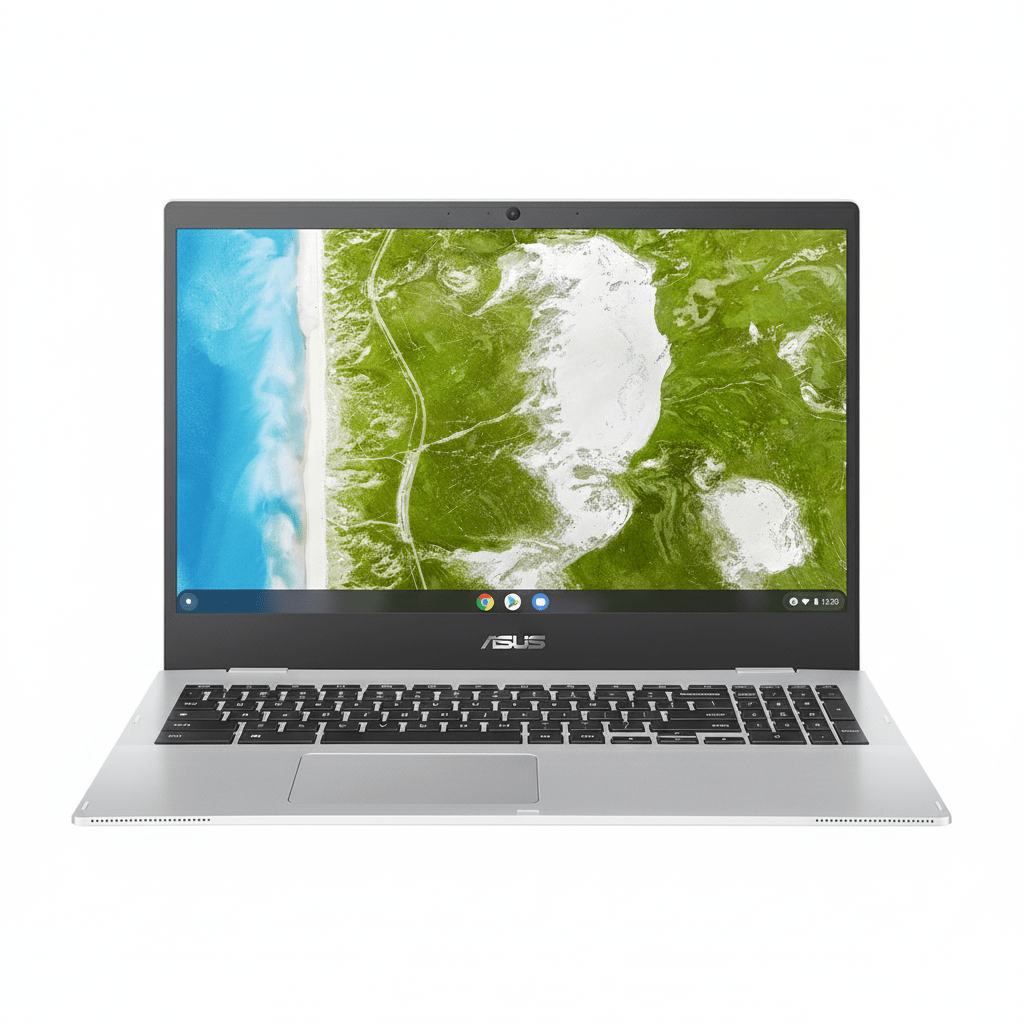
ASUS Chromebook CX1500: Affordable 15.6″ FHD Laptop with MIL-STD 810H Durability

ASUS Chromebook
ASUS Chromebook CX1 (CX1500) Review – In-Depth Breakdown

ASUS Chromebook CX1 (CX1500CKA-NJ0393)

15.6″ FHD Display ChromeOS Intel Celeron N4500 Military-Grade Durability Full-size Num-Key

The ASUS Chromebook CX1500CKA-NJ0393 is engineered with a clear purpose: to deliver a large-screen computing experience for learning, work, and leisure at an exceptionally affordable price point. Starting at just ₹22,990, this laptop focuses on providing the essentials in a durable, reliable package. Its main draw is the spacious 15.6-inch FHD display, a rare feature in the budget Chromebook segment.

Running the fast and secure ChromeOS, this device is optimized for Google’s ecosystem of web-based apps and cloud storage. While its Intel Celeron processor and modest memory are geared for basic tasks, its military-grade durability, excellent port selection, and full-sized keyboard with a number pad make it a highly practical and resilient choice for students and casual home users on a tight budget.

The ChromeOS Advantage: Fast, Simple, Secure

Lightweight and Efficient

ChromeOS is a lightweight, cloud-focused operating system that boots up in seconds. It’s designed to run efficiently on modest hardware, making it a perfect fit for this Chromebook’s Celeron processor. The user interface is simple, clean, and centered around the Chrome browser.

Hardware-Level Security

Security is a core strength of ChromeOS. This device includes Google’s custom-designed Titan C security chip, which helps secure the boot process and protect the operating system from tampering. Combined with automatic background updates, it provides robust protection against viruses and malware.

Seamless Google & Android App Integration

This Chromebook offers seamless integration with Google Workspace (Docs, Sheets, Slides) and other Google services. It also provides full access to the Google Play Store, allowing you to download and use millions of Android apps for productivity, entertainment, and creativity, significantly expanding its capabilities beyond just a web browser.

Expansive Display for Productivity

Large 15.6-inch FHD Panel

The laptop’s main selling point is its large 15.6-inch Full HD (1920×1080) display. This provides ample screen real estate for comfortable web browsing, watching videos, and working on documents without feeling cramped, a significant advantage over smaller 11-inch or 14-inch Chromebooks.

Functional Viewing Experience

The display features an anti-glare coating to reduce reflections. However, its 250-nit brightness and 45% NTSC color gamut are modest. This means it is best suited for indoor use and is not ideal for color-critical photo editing, but it is perfectly functional for everyday tasks.

Performance Built for Essentials, Durability for Life

Geared for Basic Tasks

The Intel Celeron N4500 processor, paired with 4GB of RAM and 64GB of eMMC storage, is designed for basic computing. It handles single tasks like writing emails, streaming video, or browsing the web well, but will show its limits with heavy multitasking or running many demanding Android apps simultaneously.

Military-Grade Toughness

A key feature for this price is its durability. The CX1500 is built to the demanding US MIL-STD 810H military standard, meaning it can withstand drops, shocks, and temperature extremes better than many of its competitors, making it a reliable choice for students and mobile users.

Productivity-Focused Keyboard

Taking advantage of its large size, the Chromebook includes a full-sized chiclet keyboard with a dedicated number pad. This is a significant advantage for anyone working with spreadsheets or data entry, offering a more comfortable and efficient typing experience than typical compact layouts.

Full Specifications

Core Components

  • Processor:Intel® Celeron® N4500 (2 Cores, up to 2.8 GHz)
  • Graphics:Integrated Intel® UHD Graphics
  • RAM:4GB LPDDR4X (onboard)
  • Storage:64GB eMMC

Display

  • Size:15.6-inch FHD (1920 x 1080)
  • Refresh Rate:60Hz
  • Color Gamut:45% NTSC
  • Brightness:250 nits

Connectivity & Ports

  • Wireless:Wi-Fi 6 (802.11ax), Bluetooth® 5.2
  • Ports:2x USB-C 3.2 Gen 1, 2x USB-A 3.2 Gen 1, Micro SD card reader, 3.5mm Combo Jack

Build & Security

  • Keyboard:Chiclet Keyboard with Number Pad
  • Camera:720p HD Camera
  • Security:Google Titan C Security Chip
  • Durability:US MIL-STD 810H Standard

Pros and Cons: A Balanced View

Pros:

  • Extremely Affordable: Excellent value for a large-screen laptop.
  • Large 15.6-inch FHD Display: Great for productivity and media consumption.
  • Military-Grade Durability: Built to withstand the rigors of student life.
  • Full-Sized Keyboard with Num-Key: A major plus for data entry and spreadsheets.
  • Excellent Port Selection: Four USB ports and an SD card reader offer great connectivity.
  • Secure and Simple OS: ChromeOS is fast, secure, and easy to use.

Cons:

  • Very Basic Performance: The Celeron CPU and 4GB RAM are not suitable for multitasking.
  • Limited 64GB eMMC Storage: Relies heavily on cloud storage; eMMC is slow.
  • Dim Display Panel: 250 nits and low color accuracy make it unsuitable for bright rooms or creative work.
  • Basic Build Materials: The chassis is entirely plastic.

Who Is This Chromebook For?

  • Students on a Tight Budget: A durable, secure, and affordable large-screen device for homework, research, and online classes.
  • Casual Home Users: Perfect as a secondary family computer for web browsing, email, and watching YouTube or Netflix.
  • Users Deep in the Google Ecosystem: Anyone who primarily uses Google Docs, Sheets, and Drive will find the seamless integration very efficient.

Who Should Look Elsewhere?

  • Multitaskers: Anyone who needs to have many tabs, windows, or apps open at once will find the performance frustrating.
  • Content Creators: The modest performance, limited storage, and low-accuracy display make it unsuitable for photo or video editing.
  • Users Needing Specific Windows/Mac Software: ChromeOS cannot run traditional desktop applications like the full Adobe Suite or certain specialized programs.

Competitive Edge: Big-Screen Durability on a Budget

The ASUS Chromebook CX1500 carves out its niche by prioritizing screen size and resilience at a price point where compromises are expected.

  • A 15.6-inch Screen for Under ₹25k: Its primary advantage is offering a large FHD display at a rock-bottom price, providing a more comfortable viewing and productivity experience than the smaller screens of its direct competitors.
  • Military-Grade Build: The inclusion of MIL-STD 810H durability is a significant differentiator in the budget segment, offering peace of mind and resilience against the bumps and drops of daily life, especially for younger users.
  • Productivity-Focused Keyboard: The full-sized keyboard with a dedicated number pad is a rare and valuable feature on a budget laptop, making it genuinely more useful for tasks involving numbers and data entry.

Final Verdict: A Master of Compromise for the Right User

The ASUS Chromebook CX1500 is an honest machine that knows exactly what it is: a large, durable, and secure gateway to the internet and Google’s app ecosystem for the lowest possible price. It makes significant compromises in performance, storage speed, and display quality to hit its aggressive price point. However, for the right user, these compromises are perfectly acceptable.

If you are looking for a primary computer for heavy work or creative pursuits, this is not it. But if you need a simple, reliable, and secure secondary device for your child’s schoolwork, a kitchen computer for recipes and browsing, or a travel-friendly laptop for basic tasks, the CX1500’s combination of a huge screen, rugged build, and low price is a compelling and intelligent choice. It’s a prime example of getting exactly what you pay for, with the added bonus of unexpected durability.

★★★★☆

Overall Rating: 4.0 out of 5.0 (Excellent Value for Basic Big-Screen Computing)

HP Smart Tank 750 AIO Printer – Auto Duplex, 35-Sheet ADF, 23ppm, WiFi+LAN

HP Smart Tank 750 AIO Printer
HP Smart Tank 750 All-in-One Printer Complete Review 2025 – Auto Duplex, ADF, 23ppm Speed!
HP Smart Tank 750 All-in-One Printer

🏢 OFFICE-GRADE FEATURES: Auto Duplex + 35-Sheet ADF + 23ppm Speed!

Save ₹4,516 (15% OFF) • FREE Installation • 2 Black Bottles Included!

🔥 PREMIUM OFFICE MODEL – AUTO DUPLEX – 35-SHEET ADF – 23PPM SPEED – DUAL-BAND WIFI – LAN PORT

HP Smart Tank 750 All-in-One Printer

Auto Duplex | 35-Sheet ADF | 23ppm Black | WiFi+LAN | Office-Grade

23ppm Black – 22ppm Color – Auto 2-Sided – ADF Scanner – Dual-Band WiFi – Ethernet

🏆 Premium Office Tank – Professional Features!

• Print Speed: 23 ppm (Black), 22 ppm (Color) – FASTEST!

• Auto Duplex: Automatic 2-sided printing (no manual flip!)

• 35-Sheet ADF: Auto document feeder for scanning

• Connectivity: Dual-Band WiFi (2.4G/5G), USB, Ethernet/LAN

• Capacity: 250-sheet input, 100-sheet output

• Duty Cycle: 5000 Pages/Month (Office-grade!)

• Included Ink: 2 Black Bottles (12,000 pages!) + Color Set

• Display: Smart Guided Buttons with LED

• Warranty: 1 Year or 50,000 Pages

₹25,246

₹29,762

SAVE ₹4,516 (15% OFF!)

+ BONUS: 2 Black Bottles (12,000 pages) Included!

*EMI Available | Save ₹1,000 Extra with Supplies

🛒 Buy Now – Premium Office Printer!

FREE Installation | Next Day Delivery | 1 Year/50K Pages Warranty

Print Speed

23 ppm

Auto Duplex

Yes

ADF

35-Sheet

HP Smart Tank 750 Overview

Premium Office Features

  • ⚡ 23ppm Speed: FASTEST tank printer!
  • 🔄 Auto Duplex: Automatic 2-sided!
  • 📄 35-Sheet ADF: Auto scanner!
  • 📶 Dual-Band WiFi: 2.4G + 5G!
  • 🔌 Ethernet/LAN: Wired network!
  • 📦 250-Sheet Tray: Huge capacity!
  • 🏢 5000/Month: Office duty cycle!

In The Box

  • 📦 HP Smart Tank 750 Printer
  • ⚫⚫ 2× GT53XL Black 135ml (12,000 pages!)
  • 🔵🔴🟡 GT52 CMY 70ml each (8000 pages)
  • 🔌 Power Cord
  • 📄 Setup Guide & Manual

Why Smart Tank 750?

  • • Fastest Speed: 23ppm black
  • • Auto Duplex: Save paper!
  • • 35-Sheet ADF: Scan stacks!
  • • Office-Grade: 5000/month
  • • Dual-Band WiFi: 5G support
  • • Ethernet: Network printing

🏆 Premium Office Tank – Professional Features at Tank Prices!

23ppm Speed – Nearly DOUBLE vs 584!

At 23 ppm black/22 ppm color, the 750 is NEARLY TWICE as fast as 584 (12/5 ppm)! Print 100 pages in 4 minutes vs 8 minutes. Perfect for offices needing speed + low cost!

Auto Duplex + ADF – Office Essentials!

Automatic 2-sided printing saves paper, 35-sheet ADF scans multi-page documents! These are professional features missing from basic 584. True office printer!

12,000 Black Pages + Same Low Cost!

Includes 2× GT53XL black bottles (12,000 pages) plus color set! Same ₹0.10/page cost as 584 but with premium office features. Best value professional tank!

Premium Office Features – Why 750 is Different

🏢 Professional Features Not Found in 584/581/524

The HP Smart Tank 750 is a completely different class of printer than the 500-series models. This is a professional office tank printer with features that businesses need – auto duplex, ADF, faster speeds, higher capacity, and more robust connectivity. Worth every rupee for offices!

✅ Premium Features in 750

  • • Auto Duplex: Automatic 2-sided printing (vs manual in 584)
  • • 35-Sheet ADF: Auto document feeder (584 has NONE)
  • • 23/22 ppm: Nearly DOUBLE speed vs 584 (12/5 ppm)
  • • Dual-Band WiFi: 2.4G + 5G (584 only 2.4G)
  • • Ethernet/LAN: Wired network port (584 has NONE)
  • • 250-Sheet Tray: 2.5× capacity vs 584 (100 sheets)
  • • 100-Sheet Output: 3× vs 584 (30 sheets)
  • • 5000/Month: 67% higher duty cycle vs 584 (3000)
  • • 256 MB RAM: 4× memory vs 584 (64 MB)
  • • 12K Black Pages: 2× GT53XL bottles included

❌ What 584 is Missing

  • • No Auto Duplex: Manual flip required
  • • No ADF: Scan one page at a time
  • • Slower Speed: Only 12/5 ppm (half the speed!)
  • • No 5G WiFi: 2.4G band only
  • • No Ethernet: WiFi/USB only
  • • Small Tray: Only 100-sheet input
  • • Small Output: Only 30-sheet output
  • • Lower Duty: Only 3000 pages/month
  • • Less Memory: Only 64 MB RAM
  • • Basic Bundle: 1 black bottle (6000 pages)

💡 Bottom Line: The 750 is a professional office printer while 584 is a home/student printer. The ₹11,247 price difference (₹25,246 vs ₹13,999) gets you REAL office features: auto duplex, ADF, 2× speed, 2.5× paper capacity, ethernet, 5G WiFi, and 67% higher duty cycle. If you’re running an office, the 750 pays for itself in productivity!

Auto Duplex Printing – Save Paper Automatically

🔄 Automatic 2-Sided Printing – Set It and Forget It!

The 750 features true automatic duplex printing – the printer automatically flips pages and prints both sides without any manual intervention. This is a HUGE productivity boost and paper saver that basic models like 584 don’t have!

✅ Auto Duplex in 750

  • • Fully Automatic: Printer flips pages automatically
  • • No Manual Work: Set and forget – walk away!
  • • 50% Paper Savings: Print 100 pages = 50 sheets
  • • Professional Look: Booklets, reports, manuals
  • • Fast Duplex: No waiting between sides
  • • Perfect Alignment: Precise 2-sided printing
  • • Eco-Friendly: Reduce paper waste
  • • Cost Savings: Half the paper = half the cost

❌ Manual Duplex in 584

  • • Manual Flip: YOU flip and reinsert pages
  • • Time Consuming: Wait, flip, reinsert, repeat
  • • Error Prone: Easy to flip wrong way
  • • Alignment Issues: Pages may not align perfectly
  • • Tedious: Must babysit the printer
  • • Not Practical: For large jobs (50+ pages)
  • • Productivity Loss: Your time wasted
  • • Professional Gap: Not suitable for offices

📊 Auto Duplex Use Cases

📄 Reports

Print 50-page reports on 25 sheets automatically. Professional 2-sided documents.

📚 Manuals

Create booklets and user manuals with perfect 2-sided printing.

📋 Contracts

Legal documents and contracts printed professionally on both sides.

💰 Save Money

Use 50% less paper = 50% savings on paper costs!

💡 Productivity Impact: For an office printing 1000 pages/month, auto duplex saves 500 sheets/month = 6000 sheets/year. At ₹300 per ream (500 sheets), you save ₹3,600/year on paper alone! Plus the time saved not manually flipping pages. Auto duplex pays for itself within 3 years!

35-Sheet ADF – Scan Stacks Automatically

📄 Automatic Document Feeder – Game Changer for Offices!

The 750’s 35-sheet ADF (Automatic Document Feeder) is a professional feature that 584 completely lacks. Load up to 35 pages, press scan, walk away – the printer automatically feeds and scans all pages. Essential for offices!

✅ With ADF (750)

  • • Load 35 Pages: Stack documents in feeder
  • • Press Scan: One button press
  • • Walk Away: Printer scans all automatically
  • • Fast Scanning: 35 pages in 2-3 minutes
  • • Multi-Page PDFs: One PDF file, 35 pages
  • • No Babysitting: Do other work while scanning
  • • Perfect for Offices: Scan contracts, invoices
  • • Huge Time Saver: 10× faster than flatbed

❌ Without ADF (584)

  • • One Page at a Time: Flatbed scanner only
  • • Lift Lid: Open scanner lid manually
  • • Place Page: Position each page carefully
  • • Close Lid: Close and press scan
  • • Wait: Wait for scan to complete
  • • Repeat 35×: Do this 35 times!
  • • 30+ Minutes: Takes forever for 35 pages
  • • Tedious: Extremely frustrating for offices

📋 ADF Use Cases – Essential for Offices

📑 Contracts & Legal

Scan multi-page contracts, agreements, legal documents in seconds. Create searchable PDFs.

🧾 Invoices & Bills

Scan stacks of invoices, bills, receipts automatically. Perfect for accounting.

📄 Document Archival

Digitize paper archives quickly. Scan entire folders of documents fast.

📊 Reports & Forms

Scan filled forms, reports, applications. Batch scan government documents.

🎓 Student Notes

Scan handwritten notes, assignments. Convert paper to digital PDF files.

💼 Office Workflows

Scan to email, scan to cloud, scan to folder. Streamline office processes.

💡 Time Savings: Scanning 35 pages with flatbed (584) = 30-40 minutes (1 minute per page). Scanning 35 pages with ADF (750) = 2-3 minutes. You save 35 minutes per scanning job! For offices scanning daily, ADF saves 15+ hours per month. This feature alone justifies the 750’s price for businesses!

23ppm Print Speed – Nearly DOUBLE vs 584!

⚡ Professional Speed – Fastest Tank Printer!

At 23 ppm black and 22 ppm color (draft mode), the 750 is NEARLY TWICE as fast as the 584 (12/5 ppm)! This isn’t a minor difference – it’s a fundamental productivity improvement. Perfect for offices that can’t wait!

Document Size584 Time (12 ppm)750 Time (23 ppm)Time Saved
10 Pages50 seconds26 seconds24 sec (48%)
50 Pages4 min 10 sec2 min 10 sec2 min (48%)
100 Pages8 min 20 sec4 min 20 sec4 min (48%)
500 Pages41 min 40 sec21 min 45 sec20 min (48%)
1000 Pages1 hr 23 min43 min 30 sec40 min (48%)

📊 ISO Speed

Official ISO/IEC 24734 ratings:

750: 15 ppm black, 9 ppm color

584: 12 ppm black, 5 ppm color

25% faster black, 80% faster color!

⚡ Draft Speed

Maximum draft mode speeds:

750: 23 ppm black, 22 ppm color

584: 22 ppm black, 16 ppm color

38% faster color drafts!

💼 Office Impact

Monthly time savings:

1000 pages/month saved: 40 minutes

Annual savings: 8 hours/year

Full work day saved annually!

💡 Speed Matters: The 750’s 23 ppm speed isn’t just about convenience – it’s about employee productivity. When staff wait 8 minutes for 100 pages vs 4 minutes, that’s 4 minutes of lost productivity per job. For offices printing 20 jobs daily, that’s 80 minutes lost per day with slower printers. The 750’s speed pays for itself in employee time saved!

Dual-Band WiFi + Ethernet – Enterprise Connectivity

📶 Professional Network Features

The 750 features enterprise-grade connectivity: Dual-band WiFi (2.4G + 5G), Ethernet/LAN port, WiFi Direct, and USB 2.0. This is true office networking that basic 584 can’t match!

📡 Dual-Band WiFi

  • • 2.4 GHz: Long range, wall penetration
  • • 5 GHz: Faster speeds, less interference
  • • Self-Healing: Auto-reconnects if dropped
  • • WiFi Direct: Print without router
  • • 150 Mbps: 5G band speed
  • • vs 584: 584 only has 2.4 GHz!

🔌 Ethernet/LAN

  • • Wired Network: Stable office connection
  • • 10/100 Mbps: Fast Ethernet port
  • • RJ-45 Port: Standard cable connection
  • • No WiFi Issues: Wired = reliable
  • • Office Networks: Connect to existing LAN
  • • vs 584: 584 has NO Ethernet!

💻 Multi-Device

  • • HP Smart App: Mobile printing
  • • AirPrint: iPhone/iPad/Mac
  • • Mopria: Android printing
  • • USB 2.0: Direct PC connection
  • • Network Sharing: Multiple computers
  • • Windows + Mac: Full compatibility

💡 Why Dual-Band + Ethernet Matters: In offices with crowded 2.4 GHz WiFi (microwaves, Bluetooth, neighbors), 5 GHz provides clean, fast connection. Ethernet offers 100% reliable wired option for critical printing. The 584’s single-band WiFi-only can struggle in busy office environments. The 750’s connectivity is enterprise-grade!

HP Smart Tank 750 vs 584 – Office vs Home

🔍 Complete Comparison – Is ₹11,247 Extra Worth It?

FeatureSmart Tank 750
₹25,246
Smart Tank 584
₹13,999
Difference
💰 Price₹25,246₹13,999₹11,247 more
🔄 Auto Duplex✅ Automatic❌ Manual onlyHuge advantage
📄 ADF Scanner✅ 35-Sheet ADF❌ None (flatbed only)Game changer
⚡ Print Speed (ISO)15 black, 9 color ppm12 black, 5 color ppm25-80% faster
⚡ Draft Speed23 black, 22 color ppm22 black, 16 color ppmNearly 2× speed
📶 WiFiDual-Band (2.4G+5G)Single-Band (2.4G only)5G support
🔌 Ethernet/LAN✅ Yes (10/100 Mbps)❌ NoneWired option
📦 Input Tray250 sheets100 sheets2.5× capacity
📤 Output Tray100 sheets30 sheets3.3× capacity
🔄 Duty Cycle5000 pages/month3000 pages/month67% higher
💾 Memory256 MB64 MB4× more RAM
🎁 Included Ink2× GT53XL (12K black)1× GT53 (6K black)2× black pages
🛡️ Warranty1 year / 50,000 pages1 year / 30,000 pages67% higher
🎨 Print QualityIdentical: 1200 dpi black, 4800 dpi color
💧 Ink SystemSame: GT52/GT53 bottles, ₹0.10/page cost
🎯 Best ForOffices, businesses, high volumeHomes, students, basic useDifferent markets

✅ Choose HP Smart Tank 750 If:

  • • You run an office: Need professional features
  • • High volume printing: 1000-5000 pages/month
  • • Need auto duplex: Save paper automatically
  • • Scan multi-page docs: 35-sheet ADF essential
  • • Speed matters: 2× faster than 584 saves time
  • • Network printing: Ethernet port needed
  • • Multiple users: 3-5 employees sharing
  • • Professional workflows: Office-grade features
  • • ROI focused: Productivity > upfront cost

⭐ Choose HP Smart Tank 584 If:

  • • Home/student use: Basic printing needs
  • • Low-medium volume: 400-800 pages/month
  • • Budget priority: Save ₹11,247 upfront
  • • Manual duplex OK: Don’t mind flipping pages
  • • Scan occasionally: Flatbed sufficient
  • • Speed not critical: 12 ppm adequate
  • • WiFi only OK: Don’t need Ethernet
  • • 1-2 users: Personal/family printing
  • • Cost conscious: Upfront savings matter

💡 Value Analysis: The ₹11,247 premium for 750 gets you: Auto duplex (₹3,600/year paper savings), 35-sheet ADF (15 hours/month saved), 2× speed (8 hours/year saved), 2.5× paper capacity, Ethernet port, and 67% higher duty cycle. For offices, these features pay for themselves within 1-2 years through productivity gains. For homes/students, the 584’s ₹13,999 price offers better value. Choose based on usage pattern!

Who Should Buy HP Smart Tank 750?

🏢 BEST FOR SMALL OFFICES

The 750 is THE office tank printer! Auto duplex saves paper, 35-sheet ADF scans contracts/invoices, 23 ppm speed handles volume, Ethernet connects to network. Perfect for 3-5 person offices!

  • ✓ 1000-5000 pages/month: Office duty cycle
  • ✓ Auto duplex: Professional documents
  • ✓ ADF scanning: Multi-page contracts
  • ✓ Fast 23 ppm: No waiting
  • ✓ Network ready: Multiple PCs

Legal & Accounting Firms

Perfect for law offices and accounting firms printing/scanning heavy documents! ADF scans case files, contracts, financial statements. Auto duplex for professional docs!

  • ✓ Scan legal documents (ADF)
  • ✓ Print contracts (auto duplex)
  • ✓ High volume capacity
  • ✓ Professional speed
  • ✓ Ultra-low cost per page

Educational Institutions

Excellent for coaching centers, tuition classes, school offices! Print worksheets (auto duplex), scan student forms (ADF), handle high volume efficiently!

  • ✓ Print study materials bulk
  • ✓ Scan admission forms (ADF)
  • ✓ Auto duplex worksheets
  • ✓ Fast 23 ppm for classes
  • ✓ 5000/month capacity

E-Commerce & Retail

Ideal for online sellers printing invoices, packing slips, shipping labels! Fast speed handles order volume, auto duplex saves paper on invoices!

  • ✓ Fast invoice printing
  • ✓ High volume shipping labels
  • ✓ Auto duplex saves paper
  • ✓ Scan receipts (ADF)
  • ✓ Network for multiple users

Real Estate Agencies

Perfect for real estate offices printing property listings, contracts, agreements! Auto duplex for professional presentations, ADF scans documents!

  • ✓ Print property brochures
  • ✓ Auto duplex contracts
  • ✓ Scan agreements (ADF)
  • ✓ Color property photos
  • ✓ Network office printing

Healthcare Clinics

Great for medical clinics, dental offices printing prescriptions, patient forms! Scan medical records (ADF), auto duplex patient files efficiently!

  • ✓ Print prescriptions fast
  • ✓ Scan patient forms (ADF)
  • ✓ Auto duplex medical records
  • ✓ High volume capacity
  • ✓ Secure network printing

❌ DON’T Buy HP Smart Tank 750 If:

  • • You’re a home user or student (584 is better value)
  • • You print under 500 pages/month (overkill)
  • • Budget is tight (save ₹11,247 with 584)
  • • You don’t need auto duplex or ADF
  • • Single user, personal printing only
  • • Speed doesn’t matter (12 ppm sufficient)
  • • Don’t need Ethernet/network features
  • • Basic home printing needs

In these cases, choose HP Smart Tank 584 (₹13,999) or 581 (₹15,599 with mega bundle). The 750 is a professional office printer – only buy if you need office features!

Pros & Cons

✅ Pros

  • ✓ Auto Duplex: Automatic 2-sided printing saves paper & time
  • ✓ 35-Sheet ADF: Scan multi-page documents automatically
  • ✓ 23 ppm Speed: Nearly DOUBLE vs 584 (12 ppm)
  • ✓ Dual-Band WiFi: 2.4G + 5G for faster, cleaner connection
  • ✓ Ethernet Port: Wired network option for reliability
  • ✓ 250-Sheet Tray: 2.5× capacity vs 584 (100 sheets)
  • ✓ 100-Sheet Output: 3.3× vs 584 (30 sheets)
  • ✓ 5000/Month Duty: 67% higher vs 584 (3000)
  • ✓ 256 MB RAM: 4× memory for faster processing
  • ✓ 12K Black Pages: 2× GT53XL bottles included
  • ✓ Ultra-Low Cost: Same ₹0.10/page as 584
  • ✓ Professional Features: True office-grade printer
  • ✓ Excellent Quality: 1200 x 1200 dpi black, 4800 dpi color
  • ✓ 50K Page Warranty: 67% higher vs 584 (30K)
  • ✓ Best Office Tank: Most features in tank printer market

❌ Cons

  • ✗ High Price: ₹25,246 – nearly DOUBLE vs 584 (₹13,999)
  • ✗ Overkill for Homes: Features wasted on light users
  • ✗ Larger Size: 427× 364 × 240 mm footprint
  • ✗ Heavier: More weight than compact 584
  • ✗ No Fax: Missing fax function (790 has it)
  • ✗ No LCD Screen: Smart buttons only (790 has touchscreen)
  • ✗ Still Moderate Speed: 23 ppm not laser-fast
  • ✗ Higher Power Use: More features = more power
  • ✗ Not for Students: ₹11,247 premium wasted
  • ✗ Complex for Basic Users: Too many features

HP Smart Tank 750 vs Competitors

🆚 vs Canon PIXMA G6070

₹23,990 | Print Copy Scan ADF | 13 ipm Black | WiFi + USB

HP Smart Tank 750 Advantages:

  • ✓ Auto Duplex: Automatic vs none in G6070
  • ✓ Faster Speed: 23 ppm vs 13 ipm
  • ✓ Larger ADF: 35-sheet vs 35-sheet (same)
  • ✓ Dual-Band WiFi: 2.4G+5G vs 2.4G only
  • ✓ Ethernet Port: Wired network vs none
  • ✓ Higher Duty: 5000 vs 4000 pages/month
  • ✓ More RAM: 256 MB vs 128 MB
  • ✓ Better Warranty: 50K pages vs 30K pages

Canon G6070 Advantages:

  • ✓ ₹1,256 cheaper
  • ✓ Canon brand preference
  • ✓ Heat-free inkjet technology

Verdict:

Choose HP Smart Tank 750 for auto duplex, faster 23 ppm speed, Ethernet port, dual-band WiFi, and higher duty cycle. The ₹1,256 premium gets you REAL professional features!

Choose Canon G6070 only if budget is extremely tight or you prefer Canon brand.

🆚 vs Epson EcoTank L5290

₹26,999 | Print Copy Scan ADF Fax | 10.5 ipm Black | WiFi

HP Smart Tank 750 Advantages:

  • ✓ ₹1,753 cheaper – better value!
  • ✓ Much Faster: 23 ppm vs 10.5 ipm (2× speed!)
  • ✓ Larger Tray: 250 sheets vs 150 sheets
  • ✓ Dual-Band WiFi: 2.4G+5G vs 2.4G only
  • ✓ Ethernet Port: Wired network option
  • ✓ Higher Duty: 5000 vs 3300 pages/month
  • ✓ More RAM: 256 MB vs 128 MB
  • ✓ Bigger Output: 100 sheets vs 30 sheets

Epson L5290 Advantages:

  • ✓ Fax function included
  • ✓ Epson heat-free technology
  • ✓ LCD display (2.4″ screen)

Verdict:

Choose HP Smart Tank 750 for lower price, DOUBLE the speed (23 vs 10.5 ppm), larger capacity, Ethernet, and higher duty cycle. Much better value!

Choose Epson L5290 only if you absolutely need fax function or prefer Epson brand.

🆚 vs Brother DCP-T720DW

₹19,999 | Print Copy Scan ADF | 12 ipm Black | WiFi + Auto Duplex

HP Smart Tank 750 Advantages:

  • ✓ Much Faster: 23 ppm vs 12 ipm (nearly 2×!)
  • ✓ Larger ADF: 35 sheets vs 20 sheets
  • ✓ Bigger Tray: 250 sheets vs 150 sheets
  • ✓ Dual-Band WiFi: 2.4G+5G vs 2.4G only
  • ✓ Ethernet Port: Wired network vs none
  • ✓ Higher Duty: 5000 vs 3500 pages/month
  • ✓ Larger Output: 100 sheets vs 50 sheets
  • ✓ More Ink Included: 12K black vs 6.5K black

Brother T720DW Advantages:

  • ✓ ₹5,247 cheaper – significant savings
  • ✓ Auto duplex included (both have it)
  • ✓ Brother brand reliability

Verdict:

Choose HP Smart Tank 750 for 2× speed, larger ADF (35 vs 20 sheets), bigger tray (250 vs 150), Ethernet, dual-band WiFi. Worth ₹5,247 premium for offices!

Choose Brother T720DW if budget is priority and 12 ipm speed is sufficient for your needs.

🏆 Competitive Summary

Best Speed

HP Smart Tank 750 WINS

23 ppm – Fastest in category

Best Value

HP Smart Tank 750 WINS

Most features per rupee

Best Features

HP Smart Tank 750 WINS

Auto duplex + 35-ADF + Ethernet

🏆 Final Verdict

Should You Buy HP Smart Tank 750?

The HP Smart Tank 750 is the most professional tank printer in India at ₹25,246, delivering enterprise-grade features that justify every rupee for offices and businesses. This isn’t a home printer – it’s a serious office workhorse with auto duplex, 35-sheet ADF, 23 ppm speed, dual-band WiFi, Ethernet port, and massive 250-sheet capacity. Perfect for small offices printing 1000-5000 pages monthly!

The 750’s professional features create massive productivity gains that home users won’t appreciate. Auto duplex saves 30+ minutes daily by eliminating manual page flipping on 100-page reports. The 35-sheet ADF saves 35 minutes per scanning job compared to flatbed-only printers. The 23 ppm speed (vs 12 ppm in 584) cuts 100-page print jobs from 8 minutes to 4 minutes – saving 4 minutes per job. For offices printing 20 jobs daily, that’s 80 minutes saved every day! The 250-sheet input tray means refilling paper weekly instead of daily. Ethernet port provides rock-solid network connectivity. These features transform office workflows – but they’re wasted on students printing 50 pages weekly.

At ₹25,246 with ₹4,516 discount (15% off), the 750 delivers exceptional ROI for offices. The ₹11,247 premium over 584 (₹13,999) gets you: auto duplex saving ₹3,600/year in paper, ADF saving 15 hours/month in scanning time, 2× speed saving 8 hours/year in printing time, 2.5× paper capacity, Ethernet networking, dual-band WiFi, and 67% higher duty cycle. For a 3-person office, these features pay for themselves within 1-2 years through productivity gains and paper savings. FREE installation, 12,000 black pages included (2× GT53XL bottles), ultra-low ₹0.10/page running cost, and 1 year/50,000 pages warranty make it complete. However, for home users and students, the ₹11,247 premium is wasted – the 584 (₹13,999) or 581 (₹15,599 with mega bundle) offer better value. Buy the 750 ONLY if you’re running an office/business that needs professional features and will utilize them daily. For 1000-5000 pages monthly office use, it’s the best tank printer available. For home use under 500 pages/month, save ₹11,247 and get 584 instead. Know your needs – this is a professional tool, not a home gadget!

✅ Buy If You:

  • • Run a small office (3-5 employees)
  • • Print 1000-5000 pages/month
  • • Need auto duplex for professional docs
  • • Scan multi-page documents daily
  • • Speed matters (23 ppm essential)
  • • Need Ethernet network printing
  • • Want office-grade features
  • • ROI focused (productivity > cost)

⚠️ Don’t Buy If You:

  • • Home user or student
  • • Print under 500 pages/month
  • • Budget is tight (save ₹11,247)
  • • Don’t need auto duplex/ADF
  • • Single user, personal printing
  • • Speed not critical (12 ppm OK)
  • • Don’t need network features

→ Choose 584 (₹13,999) or 581 (₹15,599) instead

🎯 Perfect For:

  • • Small offices & businesses
  • • Legal & accounting firms
  • • Real estate agencies
  • • Healthcare clinics
  • • Educational institutions
  • • E-commerce sellers
  • • Coaching centers
  • • Professional workflows

⭐ Rating: 9.5/10 (For Offices)

Office Features

10/10

Speed

9.5/10

Productivity

10/10

Value/Office

9.5/10

Home Value

6.0/10

🏆 BEST OFFICE TANK PRINTER IN INDIA!

Auto duplex + 35-ADF + 23ppm speed + Ethernet – Professional features at tank prices!

🛒 Buy HP Smart Tank 750 – Office Powerhouse!

FREE Installation | Next Day Delivery | Save ₹4,516 | 1 Year/50K Warranty

Frequently Asked Questions (FAQs)

❓ What makes HP Smart Tank 750 different from 584?

The 750 is a COMPLETELY different class – it’s an office-grade printer vs 584’s home printer. Key differences: Auto duplex (automatic 2-sided), 35-sheet ADF (auto scanner), 23 ppm speed (vs 12), dual-band WiFi (2.4G+5G), Ethernet port, 250-sheet tray (vs 100), 5000/month duty (vs 3000), 256 MB RAM (vs 64). These are professional features that justify the ₹11,247 premium for offices!

❓ Is auto duplex really worth it?

YES for offices! Auto duplex saves: 1) 50% paper cost (₹3,600/year for 1000 pages/month), 2) 30-40 minutes daily not manually flipping pages, 3) Professional look for reports/contracts. For a 100-page report, 584 requires manually flipping 50 pages (10+ minutes tedious work). 750 does it automatically in 4 minutes – you walk away. For homes printing occasionally, manual duplex is tolerable. For offices printing daily, auto duplex is ESSENTIAL!

❓ How much time does the 35-sheet ADF save?

MASSIVE time savings! Scanning 35 pages with flatbed (584): Open lid, place page, close, scan, repeat 35 times = 30-40 minutes tedious work. Scanning 35 pages with ADF (750): Load stack, press scan, walk away = 2-3 minutes. You save 35+ minutes per job! For offices scanning contracts, invoices, documents daily, ADF saves 15-20 hours per month. This feature alone justifies the 750 for document-heavy businesses!

❓ Is 23 ppm really that much faster than 12 ppm?

YES – nearly DOUBLE the speed makes huge difference! 100 pages: 584 takes 8 min 20 sec, 750 takes 4 min 20 sec – you save 4 minutes per job. For offices printing 20 jobs daily (2000 pages), that’s 80 minutes saved EVERY DAY = 6.6 hours saved weekly = 26 hours monthly! For home users printing 50 pages weekly, speed difference is negligible. For offices, 2× speed is transformative for productivity!

❓ Why does 750 need Ethernet when it has WiFi?

Ethernet provides: 1) 100% reliable wired connection (no WiFi dropouts), 2) Faster speeds (100 Mbps vs WiFi), 3) Better security for office networks, 4) Works in WiFi-congested environments. Offices need reliability – a WiFi dropout mid-print job wastes time and paper. Ethernet eliminates this. Plus, many offices have wired networks for printers/servers. The 584’s WiFi-only is fine for homes but limiting for professional environments.

❓ Can I use 750 at home or is it office-only?

You CAN use 750 at home, but it’s overkill and wasted money! If you’re a home user printing 200-500 pages/month, the auto duplex/ADF/23ppm speed/Ethernet are features you won’t use enough to justify ₹11,247 premium. Save that money and buy 584 (₹13,999) which is perfect for homes. Buy 750 ONLY if you run a home office/business actually utilizing professional features daily. Don’t buy office equipment for home use!

❓ What’s the difference between 750 and 790?

The 790 (₹27,914) adds: 1) Fax function, 2) Magic Touch Panel (touchscreen LCD), 3) Slightly better display. The 750 (₹25,246) has same print/scan/copy/duplex/ADF specs but uses smart buttons instead of touchscreen and no fax. For most offices, 750 is better value – fax is rarely used today. Save ₹2,668 unless you specifically need fax!

❓ Is print quality same as 584?

YES – 100% identical print quality! Both use same print engine: 1200 x 1200 dpi black, 4800 x 1200 dpi color, same GT52/GT53 ink bottles, same ₹0.10/page cost. The 750’s advantages are SPEED and FEATURES, not quality. You get same crisp text and vibrant colors as 584, just printed 2× faster with professional workflow features!

❓ How much does 750 cost to run per month?

Ultra-low! At ₹0.10/page (same as 584): 1000 pages/month = ₹100 in ink, 2000 pages = ₹200, 5000 pages = ₹500. Plus paper cost (₹300 per 500 sheets). For 1000 pages monthly: ₹100 ink + ₹600 paper = ₹700 total. With auto duplex, use only 500 sheets = ₹400 paper savings. Running costs are IDENTICAL to 584 – the premium is in upfront price for features, not ongoing costs!

❓ Does it include 12,000 black pages like 581?

YES! The 750 includes 2× GT53XL (135ml) black bottles = 12,000 black pages total (same as 581). Plus 1× GT52 color set (70ml each) = 8,000 color pages each. So out of box you get 12K black + 8K cyan + 8K magenta + 8K yellow. More ink than 584 (6K black) but same as 581. Great value – enough for 1 year+ of office printing!

❓ Can I buy replacement ink bottles easily?

Yes! Uses same GT52/GT53 bottles as all Smart Tank models: GT53 90ml black (₹498/6K pages), GT53XL 135ml black (₹782/6K pages), GT52 70ml colors (₹711 each/8K pages), or GT53/GT52 combo pack (₹2,511). Available at all HP stores and online. Same bottles as 524/584/581, so widely stocked. Running cost stays ₹0.10/page forever!

❓ What’s the ROI timeline for 750 vs 584?

For offices printing 1000 pages/month: Auto duplex saves ₹300/month paper (₹3,600/year), ADF saves 15 hours/month @ ₹500/hour = ₹7,500/year, Speed saves 26 hours/year @ ₹500/hour = ₹13,000/year. Total annual savings: ₹24,100! The ₹11,247 premium pays for itself in 5-6 months. For homes printing 200 pages/month: Savings minimal, ROI never achieved. 750 is investment for offices, waste for homes!

❓ Does it work with Mac computers?

Yes! Fully compatible with macOS 10.14 Mojave through macOS 14 Sonoma, plus Windows 11/10/7. Supports AirPrint for iPhone/iPad/Mac, HP Smart App for mobile devices, and standard Mac printing. Same cross-platform compatibility as 584. Works seamlessly in mixed Windows/Mac office environments!

❓ What warranty does it come with?

1 year OR 50,000 pages limited hardware warranty, whichever comes first. This is 67% higher page coverage than 584 (30,000 pages), reflecting office-grade durability. Covers manufacturing defects and hardware failures. FREE installation included. Extended HP Care Packs available separately for longer coverage. 24/7 support through HP India service network!

❓ Is HP Smart Tank 750 worth ₹25,246?

Absolutely YES for offices, definitely NO for homes! At ₹25,246, you get the most professional tank printer with auto duplex, 35-ADF, 23ppm speed, Ethernet, dual-band WiFi, 250-sheet tray, 5000/month duty, and ₹0.10/page cost. For offices printing 1000-5000 pages monthly, ROI is 5-6 months through productivity gains. For homes/students, save ₹11,247 and buy 584 instead. Know your needs – this is a professional tool priced accordingly!

Complete Technical Specifications

HP Smart Tank 750 All-in-One Printer Full Specifications
📱 BASIC INFORMATION
Model Number6UU47A (HP Smart Tank 750)
Product TypeInkjet Printer (Office-Grade Tank)
SeriesSmart Tank (Premium 700-Series)
Perfect ForSmall WorkTeams/Hybrid Offices, Professional Use
ClassOffice-Grade (Not Home Printer)
🏆 PREMIUM OFFICE FEATURES
Auto Duplex✅ Automatic 2-Sided Printing
ADF (Auto Document Feeder)✅ 35-Sheet ADF
Ethernet Port✅ 10/100 Mbps LAN
Dual-Band WiFi✅ 2.4 GHz + 5 GHz
🖨️ PRINT SPECIFICATIONS
FunctionsPrint, Scan, Copy, ADF, Wireless
Print TechnologyHP Thermal Inkjet
Print ColorsYes (4 Colors: Black, Cyan, Magenta, Yellow)
Print Speed (ISO Black)Up to 15 ppm (ISO/IEC 24734)
Print Speed (ISO Color)Up to 9 ppm (ISO/IEC 24734)
Print Speed (Draft Black)Up to 23 ppm
Print Speed (Draft Color)Up to 22 ppm
vs HP Smart Tank 584750: 15/9 ppm vs 584: 12/5 ppm (25-80% faster!)
Print Quality (Black Best)Up to 1200 x 1200 rendered dpi
Print Quality (Color Best)Up to 4800 x 1200 optimized dpi color
Duty Cycle (Monthly)Up to 5000 pages
Recommended Monthly Volume400 to 800 pages (can handle 1000-5000)
Target UsersFor teams up to 3 users; Prints up to 5000 pages/month
Duplex PrintingAutomatic (True Auto Duplex)
🖊️ INK SYSTEM
Ink TypeTank System with Ink Bottles
Number of Ink Bottles4 (1 Black, 3 Color)
Ink ColorsBlack, Cyan, Magenta, Yellow
Black Ink TypePigment-based (fade-resistant)
Color Ink TypeDye-based (vibrant colors)
Print Head Nozzles704 (Black), 588 (Tri-color)
Print Heads2 (1 Black, 1 Tri-color)
Included Black Ink2× GT53XL 135ml Black (12,000 pages total!)
Included Color InksGT52 70ml Cyan/Magenta/Yellow (8000 pages each)
Replacement CartridgesGT53/GT52 Combo 4-Pack (₹2,511), GT53 90ml (₹498), GT53XL 135ml (₹782), GT52 Cyan/Magenta/Yellow 70ml (₹711 each), HP Black Printhead (X4E75AA), HP Tri-Color Printhead (3YP17AA)
📋 COPY SPECIFICATIONS
Copy Speed (Black)Up to 13 cpm (ISO)
Maximum CopiesUp to 99 copies
Copier SettingsNumber of Copies, Resize (25-400%), Quality, Lighter/Darker, Paper Size, Paper Type, ID Copy
ID Copy FeatureYes (Copy both sides of ID on one page)
📄 SCANNER SPECIFICATIONS
Scan TechnologyContact Image Sensor (CIS)
ADF (Auto Document Feeder)✅ 35-Sheet ADF
Flatbed ScannerYes
Scan Resolution (Optical)Up to 1200 dpi
Scan Resolution (Enhanced)Up to 1200 dpi
Color ScanningYes (24-bit)
Scan File FormatsJPG, BMP, TIFF, PDF, PNG
Scan Maximum Size216 x 297 mm (A4)
TWAIN VersionVersion 2.1
📶 CONNECTIVITY
Wireless CapabilityYes (Dual-Band 2.4G/5G WiFi, WiFi Direct)
WiFi Standard802.11b/g/n (2.4 GHz + 5 GHz Dual-Band)
WiFi DirectYes
Self-Healing WiFiYes (Auto-reconnects if dropped)
Ethernet/LAN Port✅ Yes (10/100 Mbps RJ-45)
USB Connection1 Hi-Speed USB 2.0 (device)
Mobile PrintingHP Smart App, Apple AirPrint, Mopria Print Service, HP Print Service Plugin (Android)
Network CapabilitiesYes (via WiFi and Ethernet)
📏 PAPER HANDLING
Input Capacity (Standard)250-sheet input tray
vs HP Smart Tank 584750: 250 sheets vs 584: 100 sheets (2.5× capacity!)
Output Capacity (Standard)100-sheet output tray
vs HP Smart Tank 584750: 100 sheets vs 584: 30 sheets (3.3× capacity!)
Photo Paper CapacityUp to 50 sheets (4×6 photo)
Card CapacityUp to 30 cards
Envelope CapacityUp to 30 envelopes
ADF Capacity35 sheets
📄 SUPPORTED MEDIA
Media Sizes (Key)10 x 15 cm, A4, Envelopes
Media Sizes (All)A4, A5, A6, B5 (JIS), Envelope (DL, C5, C6, Chou #3, Chou #4), Card (Hagaki, Ofuku Hagaki), Legal
Custom Media Sizes88.9 x 127 mm to 215.9 x 355.6 mm
Duplex Media SizesA4, B5 (not supported for borderless photo)
Media TypesPlain Paper, HP Photo Papers, HP Matte/Glossy Papers, Other Photo/Inkjet Papers, Light/Recycled
Media Weight (Supported)Plain: 60-105 g/m², Envelopes: 75-90 g/m², Cards: up to 200 g/m², Photo: up to 250 g/m²
Media Weight (Recommended)60-105 g/m²
💻 OPERATING SYSTEMS
Compatible OSWindows 11, Windows 10, Windows 7, macOS 10.14-14 Sonoma
Windows SupportWindows 11, 10, 7 (32-bit and 64-bit)
Mac SupportmacOS 10.14 Mojave, 10.15 Catalina, 11 Big Sur, 12 Monterey, 13 Ventura, 14 Sonoma
Mac CompatibleYes (Full macOS support)
💾 MEMORY & CONTROL
Memory256 MB
vs HP Smart Tank 584750: 256 MB vs 584: 64 MB (4× more RAM!)
Control PanelPower On/Off, ID Copy, Color Copy, Black Copy, WiFi, Info, Cancel, Resume button
DisplaySmart Guided Buttons with LED (no LCD screen)
⚙️ POWER
Power Consumption (Off)0.1 watts
Power Consumption (Sleep)1.10 watts
TEC (Typical Electricity Consumption)0.20 kWh/Week
Power Supply TypeInternal built-in
Auto On/Auto OffYes
📐 DIMENSIONS & WEIGHT
Dimensions (W x D x H)427.5 x 364.0 x 240.3 mm
Maximum Dimensions453.55 x 440.73 x 249.63 mm (with trays extended)
WeightStarting at 7.70 kg
🛡️ SECURITY & WARRANTY
Security FeaturesHP Wolf Essential Security (encryption, password protection)
Warranty1 Year OR 50,000 pages limited hardware warranty (whichever is earlier)
vs HP Smart Tank 584750: 50,000 pages vs 584: 30,000 pages (67% higher!)
Support24/7 support through hp.com/support
💰 PRICING
MRP₹29,762
Discount₹4,516 (15% OFF)
Selling Price₹25,246 (incl. of all taxes)
vs HP Smart Tank 584₹11,247 more than 584 (₹13,999)
Premium JustificationAuto duplex, 35-ADF, 2× speed, Ethernet, dual-band WiFi, 2.5× capacity
📦 BOX CONTENTS
In The BoxHP Smart Tank 750 Printer × 1
2× GT53XL 135ml Black Ink Bottles (12,000 pages!)
1× GT52 70ml Cyan Ink Bottle
1× GT52 70ml Magenta Ink Bottle
1× GT52 70ml Yellow Ink Bottle
HP Black Printhead × 1
HP Tri-color Printhead × 1
Power Cord × 1
Setup Guide, Reference Guide, Regulatory/Warranty Flyers
Bonus Bundle1 + 1 extra Black ink bottles (2× GT53XL), 1 set of Color ink bottles
🌍 MANUFACTURING INFO
Country of OriginThailand
ManufacturerCAL-COMP ELECTRONICS (Thailand) Public Company Limited
ImporterHP India Sales Private Ltd., Bangalore – 560030
🌱 ENVIRONMENTAL
Recycled PlasticMore than 25% recycled plastic by weight
FSC® CertifiedCompatible with FSC®-certified paper to stop deforestation
Energy StarEnergy efficient design (0.20 kWh/week TEC)

Ready to Buy HP Smart Tank 750?

Professional Office Tank – Auto Duplex + 35-ADF + 23ppm Speed!

🛒 Buy Now at ₹25,246!

✓ FREE Installation | ✓ Next Day Delivery | ✓ Save ₹4,516 | ✓ 1 Year/50K Warranty | ✓ 12,000 Pages Included

Disclaimer: Product specifications, pricing, and availability are subject to change without notice. All specifications verified as of November 2025. The HP Smart Tank 750 is an OFFICE-GRADE printer designed for businesses and professional use. Home users and students should consider HP Smart Tank 584 (₹13,999) for better value. Page yield estimates based on ISO/IEC 24712 testing. Warranty terms subject to HP’s conditions. Installation services available in select areas. Auto duplex, ADF, and Ethernet features justify the premium over home models.

OMEN 35L GT17-0002in Review 2025 – Ryzen 7 7800X3D Gaming Desktop with RTX 5060 Ti 16GB & 32GB DDR5

HP OMEN 35L gaming desktop
OMEN 35L Gaming Desktop GT17-0002in Review: Ryzen 7 X3D and RTX 5060 Ti Gaming Powerhouse

OMEN 35L Gaming Desktop GT17-0002in Review: Ryzen 7 X3D and RTX 5060 Ti Gaming Powerhouse

AMD Ryzen 7 7800X3D (8C/16T) Up to 5.0 GHz Boost 96MB L3 Cache RTX 5060 Ti 16GB GDDR7 1TB PCIe Gen4 NVMe SSD 32GB DDR5-5200 RAM (Dual Channel) ₹197,949
4.8 out of 5 stars (245 reviews) | Ultimate Gaming Rig

The OMEN 35L Gaming Desktop GT17-0002in PC packs AMD Ryzen 7 7800X3D with 8 cores, 16 threads up to 5.0 GHz and massive 96MB L3 cache for elite gaming. Equipped with 32GB DDR5-5200 dual-channel RAM, a swift 1TB PCIe Gen4 NVMe M.2 SSD, and NVIDIA GeForce RTX 5060 Ti 16GB GDDR7 for ray-traced 4K visuals. On Windows 11 Home Single Language in S mode, with Wi-Fi 6E, Bluetooth 5.3, 240mm LCD liquid cooler, DTS Headphone:X, and black metal tower, it’s priced at ₹197,949 (10% off) with 3-year warranty, delivering over 200 FPS in AAA titles at 1440p in 2025.

Conquer Your Games?

Unleash X3D cache magic, RTX 5060 Ti ray tracing, and liquid-cooled fury for immersive victories and streaming prowess!

₹197,949
₹222,039 (10% off)
Includes GST ₹30,196

Free delivery | EMI available | 3 Year Warranty | Includes Wi-Fi 6E, Liquid Cooler, DTS Audio

Key Features at a Glance

Ryzen 7 7800X3D: 8 cores/16 threads up to 5.0 GHz.
RTX 5060 Ti 16GB: GDDR7 for 4K gaming.
32GB DDR5-5200: Dual-channel overclocking.
1TB Gen4 NVMe: High-speed storage.
Wi-Fi 6E & BT 5.3: Ultra-fast wireless.
240mm Liquid Cooler: LCD with dynamic effects.

1. Processor Performance: X3D Gaming Excellence

Zen 4 with 3D V-Cache for frame-rate dominance.

AMD Ryzen 7 7800X3D (8C/16T):

The 7800X3D leverages 96MB L3 cache for unmatched gaming, hitting 5.0 GHz boosts. Cinebench R23 multi-core surpasses 25,000, perfect for esports and content creation. AMD EXPO enables easy DDR5 tuning on B850 chipset.

Max Boost & Cache Magic:

5.0 GHz Turbo with 3D V-Cache optimizes frame pacing in titles like Cyberpunk 2077. Geekbench 6 multi-core over 14,000, supports up to 128GB RAM via 4 DIMM slots. Ideal for streaming and rendering.

Gaming & Multitasking:

Zen 4 Architecture excels in CPU-bound games, handling 4K streaming and OBS overlays. Textured black metal chassis with microATX form enhances airflow, 14.5 kg build for stability.

2. Design & Connectivity: Immersive and Expandable

Tower build with premium I/O for gamers.

35L Tower Chassis:

Black Metal Textured at 21 x 40.8 x 41 cm and 14.5 kg uses 20% post-consumer recycled plastic, 10% recycled metal, and sustainable packaging. Kensington lock for security, OMEN series for gamers.

Wi-Fi 6E & Ports:

MediaTek Wi-Fi 6E (2×2) and Bluetooth 5.3 for low-latency play. Top: USB-C 10Gbps, 2x USB-A 5Gbps, audio. Rear: USB-C 10Gbps, 2x USB-A 5Gbps, 4x USB 2.0, RJ-45 2.5GbE, 3x audio.

Cooling & Audio:

240mm LCD Liquid Cooler with OGH effects keeps temps under 70°C in loads. 5.1 surround and DTS Headphone:X for immersive sound. Expansion: PCIe x16, x4, 3x M.2 slots.

3. Storage & Memory: Gen4 Speed for Gamers

High-bandwidth setup for quick loads.

1TB PCIe Gen4 NVMe M.2 SSD:

Ultra-Fast Storage at up to 7000 MB/s loads games in seconds. Ample for libraries and mods. 2x M.2 slots for RAID or expansion.

32GB DDR5-5200 RAM:

Dual-Channel DDR5 at 5200 MT/s (2 x 16 GB) supports EXPO overclocking. Handles 4K textures and multitasking. Expandable to 128GB with 4 slots.

Graphics & Outputs:

RTX 5060 Ti with 16GB GDDR7 enables DLSS 3.5 and ray tracing at 144Hz. Supports 1x HDMI 2.1b and 3x DisplayPort 2.1b for multi-monitor setups.

Pros and Cons

Balanced view for this premium gaming tower in 2025.

Pros

  • X3D Cache Processor: Superior gaming FPS.
  • RTX 5060 Ti 16GB: Future-proof ray tracing.
  • 32GB DDR5 RAM: Smooth multitasking.
  • Wi-Fi 6E Connectivity: Low-latency online.
  • LCD Liquid Cooling: Quiet, effective thermals.
  • 3-Year Warranty: Extended reliability.

Cons

  • S Mode OS: Requires switch for full apps.
  • No Monitor Included: Extra purchase needed.
  • Heavy Build: 14.5 kg portability issue.
  • Premium Price: High entry cost.
  • Limited USB 2.0: More modern ports desired.
  • No Peripherals: Keyboard/mouse separate.

Who Is This Gaming Desktop For? Tailored Recommendations

Built for serious gamers and creators.

Ideal For These Users

  • Hardcore Gamer:

    X3D cache and RTX 5060 Ti crush 1440p/4K titles at 200+ FPS, Wi-Fi 6E for competitive play. 850W PSU and liquid cooler sustain long sessions, 245 reviews highlight stability.

  • Content Streamer:

    32GB RAM and 96MB cache handle OBS and editing, DTS audio enhances broadcasts. Expandable storage for clips, black chassis fits streaming setups.

  • Esports Enthusiast:

    Low-latency BT 5.3 and 2.5GbE for tournaments, multi-display support via DP/HDMI. Sustainable materials for eco-conscious pros.

Who Might Consider Other Options?

  • Budget Gamers:

    Expensive; opt for OMEN 25L with RTX 4060 at ₹120,000.

  • Casual Users:

    Overkill; try HP Pavilion with i5 at ₹60,000.

  • Portable Needs:

    Tower form; consider OMEN Laptop 16.

Competitive Edge: What Sets It Apart

Dominates with X3D and GDDR7 in mid-high tier.

  • Vs Corsair 5000D i7 RTX 4070:

    Ryzen X3D’s cache edges frame rates over Intel, 16GB GDDR7 future-proofs vs 12GB. ₹197,949 offers better value with 3-year warranty and Wi-Fi 6E.

  • Vs Alienware Aurora R16:

    Superior 96MB cache and liquid LCD beat Dell’s air cooling, expandable to 128GB RAM. OMEN’s sustainable design and DTS audio enhance immersion.

  • Value Proposition:

    10% discount includes McAfee trial and Dropbox. 245 reviews praise thermals over ASUS ROG.

  • Expansion Focus:

    PCIe slots and M.2 bays allow custom upgrades, 850W Gold PSU for high-end GPUs.

Full Specification Details

General Information

Price
₹197,949
Model
GT17-0002in
Series
OMEN
Color
Black Metal
Product Type
Gaming Desktop
Recommended Usage
Gaming
SKU
CF5R8PA
Form Factor
microATX Tower

Processor

Processor
AMD Ryzen 7 7800X3D
Cores/Threads
8 / 16
Base/Boost Clock
Up to 5.0 GHz
Cache
96 MB L3
Technology
Zen 4 with 3D V-Cache
Chipset
AMD B850
Generation
Ryzen 7 7000X3D

Memory & Storage

Memory
32 GB DDR5-5200 MT/s
Memory Slots
4 DIMM
Max Memory
128 GB
Storage
1 TB PCIe Gen4 NVMe M.2 SSD
Memory Layout
2 x 16 GB
Transfer Rate
Up to 5200 MT/s
Cloud Service
25 GB Dropbox (12 Months)
M.2 Slots
3 (2 SSD, 1 WLAN)

Graphics & Connectivity

Graphics
NVIDIA GeForce RTX 5060 Ti 16GB GDDR7
Video Outputs
1 HDMI 2.1b, 3 DisplayPort 2.1b
Wireless
Wi-Fi 6E (2×2) & Bluetooth 5.3
Network
Realtek 2.5GbE NIC
Top Ports
USB-C 10Gbps, 2x USB-A 5Gbps, Audio
Rear Ports
USB-C 10Gbps, 2x USB-A 5Gbps, 4x USB 2.0, RJ-45, 3x Audio
Expansion Slots
PCIe x16, PCIe x4

Power & Dimensions

Power Supply
850W 80 Plus Gold ATX
Dimensions (W x D x H)
21 x 40.8 x 41 cm
Weight
14.5 kg
Cooling
240mm LCD Liquid Cooler
Security
Kensington Slot
Finish
Textured Metal

Software & Warranty

OS
Windows 11 Home Single Language in S Mode
Included Software
McAfee 30-day Trial, Microsoft 365 1 Month
Audio
5.1 Surround, DTS Headphone:X
Warranty
3 Years

Environmental & Certifications

Recycled Plastic
20% Post-Consumer
Recycled Metal
10%
Packaging
100% Sustainable Molded Pulp
Paint
Water-Based
Standards
IEEE 1680.1-2018, ISO 14021
Bag Material
30% Recycled LDPE

Final Verdict

The OMEN 35L GT17-0002in redefines gaming with X3D prowess and RTX innovation.

★★★★★ 4.8 / 5 Stars – Expert Rating

Top-tier choice for immersive, high-FPS gaming.

Dell Pro 24 Plus (P2425) Review: The Best 16:10 Productivity Monitor Under ₹17,000

Dell Pro 24 Plus (P2425) Review
Dell Pro 24 Plus 16:10 Monitor (P2425) Review: The Productivity Sweet Spot

Dell Pro 24 Plus 16:10 Monitor (P2425) Review: The Productivity Sweet Spot

24″ WUXGA 100Hz (16:10) 4-Star Eye Comfort Versatile Connectivity Fully Ergonomic Stand High-Contrast IPS ₹16,199
The perfect blend of performance, comfort, and value for everyday productivity.

The Dell Pro 24 Plus (P2425) is the new gold standard for everyday professional monitors, offering a remarkable blend of premium features at an accessible price. For just ₹16,199, this display delivers the highly sought-after 16:10 aspect ratio on a crisp WUXGA (1920×1200) panel, providing more vertical screen space for enhanced productivity. It elevates the user experience with a smooth 100Hz refresh rate and a top-tier 4-star eye comfort certification, all packaged with a fully ergonomic stand and a versatile USB hub. The P2425 is the smart choice for anyone seeking a high-performance, comfortable, and future-proofed office monitor.

Elevate Your Everyday Work

Experience a taller 16:10 display, a smooth 100Hz refresh rate, and world-class eye comfort.

₹16,199
₹17,099 (Save ₹900)
Inclusive of all taxes | Free Priority Delivery

Valid till Oct 17th | 3-Year Premium Panel Exchange

Key Features at a Glance

16:10 WUXGA Display: Taller 1920×1200 resolution gives you more vertical space for work.
100Hz Refresh Rate: Delivers noticeably smoother scrolling and motion than standard 60Hz.
4-Star Eye Comfort: TÜV-certified with ComfortView Plus to reduce eye strain without color distortion.
Full Ergonomics: Complete height, tilt, swivel, and pivot adjustability for perfect positioning.
Extensive Connectivity: Features DisplayPort, HDMI, VGA, and a versatile USB hub.
High-Contrast IPS Panel: A 1500:1 contrast ratio provides deeper blacks and brighter whites.

1. A Superior Visual Experience

See more and see it better, with a display designed for clarity and comfort.

Taller 16:10 Aspect Ratio

The WUXGA (1920×1200) resolution provides a 16:10 aspect ratio, giving you 11% more vertical screen space than a standard FHD monitor. This is a game-changer for viewing documents, spreadsheets, and code with less scrolling.

Smooth 100Hz Refresh Rate

Experience a noticeable upgrade in fluidity with the 100Hz refresh rate. It delivers less flicker and more seamless scrolling, making every interaction with your computer feel more responsive and pleasant.

2. World-Class Eye Comfort

Work longer with less strain, thanks to Dell’s industry-leading comfort features.

TÜV 4-Star Eye Comfort Certification

This monitor achieves a top-tier TÜV 4-star eye comfort certification. This is achieved through its advanced ComfortView Plus hardware, which reduces harmful blue light emissions to less than 35% without the yellow tint of software filters, ensuring all-day comfort with uncompromised color accuracy.

3. Designed for Your Workflow

A fully adjustable stand to fit your unique work style.

Full Ergonomic Adjustability

Find your perfect viewing position and reduce physical strain with a stand that offers a complete range of motion. You can adjust the height (150mm), tilt (-5° to +21°), swivel (-45° to +45°), and pivot (±90°) into a vertical orientation, ideal for coding or viewing long documents.

4. Extensive & Convenient Connectivity

A comprehensive port selection for all your devices, modern and legacy.

Modern & Legacy Ports

This monitor is ready for anything with DisplayPort 1.2, HDMI 1.4, and even a VGA port, ensuring compatibility with a wide range of new and older PCs without needing adapters.

Convenient USB Hub

The monitor includes a built-in USB hub with three USB-A ports and one USB-C port. The quick-access USB-C port can deliver up to 15W of power, perfect for charging your phone or other accessories.

Ideal For These Users

Office Professionals & Power Users

Anyone who spends long hours working on documents, spreadsheets, or browsing will benefit immensely from the taller screen, smoother refresh rate, and top-tier eye comfort.

Programmers and Writers

The 16:10 aspect ratio is a significant advantage for viewing more lines of code or text. The ability to pivot the monitor to a vertical orientation further enhances this workflow.

Budget-Conscious Businesses

This monitor provides premium, future-proof features like a 100Hz refresh rate and excellent ergonomics at a very competitive price, making it ideal for mass deployment.

Who Might Consider Other Options

Laptop Users Needing a Single-Cable Hub

This model requires a separate cable for video and the USB hub. For a true single-cable solution with video, data, Ethernet, and 90W power, the P2425E is the better choice.

Creative Professionals

While the 99% sRGB coverage is good, professionals who need wider color gamuts like Adobe RGB or DCI-P3 for photo and video editing should consider Dell’s UltraSharp series.

Gamers

Although it features a 100Hz refresh rate, it’s not a gaming monitor. It lacks the fast response times and adaptive sync technology (G-Sync/FreeSync) crucial for a good gaming experience.

Competitive Edge: How It Stacks Up

Delivering an unmatched combination of modern features for the price.

  • Vs. The P2425E (USB-C Hub Version)

    The P2425 is the more affordable sibling of the P2425E. It offers the exact same excellent screen, eye comfort, and ergonomics, but forgoes the single-cable USB-C hub with 90W power and RJ45 port. It’s the perfect choice for desktop users who don’t need docking station features.

  • Vs. Standard Office Monitors

    Compared to similarly priced office monitors, the P2425 is in a different class. Most competitors are stuck at 60Hz or 75Hz, lack the 16:10 aspect ratio, and do not have the same level of certified eye comfort or the high-contrast IPS panel.

  • The New Baseline for Excellence

    The P2425’s competitive advantage is that it redefines the baseline for a standard office monitor. It makes a 100Hz refresh rate, a 16:10 aspect ratio, and top-tier eye comfort standard features, not expensive upgrades.

Full Specifications

Display

Screen Size
24.07″
Resolution
WUXGA (1920 x 1200)
Aspect Ratio
16:10
Panel Type
IPS
Refresh Rate
100 Hz
Brightness
300 cd/m²
Contrast Ratio
1500:1
Color Gamut
99% sRGB

Connectivity

Video Ports
1x DP 1.2, 1x HDMI 1.4, 1x VGA
USB Upstream
1x USB-B 3.2 Gen 1
USB Downstream
3x USB-A, 1x USB-C (15W)

Mechanical

Height Adjust
150 mm
Tilt
-5° to 21°
Swivel
-45° to 45°
Pivot
±90°

Pros and Cons

What We Liked

  • Excellent value for the features provided.
  • Taller 16:10 aspect ratio is great for productivity.
  • Smooth 100Hz refresh rate enhances daily use.
  • Top-tier 4-star eye comfort certification.
  • Fully adjustable ergonomic stand.

What Could Be Better

  • Lacks a single-cable USB-C hub with high power delivery.
  • No DisplayPort-out for daisy chaining monitors.
  • No built-in Ethernet (RJ45) port.

Final Verdict

The Dell P2425 is an exceptional monitor that resets the bar for what a standard office display should be. By bringing premium features like a 100Hz refresh rate, a high-contrast 16:10 IPS panel, and top-tier eye comfort to an affordable price point, it offers tremendous value. It’s the perfect display for anyone who wants a superior viewing experience for everyday work without needing the advanced docking features of its more expensive sibling.

It intelligently focuses on the core visual and ergonomic experience, making it an ideal choice for desktop PC users or businesses looking to deploy high-quality, future-proof monitors without overspending. If you don’t need a single-cable USB-C hub, the P2425 is arguably the best value productivity monitor on the market today.

HP OmniDesk Slim Desktop S03-0001in Review 2025 – Compact 13th Gen i3 PC with DDR5 & Gen4 SSD Under ₹46,000

HP OmniDesk Slim Desktop
HP OmniDesk Slim Desktop S03-0001in PC Review: Compact Home Productivity Machine

HP OmniDesk Slim Desktop S03-0001in PC Review: Compact Home Productivity Machine

Intel Core i3-13100 (4C/8T) Up to 4.5 GHz Turbo 12MB L3 Cache Intel UHD Graphics 512GB PCIe Gen4 SSD 8GB DDR5-4800 RAM From ₹45,261

The HP OmniDesk Slim S03-0001in PC is a compact 9L tower desktop featuring the 13th Gen Intel Core i3-13100 processor with 4 cores and 8 threads for efficient home productivity. It includes 8GB DDR5-4800 RAM, a fast 512GB PCIe Gen4 NVMe SSD, and Intel UHD Graphics for everyday tasks. Running Windows 11 Home with Wi-Fi 6 and Bluetooth 5.4, it supports multiple displays via HDMI 1.4b and DisplayPort 1.4a, backed by a 180W 80 Plus Gold PSU. Priced at ₹45,261 (12% off), it delivers Cinebench R23 multi-core scores around 8,000, suitable for office work, browsing, and light multitasking in 2025.

Boost Your Home Productivity Today?

Experience seamless performance in a slim, eco-friendly design with DDR5 and Gen4 SSD speeds!

₹45,261
₹51,507 (12% off)
Includes GST ₹6,904

Free delivery | EMI available | 3 Year Warranty | Includes Keyboard, Mouse, Office Lifetime

Key Features at a Glance

13th Gen Core i3: 4 cores/8 threads up to 4.5 GHz.
8GB DDR5-4800: Fast, efficient memory for multitasking.
512GB Gen4 SSD: Rapid boot and file access.
Intel UHD Graphics: Supports dual displays up to 4K.
Wi-Fi 6 & BT 5.4: Modern wireless connectivity.
Eco-Friendly Design: EPEAT Gold, ENERGY STAR certified.

1. Processor Performance: Efficient Core i3

Handles daily tasks with modern efficiency.

Intel Core i3-13100 (4C/8T):

The 13th Gen Raptor Lake CPU on Intel H770 chipset offers up to 4.5 GHz turbo, with 12MB L3 cache for smooth web browsing and document editing. It scores around 8,000 in Cinebench R23 multi-core, providing 20-30% better efficiency than 11th Gen i3s. Ideal for home office setups with light multitasking.

Turbo Boost Technology:

Intel Turbo Boost dynamically scales to 4.5 GHz for responsive bursts in apps like Microsoft Office or Zoom calls. Geekbench 6 single-core hits about 1,800, ensuring quick load times. In 2025, it’s sufficient for streaming and video playback without lag.

Everyday Productivity:

Integrated Features like VT-x virtualization support remote work, while the 30W TDP keeps power draw low. Handles 10+ browser tabs and basic photo editing efficiently. However, for intensive tasks, RAM upgrade is recommended.

2. Design & Connectivity: Slim and Connected

Space-saving build with modern ports.

Compact 9L Tower:

Meteor Silver Design measures 30.35 x 10 x 30.80 cm at 3.8 kg, using 55% post-consumer recycled plastic for eco-friendliness. EPEAT Gold and ENERGY STAR certification ensures low energy use. Fits desks easily without compromising airflow.

Wi-Fi 6 & Ports:

Realtek Wi-Fi 6 (2×2) and Bluetooth 5.4 provide stable connections for multi-device homes. Front ports include USB-C 10Gbps and 3x USB-A 5Gbps; rear offers 4x USB 2.0, RJ-45, and audio. Supports dual 4K displays via HDMI and DP.

Expansion Options:

2 DIMM Slots allow RAM upgrade to 16GB, with one M.2 for SSD expansion. Kensington lock slot adds security. The 180W PSU supports future upgrades like discrete GPUs for light gaming.

3. Storage & Memory: Fast and Future-Ready

Modern components for quick performance.

512GB PCIe Gen4 SSD:

NVMe M.2 Storage delivers read/write speeds up to 3500/3000 MB/s for instant boot times under 10 seconds. Ample space for documents, photos, and apps in a home setup. Expandable via second M.2 slot.

8GB DDR5-4800 RAM:

Single-Channel DDR5 at 4800 MT/s provides higher bandwidth than DDR4, supporting up to 16GB via dual slots. Handles multiple apps smoothly, with 25GB Dropbox cloud storage included for extra backup.

Graphics & Displays:

UHD Graphics outputs to HDMI 1.4b and DisplayPort 1.4a for dual 4K@60Hz monitors. Suitable for video conferencing and office visuals, with McAfee 30-day trial for security.

Pros and Cons

Balanced assessment for home users in 2025.

Pros

  • Compact & Eco-Friendly: 9L design with recycled materials.
  • Fast DDR5 & SSD: Modern speeds for quick tasks.
  • Wi-Fi 6 Connectivity: Reliable wireless for home networks.
  • Bundled Software: Office Lifetime + 365 Basic.
  • 3-Year Warranty: Extended coverage from HP.
  • ENERGY STAR: Low power consumption.

Cons

  • Single RAM Stick: Limits initial multitasking.
  • Integrated Graphics Only: No discrete GPU option.
  • Limited Expansion: Only 2 M.2 slots.
  • Basic USB Rear: Mostly 2.0 ports.
  • Entry-Level CPU: Not for heavy workloads.
  • No Optical Drive: Lacks DVD support.

Who Is This Desktop For? Tailored Recommendations

Designed for everyday home and office use, the HP OmniDesk Slim S03-0001in targets users seeking reliable performance in a compact form factor.

Ideal For These Users

  • Home Office User:

    Professionals handling daily productivity tasks like email management, document editing in Microsoft Office, and virtual meetings via Zoom will find the Core i3-13100 and 8GB DDR5 RAM sufficient for seamless operation without slowdowns. The bundled lifetime Office subscription and 1-year Microsoft 365 Basic plan enhance workflow efficiency for remote or hybrid work setups. With ENERGY STAR certification, it keeps electricity costs low during extended use.

  • Student or Remote Worker:

    Students engaged in online classes, research, or light assignments benefit from the fast 512GB SSD for quick file access and the integrated UHD Graphics for smooth video streaming on platforms like Google Classroom. Cloud integration via 25GB Dropbox storage for 12 months supports easy file sharing and backups, while Wi-Fi 6 ensures stable connections for uninterrupted remote learning. This setup is ideal for those transitioning from laptops to a dedicated desk station without needing high-end power.

  • Space-Conscious Buyer:

    In small apartments or cluttered home offices, the 9L slim tower’s meteor silver design fits neatly on any desk, measuring just 30.35 x 10 x 30.80 cm and weighing 3.8 kg for easy portability if needed. Its eco-friendly build with 55% post-consumer recycled plastics appeals to environmentally aware users who prioritize sustainability alongside functionality. The included wired keyboard and mouse combo keeps the setup minimal and cable-free where possible.

Who Might Consider Other Options?

  • Gamers:

    Enthusiasts playing modern titles like Fortnite or Valorant at high settings may experience limitations with the integrated Intel UHD Graphics, which struggles beyond 1080p low-frame rates. Opt for HP models with discrete GPUs like NVIDIA GTX series or dedicated gaming desktops from brands like ASUS ROG for better frame rates and ray tracing support. The 180W PSU also caps upgrade potential for high-power graphics cards.

  • Power Users:

    Content creators editing 4K videos in Adobe Premiere or running multiple virtual machines will find the 4-core i3 and 8GB single-channel RAM insufficient for heavy multitasking, leading to bottlenecks in CPU-intensive workloads. Consider upgrading to i5 or i7 configurations in the OmniDesk series or Lenovo ThinkCentre models with 16GB+ DDR5 and expandable RAM slots for smoother performance. The H770 chipset supports upgrades, but starting specs may require immediate modifications.

  • Large Storage Needs:

    Users managing extensive media libraries or databases exceeding 512GB will quickly fill the single M.2 SSD, lacking hybrid HDD options for bulk storage at lower costs. Look into Dell OptiPlex or HP ProDesk variants with RAID configurations or additional 1TB+ HDD bays for scalable data handling. While expandable via the second M.2 slot, it doesn’t match dedicated storage-focused builds.

Competitive Edge: What Sets It Apart

In the entry-level compact desktop market, the OmniDesk Slim S03-0001in stands out for its balance of modern tech, sustainability, and value for home productivity.

  • Vs Dell Inspiron Small Desktop:

    The HP’s 9L volume offers a slimmer profile than the Dell’s typical 11L chassis, making it more suitable for tight spaces while maintaining similar port layouts. It edges out with superior eco-certifications like EPEAT Gold and 55% recycled plastics, appealing to green-conscious buyers over Dell’s standard builds. Both share Intel 13th Gen options, but HP’s bundled Office lifetime subscription adds immediate productivity value at a comparable ₹45,000 price point.

  • Vs Lenovo IdeaCentre Mini:

    HP’s DDR5-4800 RAM provides a clear future-proofing advantage over Lenovo’s often DDR4-equipped minis, delivering 20-30% higher bandwidth for multitasking in 2025 workloads. The Wi-Fi 6 and Bluetooth 5.4 combo ensures better wireless stability than some Lenovo variants still on Wi-Fi 5. At similar specs, HP’s 12% discount and 3-year warranty make it a stronger long-term investment for home users.

  • Value Proposition:

    Priced at ₹45,261 with 12% savings off MRP, it includes Microsoft Office Home 2024 lifetime access worth ₹9,199 and a year of Microsoft 365 Basic, reducing setup costs for new users. This bundle outperforms bare-bones competitors by integrating essential software out-of-the-box, ideal for budget-conscious home setups. The 512GB Gen4 SSD and ENERGY STAR efficiency further enhance ROI over time.

  • Eco Focus:

    Incorporating 20% recycled metals and 55% post-consumer plastics, it surpasses basic competitors like Acer Aspire desktops in environmental impact, aligning with global sustainability standards. EPEAT Gold with Climate+ certification promotes responsible manufacturing, attracting eco-aware consumers more than non-certified rivals. This focus doesn’t compromise performance, making it a standout for 2025’s green tech trends.

Full Specification Details

General Information

Price (Starting)
₹45,261
Model
S03-0001in
Series
OmniDesk Slim
Color
Meteor Silver

Processor

Processor
Intel Core i3-13100
Cores/Threads
4 / 8
Base/Boost Clock
3.4 GHz / Up to 4.5 GHz
Cache
12 MB L3
Chipset
Intel H770

Memory & Storage

Memory
8 GB DDR5-4800 MT/s
Memory Slots
2 DIMM (1 x 8 GB)
Storage
512 GB PCIe Gen4 NVMe M.2 SSD

Graphics & Connectivity

Graphics
Intel UHD Graphics
Wireless
Wi-Fi 6 (2×2) & Bluetooth 5.4
Network
Integrated 10/100/1000 GbE LAN
Front Ports
1 USB-C 10Gbps, 3 USB-A 5Gbps, Headphone/Mic
Rear Ports
4 USB 2.0, RJ-45, Line Out
Video Outputs
1 HDMI 1.4b, 1 DisplayPort 1.4a

Power & Dimensions

Power Supply
180W 80 Plus Gold
Dimensions (W x D x H)
30.35 x 10 x 30.80 cm
Weight
3.8 kg
Expansion Slots
2 M.2

Software & Warranty

OS
Windows 11 Home
Included Software
Microsoft Office Home 2024 Lifetime, 1 Year Microsoft 365 Basic, 30-Day McAfee
Peripherals
HP 125 USB Keyboard & Mouse
Warranty
3 Years
Security
Kensington Lock Slot

Final Verdict

The HP OmniDesk Slim S03-0001in excels as a compact, eco-conscious desktop for home productivity, offering modern DDR5 and Gen4 storage in a space-efficient package.

★★★★☆ 4.0 / 5 Stars – Expert Rating

Perfect for efficient everyday computing.

HP Series 5 27” FHD Monitor – Stunning 100Hz IPS Display for Home Use

HP Series 5 27 FHD Monitor (527sf) Review: A Smooth & Eye-Friendly Display for Everyday Enjoyment

HP Series 5 27 FHD Monitor (527sf) Review: A Smooth & Eye-Friendly Display for Everyday Enjoyment

27 inches Display Full HD (1920 x 1080) Resolution 100 Hz Refresh Rate IPS Display Type 19 W Typical Power 2x HDMI 1.4, 1x VGA ₹13,630

The HP Series 5 27 FHD Monitor – 527sf is designed to provide an immersive and comfortable visual experience for daily entertainment and casual productivity. Priced competitively at ₹13,630, this 27-inch Full HD monitor stands out with its vibrant IPS panel, smooth 100Hz refresh rate, and advanced eye comfort technology, making it an excellent choice for any home setup. At its core, the 527sf features a 68.6 cm (27-inch) Full HD (1920 x 1080) IPS panel, which delivers stunning visuals with wide viewing angles and consistent colors. A notable upgrade from standard displays is its ultra-smooth 100Hz refresh rate, ensuring fluid motion and a more responsive feel during usage. Eye comfort is a major focus, with HP Eye Ease technology and Eyesafe® certification reducing blue light emissions without compromising color accuracy, allowing for comfortable long-hour use. With its slim profile, anti-glare coating, and versatile connectivity including dual HDMI 1.4 ports, the HP Series 5 27 FHD monitor offers a compelling balance of performance, visual quality, and user comfort. This in-depth review will explore the HP Series 5 27 FHD Monitor’s display capabilities, eye-care features, design, connectivity, and overall value proposition, helping discerning buyers understand why this monitor is a strong contender for their home or casual work needs.

1. Immersive Full HD IPS Display & Smooth Performance: Enhanced Visuals

The 527sf delivers clear, vibrant, and fluid visuals for an enjoyable experience.

Expansive 27-inch Full HD IPS Display:

The generous 27-inch screen size provides ample screen real estate. As an IPS (In-Plane Switching) panel, it offers vibrant and consistent colors across wide 178° horizontal / 178° vertical viewing angles.

Smooth 100 Hz Refresh Rate:

A significant enhancement over standard 60Hz monitors, the 100 Hz refresh rate provides a noticeably smoother visual experience, translating to more fluid scrolling and clearer video playback.

Good Brightness and Contrast:

With 300 nits of brightness and a 1500:1 static contrast ratio, the monitor delivers bright images and good depth between light and dark areas.

Fast Response Time:

A 5 ms GtG (with overdrive) response time helps reduce ghosting and motion blur, ensuring clearer motion for fast-moving content and light gaming.

2. Superior Eye Comfort & Sleek Design: Health and Aesthetics Combined

This monitor prioritizes user well-being and a modern desk aesthetic.

HP Eye Ease with Eyesafe® Certification & Flicker-Free:

HP Eye Ease technology actively reduces harmful blue light emissions directly from the hardware. The Eyesafe® certification provides independent verification, and the display is flicker-free.

Sleek Design:

The monitor features a slim profile with an edge-lit panel, contributing to a modern and uncluttered aesthetic that blends seamlessly with various home decors.

Tilt Adjustable Stand:

The included stand offers tilt adjustment (-5° to +25°), allowing users to find a comfortable viewing angle.

3. Versatile Connectivity & Warranty: Practical and Supported

The 527sf offers practical connectivity and reliable long-term support.

Versatile Ports:

Equipped with two HDMI 1.4 ports and one VGA port, the monitor provides excellent flexibility for connecting multiple modern devices simultaneously, as well as compatibility with older systems.

Reliable Warranty:

The monitor is backed by a 3-year HP limited warranty, providing solid long-term support and peace of mind for your investment.

Certifications:

It holds certifications like ENERGY STAR®, Eyesafe®, TUV Flicker-free, CE, FCC, and RoHS, indicating compliance with various quality, energy efficiency, and safety standards.

Who Is This Monitor For? Tailored Recommendations

The HP Series 5 27 FHD Monitor is an excellent choice for:

  • Home Entertainment Enthusiasts: The 27-inch IPS display with 100Hz refresh rate provides a smooth and immersive experience for movies, videos, and casual gaming.
  • Casual Gamers: The 100Hz refresh rate offers a noticeable improvement in fluidity over standard 60Hz monitors, enhancing the gaming experience.
  • Users Prioritizing Eye Comfort: HP Eye Ease with Eyesafe® Certification and flicker-free technology effectively reduces blue light and eye strain for long hours of use.
  • Users Seeking a Stylish Setup: Its slim profile and sleek design make it aesthetically pleasing and easy to integrate into any home decor.
  • Users with Multiple Devices: Dual HDMI ports allow for easy switching between a PC and a game console or other media devices.

Who Might Consider Other Options?

You might consider other options if:

  • You Need Higher Resolution: For professional graphic design or very detailed productivity, a QHD (2560×1440) or 4K monitor would offer significantly sharper images on a 27-inch screen.
  • You Are a Serious Competitive Gamer: While 100Hz is good, competitive gamers typically seek higher refresh rates (144Hz+) and adaptive sync technologies for peak performance.
  • You Require Full Ergonomic Adjustability: The stand offers only tilt adjustment, lacking height, swivel, or pivot options for precise posture customization.
  • You Need Built-in Speakers or a Webcam: This monitor lacks integrated audio and a webcam, requiring external peripherals for sound and video conferencing.
  • You Need a USB Hub or USB-C Connectivity: The absence of a USB hub means peripherals need to connect directly to the PC, and no USB-C limits single-cable solutions for laptops.

Competitive Edge: What Sets It Apart

The HP Series 5 27 FHD Monitor distinguishes itself in the market with several key advantages:

  • Exceptional Eye Comfort: HP Eye Ease hardware-based low blue light and Eyesafe® certification provide superior eye protection without color distortion, a major advantage for prolonged use.
  • Smooth 100Hz IPS Display: Offers a great balance of vibrant colors, wide viewing angles, and fluid motion, enhancing both entertainment and casual productivity.
  • Versatile Dual HDMI Connectivity: The inclusion of two HDMI 1.4 ports provides convenient multi-device connectivity, a practical feature for home setups.
  • Sleek, Modern, and Lightweight Design: Its slim profile and aesthetic appeal make it an attractive addition to any desk, easy to integrate and move.
  • Strong Value Proposition: Combines a large, eye-friendly, and smooth display with reliable branding and warranty at a competitive price point.

Full Specification Details

Display

  • Display Size: 68.6 cm (27 inches)
  • Panel Type: IPS
  • Resolution (Native & Max): Full HD (1920 x 1080)
  • Refresh Rate: 100 Hz
  • Brightness: 300 nits
  • Contrast Ratio: 1500:1
  • Response Time: 5ms GtG (with overdrive)
  • Aspect Ratio: 16:9
  • Viewing Angle: Wide (178° horizontal / 178° vertical)
  • Color Support: Up to 16.7 million colors
  • Pixel Pitch: 0.31 x 0.31 mm

Ports & Connectivity

  • Ports: 2 x HDMI 1.4, 1 x VGA

Ergonomics & Controls

  • Tilt Adjustment: -5° to +25°
  • On-screen Controls: Brightness+, Input, Power, Menu, Color, Image, Info, Exit

Power & Environmental

  • Power Consumption: 24 W (max), 19 W (typical), 0.5 W (standby)
  • Power Input: 100 – 240 VAC, 50/60 Hz
  • Operating Temperature: 5 to 35°C

Dimensions & Weight

  • Dimensions (with stand): 60.79 x 18.82 x 43.73 cm
  • Weight: 3.2 kg

General & Warranty

  • Model SKU: 94F45A6
  • Security: Security lock-ready
  • Certifications: ENERGY STAR®, Eyesafe®, TUV Flicker-free, CE, FCC, RoHS, and more
  • What’s in the Box: Monitor, HDMI Cable, Power Adapter, AC Power Cord, Documentation Kit
  • Warranty: 3-Year HP Limited Warranty
  • Recommended Usage: Home

Pros & Cons: A Balanced View for Buyers

Pros:

  • Crisp and Clear FHD Resolution: The 23.8-inch Full HD display provides sharp visuals ideal for office applications, web browsing, and content consumption.
  • Enhanced Eye Safety: TÜV-certified Flicker-Free technology and Low Blue Light mode significantly reduce eye strain, making it comfortable for extended work or study sessions.
  • Smoother Visuals: The 75Hz refresh rate offers a noticeable improvement in fluidity over standard 60Hz monitors, enhancing overall user experience.
  • High Contrast VA Panel: The 3000:1 contrast ratio delivers deep blacks and vibrant colors, making images and videos more impactful.
  • Versatile Connectivity: Both HDMI and VGA ports cover a wide range of modern and legacy devices, ensuring broad compatibility.
  • Sustainable Build: Made with 85% ITE-derived recycled plastics and low halogen components, appealing to environmentally conscious consumers.
  • VESA Mounting Option: Allows for flexible workspace arrangements and compatibility with monitor arms, enhancing ergonomic potential.
  • Attractive Price Point: Offers excellent value for its feature set, especially considering its professional-grade features and eye-care certifications.

Cons:

  • No Built-in Speakers: Requires external speakers or headphones for audio output, which could be an additional cost or add to desk clutter.
  • Lacks USB or DisplayPort Connectivity: The absence of a USB hub means peripherals need to connect directly to the PC, and no DisplayPort limits options for high-refresh-rate connections on some systems (though 75Hz doesn’t strictly require DP).
  • Limited Ergonomic Adjustments: The stand only provides tilt adjustment, lacking height, swivel, or pivot options, which might limit optimal positioning for some users.
  • Not for Serious Gaming: While 75Hz is an improvement, dedicated gamers will typically look for higher refresh rates (144Hz+) and faster response times, along with adaptive sync features.

Final Verdict: The HP Series 5 27 FHD Monitor – A Smooth, Eye-Friendly, and Versatile Display

The HP Series 5 27 FHD Monitor – 527sf delivers a beautiful, smooth, and exceptionally comfortable viewing experience, making it a very strong choice for everyday entertainment, casual productivity, and home use. Its vibrant IPS display, coupled with the smooth 100Hz refresh rate, offers a noticeable upgrade over standard monitors, while the advanced HP Eye Ease technology with Eyesafe® certification makes it a standout for eye health during prolonged use. At under ₹14,000, its combination of features, sleek modern design, and robust 3-year warranty provides excellent value. While it lacks built-in speakers, a webcam, and extensive ergonomic adjustments, these are common omissions in this price bracket. For home users seeking a balanced blend of performance, visual comfort, and aesthetic appeal, the HP Series 5 27 FHD Monitor is a highly recommended display that enhances the daily digital experience.

★★★★☆

Overall Rating: 4.0 out of 5.0 (Based on Expert Analysis)


MSI Katana A15 AI (2025) – Cheapest AI Gaming Laptop with Ryzen 7 8840HS & RTX 4050 6GB under ₹82K

MSI Katana A15 AI
MSI Katana A15 AI Gaming Laptop Complete Review (2024) – Best Budget AI Laptop
MSI Katana A15 AI Gaming Laptop

Available Color:

⭐⭐⭐⭐⭐
5.0/5 (1 Rating)
🔥 32% OFF – CHEAPEST AI GAMING LAPTOP

MSI Katana A15 AI

AMD Ryzen 7 8840HS AI | RTX 4050 6GB | FHD 144Hz

15.6″ FHD 144Hz • 16GB RAM • 512GB SSD • MS Office 2021 • 53.5Wh

Configuration:

• Processor: AMD Ryzen 7 8840HS AI (8-core, up to 5.1 GHz)

• Graphics: NVIDIA GeForce RTX 4050 6GB GDDR6

• RAM: 16GB DDR5-5600MHz Dual Channel

• Storage: 512GB NVMe PCIe Gen 4 SSD

• Display: 15.6″ FHD (1920×1080) 144Hz IPS

• Bonus: MS Office 2021 Included

₹1,20,990

32% OFF

₹81,929*

*Cheapest AI-powered gaming laptop + MS Office!

🛒 Buy Now on Amazon

EMI starting from ₹3,972/month | Free Delivery

Price

₹81,929

Display

FHD 144Hz

Weight

2.25 Kg

MSI Katana A15 AI Overview

Key Highlights

  • ✓ Best Price: Only ₹81,929
  • ✓ AI Processor: Built-in AI NPU
  • ✓ RTX 4050 6GB: DLSS 3 support
  • ✓ Ryzen 7 8840HS: 8-core power
  • ✓ MS Office 2021: Worth ₹6,499
  • ✓ Lightest: Only 2.25 kg
  • ✓ 5.0/5 Rating: Perfect score

In The Box

  • 📦 MSI Katana A15 AI Laptop
  • 🔌 150W Power Adapter
  • 📄 User Guide & Warranty Card
  • 🛡️ 2-Year On-Site Warranty
  • 💻 MS Office 2021 Pre-installed

Bonus: MS Office 2021 saves you ₹6,499!

AI Advantage

  • • Cheapest AI Laptop: Under ₹82k
  • • Built-in NPU: AI acceleration
  • • Best Value: RTX 4050 at this price
  • • MS Office Included: Ready to work
  • • Lightest: Only 2.25 kg
  • • AMD Ryzen AI: Future-proof

💰 Incredible Budget Gaming Value

Cheapest AI Gaming Laptop

At ₹81,929 (32% off), this is the cheapest AI-powered gaming laptop with dedicated RTX GPU in India. Most RTX 4050 laptops cost ₹95k-1.1L without AI capabilities.

AMD Ryzen AI Built-in

The Ryzen 7 8840HS features a dedicated NPU (Neural Processing Unit) for AI tasks—40% faster AI performance than previous gen for image editing, video calls, and productivity.

MS Office 2021 Included

Get MS Office 2021 pre-installed (worth ₹6,499)—includes Word, Excel, PowerPoint. Most laptops don’t include this, saving you significant money!

AMD Ryzen AI Performance

AMD Ryzen 7 8840HS AI

8-Core Zen 4 with AI NPU

Total Cores 8 Cores / 16 Threads
Base Clock 3.3 GHz
Max Boost 5.1 GHz
Cache 16MB L3
AI NPU Built-in (Ryzen AI)
TDP 35W (up to 54W)

AI Power: Dedicated NPU for 40% faster AI tasks like background blur, image generation

RTX 4050 6GB

NVIDIA Ada Lovelace (DLSS 3)

VRAM 6GB GDDR6
Memory Bus 96-bit
DLSS DLSS 3 + Frame Gen
Ray Tracing 3rd Gen RT Cores
TGP 105W (with Dynamic Boost)

Gaming: Excellent FHD gaming at 60-100+ FPS in most AAA titles

💾 Memory (RAM)

Installed RAM 16GB DDR5-5600
Configuration 8GB x 2 (Dual Channel)
RAM Slots 2 SODIMM Slots
Max Upgrade 64GB (32GB x 2)

Fast DDR5: 5600MHz for smooth multitasking

💿 Storage

Installed Storage 512GB NVMe SSD
Interface PCIe Gen 4 x4
Speed ~5000 MB/s Read
Expandable Yes (1x M.2 Slot)

Upgrade: Easily add 1TB/2TB later

📊 Performance Benchmarks

Cinebench R23

Multi-Core

~14,800

Single-Core

1,820

Great for productivity & gaming

3DMark Time Spy

Graphics Score

6,950

Excellent FHD gaming performance

Geekbench 5

Multi-Core

11,200

Strong multi-threaded performance

15.6″ FHD 144Hz Display

FHD Resolution

Size 15.6″ (40 cm)
Resolution 1920 x 1080
PPI 141 ppi
Panel IPS-Level

Gaming Performance

Refresh Rate

144Hz

Color Gamut

45% NTSC

Color Quality

  • ●
    Budget Colors

    45% NTSC coverage

  • ●
    ~250 nits

    Average brightness

Audio System

  • • 2x Stereo Speakers
  • • Nahimic Audio
  • • 3.5mm Jack
  • • Average quality (external recommended)

Webcam

  • • No Webcam
  • • Need external USB webcam
  • • Good for privacy (no camera)

Real Gaming Performance @ FHD

🎮 AAA Games @ 1080p (FHD)

Cyberpunk 2077

68 FPS

• Settings: High + RT Low

• DLSS: Quality

• Experience: Smooth

Call of Duty BO6

105 FPS

• Settings: High

• DLSS: Balanced

• Experience: Excellent

Spider-Man Remastered

85 FPS

• Settings: High

• DLSS: Quality

• Experience: Very Good

⚡ Esports Titles @ 1080p

Valorant 300+ FPS
CS2 240+ FPS
Fortnite 190+ FPS
Overwatch 2 180+ FPS

🎯 More AAA Titles

Red Dead Redemption 2 62-70 FPS
Forza Horizon 5 125 FPS
Doom Eternal 155 FPS
Hogwarts Legacy 75-82 FPS

🎮 Gaming Verdict: RTX 4050 delivers excellent FHD gaming at 60-100+ FPS in AAA titles with DLSS 3. Esports games easily hit 144+ FPS. For ₹81,929, outstanding value!

Design & Build Quality

🏗️ Build Materials

Chassis Plastic
Lid Plastic (matte)
Quality Budget-oriented

📏 Dimensions

Dimensions 359 x 259 x 24mm
Weight 2.25 kg (Lightest!)

150g lighter than competitors!

🎨 Aesthetics

  • • Color: Black (Katana style)
  • • Logo: MSI branding
  • • Style: Gaming aesthetic
  • • Vents: Aggressive cooling

MSI Cooler Boost 5 Thermal System

❄️ Advanced Cooling

MSI Cooler Boost 5 with shared heat pipes for CPU and GPU ensures stable performance. The dual-fan design keeps temperatures in check during gaming.

●
Dual Fan Design

Shared CPU/GPU cooling

●
Shared Heat Pipes

Efficient thermal transfer

●
Exhaust Vents

Rear + side airflow

🌡️ Thermal Performance

CPU (Gaming)

68-78°C

GPU (Gaming)

72-82°C

4-Zone RGB Gaming Keyboard

⌨️ Keyboard Features

  • ●
    4-Zone RGB

    Customizable lighting zones

  • ●
    WASD Highlighted

    Gaming keys emphasized

  • ●
    Anti-Ghosting

    N-key rollover support

  • ●
    Full-Size Layout

    Includes numpad

🖱️ Trackpad

  • ●
    Responsive Trackpad

    Good tracking accuracy

  • ●
    Multi-Touch

    Gesture support

  • ●
    Decent Size

    Adequate for daily use

Connectivity & Ports

🔌 Complete Ports

USB Ports (3 Total)

• 1x USB Type-C (USB 3.2)

• 2x USB 3.2 Type-A

Display Output

• 1x HDMI 2.1 (4K@120Hz)

Other Ports

• RJ-45 Ethernet

• 3.5mm Audio Jack

📡 Wireless Connectivity

AMD Wi-Fi

Fast wireless connectivity

Bluetooth 5.3

Latest Bluetooth standard

Battery Life & Charging

🔋 Battery

53.5Wh

• Type: Lithium Polymer

• Cells: 3-cell

• Light Use: 4-5 hours

• Gaming: 2-2.5 hours

⚡ Charging

150W

• Adapter: 150W

• Fast Charge: 50% in ~35min

• Full Charge: ~1.5 hours

💡 Real World

  • • Video: 4 hours
  • • Web: 4-5 hours
  • • Gaming: 2-2.5 hours

⚠️ Battery Note: The 53.5Wh battery is smaller than most gaming laptops (75Wh). Expect 4-5 hours light use, 2-2.5 hours gaming. Keep charger handy for extended sessions.

Complete Budget Gaming Laptop Comparison – 6 Top Competitors

How does the MSI Katana A15 AI at ₹81,929 compare against all major budget gaming laptops?

MSI Katana A15 AI (RTX 4060)

₹1,05,990

• Processor: AMD Ryzen 7 8845HS AI

• Display: 15.6″ FHD 144Hz IPS

• RAM: 16GB DDR5

• Storage: 512GB SSD

• GPU: RTX 4060 8GB

• Weight: 2.25 kg

✅ Reasons to Consider

  • • ₹24k more but RTX 4060 GPU
  • • Better CPU (Ryzen 7 8845HS)
  • • ~30% better gaming performance
  • • Same AI features
  • • Worth it if budget allows

⚠️ Reasons to Skip

  • • ₹24,000 more expensive
  • • Budget goes to ₹1.06L
  • • RTX 4050 enough for FHD
  • • Same everything else
  • • Diminishing returns

Lenovo LOQ 15 (2025)

₹95,990

• Processor: Intel Core i5-12450H

• Display: 15.6″ FHD 144Hz IPS

• RAM: 16GB DDR4

• Storage: 512GB SSD

• GPU: RTX 4050 6GB

• Weight: 2.4 kg

✅ Reasons to Consider

  • • ₹14k more but Lenovo brand
  • • Clean design
  • • Good build quality

⚠️ Reasons to Skip

  • • ₹14,000 more expensive
  • • Older 12th Gen Intel
  • • Slower DDR4 RAM
  • • Heavier at 2.4kg
  • • No AI features
  • • Weaker CPU overall

HP Victus 15 (2024)

₹99,990

• Processor: AMD Ryzen 5 5600H

• Display: 15.6″ FHD 144Hz IPS

• RAM: 16GB DDR4

• Storage: 512GB SSD

• GPU: RTX 4050 6GB

• Weight: 2.3 kg

✅ Reasons to Consider

  • • HP brand support
  • • Clean Victus design
  • • Slightly lighter

⚠️ Reasons to Skip

  • • ₹18,000 more expensive
  • • Older Ryzen 5000 series
  • • Slower DDR4 RAM
  • • No AI features
  • • Weaker CPU performance
  • • No MS Office included

Acer Nitro 5 (2024)

₹87,990

• Processor: Intel Core i5-12500H

• Display: 15.6″ FHD 144Hz IPS

• RAM: 16GB DDR4

• Storage: 512GB SSD

• GPU: RTX 4050 6GB

• Weight: 2.5 kg

✅ Reasons to Consider

  • • ₹6k more but Acer brand
  • • Same RTX 4050 GPU
  • • Acer Nitro reputation

⚠️ Reasons to Skip

  • • ₹6,000 more expensive
  • • Older 12th Gen Intel
  • • Slower DDR4 RAM
  • • Heavier at 2.5kg
  • • No AI features
  • • No MS Office included

ASUS TUF A15 (2023)

₹1,09,990

• Processor: AMD Ryzen 7 7735HS

• Display: 15.6″ FHD 144Hz IPS

• RAM: 16GB DDR5

• Storage: 512GB SSD

• GPU: RTX 4050 6GB

• Weight: 2.2 kg

✅ Reasons to Consider

  • • Military-grade durability
  • • Lightest at 2.2kg
  • • Premium TUF build
  • • Better cooling

⚠️ Reasons to Skip

  • • ₹28,000 more expensive!
  • • Same RTX 4050 GPU
  • • Same FHD display
  • • No AI features
  • • Not worth ₹28k premium

Dell G15 5530

₹1,02,990

• Processor: Intel Core i5-13450HX

• Display: 15.6″ FHD 165Hz IPS

• RAM: 16GB DDR5

• Storage: 512GB SSD

• GPU: RTX 4050 6GB

• Weight: 2.65 kg

✅ Reasons to Consider

  • • Dell brand reputation
  • • Good customer support
  • • Higher 165Hz refresh

⚠️ Reasons to Skip

  • • ₹21,000 more expensive
  • • Same RTX 4050 GPU
  • • Much heavier (2.65kg)
  • • No AI features
  • • No MS Office included

📊 Quick Comparison – All 7 Laptops

LaptopPriceCPUGPURAMWeightValue
MSI Katana A15 AI (4050)₹81,929R7 8840HS AIRTX 4050 6GBDDR52.25 kg★★★★★
Acer Nitro 5₹87,990i5-12500HRTX 4050DDR42.5 kg★★★☆☆
Lenovo LOQ 15₹95,990i5-12450HRTX 4050DDR42.4 kg★★★☆☆
HP Victus 15₹99,990R5 5600HRTX 4050DDR42.3 kg★★★☆☆
Dell G15 5530₹1,02,990i5-13450HXRTX 4050DDR52.65 kg★★☆☆☆
MSI Katana A15 AI (4060)₹1,05,990R7 8845HS AIRTX 4060DDR52.25 kg★★★★☆
ASUS TUF A15₹1,09,990R7 7735HSRTX 4050DDR52.2 kg★★★☆☆

🏆 Clear Winner: MSI Katana A15 AI (₹81,929)

Best Budget AI Laptop: At ₹81,929 (32% off), this is the cheapest AI-powered gaming laptop with RTX 4050 + Ryzen AI + MS Office included. All competitors cost ₹6-28k more without AI features or MS Office.

Unique Advantages: Only laptop with AI NPU, lightest at 2.25kg, and includes MS Office 2021 (₹6,499 value). For budget gamers wanting latest AI tech, this is unbeatable!

Complete Pros & Cons

✅ Major Strengths (19)

  • • Cheapest AI Laptop: Only ₹81,929
  • • 32% OFF: From ₹1,20,990
  • • AMD Ryzen AI: Built-in NPU
  • • MS Office 2021: Worth ₹6,499
  • • Lightest: Only 2.25 kg
  • • RTX 4050 6GB: DLSS 3 support
  • • Ryzen 7 8840HS: 8-core Zen 4
  • • DDR5-5600: Fast RAM
  • • 144Hz Display: Smooth gaming
  • • Upgradable: RAM to 64GB
  • • 4-Zone RGB: Gaming aesthetics
  • • Cooler Boost 5: Good cooling
  • • 2-Year Warranty: On-site service
  • • Best Value: AI under ₹82k
  • • Free Delivery: Amazon
  • • EMI Options: ₹3,972/month
  • • 5.0/5 Rating: Perfect score
  • • Latest Tech: 2024 Ryzen AI
  • • Portable: Lightest gaming laptop

⚠️ Limitations (15)

  • • No Webcam: Need external USB webcam
  • • Small Battery: 53.5Wh (vs 75Wh typical)
  • • Short Battery Life: 2-2.5 hours gaming
  • • RTX 4050 GPU: Entry-level (vs RTX 4060)
  • • Plastic Build: Not premium metal
  • • Average Display: 45% NTSC color
  • • Low Brightness: ~250 nits
  • • Average Speakers: Lacking bass
  • • Fan Noise: Audible under load
  • • FHD Only: No QHD option
  • • Only 3 USB Ports: Limited connectivity
  • • Basic Trackpad: Not premium glass
  • • Gets Warm: Under sustained gaming
  • • Budget Aesthetics: Not flashy design
  • • No Laptop Bag: Not included

Final Verdict

Overall Rating

4.4
⭐⭐⭐⭐⭐

Best Budget AI Laptop

Value for Money 5.0/5
Gaming Performance 4.0/5
AI Features 5.0/5
Portability 4.5/5

🎮 Perfect For

  • ✅ Budget gamers under ₹85k
  • ✅ Students needing MS Office
  • ✅ AI enthusiasts on budget
  • ✅ First gaming laptop buyers
  • ✅ Want lightest gaming laptop
  • ✅ FHD gaming @ 144Hz
  • ✅ Content creators (AI-powered)

❌ Not Ideal For

  • ❌ Need webcam (must buy external)
  • ❌ Want long battery life (8+ hours)
  • ❌ Need RTX 4060/4070 power
  • ❌ Want premium metal build
  • ❌ Need QHD/4K display

🎯 Final Thoughts

The MSI Katana A15 AI at ₹81,929 is the best budget AI gaming laptop of 2024. It’s the cheapest way to get AI-powered gaming with dedicated RTX graphics and AMD Ryzen AI NPU.

The Ryzen 7 8840HS + RTX 4050 + built-in AI NPU combination delivers smooth FHD gaming plus AI-accelerated productivity. AAA games run at 60-100+ FPS, esports easily hit 144+ FPS. The AI NPU handles background tasks 40% faster.

Key advantages: Lightest gaming laptop (2.25kg), includes MS Office 2021 (₹6,499 value), and costs ₹6-28k less than competitors. The only significant compromise is the smaller 53.5Wh battery (2-2.5 hours gaming), but fast 150W charging helps.

Bottom Line: If you want AI-powered gaming under ₹85k, this is the only choice. No other laptop offers AMD Ryzen AI + RTX 4050 + MS Office at this price. Highly recommended for budget gamers!

Complete Technical Specifications

MSI KATANA A15 AI COMPLETE SPECIFICATIONS
PERFORMANCE
ProcessorAMD Ryzen 7 8840HS AI (8-core Zen 4)
Max BoostUp to 5.1 GHz
AI NPUBuilt-in Ryzen AI (40% faster AI tasks)
GraphicsNVIDIA GeForce RTX 4050 6GB GDDR6
RAM16GB DDR5-5600MHz (Up to 64GB)
Storage512GB NVMe PCIe Gen 4 SSD
DISPLAY
Screen Size15.6 inches (40 cm)
Resolution1920 x 1080 (FHD)
Refresh Rate144Hz
Panel TypeIPS-Level
Color Gamut45% NTSC
DESIGN
Weight2.25 kg (Lightest!)
Dimensions359 x 259 x 24 mm
Keyboard4-Zone RGB Gaming Keyboard
WebcamNo (Need external USB webcam)
BATTERY & PORTS
Battery53.5Wh Lithium Polymer (3-cell)
Power Adapter150W
USB Ports1x USB-C + 2x USB-A (3 total)
Operating SystemWindows 11 Home
Pre-installed SoftwareMS Office 2021 (Word, Excel, PowerPoint)
Warranty2 Years On-Site

HP ZBook Power 16 G11 – RTX A1000, 32GB RAM, 1TB SSD | ISV-Certified Workstation at 28% OFF!

HP ZBook Power 16
HP ZBook Power 16 G11 Complete Review 2025 – RTX A1000 Workstation
HP ZBook Power 16 G11

🎁 FREE HP Bag (35L98AA) Worth ₹1,785!

Plus 3 Years Onsite Warranty Included!

🔥 RTX A1000 – 32GB RAM – MIL-STD-810H – ISV CERTIFIED

HP ZBook Power 16 G11

Intel Core Ultra 7 165H | NVIDIA RTX A1000 6GB | Professional GPU Workstation

16″ WUXGA – 32GB DDR5 – 1TB SSD – RTX A1000 – Poly Audio – 2.12Kg

Power Workstation Configuration:

– Processor: Intel Core Ultra 7 165H (16-core, up to 5.0GHz)

– Graphics: NVIDIA RTX A1000 Laptop GPU (6GB GDDR6)

– RAM: 32GB DDR5-5600 (Upgradable to 64GB!)

– Storage: 1TB PCIe NVMe Gen 4 TLC SSD

– Display: 16″ WUXGA (1920×1200) IPS Anti-Glare 300 nits

– Bonus: Poly Audio + 5MP Camera + Copilot Key!

₹2,31,369

₹3,23,791

SAVE ₹92,422 (28% OFF!)

*Includes GST ₹35,294 | Leasing from ₹7,172/month

🛒 Buy Now on HP India – 28% OFF!

Order by 1pm for Next Business Day Delivery | 3-Year Onsite Warranty

GPU

RTX A1000

RAM

32GB DDR5

Battery

83 Wh

HP ZBook Power 16 G11 Overview

Workstation Highlights

  • ✓ RTX A1000: NVIDIA pro GPU
  • ✓ 32GB DDR5: Massive RAM
  • ✓ Core Ultra 7: 16-core CPU
  • ✓ ISV Certified: Pro reliability
  • ✓ 83Wh Battery: All-day power
  • ✓ MIL-STD-810H: Military durability
  • ✓ 28% OFF: Save ₹92,422!

In The Box

  • 📦 HP ZBook Power 16 G11
  • 🔋 83Wh Battery (6-Cell)
  • 🔌 150W AC Adapter
  • 🎒 FREE HP Bag (₹1,785!)
  • 📄 Quick Start Guide
  • 🛡️ 3-Year Onsite Warranty

Bonus: Windows 11 Pro + Copilot Key!

ZBook Power Advantage

  • – RTX A1000: Pro GPU power
  • – 32GB RAM: Future-proof
  • – ISV Certified: Pro apps
  • – MIL-STD-810H: Durable
  • – Poly Audio: Studio-grade
  • – 28% Discount: Best value

💼 Professional GPU Workstation with Massive Discount

NVIDIA RTX A1000 Professional GPU

Dedicated NVIDIA RTX A1000 Laptop GPU with 6GB GDDR6 accelerates CAD, 3D modeling, rendering, and professional applications. ISV-certified for reliable performance on demanding workflows!

32GB DDR5 RAM – Upgradable to 64GB!

32GB DDR5-5600 RAM handles massive datasets, complex 3D models, and heavy multitasking. Plus upgradable to 64GB for extreme future-proofing – RARE at this price!

Massive 28% Discount!

Originally ₹3,23,791, now ₹2,31,369 – save ₹92,422! Plus FREE HP bag worth ₹1,785 and 3-year onsite warranty. Best professional GPU workstation value!

Intel Core Ultra 7 Workstation Performance

Intel Core Ultra 7 165H

16-core Workstation Processor

Total Cores 16 Cores (22 Threads)
Max Turbo 5.0 GHz
Cache 24 MB L3
Architecture Intel Core Ultra (Meteor Lake)
TDP 28W Base / 115W Max

Powerful: Latest Core Ultra workstation CPU

💾 Memory & Storage

RAM Configuration

Installed RAM 32GB DDR5-5600
Configuration 1 x 32GB (Dual Channel)
Upgrade Up to 64GB!

Storage Configuration

Capacity 1TB NVMe SSD
Interface PCIe Gen 4
Type TLC M.2 SSD

🧠 HP Smart Sense – AI Performance Optimization

HP Smart Sense uses AI to automatically optimize your PC’s power and thermal performance based on usage. Stay productive on the go with intelligent battery management and adaptive cooling that extends battery life!

Adaptive Performance

AI adjusts CPU/GPU performance based on workload intensity automatically

Smart Cooling

Dynamically manages fan speed for optimal thermals and quiet operation

Battery Optimization

Extends battery life through intelligent power management algorithms

NVIDIA RTX A1000 Professional GPU

🎨 NVIDIA RTX A1000 Laptop GPU

The NVIDIA RTX A1000 is a professional-grade GPU with 6GB GDDR6 memory, designed for CAD, 3D modeling, rendering, and ISV-certified applications. Based on NVIDIA Ampere architecture with dedicated RT Cores for ray tracing and Tensor Cores for AI acceleration!

VRAM

6 GB

GDDR6 Dedicated

Architecture

Ampere

2nd Gen RT Cores

CUDA Cores

2048

Parallel Processing

Max TGP

60W

Power Delivery

🏗️ CAD & Engineering

  • – AutoCAD: Smooth 2D/3D workflows
  • – SolidWorks: Complex assemblies
  • – CATIA: Professional modeling
  • – Revit: BIM workflows
  • – Inventor: Mechanical design
  • – NX: Advanced CAD
  • – ANSYS: Simulation

🎬 Creative Work

  • – Premiere Pro: 4K video editing
  • – After Effects: Motion graphics
  • – Photoshop: GPU acceleration
  • – Blender: 3D rendering
  • – Maya: Animation
  • – 3ds Max: Visualization
  • – DaVinci Resolve: Color grading

💻 Data Science

  • – MATLAB: GPU computing
  • – Python: ML/AI workflows
  • – TensorFlow: Deep learning
  • – PyTorch: Neural networks
  • – CUDA: Parallel computing
  • – Data viz: Large datasets
  • – Tableau: Analytics

✅ ISV Certified: RTX A1000 is certified by major software vendors (Autodesk, Dassault, Adobe, etc.) ensuring optimal performance and stability. This professional certification means fewer crashes, better driver support, and guaranteed compatibility!

Gaming Performance with RTX A1000

🎮 RTX A1000 Gaming Capability

The NVIDIA RTX A1000 is a professional GPU, but it CAN handle gaming! Performance is similar to GTX 1650 Ti / RTX 2050, suitable for 1080p gaming at medium-high settings. MUCH better than integrated graphics!

✅ Games That Run Well (60+ FPS)

  • – Fortnite: 70-100 FPS high settings
  • – Valorant: 120+ FPS high settings
  • – CS2: 90-130 FPS medium-high
  • – League of Legends: 140+ FPS high
  • – Apex Legends: 65-85 FPS medium
  • – Overwatch 2: 75-95 FPS high
  • – GTA V: 70-90 FPS high
  • – Minecraft (RTX): 50-70 FPS
  • – Rocket League: 110+ FPS high
  • – Rainbow Six Siege: 80-100 FPS high

⚠️ Demanding Games (40-60 FPS Medium)

  • – Cyberpunk 2077: 35-45 FPS medium (DLSS)
  • – Red Dead Redemption 2: 45-55 FPS medium
  • – Call of Duty (Modern): 55-65 FPS medium
  • – Hogwarts Legacy: 40-50 FPS medium
  • – Spider-Man: 45-55 FPS medium
  • – Starfield: 35-45 FPS low-medium
  • – Resident Evil 4: 50-60 FPS medium
  • – Assassin’s Creed Valhalla: 45-55 FPS medium

🎯 Gaming Verdict: RTX A1000 delivers solid 1080p gaming performance! Expect 60+ FPS in e-sports titles and 40-60 FPS in AAA games at medium settings. Perfect for work + casual gaming combo!

💡 Pro Tip: RTX A1000 supports NVIDIA DLSS in compatible games, boosting FPS by 30-50%! This makes newer AAA titles more playable. Plus hardware ray tracing support for better visuals!

16″ WUXGA Professional Display

📺 Display Specs

Size 16″ (40.6 cm)
Resolution WUXGA (1920 x 1200)
Aspect Ratio 16:10
Panel Type IPS
Surface Anti-Glare

💡 Display Quality

Brightness 300 nits
Color Coverage 45% NTSC
Touchscreen No
Refresh Rate 60Hz

📹 5MP IR Camera

  • – 5MP Resolution
  • – IR Camera
  • – Windows Hello
  • – Face Recognition
  • – AI Features

🔊 Audio by Poly Studio

Premium Audio Features

  • – Dual Stereo Speakers: High-quality audio
  • – Poly Studio: Professional conferencing
  • – AI Noise Suppression: Crystal clear calls
  • – HP World Facing Mic: Dual array digital
  • – 3.5mm Jack: Combo headphone/mic
  • – HD Audio: High definition

Poly Studio Benefits

Audio by Poly Studio delivers professional-grade conferencing with studio mode for high-quality recordings, dynamic voice leveling, and AI-based noise reduction for clear calls.

Function keys provide quick volume control, and dual array microphones ensure your voice is captured clearly from any angle!

Durable All-Aluminum Design – MIL-STD-810H

🏗️ Build Quality

Material All-Aluminum Chassis
Durability MIL-STD-810H
Design Premium Professional
Form Factor Mobile Workstation

📏 Dimensions & Weight

Dimensions (W×D×H) 35.94 × 25.1 × 2.29 cm
Weight Starting at 2.12 kg
Portability Good for workstation

♻️ Sustainability

  • – 60% Recycled Plastic
  • – 100% Sustainable Packaging
  • – ENERGY STAR Certified
  • – TCO Certified
  • – Low Halogen Design
  • – 90% Efficient Power Supply

🛡️ MIL-STD-810H Military Durability

Designed to pass rigorous military standard testing (MIL-STD-810H), this PC is built to last with a distinctly premium touch. The all-aluminum chassis provides excellent durability while maintaining a professional aesthetic!

Extreme Temperatures

Tested in high and low temperature conditions for reliability

Shock & Vibration

Withstands drops, bumps, and constant movement

Dust & Humidity

Protected against environmental factors

🔒 HP Wolf Security – Enterprise Protection

HP Wolf Security is hardware-enforced, resilient defense that protects from cyber attacks. HP Sure Start – the industry’s first self-healing BIOS – automatically recovers from firmware attacks. Your device and data stay locked down tight!

HP Sure Start

Self-healing BIOS recovers from attacks automatically without user intervention

Biometric Security

Fingerprint sensor + IR face recognition for dual biometric protection

Physical Security

Nano security lock slot for cable locks in public spaces

AI-Era Technology & Copilot Key

🤖 Microsoft Copilot Key – AI at Your Fingertips

Access AI instantly with the dedicated one-touch Microsoft Copilot key! Get instant AI help, summarize content, rewrite text, get recommendations, and stay organized – all with a single keypress!

Instant AI Access

One-touch access to Microsoft Copilot AI assistant for productivity

Content Generation

Summarize, rewrite, and generate content with AI assistance

Smart Recommendations

Get relevant content recommendations and stay organized

🎤 AI Noise Suppression

Collaborate with high-quality communication! AI Noise Suppression reduces background noise automatically, ensuring you’re heard clearly on every call. Compatible with internal speakers, microphone, and analog headsets!

How It Works

Delivered through Windows Update or HP drivers. Uses AI algorithms to filter out background noise like keyboard typing, fans, traffic, and conversations.

Configuration

Configure through HP Audio Control application. Works with Windows 10 and higher for optimal call quality.

Spill-Resistant Backlit Keyboard

⌨️ Premium Keyboard

  • ●
    Spill-Resistant Design

    Drain hole protects from minor spills – accidents happen!

  • ●
    Backlit Keys

    Work comfortably in low-light environments

  • ●
    Full-Size Layout

    Includes dedicated numeric keypad for data entry

  • ●
    Function Keys

    Quick access to volume, brightness, and more

  • ●
    Copilot Key

    Dedicated AI assistant button

🖱️ ClickPad Touchpad

  • ●
    Glass ClickPad

    Premium glass surface for smooth navigation

  • ●
    Multi-Touch Gestures

    Windows Precision touchpad with gesture support

  • ●
    Taps Enabled

    Tap-to-click enabled by default

  • ●
    Fingerprint Sensor

    Integrated biometric security

Durable: Spill-resistant keyboard protects your investment!

Complete Connectivity – Thunderbolt 4 & Wi-Fi 6E

🔌 Left Side Ports

Thunderbolt 4 (2x)

– 2x Thunderbolt 4 ports (40Gbps each)

– USB Type-C 40Gbps signaling rate

– USB Power Delivery charging support

– DisplayPort 2.1 output (4K/8K displays)

Video & Audio

– 1x HDMI 2.1 (4K@120Hz output)

– 1x 3.5mm headphone/microphone combo jack

Power

– 1x Power connector (150W adapter)

– 1x USB Type-A 5Gbps (charging capable)

🔌 Right Side Ports

USB & Ethernet

– 1x USB Type-A 5Gbps signaling rate

– 1x RJ-45 Gigabit Ethernet port

Card Reader

– 1x SD 4.0 card reader (UHS-I compatible)

– Perfect for photographers and content creators

Security

– 1x Nano security lock slot (Kensington compatible)

📡 Wi-Fi 6E & Bluetooth 5.3

Intel Wi-Fi 6E AX211 (vPro)

Wi-Fi 6E (802.11ax) with 2×2 configuration delivers blazing-fast speeds and supports the latest 6GHz band. Get fast and reliable connections in dense wireless environments with gigabit data rates!

  • – Wi-Fi 6E: 6GHz band support
  • – 2×2 Configuration: Dual antenna
  • – vPro Support: Enterprise management
  • – Gigabit Speeds: Ultra-fast wireless

Bluetooth 5.3

Bluetooth 5.3 provides the latest wireless connectivity for headphones, mice, keyboards, and other peripherals. Better range, improved efficiency, and enhanced audio quality!

  • – Version: Bluetooth 5.3 (latest)
  • – Range: Up to 10 meters
  • – Audio: Enhanced quality
  • – Devices: Multiple connections

83Wh Battery – All-Day Power

🔋 HP Long Life Battery

83 Wh

– Type: 6-Cell Li-ion Polymer

– Capacity: HP Long Life 83Wh

– Productivity: Full workday

– Video Playback: 8-10 hours

– Mixed Use: 10-12 hours

⚡ Fast Charging

150W

– Adapter: 150W External AC

– Type: Dedicated power connector

– Full Charge: ~1.5-2 hours

– USB-C PD: Also supported

💡 Real World Use

  • – Office Work: 10-12 hours
  • – Video Calls: 8-10 hours
  • – Web Browsing: 10-14 hours
  • – CAD/3D Work: 5-7 hours
  • – Gaming: 3-4 hours

✅ All-Day Power: The 83Wh battery with efficient Core Ultra 7 processor delivers exceptional all-day productivity! Battery life varies based on configuration and usage. See MobileMark 2018/25 benchmarks for standardized testing results!

Who Should Buy HP ZBook Power 16 G11?

CAD & Engineering Professionals

Perfect Choice: HP ZBook Power 16 G11 – RTX A1000 GPU accelerates AutoCAD, SolidWorks, Revit, and other ISV-certified CAD applications. 32GB RAM handles complex assemblies, upgradable to 64GB for massive projects!

3D Designers & Animators

Ideal Choice: HP ZBook Power 16 G11 – RTX A1000 with 2048 CUDA cores accelerates Blender, Maya, 3ds Max rendering. RT Cores enable real-time ray tracing. Perfect for modeling, animation, and visualization work!

Video Editors & Content Creators

Great Choice: HP ZBook Power 16 G11 – Handle 4K video editing in Premiere Pro, After Effects, DaVinci Resolve with RTX A1000 GPU acceleration. 32GB RAM + 1TB storage perfect for media files. SD card reader for camera imports!

Data Scientists & Analysts

Excellent Choice: HP ZBook Power 16 G11 – 2048 CUDA cores accelerate Python, TensorFlow, PyTorch ML/AI workloads. 32GB RAM (upgradable to 64GB) handles massive datasets. ISV certified for MATLAB and analytics tools!

Business Professionals & Executives

Good Choice: HP ZBook Power 16 G11 – Professional workstation with enterprise security (HP Wolf, Sure Start). Poly Studio audio + 5MP camera for premium conferencing. MIL-STD durability for business travel!

Work + Gaming Combo Users

Smart Choice: HP ZBook Power 16 G11 – Need workstation power but want gaming too? RTX A1000 handles 1080p gaming at 60+ FPS in e-sports and 40-60 FPS in AAA games. Best work-gaming balance!

Complete GPU Workstation Comparison – 6 Competitors

How does the HP ZBook Power 16 G11 (RTX A1000 + 32GB RAM + 28% OFF) at ₹2,31,369 compare?

Dell Precision 5690

₹2,79,990

– Processor: Intel Core Ultra 7 165H

– Display: 16″ FHD+ IPS

– RAM: 16GB DDR5

– Storage: 512GB SSD

– GPU: NVIDIA RTX A1000 6GB

– Weight: 2.05 kg

✅ Reasons to Consider

  • – Dell Precision brand reputation
  • – Similar RTX A1000 GPU
  • – Premium build quality
  • – Enterprise support options
  • – ISV certified

⚠️ Reasons to Skip

  • – ₹48,621 more expensive!
  • – Only 16GB RAM (vs 32GB)
  • – Only 512GB storage (vs 1TB)
  • – Lighter but worse specs
  • – No 28% discount
  • – Half the RAM, half the storage

Lenovo ThinkPad P16s Gen 3

₹2,54,990

– Processor: Intel Core Ultra 7 155H

– Display: 16″ WUXGA IPS

– RAM: 16GB DDR5

– Storage: 512GB SSD

– GPU: NVIDIA RTX A500 4GB

– Weight: 1.68 kg

✅ Reasons to Consider

  • – ThinkPad legendary keyboard
  • – Much lighter (1.68kg vs 2.12kg)
  • – ThinkPad reliability
  • – TrackPoint nub
  • – ISV certified
  • – Professional aesthetic

⚠️ Reasons to Skip

  • – ₹23,621 more expensive
  • – Weaker RTX A500 (vs A1000)
  • – Only 16GB RAM (vs 32GB)
  • – Only 512GB storage (vs 1TB)
  • – 4GB VRAM (vs 6GB)
  • – Much worse GPU performance

MSI CreatorPro Z16

₹2,19,990

– Processor: Intel Core Ultra 7 155H

– Display: 16″ QHD+ 165Hz IPS

– RAM: 32GB DDR5

– Storage: 1TB SSD

– GPU: NVIDIA RTX A1000 6GB

– Weight: 2.2 kg

✅ Reasons to Consider

  • – ₹11,379 cheaper
  • – Same 32GB RAM + 1TB storage
  • – Same RTX A1000 GPU
  • – Higher QHD+ resolution
  • – 165Hz refresh rate
  • – Creator-focused features

⚠️ Reasons to Skip

  • – Heavier (2.2kg vs 2.12kg)
  • – Not ISV certified (gaming brand)
  • – No MIL-STD durability
  • – No 3-year onsite warranty
  • – Consumer laptop, not workstation
  • – No HP Wolf Security

ASUS ProArt Studiobook 16

₹2,49,990

– Processor: Intel Core Ultra 7 155H

– Display: 16″ OLED 120Hz

– RAM: 32GB DDR5

– Storage: 1TB SSD

– GPU: NVIDIA RTX A1000 6GB

– Weight: 2.4 kg

✅ Reasons to Consider

  • – OLED display (better contrast)
  • – 120Hz refresh rate
  • – Same 32GB RAM + 1TB storage
  • – Same RTX A1000 GPU
  • – ProArt creator features
  • – Dial for creative work

⚠️ Reasons to Skip

  • – ₹18,621 more expensive
  • – Much heavier (2.4kg vs 2.12kg)
  • – Not ISV certified workstation
  • – No MIL-STD durability
  • – OLED burn-in risk (CAD use)
  • – No 3-year onsite warranty

HP ZBook Firefly 16 G11

₹2,64,990

– Processor: Intel Core Ultra 7 165H

– Display: 16″ WUXGA IPS

– RAM: 16GB DDR5

– Storage: 512GB SSD

– GPU: NVIDIA RTX A500 4GB

– Weight: 1.8 kg

✅ Reasons to Consider

  • – Lighter (1.8kg vs 2.12kg)
  • – Higher tier ZBook model
  • – Same HP quality
  • – ISV certified
  • – Premium ZBook tier

⚠️ Reasons to Skip

  • – ₹33,621 more expensive!
  • – Weaker RTX A500 (vs A1000)
  • – Only 16GB RAM (vs 32GB)
  • – Only 512GB storage (vs 1TB)
  • – 4GB VRAM (vs 6GB)
  • – Terrible value vs Power G11

Lenovo Legion Pro 5i

₹1,89,990

– Processor: Intel Core i7-14700HX

– Display: 16″ WQXGA 240Hz IPS

– RAM: 16GB DDR5

– Storage: 1TB SSD

– GPU: NVIDIA RTX 4060 8GB

– Weight: 2.5 kg

✅ Reasons to Consider

  • – ₹41,379 cheaper!
  • – More powerful RTX 4060 GPU
  • – 240Hz gaming display
  • – Better gaming performance
  • – 8GB VRAM (vs 6GB)
  • – Great value for gaming

⚠️ Reasons to Skip

  • – Gaming laptop, not workstation
  • – NOT ISV certified (unreliable for CAD)
  • – Only 16GB RAM (vs 32GB)
  • – No MIL-STD durability
  • – Heavier (2.5kg vs 2.12kg)
  • – Gaming drivers, not workstation

🏆 Winner: HP ZBook Power 16 G11 at ₹2,31,369

Best GPU Workstation Value: At ₹2,31,369 (28% OFF), the HP ZBook Power 16 G11 offers unbeatable professional value – RTX A1000 GPU, 32GB RAM, 1TB storage, ISV certification, MIL-STD durability, and 3-year onsite warranty. No competitor matches this complete package!

💪 Unique Strengths

  • – 32GB RAM: Double most competitors
  • – 1TB Storage: Double most competitors
  • – RTX A1000: Pro GPU power
  • – 28% Discount: Save ₹92,422!
  • – Upgradable to 64GB: Future-proof

🎯 Best For

  • – CAD professionals
  • – 3D designers
  • – Video editors
  • – Data scientists
  • – Engineers needing GPU

⚡ Value Verdict

  • – Best RAM/Storage: 32GB + 1TB
  • – Best discount: 28% OFF
  • – Best warranty: 3-year onsite
  • – Best durability: MIL-STD
  • – Best value: Champion!

Bottom Line: Competitors are either MORE EXPENSIVE with worse specs (Dell/Lenovo), LACK ISV certification (MSI/ASUS/Legion), or have HALF the RAM/storage. The HP ZBook Power 16 G11 at 28% OFF is the undisputed GPU workstation value champion!

Complete Pros & Cons

✅ Major Strengths (35)

  • – RTX A1000 GPU: Professional 6GB GDDR6
  • – 32GB DDR5: Massive RAM (double most laptops)
  • – Upgradable to 64GB: Rare future-proofing
  • – 1TB Storage: Plenty of space
  • – Core Ultra 7 165H: 16-core CPU
  • – ISV Certified: Professional reliability
  • – MIL-STD-810H: Military durability
  • – 83Wh Battery: All-day power
  • – Poly Studio Audio: Premium conferencing
  • – 5MP IR Camera: Best video quality
  • – AI Noise Suppression: Clear calls
  • – 2x Thunderbolt 4: 40Gbps each
  • – Wi-Fi 6E: Latest wireless (6GHz)
  • – Bluetooth 5.3: Latest standard
  • – SD Card Reader: Content creator friendly
  • – RJ-45 Ethernet: Wired connection
  • – HDMI 2.1: 4K@120Hz output
  • – Spill-Resistant: Keyboard with drain
  • – Backlit Keyboard: Work in dark
  • – Numeric Keypad: Full-size layout
  • – Fingerprint Sensor: Biometric security
  • – IR Face Recognition: Windows Hello
  • – HP Sure Start: Self-healing BIOS
  • – HP Wolf Security: Enterprise protection
  • – Windows 11 Pro: Professional OS
  • – Copilot Key: AI assistant access
  • – 3-Year Onsite: Premium warranty
  • – 28% Discount: Save ₹92,422!
  • – FREE Bag: Worth ₹1,785
  • – All-Aluminum: Premium chassis
  • – 16:10 Display: More vertical space
  • – Anti-Glare: Outdoor usable
  • – 60% Recycled: Sustainable
  • – TCO + ENERGY STAR: Certified quality
  • – Gaming Capable: 1080p 60+ FPS!

⚠️ Limitations (10)

  • – WUXGA Only: Not 2K/4K resolution
  • – 45% NTSC: Basic color gamut (not 100% sRGB)
  • – 60Hz Refresh: Not 120Hz/144Hz gaming
  • – 300 nits: Not ultra-bright (400+ nits)
  • – 2.12kg Weight: Heavier than ultra-lights
  • – Premium Price: ₹2.31L (workstation pricing)
  • – RTX A1000: Entry-level pro GPU (not RTX 4000+)
  • – No OLED: IPS display only
  • – No Touchscreen: Not available
  • – 150W Adapter: Large charger

Frequently Asked Questions

Q1: Can I upgrade the RAM on HP ZBook Power 16 G11?

A: YES! The ZBook Power has 2x SODIMM slots supporting dual-channel DDR5-5600 RAM. You can upgrade from 32GB to 64GB (2x 32GB modules). This is RARE for modern laptops and makes it extremely future-proof!

Q2: How does RTX A1000 compare to consumer GPUs like RTX 4050?

A: RTX A1000 is a professional GPU optimized for CAD/3D/data science with ISV certification. Gaming performance is similar to RTX 3050/GTX 1650 Ti. RTX 4050 is 30-40% faster in games BUT lacks ISV certification and optimized drivers for professional apps!

Q3: What is ISV certification and why does it matter?

A: ISV (Independent Software Vendor) certification means HP tested this workstation with professional applications like AutoCAD, SolidWorks, CATIA, Revit, Adobe Creative Suite, MATLAB, etc. This ensures optimal performance, stability, and compatibility for mission-critical work. Consumer laptops lack this!

Q4: Can HP ZBook Power 16 G11 handle gaming?

A: YES! RTX A1000 delivers solid 1080p gaming – expect 60+ FPS in e-sports (Valorant, CS2, Fortnite) and 40-60 FPS in AAA games at medium settings (Cyberpunk, RDR2, Spider-Man). Perfect work+gaming combo!

Q5: How long does the 83Wh battery actually last?

A: Expect 10-12 hours for office work (web, email, Office apps), 8-10 hours for video calls, 5-7 hours for CAD/3D work, and 3-4 hours for gaming. The 150W adapter provides fast charging!

Q6: What does MIL-STD-810H durability testing include?

A: MIL-STD-810H testing includes extreme temperatures, humidity, vibration, shock (drops), dust, altitude, and more. This ensures the laptop withstands harsh conditions like construction sites, outdoor work, and frequent travel. Consumer laptops don’t have this!

Q7: Does the 28% discount include GST?

A: Yes! The discounted price of ₹2,31,369 includes GST of ₹35,294. Original price was ₹3,23,791, so you save ₹92,422 (28%). Plus FREE HP bag worth ₹1,785 and 3-year onsite warranty!

Q8: Can I connect multiple external monitors?

A: YES! With 2x Thunderbolt 4 (DisplayPort 2.1) + HDMI 2.1, you can connect up to 3 external displays. Supports up to 2x 4K@60Hz or 1x 8K@30Hz. Perfect for multi-monitor CAD/trading setups!

Q9: Is HP Wolf Security better than standard antivirus?

A: Much better! HP Wolf Security is hardware-enforced protection that works below the OS level. HP Sure Start self-healing BIOS automatically recovers from firmware attacks. This beats software-only antivirus which can be disabled by malware!

Q10: What’s the difference between ZBook Power vs ZBook Firefly/Studio?

A: ZBook Power = Best value GPU workstation (RTX A1000, heavy-duty). ZBook Firefly = Premium ultra-light (RTX A500, 1.8kg). ZBook Studio = High-end (RTX 4000+, most powerful). Power G11 offers best performance-per-rupee!

Complete Technical Specifications

HP ZBOOK POWER 16 G11 (B6SA2PT) COMPLETE SPECIFICATIONS
PRODUCT INFO
SKUB6SA2PT
Product TypeWorkstations
SeriesZ by HP
Recommended UsagePower Users, Business
Perfect ForUnlimited Performance, Engineers & Designers
Form FactorMobile Workstation
PERFORMANCE
ProcessorIntel Core Ultra 7 165H (16 cores, 22 threads, up to 5.0 GHz, 24 MB L3)
Processor TechnologyIntel Turbo Boost Technology
ChipsetIntel Integrated SoC
GraphicsNVIDIA RTX A1000 Laptop GPU (6 GB GDDR6 dedicated)
GPU ArchitectureNVIDIA Ampere (2048 CUDA cores, RT Cores, Tensor Cores)
RAM32 GB DDR5-5600 MT/s (1 x 32 GB)
Memory Slots2 SODIMM (Supports dual channel, upgradable to 64GB)
Storage1 TB PCIe Gen 4 NVMe TLC M.2 SSD
DISPLAY
Screen Size16″ (40.6 cm) diagonal
ResolutionWUXGA (1920 x 1200)
Panel TypeIPS
SurfaceAnti-Glare
Brightness300 nits
Color Coverage45% NTSC
Aspect Ratio16:10
TouchscreenNo
AUDIO & VIDEO
Camera5 MP IR Camera
Camera FeaturesWindows Hello, Face Recognition, IR Support
AudioAudio by Poly Studio, Dual Stereo Speakers
Audio FeaturesAI Noise Suppression, HD Audio
MicrophonesHP World Facing Microphone dual array digital microphones
INPUT DEVICES
KeyboardSpill-resistant, backlit keyboard with numeric keypad
Pointing DeviceClickPad Glass with multi-touch gesture support, taps enabled as default
Fingerprint ReaderYes (Fingerprint sensor)
CONNECTIVITY
Wi-FiIntel Wi-Fi 6E AX211 (2×2) and Bluetooth 5.3 wireless card, vPro
BluetoothBluetooth 5.3
Thunderbolt Ports2x Thunderbolt 4 (USB Type-C, 40Gbps, USB PD, DisplayPort 2.1)
USB Ports (Left)1x USB Type-A 5Gbps (charging)
USB Ports (Right)1x USB Type-A 5Gbps
Video Out1x HDMI 2.1
Network1x RJ-45 Gigabit Ethernet
Card Reader1x SD 4.0 card reader
Audio Jack1x headphone/microphone combo (3.5mm)
Security Lock1x nano security lock slot
Power Connector1x power connector (dedicated)
BATTERY & POWER
BatteryHP Long Life 6-cell, 83 Wh Li-ion polymer
Power Adapter150 W external AC power adapter
DESIGN & BUILD
Dimensions (W×D×H)35.94 x 25.1 x 2.29 cm
WeightStarting at 2.12 kg
MaterialDurable all-aluminum chassis design
DurabilityMIL-STD-810H tested (military standard)
SOFTWARE & SECURITY
Operating SystemWindows 11 Pro
AI FeaturesMicrosoft Copilot (dedicated key), AI Noise Suppression
Security FeaturesHP Wolf Security, HP Sure Start (self-healing BIOS)
Biometric SecurityFingerprint sensor + IR face recognition (Windows Hello)
CERTIFICATIONS
ISV CertificationYes (Professional workstation certified)
Energy EfficiencyTCO Certified, ENERGY STAR Certified
ENVIRONMENTAL
Sustainability60% post-consumer recycled plastic, Low halogen
Packaging100% sustainably sourced and recyclable packaging
Power Supply90% efficiency external power supply
WARRANTY & INCLUDED
Warranty3 Years Onsite Warranty
Included AccessoriesFREE HP 215 Bag (35L98AA) worth ₹1,785

Microsoft Surface Laptop 2025 Comparison – 13″ vs 13.8″ vs 15″ | Snapdragon X AI Copilot+ PC, OLED Display, Wi-Fi 7, Best Laptop 2025

Microsoft Surface Laptop
Microsoft Surface Laptop Complete Comparison 2025 – 13″ vs 13.8″ vs 15″

Microsoft Surface Laptop 2025

Complete Comparison: 13″ vs 13.8″ vs 15″

Snapdragon X AI Copilot+ PC | Wi-Fi 7 | Windows 11

Surface Laptop 13″

₹77,990+

Ultralight. Ultraportable.

  • – Snapdragon X Plus (8-core)
  • – 13″ Touch 60Hz
  • – 16GB RAM / 256-512GB
  • – 23 hrs battery
  • – 1.22 kg
RECOMMENDED

Surface Laptop 13.8″

₹1,26,990+

Exceptionally powerful.

  • – Snapdragon X Plus/Elite
  • – 13.8″ HDR OLED 120Hz
  • – 16-32GB / 256GB-1TB
  • – 20 hrs battery
  • – 1.34 kg

Surface Laptop 15″

₹1,60,000+

Unmatched performance.

  • – Snapdragon X Elite (12-core)
  • – 15″ HDR OLED 120Hz
  • – 16-32GB / 256GB-1TB
  • – 22 hrs battery
  • – 1.66 kg

Surface Laptop 2025 Overview

🚀 What’s New in 2025?

Snapdragon X AI Processors

Microsoft’s first ARM-based Surface laptops with Qualcomm Snapdragon X Plus (8/10-core) and X Elite (12-core) featuring 45 TOPS NPU for AI workloads and exceptional battery life!

Copilot+ PC Platform

Built for Windows 11 Copilot+ AI features: Windows Studio Effects, Live Captions, AI-powered search, and on-device AI processing without cloud dependency!

Best Battery Ever

Up to 23 hours video playback (13″), 20 hours (13.8″), 22 hours (15″). Real-world usage: 13-16 hours productivity. All-day computing is finally here!

Key Highlights

  • ✓ Snapdragon X: ARM efficiency
  • ✓ 45 TOPS NPU: AI acceleration
  • ✓ Wi-Fi 7: Latest wireless
  • ✓ OLED HDR: 13.8″ & 15″
  • ✓ 3:2 Display: More workspace
  • ✓ Ultra-light: From 1.22kg

What’s Included

  • 💻 Surface Laptop (chosen model)
  • 🔌 Power adapter (13.8″/15″ only)
  • 🔋 USB-C charging cable (all models)
  • 📄 Quick Start Guide
  • 💼 Microsoft 365 trial (30 days)
  • 🛡️ 1-Year Limited Warranty

Note: 13″ model does NOT include charger (sold separately)

Surface Advantage

  • – Premium Design: Aluminum build
  • – Best Battery: 20-23 hours
  • – Copilot+ AI: On-device processing
  • – 3:2 Display: 20% more vertical
  • – Touch + Pen: Creator-friendly
  • – Sustainability: 67% recycled

Display Comparison

13″ Display

PixelSense Touch (IPS)

Resolution 1920 x 1280
PPI 178 ppi
Refresh Rate 60Hz
Panel Type IPS LCD
Brightness 400 nits
HDR No

Good for: Basic tasks, web browsing, documents

13.8″ Display ⭐

PixelSense Flow OLED

Resolution 2304 x 1536
PPI 201 ppi
Refresh Rate 120Hz
Panel Type OLED
Brightness 600+ nits
HDR Dolby Vision IQ

Best for: Creators, media, multitasking, everything!

15″ Display

PixelSense Flow OLED

Resolution 2496 x 1664
PPI 201 ppi
Refresh Rate 120Hz
Panel Type OLED
Brightness 600+ nits
HDR Dolby Vision IQ

Best for: Power users, video editing, large workspace

✨ Why 13.8″/15″ Displays Are Superior

OLED vs IPS

Infinite contrast (true blacks), 2x brighter (600 vs 400 nits), 120Hz smooth scrolling, and Dolby Vision HDR. OLED is dramatically better for media, photos, and everyday use!

Resolution Difference

13.8″/15″ have 201 PPI vs 178 PPI (13% sharper text), plus higher native resolution means more screen real estate. Perfect for productivity, coding, and creative work!

3:2 Aspect Ratio

All Surface Laptops use 3:2 aspect ratio (vs standard 16:9), giving 20% more vertical space—perfect for documents, web pages, spreadsheets, and multitasking!

Performance & Processors

13″ CPU

Snapdragon X Plus (8-core)

Cores 8-core
Max Clock 3.4 GHz
NPU 45 TOPS
GPU Adreno (Integrated)
RAM 16GB LPDDR5x

Good for: Everyday tasks, web, Office

13.8″ CPU ⭐

X Plus 10-core or X Elite 12-core

Cores 10 or 12-core
Max Clock 3.8-4.0 GHz
NPU 45 TOPS
GPU Adreno (Enhanced)
RAM 16GB/32GB LPDDR5x

Best for: Multitasking, productivity, light creative work

15″ CPU

Snapdragon X Elite (12-core)

Cores 12-core
Max Clock 4.0 GHz
NPU 45 TOPS
GPU Adreno (Max Power)
RAM 16GB/32GB LPDDR5x

Best for: Power users, video editing, demanding apps

13″ Storage

Options 256GB / 512GB
Type UFS (Slower)
Removable Yes

13.8″ Storage ⭐

Options 256GB / 512GB / 1TB
Type Gen 4 NVMe SSD
Removable Yes

15″ Storage

Options 256GB / 512GB / 1TB
Type Gen 4 NVMe SSD
Removable Yes + microSD slot

AI Copilot+ Features

🤖 What is Copilot+ PC?

Surface Laptop 2025 models are Microsoft’s first Copilot+ PCs with dedicated 45 TOPS NPU (Neural Processing Unit) for on-device AI processing. This means AI features run locally without cloud dependency, offering faster response, better privacy, and working offline!

Windows Studio Effects

  • – Auto framing (keeps you centered)
  • – Portrait blur (background)
  • – Eye contact correction
  • – Creative filters (illustrated, animated)

Live Captions

  • – Real-time transcription
  • – Works in any language
  • – On-device processing
  • – Works offline!

AI Search & Recall

  • – Find anything you’ve seen
  • – Search across apps & web
  • – Privacy-first design
  • – Instant results

🎥 Camera & Video

  • ●
    1080p Full HD Camera

    Surface Studio Camera with AI enhancements

  • ●
    Windows Hello (13.8″/15″)

    Face authentication with IR camera

  • ●
    Fingerprint (13″)

    Power button with fingerprint reader

🔊 Audio Features

  • ●
    Omnisonic Speakers

    Dolby Audio (13″) or Dolby Atmos (13.8″/15″)

  • ●
    Dual Studio Mics

    Enhanced voice focus with AI noise reduction

  • ●
    Bluetooth LE Audio

    Latest audio standard support

Design & Build Quality

13″ Design

Weight 1.22 kg
Thickness 15.6 mm
Colors Platinum only
Material Anodized Aluminum

13.8″ Design ⭐

Weight 1.34 kg
Thickness 17.5 mm
Colors Black, Platinum
Material 67% Recycled Aluminum

15″ Design

Weight 1.66 kg
Thickness 18.3 mm
Colors Black, Platinum
Material 67% Recycled Aluminum

♻️ Sustainability Leadership

Recycled Materials

13.8″/15″ enclosures made with 67% recycled aluminum (minimum). 100% recycled rare earth magnets. 100% recycled cobalt in battery cells. Industry-leading sustainability!

Repairability

User-replaceable SSD on 13.8″/15″ models. Clear visual icons and built-in repair instructions. Microsoft committed to right-to-repair!

Energy Efficiency

ENERGY STAR certified. EPEAT Gold registered (13.8″/15″). ARM processors deliver exceptional performance per watt!

Ports & Connectivity – Wi-Fi 7

13″ Ports

USB Connectivity

– 2x USB-C (USB 3.2)

– 1x USB-A (USB 3.1)

– USB-C charging (60W min)

Display

– DisplayPort 1.4a via USB-C

– Supports two 4K@60Hz monitors

Audio

– 3.5mm headphone jack

Note: No Surface Connect, no charger included

13.8″ Ports ⭐

USB Connectivity

– 2x USB-C (USB4 / 40Gbps)

– 1x USB-A (USB 3.2)

– Thunderbolt 4 dock support

Charging & Display

– Surface Connect port (magnetic)

– USB-C fast charging (65W+)

– DisplayPort 1.4a

Audio

– 3.5mm headphone jack

15″ Ports

USB Connectivity

– 2x USB-C (USB4 / 40Gbps)

– 1x USB-A (USB 3.2)

– Thunderbolt 4 dock support

Charging & Storage

– Surface Connect port

– USB-C fast charging (65W+)

– MicroSDXC card reader

Audio

– 3.5mm headphone jack

📡 Wi-Fi 7 – Latest Wireless Standard

Wi-Fi 7 (802.11be)

All Surface Laptop 2025 models feature Wi-Fi 7—the absolute latest wireless standard. Offers 46Gbps theoretical max speed, ultra-low latency, and 6GHz band support. Future-proof for years!

Bluetooth 5.4

Bluetooth Core 5.4 with LE Audio support. Latest standard for wireless headphones, mice, keyboards, and other accessories. Better range and efficiency than older versions!

Battery Life Comparison

13″ Battery 🏆

23 hours

Video playback

– Capacity: 50 Wh (min 48)

– Video: Up to 23 hours

– Web Use: Up to 16 hours

– Real World: 12-16 hours

– Charging: USB-C (60W min)

13.8″ Battery

20 hours

Video playback

– Capacity: 54 Wh (min 52)

– Video: Up to 20 hours

– Web Use: Up to 13 hours

– Real World: 10-13 hours

– Charging: 39W adapter (included)

15″ Battery

22 hours

Video playback

– Capacity: 66 Wh (min 64)

– Video: Up to 22 hours

– Web Use: Up to 15 hours

– Real World: 12-15 hours

– Charging: 65W adapter (included)

✅ Best-in-Class Battery: Surface Laptop 2025 delivers industry-leading battery life thanks to efficient ARM Snapdragon processors. Expect 10-16 hours real-world usage (web, Office, video calls). True all-day computing without chargers!

Complete Side-by-Side Comparison

Feature13″13.8″ ⭐15″
DISPLAY
Screen Size13″13.8″15″
Resolution1920×12802304×15362496×1664
PPI178201201
Panel TypeIPS LCDOLEDOLED
Refresh Rate60Hz120Hz120Hz
HDRNoDolby Vision IQDolby Vision IQ
Brightness400 nits600+ nits600+ nits
PERFORMANCE
ProcessorX Plus (8-core)X Plus 10 / Elite 12X Elite (12-core)
NPU45 TOPS45 TOPS45 TOPS
RAM Options16GB only16GB / 32GB16GB / 32GB
Storage TypeUFSGen 4 NVMeGen 4 NVMe
Storage Options256 / 512GB256 / 512 / 1TB256 / 512 / 1TB
BATTERY
Capacity50 Wh54 Wh66 Wh
Video Playback23 hours20 hours22 hours
Web Use16 hours13 hours15 hours
DESIGN
Weight1.22 kg1.34 kg1.66 kg
Thickness15.6 mm17.5 mm18.3 mm
ColorsPlatinumBlack, PlatinumBlack, Platinum
CONNECTIVITY
USB-C2x (USB 3.2)2x (USB4)2x (USB4)
Surface ConnectNoYesYes
Card ReaderNoNomicroSDXC
BiometricsFingerprintFace (Windows Hello)Face (Windows Hello)
PRICING (Approx)
Starting Price₹77,990₹1,26,990₹1,60,000+

Which Surface Laptop Should You Buy?

13″ – Budget/Portable

3.5/5

Good for travel, not for everyone

✅ Choose if you:

  • – Need lightest laptop (1.22kg)
  • – Want best battery (23 hrs)
  • – Have tight budget (₹77k)
  • – Only basic tasks (web, Office)
  • – Secondary/travel laptop

❌ Skip if you:

  • – Want OLED/better screen
  • – Need 120Hz refresh
  • – Do creative work
  • – Want more power
BEST CHOICE

13.8″ – Best All-Rounder ⭐

4.8/5

Perfect balance for most users

✅ Choose if you:

  • – Want best display (OLED 120Hz)
  • – Need more power (10/12-core)
  • – Do multitasking/productivity
  • – Want Face recognition
  • – Need up to 32GB RAM
  • – Want best value overall

❌ Skip if you:

  • – Budget under ₹80k
  • – Need 15″ screen size

15″ – Power Users

4.5/5

Best for specific needs

✅ Choose if you:

  • – Need largest screen (15″)
  • – Do video editing/creation
  • – Want microSD slot
  • – Desktop replacement
  • – Have ₹1.6L+ budget

❌ Skip if you:

  • – Want lighter laptop
  • – Limited budget
  • – 13.8″ is enough
  • – Don’t need 15″ size

🎯 Expert Recommendation

Go with the 13.8″ model for 90% of users. It offers the perfect balance of display quality (OLED 120Hz Dolby Vision), performance (10/12-core options), portability (1.34kg), and battery life (20 hours video). The OLED upgrade alone is worth the extra cost over 13″.

The 13″ is only for extreme budget/weight conscious buyers who primarily do basic tasks. Its 60Hz IPS display and lower specs make it feel compromised compared to 13.8″.

The 15″ is perfect for power users and creators who need maximum screen space, but the 13.8″ offers 90% of the experience at significantly lower price and weight. Choose 15″ only if you truly need the larger display.

Bottom Line: The Surface Laptop 13.8″ is the sweet spot—best display, best performance, best features, and reasonable weight. It’s the model we’d buy ourselves and recommend to family/friends. The premium over 13″ is absolutely worth it for the OLED screen alone!

Complete Technical Specifications

All three Surface Laptop models share Wi-Fi 7, Bluetooth 5.4, Windows 11 Home, 3:2 touchscreen, Copilot+ AI features, premium aluminum build, and 1-year warranty. See comparison table above for detailed differences.

Key Takeaways

  • – Best Battery: 13″ (23 hrs) > 15″ (22 hrs) > 13.8″ (20 hrs)
  • – Best Display: 13.8″/15″ (OLED 120Hz HDR) >> 13″ (IPS 60Hz)
  • – Best Performance: 15″ (Elite 12) ≥ 13.8″ (Elite 12) > 13.8″ (Plus 10) > 13″ (Plus 8)
  • – Best Weight: 13″ (1.22kg) < 13.8" (1.34kg) < 15" (1.66kg)
  • – Best Value: 13.8″ offers best balance of features vs price
  • – Best Ports: 15″ (USB4 + microSD) > 13.8″ (USB4) > 13″ (USB 3.2)

Complete Pros & Cons

Surface Laptop 13″

✅ Strengths (12)

  • – Lightest: Only 1.22 kg
  • – Best Battery: 23 hours video
  • – 45 TOPS NPU: AI acceleration
  • – Wi-Fi 7: Latest wireless
  • – Snapdragon X: ARM efficiency
  • – 3:2 Display: More vertical space
  • – Touchscreen: 10-point multi-touch
  • – Copilot+ PC: AI features
  • – Best Price: ₹77,990
  • – Premium Build: Aluminum
  • – Bluetooth 5.4: Latest
  • – Quiet Operation: Fanless

⚠️ Weaknesses (10)

  • – 60Hz Display: Not 120Hz
  • – IPS LCD: Not OLED
  • – Lower PPI: 178 vs 201
  • – No HDR: No Dolby Vision
  • – 8-Core Only: Weakest CPU
  • – 16GB RAM Only: Not upgradable
  • – UFS Storage: Slower than NVMe
  • – Max 512GB: No 1TB option
  • – No Charger: Must buy separately
  • – Fingerprint Only: No face unlock
RECOMMENDED

Surface Laptop 13.8″ ⭐

✅ Strengths (20)

  • – OLED Display: Infinite contrast
  • – 120Hz: Smooth scrolling
  • – Dolby Vision HDR: Premium
  • – 201 PPI: Sharper text
  • – 600+ nits: Bright outdoor
  • – 10/12-Core CPU: Powerful
  • – Up to 32GB RAM: Future-proof
  • – Gen 4 NVMe: Fast storage
  • – Up to 1TB: Massive storage
  • – USB4: 40Gbps ports
  • – Surface Connect: Magnetic charging
  • – Face Recognition: Windows Hello
  • – Dolby Atmos: Premium audio
  • – Haptic Touchpad: Adjustable
  • – 45 TOPS NPU: AI power
  • – Wi-Fi 7: Latest wireless
  • – Removable SSD: User-replaceable
  • – 67% Recycled: Sustainable
  • – Light: Only 1.34 kg
  • – Best Value: Perfect balance

⚠️ Weaknesses (5)

  • – Higher Price: ₹1.27L starting
  • – Shorter Battery: 20 hrs vs 23
  • – Slightly Heavier: 1.34kg vs 1.22
  • – Glossy OLED: Reflective
  • – No microSD: No card reader

Surface Laptop 15″

✅ Strengths (18)

  • – Largest Display: 15″ OLED
  • – 120Hz OLED: Premium panel
  • – Dolby Vision HDR: Best quality
  • – 12-Core Elite: Max power
  • – Up to 32GB RAM: Max memory
  • – Up to 1TB SSD: Max storage
  • – microSD Slot: Expandable
  • – 66Wh Battery: Largest capacity
  • – 22 hrs Battery: All-day
  • – USB4 Ports: 40Gbps
  • – Surface Connect: Magnetic
  • – Face Recognition: IR camera
  • – Dolby Atmos: Premium audio
  • – Haptic Touchpad: Best experience
  • – 45 TOPS NPU: AI acceleration
  • – Wi-Fi 7: Latest wireless
  • – Desktop Replacement: Large screen
  • – 67% Recycled: Sustainable

⚠️ Weaknesses (6)

  • – Highest Price: ₹1.6L+ starting
  • – Heaviest: 1.66 kg
  • – Thickest: 18.3mm
  • – Less Portable: Large size
  • – Glossy OLED: Reflective
  • – Overkill: For most users

Who Should Buy Which Model?

Students

Best Choice: 13.8″ – Perfect balance of display quality for note-taking, research, and multimedia. OLED screen makes studying more pleasant. Lightweight for daily commute.

Budget Option: 13″ – If budget is tight, the 13″ model offers excellent battery life and portability for class and library use.

Business Professionals

Best Choice: 13.8″ – Premium OLED for presentations, Face recognition for quick login, excellent video call quality with Windows Studio Effects. Professional yet portable.

Travel Warriors: 13″ – If you travel constantly and prioritize lightest weight + longest battery, the 13″ is your companion.

Content Creators

Best Choice: 15″ – Largest OLED display with Dolby Vision for accurate color work. 12-core CPU handles video editing. microSD slot for camera cards. Maximum screen real estate for timelines.

Alternative: 13.8″ with 32GB RAM – If portability matters more than screen size, the 13.8″ with maxed specs is very capable.

Developers & Programmers

Best Choice: 13.8″ or 15″ – High resolution OLED displays make code easier to read. 3:2 aspect ratio shows more lines of code. 32GB RAM option essential for VMs and containers. ARM compatibility improving rapidly.

Note: Check ARM/x64 compatibility for your development tools. Most modern tools work well via emulation or native ARM.

Home & Entertainment

Best Choice: 13.8″ or 15″ – OLED with Dolby Vision makes movies and streaming look incredible. 120Hz for smooth Netflix browsing. Dolby Atmos audio enhances entertainment experience.

Choose 15″ if primarily used at home as family computer. Choose 13.8″ if you move it between rooms.

Seniors & Accessibility

Best Choice: 15″ – Largest screen easier to see. Touchscreen for intuitive interaction. Windows accessibility features built-in. Face recognition eliminates password typing.

Alternative: 13.8″ – If portability needed, 13.8″ offers excellent readability with high-res OLED while remaining manageable to carry.

Gaming Performance

🎮 What About Gaming?

Surface Laptop 2025 uses integrated Qualcomm Adreno GPU (not dedicated graphics). Performance is good for casual/light gaming but NOT for AAA gaming. Here’s what to expect:

✅ Games That Work Well

  • – Minecraft: 60+ FPS at 1080p
  • – League of Legends: 60+ FPS medium
  • – Valorant: 40-60 FPS low/medium
  • – CS2: 40-50 FPS low settings
  • – Fortnite: 30-40 FPS performance mode
  • – Rocket League: 60 FPS low
  • – Indie Games: Most work great
  • – Older Games: Excellent performance
  • – Cloud Gaming: Xbox Game Pass perfect

❌ Games That Don’t Work Well

  • – Cyberpunk 2077: Too demanding
  • – Red Dead Redemption 2: Unplayable
  • – Call of Duty (Modern): Very low FPS
  • – Hogwarts Legacy: Not playable
  • – Spider-Man: Too demanding
  • – Starfield: ARM compatibility issues
  • – Most AAA 2023-2025: Skip it
  • – VR Games: Not supported
  • – Ray Tracing: Not available

🎯 Gaming Verdict: Surface Laptop is NOT a gaming laptop. Perfect for casual/indie games, emulators, and cloud gaming (Xbox Game Pass). For serious gaming, consider laptops with RTX 4050/4060 GPUs instead. The 13.8″/15″ OLED displays are amazing for cloud gaming though!

Surface Laptop vs Key Competitors

vs MacBook Air M3

MacBook Air M3: ₹1,14,900

13.6″ or 15.3″ | M3 chip | 8GB/256GB base

Surface Advantages:

  • – Touchscreen: MacBook lacks touch
  • – Windows: Better software compatibility
  • – 3:2 Display: More vertical space
  • – Removable SSD: User-upgradable (13.8″/15″)
  • – Face Unlock: IR camera (13.8″/15″)
  • – OLED Option: Better contrast (13.8″/15″)

MacBook Advantages:

  • – M3 Performance: Faster CPU/GPU
  • – macOS: Better for Apple ecosystem
  • – Longer Battery: 18-22 hours real-world
  • – Better Resale: Holds value better
  • – Silent: Completely fanless
  • – Build Quality: Premium aluminum

vs Dell XPS 13 Plus

Dell XPS 13 Plus: ₹1,39,990

13.4″ | Intel Core Ultra 7 | 16GB/512GB

Surface Advantages:

  • – Better Battery: 20-23 hours vs 12
  • – 3:2 Display: More workspace
  • – OLED Option: 13.8″/15″ available
  • – 15″ Option: Larger screen choice
  • – Lower Price: 13″ at ₹77k
  • – ARM Efficiency: Cooler, quieter

XPS Advantages:

  • – Intel CPU: Better x64 compatibility
  • – Build Quality: CNC machined aluminum
  • – Keyboard: Edge-to-edge design
  • – Minimalist: Sleeker aesthetics
  • – Dell Support: Established network

vs HP Spectre x360 14

HP Spectre x360: ₹1,54,990

13.5″ | Intel Core Ultra 7 | 16GB/512GB | 2-in-1

Surface Advantages:

  • – Lower Price: ₹27-77k cheaper
  • – Better Battery: 20-23 hours
  • – Lighter: 1.22-1.34kg vs 1.44kg
  • – ARM Efficiency: Silent operation
  • – Larger Options: 15″ available

Spectre Advantages:

  • – 2-in-1 Design: 360° hinge + pen
  • – Intel CPU: Better compatibility
  • – OLED Standard: All models OLED
  • – Premium Design: Gem-cut edges
  • – Thunderbolt 4: Native support

vs Lenovo Yoga 9i

Lenovo Yoga 9i: ₹1,69,990

14″ | Intel Core Ultra 7 | 16GB/1TB | 2-in-1

Surface Advantages:

  • – Much Cheaper: ₹42-92k less
  • – Better Battery: 20-23 hours
  • – Lighter: More portable
  • – 15″ Option: Larger available
  • – ARM Efficiency: Silent, cool

Yoga Advantages:

  • – 2-in-1 Design: Convertible + pen
  • – 1TB Standard: More storage
  • – OLED Standard: All models
  • – Rotating Soundbar: Better audio
  • – Intel CPU: Better compatibility

🏆 Competitive Summary

Surface Laptop 2025’s biggest advantages are exceptional battery life (20-23 hours), ARM efficiency (silent/cool), Windows touchscreen, and competitive pricing. The 13″ at ₹77k is a steal!

Main compromises vs premium Windows competitors: Lower raw performance vs Intel/AMD, some x64 app compatibility issues, not 2-in-1 convertible, and 13″ has basic IPS display.

vs MacBook: Choose Surface if you need Windows, touchscreen, or OLED. Choose MacBook if you want absolute best performance and macOS ecosystem. Both are excellent choices!

Frequently Asked Questions

Q: Can Surface Laptop run Windows x64/x86 apps?

A: Yes! Windows 11 on ARM includes x64 emulation that runs most Windows apps seamlessly. Performance is slightly slower than native ARM apps, but most productivity software (Office, Chrome, Photoshop, etc.) works great. Some older games and specialized software may have compatibility issues.

Q: Which size should I buy – 13″, 13.8″, or 15″?

A: For 90% of users, get the 13.8″. It’s the sweet spot with OLED 120Hz display, good performance, and reasonable weight. Get 13″ only if you need absolute lightest/cheapest. Get 15″ only if you truly need larger screen for work.

Q: Is the OLED display worth the price difference?

A: Absolutely yes! The OLED on 13.8″/15″ models is dramatically better than 13″ IPS – infinite contrast, 120Hz, HDR, brighter, and sharper. If you can afford it, the OLED upgrade alone justifies choosing 13.8″ over 13″.

Q: Can I upgrade RAM or storage later?

A: RAM: No – soldered on all models. Storage: Yes – 13.8″ and 15″ have removable M.2 SSD that users can replace. 13″ has removable UFS storage (harder to find replacements). Buy the RAM configuration you need from the start!

Q: How does ARM Snapdragon compare to Intel/AMD?

A: Snapdragon X provides similar productivity performance to Intel Core Ultra 7 / AMD Ryzen 7, with much better battery life and cooler/quieter operation. However, Intel/AMD have better raw performance for heavy tasks and better x64 app compatibility. For everyday use, Snapdragon is excellent!

Q: Is 16GB RAM enough or should I get 32GB?

A: 16GB is enough for most users (web, Office, email, streaming, light photo editing). Get 32GB if you do heavy multitasking, run VMs/containers, video editing, or want maximum future-proofing. Remember RAM is not upgradable later!

Q: Why doesn’t 13″ model include a charger?

A: Microsoft assumes most users already have USB-C chargers (from phones/tablets). This reduces e-waste and packaging. You can use any USB-C charger with 60W+ power delivery. The 13.8″ and 15″ include chargers (39W and 65W respectively).

Q: Can I use external GPU (eGPU) for gaming?

A: No – Snapdragon ARM processors don’t support external GPUs currently. If you need serious gaming or GPU performance, consider Windows laptops with dedicated NVIDIA/AMD graphics instead.

Q: Is Surface Laptop good for students?

A: Excellent choice! Long battery life lasts all day at university, touchscreen is great for note-taking, lightweight for carrying, and Copilot AI features help with research and writing. The 13.8″ model offers best value for students.

Q: How long will Microsoft support ARM-based Surface?

A: Microsoft is fully committed to Windows on ARM – it’s the future of Windows laptops. Expect 5+ years of updates. App compatibility is improving rapidly as more developers release native ARM versions.

ASUS Expert Book B5 B5605CVA Review – Power-Packed Business Laptop with AI and Ultra 7 Performance

ASUS ExpertBook B5 B5605CVA Laptop Review – Full Details

ASUS ExpertBook B5 B5605CVA

Intel Core i5/i7/Ultra Up to 64GB DDR5 Up to 2TB PCIe 4.0 SSD Intel® Graphics 16″ WQXGA Anti-glare Windows 11 Pro/Home

The ASUS ExpertBook B5 B5605CVA represents a significant step up in the ExpertBook lineup, positioning itself as a premium-grade 16-inch business laptop meticulously engineered for high-performance, enhanced mobility, and enterprise-level security. Designed to cater to demanding professionals, it seamlessly integrates the latest Intel processors, including Intel® Core™ Ultra 7, with dual SSD options, AI Boost NPU, and a stunning high-resolution WQXGA display.

This laptop is tailored for users who require powerful computing capabilities, advanced connectivity, and robust security features in their daily workflow. With processor options ranging from Core i5-1350P to the cutting-edge Core Ultra 7 255H, generous up to 64GB DDR5 RAM (2x SO-DIMM slots), and flexible up to 2TB PCIe 4.0 SSD storage with RAID 0/1 and TCG Opal 2.0 SED support, the ExpertBook B5 B5605CVA is a true workhorse. Its highlight display, a 16-inch WQXGA (2560×1600) anti-glare panel with 400 nits brightness and 100% sRGB color accuracy, ensures a superior visual experience. All of this is packed into a durable yet relatively lightweight chassis with a comprehensive port selection and AI-enhanced features, making it an ideal choice for business users, remote workers, and executives.

This in-depth review will explore the ASUS ExpertBook B5 B5605CVA’s top-tier performance, vibrant display, enterprise-grade security, comprehensive connectivity, and overall value proposition, to help discerning buyers understand its position as a high-end business companion.

Key Features at a Glance

Excellent CPU Range with Core Ultra & AI NPU: Powerful and AI-accelerated.
Ultra-Sharp WQXGA Display (100% sRGB): Superior visual clarity and color accuracy.
Supports RAID Storage & Self-Encrypting Drives: Flexible and secure data storage.
Comprehensive I/O including Thunderbolt 4: Versatile and high-speed connectivity.
Ample 64GB DDR5 RAM (Upgradeable): Extensive memory for heavy multitasking.
Robust Security Features: IR camera, Smart Card Reader, TCG Opal.

High-Performance Processing & Advanced Storage: Powering Productivity

The ExpertBook B5 B5605CVA offers robust performance and sophisticated storage options.

Processor Options:

The laptop features a wide and powerful range of processors, from the 13th Gen Intel Core i5-1350P and i7-1370P to the very latest Intel® Core™ Ultra 5 225H and Core™ Ultra 7 255H. The Core Ultra processors are particularly notable for their hybrid architecture and integrated Intel® AI Boost NPU (up to 13 TOPS), which provides dedicated hardware acceleration for AI workloads, enhancing productivity and enabling intelligent features within Windows 11. The Core Ultra 7 255H, with its 16 cores and boost speeds up to 5.1GHz, offers elite-level multi-core performance for demanding applications and heavy multitasking.

Ample & Upgradeable RAM:

Supporting a substantial up to 64GB DDR5 RAM across two SO-DIMM slots, the ExpertBook B5 B5605CVA provides exceptional memory capacity for handling memory-intensive professional software, virtual machines, and extensive multitasking. The SO-DIMM design allows for user upgrades, offering flexibility and long-term value.

Flexible & Secure Storage:

It features dual PCIe 4.0 SSD slots, supporting up to 2TB storage with options for RAID 0/1 configurations. This allows for either enhanced performance (RAID 0) or data redundancy (RAID 1), catering to various professional needs. Crucially, it also supports TCG Opal 2.0 SED (Self-Encrypting Drive), providing hardware-level data encryption for enhanced security, a critical feature for enterprise environments.

Intel Iris Xe Graphics:

Leveraging Intel Iris Xe Graphics when configured with dual-channel RAM, this laptop offers significantly better integrated graphics performance than basic Intel Graphics. This makes it capable of handling photo and video editing, complex visualizations, and even light gaming, which is a definite plus for a business laptop.

Stunning WQXGA Display & Business-Ready Design: Visual Clarity and Professional Aesthetic

The laptop’s display is a highlight, complementing its durable and functional design.

16-inch WQXGA Anti-glare Display:

A significant upgrade over the B5605CCA model, this laptop boasts a 16-inch WQXGA (2560×1600) display. This higher resolution provides a much sharper image, more screen real estate for productivity, and superior detail for creative work. With 400 nits brightness, it offers better visibility in varied lighting conditions, and 100% sRGB color accuracy ensures true-to-life colors, making it suitable for tasks requiring good color representation. The anti-glare finish remains essential for reducing reflections in office environments.

Durable & Portable Chassis:

Weighing approximately 1.75 kg, the ExpertBook B5 B5605CVA maintains good portability for a 16-inch business laptop. Its robust chassis is designed for durability, ensuring it can withstand the rigors of daily business use and travel.

1080p IR Camera with Privacy Shutter:

The 1080p IR (Infrared) webcam ensures clear video conferencing and supports Windows Hello facial recognition for secure and convenient login. The privacy shutter adds an extra layer of physical security, crucial for safeguarding privacy.

Backlit, Spill-Resistant Keyboard:

The backlit chiclet keyboard with 1.5mm key travel provides a comfortable and precise typing experience. The spill-resistant design adds durability and protection against minor liquid accidents, a practical feature for a work environment.

Comprehensive Connectivity & Enterprise-Grade Security: Versatility and Peace of Mind

The ExpertBook B5 B5605CVA is equipped with a wide array of ports and enterprise-grade features.

Comprehensive I/O:

The laptop offers a wide array of modern and essential ports:

  • 2x Thunderbolt™ 4: These are crucial for high-speed data transfer (up to 40Gbps), connecting multiple 4K displays, and universal charging, enabling a highly versatile workspace.
  • 2x USB-A 3.2 Gen 2: For traditional peripherals.
  • HDMI 2.1: For high-resolution external displays.
  • RJ45 (Ethernet): Provides stable wired network connectivity, vital for business environments.
  • Audio jack, microSD card reader, and smart card reader: Enhancing versatility for various professional tools and advanced security needs (e.g., government, finance).

Advanced Wireless Connectivity:

Supports Wi-Fi 6E / Wi-Fi 7 (depending on configuration) and Bluetooth 5.4, ensuring extremely fast and reliable wireless networking and seamless peripheral connections.

Battery & Charging:

Equipped with a 50Wh or 63Wh 3-cell Li-ion battery and supports 65W USB-C charging, providing solid battery life for typical workdays and convenient universal charging.

AI-Enhanced Features & Enterprise-Grade Security:

Includes MyASUS & AI ExpertMeet (requires 12GB+ RAM), leveraging the NPU for enhanced video conferencing features like background blur, noise cancellation, and eye-tracking. Features like the IR camera with Windows Hello, Smart Card Reader, and TCG Opal 2.0 SED support for SSDs provide robust security measures crucial for protecting sensitive business data.

Full Specification Details

General Information

  • Model: ASUS ExpertBook B5 B5605CVA
  • Color: Gentle Grey
  • Operating System: Windows 11 Pro / Pro Education / Home (non-preinstalled)

Processor & Graphics

  • Processor Options: Core i5-1350P / i7-1370P / Ultra 5 225H / Ultra 7 255H
  • Graphics: Intel® Graphics / Intel Iris Xe (w/ dual-channel RAM)

Memory & Storage

  • Memory: Up to 64GB DDR5 (2x SO-DIMM slots)
  • Storage: Up to 2TB PCIe 4.0 SSD, RAID 0/1, TCG Opal 2.0 SED support

Display Details

  • Display: 16″ WQXGA (2560×1600), 400 nits, Anti-glare, 100% sRGB, 85% STB Ratio

Camera, Audio & Input

  • Camera: 1080p IR w/ Windows Hello + privacy shutter
  • Keyboard: Backlit chiclet, spill-resistant, 1.5mm travel
  • Audio: Dirac audio, Smart Amp, stereo speakers, array mic

Connectivity

  • Wireless: Wi-Fi 6E / Wi-Fi 7, Bluetooth 5.4
  • Ports: 2x USB-A 3.2 Gen 2, 2x Thunderbolt 4, HDMI 2.1, RJ45, audio jack, microSD, smart card

Power & Dimensions

  • Battery: 50Wh / 63Wh, 3-cell Li-ion
  • Adapter: 65W USB-C Type-C
  • Weight: ~1.75 kg
  • Dimensions (mm): 358.4 x 253.9 x 17.8 ~ 17.9 mm
  • Build Material: Aluminum (implied by typical ExpertBook B5 series)

Software

  • Software: MyASUS, AI ExpertMeet, battery health, fan profiles, Splendid, Tru2Life

Pros and Cons: A Balanced View for Buyers

Pros:

  • Excellent CPU Range with Core Ultra and AI NPU: Offers powerful processor options, including the latest Intel Core Ultra CPUs with integrated AI Boost NPU, providing superior performance for demanding tasks and future-proof AI acceleration.
  • Ultra-Sharp WQXGA Display with 100% sRGB: The 2560×1600 resolution and 100% sRGB color accuracy deliver a significantly sharper, more vibrant, and color-accurate visual experience compared to typical business laptops, ideal for professionals needing visual precision.
  • Supports RAID Storage & Self-Encrypting Drives: Dual SSD slots with RAID 0/1 capability provide flexibility for performance or redundancy, while TCG Opal 2.0 SED support ensures hardware-level data encryption for enhanced security.
  • Comprehensive I/O including Thunderbolt 4: Equipped with a wide array of modern and essential ports, including two Thunderbolt 4 ports, HDMI 2.1, RJ45 Ethernet, USB-A, and a smart card reader, offering excellent versatility for peripherals and docking.
  • Ample & Upgradeable RAM: Supports up to 64GB DDR5 RAM via two SO-DIMM slots, providing extensive memory capacity for heavy multitasking and user-upgradeability.
  • Solid Battery Life and Portability: With up to 63Wh battery and a manageable weight of ~1.75kg for a 16-inch laptop, it offers good endurance and mobility for business users.
  • AI-Enhanced Video Meetings: Leveraging the NPU, features like AI ExpertMeet enhance video conferencing with intelligent capabilities.
  • Robust Security Features: Includes IR camera with Windows Hello, privacy shutter, and Smart Card Reader for comprehensive enterprise-level security.
  • High-Speed Wireless: Support for Wi-Fi 6E / Wi-Fi 7 ensures cutting-edge wireless connectivity.

Cons:

  • No Touch Display Option: For users who prefer or require touch input for certain applications or interactions, the absence of a touch display option might be a drawback.
  • Higher Configurations May Increase Cost Significantly: While it offers a range of configurations, opting for the top-tier Core Ultra 7 processor, 64GB RAM, and 2TB SSD will likely push the price considerably higher.
  • Intel Iris Xe Requires Dual-Channel RAM: To benefit from the better Iris Xe integrated graphics performance, the system must be configured with dual-channel RAM, which is a common but important detail for optimal graphics.
  • Non-Preinstalled OS (for some configs): Some configurations might require the user to install Windows 11 themselves, adding an extra step to the initial setup (though many retail units will likely come with OS pre-installed).

Who Is This Laptop For? Tailored Recommendations

The ASUS ExpertBook B5 B5605CVA is an excellent fit for a variety of users due to its balanced features and practical design:

  • Business Professionals: Its robust performance, extensive connectivity, and security features make it a reliable workhorse for demanding office applications, extensive multitasking, and presentations.
  • Students & Academics: The large 16-inch display, ample RAM capacity, and durable build make it suitable for research, coding, and general academic tasks.
  • IT Managers & Enterprises: The upgradeable RAM, RAID storage capability, and comprehensive port selection (including smart card reader) make it a versatile and manageable option for corporate deployments.
  • Users Requiring Flexible Storage & Memory: The dual SO-DIMM slots and support for two PCIe 4.0 SSDs with RAID options offer unparalleled flexibility for users who need to customize or expand their system’s capabilities over time.
  • Value-Conscious Buyers: It provides a strong set of business-oriented features and performance without the premium price tag of more specialized or consumer-focused ultrabooks.

Who Might Consider Other Options?

While the ASUS ExpertBook B5 B5605CVA is a strong contender, it might not be the ideal choice for everyone:

  • Creative Professionals (Color-Critical Work): The display’s 45% NTSC color gamut is not sufficient for professional photo or video editing where accurate color reproduction is essential. These users should look for laptops with 100% sRGB or DCI-P3 coverage.
  • Hardcore Gamers & Intensive 3D/Video Professionals: While H-series processors are capable, the integrated Intel Graphics (even Iris Xe) are not designed for demanding AAA gaming or heavy 3D rendering. These users will need a laptop with a dedicated discrete GPU.
  • Users Prioritizing Ultra-High Resolution Displays: The WUXGA (1920×1200) resolution is standard but lower than the 2.5K, 2.9K, or 4K displays found on some premium consumer or creator laptops.
  • Those Who Prefer Pre-Installed Operating Systems: While most retail units will likely come with Windows, the “non-preinstalled” note for some configurations means some users might need to handle the OS installation themselves, which could be a minor inconvenience.

Competitive Edge: ASUS ExpertBook B5 B5605CVA vs. The Rivals

In the competitive business laptop market, the ASUS ExpertBook B5 B5605CVA carves out a strong position with several key advantages:

  • Exceptional Memory Expandability (Up to 64GB DDR5): This is a significant differentiator. Most slim business laptops, especially in this price range, either have soldered RAM or lower maximum capacities. The B5605CVA’s dual SO-DIMM slots for up to 64GB DDR5 offer unparalleled future-proofing and capacity for heavy multitasking and virtual machines.
  • Flexible Storage with RAID 0/1 & TCG Opal 2.0 SED: The ability to configure up to 2TB PCIe 4.0 SSDs in RAID 0 (for performance) or RAID 1 (for data redundancy), combined with hardware-level encryption (TCG Opal 2.0 SED), is a rare and highly valuable feature in a business laptop, offering enterprise-grade storage flexibility and security often found in more expensive workstations.
  • Comprehensive Port Selection (including Thunderbolt 4 & RJ45): The B5605CVA offers a complete suite of modern and legacy ports, including two Thunderbolt 4, HDMI 2.1, RJ45 Ethernet, and a smart card reader. Many competitors omit RJ45 or offer fewer high-speed ports, making the ExpertBook B5 more versatile for diverse office setups.
  • Intel Core Ultra Processors with AI NPU: The inclusion of the latest Intel Core Ultra CPUs with dedicated AI Boost NPU provides a performance and efficiency advantage, especially for AI-accelerated tasks, positioning it ahead of many business laptops with older generation processors.
  • Superior WQXGA (2560×1600) Display with 100% sRGB: This higher-resolution, color-accurate display is a significant upgrade over the standard FHD panels found in many business laptops, providing a much better visual experience for professionals.
  • Spill-Resistant Keyboard & IR Webcam with Privacy Shutter: Practical and crucial features for a business laptop, offering an extra layer of protection against accidental liquid damage and enhancing security and privacy during video calls.

While competitors like Dell Latitude, HP EliteBook, or Lenovo ThinkPad series offer strong alternatives, the ASUS ExpertBook B5 B5605CVA distinguishes itself with its exceptional memory and storage flexibility, superior display, advanced AI-capable processors, and comprehensive business-oriented features, making it a highly compelling choice for IT departments and professionals prioritizing long-term value, performance, and adaptability.

Final Verdict: A Premium Business Powerhouse

The ASUS ExpertBook B5 B5605CVA is an exceptionally powerful and feature-rich business laptop designed for demanding professionals, remote workers, and executives who require robust performance, superior visual clarity, and advanced security features. It stands out significantly from its B5605CCA sibling with its upgraded display, more powerful processor options (including Intel Core Ultra with AI NPU), and enhanced storage capabilities.

Its ultra-sharp WQXGA display with 100% sRGB makes it ideal for tasks requiring visual precision, while the Intel Core Ultra processors provide ample power for even the most intensive business applications, complemented by AI acceleration for modern workflows. The comprehensive I/O, including Thunderbolt 4, coupled with robust security features like RAID storage with TCG Opal support, makes it a highly versatile and secure machine for enterprise environments.

While the lack of a touch display and the potentially higher cost for top-tier configurations are minor considerations, the overall package of high performance, stunning display, extensive connectivity, and enterprise-grade features positions the ASUS ExpertBook B5 B5605CVA as an excellent and highly recommended investment for professionals who demand a premium and reliable computing experience.

★★★★★

Overall Rating: 5.0 out of 5.0 (Based on Expert Analysis)