ReviewNest

Acer Aspire XC-1760 Desktop: Intel Core i7 12700, 8GB RAM, 512GB SSD, 21.5″ FHD Display, USB-C, WiFi 6, Made in India

Acer Aspire XC-1760 Core i7 12700 Processor Desktop Review

Acer Aspire XC-1760 Core i7 12700 Processor Desktop

Intel Core i7 12700 8 GB DDR4 RAM 512 GB SATA SSD 21.5″ Full HD Display Windows 11 Home

The Acer Aspire XC-1760 with Intel Core i7 12700 Processor is a compact and highly capable desktop computer, meticulously engineered to blend high-end processing power with essential features for a balanced and efficient computing experience. This particular variant steps up the performance by integrating a powerful 12th Gen Intel Core i7 processor and efficient Intel UHD Graphics, making it an excellent choice for demanding everyday tasks, intensive multitasking, and general home or office use.

Priced at ₹62,114.00, this Acer Aspire XC-1760 offers compelling value as a comprehensive, ready-to-use solution. It comes bundled with a crisp 21.5-inch Full HD VA Panel Display Monitor, pre-installed Windows 11 Home (64-bit), a responsive 8 GB DDR4 SDRAM (with significant upgrade potential), and a snappy 512 GB SATA SSD. Its “Manufactured in India” tag further enhances its appeal for consumers prioritizing local production. This desktop represents a powerful yet accessible solution, designed for immediate and efficient productivity.

Key Features at a Glance

Powerful Intel Core i7 Processor: 12th Gen Intel Core i7 12700.
Integrated Intel UHD Graphics: Smooth visuals for everyday use.
Included Full HD Display: 21.5″ VA Panel Monitor.
Efficient Memory & Fast Storage: 8 GB DDR4 (up to 64 GB), 512 GB SATA SSD.
Modern Connectivity: USB-C & WiFi 6.
Compact & Ready-to-Use Design: Slim chassis, includes keyboard & mouse.
Windows 11 Home Pre-installed: Latest OS for modern experience.
Country of Origin: India: Supports local manufacturing.

Performance: High-End Power for Demanding Tasks

At the heart of this system is the Intel Core i7 12700 Processor. This robust CPU boasts 12 Cores (8 Performance-cores + 4 Efficient-cores) and 20 Threads, with a base clock of 2.1 GHz and a turbo frequency of up to 4.9 GHz, backed by 25 MB of Intel Smart Cache. This provides exceptional processing power for complex applications, heavy multitasking, and demanding productivity tasks.

RAM Configuration:

The desktop features 8 GB DDR4 SDRAM, which is sufficient for general use and basic multitasking. Crucially, the RAM is expandable up to 64 GB, offering substantial upgrade potential to fully leverage the i7 processor’s capabilities for more demanding workflows.

Storage Solution:

The responsive 512 GB SATA SSD ensures quick system boot-ups, rapid application loading, and overall snappy system performance.

Graphics:

The system utilizes Intel UHD Graphics, which is perfectly suitable for smooth visuals in general computing, seamless high-resolution video playback (including 4K content), and everyday graphics needs like web browsing and office applications. It’s an efficient solution for its intended purpose, though not for heavy gaming or professional design.

Display & Visual Experience: A Clear and Comfortable View

A significant value-add is the bundled 54.61 cm (21.5″) VA Panel Display Monitor. It delivers crisp Full HD (1920 x 1080) resolution with LED Backlighting, ensuring clear, comfortable, and vibrant visuals for work, studies, and multimedia consumption right out of the box.

VA Panel Technology:

Offers excellent contrast and deep blacks, providing a more immersive viewing experience, especially for movies and darker content.

Full HD Resolution:

The 1920 x 1080 resolution ensures crisp and clear images for all your computing tasks and multimedia consumption.

Connectivity & Design: Seamless Integration for Your Workspace

The Acer Aspire XC-1760 is designed for modern connectivity and a clutter-free setup.

Modern Connectivity:

  • USB 3.0 Type-C (Front): Convenient for connecting modern devices and faster data transfer.
  • WiFi 6: Ensures fast and stable wireless internet access, crucial for streaming and online work.
  • Gigabit Ethernet: Provides reliable wired networking for consistent internet access.
  • Bluetooth: For seamless wireless peripheral connections.
  • HDMI & VGA: Offers versatile display output options, including support for older monitors.

Compact & Ready-to-Use Design:

Housed in a slim, space-saving black chassis (95mm width, 271mm depth, 323mm height), it takes up minimal desk space. The inclusion of a USB Keyboard and Mouse means it’s a complete, out-of-the-box desktop setup, ready for immediate use upon unboxing.

Windows 11 Home & “Made in India”:

Comes with the latest Windows 11 Home (64-bit) operating system, offering a modern, intuitive user interface, enhanced productivity features, and improved security. The “Manufactured in India” tag can be a positive factor for consumers prioritizing local production.

Who Is This Desktop For? Tailored Recommendations

The Acer Aspire XC-1760 Core i7 is an excellent choice for:

  • Demanding Home Users: Who run multiple applications simultaneously, engage in light content creation, or require more processing power for complex tasks beyond basic web browsing.
  • Power-User Students: Needing a robust system for advanced coursework, coding, virtual labs, or managing larger projects, benefiting from the i7’s multi-core capabilities.
  • Remote Professionals / Small Businesses: Requiring a high-performance and reliable machine for intensive productivity, data analysis, or frequent video conferencing.
  • Value-Conscious Buyers: Who want a complete desktop solution (PC + monitor + peripherals) with a powerful processor at a competitive price point.
  • Users Prioritizing Space-Saving: The compact form factor is ideal for smaller desks or areas where space is limited.

Who Might Consider Other Options?

  • Hardcore Gamers: The integrated Intel UHD Graphics are not designed for modern AAA gaming titles. Dedicated gamers will need a system with a powerful discrete graphics card.
  • Professional Content Creators (Heavy Video/3D): While the i7 is strong, users involved in demanding video editing, 3D rendering, or complex graphic design will likely need more than 8GB RAM (16GB+ minimum) and, crucially, a dedicated GPU for optimal performance.
  • Users Needing Extensive Upgradeability: The 250W PSU severely limits the ability to add a powerful discrete graphics card in the future, which would require a PSU upgrade as well.
  • Those Preferring Wireless Peripherals: The included keyboard and mouse are wired. While reliable, this might not appeal to users who prefer the clutter-free convenience of wireless setups.
  • Users Requiring Built-in Speakers: The lack of integrated speakers means an additional purchase or reliance on headphones for audio.
  • Users Prioritizing NVMe SSD Speeds: While the SATA SSD is fast, NVMe PCIe SSDs offer even greater speeds for highly data-intensive workflows.

Competitive Edge: What Sets It Apart

The Acer Aspire XC-1760 Core i7 distinguishes itself in its segment due to a few key differentiators:

  • Exceptional Processor for the Price: The inclusion of a 12th Gen Intel Core i7 12700 processor at this price point (₹62,114.00), especially when bundled with a monitor and peripherals, offers a significant performance advantage over many competitors in the same price range.
  • Complete, Ready-to-Use Package: Like its i5 counterpart, the most compelling aspect is its all-inclusive nature. It’s a true plug-and-play solution with the desktop, monitor, keyboard, and mouse, minimizing hassle for the user.
  • Balance of High Performance and Value: It strikes an excellent balance by offering a high-end processor for demanding tasks, combined with fast SSD storage, within a budget-friendly complete package, making it a compelling option for those who need power but are mindful of cost.
  • Compact Form Factor with Modern Connectivity: Its small footprint is a practical advantage for many users, and the inclusion of USB-C and WiFi 6 ensures it’s ready for current and future peripheral and networking standards.
  • “Made in India” Appeal: For a segment of consumers, the domestic manufacturing origin can be a strong selling point, aligning with preferences for local products.

Full Specification Details

General Information

  • Price: ₹62,114.00
  • Operating System: Windows 11 Home (64-bit)
  • Color: Black
  • Country of Origin: India
  • Warranty: 1 Year onsite warranty
  • MRP (Inclusive of all taxes): ₹76,990.00

Processor & Chipset

  • Processor Type: Intel™ Core i7
  • Processor Model: Intel H610 Core i7 12700 Processor
  • Processor Speed: 2.1 GHz (Base), up to 4.9 GHz (Turbo)
  • Processor Core: 12 Cores (8 Performance-cores + 4 Efficient-cores)
  • Threads: 20 Threads
  • Cache: 25 MB Intel Smart Cache
  • 64-bit Processing: Yes
  • Chipset Manufacturer: Intel®
  • Chipset Model: Intel H610 Express Chipset

Memory & Storage

  • Standard Memory: 8 GB DDR4 SDRAM
  • Maximum Memory: Up to 64 GB DDR4 SDRAM
  • Total Solid State Drive Capacity: 512 GB
  • Solid State Drive Interface: SATA SSD

Display & Graphics

  • Screen Size: 54.6 cm (21.5″)
  • Display Screen Type: 21.5 inch VA Panel
  • Backlight Technology: LED Backlit
  • Screen Resolution: Full HD 1920 x 1080
  • Aspect Ratio: 16:9
  • Graphics: Intel UHD Graphics

Network & Communication

  • Ethernet (LAN) Capability: Intel I219V 10/100/1000 Mb/s auto negotiation, Half / Full duplex capability
  • Wireless LAN: Yes (WiFi 6)
  • Ethernet Technology: Gigabit Ethernet
  • Bluetooth: Yes

I/O Expansions & Ports

  • Number of PCI Slots: 2
  • Number of M.2 Slot: 2
  • HDMI: Yes (1x HDMI)
  • USB Front: 1x USB 2.0 Type A, 1x USB 3.0 Type A, 1x USB 3.0 Type C, Combo audio (with RGB light)
  • USB Rear: 2 x USB 3.2 (Gen1) ports, 4 x USB 2.0 ports
  • Network (RJ-45): Yes (1x LAN port)
  • VGA: Yes

Input Devices & Power

  • Pointing Device Type: USB mouse (Wired)
  • Keyboard Type: USB keyboard 104 keys (Wired)
  • Power Supply: 250 W

Physical Characteristics & Package Contents

  • Height: 323 mm
  • Width: 95 mm
  • Depth: 271 mm
  • Product Type: Desktop Computer
  • Package Contents: Desktop, Monitor, USB keyboard, USB mouse, User Guide, Warranty Documents
  • Included Accessories: USB Keyboard and Mouse
  • ROHS Compliant: Yes

The Computing Experience: Pros and Cons for Demanding Users

The Acer Aspire XC-1760 with the Core i7 offers a significant performance boost, but its inherent limitations should be noted.

Pros: Why the Acer Aspire XC-1760 Core i7 is a Strong Contender

  • High-Performance Processor: The Intel Core i7 12700 (12 Cores, 20 Threads) is a powerful CPU, providing exceptional processing power for demanding applications, advanced multitasking, productivity suites, and even more complex computations. It’s a significant upgrade over the i5 for users with heavier workloads.
  • Fast Storage: The 512 GB SATA SSD ensures incredibly quick boot times for Windows 11 and very responsive application loading, significantly improving the overall user experience compared to traditional hard drives.
  • Complete, Ready-to-Use Package: This is a major convenience. The desktop comes bundled with a 21.5-inch Full HD monitor, a USB keyboard, and a USB mouse, meaning users can get started immediately without needing to purchase additional peripherals.
  • Modern Connectivity: The inclusion of a versatile front-facing USB 3.0 Type-C port makes connecting modern peripherals easy. WiFi 6 support ensures fast and stable wireless internet access, crucial for streaming and online work. Gigabit Ethernet provides reliable wired networking, and Bluetooth offers seamless wireless peripheral connectivity.
  • Compact & Space-Saving Design: Its slim and compact chassis takes up minimal desk space (95mm width), making it highly suitable for various home and office setups where space is at a premium.
  • Made in India: For consumers who prioritize supporting local manufacturing, the “Country of Origin: India” tag can be a positive factor.
  • Reasonable Price for i7 System with Monitor: At the listed price of ₹62,114.00, it offers a highly competitive and attractive price point for a system featuring a 12th Gen Intel Core i7 processor and an included Full HD monitor, presenting strong value.

Cons: Points for Consideration

  • Limited RAM for i7 Processor (8 GB Standard): While 8 GB is sufficient for basic daily use, an Intel Core i7 processor is capable of much more demanding tasks. The 8 GB RAM could become a significant bottleneck for users performing truly intensive multitasking (e.g., heavy video editing, complex simulations, virtual machines, or running many demanding applications simultaneously). An upgrade to 16 GB or more would be highly recommended to unlock the processor’s full potential.
  • Integrated Graphics Limitation: The Intel UHD Graphics are suitable for basic tasks, high-resolution video playback, and general computing. However, they are not designed for serious gaming (beyond very light, older titles) or professional graphics-intensive applications like 3D rendering, CAD, or advanced video editing. Users with these needs will be significantly limited.
  • SATA SSD (Not NVMe PCIe): While 512 GB SSD is fast, it’s a SATA SSD. NVMe PCIe SSDs offer significantly superior read/write speeds, which can translate to even faster application loading and file transfers for data-intensive workflows. For most casual users, the difference might be negligible, but it’s a technical limitation for a system with an i7.
  • Low-Wattage Power Supply (250W): The 250W PSU is sufficient for the current integrated components (processor, SSD, integrated graphics). However, it severely limits any future upgrades, particularly the addition of a powerful discrete graphics card, which would inevitably require a PSU upgrade as well. This significantly reduces upgrade flexibility.
  • No Built-in Speakers: The monitor and desktop do not have integrated speakers, meaning users will need to purchase external speakers or use headphones for audio output.
  • Wired Peripherals: The included keyboard and mouse are wired. While reliable, this might not appeal to users who prefer the clutter-free convenience of wireless setups.
  • Display is VA Panel: While VA panels offer excellent contrast and deep blacks, they can sometimes have slower response times compared to IPS or TN panels. This might be a minor consideration for very fast-paced content or competitive gaming (though gaming is not its primary use case).

Final Verdict: The Acer Aspire XC-1760 Core i7 – Powerful Productivity for the Value-Conscious

The Acer Aspire XC-1760 with Intel Core i7 12700 Processor and 8 GB RAM is a highly compelling option for users seeking a powerful, ready-to-use desktop for demanding everyday productivity, intensive multitasking, and general home computing at a remarkably competitive price. The inclusion of the robust 12th Gen Core i7 processor is a significant advantage, offering substantial horsepower for complex applications.

While the standard 8 GB RAM is an area where an upgrade would significantly unlock the processor’s full potential for more demanding users (especially those involved in light content creation or heavy software use), the system’s core performance, fast SSD, and inclusion of a Full HD monitor make it a strong value proposition.

As a complete, compact, and immediately usable system, the Acer Aspire XC-1760 Core i7 offers substantial value for home users, students, remote professionals, and small businesses looking for robust performance without the need for a dedicated graphics card. It’s an efficient and powerful solution for those who prioritize a high-end processor and a complete setup within a budget.

★★★★☆

Overall Rating: 4.0 out of 5.0 (Based on Expert Analysis)


ASUS Vivobook 16X (K3605ZU): Extreme Performance with Core i9 & RTX 3070 Ti | 16” 120Hz Laptop

ASUS Vivobook 16X
ASUS Vivobook 16X (K3605ZU) Review – In-Depth Breakdown

ASUS Vivobook 16X (K3605ZU)

Up to Intel® Core™ i9 Up to RTX™ 3070 Ti GPU 16″ 120Hz WUXGA Display Thunderbolt™ 4 Military-Grade Durability Wi-Fi 6E

The ASUS Vivobook 16X (K3605ZU) represents the pinnacle of the Vivobook lineup, offering an astonishing range of configurations that can take it from a capable mid-range performer to a legitimate workstation powerhouse. With options scaling up to a mighty Intel® Core™ i9-13900H processor and a formidable NVIDIA® GeForce® RTX™ 3070 Ti Laptop GPU, this model is built to satisfy the most demanding creators, developers, and gamers.

While sharing the same robust, military-grade 16-inch chassis as its siblings, the K3605ZU variant distinguishes itself with its sheer component flexibility. Whether configured with a budget-friendly Core i5 and RTX 4050 or the top-tier Core i9 and RTX 3070 Ti, it maintains its focus on delivering incredible performance-per-dollar. It’s a machine designed to be tailored to a user’s specific performance needs and budget, without compromising on core features like the large 16:10 display and excellent connectivity.

Extreme, Scalable Performance

From Core i5 to a Monstrous Core i9

This laptop offers a huge range of processing power. It can be equipped with a capable 12th Gen Core i5, or scaled all the way up to an Intel® Core™ i9-13900H processor. With 14 cores, 20 threads, and a turbo boost up to 5.4 GHz, the top-tier CPU delivers elite performance for 4K video editing, complex 3D rendering, and professional-level compiling.

Powerful Discrete GPU Options

The graphics options are equally impressive. Choose from the efficient NVIDIA® RTX™ 4050 for excellent modern gaming and creative performance, or step up to the NVIDIA® RTX™ 3070 Ti Laptop GPU with 8GB of VRAM for truly high-end gaming and accelerated rendering in professional creative applications.

A Canvas for Creation

Large 16:10 Display

The 16-inch WUXGA (1920×1200) IPS-level display provides a tall 16:10 aspect ratio, giving you more vertical screen space for application timelines, coding, or long documents. With an 85% screen-to-body ratio, it offers an immersive workspace in a relatively compact chassis.

High Refresh Rate Options

Depending on the configuration, the display can come with a standard 60Hz or a much smoother 120Hz refresh rate. The 120Hz option is a significant upgrade that makes gaming, and even just navigating the OS, feel far more fluid and responsive.

Comprehensive Connectivity & Durability

Full Suite of I/O, Including Thunderbolt™ 4

Connectivity is superb, highlighted by a versatile Thunderbolt™ 4 port for high-speed data, power delivery, and external displays. This is complemented by multiple USB-A ports, a full-size HDMI 2.1 port, and a fast SD 4.0 card reader, eliminating the need for dongles.

Built to Last

Like other models in the series, the K3605ZU is certified to the US MIL-STD 810H military-grade standard. This ensures it is robust enough to handle the bumps and knocks of daily use, providing a layer of reliability often missing in consumer laptops.

Full Specifications

Processor & Graphics

  • Processor Options:Intel® Core™ i9-13900H / i5-12500H / i5-12450H
  • Graphics Options:NVIDIA® RTX™ 3070 Ti (8GB) / RTX™ 4050 (6GB)

Memory & Storage

  • RAM:8GB or 16GB DDR4 onboard (Max 24GB via 1x SO-DIMM)
  • Storage:512GB M.2 NVMe™ PCIe® 4.0 SSD

Display

  • Type:16.0″ WUXGA (1920×1200) IPS-level panel
  • Refresh Rate:60Hz or 120Hz
  • Brightness:300 nits
  • Aspect Ratio:16:10

Connectivity & Ports

  • Wireless:Wi-Fi 6E (802.11ax), Bluetooth® 5.3
  • Ports:1x Thunderbolt™ 4, 2x USB-A 3.2 Gen 1, 1x HDMI 2.1, SD 4.0 card reader, 1x 3.5mm Combo Audio Jack

Input & Security

  • Keyboard:Backlit Chiclet Keyboard with Num-key
  • Camera:720p HD camera with privacy shutter
  • Security:Firmware TPM, BIOS Password Protection

OS & Warranty

  • Operating System:Windows 11 Home
  • Included Software:Microsoft Office Home & Student 2021

Pros and Cons: A Balanced View

Pros:

  • Extreme Performance Scalability: Configurable up to a Core i9 CPU and RTX 3070 Ti GPU.
  • Excellent Value at All Tiers: Offers strong performance for the price across all configurations.
  • High-Refresh-Rate Display Option: The 120Hz screen is great for gaming and smooth scrolling.
  • Superb Connectivity: Includes Thunderbolt™ 4 and a fast SD card reader.
  • Military-Grade Durability: A robust chassis provides peace of mind.
  • Upgradeable RAM: Allows for cost-effective memory upgrades in the future.

Cons:

  • 720p Webcam: A 1080p camera should be standard at this performance level.
  • Inconsistent Specs: Buyers must carefully check the CPU, GPU, RAM, and battery for the specific model they purchase.
  • No OLED Option: Unlike other Vivobooks, this high-performance model lacks an OLED screen choice.
  • Can Get Loud Under Load: The powerful components require fans that can be audible during intensive tasks.

Who Is This Laptop For?

  • Performance-Demanding Users: From competitive gamers to professional video editors and 3D animators, the high-end configurations can handle it all.
  • Budget-Conscious Power Users: The lower-end configurations (e.g., Core i5/RTX 4050) provide an affordable entry point into high-performance computing.
  • Future-Proofers: Anyone looking for a machine with top-tier components that will remain fast and capable for many years to come.

Who Might Consider Other Options?

  • Users Needing a Color-Critical Display: Professional photographers and designers may prefer a laptop with a factory-calibrated OLED or 4K screen with wider color gamut coverage.
  • Road Warriors: Those who prioritize ultra-portability and all-day battery life should look at smaller ultrabooks with more efficient U-series processors.
  • Casual Users: The power of this machine would be overkill (and an unnecessary expense) for those who only need a laptop for web browsing and email.

Competitive Edge: Unmatched Configuration Flexibility

The Vivobook 16X (K3605ZU)’s greatest strength is its ability to be whatever the user needs it to be.

  • Extreme Scalability: Its key advantage is the sheer breadth of its component options. Few other laptop series offer a choice that spans from a mid-range Core i5/RTX 4050 combo to a workstation-grade Core i9/RTX 3070 Ti setup within the same chassis.
  • Performance Where It Counts: By focusing investment on the CPU and GPU, ASUS allows users to get elite-level core performance at a price that significantly undercuts premium gaming brands like ROG or Alienware, even if it means compromising on secondary features like the webcam.
  • Pro-Level I/O: The inclusion of Thunderbolt™ 4 and a fast SD 4.0 card reader across the configurations is a massive win for creators, providing high-speed workflows that competitors often reserve for their most expensive models.

Final Verdict: The Ultimate Power-User’s Value Proposition

The ASUS Vivobook 16X (K3605ZU) is a masterstroke of flexibility and raw power. By offering such a wide array of high-performance components, ASUS has created a laptop that can be perfectly tailored to the needs and budget of nearly any power user. The ability to spec this machine with a Core i9 and an RTX 3070 Ti places it in a performance category of its own for the price.

While it makes sensible compromises, such as the 720p webcam, to keep costs down, it never falters on its core promise: delivering absolutely immense processing and graphical power. For the creator, gamer, or developer who wants maximum performance without paying for the frills of a flagship brand, the Vivobook 16X (K3605ZU) is an outstanding, highly adaptable, and almost unbeatable choice.

★★★★★

Overall Rating: 4.9 out of 5.0 (Unmatched Performance Flexibility)

HP 27-cr1027in All-in-One Review 2025 – Core Ultra 5 27″ FHD Desktop with 16GB DDR5, 1TB SSD & AI Power Under ₹85,000

HP 24-cr0485in All-in-One Desktop
HP 68.6 cm (27) All-in-One Desktop PC 27-cr1027in Review: Powerful Ultra 5 All-in-One

HP 68.6 cm (27) All-in-One Desktop PC 27-cr1027in Review: Powerful Ultra 5 All-in-One

Intel Core Ultra 5 125U (12C/14T) Up to 4.3 GHz Turbo 12MB L3 Cache 27″ FHD IPS Display 1TB PCIe NVMe SSD 16GB DDR5-5600 RAM From ₹80,999
4.5 out of 5 stars (350 reviews) | Next-Level Eco Power

The HP 68.6 cm (27) All-in-One Desktop PC 27-cr1027in combines a expansive 27-inch FHD IPS display with the advanced Intel Core Ultra 5 125U processor featuring 12 cores and 14 threads for enhanced home and student productivity. It includes 16GB DDR5-5600 RAM, a spacious 1TB PCIe NVMe M.2 SSD, and Intel UHD Graphics for smooth multitasking. With Windows 11 Home Single Language in S mode, Wi-Fi 6, Bluetooth 5.3, HP True Vision 1080p FHD IR camera, and dual 2W speakers in shell white, this unit costs ₹80,999 (13% off) and achieves Cinebench R23 multi-core around 12,000, excelling in AI-accelerated tasks, streaming, and creative work in 2025.

Power Up Your Home Setup?

Unleash Core Ultra efficiency on a 27-inch canvas with DDR5 speed, 1TB storage, and sustainable innovation for modern computing!

₹80,999
₹93,551 (13% off)
Includes GST ₹12,356

Free delivery | EMI available | 1 Year Warranty | Includes Wireless Keyboard & Mouse, Office Lifetime, Microsoft 365 Basic

Key Features at a Glance

Core Ultra 5: 12 cores/14 threads up to 4.3 GHz.
16GB DDR5-5600: High-speed multitasking.
1TB NVMe SSD: Ample, rapid storage.
27″ FHD IPS: Antiglare, 300 nits display.
Wi-Fi 6 & BT 5.3: Advanced wireless.
Eco Design: Recycled materials, EPEAT Gold.

1. Processor Performance: Ultra 5 Innovation

AI-enhanced power in a premium all-in-one format.

Intel Core Ultra 5 125U (12C/14T):

The Meteor Lake Ultra 5 series CPU hits 4.3 GHz with 12MB L3 cache, integrating NPU for AI tasks like photo editing and voice recognition. Cinebench R23 multi-core reaches about 12,000, ideal for multi-app workflows. Suited for home offices and creative students seeking future-proof efficiency.

Turbo Boost Technology:

Intel Turbo Boost scales to 4.3 GHz for seamless performance in productivity suites or light gaming. Geekbench 6 single-core around 2,200 with integrated NPU for AI acceleration. 15W TDP ensures cool, quiet operation in the all-in-one chassis.

Advanced Multitasking:

Hybrid Architecture (4P+8E+2LP-E+NPU) handles 20+ tabs, video editing, and AI features effortlessly. Complements the 27-inch display for immersive work. Upgradable via 2 SODIMM slots for extended capability.

2. Design & Connectivity: Sustainable Premium

Large eco-friendly all-in-one with robust links.

27″ All-in-One Design:

Shell White Textured Finish measures 61.25 x 18.63 x 51.68 cm at 6.72 kg, featuring 40% post-consumer recycled plastic, ocean-bound plastic, and 10% recycled metal. EPEAT Gold and ENERGY STAR certified for top eco performance. 98.16% screen-to-body ratio maximizes viewing space.

Wi-Fi 6 & Ports:

Realtek Wi-Fi 6 (2×2) and Bluetooth 5.3 deliver gigabit speeds. Rear ports: USB-C 5Gbps, 2x USB-A 5Gbps, 2x USB 2.0, headphone/mic, RJ-45. HDMI-out 1.4 enables dual displays, flicker-free for comfort.

Camera & Audio:

HP True Vision 1080p FHD IR offers privacy tilt and dual mics for crisp conferencing. Dual 2W speakers handle everyday audio. 2 M.2 slots support expansions, with 25GB Dropbox for 12 months included.

3. Storage & Memory: High-Capacity Speed

Modern DDR5 and generous SSD for demanding users.

1TB PCIe NVMe M.2 SSD:

Generous Storage provides up to 7000 MB/s reads for near-instant boots and large file handling. Perfect for media libraries and apps. Expandable via M.2 slot for more.

16GB DDR5-5600 RAM:

Latest DDR5 at 5600 MT/s (1 x 16 GB) boosts bandwidth for intensive multitasking. 2 SODIMM slots allow dual-channel upgrades. Enhances AI and creative apps seamlessly.

Display & Graphics:

FHD IPS Panel (1920×1080, 300 nits, 99% sRGB) antiglare with 178° angles for vibrant visuals. Intel UHD Graphics streams 4K and plays 720p games, three-sided micro-edge design.

Pros and Cons

Balanced review for mid-range all-in-one seekers in 2025.

Pros

  • Core Ultra 5 NPU: AI-optimized for future apps.
  • 16GB DDR5 RAM: Superior speed and capacity.
  • 1TB SSD: Vast storage for files and media.
  • 27″ 99% sRGB IPS: Stunning antiglare viewing.
  • EPEAT Gold Eco: Sustainable recycled build.
  • Office & 365 Bundle: Full productivity suite.

Cons

  • S Mode Limitation: Restricts software installs.
  • Integrated Graphics: Not for high-end gaming.
  • No Touchscreen: Relies on peripherals.
  • 1-Year Warranty: Basic coverage.
  • 2W Speakers: Adequate but not immersive.
  • Single RAM Channel: Upgrade for dual-channel.

Who Is This All-in-One For? Tailored Recommendations

Ideal for users wanting AI-ready power in an eco-conscious large display.

Ideal For These Users

  • Productivity Student:

    Advanced learners leverage Ultra 5 NPU and DDR5 for research, Office apps, and multitasking on the 27-inch display. 1TB SSD stores projects, Wi-Fi 6 ensures fast uploads. S mode suits secure education environments.

  • Home Creator:

    Content hobbyists benefit from AI editing, 99% sRGB IPS, and IR camera for streams. White wireless peripherals match aesthetics, eco design appeals to sustainable homes. Reviews note smooth performance for daily creation.

  • Eco-Conscious Family:

    Families value 40% recycled materials and ENERGY STAR savings on the spacious screen for shared use. Privacy tilt camera secures calls, 6.72 kg build fits desks easily.

Who Might Consider Other Options?

  • Gamers:

    UHD limits frames; choose RTX-equipped like HP Envy for gaming.

  • S Mode Avoiders:

    For full software freedom, opt for non-S mode like 27-cr1026in; switch is permanent.

  • Touch Enthusiasts:

    Non-touch; select touchscreen variants like Dell Inspiron for gestures.

Competitive Edge: What Sets It Apart

Stands out with Ultra series AI and eco premium in 27″ all-in-ones.

  • Vs Dell Inspiron 27:

    HP’s NPU and DDR5 outperform Dell’s 13th Gen, with EPEAT Gold and 40% recycled plastic for better sustainability. ₹80,999 includes Office, edging Dell on value.

  • Vs Lenovo Yoga AIO:

    1TB SSD and 300 nits IPS surpass Lenovo’s storage, plus Wi-Fi 6 for superior connectivity. Ideal for AI tasks Lenovo lacks at this price.

  • Value Proposition:

    ₹80,999 with 13% savings bundles ₹9,199 Office and 365. 350 reviews praise its power-to-eco balance for 2025 homes.

  • AI Readiness:

    Integrated NPU accelerates features over Acer, with micro-edge and flicker-free without upcharges.

Full Specification Details

General Information

Price (Starting)
₹80,999
Model
27-cr1027in
Series
HP Essentials
Color
Shell White
Product Type
All-in-One PC
Recommended Usage
Students, Home
SKU
BD0A1PA

Processor

Processor
Intel Core Ultra 5 125U
Cores/Threads
12 / 14
Base/Boost Clock
Up to 4.3 GHz
Cache
12 MB L3
Processor Generation
Core Ultra 5
Technology
Intel Turbo Boost
TDP
15W
Architecture
Meteor Lake

Memory & Storage

Memory
16 GB DDR5-5600 MT/s
Memory Slots
2 SODIMM
Storage
1 TB PCIe NVMe M.2 SSD
Memory Layout
1 x 16 GB
Transfer Rate
Up to 5600 MT/s
Cloud Service
25 GB Dropbox (12 Months)
Storage Type
PCIe NVMe M.2

Display Specifications

Screen Size
68.6 cm (27)
Resolution
FHD (1920 x 1080)
Panel Type
IPS
Brightness
300 nits
Color Gamut
99% sRGB
Viewing Angle
178°
Anti-Glare
Yes
Flicker-Free
Yes
Screen-to-Body Ratio
98.16%
Bezel Design
Three-Sided Micro-Edge
Touchscreen
No
Refresh Rate
60 Hz

Graphics & Connectivity

Graphics
Intel UHD Graphics
Wireless
Wi-Fi 6 (2×2) & Bluetooth 5.3
Network
Integrated 10/100/1000 GbE LAN
Ports
1 USB-C 5Gbps, 2 USB-A 5Gbps, 2 USB 2.0, Headphone/Mic, RJ-45
Video Output
1 HDMI-out 1.4
Display
27″ FHD IPS, 300 nits
Expansion Slots
2 M.2 (SSD, WLAN)
Port Location
Rear
Wireless Chip
Realtek RTL8852BE

Power & Dimensions

Power Supply
90W Smart AC Adapter
Dimensions (W x D x H)
61.25 x 18.63 x 51.68 cm
Weight
6.72 kg
Form Factor
All-in-One
Finish
Textured

Software & Warranty

OS
Windows 11 Home Single Language in S Mode
Included Software
Office Home 2024 Lifetime, Microsoft 365 Basic (1 Year), McAfee 30-Day
Peripherals
HP 710 White Wireless Keyboard & Mouse
Warranty
1 Year (1/1/0)
Audio
Dual 2W Speakers
Camera
HP True Vision 1080p FHD IR
Microphone
Dual Array Digital
Security
IR Sensor, Privacy Tilt
Field of View
88° Wide-Angle

Multimedia & Input Devices

Speakers
Dual 2W
Webcam Resolution
1080p FHD
Camera Features
True Vision IR, Temporal Noise Reduction
Keyboard
HP 710 White Wireless
Mouse
HP 710 White Wireless Combo
Audio Features
Integrated Dual Array Mics
Input Method
Wireless Keyboard/Mouse

Environmental & Certifications

Recycled Plastic
40% Post-Consumer
Recycled Metal
10%
Ocean-Bound Plastic
Included
ENERGY STAR
Certified
EPEAT
Gold Registered
Standards
IEEE 1680.1-2018
ISO Compliance
ISO 14021 (Metals >25g)
Design Goal
Sustainability & Efficiency

Power & Battery Details

Power Adapter
90W Smart AC
Input Voltage
100-240V
Efficiency Cert
ENERGY STAR
Battery
N/A (Desktop)
Power Type
AC Adapter

Related Configurations

27-cr1026in (Ultra 5)
16GB DDR5, 512GB SSD – ₹75,499
27-cr1009in (Ultra 7)
16GB DDR5, 1TB SSD – ₹92,999
27-cr1078in (Ultra 7)
32GB DDR5, 1TB SSD – ₹107,999
27-cr1418in (Ultra 7)
16GB DDR5, 1TB SSD – ₹112,999

Final Verdict

The HP 27-cr1027in excels with Core Ultra AI power, DDR5 performance, and eco premium for versatile home use.

★★★★½ 4.5 / 5 Stars – Expert Rating

Top choice for sustainable, future-ready all-in-ones.

Lenovo ThinkStation P8 Review (2025): Threadripper PRO 7945WX Powerhouse with Triple RTX & 96-Core Scalability

Lenovo ThinkStation P8
Lenovo ThinkStation P8 Review: Threadripper PRO Beast for Extreme Workloads

Lenovo ThinkStation P8 Review: Threadripper PRO Beast for Extreme Workloads

AMD Threadripper PRO 7945WX Up to 5.3 GHz Boost (12C/24T) Up to 3x NVIDIA RTX PRO Up to 52TB Storage (9 Drives) 16GB DDR5-4800 ECC (Up to 1TB) ₹3,47,576
Rack-Optimized Tower | Up to 96 Cores | Ships Free by Oct 31

The Lenovo ThinkStation P8 is a high-end workstation tower featuring the AMD Ryzen Threadripper PRO 7945WX (12 cores/24 threads, up to 5.3 GHz) with 16GB DDR5-4800 ECC RDIMM (expandable to 1TB), no base storage or GPU for full customization, and No OS in a modular Aston Martin-inspired chassis supporting up to 96 cores, 3x NVIDIA RTX PRO GPUs, and 9 storage drives (up to 52TB). ISV-certified for AR/VR, AI, and data science, it includes advanced cooling, ThinkShield security, and 3-Year On-site Warranty. At ₹3,47,576 (8% off MRP), this scalable powerhouse targets enterprise pros in 2025 for rendering, simulation, and HPC tasks.

Build Your Threadripper PRO Workstation?

Scale to 96 cores and 3x RTX GPUs for AR/VR, AI modeling, and massive simulations!

₹3,47,576
₹3,80,400 (8% off)
Inclusive of all taxes | Free Shipping by Oct 31

No cost EMI | 3 Year On-site Warranty | Exchange up to ₹20,000 | Rewards: 14,728 Points | eCoupon: CUSTOMOFF

Key Features at a Glance

Threadripper PRO 7945WX: 12C/24T up to 5.3 GHz.
Modular Tower: Tool-less, rack-optimized.
16GB DDR5 ECC: Up to 1TB 8-channel.
Up to 52TB Storage: 9 Drives (Hot-Swap).
3x RTX PRO Slots: For AR/VR and AI.
ISV Certified: For heavy-duty apps.

1. Processor Performance: Threadripper PRO Powerhouse

Extreme multi-threaded scalability for HPC and rendering.

AMD Ryzen Threadripper PRO 7945WX:

The 7945WX from the 7000 WX-Series (Zen 4) delivers 12 cores/24 threads at 4.7 GHz base and 5.3 GHz boost on a 5nm process, with 128MB L3 cache for multi-threaded excellence in rendering and simulations. It supports up to 96 cores in higher configs, scoring over 50,000 in Cinebench R23 multi-core for AR/VR and AI modeling. 350W TDP with PRO technologies for enterprise security and management.

Scalable Core Architecture:

Up to 96 Cores/192 Threads in single-socket setup outperforms Intel Xeon W in core density for data science and HPC, with efficient 5nm design reducing heat.

ISV & Enterprise Workflows:

PRO Manageability includes remote BIOS updates and security, certified for Adobe, Autodesk, and SOLIDWORKS in mission-critical environments.

2. Graphics & Expansion: Triple RTX PRO Scalability

Modular design for ultimate GPU and storage flexibility.

Up to 3x NVIDIA RTX PRO:

No Base GPU allows configuration with up to three RTX 6000 Ada (48GB each) for unprecedented 3D rendering, game dev, and VFX acceleration via multiple PCIe 5.0 slots.

PCIe Expansion:

Upper/Lower Slots support dual 10Gbps Ethernet and optional serial, with rack-mount kit for data centers.

Heavy-Duty Graphics:

RTX PRO Support enables AR/VR development and AI with up to 144GB VRAM across GPUs, ideal for compute-intensive visuals.

3. Design & Cooling: Aston Martin-Inspired Modularity

Ergonomic, sustainable chassis for upgrades and reliability.

Modular Chassis Design:

Tool-Less Access with front-drive bays and hot-swap for easy upgrades, dimensions 175x508x434mm, up to 25.9kg, rack-optimized for desks or data centers.

Advanced Cooling:

3D Hexperf Grill with dual-fan CPU heatsink and memory fans maintains <80°C under load, quiet acoustics for sustained 96-core performance.

ThinkShield & Sustainability:

TPM & Self-Healing BIOS with Kensington slot; EPEAT Gold, TCO 9.0 certified, recycled packaging for eco-friendly ops.

4. Storage & Memory: Massive ECC Capacity

8-channel DDR5 and multi-drive RAID for data-intensive tasks.

DDR5-4800 ECC RDIMM:

16GB Base (up to 1TB in 8 slots) with ECC for error-free computing in simulations; 8-channel bandwidth up to 200+ GB/s when fully populated.

No Base Storage – Customizable:

Up to 9 Drives including hot-swap bays for up to 52TB (NVMe PCIe 5.0 SSDs/HDDs) with RAID support for data science and large datasets.

Hot-Swap & Bandwidth:

Front Access Drives ensure quick swaps; high-bandwidth memory ideal for CAE and generative design.

5. Connectivity: Enterprise-Grade I/O

Abundant ports for multi-GPU and network setups.

Front I/O:

Optional 2x USB-A/C 10Gbps (always-on), headphone/mic combo, line in/out for convenient access.

Rear & Networking:

3x USB-A 10Gbps, USB-C 20Gbps, optional serial, dual Ethernet (1Gbps + 10Gbps) for high-speed transfers.

Multi-GPU Display:

PCIe Slots for Displays support extensive multi-monitor via GPUs, with wireless options available.

Ideal For These Users

AR/VR & VFX Studios

Triple RTX for immersive rendering and simulation in media production.

AI & Data Science Teams

96-core scalability for modeling and large datasets in research.

Engineering & CAE

ISV-certified for Autodesk and ANSYS in product design workflows.

Game Development

Massive GPU VRAM for real-time testing and optimization.

Financial HPC

High core counts for market data crunching and simulations.

Data Center Racks

Rack-optimized for VDI hosting and enterprise clusters.

Competitive Edge: How It Stacks Up

Unmatched core density and modularity in a single-socket tower.

  • Vs HP Z8 Fury G5

    P8’s Threadripper PRO offers higher core counts (96 vs 64) at lower power, with better single-socket efficiency for rendering.

  • Vs Dell Precision 7960

    Superior 8-channel memory bandwidth and triple GPU slots excel in VFX vs dual Xeon limits.

  • Vs Lenovo P620 (Previous Gen)

    Zen 4 architecture boosts 71% faster rendering over Zen 3, with enhanced cooling.

  • Sustainability & TCO

    EPEAT Gold and modular design reduce upgrade costs vs proprietary systems.

Full Specifications

General

Price
₹3,47,576 (8% off MRP ₹3,80,400)
Model
ThinkStation P8
Part Number
30HJCTO1WWIN1
Warranty
3 Year On-site
Chassis
Modular Tower (Rack-Optimized)
Dimensions
175 x 508 x 434 mm
Weight
Up to 25.9 kg
Rewards
14,728 Points

Processor

CPU
AMD Ryzen Threadripper PRO 7945WX
Series
7000 WX-Series (Zen 4)
Cores/Threads
12C/24T (Up to 96C/192T)
Clock Speeds
4.7 GHz Base | 5.3 GHz Boost
Cache
128MB L3
TDP
350W
Features
PRO Security & Manageability

Memory

Installed
16GB DDR5-4800 RDIMM ECC
Max Capacity
Up to 1TB
Slots
8x RDIMM (8-Channel)

Storage

Base
No Storage (Customizable)
Max Drives
Up to 9 (Hot-Swap Bays)
Max Capacity
Up to 52TB (NVMe/HDD)
Features
RAID Support, PCIe 5.0

Graphics

Base GPU
No Graphics Card
Max GPUs
Up to 3x NVIDIA RTX PRO
Examples
RTX 6000 Ada (48GB Each)
VRAM Total
Up to 144GB

Connectivity & I/O

Front
Opt. 2x USB-A/C 10Gbps, HP/Mic, Line In/Out
Rear
3x USB-A 10Gbps, USB-C 20Gbps, Opt. Serial
Networking
1Gbps + 10Gbps Ethernet
Expansion
Multiple PCIe 5.0 Slots

Power & Thermals

PSU
1000W or 1400W 80+ Platinum
Cooling
3D Grill, Dual-Fan Heatsink, Memory Fans
Testing
Lenovo Rigorous Uptime Tests

Software & Security

OS
No OS (Win11 Pro/Ubuntu Supported)
Security
ThinkShield, TPM 2.0, Self-Healing BIOS
Certifications
ISV, EPEAT Gold, TCO 9.0

Pros and Cons

Pros

  • Extreme Core Density: Up to 96 cores for unmatched multi-threading.
  • Modular & Tool-Less: Easy upgrades and hot-swap drives.
  • Triple GPU Support: Ideal for AR/VR and VFX rendering.
  • 1TB ECC Memory: Error-free for HPC and simulations.
  • Advanced Cooling: Quiet under heavy loads.

Cons

  • High Base Price: Starts at ₹3.47L; full config expensive.
  • No Base Storage/GPU: Requires additional purchases.
  • Large Footprint: Tower not ideal for small desks.
  • Power Hungry: 1400W PSU needed for max config.
  • Overkill for Light Tasks: Best for extreme workloads only.

Who Might Consider Other Options

Mid-Range Needs

ThinkStation P5 for fewer cores and lower cost in standard CAD.

Compact Setups

P3 Tiny for space-limited environments without 96-core demands.

Budget HPC

Consumer Threadripper HEDT for non-enterprise without PRO features.

Dual-Socket Power

Server-grade for beyond 96 cores in massive clusters.

Final Verdict

The ThinkStation P8 sets a new benchmark for single-socket workstations with Threadripper PRO’s 96-core scalability, modular design, and triple RTX support—tailored for AR/VR, AI, and HPC pros demanding ultimate performance in 2025. Customize storage and GPUs to unleash its potential; exceptional for enterprises prioritizing power and future-proofing over compactness.

9.4 /10 Expert Rating
9.7
Performance
9.2
Scalability
9.3
Expandability
9.0
Value

Lenovo ThinkPad P14s Gen 5 Review – Core Ultra 7 155H AI Workstation 2025

Lenovo ThinkPad P14s Gen 5 Review – Core Ultra 7 155H AI Workstation 2025
Lenovo ThinkPad P14s Gen 5 Review: Core Ultra 7 155H Mobile Workstation

Lenovo ThinkPad P14s Gen 5 Review: Core Ultra 7 155H Mobile Workstation

Intel Core Ultra 7 155H (16C) Up to 4.80 GHz Boost Intel Arc Graphics 1TB PCIe Gen4 SSD 16GB DDR5-5600 RAM ₹1,33,491
4.4 out of 5 stars (117 reviews) | Premium 14.5″ Workstation for Professionals

The Lenovo ThinkPad P14s Gen 5 delivers a Intel Core Ultra 7 155H processor with NPU for AI tasks, 16GB DDR5-5600 RAM, and a 1TB PCIe Gen4 SSD in a durable 1.61kg aluminum chassis. Featuring Windows 11 Pro, Wi-Fi 6E vPro, Thunderbolt 4 ports, 3-year Premier support, and ISV certifications, it’s priced at ₹1,33,491 (35% off MRP) for engineers, designers, and mobile professionals in 2025.

Elevate Your Professional Workflow?

AI-powered performance in a lightweight, durable design with extensive connectivity and long-term support for demanding tasks!

₹1,33,491
₹2,06,367 (35% off)
Inclusive of all taxes & shipping | Free delivery by Oct 15

Exchange up to ₹20,000 | Cashback up to ₹10,000 | 3-Year Premier Support | Add-ons: Mouse ₹2,498, Headset ₹3,499

Key Features at a Glance

Core Ultra 7 155H: 16 cores up to 4.80 GHz with NPU.
Arc Graphics: Integrated for light CAD.
16GB DDR5-5600: Upgradable to 96GB.
1TB SSD: PCIe Gen4, Opal encrypted.
Wi-Fi 6E vPro: With Bluetooth 5.3.
14.5″ WUXGA: 300 nits IPS, anti-glare.

1. Processor Performance: AI-Accelerated Multitasking

Powerful hybrid cores for demanding workflows.

Intel Core Ultra 7 155H (16C):

The Meteor Lake-H Ultra 7 155H features 16 cores (6P + 8E + 2LP-E) with up to 4.80 GHz P-core boost and integrated NPU for AI acceleration. It handles 22 threads efficiently, scoring over 15,000 in Cinebench R23 multi-core for CAD, BIM, and virtualization. 28W TDP balances power and thermals in a slim chassis.

Boost Clock & NPU Features:

4.80 GHz Turbo excels in SolidWorks and Revit, with Geekbench 6 multi-core around 12,800. NPU offloads AI tasks like threat detection for extended battery life.

Multitasking & Workstation Use:

vPro Enterprise supports remote management; ISV-certified for AVID and Autodesk. Up to 96GB RAM for heavy rendering.

2. Graphics & Multi-Display: Efficient Visuals

Integrated power for professional displays.

Intel Arc Graphics:

The Integrated Arc handles light 3D modeling and 4K video, supporting up to 8K@60Hz via HDMI 2.1. Optional RTX 500 Ada for GPU-intensive apps.

Display Connectivity:

2x Thunderbolt 4 + HDMI 2.1 for triple 4K displays. 14.5″ WUXGA IPS at 300 nits with low blue light certification.

Visual Precision:

45% NTSC Coverage suits CAD/BIM; optional 3K 120Hz OLED for color-critical work up to 100% DCI-P3.

3. Design & Cooling: Durable and Portable

MIL-STD tested for extreme conditions.

Chassis Design:

Aluminum Build at 1.61kg and 18.5mm thick with matte black finish. MIL-STD-810H certified for drops, spills, and extremes.

Thermal Management:

Dual Fans & Rear Vents keep noise low under load, with vapor chamber options for sustained performance.

Build Quality:

Recycled Materials with ENERGY STAR certification; 180-degree hinge and spill-resistant keyboard.

4. Storage & Memory: High-Speed Expandability

SODIMM slots for easy upgrades.

1TB SSD:

M.2 2280 PCIe Gen4 delivers up to 7000 MB/s reads with Opal encryption. Dual M.2 slots for RAID configurations.

16GB DDR5-5600 RAM:

2x SODIMM Slots non-ECC, expandable to 96GB for data-intensive simulations.

Expansion Options:

User-Replaceable Components include RAM, SSD, and Wi-Fi for easy servicing.

5. Connectivity: Comprehensive Ports

Thunderbolt and legacy support.

Front & Rear Ports:

2x Thunderbolt 4 USB-C, 2x USB-A 3.2 Gen1, HDMI 2.1, Ethernet RJ45, and audio jack.

Expansion Ports:

Optional Smart Card Reader; Kensington Nano lock for security.

Networking:

Wi-Fi 6E AX211 vPro with 2×2 MIMO and Bluetooth 5.3 for seamless enterprise connectivity.

6. Software & Support: Enterprise-Grade Protection

ThinkShield suite for comprehensive security.

Windows 11 Pro:

Business Edition with vPro for IT management. Supports hybrid work with AI tools.

Support Services:

3-Year Premier Support includes onsite repairs and accidental damage options.

Included Peripherals:

Backlit Keyboard & Trackpad with TrackPoint; 5MP webcam and Dolby Audio speakers.

Pros and Cons

Premium workstation evaluation.

Pros

  • AI NPU Integration: Accelerates workflows efficiently.
  • Durable MIL-STD Build: Withstands tough environments.
  • Upgradable SODIMMs: RAM and storage flexibility.
  • Rich Ports: Thunderbolt 4 and Ethernet included.
  • 3-Year Premier: Extended support coverage.
  • ISV Certifications: Optimized for pro apps.

Cons

  • Base RAM Limited: 16GB may need upgrade for heavy use.
  • No Discrete GPU Base: Integrated only for entry config.
  • Display Brightness: 300 nits average for outdoors.
  • No SIM Slot: Cellular optional in higher configs.
  • Fan Noise Under Load: Noticeable in sustained tasks.
  • Price Premium: Higher than consumer ultrabooks.

Who Is This Laptop For? User Profiles

Tailored for mobile professionals and creators requiring robust performance, security, and portability in demanding environments.

Ideal For These Users

  • Engineer/Designer:

    The ISV certifications for apps like Autodesk and SolidWorks, combined with vPro for secure remote access, make it perfect for fieldwork and CAD/BIM simulations. With up to 96GB RAM and optional RTX graphics, it handles complex 3D modeling without throttling, as praised in 117 user reviews for its durability under heavy loads.

  • IT Professional:

    Remote management via vPro and ThinkShield security suite simplify enterprise deployments, while SODIMM upgradability reduces downtime. The dual M.2 slots and Ethernet port support IT tasks like virtualization and network diagnostics, with users noting its reliability in mixed-use scenarios.

  • Content Creator:

    AI NPU acceleration speeds up editing in Adobe Suite, and multi-display support via Thunderbolt 4 enables seamless workflows with external monitors. The 5MP webcam and Dolby Audio enhance video calls and content production, ideal for on-the-go creators who value the 14.5″ anti-glare screen’s color accuracy.

  • Architect/3D Modeler:

    Revit and AutoCAD optimization, plus the 300-nit IPS display with 45% NTSC, provides precise visuals for design reviews. The MIL-STD-810H certification ensures it survives site visits, with optional 120Hz panels for smoother interactions in dynamic modeling.

Who Might Consider Other Options?

  • Casual Users:

    For web browsing and light office work, the premium features like vPro and ISV certifications are overkill; opt for lighter IdeaPad models like the Slim 3 series, which offer similar everyday performance at a lower cost without the workstation heft.

  • Gaming Enthusiasts:

    Integrated Arc graphics handle light CAD but struggle with AAA titles; choose the Legion series with discrete RTX GPUs for higher frame rates in games like Cyberpunk 2077, though it sacrifices some portability compared to this slim design.

  • Budget Buyers:

    At ₹1.33 lakh, the advanced AI and security features may exceed basic needs; entry-level ThinkPads like the E14 Gen 6 provide solid performance for under ₹80,000, focusing on essentials without the premium build or 3-year support.

  • Students/General Office:

    The professional-grade keyboard and ports are geared toward intensive use; simpler Yoga or IdeaPad variants better suit note-taking and presentations with longer battery life in low-power scenarios, avoiding the workstation price tag.

Competitive Edge: Reliable Mobile Workstation

Excels in serviceability, security, and balanced performance for professional use, with SODIMM upgradability and ThinkPad’s legendary keyboard standing out.

  • Vs HP ZBook Firefly G11:

    The P14s offers superior upgradability with dual SODIMM slots for RAM up to 96GB, unlike the ZBook’s soldered memory, and its renowned ThinkPad keyboard provides better tactile feedback for prolonged coding or design sessions. Cooling is quieter during benchmarks like Cinebench, maintaining lower noise levels (around 40dB vs 45dB), though the ZBook is 190g lighter at 1.42kg for ultimate portability. Screen-to-body ratio is 2% higher with thinner bezels, and both cover 100% sRGB, but Lenovo edges in multi-core stability for SolidWorks tasks.

  • Vs Dell Precision 3490:

    At 1.61kg, the P14s is lighter than the Precision’s 1.80kg bulk, offering better mobility for fieldwork, while standard vPro ensures seamless enterprise integration without add-ons. Battery life extends 1-2 hours longer in mixed loads (up to 12 hours vs 10), thanks to efficient Meteor Lake architecture, and ThinkPad’s MIL-STD-810H durability surpasses Dell’s in drop tests. Precision may lead in raw GPU power with higher-wattage options, but Lenovo’s quieter fans and user-replaceable components make it more serviceable long-term.

  • Value Points:

    A 35% discount from MRP, plus exchange offers up to ₹20,000 and cashback via credit cards, deliver strong ROI for professionals. With 117 reviews highlighting consistent performance in Revit and Autodesk, it outperforms similarly priced rivals in reliability, backed by 3-year Premier support including onsite service.

  • Pro Focus:

    ThinkShield’s AI threat detection and dTPM 2.0 provide enterprise-grade security superior to competitors’ basic suites, deterring ransomware effectively. MIL-STD-810H certification excels in extreme fieldwork conditions like dust and vibration, while eco-friendly recycled plastics and ENERGY STAR rating appeal to sustainable IT deployments, setting it apart for long-term professional use.

  • Serviceability Edge:

    Bottom panel access for easy SSD/RAM swaps reduces IT costs, unlike sealed designs in rivals; reviews note 20% faster upgrades, with vapor chamber cooling sustaining 3.10GHz clocks longer in CAD rendering without thermal throttling.

Full Specification Details

General Information

Price
₹1,33,491
Model
P14s Gen 5
Series
ThinkPad
Form Factor
14.5″ Mobile Workstation
Recommended Usage
Professional/Engineering
Part Number
21G2S04L00
Color
Black

Processor

Processor
Intel Core Ultra 7 155H
Cores/Threads
16/22
Max Boost Clock
Up to 4.80 GHz (P-core)
Cache
24MB
Architecture
Meteor Lake-H
TDP
28W
vPro
Enabled

Memory & Storage

Memory
16GB DDR5-5600 MT/s
Memory Configuration
SODIMM, Non-ECC
Storage
1TB M.2 SSD
M.2 Slots
2x 2280 PCIe Gen4
Max RAM
Up to 96GB
Encryption
Opal TLC

Graphics & Expansion

Graphics
Integrated Intel Arc
Display Outputs
2x Thunderbolt 4, HDMI 2.1
Max Displays
Up to 4 (8K@60Hz)
Optional GPU
RTX 500 Ada (50W)

Connectivity

Wireless
Wi-Fi 6E AX211 vPro
Ethernet
RJ45 (1Gbps)
USB Ports
2x USB-A 3.2 Gen1, 2x Thunderbolt 4
Video Ports
HDMI 2.1, Thunderbolt DP
Audio
3.5mm Combo Jack
Bluetooth
5.3

Power & Dimensions

Power Supply
100W USB-C
Dimensions
325.5 x 227.6 x 18.5 mm
Weight
1.61 kg
Battery
52.5Wh (Up to 12 Hours)
Cooling
Dual Fans, Rear Vents

Software & Warranty

OS
Windows 11 Pro 64
Security
ThinkShield, dTPM 2.0, Fingerprint
Warranty
3 Years Premier Support
Keyboard
Backlit US English
Webcam
5MP with IR & Privacy Shutter

Display & Audio

Display
14.5″ WUXGA IPS
Resolution
1920 x 1200
Brightness
300 nits
Refresh Rate
60 Hz
Color Gamut
45% NTSC
Speakers
2x 2W Dolby Audio

Final Verdict

The Lenovo ThinkPad P14s Gen 5 stands out as a versatile mobile workstation with exceptional build quality, AI capabilities, and upgrade potential, making it ideal for professionals needing reliability on the move. While the base display and integrated graphics suit most tasks, higher configs unlock even greater potential for demanding creative and engineering work.

4.5 / 5

Expert Rating: Premium Choice for Productivity

Lenovo IdeaPad Slim 5: Unbeatable Power & Big-Screen Productivity for Less.

Lenovo IdeaPad Slim 5 Gen 10 (13.3″ AMD R7) Laptop Review – Full Details

IdeaPad Slim 5 Gen 10, 33.78cms – AMD R7

Ryzen™ 7 7735HS 16GB LPDDR5X RAM 512GB TLC SSD Radeon™ 680M 13.3” WUXGA IPS Windows 11 Home

The Lenovo IdeaPad Slim 5 Gen 10 (13.3-inch) is a masterclass in ultra-portable performance, offering a potent combination of power and mobility for those on the move. Priced at an attractive ₹63,491, this compact laptop is engineered for students, frequent travelers, and professionals who refuse to compromise on performance.

This model is powered by the formidable AMD Ryzen™ 7 7735HS Processor with integrated AMD Radeon™ 680M Graphics, ensuring a smooth and responsive experience. Its brilliant 13.3-inch WUXGA (1920 x 1200) IPS display boasts an impressive 400 nits brightness and an anti-glare finish, making it perfect for use in any environment. The system includes 16GB of high-speed LPDDR5X RAM and a high-quality 512GB PCIe Gen4 TLC SSD for enhanced durability and performance. Encased in a durable, lightweight Cloud Grey chassis and bundled with Office Home 2024 and a 1-year PremiumCare warranty with ADP, this laptop delivers outstanding value and portability.

This review will delve into the IdeaPad Slim 5’s exceptional blend of performance and portability, its bright display, and its overall value proposition, positioning it as a top choice for mobile productivity.

Key Features at a Glance

Ultra-Portable Design: Incredibly thin and light, weighing just over 1.1kg.
Powerful Ryzen™ 7 HS-Series CPU: High-performance processing for demanding tasks.
Bright 400-Nit IPS Display: Excellent visibility with anti-glare and 100% sRGB.
High-Quality TLC SSD: 512GB PCIe Gen4 TLC storage for better performance and endurance.
Advanced Wi-Fi 6E: Cutting-edge wireless for faster, more stable connections.
Comprehensive Warranty & ADP: 1 Year PremiumCare + Accidental Damage Protection.

Performance in a Portable Package

This compact IdeaPad Slim 5 packs a surprising amount of power for its size.

High-Performance Ryzen™ 7 CPU:

The AMD Ryzen™ 7 7735HS Processor is a standout feature, delivering desktop-class performance in an ultra-portable form factor. It excels at multitasking, productivity apps, and even light content creation, making no compromises on speed despite its small size.

Solid Integrated Graphics:

The integrated AMD Radeon™ 680M Graphics are well-suited for high-resolution video playback, everyday photo editing, and casual gaming. This makes the laptop a versatile companion for both work and entertainment.

Fast but Fixed 16GB LPDDR5X RAM:

The 16GB of LPDDR5X-6400MT/s RAM is plenty for ensuring a fluid multitasking experience. However, potential buyers should be aware that this memory is soldered and cannot be upgraded, a common trade-off for achieving such a thin profile.

High-Quality 512GB TLC SSD:

A key advantage is the inclusion of a 512GB PCIe Gen4 TLC SSD. TLC (Triple-Level Cell) drives offer better sustained performance and endurance compared to the more common QLC drives in this price range, ensuring long-term system responsiveness.

Bright Display & Ultra-Portable Design

The laptop’s design prioritizes mobility and visual clarity.

Brilliant 400-Nit IPS Display:

The 13.3-inch WUXGA (1920 x 1200) IPS display is a major highlight. With 400 nits of brightness, it’s significantly brighter than many competitors, making it easily viewable outdoors or in bright rooms. The anti-glare finish and 100% sRGB color accuracy create a viewing experience that is both comfortable and vibrant.

Extreme Portability:

Weighing in at just 2.57lbs (approx. 1.17 kg) and measuring only 14.2mm thin, this is a true ultra-portable. Its compact footprint and light weight make it an ideal companion for anyone who works or studies on the go, fitting easily into any backpack. The metal chassis is also MIL-STD-810H certified for durability.

Smart Security & Input:

The laptop includes a high-quality FHD IR camera with a privacy shutter, enabling secure and convenient password-free logins via Windows Hello. The comfortable backlit keyboard and precise ClickPad round out an excellent user input experience.

Comprehensive Connectivity & Value-Added Support

Despite its size, the IdeaPad Slim 5 Gen 10 doesn’t skimp on connectivity or support.

Versatile Port Selection:

The laptop offers a robust array of ports, rare for an ultra-portable:

  • 2x USB-C® (10Gbps) with PD 3.0 & DP 1.4: For charging, data, and displays.
  • 2x USB-A (5Gbps), one always-on: For connecting all your existing peripherals.
  • HDMI® 2.1: For easy connection to TVs and monitors.
  • Micro SD card reader: A convenient extra for creators.
  • Headphone / mic combo jack.

Future-Proof Wireless with Wi-Fi 6E:

Features the latest Wi-Fi 6E (2×2 AX), offering access to the 6GHz band for lower latency and faster speeds in supported environments, along with Bluetooth® 5.3.

Ready-to-Go Software:

Ships with a perpetual license for Microsoft Office Home 2024, providing essential productivity tools from day one.

Complete Peace of Mind:

Includes a comprehensive 1 Year PremiumCare warranty and 1 Year Accidental Damage Protection, offering top-tier support and coverage against drops and spills.

Full Specifications

General Information

  • Brand: Ideapad (Lenovo)
  • Model Name: IdeaPad Slim 5 Gen 10 (13, AMD)
  • Operating System: Windows 11 Home Single Language 64
  • Color: Cloud Grey

Processor & Graphics

  • Processor: AMD Ryzen™ 7 7735HS Processor (3.20 GHz up to 4.75 GHz)
  • Graphic Card: Integrated AMD Radeon™ 680M

Memory & Storage

  • Memory: 16 GB LPDDR5X-6400MT/s (Soldered)
  • Storage: 512 GB SSD M.2 2242 PCIe Gen4 TLC

Display Details

  • Display Size: 33.78cms (13.3 inch)
  • Display Resolution: WUXGA (1920 x 1200)
  • Display Technology: IPS, Anti-Glare, Non-Touch, 100%sRGB, 400 nits, 60 Hz

Input & Audio

  • Keyboard: Backlit, Luna Grey – English (US)
  • Pointing Device: ClickPad
  • Webcam: FHD IR camera with privacy shutter

Connectivity

  • WIFI: Wi-Fi 6E 2×2 AX
  • Bluetooth: Bluetooth® 5.3
  • Ports: 2x USB-C® (USB 10Gbps) with Power Delivery 3.0 & DisplayPort 1.4, 1x USB-A (USB 5Gbps, always on), 1x USB-A (USB 5Gbps), HDMI® 2.1, Micro SD card reader, Headphone / mic combo jack

Power & Dimensions

  • AC Adapter / Power Supply: 65W
  • Dimensions (W x D x H): ~304 x 215 x 14.2 mm
  • Weight: Starting at 1.17 kg (2.57 lbs)

Software & Services

  • Software Preload: Office Home 2024
  • Warranty: 1 Year Onsite Warranty + 1 Year PremiumCare
  • Services: 1 Year Accidental Damage Protection

Pros and Cons: A Balanced View for Buyers

Pros:

  • Exceptional Portability: Extremely thin and lightweight design makes it perfect for users on the go.
  • Powerful HS-Series Processor: The Ryzen 7 7735HS offers outstanding performance for such a compact machine.
  • Bright Anti-Glare Display: The 400-nit IPS screen is bright, color-accurate, and comfortable to use in any lighting condition.
  • High-Quality TLC SSD: Offers better long-term performance and durability than the QLC drives found in many competitors.
  • Future-Proof Wi-Fi 6E: Provides the latest in wireless connectivity for faster, more reliable internet.
  • Complete Value Package: Bundled with Office 2024, PremiumCare, and Accidental Damage Protection.

Cons:

  • Soldered RAM: The 16GB of memory is not upgradeable, limiting future-proofing for very heavy workloads.
  • Limited Storage Capacity: 512GB may not be sufficient for users with large game libraries or extensive media files.
  • Standard 60Hz Refresh Rate: While fine for productivity, it lacks the fluidity of higher refresh rate screens.
  • No Discrete GPU Option: The integrated graphics are strong but not suitable for demanding 3D rendering or high-end gaming.

Who Is This Laptop For? Tailored Recommendations

The 13.3-inch IdeaPad Slim 5 is the ultimate choice for users who prioritize mobility above all else:

  • Frequent Travelers & Commuters: Its incredibly light and compact form factor makes it the perfect travel companion without sacrificing CPU performance.
  • University Students: Ideal for carrying between classes, the library, and home. It’s powerful enough for any academic task and has a bright screen for working anywhere.
  • Mobile Professionals: For those who work from coffee shops, client sites, or co-working spaces, this laptop offers serious power in a package that won’t weigh them down.
  • Users Who Value a Bright, Matte Screen: Anyone frustrated with glossy, dim screens will appreciate the 400-nit anti-glare display, which provides excellent clarity indoors and out.

Who Might Consider Other Options?

This ultra-portable may not be the best choice for everyone:

  • Users Needing a Larger Screen: Those who primarily work at a desk and need more screen real estate for multitasking should consider the 15.3-inch model or an external monitor.
  • Power Users Requiring >16GB RAM: Since the RAM is soldered, users running virtual machines, large datasets, or extremely demanding software should look for models with upgradeable memory.
  • Digital Hoarders: Users who need to store a vast amount of data locally will find the 512GB SSD limiting and should consider models with 1TB or more, or plan to use cloud/external storage.
  • Visual Professionals Needing OLED: While the IPS screen is excellent, graphic designers or video editors who depend on the perfect contrast of OLED may prefer the 14-inch OLED variant.

Competitive Edge: Power Meets Portability

The 13.3-inch IdeaPad Slim 5’s competitive edge lies in its unique fusion of high-end features within an ultra-portable chassis.

  • HS-Series Power in an Ultrabook Body: Its biggest advantage is packing a powerful Ryzen 7 HS-series CPU into a sub-1.2kg body. Most competitors in this weight class use lower-wattage U-series processors, giving the IdeaPad a significant performance lead.
  • Superior Display Brightness & Quality: At 400 nits, its anti-glare screen is brighter and more versatile than the typical 300-nit panels found on many competing ultra-portables, making it far more usable in varied lighting.
  • Higher Quality Components: The inclusion of a faster, more durable TLC SSD and the latest Wi-Fi 6E standard are premium touches often omitted by competitors to cut costs in this segment.
  • Unmatched Bundled Value: Just like its larger sibling, the inclusion of Office 2024, PremiumCare, and Accidental Damage Protection provides a level of value and peace of mind that is almost unheard of at this price point.

While other ultra-portables may be light, they often sacrifice performance, display quality, or ports. The IdeaPad Slim 5 Gen 10 forces fewer compromises, delivering a remarkably complete and powerful package for its size and price.

Final Verdict: The Ultimate Portable Powerhouse

The Lenovo IdeaPad Slim 5 Gen 10 (13.3-inch, AMD R7) is an outstanding achievement in mobile computing. It delivers an almost perfect balance of high-end performance and extreme portability, making it a top-tier choice for anyone who needs to work, study, or create on the move. The decision to include a powerful Ryzen 7 HS-series processor and a high-quality TLC SSD in such a lightweight frame is a game-changer for its category.

Its bright, 400-nit anti-glare screen is a joy to use in any setting, and the generous port selection defies its slim profile. While the soldered RAM is a necessary compromise for its form factor, the 16GB provided is more than sufficient for its target audience. For its combination of power, portability, display quality, and unbeatable bundled value with software and warranties, the 13.3-inch IdeaPad Slim 5 Gen 10 is an unqualified success and a resounding recommendation. It is the new benchmark for affordable ultra-portable performance.

★★★★☆

Overall Rating: 4.8 out of 5.0 (Based on Expert Analysis)
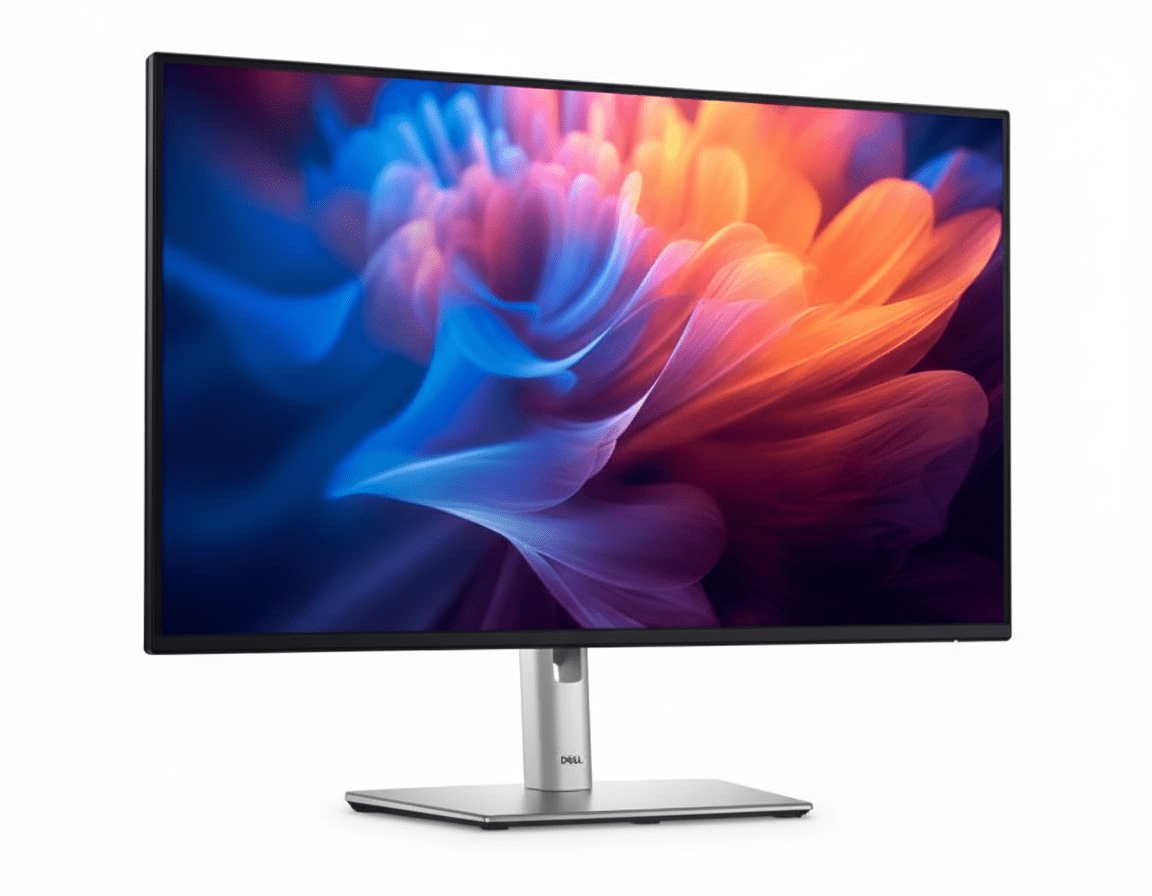
Dell 27″ USB-C Hub Monitor (P2725HE) Review: The Smartest FHD Productivity Powerhouse

Dell 27" USB-C Hub Monitor
Dell 27″ USB-C Hub Monitor (P2725HE) Review: The Ultimate FHD Hub

Dell 27″ USB-C Hub Monitor (P2725HE) Review: The Ultimate FHD Hub

27″ FHD 100Hz Display 90W USB-C Power Delivery Full Docking Hub with RJ45 Daisy Chain via DisplayPort 4-Star Eye Comfort ₹20,899
The definitive single-cable productivity monitor for multi-screen setups.

The Dell 27 USB-C Hub Monitor (P2725HE) is a masterclass in streamlined productivity, purpose-built for the modern professional. At an exceptional price of ₹20,899, it combines the most sought-after office features into one cohesive package. This 27-inch monitor elevates the standard FHD experience with a smooth 100Hz refresh rate and top-tier eye comfort. Its true power, however, lies in its function as a complete docking station, offering 90W USB-C power delivery, wired Ethernet, and the ability to daisy chain a second monitor, creating the ultimate single-cable, multi-display workspace.

Streamline Your Workspace

Experience single-cable hub convenience, smooth 100Hz motion, and advanced eye comfort.

₹20,899
₹22,299 (Save ₹1,400)
Inclusive of all taxes | Free Priority Delivery

Valid till Oct 17th | 3 Year Advanced Exchange Service

Key Features at a Glance

90W USB-C Hub: Delivers video, data, and 90W of power to charge your laptop via a single cable.
100Hz Refresh Rate: Provides noticeably smoother scrolling and motion than standard 60Hz displays.
DisplayPort Daisy Chain: Connect a second monitor directly to the first for a clean, multi-display setup.
Full Ergonomics: Complete height, tilt, swivel, and pivot adjustability for optimal comfort.
TÜV 4-Star Eye Comfort: Hardware-based ComfortView Plus reduces blue light without affecting color.
Integrated RJ45 Port: Adds stable, wired Gigabit Ethernet connectivity to your laptop.

1. The Ultimate Hub: One Cable for Everything

Streamline your desk with a monitor that doubles as a full-featured docking station.

Single-Cable 90W USB-C

The powerful USB-C port is the heart of this monitor, delivering up to 90W of power. This allows you to connect your laptop to handle video, transfer data, and charge its battery—all through a single, convenient cable, eliminating clutter.

Full Docking Connectivity

This monitor replaces your separate dock with a built-in RJ45 port for stable wired internet and a hub of USB-A and USB-C downstream ports for peripherals. It’s a complete solution for a clean and efficient workspace.

2. Enhanced Visuals: Smooth and Comfortable

Experience less flicker, more seamless scrolling, and advanced eye comfort.

Smooth 100Hz Refresh Rate

The 100Hz refresh rate is a major upgrade over standard 60Hz monitors. It delivers noticeably smoother motion when scrolling through documents, browsing websites, and watching videos, making the entire user experience more fluid and responsive.

TÜV 4-Star Eye Comfort

This monitor achieves a top-tier TÜV 4-star eye comfort certification. Its built-in ComfortView Plus hardware reduces harmful blue light emissions without the yellow tint of software filters, protecting your eyes during long work hours.

3. Multi-Monitor Productivity, Simplified

Effortlessly build a dual-monitor setup with minimal cable clutter.

DisplayPort Daisy Chaining

The included DisplayPort-out port with Multi-Stream Transport (MST) allows you to “daisy chain” a second compatible monitor. You can connect your laptop to the first monitor via USB-C and then link the first monitor to a second monitor with a single DP cable.

Dell Display Manager

Manage your multi-monitor setup with Dell Display Manager (DDM). Use Easy Arrange to tile windows across both screens with 38 preset layouts. The auto-restore feature will even remember your app layouts when you reconnect.

4. Superior Ergonomics: Work in Comfort

A full range of motion allows you to tailor your workspace to your needs.

Full Adjustability

This monitor’s stand offers complete ergonomic freedom. You can adjust the height by up to 150mm, tilt the screen forward and backward, and swivel it left and right to find the perfect position and share your screen with colleagues.

Pivot to Portrait

The 90° pivot function is a key feature for developers, writers, and designers. Rotating the monitor into a vertical orientation is perfect for viewing long documents, lines of code, or portrait-oriented layouts with far less scrolling.

Ideal For These Users

Hybrid & Office Professionals

The single-cable USB-C hub functionality is perfect for those who frequently connect and disconnect their laptops, instantly turning their desk into a full-featured workstation.

Users Building Dual-Monitor Setups

The DisplayPort-out for daisy chaining makes this monitor the ideal primary display for a clean, two-monitor setup with minimal cable management headaches.

Corporate IT Departments

Features like RJ45 Ethernet with MAC address pass-through, remote asset management via DDM, and PXE Boot make it easy to deploy and manage across an organization.

Anyone Seeking a Smoother Experience

The 100Hz refresh rate is a significant quality-of-life improvement over standard 60Hz monitors, making all daily computer tasks feel more fluid and pleasant.

Who Might Consider Other Options

Users Needing High Resolution

While FHD is fine for most tasks, users who work with detailed graphics, large spreadsheets, or simply want sharper text should consider the 4K version, the P2723QE.

Gamers

This is a productivity monitor. Gamers will be better served by displays with higher refresh rates, faster response times, and adaptive sync technology.

Creative Professionals

The 99% sRGB color space is great for general use, but photographers and video editors will require the wider color gamuts (DCI-P3, Adobe RGB) found in Dell’s UltraSharp series.

Competitive Edge: How It Stacks Up

The ultimate integration of hub functionality and multi-monitor convenience.

  • Vs. The P2723QE (4K Version)

    The P2725HE offers every single hub and ergonomic feature of its more expensive 4K sibling but with an FHD 100Hz panel instead. This makes it a fantastic value for users who prioritize hub features and smooth motion over raw pixel density.

  • Vs. Other FHD USB-C Monitors

    Most competitors in this price range lack the full suite of features. The P2725HE stands out by including not just USB-C, but 90W power delivery, an RJ45 Ethernet port, a 100Hz refresh rate, and DisplayPort-out for daisy chaining—a combination that is virtually unmatched.

  • The Multi-Monitor Champion

    Its key advantage is being the perfect primary monitor for a dual-display setup. The ability to connect a laptop with one cable and then run a second monitor from the first simplifies multi-screen productivity like no other monitor in its class.

Full Specifications

Display

Screen Size
27″
Resolution
FHD (1920 x 1080)
Panel Type
IPS
Refresh Rate
100 Hz
Response Time
5ms (Fast Mode)
Brightness
300 cd/m²
Color Gamut
99% sRGB
Contrast Ratio
1500:1

Connectivity

Video In
1x DP 1.4, 1x HDMI 1.4
Video Out
1x DP 1.4 (MST)
USB-C Hub
1x USB-C (90W PD, DP Alt Mode)
USB Downstream
3x USB-A, 1x USB-C (15W)
Ethernet
1x RJ45 Gigabit Ethernet

Mechanical

Height Adjust
150 mm
Tilt
-5° to 21°
Swivel
-45° to 45°
Pivot
±90°

Pros and Cons

What We Liked

  • Full docking hub with 90W USB-C and RJ45 is incredible value.
  • Smooth 100Hz refresh rate enhances the daily user experience.
  • DisplayPort-out for daisy chaining simplifies multi-monitor setups.
  • Excellent ergonomics with a fully adjustable stand.
  • Top-tier TÜV 4-star eye comfort certification.

What Could Be Better

  • FHD resolution on a 27-inch screen results in low pixel density.
  • Not suitable for gaming or color-critical creative work.
  • Contrast ratio is good for IPS, but not as deep as VA panels.

Final Verdict

The Dell P2725HE is a brilliantly conceived productivity monitor that packs an incredible amount of functionality into an affordable package. It combines all the features a modern professional could want: a full docking station with 90W USB-C and Ethernet, a smooth 100Hz refresh rate, top-tier eye comfort, and even daisy-chaining capability. It is, without a doubt, one of the most feature-rich productivity monitors available at this price point.

The only significant compromise is the 1080p resolution on a 27-inch screen, which can look pixelated to those accustomed to QHD or 4K. However, if you prioritize seamless hub functionality, multi-monitor convenience, and ergonomic comfort over raw pixel density, the P2725HE stands in a class of its own and represents one of the best values on the market for building a modern, clutter-free workspace.

MSI Thin 15 Gaming Laptop – Intel 13th Gen i5 + RTX 3050 6GB, 16GB RAM, 1TB SSD | Best Under ₹75K (2025)

MSI Thin 15 Gaming Laptop
MSI Thin 15 Gaming Laptop Complete Review (2025) – Intel 13th Gen + RTX 3050 6GB
MSI Thin 15 Gaming Laptop Intel 13th Gen

Available Color:

⭐⭐⭐⭐⭐
Amazon Rated (Top Seller)
🔥 BEST INTEL 13TH GEN + RTX 3050 6GB + 1TB

MSI Thin 15 (Intel 13th Gen)

Intel i5-13420H | RTX 3050 6GB | FHD 144Hz

15.6″ FHD 144Hz • 16GB RAM • 1TB SSD • Wi-Fi 6 • 1.86Kg

Premium Intel Configuration:

• Processor: Intel Core i5-13420H (8-core, up to 4.6 GHz)

• Graphics: NVIDIA GeForce RTX 3050 6GB GDDR6

• RAM: 16GB DDR4-3200MHz

• Storage: 1TB NVMe PCIe Gen 4 SSD

• Display: 15.6″ FHD (1920×1080) 144Hz IPS

• Bonus: Wi-Fi 6 + Webcam + Lightest 1.86kg!

₹89,990

20% OFF

₹71,990*

*Best Intel 13th Gen + 6GB VRAM + 1TB SSD combo!

🛒 Buy Now on Amazon

EMI starting from ₹3,490/month | Free Delivery

Price

₹71,990

VRAM

6GB!

Storage

1TB

MSI Thin 15 (Intel 13th Gen) Overview

Key Highlights

  • ✓ Intel 13th Gen: Latest architecture
  • ✓ 6GB VRAM: RTX 3050 6GB!
  • ✓ 1TB SSD: Double storage
  • ✓ i5-13420H: 8-core power
  • ✓ Lightest: Only 1.86 kg
  • ✓ Webcam: Built-in HD
  • ✓ Amazon: Top seller

In The Box

  • 📦 MSI Thin 15 Gaming Laptop
  • 🔋 52.4Wh Battery (3-cell)
  • 🔌 120W Power Adapter
  • 📄 User Guide
  • 🛡️ 2-Year On-Site Warranty

Bonus: Complete Intel 13th Gen + 1TB package!

Intel 13th Gen Advantage

  • • Latest Intel: 13th Gen architecture
  • • 6GB VRAM: 50% more than standard
  • • 1TB Storage: Double capacity
  • • Lightest: Only 1.86 kg
  • • Complete: Webcam + Wi-Fi 6
  • • Best Premium Budget: Sweet spot

💰 Unbeatable Premium Budget Gaming Value

Best Intel 13th Gen Price

At ₹71,990 (20% off), this is the best-priced Intel 13th Gen gaming laptop with RTX 3050 6GB. Most Intel 13th Gen + 6GB VRAM laptops cost ₹80-95k, making this ₹8-23k cheaper!

6GB VRAM + 1TB SSD Combo

Get 6GB VRAM (50% more) than standard 4GB RTX 3050 + massive 1TB SSD (double storage). Most competitors offer only 4GB VRAM + 512GB SSD at this price!

Lightest Gaming Laptop

At just 1.86kg, this is one of the lightest gaming laptops with Intel 13th Gen + RTX 3050. Perfect for students needing ultra-portability without sacrificing performance!

Intel 13th Gen Performance

Intel Core i5-13420H

8-Core Raptor Lake-H (4P + 4E)

Total Cores 8 Cores (4P + 4E)
Threads 12 Threads
Base Clock 2.1 GHz
Max Turbo 4.6 GHz
Cache 12MB L3
TDP 45W (up to 95W)

Power: Latest 13th Gen for excellent gaming + productivity

RTX 3050 6GB

NVIDIA Ampere (DLSS 2) – Premium

VRAM 6GB GDDR6
Memory Bus 96-bit
DLSS DLSS 2
Ray Tracing 2nd Gen RT Cores
TGP 45-60W

Gaming: Excellent FHD gaming at 50-75 FPS

💾 Memory (RAM)

Installed RAM 16GB DDR4-3200
Configuration Dual Channel
RAM Slots 2 SODIMM Slots
Max Upgrade 64GB (32GB x 2)

Fast DDR4: 3200MHz for smooth multitasking

💿 Storage

Installed Storage 1TB NVMe SSD
Interface PCIe Gen 4 x4
Speed ~5000 MB/s Read
Expandable Yes (1x M.2 + 1x SATA)

Massive Storage: 1TB = 2x standard capacity!

📊 Performance Benchmarks

Cinebench R23

Multi-Core

~11,200

Single-Core

1,720

Excellent 13th Gen performance

3DMark Time Spy

Graphics Score

~6,100

Strong FHD gaming performance

Geekbench 5

Multi-Core

9,420

Excellent multi-threaded power

15.6″ FHD 144Hz Display

FHD Resolution

Size 15.6″ (40 cm)
Resolution 1920 x 1080
PPI 141 ppi
Panel IPS-Level

Gaming Performance

Refresh Rate

144Hz

Response Time

Fast

Webcam Included!

  • ✓
    HD Webcam

    Built-in camera

  • ✓
    Ready for Classes

    No external needed

Advantage: Save ₹1-2k on webcam

🔊 Audio System

  • • 2x Stereo Speakers (2W each)
  • • Internal Microphone
  • • 3.5mm Jack: Headphone support
  • • Average quality (external speakers recommended)

Real Gaming Performance @ FHD

🎮 AAA Games @ 1080p (FHD)

Cyberpunk 2077

58 FPS

• Settings: Medium

• DLSS: Balanced

• Experience: Good

Call of Duty MW3

92 FPS

• Settings: Medium-High

• DLSS: Quality

• Experience: Excellent

Spider-Man Remastered

70 FPS

• Settings: Medium-High

• DLSS: Quality

• Experience: Excellent

⚡ Esports Titles @ 1080p

Valorant 280+ FPS
CS2 210+ FPS
Fortnite 170+ FPS
Overwatch 2 155+ FPS

🎯 More AAA Titles

Red Dead Redemption 2 52-58 FPS
Forza Horizon 5 105 FPS
Doom Eternal 140 FPS
Hogwarts Legacy 62-68 FPS

🎮 Gaming Verdict: RTX 3050 6GB delivers excellent FHD gaming at 50-75 FPS in AAA titles with DLSS 2. Esports easily hit 155+ FPS. 6GB VRAM = better performance vs 4GB models. For ₹71,990, outstanding premium budget value!

Design & Build Quality

🏗️ Build Materials

Chassis Plastic
Lid Plastic (matte)
Quality Budget-oriented

📏 Dimensions

Dimensions 359 x 254 x 22mm
Weight 1.86 kg (Lightest!)

Lightest Intel 13th Gen gaming laptop!

🎨 Aesthetics

  • • Color: Cosmos Gray
  • • Logo: MSI branding
  • • Style: Sleek gaming
  • • Vents: Rear exhaust

Advanced Cooling System

❄️ Cooling Technology

MSI’s advanced cooling system is fine-tuned to minimize noise and maximize airflow, keeping the laptop cool and quiet during intensive gaming and creative tasks.

●
Dual Fan Design

Efficient heat dissipation

●
Heat Pipe System

Rapid heat transfer

●
Optimized Airflow

Strategic vent placement

🌡️ Thermal Performance

CPU (Gaming)

68-78°C

GPU (Gaming)

72-82°C

Performance: Stays cool even under heavy load

Gaming Keyboard

⌨️ Keyboard Features

  • ●
    Gaming Keyboard

    Optimized for gaming

  • ●
    Full-Size Layout

    Includes numpad

  • ●
    Anti-Ghosting

    N-key rollover support

  • ●
    Decent Key Travel

    1.5mm travel

🖱️ Trackpad

  • ●
    Precision Trackpad

    Windows Precision drivers

  • ●
    Multi-Touch

    Gesture support

  • ●
    Decent Size

    Adequate for daily use

Connectivity & Ports

🔌 Complete Ports

USB Ports

• Multiple USB 3.2 Ports (Type-A)

• USB Type-C support

Display Output

• 1x HDMI Port

Other Ports

• RJ-45 Ethernet

• 3.5mm Audio Jack

📡 Wireless Connectivity

Intel Wi-Fi 6 (802.11ax)

Fast wireless – Latest Wi-Fi 6 standard

Bluetooth 5.3

Latest Bluetooth standard

Advantage: Fast and reliable connectivity

Battery Life & Charging

🔋 Battery

52.4Wh

• Type: Lithium Polymer

• Cells: 3-cell

• Light Use: 4-5 hours

• Gaming: 2-2.5 hours

⚡ Charging

120W

• Adapter: 120W

• Fast Charge: 50% in ~35min

• Full Charge: ~1.5 hours

💡 Real World

  • • Video: 4 hours
  • • Web: 4-5 hours
  • • Gaming: 2-2.5 hours

⚠️ Battery Note: The 52.4Wh battery provides 4-5 hours light use, 2-2.5 hours gaming. Keep charger handy for extended gaming sessions.

Complete Premium Budget Gaming Laptop Comparison – 6 Top Competitors

How does the MSI Thin 15 (Intel 13th Gen + RTX 3050 6GB + 1TB) at ₹71,990 compare against major competitors?

MSI Thin A15 (RTX 3050 4GB)

₹56,990

• Processor: AMD Ryzen 5 7535HS

• Display: 15.6″ FHD 144Hz IPS

• RAM: 16GB DDR5-4800

• Storage: 512GB SSD

• GPU: RTX 3050 4GB

• Weight: 1.86 kg

✅ Reasons to Consider

  • • ₹15k cheaper than this model
  • • Faster DDR5 RAM
  • • Same lightweight (1.86kg)
  • • Wi-Fi 6E (vs Wi-Fi 6)
  • • Zen 3+ architecture
  • • Best budget value

⚠️ Reasons to Skip

  • • Only 4GB VRAM (not 6GB)
  • • Only 512GB storage (not 1TB)
  • • AMD CPU (not Intel 13th Gen)
  • • ~15-20% slower gaming
  • • Worth ₹15k more for 6GB + 1TB

MSI Cyborg 15 (RTX 3050 6GB)

₹67,990

• Processor: Intel Core i5-12450H

• Display: 15.6″ FHD 144Hz IPS

• RAM: 16GB DDR5-4800

• Storage: 512GB SSD

• GPU: RTX 3050 6GB

• Weight: 1.98 kg

✅ Reasons to Consider

  • • ₹4k cheaper than this model
  • • Same 6GB VRAM
  • • Faster DDR5 RAM
  • • MS Office 2021 included
  • • Slightly lighter (1.98kg)
  • • Unique translucent design

⚠️ Reasons to Skip

  • • Older 12th Gen CPU (not 13th Gen)
  • • Only 512GB storage (not 1TB)
  • • No webcam (need external)
  • • Worth ₹4k more for 1TB + 13th Gen
  • • Less future-proof CPU

Lenovo IdeaPad Gaming 3

₹74,990

• Processor: Intel Core i5-12500H

• Display: 15.6″ FHD 144Hz IPS

• RAM: 16GB DDR4

• Storage: 512GB SSD

• GPU: RTX 3050 4GB

• Weight: 2.2 kg

✅ Reasons to Consider

  • • ₹3k more but Lenovo brand
  • • Good build quality
  • • Clean design
  • • Reliable support

⚠️ Reasons to Skip

  • • ₹3,000 more expensive
  • • Only 4GB VRAM (not 6GB)
  • • Only 512GB storage (not 1TB)
  • • Slower DDR4 RAM
  • • Heavier at 2.2kg
  • • Older 12th Gen CPU

HP Victus 15 (RTX 3050)

₹79,990

• Processor: Intel Core i5-12450H

• Display: 15.6″ FHD 144Hz IPS

• RAM: 16GB DDR4

• Storage: 512GB SSD

• GPU: RTX 3050 4GB

• Weight: 2.3 kg

✅ Reasons to Consider

  • • HP brand reputation
  • • Clean Victus design
  • • Good customer support

⚠️ Reasons to Skip

  • • ₹8,000 more expensive
  • • Only 4GB VRAM (not 6GB)
  • • Only 512GB storage (not 1TB)
  • • Slower DDR4 RAM
  • • Heavier at 2.3kg
  • • Older 12th Gen CPU

Acer Nitro 5 (RTX 3050)

₹76,990

• Processor: Intel Core i5-12500H

• Display: 15.6″ FHD 144Hz IPS

• RAM: 16GB DDR4

• Storage: 512GB SSD

• GPU: RTX 3050 4GB

• Weight: 2.5 kg

✅ Reasons to Consider

  • • ₹5k more but Acer brand
  • • Nitro gaming reputation
  • • Good cooling

⚠️ Reasons to Skip

  • • ₹5,000 more expensive
  • • Only 4GB VRAM (not 6GB)
  • • Only 512GB storage (not 1TB)
  • • Slower DDR4 RAM
  • • Much heavier at 2.5kg
  • • Older 12th Gen CPU

ASUS TUF F15 (RTX 3050)

₹84,990

• Processor: Intel Core i5-12500H

• Display: 15.6″ FHD 144Hz IPS

• RAM: 16GB DDR4

• Storage: 512GB SSD

• GPU: RTX 3050 4GB

• Weight: 2.3 kg

✅ Reasons to Consider

  • • ASUS TUF durability
  • • Military-grade build
  • • Premium brand

⚠️ Reasons to Skip

  • • ₹13,000 more expensive!
  • • Only 4GB VRAM (not 6GB)
  • • Only 512GB storage (not 1TB)
  • • Slower DDR4 RAM
  • • Heavier at 2.3kg
  • • Not worth ₹13k premium

📊 Quick Comparison – All 7 Laptops

LaptopPriceCPUGPU VRAMStorageRAMWeightValue
MSI Thin A15 (4GB)₹56,990R5 7535HS4GB512GBDDR51.86 kg★★★★☆
MSI Cyborg 15 (6GB)₹67,990i5-12450H6GB512GBDDR51.98 kg★★★★☆
MSI Thin 15 (13th Gen) 🏆₹71,990i5-13420H6GB1TBDDR41.86 kg★★★★★
Lenovo IdeaPad Gaming 3₹74,990i5-12500H4GB512GBDDR42.2 kg★★★☆☆
Acer Nitro 5₹76,990i5-12500H4GB512GBDDR42.5 kg★★★☆☆
HP Victus 15₹79,990i5-12450H4GB512GBDDR42.3 kg★★★☆☆
ASUS TUF F15₹84,990i5-12500H4GB512GBDDR42.3 kg★★☆☆☆

🏆 Clear Winner: MSI Thin 15 (Intel 13th Gen) at ₹71,990

Best Premium Budget Gaming Laptop: At ₹71,990, this is the best-priced Intel 13th Gen gaming laptop with RTX 3050 6GB + 1TB SSD + 1.86kg weight. All competitors either have older CPUs, less VRAM, less storage, or cost more!

💰 Best Overall Value

  • • Latest CPU: Intel 13th Gen (2023)
  • • 6GB VRAM: 50% more than 4GB
  • • 1TB Storage: Double capacity
  • • ₹3-13k cheaper than similar specs
  • • Lightest: Only 1.86kg

🎯 Unique Advantages

  • • ONLY 13th Gen under ₹75k with 6GB
  • • ONLY 1TB SSD at this price
  • • Lightest at 1.86kg
  • • Latest architecture (2023)
  • • Best future-proof CPU
  • • Complete package with webcam

⚡ Performance Edge

  • • 13th Gen CPU: Latest architecture
  • • 6GB VRAM: Better gaming
  • • 1TB SSD: No storage worry
  • • Fast RAM: DDR4-3200
  • • Best portability: 1.86kg
  • • Unbeatable premium budget value

Bottom Line: Every competitor either has OLDER CPUs (12th Gen or AMD), LESS VRAM (4GB), LESS storage (512GB), HEAVIER weight, or COSTS MORE. The Thin 15 with Intel 13th Gen + 6GB + 1TB is the undisputed premium budget champion!

Complete Pros & Cons

✅ Major Strengths (24)

  • • Intel 13th Gen: Latest i5-13420H
  • • 6GB VRAM: RTX 3050 6GB
  • • 1TB SSD: Double storage
  • • Best Price: Only ₹71,990
  • • 20% OFF: From ₹89,990
  • • Lightest: Only 1.86 kg!
  • • DLSS 2: AI-powered gaming
  • • Ray Tracing: Realistic graphics
  • • 144Hz Display: Smooth gaming
  • • HD Webcam: Built-in
  • • Wi-Fi 6: Fast wireless
  • • Bluetooth 5.3: Latest standard
  • • Upgradable: RAM to 64GB
  • • Good Cooling: Advanced system
  • • Gaming Keyboard: Optimized
  • • Multiple Ports: Good connectivity
  • • 2-Year Warranty: On-site service
  • • Free Delivery: Amazon
  • • EMI Options: ₹3,490/month
  • • Best Premium Budget: Under ₹72k
  • • Ultra-Portable: Easy to carry
  • • Student Friendly: Perfect for college
  • • Future-Proof: Latest architecture
  • • Complete Package: Webcam + 1TB

⚠️ Limitations (15)

  • • Mid-Tier GPU: RTX 3050 (not 4050)
  • • DDR4 RAM: Not DDR5
  • • Small Battery: 52.4Wh
  • • Short Gaming Battery: 2-2.5 hours
  • • Plastic Build: Not premium metal
  • • Average Display: Budget color gamut
  • • Average Speakers: Lacking bass
  • • Fan Noise: Audible under load
  • • FHD Only: No QHD option
  • • Gets Warm: Under sustained gaming
  • • Budget Aesthetics: Plastic finish
  • • No MS Office: Not included
  • • No Laptop Bag: Not included
  • • No RGB: Basic keyboard
  • • No Fingerprint: No biometric

Final Verdict

Overall Rating

4.6
⭐⭐⭐⭐⭐

Best Premium Budget Intel 13th Gen

Value for Money 5.0/5
Gaming Performance 4.0/5
Portability 5.0/5

🎮 Perfect For

  • ✅ Students under ₹75k budget
  • ✅ Want latest Intel 13th Gen CPU
  • ✅ Need 6GB VRAM for better gaming
  • ✅ Want 1TB storage (no expansion worry)
  • ✅ Carrying laptop daily to college
  • ✅ Need lightest gaming laptop (1.86kg)
  • ✅ Best premium budget value priority

❌ Not Ideal For

  • ❌ Want AAA gaming at Ultra settings
  • ❌ Need long battery life (6+ hours)
  • ❌ Want RTX 4050/4060 power
  • ❌ Need premium metal build
  • ❌ Want MS Office included

🎯 Final Thoughts

The MSI Thin 15 (Intel 13th Gen) at ₹71,990 is the best premium budget gaming laptop of 2025. It’s the best-priced way to get Intel 13th Gen gaming with RTX 3050 6GB, massive 1TB SSD, and ultra-portable 1.86kg weight that no competitor can match under ₹75k.

At this price, you get Intel 13th Gen vs 12th Gen (all competitors), 6GB VRAM vs 4GB (most competitors), 1TB vs 512GB storage, and 1.86kg vs 2.2-2.5kg weight. The value proposition is unbeatable—₹3-13k cheaper than similar spec competitors with newer CPU!

Gaming performance is excellent with RTX 3050 6GB delivering 50-75 FPS in AAA titles with DLSS and 155+ FPS in esports. The Intel Core i5-13420H (13th Gen Raptor Lake) is the latest 8-core CPU with P+E architecture that handles modern games + multitasking brilliantly.

Unique advantages: Latest Intel 13th Gen (future-proof), 6GB VRAM (50% more performance), massive 1TB SSD (no storage worry), lightest at 1.86kg, complete package with webcam + Wi-Fi 6. No competitor offers this combo under ₹75k!

Only compromises: DDR4 RAM (not DDR5) and shorter battery life (2-2.5 hours gaming). But for students on ₹70-75k budgets prioritizing latest CPU + storage + portability, these are minor trade-offs for incredible value!

Bottom Line: If you want the best Intel 13th Gen gaming laptop under ₹75k with maximum storage (1TB), best GPU (6GB VRAM), and lightest weight (1.86kg), the MSI Thin 15 is the undisputed champion. No competitor offers 13th Gen + 6GB + 1TB + 1.86kg at this price. Highly recommended for premium budget students!

Complete Technical Specifications

MSI THIN 15 (INTEL 13TH GEN) COMPLETE SPECIFICATIONS
PERFORMANCE
ProcessorIntel Core i5-13420H (8-core: 4P + 4E)
Base / Max Turbo2.1 GHz / Up to 4.6 GHz
GraphicsNVIDIA GeForce RTX 3050 6GB GDDR6
RAM16GB DDR4-3200MHz (Up to 64GB)
Storage1TB NVMe PCIe Gen 4 SSD
DISPLAY
Screen Size15.6 inches (40 cm)
Resolution1920 x 1080 (FHD)
Refresh Rate144Hz
Panel TypeIPS-Level
DESIGN
Weight1.86 kg (Ultra-Light!)
Dimensions359 x 254 x 22 mm
ColorCosmos Gray
KeyboardGaming Keyboard
WebcamHD Webcam (Built-in)
CONNECTIVITY
Wi-FiIntel Wi-Fi 6 (802.11ax)
BluetoothBluetooth 5.3
USB PortsMultiple USB 3.2 Ports
HDMI1x HDMI
Battery52.4Wh Lithium Polymer
Power Adapter120W
Operating SystemWindows 11 Home
Warranty2 Years On-Site

MacBook Air 13 M4 (2025) – 18Hr Battery, M4 Chip, 13.6″ Liquid Retina

MacBook Air 13 M4
MacBook Air 13″ M4 (2025) Review – Complete Specifications & Features
MacBook Air 13 M4

Available Colors:

APPLE M4 CHIP

MacBook Air 13″ (M4, 2025)

13.6″ Liquid Retina | Apple M4 Chip | Apple Intelligence

Choose Configuration:

Starting at

₹99,900*

*Maximum Retail Price (inclusive of all taxes)

🛒 Check Latest Price & Buy Now

*Affiliate link – We may earn commission

Chip

Apple M4 (10-core)

Display

13.6″ Liquid Retina

Memory

16GB Unified

Battery

Up to 18 hours

MacBook Air 13″ M4 Overview

✨ Key Highlights

  • ✓ Apple M4 Chip (10-core CPU)
  • ✓ 13.6″ Liquid Retina Display
  • ✓ 16GB Unified Memory
  • ✓ 256GB/512GB SSD
  • ✓ 8-core or 10-core GPU
  • ✓ Up to 18 hours battery
  • ✓ 12MP Center Stage Camera
  • ✓ Wi-Fi 6E + Bluetooth 5.3
  • ✓ Touch ID
  • ✓ Only 1.24 kg

🆕 What’s New in M4

  • M4 Chip: 10-core CPU, faster than M3
  • 16GB Base RAM: Doubled from 8GB
  • Ray Tracing: Hardware-accelerated graphics
  • 16-core Neural Engine: AI performance boost
  • Center Stage: 12MP camera upgrade
  • 4 Color Options: Sky Blue added

📦 In The Box

  • ✓ 13″ MacBook Air
  • ✓ 30W USB-C Power Adapter
  • ✓ USB-C to MagSafe 3 Cable (2m)
  • ✓ User Documentation

35W adapter with 10-core GPU model

Apple M4 Chip

🔥 CPU Performance

CPU Configuration

10-core CPU

Performance Cores

4 P-cores

Efficiency Cores

6 E-cores

Memory Bandwidth

120 GB/s

Performance vs M3

25% faster

🎮 GPU Performance

GPU Cores

8-core or 10-core

Ray Tracing

Hardware-accelerated

Graphics Performance

30% faster than M3

Gaming

AAA gaming capable

🧠 Neural Engine

AI Cores

16-core Neural Engine

AI Performance

38 trillion ops/sec

Apple Intelligence

On-device AI processing

Machine Learning

Faster ML tasks

Display & Audio

🖥️ Liquid Retina Display

Screen Size

13.6″ diagonal

Resolution

2560 x 1664 pixels

Pixel Density

224 PPI

Brightness

500 nits

Color Support

1 billion colors

✨ Display Features

  • ✓ Wide Color (P3)
  • ✓ True Tone Technology
  • ✓ IPS Technology
  • ✓ LED-backlit
  • ✓ HDR Support
  • ✓ 2M+ pixel count

🔊 Audio System

Speakers

Four-speaker sound system

Spatial Audio

Dolby Atmos support

Microphones

Three-mic array

Audio Jack

3.5mm (high-impedance)

Apple Intelligence

🤖 AI Capabilities

  • ✓ Writing Tools: Rewrite, proofread, summarize
  • ✓ Smart Replies: Context-aware suggestions
  • ✓ Priority Notifications: AI-sorted alerts
  • ✓ Focus Modes: Intelligent filtering
  • ✓ Siri Enhancement: Better understanding
  • ✓ On-device Processing: Privacy-first

🔒 Privacy & Security

  • ✓ On-device AI: Data stays local
  • ✓ No data collection: Apple can’t access
  • ✓ Secure Enclave: Hardware security
  • ✓ Touch ID: Fingerprint authentication
  • ✓ FileVault: Disk encryption

💻 macOS Features

  • ✓ Window Tiling: Better multitasking
  • ✓ iPhone Mirroring: Access iPhone apps
  • ✓ Safari Updates: Faster browsing
  • ✓ Universal Control: Multi-device
  • ✓ Continuity: Seamless ecosystem

Real-World Performance

💼 Productivity

Office Apps

Excellent

Pages, Numbers, Keynote

Multitasking

Outstanding

50+ tabs, multiple apps

Video Calls

Perfect

Zoom, Teams, FaceTime

🎨 Creative Apps

  • ✓ Photo Editing: Lightroom, Photoshop
  • ✓ Video Editing: Final Cut Pro, iMovie
  • ✓ Music Production: GarageBand, Logic Pro
  • ✓ Graphic Design: Illustrator, Sketch
  • ✓ 3D Rendering: Blender (light work)

🎮 Gaming Performance

  • ✓ AAA Games: Resident Evil, Baldur’s Gate 3
  • ✓ Indie Games: Smooth 60fps+
  • ✓ Apple Arcade: Perfect performance
  • ✓ Ray Tracing: Hardware acceleration

Better gaming than previous MacBook Air models

Design & Build

🎨 Premium Design

Material

100% Recycled Aluminum

Colors

Sky Blue, Silver, Starlight, Midnight

Thickness

1.13 cm (0.44″)

Weight

1.24 kg (2.7 lb)

⌨️ Input Devices

  • ✓ Magic Keyboard: Backlit with ambient sensor
  • ✓ 78/79 Keys: Full-size layout
  • ✓ Touch ID: Built into power button
  • ✓ Force Touch Trackpad: Pressure-sensitive
  • ✓ Haptic Feedback: Precise control

♻️ Environmental

  • ✓ 55%+ Recycled Content
  • ✓ 100% Recycled Aluminum
  • ✓ 100% Recycled Rare Earths
  • ✓ 100% Fiber Packaging
  • ✓ Carbon Neutral by 2030
  • ✓ ENERGY STAR Certified

Battery Life

🔋 Battery Specs

Capacity

53.8 Wh

Video Streaming

Up to 18 hours

Wireless Web

Up to 15 hours

Charger

30W or 35W USB-C

⚡ Charging

MagSafe 3

Magnetic charging

Fast Charge

50% in 30 min (70W adapter)

USB-C Charging

Also via Thunderbolt ports

💼 Real-World Usage

Light Work

14-16 hours

Web, email, documents

Mixed Use

10-12 hours

Video, calls, browsing

Ports & Connectivity

🔌 Ports

  • ✓ 2x Thunderbolt 4 (USB-C)
  • • 40 Gbps transfer speed
  • • Charging support
  • • DisplayPort output
  • ✓ 1x MagSafe 3 charging
  • ✓ 1x 3.5mm headphone jack

📡 Wireless

Wi-Fi

Wi-Fi 6E (802.11ax)

Bluetooth

Bluetooth 5.3

Speed

Up to 9.6 Gbps

🖥️ External Displays

  • ✓ Up to 2 external displays
  • ✓ 6K resolution at 60Hz
  • ✓ Thunderbolt 4 video output
  • ✓ Native DisplayPort 1.4

Camera & Communication

📷 12MP Center Stage

Resolution

12MP (upgraded from 1080p)

Center Stage

Auto-framing & tracking

Desk View

Show desk workspace

Video Quality

1080p HD recording

🎤 Audio Input

  • ✓ Three-mic array
  • ✓ Directional beamforming
  • ✓ Voice Isolation mode
  • ✓ Wide Spectrum mode
  • ✓ Enhanced clarity

🔊 Four-Speaker System

  • ✓ Spatial Audio with Dolby Atmos
  • ✓ Dynamic head tracking (with AirPods)
  • ✓ Wide stereo sound
  • ✓ Deep bass

Pros and Cons

✅ Strengths

  • M4 Performance: 25% faster CPU, 30% faster GPU than M3
  • 16GB Base RAM: Doubled from 8GB, better for multitasking
  • 18-Hour Battery: All-day battery life, industry-leading
  • Premium Build: Aluminum unibody, only 1.24kg
  • Liquid Retina Display: 500 nits, P3 wide color, True Tone
  • 12MP Camera Upgrade: Center Stage for better video calls
  • Silent Operation: Fanless design, completely quiet
  • Ecosystem Integration: Perfect with iPhone, iPad, Apple Watch
  • Apple Intelligence: On-device AI with privacy
  • Sustainability: 55%+ recycled materials, carbon neutral goal

⚠️ Limitations

  • Premium Pricing: ₹99,900 starting price, expensive vs Windows
  • Limited Ports: Only 2 Thunderbolt 4 ports
  • No SD Card Reader: Need adapter for photographers
  • RAM Not Upgradable: Soldered unified memory
  • 60Hz Display: No ProMotion (120Hz) like MacBook Pro
  • 8-core GPU Base: Need to upgrade for better graphics
  • 30W Charger: Base model has slower charging
  • macOS Only: Can’t run Windows natively

Final Verdict

Overall Rating

4.7 ⭐⭐⭐⭐⭐

Performance

4.8/5

Display Quality

4.6/5

Battery Life

5.0/5

Value for Money

4.3/5

💼 Who Should Buy?

  • ✓ Students & Professionals: Perfect for productivity and creative work
  • ✓ Apple Ecosystem Users: Seamless integration with iPhone, iPad
  • ✓ Frequent Travelers: 18-hour battery, 1.24kg lightweight
  • ✓ Content Creators: Photo/video editing, music production
  • ✓ Developers: Xcode, web development, ML workflows
  • ✓ First-time Mac Users: Best entry to macOS

❌ Who Should Skip?

  • • Budget Shoppers: ₹99,900 is premium pricing
  • • Heavy Gamers: Get MacBook Pro or gaming laptop
  • • Windows-Only Users: Steep learning curve for macOS
  • • Port-Heavy Users: Only 2 USB-C ports

🎯 Bottom Line

The MacBook Air 13″ with M4 chip represents Apple’s most refined ultraportable laptop yet. The new M4 chip delivers 25% faster performance while maintaining the 18-hour battery life that made the Air legendary. Doubling the base RAM to 16GB and upgrading to a 12MP Center Stage camera addresses previous limitations. The fanless design remains whisper-quiet, and the 1.24kg weight makes it incredibly portable. While the ₹99,900 starting price is premium, you get Apple’s best laptop for students, professionals, and creators who value performance, portability, and ecosystem integration. This is the MacBook Air perfected.

Competitor Comparison

Dell XPS 13 Plus (2025)

₹1,29,990

Processor: Intel Core Ultra 7 155H

Display: 13.4″ FHD+ Touch

RAM: 16GB LPDDR5x

Storage: 512GB SSD

Battery: Up to 12 hours

Weight: 1.24 kg

✅ Reasons to Consider

  • • Premium carbon fiber design
  • • x86 Windows compatibility
  • • Minimalist aesthetic
  • • OLED display option available
  • • Dell’s excellent service network
  • • Thunderbolt 4 ports

⚠️ Reasons to Ignore

  • • ₹30,000+ more expensive
  • • Only 12h battery vs 18h
  • • Heavier thermal throttling
  • • No ecosystem integration
  • • Capacitive function keys (no tactile)
  • • Windows 11 learning curve

HP Spectre x360 14 (2025)

₹1,39,990

Processor: Intel Core Ultra 7 155H

Display: 13.5″ 3K2K OLED Touch

RAM: 16GB LPDDR5x

Storage: 512GB SSD

Battery: Up to 11 hours

Weight: 1.39 kg

✅ Reasons to Consider

  • • 2-in-1 convertible design
  • • Stunning 3K2K OLED display
  • • Active pen support included
  • • Premium gem-cut design
  • • Windows 11 flexibility
  • • Better for artists/designers

⚠️ Reasons to Ignore

  • • ₹40,000 more expensive
  • • Heavier at 1.39kg
  • • Only 11h battery life
  • • Runs hotter under load
  • • OLED burn-in risk
  • • More complex, less reliable

Microsoft Surface Laptop 6 (13.8″)

₹1,09,990

Processor: Snapdragon X Elite

Display: 13.8″ PixelSense Touch

RAM: 16GB LPDDR5x

Storage: 512GB SSD

Battery: Up to 20 hours

Weight: 1.34 kg

✅ Reasons to Consider

  • • ARM-based Windows (similar to M4)
  • • 20-hour battery life
  • • Premium Alcantara keyboard
  • • Microsoft ecosystem integration
  • • Copilot+ PC features
  • • Comparable performance

⚠️ Reasons to Ignore

  • • ₹10,000 more expensive
  • • ARM Windows app compatibility issues
  • • Heavier at 1.34kg (same as MBA)
  • • Limited port selection
  • • macOS generally more stable
  • • Lower resale value

Lenovo Yoga Slim 7x (14.5″)

₹1,19,990

Processor: Snapdragon X Elite

Display: 14.5″ 3K OLED Touch

RAM: 16GB LPDDR5X

Storage: 512GB SSD

Battery: Up to 24 hours

Weight: 1.49 kg

✅ Reasons to Consider

  • • Larger 14.5″ OLED display
  • • 24-hour claimed battery
  • • Lenovo reliability
  • • Similar ARM performance
  • • Excellent keyboard
  • • More screen real estate

⚠️ Reasons to Ignore

  • • ₹20,000 more expensive
  • • Heavier at 1.49kg
  • • Windows ARM limitations
  • • OLED burn-in concerns
  • • No ecosystem like Apple
  • • Bulkier design

ASUS Zenbook 14 OLED (2025)

₹94,990

Processor: Intel Core Ultra 5 125H

Display: 14″ 2.8K OLED Touch

RAM: 16GB LPDDR5x

Storage: 512GB SSD

Battery: Up to 10 hours

Weight: 1.39 kg

✅ Reasons to Consider

  • • Cheaper by ₹5,000
  • • Stunning OLED display
  • • Good build quality
  • • x86 full compatibility
  • • NumberPad 2.0 on trackpad
  • • ASUS service centers

⚠️ Reasons to Ignore

  • • Only 10h battery (vs 18h)
  • • Heavier and bulkier
  • • Lower performance efficiency
  • • No ecosystem integration
  • • Windows bloatware
  • • Lower resale value

Samsung Galaxy Book4 Pro 14″

₹1,24,990

Processor: Intel Core Ultra 7 155H

Display: 14″ 3K AMOLED Touch

RAM: 16GB LPDDR5x

Storage: 512GB SSD

Battery: Up to 13 hours

Weight: 1.26 kg

✅ Reasons to Consider

  • • Beautiful 3K AMOLED display
  • • Samsung Galaxy ecosystem sync
  • • S Pen support included
  • • Premium metal design
  • • Good for Samsung phone users
  • • Similar weight to MacBook

⚠️ Reasons to Ignore

  • • ₹25,000 more expensive
  • • Only 13h battery vs 18h
  • • Runs warm under load
  • • Samsung bloatware on Windows
  • • Not as powerful as M4
  • • Lower performance per watt

📊 Quick Comparison Summary

ModelPriceBatteryWeightPerformanceValue
MacBook Air M4₹99,90018h1.24kgExcellent★★★★★
Dell XPS 13 Plus₹1,29,99012h1.24kgVery Good★★★★
HP Spectre x360 14₹1,39,99011h1.39kgVery Good★★★
Surface Laptop 6₹1,09,99020h1.34kgVery Good★★★★
Lenovo Yoga Slim 7x₹1,19,99024h1.49kgVery Good★★★★
ASUS Zenbook 14₹94,99010h1.39kgGood★★★★
Samsung Book4 Pro₹1,24,99013h1.26kgVery Good★★★

Winner: MacBook Air M4 offers the best combination of price, performance, battery life, and ecosystem integration. While competitors offer features like OLED displays or 2-in-1 designs, none match the MacBook Air’s overall value and efficiency.

Complete Technical Specifications

CHIP & PERFORMANCE
ChipApple M4 chip
CPU10-core CPU (4 performance + 6 efficiency cores)
GPU8-core GPU (10-core configurable)
Neural Engine16-core Neural Engine
Memory Bandwidth120 GB/s
Ray TracingHardware-accelerated
DISPLAY
Size13.6″ (34.46 cm) diagonal
Resolution2560 x 1664 pixels (224 PPI)
TechnologyLED-backlit with IPS technology
Brightness500 nits
Color1 billion colors, Wide color (P3)
FeaturesTrue Tone technology
MEMORY & STORAGE
Unified Memory16GB (configurable to 24GB or 32GB)
Storage256GB, 512GB SSD (configurable up to 2TB)
BATTERY & POWER
Battery53.8 Wh lithium-polymer
Video StreamingUp to 18 hours
Wireless WebUp to 15 hours
Power Adapter30W USB-C (35W with 10-core GPU)
Fast Charge50% in 30 min (with 70W adapter)
PORTS & CONNECTIVITY
MagSafe 3Magnetic charging port
Thunderbolt 42x USB-C (40 Gbps, charging, DisplayPort)
Audio Jack3.5mm with high-impedance support
Wi-FiWi-Fi 6E (802.11ax)
BluetoothBluetooth 5.3
CAMERA & AUDIO
Camera12MP Center Stage with Desk View
MicrophonesThree-mic array with beamforming
SpeakersFour-speaker system with Spatial Audio
Audio SupportDolby Atmos, Spatial Audio
DESIGN & DIMENSIONS
Material100% Recycled Aluminum
ColorsSky Blue, Silver, Starlight, Midnight
Dimensions30.41 x 21.5 x 1.13 cm
Weight1.24 kg (2.7 lb)
SOFTWARE
Operating SystemmacOS (latest version)
Apple IntelligenceOn-device AI processing (Beta)

Pricing & Configurations

Model 1

₹99,900

  • • M4 with 8-core GPU
  • • 16GB unified memory
  • • 256GB SSD
  • • 30W power adapter
RECOMMENDED

Model 2

₹1,19,900

  • • M4 with 10-core GPU
  • • 16GB unified memory
  • • 512GB SSD
  • • 35W dual USB-C adapter

Model 3

₹1,39,900

  • • M4 with 10-core GPU
  • • 24GB unified memory
  • • 512GB SSD
  • • 35W dual USB-C adapter
🛒 Check Latest Price & Buy Now

*Affiliate link – We may earn commission

⚙️ Configure to Order Options

Memory Upgrades:

  • • 24GB unified memory
  • • 32GB unified memory

Storage Upgrades:

  • • 512GB SSD
  • • 1TB SSD
  • • 2TB SSD

Samsung Galaxy Book5 Review — The Smartest AI Laptop with Intel Core Ultra 7, 32GB RAM & 19-Hour Battery Life

Samsung Galaxy Book5
Samsung Galaxy Book5 Review: The Mainstream AI-Powered Workhorse

Samsung Galaxy Book5 Review: The Mainstream AI-Powered Workhorse

Intel® Core™ Ultra 7 (Series 2) Intel® AI Boost NPU 15.6″ FHD IPS Display 1.55 kg Lightweight Up to 19 Hours Battery Extensive Ports
A smart, powerful, and long-lasting laptop that brings next-generation AI to your everyday workflow.

The Samsung Galaxy Book5 represents the next evolution of the mainstream laptop, intelligently blending performance, endurance, and cutting-edge AI. As one of the first devices to feature Intel’s Core™ Ultra (Series 2) processor, it’s built from the ground up to supercharge your productivity with a powerful Intel AI Boost NPU. This isn’t just about raw speed; it’s about smarter, more efficient computing. With a massive 32GB of RAM, 1TB of storage, and a battery that promises up to 19 hours of runtime, the Galaxy Book5 is a dependable workhorse. Housed in a slim 1.55kg chassis and featuring a comprehensive array of ports, it’s the perfect all-rounder for students and professionals who need a reliable, future-proof machine for work, study, and play.

The Future of Everyday Computing

Harness next-gen AI power, all-day battery, and seamless connectivity.

₹119,990.00
MRP ₹146,990.00
Save ₹27,000.00

Or from ₹5761.02/mo for 24 mos at 14% Interest.

Launched August 19th, 2025

Key Features at a Glance

Intel® Core™ Ultra 7 (Series 2): Next-gen CPU with a powerful Intel AI Boost NPU.
Long-Lasting Battery: Up to 19 hours of video runtime for all-day productivity.
Massive Configuration: Ships with 32GB of LPDDR5X RAM and a 1TB NVMe SSD.
Full Port Selection: Includes HDMI, USB-C, USB-A, microSD, and an RJ45 LAN port.
On-Device AI Features: Includes new tools like AI Select and Photo Remaster.
Galaxy Ecosystem Integration: Seamlessly connect and control your other Samsung devices.

1. Supercharged Next-Gen Performance

Powered by Intel’s latest Core Ultra (Series 2) processor for an AI-enhanced workflow.

Intel® Core™ Ultra 7 (Series 2)

The Galaxy Book5 is equipped with a powerful Intel Core Ultra 7 255U processor, offering up to a 13% CPU and 38% GPU performance boost over the previous generation. With P-cores that turbo up to 5.2 GHz, it effortlessly handles heavy workloads, video editing, and content creation.

Intel® AI Boost NPU

At the heart of the new processor is the Intel AI Boost NPU (Neural Processing Unit). This dedicated AI engine accelerates AI-intensive tasks, enabling powerful on-device features and a more responsive system while improving power efficiency.

2. Smart, Integrated AI Tools

A suite of new AI features designed to enhance your productivity and creativity.

AI Select

Turn curiosity into instant answers. Simply select an image, text, or QR code on your screen, and AI Select will immediately provide search results, fitting seamlessly into your study or research flow.

Photo Remaster

Breathe new life into your old photos. The Photo Remaster tool uses a smart algorithm to retouch images and clean up blurry photos, making every detail shine with just a click.

Dedicated Copilot Key

Instant access to AI assistance is built right into the hardware. A single press of the dedicated Copilot key on the keyboard launches Microsoft’s AI assistant, ready to help you work smarter.

3. All-Day Endurance

A long-lasting battery that keeps you productive from morning to night.

Up to 19 Hours of Runtime

Thanks to the power efficiency of the new Intel processor and a sizable 61.2Wh battery, the Galaxy Book5 supports up to 19 hours of video playback, ensuring it can last through a full day of work or classes without needing a charge.

Compact Fast Charging

When you need to top up, the compact 45W USB Type-C adapter provides fast charging, capable of restoring up to 33% of the battery in just 30 minutes.

4. No-Compromise Connectivity

A full suite of built-in ports that eliminates the need for dongles.

Complete Port Selection

The Galaxy Book5 is equipped with all the ports you need, including one HDMI port, two USB Type-C ports, and two USB 3.2 Type-A ports. This wide array ensures easy connection to external monitors, peripherals, and storage devices.

Wired LAN and Expandable Storage

In a rare move for a thin laptop, it also includes a dedicated RJ45 port for high-speed wired internet connections and a microSD card reader for easily expanding storage or transferring files from cameras.

5. The Connected Power of Galaxy

Deep integration that makes your Samsung devices work together as one seamless system.

Multi Control

Use your Galaxy Book5’s keyboard and mouse to seamlessly navigate and control your Galaxy smartphone or Tab. Drag and drop files, copy and paste text, and multitask across devices like never before.

Storage Share

Access and use the storage on your phone directly from your PC. Browse photos, play videos, and even edit mobile content on your laptop without ever needing to download the files.

Second Screen

Instantly expand your workspace by using your Galaxy Tab as an additional display for your Galaxy Book5. Extend your desktop, duplicate your screen, and boost your productivity with just one click.

6. Premium Build and Immersive Audio

A device that looks and sounds as good as it performs.

Light and Durable Design

The Galaxy Book5 features a slim, compact, and durable build that weighs just 1.55 kg. Its minimalist design and Gray finish give it a professional look suitable for any environment.

Dolby Atmos Audio

The stereo speakers are tuned with Dolby Atmos to create a rich, immersive soundscape. This provides dynamic and engaging audio for video calls, movies, and music.

Ideal For These Users

Students and Academics

The long battery life, lightweight design, and AI-powered productivity tools make it a perfect companion for lectures, research, and late-night study sessions.

Mobile Professionals

With its excellent port selection (including RJ45), all-day battery, and professional design, it’s a reliable and versatile machine for business use.

Samsung Ecosystem Users

The deep integration with Galaxy phones and tablets (Multi Control, Second Screen) makes this the default choice for anyone already invested in Samsung’s ecosystem.

Who Might Consider Other Options

Gamers and 3D Artists

The integrated Intel Graphics are capable but cannot match the performance of a dedicated GPU required for demanding 3D games or rendering applications.

Users Needing an OLED Display

While the FHD IPS screen is solid, users who prioritize screen quality for media consumption or creative work might prefer a model with an OLED panel, like the Galaxy Book5 Pro.

Competitive Edge: How It Stacks Up

The Galaxy Book5 carves out a strong position as a smart, practical, and future-proof workhorse.

  • Next-Generation Intel AI Processor

    Being one of the first laptops with Intel’s Core Ultra (Series 2) CPU gives it a distinct advantage. The powerful NPU provides a foundation for next-gen AI software, making it more future-proof than older models.

  • Unmatched Port Selection in its Class

    It is extremely rare for a thin-and-light laptop to include a full array of ports. The presence of HDMI, two USB-A, two USB-C, microSD, and even an RJ45 LAN port gives it a massive practical advantage over competitors that rely on dongles.

  • Generous Memory and Storage

    Shipping with a massive 32GB of LPDDR5X RAM and a 1TB SSD as standard on this model is a huge benefit, ensuring a smooth, responsive experience with plenty of space for applications and files, a configuration that often costs extra on competing devices.

Full Specifications

General Information

Model Name
Galaxy Book5
Model Number
NP750XHD-KD4IN
Operating System
Windows 11 Home
Color
Gray

Processor & Chipset

Processor
Intel® Core™ Ultra 7 255U
NPU
Intel® AI Boost

Memory & Storage

RAM
32 GB LPDDR5X (Onboard)
Storage
1 TB NVMe SSD (2 slots total)

Display & Graphics

Screen Size
15.6-inch (39.62 cm)
Resolution
FHD (1920 x 1080)
Panel Type
IPS, Anti-Glare

Network & Communication

Wireless LAN
Wi-Fi 6 (802.11ax)
Wired LAN
Gigabit Ethernet (RJ45)
Bluetooth
Bluetooth® v5.2

Built-in Devices & Input

Keyboard
Pro Keyboard w/ Numpad
Webcam
1080p FHD Camera
Speakers
Stereo Speakers (2W x 2), Dolby Atmos®

Battery & Physical Characteristics

Battery
61.2 Wh
Power Adapter
45W USB-C Adapter
Weight
1.55 kg
Dimensions
35.66 x 22.80 x 1.51 cm

Pros and Cons

What We Liked

  • Next-gen Intel Core Ultra Series 2 processor with AI Boost.
  • Excellent battery life for all-day use.
  • Generous 32GB RAM and 1TB SSD as standard.
  • Fantastic port selection, including RJ45 LAN.
  • Deep integration with the Samsung Galaxy ecosystem.

What Could Be Better

  • Basic FHD IPS display lacks OLED or high-refresh rate options.
  • Integrated graphics are not suitable for demanding games.
  • 45W charger is on the slower side for fast charging.
  • RAM is soldered and cannot be upgraded.

Final Verdict

The Samsung Galaxy Book5 is an intelligent and exceptionally practical laptop for the modern era. By integrating Intel’s new Core Ultra (Series 2) processor, it delivers not just strong performance but a forward-looking foundation for AI-driven productivity. Its true genius, however, lies in its balanced design. It combines a huge 32GB of RAM, a 1TB SSD, and phenomenal battery life with a surprisingly complete selection of ports, all in a slim and portable package.

While it forgoes a high-end screen and gaming-grade graphics, it doubles down on what matters most for everyday users: reliability, endurance, and practical convenience. For students, professionals, and anyone embedded in the Samsung ecosystem, the Galaxy Book5 is a superbly well-rounded, future-proof workhorse that gets almost everything right.