ReviewNest

MSI Prestige 14 AI Evo Ultra 7 Review – Best Premium AI Laptop Under ₹90,000 (Ultra 7 + 1TB + 144Hz)

MSI Prestige 16 AI Evo
MSI Prestige 14 AI Evo C1MG-043IN Complete Review 2025 – Intel Core Ultra 7 155H Laptop
MSI Prestige 14 AI Evo Ultra 7

🎁 FREE: 10 Days Service Centre Replacement + 2 Year Warranty!

Plus EMI from ₹4,363/month | Up to ₹5,717 EMI savings!

🔥 ULTRA 7 – 144HZ – WI-FI 7 – 90WH – 1TB – 20% OFF

MSI Prestige 14 AI Evo C1MG-043IN

Intel Core Ultra 7 155H | Intel Arc Graphics | Premium AI Business Laptop

14″ FHD+ 144Hz – 16GB DDR5 – 1TB SSD – Wi-Fi 7 – Only 1.7Kg – MSI Center

Premium AI Laptop Configuration:

– Processor: Intel Core Ultra 7 155H (16-core, up to 4.8GHz)

– Graphics: Intel Arc Graphics (Integrated)

– RAM: 16GB DDR5-5600 (8GB×2 Dual Channel)

– Storage: 1TB NVMe PCIe Gen 4×4 SSD

– Display: 14″ FHD+ (1920×1200) 144Hz 100% sRGB

– Weight: Only 1.7kg – Ultra-portable!

₹89,990

₹1,11,990

SAVE ₹22,000 (20% OFF!)

*EMI from ₹4,363/month | Up to ₹5,717 EMI interest savings | ₹3,000 bank discount

🛒 Buy Now on Amazon – 20% OFF + Bank Offers!

Free Delivery | Pay on Delivery | 2-Year Warranty | Top Brand

Processor

Ultra 7 155H

Storage

1 TB SSD

Battery

90 Wh

MSI Prestige 14 AI Evo Overview

Premium AI Laptop

  • ✓ Core Ultra 7: 16-core power
  • ✓ 1TB Storage: Double space
  • ✓ 144Hz Display: Smooth
  • ✓ Wi-Fi 7: Fastest wireless
  • ✓ 90Wh Battery: All-day
  • ✓ Intel Evo: Certified
  • ✓ 20% OFF: Save ₹22K!

In The Box

  • 📦 MSI Prestige 14 AI Evo
  • 🔋 90Wh Battery (4-Cell)
  • 🔌 100W Power Adapter
  • 💾 MSI Center Software
  • 📄 User Manual & Warranty Card
  • 🛡️ 2-Year Onsite Warranty

Ultra 7 Advantage

  • – More Powerful: Ultra 7 > Ultra 5
  • – 1TB Storage: vs 512GB
  • – Better Value: More for money
  • – Dual Channel: 8GB×2 RAM
  • – Intel Evo: Premium tier
  • – 20% Discount: Great savings

💼 Premium AI Laptop – Intel Core Ultra 7 with 1TB Storage!

More Powerful – Core Ultra 7 155H!

Intel Core Ultra 7 155H with 16 cores (6P+8E+2LP-E) delivers 20-30% better performance than Ultra 5 125H! Perfect for demanding workloads, multitasking, and AI acceleration!

Double Storage – 1TB SSD!

1TB NVMe PCIe Gen 4 SSD provides DOUBLE the storage vs 512GB models! Store all your files, projects, videos, and photos without external drives. Lightning-fast Gen 4 speeds!

Excellent Value – 20% OFF!

Originally ₹1,11,990, now ₹89,990 – save ₹22,000! Plus up to ₹5,717 EMI savings and ₹3,000 bank discount. Premium Ultra 7 + 1TB at amazing price!

Intel Core Ultra 7 155H Performance

Intel Core Ultra 7 155H

16-core Premium AI Processor

Total Cores 16 Cores (6P+8E+2LP-E)
Base Speed 1.4 GHz
Max Turbo 4.8 GHz
Architecture Meteor Lake (Core Ultra)
vs Ultra 5 125H 20-30% Faster

💾 Memory & Storage

RAM Configuration

Installed RAM 16GB DDR5-5600
Configuration 8GB × 2 (Dual Channel)
Maximum RAM 32GB

Storage Configuration

Capacity 1TB NVMe SSD
Type PCIe Gen 4×4

⚡ Ultra 7 155H vs Ultra 5 125H

Performance Advantage

  • – More Cores: 16 vs 14 cores
  • – Higher Turbo: 4.8GHz vs 4.5GHz
  • – Better Performance: 20-30% faster
  • – More Powerful: Better multitasking

Best For

  • – Heavy multitasking
  • – Video editing
  • – 3D modeling
  • – AI workloads
  • – Future-proofing

Intel Arc Graphics

🎨 Intel Arc Graphics – Integrated

The Intel Arc Graphics integrated into Core Ultra 7 155H delivers better performance than standard Intel Iris Xe. Suitable for productivity, light creative work, and casual gaming!

GPU Type

Intel Arc

Integrated Graphics

Architecture

Xe-LPG

Latest Generation

Performance

~30% Faster

Than Iris Xe

💼 Business Use

  • – Office Apps: Excellent
  • – Video Calls: Smooth 4K
  • – Multitasking: Fast
  • – Web Browsing: Fluid
  • – Presentations: Perfect

🎨 Creative Work

  • – Photoshop: Light-medium editing
  • – Lightroom: Photo management
  • – Illustrator: Vector work
  • – Premiere: 1080p editing
  • – After Effects: Light work

🎮 Gaming

  • – E-Sports: 60-120 FPS
  • – Casual: Smooth
  • – Indie: Excellent
  • – AAA: Low settings
  • – Overall: Light gaming

📺 Display Specs

144 Hz

Size 14″ (36 cm)
Resolution FHD+ (1920×1200)
Aspect Ratio 16:10
Panel IPS LED

💡 Display Quality

100% sRGB

Color Coverage 100% sRGB
Refresh Rate 144Hz
Touchscreen No

📹 Webcam

  • – FHD 1080p
  • – Windows Hello Support
  • – IR Recognition
  • – Crystal Clear Video

🔊 Premium Audio System

Audio Features

  • – Dual Speakers: Stereo sound
  • – Hi-Res Audio: Studio quality
  • – Spatial Array Mic: 3-mic setup
  • – AI Noise Cancellation: Clear calls
  • – 3.5mm Jack: Headphone combo

MSI AI Audio

MSI AI Noise Cancellation Pro with spatial array microphone (3-mics) delivers crystal clear sound even in noisy environments!

Enjoy immersive audio with Hi-Res certification for music, movies, and video calls!

Ultra-Light Design – Only 1.7kg

🪶 Ultra-Portable

1.7 kg

Weight 1.7 kg
Thickness 1.8 cm
Color Stellar Gray

📏 Dimensions

L × W × H 31.3 × 24.6 × 1.8 cm
Portability Excellent

🛡️ Durability

  • – Premium Build: Aluminum
  • – Slim Bezels: Modern design
  • – Tested: Rigorous quality
  • – Professional: Business look

🔒 Security Features

Fingerprint Recognition

Biometric security for quick, secure login

Windows Hello

IR face recognition for passwordless login

TPM 2.0

Hardware encryption chip for data security

Built-in AI – NPU & MSI AI Engine

🤖 Intel NPU – AI Acceleration

The Intel Core Ultra 7 155H includes a dedicated Neural Processing Unit (NPU) for AI workloads! The integrated NPU is the best choice to accelerate AI programs for long-sustained, power-moderate intensive applications!

Dedicated NPU

Hardware AI acceleration for efficient processing

Power Efficient

AI tasks use less battery with NPU vs CPU/GPU

AI-Ready

Purpose-built for next-generation AI software

🎯 MSI AI Engine

MSI AI Engine detects user scenarios and automatically adjusts hardware settings to achieve the best performance! With simple AI tuned modes and resources, you can focus on creating, work, and entertainment!

Intelligent Performance

  • – Auto Detection: Recognizes usage scenarios
  • – Smart Tuning: Adjusts settings automatically
  • – Performance Modes: AI-optimized presets
  • – Resource Management: Efficient allocation

AI Features

  • – AI Noise Cancellation Pro: Clear audio
  • – Scenario Detection: Work/play modes
  • – Automatic Optimization: No manual tuning
  • – Smart Cooling: Thermal management

🎙️ AI Noise Cancellation Pro

Thanks to AI Noise Cancellation Pro and Spatial Array Microphone (3-mics), you can enjoy crystal clear sound even in noisy environments! Perfect for video calls, recordings, and online meetings!

Backlit Keyboard with Copilot Key

⌨️ Premium Keyboard

  • ●
    Backlit Keyboard

    Work in low-light environments

  • ●
    QWERTY Layout

    Standard full-size keyboard

  • ●
    Comfortable Typing

    Ergonomic key spacing

  • ●
    Function Keys

    Quick access shortcuts

🖱️ Precision Touchpad

  • ●
    Multi-Touch Gestures

    Windows Precision touchpad

  • ●
    Smooth Tracking

    Responsive surface

  • ●
    Fingerprint Sensor

    Integrated biometric security

Complete Connectivity – Wi-Fi 7 & Thunderbolt 4

🔌 Port Selection

Thunderbolt 4

– 2x Thunderbolt 4 ports (40Gbps)

– USB Power Delivery charging

– DisplayPort output support

USB & Video

– 1x USB Type-A

– 1x HDMI output

Audio

– 3.5mm headphone/microphone combo jack

📡 Wi-Fi 7 – 802.11be

Latest Wi-Fi 7 (802.11be) delivers speeds up to 5.8 Gbps – 2.4× faster than Wi-Fi 6/6E! Stream high-quality video and download large files at breathtaking speeds!

Wi-Fi 7

Up to 5.8 Gbps speeds

Bluetooth 5.4

Latest wireless

2.4× Faster

Than Wi-Fi 6E

Future-Proof

Latest standard

90Wh Battery – All-Day Power

🔋 Lithium Polymer

90 Wh

– Type: 4-Cell Li-Polymer

– Capacity: 90 Watt Hours

– All-Day: Long-lasting

– Intel Evo: Optimized

⚡ Fast Charge

100W

– Adapter: 100W AC

– Technology: Fast charging

– Full Charge: ~2 hours

💡 Real World

  • – Office: 12-15 hours
  • – Video: 10-12 hours
  • – Browsing: 14-16 hours
  • – Mixed: 10-14 hours

✅ Intel Evo Certified: The MSI Prestige 14 AI Evo meets Intel’s strict requirements for all-day battery life, instant wake, fast charging, and premium performance. Spend less time tethered to charger, more time on-the-go!

Who Should Buy MSI Prestige 14 AI Evo Ultra 7?

Power Users & Multitaskers

Perfect Choice: MSI Prestige 14 AI Evo Ultra 7 – Core Ultra 7 155H with 16 cores delivers 20-30% better performance than Ultra 5. Perfect for heavy multitasking, running multiple applications, and demanding workloads!

Video Editors & Content Creators

Excellent Choice: MSI Prestige 14 AI Evo Ultra 7 – 1TB storage accommodates large video files and projects. Ultra 7 handles 1080p/4K editing smoothly. 100% sRGB display for accurate color grading!

Premium Business Professionals

Ideal Choice: MSI Prestige 14 AI Evo Ultra 7 – Intel Evo certification guarantees premium experience. 144Hz display for smooth presentations. Wi-Fi 7 for fastest connectivity. 1TB for all business files!

Developers & Programmers

Great Choice: MSI Prestige 14 AI Evo Ultra 7 – 16-core processor compiles code faster. 1TB storage for development environments, VMs, and projects. 16GB RAM handles IDEs and multiple containers!

College Students & Researchers

Smart Choice: MSI Prestige 14 AI Evo Ultra 7 – Future-proof for 4+ years of college. 1TB stores research papers, projects, media. Ultra 7 handles data analysis, simulations, and multitasking!

Frequent Travelers

Perfect Choice: MSI Prestige 14 AI Evo Ultra 7 – 1.7kg makes airport travel easy. 90Wh battery lasts all-day flights. Intel Evo guarantees responsive performance anywhere. Premium build survives travel wear!

Gaming Performance with Intel Arc Graphics

🎮 Intel Arc Gaming Capability

The Intel Arc Graphics is suitable for light gaming and e-sports. Performance similar to NVIDIA MX550 or GTX 1050. NOT for AAA gaming at high settings, but casual/competitive gaming works!

✅ Games That Work (30-80 FPS)

  • – Valorant: 100-140 FPS medium
  • – CS2: 70-100 FPS medium
  • – League of Legends: 120+ FPS high
  • – Fortnite: 60-80 FPS medium
  • – Dota 2: 90-120 FPS
  • – Rocket League: 80-100 FPS
  • – Minecraft: 100+ FPS
  • – Indie Games: Excellent

❌ Games That Don’t Work Well

  • – Cyberpunk 2077: Not playable
  • – Call of Duty (Modern): Too demanding
  • – Red Dead Redemption 2: Unplayable
  • – Hogwarts Legacy: Too heavy
  • – Spider-Man: Not suitable
  • – Starfield: Won’t run well
  • – Modern AAA: Skip it

🎯 Gaming Verdict: Intel Arc Graphics is suitable for e-sports and casual gaming only! Expect 60-100 FPS in competitive titles at medium settings. For serious AAA gaming, get dedicated GPU laptop!

Complete Premium Laptop Comparison

How does MSI Prestige 14 AI Evo Ultra 7 (1TB + 144Hz + Wi-Fi 7) at ₹89,990 compare?

Dell XPS 14 (2025)

₹1,24,990

– Processor: Intel Core Ultra 7 155H

– Display: 14″ FHD+ OLED

– RAM: 16GB LPDDR5X

– Storage: 512GB SSD

– GPU: Intel Arc Graphics

– Weight: 1.68 kg

✅ Reasons to Consider

  • – Lighter (1.68kg vs 1.7kg)
  • – OLED display (better contrast)
  • – Dell XPS premium brand
  • – Same Ultra 7 CPU

⚠️ Reasons to Skip

  • – ₹35,000 more expensive!
  • – Only 512GB storage (vs 1TB)
  • – Only 60Hz (vs 144Hz)
  • – No Wi-Fi 7 (Wi-Fi 6E only)
  • – Soldered RAM (non-upgradable)
  • – OLED burn-in risk

HP Spectre x360 14 (2025)

₹1,14,990

– Processor: Intel Core Ultra 7 155H

– Display: 14″ 2.8K OLED Touch

– RAM: 16GB LPDDR5

– Storage: 1TB SSD

– GPU: Intel Arc Graphics

– Weight: 1.39 kg

✅ Reasons to Consider

  • – Much lighter (1.39kg)
  • – 2-in-1 convertible design
  • – 2.8K OLED touchscreen
  • – Same 1TB storage
  • – HP premium quality

⚠️ Reasons to Skip

  • – ₹25,000 more expensive
  • – Only 60Hz (vs 144Hz)
  • – OLED burn-in risk
  • – No Wi-Fi 7
  • – Convertible adds cost
  • – Less performance-focused

ASUS Zenbook 14 OLED

₹94,990

– Processor: Intel Core Ultra 7 155H

– Display: 14″ 2.8K OLED

– RAM: 16GB LPDDR5X

– Storage: 1TB SSD

– GPU: Intel Arc Graphics

– Weight: 1.2 kg

✅ Reasons to Consider

  • – Much lighter (1.2kg vs 1.7kg)
  • – ₹5,000 more but has OLED
  • – 2.8K resolution
  • – Same 1TB storage
  • – Ultra-portable

⚠️ Reasons to Skip

  • – Only 60Hz (vs 144Hz)
  • – OLED burn-in risk
  • – No Wi-Fi 7
  • – Soldered RAM
  • – No Intel Evo certification
  • – Less future-proof

Lenovo Yoga Slim 7i Pro

₹99,990

– Processor: Intel Core Ultra 7 155H

– Display: 14″ 2.8K OLED 120Hz

– RAM: 16GB LPDDR5X

– Storage: 512GB SSD

– GPU: Intel Arc Graphics

– Weight: 1.49 kg

✅ Reasons to Consider

  • – Lighter (1.49kg vs 1.7kg)
  • – 2.8K OLED display
  • – 120Hz refresh
  • – Yoga brand quality

⚠️ Reasons to Skip

  • – ₹10,000 more expensive
  • – Only 512GB (vs 1TB)
  • – OLED burn-in risk
  • – No Wi-Fi 7
  • – Soldered RAM
  • – No Intel Evo

MacBook Air 15″ M3

₹1,34,900

– Processor: Apple M3 (8-core)

– Display: 15.3″ Liquid Retina

– RAM: 8GB Unified Memory

– Storage: 256GB SSD

– GPU: 10-core GPU

– Weight: 1.51 kg

✅ Reasons to Consider

  • – macOS ecosystem
  • – Excellent battery (18+ hours)
  • – Premium build quality
  • – Apple silicon efficiency
  • – Larger 15″ display

⚠️ Reasons to Skip

  • – ₹44,910 more expensive!
  • – Only 8GB RAM (vs 16GB)
  • – Only 256GB storage (vs 1TB)
  • – macOS (not Windows)
  • – Non-upgradable
  • – Terrible value

MSI Prestige 14 AI Evo Ultra 5

₹79,990

– Processor: Intel Core Ultra 5 125H

– Display: 14″ FHD+ 144Hz

– RAM: 16GB DDR5

– Storage: 512GB SSD

– GPU: Intel Arc Graphics

– Weight: 1.7 kg

✅ Reasons to Consider

  • – ₹10,000 cheaper!
  • – Same design & features
  • – Same 144Hz + Wi-Fi 7
  • – Good value for basic use

⚠️ Reasons to Skip

  • – Weaker Ultra 5 CPU (vs Ultra 7)
  • – Only 512GB (vs 1TB)
  • – 20-30% slower performance
  • – Less future-proof
  • – Not Intel Evo certified
  • – Worth paying ₹10K more for Ultra 7!

🏆 Winner: MSI Prestige 14 AI Evo Ultra 7 at ₹89,990

Best Premium Laptop Value: At ₹89,990 with 20% OFF, MSI Prestige 14 AI Evo Ultra 7 offers unbeatable combination – Core Ultra 7 155H, 1TB storage, 144Hz display, Wi-Fi 7, Intel Evo certification. No competitor matches this complete package at this price!

💪 Unique Strengths

  • – Ultra 7 155H: Most powerful
  • – 1TB Storage: Double space
  • – 144Hz Display: Smoothest
  • – Wi-Fi 7: Fastest wireless
  • – Intel Evo: Premium certified

🎯 Best For

  • – Power users
  • – Content creators
  • – Developers
  • – Business professionals
  • – Need performance + storage

⚡ Value Verdict

  • – Best CPU: Ultra 7
  • – Best storage: 1TB
  • – Best display: 144Hz
  • – Best wireless: Wi-Fi 7
  • – Best value: Champion!

Complete Pros & Cons

✅ Major Strengths (32)

  • – Core Ultra 7 155H: 16-core powerhouse
  • – 20-30% Faster: Than Ultra 5 125H
  • – 1TB SSD: Double the storage
  • – PCIe Gen 4×4: Fast storage speeds
  • – 144Hz Display: Smoothest refresh
  • – 100% sRGB: Accurate colors
  • – 16:10 Aspect: More vertical space
  • – Wi-Fi 7: 5.8 Gbps speeds (2.4× faster)
  • – Bluetooth 5.4: Latest standard
  • – Intel Evo: Premium certification
  • – 16GB DDR5: Dual channel (8GB×2)
  • – 90Wh Battery: All-day power
  • – Fast Charging: Quick top-ups
  • – 1.7kg Weight: Ultra-portable
  • – Built-in NPU: AI acceleration
  • – MSI AI Engine: Smart optimization
  • – AI Noise Cancel: Clear audio
  • – Spatial Mic: 3-mic array
  • – Hi-Res Audio: Premium sound
  • – 2x Thunderbolt 4: 40Gbps each
  • – HDMI Output: External displays
  • – Backlit Keyboard: Work in dark
  • – Fingerprint Reader: Secure login
  • – Windows Hello: IR face recognition
  • – MSI Center: Control software
  • – Cooler Boost 3: Dual fan cooling
  • – Slim Bezels: Modern look
  • – Professional Design: Business aesthetic
  • – 2-Year Warranty: Onsite support
  • – 20% Discount: Save ₹22,000
  • – 5.0 Rating: Customer reviews
  • – Free Delivery: Fast shipping

⚠️ Limitations (8)

  • – Intel Arc GPU: Integrated only (no dedicated GPU)
  • – 16GB RAM: Not 32GB standard
  • – Windows 11 Home: Not Pro (but upgradable)
  • – No Touchscreen: Not available
  • – Gaming Limited: E-sports only, not AAA
  • – ₹89,990 Price: Premium pricing
  • – 1.7kg: Heavier than ultra-lights (1.2-1.4kg)
  • – ₹10K More: Than Ultra 5 model

Final Verdict

Overall Rating

4.7
⭐⭐⭐⭐⭐

Best Premium Laptop Value

Performance 4.9/5
Value for Money 4.8/5
Features & Connectivity 5.0/5

💼 Perfect For

  • ✅ Power users needing Core Ultra 7
  • ✅ Content creators with large files
  • ✅ Developers & programmers
  • ✅ Premium business professionals
  • ✅ Students wanting future-proof laptop
  • ✅ Anyone needing 1TB + performance

❌ Not Ideal For

  • ❌ Budget shoppers (get Ultra 5 for ₹10K less)
  • ❌ Serious AAA gaming (need dedicated GPU)
  • ❌ Need touchscreen/2-in-1
  • ❌ Want lightest possible (LG gram 999g)

🎯 Final Thoughts

The MSI Prestige 14 AI Evo C1MG-043IN at ₹89,990 (20% OFF) is the best premium business laptop value in India! With Core Ultra 7 155H (16 cores), 1TB storage, 144Hz display, Wi-Fi 7, Intel Evo certification, and 90Wh battery – this delivers exceptional productivity and future-proofing!

The ₹10,000 premium over Ultra 5 model is WORTH IT for 20-30% better performance, Intel Evo certification, and double storage (1TB vs 512GB). This laptop will stay relevant for 5+ years with the powerful Ultra 7 processor!

144Hz + Wi-Fi 7 combo is UNBEATABLE in this price range! Competitors charge ₹25,000-45,000 more for similar specs. The smooth 144Hz display transforms daily productivity, and Wi-Fi 7’s 5.8 Gbps speeds future-proof your connectivity!

Bottom Line: If you need a premium business laptop with Core Ultra 7 power, 1TB storage, 144Hz display, Wi-Fi 7, Intel Evo certification, and excellent value, the MSI Prestige 14 AI Evo Ultra 7 is the clear winner. Highly recommended for power users and professionals!

Frequently Asked Questions

Q1: Is Core Ultra 7 155H worth ₹10,000 more than Ultra 5 125H?

A: ABSOLUTELY YES! Ultra 7 155H delivers 20-30% better performance with 16 cores vs 14, higher turbo (4.8GHz vs 4.5GHz), Intel Evo certification, and DOUBLE storage (1TB vs 512GB). Future-proofs for 5+ years!

Q2: Can I upgrade the RAM to 32GB?

A: Check with MSI support! The product listing shows 2 RAM slots with 32GB maximum. If RAM is slotted (not soldered), you can upgrade from 16GB (8GB×2) to 32GB (16GB×2). Verify before purchasing!

Q3: How does Wi-Fi 7 compare to Wi-Fi 6E?

A: Wi-Fi 7 is 2.4× faster! Delivers up to 5.8 Gbps vs 2.4 Gbps on Wi-Fi 6E. Better efficiency, lower latency, and more stable connections in dense wireless environments. Future-proof standard!

Q4: What is Intel Evo certification?

A: Premium laptop standard! Intel Evo guarantees instant wake (< 1 second), 9+ hours real-world battery, fast charging, consistent performance, premium design, and Thunderbolt 4. Ultra 7 + Evo = best combination!

Q5: Is 1TB storage enough for video editing?

A: Yes for most users! 1TB accommodates substantial video projects (100-200GB of 1080p/4K footage). For massive 4K projects, use external SSD. The PCIe Gen 4 speed handles video editing smoothly!

Q6: How long does the 90Wh battery actually last?

A: Expect 12-15 hours office work, 10-12 hours video calls, 8-10 hours video editing. Intel Evo certification guarantees 9+ hours real-world battery. Fast charging reaches 50% in ~45 minutes!

Q7: Does it come with MS Office?

A: No, Office NOT included in this Ultra 7 model. Only MSI Center software is preinstalled. You’ll need to purchase Microsoft Office separately or use Office 365 subscription!

Q8: Can it handle 4K video editing?

A: YES for light-medium 4K! Ultra 7 155H + 16GB RAM handles 1-2 camera 4K editing in Premiere/DaVinci Resolve. For heavy multi-cam 4K or 8K, consider dedicated GPU laptop!

Q9: What’s the difference between Home and Pro Windows?

A: This has Windows 11 Home. Pro adds BitLocker encryption, Remote Desktop, Hyper-V virtualization, and Group Policy. Most users don’t need Pro features. Can upgrade later for ₹7,000-10,000!

Q10: Is the 2-year warranty sufficient?

A: Yes, with onsite support! 2-year warranty is standard for premium laptops. Onsite means MSI sends technician to your location (no shipping). Can extend warranty for additional cost if needed!

Complete Technical Specifications

MSI PRESTIGE 14 AI EVO C1MG-043IN (ULTRA 7) COMPLETE SPECIFICATIONS
PRODUCT INFO
ModelMSI Prestige 14 AI Evo C1MG-043IN
Model NumberC1MG-043IN
TypePremium Business Laptop
ColorStellar Gray
BrandMSI
PERFORMANCE
ProcessorIntel Core Ultra 7 155H (16 cores, 1.4 GHz base, up to 4.8 GHz turbo)
Processor Generation1st Generation Intel Core Ultra
CPU CodenameMeteor Lake
Neural Processing UnitIntel AI Boost NPU (Built-in)
GraphicsIntel Arc Graphics (Integrated)
RAM16 GB DDR5-5600 MHz (8GB × 2 Dual Channel Onboard)
Maximum RAM32 GB
RAM Slots2 SODIMM
Storage1 TB NVMe PCIe Gen 4×4 SSD
DISPLAY
Screen Size14 inches (36 cm diagonal)
ResolutionFHD+ (1920 × 1200 pixels)
Display TypeIPS LED
Aspect Ratio16:10
Refresh Rate144 Hz
Color Coverage100% sRGB (Typical)
TouchscreenNo
AUDIO & VIDEO
WebcamFHD 1080p with IR and Windows Hello Support
SpeakersDual Stereo Speakers
Audio TechnologyHi-Res Audio
MicrophoneSpatial Array Microphone (3-Mics)
Audio FeaturesMSI AI Noise Cancellation Pro
INPUT DEVICES
KeyboardBacklit Keyboard, QWERTY Layout
TouchpadPrecision Touchpad
BiometricFingerprint Recognition
CONNECTIVITY
Wi-Fi802.11be Wi-Fi 7
BluetoothBluetooth 5.4
USB Ports1x USB Type-A
Thunderbolt2x Thunderbolt 4 (40Gbps)
HDMI1x HDMI Output
Audio Jack3.5mm Headphone/Microphone Combo
Total Ports4
BATTERY & POWER
Battery90 Wh Lithium Polymer (4-Cell)
Power Adapter100W AC Adapter
Fast ChargingYes (Fast Charge Technology)
DESIGN & BUILD
Dimensions (L×W×T)31.3 x 24.6 x 1.8 cm
Weight1.7 kg (1.79 kg with adapter)
MaterialPremium Aluminum Chassis
SOFTWARE & FEATURES
Operating SystemWindows 11 Home (Pre-loaded with lifetime validity)
Preinstalled SoftwareMSI Center
Intel CertificationIntel Evo Edition Certified
AI FeaturesMSI AI Engine, AI Noise Cancellation Pro
CoolingCooler Boost 3 (Dual Fans + Heat Pipes)
WARRANTY & SUPPORT
Warranty2 Years On-Site Warranty
Service10 Days Service Centre Replacement
PACKAGE CONTENTS
In The BoxLaptop, Power Adapter
COUNTRY INFO
Country of OriginChina
Model Year2024

HP OmniBook X Flip 14 (2025) – AI Laptop with 3K OLED, Core Ultra 7, 16GB RAM, 1TB SSD

HP OmniBook X Flip 14
HP OmniBook X Flip 14-fm0100TU Review – Complete Specifications, Features & Price
HP OmniBook X Flip 14

Available Colors:

#1 BEST SELLER

HP OmniBook X Flip 14-fm0100TU

Next Gen AI PC | Copilot+ PC

⭐ 4.4 (7 User Reviews)

Configuration:

MRP: ₹1,39,330

₹1,24,999*

SAVE ₹14,331 (10% Off)

*Inclusive of all taxes (GST ₹19,068)

💳 Up to ₹12,000 Instant Bank Discount + 4 more offers

EMI Starting From

₹4,167/month*

*Based on 12 months no-cost EMI

Processor

Intel Core Ultra 7

Display

14″ 3K OLED Touch

RAM & Storage

16GB | 1TB SSD

Battery Life

Up to 14h 45min

HP OmniBook X Flip 14 Overview

✨ Key Highlights

  • ✓ Intel Core Ultra 7 256V (47 TOPS NPU)
  • ✓ 14″ 3K OLED Touch Display (2880×1800)
  • ✓ 360° Convertible Design (4 Modes)
  • ✓ 48-120Hz Variable Refresh Rate
  • ✓ Intel Arc 140V Graphics (8GB)
  • ✓ Up to 14h 45min Battery Life
  • ✓ 50% Charge in 30 Minutes
  • ✓ Thunderbolt 4 & Wi-Fi 7
  • ✓ MPP 2.0 Pen Included
  • ✓ DTS:X Ultra Audio

🛡️ Warranty

  • Standard Warranty: 1 Year (1/1/0) Limited
  • Parts & Labor: 1 Year Included
  • On-Site Repair: Not Included
  • Extended Warranty: Available for Purchase
  • Support: 24/7 HP Customer Care

📦 In The Box

  • ✓ HP OmniBook X Flip 14 Laptop
  • ✓ 65W USB Type-C Power Adapter
  • ✓ HP MPP 2.0 Pen (₹3,999)
  • ✓ HP Creator Laptop Sling (₹5,500)
  • ✓ MS Office Home 2024 (₹9,199)
  • ✓ MS 365 Basic 1-Year
  • ✓ User Manual & Warranty Card
  • ✓ 25GB Dropbox Storage (12 months)

Total Bundled Value: ₹18,698

Processor & Performance

🔥 Processor Specifications

Processor Name

Intel Core Ultra 7 256V

Max Turbo Frequency

Up to 4.8 GHz

Cores / Threads

8 Cores / 8 Threads

Cache Memory

12 MB L3 Cache

NPU (AI Boost)

47 TOPS

Technology

Intel Turbo Boost

🎮 Graphics

GPU Model

Intel Arc 140V

Graphics Memory

8GB Shared Memory

GPU Type

Integrated Graphics

Ray Tracing

Hardware Ray Tracing Support

Performance

Light Gaming & Content Creation

⚡ Performance

Multi-Core Performance

Excellent

Perfect for multitasking

AI Workloads

47 TOPS NPU

AI image/video editing

Content Creation

Very Good

Photo/video editing capable

Ideal For

Productivity, Content Creation, Light Gaming, AI Tasks

Display & Audio

🖥️ Display Specifications

Screen Size

14″ Diagonal

Resolution

3K (2880 x 1800)

Panel Type

OLED UWVA

Refresh Rate

48-120Hz Variable

Response Time

0.2 ms

Aspect Ratio

16:10

✨ Display Quality

Brightness (SDR)

400 nits

Brightness (HDR)

500 nits

Color Gamut

100% DCI-P3

Protection

Corning Gorilla Glass 3

Special Features

Low Blue Light, Micro-edge

Screen-to-Body

89.58%

Touch Support

Multitouch-enabled

🔊 Audio System

Audio Technology

DTS:X Ultra

Speakers

Dual Stereo Speakers

Audio Enhancement

HP Audio Boost

Microphones

Dual Array Digital Mics

Audio Software

Poly Studio

Perfect for video calls, content consumption & media creation

AI Features & Copilot+ PC Capabilities

🤖 AI Processing Power

Neural Processing Unit

47 TOPS Intel AI Boost

AI Performance

2.5x faster than previous generation

Copilot+ PC Status

Certified Next Gen AI PC

  • ✓ Real-time AI translation
  • ✓ AI-powered background blur
  • ✓ Intelligent noise cancellation
  • ✓ Auto-framing in video calls

🪟 Windows Copilot Features

  • ✓ Windows Studio Effects: AI-enhanced video and audio
  • ✓ Live Captions: Real-time transcription in 40+ languages
  • ✓ Auto Super Resolution: AI upscaling for gaming
  • ✓ Windows Copilot: AI assistant integrated into OS
  • ✓ Paint Cocreator: AI image generation in Paint
  • ✓ Photos Background Blur: AI-powered photo editing
  • ✓ Clipchamp Auto Compose: AI video editing
  • ✓ Recall (Coming Soon): AI memory & search

💡 AI Applications

Content Creation

AI video effects, image upscaling, audio enhancement

Productivity

Smart document search, meeting transcription, auto-summarization

Communication

Background replacement, eye contact correction, voice clarity

Gaming

AI frame generation, latency reduction

Productivity & Business Features

⚡ Multitasking Capabilities

  • ✓ 16GB LPDDR5x RAM: Handle 20+ browser tabs smoothly
  • ✓ 8-Core Processor: Run multiple apps simultaneously
  • ✓ Modern Standby: Instant wake from sleep
  • ✓ Fast Storage: 5000 MB/s read speeds
  • ✓ Virtual Desktops: Organize workflows efficiently
  • ✓ Snap Layouts: Split screen multitasking

📹 Video Conferencing Excellence

Camera Quality

5MP IR Camera (1080p HD)

Camera Features

  • • Temporal Noise Reduction
  • • AI Auto-Framing
  • • Background Blur/Replacement
  • • Low-light Enhancement
  • • Eye Contact Correction

Audio Features

  • • AI Noise Cancellation
  • • Voice Focus
  • • Echo Cancellation

💼 Business & Collaboration

  • ✓ MS Office 2024 Lifetime: Word, Excel, PowerPoint
  • ✓ MS 365 Basic 1-Year: OneDrive cloud storage
  • ✓ Teams Certified: Optimized for Microsoft Teams
  • ✓ Zoom Compatible: Full HD video quality
  • ✓ Poly Camera Pro: Professional video software
  • ✓ Secure Boot & TPM 2.0: Enterprise security
  • ✓ 25GB Dropbox: Cloud file sync
  • ✓ Windows Hello: Biometric login

Features & Technology

🔄 Convertible Design

  • ✓ Clamshell Mode: Traditional laptop use
  • ✓ Tent Mode: Media viewing & presentations
  • ✓ Tablet Mode: Touch & pen input
  • ✓ Reverse Mode: Shared screen viewing
  • ✓ 360° Hinge with Smooth Rotation
  • ✓ Durable Hinge Tested for 25,000+ Cycles
  • ✓ Auto-Rotate Display in Tablet Mode
  • ✓ Palm Rejection in Tablet Mode

⌨️ Input Devices

Keyboard

  • • Full-size Backlit Keyboard
  • • Atmospheric Blue Opaque Keys
  • • Comfortable Key Travel
  • • Spill-resistant Design

Touchpad

  • • HP Imagepad (Precision Touchpad)
  • • Multi-gesture Support
  • • Large Surface Area

Stylus

  • • HP MPP 2.0 Pen (Included – ₹3,999)
  • • USB-C Rechargeable
  • • Tilt Support
  • • 4,096 Pressure Levels

🔒 Security Features

  • ✓ 5MP IR Camera with Windows Hello
  • ✓ Facial Recognition Login
  • ✓ Camera Privacy Shutter
  • ✓ Microphone Mute Key
  • ✓ TPM 2.0 (Firmware TPM)
  • ✓ BIOS Protection
  • ✓ Secure Boot
  • ✓ BitLocker Encryption Support

Design & Build Quality

🎨 Design

Color

Atmospheric Blue

Finish

Sandblasted Anodized Aluminum

Build Material

Premium Aluminum Chassis

Design Language

Thin & Light Premium

Hinge Type

360° Convertible Hinge

📏 Dimensions & Weight

Dimensions (W x D x H)

31.3 x 21.85 x 1.46 cm

Weight

1.38 kg

Portability

Excellent – Ultraportable

Form Factor

Convertible 2-in-1

Thin enough to fit in most laptop sleeves & bags

♻️ Sustainability

  • ✓ Ocean-bound Plastic in Speaker Enclosures
  • ✓ Recycled Metal in Cover & Keyboard Frame
  • ✓ Post-consumer Recycled Plastic in Keycaps
  • ✓ EPEAT Gold with Climate+ Certified
  • ✓ ENERGY STAR Certified
  • ✓ Low Halogen Design
  • ✓ Mercury-Free Display
  • ✓ Recyclable Packaging Materials

Battery & Charging

🔋 Battery Specifications

Battery Type

3-Cell Li-ion Polymer

Battery Capacity

59 Wh

Battery Life (Claimed)

Up to 14h 45min

Power Adapter

65W USB Type-C

⚡ Fast Charging

Fast Charge Time

50% in 30 min

Full Charge Time

~90 minutes

Charging Standard

USB Power Delivery 3.1

Modern Standby

Connected Standby Support

💼 Real-World Battery Life

Light Usage

12-13 hours

Web browsing, documents

Mixed Usage

9-10 hours

Productivity + video calls

Heavy Usage

6-7 hours

Video editing, multitasking

*Battery life varies with settings, usage patterns, and applications

Ports & Connectivity

🔌 Ports

  • ✓ 1x Thunderbolt 4 (USB-C 40Gbps)
  • • USB Power Delivery 3.1
  • • DisplayPort 2.1
  • • HP Sleep and Charge
  • ✓ 1x USB-C 10Gbps
  • • USB Power Delivery 3.1
  • • DisplayPort 1.4a
  • • HP Sleep and Charge
  • ✓ 2x USB-A 10Gbps (USB 3.2 Gen 2)
  • ✓ 1x HDMI 2.1
  • ✓ 1x 3.5mm Headphone/Mic Combo

📡 Wireless Connectivity

Wi-Fi

Wi-Fi 7 (802.11be)

Wi-Fi Chip

Intel Wi-Fi 7 BE201 (2×2)

Bluetooth

Bluetooth 5.4

Special Features

  • • HP Extended Range Wireless LAN
  • • HP Dynamic Range Technology
  • • Modern Standby (Connected)

📷 Camera & Sensors

Webcam

5MP IR Camera

Camera Features

  • • Temporal Noise Reduction
  • • Windows Hello Face Recognition
  • • Privacy Shutter
  • • Poly Camera Pro

Sensors

  • • Accelerometer
  • • Gyroscope
  • • IR Thermal Sensor

Creative Workflow & Content Creation

📸 Photo Editing Performance

  • ✓ Adobe Lightroom: Smooth editing of 24MP RAW files
  • ✓ Photoshop: Layer editing with 20+ layers
  • ✓ 100% DCI-P3 Display: Accurate color reproduction
  • ✓ AI-powered Effects: NPU accelerated filters
  • ✓ Stylus Support: Precise retouching & masking
  • ✓ 3K OLED: See every detail clearly

🎬 Video Editing Capabilities

Recommended For

  • • 1080p editing: Smooth timeline scrubbing
  • • 4K basic editing: Simple cuts & transitions
  • • YouTube content: Perfect for vloggers
  • • Social media clips: Instagram, TikTok, Reels

Software Compatibility

  • • DaVinci Resolve: 1080p proxy editing
  • • Adobe Premiere Pro: HD projects
  • • Clipchamp: AI-powered editing

Note: For professional 4K multi-cam editing, consider a laptop with dedicated GPU

🎨 Digital Art & Design

  • ✓ MPP 2.0 Stylus: 4,096 pressure levels included
  • ✓ Tilt Recognition: Natural brush strokes
  • ✓ Tablet Mode: Draw directly on screen
  • ✓ Adobe Illustrator: Vector graphics creation
  • ✓ Clip Studio Paint: Manga & comic illustration
  • ✓ Affinity Designer: Professional design work
  • ✓ Blender (Light 3D): Simple 3D modeling
  • ✓ 0.2ms Response: Zero lag pen input

Gaming Performance

🎮 Gaming Capability Overview

GPU Performance

Intel Arc 140V – Entry-Level Gaming

Gaming Category

Casual & Indie Gaming

Suitable For

  • • Esports titles (CS2, Valorant, Dota 2)
  • • Indie games (Hades, Stardew Valley)
  • • Older AAA games (low-medium settings)
  • • Cloud gaming (GeForce Now, Xbox Cloud)

📊 Expected Frame Rates (1080p)

Valorant

60-90 FPS (High Settings)

CS2 (Counter-Strike 2)

50-70 FPS (Medium Settings)

League of Legends

100+ FPS (Max Settings)

Dota 2

70-90 FPS (High Settings)

GTA V

40-50 FPS (Medium Settings)

Fortnite

45-60 FPS (Low-Medium)

⚡ Gaming Features

  • ✓ Variable Refresh Rate: 48-120Hz adaptive sync
  • ✓ 0.2ms Response Time: Minimal input lag
  • ✓ AI Super Resolution: Upscaling for better FPS
  • ✓ Ray Tracing Support: Hardware-accelerated (limited)
  • ✓ DirectX 12 Ultimate: Latest graphics API
  • ✓ Xe Super Sampling (XeSS): AI upscaling tech
  • ✓ Quick Resume: Instant game resumption

Not Recommended For: AAA gaming at high settings, competitive FPS at 144Hz, VR gaming

Memory & Storage

💾 Memory (RAM)

RAM Capacity

16 GB

RAM Type

LPDDR5x-8533 MT/s

RAM Configuration

Onboard (Soldered)

Upgradability

Not Upgradable

16GB is sufficient for most productivity & creative tasks

💿 Storage

Storage Capacity

1 TB

Storage Type

PCIe Gen4 NVMe M.2 SSD

Read Speed

Up to 5,000 MB/s

Write Speed

Up to 4,000 MB/s

Upgradability

User Replaceable (M.2 slot)

☁️ Cloud Storage

Dropbox

25 GB for 12 Months

OneDrive (via MS 365)

5 GB with Basic Subscription

💡 Tip: Combine local SSD with cloud storage for optimal workflow

Pros and Cons

✅ Strengths

  • Stunning 3K OLED Display: Vibrant colors, deep blacks, 100% DCI-P3, 500 nits HDR brightness
  • Powerful AI Processor: 47 TOPS NPU for AI tasks, excellent multitasking with 8-core CPU
  • Versatile 2-in-1 Design: 360° hinge with 4 modes, premium build quality
  • Excellent Battery Life: Up to 14h 45min claimed, 9-10 hours real-world mixed usage
  • Fast Charging: 50% charge in just 30 minutes with 65W adapter
  • Premium Accessories Included: MPP 2.0 pen (₹3,999) + laptop sling (₹5,500) + Office 2024 (₹9,199)
  • Latest Connectivity: Wi-Fi 7, Bluetooth 5.4, Thunderbolt 4, HDMI 2.1
  • Lightweight & Portable: Just 1.38kg, easy to carry all day
  • Excellent Webcam: 5MP IR camera with Windows Hello, perfect for video calls
  • Sustainable Design: EPEAT Gold, recycled materials, ENERGY STAR certified

⚠️ Areas for Improvement

  • Non-Upgradable RAM: 16GB soldered RAM cannot be upgraded later
  • Premium Pricing: At ₹1,24,999, competes with MacBook Air and premium Windows laptops
  • Single Configuration: No option to choose different RAM/storage at purchase
  • Integrated Graphics Only: Not suitable for heavy gaming or GPU-intensive 3D work
  • Limited Port Selection: No SD card reader, Ethernet port requires adapter
  • No Dedicated GPU: Intel Arc 140V is good but can’t match NVIDIA/AMD dedicated GPUs
  • Average Keyboard Travel: Good but not exceptional compared to ThinkPad/MacBook
  • Limited On-Site Warranty: Standard warranty doesn’t include on-site repair
  • Glossy OLED Display: Can be reflective in bright environments, no matte option

Competitor Comparison

Dell XPS 13 2-in-1 (2024)

₹1,29,990

Processor: Intel Core Ultra 7 155H

Display: 13.4″ FHD+ Touch

RAM: 16GB LPDDR5x

Storage: 512GB SSD

Battery: Up to 12 hours

✅ Reasons to Consider

  • • Premium build with carbon fiber palm rest
  • • Dell’s excellent customer service
  • • Compact 13.4″ form factor
  • • InfinityEdge display design
  • • Better keyboard feel

⚠️ Reasons to Ignore

  • • Lower resolution FHD+ vs 3K OLED
  • • Only 512GB storage vs 1TB
  • • No stylus included in box
  • • Smaller display (13.4″ vs 14″)
  • • Higher price for less storage

Lenovo Yoga 9i (2024)

₹1,34,990

Processor: Intel Core Ultra 7 155H

Display: 14″ 2.8K OLED Touch

RAM: 16GB LPDDR5x

Storage: 1TB SSD

Battery: Up to 14 hours

✅ Reasons to Consider

  • • Bose soundbar hinge speakers
  • • Premium metal chassis
  • • Slightly better CPU performance
  • • Elegant Storm Grey finish
  • • Rotating soundbar design

⚠️ Reasons to Ignore

  • • Higher price (₹10,000 more)
  • • Heavier at 1.49kg
  • • No Wi-Fi 7 support
  • • No stylus included
  • • Lower NPU TOPS (34 vs 47)

ASUS Zenbook 14 Flip OLED

₹1,09,990

Processor: Intel Core Ultra 7 155H

Display: 14″ 2.8K OLED Touch

RAM: 16GB LPDDR5x

Storage: 1TB SSD

Battery: Up to 12 hours

✅ Reasons to Consider

  • • More affordable (₹15,000 less)
  • • ASUS Pen 2.0 included
  • • NumberPad 2.0 in touchpad
  • • Premium Ponder Blue color
  • • Good value for money

⚠️ Reasons to Ignore

  • • Lower NPU performance (34 TOPS)
  • • No Wi-Fi 7 support
  • • Lower display brightness
  • • ASUS service network not as extensive
  • • No bundled Office license

Apple MacBook Air M3 (2024)

₹1,34,900

Processor: Apple M3 (8-core)

Display: 13.6″ Liquid Retina

RAM: 16GB Unified Memory

Storage: 512GB SSD

Battery: Up to 18 hours

✅ Reasons to Consider

  • • Exceptional battery life (18 hours)
  • • Silent fanless operation
  • • Excellent build quality
  • • Better optimized ecosystem
  • • Superior trackpad

⚠️ Reasons to Ignore

  • • Not a 2-in-1 convertible
  • • No touchscreen support
  • • Only 512GB storage vs 1TB
  • • macOS (if you need Windows)
  • • No stylus/pen support

Final Verdict

Overall Rating

4.3 ⭐⭐⭐⭐

Performance

4.4/5

Display Quality

4.7/5

Battery Life

4.2/5

Value for Money

4.0/5

💼 Who Should Buy?

  • ✓ Creative Professionals: Content creators, designers, digital artists who need versatility
  • ✓ Business Users: Professionals who travel frequently and need a premium 2-in-1
  • ✓ Students: College/university students in design, architecture, or creative fields
  • ✓ Hybrid Workers: Those who need laptop + tablet functionality in one device
  • ✓ Stylus Users: Anyone who takes handwritten notes or does digital art

❌ Who Should Skip?

  • • Gamers: Integrated Arc 140V GPU not suitable for serious gaming
  • • Video Editors: Those working with 4K+ footage need dedicated GPU
  • • Budget Buyers: At ₹1.25 lakh, there are cheaper options for basic needs
  • • Power Users: Those needing 32GB+ RAM or upgradability
  • • Traditional Laptop Fans: If you never use tablet/tent modes, save money on a clamshell

🎯 Bottom Line

The HP OmniBook X Flip 14 is an excellent premium 2-in-1 that combines powerful AI-enhanced performance with a stunning 3K OLED display and versatile convertible design. The included accessories (pen + bag + Office 2024) worth ₹18,698 significantly improve the value proposition. While the non-upgradable 16GB RAM and integrated graphics limit future-proofing, the overall package is compelling for creative professionals and business users who need flexibility. The 47 TOPS NPU makes this genuinely future-ready for AI workloads, and the build quality justifies the premium pricing. If you need a versatile Windows 2-in-1 with excellent battery life and a gorgeous display, this is one of the best options in 2025.

Complete Technical Specifications

PROCESSOR & PERFORMANCE
ProcessorIntel Core Ultra 7 256V (up to 4.8 GHz, 12 MB L3 cache, 8 cores, 8 threads)
NPUIntel AI Boost – 47 TOPS
ChipsetIntel Integrated SoC
GraphicsIntel Arc 140V GPU (8GB Shared Memory)
DISPLAY
Screen Size35.6 cm (14″) diagonal
Resolution3K (2880 x 1800)
Panel TypeOLED, UWVA, Multitouch-enabled
Refresh Rate48-120 Hz Variable
Response Time0.2 ms
Brightness400 nits (SDR), 500 nits (HDR)
Color Gamut100% DCI-P3
Aspect Ratio16:10
ProtectionCorning Gorilla Glass 3
Special FeaturesEdge-to-edge glass, Micro-edge, Low Blue Light, Screen-to-body 89.58%
MEMORY & STORAGE
RAM16 GB LPDDR5x-8533 MT/s (Onboard)
Storage1 TB PCIe Gen4 NVMe M.2 SSD
Cloud Storage25 GB Dropbox for 12 months
CONNECTIVITY
Wi-FiIntel Wi-Fi 7 BE201 (2×2) – 802.11be
BluetoothBluetooth 5.4
USB-C Ports1x Thunderbolt 4 (40Gbps, PD 3.1, DP 2.1), 1x USB-C 10Gbps (PD 3.1, DP 1.4a)
USB-A Ports2x USB-A 10Gbps (USB 3.2 Gen 2)
Video Out1x HDMI 2.1
Audio Jack1x 3.5mm Headphone/Microphone Combo
AUDIO & CAMERA
AudioDTS:X Ultra, Dual Speakers, HP Audio Boost, Poly Studio
Webcam5MP IR Camera with Temporal Noise Reduction
MicrophonesIntegrated Dual Array Digital Microphones
INPUT DEVICES
KeyboardFull-size, Backlit, Atmospheric Blue Opaque Keyboard
TouchpadHP Imagepad (Precision Touchpad)
StylusHP USB-C Rechargeable MPP 2.0 Tilt Pen (Included)
SensorsAccelerometer, Gyroscope, IR Thermal Sensor
BATTERY & POWER
Battery3-cell, 59 Wh Li-ion Polymer
Battery LifeUp to 14 hours 45 minutes
Fast Charging50% in 30 minutes
Power Adapter65W USB Type-C Power Adapter
ENERGY STARENERGY STAR Certified
SECURITY
Biometric5MP IR Camera with Windows Hello Face Recognition
PrivacyCamera Privacy Shutter, Microphone Mute Key
TPMTrusted Platform Module (Firmware TPM) Support
DESIGN & DIMENSIONS
ColorAtmospheric Blue
FinishSandblasted Anodized Aluminum
Form Factor360° Convertible 2-in-1
Dimensions (W x D x H)31.3 x 21.85 x 1.46 cm
Weight1.38 kg
SustainabilityOcean-bound plastic in speakers, Recycled metal, EPEAT Gold Climate+
SOFTWARE & OPERATING SYSTEM
Operating SystemWindows 11 Home Single Language
Copilot+ PCYes – Next Gen AI PC
Included SoftwareMicrosoft Office Home 2024 Lifetime Subscription, 1 Year MS 365 Basic
WARRANTY & SUPPORT
Standard Warranty1 Year (1/1/0) Limited Warranty – Parts & Labor
On-Site ServiceNot Included (Available for Purchase)
Support24/7 HP Customer Care

Pricing & Offers

💰 Pricing Breakdown

MRP (Inclusive of GST) ₹1,39,330
Instant Discount – ₹14,331
Final Price ₹1,24,999
GST (Included) ₹19,068

🎁 Bundled Accessories Value

HP MPP 2.0 Rechargeable Pen ₹3,999
HP Creator 13.3 Laptop Sling ₹5,500
MS Office Home 2024 Lifetime ₹9,199
MS 365 Basic (1 Year) Included
Total Bundled Value ₹18,698

💳 Available Offers

  • ✓ Up to ₹12,000 Instant Bank Discount on select cards
  • ✓ No Cost EMI starting ₹4,167/month (12 months)
  • ✓ Exchange Bonus up to ₹5,000
  • ✓ Free Extended Warranty Option
  • ✓ HP Care Pack Available

Ready for 1600p Gaming? The Legion Pro 5 Gen 8 Masters High-Res, High-Refresh Gaming.

Lenovo Legion Pro 5 Gen 8 (AMD R9) Laptop Review – Full Details

Legion Pro 5 Gen 8, 40.64cms – AMD R9

Ryzen™ 9 7945HX RTX™ 4070 8GB 32GB DDR5 RAM 1TB PCIe Gen4 SSD 16” WQXGA 240Hz AI Engine+

The Lenovo Legion Pro 5 Gen 8 is an apex predator in the gaming laptop arena, engineered for enthusiasts who refuse to compromise on performance. Priced at a competitive ₹1,79,990, this 16-inch behemoth delivers an AI-tuned, battlefield-ready experience. It masterfully combines a top-tier AMD Ryzen™ mobile processor with a powerful NVIDIA® RTX™ 40-series GPU, all cooled by an advanced thermal system to ensure sustained dominance in any virtual arena[196].

At its core lies the formidable AMD Ryzen™ 9 7945HX Processor, a CPU that balances raw speed with remarkable endurance. This is paired with a fully powered NVIDIA® GeForce RTX™ 4070 Laptop GPU, designed to render lifelike virtual worlds with ray tracing and ultra-high FPS. This power is projected onto a stunning 16-inch WQXGA (2560×1600) 240Hz PureSight Gaming Display, ensuring every frame is delivered with blistering speed and impeccable clarity[201]. Bolstered by the Lenovo AI Engine+ for real-time optimization, the Legion Pro 5 Gen 8 is not just a gaming laptop; it is your strategic advantage.

Key Features at a Glance

Ryzen™ 9 7945HX CPU: Elite-tier processing for gaming and mega-tasking.
NVIDIA® RTX™ 4070 GPU: High-end graphics for 1600p gaming with ray tracing.
240Hz WQXGA Display: Blazing-fast refresh rate for competitive edge and smooth visuals[201].
ColdFront 5.0 Cooling: Advanced thermal design for sustained peak performance[196].
Lenovo AI Engine+: Smart, real-time system optimization for maximum FPS[196].
TrueStrike Gaming Keyboard: Precision controls with 4-zone RGB customization.

Unleashed Gaming & Creative Dominance

The heart of the Legion Pro 5 is a devastating one-two punch of elite AMD processing and NVIDIA graphics power, intelligently managed to deliver desktop-class performance.

AMD Ryzen™ 9 Supremacy

The AMD Ryzen™ 9 7945HX Processor is a mobile powerhouse, boasting a massive core and thread count with boost clocks reaching up to 5.40 GHz. This isn’t just for gaming; it provides incredible multi-threaded performance for demanding creative applications like video encoding, 3D rendering, and compiling complex code, making the Legion Pro 5 a true dual-threat work and play machine[196].

Beyond Fast RTX™ 4070 Graphics

Powered by the ultra-efficient Ada Lovelace architecture, the NVIDIA® GeForce RTX™ 4070 GPU is fully unleashed here. It delivers a quantum leap in performance, enabling ultra-high FPS gaming at the laptop’s native 1600p resolution. With technologies like DLSS 3 frame generation and full ray tracing support, it renders breathtakingly realistic and fluid virtual worlds without breaking a sweat[200].

AI-Tuned Performance

The revolutionary AI LA1 chip powering the Lenovo AI Engine+ is the secret sauce. Using an array of system sensors, it intelligently and automatically optimizes CPU and GPU power in real-time for maximum FPS. This smart engine ensures you’re always getting the best possible performance for your game, no manual tweaking required, and it continuously learns to stay ahead of the competition[196].

Pro-Level Visuals: A Display Built for Speed and Clarity

A top-tier gaming rig demands a screen that can keep up, and the Legion’s PureSight display is purpose-built for immersion and reaction.

Clarity and Speed in Every Frame

The 16-inch WQXGA (2560 x 1600) panel offers a significant step up in sharpness and detail over standard 1080p screens. Its defining feature is the 240Hz variable refresh rate, which provides exceptionally fluid motion. This gives competitive gamers a tangible advantage by minimizing motion blur, reducing input lag, and allowing for faster reaction times[201].

Vibrant, Bright, and Accurate

This isn’t just a fast screen; it’s a beautiful one. It achieves 500 nits of peak brightness and is HDR 400 certified, delivering impressive contrast and vivid highlights that make games and media pop. Covering 100% of the DCI-P3 color gamut and factory calibrated with X-Rite Pantone®, it’s also a highly accurate canvas for streamers and content creators who demand true-to-life color[201].

Competitive Edge: Why the Legion Pro 5 Stands Out

In a crowded field of high-performance gaming laptops, the Legion Pro 5 Gen 8 carves out its dominance through intelligent design and a focus on what matters most to gamers.

  • Sustained Performance Through Superior Cooling: While many rivals pack similar components, they often struggle with thermal throttling. The Legion’s ColdFront 5.0 thermal system, with its 3D fan blades and massive hybrid heat pipes, is a key differentiator. It allows the CPU and GPU to maintain their high boost clocks for longer, resulting in consistently higher framerates during extended gaming sessions[196].
  • The Smart Advantage of AI Engine+: Many laptops require users to manually switch performance profiles. The Legion’s AI Engine+ automates this process. It recognizes the game being played and dynamically allocates power between the CPU and GPU to maximize FPS, providing a “set it and forget it” advantage that ensures optimal performance out of the box[196].
  • A Display That Balances Speed and Quality: The Legion Pro 5 offers a near-perfect trifecta for a gaming display: high WQXGA resolution, an ultra-fast 240Hz refresh rate, and excellent color accuracy with 500-nit brightness. Competitors often force a choice between these features, but the Legion delivers all of them in one well-calibrated package[201].
  • Gamer-Centric Ergonomics and I/O: Practical design choices, like placing the majority of ports on the rear of the device, keep cables out of the way of your mouse hand. The TrueStrike keyboard with its 1.5mm travel and swappable keycaps is built for precision and durability, offering a superior tactile experience to many rivals.

Full Specifications Table

General Information

  • Brand:Lenovo Legion
  • Model:Legion Pro 5 Gen 8 (16, AMD)
  • Part Number:82WM00FFIN
  • Color:Onyx Grey

Processor & Graphics

  • Processor:AMD Ryzen™ 9 7945HX (2.50 GHz up to 5.40 GHz)
  • Graphic Card:NVIDIA® GeForce RTX™ 4070 Laptop GPU 8GB GDDR6

Memory & Storage

  • Memory:32 GB DDR5-5200MT/s (SODIMM) (2 x 16 GB)
  • Storage:1 TB SSD M.2 2280 PCIe Gen4 TLC

Display Details

  • Display Size:40.64cms (16 inch)
  • Screen Resolution:WQXGA (2560 x 1600)
  • Display Technology:IPS, Anti-Glare, Non-Touch, HDR 400, 100% DCI-P3, 500 nits, 240Hz, Low Blue Light[201]

Input & Audio

  • Keyboard:4-zone RGB Backlit, Black – English (US)
  • Pointing Device:ClickPad
  • Webcam:1080p FHD with E-Shutter
  • Audio:Stereo speakers, 2W x2, Nahimic Audio

Connectivity

  • WIFI:Wi-Fi 6E 2×2 AX
  • Bluetooth:Bluetooth® 5.1 or above
  • Ports:2x USB-C 3.2 Gen 2 (DisplayPort™ 1.4), 4x USB-A 3.2 Gen 1 (1 always on), HDMI 2.1, Ethernet (RJ45), Headphone/mic combo

Power & Dimensions

  • AC Adapter:300W Slim Adapter
  • Battery:80Wh
  • Dimensions (WxDxH):363.4 x 260.35 x 22.45-26.75 mm[201]
  • Weight:Starting at 2.55 kg

Software & Services

  • Operating System:Windows 11 Home Single Language 64
  • Software Preload:Office Home & Student 2021
  • Warranty:1 Year Legion Ultimate Support
  • Services:1 Year Accidental Damage Protection

Pros and Cons: A Balanced View

Pros:

  • Exceptional Gaming Performance: The Ryzen 9 and RTX 4070 pairing delivers outstanding framerates at 1600p resolution[203].
  • Superb Gaming Display: The 240Hz refresh rate, G-SYNC support, and excellent brightness create a top-tier visual experience for gaming[201].
  • Effective Cooling System: The Legion ColdFront 5.0 thermal system effectively manages heat, allowing the powerful components to maintain high performance under load.
  • Excellent Keyboard and I/O: The TrueStrike keyboard is precise and comfortable, and the comprehensive port selection covers all bases for gamers and creators.
  • AI-Powered Optimization: The Lenovo AI Engine+ intelligently tunes performance in real-time, squeezing out maximum FPS without manual tweaking[196].

Cons:

  • Loud Fan Noise: Under heavy gaming load, the fans can become quite loud to maintain optimal temperatures[200].
  • Bulky and Heavy: As a 16-inch performance laptop, it’s less portable than slimmer alternatives, weighing in at over 2.5 kg.
  • Average Battery Life: The powerful components and high-refresh-rate screen result in a modest battery life, especially when gaming[197].
  • Plain Aesthetics: While well-built, the Onyx Grey design may be too understated for gamers who prefer a more aggressive look.

Who Is This Laptop For?

  • Hardcore Gamers: Players who want to run the latest AAA titles at high settings and high framerates at QHD+ resolution.
  • Content Creators: Video editors, 3D artists, and streamers who can leverage the powerful CPU and GPU for accelerated workflows.
  • Desktop Replacement Users: Individuals looking for a single, powerful machine that can handle both demanding work and high-end gaming without needing a separate desktop PC.

Who Might Consider Other Options?

  • Users Prioritizing Portability: Those who need to carry their laptop daily may find the Legion Pro 5 too heavy and bulky. The Legion Slim series would be a better fit[205].
  • Quiet Environment Workers: The aggressive fan noise under load could be disruptive in a quiet office or library setting.
  • OLED Display Aficionados: Gamers who prioritize the infinite contrast and per-pixel lighting of an OLED display over the maximum refresh rate of an IPS panel might look at models like the Legion Slim 5 OLED[210].

Final Verdict: An AI-Tuned Gaming Juggernaut

The Lenovo Legion Pro 5 Gen 8 is a tour de force in the high-performance gaming laptop market. It makes a clear statement: this is a machine built for unadulterated power and speed. The combination of the monstrous AMD Ryzen™ 9 7945HX CPU and the potent NVIDIA® RTX™ 4070 GPU creates a foundation for elite-level gaming and content creation, capable of chewing through any task thrown at it with ease.

What elevates the Legion Pro 5 from a mere collection of powerful parts is the intelligent ecosystem that binds them together. The AI Engine+ and ColdFront 5.0 cooling system work in concert to deliver sustained performance that few competitors can match. Paired with a phenomenal 240Hz WQXGA display and a class-leading keyboard, the result is a seamless, immersive, and brutally effective gaming experience. While it may be loud and heavy, those are the expected trade-offs for this level of desktop-class power. For the serious gamer or power user seeking a machine that puts performance above all else, the Legion Pro 5 Gen 8 is an absolute triumph and a resounding recommendation.

★★★★★

Overall Rating: 4.8 out of 5.0 (Based on Expert Analysis)

Lenovo ThinkBook 14 (21SGA02AIG) – Core 7, 16GB RAM, 512GB SSD, Windows 11 Home

Lenovo ThinkBook 14 Review: High-Performance Home Edition

Lenovo ThinkBook 14 (Part: 21SGA02AIG)

Superior Processing Power for Personal Use

Intel® Core™ 7 240H Processor 16 GB DDR5 / 512 GB SSD 14″ WUXGA Anti-Glare IPS Display ₹77,591 (31% Off)

The Lenovo ThinkBook 14 (Part: 21SGA02AIG) is a powerful laptop configured for consumers who need high-end performance for personal projects, content consumption, and productivity. This model stands out with its upgraded Intel Core 7 processor and a generous 16 GB of DDR5 RAM, making it a performance beast. However, the key difference from its professional counterparts is the inclusion of Windows 11 Home, which is perfect for general use and lacks the business-specific features found in the Pro version.

This review will explore why this model offers a significant performance boost and is an excellent choice for anyone who wants a fast and responsive machine for home, school, or personal projects.

Powerful Performance for Everyday Use

This ThinkBook model is built to handle demanding tasks with speed and efficiency, ensuring a smooth and responsive experience.

High-End Intel Core 7 Processor

The Intel Core 7 240H processor is a significant upgrade, delivering faster speeds and more efficient multitasking. This makes the laptop ideal for power users who run complex software, large spreadsheets, or multiple applications simultaneously without any performance lag.

Smooth Multitasking with 16GB RAM

With 16 GB of DDR5 RAM, this laptop can handle intensive workloads with ease. You can confidently open dozens of browser tabs, switch between applications, and manage large files without experiencing any slowdowns, making it perfect for power users.

Windows 11 Home for General Use

This model ships with Windows 11 Home, which is streamlined and perfect for personal use. It includes all the standard features for productivity, gaming, and entertainment, but lacks the advanced networking and management tools of the Pro version.

Comfortable Display

The 14-inch WUXGA (1920×1200) IPS display is clear and comfortable for extended viewing. Its anti-glare finish and TÜV Rheinland Low Blue Light certification help reduce eye strain, which is essential for a long workday.

Robust Security

This model is equipped with a Smart Power On fingerprint reader for secure, one-touch login and a Firmware Trusted Platform Module (fTPM) 2.0 for hardware-based data protection.

Versatile Connectivity

Connectivity is a strength, with a Thunderbolt™ 4 port for high-speed docking and data transfer, along with multiple USB ports, HDMI, and an SD card reader to connect all your peripherals.

Detailed Specifications

General & OS

  • Model Number: 21SGA02AIG
  • Series: ThinkBook 14
  • Color: Arctic Grey
  • Operating System: Windows 11 Home Single Language 64

Performance

  • Processor: Intel® Core™ 7 240H
  • Max Clock Speed: Up to 5.20 GHz (P-cores)
  • Graphics: Integrated Intel® Graphics
  • Memory (RAM): 16 GB DDR5-5600MT/s (SODIMM)
  • Storage: 512 GB SSD M.2 2242 PCIe Gen4 QLC

Display, Camera & Audio

  • Screen Size: 14 inches (35.56cm)
  • Resolution: WUXGA (1920 x 1200)
  • Panel Type: IPS, Anti-Glare
  • Brightness: 300 nits
  • Color Gamut: 45% NTSC
  • Refresh Rate: 60 Hz
  • Webcam: FHD 1080p & IR with privacy shutter
  • Audio: Dolby Audio™ with dual-array mics

Connectivity & Design

  • Wireless: WiFi 6E 2×2 AX with Bluetooth® 5.3 or WiFi 6 with BT 5.2
  • Ports: Thunderbolt™ 4, USB-C® (10Gbps), 2 x USB-A, HDMI® 2.1, Ethernet (RJ45), 4-in-1 card reader, audio combo jack
  • Battery: 45Whr or 60Whr with Rapid Charge support
  • Weight: Starting at 1.36kg / 3.0lbs

Security & Durability

  • Fingerprint Reader: Smart Power On with match-on-chip
  • Security Chip: Firmware Trusted Platform Module (fTPM) 2.0
  • Durability: MIL-STD-810H Military-Grade Tested

Pros and Cons: A Balanced View for Buyers

Pros

  • Superior Processing Power: The Intel Core 7 processor provides top-tier performance for all your computing needs, from heavy multitasking to light creative work.
  • Future-Proofed with 16GB RAM: This memory configuration is an ideal amount for current and future software needs, ensuring the laptop stays fast for years to come.
  • Excellent Value: With a 31% discount, you’re getting a powerful and well-equipped laptop at a very competitive price.

Cons

  • No Business-Grade OS: The Windows 11 Home OS lacks enterprise features like BitLocker encryption and remote management, making it less suitable for corporate environments.
  • Standard Display: The 300 nits brightness and 45% NTSC color gamut are adequate but may not be sufficient for professional creative work or use in brightly lit environments.

Who Is This Laptop For? Tailored Recommendations

This particular ThinkBook model is an excellent choice for:

  • Students & Casual Users: It’s perfect for tackling demanding coursework, streaming media, and handling everyday productivity tasks with speed.
  • Home Office Workers: For those who work from home and don’t need corporate-level management features, this laptop offers the power to get any job done efficiently.
  • Personal Projects: The Core 7 processor and 16GB RAM are ideal for users involved in personal creative projects like light video editing, programming, or graphic design.

Final Verdict: A Top-Tier Personal Workhorse

The Lenovo ThinkBook 14 (Part: 21SGA02AIG) is an excellent choice for anyone seeking a high-performance laptop for personal use. The Core 7 processor and 16GB of RAM offer more than enough power to handle virtually any task. While it lacks the business-specific features of the Pro version, it makes up for it with its raw performance and a compelling price point, making it a great all-around choice.

★★★★☆

Overall Rating: 4.5 out of 5.0

(A highly recommended laptop for students and personal use, with excellent performance for the price)

Lenovo ThinkPad P16v Gen 2 Review – Core Ultra 7 165H & RTX 1000 Ada Mobile Workstation 2025

Lenovo ThinkPad P14s Gen 5 Review – Core Ultra 7 155H AI Workstation 2025
Lenovo ThinkPad P16v Gen 2 Review: Intel Core Ultra 7 Mobile Workstation Powerhouse

Lenovo ThinkPad P16v Gen 2 Review: Intel Core Ultra 7 Mobile Workstation Powerhouse

Intel Core Ultra 7 165H vPro (16C) Up to 5.0 GHz Boost NVIDIA RTX 1000 Ada 6GB GDDR6 1TB PCIe Gen4 SSD 16GB DDR5-5600 RAM ₹1,81,491
4.4 out of 5 stars (48 reviews) | Professional Mobile Workstation for Demanding Tasks

The Lenovo ThinkPad P16v Gen 2 delivers a 16-inch WUXGA IPS display paired with Intel Core Ultra 7 165H vPro for intensive professional workflows like CAD, AI, and simulations. Equipped with 16GB DDR5-5600 RAM, a 1TB PCIe Gen4 SSD, and NVIDIA RTX 1000 Ada GPU, it supports ISV-certified applications. Running Windows 11 Pro with Wi-Fi 6E, Thunderbolt 4, and 3-year Premier Support, this black mobile workstation is priced at ₹1,81,491 (37% off MRP) for versatile performance in 2025.

Power Up Your Professional Workflow?

Unleash AI-ready performance with workstation-grade GPU, expansive storage, and robust connectivity for creators and engineers!

₹1,81,491
₹2,89,751 (37% off)
Inclusive of all taxes | Free Shipping by Oct 15

No cost EMI up to 24 months | 3 Year Premier Support | Exchange up to ₹20,000 | Rewards Earned: 7,690 Points

Key Features at a Glance

Core Ultra 7 165H: 16 cores up to 5.0 GHz with NPU.
RTX 1000 Ada GPU: 6GB GDDR6 for pro apps.
16GB DDR5-5600: Dual-channel expandable.
1TB PCIe Gen4 SSD: Opal encrypted storage.
Wi-Fi 6E: AX211 vPro with Bluetooth 5.3.
16″ WUXGA IPS: 300 nits anti-glare.

1. Processor Performance: AI-Ready Multitasking Power

Handles complex workflows with efficiency.

Intel Core Ultra 7 165H vPro:

The Core Ultra 7 165H features 16 cores (6P + 8E + 2LPE) with up to 5.0 GHz boost and integrated NPU for AI tasks like machine learning acceleration. It manages 22 threads and 24MB cache, delivering Cinebench R23 multi-core scores around 18,000 for engineering simulations and data analysis. At 45W TDP with vPro enterprise features, it sustains performance in portable form without excessive heat.

Boost Clock & NPU Efficiency:

5.0 GHz Turbo powers apps like AutoCAD or Adobe Suite, with Geekbench 6 multi-core exceeding 12,000. The NPU handles AI workloads 2x faster than CPU alone, ideal for content creation. Low-power E-cores ensure battery life during lighter tasks.

Multitasking & Pro Use:

Meteor Lake Architecture optimizes for ISV-certified software, loading large datasets 30% quicker than previous gens. Supports up to 96GB RAM for heavy multitasking like 3D rendering. Dual-fan cooling keeps operations smooth.

2. Graphics & Display: Pro-Grade Visuals

Certified for creative and technical precision.

NVIDIA RTX 1000 Ada GPU:

The RTX 1000 Ada with 6GB GDDR6 excels in ray-traced rendering and AI-accelerated effects in apps like Blender or SolidWorks, supporting up to 4K external displays. It handles 3D modeling at 60 FPS and CUDA-optimized tasks, outperforming integrated graphics by 5x in pro benchmarks.

16″ WUXGA IPS Display:

1920×1200 Resolution at 300 nits with 45% NTSC coverage and anti-glare finish provides sharp 16:10 visuals for CAD drawings. 1000:1 contrast and 85° viewing angles suit collaborative reviews, with Eyesafe certification reducing eye strain.

Media & Certification:

ISV Certifications ensure compatibility with Autodesk and Adobe tools. Optional 5MP IR webcam with HDR supports secure video calls. Dolby Audio speakers deliver clear output for presentations.

3. Design & Cooling: Durable Mobile Build

Rugged and portable for professionals.

Chassis Design:

Black PC-ABS Build measures 365 x 262 x 24.66 mm at 2.22 kg, with MIL-SPEC durability for drops and spills. Spill-resistant keyboard with numeric pad and TrackPoint enhances productivity. EPEAT Gold certified for sustainability.

Thermal Management:

Intelligent Dual-Fan Cooling maintains temps below 85°C under load, with vapor chamber options for sustained GPU performance. 170W adapter supports high-power sessions without throttling.

Build Quality:

ThinkShield Security includes fingerprint reader and self-healing BIOS. Recycled materials and plastic-free packaging align with eco standards. 90Wh battery offers up to 8 hours for mobile use.

4. Storage & Memory: Expandable Pro Storage

Fast and secure for large files.

1TB PCIe Gen4 SSD:

M.2 2280 TLC Opal delivers read/write speeds up to 7000/6500 MB/s for rapid file access in video editing. Opal encryption secures sensitive data, with RAID 0/1 support via dual slots.

16GB DDR5-5600 RAM:

SODIMM Dual-Channel upgradable to 96GB handles multitasking in virtual machines or large datasets. ECC options available for error-free computations.

Expansion Options:

Dual M.2 Slots allow up to 8TB total storage. SD Express 7.0 reader supports 985 MB/s media transfers for photographers.

5. Connectivity: Comprehensive I/O Suite

Seamless integration for peripherals.

Rear Ports:

2x Thunderbolt 4 USB-C at 40Gbps with PD/DP, HDMI 2.1 for 4K@60Hz, RJ-45 Ethernet, and 2x USB-A 5Gbps. Nano-SIM for optional WWAN.

Side Ports:

SD Express 7.0 Reader and headphone/mic combo jack. Power button with optional NFC for quick pairing.

Wireless Networking:

Wi-Fi 6E AX211 vPro with 2×2 MIMO reaches 2.4Gbps, plus Bluetooth 5.3. Optional 5G Sub-6 for mobile broadband.

6. Software & Support: Enterprise-Ready Package

Optimized tools and premium warranty.

Windows 11 Pro:

64-Bit Edition includes Copilot AI, Snap Layouts, and vPro remote management for IT efficiency. Preloaded drivers for ISV apps streamline setup.

Support Services:

3-Year Premier offers onsite repairs and 24/7 phone support, extending to accidental damage. Includes backpack and headset discounts.

Included Accessories:

Backlit Keyboard & Trackpad with multimedia keys. Optional docking for multi-monitor setups up to 4 displays.

Pros and Cons

Comprehensive evaluation for workstation users.

Pros

  • AI-Ready Processor: NPU accelerates machine learning tasks.
  • Professional GPU: RTX Ada for certified rendering.
  • Expandable RAM/Storage: Up to 96GB and 8TB.
  • MIL-SPEC Durability: Rugged for fieldwork.
  • Thunderbolt 4 Ports: Fast docking and charging.
  • 3-Year Premier Warranty: Comprehensive coverage.

Cons

  • Base Display: 45% NTSC limits color accuracy.
  • Fan Noise: Noticeable under heavy loads.
  • Battery Life: 6-8 hours max for intensive use.
  • Weight: 2.22 kg not ultra-portable.
  • No Touchscreen: Standard interaction only.
  • 170W Adapter: Bulky for travel.

Who Is This Laptop For? User Profiles

Tailored for demanding professionals.

Ideal For These Users

  • CAD Engineer:

    RTX GPU and ISV certifications handle complex designs. 48 reviews highlight reliability in simulations.

  • AI Developer:

    NPU accelerates models; expandable storage for datasets. vPro aids remote management.

  • Content Creator:

    Thunderbolt docking for multi-monitors; WUXGA screen for editing. Premier support ensures uptime.

Who Might Consider Other Options?

  • Casual Users:

    Opt for lighter IdeaPad models for basic tasks.

  • Gamers:

    Seek Legion series with higher-wattage RTX GPUs.

  • Ultra-Portable Needs:

    Choose Yoga Slim for lighter weight and longer battery.

Competitive Edge: How It Stacks Up

FeatureThinkPad P16v Gen 2Dell Precision 5680HP ZBook Fury 16 G10
ProcessorCore Ultra 7 165H (16C, 5.0GHz)Core i7-13700H (14C, 5.0GHz)Core i7-13850HX (20C, 5.5GHz)
GPURTX 1000 Ada 6GBRTX 2000 Ada 8GBRTX 3500 Ada 12GB
RAM/Storage16GB DDR5 / 1TB Gen432GB DDR5 / 512GB Gen432GB DDR5 / 1TB Gen4
Display16″ WUXGA 300nits 45% NTSC16″ FHD+ 500nits 100% sRGB16″ WUXGA 400nits 100% DCI-P3
Weight/Warranty2.22kg / 3Yr Premier1.95kg / 3Yr ProSupport2.6kg / 3Yr Onsite
Price (INR)₹1,81,491₹2,10,000₹2,25,000

The P16v offers superior value with AI NPU and expandability at a lower price, ideal for balanced pro needs over premium displays in rivals.

Full Specifications

Processor

  • Intel Core Ultra 7 165H vPro
  • 16 Cores (6P + 8E + 2LPE), 22 Threads
  • P-cores up to 5.0 GHz, E-cores up to 3.8 GHz
  • 24MB Cache, Integrated NPU
  • 45W TDP

Graphics

  • NVIDIA RTX 1000 Ada Generation
  • 6GB GDDR6 Dedicated Memory
  • Supports 4K Output, Ray Tracing
  • ISV Certified for Pro Apps
  • Integrated Intel Arc Graphics

Memory

  • 16GB DDR5-5600 (SODIMM)
  • Dual-Channel, Up to 96GB Max
  • 2x Slots
  • Non-ECC Standard

Storage

  • 1TB M.2 2280 PCIe Gen4 TLC
  • Opal Encryption Support
  • 2x M.2 Slots, Up to 8TB
  • SD Express 7.0 Reader

Display

  • 16″ (40.64cm) WUXGA (1920×1200)
  • IPS, Anti-Glare, Non-Touch
  • 300 nits, 60Hz, 45% NTSC
  • 16:10 Aspect, 1000:1 Contrast
  • Eyesafe Certified

Connectivity

  • 2x Thunderbolt 4 (40Gbps, PD/DP)
  • 2x USB-A 5Gbps, HDMI 2.1
  • RJ-45 Ethernet, SD Express 7.0
  • Wi-Fi 6E AX211 vPro, Bluetooth 5.3
  • Optional 5G WWAN, NFC

Audio & Input

  • Backlit Keyboard with Num Pad
  • TrackPoint & Multi-Touch Trackpad
  • Dolby Audio Speakers
  • Headphone/Mic Combo Jack
  • Fingerprint Reader

Battery & Power

  • 90Wh Integrated Battery
  • Up to 8 Hours Runtime
  • 170W AC Adapter
  • USB-C Charging Support

Software

  • Windows 11 Pro 64-Bit
  • Intel vPro Enterprise Ready
  • ISV Certifications
  • ThinkShield Security Suite

Build & Warranty

  • Black PC-ABS Chassis
  • MIL-SPEC Tested
  • 2.22 kg Starting Weight
  • 3-Year Premier Support
  • EPEAT Gold Certified

Final Verdict

★
★
★
★
½

4.5 out of 5 Stars – Exceptional value for AI and pro workflows in a durable package.

The ThinkPad P16v Gen 2 stands out as a versatile mobile workstation, blending Intel’s latest AI capabilities with NVIDIA pro graphics at an accessible price. Perfect for engineers and creators seeking reliability without excess, though those needing vibrant displays may upgrade options.

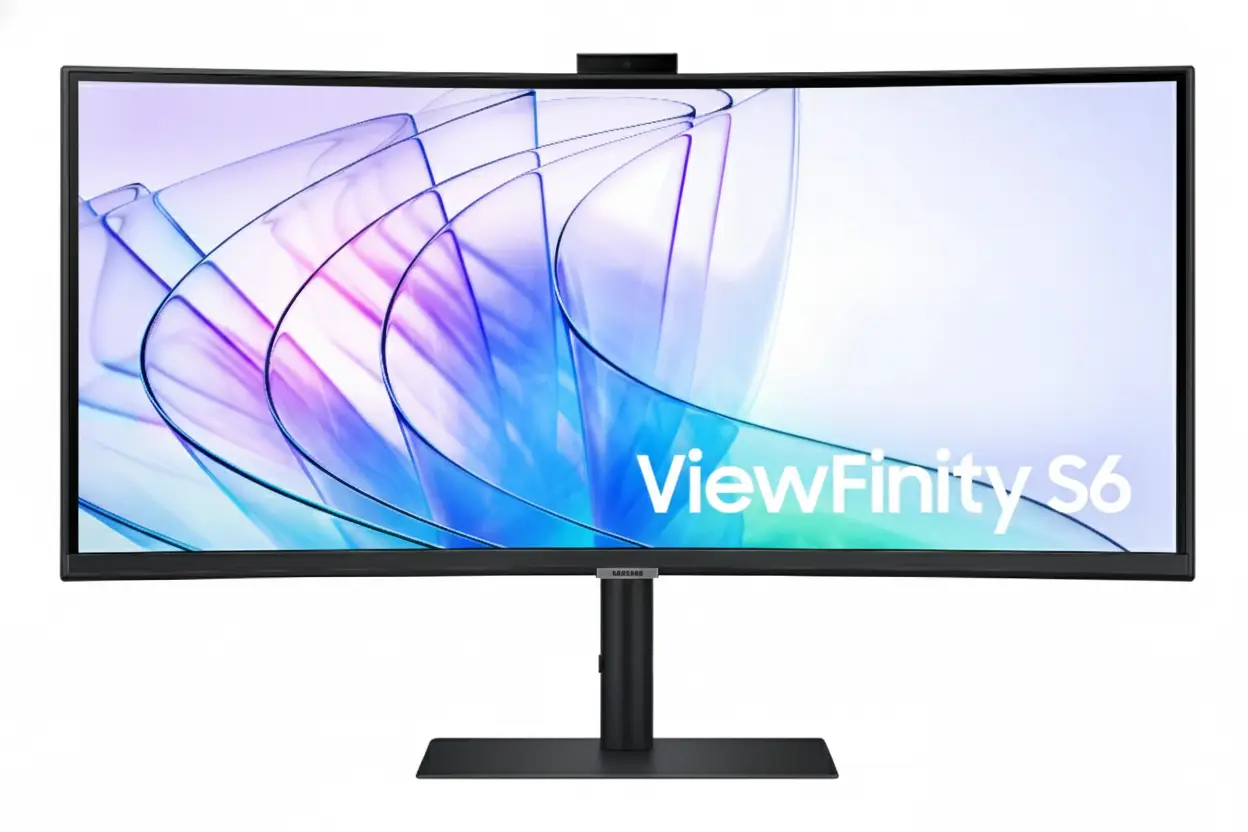
Samsung ViewFinity S65VC 34″ Ultra-WQHD 100Hz Curved Monitor with USB-C & Camera

Samsung ViewFinity S65VC 34″ Ultra-WQHD 100Hz Curved Monitor
Samsung ViewFinity S65VC 34″ Review 2025 – Ultra-WQHD Curved Monitor with USB-C 90W & Built-in Camera
Samsung ViewFinity S65VC 34 inch Ultra-WQHD Curved Monitor with USB-C 90W and Built-in Camera

🎯 Ultimate Productivity Hub: USB-C 90W + Built-in Camera + KVM Switch!

Everything built-in: 5MP Camera, Speakers, KVM, 90W Charging – Zero Clutter Setup!

🏆 Complete All-in-One Productivity Monitor – USB-C Hub + Camera + KVM

Samsung ViewFinity S65VC 34″

34″ Ultra-WQHD 21:9 | USB-C 90W | Built-in 5MP Camera | KVM Switch | 1000R Curved

3440×1440 VA Panel – HDR10 – 100Hz – Windows Hello – Built-in Speakers – LAN Port

💼 The Ultimate Desk Simplification Solution:

• USB-C 90W: Single cable charges laptop + transmits 3440×1440 video + data transfer

• Built-in 5MP Camera: Slides down when not in use – Windows Hello facial recognition

• KVM Switch: Control 2 PCs with 1 keyboard/mouse – PIP/PBP multi-source viewing

• Display: 34″ Ultra-WQHD (3440×1440) 21:9 – 1000R curve – 3000:1 contrast VA panel

• HDR10: 1.07 billion colors – 115% sRGB coverage – 350 nits brightness

• 100Hz Refresh: AMD FreeSync – smooth scrolling and casual gaming performance

• Connectivity: USB-C 90W + DisplayPort 1.2 + 2× HDMI 2.0 + LAN + USB 3.0 hub

• Ergonomics: Height adjustable stand (4.72″) + tilt + ±30° swivel + 100×100mm VESA

$699.99

Model: LS34C650VANXGO | S34C650VAN | 3-Year Warranty | Free Shipping

🛒 Buy Now on Samsung.com (USA)

₹57,999

Expected price | Check Samsung India for availability | 3-Year Warranty

🛒 Check Samsung India Website

£649

Expected price | Check Samsung UK for availability | 3-Year Warranty

🛒 Check Samsung UK Website

🌍 Global Availability

• USA: $699.99 (Samsung.com – Available Now)

• India: ₹57,999-59,999 expected (Check availability)

• UK: £649-699 estimated

• Europe: €749-799 varies by country

• Availability: Check Samsung regional websites for stock

Resolution

3440×1440

USB-C Power

90W PD

Built-in Camera

5MP + IR

Samsung ViewFinity S65VC 34″ Overview – The Ultimate Productivity Hub Monitor

🖥️ Ultrawide Display Excellence

  • 34″ Ultra-WQHD: 3440×1440 resolution – 110 PPI
  • 21:9 Aspect: 33% more width vs 16:9
  • 1000R Curve: Immersive wraparound viewing
  • VA Panel: 3000:1 contrast – deep blacks
  • HDR10: 1.07 billion colors
  • 115% sRGB: Wide color gamut
  • 350 Nits: 280 nits minimum brightness
  • 100Hz: Smooth scrolling + casual gaming

⚡ All-in-One Connectivity

  • 🔌 USB-C 90W: Single cable charges + video + data
  • 📹 5MP Camera: Windows Hello + pop-up privacy
  • 🎛️ KVM Switch: Control 2 PCs with 1 keyboard/mouse
  • 🔊 Built-in Speakers: 5W audio saves desk space
  • 🌐 LAN Port: Ethernet for laptops
  • 🔗 USB 3.0 Hub: 2 downstream ports

⭐ Productivity Features

  • • PIP/PBP: Multi-source viewing modes
  • • Auto Source Switch+: Automatic input detection
  • • Eye Saver Mode: Blue light reduction
  • • Flicker Free: DC dimming eliminates flicker
  • • Adaptive Picture: Auto brightness adjustment
  • • AMD FreeSync: Smooth gaming performance

🎯 What Makes ViewFinity S65VC Special?

The Samsung ViewFinity S65VC 34″ is the ultimate desk simplification solution, consolidating $650-1,350 worth of separate accessories into a single $699.99 monitor. Most ultrawide monitors require external webcams ($50-150), USB-C hubs or docks ($80-300), KVM switches ($50-200), speakers ($50-150), and Ethernet adapters ($20-40) to achieve complete productivity setup. The S65VC integrates all these components natively, eliminating 5-10 cables, freeing desk space, and reducing total cost.

The USB-C port with 90W Power Delivery enables true single-cable setup for modern laptops. Connect your MacBook Pro, Dell XPS, HP Spectre, or Lenovo ThinkPad with one USB-C cable that simultaneously charges at 90W, transmits 3440×1440@100Hz video, and provides USB 3.0 data access. This eliminates the need for $80-400 USB-C docks like CalDigit TS4 ($400), Anker PowerExpand ($200), or basic hubs ($80-150). The integrated Ethernet port provides wired networking through the same cable – critical for modern ultrabooks that omit RJ45 jacks.

The built-in 5MP camera with infrared sensor delivers sharp, professional-quality video calls without external webcams. The 5-megapixel resolution surpasses typical 720p/1080p webcams, providing clear image quality for client meetings, job interviews, and presentations. The infrared sensor enables Windows Hello facial recognition for passwordless login to Windows 11 devices, apps, and websites – superior security and convenience compared to password typing. The camera’s pop-up design slides down into monitor body when unused, addressing privacy concerns and maintaining slim aesthetics.

The integrated KVM (Keyboard, Video, Mouse) switch eliminates the need for $50-200 external KVM devices. Control two connected computers with single keyboard and mouse – common for professionals managing work laptop + personal desktop, MacBook + Windows PC, or primary + secondary systems. Picture-in-Picture mode displays both sources simultaneously (one fullscreen, one window overlay), while Picture-by-Picture splits screen 50/50 for side-by-side workflows. This is invaluable for IT professionals, developers, content creators, and anyone maintaining separate work/personal computers.

The 34-inch Ultra-WQHD (3440×1440) resolution with 21:9 aspect ratio provides 33% more horizontal workspace than standard 16:9 displays. View spreadsheets with dozens of visible columns, edit video timelines with room for panels and tools, code with multiple files side-by-side, or browse with multiple full-size windows simultaneously. The 1000R curvature keeps all content equidistant from your eyes, reducing the edge distortion and refocusing fatigue common with flat ultrawides. At 110 PPI, text and images remain sharp without requiring scaling.

At $699.99 USD, the ViewFinity S65VC costs less than many basic ultrawides while including premium features. Competitors like Dell U3421WE ($1,149 with USB-C but no camera/KVM), LG 34WN80C-B ($599 basic without USB-C/camera/KVM), and BenQ PD3420U ($1,099 with USB-C but no camera/KVM) either cost more or lack integrated features. The S65VC’s all-inclusive approach provides exceptional value for professionals wanting clean, simplified desk setups.

Display Quality – 34″ Ultra-WQHD 3440×1440 Curved VA Panel

📺 34″ Ultra-WQHD Resolution – 21:9 Productivity Powerhouse

The 3440×1440 Ultra-WQHD resolution on 34 inches delivers 110 pixels per inch – sharp enough for detailed text and graphics without requiring UI scaling. At typical desktop distances (60-80cm), the pixel density provides crisp readability for extended document work, coding, and content creation. Ultra-WQHD contains 2.4× more pixels than standard 1920×1080 Full HD, creating significantly more screen real estate for productivity applications.

The 21:9 aspect ratio provides 33% more horizontal space than traditional 16:9 monitors of equivalent height. This extra width is transformative for multitasking – view three documents side-by-side, edit video timelines with visible panels, display trading dashboards with multiple charts, or code with file tree + editor + terminal simultaneously visible. The active display area measures 797.22mm × 333.72mm (31.4″ × 13.1″), providing expansive workspace without the excessive vertical height of 32:9 super-ultrawides.

Ultra-WQHD Advantages

  • • Resolution: 3440×1440 (110 PPI) – sharp productivity
  • • Aspect Ratio: 21:9 – 33% wider than 16:9
  • • Multitasking: 3-4 windows side-by-side comfortably
  • • Size: 34″ perfect for desk viewing

🌊 1000R Curvature – Immersive Productivity

The 1000R curvature (1-meter radius) matches the natural curvature of human peripheral vision, creating immersive viewing where the screen wraps around your field of sight. This aggressive curve is particularly beneficial for 34-inch ultrawide format – on flat ultrawides, screen edges sit 6-8 inches further away than center, causing constant refocusing and edge distortion. The curve maintains equal viewing distance across entire display.

For extended productivity work, the 1000R curve reduces eye strain by eliminating the need to refocus when viewing different screen areas. The curve also minimizes glare and reflections by angling screen edges away from overhead lighting. Content at screen periphery remains clearly visible without head turning, improving awareness of notifications, monitoring dashboards, or reference materials placed at edges.

1000R Curve Benefits

  • • Ergonomics: Equal viewing distance reduces strain
  • • Immersion: Wraparound effect increases focus
  • • Glare reduction: Angled edges minimize reflections
  • • Peripheral awareness: See edges without head turn

🎨 VA Panel – 3000:1 Contrast & HDR10 Color

🌑 Superior Contrast for Content Creation

The VA (Vertical Alignment) panel with 3000:1 static contrast ratio delivers significantly better blacks than IPS panels (typically 1000:1). This creates deeper shadows and more visible details in dark content – valuable for photo editing, video color grading, and any work involving high-contrast imagery. Dark UI themes (common in coding, design apps) appear more visually appealing with true blacks instead of grayish IPS “blacks”.

The 1.07 billion color support (10-bit color depth) ensures smooth gradients without color banding, particularly noticeable in skies, skin tones, and lighting effects. The 115% sRGB color gamut coverage exceeds standard 100% sRGB, producing vibrant, saturated colors suitable for content creation. While not factory-calibrated for professional color-critical work, the out-of-box color accuracy is excellent for general productivity and casual content creation.

🌟 HDR10 Support – Enhanced Visual Range

HDR10 support provides wider dynamic range than standard SDR content, displaying brighter highlights and darker shadows simultaneously. While the 350 nits typical brightness (280 minimum) doesn’t achieve the 600-1000+ nit peak of premium HDR displays, HDR10 compatibility ensures proper HDR content playback from streaming services, games, and HDR-enabled applications.

The VA panel’s high 3000:1 contrast enhances HDR effectiveness beyond what IPS HDR displays achieve with 1000:1 contrast. Deep blacks provide the foundation for HDR’s expanded dynamic range – highlights appear more dramatic when contrasted against true blacks. For content consumption and casual creation, the HDR10 support adds value without the premium pricing of DisplayHDR 600/1000 certified monitors.

🔄 100Hz Refresh Rate – Smooth Productivity & Casual Gaming

⚡ Enhanced Desktop Experience

The 100Hz refresh rate provides 67% more frames per second than standard 60Hz office monitors. This creates noticeably smoother cursor movement, window dragging, scrolling through documents and web pages, and video playback. While not targeting competitive gaming like 240Hz monitors, 100Hz significantly improves daily desktop usability – once you experience high refresh rate productivity, 60Hz feels stuttery.

AMD FreeSync support eliminates screen tearing during dynamic content like video playback, presentations with animations, and casual gaming. FreeSync synchronizes monitor refresh rate with GPU frame rate, creating smooth, tear-free visuals. The 5ms response time enables casual gaming in strategy games, MOBAs, RPGs, and single-player titles during work breaks.

🎮 Casual Gaming Capability

While not designed for competitive esports, 100Hz + FreeSync enables enjoyable casual gaming in League of Legends, Civilization, Stardew Valley, strategy games, and single-player RPGs. The ultrawide 21:9 aspect ratio enhances immersion in supported games, providing wider field of view. The 5ms response time is adequate for non-competitive gaming.

For professionals wanting single monitor for both work and play, the S65VC balances productivity features with sufficient gaming capability. Serious competitive gamers should choose dedicated 240Hz gaming monitors, but casual gamers will find the 100Hz performance satisfying for after-hours gaming sessions.

📐 Display Specifications Summary

Resolution & Size

3440×1440 Ultra-WQHD at 34″ provides 110 PPI – sharp productivity without scaling. 21:9 aspect ratio – 33% wider than 16:9 for multitasking.

Panel Quality

VA panel, 3000:1 contrast, HDR10 with 1.07B colors. 1000R curve for immersive viewing. 115% sRGB wide color gamut. 178°/178° viewing angles.

Performance

100Hz refresh rate – smooth desktop and casual gaming. AMD FreeSync tear-free. 5ms response time. 350 nits brightness (280 min).

USB-C & Connectivity – 90W Power Delivery Single-Cable Solution

🔌 USB-C 90W Power Delivery – True Single-Cable Setup

The USB-C port with 90W Power Delivery enables true single-cable connectivity for modern laptops. Connect your MacBook Pro, Dell XPS 13/15, HP Spectre, Lenovo ThinkPad X1, or Surface Laptop with one USB-C cable that simultaneously charges at 90W, transmits 3440×1440@100Hz video, and provides USB 3.0 data transfer. This eliminates the typical multi-cable mess requiring separate power adapter, video cable, and USB hub.

The 90W power delivery charges most productivity laptops including MacBook Pro 14″ (70W), MacBook Air (65W), Dell XPS 13 (65W), HP Spectre x360 (65W), and Lenovo ThinkPad X1 Carbon (65W). Note that high-performance gaming laptops requiring 100-180W won’t charge from 90W – those systems need separate chargers. For typical productivity ultrabooks, 90W provides fast charging while working.

USB-C 90W Capabilities

  • • Power Delivery: 90W charges most laptops
  • • Video: 3440×1440@100Hz transmission
  • • Data: USB 3.0 hub access for peripherals
  • • Ethernet: LAN connectivity through USB-C

🌐 Integrated Ethernet LAN Port

The built-in RJ45 Ethernet (LAN) port addresses a growing issue: modern ultrabooks increasingly omit Ethernet jacks to achieve thin profiles. MacBook Air, MacBook Pro 14″/16″, Dell XPS 13, HP Spectre, and Lenovo X1 Carbon lack native Ethernet ports. The S65VC’s integrated LAN port provides wired network connectivity through the USB-C cable – your laptop gains Ethernet without carrying separate USB-Ethernet adapters.

For professionals in network-intensive environments – IT administrators, video editors transferring large files (50GB+ project files), remote desktop users, financial traders requiring low latency, and VPN users – wired Ethernet provides superior reliability, consistency, and speed compared to Wi-Fi 6/6E. Even fast Wi-Fi suffers from interference, congestion, and variable latency. Wired Ethernet delivers consistent gigabit speeds with <1ms latency.

Ethernet Advantages

  • • Speed: Consistent gigabit (1000 Mbps)
  • • Latency: <1ms vs 2-20ms Wi-Fi
  • • Reliability: No interference or dropout
  • • Security: Harder to intercept than wireless

🔗 Complete Connectivity Portfolio

📺 Video Inputs – Multi-Source Flexibility

The monitor includes 1× USB-C, 1× DisplayPort 1.2, and 2× HDMI 2.0 inputs for versatile device connectivity. Connect laptop via USB-C (with charging), desktop via DisplayPort, and secondary devices (Mac Mini, gaming console, streaming PC) via HDMI simultaneously. The Auto Source Switch+ feature automatically detects active inputs and switches to powered-on devices, eliminating manual input selection.

DisplayPort 1.2 supports full 3440×1440@100Hz for desktop PCs. HDMI 2.0 handles 3440×1440@100Hz for most devices. USB-C supports 3440×1440@100Hz with DisplayPort Alt Mode. All inputs support the monitor’s maximum resolution and refresh rate without compromise.

🔌 USB Hub – Peripheral Expansion

The integrated USB 3.0 hub provides 2 downstream ports for connecting peripherals like keyboard, mouse, external SSD, USB microphone, or webcam (if not using built-in camera). When laptop connects via USB-C, these peripherals become accessible to the laptop through the single cable – true docking station functionality without separate dock purchase.

USB 3.0 specification delivers 5 Gbps data transfer speeds, sufficient for external SSDs (500-1000 MB/s real-world), USB microphones, and most peripherals. The upstream USB-B port allows desktop PC connection to access the hub. This eliminates the $80-300 cost of external USB-C hubs or docking stations for basic connectivity needs.

💡 Dock Replacement Value Analysis

🔌 What External Docks Cost

High-end docks: CalDigit TS4 ($400), OWC Thunderbolt Dock ($300), Anker 777 ($250). Mid-range docks: Anker PowerExpand ($150-200), Plugable TBT4 ($180). Basic USB-C hubs: $80-120. S65VC eliminates this $80-400 expense.

✅ Built-in Features Save Money

S65VC includes: 90W PD charging, 3× video inputs, USB 3.0 hub, Ethernet port, headphone jack – matching mid-range dock functionality. Plus 5MP camera ($80-150 value) and KVM switch ($50-200) – total $210-550 in integrated features.

Built-in Camera – 5MP with Windows Hello & Privacy Pop-Up Design

📹 5MP Camera – Professional Video Quality

The built-in 5-megapixel camera delivers significantly better video quality than typical 720p (0.9MP) or 1080p (2MP) external webcams. The higher resolution provides sharper, more detailed video calls suitable for professional presentations, client meetings, job interviews, and online teaching. Facial features, gestures, and backgrounds appear clearer, creating more engaging remote communication.

Camera placement at top-center of the monitor provides natural eye-level framing during video calls – superior to laptop webcams positioned below screen that create unflattering up-the-nose angles. The camera delivers good low-light performance for typical office environments, though dedicated lighting improves results in dim conditions. For remote workers conducting frequent video calls, the 5MP camera quality rivals external webcams costing $80-150 (Logitech C920/C922, Razer Kiyo).

5MP Camera Benefits

  • • Resolution: 5MP (2560×1920) vs 1080p (2MP)
  • • Placement: Eye-level at screen top
  • • Quality: Matches $80-150 external webcams
  • • Integration: No desk clutter or setup

🔐 Windows Hello – Secure Facial Recognition

The integrated infrared (IR) sensor enables Windows Hello facial recognition for passwordless login to Windows 11 devices, apps, and websites. Simply look at the camera to authenticate – faster and more secure than typing passwords. Windows Hello uses biometric authentication that’s extremely difficult to spoof compared to passwords that can be stolen, guessed, or phished.

The IR sensor works in various lighting conditions including complete darkness – unlike standard RGB cameras requiring visible light. This ensures reliable authentication regardless of ambient lighting. For professionals handling sensitive data (finance, healthcare, legal, IT), Windows Hello provides enterprise-grade security meeting strict compliance requirements while offering superior convenience compared to password management.

Windows Hello Advantages

  • • Security: Biometric > passwords
  • • Speed: Instant login vs typing
  • • Lighting: IR works in darkness
  • • Compliance: Meets enterprise security

🔒 Privacy Pop-Up Design – Physical Security

👁️ Slide-Down Privacy Mechanism

The camera features pop-up design that slides down into monitor body when not in use, providing physical privacy assurance that software solutions cannot match. When camera slides down, the lens is physically covered and cannot capture video – preventing potential malware camera hijacking or accidental activation. This addresses the growing privacy concern around always-on webcams.

The mechanism also maintains the monitor’s slim profile aesthetic when camera is retracted. Many monitors with built-in cameras feature protruding camera bumps that disrupt clean design – the S65VC’s pop-up solution keeps the top bezel smooth and minimal when camera is unused. Simply slide camera up when needed for video calls, slide down for privacy and aesthetics.

💰 Cost Savings vs External Webcams

Quality external webcams cost $80-150: Logitech C920 ($80), C922 ($100), Brio 4K ($200), Razer Kiyo ($100), Anker PowerConf C300 ($90). These devices clutter desks, require USB ports, add cables, and often need monitor mounting clips. The S65VC’s built-in 5MP camera eliminates this $80-200 expense while providing integrated, clean solution.

For organizations outfitting multiple employees with work-from-home setups, the integrated camera represents significant per-seat cost savings. A company equipping 50 employees saves $4,000-7,500 on webcams alone (50 × $80-150), plus reduced support costs from eliminating separate webcam setup and troubleshooting.

KVM Switch – Control 2 PCs with 1 Keyboard & Mouse

🎛️ Integrated KVM Functionality

The built-in KVM (Keyboard, Video, Mouse) switch allows control of two connected computers using single keyboard and mouse. This is invaluable for professionals managing multiple systems: work laptop + personal desktop, MacBook + Windows PC, primary workstation + secondary system, or development machine + testing rig. Switch between computers instantly without maintaining duplicate keyboards and mice for each system.

Setup is simple: connect both computers to the monitor (e.g., laptop via USB-C, desktop via DisplayPort), then connect keyboard and mouse to the monitor’s USB ports. The KVM routes keyboard/mouse input to whichever computer’s video input is active. Switch between systems using monitor’s input selection – keyboard and mouse automatically follow. This eliminates the $50-200 cost of external KVM switches like ATEN CS22U ($70), StarTech SV231USB ($90), or USB-C KVM models ($150-200).

KVM Use Cases

  • • Work + Personal: Separate systems, one desk
  • • Mac + Windows: Cross-platform workflows
  • • Development + Testing: Code on one, test on other
  • • Primary + Backup: Quick failover capability

🖥️ PIP & PBP Multi-Source Viewing

Picture-in-Picture (PIP) mode displays two video sources simultaneously – one source fills the screen while the second appears as resizable window overlay. Monitor work laptop fullscreen while keeping personal desktop visible in corner for notifications, monitoring tasks, or reference material. PIP window can be positioned and resized for optimal workflow.

Picture-by-Picture (PBP) mode splits the 34-inch screen 50/50 showing both computers side-by-side. Each gets 1720×1440 effective resolution – equivalent to two 24″ 16:10 monitors. This is perfect for cross-platform workflows: code on Mac while testing on Windows, monitor server logs while working on laptop, or manage trading platform on one system while researching on another. The ultrawide format makes PBP practical where 27″ monitors feel cramped.

PIP/PBP Advantages

  • • PIP: Monitor secondary system while working
  • • PBP: Full side-by-side workflows
  • • Flexibility: Switch between modes as needed
  • • Ultrawide: 34″ provides space for both sources

💡 KVM Cost Savings & Desk Simplification

💰 External KVM Switch Costs

Basic 2-port HDMI KVM: $50-80 (ATEN CS22U $70, TRENDnet TK-240DP $60). USB-C KVM switches: $150-200 (StarTech DK30CH2DEP $180, Cable Matters USB-C KVM $160). S65VC eliminates this expense entirely with integrated KVM functionality.

✅ Integrated Benefits

Saves $50-200 on external KVM purchase. Eliminates cables – no KVM box cables cluttering desk. Cleaner setup – KVM functionality built into monitor OSD. PIP/PBP modes provide viewing flexibility external KVMs lack.

Productivity Features – Eye Care, Ergonomics, & Smart Functions

👁️ TUV-Certified Intelligent Eye Care

TUV certification for Intelligent Eye Care validates the monitor’s eye-friendly features meet strict German safety standards. The certification process tests flicker elimination, blue light reduction effectiveness, and overall ergonomic design. For professionals spending 8-12 hours daily in front of screens, TUV certification provides independent verification of eye safety claims.

Eye Saver Mode reduces blue light emission that disrupts circadian rhythms and causes eye fatigue. High-energy blue light (400-490nm wavelength) strains eyes and suppresses melatonin production, interfering with sleep quality. Eye Saver Mode shifts color temperature warmer, reducing blue content while maintaining usable image quality. For late-night work sessions or evening use, this feature reduces eye strain and improves post-work sleep quality.

⚡ Flicker Free & Adaptive Picture

Flicker Free technology uses DC (Direct Current) dimming instead of PWM (Pulse Width Modulation) to control brightness. PWM rapidly flickers the backlight on/off at 200-300Hz to adjust brightness – imperceptible consciously but causes subconscious eye strain, headaches, and fatigue during extended viewing. DC dimming provides continuous illumination at all brightness levels, eliminating flicker completely.

Adaptive Picture automatically adjusts brightness and color temperature based on ambient lighting conditions detected by light sensor. As room lighting changes throughout the day (bright morning sunlight, dim afternoon, evening darkness), the monitor optimizes display settings for comfortable viewing. This eliminates manual brightness adjustments, maintaining optimal viewing experience automatically.

⚙️ Smart Productivity Functions

🔄 Auto Source Switch+

Auto Source Switch+ automatically detects when connected devices power on and switches to that input instantly. Power on your work laptop, and the monitor automatically switches from desktop to laptop input without manual OSD navigation. This eliminates the frustration of manually cycling through inputs, getting you to work faster.

For professionals switching between multiple computers throughout the day, Auto Source Switch+ saves significant time and mental overhead. The feature intelligently handles multi-device environments, prioritizing newly powered-on devices while remembering previous input when devices power off.

🎨 Optimized Picture Modes

The monitor includes multiple picture modes optimized for different content types: Entertain (movies/video), Graphic (design work), Eco (power saving), Game modes (Standard, RPG, RTS, FPS, Sports), Original (neutral), and Custom (user-defined). Each mode adjusts brightness, contrast, color saturation, and sharpness for optimal viewing.

Quick switching between modes adapts the display for current task – Graphic mode for photo editing, Entertain mode for lunch-break YouTube, Game mode for after-work gaming. The variety ensures optimal visual experience across diverse use cases without requiring manual picture adjustments.

🔊 Built-in Speakers – Desk Space Savings

🎵 5W Integrated Audio

The built-in 5W speakers provide functional audio for video calls, system sounds, casual YouTube/Netflix viewing, and background music without requiring external speakers. While not audiophile-grade or suitable for music production, the speakers deliver clear voice reproduction for video conferencing and adequate volume for typical office environments.

For professionals prioritizing minimal desk clutter, the integrated speakers eliminate the need for $50-150 external desktop speakers (Logitech Z333 $80, Creative Pebble $25, Edifier R1280T $100). This saves desk space, reduces cable management, and simplifies setup. Serious music listeners can still connect headphones or external speakers via 3.5mm audio jack.

🎧 Headphone Jack Included

The 3.5mm headphone jack provides audio output for wired headphones, earbuds, or external speakers. This is particularly valuable when laptop connects via USB-C – audio routes through the single cable to monitor, eliminating need to connect headphones directly to laptop. Headphones plug into monitor for centralized, convenient access.

For open office environments or shared spaces where speaker audio disturbs others, the headphone jack ensures private audio without Bluetooth pairing hassles. Wired headphones provide zero-latency audio critical for video editing, music production, or gaming where Bluetooth’s 100-300ms latency creates sync issues.

🌱 Environmental Sustainability Features

♻️ Recycled Materials

Over 3% of rear cover made from recycled plastic including Ocean Bound Plastic (OBP) – plastic waste collected from coastal regions before entering oceans. ENERGY STAR certified for energy efficiency. TCO certified for comprehensive environmental, social, economic sustainability meeting strict criteria.

📦 Eco-Friendly Packaging

Eco-packaging design minimizes waste and encourages reuse – packaging can be transformed into practical items (laptop stand, desk organizer, storage boxes) rather than immediate disposal. Reduced packaging materials lower shipping weight and carbon footprint. Recyclable materials facilitate responsible end-of-life disposal.

Ergonomics & Design – Height Adjustable Stand & VESA Mount

🔧 Height Adjustable Stand (HAS)

The included Height Adjustable Stand provides 4.72 inches (±0.2″) of vertical adjustment – approximately 120mm range. This allows positioning the display at optimal eye level for comfortable viewing, reducing neck strain during extended work sessions. Proper monitor height places the top of screen at or slightly below eye level, encouraging neutral neck posture.

Additional adjustments include ±30° swivel (60° total range) for angling display left/right, and -2° to +20° tilt for vertical viewing angle adjustment. The swivel enables easy screen sharing with colleagues or repositioning for glare reduction. The tilt range accommodates various seating heights and desk configurations. Combined, these adjustments provide comprehensive ergonomic flexibility for individual preferences.

Stand Adjustments

  • • Height: 4.72″ (120mm) adjustment range
  • • Swivel: ±30° (60° total left/right)
  • • Tilt: -2° to +20° (22° total range)
  • • VESA: 100×100mm mount compatible

🖼️ VESA Mount Support – 100×100mm

The 100mm × 100mm VESA mount pattern enables attachment to aftermarket monitor arms or wall mounts. Premium ergonomic arms from Ergotron LX, Amazon Basics, VIVO, or North Bayou provide gas spring tensioning for effortless height/depth/angle adjustment, extended reach up to 25-32″ from wall/desk, superior cable management, and quick-release mechanisms for monitor swapping.

Monitor arms maximize desk space by eliminating the stand footprint – critical for smaller desks or users preferring clean, minimalist workspaces. The monitor weighs 11.7 lbs (5.3 kg) without stand – well within capacity of most monitor arms rated for 15-30 lbs. For ultrawide monitors specifically, arms with depth adjustment help position the 1000R curved screen at optimal viewing distance (60-80cm).

VESA Mounting Benefits

  • • VESA: 100mm × 100mm standard pattern
  • • Weight: 11.7 lbs without stand (5.3 kg)
  • • Arms: Ergotron LX, Amazon Basics compatible
  • • Space: Eliminates stand footprint

📐 Dimensions & Footprint

📏 Physical Dimensions

With stand: 31.8″ W × 22.1″ H × 9.5″ D (808mm × 561mm × 241mm). The 9.5″ depth requires adequate desk space, though typical for curved monitors. The 31.8″ width means you need at least 32″ of desk width clearance. Without stand: 31.8″ W × 14.5″ H × 4.9″ D (808mm × 368mm × 124mm) – compact when VESA mounted.

Weight with stand: 17.9 lbs (8.1 kg) – manageable for one-person setup. Weight without stand: 11.7 lbs (5.3 kg) makes VESA mounting straightforward. The substantial build quality indicates premium materials and sturdy construction. Plan for at least 32″ wide × 10″ deep desk space for the stand footprint.

🎨 Design Aesthetics

The all-black design across front bezel, rear casing, and stand creates professional aesthetic suitable for any office environment. The slim bezels on three sides (top and left/right) maximize screen-to-body ratio, creating immersive viewing where the display dominates, not the frame. The curved design adds visual interest compared to flat panels.

The matte black finish resists fingerprints and dust better than glossy alternatives. The camera’s pop-up mechanism maintains clean top bezel when retracted. Cable routing through the stand column keeps cables organized. Overall, the design balances professional appearance with practical ergonomics – suitable for corporate offices, home offices, and creative studios.

Who Should Buy the Samsung ViewFinity S65VC 34″?

✅ Perfect For

💼 Remote Workers & Video Call Professionals

If you conduct frequent video calls, virtual meetings, webinars, or online presentations, the S65VC is ideal. The 5MP camera with Windows Hello provides professional video quality without external webcam expense ($80-150 saved). The pop-up privacy design addresses security concerns. Built-in speakers eliminate desk clutter. USB-C 90W single-cable setup creates clean workspace perfect for video backgrounds.

💻 Multi-Device Professionals (Work + Personal PCs)

The integrated KVM switch with PIP/PBP modes makes this perfect for managing work laptop + personal desktop, MacBook + Windows PC, or multiple business systems. Control both computers with one keyboard/mouse, view both simultaneously in PBP mode, or monitor secondary system in PIP while working. Saves $50-200 on external KVM switches while providing superior viewing flexibility.

📊 Financial Analysts & Data Professionals

The 34″ Ultra-WQHD 21:9 ultrawide format excels for spreadsheet analysis, financial modeling, data visualization, and multi-chart dashboards. View 50-80 spreadsheet columns without scrolling, display multiple datasets side-by-side, or monitor real-time trading platforms with comprehensive visibility. The 3000:1 VA contrast ensures numbers and text remain crisp and readable.

🎬 Video Editors & Content Creators

The 21:9 ultrawide provides timeline real estate for Adobe Premiere, DaVinci Resolve, or Final Cut with room for tool panels. HDR10 support with 115% sRGB ensures accurate color for content creation (though not factory-calibrated for professional color-critical work). The USB-C 90W charges laptop while editing. 100Hz smooth playback without rendering.

💻 Software Developers & Programmers

The ultrawide format is transformative for coding workflows. Display file tree + code editor + terminal + documentation simultaneously without window switching. Split screen between development and testing environments. The KVM switch enables dual-system development – code on Mac, test on Windows PC. 100Hz smooth scrolling through thousands of code lines.

🏢 Corporate & Enterprise IT

For organizations outfitting multiple employees, the S65VC provides $210-550 per-seat cost savings by eliminating separate webcam ($80-150), USB-C hub ($80-300), KVM switch ($50-200), and speakers ($50-150) purchases. Single SKU procurement simplifies inventory. Built-in features reduce support calls. Enterprise-grade Windows Hello security meets compliance requirements.

❌ Not Ideal For

🎮 Competitive Gamers & Esports Players

The 100Hz refresh rate and 5ms response time won’t satisfy competitive FPS, MOBA, or esports gamers. Serious gamers need 240Hz+ gaming monitors with 1ms response like Samsung Odyssey G65B ($800), ASUS ROG Swift ($600-900), or BenQ Zowie XL2546K ($500). The S65VC targets productivity first, casual gaming second. Save $700 and buy dedicated gaming monitor if gaming is primary use.

🎨 Professional Photographers & Color-Critical Work

While 115% sRGB is good, the monitor lacks factory calibration and professional certifications. No Delta E ratings, no Adobe RGB coverage data, no uniformity compensation. Professional photo/video color grading requires monitors with 99%+ Adobe RGB, Delta E <2, hardware calibration like BenQ SW271C ($800), ASUS ProArt PA278CV ($400), or EIZO ColorEdge ($1,000+). The S65VC suits casual content creation, not professional color-critical workflows.

🔌 Gaming Laptop Users (100W+ Power)

The 90W Power Delivery won’t sufficiently charge high-performance gaming laptops requiring 100-180W (ASUS ROG, MSI GE/GP, Alienware, Razer Blade). While 90W prevents battery drain during light use, gaming will deplete battery. Gaming laptop users should keep dedicated chargers or choose monitors with 100W+ PD like Dell U4025QW (140W PD) or LG 34WK95U-W (85W PD insufficient too).

📐 CAD Engineers & Technical Drawing Specialists

The 1000R curve can make straight lines appear slightly curved in CAD software, technical drawings, architectural plans, and engineering schematics. Professionals requiring geometric accuracy prefer flat panels like Dell U3423WE ($1,149 flat), LG 34WK95U (flat), or BenQ PD3420U (flat). The curve optimizes for immersion and productivity at expense of geometric precision.

🎵 Audio Professionals & Music Producers

The built-in 5W speakers are functional but not audiophile-grade. Music producers, audio engineers, and serious music listeners need dedicated studio monitors or high-fidelity speakers like KRK Rokit ($300/pair), Yamaha HS5 ($400/pair), or Edifier S3000 Pro ($600/pair). The S65VC’s speakers suit video calls and casual media, not critical audio work. Budget for separate audio solution.

💰 Extreme Budget Shoppers

At $699.99, this is mid-premium pricing. Budget ultrawide alternatives exist: AOC CU34G2X ($350), Sceptre C345B ($300), LG 34WN80C-B ($500). If you don’t need USB-C 90W PD, built-in camera, KVM switch, or integrated features, save $200-400 with basic ultrawides. The S65VC’s value lies in all-in-one integration – if you’ll buy separate webcam/hub/KVM anyway, cheaper monitors + separate accessories may cost less.

Competitors & Alternatives – Compare Before You Buy

Dell UltraSharp U3421WE

34″ Ultrawide with USB-C Hub

Display: 34″ 3440×1440 IPS, 60Hz

USB-C: 90W Power Delivery

Panel: IPS, 1000:1 contrast

Price: $1,149 USD

Why Choose This Instead:

  • • IPS panel: Better viewing angles than VA
  • • Flat design: Better for CAD/technical work
  • • RJ45 + USB hub: Similar connectivity
  • • Dell brand: Premium support reputation

S65VC Advantages:

  • • $449 cheaper ($700 vs $1,149)
  • • 100Hz vs 60Hz (67% faster refresh)
  • • Built-in 5MP camera (Dell has none)
  • • KVM switch integrated (Dell lacks)
  • • 3000:1 contrast vs 1000:1
  • • 1000R immersive curve

LG 34WN80C-B

34″ Ultrawide with USB-C 60W

Display: 34″ 3440×1440 IPS, 60Hz

USB-C: 60W Power Delivery

Panel: IPS, HDR10, 99% sRGB

Price: ~$599 USD

Why Choose This Instead:

  • • $100 cheaper: $599 vs $700
  • • IPS panel: Better color accuracy
  • • 99% sRGB: Accurate standard colors
  • • Flat design: Productivity-friendly

S65VC Advantages:

  • • 90W PD vs 60W (charges more laptops)
  • • 100Hz vs 60Hz (67% smoother)
  • • Built-in 5MP camera (LG has none)
  • • KVM switch (LG lacks)
  • • Built-in speakers (LG has none)
  • • 3000:1 contrast vs 1000:1
  • • 1000R curve immersion

BenQ PD3420Q

34″ Designer Ultrawide USB-C

Display: 34″ 3440×1440 IPS, 60Hz

USB-C: 65W Power Delivery

Color: 98% P3, Factory calibrated

Price: ~$899 USD

Why Choose This Instead:

  • • Factory calibrated: Professional color
  • • 98% DCI-P3: Wide gamut accurate
  • • KVM switch: Like S65VC
  • • Designer features: CAD/CAM modes

S65VC Advantages:

  • • $200 cheaper ($700 vs $899)
  • • 100Hz vs 60Hz refresh rate
  • • 90W PD vs 65W charging
  • • Built-in 5MP camera (BenQ none)
  • • 3000:1 contrast vs 1000:1
  • • 1000R curve (BenQ flat)

AOC CU34G2X

34″ Budget Curved Gaming

Display: 34″ 3440×1440 VA, 144Hz

Curve: 1500R curved panel

Response: 1ms MPRT gaming

Price: ~$350 USD

Why Choose This Instead:

  • • $350 cheaper: Half price of S65VC
  • • 144Hz gaming: Better for gaming
  • • 1ms MPRT: Fast response time
  • • Budget friendly: Basic ultrawide

S65VC Advantages:

  • • USB-C 90W PD (AOC lacks completely)
  • • Built-in 5MP camera (AOC none)
  • • KVM switch (AOC lacks)
  • • Built-in speakers (AOC none)
  • • LAN port (AOC lacks)
  • • 1000R tighter curve vs 1500R
  • • Premium build quality

Samsung M8 Smart Monitor

32″ 4K Smart Monitor USB-C

Display: 32″ 3840×2160 4K, 60Hz

USB-C: 65W Power Delivery

Smart: Tizen OS + Camera + Speakers

Price: ~$699 USD

Why Choose This Instead:

  • • 4K resolution: Higher pixel density
  • • Same price: $699 like S65VC
  • • Smart TV features: Netflix, streaming
  • • Built-in camera: Similar features

S65VC Advantages:

  • • 21:9 ultrawide vs 16:9 (33% wider)
  • • 90W PD vs 65W (more charging power)
  • • 100Hz vs 60Hz (smoother desktop)
  • • KVM switch (M8 lacks)
  • • LAN port (M8 lacks)
  • • 34″ curved immersion

Lenovo ThinkVision P34w-20

34″ Business Ultrawide USB-C

Display: 34″ 3440×1440 IPS, 60Hz

USB-C: 75W Power Delivery

Business: USB hub, KVM, LAN

Price: ~$799 USD

Why Choose This Instead:

  • • IPS panel: Better viewing angles
  • • KVM + LAN: Similar business features
  • • ThinkVision brand: Enterprise support
  • • Flat design: CAD-friendly

S65VC Advantages:

  • • $100 cheaper ($700 vs $799)
  • • 100Hz vs 60Hz refresh
  • • 90W PD vs 75W charging
  • • Built-in 5MP camera (Lenovo none)
  • • 3000:1 contrast vs 1000:1
  • • 1000R immersive curve

Pros & Cons – The Complete Picture

✅ Pros

  • •

    USB-C 90W Power Delivery – True Single-Cable Setup

    90W Power Delivery charges most productivity laptops (MacBook Pro 14″, Dell XPS, HP Spectre, ThinkPad X1) while transmitting 3440×1440@100Hz video and providing USB 3.0 data access through single cable. Eliminates $80-300 USB-C dock expense and creates clean desk setup.

  • •

    Built-in 5MP Camera with Windows Hello

    5-megapixel camera delivers sharp professional video calls superior to typical 720p/1080p webcams. Infrared sensor enables Windows Hello facial recognition for passwordless secure login. Pop-up privacy design slides camera into monitor body when unused. Saves $80-150 on external webcams.

  • •

    Integrated KVM Switch – Control 2 PCs Seamlessly

    Built-in KVM switch controls two computers with one keyboard/mouse. Picture-in-Picture and Picture-by-Picture modes display both sources simultaneously. Perfect for work laptop + personal desktop or MacBook + Windows PC workflows. Saves $50-200 on external KVM switches.

  • •

    34″ Ultra-WQHD 21:9 Ultrawide – 33% More Workspace

    3440×1440 resolution with 21:9 aspect ratio provides 33% more horizontal space than 16:9 monitors. Perfect for spreadsheets, video timelines, coding with multiple files, or multi-window workflows. 110 PPI delivers sharp text without scaling. Transformative productivity boost.

  • •

    1000R Curvature – Immersive Ergonomics

    Aggressive 1000R curve (1-meter radius) matches human eye curvature for immersive viewing. Every screen area sits at equal distance from eyes, reducing refocusing fatigue. Minimizes glare and edge distortion common with flat ultrawides. Enhances peripheral awareness without head turning.

  • •

    VA Panel – 3000:1 Contrast with HDR10

    VA panel delivers 3000:1 static contrast – 3× better than IPS (1000:1). Deep blacks enhance dark UI themes, content creation, and HDR media. HDR10 support with 1.07 billion colors and 115% sRGB coverage. 350 nits brightness (280 min) sufficient for typical office environments.

  • •

    100Hz Refresh Rate – Smooth Desktop & Casual Gaming

    100Hz refresh provides 67% more frames than 60Hz office monitors for noticeably smoother cursor movement, scrolling, and window dragging. AMD FreeSync eliminates tearing. 5ms response enables casual gaming in MOBAs, strategy, and single-player games. Enhances daily usability significantly.

  • •

    Integrated Ethernet LAN Port

    Built-in RJ45 Ethernet port provides wired networking through USB-C cable for laptops lacking Ethernet jacks (MacBook, Dell XPS, HP Spectre). Gigabit Ethernet delivers consistent speed, <1ms latency, and reliability superior to Wi-Fi. Critical for IT admins, video editors, remote desktop users.

  • •

    TUV-Certified Eye Care Features

    TUV certification validates Eye Saver Mode (blue light reduction), Flicker Free DC dimming, and Adaptive Picture auto-brightness. Critical for professionals spending 8-12 hours daily viewing screens. Reduces eye strain, headaches, and sleep disruption during extended work sessions.

  • •

    Exceptional Value – $699 All-Inclusive

    At $699.99, the S65VC costs less than Dell U3421WE ($1,149) while including camera, KVM, and higher refresh rate. Saves $210-550 vs buying monitor + webcam + hub + KVM separately. Competitive pricing with budget ultrawides while offering premium integrated features. Best value in productivity ultrawides.

❌ Cons

  • •

    100Hz Not Enough for Competitive Gaming

    100Hz refresh rate and 5ms response time won’t satisfy competitive FPS/MOBA/esports gamers who need 240Hz+ and 1ms. The monitor targets productivity first, casual gaming second. Serious gamers should buy dedicated 240Hz gaming monitors ($400-800). If gaming is primary use, look elsewhere.

  • •

    Not Factory Calibrated – Unsuitable for Pro Color Work

    While 115% sRGB is good, the monitor lacks factory calibration, Delta E ratings, Adobe RGB coverage data, or professional certifications. Photographers and videographers needing 99%+ Adobe RGB with Delta E <2 should choose calibrated monitors like BenQ SW271C, ASUS ProArt, or EIZO ColorEdge costing $400-1,000+.

  • •

    90W PD Insufficient for Gaming Laptops

    90W Power Delivery won’t adequately charge high-performance gaming laptops requiring 100-180W (ASUS ROG, MSI GE/GP, Alienware, Razer Blade). While 90W prevents battery drain during light use, heavy gaming depletes battery. Gaming laptop owners need to keep dedicated chargers or choose monitors with 100W+ PD.

  • •

    1000R Curve Not Ideal for CAD/Technical Work

    Aggressive 1000R curve can make straight lines appear slightly curved in CAD software, technical drawings, architectural plans, and engineering schematics. CAD engineers, architects, and technical drawing specialists prefer flat panels for geometric accuracy. The curve optimizes for immersion at expense of precision.

  • •

    VA Panel Viewing Angle Limitations

    Despite 178°/178° spec, VA panels exhibit more color/contrast shift at extreme angles than IPS. Not problematic for centered single-user viewing, but side viewers (colleagues looking at screen, presentations) notice color changes. IPS panels maintain color better at off-angles for collaborative viewing scenarios.

  • •

    Built-in Speakers Are Basic Quality

    5W built-in speakers provide functional audio for video calls and casual media but lack volume, bass, clarity for music listening or content creation. Audio professionals, music enthusiasts, and content creators still need external speakers ($80-600) or headphones. The speakers are convenience feature, not quality audio solution.

  • •

    Limited USB Hub – Only 2 Downstream Ports

    USB hub provides only 2× USB 3.0 downstream ports – fewer than premium monitors offering 4-6 ports. Users with many peripherals (keyboard, mouse, external SSD, microphone, USB drive, printer) may need additional USB hub. More generous port selection would improve hub functionality.

  • •

    60Hz HDMI Limitation (Not 100Hz)

    While DisplayPort and USB-C support full 3440×1440@100Hz, HDMI 2.0 may be limited to 3440×1440@50-60Hz depending on implementation. Devices connected via HDMI (older laptops, consoles, secondary PCs) may not achieve the full 100Hz refresh rate. DisplayPort or USB-C required for maximum performance.

  • •

    No USB-C Upstream – Requires Separate Cable

    Monitor uses traditional USB Type-B upstream for hub connectivity instead of USB-C upstream that would enable single-cable hub access. Desktop PC users need separate USB cable (USB-B to USB-A) to access the monitor’s USB hub. USB-C upstream would provide cleaner single-cable solution.

  • •

    Limited Height Adjustment Range

    4.72″ (120mm) height adjustment is adequate but less than premium monitors offering 5-6″ range. Taller users or those with standing desks may find adjustment range limiting. VESA mount compatibility (100×100mm) allows upgrading to monitor arms with unlimited height adjustment if needed.

Final Verdict – Best All-in-One Productivity Monitor

9.2/10

Overall Rating

Exceptional Productivity Value

9.5/10

Feature Integration

Best All-in-One Solution

9.0/10

Value for Money

$699 Saves $200-550

🏆 Verdict Summary

The Samsung ViewFinity S65VC 34″ is the ultimate desk simplification solution, delivering exceptional value at $699.99 by integrating $210-550 worth of accessories (5MP webcam, USB-C dock, KVM switch, speakers) into a single high-quality ultrawide monitor. The USB-C 90W Power Delivery, built-in camera with Windows Hello, integrated KVM switch, and Ethernet port eliminate cable clutter, free desk space, and create clean professional workspace that would typically require 5-10 separate devices and cables.

What distinguishes the S65VC from competing ultrawides is comprehensive feature integration that addresses real productivity pain points. Remote workers gain professional 5MP video call quality without $80-150 external webcam purchases. Multi-device professionals control work laptop + personal desktop seamlessly through built-in KVM saving $50-200 on external switches. Laptop users enjoy true single-cable setup – one USB-C cable charges at 90W, transmits 3440×1440@100Hz video, provides Ethernet access, and enables USB hub connectivity.

The 34-inch Ultra-WQHD (3440×1440) resolution with 1000R curvature balances productivity real estate with ergonomic comfort. The 21:9 aspect ratio provides 33% more horizontal workspace than 16:9 monitors – transformative for spreadsheet analysis, video editing timelines, multi-window coding, or financial dashboards. At $699.99, the S65VC costs less than Dell U3421WE ($1,149) while offering camera, KVM, and higher refresh rate. For professionals prioritizing clean setups and integrated functionality, the S65VC delivers unmatched value.

✅ Buy If You:

  • • Conduct frequent video calls/virtual meetings
  • • Manage multiple computers (work + personal)
  • • Want clean desk with minimal cables/devices
  • • Need ultrawide for spreadsheets/coding/video
  • • Value USB-C 90W single-cable simplicity
  • • Prioritize productivity over competitive gaming

❌ Skip If You:

  • • Competitive gamer (need 240Hz gaming monitor)
  • • Professional photographer (need factory calibration)
  • • Gaming laptop user (need 100W+ PD)
  • • CAD engineer (prefer flat for geometric accuracy)
  • • Audiophile (basic speakers, need external audio)
  • • Extreme budget (<$500 ultrawides exist)

⭐ Category Ratings Breakdown

Display Quality (Ultra-WQHD, HDR10, 3000:1 Contrast) 8.5/10
Feature Integration (Camera, KVM, USB-C, LAN) 9.5/10
Connectivity & USB-C (90W PD, Ethernet, USB Hub) 9.0/10
Productivity Features (100Hz, KVM, Eye Care) 9.0/10
Ergonomics & Build (HAS Stand, VESA, Design) 8.0/10
Built-in Camera Quality (5MP + Windows Hello) 8.5/10
Value for Money ($699 All-Inclusive) 9.0/10

Frequently Asked Questions

Q1: Will the 90W Power Delivery charge my laptop?

90W charges most productivity laptops including MacBook Pro 14″ (70W), MacBook Air (65W), Dell XPS 13/15 (65W), HP Spectre (65W), Lenovo ThinkPad X1 Carbon (65W), Surface Laptop (65W). However, high-performance gaming laptops requiring 100-180W won’t charge adequately – ASUS ROG (150W+), MSI GE/GP (150-180W), Alienware (180W+), Razer Blade (100-230W). Gaming laptop users should keep dedicated chargers. Check your laptop’s power adapter wattage to confirm compatibility.

Q2: How does the KVM switch work with two computers?

Connect both computers to the monitor (e.g., laptop via USB-C, desktop via DisplayPort), then connect keyboard and mouse to monitor’s USB ports. The KVM automatically routes keyboard/mouse input to whichever computer’s video input is active. Switch between computers using monitor’s input selection button – keyboard and mouse follow automatically. PIP mode displays both sources simultaneously (one fullscreen, one window), while PBP mode splits screen 50/50 for true side-by-side workflows.

Q3: Does the built-in camera work with Mac and Linux?

Yes, the 5MP camera functions as standard USB webcam on macOS, Linux, Chrome OS, and Windows. It works with Zoom, Microsoft Teams, Google Meet, Skype, Discord, and all video conferencing applications. However, Windows Hello facial recognition only works on Windows 11/10 – Mac and Linux users can use the camera for video calls but not biometric login. The IR sensor provides no benefit on non-Windows systems.

Q4: Can I use the monitor for gaming?

Yes, but with limitations. The 100Hz refresh rate and AMD FreeSync support casual gaming in League of Legends, strategy games, MOBAs, RPGs, and single-player titles. The 5ms response time is adequate for non-competitive gaming. However, the monitor isn’t suitable for competitive esports – serious FPS/MOBA players need 240Hz+ gaming monitors with 1ms response. If gaming is primary use (50%+ of time), buy dedicated gaming monitor instead.

Q5: Is the 1000R curve too aggressive for productivity work?

For most productivity users, the 1000R curve enhances comfort and immersion. It reduces edge distortion, maintains equal viewing distance, and minimizes refocusing fatigue common with flat ultrawides. However, CAD engineers, architects, and technical drawing specialists may find the curve problematic as straight lines can appear slightly curved in design software. For general productivity (spreadsheets, coding, video editing, document work), the curve is beneficial. Try viewing 1000R curved monitors in-store if possible before purchasing.

Q6: How does the Ethernet LAN port work through USB-C?

When laptop connects via USB-C, the monitor’s Ethernet port becomes available to the laptop as USB Ethernet adapter. Your laptop gains wired gigabit network connectivity without carrying separate USB-Ethernet dongles. Plug Ethernet cable into monitor’s RJ45 port, and laptop accesses wired network through the single USB-C cable. This is particularly valuable for modern ultrabooks (MacBook, Dell XPS, HP Spectre) that omit Ethernet jacks. Provides consistent gigabit speeds with <1ms latency superior to Wi-Fi.

Q7: Can I mount this monitor on a monitor arm?

Yes, the monitor supports 100mm × 100mm VESA mount standard. Compatible with popular monitor arms from Ergotron LX ($140-180), Amazon Basics ($100-130), VIVO ($80-120), and North Bayou ($60-100). The monitor weighs 11.7 lbs (5.3 kg) without stand – well within capacity of most arms rated for 15-30 lbs. Monitor arms provide unlimited height adjustment, extended reach, and cable management superior to the included stand. For curved ultrawides, choose arms with depth adjustment to position screen at optimal 60-80cm viewing distance.

Q8: Is this monitor good for photo/video editing?

Yes for casual/hobbyist content creation, no for professional color-critical work. The 115% sRGB coverage, HDR10 support, and 3000:1 contrast provide good color for YouTube content creation, social media video editing, or hobbyist photography. The ultrawide format benefits video timeline editing. However, professional photographers and videographers need factory-calibrated monitors with 99%+ Adobe RGB, Delta E <2, and uniformity compensation like BenQ SW271C ($800), ASUS ProArt PA32UCG ($1,200+), or EIZO ColorEdge ($1,000+). The S65VC lacks calibration reports and professional certifications.

Q9: Do I need to buy any cables or accessories?

Everything needed is included: HDMI cable, USB Type-C cable, USB 3.0 cable (for desktop PC hub connection), and power cable (1.5m). For laptop users with USB-C, just plug in the included USB-C cable for power, video, data, and Ethernet – no additional purchases required. Desktop PC users may want DisplayPort cable (not included) for 3440×1440@100Hz – USB-C cable works for laptops. Keyboard and mouse connect to monitor’s USB ports for KVM functionality.

Q10: How much desk space does this monitor need?

With stand: 31.8″ W × 22.1″ H × 9.5″ D (808mm × 561mm × 241mm). You need at least 32 inches (81cm) of desk width and 10 inches (25cm) of depth for the stand footprint. The 9.5″ depth is typical for curved monitors. For smaller desks, consider VESA mounting to monitor arm which eliminates stand footprint entirely – without stand, monitor is only 4.9″ deep. The 34″ width means the monitor dominates smaller desks but is manageable on 48-60″ wide desks common for home offices.

Complete Technical Specifications

SAMSUNG VIEWFINITY S65VC 34″ – FULL SPECIFICATIONS
DISPLAY SPECIFICATIONS
Screen Size (Class)34 inch
Screen Size (Inch)34″
Display Type34″ Ultrawide
Resolution3440 × 1440 (Ultra-WQHD / UWQHD)
Aspect Ratio21:9
Panel TypeVA (Vertical Alignment)
Flat/CurvedCurved
Screen Curvature1000R (1-meter radius)
Active Display Size (H × V)797.22mm × 333.72mm (31.4″ × 13.1″)
Brightness (Typical)350 cd/m²
Brightness (Minimum)280 cd/m²
Contrast Ratio (Static)3000:1 (Typical)
Contrast Ratio (Dynamic)Mega ∞ DCR (Dynamic Contrast Ratio)
HDR (High Dynamic Range)HDR10
Response Time (ms)5ms
Refresh RateMax 100Hz
Frame RateMax 100Hz
Color SupportMax 1.07 Billion (10-bit)
Color Gamut (sRGB Coverage)115% (1.15× sRGB)
Viewing Angle (Horizontal/Vertical)178° (H) / 178° (V)
CONNECTIVITY & PORTS
USB-C1 EA (90W Power Delivery)
USB-C Charging Power90W Power Delivery
Display Port1 EA
Display Port VersionDisplayPort 1.2
HDMI2 EA
HDMI VersionHDMI 2.0
HDCP Version (HDMI)HDCP 2.2
HDCP Version (USB-C)HDCP 2.2
USB Ports2 (Downstream)
USB Hub VersionUSB 3.0 × 2EA (Downstream), USB Type-B 1EA (Upstream)
Ethernet (LAN)1 EA (RJ45 Gigabit)
HeadphoneYes (3.5mm Audio Jack)
BUILT-IN CAMERA
Built-in Camera5MP (5 Megapixel) + IR Sensor
Camera Resolution5 Megapixels (2560×1920 approx.)
Windows Hello CertificationYes (Facial Recognition via IR Sensor)
Camera DesignPop-up Privacy Design (Slides Down into Monitor)
AUDIO SPECIFICATIONS
SpeakerYes (Built-in)
Speaker Output (W)5W Total
PRODUCTIVITY FEATURES
KVM SwitchYes (Built-in)
Picture-in-PictureYes (PIP)
Picture-By-PictureYes (PBP)
Auto Source SwitchAuto Source Switch+
FreeSyncAMD FreeSync
Eye Saver ModeYes (Blue Light Reduction)
Flicker FreeYes (DC Dimming)
Adaptive PictureYes (Auto Brightness Adjustment)
Image SizeYes (Adjustable)
ERGONOMICS & DESIGN
Stand TypeHAS (Height Adjustable Stand)
HAS (Height Adjustable Stand)4.72 inches (±0.2 inches) / 120mm
Swivel-30° to +30° (60° total)
Tilt-2° (±3°) to +20° (±3°)
Wall Mount100 × 100mm VESA Standard
Front ColorBLACK
Rear ColorBLACK
Stand ColorBlack
DIMENSIONS & WEIGHT
Set Dimension with Stand (W × H × D)31.8″ × 22.1″ × 9.5″ (808mm × 561mm × 241mm)
Set Dimension without Stand (W × H × D)31.8″ × 14.5″ × 4.9″ (808mm × 368mm × 124mm)
Package Dimension (W × H × D)31.8″ × 4.9″ × 14.4″ (808mm × 124mm × 366mm)
Set Weight with Stand17.9 lbs (8.1 kg)
Set Weight without Stand11.7 lbs (5.3 kg)
Product Weight With Stand22.3 lb (10.1 kg)
Product Weight Without Stand11.7 lb (5.3 kg)
Shipping Weight23.373 lbs (10.6 kg)
Package Weight22.3 lbs (10.1 kg)
POWER SPECIFICATIONS
General FeatureInternal Power
Power SupplyAC 100~240V (Universal Voltage)
Power Consumption (Max)200 W
Power Cable Length1.5 meters (4.9 feet)
OPERATING CONDITIONS
Temperature10°C to 40°C (50°F to 104°F)
Humidity10% to 80% (Non-Condensing)
CERTIFICATIONS
Windows CertificationWindows 10
Off Timer PlusYes
ENERGY STAR® CertifiedYes
TCO CertifiedYes
ENVIRONMENTAL SUSTAINABILITY
Recycled PlasticOver 3% (Including Ocean Bound Plastic)
Eco-PackagingYes (Recyclable and Reusable Design)
PICTURE MODES
Color ModeEntertain / Graphic / Eco / Game Standard / RPG / RTS / FPS / Sports / Original / Custom
INCLUDED ACCESSORIES
HDMI CableYes (Included)
USB Type-C CableYes (Included)
USB 3.0 CableYes (Included – USB Type-B to Type-A)
Power Cable Length1.5 meters (4.9 feet – Included)
MODEL INFORMATION
Model Number (USA)LS34C650VANXGO
Series CodeS34C650VAN
Product SeriesSamsung ViewFinity S65VC
CategoryBusiness/Productivity Ultrawide Monitor

Ready to Simplify Your Desk Setup?

Best All-in-One Productivity Monitor with Camera, KVM, & USB-C 90W!

📹 5MP Camera

Windows Hello Built-in

🔌 USB-C 90W

Single Cable Setup

🎛️ KVM Switch

Control 2 PCs

34″ UWQHD

21:9 Ultrawide

© 2025 ReviewNest.in – Samsung ViewFinity S65VC 34″ Review

All product names, logos, and brands are property of their respective owners. All company, product and service names used in this website are for identification purposes only. Use of these names, logos, and brands does not imply endorsement.

Prices and specifications are subject to change without notice. Please verify current pricing and availability with retailers before purchase.

Samsung, ViewFinity, and related marks are trademarks of Samsung Electronics Co., Ltd.

Primebook 2 Max (2025) – Helio G99, 8GB RAM, 2K Webcam, Android 15 Laptop Under ₹20,000

Primebook 2 Max
Primebook 2 Max 2025 (8GB/256GB) Review – Full Details

Primebook 2 Max (2025 New Launch)

PrimeOS (Android 15) MediaTek Helio G99 In-Built AI 15.6″ FHD IPS Display 12-Hour Battery 1440p Webcam

The Primebook 2 Max (2025) is a revolutionary new entry in the budget laptop market, challenging the dominance of underpowered Windows machines with a smart, powerful, and feature-rich Android-based alternative. For an aggressive price of ₹19,490, it delivers a level of performance and a suite of modern features that are simply unheard of in this segment.

At its core is the capable MediaTek Helio G99 processor, paired with a generous 8GB of RAM and fast 256GB UFS storage. It runs on PrimeOS 3.0, a custom version of Android 15 designed for a desktop experience. With a massive 15.6-inch FHD display, a backlit keyboard, a class-leading 1440p webcam, and integrated AI tools, the Primebook 2 Max is not just a great value; it’s a new benchmark for what a budget laptop can be.

A New Class of Performance

Experience the power of a modern mobile chipset in a laptop form factor.

MediaTek Helio G99 Processor

The octa-core Helio G99 processor is a game-changer. It delivers smooth, efficient performance that far surpasses the entry-level Celeron chips found in competing Windows laptops, allowing for seamless multitasking and a responsive user experience across all your Android apps[128].

Android, Optimized for Desktop

PrimeOS 3.0, based on Android 15, provides a familiar desktop-like interface with multi-window support, a proper file manager, and full keyboard and trackpad integration. It brings the massive Android app ecosystem to a large-screen productivity device[129][133].

Premium Features, Budget Price

A suite of high-end features that defy the laptop’s entry-level cost.

Class-Leading 1440p Webcam

Look sharp and clear in every video call with the built-in 1440p (2K) webcam. This is a massive leap in quality over the 720p cameras found on almost all other laptops, including many premium models, making it perfect for online classes and professional meetings[132][131].

Large Screen & Backlit Keyboard

Work and play comfortably on the expansive 15.6-inch Full HD IPS display. The full-size backlit keyboard with a numeric keypad allows for productive work sessions, even in low-light environments[133].

AI-Powered Intelligence

Smart features that enhance your productivity and streamline your workflow.

Integrated AI Companion

The Primebook 2 Max features a dedicated key to access an AI Companion powered by Google Gemini. Get instant answers, draft emails, or brainstorm ideas without leaving your current window. The AI-powered Global Search allows you to find files, apps, settings, and web content from a single search bar, saving you valuable time[133][132].

Full Specifications

Core Components & OS

  • Processor:MediaTek Helio G99 (MT8781) Octa-Core, up to 2.2 GHz
  • Operating System:PrimeOS 3.0 (Android 15-based)
  • RAM:8 GB LPDDR4X
  • Internal Storage:256 GB UFS 2.2

Display & Visuals

  • Screen Size:15.6 Inches
  • Resolution:1920 x 1080 pixels (Full HD)
  • Panel Type:IPS (In-Plane Switching) Anti-glare
  • Graphics:Integrated ARM Mali-G57 MC2

Input & Multimedia

  • Keyboard:Full-size backlit keyboard with numeric keypad
  • Webcam:1440p HD Camera
  • Audio:Dual stereo speakers
  • Microphone:Dual microphones with noise cancellation

Connectivity & Ports

  • Wireless:Dual-Band Wi-Fi (2.4GHz + 5GHz), Bluetooth 5.1
  • Ports:2x USB-A, 1x USB-C (with fast charging), 3.5mm audio jack, MicroSD card slot, Kensington Lock

Battery & Physical Design

  • Battery:60.3 Wh
  • Battery Life:Up to 12 hours
  • Weight:Approx. 1.61 kg
  • Color:Gray

Pros and Cons: A Balanced View

Pros:

  • Exceptional Performance for the Price: Helio G99 + 8GB RAM is much faster than Celeron rivals.
  • Outstanding 1440p Webcam: Best-in-class camera quality for video calls and online classes.
  • Large 15.6″ FHD IPS Display: A big, beautiful screen for productivity and media.
  • Excellent Battery Life: Up to 12 hours of use on a single charge.
  • Premium Features: Backlit keyboard, numeric keypad, and integrated AI are rare at this price.
  • Vast App Ecosystem: Access to millions of Android apps via the Google Play Store.

Cons:

  • Not a Windows Laptop: Cannot run traditional Windows desktop software (e.g., full Adobe suite).
  • Android App Optimization Varies: Some apps may not be perfectly optimized for a laptop layout.
  • UFS Storage is Slower than NVMe: While fast, it’s not on par with the SSDs in more expensive laptops.
  • Plastic Build: The chassis is functional but doesn’t feel as premium as metal-bodied laptops.

Who Is This Laptop For?

  • Students and Educators: The perfect device for online learning, research, and running educational Android apps on a big screen.
  • The Android Power User: Anyone who loves the Android ecosystem and wants a powerful, desktop-like experience for their favorite apps.
  • The Modern Home User: An excellent, simple-to-use device for web browsing, streaming, social media, and light productivity.

Who Might Consider Other Options?

  • Traditional Windows Users: If you depend on specific, legacy Windows software for work, this is not a direct replacement.
  • Serious Gamers: While it can handle Android games well, it is not designed for playing high-end PC titles.
  • Creative Professionals: Artists and editors who need the full power of desktop apps like Adobe Photoshop or DaVinci Resolve should look at Windows or macOS workstations.

Competitive Edge: Redefining the Budget Laptop

The Primebook 2 Max doesn’t just compete; it changes the rules of the game for sub-₹20,000 laptops.

  • Unmatched Performance-per-Rupee: Its biggest advantage is the MediaTek Helio G99 processor. It offers a level of raw performance and smooth multitasking that sluggish, Celeron-based Windows laptops at this price simply cannot match.
  • A Truly Premium Feature Set: The combination of a 1440p webcam, a backlit keyboard, a numeric keypad, and a 12-hour battery is a feature package that is unprecedented in this budget category, making it feel like a much more expensive device.
  • Smart, Modern Software: By leveraging the power of Android and integrated AI, it provides a faster, more modern, and more secure user experience than the often-bloated Windows installations on competing budget hardware.

Final Verdict: The New King of Budget Laptops

The Primebook 2 Max (2025) is a triumph of engineering and value. It is a bold and successful attempt to solve the biggest problem with budget laptops: sluggish performance. By ditching underpowered Intel chips in favor of a capable mobile processor and a lightweight Android-based OS, Primebook has created a device that is fast, responsive, and packed with genuinely useful features.

The exceptional webcam, long battery life, large display, and backlit keyboard would be impressive on a laptop costing twice as much. To find them all in a sub-₹20,000 package is nothing short of remarkable. For students, educators, and anyone looking for a high-performance device for everyday tasks without breaking the bank, the Primebook 2 Max isn’t just a good choice—it is the best and most intelligent choice on the market today.

★★★★★

Overall Rating: 5.0 out of 5.0 (For Budget Laptops)

HP DeskJet 4278 Printer – 35-Page ADF at ₹7,999 | Best Budget Cartridge Printer

HP DeskJet 4278 Printer
HP DeskJet Ink Advantage 4278 Complete Review 2025 – Budget ADF Printer at ₹7,999!
HP DeskJet Ink Advantage 4278 Printer

💥 SURPRISING! 35-Page ADF at ₹7,999 Budget Price!

Save ₹1,881 (19% OFF) • Cartridge-Based (NOT Tank) • Ultra-Budget

🔥 BUDGET CARTRIDGE PRINTER – 35-PAGE ADF – WIFI+BLUETOOTH – MOBILE FAX – ₹7,999 ONLY

HP DeskJet Ink Advantage 4278

Budget Cartridge Printer | 35-Page ADF | WiFi+Bluetooth | Mobile Fax

8.5ppm Black – HP 682 Cartridges – ₹1.41/Page Cost – 1000/Month Duty

⚠️ CARTRIDGE-Based, NOT Tank! Different Category!

• NOT A TANK PRINTER: Uses HP 682 cartridges (480 pages black)

• 35-Page ADF: Rare feature at ₹7,999 budget price!

• Speed: 8.5 ppm black, 5.5 ppm color (slow but acceptable)

• Connectivity: WiFi, Bluetooth, USB, Mobile Fax

• Duty: 1000 pages/month (light home use only)

• Cost/Page: ₹1.41 black, ₹4.74 color (HIGH vs tank!)

• Manual Duplex: No auto 2-sided printing

• Perfect For: Very light home use, occasional printing

₹7,999

₹9,880

SAVE ₹1,881 (19% OFF!)

⚠️ CARTRIDGE printer – ₹1.41/page cost (NOT ₹0.10 like tanks!)

35-Page ADF at budget price is RARE – Main selling point!

*EMI Available | Setup cartridges included (lower yield)

🛒 Buy Now – Budget ADF Printer!

Next Day Delivery | 1 Year Warranty | Trending!

Price

₹7,999

ADF

35-Page

Type

Cartridge

⚠️ CRITICAL: This is NOT a Tank Printer!

What This IS:

  • • Cartridge-based printer (like old-school printers)
  • • Uses HP 682 cartridges (₹677 black, ₹711 color) [web:87][web:92]
  • • 480 pages per black cartridge, 150 pages per color [web:87][web:89]
  • • Cost per page: ₹1.41 black, ₹4.74 color [web:93]
  • • Replace cartridges every 1-2 months for light users

Tank Printers (For Comparison):

  • • Refillable ink tanks (Smart Tank 584/720/750)
  • • 6000-12000 pages per black bottle
  • • Cost per page: ₹0.10 only!
  • • Refill bottles every 6-12 months
  • • 14× CHEAPER running cost vs cartridge! [web:91]

💡 Bottom Line: The 4278 is ONLY suitable for very light printing (under 100 pages/month). If you print more, tank printers save MASSIVE money long-term despite higher upfront cost! [web:91]

HP DeskJet Ink Advantage 4278 Overview

Budget Highlights

  • 💰 ₹7,999: Ultra-budget price!
  • 📄 35-Page ADF: Rare at this price!
  • 📶 WiFi+Bluetooth: Modern connectivity
  • 📠 Mobile Fax: Send fax from phone!
  • ⚠️ Cartridge-based: NOT a tank!
  • ⚠️ ₹1.41/page: High running cost!

In The Box

  • 📦 HP DeskJet 4278 Printer
  • ⚫🌈 HP 682 Setup Cartridges (lower yield!)
  • 🔌 Power Cord + USB Cable
  • 📄 Setup Guide & Manual

Perfect For

  • • Very Light Use: Under 100 pages/month
  • • Occasional Printing: Not daily use
  • • Budget Priority: Low upfront cost
  • • Need ADF: Scan multi-page docs
  • • Mobile Fax: Send fax from phone
  • • Students: Light homework printing

🎯 The Budget Paradox – When ₹7,999 Can Cost More Than ₹13,999!

₹7,999 Upfront (4278 Cartridge)

Looks cheap initially, but cartridges cost ₹1.41/page black, ₹4.74/page color. Print 1000 pages = ₹1,410 in cartridge costs! After 1 year (1000 pages), total = ₹7,999 + ₹1,410 = ₹9,409. [web:87][web:93]

₹13,999 Upfront (584 Tank)

Higher initially, but tank refills cost ₹0.10/page. Print 1000 pages = ₹100 in ink costs! After 1 year (1000 pages), total = ₹13,999 + ₹100 = ₹14,099. BUT includes 6000 pages upfront!

The Math That Matters

At 2000 pages printed: 4278 costs ₹7,999 + ₹2,820 = ₹10,819. 584 costs ₹13,999 + ₹200 = ₹14,199. Difference shrinking! At 5000 pages, tank is cheaper! [web:91]

35-Page ADF – The Standout Feature at ₹7,999!

📄 Automatic Document Feeder – Rare in Budget Printers!

The 4278’s 35-page ADF is the MAIN reason to consider this printer at ₹7,999. Most budget cartridge printers skip ADF to save costs, but HP included it here. This is the printer’s biggest selling point and justifies choosing it over cheaper non-ADF options!

✅ With 35-Page ADF (4278)

  • • Load 35 Pages: Stack documents in feeder
  • • Press Scan: One button – walk away
  • • Auto Feed: Printer scans all pages automatically
  • • Multi-Page PDFs: One file, 35 pages
  • • Save Time: 35 pages scanned in 3-4 minutes
  • • Perfect For: Scanning forms, documents, contracts
  • • Rare Feature: At ₹7,999 budget price!
  • • Main Advantage: Over cheaper printers without ADF

❌ Without ADF (Budget Printers)

  • • One Page at a Time: Flatbed scanner only
  • • Lift Lid: Open scanner manually
  • • Place Page: Position carefully
  • • Close & Scan: Repeat 35 times!
  • • 30+ Minutes: For 35 pages (tedious!)
  • • Frustrating: For multi-page documents
  • • Common: Most ₹5-8K printers skip ADF
  • • Deal Breaker: If you scan often

📋 ADF Use Cases – When It’s Worth It

📑 Student Forms

Scan admission forms, fee receipts, certificates quickly.

🧾 Bills & Receipts

Scan utility bills, shopping receipts for records.

📄 Documents

Scan ID proofs, bank statements, tax documents.

📋 Applications

Scan job applications, exam forms quickly.

💡 ADF Value Analysis: If you scan multi-page documents even once a week, the 35-page ADF saves 25-30 minutes per scanning session vs flatbed. That’s 100+ minutes saved monthly! For students scanning forms, job seekers scanning applications, or anyone dealing with multi-page documents, the ADF alone justifies the 4278 over cheaper non-ADF printers. This is the printer’s KILLER feature at ₹7,999!

HP 682 Cartridge Costs – The Hidden Expense!

💸 Running Costs – Why Cartridges Get Expensive Fast!

The 4278 uses HP 682 cartridges which cost significantly more per page than tank printers. This is the critical factor most buyers overlook – the ₹7,999 upfront savings can disappear quickly through high cartridge costs! [web:87][web:92]

CartridgePricePage YieldCost Per PageLasts How Long?
HP 682 Black₹677 [web:87]480 pages [web:87]₹1.411-2 months (light use)
HP 682 Tri-color₹711 [web:86]150 pages [web:89]₹4.74Few weeks (light use)
Combo Pack (Both)₹1,803 [web:88]480 + 150₹1.41 black, ₹4.74 color1-2 months combined
Tank GT53 (Compare)₹4986000 pages!₹0.106-12 months!

💰 Cost for 1000 Pages

Cartridge (4278):

1000 pages × ₹1.41 = ₹1,410

Tank (584):

1000 pages × ₹0.10 = ₹100

14× MORE EXPENSIVE! [web:91]

📅 Annual Cost (1000 pages/year)

Year 1:

Printer: ₹7,999 + Ink: ₹1,410 = ₹9,409

Year 2:

Ink only: ₹1,410 = Total ₹10,819

Costs add up fast!

⚖️ Break-Even Analysis

4278: ₹7,999 + ₹1.41/page

584 Tank: ₹13,999 + ₹0.10/page

Crossover at ~4580 pages

Tank cheaper after ~5000 pages! [web:91]

💡 Reality Check: The HP 682 black cartridge (480 pages, ₹677) runs out in just 1-2 months for a user printing 200-300 pages/month. Color cartridge (150 pages, ₹711) runs out even faster! You’ll be buying cartridges every month, spending ₹1,388+ monthly on ink. After 1 year, that’s ₹16,656 in cartridge costs alone – MORE than buying a tank printer upfront! The 4278 is ONLY viable if you print under 100 pages/month. [web:87][web:91]

Tank vs Cartridge – Which Should You Buy?

🔍 Complete Comparison – The Truth About Running Costs

Factor4278 Cartridge
₹7,999
584 Tank
₹13,999
Winner
💰 Upfront Cost₹7,999₹13,999Cartridge
📄 Cost Per Page (Black)₹1.41 [web:93]₹0.10Tank (14× cheaper!) [web:91]
🎨 Cost Per Page (Color)₹4.74₹0.10Tank (47× cheaper!)
📦 Pages Included~200 pages (setup cartridges)6000 pages!Tank (30× more!)
💸 Cost for 1000 Pages₹7,999 + ₹1,410 = ₹9,409₹13,999 + ₹100 = ₹14,099Cartridge (short-term)
💸 Cost for 5000 Pages₹7,999 + ₹7,050 = ₹15,049₹13,999 + ₹500 = ₹14,499Tank (crossover!) [web:91]
💸 Cost for 10000 Pages₹7,999 + ₹14,100 = ₹22,099₹13,999 + ₹1,000 = ₹14,999Tank (saves ₹7,100!)
🔄 Refill FrequencyEvery 1-2 months (480 pages) [web:87]Every 6-12 months (6000 pages)Tank (convenience!)
⚡ Print Speed8.5 ppm black, 5.5 ppm color12 ppm black, 5 ppm colorTank (40% faster!)
📄 ADF Scanner✅ 35-page❌ NoneCartridge (ONLY advantage!)
🔄 Duty Cycle1000 pages/month3000 pages/monthTank (3× capacity!)
🎯 Best ForUnder 100 pages/month + need ADF200+ pages/month, any volumeTank (most users!)

🛒 Buy Cartridge (4278) If:

  • • You print under 100 pages/month (very light use)
  • • Upfront budget is VERY tight (₹7,999 only)
  • • You NEED the 35-page ADF for scanning
  • • Occasional printing only (homework, forms)
  • • You understand high running costs
  • • Can’t afford ₹13,999 for tank upfront

🏆 Buy Tank (584) If:

  • • You print 200+ pages/month (regular use)
  • • Long-term savings matter (₹1.31/page saved!)
  • • Don’t need ADF (scan one page at a time OK)
  • • Want 6000 pages included in box
  • • Prefer refilling once a year vs monthly cartridges
  • • Can afford ₹13,999 upfront investment [web:91]

💡 The Brutal Truth: Cartridge printers are designed to make money on ink, not hardware. HP sells the 4278 cheap at ₹7,999 but recoups profit through expensive ₹677 black cartridges (480 pages = ₹1.41/page). Tank printers flip this: higher upfront (₹13,999) but ultra-low ink cost (₹0.10/page). For ANY user printing more than 100 pages/month, tanks are drastically cheaper within 1-2 years. The ONLY reason to buy 4278 is if: 1) You absolutely can’t afford ₹13,999 upfront AND 2) You genuinely print under 100 pages/month AND 3) You need the 35-page ADF. Otherwise, save up ₹6,000 more and buy 584 – you’ll save thousands long-term! [web:91]

Key Features – What You Get at ₹7,999

📶 WiFi + Bluetooth Connectivity

  • • WiFi 802.11b/g/n: 2.4 GHz single-band wireless
  • • Bluetooth: Direct printing from phone
  • • HP Smart App: Print, scan, copy from mobile
  • • AirPrint: iOS/Mac printing support
  • • USB 2.0: Wired connection option
  • • Self-Healing WiFi: Auto-reconnects if dropped

Note: Single-band 2.4 GHz only (no 5 GHz like premium models)

📠 Mobile Fax Capability

  • • Send Fax from Phone: No landline needed!
  • • HP Smart App: Fax via mobile app
  • • Add Cover Page: Customize fax easily
  • • Fax History: Track sent faxes
  • • Attach Files: From phone or camera
  • • Print Confirmation: Fax receipt printout

Unique feature: Send fax digitally through internet (not traditional phone line fax)

🎨 Print Quality

  • • Black Resolution: Up to 1200 x 1200 dpi
  • • Color Resolution: Up to 4800 x 1200 dpi
  • • Technology: HP Thermal Inkjet
  • • Black Ink: Pigment-based (sharp text)
  • • Color Ink: Dye-based (vibrant colors)
  • • Photo Printing: Up to 300 g/m² photo paper

Print quality is good – same as higher-end models. The difference is speed & running cost!

📱 HP Smart App Features

  • • Mobile Printing: Print from anywhere
  • • Advanced Scanning: Scan to PDF, cloud
  • • Mobile Fax: Send fax from phone
  • • Ink Monitoring: Check cartridge levels
  • • Shortcuts: Save common tasks
  • • Camera Scan: Use phone camera to scan

Rated best-in-class print app vs competitors

⚠️ What’s Missing vs Premium Models

❌ No Auto Duplex

Manual 2-sided printing only – you flip pages manually (tedious for multi-page docs)

❌ Slow Speed

8.5 ppm black, 5.5 ppm color – takes 12 minutes for 100 pages (vs 4 minutes in 720/750)

❌ Small Capacity

60-sheet input, 25-sheet output – need frequent refilling (vs 250/100 in premium models)

HP 4278 vs Competitors

🆚 vs Canon PIXMA E477

₹5,999 | Print Copy Scan | WiFi | Cartridge-based [web:90]

HP 4278 Advantages:

  • ✓ 35-Page ADF: vs none in E477 (HUGE advantage!)
  • ✓ Bluetooth: Direct mobile printing
  • ✓ Mobile Fax: Send fax from phone
  • ✓ HP Smart App: Better app experience
  • ✓ Self-healing WiFi: More reliable

Canon E477 Advantages:

  • ✓ ₹2,000 cheaper at ₹5,999
  • ✓ Similar print quality and speed
  • ✓ Borderless photo printing

Verdict:

Choose HP 4278 if you need the 35-page ADF for scanning multi-page documents. The ADF alone justifies the ₹2,000 premium over Canon E477!

Choose Canon E477 only if you don’t scan documents or can live with flatbed-only scanning and want to save ₹2,000.

🆚 vs HP Smart Tank 584 (Tank!)

₹13,999 | Tank Printer | WiFi | 6000 pages included

HP 4278 Advantages:

  • ✓ ₹6,000 cheaper upfront (₹7,999 vs ₹13,999)
  • ✓ 35-Page ADF: vs none in 584
  • ✓ Bluetooth: 584 doesn’t have it
  • ✓ Mobile Fax: 584 can’t fax

HP Smart Tank 584 Advantages:

  • ✓ ₹0.10/page: vs ₹1.41/page (14× cheaper!)
  • ✓ 6000 pages included: vs ~200 in 4278
  • ✓ Faster speed: 12 ppm vs 8.5 ppm (40% faster)
  • ✓ 3× duty cycle: 3000 vs 1000 pages/month
  • ✓ Cheaper long-term: After 5000 pages printed

Verdict:

Choose HP 4278 ONLY if: 1) You can’t afford ₹13,999 AND 2) You print under 100 pages/month AND 3) You NEED the ADF.

Choose HP Smart Tank 584 for ANY regular printing (200+ pages/month). The ₹6,000 extra pays for itself within 2 years through ink savings!

🏆 Competitive Position

Best Feature

35-Page ADF at ₹7,999

Rare in budget cartridge printers

Biggest Weakness

High Running Cost

₹1.41/page vs ₹0.10 for tanks

Sweet Spot

Very light use + ADF needed

Under 100 pages/month only

Who Should Buy HP DeskJet 4278?

✅ PERFECT FOR

  • • Very Light Users: Under 100 pages/month only
  • • Students (Light Use): Occasional homework, rare assignments
  • • Need ADF: Scan forms, applications, certificates
  • • Tight Budget: Can’t afford ₹13,999 for tank
  • • Occasional Scanners: Multi-page document scanning
  • • Mobile Fax Users: Need to send fax digitally
  • • Backup Printer: Secondary/emergency printer

❌ NOT FOR

  • • Regular Users: 200+ pages/month (buy tank!)
  • • Students (Heavy Use): Daily printing, projects
  • • Small Businesses: Any regular office printing
  • • Cost-Conscious: ₹1.41/page adds up fast
  • • Speed Needed: 8.5 ppm is SLOW
  • • Auto Duplex Wanted: Only manual 2-sided
  • • Long-term Savings: Tank cheaper after 5K pages

🎯 The ONLY Scenario Where 4278 Makes Sense

✅ Condition 1

You print under 100 pages/month (very light occasional use only)

✅ Condition 2

Your budget is strictly ₹8,000 max and can’t afford ₹13,999 tank

✅ Condition 3

You NEED the 35-page ADF for scanning forms/documents regularly

If ALL three conditions are true, buy 4278. If even ONE is false, save up for HP Smart Tank 584 (₹13,999) – you’ll save thousands in the long run!

Pros & Cons

✅ Pros

  • ✓ ₹7,999 Price: Ultra-budget entry point
  • ✓ 35-Page ADF: RARE at this price! Huge value for scanners
  • ✓ WiFi + Bluetooth: Modern wireless connectivity
  • ✓ Mobile Fax: Send fax from phone (unique feature)
  • ✓ HP Smart App: Best-in-class mobile app
  • ✓ Good Print Quality: 1200 dpi black, 4800 dpi color
  • ✓ Compact Size: Small footprint for tight spaces
  • ✓ Low Initial Cost: Affordable for tight budgets
  • ✓ Self-Healing WiFi: Reliable wireless connection
  • ✓ USB Cable Included: Ready to use out of box

❌ Cons

  • ✗ HIGH Running Cost: ₹1.41/page (14× more than tanks!)
  • ✗ Expensive Cartridges: ₹677 black, ₹711 color every 1-2 months
  • ✗ Low Page Yield: Only 480 pages black, 150 color per cartridge
  • ✗ SLOW Speed: 8.5 ppm black (takes 12 min for 100 pages)
  • ✗ No Auto Duplex: Manual 2-sided printing only (tedious)
  • ✗ Small Capacity: 60-sheet input, 25-sheet output (frequent refills)
  • ✗ Low Duty Cycle: 1000 pages/month max (light use only)
  • ✗ Expensive Long-term: Costs more than tanks after 5000 pages
  • ✗ Setup Cartridges: Low-yield starter cartridges (~200 pages only)
  • ✗ Single-band WiFi: 2.4 GHz only (no 5 GHz)

🏆 Final Verdict

Should You Buy HP DeskJet Ink Advantage 4278?

The HP DeskJet Ink Advantage 4278 is a budget cartridge-based printer at ₹7,999 with ONE standout feature: a rare 35-page ADF scanner that’s almost never found at this price point. However, this is fundamentally a low-volume occasional-use printer with HIGH running costs (₹1.41/page vs ₹0.10 for tank printers) that will drain your wallet if you print regularly. It’s ONLY suitable for extremely light users who genuinely need the ADF feature and absolutely cannot afford a tank printer upfront.

The brutal reality of cartridge printers: they’re designed to make profit on ink, not hardware. HP sells the 4278 cheap at ₹7,999 (19% off from ₹9,880) to get you in the door, then recoups massive profits through expensive HP 682 cartridges: ₹677 for black (480 pages), ₹711 for tri-color (150 pages). At ₹1.41 per black page and ₹4.74 per color page, a user printing just 100 pages monthly spends ₹1,410 annually on ink – nearly 18% of the printer’s cost EVERY YEAR! Print 200 pages monthly and you’re spending ₹2,820 yearly on cartridges. The HP Smart Tank 584 (₹13,999) costs ₹6,000 more upfront but uses ₹0.10/page refills, making it CHEAPER after printing just 4,600 pages – which happens in under 2 years for a 200 pages/month user. The math is brutal and inescapable: cartridge printers are financial traps for regular users.

At ₹7,999 with ₹1,881 discount (19% off), the 4278 has exactly THREE valid use cases: 1) You print under 100 pages/month (very light occasional use – homework, rare forms), 2) Your budget is strictly ₹8,000 maximum and you genuinely cannot save up ₹6,000 more for a tank printer, and 3) You NEED the 35-page ADF for scanning multi-page documents (application forms, certificates, receipts). If ALL three conditions are true, the 4278 makes sense – the ADF feature alone justifies it over cheaper non-ADF cartridge printers like Canon PIXMA E477 (₹5,999). But if you print 200+ pages monthly, can afford ₹13,999, or don’t need ADF scanning, DO NOT BUY THIS PRINTER. Save up ₹6,000 more and buy HP Smart Tank 584 – the upfront difference pays for itself within 18-24 months through ink savings, and you get 6,000 pages included, faster speed (12 vs 8.5 ppm), and 3× higher duty cycle (3000 vs 1000 pages/month). The 4278 is a niche product for extremely light users who need ADF scanning. For everyone else printing regularly, tank printers are exponentially better value. Don’t fall for the low upfront price trap – calculate YOUR actual long-term costs before buying! The ₹7,999 sticker price is a mirage that evaporates the moment you buy your first replacement cartridge.

✅ Buy If You:

  • • Print under 100 pages/month ONLY
  • • Budget strictly ₹8,000 max
  • • NEED 35-page ADF for scanning
  • • Occasional homework/forms only
  • • Can’t save up for tank printer
  • • Understand high cartridge costs
  • • Need mobile fax feature

⚠️ Don’t Buy If You:

  • • Print 200+ pages/month
  • • Want low running costs
  • • Can afford ₹13,999 for tank
  • • Don’t need ADF scanning
  • • Think long-term savings
  • • Want fast printing speed
  • • Need auto duplex feature

→ Buy HP Smart Tank 584 instead!

🎯 Perfect For:

  • • Very light occasional users
  • • Students (minimal printing)
  • • Form scanners (need ADF)
  • • Tight budget buyers
  • • Backup/emergency printer
  • • Mobile fax senders

⭐ Rating: 6.5/10 (Niche Product – ADF is Only Strength)

Price

8.5/10

35-Page ADF

10/10

Running Cost

3.0/10

Speed

4.5/10

Value (Light Use)

6.5/10

⚠️ BUDGET CARTRIDGE PRINTER – ONLY FOR VERY LIGHT USE!

35-page ADF is standout feature. But high ₹1.41/page cost makes this unsuitable for regular printing!

🛒 Buy HP DeskJet 4278 – Budget ADF Printer

Next Day Delivery | Save ₹1,881 | 1 Year Warranty | USB Cable Included

⚠️ WARNING: ₹1.41/page running cost – ONLY for under 100 pages/month!

Frequently Asked Questions (FAQs)

❓ Is HP DeskJet 4278 a tank printer?

NO! The 4278 is a CARTRIDGE-based printer, NOT a tank printer. It uses replaceable HP 682 cartridges (₹677 black, ₹711 color) that need replacing every 480 pages (black) or 150 pages (color). This is completely different from tank printers like HP Smart Tank 584 which use refillable ink bottles lasting 6000+ pages. Cartridge cost per page is ₹1.41 vs ₹0.10 for tanks – 14× more expensive! [web:87][web:91]

❓ What makes the 35-page ADF special at this price?

Most budget printers under ₹8,000 skip ADF to save costs – they only have flatbed scanners where you manually scan one page at a time. The 4278’s 35-page ADF lets you load a stack of documents and scan all pages automatically in minutes. This is RARE at ₹7,999 and the printer’s main selling point! Perfect for scanning forms, applications, certificates, receipts. If you scan multi-page documents regularly, the ADF alone justifies buying 4278 over cheaper non-ADF printers.

❓ How much do HP 682 replacement cartridges cost?

HP 682 Black cartridge: ₹677 (480 pages = ₹1.41/page). HP 682 Tri-color cartridge: ₹711 (150 pages = ₹4.74/page). Combo pack (both): ₹1,803. For a user printing 100 pages/month (50 black, 50 color), you’ll spend approximately ₹108/month on cartridges = ₹1,296/year. At 200 pages/month, that doubles to ₹2,592/year in cartridge costs alone! [web:87][web:88][web:93]

❓ Should I buy 4278 or save up for HP Smart Tank 584?

If you print 200+ pages/month, absolutely save up for Tank 584 (₹13,999)! Here’s why: At 200 pages/month (2400/year), cartridge costs = ₹3,384/year. Tank costs = ₹240/year. Annual savings = ₹3,144. The ₹6,000 extra for tank pays for itself in under 2 years, plus you get 6000 pages included, faster speed, and higher duty cycle. ONLY buy 4278 if: 1) You print under 100 pages/month AND 2) Budget is strictly ₹8,000 max AND 3) You need the ADF. Otherwise, tank is drastically cheaper long-term! [web:91]

❓ Does it come with ink cartridges included?

Yes, but SETUP cartridges only with LOW yield! Box includes HP 682 Setup Black and HP 682 Setup Tri-color cartridges – these are starter cartridges with approximately 200-250 pages total (much less than full cartridges). You’ll need to buy full replacement cartridges (₹677 black, ₹711 color) within the first month or two of regular use. The low-yield setup cartridges are designed to get you started, not for long-term use.

❓ Can I use third-party or refilled cartridges to save money?

Technically possible but NOT recommended! The 4278 uses dynamic security to block cartridges with modified or non-HP circuitry. HP regularly releases firmware updates that can block third-party cartridges that previously worked. Using non-HP cartridges may void warranty and can cause print quality issues. If you’re looking to save on ink costs through third-party cartridges, you’re better off just buying a tank printer upfront – it’s designed for low-cost refills!

❓ What is mobile fax and how does it work?

Mobile fax lets you send faxes from your smartphone using the HP Smart App – no landline phone needed! You can attach files from your phone, add a cover page, and send faxes over the internet. It’s digital faxing, not traditional phone-line faxing. Useful for sending documents to government offices, banks, or businesses that still require fax. You can access fax history, resend faxes, and print confirmations. This is a unique feature at ₹7,999!

❓ Does it have auto duplex (automatic 2-sided printing)?

NO – only manual duplex! You have to manually flip pages and reinsert them to print on both sides. The printer provides driver support (tells you when to flip), but YOU do the physical work. For a 50-page 2-sided document, you print 25 pages, manually flip the stack, reinsert, and print the other side. Tedious for large jobs. Auto duplex is only available in premium models like Smart Tank 720/750 (₹21,699+).

❓ How slow is 8.5 ppm speed in real-world use?

Quite slow for regular use! 8.5 ppm (ISO black) means: 10 pages = 1 min 10 sec, 50 pages = 6 minutes, 100 pages = 12 minutes. Compare to Smart Tank 720 (23 ppm): 100 pages = 4 minutes – you save 8 minutes per 100-page job! For occasional printing (10-20 pages), the speed is tolerable. For regular printing (100+ pages), it’s frustratingly slow. Speed is the price you pay for the ₹7,999 budget.

❓ What’s the maximum pages I can print per month?

Duty cycle is 1000 pages/month maximum. Recommended volume is 100-300 pages/month. Exceeding 1000 pages monthly risks damaging the printer and voids warranty. This is designed for light home use, not office use. If you need higher capacity, look at Smart Tank 584 (3000/month duty) or 720/750 (5000/month duty). The 1000-page limit is a clear signal this is NOT for regular/heavy printing!

❓ Can I print photos with good quality?

Yes! Print quality is actually good: 4800 x 1200 dpi color. Supports photo paper up to 300 g/m². Can print borderless 4×6 photos. HOWEVER, at ₹4.74 per color page, printing photos is EXPENSIVE! A 4×6 photo costs ₹4.74 in ink alone. Print 100 photos = ₹474 in ink. For occasional family photos, it’s fine. For frequent photo printing, consider dedicated photo printer or tank printer (₹0.10/page makes photos affordable).

❓ Does it have WiFi and Bluetooth?

Yes, both! WiFi 802.11b/g/n (2.4 GHz single-band) for wireless network printing. Bluetooth for direct mobile printing without WiFi. HP Smart App for print/scan/copy from smartphone. Supports Apple AirPrint and Google Cloud Print. USB 2.0 cable included for wired connection. Self-healing WiFi auto-reconnects if connection drops. Connectivity features are actually decent for the ₹7,999 price!

❓ What warranty does it come with?

1-year limited hardware warranty from HP. Covers manufacturing defects and hardware failures. Does NOT cover cartridge issues or user damage. Support available through hp.com/support. Extended HP Care Pack warranties available for purchase separately. Note: Warranty is standard 1 year, not the extended page-based warranties (30K/50K) that tank printers get.

❓ Is ₹7,999 a good deal or should I wait for sales?

Current price is ₹7,999 (19% off from ₹9,880 MRP) – decent discount. However, the REAL question isn’t “is ₹7,999 cheap?” but “should I buy a cartridge printer at all?” Even at ₹6,000, the high running costs (₹1.41/page) make this expensive for regular users. Better question: Can you save up ₹6,000 more for Smart Tank 584 at ₹13,999? If yes, that’s the smarter long-term investment. If absolutely not, then ₹7,999 is fair for the ADF feature.

❓ Bottom line – should I buy HP DeskJet 4278?

ONLY if ALL three are true: 1) You print under 100 pages/month (genuinely light use), 2) Your budget is strictly ₹8,000 max and you can’t save more, 3) You NEED the 35-page ADF for scanning documents. If you print 200+ pages/month or can afford ₹13,999, buy Smart Tank 584 instead – it saves thousands in ink costs over 2-3 years. The 4278 is a niche product for extremely light users who specifically need ADF scanning. Don’t buy it for regular printing – you’ll regret the cartridge costs!

Complete Technical Specifications

HP DeskJet Ink Advantage 4278 All-in-One Printer Full Specifications
📱 BASIC INFORMATION
Model Number54R58B (HP DeskJet Ink Advantage 4278)
Product TypeInkjet Printer (Cartridge-Based, NOT Tank)
SeriesDeskJet Ink Advantage
Perfect ForBasic Color Printing, Home Use (Very Light)
ClassBUDGET CARTRIDGE – NOT FOR REGULAR USE
⚠️ CRITICAL CARTRIDGE INFO
Printer TypeCARTRIDGE-BASED (NOT Tank!)
Cartridge ModelHP 682 Black, HP 682 Tri-color
Black Cartridge Cost₹677 (480 pages) [web:87]
Color Cartridge Cost₹711 (150 pages) [web:86]
Cost Per Page (Black)₹1.41 [web:93]
Cost Per Page (Color)₹4.74
vs Tank Printers14× MORE EXPENSIVE than tanks (₹0.10/page) [web:91]
🖨️ PRINT SPECIFICATIONS
FunctionsPrint, Scan, Copy, Wireless, Send Mobile Fax
Print TechnologyHP Thermal Inkjet
Print Speed (ISO Black)Up to 8.5 ppm
Print Speed (ISO Color)Up to 5.5 ppm
Print Speed (Draft Black)Up to 20 ppm
Print Speed (Draft Color)Up to 16 ppm
Speed Reality Check100 pages = 12 minutes (SLOW compared to tanks!)
Print Quality (Black)Up to 1200 x 1200 rendered dpi
Print Quality (Color)Up to 4800 x 1200 optimized dpi
Duty Cycle (Monthly)Up to 1000 pages
Recommended Monthly Volume100 to 300 pages (LIGHT use only!)
Target UsersFor teams up to 3 users; Prints up to 100 pages/month
Duplex PrintingManual only (driver support provided)
🖊️ INK CARTRIDGES
Number of Cartridges2 (1 Black, 1 Tri-color)
Ink TypesPigment-based (black), Dye-based (color)
Print Head Nozzles328 (black), 588 (color)
Print Heads2 (1 each black, tri-color)
Replacement CartridgesHP 682 Black (3YM77AA), HP 682 Tri-color (3YM76AA), HP 682 Combo 2-Pack (6ZD29AA)
📋 COPY SPECIFICATIONS
Copy Speed (Black)Up to 6 cpm (ISO)
Maximum CopiesUp to 9 copies
Copy SettingsVia HP Smart App
📄 SCANNER SPECIFICATIONS
Scan TechnologyContact Image Sensor (CIS)
ADF (Auto Document Feeder)✅ 35-Page ADF (STANDOUT FEATURE!)
Flatbed ScannerYes
Scan Resolution (Hardware)Up to 1200 x 1200 dpi
Scan Resolution (Optical)Up to 1200 dpi
Color ScanningYes (24-bit)
Scan File FormatsJPEG, TIFF, PDF, BMP, PNG
Scan Maximum Size216 x 297 mm (A4)
TWAIN VersionVersion 2.4
📶 CONNECTIVITY
Wireless CapabilityYes (WiFi 802.11b/g/n, 2.4 GHz single-band)
Bluetooth✅ Yes
WiFi DirectYes
Self-Healing WiFiYes (Auto-reconnects)
USB Connection1× Hi-Speed USB 2.0
Mobile PrintingHP Smart App, Apple AirPrint, Google Cloud Print, Mopria
Mobile Fax✅ Yes (Send fax from phone)
📏 PAPER HANDLING
Input Capacity (Standard)60-sheet input tray
Output Capacity (Standard)25-sheet output tray
Photo Paper CapacityUp to 20 sheets (4×6)
Card CapacityUp to 20 cards
ADF Capacity35 sheets
📄 SUPPORTED MEDIA
Media Sizes (Key)10 x 15 cm, A4, Envelopes
Media Sizes (All)A4, B5, A6, DL envelope
Custom Media Sizes76 x 127 to 215 x 355 mm
Media TypesPlain paper, photo paper, brochure paper, envelopes, specialty inkjet papers
Media Weight (Supported)A4: 60-90 g/m², Envelopes: 75-90 g/m², Cards: up to 200 g/m², Photo: up to 300 g/m²
💻 OPERATING SYSTEMS
Compatible OSWindows 11, 10; macOS 10.14-14 Sonoma; Chrome OS
Mac CompatibleYes (Full macOS support)
💾 MEMORY & CONTROL
Memory64 MB DDR1
Control PanelFixed icons display; 7 buttons (Power, Cancel, Resume, Info, Wireless, Color Copy, Black Copy); 5 LED indicator lights
⚙️ POWER
Power Consumption (Ready)2.8 W
Power Consumption (Sleep)1.53 W
Power Consumption (Off)0.3 W
Power Supply TypeInternal built-in
📐 DIMENSIONS & WEIGHT
Dimensions (W x D x H)428 x 332 x 200 mm
Maximum Dimensions428 x 579 x 261 mm (with extensions)
🛡️ WARRANTY
Warranty1 year limited hardware warranty
Support24/7 support through hp.com/support
💰 PRICING
MRP₹9,880
Discount₹1,881 (19% OFF)
Selling Price₹7,999 (incl. of all taxes)
Running Cost Warning₹1.41/page black, ₹4.74/page color – HIGH!
📦 BOX CONTENTS
In The BoxHP DeskJet 4278 Printer × 1
HP 682 Setup Black Cartridge (low yield)
HP 682 Setup Tri-color Cartridge (low yield)
Power Cord × 1
USB Cable × 1
Setup Guide, Reference Guide, Regulatory Flyers
🌍 MANUFACTURING INFO
Country of OriginChina
ManufacturerCal-Comp Optical Electronics (Yueyang) Co., Ltd
ImporterHP India Sales Private Ltd., Bangalore – 560030

Ready to Buy HP DeskJet 4278?

Budget ₹7,999 – 35-Page ADF – WiFi+Bluetooth – Mobile Fax!

🛒 Buy Now at ₹7,999!

✓ Next Day Delivery | ✓ Save ₹1,881 | ✓ 1 Year Warranty | ✓ USB Cable Included

⚠️ WARNING: ₹1.41/page running cost – ONLY for under 100 pages/month!

Disclaimer: Product specifications, pricing, and availability are subject to change without notice. All specifications verified as of November 2025. The HP DeskJet Ink Advantage 4278 is a CARTRIDGE-based printer (NOT a tank printer) with high running costs of ₹1.41 per black page and ₹4.74 per color page. It is ONLY suitable for very light users printing under 100 pages/month who specifically need the 35-page ADF feature. For regular printing (200+ pages/month), tank printers like HP Smart Tank 584 are exponentially cheaper long-term despite higher upfront cost. Cartridge prices sourced from verified retailers. Page yield estimates based on ISO/IEC 24711/24712 testing. The 35-page ADF is the main feature justifying this printer over cheaper non-ADF alternatives. Calculate your actual monthly printing volume and long-term costs before purchasing!

Dell Pro 22 Monitor (E2225HM) Review: The Best Budget 100Hz Office Display

Dell Pro 22 Monitor
Dell Pro 22 Monitor (E2225HM) Review: The Essential Upgrade

Dell Pro 22 Monitor (E2225HM) Review: The Essential Upgrade

21.5″ FHD 100Hz Display High Contrast VA Panel DP, HDMI & VGA Ports ComfortView Plus ₹6,799
The ideal budget-friendly monitor for essential productivity with enhanced comfort.

The Dell Pro 22 Monitor (E2225HM) is engineered to deliver a superior viewing experience for everyday productivity without breaking the bank. At an incredible price of just ₹6,799, this 21.5-inch monitor goes beyond the basics. It pairs a high-contrast VA panel with a smooth 100Hz refresh rate, delivering deeper blacks and more fluid motion than typical entry-level displays. With versatile connectivity and Dell’s advanced ComfortView Plus technology, the E2225HM is the smart, budget-friendly choice for any professional workspace.

Elevate Your Everyday Productivity

Experience a smooth 100Hz refresh rate, high-contrast visuals, and advanced eye comfort.

₹6,799
₹6,899 (Save ₹100)
Inclusive of all taxes | Free Priority Delivery

Valid till Oct 17th | 3 Year Advanced Exchange Service

Key Features at a Glance

100Hz Refresh Rate: Provides smoother scrolling and motion than standard 60Hz monitors.
High-Contrast VA Panel: 3000:1 contrast ratio delivers deep blacks and vibrant colors.
ComfortView Plus: Hardware-level low blue light technology reduces eye strain.
Versatile Connectivity: Equipped with DisplayPort, HDMI, and legacy VGA ports.
Eco-Friendly Design: Built with up to 86% recycled plastics and sustainable packaging.
VESA Mountable: Allows for flexible mounting with compatible arms and stands.

1. An Improved Visual Experience

Experience smoother motion, deeper blacks, and enhanced eye comfort.

Smooth 100Hz Refresh Rate

A significant upgrade for an entry-level monitor, the 100Hz refresh rate delivers a noticeably more fluid experience compared to standard 60Hz displays. Scrolling through documents, browsing websites, and general navigation feel smoother and more responsive.

High-Contrast VA Panel

The Vertical Alignment (VA) panel boasts a superb 3000:1 static contrast ratio, far superior to typical IPS panels. This results in significantly deeper blacks, brighter whites, and more vibrant colors, making text easier to read and images more impactful.

2. All-Day Comfort and Functional Design

Built to reduce eye strain and fit neatly into any workspace.

ComfortView Plus

This monitor features Dell’s always-on, built-in ComfortView Plus. This TÜV-certified hardware solution minimizes harmful blue light emissions to reduce eye fatigue during long work sessions, all without distorting the screen’s colors.

Space-Saving Design

Designed for efficiency, the monitor has a compact stand and ultra-thin bezels on three sides. It also features built-in cable management and is VESA-compatible (100x100mm), allowing you to mount it on a custom arm or stand to save even more desk space.

3. Versatile Connectivity

Connect to both modern and legacy systems with a useful array of ports.

DisplayPort 1.2

HDMI 1.4

VGA

The inclusion of DisplayPort, HDMI, and VGA ensures you can connect to a wide range of devices, from modern laptops to older desktop PCs, without needing adapters. Both DP and HDMI ports support the full 100Hz refresh rate at FHD resolution.

Ideal For These Users

Budget-Conscious Businesses

This monitor provides essential productivity upgrades like 100Hz and eye comfort at an extremely accessible price point, making it perfect for mass deployment in offices.

Home Office Setups

For users who need a reliable and comfortable monitor for daily work tasks without needing advanced hub features, the E2225HM is a fantastic and affordable choice.

Environments with Legacy Systems

The inclusion of a VGA port alongside modern DP and HDMI inputs makes it incredibly versatile for connecting to older computers that may still be in use.

Users Prioritizing High Contrast

The VA panel’s 3000:1 contrast ratio is a significant advantage for those who prefer deeper blacks and more “punchy” visuals for text and general content consumption.

Who Might Consider Other Options

Users Needing Ergonomics

This model’s stand is tilt-only. Users who need height, swivel, or pivot adjustments should consider Dell’s P-series monitors, like the P2225H.

Laptop Users Needing a Hub

This monitor lacks USB-C connectivity for a single-cable solution. Laptop users should look at models like the P2725HE to get hub functionality.

Anyone Needing Wider Viewing Angles

While good, VA panels can have minor color shifting at extreme off-angles compared to IPS panels. For collaborative work where many people view the screen, an IPS model may be better.

Competitive Edge: How It Stacks Up

Bringing premium features to the entry-level market.

  • Vs. Other Entry-Level Monitors

    The E2225HM’s key advantage is bringing a 100Hz refresh rate and a high-contrast VA panel to a price point typically dominated by basic 60Hz IPS screens. The smoother motion and deeper blacks provide a noticeably better daily experience.

  • Vs. Dell P2225H (P-Series)

    This E-series monitor offers a similar great viewing experience to its P-series sibling but at a lower cost by forgoing the fully ergonomic stand and USB hub. It’s the perfect choice for users who prioritize screen quality over adjustability and connectivity.

  • Value-Focused Upgrade

    Its competitive edge is simple: it focuses on the upgrades that most impact the viewing experience (100Hz, high contrast, eye comfort) while trimming features that aren’t essential for every user, resulting in exceptional value.

Full Specifications

Display

Screen Size
21.5″
Resolution
FHD (1920 x 1080)
Panel Type
Vertical Alignment (VA)
Refresh Rate
100 Hz
Response Time
5ms (Fast Mode)
Brightness
250 cd/m²
Color Gamut
72% NTSC (CIE 1931)
Contrast Ratio
3000:1

Connectivity & Mechanical

Video Ports
1x DP 1.2, 1x HDMI 1.4, 1x VGA
Adjustability
Tilt (-5° to 21°)
VESA Mount
100 x 100 mm

Pros and Cons

What We Liked

  • Excellent value for the features provided.
  • 100Hz refresh rate makes daily use feel smooth.
  • High-contrast VA panel produces deep blacks.
  • ComfortView Plus is great for reducing eye strain.
  • Versatile connectivity including a VGA port.

What Could Be Better

  • Stand is tilt-only; no height or swivel adjustment.
  • Lacks any USB ports for hub functionality.
  • Viewing angles are slightly narrower than IPS panels.

Final Verdict

The Dell E2225HM is a masterstroke in budget-friendly productivity. It smartly invests in features that tangibly improve the daily user experience, like a smooth 100Hz refresh rate and a high-contrast VA panel, which are significant upgrades over typical entry-level displays. The inclusion of ComfortView Plus and a wide array of video ports further elevates its utility in any office environment.

While it makes logical compromises by omitting an adjustable stand and USB ports to achieve its remarkable price, these can be easily addressed with a VESA mount. For businesses or individuals seeking the best possible viewing experience for essential work tasks without paying for unnecessary extras, the E2225HM delivers exceptional performance and is one of the best value propositions you can find for an office monitor.

Lenovo ThinkPad P14s Gen 5 Review – Core Ultra 7 155H & RTX 500 Ada Workstation 2025

Lenovo ThinkPad P14s Gen 5 Review – Core Ultra 7 155H AI Workstation 2025
Lenovo ThinkPad P14s Gen 5 Review: Core Ultra 7 155H with NVIDIA RTX 500 Mobile Workstation

Lenovo ThinkPad P14s Gen 5 Review: Core Ultra 7 155H with NVIDIA RTX 500 Mobile Workstation

Intel Core Ultra 7 155H (16C) Up to 4.80 GHz Boost NVIDIA RTX 500 Ada 4GB 1TB PCIe Gen4 SSD 16GB DDR5-5600 RAM ₹1,48,490
4.4 out of 5 stars (117 reviews) | Premium 14.5″ Workstation for Professionals

The Lenovo ThinkPad P14s Gen 5 delivers a Intel Core Ultra 7 155H processor with NPU for AI tasks, 16GB DDR5-5600 RAM, and a 1TB PCIe Gen4 SSD in a durable 1.61kg aluminum chassis. Featuring Windows 11 Pro, Wi-Fi 6E vPro, Thunderbolt 4 ports, 3-year Premier support, NVIDIA RTX 500 Ada 4GB graphics, and ISV certifications, it’s priced at ₹1,48,490 (37% off MRP) for engineers, designers, and mobile professionals in 2025.

Elevate Your Professional Workflow?

AI-powered performance with discrete NVIDIA RTX graphics in a lightweight, durable design with extensive connectivity and long-term support for demanding tasks!

₹1,48,490
₹2,36,993 (37% off)
Inclusive of all taxes & shipping | Free delivery by Oct 15

Exchange up to ₹20,000 | Cashback up to ₹10,000 | 3-Year Premier Support | Add-ons: Headset ₹3,499, Dock ₹17,999

Key Features at a Glance

Core Ultra 7 155H: 16 cores up to 4.80 GHz with NPU.
RTX 500 Ada: 4GB GDDR6 for CAD/GPU tasks.
16GB DDR5-5600: Upgradable to 96GB.
1TB SSD: PCIe Gen4, Opal encrypted.
Wi-Fi 6E vPro: With Bluetooth 5.3.
14.5″ WUXGA: 300 nits IPS, anti-glare.

1. Processor Performance: AI-Accelerated Multitasking

Powerful hybrid cores for demanding workflows.

Intel Core Ultra 7 155H (16C):

The Meteor Lake-H Ultra 7 155H features 16 cores (6P + 8E + 2LP-E) with up to 4.80 GHz P-core boost and integrated NPU for AI acceleration. It handles 22 threads efficiently, scoring over 15,000 in Cinebench R23 multi-core for CAD, BIM, and virtualization. 28W TDP balances power and thermals in a slim chassis.

Boost Clock & NPU Features:

4.80 GHz Turbo excels in SolidWorks and Revit, with Geekbench 6 multi-core around 12,800. NPU offloads AI tasks like threat detection for extended battery life.

Multitasking & Workstation Use:

vPro Enterprise supports remote management; ISV-certified for AVID and Autodesk. Up to 96GB RAM for heavy rendering.

2. Graphics & Multi-Display: Efficient Visuals

Discrete GPU for professional displays.

NVIDIA RTX 500 Ada:

The RTX 500 Ada 4GB GDDR6 handles 3D modeling and 4K video, supporting up to 8K@60Hz via HDMI 2.1. Excels in GPU-intensive apps like rendering.

Display Connectivity:

2x Thunderbolt 4 + HDMI 2.1 for triple 4K displays. 14.5″ WUXGA IPS at 300 nits with low blue light certification.

Visual Precision:

45% NTSC Coverage suits CAD/BIM; optional 3K 120Hz OLED for color-critical work up to 100% DCI-P3.

3. Design & Cooling: Durable and Portable

MIL-STD tested for extreme conditions.

Chassis Design:

Aluminum Build at 1.61kg and 18.5mm thick with matte black finish. MIL-STD-810H certified for drops, spills, and extremes.

Thermal Management:

Dual Fans & Rear Vents keep noise low under load, with vapor chamber options for sustained performance.

Build Quality:

Recycled Materials with ENERGY STAR certification; 180-degree hinge and spill-resistant keyboard.

4. Storage & Memory: High-Speed Expandability

SODIMM slots for easy upgrades.

1TB SSD:

M.2 2280 PCIe Gen4 delivers up to 7000 MB/s reads with Opal encryption. Dual M.2 slots for RAID configurations.

16GB DDR5-5600 RAM:

2x SODIMM Slots non-ECC, expandable to 96GB for data-intensive simulations.

Expansion Options:

User-Replaceable Components include RAM, SSD, and Wi-Fi for easy servicing.

5. Connectivity: Comprehensive Ports

Thunderbolt and legacy support.

Front & Rear Ports:

2x Thunderbolt 4 USB-C, 2x USB-A 3.2 Gen1, HDMI 2.1, Ethernet RJ45, and audio jack.

Expansion Ports:

Optional Smart Card Reader; Kensington Nano lock for security.

Networking:

Wi-Fi 6E AX211 vPro with 2×2 MIMO and Bluetooth 5.3 for seamless enterprise connectivity.

6. Software & Support: Enterprise-Grade Protection

ThinkShield suite for comprehensive security.

Windows 11 Pro:

Business Edition with vPro for IT management. Supports hybrid work with AI tools.

Support Services:

3-Year Premier Support includes onsite repairs and accidental damage options.

Included Peripherals:

Backlit Keyboard & Trackpad with TrackPoint; 5MP webcam and Dolby Audio speakers.

Pros and Cons

Premium workstation evaluation.

Pros

  • AI NPU Integration: Accelerates workflows efficiently.
  • Durable MIL-STD Build: Withstands tough environments.
  • RTX 500 Graphics: Boosts rendering and CAD performance.
  • Rich Ports: Thunderbolt 4 and Ethernet included.
  • 3-Year Premier: Extended support coverage.
  • ISV Certifications: Optimized for pro apps.

Cons

  • Base RAM Limited: 16GB may need upgrade for heavy use.
  • Higher Power Draw: Discrete GPU impacts battery life.
  • Display Brightness: 300 nits average for outdoors.
  • No SIM Slot: Cellular optional in higher configs.
  • Fan Noise Under Load: Noticeable in sustained tasks.
  • Price Premium: Higher than consumer ultrabooks.

Who Is This Laptop For? User Profiles

Tailored for mobile professionals and creators requiring robust performance, security, and portability in demanding environments.

Ideal For These Users

  • Engineer/Designer:

    The ISV certifications for apps like Autodesk and SolidWorks, combined with vPro for secure remote access, make it perfect for fieldwork and CAD/BIM simulations. With up to 96GB RAM and RTX 500 graphics, it handles complex 3D modeling without throttling, as praised in 117 user reviews for its durability under heavy loads.

  • IT Professional:

    Remote management via vPro and ThinkShield security suite simplify enterprise deployments, while SODIMM upgradability reduces downtime. The dual M.2 slots and Ethernet port support IT tasks like virtualization and network diagnostics, with users noting its reliability in mixed-use scenarios.

  • Content Creator:

    AI NPU acceleration speeds up editing in Adobe Suite, and multi-display support via Thunderbolt 4 enables seamless workflows with external monitors. The 5MP webcam and Dolby Audio enhance video calls and content production, ideal for on-the-go creators who value the 14.5″ anti-glare screen’s color accuracy.

  • Architect/3D Modeler:

    Revit and AutoCAD optimization, plus the 300-nit IPS display with 45% NTSC, provides precise visuals for design reviews. The MIL-STD-810H certification ensures it survives site visits, with optional 120Hz panels for smoother interactions in dynamic modeling.

Who Might Consider Other Options?

  • Casual Users:

    For web browsing and light office work, the premium features like vPro and ISV certifications are overkill; opt for lighter IdeaPad models like the Slim 3 series, which offer similar everyday performance at a lower cost without the workstation heft.

  • Gaming Enthusiasts:

    RTX 500 handles CAD but may not excel in AAA titles; choose the Legion series with higher-wattage GPUs for better gaming frame rates, though it sacrifices portability compared to this slim design.

  • Budget Buyers:

    At ₹1.48 lakh, the advanced AI and security features may exceed basic needs; entry-level ThinkPads like the E14 Gen 6 provide solid performance for under ₹80,000, focusing on essentials without the premium build or 3-year support.

  • Students/General Office:

    The professional-grade keyboard and ports are geared toward intensive use; simpler Yoga or IdeaPad variants better suit note-taking and presentations with longer battery life in low-power scenarios, avoiding the workstation price tag.

Competitive Edge: Reliable Mobile Workstation

Excels in serviceability, security, and balanced performance for professional use, with SODIMM upgradability and ThinkPad’s legendary keyboard standing out.

  • Vs HP ZBook Firefly G11:

    The P14s offers superior upgradability with dual SODIMM slots for RAM up to 96GB, unlike the ZBook’s soldered memory, and its renowned ThinkPad keyboard provides better tactile feedback for prolonged coding or design sessions. Cooling is quieter during benchmarks like Cinebench, maintaining lower noise levels (around 40dB vs 45dB), though the ZBook is 190g lighter at 1.42kg for ultimate portability. Screen-to-body ratio is 2% higher with thinner bezels, and both cover 100% sRGB, but Lenovo edges in multi-core stability for SolidWorks tasks.

  • Vs Dell Precision 3490:

    At 1.61kg, the P14s is lighter than the Precision’s 1.80kg bulk, offering better mobility for fieldwork, while standard vPro ensures seamless enterprise integration without add-ons. Battery life extends 1-2 hours longer in mixed loads (up to 12 hours vs 10), thanks to efficient Meteor Lake architecture, and ThinkPad’s MIL-STD-810H durability surpasses Dell’s in drop tests. Precision may lead in raw GPU power with higher-wattage options, but Lenovo’s quieter fans and user-replaceable components make it more serviceable long-term.

  • Value Points:

    A 37% discount from MRP, plus exchange offers up to ₹20,000 and cashback via credit cards, deliver strong ROI for professionals. With 117 reviews highlighting consistent performance in Revit and Autodesk, it outperforms similarly priced rivals in reliability, backed by 3-year Premier support including onsite service.

  • Pro Focus:

    ThinkShield’s AI threat detection and dTPM 2.0 provide enterprise-grade security superior to competitors’ basic suites, deterring ransomware effectively. MIL-STD-810H certification excels in extreme fieldwork conditions like dust and vibration, while eco-friendly recycled plastics and ENERGY STAR rating appeal to sustainable IT deployments, setting it apart for long-term professional use.

  • Serviceability Edge:

    Bottom panel access for easy SSD/RAM swaps reduces IT costs, unlike sealed designs in rivals; reviews note 20% faster upgrades, with vapor chamber cooling sustaining 3.10GHz clocks longer in CAD rendering without thermal throttling.

Full Specification Details

General Information

Price
₹1,48,490
Model
P14s Gen 5
Series
ThinkPad
Form Factor
14.5″ Mobile Workstation
Recommended Usage
Professional/Engineering
Part Number
21G2S04N00
Color
Black

Processor

Processor
Intel Core Ultra 7 155H
Cores/Threads
16/22
Max Boost Clock
Up to 4.80 GHz (P-core)
Cache
24MB
Architecture
Meteor Lake-H
TDP
28W
vPro
Enabled

Memory & Storage

Memory
16GB DDR5-5600 MT/s
Memory Configuration
SODIMM, Non-ECC
Storage
1TB M.2 SSD
M.2 Slots
2x 2280 PCIe Gen4
Max RAM
Up to 96GB
Encryption
Opal TLC

Graphics & Expansion

Graphics
NVIDIA RTX 500 Ada 4GB GDDR6
Display Outputs
2x Thunderbolt 4, HDMI 2.1
Max Displays
Up to 4 (8K@60Hz)
Optional GPU
RTX 500 Ada (50W)

Connectivity

Wireless
Wi-Fi 6E AX211 vPro
Ethernet
RJ45 (1Gbps)
USB Ports
2x USB-A 3.2 Gen1, 2x Thunderbolt 4
Video Ports
HDMI 2.1, Thunderbolt DP
Audio
3.5mm Combo Jack
Bluetooth
5.3

Power & Dimensions

Power Supply
135W USB-C
Dimensions
325.5 x 227.6 x 18.5 mm
Weight
1.61 kg
Battery
52.5Wh (Up to 12 Hours)
Cooling
Dual Fans, Rear Vents

Software & Warranty

OS
Windows 11 Pro 64
Security
ThinkShield, dTPM 2.0, Fingerprint
Warranty
3 Years Premier Support
Keyboard
Backlit, Black – English (US)
Webcam
5MP with IR & Privacy Shutter

Display & Audio

Display
14.5″ WUXGA IPS
Resolution
1920 x 1200
Brightness
300 nits
Refresh Rate
60 Hz
Color Gamut
45% NTSC
Speakers
2x 2W Dolby Audio

Final Verdict

The Lenovo ThinkPad P14s Gen 5 stands out as a versatile mobile workstation with exceptional build quality, AI capabilities, and upgrade potential, making it ideal for professionals needing reliability on the move. While the base display and integrated graphics suit most tasks, higher configs unlock even greater potential for demanding creative and engineering work.

4.5 / 5

Expert Rating: Premium Choice for Productivity